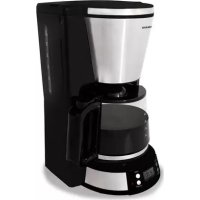
TCM1501S - Coffee machine Tomado - Free user manual and instructions
Find the device manual for free TCM1501S Tomado in PDF.



| Product type | Filter coffee machine |
| Brand | Tomado |
| Model | TCM1501S |
| Maximum number of cups | 10 cups (approx. 1.25 L) |
| Carafe material | Glass with lid |
| Permanent filter included | Yes |
| Anti-drip system (stop-drop) | Yes |
| Hot plate | Keeps warm for 40 minutes |
| Delayed timer (programmed start) | Yes |
| Display | 24-hour LCD |
| Automatic shut-off | Yes, after 40 minutes |
| Control indicator | On/off and delay mode |
| Power | Approx. 900 W |
| Power supply | 220-240 V ~ 50 Hz, earthed plug |
| Dimensions (W x D x H) | Approx. 28 x 20 x 35 cm |
| Net weight | Approx. 1.5 kg |
| Water tank capacity | MAX marking do not exceed |
| Cleaning | Exterior: damp cloth; carafe and filter holder: warm soapy water (not dishwasher safe) |
| Recommended descaling | After approx. 40 uses, with descaling agent or white vinegar |
| Spare parts available | Glass carafe, permanent filter, filter holder (at www.tomado.com/support) |
| Warranty | 24 months (subject to conditions) |
Frequently Asked Questions - TCM1501S Tomado
User questions about TCM1501S Tomado
0 question about this device. Answer the ones you know or ask your own.
Ask a new question about this device
Download the instructions for your Coffee machine in PDF format for free! Find your manual TCM1501S - Tomado and take your electronic device back in hand. On this page are published all the documents necessary for the use of your device. TCM1501S by Tomado.
USER MANUAL TCM1501S Tomado
- Carefully read the entire instruction manual prior to using the appliance and store it carefully for future reference.
- Only use this appliance for the purposes described in the instruction manual.
- Caution! Avoid contact with the warm surfaces!
- Only connect the appliance to alternate current, to an earthed wall socket, with a mains voltage that corresponds with the information provided on the information plate of the appliance.
- Never bend the power cord sharply or allow it to run across hot parts.
- Fully unwind the cord to prevent it from overheating.
- Never place the appliance near appliances that give off heat, such as ovens, gas cookers, hotplates, etc. Keep the appliance away from walls or other objects that may catch fire, such as curtains, towels (cotton or paper, etc.).
- Always make sure the appliance is placed on an even, flat surface and is only used indoors.
- Do not leave the appliance unsupervised if the appliance is operational.
- Do not use the appliance if the plug, cord or appliance are damaged, or if the appliance no longer functions properly or if it is damaged in any other way. If this is the case, consult the retailer or our maintenance service.
- If the connection cord of this appliance becomes damaged, it must be replaced by the manufacturer, its customer service or a similarly qualified person in order to prevent hazardous situations.
- Do not pull the cord and/or appliance to remove the plug from the wall socket. Never touch the appliance with wet or damp hands.
- Keep the appliance out of reach of children. Children do not see the dangers associated with handling electrical appliances. Therefore, never allow children to operate electrical appliances without supervision. Keep the appliance and cord out of reach of children younger than 8 years of age.
TOMADO
- The appliance may be used by children of 8 years and older and by persons with restricted physical, sensory or mental capacities or a lack of experience or knowledge, provided that they use the appliance under supervision and are instructed about the safe use of the appliance, and understand the associated hazards.
Children must not play with the appliance. - The appliance may not be cleaned or maintained by children, unless this is done under supervision.
- If the appliance is not being used or is being cleaned, switch off the appliance and remove the plug from the socket.
- If the appliance does not function after switching it on, it is possible that the fuse or circuit breaker in the electricity distribution box have been activated. The load on the group can be too high or an earth leakage could have occurred.
- In case of a breakdown, never make repairs yourself; a tripped safety device in the appliance could indicate a defect that cannot be remedied by removing or replacing this safety device. Only original parts should be used.
- The water reservoir deforms when using hot water, therefore only fill it with cold water. Always use the coffee machine with a closed filter cover.
- Do not switch on the appliance with an empty reservoir combined with an empty glass jug.
- Never use a cracked glass jug or a glass jug with a loose or damaged handle.
- Handle the glass part carefully when using and cleaning.
- Do not place the glass jug containing hot liquid on a hot or cold surface.
- Do not use the glass jug for other purposes than described here.
- Do not place an empty glass jug back on the hot plate.
- Never submerge the appliance, cord or plug in water.
-
This appliance is intended for household and similar use, such as:
-
in staff kitchens, in shops, offices and other work environments;
- by guests of hotels, motels and other residential environments;
- in Bed&Breakfast type environments;
-farms.
TOMADO
- If the appliance is not used as intended, no compensation can be claimed in case of defects or accidents and the warranty will be invalidated.
TOMADO
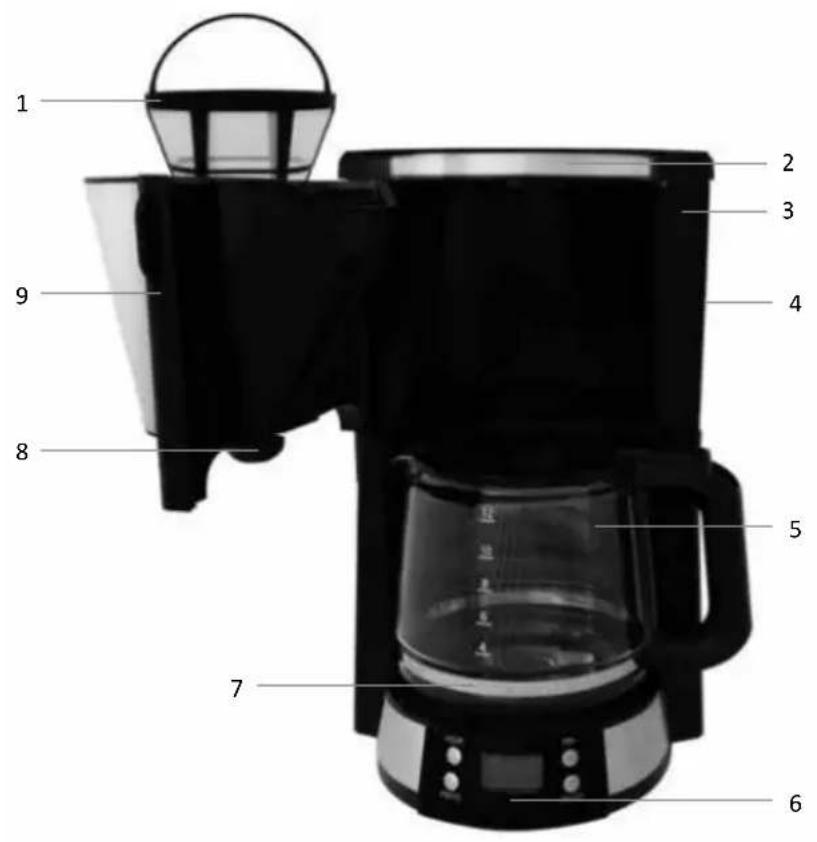
PRODUCT DESCRIPTION
- Permanent filter
- Water reservoir cover
- Water reservoir
- Water level indicator
- Glass jug with cover
- Operating panel with on/off switch and indicator led
- Hot plate
- Drip stop
- Filter holder
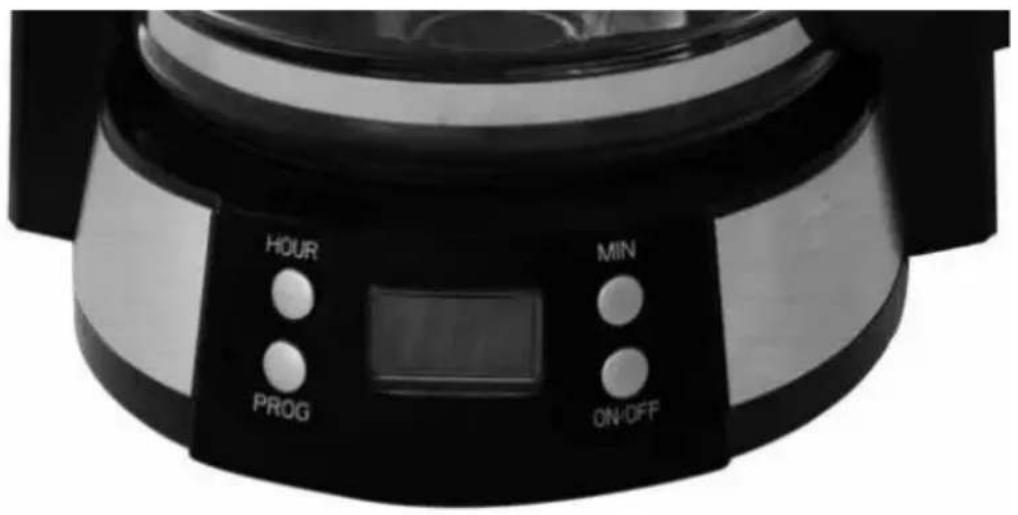
OPERATING PANEL
TOMADO
PRIOR TO FIRST USE
Before using the coffee machine for the first time, proceed as follows: Unpack the coffee machine and remove all packaging material. Keep the packaging (plastic bags and cardboard) out of reach of children. After unpacking the appliance, carefully check it for external damage that may have occurred during transport.
Place the coffee machine on a flat surface. It is best to clean the interior of the new coffee machine prior to using it for the first time. This is done by filling the water reservoir with cold water and using the appliance two to three times without coffee.
Clean the glass jug and filter holder with hot soapy water, then rinse properly and wipe dry. Never use scouring sponges, steel wool or other abrasives!
Important: Only use cold water for cleaning the inside of the coffee machine. Hot water has a negative effect on the coffee machine's life span.
MAKING COFFEE
Check that the voltage stated on the information plate matches the voltage used in your region. Place the coffee machine on a flat, stable surface. Insert the plug in an earthed wall socket.
- Fold the cover of the water reservoir upwards and fill the reservoir using the glass jug until the required level (the stripes indicate the number of cups). Do not fill the reservoir above the MAX indication. Close the cover.
- Turn the filter holder open and place the permanent filter or a paper filter bag (size 1 x 4) with the edges folded. This prevents the filter bag from folding inwards and closing. Add the required coffee (extra-fine grind) and softly shake it to flatten out the coffee. For 10 cups, according to taste, you can use 5 to 6 measuring spoons of coffee, or 6 grams of coffee per cup. In case of a smaller number of cups, you can change the amount of coffee accordingly.
- Turn back the filter holder to close it.
- Place the glass jug horizontally on the hot plate.
- Then switch on the appliance by pressing the ON/OFF button on the operating panel. The indicator led lights up. The hot plate under the glass jug is now switched on automatically.
- Once the filter process has been completed, remove the glass jug from the hot plate and pour out the coffee.
- Coffee tastes best immediately after it has been made, so do not wait too long before serving. The glass jug can immediately be placed back on the hot plate or you can pour the coffee into a thermos jug.
Attention: This coffee machine comes with a drip stop. This means that the flow of coffee is stopped immediately when the glass jug is removed. The filter holder is closed off, as a result of which the flow of coffee is stopped. Be sure to place back the glass jug as quickly as possible to prevent the filter from overflowing. If you want to interrupt the coffee making process for a longer period of time, press the on/off button to switch off the coffee machine. When making coffee, do not touch the cover to prevent burns due to hot steam.
SWITCHING OFF
After use, always switch off the appliance by pressing the ON/OFF button. The indicator led switches off.
The coffee machine keeps the coffee warm for 40 minutes. After these 40 minutes the coffee machine switches off automatically.
Do not forget to remove the paper filter bag and throw it away or to remove the permanent filter and rinse it clean. Turn the filter holder open and remove the filter. Throw away the filter bag. When using the permanent filter, empty it, clean it and use it again.
DELAYED START (TIMER)
Perhaps you do not want to make coffee immediately, but at a later time. For example, when it is 9 am, and you want the coffee machine to start automatically at 1 pm; first perform steps 1 to 4 of chapter "MAKING COFFEE", and then set the delayed start time as follows:
- Set the current time to 9:00 hours by pressing the "HOUR" and "MIN" buttons. If you have already done this, you can skip this step.
Caution: time is indicated in 24 hour format. - Press the PROG button once, the green PROG indicator led starts to flash and "12:00" flashes in the LCD display. Set the delayed start time to 13:00 hours by pressing the "HOUR" and "MIN" buttons.
- Press the PROG button once more, the PROG indicator led now lights up continuously. After some time, the LCD display shows the current time. Caution: You can stop the delayed start function by pressing the PROG button. If you want to change the time for the delayed start, stop the delayed start and follow steps 2 and 3 once more.
- At the set time for the delayed start, the red ON/OFF indicator led lights up and the appliance starts to make coffee. When coffee making is finished, the hot plate keeps the coffee in the glass jug warm. The appliance switches off automatically and the red indicator led goes out as well, if you have not already switched off the coffee machine yourself after making coffee. Do not wait too long before serving the coffee, the coffee tastes best immediately after it has been made. Caution: During the coffee making process, the "PROG", "HOUR" and "MIN" buttons do not work.
CLEANING AND MAINTENANCE
Regularly clean the coffee machine. This is not only beneficial for the life span of the appliance, it also ensures optimum use of the appliance and, of course, good tasting coffee.
Cleaning should involve the following:
- Prior to cleaning, always check that the coffee machine is switched off and that the plug has been removed from the socket.
- Regularly clean the outside of the appliance with a slightly damp cloth and then wipe it dry with a dry cloth. Never use abrasives. Never rinse the appliance under the tap or submerge it in water.
- Clean the glass jug with cover and the filter holder with hot water and a mild washing-up liquid. Thoroughly rinse the glass jug with hot water. Thoroughly dry the glass jug before placing it back on the hot plate. The glass jug and filter holder may not be cleaned in a dishwasher.
DE-SCALING
Regularly de-scale your coffee machine. The de-scaling intervals depend on the hardness of the mains water and the frequency at which the coffee machine is being used. We recommend de-scaling the coffee machine after using one box of coffee filters (making coffee approximately 40x ). Due to scaling, the heating element can become obstructed. This causes overheating, as a result of which the coffee machine is switched off automatically as a safety precaution and will no longer function. The coffee machine will have to be repaired. You can de-scale the coffee machine with a special de-scaling agent for coffee machines or with kitchen grade vinegar. If you use a special de-scaling agent for coffee machines, you must observe the instructions on the packaging of this agent.
When using kitchen grade vinegar, proceed as follows:
- Switch off the appliance by pressing the on/off button. Remove the plug from the socket and remove all separate components (glass jug and filter holder).
- To remove any remaining water, hold the appliance upside down above the sink.
- Fill half the water reservoir with cold kitchen grade vinegar and fill up with clean, cold water. Place the glass jug on the hot plate and place the filter holder back on the appliance with an empty filter bag.
- Switch on the appliance.
- Allow approximately half of the vinegar/water mixture to flow through and switch off the appliance. Wait approximately 15 minutes and then switch the appliance back on. As a result the scale will be softened and removed.
- After de-scaling, allow a full reservoir of cold water to flow through the appliance at least 3 times, to remove all de-scaling liquid and vinegar residues and thus prevent a sour taste in the coffee.
TOMADO
Caution! If the coffee machine has not been used for some time, e.g. due to vacation, it is recommended to remove and clean all separate components. Then place the cleaned separate components back on their place and allow the coffee machine to make one run with clean water. In this way you will prevent a possible foreign taste.
RECYCLING
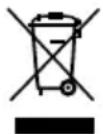
This symbol means that this product should not be disposed of with regular household waste (2012/19/EU).
Observe the applicable rules in your country for the separated collection of electric and electronic products.
By disposing of the product correctly, you prevent negative consequences for the environment and for public health.
The packaging material of this product can be recycled 100% , return packaging material separately.
TOMADO
Go to www.tomado.com/support to purchase accessories or spare parts.
WARRANTY CONDITIONS
A 24 month warranty is provided for this product. Your warranty is valid if the product has been used in accordance with the user instructions and for the purpose for which it was made. Also the original proof of purchase must be submitted, stating the date of purchase, the name of the retailer and the item number of the product. For extensive warranty information you are referred to our website: www.tomado.com/support
CONDITIONS DE LA GARANTIE

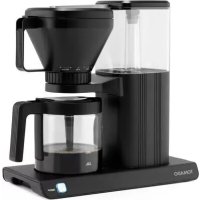
Brand : Tomado
Model : TCM1501S
Category : Coffee machine