ManualGo.com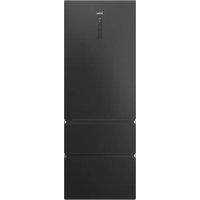
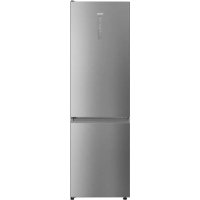
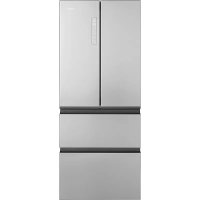
HTW7720ENPT - Fridge HAIER - Free user manual and instructions
Find the device manual for free HTW7720ENPT HAIER in PDF.



Download the instructions for your Fridge in PDF format for free! Find your manual HTW7720ENPT - HAIER and take your electronic device back in hand. On this page are published all the documents necessary for the use of your device. HTW7720ENPT by HAIER.
USER MANUAL HTW7720ENPT HAIER
GB WARNING:Risk of fire/flammable material. The symbol indicates there is a risk of fire since flammable materials are used. Take care to avoid causing a fire by ingiting flammable material.
DE WARNING:Brandgefahr/ brennbares
Thank you for purchasing a Haier Product.
Please read these instructions carefully before using this appliance. The instructions contain important information which will help you get the best out of the appliance and ensure safe and proper installation, use and maintenance.
Keep this manual in a convenient place so you can always refer to it for the safe and proper use of the appliance.
If you sell the appliance, give it away, or leave it behind when you move house, make sure you also pass this manual so that the new owner can become familiar with the appliance and safety warnings.
Legend

Warning - Important Safety information

General information and tips

Environmental information
Disposal
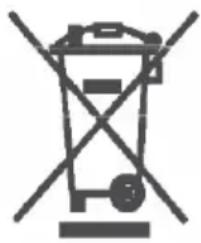
Help protect the environment and human health. Put the packaging in applicable containers to recycle it. Help to recycle waste of electrical and electronic appliances. Do not dispose appliances marked with this symbol with the household waste. Return the product to your local recycling facility or contact your municipal office.

WARNING!
Risk of injury or suffocation!
Refrigerants and gases must be disposed of professionally. Ensure that the tubing of the refrigerant circuit is not damaged before being properly disposed of. Disconnect the appliance from the mains supply. Cut off the mains cable and dispose of it. Remove the trays and drawers as well as the door catch and seals, to prevent children and pets to get closed in the appliance.
1-Safety information 4
2-Intended use 8
3-Product description. 9
4-Control panel 11
5-Use 12
6-Energy saving tips 22
7-Equipment 23
8-Care and Cleaning 26
9-Troubleshooting 29
10-Installation 32
11-Technical data 37
12-Customer Service 38
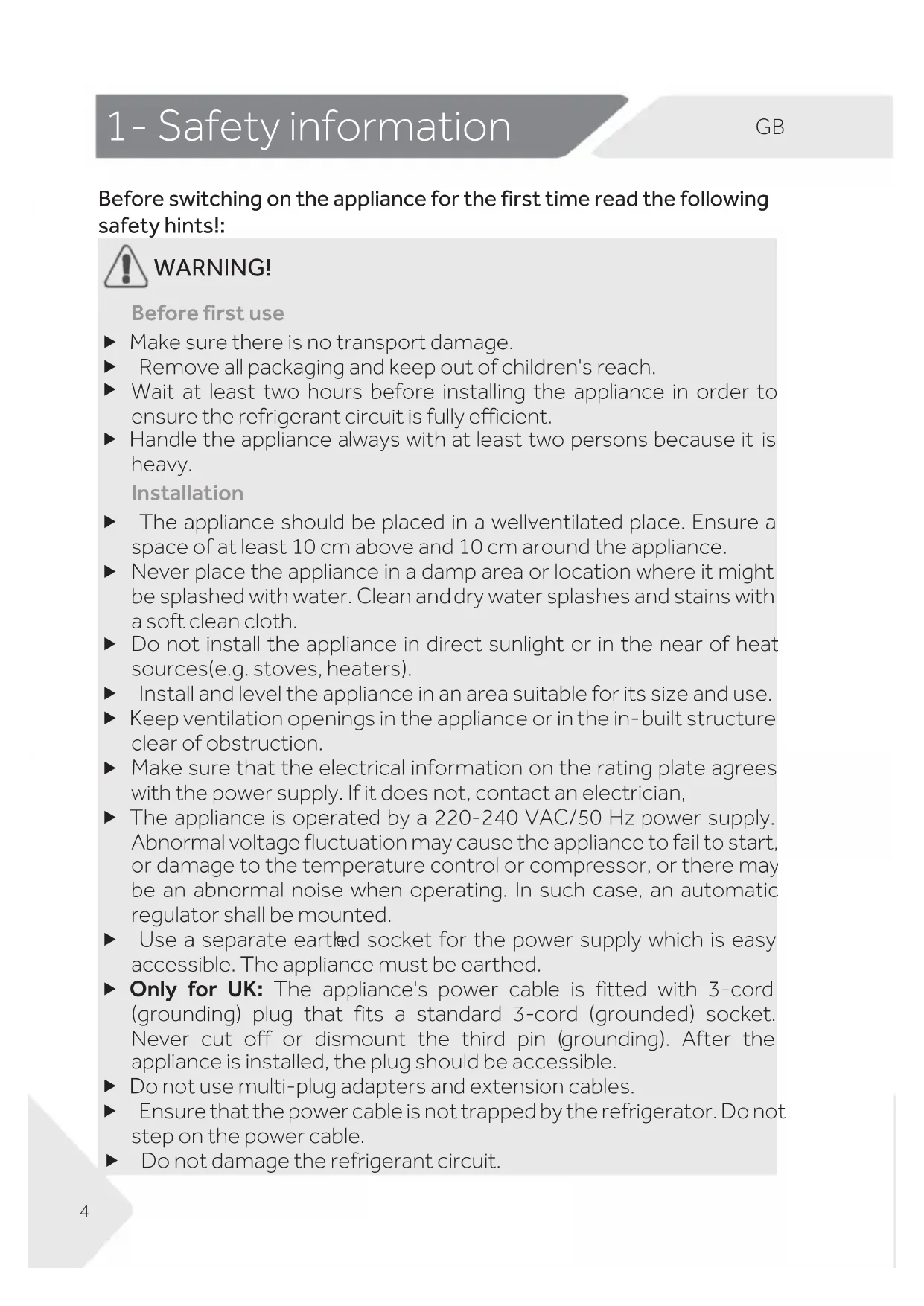
Before switching on the appliance for the first time read the following safety hints!

WARNING!
Before first use
Make sure there is no transport damage.
Remove all packaging and keep out of children's reach.
- Wait at least two hours before installing the appliance in order to ensure the refrigerant circuit is fully efficient.
- Handle the appliance always with at least two persons because it is heavy.
Installation
The appliance should be placed in a wellventilated place. Ensure a space of at least 10 ~cm above and 10 ~cm around the appliance.
- Never place the appliance in a damp area or location where it might be splashed with water. Clean and dry water splashes and stains with a soft clean cloth.
- Do not install the appliance in direct sunlight or in the near of heat sources (e.g. stoves, heaters).
Install and level the appliance in an area suitable for its size and use.
- Keep ventilation openings in the appliance or in the in-built structure clear of obstruction.
Make sure that the electrical information on the rating plate agrees with the power supply. If it does not, contact an electrician,
The appliance is operated by a 220-240 VAC/50 Hz power supply. Abnormal voltage fluctuation may cause the appliance to fail to start, or damage to the temperature control or compressor, or there may be an abnormal noise when operating. In such case, an automatic regulator shall be mounted.
- Use a separate earthed socket for the power supply which is easy accessible. The appliance must be earthed.
- Only for UK: The appliance's power cable is fitted with 3-cord (grounding) plug that fits a standard 3-cord (grounded) socket. Never cut off or dismount the third pin (grounding). After the appliance is installed, the plug should be accessible.
- Do not use multi-adapter and extension cables.
- Ensure that the power cable is not trapped by the refrigerator. Do not step on the power cable.
Do not damage the refrigerant circuit.

WARNING!
Daily use
This appliance can be used by children aged from 8 years and above and persons with reduced physical, sensory or mental capabilities or lack of experience and knowledge if they have been given supervision or instruction concerning use of the appliance in a safe way and understand the hazards involved,
- Keep away children under 3 years of age from the appliance unless they are constantly supervised.
Children shall not play with the appliance.
- If cool gas or other inflammable gas is leaking in the vicinity of the appliance, turn off the valve of the leaking gas, open the doors and windows and do not unplug a plug in the power cable of the refrigerator or any other appliance.
- Notice that the appliance is set for operation at a specific ambient range between 10 and 43^ . The appliance may not work properly if it is left for a long period at a temperature above or below the indicated range.
- Do not place unstable articles (heavy objects, containers filled with water) on top of the refrigerator, to ovoid personal injury caused by falling or electric shock caused by contact with water.
- Do not pull on the door shelves. The door may be pulled slant, the bottle rack, may be pulled away, or the appliance may topple.
- Open and close the doors only with the handles. The gap between the doors and between the doors and the cabinet is very narrow. Do not extend your hands in these areas to avoid pinching your fingers. Open or close the refrigerator doors only when there are no children standing within the range of door movement.
- Do not store or use inflammable, explosive or corrosive materials in the appliance or in the vicinity.
- Do not store medicines, bacteria or chemical agents in the appliance. This appliance is a household appliance. It is not recommended to store materials that require strict temperatures.
- Never store liquids in bottles or cans (besides high percentage spirits) especially carbonated beverages in the freezer, as these will burst during freezing.
- Check the condition of food if a warming in the freezer has taken place.

WARNING!
Daily use
- Do not set unnecessarily low temperature in the refrigerator compartment. Minus temperatures may occur at high settings. Attention: Bottles can burst.
- Do not touch frozen goods with wet hands (wear gloves). Especially do not eat ice lollies immediately after removal from the freezer compartment. There is the risk to freeze or the formation of frost blisters. FIRST aid: keep immediately under running cold water. Do not pull away!
- Do not touch the inside surface of the freezer storage compartment when in operation, especially with wet hands, as your hands may freeze onto the surface.
- Unplug the appliance in the event of a power interruption or before cleaning. Allow at least 5 minutes before restarting the appliance, as frequent starting may damage the compressor.
- Do not use electrical devices inside the food storage compartments of the appliance, unless they are of the type recommended by the manufacturer.
Maintenance / cleaning
Make sure children are supervised if they carry out cleaning and maintenance.
- Disconnect the appliance from the electrical supply before undertaking any routine maintenance. Allow at least 5 minutes before restarting the appliance, as frequent starting may damage the compressor.
Hold the plug, not the cable, when unplugging the appliance.
- Do not scrape off frost and ice with sharp objects. Do not use sprays, electric heaters like heater, hair dryer, steam cleaners or other sources of heat in order to avoid damage to the plastic parts.
- Do not use mechanical devices or other means to accelerate the defrosting process, other than those recommended by the manufacturer.
If the supply cord is damaged, it must be replaced by the manufacturer, its service agent or similarly qualified persons in order to avoid a hazard.
- Do not try to repair, disassemble or modify the appliance by yourself. In case of repair please contact our customer service.

WARNING!
Maintenance / cleaning
- Eliminate the dust on the back of the unit at least once in the year to avoid hazard by fire, as well as increased energy consumption.
- Do not spray or flush the appliance during cleaning.
Do not use water spray or steam to clean the appliance. - Do not clean the cold glass shelves with hot water. Sudden temperature change may cause the glass to break.
Refrigerant gas information

WARNING!
The appliance contains the flammable refrigerant ISOBUTANE (R600a). Make sure the refrigerant circuit is not damaged during transportation or installation. Leaking refrigerant may cause eye injuries or ignite. If a damage has occurred, keep away open fire sources, thoroughly ventilate the room, do not plug or unplug the power cords of the appliance or any other appliance. Inform the customer service.
In case of eyes get into contact with the refrigerant, rinse immediately it under running water and call immediately the eye specialist.

CAUTION!
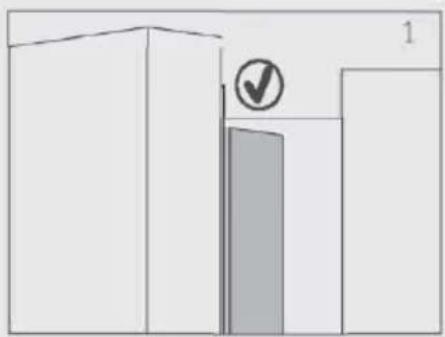
When you close the door, the vertical door beam on the left door should be bent inside (1).
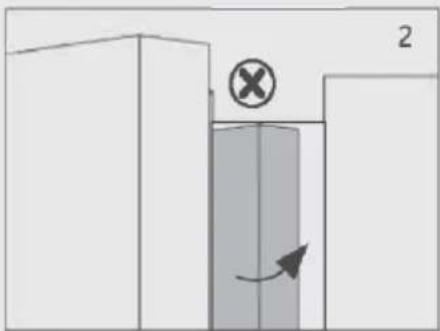
If you try to close the left door and the vertical door beam is unbent (2), you should bend it firstly, otherwise the door beam will hit the fixing shaft or right door. Thus a damage to the door beam or a leak will occur.
There is a heating thread inside the vertical door beam. The temperature of the surface will rise a little, which is normal and won't affect the function of refrigerator
2.1 Intended use
This appliance is intended for cooling and freezing food. It has been designed exclusively for use in dry interior households. It is not intended for commercial or industrial use.
Changes or modifications to the device are not allowed. Unintended use may cause hazard s and loss of warrant any claims.
2.2 Accessories
Check the accessories and literature in accordance with this list (Fig.2.2):
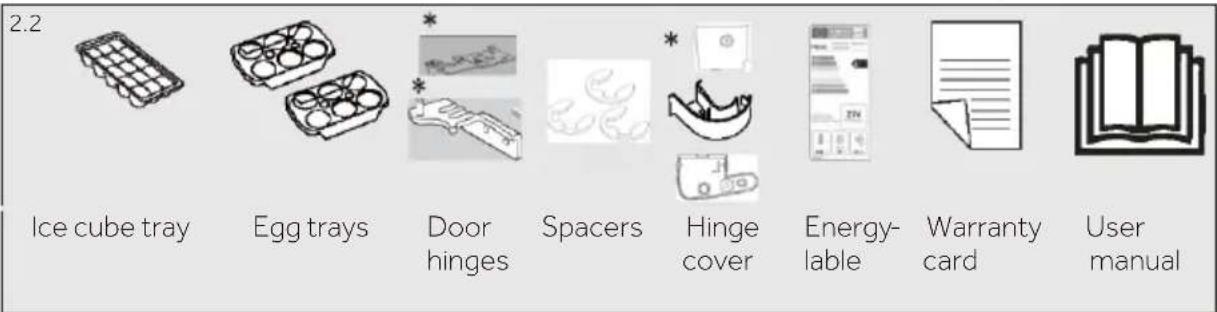
*HTW7720ENMP/HTW7720ENMB/HTW7720ENPT

Notice: Differences
Due to technical changes and different models, some of the illustrations in this manual may differ from your model.
Picture of appliance (Fig. 3)
model: HFW7720EWMP /HFW7720ENMB
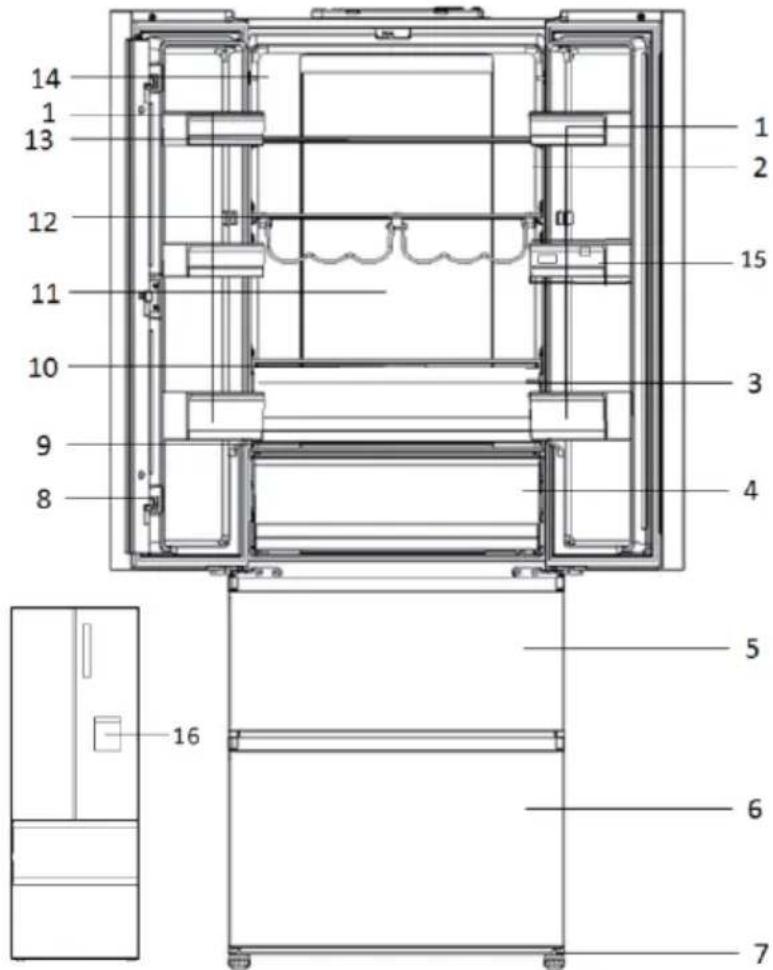
1 Door rack
2 O.K.-temperature indicator (optional)
3 Humidity Zone drawer
4 My Zone drawer
5 Upper freezer storage drawer
6 Lower freezer storage drawer
7 Adjustable feet
8 Door beam
9 My Zone drawer glass cover
10 Humidity drawer glass cover
11 Back lamp
12 Bottle rack
13 Glass shelf
14 Rating plate
15 Water tank (HFW7720EWMP)
16 Water dispenser (HFW7720EWMP)
3-Product description
model: HTW7720ENMP /HTW7720ENMB/HTW7720ENPT/HTW7720DNMP/ HTW7720BNMM
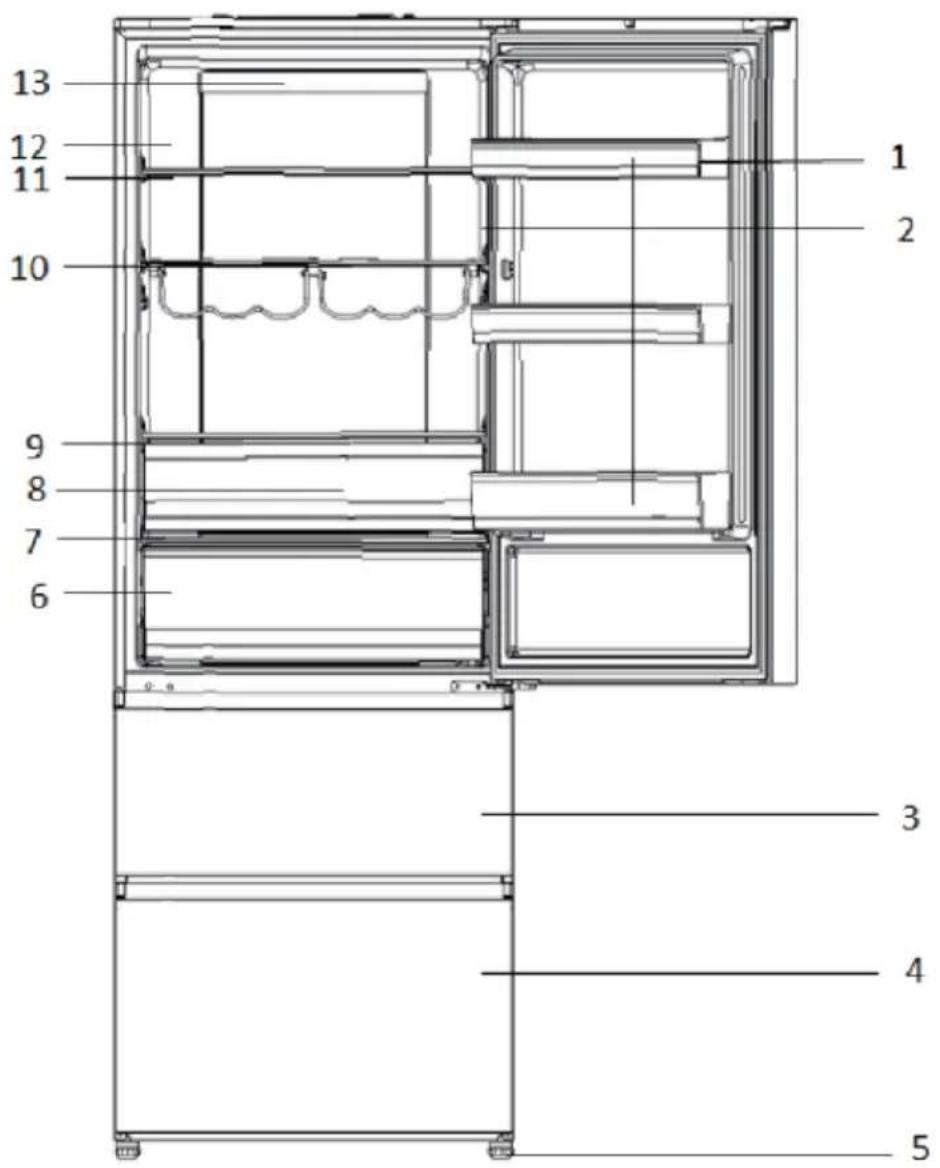
9 Humidity drawer glass cover
)lanot0 Bottle rack
11 Glass shel f
12 Rating plate
13 Back lamp
1 Door rack
2 OK-temperature indicator (op
3 Upper freezer storage drawer
4 Lower freezer storage drawer
5 Adjustable feet
6 My Zone drawer
7 My Zone drawer glass cover
8 Humidity Zone drawer
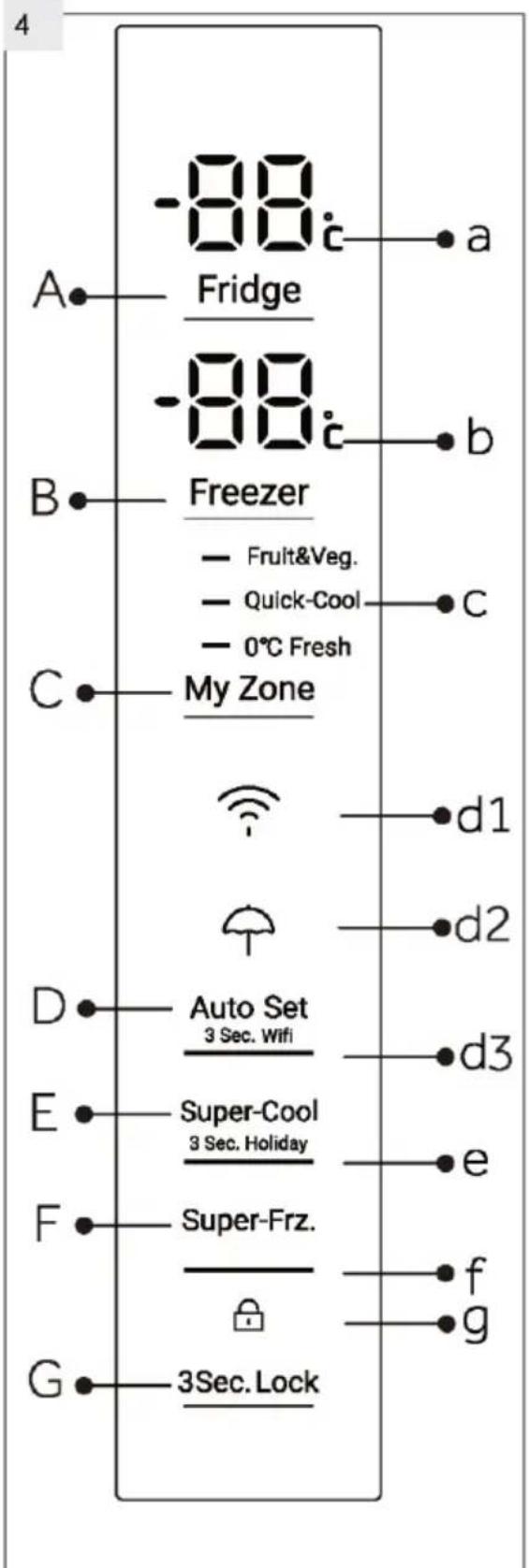
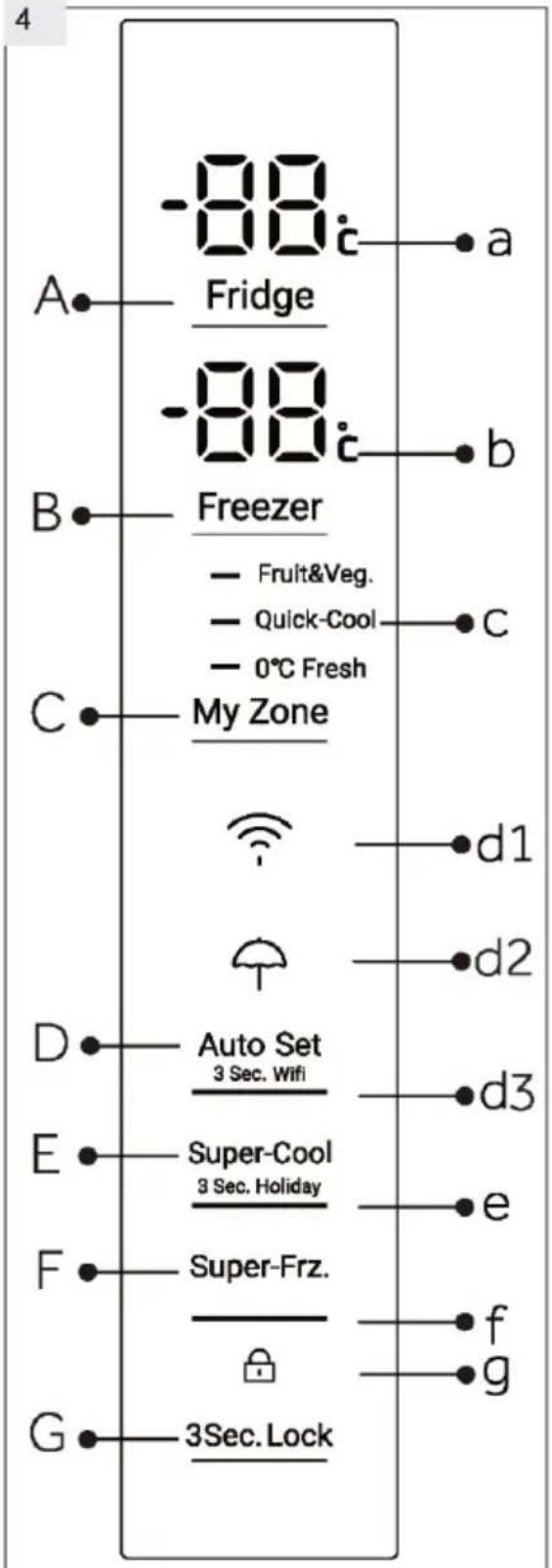
Control panel (Fig. 4)
Keys:
A Fridge temperature setting
B Freezer temperature setting
C My Zone setting
D Auto Set mode and Wifi function on/off
E Super Cool function and Holiday function on/off
F Super Freeze function on/off
G Panel lock/unlock
Indicators:
a Temperature fridge compartment
b Temperature freezer compartment
c My Zone function
d1 Wifi function
d2 Holiday function
d3 Auto Set mode
e Super-Cool function
f Super-Freeze function
g Panel lock
5.1 Before first use
- Remove all packaging materials, keep them out of children's reach and dispose them in an environmentally friendly manner.
- Clean the inside and outside of the appliance with water and a mild detergent before putting any food in it.
After the appliance has been levelled and cleaned, wait for at least 2 hours before connecting it to the power supply. See Section INSTALLATION.
Precool the compartments at high settings before loading with food. The function Super-Freeze helps to cool down the freezer compartment quickly.
The refrigerator temperature and freezer temperature are automatically set to 5^ and -18^ respectively. These are the recommended settings. If desired, you can change these temperatures manually. Please see MANUAL ADJUSTING MODE.
5.2 Sensor keys
The buttons on the control panel are sensor keys, which already respond when lightly touched with the finger.
5.3 Switch on /off the appliance
The appliance is in operation as soon as it is connected to the power supply.
When the appliance is powered on for the first time, the actual refrigerator and freezer temperatures ("a" and "b") are displayed. The display will flash. If the doors are closed it will switch off after 30 seconds. Maybe the panel lock is active.

Notice: Presettings
The appliance is preset to the recommended temperature of 5^ (refrigerator) and -18^ (freezer). Under normal ambient condition you need not to set a temperature.
The presetting function for the My Zone drawer is Fruit&Veg.
- When the appliance is switched on after disconnection from the main power supply, it may take up to 12 hours for the correct temperatures to be reached.
Empty the appliance before switching off. To switch off the appliance, pull the power cord out off the power socket.
5.4 Standby-mode
The display screen turns off automatically 30 seconds after pressing a key. The display will be automatically locked. It lights up automatically by touching any key or opening the door/drawer.
5.5

3Sec.Lock
5.5 Lock/unlock panel

Notice: Panel lock
The control panel is automatically blocked against activation if 30 seconds no key is touched. For any settings the control panel must be unlocked
- Touch key "G" for 3 seconds to block all panel elements against activation (Fig. 5.5). The related indicator "a" is now displayed.
For unlocking touch again the key.
5.6 Door opening alarm
When one of the refrigerator doors is opened for more than 3 minute, the door opening alarm will sound. The alarm can be silenced by closing the door. If the door is left open for more than 7 minutes, the light inside the refrigerator and control panel illumination will automatically switch off.
5.7 Select the working mode
You may need to select one of the following two ways to set the appliance:
5.7.1 Auto Set mode
If you do not have any special requirements, we recommend that you use Auto Set mode In the mode, the appliance can automatically adjust the temperature setting according to the ambient temperature and temperature change in the appliance. This function is totally hand free.
- Unlock the panel by touching key "G" if it is locked (Fig. 5.5)
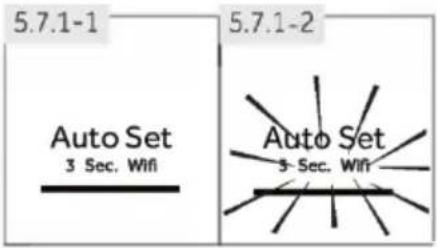
- Touch key "D" (Fig 5.7.1.1)
- Indicator "d3" illuminates and the function is activated (Fig. 5.7.1-2)
By repeating the above steps or selecting an other function this function can be switched off again.
5.7.2 Manual adjusting mode
If you want to manually adjust the temperature of the appliance in order to store a particular food, you can set the temperature via a temperature adjusting key:

Notice: Conflict with other functions
The temperature cannot be adjusted, if any other function (Super- Cool, Super-Freeze, Holiday or Auto Set) is activated or the display is locked. The corresponding indicator will flash accompanying with a buzzer
5.7.2.1 Adjust the temperature for fridge
- Unlock the panel by using it is key "G" locked (Fig. 5.5).
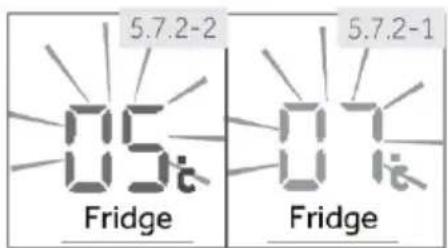
- Touch key "A" (Fridge) to select the fridge compartment. The actual temp ature the fridges is 100°C and play (Fig. 5.7.2-1).
- Touch sequentia idyikesiredFr ge) unt the d value of temper stage flashi (Fig. 5.7.2-2). A signal wil I sound at each key togh. The temper ature decreases in sequence of 1^ from a minimum of 1^ to a maximum of 9^ . The optimum temperature in the fridge is 5^ . Colder temperatures mean unnecessary energy consumption.
- Touch any key except "A" (Fridge) to confirm, or the setting confirms automatically after 5 seconds. Dispelder p ature stopings
5.7.2.2 Adjust the temperature for freezer
- Unlock the panel bit if it is key "G" locked (Fig. 5.5).
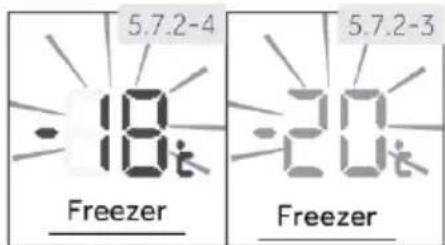
- Touch key "B" (Freezer) to select the freezer compartmentTime actual temp ature the freezer compartment is played (Fig. 5.7.2-3).
- Touch sequential key "B" (Freezer) until the desired value of temperature is 100 (Fig.5.7.2-4). A signal will sound at each key press. The temper ature increases in seconds of 1^ from -14^ to -24^ . The optimum temperature in the freezer is -18^ . Colder temperatures mean unnecessary energy consumption.
- Touch any key except B (Freezer) to confirm, or the setting confirms automatically after 5 seconds. Dispender p ature stopsings

Notice: Influences on temperatures
The indoortemperesareinfencby thwifglio factors.
Ambient em ature
Amount of stored foods
Frequency of door opening
Installation of the appliance
5.8 Super-Cool function
Switch on the Super-Cool function if larger quantity of food should be stored (for example after the purchase). The Super-Cool function accelerates the cooling of fresh food and protects the goods already stored from undesirable warming. When the function starts, the temperature is nearly +1^
- Unlock the panel by touching key "G" if it is locked (Fig 5.5).
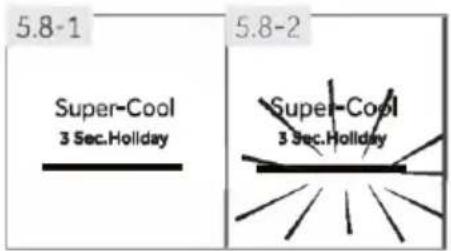
- Touch key "E"(Super-Cool) (Fig.5.8.-1).
- Indicator "e" illuminates and the function is activated (Fig 5.8.-2).
By repeating the above steps or selecting an other function this function can be switched off again.

Notice: Automatically switch off
This function will be automatically disabled when the function has lasted for more than 4 hours..
5.9 Super-Freeze function
Fresh food should be frozen as quickly as possible to the core. This preserves the best nutritional value, appearance and taste. The Super-Freeze function accelerates the freezing of fresh food and protects the goods already stored from undesirable warming. If you need to freeze a large amount of food at once, it is recommended to set the Super-Freeze function on ahead for 24h before the usage of frozen room. When the function starts, the temperature is lower than -24°C.
- Unlock the panel by touching key "G" if it is locked (Fig.5.5).
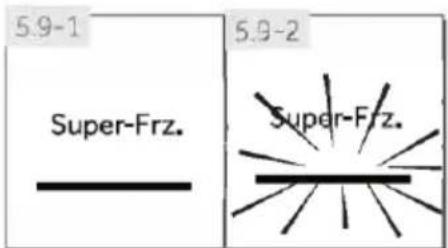
- Touch key "F" (Super-Freeze) (Fig.5.9.-1).
- Indicator "f illuminates and the function is activated (Fig.5.9.-2).
By repeating the above steps or selecting an other function this function can be switched off again.

Notice: Automatically switch off
The Super-Freeze function will automatically switch off after 50 hours. The appliance is then operated at the previously set temperature
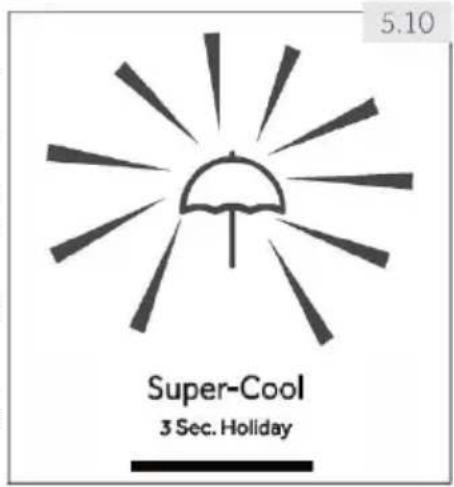
5.10 Holiday function
This function sets the fridge temperature permanently to 17^ .
This allows to keep the door of the empty fridge closed without causing an odour or mold - during a long absence (e.g. during holiday). The freezer compartment is free for your setting
- Unlock the panel by touching key "G" if it is locked (Fig. 5.5).
- Touch key "E"(Super-Cool) for 3 seconds (Fig. 5.10). Indicator "d2" illuminates and the function is activated.
By repeating the above steps or selecting an other function this function can be switched off again.

WARNING!
In Holiday function. The setting of "Fruit&Veg, Quick cool, 0^ C fresh" icons in Myzone will be switched off and the temperature of Myzone cannot be adjusted. The fridge compartment and Myzone will display in the previous setting once exiting the holiday function.
5.11 My Zone drawer
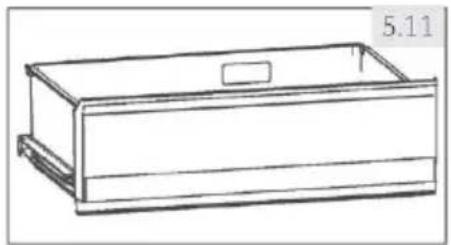
The fridge compartment is equipped with a My Zone drawer (Fig. 5.11). Following functions are available:
5.11.1 Function Fruit & Veg.
This function is suitable to store fresh fruits and vegetables.

Notice: Fruit & Veg. function
Cold-sensitive fruits like pineapple, avocado, bananas, grapefruits and vegetables such as potatoes, aubergines, beans, cucumbers, zucchini and tomatoes and cheese should not be stored in the My Zone drawer.
5.11.2 Function 0^ Fresh
This function sets the temperature in the MyZone drawer to 0^ . Suitable to store fresh food such as meat or fish. Most foods stay fresh at 0^ , but not frozen.

Notice: 0^ C Fresh function
Due to different water contents of meat, some meat with more moisture will be frozen at temperatures lower than 0^ . So "immediately cut" meat should be stored in My-Zone box, with temperatures min. 0^ .
This function allows to store products such as cheese, fresh pasta and diary products. The temperature in MyZone compartment is set to +2^ .

Notice: MyZone drawer
One of the three functions of the My Zone compartment must always be activated
To reduce the refrigerator compartment temperature use the Q Cool function. To increase it, use the Fruit & Veg. function.
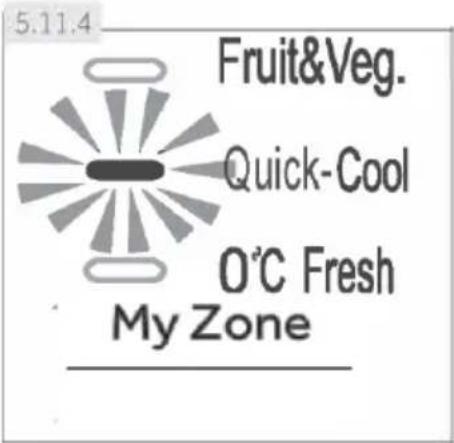
5.11.4 Select function for MyZone box
- Unlock the panel by touching key "G" if it is locked (Fig. 5.5)
- Touch sequentially "C" (MyZone) until the desired function "c" is flashing (Fig. 5.11.4).
- After a few seconds indicator "c" will shine permanently and the setting is confirmed.
5.12 HUMIDITYZONE
The HUMIDITY ZONE drawer is for storing salads, fruits&vegetables
5.13 Tips on storing fresh food
5.13.1 Storing into the refrigerator compartment
Keep your fridge temperature below 5^
Hot food must be cooled to room temperature before storing in the appliance
Foods stored in the refrigerator should be washed and dried before storing
▶ Food to be stored should be properly sealed to avoid odour or taste alterations
- Do not store excessive quantities of food. Leave spaces between foods to allow cold air flowing around them, for a better and more homogeneous cooling
Foods eaten daily should be stored at the front of the shelf.
- Leave a gap between foods and the inner walls, allowing air flowing. In special way don't store foods against the rear wall: foods could freeze against rear wall. Avoid direct contact of food (especially oily or acidic food) with the inner liner, as oil/acid can erode the inner liner. Clean away oily/acid dirt whenever it is found
- Frozen food can be gently thawed in the refrigerator compartment. This saves energy.
Unpleasant odours inside the fridge are a sign that something has spilled and cleaning is required. See CARE AND CLEANING
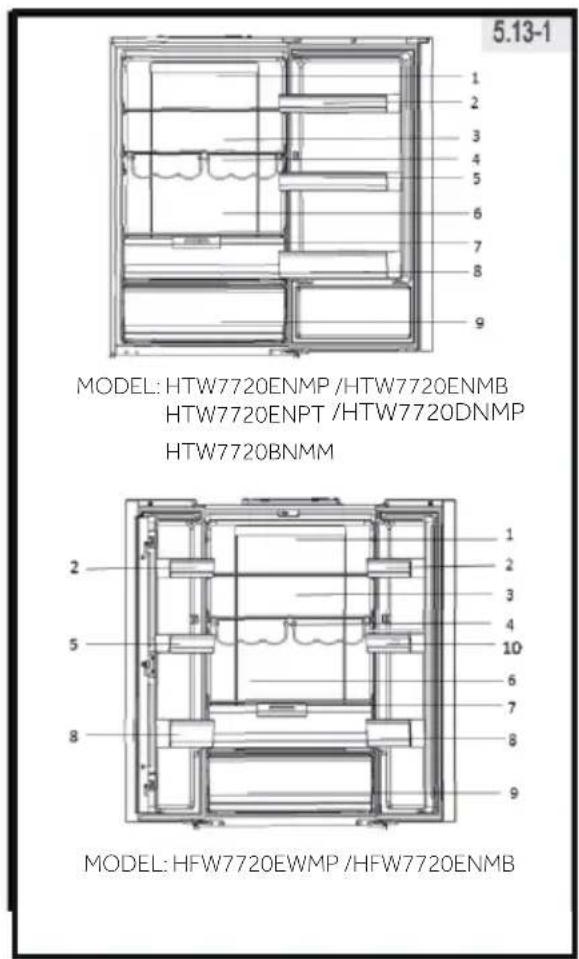
- Different foods should be placed in different areas according to their properties (Fig 5.13-1)
1 Pickled foods, canned food, etc
2Butter,cheese,eggs,spices,etc
3 Snack foods, etc
4 Wine, champagne, etc
5 Eggs, canned food, spices, etc
6 Pasta,milk,tofu,dairy,etc
7 Humity Zone: salads, fruit&vegetables
8 Drinks and bottled foods
9 My Zone drawer Fruit, vegetables, salad (Fruit & Veg.) canned beverages (S-Cool) Raw fresh food (0^ Fresh)
1 Pickled foods, canned food, etc
2Butter,cheese,eggs,spices,etc
3 Snack foods, etc
4 Wine, champagne, etc
5 Eggs, canned food, spices, etc
6 Pasta,milk,tofu,dairy,etc
7 Humity Zone: salads, fruit&vegetables
8 Drinks and bottled foods
9 My Zone drawer Fruit, vegetables, salad (Fruit & Veg.) canned beverages (S -Cool) Raw fresh food (0^ Fresh)
10 Water tank: For storing drinking water (HFW7720EWMP)
5.13.2 Storage into the freezer compartment
- Keep the freezer temperature at- 18^
24 hours before freezing switch on the Super-Freeze function; -for small quantities of food 4-6 hours are sufficient. - Hot food must be cooled to room temperature before storing in the freezer compartment.
- Food cut into small portions will freeze faster and be easier to defrost and cook. The recommended weight for each portion is less than 2.5kg
It is better to pack food before putting it into the freezer. The outside of the packaging must be dry to avoid bags sticking together. Packaging materials should be odour-free, airtight, non- poisonous and nontoxic.
In order to avoid expiration of storage periods, please note the freezing date, time limit and name of the food on the packaging according to the storage periods of different foods.
WARNING!: Acid, alkali and salt etc. could erode the internal surface of the freezer. Do not place the food having these substances (e.g. sea fish) directly on the internal surface. Salt water in the freezer should be cleaned up immediately.
Do not exceed the food storage times recommended by the manufacturers. Only take the required amount of food out of the freezer. - Consume defrosted food quickly. Defrosted food cannot be re-frozen unless it is first cooked, otherwise it may bless edible.
- Do not load excessive quantities of fresh food in the freezer compartment. Refer to the freezing capacity of the freezer - See TECHNICAL DATA or data at the type plate.
- Food can be stored in the freezer at a temperature of at least -18^ for 2 to 12 months, depending on its properties (e.g., meat: 3-12 months, vegetables: 6-12 months)
- When freezing fresh food, avoid bringing it in contact with already frozen food. Risk of thawing!
5.13.3 When storing commercially frozen foods, please follow these guidelines:
Always follow manufacturers' guidelines for the length of time you should store food for. Do not exceed these guidelines!
Try to keep the length of time between purchase and storage as short as possible to preserve food quality.
Buy frozen foods, which have been stored at a temperature of -18^ or below.
- Avoid buying food which has ice or frost on the packaging - This indicates that the products might have been partially defrosted and refrozen at some point temperature rises affect the quality of food.
5.14.1 Water dispenser (HFW7720EWMP)
With the water dispenser (Fig.5.14.1) cool drinking water can be tapped.
The water tank should be cleaned before first use (see CARE AND CLEANING).

WARNING!
Use drinking water only.
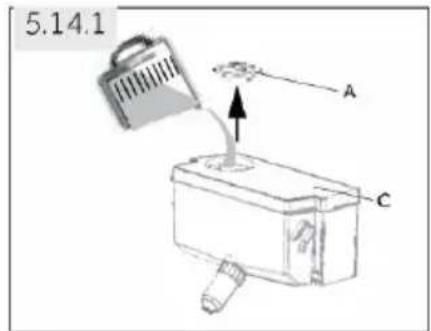
- Ensure that the water tank is properly inserted (see EQUIPMENT)
- Rotate and lift the round lid (A) and fill the water tank up with fresh drinking water.
- Fill water only up to the mark (1,8 l); as it could overflow when the door opens and closes.
- Close the round lid until it clicks into place.
WATER DISPENSER
Before refilling dispose residual water and clean the water tank.
- When you don't need water for a long time, please empty the water tank and insert the cleaned tank.
The cover (C) on the water tank is additionally used to save energy. If you do not want to get water from the water dispenser for a long period, please still install the cover because of better insulating and saving energy.
5.14.2
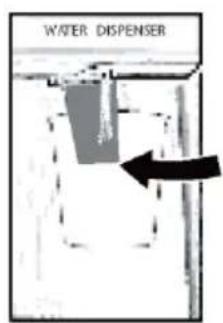
5.14.2 Getting water from the dispenser
- Place a glass underneath the water outlet.
- Push it gently against the water dispenser lever with your glass.
Make sure the glass is in line with the dispenser to prevent the water from splashing out.
5.15 Wi-Fi mode setting
IN APP PAIRING PROCEDURE
Step 1
- Download the hOn app on the stores

GETITON GooglePlay

Download on the App Store

EXPLORE IT ON AppGallery
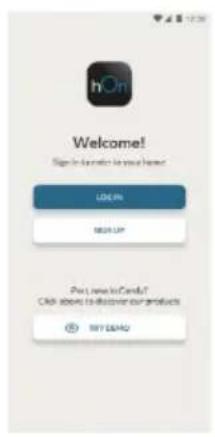
Step 2 • Create your account on the hOn App or log in if you already have an account
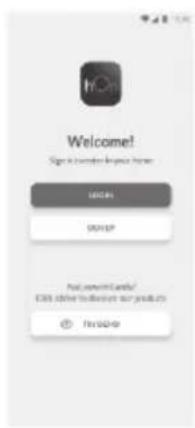
Step 3. Follow pairing instructions in the hOn App
PRODUCT INFORMATION
How to activate Wi-Fi module:
- Touch key "D" on the Control panel for 3 seconds to activate the Wi-Fi module
- The Wi-Fi module is switched on, the Wi-Fi icon starts to blink
- If the Fridge is enrolled but the Wi-Fi is off the icon will blink
- If the Fridge is enrolled and connected, the Wi-Fi icon is always on
- To reset the Wi-Fi, touch key "D" on the Control panel for 3 seconds

Energy saving tips
Make sure the appliance is properly ventilated (see INSTALLATION).
- Do not install the appliance in direct sunlight or in the near of heat sources (e.g. stoves, heaters).
- Avoid unnecessarily low temperature in the appliance. The energy consumption increases the lower the temperature in the appliance is set.
Functions like SUPER-FREEZE or SUPER-COOL consume more energy.
- Allow warm food to cool down before placing it in the appliance.
- Open the appliance door as little and as brie ly as possible.
Do not over ill the appliance to avoid obstructing the air low.
- Avoid air within the food packaging.
- Keep door seals clean so that the door always closes correctly.
- Defreeze frozen food in the fridge storage compartment.
The most energy-saving configuration requires drawer, food box and shelves to be positioned in the appliance on factory-fresh condition, and food to be placed without blocking the air outlet of the duct.
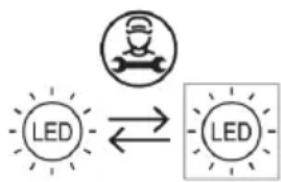
Replacing the LED-lamps
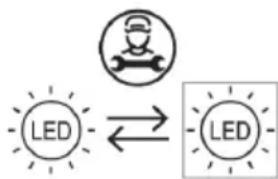
Replaceable (LED only) light source by a professional
This product contains a light source of energy efficiency class G.
| Compartment | Energy efficiency class | Model |
| Refrigerator | G | HTW7720ENMB HTW7720EWMP HTW7720ENMB HFW7720ENMB HTW7720ENPT HTW7720DNMP HTW7720BNMM |

Notice: Differences depending on model
Due to different models, your product may not have all of the following features. Please refer to chapter PRODUCT DESCRIPTION.
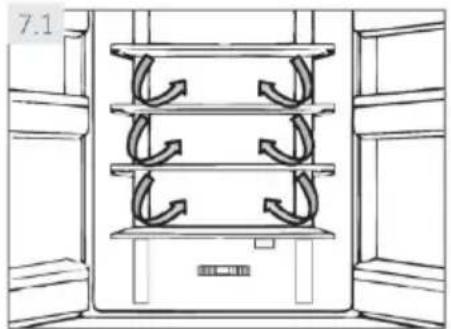
7.1 Lateral air-flow
The refrigerator is equipped with a Lateral air-flow system, with which cool air flows are located on every shelf level (Fig. 7.1). This helps to maintain a uniform temperature to ensure that your food is kept fresher for longer.
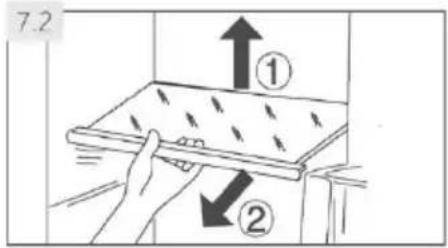
7.2 Adjustable shelves
The height of the shelves can be adjusted to fit your storage needs.
- To relocate a shelf, remove it first by uplifting its hind edge (1) and pulling it out (2) (Fig. 7.2).
- To reinstall it, put it on the lugs on both sides and push it to the most rearward position until the rear of the shelf is fixed inside the slots in the sides

Notice: Shelves
Ensure that all ends of a shelf are level.
7.3
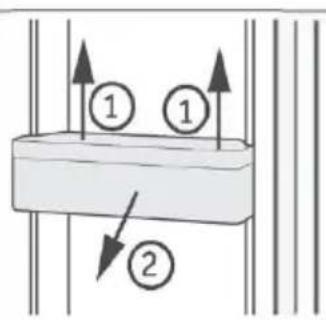
7.3 Removable door racks
The door racks can be removed for cleaning:
Place hands on each side of the rack, lift it upwards (1) and pull it out (2) (Fig. 7 3).
In order to insert the door rack, the above steps are carried out in reverse order.
7.4
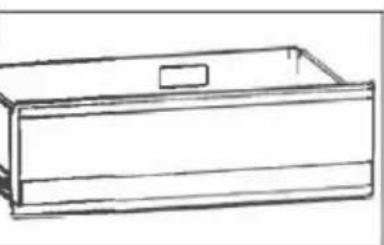
7.4 My Zone drawer
For use and setting of the My Zone compartment (Fig. 7.4) please check section USE (My Zone drawer).
7.5 OPTIONAL: OK-temperature indicator
The OK-temperature (Fig. 7.5) indicator can be used to determine temperatures below +4^ . Gradually reduce the temperature if the sign does not indicate "OK".
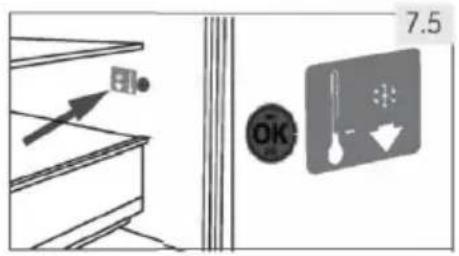

Notice: OK-sticker
When the appliance is switched on, it may take up to 12 hours for the correct temperatures to be reached.
7.6 Removable freezer drawer
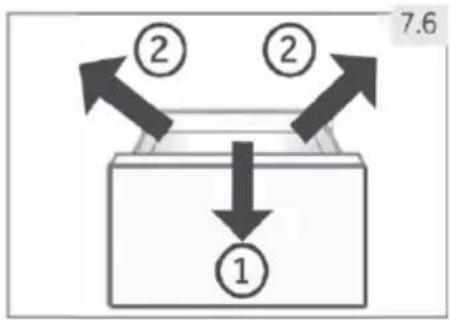
To remove the drawer out, pull out to the maximum extent (1), lift and remove (2) (Fig. 7.6).
In order to insert the drawer, the above steps are carried out in reverse order.
7.7 Removable water tank (HFW7720EWMP)
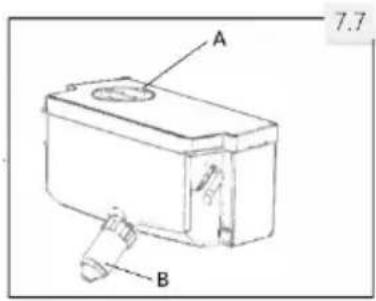
The water tank (Fig.7.7) can be removed and reinstalled for cleaning in the same way as the door racks.
Insert water tank
Place the water tank in the position that the water outlet (B) fits into the opening of the door. Make sure that the water tank is locked.

Notice:
If the water tank is not properly inserted, water can drip from the connection.
Do not use excessive force when removing or installing the water tank, to avoid damaging the tank.
7.8 3D-freezer drawer
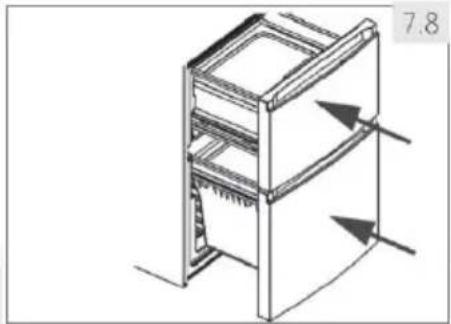
The freezer drawers (Fig. 7.8) can be extended straightly and completely. They are mounted on easy-roll telescopic runners, so that you can store and remove the freezing good comfortably. Because of the automatic door closing mechanism the handling is easy and you save energy

WARNING!
Do not overload the drawers: Max. load of each drawer: 35 kg!.
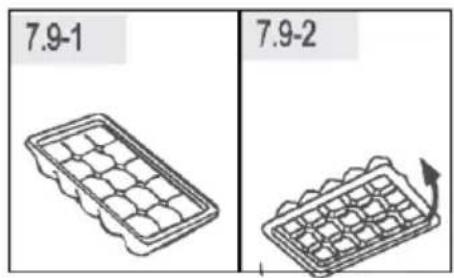
7.9 Ice cube tray
- Fill the ice cube tray 3/4 full of water and put it into one of the freezer storage drawer (Fig. 7.9-1)
- Twist the ice cube tray slightly or hold it under flowing water to loosen the ice cubes (Fig. 7.9-2)
7.10 Daylight
The LED interior light comes on when the door is opened. The performance of the lights is not affected by any of the appliances other settings
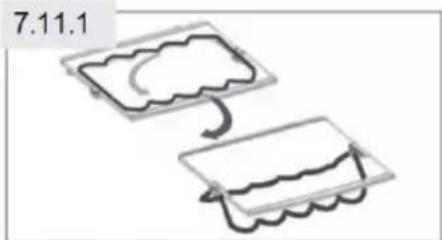
7.11 Foldable bottle rack
For normal use
- Pull down the brackets of the bottle rack (Fig. 7.11-1)
- Fit the bottles into the rack (Fig 7.11-2)
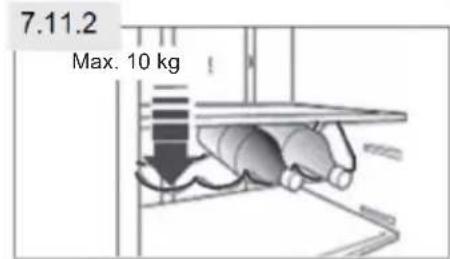
When not in use, the bottle rack can be folded back in order to save space.

WARNING!
Make sure the total weight of the bottles does not exceed 10kg
7.12 HUMIDITY ZONE
For use of the HUMIDITY ZONE compartment (Fig 7.12) please check section USE (HUMIDITY ZONE)

WARNING!
Disconnect the appliance from the power supply before cleaning
8.1 General
Clean the appliance when only little or no food is stored.
The appliance should be cleaned every four weeks for good maintenance and to prevent bad stored food odours

WARNING!
- Do not clean the appliance with hard brushes, wire brushes, detergent powder, petrol, amyl acetate, acetone and similar organic solutions, acid or alkaline solutions. Please clean with special refrigerator detergent to avoid damage.
Do not spray or flush the appliance during cleaning.
Do not use water spray or steam to clean the appliance. - Do not clean the cold glass shelves with hot water. Sudden temperature change may cause the glass to break.
- Do not touch the inside surface of the freezer storage compartment, especially with wet hands, as your hands may freeze onto the surface.
In case of heating check the condition of frozen goods.
Always keep the door gasket clean.
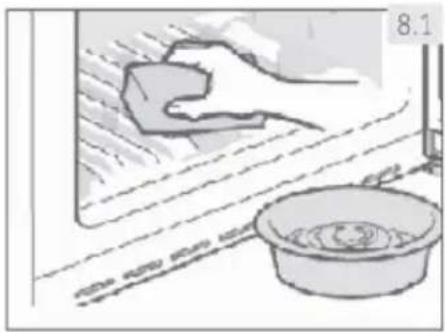
Clean the inside and housing of the appliance with a sponge dampened in warm water and neutral detergent (Fig. 8.1).
Rinse and dry with soft cloth.
Do not clean any of the parts of the appliance in a dishwasher.
Clean the accessory only with warm water and mild neutral detergent.
- Allow at least 5 minutes before restarting the appliance as frequent starting may damage the compressor.
8.2 Defrosting
The defrosting of the refrigerator and the freezer compartment are done automatically, no manual operation is needed
8.3 Replacing the Back-lamp

WARNING!
Do not replace the Back-lamp yourself, it must only be replaced by either the manufacturer or the authorised service agent
The lamp as its light source, featuring low energy consumption and long service life. If there is any abnormality, please contact the customer service See CUSTOMER SERVICE.
Parameters of the lamp:
Voltage 12V: Max Power: 12W
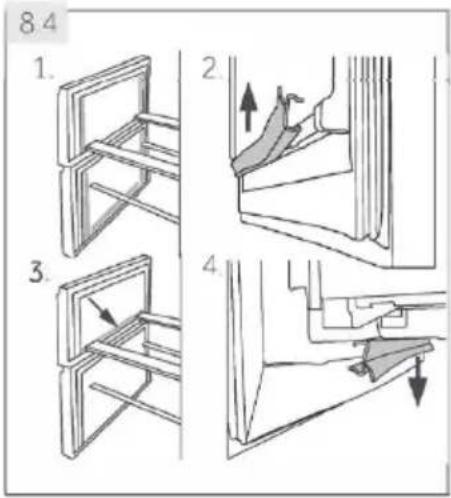
8.4 Removable auxiliary door gaskets
There are six auxiliary door gaskets on the upper and lower freezer drawer.
- Locate the five indicated door gaskets on the upper and lower freezer drawer (Fig. 8.4-1.)
- Make sure the bent slices of the gaskets point inwards when attaching (Fig. 8.4-2.).
- Locate the lower gasket of the upper drawer as indicated (Fig. 8.4-3.).
- Make sure the bent slice of this gasket points downwards when attaching (Fig. 8.4-4.).
You get these gaskets as well as the revolving door / drawer gaskets via the customer service (see warranty card).
8.5 Non-use for a longer period
If the appliance is not used for an extended period of time, and you will not use the Holiday-function for the refrigerator:
Take out the food.
Unplug the power cord.
Clean the appliance as described above.
- Keep the door and freezer drawers/door open to prevent the creation of bad odours inside.

Notice: Switch off
Turn the appliance off only if strictly necessary.
8.6 Moving the appliance
- Remove all food and unplug the appliance.
- Secure shelves and other moveable parts in the fridge and the freezer with adhesive tape.
- Do not tilt the refrigerator more than 45^ to avoid damaging the refrigerating system.

WARNING!
Do not lift the appliance by its handles.
Never place the appliance horizontally on the ground.
8.7 Cleaning the water tank (HFW7720EWMP)
- Take off the water tank out of the appliance.
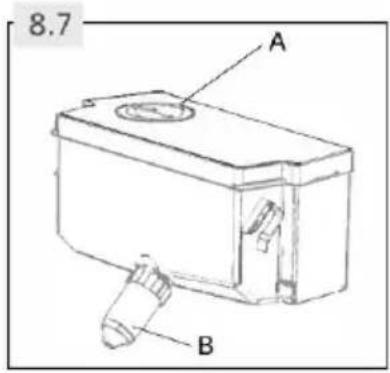
- Remove the cover (Fig 8.7-A).
- Unscrew the dispenser cock (Fig 8.7-B)
- Clean the tank and dispenser cock with warm water and liquid dishwashing detergent. Make sure soap is rinsed off.
- Mount the dispenser cock, close the cover and replace the tank inside the appliance
Many occurring problems could be solved by yourself without specific expertise. In case of a problem please check all shown possibilities and follow below instructions before you contact an after sales service. See CUSTOMER SERVICE.

WARNING!
Before maintenance, deactivate the appliance and disconnect the mains plug from the mains socket.
- Electrical equipment should be serviced only by qualified electrical experts, because improper repairs can cause considerable consequential damages.
A damaged supply should only be replaced by the manufacturer, its service agent or similarly qualified persons in order to avoid a hazard.
9.1 Troubleshooting table
| Problem | Possible Cause | Possible Solution |
| The compressor does not work. | •Mains plug is not connected in the mains socket. •The appliance is in the defrosting cycle. | •Connect the mains plug. This is normal for an automatic defrosting. |
| The appliance runs frequently or runs for a too long period of time. | •The indoor or outdoor temperature is too high. •The appliance has been off power for a period of time. •A door/drawer of the appliance is not tightly closed. •The door/drawer has been opened too frequently or for too long. •The temperature setting for the freezer compartment is too low. •The door/drawer gasket is dirty, worn, cracked or mismatched. •The required air circulation is not guaranteed. | •In this case, it is normal for the appliance to run longer. Normally, it takes 8 to 12 hours for the appliance to cool down completely. •Close the door/drawer and ensure the appliance is located on a level ground and there is no food or container jarring the door •Do not open the door/drawer too frequently. Set the temperature higher until a satisfactory refrigerator temperature is obtained. It takes 24 hours for the refrigerator temperature to become stable. •Clean the door/drawer gasket or replace them by the customer service. •Ensure adequate ventilation. |
| The inside of the refrigerator is dirty and/or smells. | •The inside of the refrigerator needs cleaning. •Food of strong odour is stored in the refrigerator. | •Clean the inside of the refrigerator. Wrap the food thoroughly. |
| It is not cold enough inside the appliance. | ·The temperature is set too high. ·Too warm goods has been stored. ·Too much food has been stored at one time. ·The goods are too close to each other. ·A door/drawer of the appliance is not tightly closed. ·The door/drawer has been opened too frequently or for too long. | ·Reset the temperature. ·Always cool down goods before storing them. ·Always store small quantities of food. ·Leave a gap between several foods allowing air flowing. ·Close the door/drawer. ·Do not open the door/drawer too frequently. |
| It is too cold inside the appliance. | ·The temperature is set too low. ·The Power-Freezer function is activated or is running too long. | ·Reset the temperature. ·Switch off the Power-Freezer function. |
| Moisture formation on the inside of the refrigerator compartment. | ·The climate is too warm and too damp. ·A door/drawer of the appliance is not tightly closed. ·The door/drawer has been opened too frequently or for too long. ·Food containers or liquids are left open. | ·Increase the temperature. ·Close the door/drawer. ·Do not open the door/drawer too frequently. ·Let hot foods cool to room temperature and cover foods and liquids. |
| Moisture accumulates on the refrigerators outside surface or between the doors/door and drawer. | ·The climate is too warm and too damp. ·The door/drawer is not closed tightly. The cold air in the appliance and the warm air outside it condensates. | ·This is normal in damp climate and will change when the humidity decreases. ·Ensure that the door/drawer is tightly shut. |
| Strong ice and frost in the freezer compartment. | ·The goods were not adequately packaged. ·A door/drawer of the appliance is not tightly closed. ·The door/drawer has been opened too frequently or for too long. ·The door/drawer gasket is dirty, worn, cracked or mismatched. ·Something on the inside prevents the door/drawer to close properly. | ·Always pack the goods well. ·Close the door/drawer. ·Do not open the door/drawer too frequently. ·Clean the door/drawer gasket or replace them by new ones. ·Reposition the shelves, door racks, or internal containers to allow the door/drawer to close. |
| The appliance makes abnormal sounds. | ·The appliance is not located on level ground. ·The appliance touches some object around it. | ·Adjust the feet to level the appliance. ·Remove objects around the appliance. |
| A slight sound is to be heard similar to that of flowing water. | ·This is normal. | ·- |
| You will hear an alarm beep. | ·The fridge storage compartment door is open. | ·Close the door or silence the alarm manually. |
| You will hear a faint hum. | ·The anti-condensation system is working. | ·This prevents condensation and is normal. |
| The interior lighting or cooling system does not work. | ·Mains plug is not connected in the mains socket. ·The power supply is not intact. ·The LED-lamp is out of order. | ·Connect the mains plug. ·Check the electrical supply to the room. Call the local electricity company! ·Please call the service for changing the lamp |
| The sides of the cabinet and door strip get warm. | ·This is normal. | ·- |
9.2 Power interruption
In the event of a power cut, food should remain safety cold for about 12 hours. Follow these tips during a prolonged power interruption, especially in summer
Open the door/drawer as few times as possible.
Do not put additional food into the appliance during a power interruption.
If prior notice of a power interruption is given and the interruption duration is longer than 12 hours, make some ice and put it in a container in the top of the refrigerator compartment.
An inspection of the goods is required immediately after the interruption.
As temperature in the refrigerator will rise during a power interruption or other failure the storage period and edible quality of food will be reduced. Any food that defrosts should be either consumed, or cooked and refrozen (where suitable) soon afterwards in order to prevent health risks

Notice: Memory function during power interruption
After restoration of power the appliance continues with the settings that were set before the power failure.
To contact the technical assistance, visit our website: https://corporate.haier-europe.com/en/.
Under the section "website", choose the brand of your product and your country. You will be redirected to the specific website where you can find the telephone number and form to contact the technical assistance.

WARNING!
The appliance is heavy. Always handle with at least two persons.
- Keep all packaging materials out of children's reach and dispose them in an environmentally friendly manner.
Take the appliance out of the packaging
Remove all packaging materials.
10.1 Environmental conditions
The room temperature should always be between 10^ and 43^ , since it can influence the temperature inside the appliance and its energy consumption. Do not install the appliance near other heat-emitting appliances (ovens, refrigerators) without isolation.
10.2 Door reversibility
(Only model HTW7720ENMP/HTW7720ENMB)
Before the appliance is permanently installed, check the correct position of the door hinge. If necessary see section the DOOR REVERSIBILITY
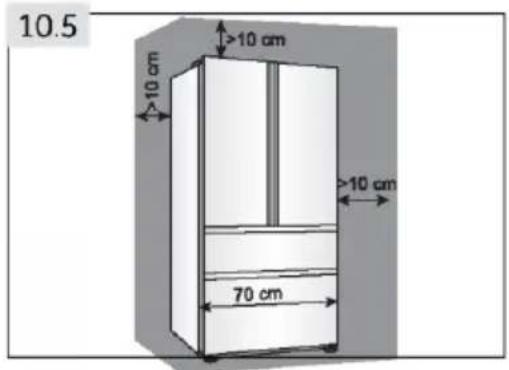
10.3 Space recommendation
Recommended space when door is opened.(Fig. 10.4)
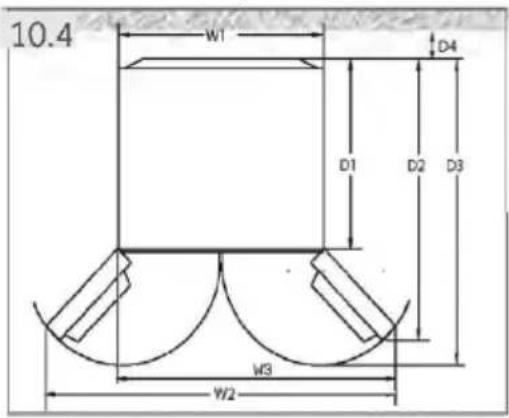
| Model | Width in mm | Depth in mm | Distance to wall in mm | ||||
| HTW7720DNMP | W1 | W2 | W3 | D1 | D2 | D3 | D4 |
| HTW7720ENMP | |||||||
| HTW7720ENMB | 700 | - | 1198.5 | 600 | 1140 | 1322 | 100 |
| HTW7720ENPT | |||||||
| HTW7720BNMM | |||||||
| HFW7720EWMP | 700 | 1188 | - | 600 | 887 | 966 | 100 |
| HFW7720ENMB | |||||||
10.4 Ventilaton cross-section
To achieve sufficient ventilation of the appliance for safety reasons we recommend observing the space recommendation guidelines.
(Fig 10.5)
For a free standing appliance: this refrigerating appliance is not intended to be used as a built-in appliance.
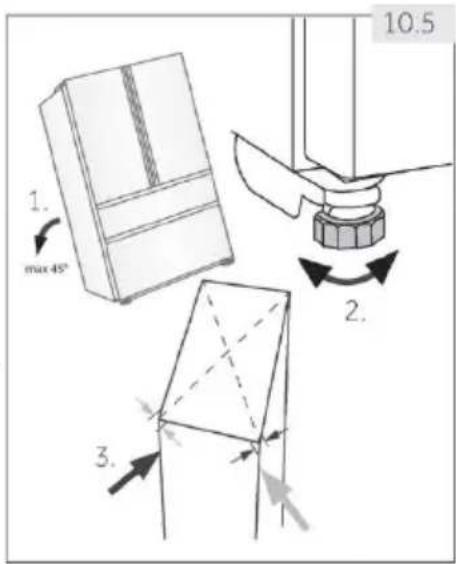
10.5 Aligning the appliance
The appliance should be placed on a flat and solid surface.
- Tilt the appliance slightly backwards (Fig. 10.5).
- Set the feet to the desired level.
- The stability can be checked by alternately bumping on the diagonals. The slightly swaying should be the same in both directions. Otherwise the frame can warp; possible leaking door seals are the result. A low tendency to the rear facilitates the closing of the door.
10.6 Fine tuning of the doors
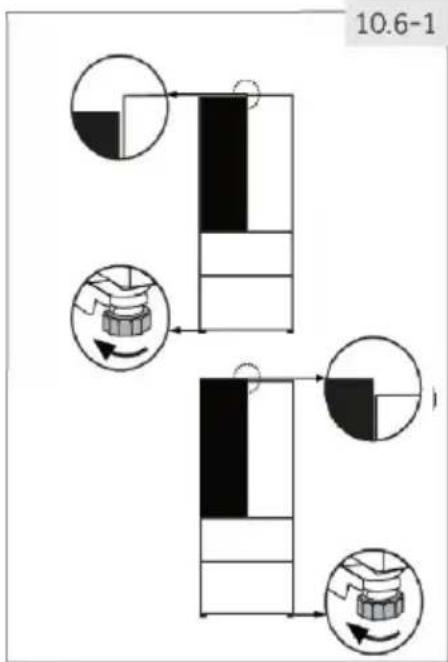
If the doors are not in one level, this mismatch can be remedied by following.
10.6.1 Using adjustable foot
Rotate the adjustable foot according to the direction of arrow i(Fig. 10.6 -1) to turn up or down the foot.
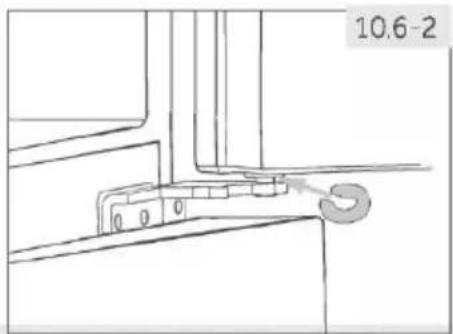
10.6.2 Using spacers
Open the upper door and lift it.
- Carefully clip the spacer (enclosed in the accessory bag) in the white plastic ring of the middle hinge by hand or using tools like pliers (Fig. 10.6-2). Do not scratch or bruise the door.

Notice: Levelling
In the future use of refrigerator, doors uneven phenomenon may occur to the weight of stored food. Then please adjust according to the above methods.
10.7 Waiting time
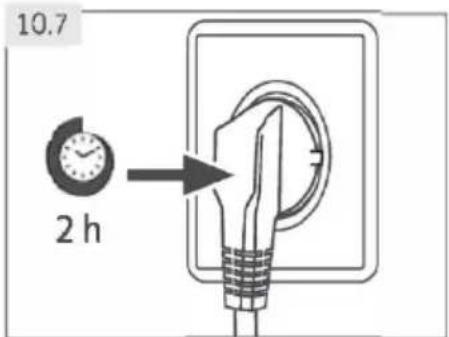
To the maintenance-free lubrication oil is located in the capsule of the compressor. This oil can get through the closed pipe system during slanting transport. Before connecting the appliance to the power supply you have to wait 2 hours (Fig. 10.7) so that the oil runs back into the capsule.
10.8 Electrical connection
Before each connection check if:
power supply, socket and fusing are appropriate to the rating plate.
the power socket is earthed and no multi-plug or extension.
the power plug and socket are strictly according.
Connect the plug to a properly installed household socket.

WARNING!
To avoid risks a damaged power cord must be replaced by the customer service (see warranty card).
When positioning the appliance, ensure the supply cord is not trapped or damaged.
Do not locate multiple portable socket-outlets or portable power supplies at the rear of the appliance.

Taking care to avoid causing a fire by igniting flammable material.
POSITIONING
Install the appliance at a location where the ambient temperature corresponds to the climate class indicated on the rating plate of the appliance:
- extended temperate: 'this refrigerating appliance is intended to be used at ambient temperatures ranging from 10^ C to 32^ C' ;
- temperate: 'this refrigerating appliance is intended to be used at ambient temperatures ranging from 16^ C to 32^ C' ;
- subtropical: 'this refrigerating appliance is intended to be used at ambient temperatures ranging from 16^ C to 38^ C' ;
- tropical: 'this refrigerating appliance is intended to be used at ambient temperatures ranging from 16^ C to 43^ C' .
10.9 Door Reversibility
Before connecting tire appliance to the power supply you should check, whether the door swing must changed from right (as delivered) to left, if this is required by the installation location and the usability.

WARNING!
The appliance is heavy. You need two persons to carry out the door reversibility.
Before any operation, first unplug the appliance from the mains.
Do not tilt the appliance more than 45^ to prevent damage of the cooling system.
Assembly steps (Fig. 10.9):
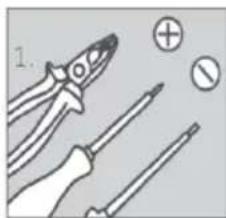
- Provide necessary tool.
-
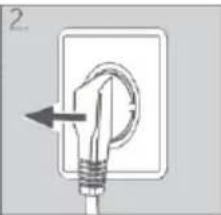
Unplug the appliance.
-
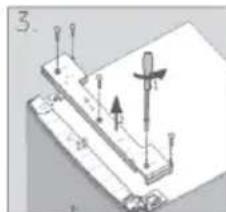
Remove the screws which fix the front panel (1) and remove the panel (2).
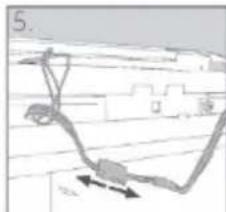
Remove the small cover of the front panel from left to right side - Unplug the connection cable
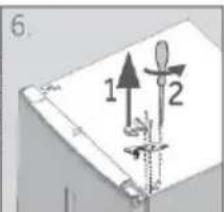
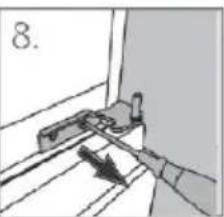
- Remove the upper hinge cover (1) and unscrew the upper hinge (three screws) on right side (2)
- Lift the loose refrigerator door carefully off the lower hinge
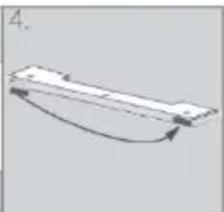
- Turn the door upside down, unscrew the cover (1) and the door stop (2) with fixing part (3)
- Remove the lower hinge of the upper door
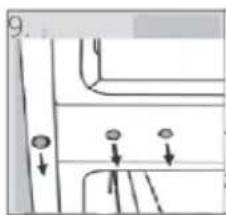
- Change the positions of the blanking plugs and the screw on the side
- Change the door stop from the current position to opposite side
10- Installation
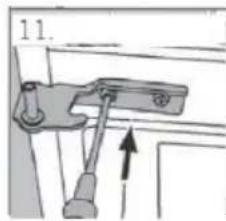
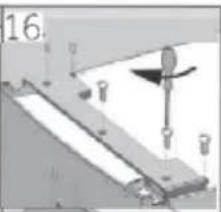
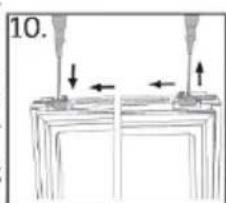
- Take out the new lower hinge of upper door from the accessory bag and screw it to the left side of the appliance.
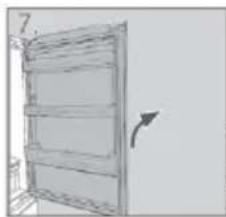
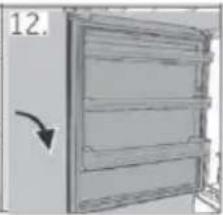
- Lift the upper door carefully on to the lower hinges so that the pivot fits into the hinge barrel.
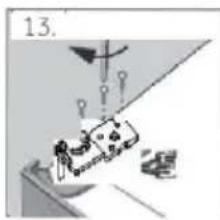
- Take out the upper hinge from the accessory bag. Put the connection cable through the upper hinge and fix the upper hinge with the three screws on left side of appliance.
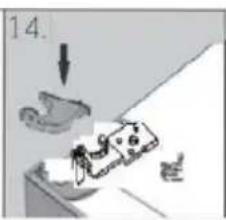
- Put the hinge cover over(delivered in the accessory bag) the hinge.
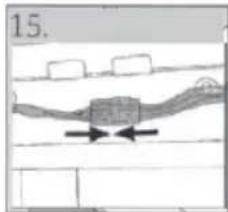
- Plug in the connection cable and fit it into the opening.
- Replace front panel and fix it with the five screws After the change of the door check that the door seals are located properly on the housing and all screws are tightened well
11.1 Product fiche
| Trade mark | Haier | |
| Model identifier | HTW7720ENMP HTW7720ENMB HTW7720ENPT HTW7720DNMP HTW7720BNMM | HFW7720EWMP HFW7720ENMB |
| Category of the model | Refrigerator-freezer | |
| Energy efficiency class | BHTW7720BNMM/DHTW7720DNMP/E | |
| Annual energy consumption (kWh/year)1) | 243 HTW7720BNMM/301 | 302 |
| Volume cooling (L) | 345 HTW7720BNMM/343 | 337 |
| Volume freezing (L) | 141 HTW7720BNMM/140 | 140 |
| Star rating | [1] | |
| Temperature of other compartments > 14°C | Non applicable | |
| Frostfree system | Yes | |
| Power cut safe (h) | 12 | 10 |
| Freezing capacity (kg/24h) | 10 | |
| Climate class This appliance is intended to be used at an ambient temperature between 10°C and 43°C | SN.N.ST.T | |
| Noise emission class and airborne acoustical noise emissions (db(A) re 1pW) | A(29)HTW7720DNMP /C (37) | |
| Temperature rise time (h) | 12 | 10 |
| Construction type | Freestanding | |
1) based on standard test results for 24 hours. Actual energy consumption will depend on how the appliance is used and where it is located
11.2 Additional technical data
| Total volume (L) | 486 HTW7720BNMM/483 | 477 |
| Voltage / Frequency | 220-240V -/50Hz | |
| Input power (W) | 120 | |
| Input current (A) | 1.5 | |
| Main fuse (A) | 16 | |
| Coolant/amount | R600a/62g | |
| Dimensions (D/W/H in mm) | 675x700x2006 | |
11.3 Standards and directives CC and UK CA
This product meets the requirements of all applicable CE and UKCA directives with the corresponding harmonised standards, which provide for CE and UKCA markings.
12- Customer Service
We recommend our Haier Customer Service and the use of original spare parts If you have a problem with your appliance, please first check section TROUBLESHOOTING If you cannot find a solution there, please contact
your local dealer or
the Service & Support area at www.haier.com where you can find telephone numbers and FAQs and where you can activate the service claim
To contact our Service, ensure that you have the following data available
The information can be found on the rating plate
Model
Serial No
Also check the Warranty Card supplied with the product in case of warranty
AVAILABILITY OF SPARE PARTS
Thermostats, temperature sensors, printed circuit boards and light sources are available for a minimum period of seven years after placing the last unit of the model on the market. Door handles, door hinges, trays and baskets for a minimum period of seven years and door gaskets for a minimum period of 10 year, after placing the last unit of the model on the market.
GUARANTEE
Minimum guarantee is: 2 years for EU Countries, 3 years for Turkey, 1 year for UK, 1 year for Russia, 3 years for Sweden, 2 years for Serbia, 5 years for Norway, 1 year for Morocco, 6 months for Algeria, Tunisia no legal warranty required.
TECHNICAL ASSISTANCE
To contact the technical assistance, visit our website: https://corporate.haier-europe.com/en/ Under the section "website", choose the brand of your product and your country. You will be redirected to the specific website where you can find the telephone number and form to contact the technical assistance
For general business enquiries please find below our addresses in Europe
| European Haier addresses | |||
| Country* | Postal address | Country* | Postal address |
| Italy | Haier Europe Trading SRL Via De Cristoforis, 12 21100 Verese ITALY | France | Haier France SAS 3-5 rue des Graviers 92200 Neuilly sur Seine FRANCE |
| Spain Portugal | Haier Iberia SL Pg. Garcia Faria, 49-51 08019 Barcelona SPAIN | Belgium-FR Belgium-NL Netherlands Luxembourg | Haier Benelux SA Anderlecht Route de Lennik 451 BELGIUM |
| Germany Austria | Haier Deutschland GmbH Hewlett-Packard-Str. 4 D-61352 Bad Homburg GERMANY | Poland Czechia Hungary Greece Romania Russia | Haier Poland Sp.zo.o Al. Jerozolimskie 181B 02 222 Warszawa POLAND |
| United Kingdom | Haier Appliances UK Co.Ltd. One Crown Square Church Street East Woking, Surrey, GU21 6HR UK | ||
*For further information about the product, please consult https://eprel.ec.europa.eu/ or scan the QR on the energy label supplied with the appliance


Bedienungsanleitung
Kuhl-Gefriergerät
HHTW7720ENMP
HFW7720EWMP
HTW7720ENMB
HFW7720ENMB
HTW7720ENPT
HTW7720DNMP
HTW7720BNMM
PRODUKT INFORMATIONEN
5.2 Touches sensitives
Download on the App Store
EXPLORE IT ON AppGallery
INFORMATION DU PRODUIT
Comment activer le module Wi-Fi:

Download on the App Store
EXPLORE IT ON AppGallery
5.6 Deur opening alarm
Download on the App Store
EXPLORE IT ON AppGallery
Download on the App Store
EXPLORE IT ON AppGallery

Download on the App Store

EXPLORE IT ON AppGallery
Ovladaci panel (obr.4)
Tlačitka:
Download on the App Store

EXPLORE IT ON AppGallery
Krok 2 Vytvortesiucetvaplikaci hOn nebo se prihlaste,pokudjiiz mateucet
Krok 3 Postupujte podlePokynuk parovani v aplikaci hOn
K
INFORMACE O PRODUKTU
Jak aktivovat Wi-Fi modul:
Download on the App Store
EXPLORE IT ON AppGallery
Substituir as lampadas LED
8.3 Substituir as lampadas LED
7.1 Lateral air- low
To yueio evai eonliaoevo eva ouotnla lateral airlow, xapn oTO OTIO UAPXei pon kpuou aepa oe kaee Tneo paiou (Eik. 7.1). Auto BonoTa otN diatnpnon Ooiopogns eepokpaiaac yia va diaoqalizete oni ta TpOgma Ta biT-n-pouvtai ppeoka yia TEPIOOTepo kaipo.
https://corporate.haier-europe.com/en/.
Download on the App Store

EXPLORE IT ON AppGallery
- darbiba