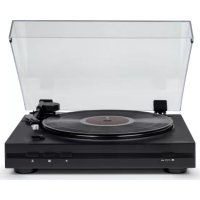
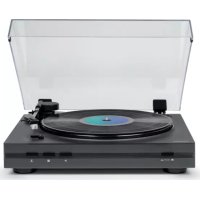
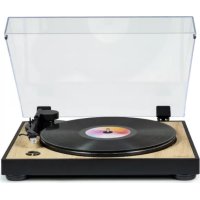
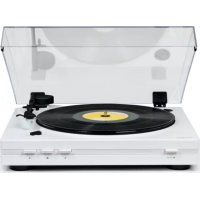
TT350 - Turntable THOMSON - Free user manual and instructions
Find the device manual for free TT350 THOMSON in PDF.



| Product type | Fully automatic turntable |
| Brand | Thomson |
| Model | TT350 |
| Dimensions (W x D x H) | 387 x 345 x 119 mm |
| Weight | 2.65 kg |
| Power supply | 12 V DC, 200 mA via external power adapter (100-240 V AC, 50/60 Hz) |
| Power consumption | 2.4 W (standby 0.3 W) |
| Drive method | Belt drive |
| Speeds | 33 1/3 and 45 rpm |
| Stylus type | MM (moving magnet) |
| Stylus | Audio Technica AT3600L |
| Signal-to-noise ratio | ≥ 40 dB |
| Automatic functions | Automatic start and stop, automatic arm return |
| PHONO/LINE selector | Yes, to choose between internal or external preamp |
| Outputs | RCA line (L/R) + 3.5 mm jack adapter included |
| Included accessories | Platter mat, 45 rpm adapter, dust cover, RCA cables, power adapter, user manual |
| Maintenance and cleaning | Unplug before cleaning; use a soft cloth; do not lubricate |
| Safety | Do not open the casing; avoid moisture; keep out of reach of children |
| Usage | Household, indoor only |
| Reparability | Have repairs done by qualified personnel; spare parts not specified |
Frequently Asked Questions - TT350 THOMSON
User questions about TT350 THOMSON
0 question about this device. Answer the ones you know or ask your own.
Ask a new question about this device
Download the instructions for your Turntable in PDF format for free! Find your manual TT350 - THOMSON and take your electronic device back in hand. On this page are published all the documents necessary for the use of your device. TT350 by THOMSON.
USER MANUAL TT350 THOMSON
natural_image
Line drawing of a vintage CD or DVD stand with open lid and circular base (no text or symbols)MODE D'EMPLOI
AVANT D'UTILISER CET APPAREIL, VEUILLEZ LIRE ATTENTIVEMENT CE MODE D'EMPLOI ET LE CONSERVER AFIN DE POUVOIR LE CONSULTER ULTÉRIEUREMENT.
natural_image
Diagram of a vintage CD or DVD disc with an open lid and base mount (no text or symbols)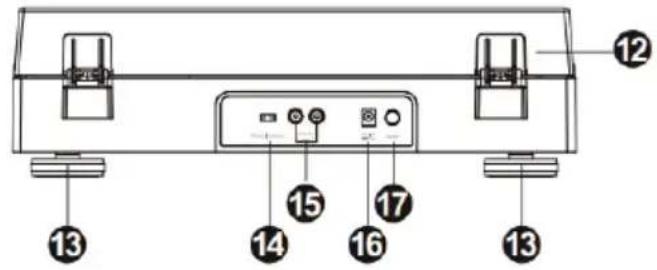
natural_image
Illustration of a hand using a compass to measure a tool, with no visible text or symbolsAttention
BELGIQUE, customerservice@bigben-interactive.be
NEDERLAND, customerservice@bigben-interactive.nl
ESPANA, sat@bigbenespana.es
ITALIA, support@bigbeninteractive.it
www.bigben.eu
TT350 and its derivatives
COMPLETELY AUTOMATED RECORD PLAYER
natural_image
Line drawing of a vintage CD or DVD stand with open lid and circular base (no text or symbols)OPERATING INSTRUCTIONS
BEFORE USING THIS DEVICE, PLEASE CAREFULLY READ THESE INSTRUCTIONS FOR USE, AND KEEP THEM IN A SAFE PLACE FOR FUTURE CONSULTATION.
Getting started 11
Safety warning and notice 11
What is in the box 13
Precautions for use 13
Description of parts 14
Features and functions 15
Warning 15
Record player characteristics 16
External power adapter characteristics 17
Care of the environment 17
Additional information 17
Declaration of conformity 17
Getting started
• Take the device out of the box
- Remove all the packaging from the product.
- Place the packaging inside the box and either keep or dispose of properly in compliance with the waste sorting instructions shown on the product packaging.
Safety warning and notice
You must read and understand all the instructions before using this device. The warranty will not apply if damage is caused by failure to follow the instructions.

- Never remove the device casing.
- Never place this device on other electrical equipment.
- Protect the power cord from being walked on or pinched, particularly at the plugs, sockets, and the point where it exits the device. Make sure that the power voltage corresponds to the voltage shown on the rating plate at the rear of the device. Always pull the plug from the socket when disconnecting from the mains. Never pull on the cord. Ensure you have completed all the other connections before connecting the plug.
- Only use attachments/accessories that are recommended by the manufacturer.
-
Entrust all device repairs to qualified repairers. A repair is needed when the device has been damaged in any fashion, and in particular:
-
if the power cord is damaged;
- in the event of a liquid spill or objects being inserted into the device;
- if the device is exposed to rain or humidity;
- if the device does not operate normally;
-
or if the device has been dropped or impacted.
-
The series panel is located on the bottom of the device.
- Never block the air vents.
- Ensure you have sufficient stable space around the device for ventilation.
- This device must be used in a moderate climate, away from direct sunlight, naked flames or heat, heating devices, cookers or any other device (including amplifiers) that generates heat. Do not install near a heat source.
- The batteries (battery pack or inserted batteries) must not be exposed to excessive heat, such as sunshine, fire, etc.
- Always unplug the device before cleaning it. Never lubricate any part of this device. Clean
it using a soft cloth. Do not use abrasives or aggressive cleaning products. Cleaning and user maintenance must not be carried out by children without supervision.
- Ensure that you always have easy access to the power cord, plug or adaptor to disconnect this device from the mains if necessary.
- Do not use this device near a water point. It must not be dripped on or splashed. Do not use this device in a damp or wet environment.
- Disconnect this device in the event of a storm or if you are not going to use it for a long period of time.
- This device can be used by children aged 8 and over, and by persons with a physical or sensory disability, learning difficulties or a lack of experience and knowledge, provided they are supervised or have received instructions on the safe use of the device, and they understand the risks involved. Children must not play with the device or cord (risk of strangulation).
- This device must only be supplied with very low safety voltage corresponding to the marking on the device.
- The battery should be removed from the device before disposal. The device must be disconnected from the power supply when removing the battery.
- The product must be at a minimal distance of 20 cm from human body when working.
- Risk of suffocation: Small parts are not intended for children under 3 years old or for people with a tendency to put inedible objects in their mouths.
- This device is for household use only; do not use outdoors.
- The mains adaptor acts as a disconnect. As such, the device's mains adaptor must remain free from obstruction OR be easily accessible when in use. To fully disconnect the power supply, the mains adaptor must unplugged from the mains socket.
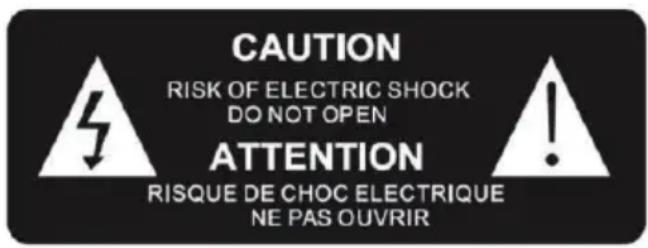

The lightning bolt symbol within an equilateral triangle alerts users to the presence of dangerous uninsulated electrical voltages inside the device that are strong enough to present a risk of electric shock.

The exclamation mark within a triangle indicates the presence of important instructions for operation and maintenance (repair) in the documentation that accompanies the device.
| Class II material |  |
| Direct current |  |
| Alternating current |  |
| For indoor use only |  |
What is in the box
Check and identify the contents of your box:
- Main unit
- Platter mat
• 45 tr/min. adapter
• Dust cover for the main unit
• Double male RCA to double male RCA cable - Double female RCA cable to 3.5 mm jack stereo connector
• External power adapter - User guide
Precautions for use
IMPORTANT. DO NOT MOVE THE TONE ARM BY HAND. USE THE AUTOMATIC PLAY BUTTON CONTROL.
- Once play has started you are free to lift and move the tone arm by hand, but always use the stop control to cease play.
- Do not put anything on top of the record player cover. Objects placed on the cover may generate noises caused by the vibrations, or they may fall, notably when the record player is in use.
- Do not move or lift the product during use. Effectively, during use, the vinyl disc turns and you may damage the record, the needle, the headshell or the unit, or even cause a malfunction. Always remove the vinyl disc before moving this unit.
- You can adjust the speed of 33 or 45 rpm vinyls underneath the product.
natural_image
Diagram of a vintage CD or DVD disc with an open lid and base mount (no text or symbols)Description of parts
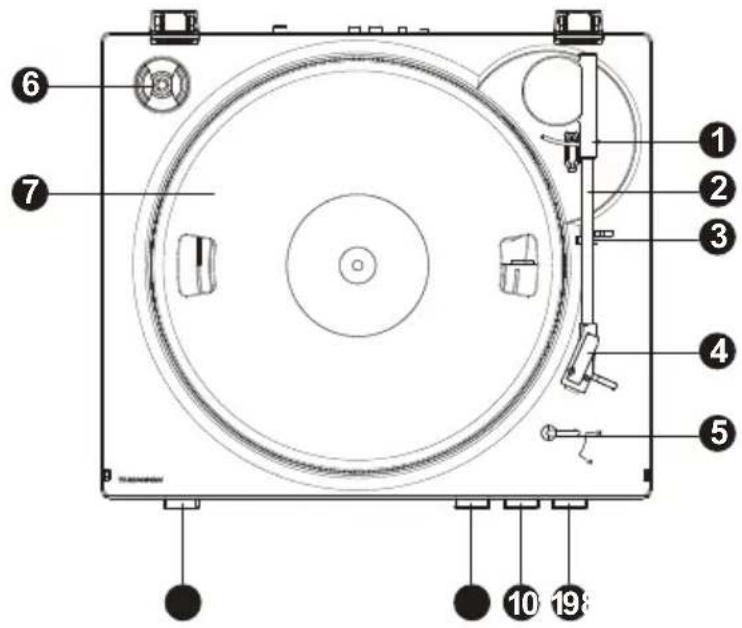
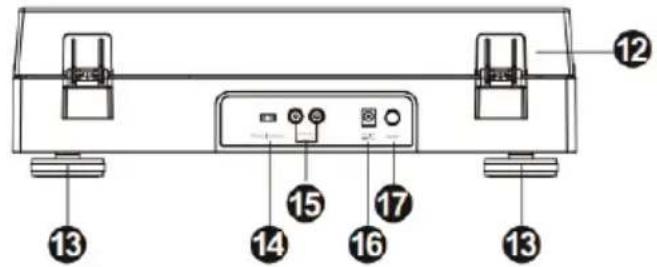
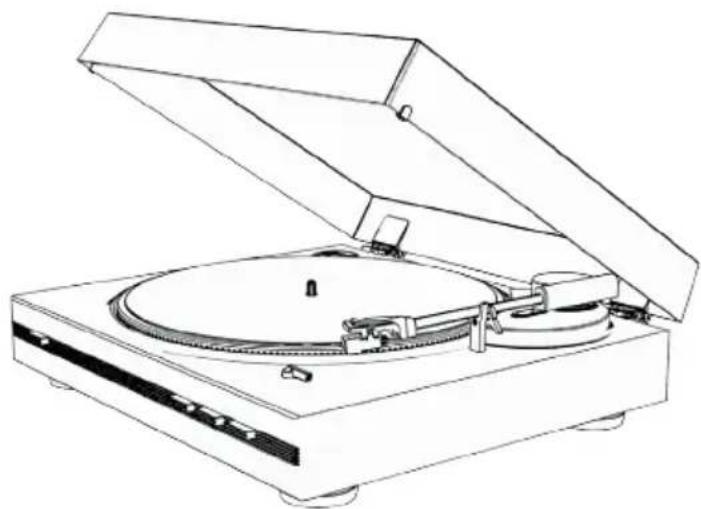
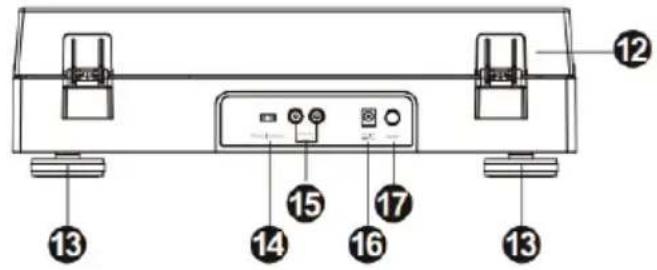
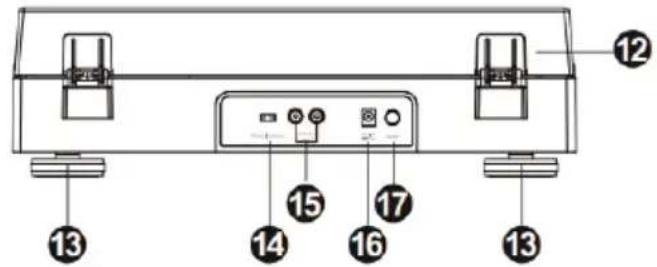
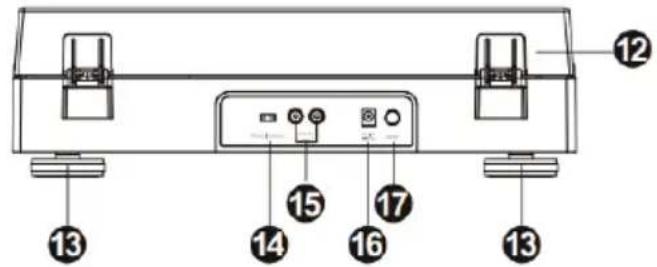
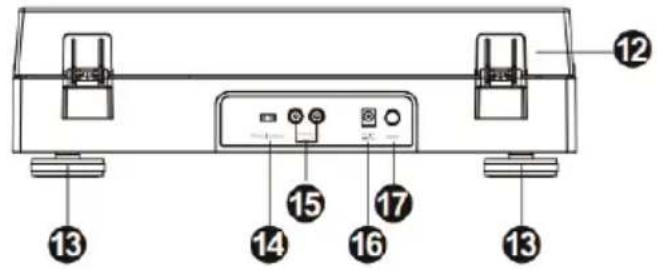
| 1. Arm base 10. | ■ Pause / Stop | |
| 2. Tone arm 11. Tone arm lever | ||
| 3. Arm rest 12. Dust cover | ||
| 4. Headshell 13. Record player feet | ||
| 5. Automatic start-up for 33/45 turns 14. Phono/line selector | ||
| 6. 45 tr/min. adapter rest 15. RCA line output | ||
| 7. Record player turntable 16. External power adapter inlet | ||
| 8. 33/45 turns speed selector 17. On/Off switch | ||
| 9. ▶ Play | ||
Features and functions
Drive belt:
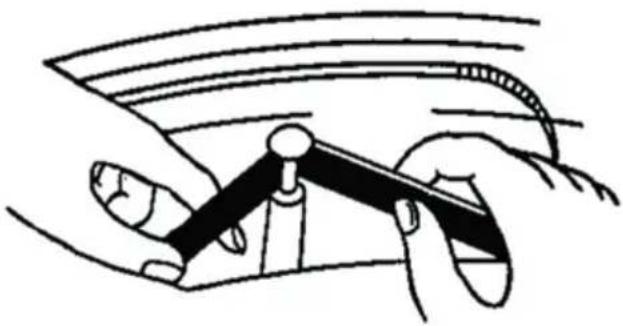
The belt and the record player turntable (7) are installed in the factory, but the drive belt may loosen during transport. If this happens, follow the procedure below to install it yourself.
A. Remove the rubber mat from the record player turntable (7) and E-ring of the record player axis, then release the turntable from the axis.
B. Place the drive belt on the inner edge of the record player turntable (7) and pass it through the hole.
C. Hold the belt between your fingers and place it on the motor pulley, as shown in the diagram.
D. Attach the E-ring onto the rubber mat on the record player turntable.
natural_image
Illustration of a hand using a tool to interact with a curved object (no text or symbols present)Warning
- Make sure that the drive belt isn't misshapen or twisted.
- Avoid getting oil on the belt. Oil splashed could make the belt slip.
Connection:
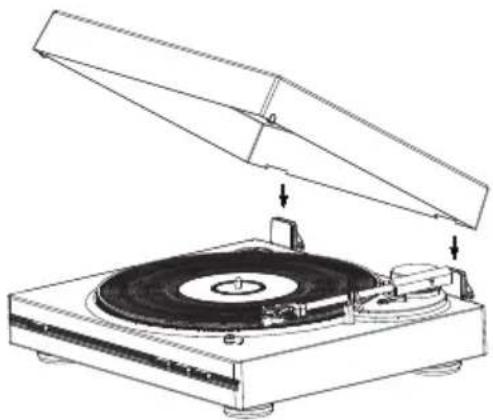
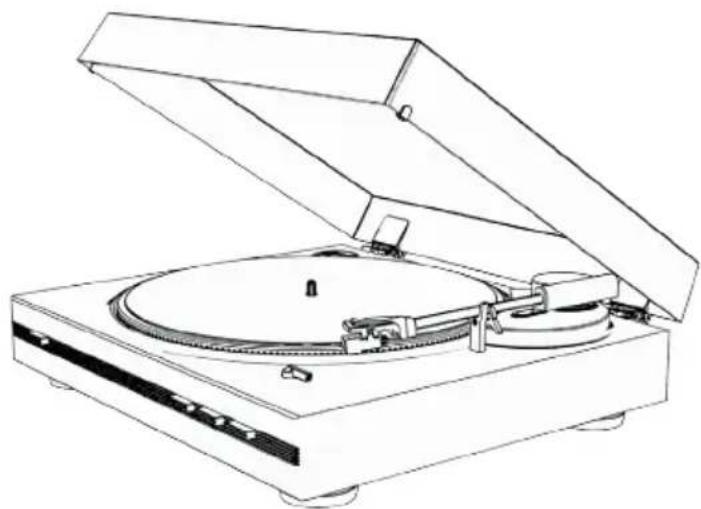
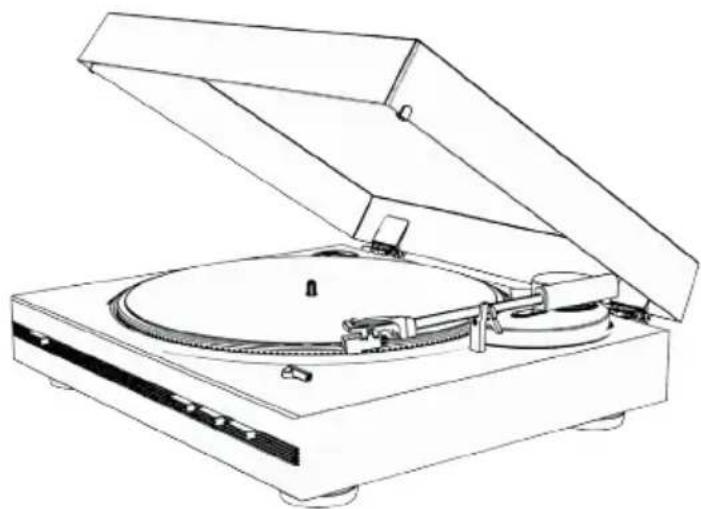
- Place the dust cover (12) on top of the device by gently inserting the hinges into the dedicated spaces.
- Insert the power cable into the appliance's socket, then connect the other end to the mains socket.
- Turn on the record player using the On/Off button (17) on the unit.
Phono/line selector:
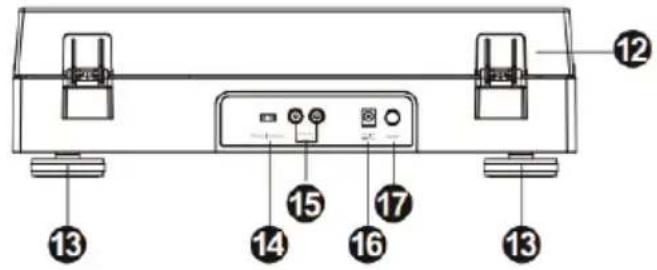
- The phono/line selector (14) is located on the rear panel.
- By selection "PHONO", the audio signal bypasses the internal pre-amplifier, without processing. The record player must therefore be connected to an external pre-amplifier in order to play the music.
- By selecting "LINE", the audio signal is processed by the internal pre-amplifier. The record player can be directly connected to active speakers to play the music.

Phono | Line out
Use:
- Place a disc onto the record player turntable (7) and select the desired speed (33/45) depending on the disc, and also check that the 33 and 45 tr/min (8) vinyl disc selector is positioned according to the size of your vinyl disc.
- Remove the needle protector.
- Open the base of the tone arm to release the arm. Press the Play button (9) on the front panel. The record player moves directly into the desired position over the disc and starts playing the music, starting with the first track. If you want to play other tracks from the disc,
press on the tone arm lever (11) ▼. The tone arm will raise and stop playing the music. Manually position the tone arm in the desired position over your disc and press the tone arm lever(11) ▼ again. The tone arm will slowly move down and start to play the music again.
- The tone arm returns to its base (1) automatically when the disc has finished.
- For optimal product performance and maintenance, unplug the record player when it is not in us.
Please note:
When you're playing a 45-turn disc, use the 45-turn adapter (6) included, located in the upper-left section of the turntable.
Line output:
- This system can be connected to an external device (e.g. amplifier or active speakers) via the RCA line output (15) which is located at the rear of the product.
- Use the double male RCA to double male RCA cable to connect to an external device.

- If necessary, use the Double female RCA to 3.5 mm jack stereo cable to connect the 3.5 mm jack connector of the external device.
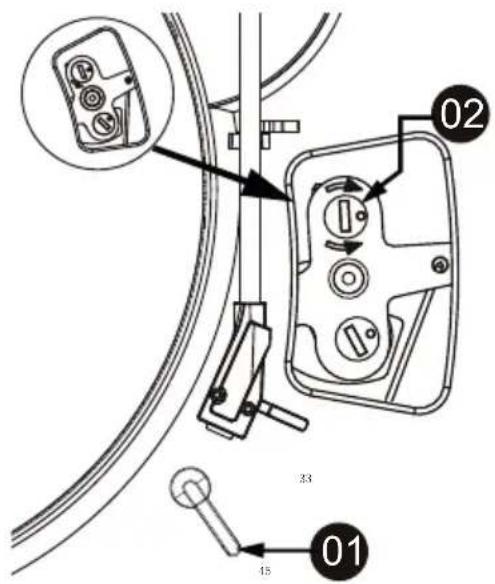
How to adjust the Auto Start Position for 7 inch vinyl (17.7 cm) records
- Turn the record selector switch to the 45 position.
- Using a flat head screwdriver, turn screw clockwise in position 2 (as shown in illustration), if Auto Start Position drops the headshell too far in.
- Using a flat head screwdriver, turn screw anti-clockwise in position 2 (as shown in illustration), if Auto Start Position drops the headshell too far out.
Note: adjust the speed selector based on size of your 7 inch vinyl record.
Record player characteristics:
| Operating voltage 12 V mains/200 mA | |
| Power consumption 2.4 W | |
| Consumption on standby 0.3 W | |
| Dimensions (LxWxH) 387 x 345 x 119 mm | |
| Unit weight 2.65 kg | |
| Drive method By belt | |
| Speeds 33- 1/ 3 and 45 tr/min. | |
| S/B ratio ≥40 dB | |
| Type of headshell MM | |
| Needle Audio Technica AT3600L |
External power adapter characteristics:
| Name of manufacturer of the adapter or registered trademark | Ruiguan Technology (Dongguan) Co., Ltd. |
| Adapter model reference HP05A-1200200-DE | |
| Input voltage and frequency 100-240V c.a., 50/60 HZ | |
| Voltage, current and output power 12 V 0.2 A | 2.4 W |
| Average active efficacy 72.88% | |
| Power consumption without load 0.1 W |
Care of the environment

Your product is designed and manufactured with high quality materials and components, which can be recycled and reused.
Attention should be drawn to the environmental aspects of battery disposal.

When this crossed-out wheeled bin symbol is attached to a product it means that the product is covered by the European Directive 2002/96/EC. Please inform yourself about the local separate collection system for electrical and electronic products. Please act according to your local rules and do not dispose of your old products with your normal household waste. Correct disposal of your old product helps to prevent potential negative consequences for the environment and human health.
Additional information
- THOMSON is a registered trademark of TECHNICOLOR SA or its subsidiaries, used under licence by Bigben Interactive.
Declaration of conformity
- Bigben Interactive hereby declares that the TT350 radio equipment and its derivatives are in compliance with Directive 2014/53/EU. The full text of the EU declaration of conformity is available at the following web address: https://www.bigben-interactive.co.uk/support/
Made in China
Manufactured by BIGBEN INTERACTIVE SA
396, Rue de la Voyette
CRT2 - FRETIN
CS 90414
59814 LESQUIN Cedex - France
www.bigben.eu
Fabricant : Bigben Interactive FRANCE
396, Rue de la Voyette, C.R.T. 2, Fretin,
CS90414 - 59814 Lesquin Cedex, France
BELGIQUE, customerservice@bigben-interactive.be
NEDERLAND, customerservice@bigben-interactive.nl
ESPAÑA, sat@bigbenespana.es
ITALIA, support@bigbeninteractive.it
www.bigben.eu
natural_image
Line drawing of a vintage CD or DVD stand with open lid and base plate (no text or symbols)natural_image
Diagram of a vintage CD or DVD disc with an open lid and base mount (no text or symbols)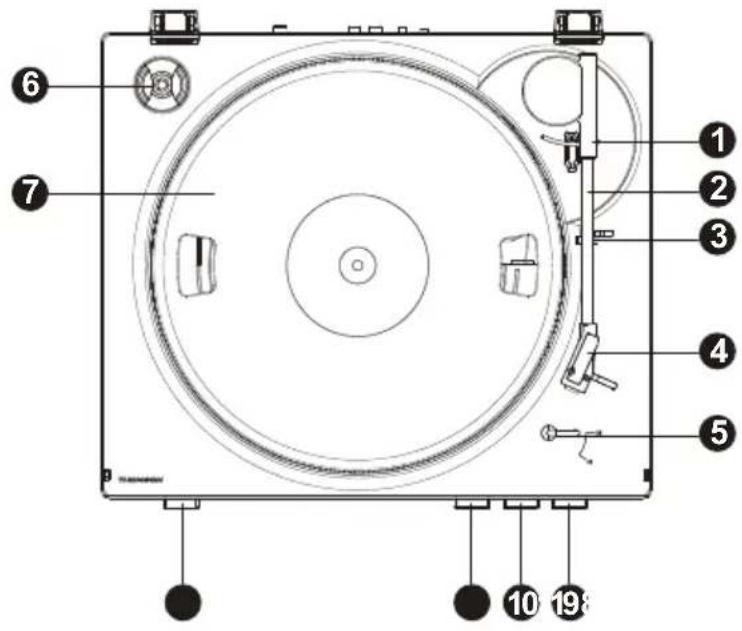
natural_image
Illustration of a hand using a compass to measure a tool, with no visible text or symbolsAdvertencia
Selector PHONO/LINE:
BELGIQUE, customerservice@bigben-interactive.be
NEDERLAND, customerservice@bigben-interactive.nl
ESPAÑA, sat@bigbenespana.es
ITALIA, support@bigbeninteractive.it
www.bigben.eu
natural_image
Line drawing of a vintage CD or DVD disc with open lid and base (no text or symbols)ISTRUZIONI PER L'USO
PRIMA DI UTILIZZARE L'APPARECCHIO, LEGGERE ATTENTAMENTE LE ISTRUZIONI PER L'USO E CONSERVARLE PER UN'EVENTUALE CONSULTAZIONE FUTURA.
natural_image
Diagram of a vintage CD or DVD disc with an open lid and base mount (no text or symbols)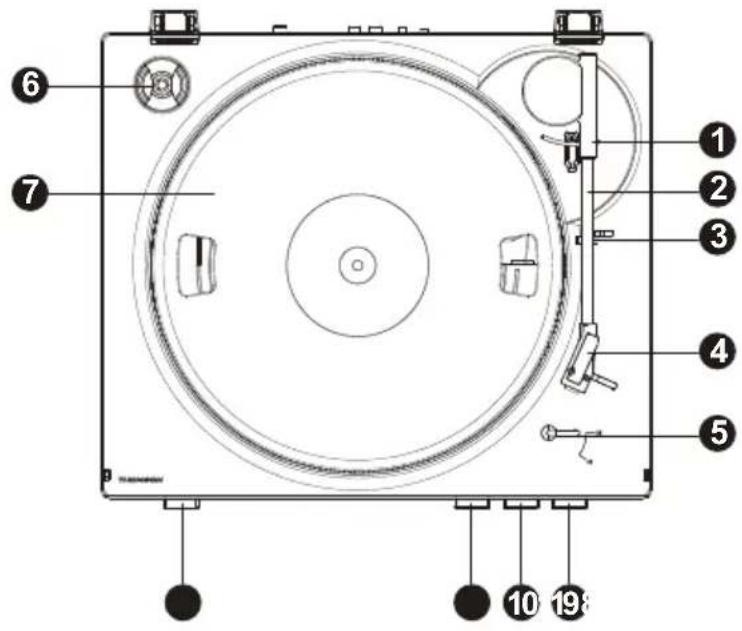
natural_image
Illustration of a hand using a compass to measure a tool, with no visible text or symbolsAttenzione
Caratteristiche del giradischi:
BELGIQUE, customerservice@bigben-interactive.be
NEDERLAND, customerservice@bigben-interactive.nl
ESPANA, sat@bigbenespana.es
ITALIA, support@bigbeninteractive.it
www.bigben.eu
TT350 e derivados
GIRA-DISCOS TOTALMENTE AUTOMÁTICO
natural_image
Line drawing of a vintage CD or DVD stand with open lid and base plate (no text or symbols)natural_image
Diagram of a vintage CD or DVD disc with an open lid and base, showing mechanical components and sound wave (no text or symbols present)
natural_image
Illustration of a hand using a compass to measure a tool, with no visible text or symbolsAtenção
Características do gira-discos:
BELGIQUE, customerservice@bigben-interactive.be
NEDERLAND, customerservice@bigben-interactive.nl
ESPAÑA, sat@bigbenespana.es
ITALIA, support@bigbeninteractive.it
www.bigben.eu
TT350 und Serie
natural_image
Line drawing of a vintage CD or DVD stand with open lid and circular base (no text or symbols)BEDIENUNGSANLEITUNG
natural_image
Diagram of a CD or DVD disc with an open lid and base mount (no text or symbols)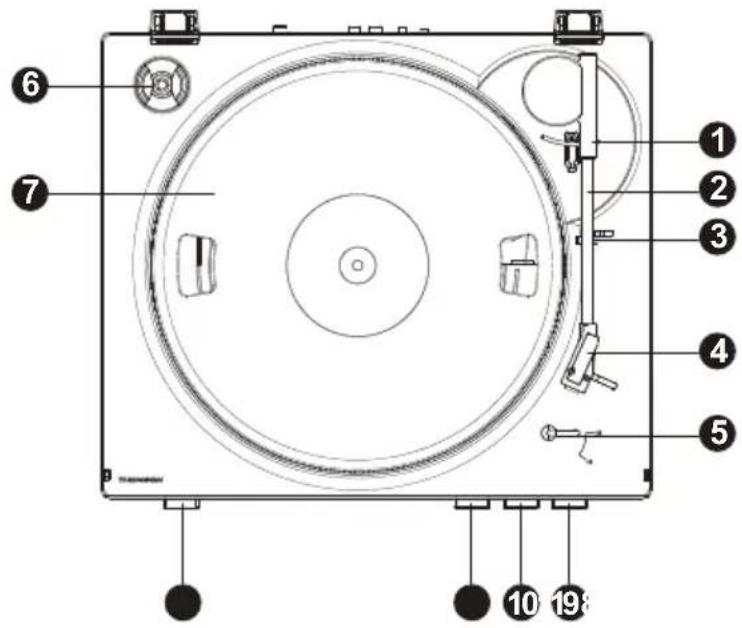
natural_image
Illustration of a hand using a compass to measure a curved object, no text or symbols presentAchtung
BELGIQUE, customerservice@bigben-interactive.be
NEDERLAND, customerservice@bigben-interactive.nl
ESPAÑA, sat@bigbenespana.es
ITALIA, support@bigbeninteractive.it
www.bigben.eu
TT350 en derivaten
VOLLEDIG GEAUTOMATISEERDE PLATENSPELER
natural_image
Line drawing of a vintage CD or DVD stand with open lid and circular base (no text or symbols)GEBRUIKSHANDLEIDING
ALVORENS DIT APPARAAT TE GEBRUIKEN, LEES DEZE INSTRUCTIES AANDACHTIG DOOR EN BEWAAR DEZE VOOR TOEKOMSTIGE RAADPLEGING.
natural_image
Diagram of a vintage CD or DVD disc with an open lid and base mount (no text or symbols)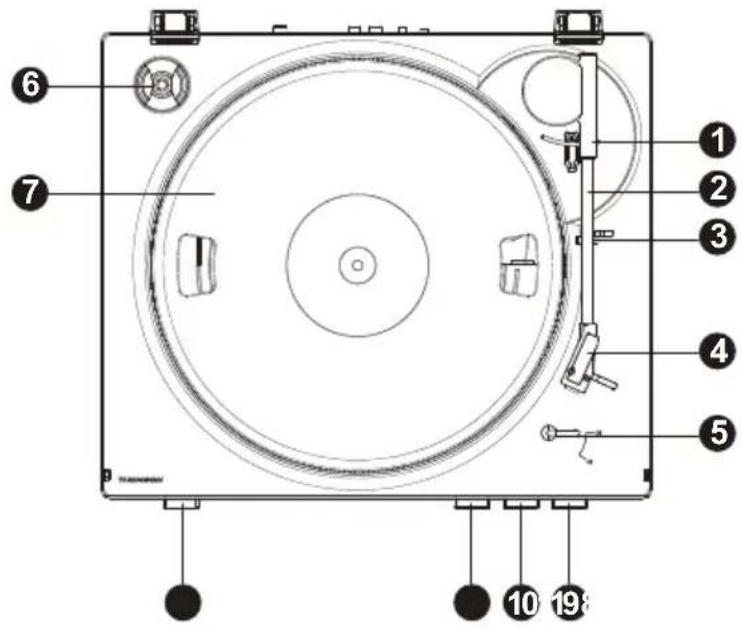
natural_image
Illustration of a hand using a compass to measure a tool, with no visible text or symbolsLet op
BELGIQUE, customerservice@bigben-interactive.be
NEDERLAND, customerservice@bigben-interactive.nl
ESPAÑA, sat@bigbenespana.es
ITALIA, support@bigbeninteractive.it
www.bigben.eu
- MODE D'EMPLOI
- Attention
- COMPLETELY AUTOMATED RECORD PLAYER
- OPERATING INSTRUCTIONS
- Getting started
- Safety warning and notice
- What is in the box
- Precautions for use
- IMPORTANT. DO NOT MOVE THE TONE ARM BY HAND. USE THE AUTOMATIC PLAY BUTTON CONTROL.
- Description of parts
- Features and functions
- Drive belt:
- Warning
- Connection:
- Phono/line selector:
- Use:
- Please note:
- Line output:
- How to adjust the Auto Start Position for 7 inch vinyl (17.7 cm) records
- Care of the environment
- Additional information
- Declaration of conformity
- Advertencia
- Selector PHONO/LINE:
- ISTRUZIONI PER L'USO
- Attenzione
- GIRA-DISCOS TOTALMENTE AUTOMÁTICO
- Atenção
- BEDIENUNGSANLEITUNG
- Achtung
- VOLLEDIG GEAUTOMATISEERDE PLATENSPELER
- GEBRUIKSHANDLEIDING
- Let op
Brand : THOMSON
Model : TT350
Category : Turntable