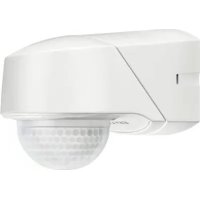
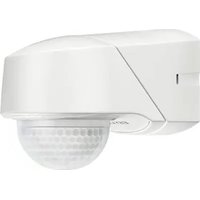
RC 280i - Motion detector Esylux - Free user manual and instructions
Find the device manual for free RC 280i Esylux in PDF.


| Product Type | Passive infrared motion detector |
| Brand | Esylux |
| Model | RC 280i |
| Detection area | 280° (3 x 95° individually adjustable) + 360° flush with wall |
| Range | approx. 20 m (mounting height 2.50 m) |
| Power supply | 230 V AC / 50 Hz |
| Switching capacity | 2300 W / 10 A (cos φ = 1), 1150 VA / 5 A (cos φ = 0.5) |
| Max. inrush current | 100 A / 250 μs |
| Activation time | Pulses / 15 s to 30 min (adjustable) |
| Brightness threshold | 2 to 2500 lux |
| Settings | Potentiometers on device or optional infrared remote control |
| Protection rating | IP 54 |
| Protection class | II |
| Operating temperature | -25 °C to +55 °C |
| Dimensions (W x H x D) | 78 x 105 x 135 mm |
| Available colors | White (RAL 9010), brown (RAL 8017), black (RAL 9005), stainless steel look |
| Housing material | UV-resistant polycarbonate |
| Mounting | Wall or ceiling, no additional accessory required |
| Test functions | Test mode with/without load, detection test |
| Advanced functions | Permanent light, holiday mode, alarm mode, pulse mode |
| Locator LED | Red, flashing on detection (can be deactivated) |
| Manufacturer warranty | 3 years |
| Repairability | Spare parts available via the manufacturer |
| Maintenance | Clean with a soft, dry cloth. Do not use abrasive products. |
Frequently Asked Questions - RC 280i Esylux
User questions about RC 280i Esylux
0 question about this device. Answer the ones you know or ask your own.
Ask a new question about this device
Download the instructions for your Motion detector in PDF format for free! Find your manual RC 280i - Esylux and take your electronic device back in hand. On this page are published all the documents necessary for the use of your device. RC 280i by Esylux.
USER MANUAL RC 280i Esylux
natural_image
Line drawing of a car's front wheel and side panel (no text or symbols)natural_image
Diagram showing a spray gun spraying water onto a surface with an arrow indicating direction (no text or symbols)ABB. • FIG. 2 ABB. • FIG. 3
②.12.2
O
natural_image
Diagram of a mechanical component with a bracket and arrow indicating direction (no text or symbols)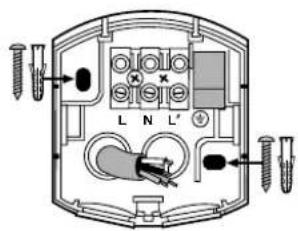
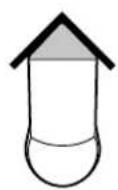
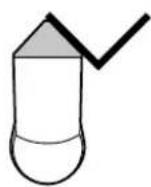
ABB. • FIG. 4
4.1
4.3
4.5
4.7
natural_image
Pure electrical circuit lines without any symbols4.2
4.4
4.6
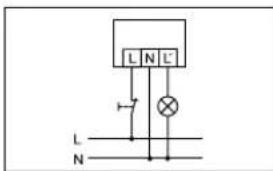
ABB. • FIG. 5 ABB. • FIG 6
natural_image
Three technical line drawings of a car's wheel assembly, showing front, side, and top views with no text or symbols.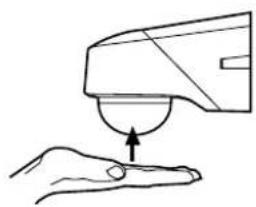
natural_image
Line drawing of a hand holding a small object with an arrow indicating motion (no text or symbols)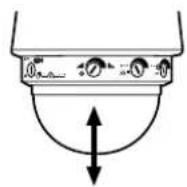
ABB. • FIG. 7
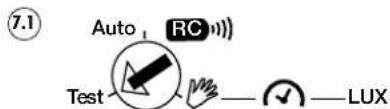
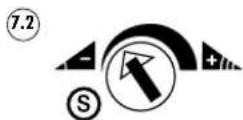
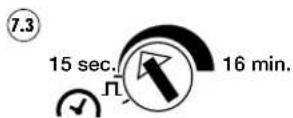
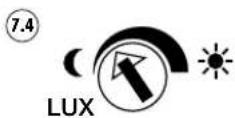
ABB. • FIG. 8 ABB. • FIG. 9 ABB. • FIG. 10
natural_image
Diagram of a device with a dome and a bowl, showing mechanical components and a tool (no text or symbols)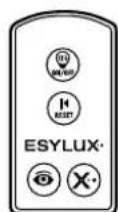
Mobil-RCiMobil-RCi-M
Congratulations on your purchase of this high-quality ESYLUX product. To ensure proper operation, please read these user instructions carefully and keep them for future reference.
1 • SAFETY INSTRUCTIONS
CAUTION: work on the 230 V power system must be carried out by authorised personnel only with due regard to the applicable installation regulations. Switch off the power supply before installing the system.
On the input side, the device is to be protected against short circuits with a 10-A circuit breaker.
= Contact gap < 1.2 mm
Use this product only as intended (as described in the user instructions). Changes or modifications to the product or painting it will result in loss of warranty. You should check the device for damage immediately after unpacking it. If there is any damage, you should not install the device under any circumstances. If you suspect that safe operation of the device cannot be guaranteed, you should turn the device off immediately and make sure that it cannot be operated unintentionally.
2 • DESCRIPTION
ESYLUX RCi series motion detectors have a 130^/230^/280^ field of detection and 360^ anti-creep protection. ESYLUX motion detectors are passive infrared detectors which react to moving heat sources (e.g. people or vehicles) (Fig. 1 (1) 360^ anti-creep protection (2) head-on to detector (3) diagonally to detector). If the motion detector senses a change in thermal radiation inside its field of detection, depending on the set light value, it will activate the connected system (e.g. lighting) for a preset length of time. The ESYLUX RCi motion detector series can be mounted onto a wall or ceiling without the need for further accessories. The device can be mounted on inner and outer corner walls using accessories. The ESYLUX RCi motion detector features factory settings and the detector operates according to preset values (10 lux, 2 min, max. electronic range). The values can be individually modified. The device can be preset using either the adjusting controllers on the device or, more conveniently, using the ESYLUX Mobil-RCi and Mobil-RCi-M remote controls (available as an option).
NB: To activate the detector's complete range of functions, the Mobil-RCi remote control is required.
3 • INSTALLATION/ASSEMBLY/CONNECTION
Before installing the device, observe the following:
- Turn off the power supply.
- Information concerning range is based on an installation height of 2.50 m. (The field of detection will vary according to the height)
-
For optimum performance (i.e. maximum range), position the device so that people vehicles are moving parallel to the detector (Fig. 1).
-
Make sure that the detector has a clear line of sight, as infrared beams cannot penetrate solid objects.
- To avoid influencing the light sensor, maintain a minimum distance of 1m in relation to the connected lighting and do not point light sources directly at the detector.
- When installing the device, bear in mind the surrounding area e.g. neighbouring properties or the distance to the road.
- The motion detector should only be installed on a stable, flat surface (wall/ceiling).
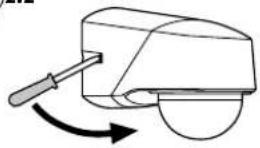
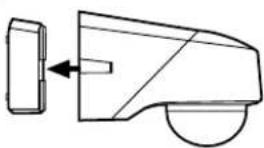
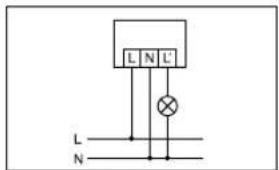
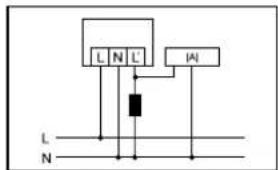
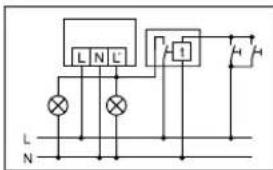
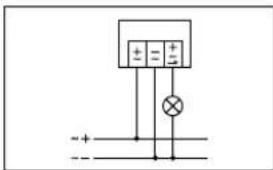
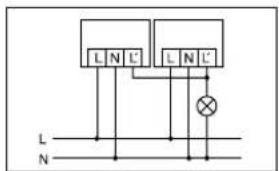
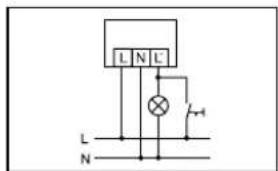
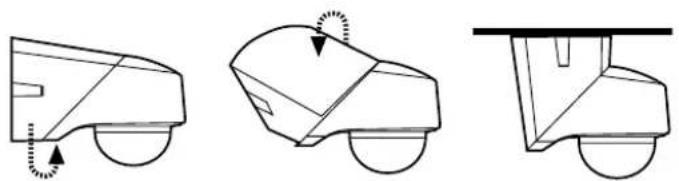
The wall base unit and sensor are connected. For installation purposes, separate the two parts. Fit the screwdriver into the side opening and lever in the direction of the sensor, pulling the detector away from the wall base (Fig. 2.1). If mounting on a wall, the cable inlets must face downwards. If mounting on a ceiling, the cable inlets must face forwards. Feed the cable into the detector and mount the wall base unit in the required position (Fig. 3). Connect the motion detector according to the circuit diagram (Fig. 4).
CAUTION: The maximum in-rush current must not be exceeded when connecting to capacitive loads such as electronic ballasts or fluorescent lamps with parallel compensation.
(4.1) Standard operation (RC 130i - RC 280i).
(4.2) Parallel connection of max. 8 devices.
(4.3) When connecting inductors (e.g. relays, contactors, ballasts) the use of a filter (A) may be necessary.
(4.4) Standard operation with additional permanent lighting function through external switch.
(4.5) Parallel connection and automatic stairwell light.
(4.6) Standard operation with the additional possibility of switching on by hand. If fitting to a ceiling, the two sensor parts are turned away from each other by 180^ (Fig. 5). Press the sensor into the wall base until it clicks into place (Fig. 2.2).
(4.7) Standard operation (RC 230i UC).
NB: The motion detector's sensor must be facing downwards.
4 • START-UP AND SETTING
After the device has been successfully installed and the power supply switched on, the device will perform a self-test (lasting about 60 seconds), the red focus LED and the blue mode LED will flash alternately. During the self-test, certain functions can be enabled by the optional remote control Mobil-RCi. The connected system is activated. After the automatic test has been performed, the device will be operational. The setting elements are concealed in the housing. By pressing up and letting go of the lens, the sensor head is unlocked and protrudes from the housing by approx. 1 cm. Repeat this procedure to allow the sensor to return to its original, locked position (Fig. 6, works like a retractable ballpoint pen). A range of further setting options/special functions are available with the optional Mobil-RCi remote control.
Test mode
Turn the operation selector switch (Fig. 7.1) to "Test".
During the test mode, the focus LED remains permanently on.

NB: Test mode can also be activated using the Mobil-RCi remote control (see section 6).
4.1 Loaded test mode (LTM)
Regardless of the ambient brightness, if motion is detected, the detector switches the device and the blue mode LED on for 1 second and off for 2 seconds.
4.2 Load-free test mode (LFTM)
Regardless of the ambient brightness, if motion is detected, the blue mode LED will switch on for 1 second and off for 2 seconds.

NB: The load-free test mode (LFTM) function is deactivated in the factory settings. Activation or deactivation is only possible during the self-test. Switch the power supply on and press the button during the self-test. The load-free test mode (LFTM) function is now activated. To disable this function, press during self-test again the button or while the device is in programming mode the button (resets factory settings).
The following possibilities are available to adjust the field of detection to the surrounding area:
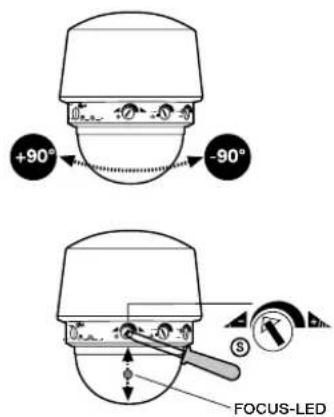
- Turning the sensor head horizontally by +/- 90^ (unlock sensor head first, see Fig. 6). The central position is indicated by the red arrow.
- Adjust the range for each sensor field by mechanically adjusting the internal lens mask (Fig. 7.2). The position is displayed optically by the red focus LED (Fig. 8). The RC 130i has 1 sensor, the RC 230i has 2 sensors and the RC 280i has 3.
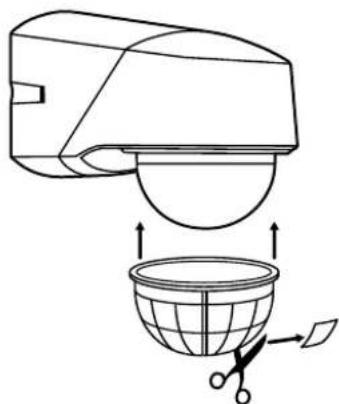
- Use of the supplied, customisable covering cap for masking specific areas (Fig. 9). Once the field of detection is set, turn the operation selector switch to " [RE] " to make the adjustments using the setting elements on the device, or to " Auto RG [RE]" to run the factory settings or to make other settings using the remote control.
5 • OPERATION/PROGRAMMING
Every time movement is detected the red focus LED briefly flashes twice. This function can be switched off (see section 6). Depending on the set light value, the motion detector will switch the system on for the on-period.
Setting element: operation selector switch (Fig. 7.1)

NB: The operation selector switch allows you to set the parameters for the device. You can either simply select the values using the setting elements (Fig. 7.3 and 7.4) on the device or use the factory settings, or the parameters set using the remote control. You can toggle the settings time; the defined values apply.
Test mode: See Test mode section
Manual mode 📋: Device operates according to the parameters set via the setting elements (Fig. 7.3 and 7.4) on the device.
Auto/RC mode Auto RC): Device operates according to the factory settings or the parameters defined using the remote control.
Factory settings
Set the operation selector switch (Fig. 7.1) to "Auto RC")". If no values have yet been defined with the remote control, the detector operates according to the factory settings. These consist of a fixed value for the on-period, the electronic setting for the range and the light value (2 min/max. electronic range/10 lux). The values can be individually modified using the remote control. To return settings to the original default values, press the Reset button (ensure that you are in programming mode) on the Mobil-RCi remote control.
Setting element: on-period (Fig. 7.3)
Adjustable on-period: impulse, 15 seconds – 16 minutes (up to 30 minutes via Mobil-RCi remote control). Impulse means that the device is activated for approx. 1 second followed by a break of 9 seconds in which no movement is detected. The red focus LED flashes twice for each sequence. After the break, a new sequence is triggered if motion is detected. This is suitable, for example, for controlling automatic stairwell lights or a doorbell.
Setting element: light value (Fig. 7.4)
The light value is infinitely variable between 2 - 2500 lux.
Setting element: range adjustment (Fig. 7.2)
Depending on the model, there are 1 to 3 setting elements. The controller for setting the range is independent of the operation selector switch setting. Range adjustment: from approx. 20 m – approx. 5 m.
6 • REMOTE CONTROL

NB: To be able to use the Mobil-RCi remote control, the operation selector switch must be set to "Auto RC!!" (Fig. 7.1). If the selector switch is set to "A(und RC)g" have not yet been input by remote control, the device will operate according to default factory s (10 lux/2 min/max. electronic range).
All settings programmed by remote control are permanently stored in the memory and will not be lost in the event of a power failure.
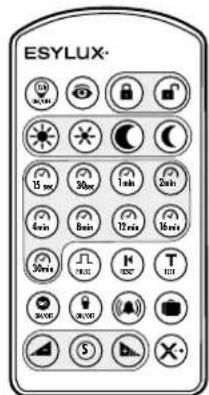
Using the Mobil-RCi and Mobil-RCi-M remote control (Fig. 10) the settings can be easily programmed without needing to climb a ladder or use any tools. For optimum reception, when programming the settings, point the remote control at the motion detector. Please note that if the sun shines directly on the sensor, the standard detection range of approx. 6 m may be dramatically reduced owing to the sun's infrared rays.
6.1 Acknowledgement of commands:
Red focus LED and blue LED flash twice alternately.
6.2 Standard functions/programming mode
There are basically two different options for entering values via the remote control.
Standard functions
These functions can be selected directly:
- Test mode
• Continuous lighting ON/OFF
• Storage of current light value
- Reset (resets the current modes)
• Master X (cancels the time setting)
- Programming mode
Extended functions
These functions can only be selected/set if the device is in programming mode (button ☐).
• Predefined light values
• Predefined time setting
- Impulse mode activation
- Holiday mode
- Alarm mode
• Anti-creep protection ON/OFF
- Focus LED ON/OFF
• Electronic range adjustment
- Reset (resets to factory settings)

NB: The special impulse, holiday and alarm mode functions cannot be used at the same time. aogram activated most recently is active.
| Button Function | |
| Opens programming modeIndicated by flashing focus LED.The set values are active once programming mode is closed ☑ or are automatically activated after 5 minutes. | |
| Closes programming mode | |
| Loaded test mode (LTM)During the test mode, the focus LED remains permanently on. Regardless of the ambient brightness, if motion is detected, the detector switches the device and the blue mode LED ON for 1 second and OFF for 2 seconds.Exit test mode by pressing the ☑ button.Load-free test mode (LFTM)During the test mode, the focus LED remains permanently on.Regardless of the ambient brightness, if motion is detected, the blue mode LED will switch ON for 1 second and OFF for 2 seconds. Exit test mode by pressing the ☑ button.→ | |
| NB: The load-free test mode (LFTM) function is deactivated in the factory settings. Activation or deactivation is only possible during the self-test. Switch the power supply on and press the button during the self-test. The load-free test mode (LFTM) function is now activated. To disable this function, press during self-test again the button or while the device is in programming mode the button (resets factory settings). | |
| Setting the light values (programming mode)Day and night operationThe sun is starting to set (approx. 100 lux)The sun is almost set (approx. 25 lux)Night operation (approx. 2 lux) | |
| Storing the current light valueStores the current light value. | |
| On-period (programming mode)Adjustable from 15 seconds to 30 minutes. | |
| Impulse mode (programming mode)Impulse means that the device is activated for 1 second followed by a break of 9 seconds in which no movement is detected. The red focus LED flashes twice for each sequence. After the break, a new sequence is triggered if motion is detected. This is suitable, for example, for controlling automatic stairwell lights or a doorbell. | |
| Continuous lighting ON/OFFSystem can be switched ON or OFF, independently of motion or ambient brightness, for 12 hours max.NB: To prevent tampering, the continuous lighting OFF function is disabled in the factory settings. Activation is only possible during the self-test. Switch the power supply on and press the button during the self-test. The continuous light OFF function is now enabled.To disable this function, press the button when the device is in programming mode. (Resets factory settings). |

 | Operating continuous lighting ON/OFFContinuous light mode OFF disabled - Every time thebuttonispressed, the light switches ON for 12 hours. Continuous light OFF enabled- Pressing thebuttononce switches the light ON for 12 hours. If thebuttonis pressed again, the light will switch OFF for 12 hours. Pressthebuttonagain to switch the light OFF - ON - OFF - ON.[2AXY]  [2068][X408] [2068][X408]  [ZB4X] [ZB4X] switchto automatic mode. switchto automatic mode. |
 |    [WHYZ] [WHYZ] [B5Z6] [B5Z6] inti-creep protection. inti-creep protection. |
 |    [AD0Z][SCCH][H3GZ][BBKW][SZB6]witch itn. The focus LED briefly lights up to indicate that it is active.[AD0Z][SCCH][H3GZ][BBKW][SZB6]knowledged by twoof the "blue mode" LED. [AD0Z][SCCH][H3GZ][BBKW][SZB6]witch itn. The focus LED briefly lights up to indicate that it is active.[AD0Z][SCCH][H3GZ][BBKW][SZB6]knowledged by twoof the "blue mode" LED. |
 [DH4][SHCT] [DH4][SHCT] [THXW][5XOZ] [THXW][5XOZ] [YAY7][TKXD][HBDC][ODXC][XYBD][ZT0Z][YBT7][207H][BD8T] [YAY7][TKXD][HBDC][ODXC][XYBD][ZT0Z][YBT7][207H][BD8T] | |
 | [2HWV]  [4OC2] [4OC2] [YY6S][KAYW][20HZ][TTXK][TSXK][DA7T][HD2B] [YY6S][KAYW][20HZ][TTXK][TSXK][DA7T][HD2B] [HYXZ][CAXD][CKAO][CKOX] [HYXZ][CAXD][CKAO][CKOX] [AO34][DXTT][DW49][KXS3][SDOK][BO23][SH8Z][KSH8Z] [AO34][DXTT][DW49][KXS3][SDOK][BO23][SH8Z][KSH8Z] the connected lighting for 1 to 8 hours once ahas been reached, regardless of whether motion isthis period of continuous lighting has elapsed, theres back to automatic mode. The process is repeatedadded each time the holiday mode button is pressed.rs is indicated by the blue mode LED. When thes pressed for the first time, the blue mode LED lightsperiod and is then briefly interrupted: this means 1holiday mode button is pressed for the second time,its up for a prolonged period and is then interruptedhours are set. This process continues up to a settingn is pressed for a ninth time the system returns to 1[604Z] the connected lighting for 1 to 8 hours once ahas been reached, regardless of whether motion isthis period of continuous lighting has elapsed, theres back to automatic mode. The process is repeatedadded each time the holiday mode button is pressed.rs is indicated by the blue mode LED. When thes pressed for the first time, the blue mode LED lightsperiod and is then briefly interrupted: this means 1holiday mode button is pressed for the second time,its up for a prolonged period and is then interruptedhours are set. This process continues up to a settingn is pressed for a ninth time the system returns to 1[604Z] |
| Once the required number of hours has been programmed, close programming mode to activate the function.To cancel, press the × button.To quit holiday mode, press the 🔒 button. | |
| ResetResets the device to automatic mode. This cancels alarm mode, holiday mode, impulse mode, test mode and the time setting.Reset - in programming mode 🔒 Resets the device to the default settings. Cancels all values set by remote control and resets all functions. The device operates according to the preset factory settings (10 lux/2 min/max. electronic range).NB: If the continuous lighting OFF function is to be used further, it must be enabled. | |
| Master XThis is used to activate the continuous lighting OFF function (see Continuous lighting ON/OFF) and to cancel the time settings. | |
| Electronic range adjustmentThis function electronically increases the range by +15 % or decreases it by -30 %. The Ⓤ button reinstates the basic settings. |
7 • PRACTICAL ADVICE
- Small animals, nearby trees or bushes moving in the wind may trigger the device.
- The detector's range can be dramatically reduced by objects moving towards it, rather than parallel with it.
8 • DISPOSAL

NOTE: this device must not be disposed of as unsorted household waste. Used devices must posed of correctly. Contact your local town council for more information.

9 • ESYLUX MANUFACTURER'S GUARANTEE
ESYLUX products are tested in accordance with applicable regulations and manufactured with the utmost care. The guarantor, ESYLUX Deutschland GmbH, Postfach 1840, D-22908 Ahrensburg, Germany (for Germany) or the relevant ESYLUX distributor in your country (visit www.esylux.com for a complete overview) provides a guarantee against manufacturing/material defects in ESYLUX devices for a period of three years from the date of manufacture.
This guarantee is independent of your legal rights with respect to the seller of the device. The guarantee does not apply to natural wear and tear, changes/interference caused by environmental factors or damage in transit, nor to damage caused as a result of failure to follow the user or maintenance instructions and/or as a result of improper installation. Any illuminants or batteries supplied with the device are not covered by the guarantee. The guarantee can only be honoured if the device is sent back with the invoice/receipt, unchanged, packed and with sufficient postage to the guarantor, along with a brief description of the fault, as soon as a defect has been identified.
If the guarantee claim proves justified, the guarantor will, within a reasonable period, either repair the device or replace it. The guarantee does not cover further claims; in particular, the guarantor will not be liable for damages resulting from the device's defectiveness. If the claim is unfounded (e.g. because the guarantee has expired or the fault is not covered by the guarantee), then the guarantor may attempt to repair the device for you for a fee, keeping costs to a minimum.
• TECHNICAL DATA
| MAINS VOLTAGE(RC 130i, RC 230i, RC 280i) | 230 V ~ 50 Hz |
| MAINS VOLTAGE (RC 230i UC) | 12 - 36 V = / 12 - 24 V ~ |
| FIELD OF DETECTION | RC 130i130° (1 x 130° can be set independently) and 360° creep zone protectionRC 230i / RC 230i UC230° (2 x 115° can be set independently) and 360° creep zone protectionRC 280i280° (3 x 95° can be set independently) and 360° creep zone protection |
| RANGE | approx. 20 m, at an installation height of 2.50 m |
| SETTINGS | Mechanically using the setting controls, electronically using the infrared remote control |
| SWITCHING CAPACITY(RC 130i, RC 230i, RC 280i) | 230 V ~ 50 Hz, 2300 W/10 A (cos φ = 1), 1150 VA/5 A (cos φ = 0,5) |
| SWITCHING CAPACITY (RC 230i UC) | 12 - 36 V = / 12 - 24 V ~, 10 A (cos φ = 1), 5 A (cos φ = 0,5) |
| MAX. INRUSH CURRENT | 100 A/250 μs |
| TIME SETTING | Impulse/approx. 15 seconds - 30 minutes |
| LIGHT EXPOSURE VALUE APPROX. | 2 - 2500 LUX |
| PROTECTION TYPE/CLASS | IP 54, II |
| TEST SYMBOL | TÜV Süd |
| OPERATING TEMPERATURE RANGE | -25 °C...+55 °C |
| CASING | UV-stabilised polycarbonate |
| COLOUR | white, similar to RAL 9010, brown, similar to RAL 8017, black, similar to RAL 9005, Stainless steel look |
| APPROX. DIMENSION | Width 78 mm, Height 105 mm, Depth 135 mm |
Technical and design features may be subject to change.
FR • NOTICE DE MONTAGE ET D'UTILISATION
4.2 Mode Test sans charge (TSC)

- • SAFETY INSTRUCTIONS
- • DESCRIPTION
- • INSTALLATION/ASSEMBLY/CONNECTION
- • START-UP AND SETTING
- Test mode
- Loaded test mode (LTM)
- Load-free test mode (LFTM)
- • OPERATION/PROGRAMMING
- Setting element: operation selector switch (Fig. 7.1)
- Factory settings
- Setting element: on-period (Fig. 7.3)
- Setting element: light value (Fig. 7.4)
- Setting element: range adjustment (Fig. 7.2)
- • REMOTE CONTROL
- Acknowledgement of commands:
- Standard functions/programming mode
- Standard functions
- Extended functions
- • PRACTICAL ADVICE
- • DISPOSAL
- • ESYLUX MANUFACTURER'S GUARANTEE
- FR • NOTICE DE MONTAGE ET D'UTILISATION
- Mode Test sans charge (TSC)
Brand : Esylux
Model : RC 280i
Category : Motion detector