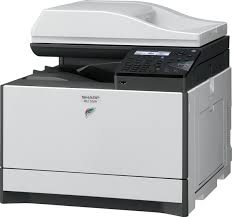
MXC250E/F/FE/MXC300E/W/WE - Printer SHARP - Free user manual and instructions
Find the device manual for free MXC250E/F/FE/MXC300E/W/WE SHARP in PDF.



User questions about MXC250E/F/FE/MXC300E/W/WE SHARP
0 question about this device. Answer the ones you know or ask your own.
Ask a new question about this device
Download the instructions for your Printer in PDF format for free! Find your manual MXC250E/F/FE/MXC300E/W/WE - SHARP and take your electronic device back in hand. On this page are published all the documents necessary for the use of your device. MXC250E/F/FE/MXC300E/W/WE by SHARP.
USER MANUAL MXC250E/F/FE/MXC300E/W/WE SHARP
DIGITAL FULL COLOUR MULTIFUNCTIONAL SYSTEM
STARTGUIDE
STARTGUIDE
| This guide explains important point to note for installation and usage. The Operation Guide for the machine is on the accompanying CD-ROM. View the Operation Guide when you use the machine after the initial setup is completed. Keep this manual close at hand for reference whenever needed. | English ...... 3 | |
| GUIDE DE DEMARRAGE | ||
| GUIA DE INICIO | Ce guide fournit des instructions importantes concernant l'installation et l'utilisation de cet apparéil. Le Mode d'emploi de la machine se trouve sur le CD-ROM. Consultez le Mode d'emploi lorsque vous utilisez la machine après la configuration initiale.Conservez ce guide à portée de main afin de vous y reporter ultérieurement en cas de besoin. | François ...... 7 |
| Esta guía presente observaciones importantes de instalación y uso. El Manual de instructriones de laística está incluideno el CD-ROM suministrado. Consulte el Manual de instructriones para utiliser laística una vez finalizada la configuración inicial.Mantenga estemanuala mano para consultarlo cuando lo necesse. | Espanol ...... 11 | |
| ERSTE SCHRITTE | ||
| GUIDA RAPIDA | Diette Anleitung erlautert wichtige Hinweise zur Installation und Verwendung. Das Bedienungshandbuch für das Gerät ist auf der CD-ROM im Lieferumfang enthalten.ufen Sie das Bedienungshandbuch auf,wenn Sie das Gerät verwenden, nachdem die erstek Konfiguration abgeschlossen ist.Bewahren Sie diese Anleitung in greifbarer Höhe auf, um bei Bedarf darin nachschlagen zu konnen. | Deutsch ...... 15 |
| La presente guía fornisce istruzioni importanti per l'installazione e l'utilizzo. Il Manuale diistruzioni della macchina si trova sul CD-ROM allegato. Visualizzare il Manuale di struczioni quando si utilizesza la macchina al termino della configurazione iniziale.Tenere il presente manuale a disposizione per la consultatione in caso di necessità. | Italiano ...... 19 | |
| INSTALLATIEHANDLEIDING | ||
| STARTHANDBOK | Deze handleiding bevat belangrijke informatie voor de installmenten en het gebruik. Bedieningshandleiding van het apparaat staat op de meegeleverde cd-rom. Raadpleeg debedieningshandleiding wanner u het apparaat gebruikt verder na de installment.Houd deze handleiding binnenhandbereik zodate u deze indien nodig kurz raadplegen. | Nederlandss.23 |
| Den här handboken beskriver viktiga punkter som bör observeras vid installation ochanvändning. Maskinen bruksanvising finns på den medfoljande cd-skivan.Läsbruksanvisningen nár du anvander maskinenfter det att den inledende inställningen ar klar.Fördara den här handboken på ett lättigganglist ställe sà att du kan anvanda den vid behov. | Svenska ...... 27 | |
| HURTIGVEILEDNING | ||
| ALOTUSOPAS | Denne hurtigveiledningen inneholder vigntig informasjon om installationsjon og bruuk av maskinen.Du finnerBrukerveiledningen for maskinen på den medfolgende CD-ROM-en. Slå opp ibrukervellinedningen nár du bruker maskinen erter at den inledende konfigurasjonen er fertig.Oppbevar这几个veiledningen på ett tilgengelig sted, sikat at du kan slå opp i den ved behov. | Norsk ...... 31 |
| Tämä opas sisälä tärkeitä asennusta ja käytöä koskevia huomautuksia. Laitteen käytöohjelöytyy mukana toimitetulta CD-ROM-levylä. Katso ohjeita käytöohjeesta, kun käytä laitetta alkuasennuksen jälleen.Sälytä tämä käytöopas tarpeen mukaan saatavilla. | Suomi ...... 35 | |
| STARTVEILEDNING | ||
| GUIA INICIAL | Denne veiledning forklarer vigtige punkter angäende installation og anvendelse. Driftsguidentil maskinenfindes pa den medfolgende cd. Se i Driftsguiden, nár du bruger maskinen, after atden første installation er udfør.Opbevar veiledningen i nærheden som reference, nár det er nødvendigt. | Dansk ...... 39 |
| Este guía aborda pontos importantes a ter em consideração durante a instalación eutilização.O Manual do Utilizador da mesma encontrar-se no CD-ROM forncido. Visualize o Manual doUtilizador quando utilizea a mesma depoié de conclusión a configuração inicial.Mantenha este manual fechado e acessível para utilizing como referencia sempre quenecessitar. | Portugués ... 43 | |
Symbols in this manual
To ensure safe use of the machine, this manual uses various safety symbols. The safety symbols are classified as explained below. Be sure you understand the meaning of the symbols when reading the manual.
Meaning of the symbols

CAUTION! HOT

PINCH POINT KEEP CLEAR
Power notes

WARNING

-
Be sure to connect the power cord only to a power outlet that meets the specified voltage and current requirements. Also make certain the outlet is properly grounded. Do not use an extension cord or adapter to connect other devices to the power outlet used by the machine. Using an improper power supply may cause fire or electrical shock.
-
For the power supply requirements, see the name plate on the left side of the machine.

Do not damage or modify the power cord.
Placing heavy objects on the power cord, pulling it, or forcibly bending it will damage the cord, resulting in fire or electrical shock.

Do not insert or remove the power plug with wet hands. This may cause electrical shock.

CAUTION

When removing the power plug from the outlet, do not pull on the cord. Pulling on the cord may cause damage such as wire exposure and breakage, and may result in fire or electrical shock.

If you will not use the machine for a long time, be sure to remove the power plug from the outlet for safety.

When moving the machine, switch off the main power and remove the power plug from the outlet before moving. The cord may be damaged, creating a risk of fire or electrical sh
Installation notes

CAUTION

Do not install the machine on an unstable or slanted surface. Install the machine on a surface that can withstand the weight of the machine.
Risk of injury due to the machine falling or toppling. If peripheral devices are to be installed, do not install on an uneven floor, slanted surface, or otherwise unstable surface. Danger of slippage, falling, and toppling. Install the product on a flat, stable surface that can withstand the weight of the product.

Do not install in a location with moisture or dust. Risk of fire and electrical shock.
If dust enters the machine, dirty output and machine failure may result.

Locations that are excessively hot, cold, humid, or dry (near heaters, humidifiers, air conditioners, etc.)
The paper will become damp and condensation may form inside the machine, causing misfeeds and dirty output.
If the location has an ultrasonic humidifier, use pure water for humidifiers in the humidifier. If tap water is used, minerals and other impurities will be emitted, causing impurities to collect on the inside of the machine and create dirty output.

Locations exposed to direct sunlight
Plastic parts may become deformed and dirty output may result.

Locations with ammonia gas
Installing the machine next to a diazo copy machine may cause dirty output.

Do not install the machine in a location with poor air circulation. A small amount of ozone is created inside the machine during printing.
The amount of ozone created is not sufficient to be harmful; however, an unpleasant odor may be noticed during large copy runs, and thus the machine should be installed in a room with a ventilation fan or windows that provide sufficient air circulation. (The odor may occasionally cause headaches.)
* Install the machine so that people are not directly exposed to exhaust from the machine. If installed near a window, ensure that the machine is not exposed to direct sunlight.

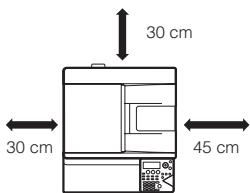
Near a wall
Be sure to allow the required space around the machine for servicing and proper ventilation. (The machine should be no closer than the distances indicated below from walls.)

Locations subject to vibration.
Vibration may cause failure

WARNING

CAUTION
Indicates a risk of death or serious injury
Indicates a risk of human injury or property damage.

PROHIBITED ACTIONS

DO NOT DISASSEMBLE

MANDATORY ACTIONS

CAUTION
- The machine should be installed near an accessible power outlet for easy connection.
- Connect the machine to a power outlet which is not used for other electric appliances. If a lighting fixture is connected to the same outlet, the light may flicker.
About consumables

CAUTION

Do not throw a toner cartridge into a fire. Toner may fly and cause burns.

Store a toner cartridge out of the reach of children.

Handling precautions

WARNING

Do not place a container of water or other liquid, or a metal object that might fall inside, on the machine. If the liquid spills or the object falls into the machine, fire or electrical shock may result.

Do not remove the machine casing. High-voltage parts inside the machine may cause electrical shock.

Do not make any modifications to this machine. Doing so may result in personal injury or damage to the machine.

Do not use a flammable spray to clean the machine. If gas from the spray comes in contact with hot electrical components or the fusing unit inside the machine, fire or electrical shock may result.

If you notice smoke, a strange odor, or other abnormality, do not use the machine. If used in this condition, fire or electrical shock may result. Immediately switch off the main power and remove the power plug from the power outlet Contact your dealer or nearest authorised service representative.

If a thunder storm begins, switch off the main power and remove the power plug from the outlet to prevent electrical shock and fire due to lightning.

If a piece of metal or water enters the machine, switch off the main power and remove the power plug from the power outlet. Contact your dealer or nearest authorised service representative. Using the machine in this condition may result in electrical shock or fire.

CAUTION

Do not look directly at the light source. Doing so may damage your eyes.

- Do not block the ventilation ports on the machine. Do not install the machine in a location that will block the ventilation ports.
- Blocking the ventilation ports will cause heat to build up in the machine, creating a risk of fire.

The fusing unit and paper exit area are hot. When removing a misfeed, do not touch the fusing unit and paper exit area. Take care not to burn yourself.

When loading paper, removing a misfeed, performing maintenance, closing the front and side covers, and inserting and removing trays, take care that your fingers are not pinched.
Laser information
| Wave length | 790 nm ± 10 nm |
| Pulse times | (9.97 μs ± 0.034 μs) / 7 mm |
| Output power | Max 0.6 mW (LD1 + LD2) |
Caution
Use of controls or adjustments or performance of procedures other than those specified herein may result in hazardous radiation exposure.
This Digital Equipment is CLASS 1 LASER PRODUCT (IEC 60825-1 Edition 2-2007).
Caution!
For complete electrical disconnection, pull out the main plug. The socket-outlet shall be installed near the equipment and shall be easily accessible.
Shielded interface cables must be used with this equipment to maintain compliance with EMC regulations.
The equipment should be installed near an accessible socket outlet for easy disconnection.
Each instruction also covers the optional units used with these products.
For the users of the fax function (for MX-C250F/C250FE/C300W/C300WE)
The declaration of conformity may be consulted at: http://www.sharp.de/doc/MX-C300W_MX-C300WE.pdf http://www.sharp.de/doc/MX-C250F_MX-C250FE.pdf
This equipment has been designed to work on the British analogue public switched telephone network.
This equipment has been tested according to the pan-European ES 203 021 regulation.
It will operate on all analogue telephone networks which comply with the ES 203 021.
Please contact your dealer or network operator, if you are not sure whether your network operates according to ES 203 021.
Important safety instructions
- If any of your telephone equipment is not operating properly, you should immediately remove it from your telephone line, as it may cause harm to the telephone network.
- Never install telephone wiring during a lightning storm.
- Never install telephone socket in wet locations unless the socket is specifically designed for wet locations.
- Never touch uninsulated telephone wires or terminals unless the telephone line has been disconnected at the network interface.
- Use caution when installing or modifying telephone lines.
- Avoid using a telephone (other than a cordless type) during an electrical storm. There may be a remote risk of electric shock from lightning.
- Do not use a telephone to report a gas leak in the vicinity of the leak.
- Do not install or use the machine near water, or when you are wet. Take care not to spill any liquids on the machine.
- Save these instructions.
Software licence
The SOFTWARE LICENCE will appear when you install the software from the CD-ROM. By using all or any portion of the software on the CD-ROM or in the machine, you are agreeing to be bound by the terms of the SOFTWARE LICENCE.
- The explanations in this manual assume that you have a working knowledge of your Windows or Macintosh computer.
- For information on your operating system, please refer to your operating system manual or the online Help function.
- The explanations of screens and procedures in this manual are primarily for Windows 7 in Windows® environments. The screens may vary depending on the version of the operating system.
- This manual contains references to the fax function. However, please note that the fax function is not available in some countries and regions.
- This manual contains explanations of the PC-Fax driver and PPD driver. However, please note that the PC-Fax driver and PPD driver are not available and do not appear on the software for installation in some countries and regions. In this case, please install the English version if you want to use these drivers.
- Considerable care has been taken in preparing this manual. If you have any comments or concerns about the manual, please contact your dealer or nearest authorised service representative.
- This product has undergone strict quality control and inspection procedures. In the unlikely event that a defect or other problem is discovered, please contact your dealer or nearest authorised service representative.
- Aside from instances provided for by law, SHARP is not responsible for failures occurring during the use of the product or its options, or failures due to incorrect operation of the product and its options, or other failures, or for any damage that occurs due to use of the product.

Products that have earned the ENERGY STAR® are designed to protect the environment through superior energy efficiency.
The products that meet the ENERGY STAR® guidelines carry the ENERGY STAR® logo.
The products without the logo may not meet the ENERGY STAR® guidelines.
This product is designed for commercial application only and as such it falls outside the scope of Regulation (EC) 1275/2008 implementing EU Directive 2005/32/EC on eco-design requirements for standby and off mode electric power consumption. Sharp does not recommend the product for domestic application and will not accept any liability for such use.
Warranty
While every effort has been made to make this document as accurate and helpful as possible, SHARP Corporation makes no warranty of any kind with regard to its content. All information included herein is subject to change without notice. SHARP is not responsible for any loss or damages, direct or indirect, arising from or related to the use of this operation manual. © Copyright SHARP Corporation 2013. All rights reserved. Reproduction, adaptation or translation without prior written permission is prohibited, except as allowed under copyright laws.
Material safety data sheet
The MSDS (Material Safety Data Sheet) can be viewed at the following URL address: http://www.sharp-world.com/corporate/info/index.html
Wireless LAN (for MX-C300W/C300WE)
The communication range of wireless LAN may shorten or communication may not be possible in some usage environments, due to shielding materials, the installation location, the effects of ambient radio noise, data transmission speed, and other factors.
Notice for users in the UK
MAINS PLUG WIRING INSTRUCTIONS
The mains lead of this equipment is already fitted with a mains plug which is either a non-rewireable (moulded) or a rewireable type. Should the fuse need to be replaced, a BSI or ASTA approved fuse to BS1362 marked or and of the same rating as the one
removed from the plug must be used. Always refit the fuse cover after replacing the fuse on the moulded plug. Never use the plug without the fuse cover fitted. In the unlikely event of the socket outlet in your home not being compatible with the plug supplied either cut-off the moulded plug (if this type is fitted) or remove by undoing the screws if a rewireable plug is fitted and fit an appropriate type observing the wiring code below.
DANGER: The fuse should be removed from the cut-off plug and the plug destroyed immediately and disposed of in a safe manner. Under no circumstances should the cut-off plug be inserted elsewhere into a 13A socket outlet as a serious electric shock may occur.
To fit an appropriate plug to the mains lead, follow the instructions below:
IMPORTANT: The wires in this mains lead are coloured in accordance with the following code:
GREEN-AND-YELLOW: BLUE: BROWN:
Earth Neutral Live
As the colours of the wires in this mains lead may not correspond with coloured markings identifying the terminals in your plug, proceed as follows: The wire which is coloured GREEN-AND-YELLOW must be connected to the terminal in the plug which is marked with the letter E, or by the safety earth symbol ± , or coloured green or greenand-yellow. The wire which is coloured BLUE must be connected to the terminal which is marked with the letter N or coloured black.
The wire which is coloured BROWN must be connected to the terminal which is marked with the letter L or coloured red. If you have any doubt, consult a qualified electrician.
WARNING: THIS APPARATUS MUST BE EARTHED.
Noise emission
Noise emission values
The following shows noise emission values as measured according to ISO7779.
Sound power level LwAd
| MX-C250E/F/FE | MX-C300E/W/WE | |
| Operating (continuous printing) | 7.07 B | 7.06 B |
| Standby mode (Low power level mode) | - | - |
Sound pressure level L_pAm
| MX-C250E/F/FE | MX-C300E/W/WE | ||
| Operating (continuous printing) | Bystander positions | 55 dB | 55 dB |
| Standby mode | Bystander positions | - | - |
- Operating: with option MX-CS11.
- Standby: " -" = less than background noise.
Supplies
- Standard supplies for this product that can be replaced by the user include paper and toner cartridges.
- Be sure to use only SHARP-specified products for the toner cartridges and transparency film.

GENUINE SUPPLIES
For best copying results, be sure to use only Sharp Genuine Supplies which are designed, engineered, and tested to maximize the life and performance of Sharp products. Look for the Genuine Supplies label on the toner package.
Storage of supplies Proper storage
- Store the supplies in a location that is:
clean and dry,
- at a stable temperature,
not exposed to direct sunlight.
- Store paper in the wrapper and lying flat.
- Paper stored in packages standing up or out of the wrapper may curl or become damp, resulting in paper misfeeds.
Storing toner cartridges
Store a new toner cartridge box horizontally with the top side up. Do not store a toner cartridge standing on end. If stored standing on end, the toner may not distribute well even after shaking the cartridge vigorously, and will remain inside the cartridge without flowing out.
Supply of spare parts and consumables
The supply of spare parts for repair of the machine is guaranteed for at least 7 years following the termination of production. Spare parts are those parts of the machine which may break down within the scope of the ordinary use of the product, whereas those parts which normally exceed the life of the product are not to be considered as spare parts. Consumables too, are available for 7 years following the termination of production.
Information on Disposal for Users (private households)
Attention: Your product is marked with this symbol. It means that used electrical and electronic products should not be mixed with general household waste. There is a separate collection system for these products.
In the European Union
Attention: If you want to dispose of this equipment, please do not use the ordinary dust bin! Used electrical and electronic equipment must be treated separately and in accordance with legislation that requires proper treatment, recovery and recycling of used electrical and electronic equipment. Following the implementation by member states, private households within the EU states may return their used electrical and electronic equipment to designated collection facilities free of charge. In some countries

your local retailer may also take back your old product free of charge if you purchase a similar new one.
- Please contact your local authority for further details. If your used electrical or electronic equipment has batteries or accumulators, please dispose of these separately beforehand according to local requirements. By disposing of this product correctly you will help ensure that the waste undergoes the necessary treatment, recovery and recycling and thus prevent potential negative effects on the environment and human health which could otherwise arise due to inappropriate waste handling.
In other Countries outside the EU
If you wish to discard this product, please contact your local authorities and ask for the correct method of disposal. For Switzerland: Used electrical or electronic equipment can be returned free of charge to the dealer, even if you don't purchase a new product. Further collection facilities are listed on the homepage of www.swico.ch or www.sens.ch.
Information on Disposal for Business Users
In the European Union
If the product is used for business purposes and you want to discard it: Please contact your SHARP dealer who will inform you about the take-back of the product. You might be charged for the costs arising from take-back and recycling. Small products (and small amounts) might be taken back by your local collection facilities. For Spain: Please contact the established collection system or your local authority for take-back of your used products.
In other Countries outside the EU
If you wish to discard of this product, please contact your local authorities and ask for the correct method of disposal.
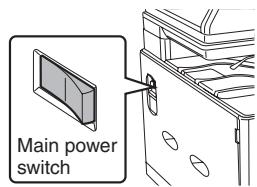
Turning the power on and off
Turning on the power
Switch the main power switch to the " | " position.
Turning off the power
Switch the main power switch to the “O” position.
- Before switching off the main power switch, make sure that the data indicator and the line indicator are off on the operation panel.
- When using the fax function, always keep the main power switch in the "on" position.
Operation manuals
The instructions for this manual are separated in the following three sections.
Before using the machine Start Guide: this manual
This section explains precautions to ensure safe usage, part names and how to switch on/off the power. This section also includes important information for persons that are responsible for the maintenance of this machine.
Read this section before using the machine for the first time.
Printing and faxing from a computer Software Setup Guide (PDF)
This section explains how to install the various drivers needed when using this machine as a printer, network scanner, or fax machine. Read this section when using this machine from a computer.
Directions for use
Operation Guide (PDF)
Information on the copier, fax, and other various functions that this machine provides have been compiled into a PDF file called [Operation Guide]. Read the Operation Guide to learn how to use this machine, when you want to know more about its functions, or when you have trouble operating it.
How to read the Operation Guide
The Operation Guide on the accessory CD-ROM provides detailed instructions for operating the machine. The Operation Guide is provided in PDF format. Insert the supplied CD-ROM into your CD-ROM drive. CD-ROM will run automatically.
If it does not start automatically, double-click the CD-ROM icon or display the contents of the CD-ROM and double-click "index.html".
To view the manual in PDF format, Acrobat Reader or Adobe Reader of Adobe Systems Incorporated is required. If neither program is installed on your computer, the programs can be downloaded from the following URL: http://www.adobe.com/
System settings password
A password is necessary to change the machine's system settings using administrator authority. System settings can be changed from either the operation panel or using a computer web browser. After setting up the machine, refer to [SYSTEM SETTINGS] in the Operation Guide to set a new password.
Password for logging in from this machine
The factory default password for the machine is "00000".
- Password for logging in from a computer
There are two accounts that can log in from a web browser: "Administrator" and "User". The factory default passwords for each account are shown on the right side. Signing in as an "Administrator" will allow you to manage all the settings available via web browser.
| Account | Password | |
| User | users | users |
| Administrator | admin | admin |

Please take care not to forget newly set administrator passwords.
BasicSpecifications/Copierspecifications
| Model | MX-C250E/MX-C250F/MX-C250FE MX-C300E/MX-C300W/MX-C300WE |
| Type | Desktop |
| Colour | Full colour |
| Copier system | Laser electrostatic copier |
| Scanning resolution | Scan: (Document glass) 600 × 600 dpi, 600 × 400 dpi (Document Feeder) 600 × 600 dpi, 600 × 300 dpi Print: 600 × 600 dpi |
| Gradation | Scan: 256 levels / Print: equivalent to 256 levels |
| Original paper sizes | Max. A4 (8-1/2"×11") / sheets, bound documents |
| Copy sizes | A4 to A5 (8-1/2"×14" to 5-1/2" × 8-1/2"), Transparency film, Heavy paper, Envelopes Tray 1-2: A4, B5, A5, 8-1/2" × 11", 7-1/4 × 10-1/2", 5-1/2" × 8-1/2" Multi-bypass tray: 216 mm × 356 mm (8-1/2" × 14") to A6, Transparency film, Heavy paper, Envelopes Lost margin (leading edge): 4 mm (11/64") ± 1 mm (± 3/64")Lost margin: (trailing edge): 2 mm (6/64") - 5 mm (- 13/64")Leading edge / trailing edge: total 8 mm (21/64") or lessNear edge / far edge: total 8 mm (21/64") or less |
| Warm-up time | 29 seconds ● This may vary depending on the ambient conditions. |
| First-copy time | B/W: 10 seconds Colour: 18 seconds ● This may vary depending on the state of the machine. ● Portrait feeding of A4 (8-1/2" × 11") sheets. |
| Continuous copying speeds* | MX-C250E/C250F/C250FE 25 copies/min. MX-C300E/C300W/C300WE 30 copies/min. * Continuous speed for same original source. Output may be temporarily interrupted to stabilize image quality. |
| Copy rations | Same size: 1:1 ± 0.8 %Enlarge: 115 %, 122 %, 141 %, 200% Reduce: 50 %, 70 %, 81 %, 86% Zoom range: 25 to 400 % (25 - 200 % using SPF/RSPF) in 1 % increments, total 376 increments. |
| Paper feed / capacity | 250 sheets in one tray plus 50-sheet multi-bypass tray ● Using 80 g/m² (21 lbs.) weight paper |
| Max. paper feed / max. capacity | 750 sheets in 2 trays plus 50-sheet multi-bypass tray ● Using 80 g/m² (21 lbs.) weight paper |
| Continuous copy | Max. 999 copies |
| Memory | 512 MB |
| Ambient environment | 10 °C (54 °F) to 35 °C (91 °F) (20 % to 60 % RH) 10 °C (54 °F) to 30 °C (86 °F) (85 % RH) |
| Required power supply | Local voltage ± 10 % (For the power supply requirements, see the name plate on the left side of the machine.) Power consumption Max. 1150 W (220-240 V) (including options such as the desk) |
| Dimensions | MX-C250E/C250F/C250FE: 429 mm (W) × 509 mm (D) × 398 mm (H) (16-57/64" (W) × 20-3/64" (D) × 15-43/64" (H)) MX-C300E/C300W/C300WE: 429 mm (W) × 509 mm (D) × 421 mm (H) (16-57/64" (W) × 20-3/64" (D) × 16-37/64" (H)) |
| Weight | MX-C250E/C250F/C250FE: Approx. 28 kg (61.8 lbs.) MX-C300E/C300W/C300WE: Approx. 29 kg (64.0 lbs.) |
| Overall dimensions | 640 mm (W) × 509 mm (D) (25-13/64" (W) × 20-3/64" (D)) (With multi-bypass tray extended) |
Automatic document feeder
| Document feeder types | MX-C250E/C250F/C250FE: Single Pass Feeder (SPF) MX-C300E/C300W/C300WE: Reversing Single Pass Feeder (RSPF) |
| Original paper sizes | A4 to A5 (8-1/2" × 14" to 5-1/2" × 8-1/2"), Business card (MX-C300E/C300W/C300WE only: 51 × 89 mm to 55 × 91 mm (2" × 3-1/2" to 2-1/6" × 3-19/32")) |
| Original paper types | 50 g/m2(13 lbs. bond) to 105 g/m2(28 lbs. bond) |
| Paper storage capacity | MX-C250E/C250F/C250FE: 35 sheets (80 g/m2(21 lbs.)) MX-C300E/C300W/C300WE: 50 sheets (80 g/m2(21 lbs.)) MX-C300E/C300W/C300WE: Business card capacity up to 25 sheets (0.2mm (0.008") thickness) or maximum 6.5mm (0.266") stacking height |
| Scan speed (copy) | B/W: 18 one-sided sheets/minute (A4, 600 × 300 dpi) Colour: 9 one-sided sheets/minute (A4, 600 × 300 dpi) |
Drawer (Optional)
| Model | 500-sheet paper feed unit (MX-CS11) |
| Paper sizes | A4, B5, A5, 8-1/2" × 11", 7-1/4" × 10-1/2", 5-1/2" × 8-1/2" |
| Useable paper | 60 g/m2(16 lbs. bond) to 105 g/m2(28 lbs. bond) |
| Paper capacity | 500 sheets ● Using 21 lbs. (80 g/m2) weight paper |
| Dimensions | 427 mm (W) × 505 mm (D) × 151 mm (H) (16-13/16" (W) × 19-57/64" (D) × 5-61/64" (H)) |
| Weight | Approx. 5 kg (11.1 lbs.) |
Fax Specifications
| Model | MX-C250F/C250FE/MX-C300W/C300WE |
| Useable lines | General phone lines (PSTN), automated branch exchange (PBX) |
| Connection speed | Super G3: 33.6 kbps, G3: 14.4 kbps |
| Coding method | MH, MR, MMR, JBIG |
| Connection mode | Super G3 / G3 |
| Original paper sizes for transmission | A4 (8-1/2" × 11") (Paper with a max. length of 500 mm can be transmitted (one-sided only).) |
| Registered paper size | A4, B5, A5, 8-1/2" × 11", 7-1/4" × 10-1/2", 5-1/2" × 8-1/2" |
| Transmission time | Approx. 2 seconds * (A4 (8-1/2" × 11") Sharp standard paper, normal characters, Super G3 (JBIG)) |
| Memory | 8 MB |
| Notes | Auto dial memory Max. 300 entries (Including group dialling for fax) |
- Complies with the 33.6 kbps transmission method for Super G3 facsimiles standardized by the International Telecommunications Union (ITU-T). This is the speed for when sending an A4 (8 - 1 / 2^n × 11^n) size piece of paper of around 700 characters at standard image quality (8 × 3.85 line/mm) in Hi-speed mode (33.6 kbps). This is the transmission speed for image information only and does not include time for transmission control. The actual time needed for a transmission depends on the content of the text, type of receiving fax machine, and telephone line conditions.
Network Printer Specifications
| Continuous print speed | Same as continuous copy speed |
| Resolution | Data processing: 600 × 600 dpi Print: 600 × 600 dpi |
| Page description language | Standard: PCL6 emulation, PS3 emulation |
| Compatible protocols | TCP/IP (IPv4/IPv6) |
| Compatible OS | Windows XP, Windows Server 2003, Windows Vista, Windows Server 2008, Windows 7, Windows 8, Windows Server 2012 Macintosh (Mac OS X 10.4, 10.5, 10.6, 10.7, 10.8) |
| Internal fonts (options) | 80 fonts for PCL, 136 fonts for PS3 emulation |
| Interface | 10BASE-T/100BASE-TX, USB 2.0 (high speed mode) |
Network Scanner Specifications
| Type | Colour scanner |
| Scan resolution | 100 dpi, 150 dpi, 200 dpi, 300 dpi, 400 dpi600 dpi (push scan)50 to 9,600 dpi *1 (pull scan) |
| Interface | 10BASE-T/100BASE-TX, USB 2.0 (during USB memory scanning) |
| Compatible protocols | TCP/IP (IPv4) |
| Compatible OS *2 | Pull scan (TWAIN)Windows XP, Windows Server 2003, Windows Vista,Windows Server 2008, Windows 7, Windows 8,Windows Server 2012 |
| Output format | (B/W)TIFF, PDFCompression method: decompression, G3 (MH), G4 (MMR)(Grey scale/colour)TIFF, PDF, JPEG (high, mid, and low compression) |
| Driver | TWAIN compliant |
1 You must decrease the scan size when increasing the resolution.
2 There are cases when a connection cannot be established. Please contact your local dealer for more information.
Wireless LAN Specifications
| Model | MX-C300W/C300WE |
| Type | Built-in type |
| Compliance standards | IEEE802.11n/g/b |
| Transmission method | OFDM (IEEE 802.11n/g), DS-SS (IEEE 802.11b) |
| Frequency band / channels | IEEE802.11n/g/b: 2.4 GHz (1 - 13 ch) |
| Transmission speed (value of standard) * | IEEE802.11n max. 150 Mbps IEEE802.11g max. 54 Mbps IEEE802.11b max. 11 Mbps |
| Security | WEP, WPA Personal, WPA2 Personal |
- The indicated values are maximum theoretical values for the Wireless LAN Standard. The values do not indicate actual data transmission speeds.
MISE SOUS TENSION ET HORS TENSION
Symbole in thisem Handbuch
LAN wireless (per MX-C300W/C300WE)
AFKNELPUNT
VRIJ HOUDEN
Specifications networkkprinter
Specifications networkscanner
| Type | Kleurencsampler |
| Scanresolutie | 100 dpi, 150 dpi, 200 dpi, 300 dpi, 400 dpi600 dpi (push scan)50 to 9,600 dpi *1 (pull scan) |
| Interface | 10BASE-T/100BASE-TX, USB 2.0 (bij scan van USB-geheugen) |
| Compatible protocollen | TCP/IP (IPv4) |
| Compatible besturingsystemen *2 | Pull scan (TWAIN)Windows XP, Windows Server 2003, Windows Vista,Windows Server 2008, Windows 7, Windows 8,Windows Server 2012 |
| Uitvoerformaat | (B/W)TIFF, PDFCompressiemethode: decompression, G3 (MH), G4 (MMR)(Grijstinten/kleur)TIFF, PDF, JPEG (hoge, gemiddelde en lage compressie) |
| Stuurprogramma | TWAIN-compatible |
High-voltage parts inside the machine may cause electrical shock.

Doing so may result in personal injury or damage to the machine.

Använd inte brandfarlig spray für att rengörä maskinen. If gas from the spray comes in contact with hot electrical components or the fusing unit inside the machine, fire or electrical shock may result.

Information on Disposal for Business Users
Inom EU
Network Printer Specifications
| Kontinuierlig utskriftshastigkeit | Samma som kontinuierlig kopieringshastigkeit |
| Upplösning | Databearbetning: 600 × 600 dpi Utskrift: 600 × 600 dpi |
| Sidbeskrivningsspråk | Standard: PCL6-emulering, PS3-emulering |
| Kompatibla protokoll | TCP/IP (IPv4/IPv6) |
| Kompatibla operativsystem | Windows XP, Windows Server 2003, Windows Vista, Windows Server 2008, Windows 7, Windows 8, Windows Server 2012 Macintosh (Mac OS X 10.4, 10.5, 10.6, 10.7, 10.8) |
| Inbygda teckensnitt (tilval) | 80 teckensnitt für PCL, 136 teckensnitt für PS3-emulering |
| Gränssnitt | 10BASE-T/100BASE-TX, USB 2.0 (High-Speed-läge) |
Passord for systeminnstilling
Basic Specifications/Copiers specifications
Password for systemindstlinger
Det er不同程度 med et password for at ândre maskinens systemmindstillinger med administratortrottigheder. Systemmindstilingerne kan ândres enten fra betjeningspanelet ether via en computers webbrowser. När maskinen er opsat, skal du se i [SYSTEMMINDSTILLINGER] i Driftsguide for at indstille et nyt password.
Sorg for icke at glemme de nye administratorpasswords.
Basic Specifications/Copiers specifications
| Model | MX-C250E/MX-C250F/MX-C250FE MX-C300E/MX-C300W/MX-C300WE |
| Type | Desktop |
| Farve | Fuldfarve |
| Kopieringssystem | Elektrostatisk laserkopimaskine |
| Scanningsoplosning | Scan: (Glasruden) 600 × 600 dpi, 600 × 400 dpi (Dokument-Feeder) 600 × 600 dpi, 600 × 300 dpi Print: 600 × 600 dpi |
| Graddeling | Scan: 256 niveauer / Print: svarende til 256 niveauer |
| Originale papirformater | Maks. A4 (8-1/2"×11") / ark, indbundne dokumenter |
| Kopiformater | A4 til A5 (8-1/2"×14" til 5-1/2" × 8-1/2"), Overheadfilm, Kraftigt papir, Konvolutter Bakke 1-2: A4, B5, A5, 8-1/2" × 11", 7-1/4 × 10-1/2", 5-1/2" × 8-1/2" Multi-bypass bakke: 216 mm × 356 mm (8-1/2" × 14") til A6, Overheadfilm, Kraftigt papir, Konvolutter Mistet margen (forkant): 4 mm (11/64") ± 1 mm (± 3/64") Mistet margen: (bagkant): 2 mm (6/64") - 5 mm (- 13/64") Forkant / bagkant: Samlet 8 mm (21/64") oeller minde Nærmeste kant: Samlet 8 mm (21/64") fjerneste kant |
| Opvarmingstid | 29 sekunder • Dette kan variere afhängigt af omgivelsesforholdene. |
| Tid inden første kopi | S/H: 10 sekunder Farve: 18 sekunder • Det kan variere afhängigt af maskinens tilstand. • Fremføring af A4-ark (8-1/2" × 11") i stående retning. |
| Hastigheder for kontinueregkoping* | MX-C250E/C250F/C250FE 23 kopier/min. MX-C300E/C300W/C300WE 23 kopier/min. * Kontinuereg hastighed for fremme originale kilde. Udskrivning kan midertidigt afbydes for at stabilisere billedkvalitet. |
| Kopieringsrationer | Samme størrelse: 1:1 ± 0.8% Forstør: 115%, 122%, 141%, 200% Reduceur: 50%, 70%, 81%, 86% Zoominterval: 25 til 400% (25 - 200% med RSPF) i 1% intervaller, samlet 376 intervaller. |
| Papirmagasin / kapacitet | 250 ark i en bakke plus 50-ark specialbakke • Med 80 g/m² (21 lbs.) papirvægt |
| Maks. papimagasin / maks. kapacitet | 750 ark i 2 bakker plus 50-ark specialbakke • Med 80 g/m² (21 lbs.) papirvægt |
| Kontinuereg kopi | Maks. 999 kopier |
| Hukommelse | 512 MB |
| Omgivende miljø | 10 °C (54 °F) til 35 °C (91 °F) (20 % til 60 % RH) 10 °C (54 °F) til 30 °C (86 °F) (85 % RH) |
| Krævet strømforsyning | Lokal spending ±10% (se yderligere oplysninger om strømforsyningskrav på navneskitet i vindestre hjørne på maskinen.) Strømforbrug. Maks. Maks. 1150 W (220-240 V) (inklusiv muligheder, f.eks. modulet) |
| Mål | MX-C250E/C250F/C250FE: 429 mm (W) × 509 mm (D) × 398 mm (H) (16-57/64" (W) × 20-3/64" (D) × 15-43/64" (H)) MX-C300E/C300W/C300WE: 429 mm (W) × 509 mm (D) × 421 mm (H) (16-57/64" (W) × 20-3/64" (D) × 16-37/64" (H)) |
| Vægt | MX-C250E/C250F/C250FE: Cirka. 28 kg (61,8 lbs.) MX-C300E/C300W/C300WE: Cirka. 29 kg (64,0 lbs.) |
| Udvendigeål | 640 mm (W) × 509 mm (D) (25-13/64" (W) × 20-3/64" (D)) (Med udvidet specialbakke) |