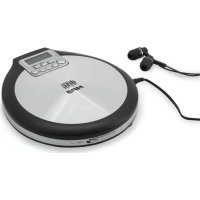
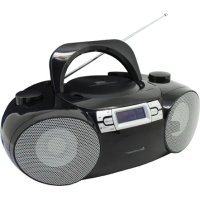
CD9250 - Cd player/recorder Soundmaster - Free user manual and instructions
Find the device manual for free CD9250 Soundmaster in PDF.



| Product type | Portable CD player/recorder |
| Brand | Soundmaster |
| Model | CD9250 |
| Mains power supply | 100-240 V AC, 50/60 Hz, 150 mA; output 5 V DC / 1 A (adapter included) |
| Battery power | 2 AA (LR6/UM3) standard or alkaline batteries, 3 V DC in series |
| Rechargeable batteries | 2 Ni-MH AA batteries, 1.2 V, 1300 mAh recommended |
| Battery life | 6 to 8 hours (alkaline batteries) |
| Charging time | Approximately 12 hours at 500 mA |
| Compatible disc formats | Audio CD, CD-R, CD-RW (finalized), MP3/WMA CD |
| Playback functions | Play, pause, forward/back skip, search, repeat (track/disc), intro, shuffle, program (20 tracks), resume |
| Anti-skip system | ESP (Electronic Skip Protection) enabled by default, can be disabled in CD audio mode |
| Equalizer | X-BASS (bass enhancement) |
| Volume | Gradual adjustment + HI VOL mode to exceed safety limit |
| Headphone output | 3.5 mm jack |
| Headphone output power | 2 x 2.8 V DC, 500 mA (max) |
| Key lock | HOLD function (switch on top) |
| Dimensions (approx.) | Not specified in manual, estimated: 14 x 14 x 3 cm |
| Weight (approx.) | Not specified, estimated: 300 g (without batteries) |
| Operating temperature | 0 to 45 °C |
| Storage temperature | -20 to 35 °C |
| Cleaning | Soft lint-free cloth slightly damp; no detergents or abrasives |
| Maintenance | Do not open; refer to qualified professional |
| Laser safety | Class 1 laser |
| Importer | Wörlein GmbH, Gewerbestrasse 12, 90556 Cadolzburg, Germany |
Frequently Asked Questions - CD9250 Soundmaster
User questions about CD9250 Soundmaster
0 question about this device. Answer the ones you know or ask your own.
Ask a new question about this device
Download the instructions for your Cd player/recorder in PDF format for free! Find your manual CD9250 - Soundmaster and take your electronic device back in hand. On this page are published all the documents necessary for the use of your device. CD9250 by Soundmaster.
USER MANUAL CD9250 Soundmaster
- RESUME HOLD OFF Switch
Do not dispose of this product with the normal household waste at the end of its life cycle. Return it to a collection point for the recycling of electrical and electronic devices. This is indicated by the symbol on the product, user manual or packaging
The materials are reusable according to their markings. By reusing, recycling or other forms of utilization of old devices you make an important contribution to the protection of our environment.
Please contact your local authorities for details about collection points.
| 警告 | WARNING | |
| Risk of electric shock Do not open! | ||
| Caution: To reduce the risk of electric shock, do not remove the cover (or back). There are no user serviceable parts inside. Refer servicing to qualified service personnel. | ||

This symbol indicates the presence of dangerous voltage inside the enclosure, sufficient enough to cause electric shock.

This symbol indicates the presence of important operating and maintenance instructions for the device
Used batteries are hazardous waste and NOT to be disposed of with the household waste! As a consumer you are legally obligated to return all batteries for environmentally responsible recycling - no matter whether or not the batteries contain harmful substances*)
Return batteries free of charge to public collection points in your community or shops selling batteries of the respective kind.
Only return fully discharged batteries
*) marked Cd = cadmium, Hg = mercury, Pb = lead
- Only use mercury and cadmium-free batteries.
- Used batteries are hazardous waste and NOT to be disposed of with the household waste!!!
- Keep batteries away from children. Children might swallow batteries.
- Contact a physician immediately if a battery was swallowed.
- Check your batteries regularly to avoid battery leakage.
- Batteries shall not be exposed to excessive heat such as sunshine, fire or the like.
- CAUTION: Danger of explosion if battery is incorrectly replaced
- Replace only with the same or equivalent type
CAUTION - INVISIBLE LASER RADIATION WHEN OPENING THE COVER OR PRESSING THE SAFETY INTERLOCK. AVOID EXPOSURE TO THE LASER BEAM.
To prevent possible hearing damage, do not listen at high volume levels for long periods
- Use the device in dry indoor environments only.
- Protect the device from humidity.
- This apparatus is for moderate climates areas use, not suitable for use in tropical climates countries.
Safety, Environmental and Setup Instructions
- No objects filled with liquids, such as vases, shall be placed on the apparatus.
- The mains plug or an appliance coupler is used as the disconnect device, the disconnect devices shall remain readily operable.
- Connect this device to a properly installed and earthed wall outlet only. Make sure the mains voltage corresponds with the specifications on the rating plate.
- Make sure the mains cable stays dry during operation. Do not pinch or damage the mains cable in any way.
- A damaged mains cable or plug must immediately be replaced by an authorized service center.
- In case of lightning, immediately disconnect the device from the mains supply.
Children should be supervised by parents when using the device. - Clean the device with a dry cloth only.
- Do NOT use CLEANING AGENTS or ABRASIVE CLOTHS!
- Do not expose the device to direct sunlight or other heat sources.
- Install the device at a location with sufficient ventilation in order to prevent heat accumulation.
- Do not cover the ventilation openings!
- Install the device at a safe and vibration-free location.
- Install the device as far away as possible from computers and microwave units; otherwise radio reception may be disturbed.
- Do not open or repair the enclosure. It is not safe to do so and will void your warranty. Repairs only by authorized service/ customer center.
- No naked flame sources, such as lighted candles, should be placed on the unit.
- When you are necessary to ship the unit store it in its original package. Save the package for this purpose.
- In case of malfunction due to electrostatic discharge or fast transient (burst), remove and reconnect the power supply.
- If the unit is not using for a long period of time, disconnect it from the power supply by unplugging the power plug. This is to avoid the risk of fire.
LOCATION OF CONTROLS
- LCD
Display
-
Battery charging indicator
-
ESP
Turns on/off ESP (Electronic Skip Protection)
- Play Pause
switches the player on, starts or pauses playback.
- 5V DC
jack for connecting external power supply.
- RESUME HOLD OFF Switch
Enable resume function locks all buttons switch off HOLD and RESUME.
- Phones
3.5mm headphone jack to connect the headphones.
- Vol
adjusts the volume
- X-BASS HI VOL
selects the bass enhancement switch off Volume restriction
- ALBUM
selects next album
- TOP
stop playback, clears a program or switches the player off
12.
skips and searches backward or forward
13.PROG/MODE
PROG: program tracks, reviews the program.
MODE: selects the different playing possibilities: REPEAT and RANDOM
-
CD DOOR
-
OPEN
opens the CD lid.
-
Battery compartment
-
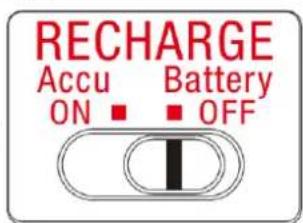
Recharge ON/OFF
ON: when using adaptor, recharge the rechargeable batteries.
OFF: when using adaptor, switch off for standard/conventional batteries.
BATTERIES (Not supplied)

Attention

On operation with standard/conventional batteries, that the charging switch
"RECHARGE" (17) slide to OFF position. Otherwise the batteries may become hot and may explode.
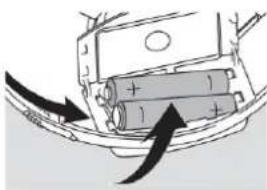
Inserting batteries
Open the battery compartment and insert either 2 normal or alkaline batteries type AA (LR6, UM3).
Old and new or different types of batteries should not be combined.
Don't use petrol, alcohol or other abrasive cleansers to clean the exterior.
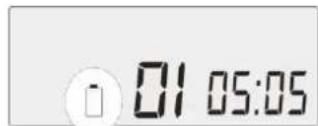
Indication of empty batteries
Replace the battery or connect the mains adapter as soon as battery icon appeared.
Remove batteries if they are empty or if the unit will not be used for a long time.
Batteries contain chemical substances, so they should be disposed of properly.
POWER SUPPLY / GENERAL INFOMATION
Only use the provided mains adapter (5V/1A) micro USB jack. Any other product may damage the set.

Attention

Slide the charging switch to OFF position if using normal batteries.
Connect the mains adapter to 5V DC on the set and to the wall outlet.
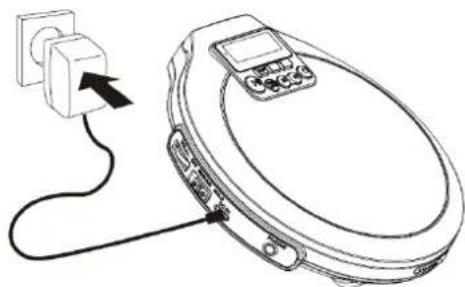
Note: Always disconnect the adapter if you are not using it.
This unit can fully recharge the specified rechargeable battery, in approximately 12 hours at 500 mA. The rechargeable batteries (NOT supplied) should be recharged before they are used for the first time because they are low in power or if they have not been used for a long period (over 60 days).
- Open the battery compartment cover and insert two of the recommended rechargeable batteries, matching polarity (1.2V 1300mA for NiMH). (Both batteries must be of rechargeable Nickel-Metal Hydride (Ni-MH) type battery otherwise the batteries may explode or leak.)
- Plug in the AC adaptor then set the Recharge switch to ON position to start charging. (Use only the AC adaptor supplied with the set for charging.)
- After 12 hours. Please unplug the AC adaptor and switch the Recharge switch to the off position. (Do not charge continuously for 24 hours or more. Doing so can cause the performance of the rechargeable battery to deteriorate.)
- If the operating time decreases drastically even when the rechargeable batteries are properly recharge, purchase a new set of rechargeable Nickel-Metal Hydride batteries.
- When charging for the first time or after a long time, playing time may be reduced. In this case, charge and discharge the batteries several times.
Note : You may play DISCS whilst charging the batteries.
IMPORTANCE
- It is normal for batteries to become hot during charging and they will gradually cool down to room temperature after fully charged.
- Remove batteries from the CD player if not going to be used for a long time.
- Battery storage temperature: -20 35^/ CD player operation temperature: 0 45^
- Charging time may vary based on different battery capacities.
(The charging time is varying on the used battery capacity. If the battery capacity is larger the charging time becomes longer; if smaller the charging time becomes shorter.
Caution
- Do not use the charging function in humid conditions.
- Do not use the charging function if it has a damaged plug.
- Do not use the charging function after it has been dropped or damaged.
- Do not open/disassemble the CD player.
- Unplug the CD player before maintenance or cleaning.
- Do not use the charging function in direct sunlight.
- This appliance can be used by children aged from 8 years and above and persons with reduced physical, sensory or mental capabilities or lack of experience and knowledge if they have been given supervision or instruction concerning use of the appliance in a safe way and understand the hazards involved.
- Children should not play with the CD player while using charging function.
- Cleaning and user maintenance should not be made by children without supervision.
Charging Time
| NiMH | Capacity (mAh/series) | Charging Time (hrs) |
| AA size 1300mAh | 12 |
- Charging time is subjected to the power rating of the CD player with 5V DC output
Specifications:
| Input Rating | Output Rating |
| DC 5.0V / 1.0A | 2xAA-DC 2.8V 500mA average |
LED Indications
| Condition | LED Indicator |
| Recharge switch is ON | Red light - Charging the battery |
| Charging function enable | No light – Charging completed |
| Recharge switch is OFF | No light |
| Charging function disable |
HEADPHONES
HEADPHONE VOLUME WARNING
Connect headphones with volume set low and increase it if required. Prolonged listening through some headphones at high volume setting can result in hearing damage. Earphones or headphones must comply with EN 50332-1 / E50332-2 to ensure continue protection from excessive sound pressure.
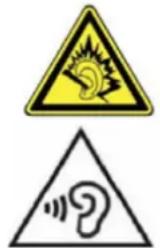
At full power, prolonged listening to the player can damage the ear of the user.
To prevent possible hearing damage, do not listen at high volume levels for long periods.
IMPORTANT!
Hearing safety:
Do not play your headphones at a high volume. Hearing experts advice that continuous use at high volume can permanently damage your hearing.
Traffic safety:
Do not use headphones while driving a vehicle. It may create a hazard and it is illegal in many countries. Even if your headphones are an open-air type designed to let you hear outside sounds, do not turn up the volume so high that you cannot hear what is going on around you.
LISTENING AT HI VOLUME
Press and hold the HI VOL button until display shown "HI VOL" to allow the volume to be increased above safe levels.
To disable HI VOLUME, press and hold the HI VOL button 2 secs.
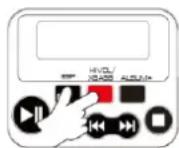
Remarks:
HI VOL will be automatically cancel when continues listening 20 hours or above. HI VOL will be automatically cancel when unit switch OFF or open the CD door.
CD PLAYER AND CD HANDLING
- Do not touch the lens (Laser head) of the CD player.
- Do not expose the unit, batteries or CDs to humidity, rain, sand or excessive heat (caused by heating equipment or direct sunlight).
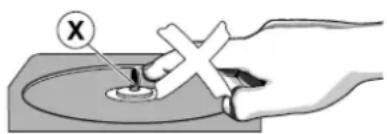
- You can clean the CD player with soft, slightly dampened and lint-free cloth. Do not use any cleaning agents as they may be corrosive.
- To clean the CD, wipe it in a straight line from the center toward the edge using soft and lint-free cloth. A cleaning agent may damage the disc! Never write on a CD or attach a sticker to it.
- The lens may cloud over when the unit is moved suddenly from cold to warm surroundings. Playing a CD is not possible then. Leave the CD player in a warm environment until the moisture has evaporated.
Active mobile phones in the vicinity of the CD player may cause malfunctions. - Avoid dropping the unit as this may cause damage.
VOLUME
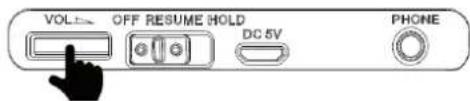
Adjust the volume by using VOL
SOUND ADJUSTMENT
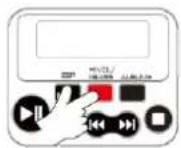
Press the XBASS button repeatedly to enable or disable a strong bass enhancement.
You can hear the bass different from the microphone.
PLAYING A DISC
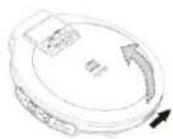
With this set you can play
-all pre-recorded audio CDs
-all finalized audio CDRs and CDRWs
-MP3-WMA-CDs (CD-ROMs with MP3/ WMA files)
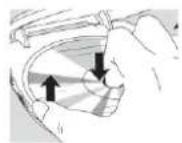
- Push the OPEN since to open the CD lid.
- Insert a disc, printed side up, by pressing gently on the disc's center so that it fits onto the hub. Close the CD lid by pressing it down.
- Press switch the unit on.
"---" are displayed briefly when reading the contents of the disc.
Press again to start playback. For audio CD tracks, the current track number and the elapsed playing time are displayed.
- Press stop playback.
The total number of tracks and the total playing time of an audio disc are displayed. The total number of albums and tracks of MP3/WMA-CD are displayed.
- To remove the disc, hold it by its edge and press the hub gently while lifting the disc.
- Press again to switch off the player
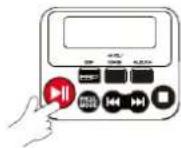
Notes:
- After press it may take some time to read the disc until the first MP3 track is played.
- The set switches off automatically after 60 seconds, if no control is operated in the stop mode.
On enhanced music CDs and mixed mode CDs, there are audio CD tracks as well as MP3 files.
- All audio CD tracks normally placed in album 1 or the last album number.
- When audio CD tracks are played, the display shows the album number, track number, elapsed time, but no MP3 is displayed.
- When MP3 files are played, the display shows the album number, track number, elapsed time and MP3 icon.
- When WMA files are played, the display shows the album number, track number and elapsed time.
Note: Enhanced music CD and mixed mode CD containing computer data (text file, picture) are not recommended in order to allow the set to play audio CDs and Mp3 files correctly.
PAUSE
- Press interrupt playback. - The elapsed playing time blinks.
- To resume playback, press to again
Note: The set will return to the stop mode automatically after 60 seconds in pause mode.
SELECTING ALBUMS AND TRACKS ON MP3-WMA-CD
Selecting a track during playback
Briefly press once or several times to skip to beginning of the current, previous or subsequent track.
-Playback continues with the selected track.
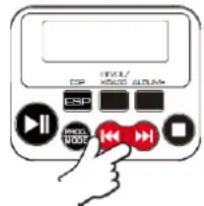
Searching for a passage during playback
- Keep pressed to find a particular passage in a backward or forward direction.
Searching is started and playback continues at a low volume.
- Release the button at the desired passage.
Normal playback continues.
Selecting Album (only in MP3 mode)
Press the ALBUM button to select the next album (if available).
PROGRAMMING TRACK NUMBERS
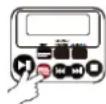
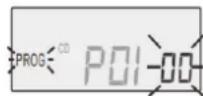
You can store up to 20 tracks in a program. A single track may be stored more than once in the program.
- While playback is stopped
- Press PROG to enter programming. PROG indicator and track number briefly on display.
- Select a track with or then press PROG to store the track.
- Repeat step 2-3 to store all desired tracks
- Press start playback of your programmed tracks.
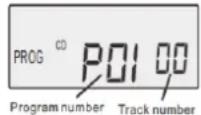
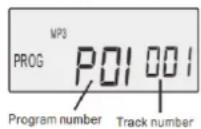
- PROG is shown and playback starts.
- To add additional tracks to your program, press to Stop playback and continue with step 2 and 3.
In the stop mode, you can review the programmed track(s) by pressing or
The display shows all the stored tracks in sequence.
Note:
If you try to store more than 20 tracks, start the program form the already first stored title.
Clearing the program
While playback is stopped, press to clear program.
- PROG indicator goes off and the program is cleared.
Note: The program will also be cleared if the power supply is interrupted, or if the CDplayer lid is opened, or if the set switches off automatically.
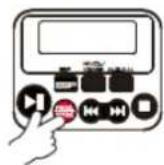
PLAYING TRACKS REPEATEDLY, INTRO OR IN RANDOM ORDER - MODE
- Press MODE repeatedly during playback to select:
The current track played repeatedly.
: The entire disc is played repeatedly.
The entire MP3 disc folder is played repeatedly
INTRO : The entire disc is played the first 10 seconds.
All tracks of the disc are played in random order once.
- To return to normal playback, press MODE repeatedly until
,ALL,INPROanddisappea
ESP (Electronic Skip Protection)
With a conventional portable MP3-CD player you might have experienced that the music stopped e.g. when you were jogging.
The ESP prevents loss of sound caused by light vibrations and shocks. Continuous playback is ensured. However it does not protect the unit against any damage caused by dropping.
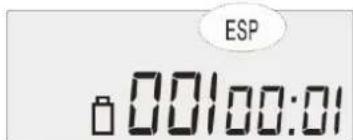
In this set ESP is default "ON". It is possible to set ESP off in audio CD playback (ESP is always on in MP3 playback).
Press ESP button to deactivate ESP function - ESP disappears.
Press ESP button again to activate ESP function - ESP is displayed.
RESUME
You can interrupt playback and continue from the position where playback stopped (RESUME).
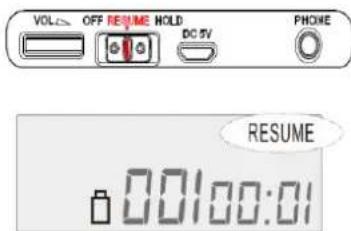
- Set the OFF-RESUME-HOLD slider to RESUME position to activate RESUME. RESUME is shown.
- Press in once whenever you want to stop playback and switch the unit off.
- Press resume playback, the playback continues from where you have stopped. To deactivate RESUME, set the slider to OFF position. - RESUME goes off.
Note:
If open and close the CD lip during playback, RESUME function is also activated. RESUME becomes reset by changing the CD.
HOLD
You can lock the buttons of the set. When a key is pressed, no action will be executed. With HOLD activated, you can avoid accidental activation of other functions.
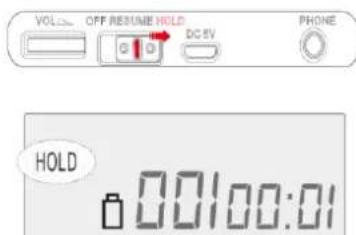
- Switch the slider to HOLD to activate HOLD. All buttons are locked, HOLD is shown when you press any button.
- To deactivate HOLD, switch the slider to OFF.
Troubleshooting
| Problem | Solution / Cause |
| No power, playback does not start | - Insert the batteries correctly. - Replace the batteries. - Connect the mains adapter securely. |
| Hold indication and/ or no reaction to controls | - Deactivate HOLD. - Disconnect the set from the power to controls supply or take out the batteries for a few seconds. |
| No sound or bad sound quality | - Press▶ to resume playback. - Adjust the volume. - Check and clean the connections. - Keep this set away from active mobile phones or strong magnetic fields. |
| „dISC“ / „Err“/ error message | - Insert a disc, label upwards. - Clean or replace the disc. - Wait until the steamed up lens has cleared. - Make sure you have inserted an audio disc or an MP3/WMA-CD. - Make sure the inserted CDR or CD-RW is recorded correctly. |
| Music is not played | - Make sure that the file names of the MP3 files end with .mp3 / WMA files end with .wma |
| Missing directories on MP3-CD | - Make sure the total number of files and albums on your MP3/WMA-CD does not exceed (MP3+WMA) 600 and (CD) 99 respectively. - Only albums with MP3 files are shown. Other computer data file is skipped. |
| The disc skips tracks | - Clean or replace the disc. - Make sure REP, INTRO, RND, ALL or PROG are not selected. |
| Music skips or popping sound when | - Play the music file on your computer. If the problem persists, encode the audio track again and make a new CD-ROM. |
TECHNICAL SPECIFICATIONS
Power Supply: AC 100-240V ~ 50/60Hz, 150 mA Model: TBA0050500100VDE
DC output: 5V 1A
Batteries: DC 3V (AA x 2) (Optional, not supplied)
Battery playback time: 6-8 hrs (Alkaline battery)
Recharge battery type: Nickel-Metal Hydride (Ni-MH) 1.2V / AA size
Charging Time around 12 hours with 500mA
IMPORTER
CLASS 1 LASER PRODUCT
KLASSE 1 LASER PRODUKT
LUOKAN 1 LASER LAITE
KCLASS 1 LASER APPARAT
PRODUCTO LASER CLASE 1
ATTENTION - RADIATION
LASER INVISIBLE LORSQUE VOUS OUVREZ LE COUVERCLE
OU APPUYEZ SUR L'ENCLENCHEMENT DE SECURITE. EVITEZ TOUTE EXPOSITION AU RAYON LASER

PILES (non fournies)

Attention

ESP (Electronic Skip Protection)
CLASS 1 LASER PRODUCT
KLASSE 1 LASER PRODUKT
LUOKAN 1 LASER LAITE
KCLASS 1 LASER APPARAT
PRODUCTO LASER CLASE 1
WAARSCHUWING-ONZICTBARE LASERSTRALING WANNEER DE BEHUIZING GEOPEND WORDT OF DE INTERNE BEVEILIGING UITGESCHAKELD. VERMIJD BLOOTSTELLING AAN DE LASERSTRAAL.

WAARSCHUWING VOLUME HOOFDTELEFOON
ESP (Electronic Skip Protection)
ESP (Electronic Skip Protection)
CLASS 1 LASER PRODUCT
KLASSE 1 LASER PRODUKT
LUOKAN 1 LASER LAITE
KCLASS 1 LASER APPARAT
PRODUCTO LASER CLASE 1
PRECAUCION - RADIACION INVISIBLE DE LASER AL ABRIR LA TAPA O PULSAR EL INTERBLOQUEO DE SEGURIDAD. EVITE LA EXPOSICION AL HAZ DE LASER.

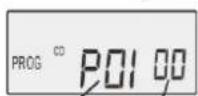
Program number Track number
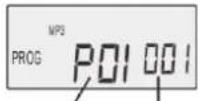
Program number Track number
- LOCATION OF CONTROLS
- BATTERIES (Not supplied)
- Attention
- Inserting batteries
- Indication of empty batteries
- POWER SUPPLY / GENERAL INFOMATION
- IMPORTANCE
- Caution
- HEADPHONES
- HEADPHONE VOLUME WARNING
- IMPORTANT!
- Hearing safety:
- Traffic safety:
- LISTENING AT HI VOLUME
- Remarks:
- CD PLAYER AND CD HANDLING
- VOLUME
- SOUND ADJUSTMENT
- PLAYING A DISC
- Notes:
- PAUSE
- SELECTING ALBUMS AND TRACKS ON MP3-WMA-CD
- Selecting a track during playback
- Searching for a passage during playback
- Selecting Album (only in MP3 mode)
- PROGRAMMING TRACK NUMBERS
- Note:
- Clearing the program
- PLAYING TRACKS REPEATEDLY, INTRO OR IN RANDOM ORDER - MODE
- ESP (Electronic Skip Protection)
- RESUME
- HOLD
- TECHNICAL SPECIFICATIONS
- IMPORTER
- PILES (non fournies)
- WAARSCHUWING VOLUME HOOFDTELEFOON
Brand : Soundmaster
Model : CD9250
Category : Cd player/recorder