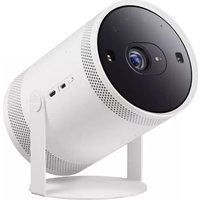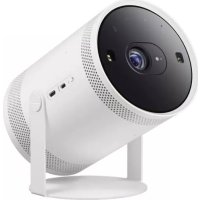
The Freestyle - Projector SAMSUNG - Free user manual and instructions
Find the device manual for free The Freestyle SAMSUNG in PDF.



| Product Type | Projector |
| Brand | Samsung |
| Model | The Freestyle |
| Display Resolution | 1920 x 1080 (Full HD) |
| Image Size (Diagonal) | 30 to 100 inches (76.2 to 254.0 cm) |
| Throw Ratio | 1.2 |
| Sound (Output) | 5 W |
| Dimensions with Stand (W x H x D) | 102.4 x 157.8 x 95.2 mm |
| Weight with Stand | 785 g |
| Operating Temperature | 10°C to 40°C (50°F to 104°F) |
| Operating Humidity | 10 to 80 % (non-condensing) |
| Power Supply | Power Adapter (PD 50 W min. recommended) |
| Standby Power Consumption | 2.0 W (with Wi-Fi off) |
| Wireless Connectivity | Wi-Fi 5 GHz / 2.4 GHz, Bluetooth |
| Ports | 1 x Micro HDMI, 1 x USB-C (power) |
| Key Features | SmartThings, Voice Assistant, Ambient Mode, Auto Focus, Keystone Correction |
| Remote Control | Samsung Smart Remote with USB-C charging |
| Maintenance | Clean with a soft, dry cloth; avoid chemicals |
| Safety | Do not expose to water, heat, or metal objects; maintain ventilation distances |
| Repairability | Opening and repair by authorized technician only; remote control battery not user-replaceable |
| Package Contents | Projector, Samsung Smart Remote, Lens Cover, Quick Start Guide |
Frequently Asked Questions - The Freestyle SAMSUNG
User questions about The Freestyle SAMSUNG
0 question about this device. Answer the ones you know or ask your own.
Ask a new question about this device
Download the instructions for your Projector in PDF format for free! Find your manual The Freestyle - SAMSUNG and take your electronic device back in hand. On this page are published all the documents necessary for the use of your device. The Freestyle by SAMSUNG.
USER MANUAL The Freestyle SAMSUNG
Thank you for purchasing this Samsung product.
To receive more complete service, please register your product at www.samsung.com Model __ Serial No. __
Before Reading This User Manual
This Projector comes with this User Manual and an embedded e-Manual ( Menu>Settings>Support>Open e-Manual).
Warning! Important Safety Instructions
Please read the Safety Instructions before using your Projector. Refer to the table below for an explanation of symbols which may be on your Samsung product.
| ! | This symbol indicates that this product has included important literature concerning operation and maintenance. |
| Class II product: This symbol indicates that a safety connection to electrical earth (ground) is not required. If this symbol is not present on a product with a mains lead, the product MUST have a reliable connection to protective earth (ground). | |
| ~ | AC voltage: Rated voltage marked with this symbol is AC voltage. |
| = | DC voltage: Rated voltage marked with this symbol is DC voltage. |
| Caution. Consult instructions for use: This symbol instructs the user to consult the user manual for further safety related information. |
Contain with module complies with class 1 LASER product.
Power
- Do not overload wall outlets, extension cords, or adaptors beyond their voltage and capacity. It may cause fire or electric shock. Refer to the power specifications section of the manual and/or the power supply label on the product for voltage and amperage information.
- Power-supply cords should be placed so that they are not likely to be walked on or pinched by items placed upon or against them. Pay particular attention to cords at the plug end, at wall outlets, and at the point where they exit from the appliance.
- Never insert anything metallic into the open parts of this apparatus. This may cause electric shock.
- To avoid electric shock, never touch the inside of this apparatus. Only a qualified technician should open this apparatus.
- Be sure to plug in the power cable until it is firmly seated. When unplugging the power cable from a wall outlet, always pull on the power cable's plug. Never unplug it by pulling on the power cable. Do not touch the power cable with wet hands.
- If this apparatus does not operate normally - In particular, if there are any unusual sounds or smells coming from it - unplug it immediately and contact an authorised dealer or Samsung service centre.
- To protect this apparatus from a lightning storm, or to leave it unattended and unused for a long time, be sure to unplug it from the wall outlet and disconnect the antenna or cable system.
Accumulated dust can cause an electric shock, an electric leakage, or a fire by causing the power cable to generate sparks and heat or by causing the insulation to deteriorate.
-
Use only a properly grounded plug and wall outlet.
-
An improper ground may cause electric shock or equipment damage. (Class I Equipment only.)
To turn off this apparatus completely, disconnect it from the wall outlet. To ensure you can unplug this apparatus quickly if necessary, make sure that the wall outlet and power plug are readily accessible.
Installation
- Do not place this apparatus near or over a radiator or heat register, or where it is exposed to direct sunlight.
- Do not place vessels (vases etc.) containing water on this apparatus, as this can result in a fire or electric shock.
- Do not expose this apparatus to water (rain) or moisture.
- Do not install your Projector in a location with heavy dust, chemical substances, too high or low temperature or high humidity, an automotive or other vehicle used for transportation, or a location where the Projector will operate continuously for an extended period of time, such as an airport or train station. If installed in such locations, a serious quality problem may occur due to the surrounding environment.
- Do not expose this apparatus to dripping or splashing.
- Do not expose this apparatus to oil or oil mist.
- Do not use oils or lubricants. This may cause this apparatus to crack.
Providing proper ventilation for your Projector
When you install your Projector, maintain a distance of at least 10 cm between the Projector and other objects (walls, cabinet sides, etc.) to ensure proper ventilation. Failing to maintain proper ventilation may result in a fire or a problem with the product caused by an increase in its internal temperature.
Operation
- Move the product by holding the body. Do not hold the Lens Cap.
- This apparatus uses batteries. In your community, there might be environmental regulations that require you to dispose of these batteries properly. Please contact your local authorities for disposal or recycling information.
- Store the accessories (remote control, or etc.) in a location safely out of the reach of children.
- When you need to turn off the Projector completely, wait until the fan stops completely so that the Projector can cool down completely.
- Do not dispose of remote control or batteries in a fire.
- Do not short-circuit, disassemble, or overheat the batteries.
- CAUTION: There is danger of an explosion if you replace the batteries used in the remote with the wrong type of battery. Replace only with the same or equivalent type.
WARNING - TO PREVENT THE SPREAD OF FIRE, KEEP CANDLES AND OTHER ITEMS WITH OPEN FLAMES AWAY FROM THIS PRODUCT AT ALL TIMES. - Do not drop or strike the product. If the product is damaged, disconnect the power cable and contact a Samsung service centre.
Caring for the Projector
To clean this apparatus, unplug the power cable from the wall outlet and wipe the product with a soft, dry cloth. Do not use any chemicals such as wax, benzene, alcohol, thinners, insecticide, aerial fresheners, lubricants, or detergents. These chemicals can damage the appearance of the Projector or erase the printing on the product.
The exterior of the Projector can get scratched during cleaning. Be sure to wipe the exterior carefully using a soft cloth to prevent scratches.
- Do not spray water or any liquid directly onto the Projector. Any liquid that goes into the product may cause a failure, fire, or electric shock.
01 Product Overview

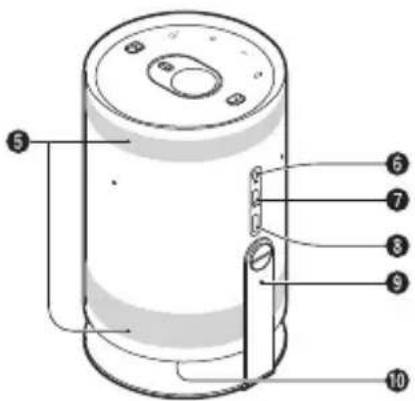
- To supply power via an external battery, ensure that the battery supports PD (Power Delivery) and its single port has output of 50 W or more.
- Please be advised that the pogo pin on the bottom of the Projector is a feature only intended for certain socket adapter features that are not available/supported in your country. Please do not attempt to use or connect the pogo pin with any other accessories.
Touch Keys
$$ \begin{array}{l} \mathsf {O} (\text {P o w e r}) \ + - \text {(V o l u m e)} \ \left[ \begin{array}{l} \end{array} \right] (\text {M o b i l e}) \ \end{array} $$
Directly connect to the SmartThings app on your mobile device.
Distance sensor
Lens
Remote control sensor / LED Indicator
6 Ventilation
MIC On/Off switch
Micro HDMI Port
USB Port (For Power)
9 Cradle
10 Speaker
The product colour and shape may vary depending on the model.
- Do not block Projector intake and exhaust vents.
- When operating the Projector in an enclosed space, allow at least 50 cm clearance around the intake and exhaust vents.
- When the Projector is not used, cover it with the Lens Cap to protect the lens and distance sensor. If the distance sensor is contaminated by dust, the Focus or Keystone function may not work properly.
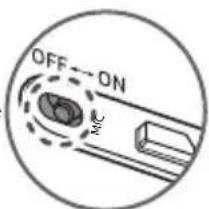
Setting the MIC On/Off
You can turn the MIC on or off by using the MIC switch on the side of the Projector.
During analysis using data from the MIC, the data is not saved.
02 The Samsung Smart Remote
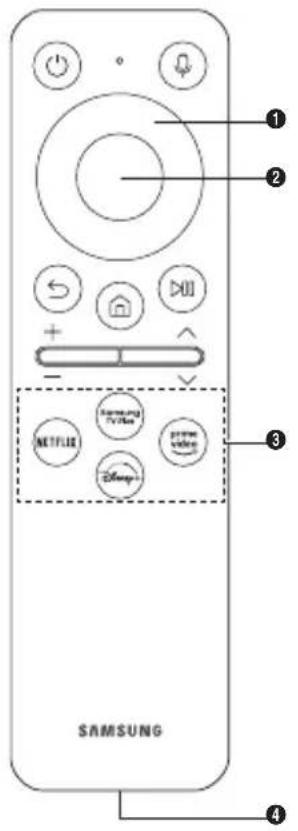

(Power)
Press to turn the Projector on or off.

(Voice Assistant)
Runs Voice Assistant. Press and hold the button, say a command, and then release the button to run Voice Assistant.
The supported Voice Assistant's languages and features may differ by geographical region.

Directional button (up, down, left, right)
Moves the focus and changes the values seen on the Projector's menu.

Select
Selects or runs a focused item.

(Return)
Press to return to the previous menu.

(Smart Hub) + (Control PAD)
Press to switch to the Media Home. From the Ambient screen, press to switch to the Ambient Home.
- When pressed for 1 second or more, the Control PAD appears. You can use Settings menu / virtual numeric pad / Option pad with Colour buttons by using Control PAD.

(Play/pause)
Using these controls, you can control the media content that is playing.

Volume)
Move the button up or down to adjust the volume. To mute the sound, press the button. When pressed for 1 second or more, the Accessibility Shortcuts menu appears.

Channel)
Move the button up or down to change the channel. To see the Guide screen, press the button.
- When pressed for 1 second or more, the Channel List screen appears.

Launch app button
Launch the app indicated by the button.
Available apps may differ depending on the geographical area or contents provider.
+airing)
If the Samsung Smart Remote does not pair to the Projector automatically, point it at the front of the Projector, and then press and hold the end buttons simultaneously for 3 seconds or more.
USB port (C-type) for charging
Used for quick charging. The LED on the front will light when charging. When the battery is fully charged, the LED will turn off.
The USB Cable is not provided.
- Use the Samsung Smart Remote less than 6 m from the Projector. The usable distance may vary with the wireless environmental conditions.
The Images, buttons, and functions of the Samsung Smart Remote may differ with the model or geographical area. - It is recommended to use an original Samsung charger. Otherwise, it may cause performance degradation or failure of the product. In this case, the warranty service is not applicable.
- When the remote control does not work due to low battery, charge it by using the USB-C type port.

Fire or explosion may occur, resulting in damage to the remote control or personal injury.
- Do not apply shock to the remote control.
- Be careful not to let foreign substances such as metal, liquid, or dust come in contact with the charging terminal of the remote control.
- When the remote control is damaged or you smell smoke or burning fumes, immediately stop operation and then repair it at the Samsung service centre.
- Do not arbitrarily disassemble the remote control.
- Be careful not to let infants or pets suck or bite the remote control. Fire or explosion may occur, resulting in damage to the remote control or personal injury.
03 Initial Setup
When you turn on your Projector for the first time, it immediately starts the Initial Setup. Follow the Instructions displayed on the screen and configure the Projector's basic settings to suit your viewing environment.
04 Troubleshooting and Maintenance
Troubleshooting
For more Information, see "Troubleshooting" in the e-Manual.
Menu > Settings > Support > Open e-Manual > Troubleshooting
If none of the troubleshooting tips apply, please visit "www.samsung.com" and click Support or contact the Samsung service centre.
To keep your Projector in optimum condition, upgrade to the latest software. ( 念 > Menu > Settings > Support > Software Update).
The Projector won't turn on.
- Make sure that the power cable is securely plugged in to the Projector and the wall outlet.
Make sure that the wall outlet is working and the remote control sensor of the Projector is lit and glowing a solid white.
Try pressing the Power button of the Projector to make sure that the problem is not with the remote control. If the Projector turns on, refer to "The remote control does not work".
The remote control does not work.
- Check if the remote control sensor of the Projector blinks when you press the button on the remote control.
- When the remote's battery is discharged, charge the battery using the USB charging port (C-type).
Try pointing the remote directly at the Projector from 1.5-1.8 m away.
Make sure to pair the remote to the Projector.
05 Specifications and Other Information
Specifications
| Model Name SP-LSP3BLA | |
| Display Resolution 1920 x 1080 | |
| Lens Throw Ratio 1.2 | |
| Image Size (Diagonal) 30 - 100 inches (76.2 - 254.0 cm) | |
| Sound (Output) 5 W | |
| Dimensions (W x H x D) | |
| With Cradle | 102.4 x 157.8 x 95.2 mm |
| With Cradle, Lens Cap | 102.4 x 172.8 x 95.2 mm |
| Weight | |
| With Cradle | 785 g |
| With Cradle, Lens Cap | 830 g |
| Operating Temperature | |
| 10 °C to 40 °C (50 °F to 104 °F) | |
| Operating Humidity | |
| 10 % to 80 %, non-condensing | |
| Storage Temperature | |
| -20 °C to 45 °C (-4 °F to 113 °F) | |
| Storage Humidity | |
| 5 % to 95 %, non-condensing | |
Notes
This device is a Class B digital apparatus.
For information about the power supply, and more information about power consumption, refer to the information on the label attached to the product.
- For the label-rating, see the surface of the bottom of the Projector.
The images and specifications of the Quick Setup Guide may differ from the actual product.
Overall Standby Power Consumption: 2.0 W
(Wi-Fi Port deactivation method: > Menu > Settings
All Settings > Connection > Network > Network Status > Disconnect)
- Figures and illustrations in this User Manual are provided for reference only and may differ from the actual product appearance.
Product design and specifications may change without notice.
An administration fee may be charged in the following situations:
(a) An engineer is called out at your request, but it is found that the product has no defect (i.e., where the user manual has not been read).
(b) You bring the unit to the Samsung service centre, but it is found that the product has no defect (i.e., where the user manual has not been read).
You will be informed of the administration fee amount before a technician visits.
Following the repair by a non-authorised service provider, self-repair or non-professional repair of the product, Samsung is not liable for any damage to the product, any injury or any other product safety issue caused by any attempt to repair the product which does not carefully follow these repair and maintenance instructions. Any damage to the product caused by an attempt to repair the product by any person other than a Samsung certified service provider will not be covered by the warranty.
Please visit samsung.com/support to find further information about external power adapter and remote control associated with EU Ecodesign directive - ErP regulation
Decreasing power consumption
When you shut the Projector off, it enters Standby mode. In Standby mode, it continues to draw a small amount of power. To decrease power consumption, unplug the power cable when you don't intend to use the Projector for a long time.
Hereby, Samsung declares that this radio equipment is in compliance with Directive 2014/53/EU and the relevant UK statutory requirements.
The full text of the declaration of conformity is available at the following internet address: http://www.samsung.com go to Support and enter the model name.
This equipment may be operated in all EU countries and in the UK.
The 5 GHz WLAN(Wi-Fi) function of this equipment may only be operated indoors.
BT max transmitter power: 100mW at 2.4GHz - 2.4835GHz
Wi-Fi max transmitter power: 100mW at 2.4GHz - 2.4835GHz, 200mW at 5.15GHz - 5.25GHz, 100mW 5.25GHz - 5.35GHz & 5.47GHz - 5.725GHz
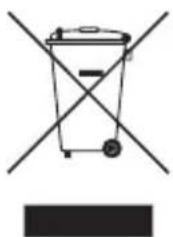
Correct Disposal of This Product (Waste Electrical & Electronic Equipment) (Applicable in countries with separate collection systems)
This marking on the product, accessories or literature indicates that the product and its electronic accessories (e.g. charger, headset, USB cable) should not be disposed of with other household waste at the end of their working life. To prevent possible harm to the environment or human health from uncontrolled waste disposal, please separate these items from other types of waste and recycle them responsibly to promote the sustainable reuse of material resources.
Household users should contact either the retailer where they purchased this product, or their local government office, for details of where and how they can take these items for environmentally safe recycling.
Business users should contact their supplier and check the terms and conditions of the purchase contract. This product and its electronic accessories should not be mixed with other commercial wastes for disposal.

Correct disposal of batteries in this product (Applicable in countries with separate collection systems)
The marking on the battery, manual or packaging indicates that the battery in this product should not be disposed of with other household waste. Where marked, the chemical symbols Hg , Cd or Pb indicate that the battery contains mercury, cadmium or lead above the reference levels in EC Directive 2006/66.
The battery incorporated in this product is not user replaceable. For information on its replacement, please contact your service provider. Do not attempt to remove the battery or dispose it in a fire. Do not disassemble, crush, or puncture the battery. If you intend to discard the product, the waste collection site will take the appropriate measures for the recycling and treatment of the product, including the battery.
Removing the battery
- To remove the battery, contact an authorised service centre.
To obtain battery removal instructions, please visit www.samsung.com/global/ecodesign_energy. - For your safety, you must not attempt to remove the battery. If the battery is not properly removed, it may lead to damage to the battery and device, cause personal injury, and/or result in the device being unsafe.
Licences
These licences may not be supported depending on the model or geographical area.
Dolby Audio
rovi guide
HEVCAdvance
Covered by Patents at patentlist.hevcadvance.com
HDMI
HIN-DEFINITION MULTIMEDIA INTERFACE
The terms HDMI and HDMI High-Definition Multimedia Interface, and the HDMI Logo are trademarks or registered trademarks of HDMI Licensing Administrator, Inc. in the United States and other countries.
This page is intentionally left blank.
Contain with module complies with class 1 LASER product.
Stromversorgung
HEVCAdvance ™ Covered by Patents at patentlist.hevcAdvance.com
HOMI
The terms HDMI and HDMI High-Definition Multimedia Interface, and the HDMI Logo are trademarks or registered trademarks of HDMI Licensing Administrator, Inc. in the United States and other countries.
Contain with module complies with class 1 LASER product.
Alimentation
Covered by Patents at patentlist.hevcadvance.com
HDMI
HIN-DEFINITION MULTIMEDIA INTERFACE
The terms HDMI and HDMI High-Definition Multimedia Interface, and the HDMI Logo are trademarks or registered trademarks of HDMI Licensing Administrator, Inc. in the United States and other countries.
Contain with module complies with class 1 LASER product.
Alimentazione
HEVCAdvance ™ Covered by Patents at patentlist.hevcAdvance.com
HOMI
The terms HDMI and HDMI High-Definition Multimedia Interface, and the HDMI Logo are trademarks or registered trademarks of HDMI Licensing Administrator, Inc. in the United States and other countries.
Questapagina
è stata lasciata
Contain with module complies with class 1 LASER product.
Apparaat
Covered by Patents at patentlist.hevcadviance.com
HDMI
HIN-DEFINITION MULTIMEDIA INTERFACE
The terms HDMI and HDMI High-Definition Multimedia Interface, and the HDMI Logo are trademarks or registered trademarks of HDMI Licensing Administrator, Inc. in the United States and other countries.
Contain with module complies with class 1 LASER product.
Alimentación
Covered by Patents at patentlist.hevcadvance.com
HDMI
HIN-DEFINITION MULTIMEDIA INTERFACE
The terms HDMI and HDMI High-Definition Multimedia Interface, and the HDMI Logo are trademarks or registered trademarks of HDMI Licensing Administrator, Inc. in the United States and other countries.
Contain with module complies with class 1 LASER product.
Potência
Covered by Patents at patentlist.hevcadvance.com
HDMI
HIN-DEFINITION MULTIMEDIA INTERFACE
The terms HDMI and HDMI High-Definition Multimedia Interface, and the HDMI Logo are trademarks or registered trademarks of HDMI Licensing Administrator, Inc. in the United States and other countries.
Contain with module complies with class 1 LASER product.
Effekt
Covered by Patents at patentlist.hevcadvance.com
HDMI
HIN-DEFINITION MULTIMEDIA INTERFACE
The terms HDMI and HDMI High-Definition Multimedia Interface, and the HDMI Logo are trademarks or registered trademarks of HDMI Licensing Administrator, Inc. in the United States and other countries.
Contain with module complies with class 1 LASER product.
Taend/sluk
Covered by Patents at patentlist.hevcadvance.com
HDMI
HIN-DEFINITION MULTIMEDIA INTERFACE
The terms HDMI and HDMI High-Definition Multimedia Interface, and the HDMI Logo are trademarks or registered trademarks of HDMI Licensing Administrator, Inc. in the United States and other countries.

Contain with module complies with class 1 LASER product.
Av/pa
- Ikke overbelast vegguttak, skjeteledninger erler adaptere utover deres spelning og kapasitet. Det kan forarsake brann eller elektrisk stot. Se avsnittet for strmspesifikasjoner i handboken og/eller strmfornsinyningsetiketten paproduktek for informasjon om spelning og strom.
- Ledninger fra strømuttak skal plasseres sik at det ilke er sannsynlig at man går på dem eller at de blir klemtammen av gjenstander som plasseres oppå dem. Vær spesielt naye med ledningene ved stæpselenden, ved vegguttak og ved punkter der de går ut fra apparatet.
Forauldri noe av metall inn i de apne delene av apparatet. Dette kan forarsake elektrisk stot.
For a unnga elektrisk stot ma du aldri berore innsiden av apparatet. Bare en kvalifisert tekniker ma apne dette apparatet.
Sorg for at du setter strømkabelen skikkelig inn. Nardu tar ut en strømkabel fra et vegguttak, ma du alltid dra i pluggen til kabelen. Aldri ta den ut ved a dra i selve kabelen. Ikke ta pa strømkabelen med vate hender.
- Hvis dette apparatet sekske fungerer som det skal, spesielt hvis detkommen uvanlige lyder erller lukter fra det, ma du umiddelbart koble det fra og kontakte en autorisert forhandler erler et Samsung-servicesenter.
For a beskyte dette apparatet mot lynnedslag, aller for a la det vare uten tilsyn og ubrukt i lang tid, ma du sarge for a koble det fra stikkontakten og koble fra antennen ell kabelsystem.
4 USB-port (C-type) for lading
Brukes til hurtiglading. LED-en pa forsiden er tent under lading. När batteriet er fulladet, slukker LED-en.
- USB-kabelen falgger icike med.
Covered by Patents at patentlist.hevcadvance.com
HDMI
HIN-DEFINITION MULTIMEDIA INTERFACE
The terms HDMI and HDMI High-Definition Multimedia Interface, and the HDMI Logo are trademarks or registered trademarks of HDMI Licensing Administrator, Inc. in the United States and other countries.
Contain with module complies with class 1 LASER product.
Virta
HEVCAdvance ™ Covered by Patents at patentlist.hevcAdvance.com
HOMI
The terms HDMI and HDMI High-Definition Multimedia Interface, and the HDMI Logo are trademarks or registered trademarks of HDMI Licensing Administrator, Inc. in the United States and other countries.
If you have any questions or comments relating to Samsung products, please contact the Samsung service centre.
Contact SAMSUNG WORLD WIDE
| Country | Samsung Service Centre | Web Site |
| AUSTRIA 0800 72 67 | 864 (0800-SAMSUNG) www.samsung.com/at/support | |
| BELGIUM 02-201-24 | 18 | www.samsung.com/be/support (Dutch)www.samsung.com/be_fr/support (French) |
| BOSNIA 055 233 999 | www.samsung.com/ba/support | |
| ALBANIA 045 620 202 | www.samsung.com/al/support | |
| BULGARIA | 0800 111 31 - Bežilatěen за ветчку onepatörn*3000 - Лета на[ein范围内разовения等方面 сprodependары на моблике onepatör09:00 до 18:00 - Понеделник до пétьк | www.samsung.com/bg/support |
| CROATIA 072 726 786 | www.samsung.com/hr/support | |
| CZECH | 800 - SAMSUNG (800-726786) www.samsung.com/cz/support | |
| Samsung Electronics Czech and Slovak, s.r.o. V Parku 2323/14, 148 00 - Praha 4 | ||
| DENMARK 707 019 | 70 www.samsung.com/dk/support | |
| FINLAND 030-6227 | 515 www.samsung.com/fe/support | |
| FRANCE 01 48 63 00 | 00 www.samsung.com/fr/support | |
| GERMANY | 06196 77 555 77 | www.samsung.com/de/support |
| CYPRUS 8009 4000 | only from landline, toll free | |
| GREECE | 80111-SAMSUNG (80111 726 7864) only from land line(+30) 210 6897691 from mobile and land line | www.samsung.com/gr/support |
| HUNGARY | 0680SAMSUNG (0680-726-7864) | www.samsung.com/hu/support |
| ITALIA | 800-SAMSUNG (800.7267864) | www.samsung.com/it/support |
| LUXEMBURG | 261 03 710 | www.samsung.com/be_fr/support |
| NORTHMACEDONIA | 023 207 777 www.samsung.com/mk/support | |
| MONTENEGRO | 020 405 888 | www.samsung.com/support |
| SLOVENIA | 080 697 267 (brezplačna številka) | www.samsung.com/si/support |
| NETHERLANDS | 088 90 90 100 | www.samsung.com/nl/support |
| NORWAY 21629099 | www.samsung.com/no/support | |
| POLAND | 801-172-678* lub +48 22 607-93-33*(opłata wedlug taryfy operadora) | www.samsung.com/pl/support |
SAMSUNG
BP81-00493A-02
Contact SAMSUNG WORLD WIDE
If you have any questions or comments relating to Samsung products, please contact the Samsung service centre.
| Country | Samsung Service Centre | Web Site |
| PORTUGAL 808 207 | 267 www.samsung.com/pt/support | |
| ROMANIA | 0800872678 - Apel Gratis *8000 - Apel tarifat in reçea | www.samsung.com/ro/support |
| SERBIA 011 321 6899 www.samsung.com/rs/support | ||
| KOSOVO 038 40 30 | 90 www.samsung.com/support | |
| SLOVAKIA 0800 - SAMSUNG (0800-726 786) www.samsung.com/sk/support | ||
| SPAIN 91175 00 15 www.samsung.com/es/support | ||
| SWEDEN 0771-400 | 300 www.samsung.com/se/support | |
| SWITZERLAND 0800 | 0726 786 | www.samsung.com/ch/support (German) www.samsung.com/ch_fr/support (French) |
| UK 0333 000 0333 | www.samsung.com/uk/support | |
| IRELAND (EIRE) | 0818 717100 | www.samsung.com/ie/support |
| LITHUANIA 8-800-7777 www.samsung.com/lt/support | ||
| LATVIA | 8000-7267 | www.samsung.com/lv/support |
| ESTONIA 800-7267 | www.samsung.com/ee/support | |
| TURKEY | 444 7711 | www.samsung.com/tr/support |
© 2022 Samsung Electronics Co., Ltd. All rights reserved.