IAN 356421 - Alarm Clock AURIOL - Free user manual and instructions
Find the device manual for free IAN 356421 AURIOL in PDF.



| Product type | Alarm clock with alarm and medication reminder |
| Brand | Auriol |
| Model | IAN 356421 |
| Article number | 4-LD5460 |
| Dimensions (alarm clock) | approx. 19.3 × 13.1 × 2.8 cm |
| Weight (alarm clock) | approx. 260 g |
| Dimensions (power adapter) | approx. 3.5 × 4.3 × 6.0 cm (cable approx. 1.50 m) |
| Weight (power adapter) | approx. 58 g |
| Power supply | Power adapter 100–240 V, 50/60 Hz, output 5 V DC 1 A via USB |
| Power reserve | Integrated rechargeable lithium battery ML621 (non-replaceable) approximately 1 week |
| Display | Digital or analog display, adjustable backlight |
| Main functions | 2 independent alarms, medication reminder (morning/noon/evening), Snooze function, time of day display, adjustable brightness (off, auto, high, low), alarm volume (0–15), 12/24 hour format, date, languages (German, English, Danish, Dutch, Spanish, Italian, French) |
| Safety instructions | Do not expose to water, do not open the housing, use only the provided power adapter |
| Care and cleaning | Unplug before cleaning; soft, dry, lint-free cloth; no harsh chemicals |
| Warranty | 3 years from date of purchase |
| Customer service | Inter-Quartz GmbH, Valterweg 27A, 65817 Eppstein, Germany – support@inter-quartz.de |
| General information | Manufactured in 2020, supplier: digi-tech gmbh |
Frequently Asked Questions - IAN 356421 AURIOL
User questions about IAN 356421 AURIOL
0 question about this device. Answer the ones you know or ask your own.
Ask a new question about this device
Download the instructions for your Alarm Clock in PDF format for free! Find your manual IAN 356421 - AURIOL and take your electronic device back in hand. On this page are published all the documents necessary for the use of your device. IAN 356421 by AURIOL.
USER MANUAL IAN 356421 AURIOL
ALARM CLOCK WITH MEDICATION REMINDER
Usage and safety instructions
FR BE RÉVEIL AVEC ALARME POUR MÉDICAMENTS
NL BE WEKKER MET MEDICATIEHERINNERING
©BUDÍK S PŘIPOMÍNKOU NA LÉKY
text_image
Diagram of a device control panel with labeled buttons and indicators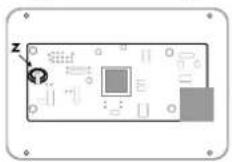
GB Usage and safety instructions
Table of contents
Table of contents....- 18 -
Introduction - 20 -
Intended use....-20-
Scope of delivery....-20 -
Technical specifications....- 20 -
Alarm clock....-20-
Plug-in power supply....- 20 -
Explanation of symbols....- 21 -
Packaging symbols....- 22 -
Important safety information important safety information....- 22 -
Important safety information for users ....- 22 -
Important safety information for the batteries/rechargeable batteries ....- 22 -
Electricity hazard 23 -
Placing or hanging the alarm clock securely - 23 -
Display and controls....-24 -
Setup - 25 -
Settings -25-
Quick setting - 25 -
Basic settings....- 26 -
Setting the language....-26-
Setting the screen format....- 26 -
Setting the date....-26-
Setting the date mode ....- 27 -
Setting the time format....- 27 -
Time setting....- 27 -
Setting the time of day display 27 -
Setting alarm 1 and 2....- 27 -
Setting the morning/midday/evening medication reminder ....- 28 -
Setting the alarm volume....-28-
Adjusting the brightness 28 -
Snooze function (SNOOZE) 29 -
Restart (RESET) - 29 -
Cleaning instructions....- 29 -
Storage 29
Simplified EU declaration of conformity - 29 -
Disposal....-29 -

Disposal of the electrical device....- 30 -
Disposal of the batteries/rechargeable batteries ....- 30 -
Recycling....- 30 -
Waste disposal....- 31 -
digi-tech gmbh warranty....- 31 -
Warranty conditions....- 31 -
Warranty period and defects liability 31 -
Scope of the warranty....- 31 -
Warranty claim procedure....- 31 -
Service....-33-
Supplier 33
ALARM CLOCK WITH MEDICATION REMINDER
Introduction
Please read the instruction manual before using the product for the first time- even if you are experienced at using electronic equipment. Please take special care when reading the chapter "Important safety information". Keep this instruction manual so you may use it a reference material in the future.
Hand over all documents when passing the alarm clock on to third parties. Please retain the packaging and instruction manual for future reference.
Intended use
This electronic appliance is intended for time display and the described additional features. Any other use or modification of the electronic appliance does not comply with the intended uses. The manufacturer is not liable for damages caused by improper use or misuse. The device is not intended for commercial use.
Scope of delivery
Note: Please check the scope of delivery after purchase. Make sure that all parts are present and not defective. If the delivery is incomplete and/or parts are damaged, do not use the device. Contact the service department (see "Warranty case processing").
- 1 x Alarm clock incl. rechargeable battery for memory function (not replaceable)
- 1 x Stand
• 1 x Plug-in power supply
• 1 x Instruction manual
Technical specifications
Alarm clock
- Operating temperature range: 0 - 50 °C
• Operating humidity range: 30 - 90%
• Dimensions: approx. 19.3 x 13.1 x 2.8 cm
• Weight: approx. 260 g - Input voltage/current: DC IN 5V±0A
- Power reserve:
Rechargeable battery for memory function: 1 x lithium ML621 (not replaceable)
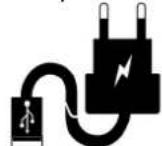

Plug-in power supply
• Model: HX06-0501000-AG-002
- Operating temperature range: 0 - 50 °C
- Operating humidity range: 30 - 90%
• Dimensions: approx. 3.5 x 4.3 x 6.0 cm, cable length approx. 1.50 m
• Weight: approx. 58 g

• Input voltage: 100 - 240 V
• Input AC frequency: 50/60 Hz
- Input current: 1.0 A Max.
• Output voltage: 5.0 V DC/direct current
• Output current: 1.0 A
• Output power: 5.0 W
• Average operational efficiency: 73.62%
• Zero load power consumption: 0.1 W Max.
- Protection class: II
• Safety, tested 50477229 0001
USB

Explanation of symbols
 | Use only in dry locations indoors! | ||
| With the CE mark, digi-tech gmbh declares conformity with the applicable EU directives. | |||
 | DC voltage symbol | ||
 | AC voltage symbol | ||
 | Protection class II | ||
 | USB port | ||
| [CHDB] | TÜV/GS - tested safety | ||
 | Efficiency class | ||
 | Indicates important information in these operating instructions that must be observed. | ||
 | Plug-in power supply | ||

Packaging symbols
| Time | |
 | Alarm clock |
 | Snooze |
 | Medication reminder |
Important safety information
Important safety information for users

WARNING! RISK OF INJURY!
This device may be used by persons (including children over 8 years of age) with reduced physical, sensory or mental abilities or lack of experience and knowledge, if they are supervised or instructed regarding the safe use of the device and understand the dangers that may arise. Children may not play with the device. Cleaning and user maintenance of the device may not be performed by children without supervision. Keep packaging films out of the hands of children. There is a danger of suffocation.
Important safety information for the batteries/rechargeable batteries

WARNING!
HEALTH HAZARD! RISK OF EXPLOSION!
Keep new and old batteries/rechargeable batteries out of reach of small children. If a battery/rechargeable battery is swallowed, medical help must be obtained immediately. The battery/rechargeable battery must always be inserted in the correct polarity. Clean the battery and device contacts beforehand if necessary. Do not attempt to recharge, short-circuit, or open the battery. Never heat the battery to recharge it. Do not expose the battery/rechargeable battery to excessive heat such as sunshine, fire or the like. There is an increased risk of leakage! Never throw the battery/rechargeable battery into fire as it may explode. Improper use of the battery/rechargeable battery poses a risk of explosion and leakage of the battery fluid.
If the battery should leak, avoid contact with skin, eyes and mucous membranes. Use gloves. In the event of contact with battery fluid, immediately rinse the affected areas with plenty of clean water and consult a doctor immediately. Remove the dead

battery/rechargeable battery from the device immediately, there is an increased risk of leakage.
Electricity hazard

WARNING!
ELECTRIC SHOCK/MORTAL DANGER!
- Do not immerse the alarm clock or the plug-in power supply in water or other liquids, otherwise there is a risk of electric shock.
- Do not touch the alarm clock or the plug-in power supply with wet hands and do not operate it outdoors or in rooms with high humidity.
- Do not place any vessels filled with liquids, such as vases, on or in the vicinity of the alarm clock and plug-in power supply. The container could tip over and the liquid could impair electrical safety.
- Never open or remove the housing of the alarm clock or the plug-in power supply. There are live parts inside the housing, touching them can lead to an electric shock.
- Do not insert any objects into openings in the device. You could touch live parts, otherwise there is a risk of electric shock.
- Unplug the plug-in power supply from the mains socket if faults occur during operation (e.g. malfunctions or smoke), after use and during thunderstorms. Always pull on the plug-in power supply, not the connection cable.
- To completely disconnect the device from electrical power, pull the plug-in power supply out of the mains socket. The plug-in power supply always consumes a small amount of electricity as long as it is connected to a mains socket. Even if the alarm clock is not connected to the plug-in power supply.
- The mains socket must always be easily accessible so that you can pull the plug-in power supply quickly in an emergency.
- Position the cable of the plug-in power supply in such a way that it does not become a tripping hazard. The cable of the plug-in power supply unit must not be kinked or squeezed.
- Keep the plug-in power supply cable away from hot surfaces and sharp edges.
- Do not make any modifications to the alarm clock or the plug-in power supply.
- Only have repairs to the device or the plug-in power supply carried out by a specialist workshop. Improper repairs can result in considerable danger for the user.
- Only operate the alarm clock with the included plug-in power supply. Use the plug-in power supply only for this alarm clock. In the event of a defect, the plug-in power supply unit may only be exchanged for a power supply unit of the same type.
Placing or hanging the alarm clock securely
The alarm clock and the plug-in power supply are not designed for use in rooms with high humidity (e.g. bathrooms). Place the alarm clock on a firm, level surface. To do this, screw the stand (B) into the hole with the thread (3). Or hang the alarm clock on a nail or screw
GB IE
using the hole for wall mounting (11). Mounting material is not included in the scope of delivery. Make sure that:
• the device is not placed on a thick carpet or bed when in use;
• no direct heat sources (e.g. heaters) affect the device;
• no direct sunlight hits the device;
- contact with water spray and drops of water is avoided (do not place any objects filled with liquids, e.g. vases, on or near the device);
• the device is not in the immediate vicinity of magnetic fields (e.g. loudspeakers);
• no foreign objects penetrate;
- candles and other open flames must be kept away from this product at all times to prevent the spread of fire.
Display and controls
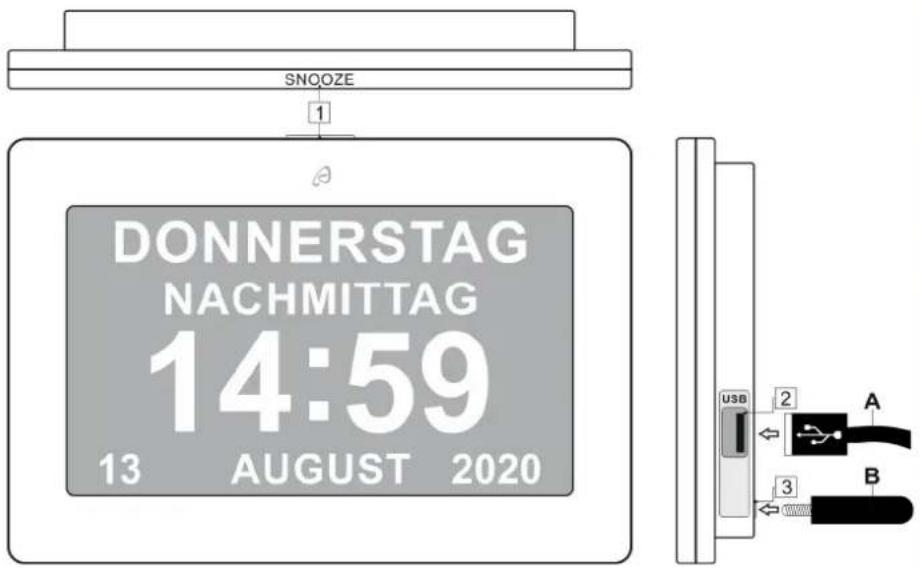
text_image
SNOOZE 1 DONNERSTAG NACHMITTAG 14:59 13 AUGUST 2020 USB 2 A 3 B| A | Plug-in power supply with USB connector | B Stand with thread | |
| 1 | SNOOZE button 2 | USB connection/plug-in power supply | |
| 3 | Threaded hole for stand | ||
text_image
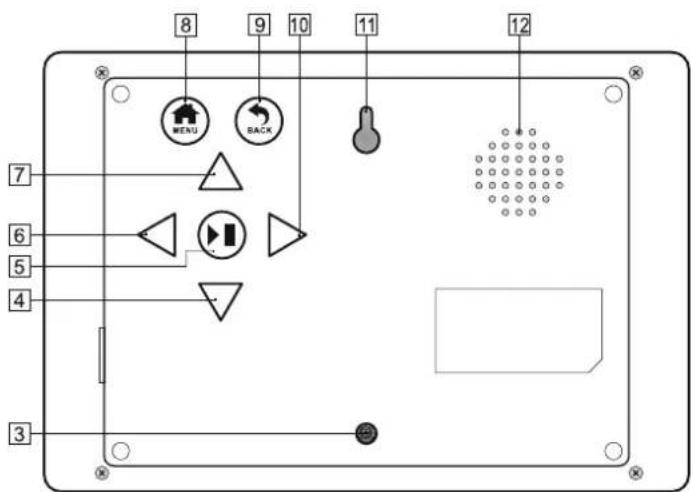
8 9 10 11 12 MENU BACK 7 6 5 4 3| 3 | Threaded hole for stand | 4 Down button |
| 5 | Enter button(continue switch, stop switch) | 6 Right button |
| 7 Up button 8 | MENU button(Return to normal display) | |
| 9 | BACK button1 step back | 10 Left button |
| 11 Hole for wall mounting 12 Speaker |
Setup
Remove the protective film from the alarm clock's display.
Insert the plug of the plug-in power supply (A) into the USB socket (2) on the side of the alarm clock and connect it to a mains socket. Three apples appear temporarily on the display during the start-up process.


Note: Your alarm clock has an internal rechargeable battery for the memory function, which can hold the set data for about a week without a power connection. However, no functions are usable without a power connection.
Settings
! Note: If you want to set or operate the alarm clock, remove it from the wall as the control panels are on the back of the alarm clock.
Quick setting
When setting numeric values, you can use quick setting by pressing and holding the respective buttons.

Basic settings
You can make the following settings in the menu:
| Languages German |
| Screen format digital |
| Date setting 1- 1- 2020 |
| Date mode Day-month-year |
| Time format 24 hour display |
| Time setting 0:00 |
| Time of day display Off |
| Alarm 1 7:00 Off |
| Alarm 2 8:00 Off |
| Morning medication reminder 6:00 Off |
| Midday medication reminder 11:00 Off |
| Evening medication reminder 18:00 Off |
| Alarm volume setting 8 |
| Brightness level Off |
| Reset setting |
Setting the language
Press the MENU (8) button to enter the menu. Press the up (7) or down (4) button repeatedly until the languages <> are active. You can now change the language with the left (10) or right (6) button. You can choose from: Deutsch - German, English - English, dansk - Danish, Nederlands - Dutch, español - Spanish, italiano - Italian and français - French.
Exit the menu by pressing the MENU (8) button.
Setting the screen format
Press the MENU (8) button to enter the menu. Press the up (7) or down (4) button repeatedly until the screen format <> is active. You can now change the screen format with the left (10) or right (6) button. You can choose between: digital and analog. Exit the menu by pressing the MENU (8) button.
Setting the date
Press the MENU (8) button to enter the menu. Press the up (7) or down (4) button repeatedly until the date setting <> is active. Press the Enter (5) button. The number that can be set is visible with an underscore. Set the day by pressing the Up (7) or Down (4) button, then press the Right (6) button. Set the month and year in the same way and confirm by pressing the Enter (5) button.
Exit the menu by pressing the MENU (8) button.
-26-

Setting the date mode
Press the MENU (8) button to enter the menu. Press the up (7) or down (4) button repeatedly until the date mode setting < > is active. You can now change the date mode with the left (10) or right (6) button. The following are available: day-month-year and month-day-year.
Exit the menu by pressing the MENU (8) button.
Setting the time format
Press the MENU (8) button to enter the menu. Press the up (7) or down (4) button repeatedly until the time format < > is active. You can now change the time format with the left (10) or right (6) button. The following are available: 12-hour display and 24-hour display.
Exit the menu by pressing the MENU (8) button.
Time setting
Press the MENU (8) button to enter the menu. Press the up (7) or down (4)

button repeatedly until the time setting <> is active. Press the Enter (5) button.
The number that can be set is visible with an underscore. Set the hours by pressing the Up (7) or Down (4) button, then press the Right (6) button. Set the minutes in the same way and confirm by pressing the Enter (5) button.
Exit the menu by pressing the MENU (8) button.
Setting the time of day display
Press the MENU (8) button to enter the menu. Press the up (7) or down (4) button repeatedly until the time of day display setting <> is active. You can now change the time of day display with the left (10) or right (6) button. You have the following options: Off and On. If (On) is selected, this submenu is displayed:
| Time of day display On |
| Morning 06:00-11:00 |
| Midday 11:00-14:00 |
| Afternoon 14:00-18:00 |
| Evening 18:00-22:00 |
| Night 22:00-06:00 |
Exit the menu by pressing the MENU (8) button.
Setting alarm 1 and 2
Press the MENU (8) button to enter the menu. Press the up (7) or down (4) button repeatedly until the alarm 1 or alarm 2 setting <> is active. Press the
Enter (5) button. The number that can be set is visible with an underscore. Set the hours by pressing the Up (7) or Down (4) button, then press the Right (6) button. Set the minutes
-27-
GB IE
in the same way and whether alarm 1 or 2 should be set to once, repeat (daily) or off. Confirm by pressing the Enter (5) button. Exit the menu by pressing the MENU (8) button.
Note:
To turn off the alarm, press any button on the back of the alarm clock except the SNOOZE (1) button.
Setting the morning/midday/evening medication reminder
Press the MENU (8) button to enter the menu. Press the up (7) or down (4) button repeatedly until the setting for the morning/midday/evening medication reminder <> is active. Press the Enter (5) button. The number that can be set is visible with an underscore. Set the hours by pressing the Up (7) or Down (4) button, then press Right (6) button. Set the minutes in the same way and whether the medication remin should be set to once, repeat (daily) or off. Confirm by pressing the Enter (5) button. Exit the menu by pressing the MENU (8) button.

Note:
The medication reminder sounds for approx. 2 minutes and is permanently visible with a text on the display. You can also be reminded again by pressing the SNOOZE (1) button.
To turn off the alarm, press any button on the back of the alarm clock except the SNOOZE (1) button.
Setting the alarm volume
Press the MENU (8) button to enter the menu. Press the up (7) or down (4) button repeatedly until the alarm volume setting <> is active. You can now change the alarm volume setting with the Left (10) or Right (6) button. You have the following options: 0-off, 1-quiet to 15-loud. Exit the menu by pressing the MENU (8) button.
Adjusting the brightness
Press the MENU (8) button to enter the menu. Press the up (7) or down (4) button repeatedly until the brightness level setting <> is active. You can now change the brightness of the display with the left (10) or right (6) button. You may select: off, autom. dimmer, high and low. Exit the menu by pressing the MENU (8) button.
| Off | No dimmer activated, constant brightness |
| Autom. dimmer | Automatic dimming activatedThe display is adjusted to the brightness in the room |
| high | The display is permanently set to the highest brightness |
| low | The display is permanently set to the lowest brightness |

Snooze function (SNOOZE)
When the alarm/medication reminder sounds, press the SNOOZE (1) button to temporarily deactivate the alarm/medication reminder. After approx. 5 minutes the alarm/medication reminder will sound again. To turn off the alarm, press any button on the back of the alarm clock except the SNOOZE (1) button.
Restart (RESET)
Press the MENU (8) button to enter the menu. Press the up (7) or down (4) button until Reset setting is active. Press the Enter (5) button, the reset function appears and you can now choose between Yes and No with the left (10) or right (6) key. To restart, select Yes and confirm by pressing the Enter (5) button. Exit the menu by pressing the MENU (8) button..
Cleaning instructions

Pull the plug-in power supply from the power outlet before cleaning the device. The device must not be exposed to moisture. Avoid water drops and water spray. There is a danger of electric shock!
Improper cleaning can damage the device. Do not submerge the device in water or other liquids. Do not use aggressive cleaners, brushes with metal or nylon bristles, or sharp or metallic cleaning tools such as knives, scrapers or similar implements. These may damage the surface of the device. Clean the device using a soft, dry, lint-free cloth, such as a glasses cleaning cloth.
Storage
If the alarm clock is not used for a longer period of time, store it, cleaned and protected from sunlight, in a dry, cool place, preferably in its original packaging.
Simplified EU declaration of conformity

Digi-tech gmbh hereby declares that the alarm clock 4-LD5460 comply with the RoHS Directive 2011/65/EU and EMC Directive 2014/30/EU.. The full text of the EU declaration of conformity is available at the following internet address: http://www.digi-tech-gmbh.com/ce/356421_2004_WE.pdf
Disposal
This device and all the packaging materials are recyclable. Please dispose of them separately for better waste handling. You can find out about disposal options for your product by contacting your municipality.
Please take note of the marking of packaging material when separating waste materials. They are marked with abbreviations (a) and numbers (b) with the following meanings:
-29-

1-7: plastics
20-22: paper and cardboard
80-98: composite materials.

Disposal of the electrical device
Remove the memory function rechargeable battery before disposal!
Note: Pull the plug-in power supply out of the mains socket!
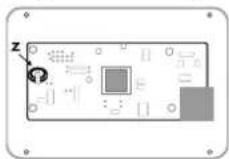
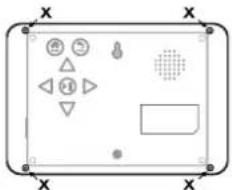
• Unscrew the screws (X) on the back of the housing.
- Carefully remove the battery for the memory function (Z) from the circuit board. Use a screw driver if necessary.
- Or contact a specialist at a collection facility.
Dispose of the rechargeable battery for the memory function separately (see Disposal of the batteries).
This alarm clock are subjects to the European Directive
natural_image
Pure electrical panel diagram without any text, numbers, or symbols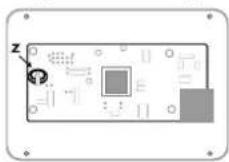
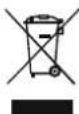
2012/19/EU. The symbol of the crossed-out wheelie bin indicates that the product must be disposed of separately in the European Union. Labelled products cannot be disposed of with normal household waste, but must be handed in at a collection point for the recycling of electrical and electronic equipment.
In the interest of the environment, when your device has reached the end of its usefulness, do no throw it in the normal household trash. Dispose of it in the proper and correct way. You can find out about collection sites and their business hours from your public administration. Please adhere to applicable requirements.

Disposal of the batteries/rechargeable batteries
Defective or spent batteries/rechargeable batteries must be recycled in accordance with directive 2006/66/EC and its revisions. Return batteries, rechargeable batteries or the device at the available collection sites.


WARNING! Improper disposal of batteries/rechargeable batteries causes environmental damage!
Batteries/rechargeable batteries may not be disposed of in normal household waste. They may contain toxic heavy metals and are subject to hazardous waste treatment. By disposing of the device and the battery properly, you avoid environmental damage and a risk to your personal health.
The chemical symbols of the heavy metals are as follows: Cd = Cadmium, Hg = Mercury, Pb = lead. Therefore, please dispose of spent batteries/rechargeable batteries at a communal collection site.
Recycling
The product packaging consists of recyclable materials. Please dispose of them properly at the available collection sites.


Waste disposal
Dispose of the packaging in an environmentally responsible fashion. Please note the marking of the different packaging materials and separate them if applicable.

digi-tech gmbh warranty
This alarm clock includes a 3 year warranty starting on the day of purchase. In case of defects of this alarm clock you have, by law, certain rights regarding the vendor of the alarm clock. These rights are not changed by the warranty which is described in the following paragraphs.
Warranty conditions
The warranty duration starts on the date of purchase. Please keep the receipt in a safe place. The receipt is needed as a proof of purchase. If a defect occurs in the alarm clock within 3 years, the alarm clock will be repaired or replaced (according to our choice) free of charge. This warranty requires that, within the 3 year warranty period, the alarm clock and the receipt can be made available to us along with a short written description of the defect and when it occurred. If the defect is covered by the warranty, you will receive the repaired alarm clock or a new alarm clock. Repair or replacement does not cause the warranty period to restart.
Warranty period and defects liability
The warranty period is not increased by the defect liability. This also applies to repaired or replaced parts. If defects are noticed at the time of purchase they must be reported immediately upon unpacking the item. Paid repair may be available after the end of the warranty period.
Scope of the warranty
The alarm clock was manufactured according to strict quality guidelines and was carefully inspected before delivery. The warranty does not include parts that experience normal wear and tear and can thus be seen as wear parts or fragile parts that are damaged. Examples include Switches, Batteries or parts made of glass. This warranty becomes void if the alarm clock is damaged, is not used in the recommended way or is improperly repaired.
For proper use of the alarm clock all instructions in this manual must be adhered to exactly. Use of the alarm clock in a way that is discouraged in the manual must be avoided.
The alarm clock not intended for commercial use. Abusive or improper use, excessive force and changes that are made by non-authorized repair centers will void the warranty.
Warranty claim procedure
To ensure that your call is processed in a fast and efficient manner please note the following directions:

- Have your receipt (as proof of purchase) and the article number (356421_2004) handy.
- The article number can be found on the type label, an engraving, the front page of the manual (bottom left) or a sticker on the back side or bottom side of the case.
- In case defects occur, please first contact the service center (see below) by phone or email.

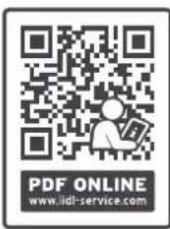
Visit www.lidl-service.com to download this and many other manuals, product videos and software.
text_image
PDF ONLINE www.idl-service.comWith this QR-Code you can reach the Lidl-Service-Site (www.lidl-service.com) directly and you can open your manual by entering the article number (356421_2004).

Service
Inter-Quartz GmbH
Valterweg 27A
65817 Eppstein
GERMANY
Email: support@inter-quartz.de
Telephone: +49 (0)6198 571825

DE 00800 5515 6616 00800 5515 6616
AT 00800 5515 6616 00800 5515 6616
CH 0800 563862 00800 44 11 493 PL
GB 00800 5515 6616 800 142 315 CZ
IE 00800 5515 6616 0800 004449 SK
FR 00800 5515 6616
IAN 356421_2004
Art.-Nr.: 4-LD5460

Supplier
Please note that the following address is not a service address.
Please first contact the service address (see above).
digi-tech gmbh
Valterweg 27A
65817 Eppstein
GERMANY

-33-

text_image
Diagram of a device control panel with labeled buttons and indicators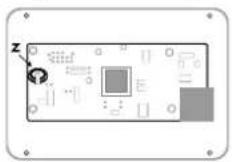

WEKKER MET MEDICATIEHERINNERING
Introductie
text_image
Diagram of a device control panel with labeled buttons and indicators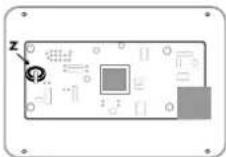

BUDÍK S PŘIPOMÍNKOU NA LÉKY
Úvodní slovo
natural_image
Pure electrical circuit lines without any symbols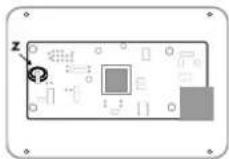
Likvidace baterii/nabijecí baterie
natural_image
Pure electrical circuit lines without any symbols