RESQ 100 - Radio MARMITEK - Free user manual and instructions
Find the device manual for free RESQ 100 MARMITEK in PDF.


User questions about RESQ 100 MARMITEK
0 question about this device. Answer the ones you know or ask your own.
Ask a new question about this device
Download the instructions for your Radio in PDF format for free! Find your manual RESQ 100 - MARMITEK and take your electronic device back in hand. On this page are published all the documents necessary for the use of your device. RESQ 100 by MARMITEK.
USER MANUAL RESQ 100 MARMITEK
Please read these safety instructions thoroughly and make sure you understand everything. Incorrect use will void Marmitek's warranty.
- Do not submerge the product in water.
- Do not expose the product to extremely high or low temperatures.
- This product is not a toy; keep out of the reach of children.
- Never connect the USB cable if it is damaged.
- Disconnect the USB charging cable if this product is not used for an extended period.
- Only use AAA batteries to power this product.
- Never use damaged batteries and remove/replace empty batteries.
- Only use one type of battery at the same time. Do not mix disposable and rechargeable batteries.
- Replace all batteries at the same time. Do not mix new and used batteries.
- Do not overcharge the rechargeable battery, as this may damage it or reduce its lifespan.
- Remove the batteries if the product is not used for an extended period.
- Never open the product, as the device may contain parts with electrical voltage.
- Incorrect use, modifications, or repairs void all warranties.
- Marmitek does not assume product responsibility for incorrect or unintended use of the product.
Marmitek accepts no liability other than the legal product responsibility.
MARMITEK
Introduction
Congratulations on your purchase of this Marmitek device. You have bought a high-quality appliance that you will enjoy for many years to come. By using this device with attention and care, you reduce the risk of personal injury or property damage. When this manual mentions the device, it refers to the RESQ 100.

Caution
It is important to read and understand this instruction manual before installing and using the device.
This manual describes the correct and safe use of this device. Keep this manual for future reference. The manual is an essential part of the device and must be given to the new owner upon resale or exchange.
This manual has been compiled with the utmost care. Marmitek reserves the right to improve and adjust this manual at any time.
The following symbols and terms are used in this manual to alert the reader to safety issues and important information:

Warning
Indicates a hazardous situation which, if the safety instructions are not followed, can lead to injuries to the operator or bystanders, light and/or moderate damage to the product or to the environment.

Caution
Indicates a hazardous situation which, if the safety instructions are not followed, can lead to light and/or moderate damage to the product or to the environment.
TIP: Useful information during installation or use.
Identification
The identification plate is located on the bottom of the device.
MARMITEK
Specifications
| Power | |
| Working power | 2.9-4.5V |
| Input | 5V 2A |
| Output | 5V 2A (max.) |
| Charging cable | USB-C to USB-C+A |
| Rechargeable battery | 1x 4500mAh |
| Disposable batteries | 3x AAA LR03 1.5V (not included) |
| Radio | |
| DAB frequency band | 170-240MHz |
| FM frequency band | 87.5-108MHz |
| Bluetooth 5.0 frequency band | 2.4GHz |
| Light | |
| Flashlights | 3W (white) |
| Reading light | 1W (warm white) |
| Warning light | 0.5W (blue/red) |
| Technology | |
| Speaker | 3W (max.) |
| Display | LCD |
Warranty
Marmitek offers a 2-year warranty on this device from the date of purchase. The warranty does not cover wear and tear from normal use. The warranty expires if a defect is the result of unintentional or careless use of the device. The manufacturer, importer and supplier are not liable for incorrect use.
Description
This device features FM and DAB radio, as well as Bluetooth streaming. It also features three flashlights, a reading light, a warning light, and an SOS alarm. The device can be charged via charging cable, hand crank, solar panel, or disposable batteries.
MARMITEK
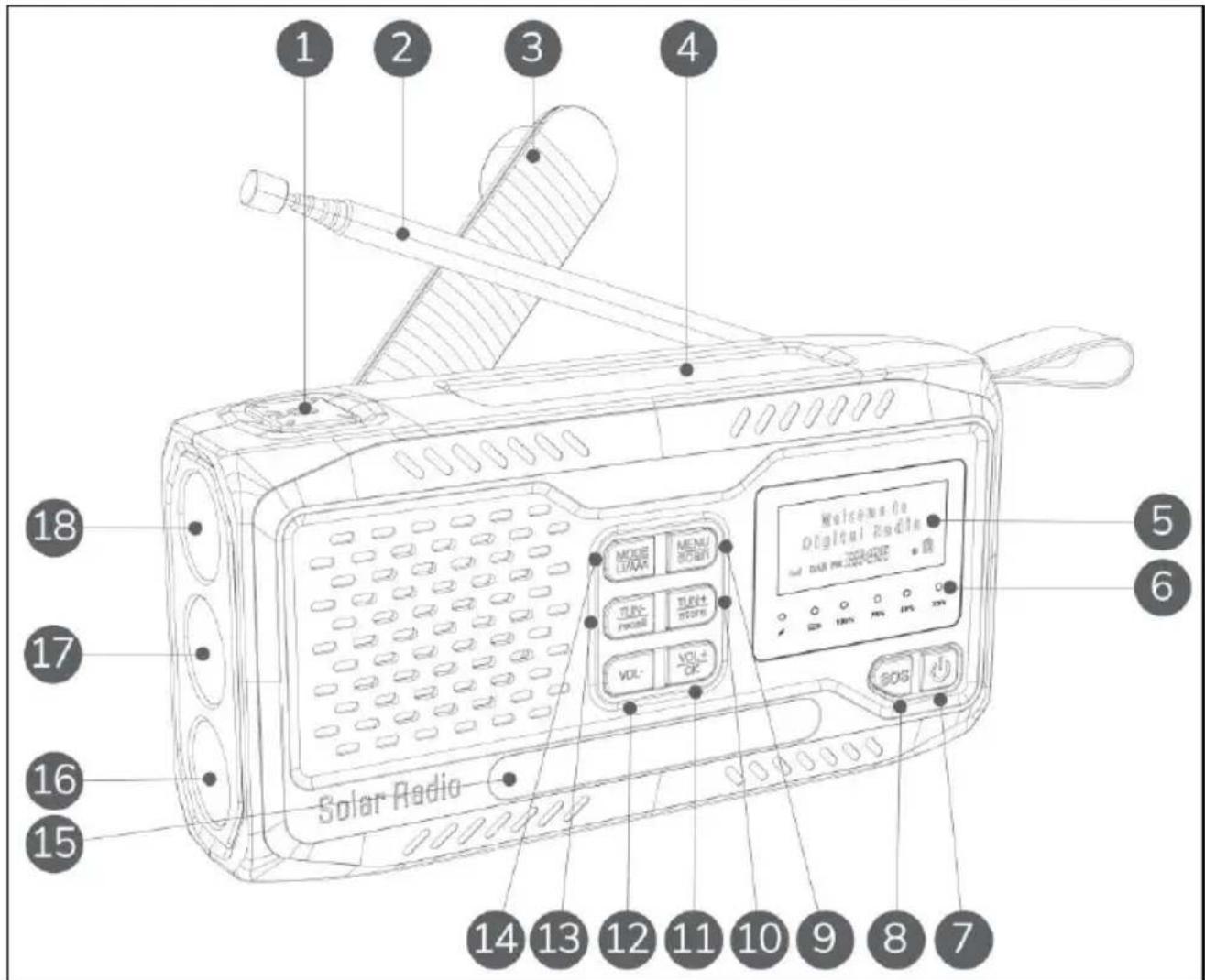
Figure 1: Front view.
- Light button
- Antenna
- Hand crank
- Solar panel
- LCD display
- Indicators
- Power button
- SOS button
- Menu button, scan radio stations
-
Tune up, menu navigation, store as preset
-
Volume up, OK button
- Volume down
- Tune down, menu navigation, recall preset
- Source selection, battery mode
- Reading light / warning light
- Low beam flashlight
- High beam flashlight
- Low beam flashlight
MARMITEK
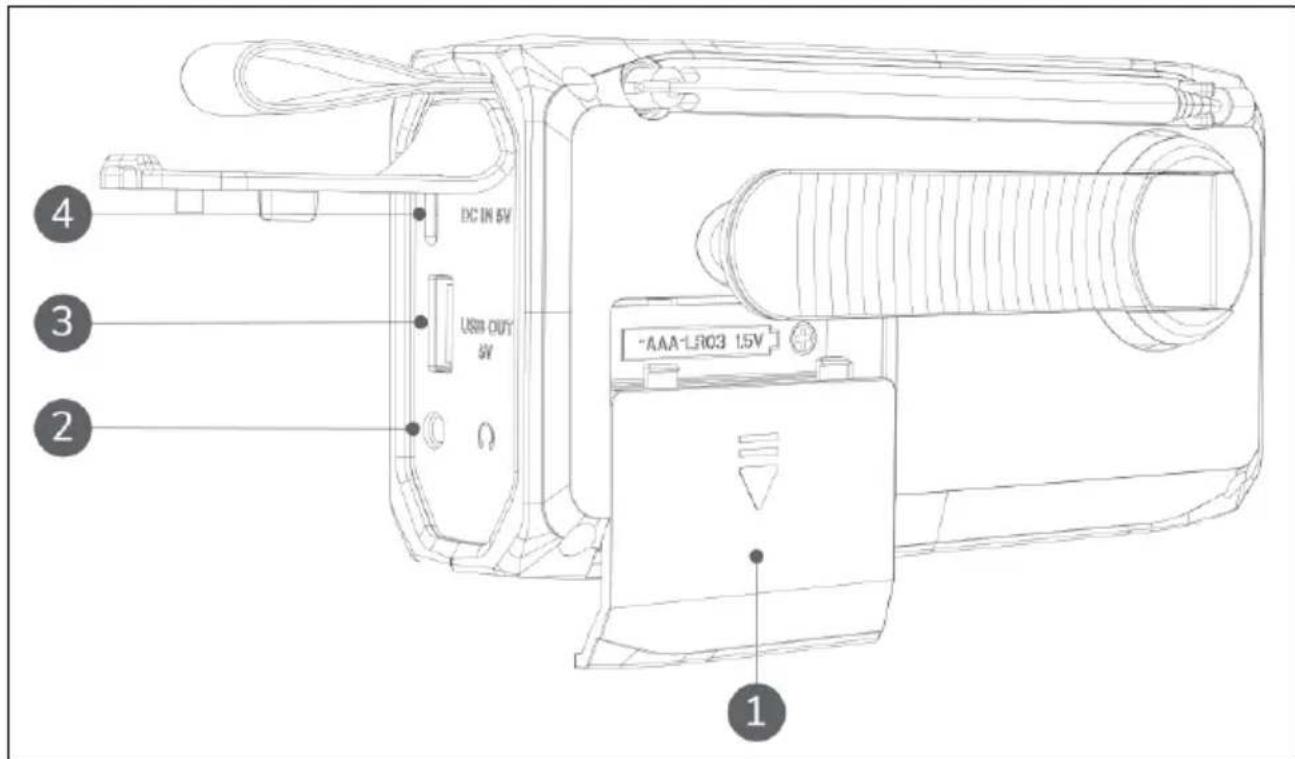
-
Battery compartment
-
USB-A power output
-
3.5 mm headphone jack
-
USB-C power input
Indicators
- The charging indicator blinks red when the device is charged via the hand crank or solar panel.
- The battery indicator blinks blue when the device is powered by disposable batteries.
- The four power indicators display the current power level of the rechargeable battery. They blink blue when the device is charged via the charging cable.
Transport and storage
- Wipe the device clean with a dry cloth before storing.
- Store the device in its original packaging in a cool, dry and dust-free area.
- Disconnect the USB charging cable if this product is not used for an extended period.
- Remove the disposable batteries if the product is not used for an extended period.
MARMITEK
Use
TIP: If the device has not been used for over 60 days, the rechargeable battery must be reactivated. To reactivate the battery, place the device in direct sunlight for 30 minutes or turn the hand crank for 5 minutes.
Radio
- Press and hold the power button to turn the radio on or off.
- Press the power button to enter standby mode. The radio is silent, and the display shows the date and time.
- Use the MODE button to cycle between DAB radio, FM radio, or Bluetooth streaming.
Changing stations
- Press and hold the scan button to scan all stations.
- Use the tune up and tune down buttons to change stations.
Preset stations
- Press and hold the store button to store the current station as a preset.
- Use the tune up and tune down buttons to select one of 40 available preset addresses.
- Press the OK button to save the preset.
- Press and hold the recall button to view all preset stations.
- Use the tune up and tune down buttons to select a station.
- Press the OK button to confirm the selection.
Radio settings
Press the menu button to enter the settings menu. Use the tune up and tune down buttons to cycle through the various submenus and options. Press the OK button to confirm or press the menu button to cancel and return to the previous screen. The display automatically returns to the previous screen after 10 seconds of inaction.
The following submenus are available from the settings menu, depending on the current radio mode:
Full scan (DAB): Perform a full scan.
- Manual tune (DAB): Manually tune frequency.
- Prune (DAB): Remove invalid stations from the scan list.
- DRC (DAB): Configure the dynamic range compression.
- Scan setting (FM): Select whether all stations or only strong stations are scanned.
- Audio settings (FM): Select stereo or forced mono audio.
MARMITEK
- System (DAB, FM, Bluetooth): Various system settings, including sleep time settings, time/date settings, backlight settings, equalizer preset, display contrast adjustment, language selection, factory reset, and software version view.
TIP: The system menu is only available when the radio is in standby mode.
Bluetooth
- Activate Bluetooth on your smartphone and pair it with Marmitek RESQ 100.
- Use the tune up and tune down buttons to change songs.
- Use the volume up and volume down buttons to change the volume.
Light
If the radio is on, press the light button to turn on the high beam flashlight. If the radio is off, press and hold the light button for 3 seconds to turn on the high beam flashlight.
If the high beam flashlight is on, use the light button to cycle between the different lights in the following order:
- High beam flashlight
- Reading light
- Low beam flashlights
- Warning light
- All flashlights
- Off
Powering the radio
The RESQ 100 has a rechargeable battery. It can be charged in one of three ways:
- Insert the charging cable into the USB-C power input and connect the device to a power supply. Fully charging the device takes 2-3 hours.
IMPORTANT: Turn off the radio while it is being charged via the charging cable. - Swiftly rotate the hand crank either clockwise or anticlockwise. Rotating the handle for 5 minutes at a speed of 130-150 RPM generates enough power for 30 minutes of radio usage or 20 minutes of light.
- Place the device in direct sunlight to charge its battery using the solar panel.
TIP: Use the solar panel only to maintain the battery's power level. The solar panel is inefficient at fully charging an empty battery.
In case of emergency, the radio can also be powered by three disposable batteries (AAA) in the battery compartment. Press and hold the Li/AAA
MARMITEK
button for 3 seconds to switch between the rechargeable battery and the disposable batteries.
Charging external devices
The RESQ 100 can be used to charge an external device. Simply insert the charging cable into the USB output and connect the radio to an external device. A fully charged radio has a maximum output of 2 ampere.
IMPORTANT: The RESQ 100 is not a power bank. It is intended to charge a device in case of emergency.
SOS alarm
Press and hold the SOS button to activate the SOS alarm. An alarm sound will emit from the speaker and the flashlights will blink SOS in Morse code. Press the SOS button again to deactivate the SOS alarm.
Maintenance and cleaning

Warning
This device may not be repaired or modified.
Maintenance and repairs must be performed by Marmitek.
Only clean the device with a dry or damp cloth. Never use any abrasive, corrosive, or scouring cleaning agents, as these may damage the device.
Disposal

Dispose of the product in accordance with the local ordinances of your place of residence.
This marking indicates that this product should not be disposed with other household waste throughout the EU. To prevent possible harm to the environment or human health from uncontrolled waste disposal, recycle it responsibly to promote the sustainable reuse of material. To return your used device, please use the return and collection systems or contact the retailer where the product was purchased. They can take this product for environmentally safe recycling.
Remove the batteries from the product for separate disposal.
MARMITEK
CE declaration
Hereby, Marmitek BV declares that this RESQ 100^TM is in compliance with the essential requirements and other relevant regulations of Directives:
- Electromagnetic Compatibility (EMC) Directive 2014/30/
Low Voltage Directive (LVD) 2014/35 - Restriction of Hazardous Substances (RoHS) Directive 2011/65/EU
The full declaration of conformity is available at www.marmitek.com.
MARMITEK
Veiligkeit
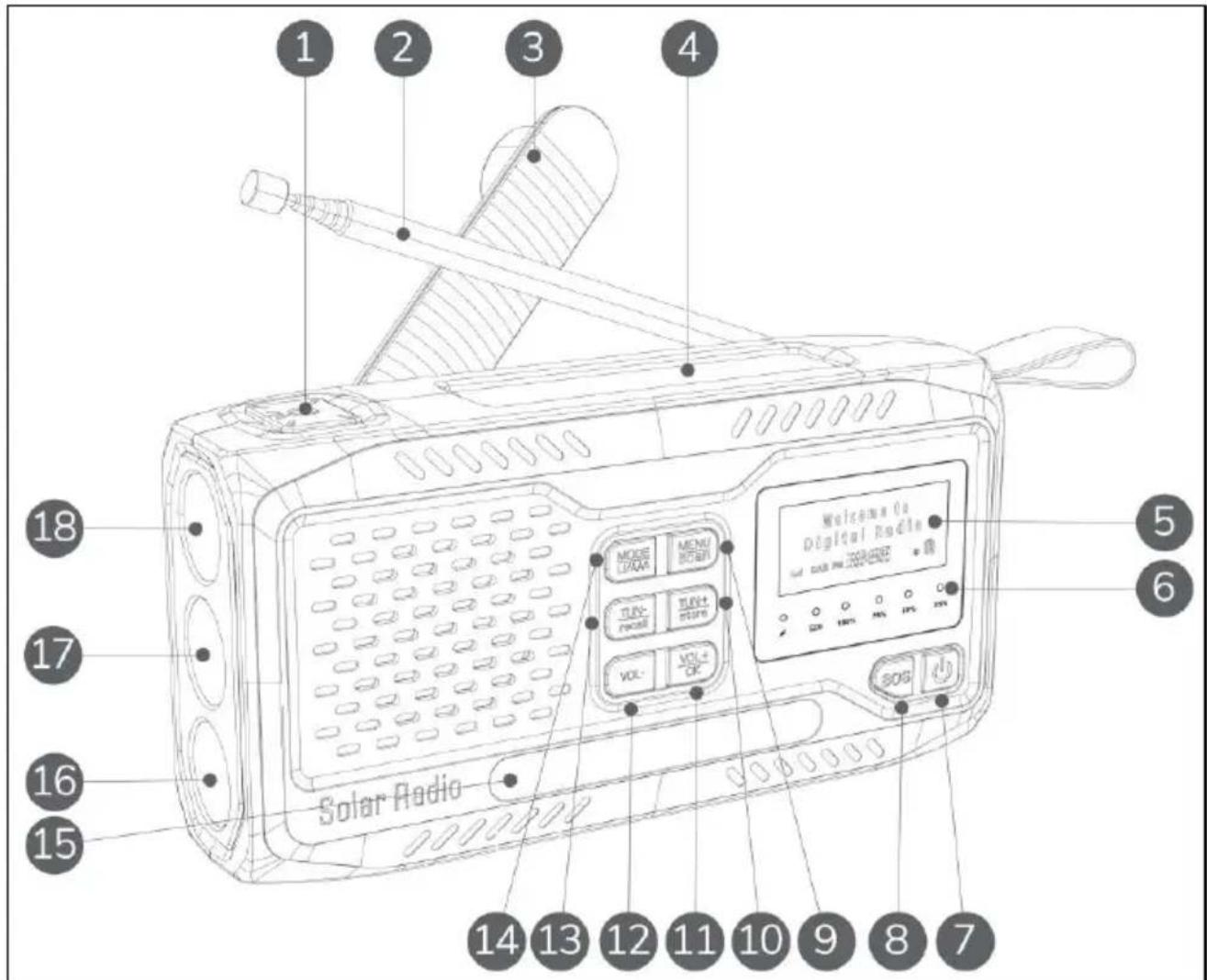
Figure 1: Vuelde face.
A member of the vogel's Group
E: info@marmitek.nl
W: www.marmitek.com.