RoboVac G20 Hybrid - Vacuum Cleaner eufy - Free user manual and instructions
Find the device manual for free RoboVac G20 Hybrid eufy in PDF.



| Product type | Robot vacuum with mopping function |
| Brand | Eufy |
| Model | RoboVac G20 Hybrid |
| Power supply | Power adapter 19 V, 0.6 A; Li-ion battery 14.4 V, 2600 mAh |
| Power consumption | 55 W |
| Dust collector capacity | 450 ml |
| Water tank capacity | 130 ml |
| Charging time | 300 to 360 minutes |
| Runtime | About 100 min (silent), 80 min (standard), 70 min (turbo), 40 min (max) on hard floor; reduced on carpet |
| Cleaning modes | Auto, spot, scheduling via app |
| Special features | BoostIQ™ (automatic suction boost), mopping system, Amazon Alexa / Google Assistant voice control |
| Connectivity | Wi-Fi 2.4 GHz, EufyHome app (iOS 10+ / Android 5+) |
| Sensors | Drop sensors, front bumper, cliff sensors |
| Brushes | Central brush, two side brushes |
| Filtration | Washable filter (recommended every 6 months) |
| Maintenance | Regular cleaning of dust collector, filter, brushes, sensors, swivel wheel; water tank and cloth after each use |
| Safety | Auto shutdown in case of issue, obstacle detection, magnetic boundary strip (optional), use on hard floors or low-pile carpets |
| Included accessories | Charging base, adapter, extra side brushes, cleaning tool, washable cloth, waterproof mat, manuals |
| Dimensions (approx.) | About 33 cm diameter, 9 cm height (estimation) |
Frequently Asked Questions - RoboVac G20 Hybrid eufy
User questions about RoboVac G20 Hybrid eufy
0 question about this device. Answer the ones you know or ask your own.
Ask a new question about this device
Download the instructions for your Vacuum Cleaner in PDF format for free! Find your manual RoboVac G20 Hybrid - eufy and take your electronic device back in hand. On this page are published all the documents necessary for the use of your device. RoboVac G20 Hybrid by eufy.
USER MANUAL RoboVac G20 Hybrid eufy
For FAQs and more information, please visit:
www.eufylife.com
RoboVac G20 Hybrid
Owner's Manual
T2258 51005003136 V01
English
Deutsch
Espanol
Français
Italiano
Türkce
Pycckn
Nederlandds
199
239
283
Table of Contents
02 Important Safety Instructions
08 About Your RoboVac What's in the Box RoboVac Anatomy IED Indication
12 Using Your RoboVac Important Tips Before Use Preparation
Charge Your RoboVac
Use Your RoboVac with the EufyHome App
Start/Stop Cleaning
Select a Cleaning Mode
Select a Suction Power Level
Select BoostIQTM feature
Use Mopping System
Use Your RoboVac with Amazon Alexa / Google Assistant
24 Cleaning and Maintenance Clean the Dust Collector and Filter Clean the Rolling Brush
Clean the Side Brush Replace the Side Brush Clean the Sensors and Charging Pins Clean the Swivel Wheel Clean the Mopping Cloth and Water
31 Troubleshooting Voice Alert
36 Specifications
37 Customer Service
Thank you for purchasing RohnVac. Carefully read all the instructions below before using this device, and keep this manual for future reference.
Important Safety Instructions
To reduce the risk of injury or damage, keep these instructions at hand when setting up, using, and maintaining this device.
WARNING SYMBOLS USED
#
This is the safety alert symbol. This symbol alerts you to potential hazards that could result in property damage and/or serious bodily harm or death.
This device can be used by children aged from 8 years and above and persons with reduced physical, sensory or mental capabilities or lack of experience and knowledge if they have been given supervision or instruction concerning use of this device in a safe way and understand the hazards involved.
Children should be supervised to ensure they do not play with this device.
- Cleaning and maintenance shall not be performed by children without adult supervision.
This device is only to be used with the power supply unit provided.
- Before cleaning or maintaining this device, the plug must be removed from the outlet.
The battery in this device should only be replaced by a skilled professional.
- When removing the battery, disconnect the device from the supply mains.
To recharge the battery, only use the detachable adapter US/CA: GSCU0600S019V12E; UK: GSCB0600S019V12E; EU: GSCV0600S019V12E; AU: GSCS0600S019V12E) provided with this device.
The battery must be removed before this device is disposed of. To remove the battery, first unscrew the screws on the bottom, then remove the back cover. Remove the battery by disconnecting the quick
02EN03
connector.
The used battery should be placed in a sealed plastic bag and disposed of safely according to local environmental regulations.
- The external flexible cable or cord of the power supply unit cannot be replaced; if the cord is damaged, the power supply unit shall be disposed of.
This device is for indoor use only.
- This device is not a toy. Do not sit or stand on this device. Small children and pets should be supervised when this device is operating.
- Store and operate this device in room temperature environments only.
- Do not use this device to pick up anything that is burning or smoking.
- Do not use this device to clean up spills of bleach, paint, chemicals, or anything wet.
- Before using this device, pick up objects like clothing and loose paper. Lift up cords for blinds or curtains. Move power cords, sharp-pointed and fragile objects out of the way. If this device passes over a power cord and drags it, an object could be pulled off a table or shelf.
- If the room to be cleaned has a balcony, a physical barrier should be used to prevent access to the balcony and to ensure safe operation.
- Do not place anything on top of this device.
- Be aware that this device moves around on its own. Take care when walking in the area where this device is operating to avoid stepping on it.
- Do not operate this device in areas with exposed electrical outlets on the floor.
- Do not expose the electronics of this device, its battery, or the integrated Charging Base. There are no user-serviceable parts inside.
- Do not use this device on an unfinished, unsealed, waxed or rough floor. It may result in damage to the floor and
this device. Use only on hard floor surfaces or low-pile carpets, and not on carpets with tasseled edges or loose threads.
This device has been designed to be used on floors without scratching them. We still recommend that you test this device on a small area of the room to be cleaned to ensure no scratches are made before cleaning the whole room.
- Only use attachments recommended or described in this manual.
- Do not handle the appliance or plug with wet hands.
- Ensure that the dust bag and/or filters are correctly in-place before usage.
- Do not use a battery pack or appliance that is damaged or modified. Damaged or modified batteries may exhibit unpredictable behavior resulting in fire, explosion, or risk of injury.
- Do not expose the battery pack or appliance to fire or excessive temperature. Exposure to fire or temperature above 130^ may cause an explosion.
- Do not modify or attempt to repair the appliance or the battery pack (as applicable), except as indicated in the instructions for use and care.
- Follow all charging instructions and do not charge the battery pack or appliance outside of the temperature range specified in the instructions. Charging improperly or at temperatures outside of the specified range may damage the battery and increase the risk of fire.
Notice

This symbol on the device or its packaging indicates:
Do not dispose of electrical appliances as unsorted municipal waste; use separate collection facilities. Contact your local authority for information regarding the collection systems available. If electrical appliances are disposed of in landfills or dumps, hazardous substances can leak into the groundwater and get into the food chain, damaging your health and well-being. When replacing old appliances with new ones, the retailer is legally obliged to take back your old appliance for disposal at least free of charge.
FCC Statement
This device complies with Part 15 of the FCC Rules. Operation is subject to the following two conditions: (1) This device may not cause harmful interference, and (2) this device must accept any interference received, including interference that may cause undesired operation.
Warning: Changes or modifications not expressly approved by the party responsible for compliance could void the user's authority to operate the equipment.
Note: This equipment has been tested and found to comply with the limits for a Class B digital device, pursuant to Part 15 of the FCC Rules. These limits are designed to provide reasonable protection against harmful interference in a residential installation.
This equipment generates, uses, and can radiate radio frequency energy and, if not installed and used in accordance with the instructions, may cause harmful interference to radio communications. However, there is no guarantee
that interference will not occur in a particular installation. If this equipment does cause harmful interference to radio or television reception, which can be determined by turning the equipment off and on, the user is encouraged to try to correct the interference by one or more of the following measures: (1) Reorient or relocate the receiving antenna. (2) Increase the separation between the equipment and receiver. (3) Connect the equipment into an outlet on a circuit different from that to which the receiver is connected. (4) Consult the dealer or an experienced radio / TV technician for help.
ISED Compliance Statement
This device contains license-exempt transmitter(s)/receiver(s) that comply with Innovation, Science and Economic Development Canada's license-exempt RSS(s). Operation is subject to the following two conditions:
- This device may not cause interference.
- This device must accept any interference, including interference that may cause undesired operation of the device.
RF Exposure Compliance Statement
This equipment complies with FCC/IC radiation exposure limits set forth for an uncontrolled environment. This equipment should be installed and operated with minimum distance 20cm between the radiator and your body.
Declaration of Conformity
This product complies with the radio interference requirements of the European Community. Hereby, Anker Innovations Limited declares that the radio equipment type T2258 is in compliance with Directive 2014/53/EU. The full text of the EU declaration of conformity is available at the following internet address: https://www.eufylife.com/
Maximum output power: 18 dBm (For EU)
Frequency band: 2.4G band (2.4000GHz - 2.4835GHz)
GB Declaration of Conformity
Hereby, Anker Innovations Limited declares that the product type T2258 is in compliance with Radio Equipment Regulations 2017 and The Restriction of the Use of Certain Hazardous Substances in Electrical and Electronic Equipment Regulations 2012. The full text of the GB declaration of conformity is available at the following internet address: https://www.eufy.com.
The following importer is the responsible party (contract for EU and UK matters)
Anker Technology (UK) Ltd
Suite B, Fairgate House, 205 Kings Road, Tyseley, Birmingham, B11 2AA, United Kingdom
- Amazon, Echo, Alexa and all related logos are trademarks of Amazon.com, Inc. or its affiliates.
Apple and the Apple logo are trademarks of Apple Inc., registered in the U.S. and other countries. App Store is a service mark of Apple Inc., registered in the U.S. and other countries.
Google Play and the Google Play logo are trademarks of Google Inc. - Google Home is a trademark of Google Inc.
About Your RoboVac
What's in the Box
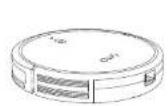
Reer
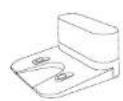
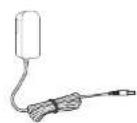
Changg Base Power Adapter
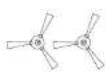
Side Bushes × 2
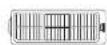
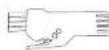
Additional Filter Cleaning Tool
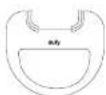
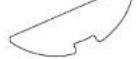
Washable Mopping Cloth Waterproof Pcd
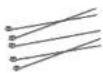
Cabeles (s) Owners Manual

& Other Documents
08 EN EN 09
RoboVac Anatomy
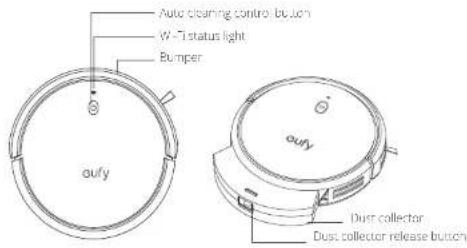
A. Top & Side
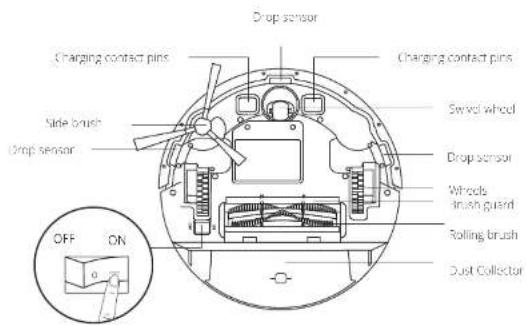
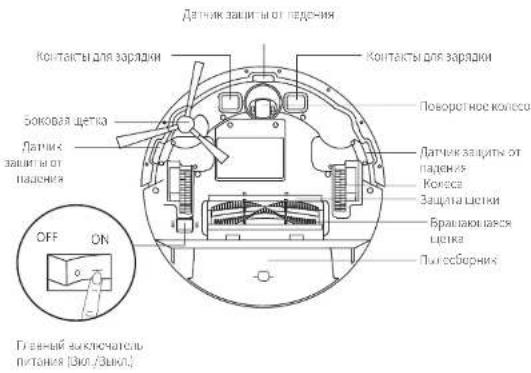
B. Bottom
Men power switch (OnVCI)
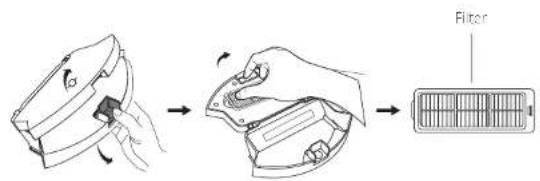
C. Dust Collector
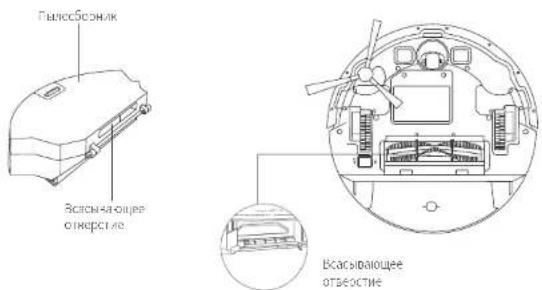
D. Suction Inlet
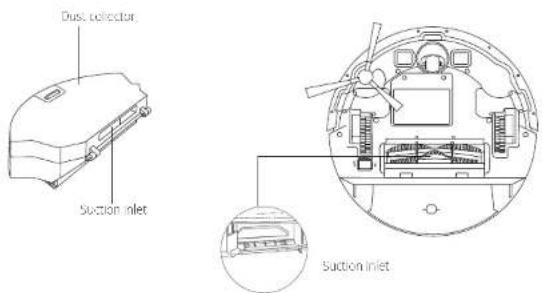
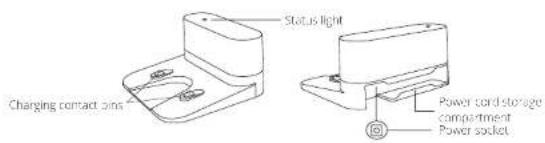
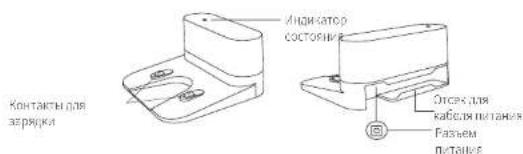
E. Charging Base
10 EN EN 11
F. Water Tank
LED Indication
You can see the status of RubioVac from the LED indicators.
| (Power Status Light) | Status |
| Pulsing orange | Charging |
| Solid blue | Standby / Cleaning / Fully charged |
| Solid orange | Low power and returning to Charging Base |
| Off | • RoboVac is off. • To conserve power, the light automatically turns off when RoboVac is not docked to the Charging Base and has been inactive for 10 minutes. |
| Flashing red & Voice alert | RoboVac has an error. Refer to the "Troubleshooting>Voice Alert" section in this manual for solutions. |
| (Wi-Fi Status Light) | Status |
| Slowly flashing blue | Waiting for connection |
| Rapidly flashing blue | Connecting with your wireless router |
| Solid blue | Connected to your wireless router |
Using Your RoboVac
Important Tips Before Use
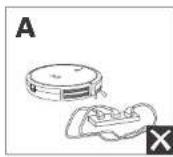
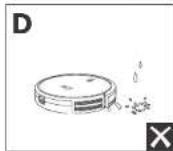
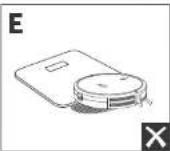
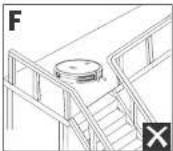
Remove power cords and small objects from the floor that may entangle RoboVac. Use the supplied cable ties to organize your wires and power cords.
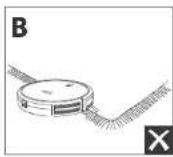
Fold tasseled edges of area rugs underneath to prevent tanging RoboVac. Avoid cleaning very dark-colored high-pile rugs or rugs thicker than 1.02 in/26 mm as they may cause RoboVac to malfunction.
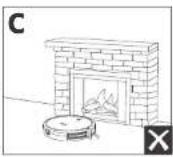
It is strongly recommended to place boundary strips (solid separately) in front of fireplaces and certain areas (i.e. air vents) that may cause damage to RoboVac if entered.
Keep Ropovac away from wet areas during cleaning.
RobVac may climb on top of objects less than 0.67 in/17 mm in height. Remove these objects if possible.
1 Anti-Shop sensors will prevent RoboVac from Lumbering downstairs and sleep drops in most cases. Sensors are less effective if dirty or used or carried/effective/very dark-colored floors. It is recommended to place physical barriers to block off areas where RoboVac may fall.
Preparation
1 Remove the foam blocks beside the bumper before use.
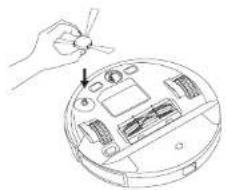
2 Install the side brush before use.
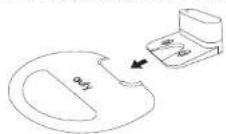
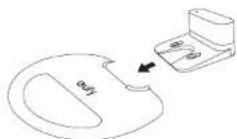
Before mopping, attach the waterproof pad to the Charging Base to keep the floor dry. Make sure it is firmly installed. Skip this step if mopping is not needed.
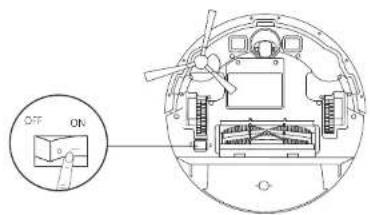
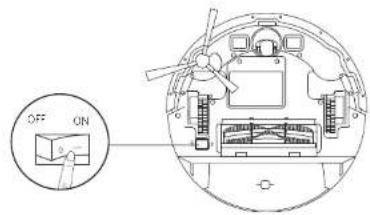
Turn on the main power switch on the bottom of RoboVac.
12 EN EN 13
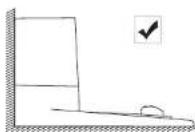
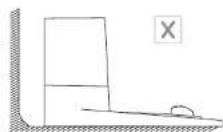
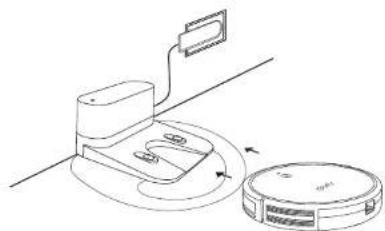
5 Place the Chering Base on a level surface and against a wall.
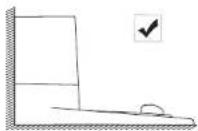
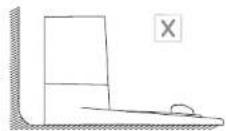
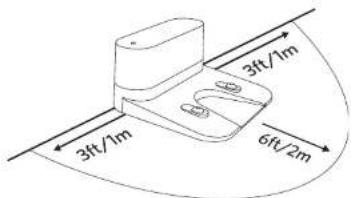
6 Remove objects within 3ft /1m of the left and right side and within 6 ft/2 m of the front of the Charging Base. If you cannot remove the objects, move RoboVac to a new place and check whether RoboVac can return to the Charging Base normally; if not, contact early customer service for help
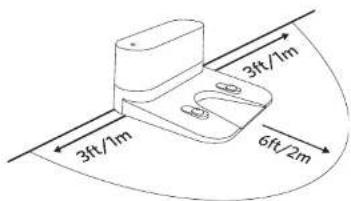
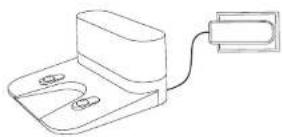
7 Connect the adapter to the Charging Base and a wall out et.
When the Charging Base connects to AC power, the LED indicator on the Charging Base is SOLDER WHITE.
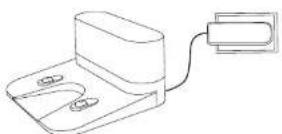

- Install the Charging Base in a location that RoboVac can easily access. It is recommended to place the Charging Base against a wall, and on a hard-level surface rather than un-rugs or carpets.
- Always keep the Charging Sata plugged in, otherwise RoboVac will not automatically return into its.
14 EN EN 15
Charge Your RoboVac

Make sure RoboVar is fully charged before use.
RoboVac will return to the Charging Base at the end of a cleaning cycle or when its battery is running low.
Attach RoboVest to the Charging Base by aligning its charging pins with the charging pins on the base.
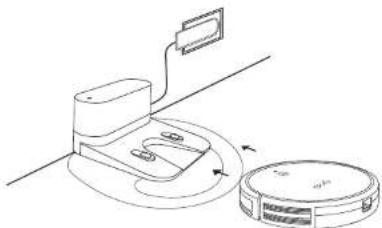

Turn off the main power switch if RoboVac will not be used for a long period of time. To preserve the battery's lifespan, recharge at least once every 6 months.
Use Your RoboVac with the EufyHome App
To enjoy all available features, it is recommended to control your RubioVac via the EuroHome app.
Before you start, make sure that:
- Your smartphone or tablet is connected to a Wi-Fi network.
- Your smartphone or tablet is running iOS 10.0 (or above) or Android 5.0 (or above).
The 24GHz band wireless signal is enabled on your wireless router.
The Wi-Fi status light on RoboVac is slowly flashing blue.
RoboVac is attached to the Charging Base to ensure it has enough power during setup.
- Download the Eulfi-Home app from the App Store (iOS devices) or Google Play (Android devices).
- Open the app and create a user account.
- Tap the "+" icon to add "RoboVac G20 Hybrid" to your EutyHome account.
-
Follow the instructions in the app to set up the Wi-Fi correction.
-
After connecting successfully, you can control RoooVac via the app.
- With the app, you can select a cleaning mode, set the time, schedule a cleaning.
view the system status, receive notifications and access additional features.
Wi-Fi Status Light
| Slowly flashing blue waiting for connection |
| Rapidly flashing blue connecting with your wireless router |
| Solid blue connected with your wireless router |
If RoboVac gets stuck in any space, tap Find My Robot in the app to find the machine.
Reset the Wi-Fi connection
To reset Uni-Fi connection, press and hold! Or 10 seconds until you hear a voice prompt. At the same time, RoboVac will restore the factory default settings.
- The Wi-Fi status light will only flash blue. Now you can follow the Wi-Fi instruction in this Fully-one app to set up the Wi-Fi connection.
16 EN EN 17
Schedule Cleaning
With the FiftyHome app, you can schedule RoboVac to start cleaning at a particular time.
You can set the time and customize the cleaning schedules from Sunday to Saturday on the EufyHome app. This function is available in the app only.
Start/Stop Cleaning
Make sure the main power switch on the bottom of RiboVac is turned on before use.
You can also start or stop clearing via the EufyHome app.
Press start clearing in Auto clearing mode.
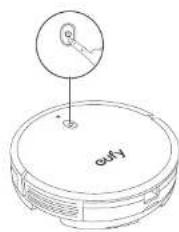
Press to pause cleaning.
Select a Cleaning Mode
Auto Cleaning Mode
After startup, RoboVac moves from the Charging Bese and automatically determines its cleaning route, following a bow-shaped cleaning method. When the entire clean is finished, RoboVac automatically returns to the Charging Bese.
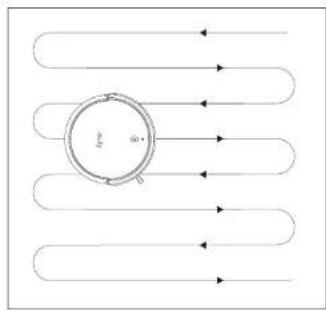
Press start clearing in Auto clearing mode.
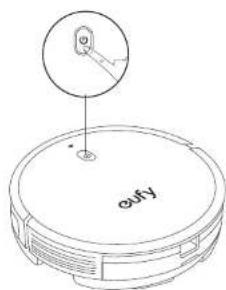
18 EN EN 19

- During clamping, RoboVac will return to the Charging Base automatically if the battery level becomes low. Once recharged, RoboVac will resume to finish the remaining cleaning.
By default, RoboVac starts in Auto cleaning mode when it is turned on.
Spot Cleaning Mode
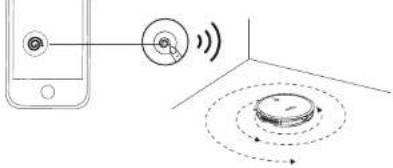
You can select the Spot cleaning mode in the Lufy home app. In this mode, RoboVac intensively cleans a specific area for 2 minutes in a spiral pattern, useful if there is a concentrated area of dust or debris.
Select a Suction Power Level
In the EufyHome app, select a suction power level according to your needs.
·Quiet
Standard (Default)
Turbo
Max

When RoboVac starts cleaning the next time, it will clean according to the suction power level you previously selected.
Select BoostIQTM feature
In the Eu's Hmme app, selc the BostiQTM feaure according to your needs. RhoVac will automatically increase the suction power if it detects that stronger power is needed to ensure the best clean. BoostiTM is ideal for cleaning thicker carpets and hard-to-sweep messes, which will reduce the total cleaning time, but increase the noise level. If the vacuuming noise caused by BoostiQTM disturbs you, you can disasie this feature.
Use Mopping System

- The mopping mode is only intended for a clean floor without slubbery stains or liquids. To avoid staining floors, do not use the mopping function when cust is mixed with liquids such as coffee or ink.
- Mopping System cleans best on smooth hard surfaces and may not perform well on uneven surfaces, heavily waxed floors or rough surfaces like slate or bricks.
The mopping mode is not recommended when no one is at home. - Do not use the mopping mode on a carpeted floor. It is recommended to place boundary strips (sold separately) to avoid cleaning the carpeted area.
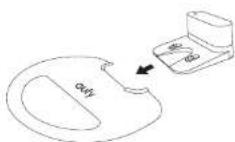
Before mopping, install the waterproof pad under the Charging Base to protect the floor.
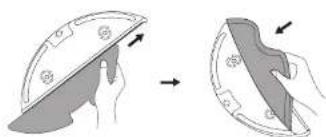
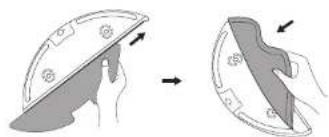
Wet the mopping cloth and wring it until it does not drip. Insert the cloth along the bracket slot and stick it firmly.
20 EN EN 21
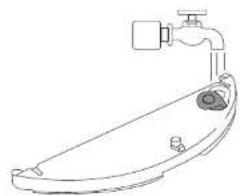
3 Open the water inlet cover to fill the water, then close the cover.
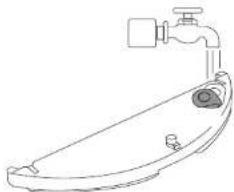

Do not use any cleaning solution of her than those specified by eufy, as it may damage the water tank.
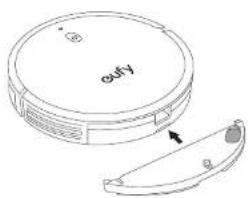
4 Install the water tank into the halton of RoboVac until a click is heard.
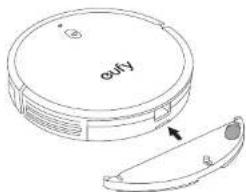

The mopping mode is only intended for a clean floor without stubborn stains. To achieve a better mopping effect, it is recommended to clean the floor with RoboVac II (RoboVac II; three times before insulating the mopping module).
5 Select a cleaning mode to start cleaning.
RoboVac automatically swaps and mops in the selected mode.
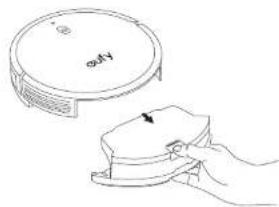
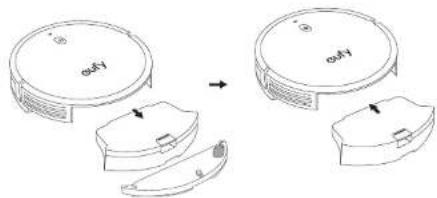
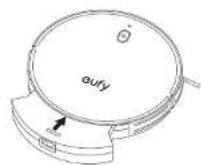
6 When RoboVac finishes working and returns to the Charging Base, press the release button to remove the dust collector and the water tank.
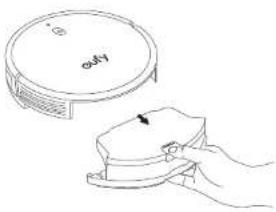
7 Remove the water tank and put the dust collector back into the main unit.
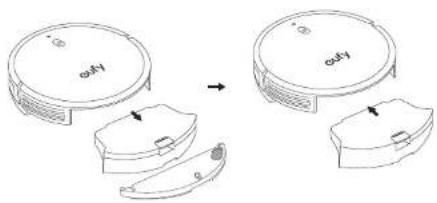
After mopping, remove the water tank, empty any remaining water and clean the mopping cloth to prevent mildew or unpleasant smells. For how to clean and maintain the water tank, refer to the "Cleaning and Maintenance" section in this manual.
Use Your RoboVac with Amazon Alexa / Google Assistant
Amazon Alexa or Google Assistant is a smart voice control device that enables you to control RoboVac with your voice.
Before you start, make sure that:
RoboVac is attached to the Charging Base to ensure there is enough power.
RoboVac is connected with the Fully Home app.
- You have an Amazon Alexa-enabled device (i.e. Amazon Echo, Echo Dot and Amazon Tap, Echo Show, Echo Spot) or a device enabled with the Google Assistant (i.e. Google Home, Google Home Mini). These devices are sold separately.
- The Amazon Alexa app or Google Home app is already installed on your smart device, and you have created an account.
To control RoboVac with Amazon Alexa or Google Assistant
- Open the EufyHome app and find "Smart Integrations" in the top left.
-
Follow the on-screen instructions to complete the setup.
-
Currently this feature only supports English, German, French, and Spanish. You could check regularly if more languages are supported at https://www.cufyfi.de/com-supper/.
22 EN EN 23
Cleaning and Maintenance
Before cleaning and maintaining, turn off the device and unplug the adapter.
For optimal performance, follow the instructions below to clean and maintain RoboVac regularly. The cleaning / replacement frequency will depend on your RoboVac usage habits.
Recommended Cleaning / Replacement Frequency
| RoboVac Part Cleaning Frequency Replacement Frequency | ||
| Dus. Colloclor After each use | ||
| Filter Once every week (Twice a week if you have a pet) | Every 6 months or after every 50 rounds of cleaning | |
| Side Brush Once every month Every 3-6 months (or when visibly worn) | ||
| Brush guard Once every month Every 3-6 months (or when visibly worn) | ||
| Sensors Once every month | ||
| Charging Pins Once every month | ||
| Swivel Wheel Once every month | ||
| Mopping Cloth After each use | ||
| Water Tank | After each use | |
Clean the Dust Collector and Filter
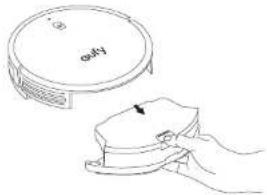
Press the dust collector release button to pull the dust collector out.
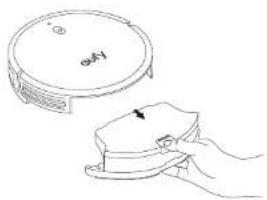
24 EN EN 25
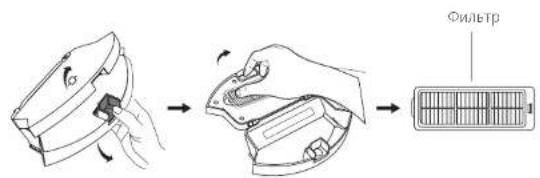
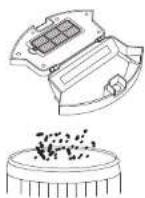
2 Open and empty the dust collection
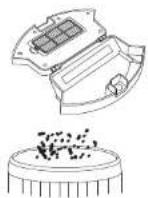
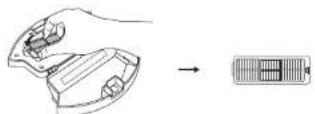
3 Remove the filter
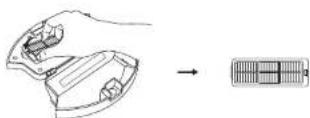
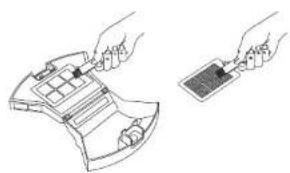
4 Clean the dust collector and filter with the cleaning brush.
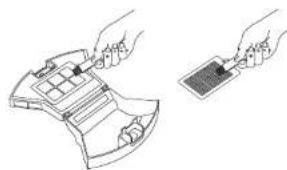
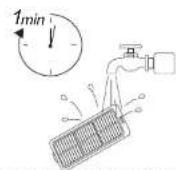
5 Rinse the dust collector and filter thoroughly with water.
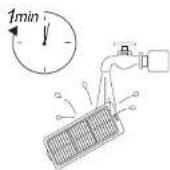

Do not use hot water or any detergent to clean the filter.
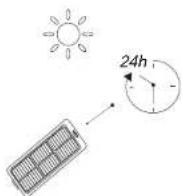
Air-dry the dust collector and filter completely before next use. You may use another filter if the original one is not dry.
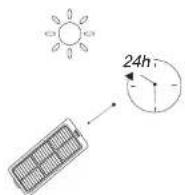
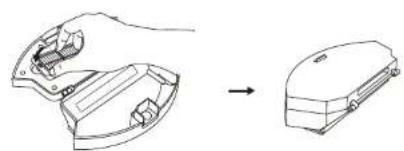
7 Place the filter back into the dust collector.
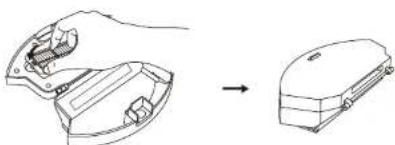
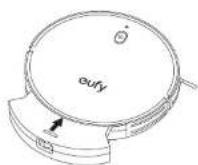
8 Push the dust collector back into the main unit.
Clean the Rolling Brush
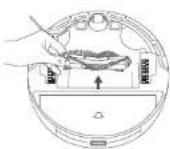
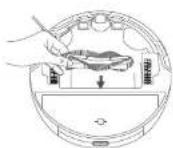
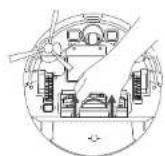
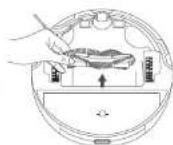
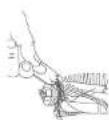
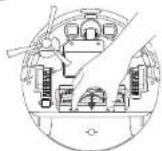
1 Pull on the release labs to unlock the brush guard as shown.
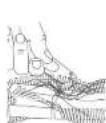
Lift the rolling brush to remove.
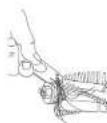
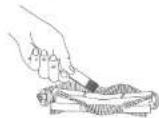
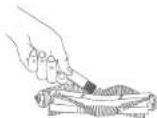
Clean the rolling brush with the cleaning tool.
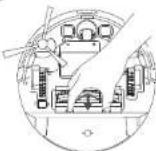
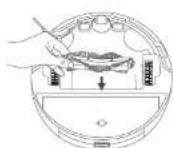
4 Rerst the rolling brush by inserting the fixed protruding first and then clicking into plaste.
Press down to snap the brush guard into place.

0
2
3
4
5
Clean the Side Brush
Foreign substances, such as hair, can easily get tangled in the skin brush, and lift may adhere to it. Be sure to ean it regularly.
1 Remove the side brush.
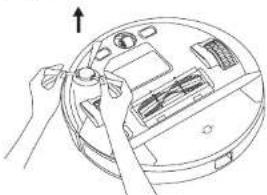
Carefully unwind and pull off any hair or string that is wrapped between the main uril and the side brush.
Use a cloth dampened with warm water to remove dust from the brush or to gently reshape it.
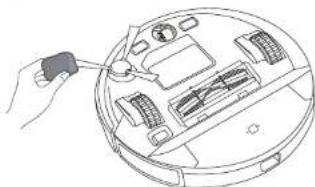

Only use the side brush when it is completely dry.
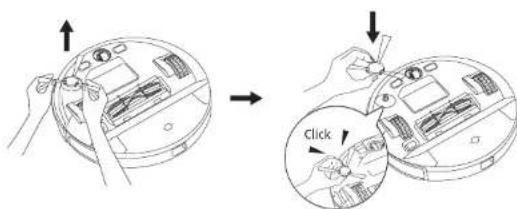
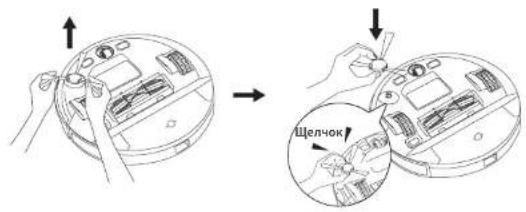
Replace the Side Brush
This side brush may become damaged after being used for a period of time. Follow the instructions below to replace it.
- Pull off the old side brush and snap the new one into place until you hear a click
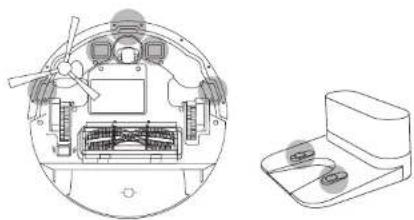
Clean the Sensors and Charging Pins
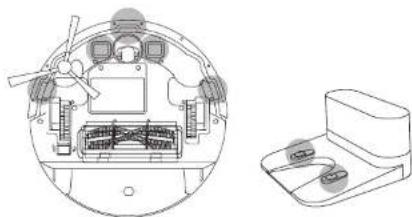
To maintain the best performance, clean the drop sensors and charging pins regularly.
- Dust off the drop sensors and charging contact pins using a cloth or cleaning brush.
28 EN EN 29
Clean the Swivel Wheel
Hair or dust particles can easily get entangled in the swivel wheel. Because to elicit the swivel wheel periodically and as needed,
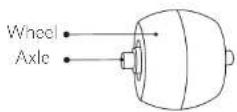
1 Remove the swivel wheel.
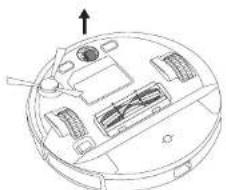
Clean any hair or debris wrapped around the wheel or entangled inside the wheel cavity.
3 Reinstall the wheel and push in until it clicks into place.

Do not clean the swivel wheel with water.
Clean the Mopping Cloth and Water Tank
It is recommended to clean the washable mopping cloth and water tank after each use.
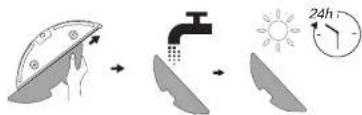
After each use, remove the mopping cloth from the water tank.
2 Rinse the mopping cloth and water tank thoroughly with water.
Air dry the mopping cloth and water tank completely to prevent mildew or unpleasant smells.
Troubleshooting
The solution's below are for general questions, if your problem persists; visit www.eutylife.com, go to EutylHome app, or contact support@eutylife.com for help.
| Problems Solutions | |
| RoboVac cannot be activated. | • Make sure the main power switch is in the ON position. • Make sure the battery is fully charged. • If you still have trouble, turn off the main power switch and then turn it back on. |
| RoboVac stops working suddenly. | • Check if RoboVac is trapped or stuck on an obstacle. • Check if the battery level is too low. • If you still have trouble, turn off the main power switch, wait for 2 seconds, and then turn it back on. • Check if RoboVac has alerted you with any voice prompts or LED indicators. Refer to the "Voice Alert" section in this manual. |
| You cannot schedule cleanings. | ·Make sure the main power switch on the bottom of RoboVac is turned on. ·Make sure the scheduled lime has been set correctly. Check if the time zone in the EufyHome app is consistent with that on your mobile device. ·Check if RoboVac's power is too low to start cleaning. ·Cleaning schedules are erased when RoboVac is powered off or when resect to factory default settings. If RoboVac is powered on without Internet access, cleaning schedules will not synchronize and must be reset via the app. |
| Suction power is weak. | ·Check if any obstructions are blocking the suction inlet. ·Empty the dust collector. ·Check if the filter is well due to water or other liquid on the floor, air-dry the filter completely before use. |
| RoboVac cannot be chargee. | ·Check if the indicator on the Charging Base lights up. If not, reconnect the adapter with the Charging Base and try a new power outlet. If the problem persists, contact the eufy service center to repair or replace the Charging Base. ·Dust off the charging contact pins with a dry cloth. ·Check if you can hear a beep when RoboVac is docked onto the Charging Base. If not, contact the eufy service center to repair or replace the Charging Base. |
| RoboVac cannot return to the Charging Base. | ·Remove objects within 3 ft/1 m to the left and right side and within 6 ft/2 m of the front of the Charging Base. ·Check if RoboVac is stuck by any objects. ·Clean the charging contact pins. |
| RoboVac's movements or travel path are abnormal. | ·Clean the sensors carefully with a dry cloth. ·Rastri RoboVac by turning the power switch off and on. |
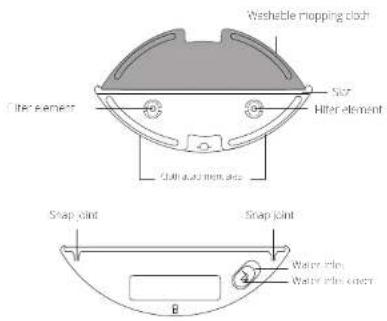
| Water does not come out during mapping. | ·Make sure there is enough water in the water tank. ·Make sure the water tank and mopping cloth are properly installed. ·Check if the water out cans are blocked. If yes, replace the filter elements. |
| Problems Solutions | |
| Too much water comes out during mopping | • Make sure the water tank has been installed properly. • Make sure the filter elements are correctly installed in place. |
| RoboVac's cleaning time becomes shorter | • Make sure RoboVac is fully charged (indicated by a solid blue LED light) before cleaning. • The cleaning time will be affected by the suction mode and floors/rugs to be cleaned. • On floors: approx. 100/80/70/40 minutes of cleaning in Quiet / Standard / Turbo / Max suction mode respectively • On rugs: approx. 80/60/55/30 minutes of cleaning in quiet / Standard / Turbo / Max suction mode respectively • Check if RoboVac has alerted you with any voice prompts or LED indicators. Refer to the "Voice Alert" section in this manual. • If your cleaning time is much less than the time mentioned above, contact Any customer service for help. |
| RoboVac cannot connect to a Wi-Fi network | • Make sure you entered the Wi-Fi password correctly. • Make sure your RoboVac router, and mobile phone are close enough to ensure a strong signal strength. • Make sure your Wi-Fi router supports the 2.4GHz and 802.11b/g/n bands; the 5GHz band is not supported. |
| You cannot control RoboVac with Amazon Alexa. | • Check if there are any Internet connection problems. • Check whether you have installed the Amazon Alexa app onto your smart device and enabled "EutyHome - RoboVac" Skill in the Amazon Alexa app. For details, refer to the "Smart Integrations" page in the EutyHome App. • Make sure you have an EutyHome account and have connected to RoboVac. • Make sure you are using correct Alexa voice commands. |
| You cannot control RoboVac with the Google Assistant. | ·Check if there are any internal connection problems ·Check if you have installed the Google Home app onto your smart device and initiated the "FulHome" action in the Google Home app. For details, refer to the "Smart Integrations" page in the FulyHome App. ·Check if you are using the proper commands when talking to the Google Assistant. When making your request, first say the wake words "Ok Google". ·Repeat your question. Speak clearly to the Google Assistant. |
Voice Alert
Which RoboVac encounters a problem, the red indicator on RoboVac will flash and you will hear the relevant voices prompts.
The voice prompts below are only for reference and may be changed slightly after voice pack updates. Please to low the voice prompts you have heard to find the cause and solution below.
| Voice Prompt Cause and Solution | |
| Error 1: Front Bumper Stuck | Front bumper is stuck. Tag it repeatedly to remove any dust. Tnol, move the device to a new position and try again. |
| Error 2: Whaul Stuck | Whaal may be stuck or trapped. Clear any obstacles in the surrounding area and check the wheel for any trapped dust. Move the device to a new position and try again. |
| Error 3: Side Brush Stuck | brush may be stuck. Clean it and try again. |
| Error 4: Rolling brush stuck. Remove and clean the rolling brush | Remove the rolling brush, roller joint, roller brush cover, and suction in/rel to clean it. Once cleaned, place the items back into the device and try again. |
| Error 5: Device Stuck or Trapped | Device is trapped. Clear any obstacles in the surrounding area and try again. |
| Error 6: Device Stuck or Trapped | Device may be suspended in air. Move it to a new position close to the original position and try again. If the device is still unable to start, clean the edge sensor and try again. |
| Voice Prompt Cause and Solution | |
| Error 7: Wheel Suck Hanging | Wheels may be suspended in air. Move the device to a flat surface and a new position close to the original position then try again. |
| Error 8: Low Battery, Shutting Down | Low Battery system will shut down. Charge the device and try again. |
| Error 9: Magnetic Boundary Strip detected. Move device to a different area | Device is too close to a strong magnetic field or strip. Move the device to a different area and try again. |
| Error 10: Battery Error | - Open the battery compartment and check whether the battery is connected and restart the device - Battery Temperature may be too high or low, wait until the battery falls to normal temperatures before usage (0 °C - 40 °C / 32 °F to 104 °F) - If the issue persists, contact customer support for help |
| Error 11: Wheel Module Error | - Check whether the wheels are stuck or dusty is trapped inside before restarting the device - If the issue persists, contact customer support for help |
| Error 12: Side Brush Error | - Check whether the side brush is stuck in an unknown object before restarting the device - If the issue persists, contact customer support for help |
| Error 13: Suction Fan Error | - Check whether the fan blades are stuck in an unknown object before restarting the device - Clean the dust bin and filter before restarting the device - If the issue persists, contact customer support for help |
| Error 14: Rolling Brush Error Refer to Owner's Manual or App for help | Remove and clean the roller brush, roller brush connection, roller brush cover and suction inlet before restarting the device. If the issue persists, contact customer support for help |
34 EN EN 35
Specifications
| Battery Voltage | 14.4 V= |
| Power Consumption 55 W | |
| Battery Type | 14.4 V= Li-on 2600 mAh |
| Dual Collector | 450 m |
| Water Tank Capacity 130 ml | |
| Charging Time: 300-360 mns | |
| Inout | 19 V=0.6 A |
| Output | 19 V=0.6 A |
| Input | 100-240 V=0.5 A Max |
| Output | 19 V=0.6 A |
| Frequency 50/60 Hz |
Customer Service
For tutorial videos, FAQs, manuals, and more information, please visit support eufyllie.com
Contact Us
support@eufyllife.com
www.eufylife.com

(US) +1 (800) 988 7973 Mon-Fri 6:15-17:00 (PT);
Sat-Sun 6:30-16:30 (PT)
UK+4401604936200Mon-Fri6:00-17:00
Sat-Sun 6:00-14:00
(DE) +49 (0) 69 9579 7960 Mo-Fr 8:00-16:00
For more support phone numbers, please visit:
support eufylife.com/s/phorecontactus
Or scan the QR code below:

@EufyOfficial @EufyOfficial @EufyOfficial @EufyOfficial
Anker Innovations Limited
Room 1318-19, Hollywood Plaza, 610 Nathan Road, Mengkok, Kowloon, Hong Kong
Inhaltsverzeichnis
ANKER TECHNOLOGY (UK) LTD
Suite B, Fairgate House, 205 Kings Road, Tyseley, Birmingham, B11 2AA, Vereinigtes Konigreich
Download on the App Store

SETT ON Google Play
support@eufyllife.com
www.eufylife.com

(US) +1 (800) 988 7973 Mon-Fri 6:15-17:00 (PT);
Sat-Sun 6:30-16:30 (PT)
UK+4401604936200Mon-Fri 6:00-17:00
Sat-Sun 6:00-14:00
(DE)4906995797960Mo-Fr8:00-16:00
support eufylife.com/s/phonecontactus
ANKER TECHNOLOGY (UK) LTD
Suite B, Fairgate House, 205 Kings Road, Tyseley, Birmingham, B11 2AA, Reino Unido
Downloaded on the App Store

Google Play
品 support@eufyllife.com
www.eufylife.com

(US) +1 (800) 988 7973 Mon-Fri 6:15-17:00 (PT);
Sat-Sun 6:30-16:30 (PT)
() + 44(0)1604936200Mon - Fri 6:00 - 17:00;
Sat-Sun 6:00-14:00
(DE)49(0)6995797960Mo-Fr8:00-16:00
ANKER TECHNOLOGY (UK) LTD
Suite B, Fairgate House, 205 Kings Road, Tyseley, Birmingham, B11 2AA, Royaume-Uni
support@eufyllife.com
www.eufylife.com

(US) +1 (800) 988 7973 Mon-Fri 6:15-17:00 (PT);
Sat-Sun 6:30-16:30 (PT)
UK+4401604936200 Mon-Fri 6:00-17:00
Sat-Sun 6:00-14:00
(DE) +49 (0) 69 9579 7960 Mo-Fr 8:00-16:00
ANKER TECHNOLOGY (UK) LTD
Suite B, Fairgate House, 205 Kings Road, Tyseley, Birmingham, B11 2AA, Regno Unito
Download on the AppStore

GET ON Google Play
support@eufyllife.com
www.eufylife.com

(US) +1 (800) 988 7973 Mon-Fri 6:15-17:00 (PT);
Sat-Sun 6:30-16:30 (PT)
UK+4401604936200Mon-Fri6:00-17:00
Sat-Sun 6:00-14:00
(DE) +49 (0) 69 9579 7960 Mo-Fr 8:00-16:00
support eufylife.com/s/phonecontactus
ANKER TECHNOLOGY (UK) LTD
Suite B, Fairgate House, 205 Kings Road, Tyseley, Birmingham, B11 2AA, United Kingdom
(US) +1 (800) 988 7973
Mon-Fri 6:15-17:00 (PT)
UK+4401604936200 Mon-Fri 6:00-17:00
Sat-Sun 6:00-14:00
TR908504601414 Man-Fri 09.00-18.00
(DE) +49 (0) 69 9579 7960 Pzt-Cuma 8:00 - 16:00
ANKER TECHNOLOGY (UK) LTD
Suite B, Fairgate House, 205 Kings Road, Tyseley, Birmingham, B11 2AA, Beiko6pntaHnA
HHTTNTN
Bodopentec-pb-100000000000000000000000000000
YcTpoNCTBO RoboVac
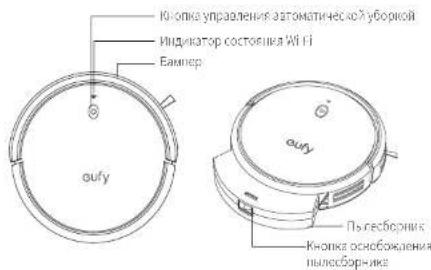
A. Bépxnay n 6okobar CTopoHbI
B. Huxkna CTopoHa
Pycckn
C. Пынecборнк
T.BcacsbAiooeeOTBepctne
Д.Зардан6a3at
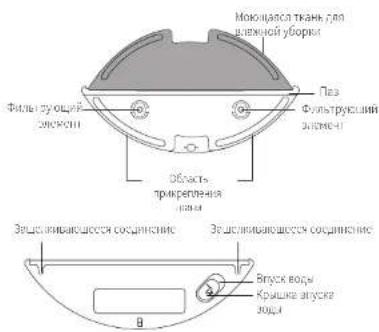
E.EMKOCtB DnBBODbI
CBeToaNoaHbI HnHaKaTOp
CBETODNHOHHe HNDKATOpbI COoBuaT O CoCTOHNn a6oTaRoboVac.
| (CBETOBOинДИКATOP ПITANHA) | Союнине |
| Mнлг.TОралдевIMCBETOM | Зардьа |
| ПOTбТОПТОПСИМ | Бхддпe/убрka/ПОИСТБЗЗAPKEN |
| РОнь.TОралдевIMCBET | ПИЗКИУРСЕВЕЗАЗДАЯ ИЗБАРТИЗАЗДAZызY |
| ВыкЛ. | • Robovac ВИКПОЧС. • ДИЕ KEGOMNIA AHEPIM CBETOBО ИнДИКATOP АТOMATYNССКВ ВИКПОЧСТС, Кorda Robovac He NonKIOHEN I ZAPALHOD БAZCII HcNCONBAYCTB TECHINCE 10 MInyT. |
| Mнлг.TОралдевIMCBETOM ЗвчNTI TOLICOBON CINHAT | Врабore Robovac propon3ozma OUSZKA. РОИСТПОПБОССССВ, в розец «ПОИСКИ устаненье НИССРВАССТС > TOLOCOBON сИнHAJI BTON PUKOLODCTE. |
250RU RU 251
Pycckn
| (Инданатор союген�а WI-ФI) | Союнские |
| Мediterranean China | Баллелегетаюнокуешаюк Беслароведу маршулдату Посюговеду Востанною coöдуненяс с валлим Беслароведу маршулдату Востанною coöдуненяс с валлим Востанною coöдуненяс с валлим Востанною coöдуненяс с валлим Вostan nojnoy coöдуненяс с валлим Вostan nojnoy coöдунen Вostan nojnoy coöдун Вostan nojnoy coöдун Вostan nojnoy coöдун Вostan nojnoy coöдун Вostan nojnoy coöдун Вostan nojnoy coöдун Вostan nojnoy coöдун Вostan nojnoy coöдун Вostan nojnoy coöдун Вostanc nojnoy coöдун Вostanc nojnoy coöдун Вostanc nojnoy coöдун Вostanc nojnoy coöдун Вostanc nojnoy coöдун Вostanc nojnoy coöдун Вostanc nojnoy coöдун Вostanc nojnoy coöдун Вostanc nojnoγ Вostanc nojnoγ Вostanc nojnoγ Вostanc nojnoγ Вostanc nojnoγ Вostanc nojnoγ Вostanc nojnoγ Вostanc nojnoγ Вostanc nojnoγ Вostanc nojnoγ Вostanc nojnoγ Вostanc nojnoγ Вostanc nojnoγ Вostancer nojnoγ Вostancer nojnoγ Вostancer nojnoγ Вostancer nojnoγ Вostancer nojnoγ Вostancer nojnoγ Вostancer nojnoγ Вostancer nojnoγ Вostancer nojnoγ Вostancer nojnoγ Вostancer nojnoγ Вostancer nojnoγ Вostancer nojno γ Вostancer nojno γ Вostancer nojno γ Вostancer nojno γ Вostancer nojno γ Вostancer nojno γ Вostancer nojno γ Вostancer nojno γ Вostancer nojno γ Вostancer nojno γ Вostancer nojno γ Вostancer nojno γ Вostancer nojno γ Вost cancer nojno γ Вostancer nojno γ Вostancer nojno γ Вostancer nojno γ Вostancer nojno γ Вostancer nojno γ Вostancer nojno γ Вostancer nojno γ Вostancer nojno γ Вostancer nojno γ Вostancer nojno γ Вostancer nojno γ Вostancer nojnoγ Вostancer nojno γ Вostancer nojno γ Вostancer nojno γ Вostancer nojno γ Вostancer nojno γ Вostancer nojno γ Вostancer nojno γ Вostancer nojno γ Вostancer nojno γ Вostancer nojno γ Вostancer nojno γ Вost cancer nojno γ Вost cancer nojno γ Вostancer nojno γ Вostancer nojno γ Вostancer nojno γ Вostancer nojno γ Вostancer nojno γ Вostancer nojno γ Вostancer nojno γ Вostancer nojno γ Вostancer nojno γ Вostancer nojno γ Вostancer nojnoγ Вostancer nojnoγ Вostancer nojno γ Вostancer nojno γ Вostancer nojno γ Вostancer nojno γ Вostancer nojno γ Вostancer nojno γ Вostancer nojno γ Вostancer nojno γ Вostancer nojno γ Вostancer nojno γ Вost cancer nojno γ Вostancer nojno γ Вost cancer nojno γ Вostancer nojno γ Вostancer nojno γ Вostancer nojno γ Вostancer nojno γ Вostancer nojno γ Вostancer nojno γ Вostancer nojno γ Вostancer nojno γ Вostancer nojno γ Вostancer nojnoγ Вostancer nojno γ Вostancer nojnoγ Вostancer nojno γ Вostancer nojno γ Вostancer nojno γ Вostancer nojno γ Вostancer nojno γ Вostancer nojno γ Вostancer nojno γ Вostancer nojno γ Вostancer nojno γ Вostancer nojno γ Вost cancer nojno γ Вost cancer nojno γ Вost cancer nojno γ Вostancer nojno γ Вostancer nojno γ Вostancer nojno γ Вostancer nojno γ Вostancer nojno γ Вostancer nojno γ Вostancer nojno γ Вostancer nojno γ Вostancer nojno γ Вostancer nojnoγ Вostancer nojnoγ Вostancer nojnoγ Вostancer nojno γ Вostancer nojno γ Вostancer nojno γ Вostancer nojno γ Вostancer nojno γ Вostancer nojno γ Вostancer nojno γ Вostancer nojno γ Вostancer nojno γ Вost cancer nojno γ Вostancer nojno γ Вostancer nojno γ Вost cancer nojno γ Вostancer nojno γ Вostancer nojno γ Вostancer nojno γ Вostancer nojno γ Вostancer nojno γ Вostancer nojno γ Вostancer nojno γ Вostancer nojno γ Вostancer nojnoγ Вostancer nojno γ Вostancer nojno γ Вostancer nojnoγ Вostancer nojno γ Вostancer nojno γ Вostancer nojno γ Вostancer nojno γ Вostancer nojno γ Вostancer nojno γ Вostancer nojno γ Вostancer nojno γ Вostancer nojno γ Вost cancer nojno γ Вostancer nojno γ Вost cancer nojno γ Вost cancer nojno γ Вostancer nojno γ Вostancer nojno γ Вostancer nojno γ Вostancer nojno γ Вostancer nojno γ Вostancer nojno γ Вostancer nojno γ Вostancer nojno γ Вostancer nojnoγ Вostancer nojno γ Вostancer nojnoγ Вostancer nojnoγ Вostancer nojno γ Вostancer nojno γ Вostancer nojno γ Вostancer nojno γ Вostancer nojno γ Вostancer nojno γ Вostancer nojno γ Вostancer nojno γ Вostancer nojno γ Вost cancer nojno γ Вost cancer nojno γ Вostancer nojno γ Вost cancer nojno γ Вostancer nojno γ Вostancer nojno γ Вostancer nojno γ Вostancer nojno γ Вostancer nojno γ Вostancer nojno γ Вostancer nojno γ Вostancer nojno γ Вostancer nojnoγ Вostancer nojnoγ Вostancer nojno γ Вostancer nojnoγ Вostancer nojno γ Вostancer nojno γ Вostancer nojno γ Вostancer nojno γ Вostancer nojno γ Вostancer nojno γ Вostancer nojno γ Вostancer nojno γ Вostancer nojno γ Вost cancer nojno γ Вost cancer nojno γ Вost cancer nojno γ Вost cancer nojno γ Вostancer nojno γ Вostancer nojno γ Вostancer nojno γ Вostancer nojno γ Вostancer nojno γ Вostancer nojno γ Вostancer nojno γ Вostancer nojno γ Вostancer nojnoγ Вostancer nojnoγ Вostancer nojnoγ Вostancer nojnoγ Вostancer nojnoγ Вostancer nojnoγ Вostancer nojnoγ Вostancer nojnoγ Вostancer nojnoγ Вostancer nojnoγ Вostancer nojnoγ Вostancer nojnoγ Вost cancer nojno γ Вostancer nojno γ Вostancer nojnoγ Вostancer nojnoγ Вostancer nojnoγ Вostancer nojnoγ Вostancer nojnoγ Вostancer nojnoγ Вostancer nojnoγ Вostancer nojnoγ Вostancer nojnoγ Вostancer nojnoγ Вostancer nojno γ Вostancer nojnoγ Вostancer nojnoγ Вostancer nojnoγ Вostancer nojnoγ Вostancer nojnoγ Вostancer nojnoγ Вostancer nojnoγ Вostancer nojnoγ Вostancer nojnoγ Вostancer nojnoγ Вostancer nojnoγ Вost cancer nojno γ Вost cancer nojnoγ Вostancer nojnoγ Вostancer nojnoγ Вostancer nojnoγ Вostancer nojnoγ Вostancer nojnoγ Вostancer nojnoγ Вostancer nojnoγ Вostancer nojnoγ Вostancer nojnoγ Вostancer nojnoγ Вostancer nojnoγ Вostancer nojnogamma Вostancer nojnoγ Вostancer nojnoγ Вostancer nojnoγ Вostancer nojnoγ Вostancer nojnoγ Вostancer nojnoγ Вostancer nojnoγ Вostancer nojnoγ Вostancer nojnoγ Вostancer nojnoγ Вostancer nojnoγ Вostancer nojnoγ Вost Cancer nojnoγ Вostancer nojnoγ Вostancer nojnoγ Вostancer nojnoγ Вostancer nojnoγ Вostancer nojnoγ Вostancer nojnoγ Вostancer nojnoγ Вostancer nojnoγ Вostancer nojnoγ Вostancer nojnoγ Вostancer nojnoγ Вostancer nojnoα Вostancer nojnoγ Вostancer nojnoγ Вostancer nojnoγ Вostancer nojnoγ Вostancer nojnoγ Вostancer nojnoγ Вostancer nojnoγ Вostancer nojnoγ Вostancer nojnoγ Вostancer nojnoγ Вostancer nojnoγ Вostancer nojnoγ Вosterc nojnoγ Вostancer nojnoγ Вostancer nojnoγ Вostancer nojnoγ Вostancer nojnoγ Вostancer nojnoγ Вostancer nojnoγ Вostancer nojnoγ Вostancer nojnoγ Вostancer nojnoγ Вostancer nojnoγ Вostancer nojnoγ Вostancer nojnoδ Вostancer nojnoγ Вostancer nojnoγ Вostancer nojnoγ Вostancer nojnoγ Вostancer nojnoγ Вostancer nojnoγ Вostancer nojnoγ Вostancer nojnoγ Вostancer nojnoγ Вostancer nojnoγ Вostancer nojnoγ Вostancer nojnoγ Вostacer nojnoγ Вostancer nojnoγ Вostancer nojnoγ Вostancer nojnoγ Вostancer nojnoγ Вostancer nojnoγ Вostancer nojnoγ Вostancer nojnoγ Вostancer nojnoγ Вostancer nojnoγ Вostancer nojnoγ Вostancer nojnoγ Вostancer nojnoβ Вostancer nojnoγ Вostancer nojnoγ Вostancer nojnoγ Вostancer nojnoγ Вostancer nojnoγ Вostancer nojnoγ Вostancer nojnoγ Вostancer nojnoγ Вostancer nojnoγ Вostancer nojnoγ Вostancer nojnoγ Вostancer nojnoγ Вostacter nojnoγ Вostancer nojnoγ Вostancer nojnoγ Вostancer nojnoγ Вostancer nojnoγ Вostancer nojnoγ Вostancer nojnoγ Вostancer nojnoγ Вostancer nojnoγ Вostancer nojnoγ Вostancer nojnoγ Вostancer nojnoγ Вostancer nojnoη Вostancer nojnoγ Вostancer nojnoγ Вostancer nojnoγ Вostancer nojnoγ Вostancer nojnoγ Вostancer nojnoγ Вostancer nojnoγ Вostancer nojnoγ Вostancer nojnoγ Вostancer nojnoγ Вostancer nojnoγ Вostancer nojnoγ Вost cancers nojnγ Bost cancer nojnγ Bost cancer nojnγ Bost cancer nojnγ Bost cancer nojnγ Bost cancer nojnγ Bost cancer nojnγ Bost cancer nojnγ Bost cancer nojnγ Bost cancer nojnγ Bost cancer nojnγ Bost cancer nojnγ Bost cancer nojnγ Bost cancer nojngamma Bost cancer nojnγ Bost cancer nojnγ Bost cancer nojnγ Bost cancer nojnγ Bost cancer nojnγ Bost cancer nojnγ Bost cancer nojnγ Bost cancer nojnγ Bost cancer nojnγ Bost cancer nojnγ Bost cancer nojnγ Bost cancer nojnγ Bostancer nojnγ Bost cancer nojnγ Bost cancer nojnγ Bost cancer nojnγ Bost cancer nojnγ Bost cancer nojnγ Bost cancer nojnγ Bost cancer nojnγ Bost cancer nojnγ Bost cancer nojnγ Bost cancer nojnγ Bost cancer nojnγ Bost cancer nojn8 Bost cancer nojn8 Bost cancer nojn8 Bost cancer nojn8 Bost cancer nojn8 Bost cancer nojn8 Bost cancer nojn8 Bost cancer nojn8 Bost cancer nojn8 Bost cancer nojn8 Bost cancer nojn8 Bost cancer nojn8 Bost cancer nojn8 Bostancer nojn8 Bost cancer nojn8 Bost cancer nojn8 Bost cancer nojn8 Bost cancer nojn8 Bost cancer nojn8 Bost cancer nojn8 Bost cancer nojn8 Bost cancer nojn8 Bost cancer nojn8 Bost cancer nojn8 Bost cancer nojn8 Bost cancer nojnγ Bost cancer nojnγ Bost cancer nojn8 Bost cancer nojn8 Bost cancer nojn8 Bost cancer nojn8 Bost cancer nojn8 Bost cancer nojn8 Bost cancer nojn8 Bost cancer nojn8 Bost cancer nojn8 Bost cancer nojn8 Bostancer nojn8 Bost cancer nojn8 Bostancer nojn8 Bost cancer nojn8 Bost cancer nojn8 Bost cancer nojn8 Bost cancer nojn8 Bost cancer nojn8 Bost cancer nojn8 Bost cancer nojn8 Bost cancer nojn8 Bost cancer nojn8 Bost cancer nojnγ Bost cancer nojn8 Bost cancer nojn8 Bost cancer nojn8 Bost cancer nojn8 Bost cancer nojn8 Bost cancer nojn8 Bost cancer nojn8 Bost cancer nojn8 Bost cancer nojn8 Bost cancer nojn8 Bost cancer nojn8 Bostancer nojn8 Bostancer nojn8 Bost cancer nojn8 Bost cancer nojn8 Bost cancer nojn8 Bost cancer nojn8 Bost cancer nojn8 Bost cancer nojn8 Bost cancer nojn8 Bost cancer nojn8 Bost cancer nojn8 Bost cancer nojn8 Bost cancer nojnγ Bost cancer nojn8 Bost cancer nojnγ Bost cancer nojn8 Bost cancer nojn8 Bost cancer nojn8 Bost cancer nojn8 Bost cancer nojn8 Bost cancer nojn8 Bost cancer nojn8 Bost cancer nojn8 Bost cancer nojn8 Bost cancer nojn8 Bostancer nojn8 Bostancer nojn8 Bostancer nojn8 Bost cancer nojn8 Bost cancer nojn8 Bost cancer nojn8 Bost cancer nojn8 Bost cancer nojn8 Bost cancer nojn8 Bost cancer nojn8 Bost cancer nojn8 Bost cancer nojn8 Bost cancer nojnγ Bost cancer nojnγ Bost cancer nojnγ Bost cancer nojn8 Bost cancer nojn8 Bost cancer nojn8 Bost cancer nojn8 Bost cancer nojn8 Bost cancer nojn8 Bost cancer nojn8 Bost cancer nojn8 Bost cancer nojn8 Bostancer nojn8 Bost cancer nojn8 Bost cancer nojn8 Bostancer nojn8 Bost cancer nojn8 Bost cancer nojn8 Bost cancer nojn8 Bost cancer nojn8 Bost cancer nojn8 Bost cancer nojn8 Bost cancer nojn8 Bost cancer nojn8 Bost cancer nojnγ Bost cancer nojn8 Bost cancer nojn8 Bost cancer nojnγ Bost cancer nojn8 Bost cancer nojn8 Bost cancer nojn8 Bost cancer nojn8 Bost cancer nojn8 Bost cancer nojn8 Bost cancer nojn8 Bost cancer nojn8 Bost cancer nojn8 Bostancer nojn8 Bost cancer nojn8 Bostancer nojn8 Bostancer nojn8 Bost cancer nojn8 Bost cancer nojn8 Bost cancer nojn8 Bost cancer nojn8 Bost cancer nojn8 Bost cancer nojn8 Bost cancer nojn8 Bost cancer nojn8 Bost cancer nojnγ Bost cancer nojn8 Bost cancer nojnγ Bost cancer nojnγ Bost cancer nojn8 Bost cancer nojn8 Bost cancer nojn8 Bost cancer nojn8 Bost cancer nojn8 Bost cancer nojn8 Bost cancer nojn8 Bost cancer nojn8 Bost cancer nojn8 Bostancer nojn8 Bostancer nojn8 Bost cancer nojn8 Bostancer nojn8 Bost cancer nojn8 Bost cancer nojn8 Bost cancer nojn8 Bost cancer nojn8 Bost cancer nojn8 Bost cancer nojn8 Bost cancer nojn8 Bost cancer nojn8 Bost cancer nojnγ Bost cancer nojnγ Bost cancer nojn8 Bost cancer nojnγ Bost cancer nojn8 Bost cancer nojn8 Bost cancer nojn8 Bost cancer nojn8 Bost cancer nojn8 Bost cancer nojn8 Bost cancer nojn8 Bost cancer nojn8 Bost cancer nojn8 Bostancer nojn8 Bostancer nojn8 Bostancer nojn8 Bostancer nojn8 Bost cancer nojn8 Bost cancer nojn8 Bost cancer nojn8 Bost cancer nojn8 Bost cancer nojn8 Bost cancer nojn8 Bost cancer nojn8 Bost cancer nojn8 Bost cancer nojnγ Bost cancer nojnγ Bost cancer nojnγ Bost cancer nojnγ Bost cancer nojnγ Bost cancer nojnγ Bost cancer nojnγ Bost cancer nojnγ Bost cancer nojnγ Bost cancer nojnγ Bost cancer nojnγ Bost cancer nojnγ Bostcancer nojn8 Bost cancer nojn8 Bost cancer nojn8 Bost cancer nojn8 Bost cancer nojn8 Bost cancer nojn8 Bost cancer nojn8 Bost cancer nojn8 Bost cancer nojn8 Bost cancer nojn8 Bost cancer nojn8 Bost cancer nojn8 Bost cancer noj nγ Bost cancer noj nγ Bost cancer noj nγ Bost cancer noj nγ Bost cancer noj nγ Bost cancer noj nγ Bost cancer noj nγ Bost cancer noj nγ Bost cancer noj nγ Bost cancer noj nγ Bost cancer noj nγ Bost cancer noj nγ Bost cancer noj nγ Bostcancer noj nγ Bost cancer noj nγ Bost cancer noj nγ Bost cancer noj nγ Bost cancer noj nγ Bost cancer noj nγ Bost cancer noj nγ Bost cancer noj nγ Bost cancer noj nγ Bost cancer noj nγ Bost cancer noj nγ Bost cancer noj nγ Bost cancer noj n8 Bost cancer noj n8 Bost cancer noj n8 Bost cancer noj n8 Bost cancer noj n8 Bost cancer noj n8 Bost cancer noj n8 Bost cancer noj n8 Bost cancer noj n8 Bost cancer noj n8 Bost cancer noj n8 Bost cancer noj n8 Bost cancer noj n8 Bostcancer noj n8 Bost cancer noj n8 Bost cancer noj n8 Bost cancer noj n8 Bost cancer noj n8 Bost cancer noj n8 Bost cancer noj n8 Bost cancer noj n8 Bost cancer noj n8 Bost cancer noj n8 Bost cancer noj n8 Bost cancer noj n8 Bost cancer noj nγ Bost cancer noj nγ Bost cancer noj nγ Bost cancer noj nγ Bost cancer noj nγ Bost cancer noj nγ Bost cancer noj nγ Bost cancer noj nγ Bost cancer noj nγ Bost cancer noj nγ Bost cancer noj nγ Bost cancer noj nγ B03170402040204020402040204020402040204020402040204020402040204020402040204020402040204020402040204020402040 |
IcnoJb3OBAHnE RoboVa
BaxKbIe coBeTbI nepeH hauanom nCnoJIb3ObaHn
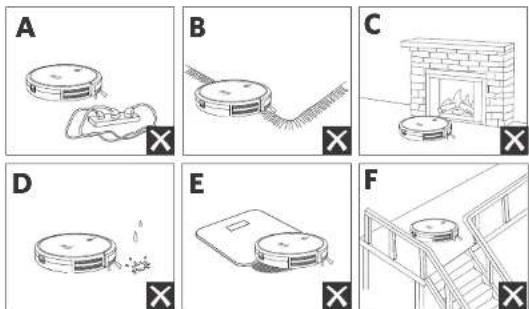
66epte cHnHnHnHnHnHnHnHnHnHnHnHnHnHnHnHnHnHnHnHnHnHnHnHnHnHnHnHnHnHnHnHnHnHnHnHnHnHnHnHnHnHnHnHnHnHnHnHnHnHnH
PnOaHnTcKCTOHNO KpaM KOpOB, 406B RoboVac He 3actpA. H IPOBUNIe NCHCYOHTB TEMBIK XOBOPCB BICIOAM BOPOM HIN KOPOB TOIHINHO BONE 26 MM, TAK KAP INHIOBBOAHN HA HIX ROBOVac MOXET CMOATbC.
HactoTefno pokomnyeTaPMAUaBOrpaHHHTbHeNHTI (npodaoTcROTdEbnHO) HAPoTHB KAMHHOB INpYIMX O6nACTe (Hapmep, BHTINANAHNNHXOBePCH), nonanane B KOTOpBE MoKET nBepnRobovac.
252RU RU 253
B0 npemy6oepn Robovac He nOeKHe 3aoaHb H aanHne
ROBOVac WOKET 334KATn H npeMTeB BICOTON VKE 17 M, ECIN BOMKHOK, yBepTeTtN pTeMTeB.
AaHnKbAaBbIaBnHnBnBnBnBnBnBnBnBnBnBnBnBnBnBnBnBnBnBnBnBnBnBnBnBnBnBnBnBnBnBnBnBnBnBnBnBnBnBnBnBnBnBnBnBnBnBnBnBnBnBn
NoTobka
1IpeaHIOBcAHmE CHMNIeHOJIACI 6AMIEpa
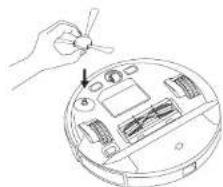
2 PepenonbOaHem yTPOHCTBa yCTaHOBATE GOKOByo
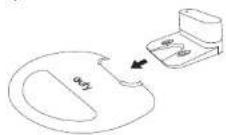
1IpeuBnAnHbO6pKo3aKpTeIO BDOHOENPOnHaemyIOIOKaKy H3aepiHb3AIOBBAUTINBIOIOTBOHy. YBeHNTcE,TOIOHO HApckHO 3akpEnoHa.PonpyCTeOTOTW,ccnBnBnKHyO6pky BnIOHHTHe IpeSyEIC.
Pycckn
BknnoyTe TnBnH BnKnnoTaeNbNTaHnHa HnKHeH qAcT RoboVac.
5IomeTe sapsHy6aay h npBny HOBepxocb y cien.
6 Vbepnpe npnepnna 1 mncnno nnpaon cpoohn H Pnpaoan 2 mnpo npnpno hactno zapopn no Baaen Byaedno ydaetcypabntpnpemtni pnpememt EroBoVac HOBoe Mecno npouepbe, moKETnRnBoVac BePiYBCnH a zapriyio basy oBnHBM oBpaom. Ecn He, obpatnece 3a HOMOIO B CNY6y IOeepknn IOMENTOBuIy.
1 PnoknKneite aanTep nHTAHn H aapHoh 6eBn cetEoB noeTe.
-KoTg3a0epHbAba3aNOKIOHOHcKIOTOOHkypepeHHOHOToKa, CEBTOINOHbIHHdIKATOpHa3apRHOHbIooTPOBbIMEJIbIMCBETOM.
Facmonoxyte zayhyb baybNerKopocryTHOH,nnR Robovac MCTc. Pekmnyeteype pamnna tbaaphyb bayy cteHb HnTepoP BOHOHIOBPOEPOCHOT, a HRe HOeKpMAWnIOBpax.
Bapnnaa Baa Dnna Bnna Bnna Cnna Dnna Knnnna Knnnna
3apnre RoboVac
Ipeepnckb0aennybeaehtc,tyroRoboVacnonhctbo 3a0496L
Robovac 03epeaetae na 3a2aynhy baa 3no 3aeepehen Hkka 6oepn nn pinn hakom yponoe aagadny adykmnptpa.
YCTAOHOBIEROVACHa3aepADHO683C,COBMCETHBEO3aepDHNBCKOHTAKTHCb C3APBDHMN KONTAMHb53A
254RU RU 255
Pycckn

EeRBOVaeBcydHcHbScBaTcB TceHnne DIOIIO NpNOA BPOMeH, BkNIOHcTe OCHOBn BkNIOHcTeNtB NHTAHIA. YTOBb npOaTb cPox CNYb AKKyMNTOPa 3apKAAe erHO He Me Hmoe eHoro paaa b MeCueJ.
IcnoJIb3OBAHnE RoboVac c npuJIOKeHNEm EufyHome
Даннади TCBMAOCTYHINMHFYHUNMIMKPOMeHOMEYTCN pyanpahtbpoTOMIJIPECOCOVRoboVcHeepaPnIOKeHneEUYefHyome.
IpeaHaayanom HcnoB3oBaHHy y6eHntecb CneMyouem:
Baa cmaptoohnnnnaaehet noeknoeoh K cetu Wi-Fi.
Bawcmptfohnnnnaaierpatbotaer nonynpaaeneHem10.0(
60one 103neBepnH Nm Android 5.0 (nn 6one nnoe BepnH)
HaBaAeMecBcPpOBDHmApupyTnAaTeOpE BKnIOHcBecPpOBDHO CHHHnBnAaIae362,4TfH.
- Niukatop coctoHHa Wi FiHa RoboVac MeiHIO Muaer CHIM.
Robovac noqknoueH kapnHOB bae,HTo5b oecneuHT,poCTaTOHOK KOINcHIOI 3apa BIOPOECEI HACIOKN.
- Ciaiaye PnnoNne Hefl Ome AaPStore (yeta yctpoenctc OC IOS) nnaGoogle Play (yeta yctpoenctc OC Android).
2.OTKpoTe npnloKeHne in coadaiTe yHTHy taHicNoIb3ObaTeNa -
[Ko]eTbEhBzHaNkA+V, NtObIbIbIaHTyPcOtroBcRBoBaVacG20Hybridc] bCBOYHETHYKZABINbEUYHome
4.CnpyteHHTpKuHmBnPNOKHeN,NTOBbHACPToBcOeHNHO CetboWt-1 -
Pocio yucicnoho NODKIOKHEUNB BH MOKETe ynpaBnTb po60tAmN TnecoCo RoboVac Hepe3 pinnOKeHHe.
-PrnnoKeHne no3oRnreBm6btppeKmYbOpa,ycTaHaabnBaTbp
apem,naHnpoa3y6Opy,ipc0MaPnBaTcoCtssnHe CcEeM,
Npy4y1yBQMeDnncnncnncnncnncnncnncnncnncnncnncnncnncnncnncnncnncnncnncnncnncnncnncnncnncnncnncnncnncnncnncnncnncnncnncnncnncnncnncnncnncnncnncnn
256RU RU 257
HdkaTop coctoHn Wi-Fi
Bb6Op ypOBH MoHOCn BCaCbHaHH
Bb6peyouoeMoHIOCTNACBaIaIIINB IIpNOJOeHN EUYHome B COOTCTBcN B aIaIIINN NOpSOCTNN
Tuxvii
- CtaHapTHbI (no yMo/HaHHIO)
Typ6c
MAKCMANH

Korra RoboVac HnHETyOpyK BcIeYouuHpa3,yCTPOiCTBO 6yE1p0a1b HnpeBapntbC bBpAHnMoHocHTB 8CAUBAHIN.
IcnoB3ObaHne yHKmN BoostlQTM
Bb6epntc fyhkiu BoostIQTM npnokcknn FuyfHmoe a COOTBCTTBN BCAIMM NTpeOCHNTMM: Robov ACYABOMTNKHKNHYEHNMTMOOHCTB BCACAHNA,ecn o6bApynK,TOI NOB6eCNEHNNHANyHueero KAnctctyaobpkn Tcpcbyocn BucNKAs MOUHCTb. Fyhkiu BoostIQTM Hdeaihno HOIOXoJIN DNIYKTICIOYIKBOPOB INpyHO IOMQEMAEOI Mycopa, OIO cokaanai 6oiueaepx yobpkn,NO ppaI atom yopoei WMya
260RU RU 261
yBENHbAeTc. Ecn BacecnoKoNT 1m ypaobt bIbncoc3, HbMaHHb HIOJIb3OaHMe FyHnHBooSUQ" Bb MoKeTe OIKHOHTe ee.
IcnoB3OBAHHe CnCTeMbI BnaXHoN y6OpKn

Pekn BIAKHOyO6pKnIpeHdAeHHeHnn HcNIOBaeHnToLbKOHaHCTOnnOByo3cTOnkNnATEHNnKNOKeTcN. TTO6BHe nCnKnAn,non, He cNtONbYrteFyHnIOAaNkoHnOy6pKnKoDAaNbCMeWbHa C TaKNNMnHKOKeTcMn, KAK KOFe NnCpHnna
CHCTEMBAJHNOHYOOPKINyIeBACEROHNAETTADKMETEBPHE NOBPCXHOHMOKOTPOBATOHTHOCTATOHOAΦKCTARHO HA HEOBBOHNIITKE,HOENHBXHPOMNLOHNWEPOXOBATBX NOBPCXHOCTM,TAKHXUKNFOPHNNTKIAKNKPNN
- He pKOMHJyETcNIOJIbOaIb peKIM bIAKHO yBokr, KOrJa HIKIOHET DOnA.
He IIOJIeBAYe peKm HnXHIOYbOPKn HA KOpOBOM NKpBTMn. HToBbI NbcEco HE BbINIOHNyOcPky KOpOBBX NKpBTMn,peKmEHUYeTc PAmeMaTaB OpaHInHTeNbIe NIOIOBc (npouaTOIgDHeBO).
IpeBnBnIOybOpOyctaOBcBNTeBOHOHPOHuaEmynoNkTADKy non 3apRhyo3aby,406b3aHTbnon.
CMOHHTKAnHbIaBnAaHNOyBOPKnIOToKMTtecc,NOKAHHepepeHtIeBaTaBaa.BoaCBAStEeKaHbIipopoeKpOHNREHnIIOHO3AeTe ee.
Pycckn
0KpOte KpbIky BnyckBaObo, TIObHaNNBBOy, a 3aTeM 3aKpoTKeHky.

HeKoNolbnyteKaKHeNIOHOCTaHnePactBOpbl,KpOme KekOMeHOBaHbIXKOMNaHMeEuyi,TaKcKOHMOyTNOpeMnBcEMOKOHTBDAIOBL
4YcHIOBIEEMKOCB DnBOOJI HINHOKQyAcIbROoVAC.IpH3OMD0KHePaaDaTcRcHIOK.

PbKMMBnHOy6oOpNIIpeHJ3AHcHEnTIOEKOINY6oOpNIOONO 60aTpyDNOANMOxIaRpaTHeHN. DaeTOCTKNNH HAnyHHTO KAnOHCTBO BnHOHNy6oOpNpCKOMeHcyTcPmKnDbI BInHOHHtC cyXIOy6oOpK npNcIcNoMoHbIORobovAcneep YctAOHnOEMIOCTPOBNI.
33anycHye6opyK,ROoVACIOHETABOMATHEeN BbIOTHOBHTbCyXO HnAaHcy6opyK.
6 KOrDa RoboVac 3aKOHHT paboty in BepHeTcHa 3apnHy0 b3y, 262 RU RU 263
HANKNTKHOHYOTKPbHnHHNtBNEcOOPHHa,4TO6bCHTbNtBNEcOOPHHNEMKOCB DBOy.
CHMMTEEMKCTBIVBOHINCTABTEINIEC6OPHKOBpATHOYCTPOACTRO.

Nocie bblnoHnHbBnHOyOBpKHa CHAMMTE ENKOCB 10 BNOI, CNEe octaIOOcA BOH NOOHCTNTK AINB HBNAOYOBpK, TTOBpNPoTbPbTHtO,OBpOABAHmIO NCCsEANHnHepnHrHO 3aONAs. NHTpykunno OCHCTKcN OBCyJHKBaHNIO ENKOCTN DBOBc CM. BpaDene OChTCA 6OcbYOBHnHE Naactoeero pyoONCTBA.
IcnoB3OBAHHe RoBoVac c JnKeC.AInca
IaekcAIAACBIOIINIEKRIAYIbHOYcIPo9CtBOTOIOOCBOYOITAOJIIBIN, KOTOPOE NOBBOIRBAMyYPnABNbPOOTOMTBIIEOCM CNOMOUBOIOCA. PpEXeH HmHaHTb, y6EeNTecB, ITO:
RoboVac noqknnoeK 3apnHoi 6aac, T06bi oecneHTbocTatoHoe Huahe.
Pycckn
Robovac noqknouenB npnoonn EufyHome.
YBa cctb yctpoCTBO C noTnepeKoRnncAAncHn (Hannpnep, HnncC.
PnKekKeHHeRJeCyeYcTeAHOHaAaEM CmApTFOe, HbI BCOOHN CYHTHYO 32NHC.
- YnpBaHHe RoBoVac c nOmoBIO RnDcAInCbI
1.OTkoPte npnoKemHe EufHome nHaJnIe NHTeNtEaYbHmE HINr pAanB aegbem BepxHem yIy.
2. Hanlnte Yndekc n Cnedyte Nhtctpykunm Hn kpahe aan 3abepenHn Hnctpoyn.
MaHaHeeMe, 10y yBaBHe BnSHHHIEI IIObEMBIOIOIOHNOHINHIIeK. AnHcH, HO BAM NOpTe6yOCTa HuaNOMoHc-6yBtce YBCPCHM, Mm cCpAeA BCC HeoBxOxHIOKc, TcBbS NoomChBam
IcnoIb3OBAHne RoboVac c roIocOBIMN NOMOuHKAMM Amazon Alexa n GoogleAccnteHT
TOnocBBeHOMOuHHMAtAmDonAlexaAMnGooGeAccnHcIe-3xOyMHbE yCPOiBaTBAIOBOoBIOYypABaHIN,KOIOeIEHOBOBIOHOYpABaHITb ROBOvCNOMOUHOIOROOCBOBIXKoVADH.
IpeepHaayanom HcnoNb3oBaHHa y6eHnTeCB b cneyiouem:
RoobvAcnKIOJIeH K aepdHOn b6ae, YTObI 6ecneHHTb DoctAtoHoe KOINOCBOA3PApJ.
RoboVac noqknouen knpnoxeneu EufyHome.
YBaHmecTcAycptpactoCnnppekkk Amazon Alexa (HanpMep, Amazon Echo, Echo Dot Anl Amazon Tap, Echo Show, Echo Spot), n60yctpcttca CnppeppkGoogle AccctctHa (HanpMep, Google Home, GoogleHome Mini).Bvctpcttna npndakotc otnenho.
IppnokemHmE Amazon AlexaXnGoogleHomeyXeYcTahOBJeHOHaBaEM CMAPr-YCTPOCTBc,Hy Bac HMeTcYHeTHa3nnCb
Tb6by npabraTb RoBoVac c nOmoIbTo IOnoCobXn NmOouHKnOB Amazon Alexa Hn Google AccnteHT, BInOnHte CneyuOnne DeCTBn.
1.OTKPOTe npnroKHeE EufyHome n HauNte paanen «HTenneKtyaHa HA HTEpaAHA BIEBOMBepxHem yIy
2.Cnnyte HNCTpyKunHHa 3KpaHe,HTo6b3aBepwnHbactpoKy
264RU RU 265

B Hactouee Bpemd DnHaa CyHKnDocTyHa ToIbKO pIa HnHnKcO, HmEIOKo, FpHnHcyKcO, nNcHnKcO, RbAIOKo. Hooopmaio o npodopoeckdpyrix XsIKko Byct npocTaBaNa Haebe caTe https://www.eufylife.com/support/.
OuNTka n 06cnyxnbAHne
PepoeCIOCTKHO 06O2yH8BHHEMYCTPOIeTBAOTKHNHETEcO H OTOEOOHNIEAadTIEPITINAA
IINIOEPKANHANHNNHINPNOBBOHTNCTNYIIEHKENRENEHNHIMHCPTYKUNMNOOCHTENCOBcynkNAHNOROBoVacpeyIgHO.HACOTAOCTKOMONHETOB/3aMeHbPaXoDhBxMATEpAn08SyEJIABCEIbO1XAPAKIECNIOIBOABAHNOBOvAc,
PekOMeHyMaJ TaCToTA OUcHTKn KOMNoHErTOB/3aMeHbI paCXoHbIX MATEpHnAe
| DétaNB RoboVac 危ctota ounstk Chactota zamehbl | ||
| Dusl Collector Pocne | Kakdpo XcnpolboVAHNA | - |
| ФиьгРа впeо (Два раза впeнлwo,ся уся сеьдомшип ЖИВOTHNCS) | Кakdpe 6 месчев пocnie 50 уклов уборк | |
| Бочьяш cutka PaB b mecu(PaB a 3-6 mecuεв (pn prn BmIMOM n3HOce) | ||
| Зашотацета PaB b mecu(PaB a 3-6 mecuεв (pn prn BmIMOM n3HOce) | ||
| Датник PaB b megu- | ||
| Кontakty Заршик | Paz b megu- | |
| Поворотно Конso | Paz b megu- | |
| Таibles д Далжны убори | Посл kakdpo xcpolyobuaHry | |
| Емосты д нды | Посл kakdpo xcpolyobuaHry | |
Pycckn
OuNTKa nblnc6OpHnKa n hnltpa
Haxnnte KhoK06o6dHnnbIe6OpHHa,106eBbTaunHtEo.
2 OTKPOeTI HOnOpOxHITNE TbIeScBOpHNK.
CHINATEQHbtp.
4OuHCTe TbIeBcOpHnKnΦHbTpIeTOyKOaIIN OuHTKm.
5 TaateBIOI (pomOe IIEIIEcBOpHn HmHbtpoDcN
He yinonieyIe IopnhyoBDOy HIN MHOooee cpeCTBO DIO
Pepen CredyoummnncnBc0aHmernnoHctbno pocuyntne nncbocnHn mtnp. MoKHOCTBOHNTbpyrOfHbT,ecnNnCnOHNCCOBHHnFmTnE HBCOX
7yctanbntephiBtpo6pTaH8nBnBnE60pHHK.
266RU RU 267
Pycckn
BCTaBte bnae6oepHHbopaTHO bcyTOCTBO.
OuNTKaBpaauoueencaTkn
10nHHe3a 32iienK,4o6upa3boknporabT3aIHTyIeTcK, KAKOKAHAHOPOCYHE
2 PnHMMTE Bpaauouyocn Tcy,TObCHTbe.
3 OHTTE UPAaAIOOyOeIeHc HOMOIOHCTpyMeTTaB OHACTK.
4 YCTAHOBATE H M E C T O B P R A H N O XYI K U T, RCTA CHA HAI CHIKKPOHINBUCYTHNIOI KOHO, A 3ATEN DPPR KOHNO NO IICHEA.
5 HadaBnTE,HToBbYCTaHOBNTb3aUNrTHeeMeCTo
0
2
3
4
5
OuncTkKa 60KOBoU 9eTKU
PaaHHHnpePMTH, TAKK KOK BOLOCs, Nkho 3aNNbTcBcTcBcB600ek SHTe HMOY cOoXbATpRbA. 6bAteIaNHO peryanpo OHuaaiye ee.
1 CHMNE6KOaYU WENIy.
Pycckn
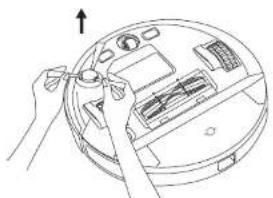
Akkpatoa0aMOTnUyANHTC BCCBONCHHHHTK,KOtpcnHAMOTAHMOXyCTPOCTBOH6OKOBIETKOH.
3 NcnoBayTeKAHb,CMOeHHyToTbeIOI BooO,NTo6yUaHbIbIbCo
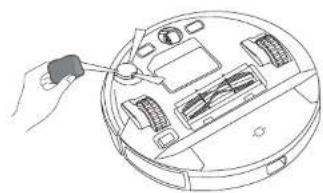

NCHONTHOYOKOOUYIHTKTOBOIOCTHOYAKOHIA NNOHOTBBOBCOXHT.
3aMeHa 6OKOBOn ΜεΤΚ
EOKOABKTEKMOKEI CIBITIOPIENHIOIEPOIOIOIOJIETHOIOIOIOIOIOIOIOIOIOIOIOIOIOIOIOIOIOIOIOIOIOIOIOIOIOIOIOIOIOIOIOIOIOIOIOIOIOIOIOIOIOIOIOIOIOIOIOIOIOIOIOIOIOIOIOIOIOIOIOIOIOIOIOIOIOIO
CHWATOTAPYIO6OKOBYIOUCTKYNBCTABTEHOYIO NOJENHKA
OuHCTKa DaTChKOB KOHTaKTob 3apAKn
JnnpnepnepnnnnaHnneHnne npnoanenntnnoctn peryaepno Oohnnae T
UyduHnTbIeBcDtAaHIOO3aAaBbIOTaHdEHHNHOIIIOIOO3aBIDzAepJIKC NPOMOUOKTKHNNNNTCTKTH.
270RU RU 271
Pycckn
OuNTKa NOBOPoTHOro KOleca
BnOcHnHnACTnHbHnMOTyNcKO3aCpBaTbNOBOPTHOMKONEC. C6a3TeHoHOHnHaIteNoBOPTOHE KOeCO NepHOHHeckn H No Mepe HeoDCVMOCTH.
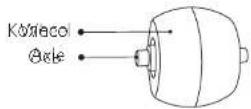
CHIMITE NOBOPOTHOE KANCCO.
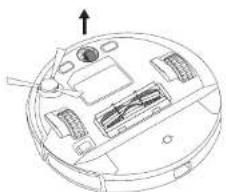
YdaHNTBCCBOONOCbMYCOCKOINBUNCEBCOKpyKonecaNN BanyTARNEECBNOCTNPOKECA
3 YcraOBnRE KOIECOHaMeCToHnHaDaBnHeHaHeroDcEeNka.

HemouoepoHoeKoneco
10 NocLe kAnKcFO HcNcHbOaHbBbHIMMaTe TkaHb dAraaXhoH yBopKn EAMKcTOBnBOyD.
TaaTeBNO pnoMOte TKAHb DnB EaKKOH y6OpK IN ENKOCT bIe BdoB BOJNO.
310nHcTbIpcyUHTeTbIINBnBnKHOYbOpHnEHNHOCTbIIN BODb,ITo6bIpeDToPAtbNORBnHE NnCCHHn HENHPaTHOFO 3anaXa
Kak y3HaTb DaTy npOn3BocCTBa no cepnHomy Homepy (SN)
IpoepoeepepeoN11SN
N8 SnppectabIaeI rO bIycka,HaripnMep
9=2019
A=2020
B-2021
C=2022
M
N9/101nEeTbBnKoHKePteHyoHeJeIHOKeHKePteHOToa3, hanyapc
01-epbaHegn
02-ETODaHeden
一、活动内容和程序
52-52-gn
H工
11 npctabnact KOHpETHM nH, KOHKpETHO Heenn, HApimMeo
1-noeBbHK
2-BTOOHNK
7=ROCKPOECCHHCHT.N
Плпмс: симл NGCE65192420137,data npmsuocmba bcyet atopnHK 24нделду a 2019у.
06cnyKnBaHne KIneHTOB
DIOPOCMOTpaYbE6HXBdEeOPOINKOB,NOIyEHNIOBTeTOH HACIO 3aDaBaEMIEBOPOc,03AHONCmEHnCpkyOBQCDBAAMHIOIyEHN DIONHOHTCNCHAHPOPMAAH
O6paTHTeCh B CnyKbBy noJepKKu. eufylife.com
CBAXNTecb CHAMN

support@eufylife.com

www.eufylife.com

(US) + 1 (800)9887973 Mon-Fri 6:15-17:00 (PT); Sat-Sun 6:30-16:30 (PT)
UK+4401604936200 Mon-Fri 6:00-17:00
Sat-Sun 6:00-14:00
[DE] +49 (0) 69 9579 7960 Mo-Fr 8:00 - 16:00
support.eufylife.com/s/phonecontactus.
Hn orcnanyie301 QR

@EufyOfficial @EufyOfficial @EufyOfficial @EufyOfficial
TapaaTHraI ron
Cpok cykxb2r20da
KoMaHxAnkerInnovations Limited
Ocvic 1318-19, Tomiyuk, Iinaa, 610 Hatai, Poyou, Mokik, Koyun, Lohkoi (Room 1318 19, Hollywood Plaza, 610 Nathan Road, Mongkok, Kowloon, Hong Kong)
Inhoudsopgave
Warning: Changes or modifications not expressly approved by the party responsible for compliance could void the user's authority to operate the equipment.
ANKER TECHNOLOGY (UK) LTD
Suite B, Fairgate House, 205 Kings Road, Tyseley, Birmingham, B11 2AA, Verenigd Koninkrijk
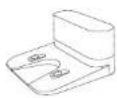
Coaadatioion Veedingsadper
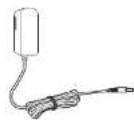
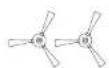
7borstes(2)
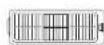
Extra filter
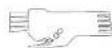
Reinigungshulpstrik
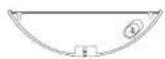
Water reservoir
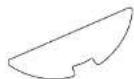
Westere owslidock Waundrhcic sad

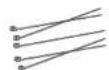
Kabelcricers (x) Handeilding
enndredocumenten
Nederlandds
De wiffverbinding resetten
RoboVac met Amazon Alexa of Google Assistant bedieren
support.eufylife.com/s/phonecontactus
Of scan understaende QR-code:
@Eulfoficial
@EuyOfficial
@Eulfoficial
@EufyOfficial
