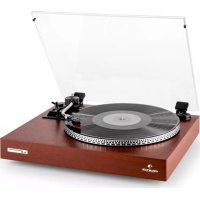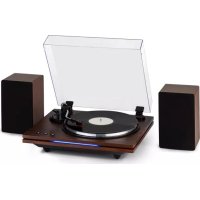
TTPlay PLUS - Media player Auna - Free user manual and instructions
Find the device manual for free TTPlay PLUS Auna in PDF.



| Product Type | Turntable with Bluetooth connectivity |
| Brand | Auna |
| Model | TTPlay PLUS |
| Dimensions (approx.) | 420 x 350 x 120 mm |
| Weight (approx.) | 3.5 kg |
| Power supply | AC adapter 5V / 2A (included) |
| Rotation speeds | 33 1/3, 45, 78 rpm |
| Compatible disc diameter | 7", 10", 12" |
| Tonearm type | Straight tonearm with adjustable counterweight |
| Adjustable tracking force | 3 to 6 grams |
| Connectivity | Bluetooth, RCA outputs (L/R) |
| Functions | Auto stop, pitch control, manual stop |
| Chassis material | Plastic and metal |
| Color | Black |
| Certifications | CE, WEEE directive |
| Care and cleaning | Dust with a soft dry cloth. Do not use liquid products. |
| Safety | Do not expose to water, rain or moisture. Unplug before cleaning. |
| Spare parts and repairability | Contact a qualified technician. Do not open the casing. |
| General information | Complete manual available for free download at notice-facile.com |
Frequently Asked Questions - TTPlay PLUS Auna
User questions about TTPlay PLUS Auna
0 question about this device. Answer the ones you know or ask your own.
Ask a new question about this device
Download the instructions for your Media player in PDF format for free! Find your manual TTPlay PLUS - Auna and take your electronic device back in hand. On this page are published all the documents necessary for the use of your device. TTPlay PLUS by Auna.
USER MANUAL TTPlay PLUS Auna
INHALT
natural_image
Simple line drawing of a plug with a cable and terminal connector (no text or symbols)natural_image
Technical line drawing of a mechanical device with two speakers and a central frame (no text or symbols)BEDIENUNG
Member of Berlin Brands Group
Handwerkerstr. 11
15366 Dahlwitz-Hoppegarten
Deutschland
natural_image
Symbol of a trash bin crossed with a diagonal line, no text or numbers presentCongratulations on purchasing this equipment. Please read this manual carefully and take care of the following hints to avoid damages. Any failure caused by ignoring the items and cautions mentioned in the instruction manual are not covered by our warranty and any liability. Scan the QR code to get access to the latest user manual and other information about the product.
CONTENTS
Safety Instructions 17
Overview 19
Installation 20
Turntable Operation 21
Disposal Considerations 23
WARNINGS
 | CAUTION |  |
| RISK OF ELECTRIC SHOCKDO NOT OPEN | ||
| CAUTION: TO REDUCE THE RISK OF ELECTRIC SHOCK AND SERIOUS PERSONAL INJURY, DO NOT REMOVE ANY COVER. NO USER-SERVICABLE PARTS INSIDE. REFER SERVICING TO QUALIFIED SERVICE PERSONNEL ONLY.WARNING. TO REDUCE THE RISK OF FIRE OR ELECTRICAL SHOCK, DO NOT EXPOSE THIS PRODUCT TO WATER, RAIN OR MOISTURE. | ||
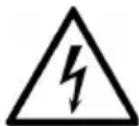 | Triangle with lightning plus explanation as follows:DANGEROUS VOLTAGE: The lightning flash with arrowhead symbol within the equilateral triangle is intended to alert the user to the presence of uninsulated dangerous voltage within the product's enclosure that may be of sufficient magnitude to constitute a risk of electric shock to persons. |
 | Triangle with exclamation point plus explanation as follows:ATTENTION: The exclamation point within the equilateral triangle is intended to alert the user to the presence of important operating and maintenance (servicing) instructions in the literature accompanying this product. |
SAFETY INSTRUCTIONS
Read the instructions. All application notes must be read before using the device.
- Children from the age of 8 years and persons with mental, sensory and physical disabilities may only use the device if they have been thoroughly familiarized with the functions and safety precautions by a responsible supervisor and understand the associated risks.
- Check that the power cord is undamaged before use. If the power cord or plug is damaged, it must be replaced by the manufacturer, an authorized dealer or a similarly qualified person.
- Check that the power cord is undamaged before use. If the power cord or plug is damaged, it must be replaced by the manufacturer, an authorized dealer or a similarly qualified person.
- Keep the operating instructions for later use.
- The guidelines for attention, use and safety must be observed.
- The device must not be used near water or brought into contact with moisture.
- Make sure that no liquid enters through the device and equipment openings.
- Move the device carefully, avoid shocks.
- Do not block the failure of the device outputs.
- Do not place the device near a heat source (e.g. radiator). Don't expose it to the sun.
- Connect the device as described in this manual.
- This device has a connection with an overload protection. Replacement should only be carried out by an experienced technician or the device manufacturer.
- To clean the device, please follow the recommendations in the note.
- The power cord should be disconnected if you do not use it for a long period of time.
- The device must be repaired by a qualified person if:
a. the power cable is damaged.
b. objects have fallen into the unit or liquid has been spilled into the unit.
c. The device was exposed to the rain.
d. The device does not function correctly without significant external changes
e. The device is defective.
- The user must not attempt to service the device beyond what is
described in this information form.
- Do not expose the unit to dripping or splashing and do not place objects filled with liquids, such as vases, on the unit.
- To disconnect the power supply completely, the power plug of the device must be disconnected from the mains, as the disconnecting devices are the power plugs of the device.
- The power plug of the unit must not be blocked OR should be easily accessible when used as intended.
- Do not expose the battery to excessive heat such as sunlight, fire or the like.
- Excessive sound pressure from earphones and headphones can cause hearing loss.
- Keep a minimum distance (8 cm) around the device for adequate ventilation.
- Ventilation must not be impeded by covering the ventilation opening with objects such as newspapers, tablecloths, curtains, etc.
- No naked flame sources, such as lighted candles, should be placed on the apparatus;
- Attention should be paid to the environmental aspects of battery disposal.
- The device must be used in temperate climate zones.
- Risk of explosion due to improper battery replacement.
- Only replace batteries with the same or equivalent type.
- The main connector must remain easily accessible.
- Ventilation must not be impeded by covering the ventilation opening with objects such as newspapers, tablecloths, curtains, etc.
- No naked flame sources, such as lighted candles, should be placed on the apparatus.
- Attention should be paid to the environmental aspects of battery disposal.
- The device is suitable for use in temperate climates.
- Risk of explosion due to improper battery replacement. Replace only with the same or equivalent type.
- The mains plug must remain easily accessible.
OVERVIEW
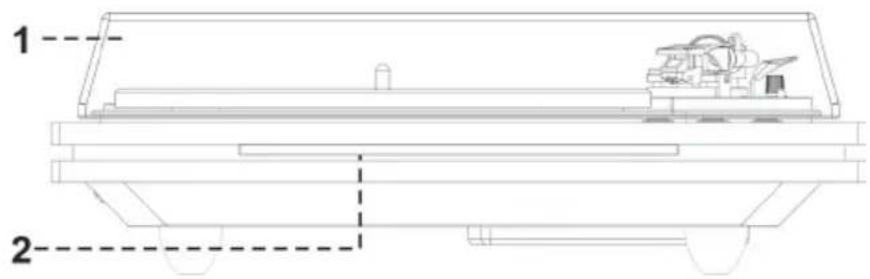
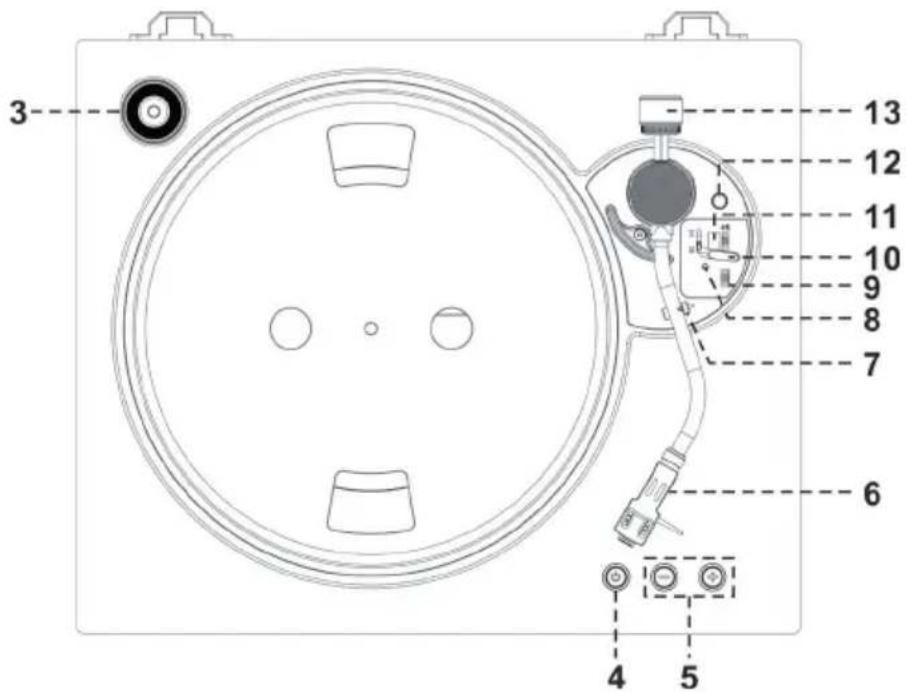
1 Dust Cover
2 BT Indicator (Blue)
3 Spindle Adaptor
4 Power Button
5 Volume + / - Button
natural_image
Simple line drawing of a plug connected to a resistor, with no text or symbols present.11 Turntable speed selector
12 Pitch adjust
13 Counter weight
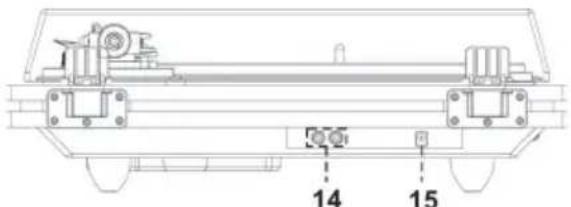
14 Speaker jack (L/R)
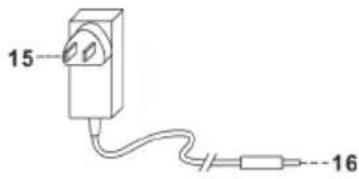
15 DC Input Jack
6 Cartridge Head Shell
7 Tone-arm lock
8 Power LED Indicator (Red)
9 Auto Stop On/Off Switch
10 Cueing lever
16 AC/DC adaptor
17 DC plug
INSTALLATION
Precautions
- Unpack all parts and remove protective material.
- Do not connect the unit to the mains before checking the mains voltage and before all other connections have been made.
- Do not cover any vents and make sure that there is a space of several centimeters around the unit for ventilation.
Installation of counter weight
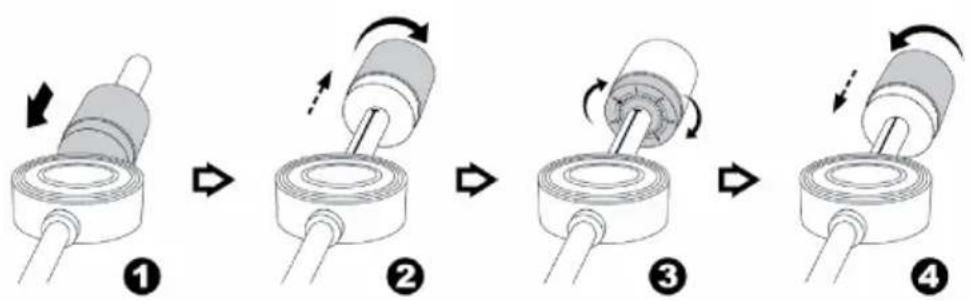
- Slide in the counter weight (2) completely into the rear of the tone arm until it reaches the end. Turn it clockwise until it click with pit inside.
- Twist the counter weightclockwise & backwarduntil it reach the whiteinner line as below figure.
- Twist the counter marking until it reach position" 0". The pressure at the position " 0 " at the white line is 3 grams.
- Rotate the counter weight anti-clockwise and inward for a whole turn, ie when reaching "0" again, it will increase for 1 gram. It means that the press will reach 4 grams after turning for one turn inward, 5 grams after turning for two turns inward.
- To reduce the press, rotate the counter weight clockwise and backward for a whole turn to reduce the press for 1 gram.
- Keep rotating the counter until it reaches the appropriate working pressure.
flowchart
graph TD
    A["Step 1: Roll pin, clockwise arrow"] --> B["Step 2: Rotation arrow, clockwise arrow"]
    B --> C["Step 3: Rotation arrow, clockwise arrow"]
    C --> D["Step 4: Rotation arrow, clockwise arrow"]
Remark : the working pressure of the provided stylus is from the range 4 - 6 grams. According to the cartridge manufacturer. All stylus has its own working pressure and please refer to the specification respectively.
Connection
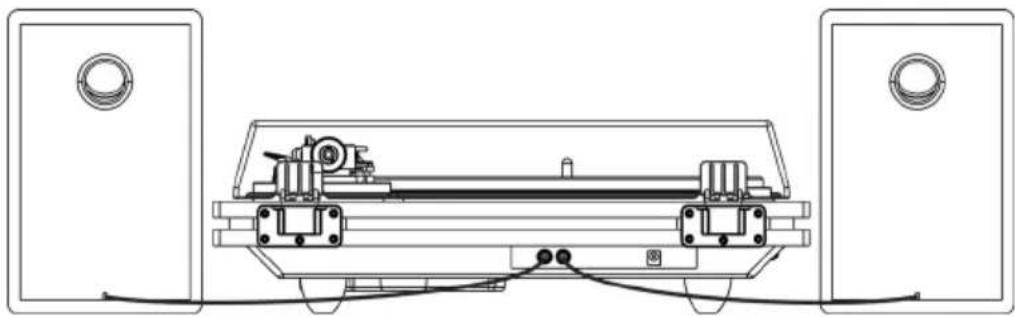
- Plug the RCA plug of left speaker into the left speaker RCA socket (14.) with the "L" mark locates at back of the unit.
- Plug the RCA plug of right speaker into the right speaker RCA socket
(14.) with the "R" mark.
-
Insert the DC plug (17.) to the DC Input jack (15.) of the main unit, then connect the AC/DC adaptor (16.) to AC outlet.
-
Press the Power Button (4.), the BT Indicator (2.) will light up and flashing. Your system is now ready to connect your BT device. Please refer to the Operations section of this Manual for details.
TURNTABLE OPERATION
natural_image
Technical line drawing of a mechanical device with two speakers and a central frame (no text or symbols)- Push upward of the stylus protector.
• Make sure that the tone arm is unlocked and free to move from the tone arm rest prior to operating. Lock the tone arm again when not in use.
-
Press the Power Button (4.) twice and the Power LED Indicator (8.) will light up in Red color.
-
Raise the turntable dust cover (1.).
-
Place the record on the platter (use the 45 RPM record adaptor if you are playing 45 RPM records).
-
Set the speed selector (11.) to the proper position for the record you are playing.
-
Set the cueing lever (10.) to the up position.
-
Lift the tone arm from the rest and slowly move it to the record side. The platter will start to rotate and position the tone arm over the desired position of the record.
-
Pull down the cueing lever (10.). The tone arm will come slowly on the record and start playback.
-
Adjust the Volume + / - Button (5.) to the desire level.
-
At the end of the record, the tone arm will automatically stop spinning. Lift the tone arm from the record and return it to the rest.
-
To stop manually, lift the tone arm from the record and return to the rest.
Remarks
- Some types of records may have an auto-stop area outside the preset limit, so the turntable may stop before the last track finishes. In this case, set the Auto Stop On/Off switch (6) to the "OFF" position. This allows the record to play to the end, but please note that it will not stop automatically. You must manually raise the tone arm and place it back in the rest and then turn off the power to stop the turntable from spinning.
- Users should not change to a ceramic cartridge system, otherwise unit can't be connected anymore to an Aux-in of music-centre
Platter speed fine adjustment
- During playback of record, turn the Pitch Adjustment (12) to fine adjust the platter rotation speed.
- Turning clockwise (+) will increase the turning speed and anti-clockwise will slow down the speed.
- Turn the Pitch Adjustment until the output sound performance is up to your satisfaction
BT connecting and Playback
- Press the Power Button (4.), the BT Indicator (2.) will light up.
- The BT LED indicator (2.) will be flashing, it means the BT in non connection / searching mode.
- Switch on the BT feature of your BT device (such as mobile phone) and select "TT-Play PLUS" BT equipment to connecting.
- Once the connecting was finish and connect successfully, the BT LED indicator (2.) will light up.
- Start to playback your BT device and enjoy the music by the main unit.
- Adjust the Volume + / - Button (5.) to the desire level.
Remarks
- Press the Power Button (4.) to disconnect the BT connection and the unit will switch to Phono function.
- Press the play / pause / skip button of your BT device for operation.
Due to ErP stage two requirement and protect the environment, the unit will switch to standby mode automatically when no any music playing over 15 minutes.
DISPOSAL CONSIDERATIONS
natural_image
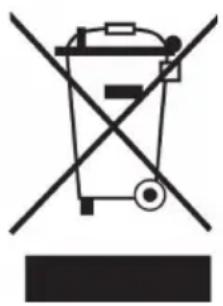
Symbol of a trash bin crossed with a diagonal line, representing no waste or discharge (no text or labels)If there is a legal regulation for the disposal of electrical and electronic devices in your country, this symbol on the product or on the packaging indicates that this product must not be disposed of with household waste. Instead, it must be taken to a collection point for the recycling of electrical and electronic equipment. By disposing of it in accordance with the rules, you are protecting the environment and the health of your fellow human beings from negative consequences. For information about the recycling and disposal of this product, please contact your local authority or your household waste disposal service.
DECLARATION OF CONFORMITY

Manufacturer:
Chal-Tec GmbH, Wallstrasse 16, 10179 Berlin, Germany.
Importer for Great Britain:
Berlin Brands Group UK Ltd PO Box 1145 Oxford, OX1 9UW United Kingdom
Hereby, Chal-Tec GmbH declares that the radio equipment type TT-Play PLUS is in compliance with Directive 2014/53/EU. The full text of the EU declaration of conformity is available at the following internet address: use.berlin/10035272
For Great Britain: Hereby, Chal-Tec GmbH declares that the radio equipment type TT-Play PLUS is in compliance with the relevant statutory requirements. The full text of the declaration of conformity is available at the following internet address: use.berlin/10035272
Chère cliente, cher client,
SOMMAIRE
natural_image
Simple line drawing of a plug with a cable and terminal connector (no text or symbols)Installation du contrepoids
flowchart
graph TD
    A["Step 1: Roll pin, clockwise arrow"] --> B["Step 2: Rotation arrow, clockwise arrow"]
    B --> C["Step 3: Rotation arrow, clockwise arrow"]
    C --> D["Step 4: Rotation arrow, clockwise arrow"]
natural_image
Technical line drawing of a mechanical device with two speakers and a central body (no text or symbols)UTILISATION
natural_image
Symbol of a trash bin crossed out by a diagonal line, with no text or labels present.DÉCLARATION DE CONFORMITÉ

Fabricant :
Chal-Tec GmbH, Wallstraße 16, 10179 Berlin, Allemagne.
Berlin Brands Group UK Ltd
PO Box 1145
Oxford, OX1 9UW
United Kingdom
CONTENIDO
natural_image
Simple line drawing of a plug connected to a resistor, with no text or symbols present.flowchart
graph TD
    A["Step 1: Roller with clockwise arrow"] --> B["Step 2: Rotation arrow"]
    B --> C["Step 3: Rotation arrow"]
    C --> D["Step 4: Rotation arrow"]
Nota :
natural_image
Technical line drawing of a mechanical device with two speakers and a central frame (no text or symbols)FUNCIONAMIENTO
natural_image
Symbol of a trash bin crossed out by a diagonal line, with no text or labels present.INDICE
natural_image
Simple line drawing of a plug with a cable and terminal connector (no text or symbols)flowchart
graph TD
    A["Step 1: Roll and nut"] --> B["Step 2: Rotation arrow"]
    B --> C["Step 3: Rotation arrow"]
    C --> D["Step 4: Rotation arrow"]
Nota :
natural_image
Technical line drawing of a mechanical device with two speakers and a central frame (no text or symbols)UTILIZZO
natural_image
Symbol of a trash bin crossed out by a diagonal line, with no text or labels present.Berlin Brands Group UK Ltd
PO Box 1145
Oxford, OX1 9UW
United Kingdom