Jerry Lee - Media player Auna - Free user manual and instructions
Find the device manual for free Jerry Lee Auna in PDF.



| Product type | Turntable with built-in speaker |
| Brand | Auna |
| Model | Jerry Lee |
| Item numbers | 10027041, 10027042, 10027043 |
| Power supply | 220-240 V ~ 50/60 Hz or DC 5 V (adapter included) |
| Speeds | 33 1/3, 45, 78 rpm |
| Auto stop | Yes, switchable (ON/OFF) |
| Built-in speaker | Yes |
| Audio outputs | RCA (for stereo system) |
| USB output | Yes, for vinyl digitization |
| 45 rpm adapter | Included |
| Stylus protective cap | Included |
| Dust cover | Yes |
| Dimensions (approx.) | 420 x 350 x 120 mm (estimate) |
| Weight (approx.) | 2.5 kg (estimate) |
| Stylus maintenance | Clean with a soft brush; use cleaning liquid sparingly |
| Cabinet cleaning | Soft cloth with a little dish detergent; no harsh solvents |
| Safety instructions | Disconnect during storms; do not overload outlets; avoid contact with liquids; maintenance by qualified personnel |
| Recycling | Do not dispose with household waste; drop off at a collection point for electrical appliances |
| Included software | Audacity (for digitization) |
Frequently Asked Questions - Jerry Lee Auna
User questions about Jerry Lee Auna
0 question about this device. Answer the ones you know or ask your own.
Ask a new question about this device
Download the instructions for your Media player in PDF format for free! Find your manual Jerry Lee - Auna and take your electronic device back in hand. On this page are published all the documents necessary for the use of your device. Jerry Lee by Auna.
USER MANUAL Jerry Lee Auna
www.auna.multimedia.com

Berlin Brands Group UK Ltd
PO Box 1145
Oxford, OX1 9UW
United Kingdom
SICHERHEITSHINWEISE
Allgemeine Hinweise
Congratulations on the purchase of your device. Please read the following instructions carefully and follow them to prevent potential damage. We accept no liability for damage caused by disregarding the instructions and improper use. Please scan the QR code to access the latest operating instructions and further information about the product.

CONTENTS
Safety Instructions 12
Technical Data 13
Device overview 14
Operation 15
Care and Maintenance 16
Disposal Considerations 16
MANUFACTURER & IMPORTER (UK)
Manufacturer: Chal-Tec GmbH, Wallstraße 16, 10179 Berlin, Germany.
Importer for Great Britain:
Berlin Brands Group UK Ltd
PO Box 1145
Oxford, OX1 9UW
United Kingdom
SAFETY INSTRUCTIONS
General instructions
- Lightning strike - If you are not using the unit for a longer period of time or if there is a thunderstorm, pull the plug out of the mains socket or disconnect the unit from the antenna connection. This prevents damage to the product due to lightning and overvoltage.
- Overloading - Do not overload electrical outlets, extension cords or integral sockets as this may result in a fire or electric shock.
- Foreign objects and liquid entry - Never push objects of any kind into the unit through openings as they may touch dangerous voltage points or short out parts that could cause a fire or electric shock. Never spill liquids of any kind on the unit.
- Repair and maintenance - Do not attempt to service this product yourself as opening or removing covers may expose you to dangerous voltages or other hazards. Leave all maintenance work to qualified service personnel.
- Damage requiring servicing - Unplug the appliance from the wall outlet and refer servicing to qualified service personnel when any of the following situations occur:
a) If the mains cable or plug is damaged.
b) If liquid has been spilled or objects have fallen onto the product.
c) If the product has been exposed to rain or water.
d) If the product has been dropped or damaged.
e) If the product has a significantly reduced performance.
- Spare parts - If spare parts are needed, make sure that the specialist company replacing the parts only uses spare parts that are approved by the manufacturer or have the same characteristics as the original part. Unauthorised substitutions may result in fire, electric shock or other hazards.
- Heat - Do not install near any heat sources such as radiators, heat registers, stoves, or other products (including amplifiers).
Special notes
Children over 8 years as well as mentally, sensory and physically impaired persons may only use the device if they have been informed in detail about the functions and safety precautions by a supervisor responsible for them beforehand and understand the associated risks.
- Children should be supervised to ensure that they do not play with the device. Make sure that children and babies do not play with plastic bags or other packaging materials.
- Make sure that the mains adapter/mains plug always remains easily accessible so that the unit can be quickly disconnected from the mains in an emergency.
- When you are no longer using the device, switch it off and pull the plug out of the socket.
TECHNICALDATA
Product code 10027041, 10027042, 10027043
Power supply
220-240 V ~ 50/60 Hz or
DC 5V power supply (included)
DEVICE OVERVIEW
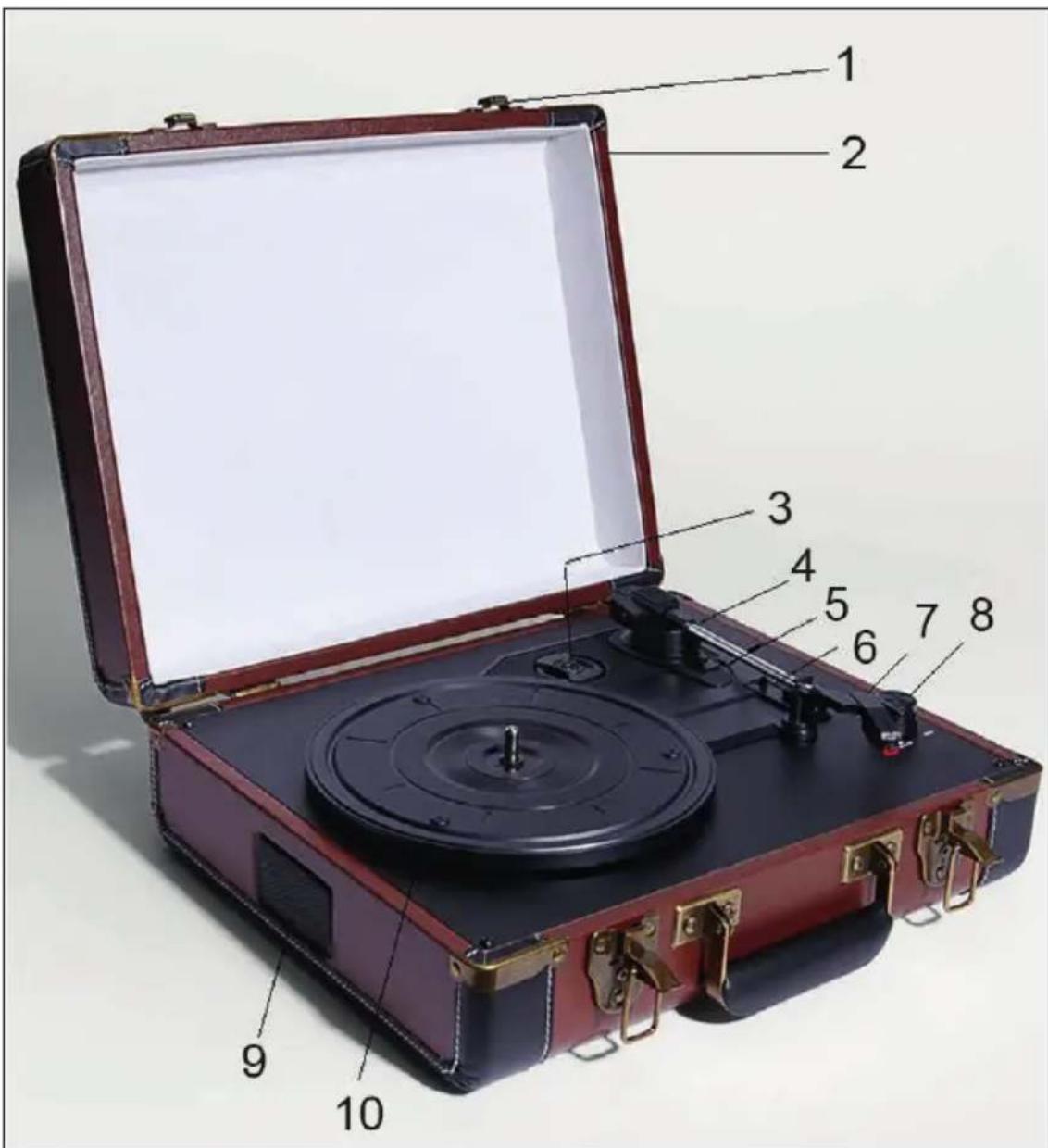
| 1 | Closure 6 | Speed switch (33.3 / 45 / 78 rpm) | |
| 2 | Cover 7 Power LED | ||
| 3 | Adapter for 45 rpm plates (Puck) | 8 Volume control | |
| 4 | Tone arm lever 9 Speaker | ||
| 5 | Auto-stop switch 10 Turntable | ||
OPERATION
- Connect the unit to the USB port of a computer using the USB cable supplied or plug the power supply unit supplied into the wall socket.
- Place a record on the turntable. If necessary, do not forget to remove the puck from its anchorage and apply it to the record.
- Select the appropriate speed using the speed switch.
- Turn the volume control (on/off switch at the same time). The power LED indicates the status of the unit.
- Lift the tone arm slightly and guide it over the first grooves of the record. The record player will now automatically start spinning the record.
- Now carefully lower the tone arm so that the needle gently touches down on the record.
- Enjoy your music selection!
- When a record comes to its end, the turntable stops automatically, provided the Auto Stop switch (5) is set to ON. If it is set to OFF, the turntable will continue to turn until the tone arm is put back.
- Protect the needle with the supplied protective cap when the record player is not in use.
Connecting and digitising LPs
With the record player, you can enjoy music on the move - but for home use, there are also outputs for the home stereo system.
Simply connect the rear RCA outputs with a suitable cable to the AUX input of your existing system.
If you want to digitise your records, use the rear USB output and connect the record player to the USB port of your computer. With the supplied AUDACITY music software, you can set the USB input of the computer as the signal source for the recording (is preset during installation). Please refer to the software manufacturer's information for further instructions on the respective procedure.
CARE AND MAINTENANCE
Cleaning
- Open and close the lid carefully.
- Do not touch the needle tip with your fingers and avoid bumping the needle against the turntable or the edge of the record.
- Clean the needle tip frequently. Use a soft brush for this.
- If you must use a needle cleaning fluid, use it very sparingly.
- Carefully wipe the housing of the turntable with a soft cloth. Use only a small amount of dishwashing detergent to clean the record player.
- Never use harsh cleaners or solvents for cleaning.
Transport
Before transporting the unit, carry out the following steps:
- Put the protective cap on the needle.
- Insert the retaining clip into the tone arm.
DISPOSAL CONSIDERATIONS
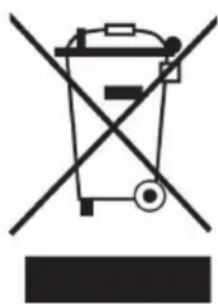
If there is a legal regulation in your country regarding the disposal of electrical and electronic equipment, this symbol on the product or on the packaging indicates that this product must not be disposed of with household waste. Instead, it must be taken to a collection point for the recycling of electrical and electronic equipment. By disposing of this product in accordance with the regulations, you protect the environment and the health of those around you from negative consequences. For information on recycling and disposal of this product, contact your local government or household waste disposal service.
Estimado cliente:
Berlin Brands Group UK Ltd
PO Box 1145
Oxford, OX1 9UW
United Kingdom
Cher client, chere clientele,
Berlin Brands Group UK Ltd
PO Box 1145
Oxford, OX1 9UW
United Kingdom
CONSIGNES DE SECURITÉ
Consignes generales
PRODUTTORE E IMPORTATORE (UK)
Produtlore:
Chal-Tec GmbH, Wallstraße 16, 10179 Berlin, Germania.
Berlin Brands Group UK Ltd
PO Box 1145
Oxford, OX1 9UW
United Kingdom