IAN 366722 - Blood pressure monitor SILVERCREST - Free user manual and instructions
Find the device manual for free IAN 366722 SILVERCREST in PDF.



User questions about IAN 366722 SILVERCREST
0 question about this device. Answer the ones you know or ask your own.
Ask a new question about this device
Download the instructions for your Blood pressure monitor in PDF format for free! Find your manual IAN 366722 - SILVERCREST and take your electronic device back in hand. On this page are published all the documents necessary for the use of your device. IAN 366722 by SILVERCREST.
USER MANUAL IAN 366722 SILVERCREST
OBERARM-BLUTDRUCKMESSAGE/UPPER ARM BLOOD PRESSURE MONITOR / TENSIOMÉTURE DE BRAS
DE AT CH
OBERARM-
BLUTDRUCKMESSAGERÄT
Instructions for use and safety notes
NL BE
BOVENARM-BLOEDDRUKMETER
Before reading, unfold both pages containing illustrations and familiarise yourself with all functions of the device.
FR B
GB/IE Instructions for use and safety notes Page 47
www.healthforyou.lidl/privacy.html
List of pictograms used
Introduction
Intended use
Intended purpose.. 51
Target group . 52
Clinical use.. 52
Indication.. 53
Contraindication 53
Parts description.. 54
Scope of delivery.. 55
Technical data.. 56
Warnings and safety notes.. 58
General warnings.. 58
General precautions.. 60
Battery safety information.. 62
Information on electromagnetic compatibility.. 63
Initial use.. 64
Inserting/Replacing batteries.. 64
App/web version of "HealthForYou" Page 65
Changing the date/time/time format/Bluetooth® settings......Page 65
Activating and deactivating Bluetooth® Page 67
Measuring blood pressure Page 67
- Attaching the cuff 68
Adopting the correct posture.. 69
Selecting a memory.. 70
Carrying out the blood pressure measurement.. Page 70
Transferring measurements via Bluetooth® Page 72
Evaluating Measurements 73
General information about blood pressure.. Page 73
Cuff position control.. Page 74
Introduction of cardiac arrhythmia . Page 74
Risk indicator.. 75
Saving, requesting and deleting measurements
Restoring the device to its factory settings Page 78
Cleaning and care.. 79
Storage 79
Troubleshooting 80
Disposal
Warranty/Service 82
| List of pictograms used | |
| WARNING Warning of risks of injury or health hazards | |
| ATTENTION This symbol shows that caution should be exercised if devices or controllers are being operated near this symbol or that the current situation requires attentiveness or intervention from the operator to avoid unintended consequences. | |
| Product Information Note on important information | |
| Instructions | |
| Observe instructions for use | |
| --- | Direct current |
| Storage/ Transport | Permissible storage and transport temperature and humidity |
| Operating | Permissible operating temperature and humidity |
| Permissible storage, transport and operating air pressure | |
| Manufacturer | |
| EC REP | Authorized EU representative for manufacturers of medical devices |
| Importer | |
| Applied part, type BF | |
| SN | Serial number |
| CE 0123 | The CE mark certifies compliance with the basic requirements of Medical Devices Directive 93/42/EEC. |
| Pb Cd Hg | Improper disposal of batteries can harm the environment! Do not dispose of batteries containing harmful substances in household waste. |
| IP21 | Device protected against foreign matter ≥12.5 mm and against water falling vertically |
| Disposition of the packaging and the blood pressure monitor in an environmentally friendly manner! | |
| B A | Marking to identify the packaging material. A = material abbreviation, B = material number: 1-6 = plastics, 20-22 = paper and cardboard. |
| Data transfer via Bluetooth® low energy technology | |
| MD | Medical device |
Upper Arm Blood Pressure Monitor
Introduction

Please make yourself familiar with the upper arm blood pressure monitor before preparing it for use or using it for the first time. Please carefully
read the following instructions for use and the important safety notes. Failure to observe the notes may result in personal injury or property damage. The product must only be used as described in these instructions for use and for the specified fields of application. Keep these instructions for use in a safe place. If you pass the upper arm blood pressure monitor on to anyone else, please ensure that you also pass on all the documentation.
- Intended use
Intendedpurpose
This upper-arm blood pressure monitor is intended to measure and monitor the arterial blood pressure values and the heart rates of adults with an arm circumference of 22 to 42cm , in a non-invasive way.
Using this device, you can quickly and easily measure your blood pressure, save the measurements and display the progression and average of these measurements. The recorded measurements are classified and evaluated graphically.
A symbol in the display also warns of irregular heartbeat. If this symbol frequently lights up in the display after the measurement, please consult your doctor for diagnosis. Any use other than previously mentioned or any product modification is prohibited and may result in injuries and / or product damage. The manufacturer assumes no liability for damage arising out of improper use. The product is only intended for use in private environments (at home).
Target group
Blood pressure measurement is suitable for adult users whose upper arm circumference is within the area printed on the cuff.
Clinical use
The user can quickly and easily record their blood pressure and pulse values using the device. The blood pressure measurement values recorded are classified in accordance with internationally applicable guidelines and evaluated graphically. Furthermore, the device can identify irregular heartbeats occurring during the measurement and inform the user via a symbol on the display. The device saves the displayed measurement values and can also provide average values of previous measurements. The data recorded can support health service providers when diagnosing and treating blood
pressure problems and thus contribute to the long-term monitoring of the user's health.
Indication
If the user has hypertension or hypotension, they can monitor their blood pressure, pulse values and irregular heartbeat in a home environment. However, the user does not have to suffer from hypertension or irregular heartbeat to use the device.
- Contraindication

Do not use this product on newborns and pre-eclampsia patients. We recommend consulting your doctor before using the product if you are pregnant.
The device is not suitable for use by patients with implanted electrical devices such as pacemakers or defibrillators. Do not use the device if you have metal implants.
People with limited physical, sensory or mental abilities should be supervised by a person responsible for their safety and adhere to this person's instructions for using the device.
Before using the device under any of the following circumstances, it is absolutely necessary that you consult a doctor: cardiac arrhythmias, circulation problems, diabetes, hypotension, chills, tremors.
- Do not use the product in conjunction with a high-frequency surgical unit.
- Do not place the cuff on individuals who have had a mastectomy.
- Do not place the cuff over wounds as this could lead to further injuries.
Ensure that the cuff is not placed on an arm of a person whose arteries or veins are undergoing medical treatment, i.e. intra-vascular access or intra-vascular therapy or an arteriovenous (A-V) shunt. - Do not use the device on people with allergies or sensitive skin.
-Partsdescription
1 Cuff
2 Cuff tubing
3 Cuff plug
4 Display
5 Memory button M
6 Settings button SET
7 Function button - / + 8 START/STOP button ① |START
9 Risk indicator
10 Connection for cuff plug
11 Battery compartment
Display indicators
12 Time and date
13 Systolic pressure
Diastolic pressure
15 Pulse value determined
Symbol for irregular heartbeat Symbol for pulse
17 Memory display: Average value (A), morning (AM), evening (PM), number of the memory space
Symbol for replace battery
19 Risk indicator
20 Release air
21 User memory
Symbol for Bluetooth® transfer
23 Cuff position control OK

Scope of delivery
1 Upper arm blood pressure monitor
1 Upper arm cuff (material no. 164.385 cuff SBM 69) with cuff tubing
4 Batteries 1.5 V type AAA LRO3
1 Instructions for use
1 Quick start guide
1 Blood pressure record card
1 Storage pouch
-Technicaldata
Type: SBM 69
Measuring method: Oscillometric, non-invasive blood pressure measurement on the upper arm
Measurement range: Cuff pressure: 0-299 mmHg, systolic: 60-230 mmHg diastolic: 40-130 mmHg pulse: 40-199 beats per minute
Display accuracy: systolic ± 3 mmHg, diastolic ± 3 mmHg, pulse ± 5% of the displayed value
Measurement uncertainty: max. permissible standard deviation according to clinical testing: systolic 8mmHg /diastolic 8mmHg
Memory: 2 x 100 memory spaces
Dimensions: L 134.5 mm x W 100 mm x H 51.0 mm
Cuff: suitable for an arm circumference between 22 and 42 cm Weight: approx. 395g (with cuff, without batteries)
Permissible operating conditions: +5 °C to +40 °C, 15 % to 90 % relative humidity (non-condensing), 700-1060 hPa ambient pressure
Permissible storage
conditions: -20 °C to +60 °C, ≤ 93 % relative
humidity (not condensing),
700-1060 hPa ambient pressure
Power supply: 4 × 1.5 ~V AAA batteries
Product expected
lifespan: 5 years
Battery life: Approx. 225 measurements, depend
ing on blood pressure level and infla
tion pressure / Bluetooth® transfer
Classification: Internal supply, IP21, no AP or APG,
continuous operation, applied part
Type BF
Data transfer via
Bluetooth® low
energy technology: The product uses Bluetooth® low
energy technology, frequency band
2.402-2.480 GHz, maximum
transmission power radiated in the
frequency band < 4 dBm
For a list of compatible smart phones,
information about the "HealthForYou"
app and software, as well as further
details about the devices, please
visit: www.healthforyou.lidl
System requirements
of the „HealthForYou“
web version: - MS Internet Explorer
-MS Edge
- Mozilla Firefox
- Google Chrome
-Apple Safari
(in the respective updated version)
System requirements
of the "HealthForYou"
app: iOS from Version 12.0; Android
from 8.0; Bluetooth® from 4.0
Technical specifications subject to change without notice due to updates.
-Warnings and safety notes

General warnings
The measurements you take are only intended for your information - they do not replace a medical examination! Discuss your measured values with a doctor. Under no circumstances should you make medical decisions by yourself on the basis of these values (e.g. with regard to medication dosages)!
The device is only intended for the purpose described in these instructions for use. The manufacturer is not liable for damage caused by improper or incorrect use.
Using the blood pressure monitor outside the domestic environment or under the influence of movement (e.g. whilst riding in cars, ambulances or helicopters as well as whilst practising physical activities such as sport) can impact the accuracy of the measurement and lead to measurement errors.
Cardiovascular system diseases may result in incorrect measurements and/or impairments to the device's measurement accuracy.
- Do not use the device at the same time as other medical electrical devices (ME devices). This could lead to the measurement device malfunctioning and/or an inaccurate measurement.
- Do not use the device outside of the stated storage and operating conditions. This could lead to incorrect measurement results.
- Only use the cuffs supplied with this device or described in these instructions for use. Using another cuff can lead to inaccurate measurements.
Ensure that the limb is not functionally impaired when inflating the cuff.
- Do not take measurements more often than necessary. Due to the limitation to blood flow, it can lead to the development of bruising.
Blood circulation should not be restricted by the blood pressure measurement for an unnecessary amount of time. Remove the cuff from the arm if the device malfunctions.
Only place the cuff on the upper arm. Do not place the cuff on other body parts.
The air tube poses a risk of strangulation for infants. Furthermore, the small parts the product contains present a choking hazard for infants if swallowed. They should therefore always be supervised.
- Do not use the sphygmomanometer in conjunction with a high-frequency surgical unit.
Do not use the device with a defibrillator.
Do not use the device during an MRI scan.
- Do not expose the device to static electricity. Always ensure that no static electricity is coming off of you before you operate the device.
- Do not place the device in pressure receptacles or gas sterilisation devices.
- Do not allow the device to fall and also avoid stepping on or shaking the device.
- Do not disassemble the device, as this can lead to damage, malfunctions and faults.
Do not use rechargeable batteries.
If no button is pressed, the automatic shutoff will switch off the sphygmomanometer within 1 minute to save the batteries.

Generalprecautions
Attention! Potential damage to the device. The sphygmomanometer is made up of precision components and electronic components. The accuracy of the measurements
and the service life of the device depend on the device being used with a due amount of care.
- Protect the device from impacts, moisture, dirt, severe temperature fluctuations and direct sunlight.
Do not drop the device.
Bring the device to room temperature before taking measurements. If the measuring device has been stored near to the maximum or minimum storage and transport temperature and is brought into an environment with a temperature of 20^ , it is recommended that you wait approx. 2 hours before using the measuring device. - Avoid mechanically restricting, compressing or kinking the cuff tubing.
- Routinely inspect the device to ensure the device is not visibly damaged before use and the battery level is sufficient. When in doubt, do not use and contact the service department or an authorised retailer. Do not use additional parts not recommended or sold as components by the manufacturer.
- Never open or repair the device or proper function cannot be guaranteed. Non-compliance will void the warranty.
Please contact the service department or an authorised retailer for repairs. However, before making a complaint, firstly check the batteries and replace them if necessary.

Batterysafety
information
DANGER TO LIFE! Keep batteries out of the reach of children. Seek immediate medical attention if swallowed!
EXPLOSION HAZARD! Never recharge disposable batteries. Never short-circuit and / or open batteries. The battery may overheat, ignite or explode.
Never throw batteries into fire or water.
Do not exert mechanical stress on batteries.
Risk of battery leakage
Avoid extreme conditions and temperatures which may affect batteries, e.g. radiators / direct sunlight.
If batteries have leaked, avoid contact with skin, eyes and mucous membranes with the chemicals! Flush immediately the affected areas with fresh water and seek medical attention!
WEAR PROTECTIVE GLOVES! Leaked or

damaged batteries can cause burns on contact with the skin. Therefore wear suitable
safety gloves in this case.
In the event of a battery leak, immediately remove the batteries from the product to prevent damage.
Only use the same type of batteries. Do not mix old and new batteries!
Remove the batteries if the product will not be used for an extended period.
Risk of product damage
Only use the specified battery type!
Insert the batteries according to the polarity marking (+) and (-) on the battery and the product.
Clean the contacts on the battery and inside the battery compartment with a dry cloth before inserting the battery!
- Immediately remove drained batteries from the product.
- Do not use rechargeable batteries.

Information on electromagnetic compatibility
The device is suitable for use in all environments that are listed in these instructions for use, including in the home.
In the presence of electromagnetic disturbances, the device may under some circumstances only be useable to a limited extent. This can result in error messages or the breakdown of the display / device, for example.
The use of the device immediately next to other devices or stacked with other devices is to be avoided, as this can result in faulty operation. If it is necessary to use the device in such a way in spite of this, this device and the other device should be monitored to make sure that they are working correctly.
The use of equipment other than that which has been specified or made available by the manufacturer of this device can lead to increased electromagnetic interfer
ence or the reduced electromagnetic stability of the device and can lead to faulty functioning.
Failure to observe these instructions may lead to a reduction in the performance features of the device.
- Initial use
Verify the parts listed in the scope of delivery are complete.
- Remove all packaging material.
- Inserting/Replacing batteries
Slide the battery cover off the battery compartment (fig. C).
Insert the four type 1.5 V AAA (Alkaline type LRO3) batteries (with the correct polarity) into the device (fig. C). Please note the marking inside the battery compartment.
Carefully close the battery cover on the battery compartment 11.
Do not use rechargeable batteries.
Note: if the change battery indicator 18 is displayed continuously, measurement will not be possible until all batteries have been replaced. As soon as the batteries have been removed from the device, the date and time will be reset. Saved measurements will still be stored.
All display elements will be shown briefly and 24h will flash on the display. Now set the date, time, time
format and Bluetooth® (see the chapter „Changing the date / time / time format/Bluetooth® settings").
App/web version of "HealthForYou"
Download the free app "HealthForYou" from the Apple App Store and Google Play.
Follow the installation instructions on the screen.
□ Alternatively, you can also visit the website www.healthforyou.lidl. Here you will be able to enter measurements and find guidance for assessment.

The „HealthForYou“ privacy policy can be viewed via the following link: www.healthforyou.lidl/privacy.html
- Changing the date/time/time format/Bluetooth® settings
Configure the date, hour format and time. It is only in this way that you will be able to correctly save these measurements with the date and time and request them later on.
The settings menu can be accessed in two different ways:
Before first use and after every battery change:
When you insert batteries into the device, you will automatically arrive at the relevant menu.
If batteries have already been inserted:
On the switched-off device, hold the settings button SET6 pressed for approx. 5 seconds.
Now proceed as follows:
The time format will flash. Use the function buttons - / + to set the format to 12-hour or 24-hour. Press the SET button ⑥ to confirm. The year will flash.
Use the function buttons - 74 to set the year. Press the SET button 6 to confirm.
The month will flash.
Use the function buttons - 74 to set the month. Press the SET button 6 to confirm.
Configure the day, hour and minute consecutively as described above. Press the SET 6 button to confirm each entry.
The Bluetooth symbol will be shown on the display. "On" and "OFF" will flash at the same time.
Using the function buttons - / + " , choose whether you want to activate ("On" flashes) or deactivate ("OFF" flashes) Bluetooth data transfer. Press the SET button to confirm.
IfBluetooth ® is activated ("On") data transfer will begin automatically after the measurement has been taken.
Note: The battery life is reduced by transfer via Bluetooth®.
Activating and deactivating Bluetooth®
You can activate or deactivate the device's Bluetooth® function at any time, independently of the other settings.
Proceed as follows:
□ With the device switched off, briefly press the settings button SET 6. You will now see the Bluetooth® symbol 22 in the display 4, "On" or "OFF" will flash simultaneously.
Now activate or deactivate data transfer using the function buttons - / + 7 (Activated: "On" flashes in the display.4.Deactivated:"OFF" flashes in the display 4).
- Confirm your selection using the settings button SET 6. The device will then automatically switch off.
- Measuring blood pressure
Note: To generate an informative profile of the development of your blood pressure and thus guarantee that you will be able to compare the measured values adequately, measure your blood pressure regularly and always at the same time of day. It is recommended that you measure blood pressure twice a day: once in the morning after getting up and once in the evening.
You should not eat, drink, smoke or be physically active in the 30 minutes before each measurement.
Before taking the first blood pressure measurement, always rest for 5 minutes!
The measurement should always be taken in an adequate state of physical rest. You should therefore avoid taking measurements at stressful times.
Furthermore, if you wish to take multiple measurements one after the other, always wait at least 1 minute between each measurement.
Repeat the measurement process if the measured values seem incorrect.
Bring the device to room temperature before taking measurements.
□ Only place the cuff on the upper arm. Do not place the cuff on other body parts
The sphygmomanometer can only be operated with batteries. Please be aware that data transfer and data storage are only possible if your sphygmomanometer is powered on. If the batteries are drained, the date and time will be deleted from the sphygmomanometer.
- Attaching the cuff
ATTENTION! Only use the device with the original cuff. The cuff is suitable for an upper arm circumference of between 22 and 42~cm . The correct fit should be checked before the measurement is taken using the index markings described below.
Place the cuff on a bare upper arm (fig. D). The blood flow of the arm should not be constricted by clothing etc. which is too tight.
Position the cuff on the upper arm so the lower edge is 2 - 3cm up from the elbow and over the artery. The cuff tubing points towards the middle of the palm.
Place the free end of the cuff closely, but not too tightly, around the arm and close the Velcro strip. The cuff should not be too tight (fig. E). Check that two fingers can still fit beneath the cuff (fig. F).
This cuff is suitable for you if, after putting it on, the index mark on the outside of the cuff () is within the OK range on the cuff (Fig. G).
Now insert the cuff tubing with the cuff plug 3 into the connector (fig. H).
If the measurement is being taken using the right upper arm, the air tube should be over the inner side of your elbow. Ensure that you do not press on the air tube with your arm.
- Adopting the correct posture
Note: Stay still during the measurement process and do not talk to prevent the measurement result from being falsified.
You can carry out the measurement while sitting or lying down. Always ensure that the cuff is at the same level as the heart (fig. I-K).
Sit comfortably for the blood pressure measurement. Decline your back and arms. Do not cross your legs. Put your feet flat on the ground.
In order not to falsify the measurement result, it is important that you stay still and do not talk.
- Selecting a memory
There are 2 memories available, each with 100 memory spaces, so that you can save the measured values of 2 different people separately.
With the device switched off, press the START / STOP button ① |START 8. The most recently selected user memory will flash in the display 4 - this is User 1 in the default settings.
You can now use the function buttons [n]-1 +[n]n to select the desired user memory.
- Confirm your selection by pressing the START / STOP button ① | START 8 again. The device will then automatically begin measuring values.
- Carrying out the blood pressure measurement
Place the cuff on your arm as previously described and assume the position in which you wish to carry out the measurement.
Start the blood pressure monitor using the START / STOP button ① |START 8 and select the desired user memory as described in the Chapter „Selecting a memory".
After the full-screen display, the last measurement result saved will be displayed. If no measurement has been saved, the device will display the value of "0".
After you have confirmed the user selection using the START / STOP button ① | START 8, the blood pressure monitor automatically begins measuring by inflating the cuff. The measurement is taken while the cuff is being pumped up. As soon as a pulse has been detected, the pulse symbol will be displayed. After this, the cuff air pressure will be released again.
The measurement results for systolic pressure, diastolic pressure and pulse will be displayed.
You can stop the measurement at any time by pressing the START/STOP button ① |START 8.
If the measurement has not been carried out correctly, "Er_" will be displayed (see "Troubleshooting" also). Repeat the measurement process in the event that this happens.
The measurement result will be saved automatically.
If you have activated Bluetooth® data transfer, the data will be transferred. The blood pressure monitor displays the symbol for Bluetooth® transfer during transfer.
To power down press the START / STOP button
1 START 8
Note: The device switches off automatically after one minute if no button has been pressed. Wait for at least one minute before taking another measurement!
-Transferringmeasurements via Bluetooth®
You have the option of transferring the measured values and values saved on your device to your smartphone using Bluetooth® low energy technology.
Activate Bluetooth your smartphone settings and open the "HealthForYou" app.
Note: The "HealthForYou" app must be open for transfer to occur.
Add "SBM69" in the app.
When connecting for the first time, a randomly generated six-digit PIN code will be displayed on the device over two lines. At the same time, an entry field will appear on your smartphone where you should enter this six digit code. When you have entered it correctly, the device is connected with your smartphone and you can begin to transfer your measurement values.
Warning! The displayed values are intended merely as a visualisation and may not be used as the basis for therapeutic measures. The software is not part of a diagnostic medical system.
We wish to expressly indicate that the software at hand is not a medical product in accordance with the EU directive 93/42/EEC.
Note: During data transfer, button functions cannot be executed.
To transfer measurements to your smartphone via Bluetooth® proceed as follows:
Manual transfer
Go to save mode (see "Saving, requesting and deleting measurements"). As soon as the average value of all measurements is displayed, a Bluetooth® connection will automatically be established. The data will be transferred and the Bluetooth® symbol will be shown on the display.
Switch the blood pressure monitor off by pressing the START/STOP button ① |START 8.
Automatic transfer
If you forget to switch off the blood pressure monitor, it will automatically switch off after one minute. In this case, the value will be saved in the selected user memory and the data will be transferred if Bluetooth® data transfer has been activated. The Bluetooth® symbol will be shown on the display during transfer.
EvaluatingMeasurements
- General information about blood pressure
Blood pressure is the force with which the bloodstream presses against the arterial walls. Arterial blood pressure changes continuously over the course of a cardiac cycle.
The blood pressure figure is always given in the form of two values.
- The highest pressure in the cycle is called the systolic
blood pressure. It occurs when the heart muscle draws together and presses the blood into the vessels.
- The lowest number is the diastolic blood pressure, which then occurs when the heart muscle has fully stretched out again and the heart fills with blood.
Blood pressure fluctuations are normal. Even on a repeat measurement, observable differences between the measured values can arise. One-time or irregular measurements therefore do not provide a reliable indication of the actual blood pressure. A reliable assessment is only possible if you regularly measure your blood pressure under comparable conditions.
Cuff position control
The device has a cuff position control. Using this function, the device automatically checks the correct position of the cuff on your upper arm whilst it is taking a measurement. If the cuff 1 has been correctly positioned, the symbol OK 23 will appear in the display 4 during inflation. It will stay there until the measurement has successfully been taken and will then be shown together with the recorded values.
Introduction of cardiac arrhythmia
This device can identify any irregular heartbeat disorders and, if necessary, indicates this after the measurement process
with the symbol this can be an indicator for irregular heartbeat.
Arrhythmia is an illness in which the heart rhythm is abnormal due to errors in the bioelectric system, which controls the heartbeat. The symptoms (skipped or premature heartbeats, slow or rapid pulse) can stem from heart conditions, age, physical predispositions, an excess of luxury foods, stress or a lack of sleep. Arrhythmia can only be diagnosed by a doctor after a physical examination.
Repeat the measurement process if the symbol is shown on the display after the measurement. Please make sure that you rest for a minute before the measurement and do not talk or move during it.
If the symbol is displayed repeatedly, contact your doctor. Self-diagnosis and self-treatment on the basis of measurement results can be dangerous. Follow your doctor's instructions.
Risk indicator
In accordance with the guidelines / definitions provided by the World Health Organisation (WHO) and the latest findings, the measurement results can be classified and evaluated according to the following table:
| Range of blood pressure values | Risk indicator colour | Systole (in mmHg) | Diastole (in mmHg) | Remedies |
| Stage 3: severe hypertension | red ≥ 180 | ≥ 110 seek | medical attention | |
| Stage 2: moderate hypertension | orange 16 | 0-179 100- | 109 seek | medical attention |
| Stage 1: mild hyper-tension | yellow 140 | -159 90-99 | regular | monitoring by a doctor |
| High, normal | green 130 | -139 85-89 | regular | monitoring by a doctor |
| Normal green | 120-129 | 80-84 Self-monitor | ||
| Ideal green < | 120 < 80 $elf-monitor |
Source: WHO, 1999
Note: These standard values merely serve as a general guideline as blood pressure deviates depending on the individual, different age groups, etc.
It is important that you consult your doctor at regular intervals. Your doctor will give you your particular values for normal blood pressure as well as the value for when your blood pressure is classified as dangerous.
The bar chart on the display and the scale on the device state which range the blood pressure measured is in.
If the systole and diastole values are in two different ranges (i.e. systole is "high, normal" and diastole is "normal") the graphic categorisation on the device will always show the higher range i.e. in the above example this would be "high, normal".
- Saving, requesting and deleting measurements
The results of each successful measurement are saved together with the date and time. If there are over 100 measurement values, the oldest measurement value will be overwritten.
□ With the device switched off, press the START / STOP button ① |START 8 to select the desired user memory
Confirm your selection by pressing the memory button M 5.
"A" will flash in the display 4 and an average of all the saved measurements in the selected user memory will be shown.
Press the memory button again to display the average value of the last 7 days for the morning measurement. (Morning: 5.00 am - 9.00 am, display "AM"). Press the memory button M again to display the average value of the last 7 days for the evening measurement. (Evening: 6 pm - 8 pm, display "PM". By pressing the memory button M again, the last individual measurement will be displayed with the date and time.
Press the START / STOP button to switch off the device.
Note: The device switches off automatically after one minute when no button has been pressed.
Deleting a selected user memory
To delete the memory of the selected user, press the memory button M 5 when the device is switched off.
The average value of all measurements will appear on the display. Next to this, "A" and the Bluetooth transfer symbol [22] will flash.
- Keep the function buttons -/ + 7 pressed simultaneously for 5 seconds.
After successful deletion, "CL 00" will appear in the display.
The data has been deleted.
- Restoring the device to its factory settings
You can delete all of the data saved on the device, e.g. settings or saved measured values, by restoring the device to its factory settings.
Proceed as follows:
□ With the device switched off, press the memory button M 5. You will then be in the most recently selected user memory. "A" will flash in the display 4.
Now press the memory button M 5 again to switch to the display mode for the average morning value. "AM" will flash in the display 4.
Hold down both function buttons - / + 7 at the same time for approx. 15 seconds, until "CL ALL" appears in the display 4. Now all of the data saved on the device will be deleted and the device will be restored to its factory settings.
- Cleaning and care
ATTENTION! Possible property damage! Never hold the product under water as liquid could enter the product and damage it.
Clean the device and carefully using a slightly damp cloth.
Do not use cleaners or solvents.
Storage
ATTENTION! Possible property damage! Do not place any heavy objects on the device and cuff.
If the product will not be used for more than one month, remove both batteries from the device to prevent possible battery leakage.
Do not kink the cuff tubing 2
Store the product in a dry location (relative humidity ≤ 93% ). High humidity can shorten the service life or
damage the product. Store the product in a location with ambient temperatures between -20^ and +60^ .
- Troubleshooting
| Troubleshooting | Problem Solution | |
| Er1 The pulse | cannot be measured correctly. | Repeat the measurement process. Be sure not to move or talk. |
| Er2 You have | been talking or moving during the measurement process. | |
| Er3 | The cuff was attached too tightly or too loosely. | |
| Er4 An error | occurred during the measurement process. | |
| Er5 The pump | p-up pressure is higher than 300 mmHg or the blood pressure measurement falls outside of the measuring range. | |
| Er6 | The batteries are almost dead. | Reinsert the batteries or replace them with new batteries. |
| Er7 Data cannot be sent via Bluetooth® | Activate Bluetooth® on your smartphone and start the "HealthForYou" app. | |
| Er8 A device | error has occurred. | Repeat the measurement process. Be sure not to move or talk. |
| OUT | Out of measurement range | - Relax for a moment. - Refasten the cuff and then measure again. - If the problem persists, contact your physician. |
Disposal
The packaging is made entirely of recyclable materials, which you may dispose of at local recycling facilities.
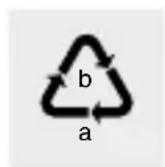
Observe the marking of the packaging materials for waste separation, which are marked with abbreviations (a) and numbers (b) with following meaning: 1-6: plastics / 20-22: paper and fibreboard / 80-98: composite materials.

Contact your local refuse disposal authority for more details of how to dispose of your worn-out product.
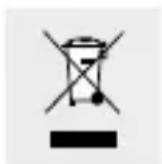
To help protect the environment, please dispose of your product properly when it has reached the end of its useful life, and not in the household waste. Dispose of the product according to the EC Waste
Electrical and Electronic Equipment Directive - WEEE. Please contact your municipality for information on collection facilities and their opening hours.
Per Directive 2006 / 66 / EC and its amendments, defective or used batteries must be recycled. Return the batteries and/or the product to a collection site.
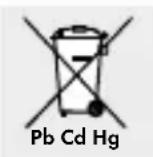
Improper disposal of batteries can harm the environment!
Never dispose of batteries in your household bin. They may contain toxic heavy metals and are subject to hazardous waste regulations. The chemical symbols of the heavy metals are: Cd = cadmium, Hg = mercury, Pb = lead. Therefore dispose of used batteries through your local collection facilities.
Warranty/Service
We provide a 3-year warranty covering faults in materials or manufacturing of the blood pressure monitor from the purchase date.
The warranty does not cover:
- Damage due to improper use.
- Wearparts.
- Damage caused by the customer.
If the device has been opened by an unauthorised repair shop.
This warranty does not affect the customer's legal rights. The customer must provide proof of purchase in order for
any warranty claims within the warranty period to be honoured. The warranty claim must be filed with Hans Dinslage GmbH, Uttenweiler, Germany, within 3 years from the date of purchase.
In the event of a complaint, please contact our Service Department listed below:
Service Hotline (free of charge):
GB
0800 93 10 319 (Mon - Fri: 8 am - 6 pm)
service-uk@sanitas-online.de
IE NI
1800 93 92 35 (Mon-Fri: 8 am-6pm)
service- ie@sanitas-online.de
If we ask you to return the defective blood pressure monitor, please send it to the following address:
send to:
NU Service GmbH
Lessingstraße 10b
89231 Neu-Ulm, GERMANY
IAN 366722_2101
This device complies with European Standard EN 60601-1-2 (in accordance with CISPR 11, IEC 61000-4-2, IEC 61000-4-3, IEC 61000-4-8) and is subject to special precautions with
respect to electromagnetic compatibility. The device is suitable for use in all environments listed in these instructions for use, including domestic environments. Please note, portable and mobile HF communication devices may interfere with this device. This device complies with EU Medical DevicesDirective 93/42/EEC, the Medical Devices Act and standard IEC 80601-2-30 (Medical electrical equipment Part 2-30: Particular requirements for basic safety and essential performance of automated non-invasive blood pressure monitors).
The accuracy of this blood pressure monitor has been thoroughly tested and was developed with regard to a long utilizable service life. If the device is used in medicine, technical inspections using the suitable equipment are to be carried out. Precise information on how to test the accuracy of the device can be requested from our service address.
We hereby affirm that this product complies with the European RED Directive 2014/53/EU.
The CE declaration of conformity for this product is available at:
www.sanitas-online.de/web/de/landingpages/
cedeclarationofconformity.php
Dimensions: L 134,5 mm x l 100 mm x H 51,0 mm
www.healthforyou.lidl
Configurations pour
la version web de
I'application
« HealthForYou »: - MS Internet Explorer
-MS Edge
- Mozilla Firefox
- Google Chrome
-Apple Safari
Bluetooth® low energy technology,
frequenieband 2,402-2,480 GHz,
www.healthforyou.lidl
Systeemvoorwaarden
voorde
"HealthForYou"-
webversie: - MS Internet Explorer
-MS Edge
- Mozilla Firefox
- Google Chrome
-Apple Safari
Service hotline (gratis):
NL
0800 54 30 543 (ma. - fr.: 8 - 18 klok)
service-nl@sanitas-online.de
BE
0800 70 611 (ma. - fr.: 8 - 18 klok)
service-be@sanitas-online.de
www.healthforyou.lidl
NOSTE OCHRANNÉ RUKAVICE! Vyte-
The Bluetooth® word mark and logos are registered trademarks owned by Bluetooth SIG, Inc. and any use of such marks by Hans Dinslage GmbH is under license. Other trademarks and trade names are those of their respective owners.
Apple and the Apple logo are trademarks of Apple Inc., registered in the U.S. and other countries. App Store is a service mark of Apple Inc., registered in the U.S. and other countries.
Google Play and the Google Play logo are trademarks of Google LLC. Android is a trademark of Google LLC.
| Guangdong Transtek Medical Electronics Co., Ltd. Zone A, No. 105, Dongli Road, Torch Development District, Zhongshan, 528437, Guangdong, China | |
| EC|REP | MDSS - Medical Device Safety Service GbH, Schiffgraben 41, 30175 Hannover, Germany |
| Imported by: Hans Dinslage GmbH, Riedlinger Str. 28, 88524 Uttenweiler, Germany www.sanitas-online.de | |
Notes on electromagnetic compatibility
The ME EQUIPMENT or ME SYSTEM is suitable for home healthcare environments and so on. Warning: Don't near active HF surgical equipment and the RF shielded room of an ME system for magnetic resonance imaging, where the intensity of EM disturbances is high.
Warning: Use of this equipment adjacent to or stacked with other equipment should be avoided because it could result in improper operation. If such use is necessary, this equipment and the other equipment should be observed to verify that they are operating normally.
Warning: Use of accessories, transducers and cables other than those specified or provided by the manufacturer of this equipment could result in increased electromagnetic emissions or decreased electromagnetic immunity of this equipment and result in improper operation.
Warning: Portable RF communications equipment (including peripherals such as antenna cables and external antennas) should be used no closer than 30~cm (12 inches) to any part of the equipment (SBM69), including cables specified by the manufacturer. Otherwise, degradation of the performance of this equipment could result.
If any: a list of all cables and maximum lengths of cables (if applicable), transducers and other ACCESSORIES that are replaceable by the RESPONSIBLE ORGANIZATION and that are likely to affect compliance of the ME EQUIPMENT
or ME SYSTEM with the requirements of Clause 7 (EMIS-SIONS) and Clause 8 (IMMUNITY). ACCESSORIES may be specified either generically (e.g. shielded cable, load impedance) or specifically (e.g. by MANUFACTURER and EQUIPMENT OR TYPE REFERENCE). If any: the performance of the ME EQUIPMENT or ME SYSTEM that was determined to be ESSENTIAL PERFORMANCE and a description of what the OPERATOR can expect if the ESSENTIAL PERFORMANCE is lost or degraded due to EM DISTURBANCES (the defined term "ESSENTIAL PERFORMANCE" need not be used).
Table 1: Guidance and manufacturer's declaration - electromagnetic emissions:
| Emissions test Compliance | |
| RF emissions CISPR 11 | Group 1 |
| RF emissions CISPR 11 | Group B |
| Harmonic emissions IEC 61000-3-2 | Not application |
| Voltage fluctuations/flicker emissions IEC 61000-3-3 | Not application |
Table 2: Guidance and manufacturer's declaration - electromagnetic immunity:
| Immunity test IEC | 60601-2 test level | Compliance level |
| Electrostatic discharge (ESD) IEC 61000-4-2 | ±8 kV contact ±2 kV, ±4 kV, ±8 kV, ±15 kV air | ±8 kV contact ±2 kV, ±4 kV, ±8 kV, ±15 kV air |
| Electrical fast transient / burst IEC 61000-4-4 | Not applicable Not applicable | |
| Surge IEC61000-4-5 | Not applicable Not applicable | |
| Voltage dips, short interruptions and voltage variations on power supply input lines IEC 61000-4-11 | Not applicable Not applicable | |
| Power frequency (50Hz / 60Hz) magnetic field IEC 61000-4-8 | 30 A/m 50 Hz / 60 Hz | 30 A/m 50 Hz / 60 Hz |
| Conduced RF IEC61000-4-6 | Not applicable Not applicable | |
| Radiated RF IEC61000-4-3 | 10 V/m 80 MHz-2,7 GHz 80 % AM at 1 kHz | 10 V/m 80 MHz-2,7 GHz 80 % AM at 1 kHz |
| NOTE UT is the a.c. mains voltage prior to application of the test level. | ||
Table 3: Guidance and manufacturer's declaration - electromagnetic immunity:
| Radiated RF IEC61000-4-3 (Test specifications for ENCLOSURE PORT IMMUNITY to RF wireless communications equipment) | Test Fre- quency | Band (MHz) | Service |
| 385 380-3 | 90 TETRA | 400 | |
| 450 430-4 | 70 GMRS 460: | FRS 460 | |
| 710 704-7 | 87 LTE Band | 13, 17 | |
| 745 | |||
| 780 | |||
| 810 800-9 | 60 GSM | 800/900, TETRA 800, iDEN 820, CDMA 850, LTE Band 5 | |
| 870 | |||
| 930 | |||
| 1720 1700 | -1990 GSM 1800;CDMA1900; GSM1900; DECT;LTE Band 1,3,4,25;UMTS | ||
| 1845 | |||
| 1970 | |||
| 2450 2400 | -2570 Bluetooth,WLAN,802.11b/g/n,RFID 2450,LTE Band 7 | ||
| 5240 5100 | -5800 WLAN | 802.11 a/n | |
| 5500 | |||
| 5785 | |||
Table 3: Guidance and manufacturer's declaration - electromagnetic immunity:
| Radiated RF IEC61000-4-3 (Test specifications for ENCLOSURE PORT IMMUNITY to RF wireless communications equipment) | Modulation | Modulation (W) | Distance (m) | IMMUNITY TEST LEVEL (V/m) |
| Pulse modulation b) 18 Hz | 1.8 0.3 27 | |||
| FM c) ± 5kHz deviation 1 kHz sine | 2 0.3 28 | |||
| Pulse modulation b) 217 Hz | 0.2 0.3 9 | |||
| Pulse modulation b) 18 Hz | 2 0.3 28 | |||
| Pulse modulation b) 217Hz | 2 0.3 28 | |||
| Pulse modulation b) 217Hz | 2 0.3 28 | |||
| Pulse modulation b) 217Hz | 0.2 0.3 9 |

Guangdong Transtek Medical Electronics Co., Ltd.
Zone A, No.105, Dongli Road, Torch Development District, Zhongshan, 528437, Guangdong, CHINA
EC REP
MDSS - Medical Device Safety Service GmbH, Schiffgraben 41, 30175 Hannover, GERMANY

Imported by Hans Dinslage GmbH, Riedlinger Straße 28, 88524 Uittenweiler, GERMANY
Stand der Informationen - Last Information Update - Version des informations - Stand van de informatatie - Stan informaci Stav informaci - Stav informaci: 06 / 2021 - Ident.-No.: 749.948_SBM69_2021-03-10_01_IM_Lidl_LB8 OSX