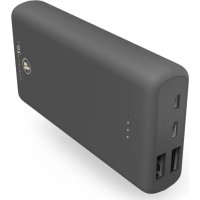
Supreme 20HD 00187292 - Power bank HAMA - Free user manual and instructions
Find the device manual for free Supreme 20HD 00187292 HAMA in PDF.



| Product type | Portable battery (PowerPack) |
| Brand | Hama |
| Model | Supreme 20HD 00187292 |
| Nominal capacity | 20000 mAh |
| Typical capacity | 20200 mAh |
| Usable capacity | 13667 mAh (at 5V/2A) |
| Battery technology | High-density lithium polymer |
| Nominal voltage | 3.7 V |
| USB-C input | 5 V / 2 A |
| micro-USB input | 5 V / 2 A |
| USB-A output 1 | 5 V / 3 A |
| USB-A output 2 | 5 V / 3 A |
| USB-C output | 5 V / 3 A |
| Maximum total output | 5 V / 3 A (3000 mA) |
| Charging indicator | 4 LEDs (25% per LED) |
| Optimized charging | Yes, automatic detection |
| Protection | Against overcharge, deep discharge, short circuit |
| Included cable | USB-A to USB-C |
| Maintenance | Slightly damp lint-free cloth |
| Recycling | Compliant with WEEE and battery directives |
Frequently Asked Questions - Supreme 20HD 00187292 HAMA
User questions about Supreme 20HD 00187292 HAMA
0 question about this device. Answer the ones you know or ask your own.
Ask a new question about this device
Download the instructions for your Power bank in PDF format for free! Find your manual Supreme 20HD 00187292 - HAMA and take your electronic device back in hand. On this page are published all the documents necessary for the use of your device. Supreme 20HD 00187292 by HAMA.
USER MANUAL Supreme 20HD 00187292 HAMA
OperatingInstructions
Bedienungsanleitung
Moded'emploi
Instruccionesdeuso
Gebruiksaanwijzing
Istruzioniperl'uso
Instrukcjaobsługi
Használatiútmutató
Manualdeutilizare
Návodk p oužití
Návodnapoužitie
Manualdeinstruções
Bruksanvisning
Thankyouforchoosinga H amaproduct.
Take your time and read the following instructions and information completely. Please keep these instructions in a safe place for future reference. If you sell the device, please pass these operating instructions onto thenewowner.
1. Explanationofwarningsymbolsandnotes
Warning

This symbol is used to indicate safety instructions or to draw your attention to specific hazards and risks.
Note

This symbol is used to indicate additional information or important notes.
High-densityLi-polymercells
This product contains high-density Li-polymer cells. High-density cells were developed primarily for smartphoneproductioninordertoaccommodatethenewveryhighdemandsintermsofcapacity andperformancewithsmallspacerequirements.ThesenewgenerationsofLi-polymercellsallowa lightweightandcompactdesignwithcomparativelyhighcapacity.
2.Packagecontents
• " Supreme20HD"PowerPack,20000mAh
• U SB-A to U SB-Cable
• Theseoperatinginstructions
3. Safetyinstructions
• T heproductisintendedforprivate,non-commercialuseonly.
• U setheproductonlyfortheintendedpurpose.
- Protect the product from dirt, moisture and overheating and use it in dry environments only.
- Do not use the product in the immediate vicinity of heaters, other heat sources or in direct sunlight.
- As with all electrical products, this device should be kept out of the reach of children.
• D o n otdroptheproductanddonotexposeittoanymajorshocks.
- Do not operate the product outside the power limits specified in the technical data.
- Do not open the device or continue to operate it if it becomes damaged.
- Dispose of packaging material immediately in accordance with the locally applicable regulations.
- The battery is permanently installed and cannot be removed; dispose of the product as a whole in accordancewiththestatutoryregulations.
- Do not modify the product in any way. Doing so voids the warranty.
- Do not use the product in areas in which electronic products are not permitted.
- Do not attempt to service or repair the product yourself. Leave any and all service work to qualified experts.
• D o n otincineratethebatteryortheproduct.
- Do not tamper with or damage/heat/disassemble the batteries/rechargeable batteries.
4.Operation
4.1. Charging the powerpack
Warning- r echargeablebattery

- Do not charge the power pack via your PC or notebook. The charging currents can damage the USBportonthePCornotebook.
- O nlyusesuitablechargingdevicesorUSBconnectionstochargetheproduct.
- Do not use defective chargers or USB ports and do not attempt to repair them.
- Do not overcharge the product or allow the battery to completely discharge.
- A voidstoring, charging and using inextremetemperatures and atextremely low atmospheric pressures (such as at high altitudes).
- C hargeregularly(atleastquarterly)duringperiodsofprolongedstorage.
- Start the power pack charging process by connecting the enclosed USB-A to USB-C cable to the USB-C input on the power pack (IN 5V/2A) and to a suitable USB charger. To do this, consult the operating instructions for the USB charger you are using. Alternatively, the power pack can also be chargedviathemicro-USBport(IN5V/2A).
• T hechargingprocessbeginsandendsautomatically.
• Fully charge the power pack once before using it for the first time.
Note-capacity

- D uringthepowerpackchargingprocess, thecapacityisdisplayedconstantly.
• Each status LED corresponds to 25% of the capacity. The permanent illumination of an LED indicate that the capacity has already been reached. If three LEDs light up and the fourth phone flashes, the power pack is at least 75% charged. - I fallfourstatusLEDslightup, thefullcapacityisavailable.
- Press the button on the power pack to switch this on and to determine the power pack's current capacity.
- Press the button twice until the status LEDs go out to switch the power pack off.
4.2.Chargingdevices
Warning- Connectionofdevices

- Before connecting a device, check whether it can be adequately supplied with the power pack's currentdelivery.
- Ensure that the total current consumption of the connected device does not exceed 3000 mA.
• N otetheinstructionsinyourdevice'soperatingmanual. - You must obey the instructions and safety notes contained therein regarding the supply of power to your devices.
• T hepowerpackmustnotbechargedanddischargedatthesametime! - Please do not charge simultaneously at the two USB and USB-C outputs since this significantly reduces the charging current. The charging period increases significantly as a result and the powerpackmay, i n c ertaincircumstances,becomeoverloaded.
Warning

- Never connect the power pack's charging cable to its input and output simultaneously. This can damagethebattery.
- Do not connect any devices during the power pack charging process. Doing so can damage the powerpackandconnecteddevices.
- Connect the enclosed USB-A to USB-C cable to the power pack's USB port (OUT 5V/3A) and the USB-Cportonyourdevice(mobilephone,smartphone,etc.).
- In certain circumstances, the enclosed charging / connecting cable may not match the USB port on your device. In this case, use the USB cable that camewith your device.
- When using the USB-C output (OUT 5V/3A) for the charging process, connect a suitable USB-C chargingcabletotheUSB-Coutputonthepowerpackandtheportonyourdevice.
- The charging process begins automatically. During the charging process, the status LEDs indicate the powerpack's remaining available capacity.
• T hecurrentbatterychargestatusofyourdeviceisindicatedonthis. - Terminatethechargingprocessandswitchthepowerpackoffbypassingthebuttononthe powerpacktwice.ThestatusLEDsgout.
- In the event that no device is connected, the power pack switches itself off automatically.
Note- o ptimisedcharging

Optimisedchargingmeansthatthepowerpackrecognisestheconnecteddevice,suppliesitwith the ideal current strength and therefore reduces the charging time to a minimum. Note that the powerpack'smaximumcurrentdeliveryis3000mA.
5. Careandmaintenance
Only clean this product with a slightly damp, lint-free cloth and do not use aggressive cleaning agents.
6.WarrantyDisclaimer
Hama GmbH & Co KG assumes no liability and provides no warranty for damage resulting from improper installation/mounting, improper use of the product or from failure to observe the operating instructionsand/orsafetynotes.
7.Technicaldata
| USB-Cinput5 V 2 A | --- |
| Micro-USBinput5 V 2 A | --- |
| USB-A o utput1 | 5 --- |
| USB-A o utput2 | 5 --- |
| USB-Coutput5 V 3 A | --- |
| Totaloutput5 V 3 A (max.) | --- |
| Battery type | 3.7 V/Li-Po (high-density) |
| Min.capacity20000mAh/ 7 4.00Wh | |
| Typ.capacity20200mAh/ 7 4.74Wh | |
| UsableCapacity*13667mAh@ 5 V | --- 2 A |
* The usable capacity is the capacity that can be drawn from the output sockets, measured at 5V output voltage and a draw current of 2A.
8. Recycling information
Noteonenvironmental protection:
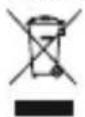
Following the implementation of European Directive 2012/19/EU and 2006/66/EU into national law, the following applies: Electrical and electronic devices as well as batteries must not be disposed of with household waste. Consumers are obliged by law to return electrical and electronic devices as well as batteries to the designated public collection points or to the
point of sale at the end of their service lives. Detailed information on this topic is defined in the national laws of the respective country. This presence of the above symbol on the product, operating instructions or package indicates that the product is subject to these regulations. By recycling, reusing the materials or other forms of utilising old devices/batteries, you are making an important contribution to protecting our environment.
Avertizare – Acumulator

8. Pokynyk likvidaci
- EXPLANATIONOFWARNINGSYMBOLSANDNOTES
- WARNING
- NOTE
- HIGH-DENSITYLI-POLYMERCELLS
- 2.PACKAGECONTENTS
- SAFETYINSTRUCTIONS
- 4.OPERATION
- CHARGING THE POWERPACK
- WARNING- R ECHARGEABLEBATTERY
- NOTE-CAPACITY
- 4.2.CHARGINGDEVICES
- WARNING- CONNECTIONOFDEVICES
- NOTE- O PTIMISEDCHARGING
- CAREANDMAINTENANCE
- 6.WARRANTYDISCLAIMER
- RECYCLING INFORMATION
- NOTEONENVIRONMENTAL PROTECTION
- AVERTIZARE – ACUMULATOR
- POKYNYK LIKVIDACI
Brand : HAMA
Model : Supreme 20HD 00187292
Category : Power bank