
Active BT - Bluetooth Headset HAMA - Free user manual and instructions
Find the device manual for free Active BT HAMA in PDF.



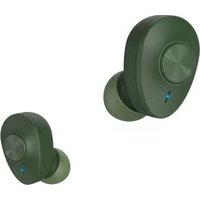
| Product type | Bluetooth stereo headset |
| Brand | Hama |
| Model | Active BT |
| Weight | 12 g |
| Power supply | Li-Po battery 3.7 V / 60 mAh, recharge via USB |
| Charging time | About 2 hours |
| Talk time | Up to 5.5 hours |
| Music playback time | Up to 6 hours |
| Bluetooth range | Up to 10 m |
| Bluetooth version | 5.0 |
| Supported Bluetooth profiles | A2DP V1.3, AVRCP V1.6, HFP V1.7, SPP V1.2 |
| Headphone impedance | 32 Ω |
| Headphone sensitivity | 96 dB |
| Frequency response | 20 – 20,000 Hz |
| Main functions | Play/pause, volume +/-, next/previous tracks, hands-free calling, multipoint, voice assistant |
| Package contents | Headset, USB cable, 3 pairs of earpads (S/M/L), user manual |
| Care and cleaning | Clean with a slightly damp lint-free cloth, avoid harsh detergents |
| Safety | Do not use at high volume for extended periods; do not open or modify; recycle according to guidelines |
| Recycling | Device and battery should not be disposed of with household waste; drop off at collection point |
Frequently Asked Questions - Active BT HAMA
User questions about Active BT HAMA
0 question about this device. Answer the ones you know or ask your own.
Ask a new question about this device
Download the instructions for your Bluetooth Headset in PDF format for free! Find your manual Active BT - HAMA and take your electronic device back in hand. On this page are published all the documents necessary for the use of your device. Active BT by HAMA.
USER MANUAL Active BT HAMA
"BTHRun" & " BTHActive"
Bluetooth® StereoHeadset
Operating Instructions
Bedienungsanleitung
Moded'emploi
Instruccionesdeuso
PykoBOOCTBOONKcnpnyatauH
Gebruiksaanwijzing
Manualdeinstruções
GB
D
F
E
RUS
NL
P

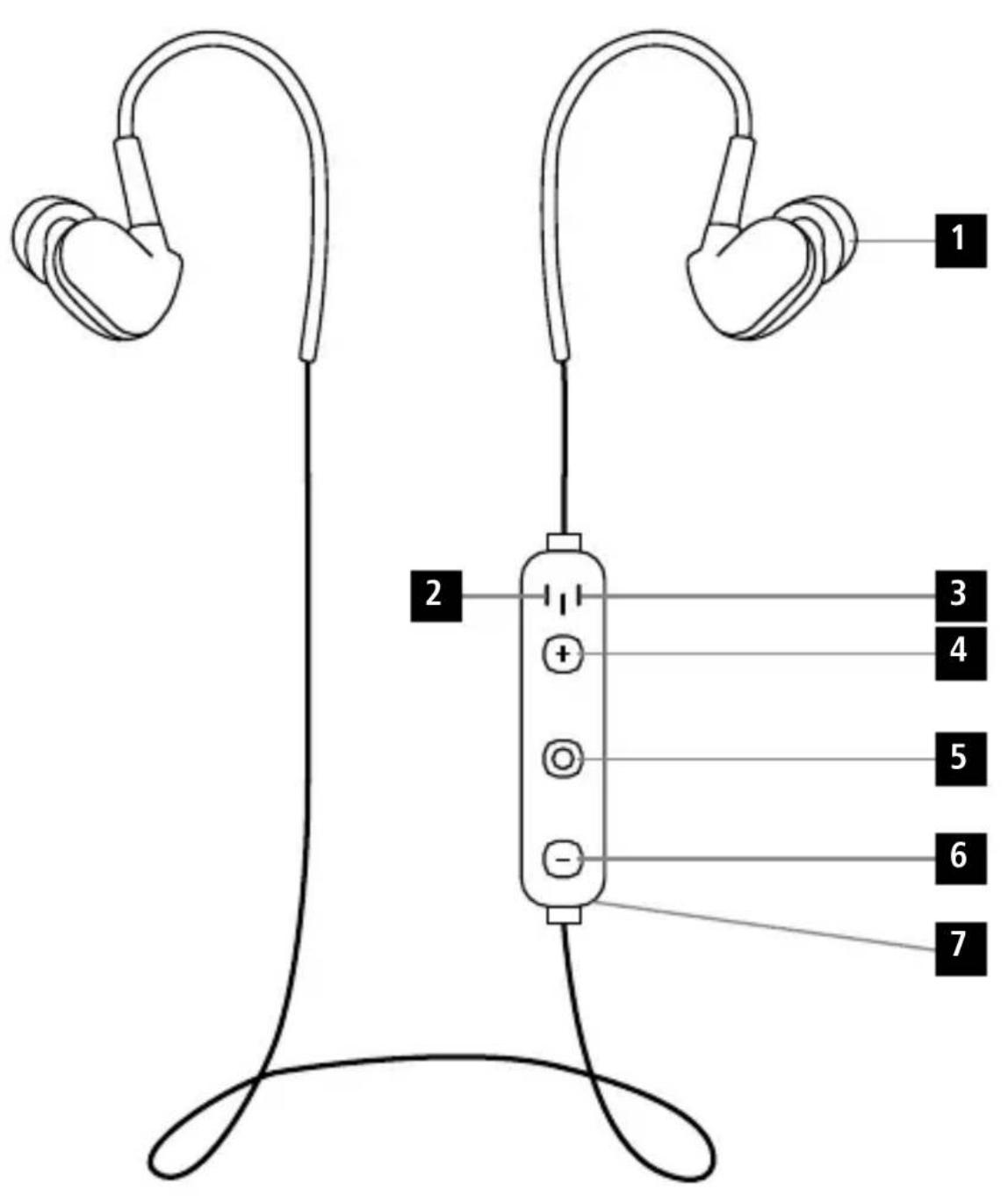
ControlsandDisplays
1.Earphones
2 M i c r o p h o n e
3 S tatusLEDs
4 V olume+,jumpforward o ntitle
5 O n/offbutton,voicecontrol,multifunction button(MF)
6 V olume-, jumpbackward o nettle
7 C hargingsocket
Thankyouforchoosinga H amaproduct. Takeourtimeandreadthefollowinginstructions andinformationcompletely.P leasekeepthese instructions in a safe place for future reference.If yousellthedevicpeleasepasstheseseoperating instructionsontothewonowner.
1.ExplanationofWarningSymbolsandNotes
Warning

Thissymbolisusedtoindicatesafetyinstructions ortodrawyourattentionospecific h a z a r d s andrisks.
Note

Thissymbolisusedtoindicateadditional informationorimportantnotes.
2.PackageContents
- 1 x Bluetoberheadset
- 1 x USBCharginqcable
3 pairsofearcushions(sizeS,M,L)
T heseoperatinginstructions
3.SafetyNotes
T heproductisintendedforprivate,non-commercialuseonly.
- P roteccttheproductfromdirt, moisture a nd overheating, andonlyuseitina d ryvironment.
- D o n otdroptheproductanddonotexposeitto anymajorshocks.
- D on otoperatetheproductoutsidethepower limitsgiveninthespecifications.
- D o n otopenthedeviceorcontinuetooperateitif itbecomesdamaged.
- S incethebatteryisintegratedandcannotbe removed, you will need to dispose of the product as a hole. Do this incompliance with the legal requirements.
- D isposeofpackagingmaterialimmediately accordingtolocallyapplicableregulations.
- Do not modify the product in any way. Doing so voidsthewarranty.
- Do not throw the battery or the product into fire.
- D o n ottamperwithordamage/heat/disassemble thebatteries/rechargeablebatteries.
- U setheproductforitsintendedpurposeonly.
- D o n otattempttoserviceorrepairtheproduct yourself. L eaveanyandallserviceworkto qualifiedexperts.
Warning-Battery

- O nlyusesuitablechargingdevicesorUSB connectionsforcharging.
- A s a rule, donotchargedevicesorUSB connectionsthat are effective anddonottry torepairthemyourselves.
- D o n o toverchargetheproductor allowthe batterytocompletelydischarge.
- A voidstoring,chargingorusingthedevicenextremetemperaturesandextremelylow atmosphericpressure (forexample,athigh altitudes).
- W henstoredovera I ongperiodoftime, batterieesshouldbechargedregularly(atleast everythreemonths).
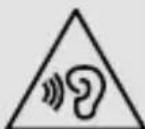
Warning-Highvolumes

- Highboundpressure level!
- There is a risk of hearing damage.
- To prevent hearing loss, avoid listening at high volumelevelsforlongperiods.
- Always keep the volume at a reasonable level. Loudvolumes, evenovershortperiods, can causehearingloss.
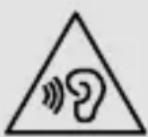
- U singthisproductlimitsyour perceptionofambientnoise. For thisreason,donotoperate anyvehiclesormachineswhile usingthisproduct.
4. Getting Started
- T heheadsetisequippedwitha re c h r a g e a b l e battery. The battery must be fully charged before usingthe deviceforthe firsttime.
- Ensure that the headset is switched off before chargingit.
- B eginchargingbyconnectingtheincludedUSB chargingcabletothechargingsocket(7)as wellastheUSBconnectionofa P C/laptop.
-
Alternatively, you can charge the headset using a suitableUSBcharger. P leasefertotheoperating instructionsfortheUSBchargerused.
-
The display lights up constantly in red during the chargingprocess.
- I t takesaround2-3hoursuntilthebatteryis completelycharged.
- O ncethechargingprocessiscomplete,thered lightoftheLED(3)turnstobluelight.
- D isconnectallcableandmainsconnections afteruse.
5. Operation Switchingtheheadsetoff/on
Press the MF button (5) until a voice says "Power ON" and the blue LED flashes.
To switch it off, press and hold the MF button (5) until a voice says "PowerOFF" and thened LED flashes.
Note

Thefunctionsdescribedinthissectionare on l y availableforBluetooth - capableterminaldevices.
5.1.Bluetooth 念 pairing
Note-Pairing

- Makesure that your Bluetooth®-capable terminal device is on and Bluetooth® is activated.
- Makesure t hatyourBluetooth®- capable terminaldeviceisvisibleforotherBluetooth devices.
- F ormore i nformation, pleasereferto the operatinginstructionsofyourterminaldevice.
- T heheadsetandtheterminaldevicesshouldnot be any further than 1 metre away from each other. T hesmallerthedistance,thebetter.
- S witchtheheadsetonusingtheMButton(5).
- P ressandholdtheMFbutton(5)untiltered and blue LEDs flash alternatingly. The headset is searchingfora Bl u e to o t connection.
- O pentheBluetooth® settingssonyourterminal deviceandwaituntil HamaBTHRUNorHama BTHACTIVE appearsinthelistofBluetooth® devicesfound.
- Se I HamaBTHRUNorHamaBTHACTIVE and waituntiltheheadsetislistedasconnectedinthe Bluetooth® settingsonyourterminaldevice.
Note-Blueto8password

Someterinaldevicesrequireapassword in o rder toconnecttoanotherBluetooth device.
Note-BIuetobpassword

If your terminal device requests a password for connectionwiththeheadset,enter0000.
Note

- O nce the connection has been established, a voicesays, "Connected".
- I f t heconnectionattempttakeslongerthan 300secondstoccomplete,itiscancelledand theLEDsgoout.Inthiscase,repeatthesteps listedpreviouslyunder5.1Bluetooth ^ 念 pairing.
5.2.AutomaticBluetooth connection(after successfulpairing)

Note
- Makesure t hatyourBluetooth®-capable terminaldeviceisonandBluetooth ® is activated.
- Makesure t hatyourBluetooth®-capable terminaldeviceisvisibleforotherBluetooth devices.
-
For more information, pleasereferto the operatinginstructionsofyourterminaldevice.
-
S witchtheheadsetonusingtheMFbutton(5). TheblueLEDbeginstoflashandtheheadset automaticallyconnectswiththelastterminal deviceused.

Note
- O nce the connection has been established, a voicesays, "Connected".
- If t heconnectionattempttakeslongerthan 300secondstcomplete,itiscancelledand theLEDsgoout.Inthiscase,repeatthesteps listedpreviouslyunder5.2.
- I t m aybenecessarytomakesettings yourterminaldevicetoenableautomatic connectionwiththepairedheadset.
Note-C onnectionimpaired

Aftertheheadsetandterminaldevicehavebeen paired, a connectionistablishedautomatically. IftheBluetooth connectionisnotestablished automatically, checkthefollowing:
ChecktheBluetooth® settingsofyourterminal device to see whether HamaBTHRUNorHama BTHACTIVEisconnected.Ifnot,repeat the stepslistedunder5.1.Bluetooth® pairing.
Checkwhetherobstaclesareimpairingtherange.Ifso,movethedevicesclosertogether.
Note-C onnectionimpaired

- T heperformancecanalsobeaffectedbyaweakbattery.
5.3.Bluetooth® multipointconnection
ThisheadsetcanbeconnectedwithtwoBluetooth - enabledterminaldevicessimultaneously.
- First connect the headset with the first terminal device asdescribed in 5.1.
T hendisableBluetooth onthatterimaldevice. - N ext,connecttheheadsetwiththesecondterminal deviceasdescribedin5.1.
- A c tivateBluetooth® onthefirstterminaldeviceonce more. The headsetnowconnectstothatterminal deviceautomatically.
5.4.Audiplayback

Note
- N otethatthefunctionsdescribedunder5.3. and 5.4. are only possible with an active Bluetooth® connection.
- Y ourterminaldevicemustalsosupportthe individualfunctions.
- F ormore information, pleasereferto the operatinginstructionsofyourterminaldevice.
- F unctionscanstillbecontrolleddirectlyviathe terminaldevice.
S etthevolumeonyourterminaldevicetoa lowlevel. - S witchtheheadsetonusingtheMFbutton (5).Uponsuccessfulconnection,a voicesays, "Connected".
- S tartaudiplaybackontheconnectedterminal device.
- Press Volume + (4) to increase the volume. There is an announcementwhenthemaximumvolume isreached.
- Press Volume - (6) to reduce the volume.
- Press the MF button (5) to start or pause audio playback.
- Press and hold Jump forward one title (4) to skiptothenexttitle.
- Press and hold Jump backward one title (6) to skiptothepreviousit.
5.5.Hands-freefunction
- P resstheMFbutton(5)oncetoansweran incomingcall.
- Press the MF button(5) twice or use your telephone torejectanincomingcall.
During a call, press the MF button (5) once to endthecall. - Press the MF button (5) twice to call the number of the last call.
Note-Callquality

To increase the call quality, make sure that you are neartheheadsetwithyourmobilephone duringthecall.
5.6.Disconnectingtheheadset
- S witchtheheadsetoff.
- D isconnecttheheadsetviatheBluetooth® settingsonyourterminaldevice.
5.7.Batterycapacity
- An announcement is made and the display flashes inred w henthebatteryislow
- C hargetheheadsetasdescribedin4.Getting Started.
6.CareandMaintenance
Onlycleanthisproductwitha s lightlydamp,lint-free clothanddonotuseaggressivecleaningagents. Makesure t hatwaterdoesnotgetintotheproduct.
7.WarrantyDisclaimer
HamaGmbH& Co KGassumesnoliabilityand providesnowwarrantyfordamageresultingfrom improperinstallation/mounting,improperusef theproductorfromfailure to o observetheoperating instructionsand/orsafetynotes.
8. Service and Support
PleasecontactHamaProductConsultingifyouhave anyquestionsaboutthisproduct.
Hotline:+499091502-0(German/English)
Furthersupportinformationcanbefoundhere:
www.hama.com
9. Technical Data
| 6 | Bluetooth® Headset |
| Earphone/microphone impedance | 32 Ω / 1.4 - 2.2 Ω |
| Frequency20-2 0 0 0 Hz | |
| Earphone/microphone sensitivity | 96dB/ - 4 2 d B |
| WBCV≥75mV | |
| RangeMax.10m | |
| Bluetooth® technologyv5.0 | |
| Profile | A2DPV1.3/ A VRCPV1.6/ HFPV1.7/ S PPV1.2 |
| Transmissionfrequency2.4-2 .48GHz | |
| BatteryLi-Po 3 .7V | |
| Batterycapacity60mAh | |
| CurrentconsumptionMax.45mA | |
| ChargingvoltageMax.5 V USB | |
| Totalweight12g | |
| Max.TalkTime/ Max.MusicPlayTime* | 5.5h / 6 h |
| Standbytime* | 60 |
| Readyforuse* | 180days |
| Chargingtime | 2h |
*afterfull charge
10. Recycling Information
Noteonenvironmental protection:
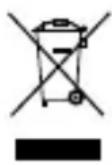
After the implementation of the European Directive 2012/19/EU and 2006/66/EU inthenational legal system, the following applies: Electric and electronic devices aswellas
batteries mustnotbe disposedofwithhousehold waste. Consumers are obliged by law to return electrical and electronic devices as well as batteries at the end of their service lives to the public collecting points set up for this purpose or point of sale. Details to this are defined by the national law of the respective country. This symbol on the product, the instructionmanualor thepackageindicates that a product is subject to these regulations. By recycling, reusing the materials or other forms of utilising old devices/Batteries, you are making an important contributiontoprotecting our environment.
11.DeclarationofConformity
CE Hereby, Hama GmbH & Co KG declares that theradioequipmenttype [00177078, 00177094,00177095,
00177096] is in compliance with Directive 2014/53/ EU. The full text of the EU declaration of conformity is availableatthe followinginternetaddress: www.hama.com->00177078,00177094,00177095, 00177096->Downloads.
| Frequency band(s) | 2402MHz – 2480MHz |
| Maximum radio-frequency power transmitted | 3.5mW EIRP |
h
BHHMaHHe-AkkymyIaTOp

Pa3pewaaetcncnoB30BaTbToJbKO COBMeCTnMbIe3apnHbIeYcTpoiCTBaN USB-pa3beMbl.
-Kateropnueckn3anpeaetcncnoJb30BaTb np eMOHTnpoBaTbHeNCpabHbIe3apdHbIe yctpoiCTbaJIINUSB-pa3beMb!
HeDonyckaTeu36bIToHOn3apJkNn rny60koJa3PdKnU3DeJIa.
-36eraTExpaHEnH,3apAKnN nOJIb3OBaHnI npn3KCTpeMaJIbHbIX TemnepaTypaxn 3 KCTpeMaJIbHOHN3KOM aTMocΦeHOMdaBHeHHn(HaNPmEp,Ha 60JIbIOHBICOTe).
-ПиДЛТeЛьНOMxpaHEnHnpeRyIaPHO 3apJkaTeaKkMylTOp(HepeXeOdHOr pa3aB T pIMecra).
BHHMaHHe - TexHmKa 6e30NaCHOCTN

- BbICOKoE3ByKOBoeIaBJIeHne!
-OnacnoctbnoBpeKdHnropaHOBcnyxa.
Bou36exaHneOpTeepncyxaHeCnyuMaTe BOCpOun3BeJeHnEHa6oJbWoIrpOMKocTb TeueHnEJIInTeJbHO BpeMeHn. - HenpeBbIaTbHOpMaJIbHyOrpOMKoCTb. Bo3dEiCTBnE rPOMKoro 3ByKa, B T.Y. B TeueHne KOpOTKO R BPemEn, MoXe I npUBeCTN K NOBpeXDeHnIOOPraHOBCJyxa.
BOBpeM3KcNpyatauunn3dEJnRCHnxaeTCTeNEHbBOCnpnTnroOKpykaUoux3BykOBu uMOB.3anpeuaetcNcNoIb3OBAtBu3deJeNeBOBpeMBOXDeHnraABTomO6nJynpaBJIeHnMaunHaM.
4.BB0dB 3 Kcπnyatauio
Длгпанногарнтурьинусмтpeнakkymyлгot.PpeBBOOMrarpHnTypbIb3KcNllyaatauHOeOxOUMONJHOCTb03apraNTbakkymylrgot.
-ПередначалмзардадоТКлючтетарнтур.
-To6bHaata3apraaKMyJrTopa,NoKJIIOHTe Ka6eIb USB pa3bem 3apdHoro yCTpOiCTBa (7) n Ka3bemy USB kOmbltopea.
- TapHnTypy TaKxMe MoXHo 3apXaTb Uepe3 3apJnHOeycTpoiCTBOUSB.Co6IIOdaIte HNCTpyKUINNO3KCNlyatauynucTPOiCTB.
BovpeMa3apraJaHenpepbIBHOropuTKpacna lamna.
-Длллнloro3apdaakkymyIaTopaTepe6yetyOK.2-3uaOB.
-Пookончаннзардогорпснн CBETODINHbINHHDKaTOp(3).
-1000KOHaHHnpa6oTbIOTKIOHHTeBCE Ka6eJIbHbIe n CeTeBbIe COeINHeHn.
5.3Kcnnyataun
BkIIOUeHHn B bIKIOUeHnerapHnTpybl
Haxmte u yepxnbate KhoNky MF (5).Pnp6op noaCT CnHaI nItaHna (Power ON), n 3arOpntc cnHraamna.
ydepxmbauteKhoNkyMF(5).Pnp6opnoact CnHaJI OTKIOUeHnIITAHn (Power OFF), KpachaJamnanorachet.
PpimechaHne

5.4.Bocnpoun3BedeHne3Byka
PpmeaHne

-Функции3 rIaB 5.3и5.4 pa6oTaOT TOIbKO npHAnuNcOeDnHeHnBaTeBluTeoth
KpOMe3TOrOyCTpoINCTBOBOCnPOIN3BeEHNIA DOLXHO6bITcOBMeCTNMOC H EKOTOpBMN φ yHKUaMNI.
-NoIpO6HeecMOTnTeHCTpyKUHO NO 3KcNJIyatauynyctpoiCTBa.
-ФУнкцЯМIMMOxHoynpaBnTb HeNOCpeIcTBeHHOuepe3yCTpoIcTBO BOCIpON3BeDeHn.
HayctpoiCTBeBOCpON3BeDeHnAcyCTaHOBNTe MNHMmaIbHyIOrPOMKoCTb.
BkHouHTe raphNtpy KhoNkoM MF (5).Pn yCTaHOBKe CoeINHeHnRapHNTypaNoDaCTcHnHaI «CoeINHeHneYctaHOBJeHO
HAnctOuHnke 3 BykAkBIOUHTe BOCnpOn3BeDeHHe.
-TObIyBEnuHtBpOMKoCTb,HaXMnTe KHOKNy FpOMKOCTb+ (4).EcINrFpOMKOCTb YBeJIuHeHaOMAkCMMyMa,rapHHTypaNoJaCT COOTBetCTByUcNcHHaJ.
-4To6bIyMeHbIHTbTgPOMKoCTb,HaXMNTe TpomKoCTb-(6).
-TO6bIInpnoCTaHOBnTbINNBO3O6HOBnTb BOCPPOUN3BeDeHHe,HaXMMTEKHNKyMF(5).
YTo6bI nepeTn K CneDyUoEmy faNny, HaxMnte KHOKNyCneDyUOuHmHn(4).
- TTo6bl nepeTn K npdeBdyuemy fainy, haxmTe KhoNkPypeBdyuynu(6).
PpmeaHne-KaeeCTBOcRHaHa

YTO6bIIOBbICITbKaueCTBOcHHaJa,CleIyET HAXOINTBcB HEnOpCpeDCTBeHHo 6JIIN3OCTn C rPOMKOrOBOpNTeIeM.
5.6.OTKIIoueHnErapHHTypbl
- BbIKJIOUHTeRAPHNTpy.
-OTKJIOHTeRAPHITypee3HaCTpoiKNBluetooth yctpoIcTBaOcnpon3BeJeHnA.
5.7.EMKOCtbakkymyTota
-Прималоюстаочнй EMKOCnAKKMyIaTopa rapHNTya nOdaet CnHaJ, n HauHnaet MmraTb KpaCHbIMnHnIkaTOp.
3apnTe aKKyMnyTOp, KaK onucaHO B rnaBe 4. BBOB B 3KcNpyatauio).
6. YxOaI TeXo6CyJKBaHne
YnCTKyn3dEINnAmpOn3BODntbTobko6e3BOPCOBOI CnerKaBnaJxHOHcAlneTko.3anpeaetcnpmHeHArpeccNBbHcHnCTaueNecpeDCTBa.CneNTe3aTeM, YTO6bIByCTpOCTBOHenONanaBOda.
7. Otka30TrapaHTnHbIXo6a3aTeJIbCTB
KomnaHamaGmbH&CoKGHe HeceT OTBeTCTBHeHOCTb3ayuep6,B03HNKUnBcJeDCTBne HEnpaBnIbHoRO M OHTaxa,NoDKNoUeHnI NcNoJIb3OBAHnI3DeJnIHeNOnA3NaYeHnIO,a TAKKe B CLeIcTbNEHeCObJIoDeHnIINHCTpyKunNO 3KcNlyatauIn N TexHnKn 6e3oNaChOCTn.
8.OTdTeXo6CnyxuBaHn
NobonpocampeMOHTaIJI3aMeHbHeNCnpaBbIX
m3dennio6paaaNTecbkPnoabuynlNB
cepBncHyIOcnyk6byKOMnaHnHama.
TopyraJInHNOTeLaTeXo6cnyxnbAHn:
+499091502-0(HeMeucKn,aHrnnckn)
Piopbo6HeecMOTpnte3decb:www.hama.com
9. TexHuecknexapakTepeNCTKn
The Bluetooth® word mark and logos are registered trademarks owned by Bluetooth SIG, Inc. and any use of such marks by Hama GmbH & Co KG is under license. Other trademarks and trade names are those of their respective owners.
All listed brands are trademarks of the corresponding companies. Errors and omissions excepted, and subject to technical changes. Our general terms of delivery and payment are applied.

- BTHRUN" & " BTHACTIVE
- BLUETOOTH® STEREOHEADSET
- CONTROLSANDDISPLAYS
- 1.EXPLANATIONOFWARNINGSYMBOLSANDNOTES
- WARNING
- NOTE
- 2.PACKAGECONTENTS
- 3.SAFETYNOTES
- WARNING-BATTERY
- WARNING-HIGHVOLUMES
- GETTING STARTED
- OPERATION SWITCHINGTHEHEADSETOFF/ON
- 5.1.BLUETOOTH 念 PAIRING
- NOTE-PAIRING
- NOTE-BLUETO8PASSWORD
- NOTE-BIUETOBPASSWORD
- 5.2.AUTOMATICBLUETOOTH CONNECTION(AFTER SUCCESSFULPAIRING)
- NOTE-C ONNECTIONIMPAIRED
- 5.3.BLUETOOTH® MULTIPOINTCONNECTION
- 5.4.AUDIPLAYBACK
- 5.5.HANDS-FREEFUNCTION
- NOTE-CALLQUALITY
- 5.6.DISCONNECTINGTHEHEADSET
- 5.7.BATTERYCAPACITY
- 6.CAREANDMAINTENANCE
- 7.WARRANTYDISCLAIMER
- SERVICE AND SUPPORT
- TECHNICAL DATA
- RECYCLING INFORMATION
- NOTEONENVIRONMENTAL PROTECTION
- 11.DECLARATIONOFCONFORMITY
- BHHMAHHE-AKKYMYIATOP
- BHHMAHHE - TEXHMKA 6E30NACHOCTN
- 4.BB0DB 3 KCΠNYATAUIO
- 5.3KCNNYATAUN
- BKIIOUEHHN B BIKIOUEHNERAPHNTPYBL
- PPIMECHAHNE
- 5.4.BOCNPOUN3BEDEHNE3BYKA
- PPMEAHNE
- PPMEAHNE-KAEECTBOCRHAHA
- 5.6.OTKIIOUEHNERAPHHTYPBL
- 5.7.EMKOCTBAKKYMYTOTA
- YXOAI TEXO6CYJKBAHNE
- OTKA30TRAPAHTNHBIXO6A3ATEJIBCTB
- 8.OTDTEXO6CNYXUBAHN
- TEXHUECKNEXAPAKTEPENCTKN
Brand : HAMA
Model : Active BT
Category : Bluetooth Headset