RR140 - Speaker BIGBEN - Free user manual and instructions
Find the device manual for free RR140 BIGBEN in PDF.



User questions about RR140 BIGBEN
0 question about this device. Answer the ones you know or ask your own.
Ask a new question about this device
Download the instructions for your Speaker in PDF format for free! Find your manual RR140 - BIGBEN and take your electronic device back in hand. On this page are published all the documents necessary for the use of your device. RR140 by BIGBEN.
USER MANUAL RR140 BIGBEN
natural_image
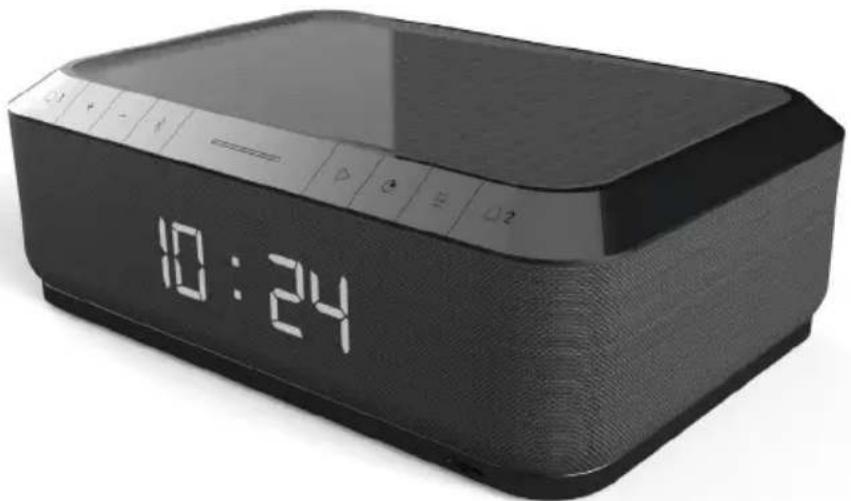
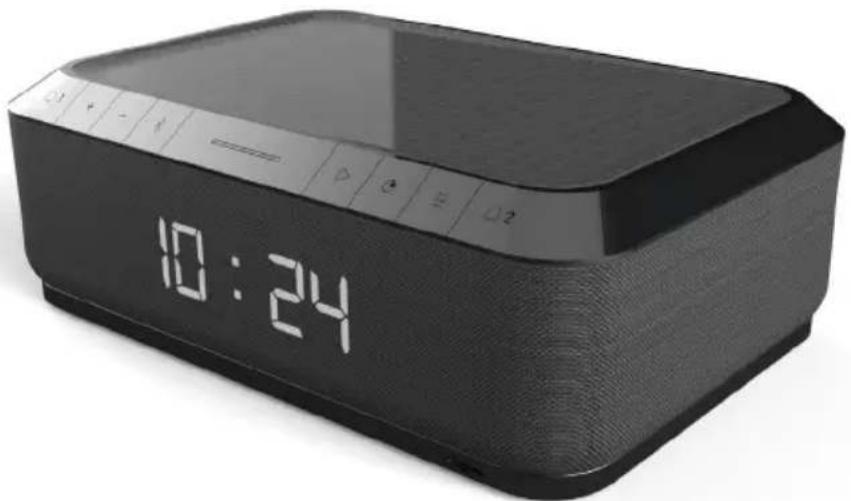
Black digital alarm device with a digital display showing 10:24 (no text or symbols on the device body)MODE D'EMPLOI
LISEZ ATTENTIVEMENT LE MODE D'EMPLOI AVANT UTILISATION ET CONSERVEZ-LE POUR CONSULTATION ULTÉRIEURE.
Table des matières
text_image
FM AL1 23:30 HAP AL2 SLP zzZ 11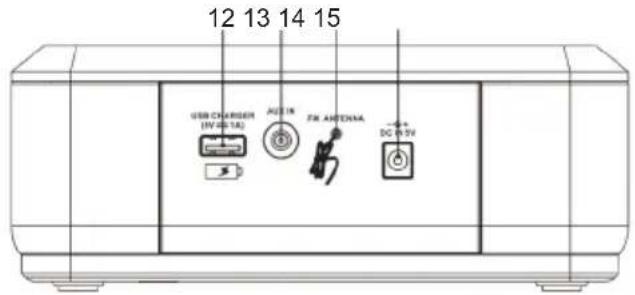
text_image
12 13 14 15 USB CHARGER (IV-0-1A) AC 1R FA ANTENIA DC 0-5Vtext_image
Correct Incorrecttext_image
RoHS CE REACH
Fabricant : Bigben Interactive FRANCE
- Rue de la Voyette, C.R.T. 2 Fretin,
CS 90414 - 59814 LESQUIN Cedex, France
BELGIQUE/NEDERLAND, customerservice@bigben-interactive.be
klantenservice@bigben-interactive.nl
ESPAÑA, sat@bigbeninteractive.es
ITALIA, support@bigbeninteractive.it
www.bigben.eu
bigben
RR140I
FM CLOCK RADIO WITH WIRELESS CHARGER & USB CHARGER
OPTIONAL: RR140I BT BLUETOOTH
natural_image
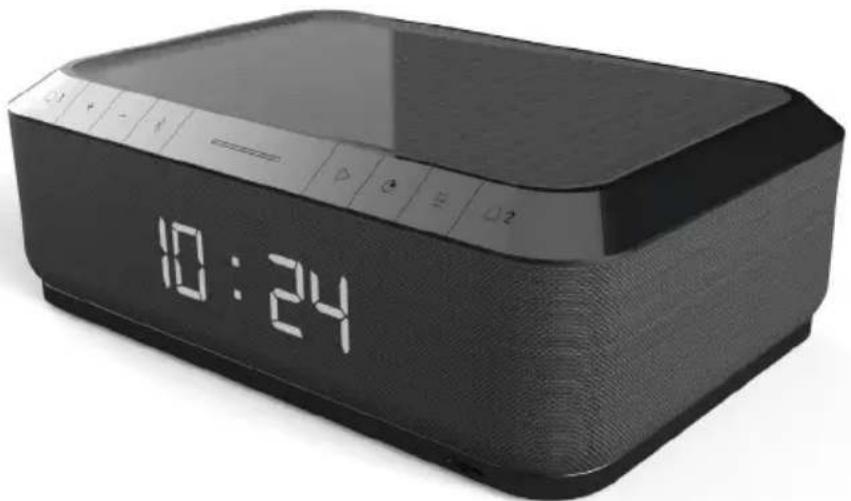
Black digital alarm device with a digital display showing 10:24 (no text or symbols on the device body)OPERATING INSTRUCTIONS
PLEASE READ OPERATING INSTRUCTIONS CAREFULLY BEFORE USE AND KEEP FOR FUTURE REFERENCE.
Contents
Setting started 1
Safety and Notice
Care for your product 2
Care of the environment
What's in the box 3
Power
Description of parts 4
Getting started
USB charging
Wireless charging 5
Setting the time & alarm
Snooze & Dimmer 6
NAP / Sleep
Operating the radio
Aux-in function 7
Bluetooth (optional)
Remarks & Specifications
Setting Started
- Remove the appliance from the box.
- Remove any packaging from the product.
- Place the packaging inside the box and either or dispose of safely.
Safety and Notice
Read and understand all instructions before you use this product. If damage is caused by failure to follow the instructions, the warranty does not apply.
text_image
CAUTION RISK OF ELECTRIC SHOCK DO NOT OPEN ATTENTION RISQUE DE CHOC ELECTRIQUE NE PAS OUVRIRThe lightning symbol inside an equilateral triangle warns the user of the presence inside the product of uninsulated hazardous electric voltages powerful enough to represent an electrocution risk.
Safety
Warning
- Never remove the casing of this apparatus.
- Never lubricate any part of this apparatus.
- Never place this apparatus on other electrical equipment.
- Keep this apparatus away from direct sunlight, naked Fames or heat.
- Never look into the laser beam inside this apparatus.
- Ensure that you always have easy access to the power cord, plug or adaptor to disconnect this apparatus from the power.
- Minimum distances 10 cm around the apparatus for sufficient ventilations.
- The ventilation should not be impeded by covering the ventilation openings with items, such as newspapers, table-cloths, curtains, etc.
- No naked flame sources such as lighted candles should be placed on the apparatus.
- Attention should be drawn to environmental aspects of battery disposal.
- The use of apparatus in moderate climates.

- Read these instructions.
- Keep these instructions.
-
Heed all warnings.
-
Follow all instructions.
- Do not use this apparatus near water.
- Clean only with dry cloth.
- Do not block any ventilation openings. Install in accordance with the manufacturer's instructions.
- Do not install near any heat sources such as radiators, heat registers, stoves, or other apparatus (including amplifiers) that produce heat.
- Protect the power cord from being walked on or pinched, particularly at plugs, convenience receptacles, and the Point where they exit from the apparatus.
- Only use attachments/accessories specified by the manufacturer.
- Unplug this apparatus during lightning storms or when unused for long periods of time.
- Refer all servicing to qualified service personnel. Servicing is required when the apparatus has been damaged in anyway, such as power-supply cord or plug is damaged, liquid has been spilled or objects have fallen into the apparatus, apparatus has been exposed to rain or moisture, does not operate normally, or has been dropped.
- Apparatus shall not be exposed to dripping or splashing.
- Do not place any sources of danger on the apparatus (e.g. liquid filled objects, lighted candles).
- Where the AC/DC adaptor or an appliance coupler is used as the disconnect device, the disconnect device shall remain readily operable.
- Make sure there is enough free space around the product for ventilation.
- Batteries (battery pack or batteries installed) shall not be exposed to excessive heat such as sunshine, fire or the like.
- The rating label is placed on the bottom side of apparatus.
Care for your product
- Always unplug the appliance and wait for the unit getting cold before cleaning.
- Do not play music at excessive volume levels as damage to hearing and or the equipment may occur.
- Do not use this unit in wet or damp conditions.
- Clean the appliance with a soft, damp, lint free cloth. Do not use abrasives or harsh cleaners.
Care of the environment

Your product is designed and manufactured with high quality materials and components, which can be recycled and reused.
Your product contains batteries covered by the European Directive 2006/66/EC, which cannot be disposed with normal household waste. Please inform yourself about the local rules on separate collection of batteries because correct disposal helps to prevent negative consequences for the environmental and human health.
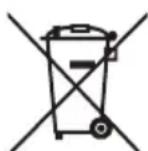
When this crossed-out wheeled bin symbol is attached to a product it means that the product is covered by the European Directive 2002/96/EC. Please inform yourself about the local separate collection system for electrical and electronic products. Please act according to your local rules and do not dispose of your old products with your normal household waste. Correct disposal of your old product helps to prevent potential negative consequences for the environment and human health.

What's in the box
Check and identify the contents of your package:
- Main Unit
- AC adaptor
- User manual
Power

CAUTION
- Risk of product damager! Make sure that the power voltage corresponds to the voltage printed on the back label.
- Risk of electric shock! When you unplug the AC/DC adaptor always pull the plug from the socket. Never pull the cord.
- Before connecting the AC/DC adaptor, ensure you have completed all other connections. Place the unit in the desired position and unravel the mains cable. Insert the cable into the supply socket and switch on if applicable.
Power Source
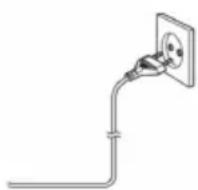
This unit is designed to operate on a normal AC 100-240V, 50/60Hz household power supply. Do not attempt to operate the system using other power sources. This may result in damage to the unit and void your warranty.
The adaptor manufacturer: Dong Guan Obelieve Electronic Co., Ltd.
Adaptor Model: OBL-0502400E.
Battery power
- Be sure that the batteries are inserted correctly to avoid damage to the appliance. Always remove the batteries when appliance will not be used for a long period of time, as this will cause leakage to the batteries and subsequently damage to your set.
- Use batteries of the same type. Never use different types of batteries together.
- Do not throw the battery into the fire, or exposed to sunshine or the like.
- If the liquid contained in the batteries comes in contact with eyes or skin, wash the area immediately and carefully with clear water and consult a doctor.
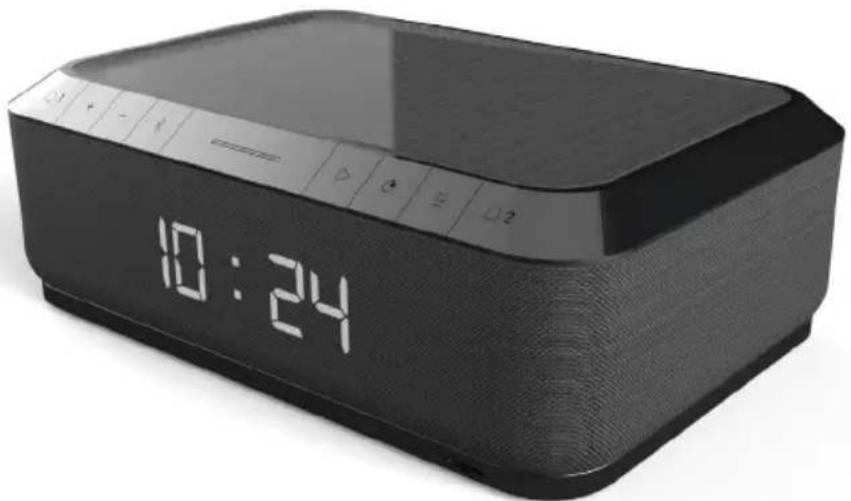
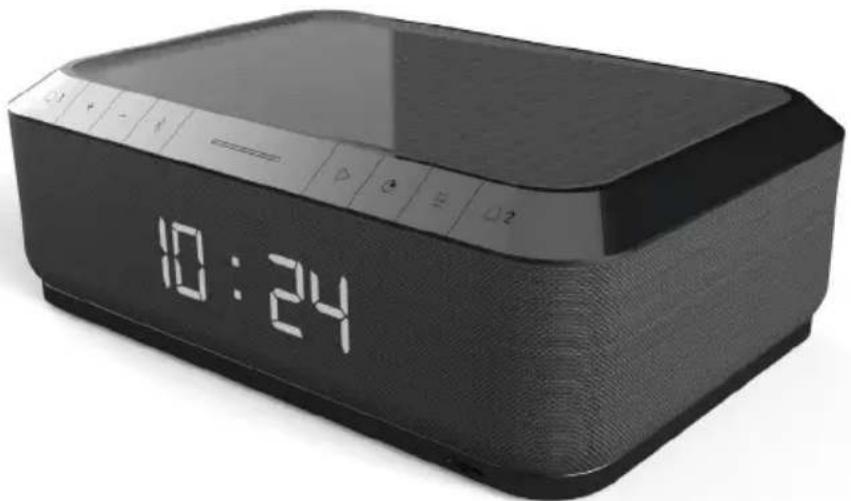
Description of Parts
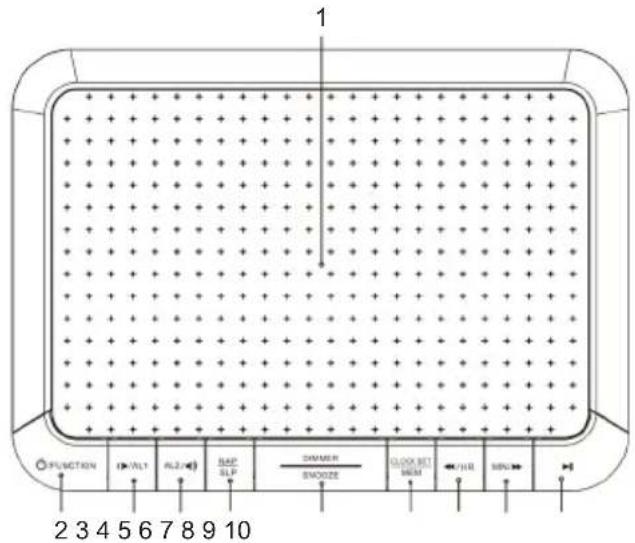
text_image
1 FUNCTION (VLT) ALZ MAP SLR DIMMER SMOZZE CLOCK SET DEA CHL MINI 2 3 4 5 6 7 8 9 10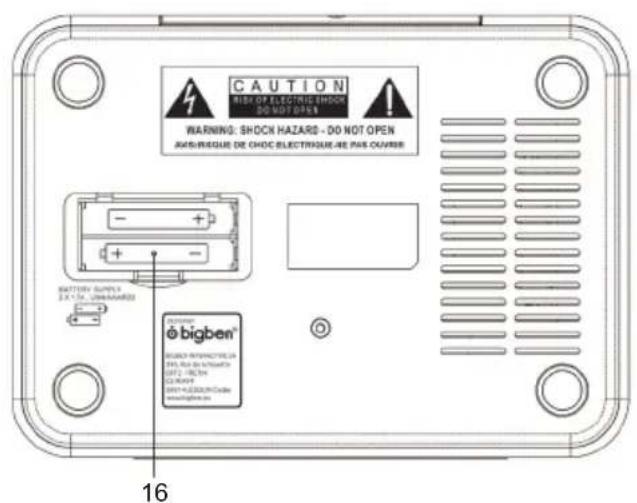
text_image
CAUTION SHOCH HAZARDS - DO NOT OPEN AND/RESQUE DE CHOC ELECTRÈGUE-RE PAS OUVIRÉ WARNING: SHOCH HAZARDS - DO NOT OPEN AND/RESQUE DE CHOC ELECTRÈGUE-RE PAS OUVIRÉ BATTERY SUPPLY EX. 10V, UNAVIARD ®bigben® 16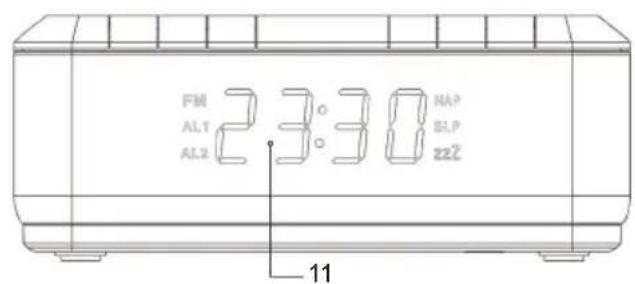
text_image
FM AL1 23:30 MAP AL2 SLP zzl̄ 11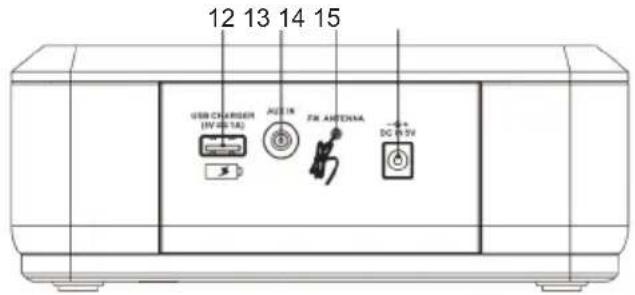
text_image
12 13 14 15 USB CHARGER (IV-0-1A) AC 1R FA ANTENIA DC 0-5V- Wireless Charging
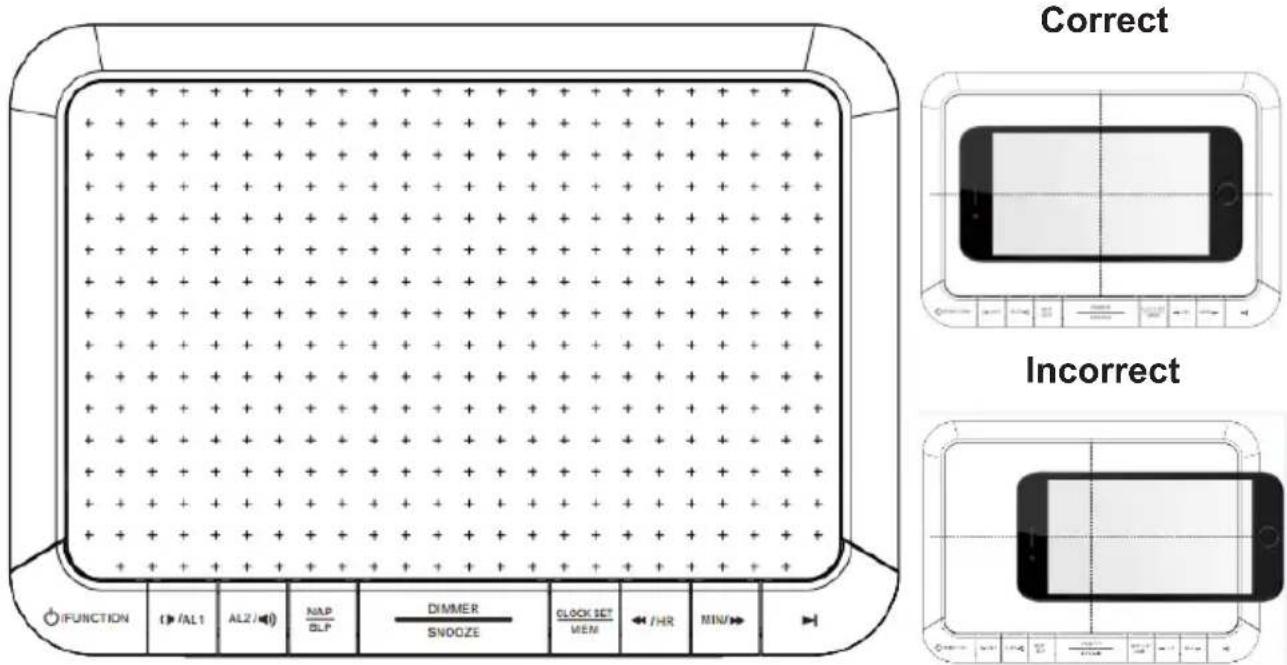
- Power / Mode(FM/Aux in)
- Volume - / (Alarm 1)
- ☐2 (Alarm 2) / Volume +
- NAP / Sleep function
- Dimmer / Snooze
- Time set / MEM
-
skip - / HR (hour)
-
MIN (Minute) / skip +
-
▶ / Alarm OFF
-
LED Display
-
USB charger (5V /1 A)
-
Aux In
-
FM Antenna
-
AC socket
-
Battery compartment
Getting started
Plug the power adapter into the back of the clock, and the other end into a standard electrical outlet.
USB charging
To charge your device or mobile phone, connect your USB charging cable (not provided) to the USB charging port (12) located on the back of the clock.
Wireless charging
Compatible with wireless charging enabled smartphones. Other smart phones need to use wireless charging adapters to work.
Put mobile phone on the top panel.
text_image
Correct Incorrect*Note: When the phone is being charged your phone's charging indicator will show as normal.
*Note: For maximum charging efficiency, the phone must be aligned with the center of the charging area.
*Note: Phones that are capable of wireless charging may need to be placed slightly off center. The built-in wireless receiver may not be centered inside the phone. This varies by brand/model.
Note: Wireless Charging and Radio / Aux in can be used at the same time.
Setting the time
- Press Power to enter standby mode.
- Press & hold Time Set (7) for 2 seconds. The display will flash.
- Press HR (Hour) Set / Min (Minute) Set (8, 9) to set the hour and minute.
• The Clock will show 24H mode.
Setting the alarm
- Press Power to enter standby mode.
- In standby mode, press & Alarm 1 (3) for 2 seconds and, the main digit will show 0:00.
- Press Hour (8) & Min (9) to set the alarm hour & minute.
- Press Alarm 1 (3) again to confirm alarm 1.
- Press K > 0! - / + to switch between the alarm outputs: "Buzzer" and "FM" radio
- Press Alarm 1 to confirm the alarm output.
- There is dual alarm. Repeat the above steps to set Alarm 2 (4) & select the alarm output. Once the alarm is set, the alarm display light will be ON.
Turning off the alarm
- To turn off the buzzer or FM radio, press Alarm Off (10).
- The Alarm clock will resume the function at the same time the next day.
Cancelling / Disabling the alarm function:
- Press Alarm 1 or 2, the alarm icon will display.
- In standby mode, Press Alarm 1 / or Alarm 2 for 2 seconds to select "OFF". The alarm function will be cancelled and the alarm display light will disappear.
- If no key is pressed for 10 seconds, the system will go back to normal mode.
Using the snooze function
When the alarm is ringing or the radio is on, press "SNOOZE". The Snooze display light will flash. The alarm will stop, but ring again or the radio will be on every 9 minutes. Press Alarm Off (10) to turn off the alarm and the Snooze indicator light will be also off.
Dimmer control (LED Display)
- Press Dimmer to control the brightness of the display.
- There are 3 levels: High level (brightness) Low level (Dim light) OFF.
NAP
- In standby mode, press NAP (5). The bell will ring after the selected time.
- It will start to count down from the default 90 minutes. There are different options for the user: 90, 80, 70, 60, 50, 40, 30, 20, 10 & OFF.
- When the bell rings, press NAP or function, press [5] & select OFF. (2) again to turn off the sound. To cancel the NAP timer
Sleep
- When the radio is ON, press Sleep (5). The sound/radio will stop after the selected time.
- It will start to count down from the default 10 to 90 minutes. There are options for the user: 90, 80, 70, 60, 50, 40, 30, 20, 10 & OFF.
- To remind you of the Sleep function, the LED will display the sign (SLP) with the selected minutes after the user has set Timer.
- If user wants to cancel the function, press Sleep (5) again and select OFF.
OPERATING THE RADIO
A) Auto scan
- Press the Power button to turn on the unit & select FM Mode (2).
- Press the button (10) for 2 seconds to start the AUTO SCAN function and automatically search for radio stations for 3 minutes. The screen displays the digits and station numbers. Once complete, the unit will store a maximum of 20 preset stations.
- Press the MEM to select the desired station.
B) Tuning
- Set the Mode button (2) to the FM position.
- Press k_0k_1 - / + (8, 9) to automatically tune in to the next station.
- Adjust the Volume (3, 4) to the desired level.
- Press the Power Button ② to turn the radio off.
C) Storing stations in memory positions P01 to P20
- Set the Mode (2) to the FM position.
- Press the ISkp-/+ to select the station number.
- Press the MEM (7) to save. 20 radio stations can be stored in memory.
-
Press the (MEM) to select and listen to a saved station.
-
Tune in to the desired station, press the ▶ ▶ Skip - / + (8, 9). The current position number will flash in the display, e.g. 'P01, P02... P20'.
Antenna
Extend the wire to obtain the best reception. The user may need to turn or change the position of the unit to improve reception.
AUX-IN function
- Press the Power button Ⓞ turn on the unit & set the Mode (2) to AUX-In mode.
- Plug one end of the 3.5 mm audio cable (not included) into the Aux-in jack (13) on the back panel and the other end into the line-out jack or headphone jack of an external audio source or computer.
- Press Power Mode again to exit.
Bluetooth (optional)
Bluetooth pairing
- Press the Mode button to reach "BT".
- Select "RR140I BT" in your mobile phone.
- If you want to pair a new device: Press BT PAIR to restart the pairing process.
Remarks:
- Don't discard the electrical and electronic appliances in the regular waste disposal.
• Take them to a collection point. - Some components in these appliances may be hazardous to health and the environment.
Note : To save energy, in Aux-in function / Bluetooth function (Optional), when the unit has no sound output or no button is pressed for 30 minutes, the unit will be switched to stand-by mode automatically. It can be switched ON by pressing the POWER selector again.
Specifications
Power supply: AC 100-240V, 50/60Hz
Power consumption: 12W
Radio frequency coverage: F87.50 - 108 MHz
Operating Frequency: F87.5 - 108MHz,
Warning!
- Make sure that battery is inserted the right way and with the right polarity
- Remove exhausted battery from the product
- The supply terminals should not be short-circuited
-
Dispose of battery safely
-
If there is an incoming call while "RR140I range" is connected to your cell phone for music playback, it will pause at once when you answer the call and resume after the call ended. (Sometimes it will pause after end the call, it depends on your cell phone.)
- The Bluetooth® word, mark and logo are registered trademarks owned by Bluetooth SIG, Inc. and any use of such marks by Bigben Interactive is under license. Other trademarks and trade names are those of their respective owners.
- The undersigned, Bigben Interactive declares that the radio equipment of the RR140I type complies with the 2014/53/EU directive.
The complete text is available at https://www.bigben-interactive.co.uk/support/
Manufactured by BIGBEN INTERACTIVE SA
396, Rue de la Voyette
CRT2 - FRETIN
CS 90414
59814 LESQUIN Cedex - France
www.bigben.eu
Made in China

text_image
RoHS CE REACH
Fabricant : Bigben Interactive FRANCE
- Rue de la Voyette, C.R.T. 2 Fretin.
CS 90414 - 59814 LESQUIN Cedex, France
BELGIQUE/NEDERLAND, customerservice@bigben-interactive.be
klantenservice@bigben-interactive.nl
ESPAÑA, sat@bigbeninteractive.es
ITALIA, support@bigbeninteractive.it
www.bigben.eu
bigben
RR140I
RADIO RELOJ FM CON CARGADOR INALÁMBRICO Y CARGADOR USB
OPCIONAL: RR140I BT BLUETOOTH
natural_image
Black digital alarm device with a digital display showing 10:24 (no text or symbols on the device body)text_image
FM AL1 23:30 HAP AL2 22℃ BLP 11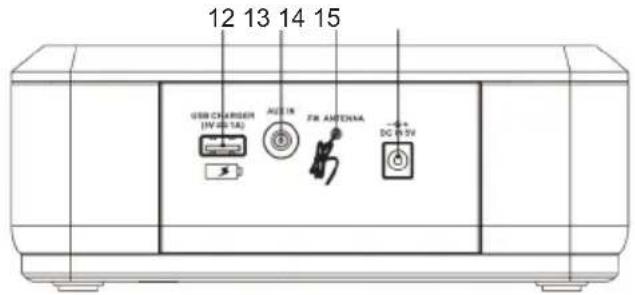
text_image
12 13 14 15 USB CHARGER (IV-0-1A) AUX IN FX ANTENNA DC 0-5Vtext_image
RoHS CE REACH
Fabricant : Bigben Interactive FRANCE
- Rue de la Voyette, C.R.T. 2 Fretin.
CS 90414 - 59814 LESQUIN Cedex, France
BELGIQUE/NEDERLAND, customerservice@bigben-interactive.be
klantenservice@bigben-interactive.nl
ESPAÑA, sat@bigbeninteractive.es
ITALIA, support@bigbeninteractive.it
www.bigben.eu
bigben
RR140I
RADIOSVEGLIA CON CARICABATTERIA WIRELESS E CARICABATTERIA USB OPZIONALE: RR140I BT BLUETOOTH
natural_image
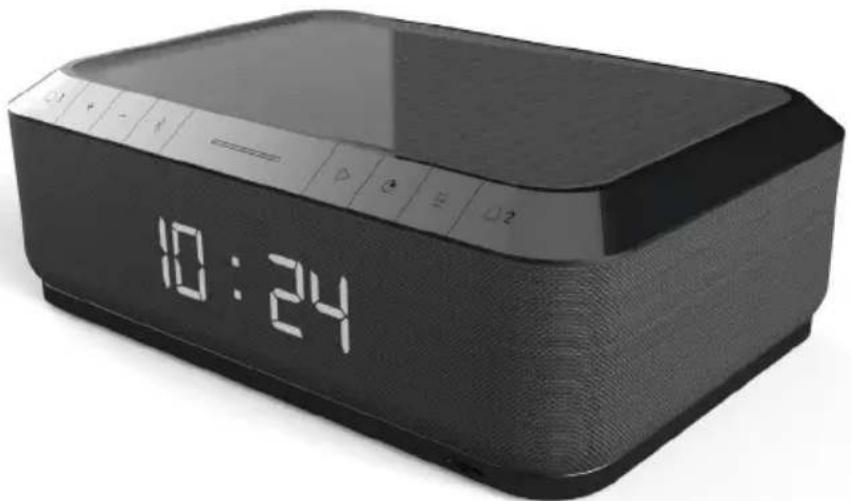
Black digital alarm device with a digital display showing 10:24 (no text or symbols on the device body)ISTRUZIONI D'USO
LEGGERE ATTENTAMENTE LE ISTRUZIONI SUL FUNZIONAMENTO PRIMA DI UTILIZZARE L'UNITÀ E CONSERVARLE PER CONSULTAZIONI FUTURE.
Indice
Per iniziare 1
text_image
RoHS CE REACH
Fabricant : Bigben Interactive FRANCE
- Rue de la Voyette, C.R.T. 2 Fretin.
CS 90414 - 59814 LESQUIN Cedex, France
BELGIQUE/NEDERLAND, customerservice@bigben-interactive.be
klantenservice@bigben-interactive.nl
ESPAÑA, sat@bigbeninteractive.es
ITALIA, support@bigbeninteractive.it
www.bigben.eu
bigben
RR140I
RÁDIO DESPERTADOR FM COM CARREGADOR SEM FIOS E CARREGADOR USB OPCIONAL: RR140I BT BLUETOOTH
natural_image
Black digital alarm device with a digital display showing 10:24 (no text or symbols on the device body)text_image
FM AL1 23:30 MAP AL2 SLP zzl 11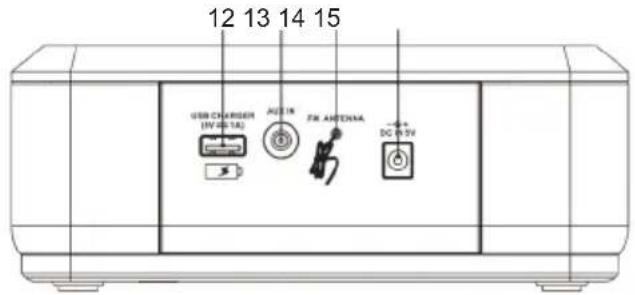
text_image
12 13 14 15 USB CHARGER (IV-0-1A) AC 1R FA ANTENIA DC 0-5Vtext_image
RoHS CE REACH
Fabricant : Bigben Interactive FRANCE
- Rue de la Voyette, C.R.T. 2 Fretin.
CS 90414 - 59814 LESQUIN Cedex, France
BELGIQUE/NEDERLAND, customerservice@bigben-interactive.be klantenservice@bigben-interactive.nl
ESPAÑA, sat@bigbeninteractive.es
ITALIA, support@bigbeninteractive.it
www.bigben.eu
bigben
RR140I
FM-RADIOWECKER MIT INDUKTIONS-LADEFUNKTION UND USB-LADEANSCHLUSS OPTIONAL: RR140I BT BLUETOOTH
natural_image
Black digital alarm device with a digital display showing 10:24 (no text or symbols on the device body)BEDIENUNGSANLEITUNG
text_image
FM AL1 23:38 MAP AL2 SLP zzZ 11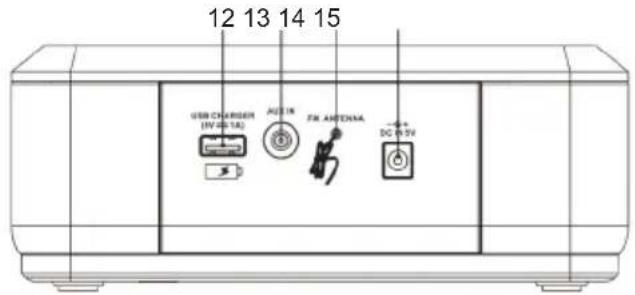
text_image
12 13 14 15 USB CHARGER (IV-0-1A) AC 1A FA ANTENZA DC 0-5Vtext_image
RoHS CE REACH
Fabricant : Bigben Interactive FRANCE
- Rue de la Voyette, C.R.T. 2 Fretin.
CS 90414 - 59814 LESQUIN Cedex, France
BELGIQUE/NEDERLAND, customerservice@bigben-interactive.be
klantenservice@bigben-interactive.nl
ESPAÑA, sat@bigbeninteractive.es
ITALIA, support@bigbeninteractive.it
www.bigben.eu
bigben
RR140I
FM-WEKKERRADIO MET DRAADLOZE LADER EN USB-LADER
OPTIONEEL: RR140I BT BLUETOOTH
natural_image
Black digital alarm device with a digital display showing 10:24 (no text or symbols on the device body)HANDLEIDING
LEES DEZE GEBRUIKSAANWIJZING ZORGVULDIG DOOR VOOR GEBRUIK EN BEWAAR VOOR LATERE RAADPLEGING.
Inhoud
Aan de slag 1
BELGIQUE/NEDERLAND, customerservice@bigben-interactive.be
klantenservice@bigben-interactive.nl
ESPAÑA, sat@bigbeninteractive.es
ITALIA, support@bigbeninteractive.it
www.bigben.eu