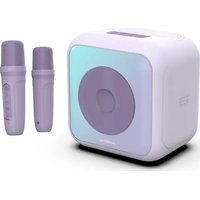
PARTYBTKML - Loudspeaker BIGBEN - Free user manual and instructions
Find the device manual for free PARTYBTKML BIGBEN in PDF.


| Product type | Karaoke speaker with 2 wireless microphones |
| Brand | Bigben |
| Model | PARTYBTKML |
| Speaker dimensions | 176 x 145 x 175.4 mm |
| Microphone dimensions | Approximately 37.5 x 37.5 x 134.4 mm |
| Power supply | DC 5V 2A via USB-C |
| RMS power | 10 W |
| Peak power | 30 W |
| Speaker | 4" (15 W, 3.5 Ω) |
| Speaker battery capacity | 3.7 V, 2400 mAh Li-ion |
| Microphone battery capacity | 3.7 V, 500 mAh |
| Speaker battery life | Approximately 3 hours at 100% volume, 5 hours at 50% volume |
| Charging time | Approximately 4 hours |
| Bluetooth version | 5.3 |
| Bluetooth range | 10 m (speaker), 6 m (microphone) |
| Connection modes | Bluetooth, USB, AUX |
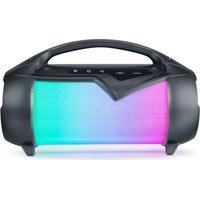
| LED lighting | 8 RGB modes synchronized with music |
| Microphone sound effects | Applause, kiss, laughter (S button) |
| Microphone voice effects | High-pitched, low-pitched, robot (V button) |
| Additional functions | Echo, EQ (Pop/Rock/Jazz/Bass Boost), Voice function (cuts original vocals) |
| Maximum USB capacity | 32 GB |
| Warranty | 2 years |
Frequently Asked Questions - PARTYBTKML BIGBEN
User questions about PARTYBTKML BIGBEN
0 question about this device. Answer the ones you know or ask your own.
Ask a new question about this device
Download the instructions for your Loudspeaker in PDF format for free! Find your manual PARTYBTKML - BIGBEN and take your electronic device back in hand. On this page are published all the documents necessary for the use of your device. PARTYBTKML by BIGBEN.
USER MANUAL PARTYBTKML BIGBEN
MODE D'EMPLOI
AVANT D'UTILISER CET APPAREIL, VEUILLEZ LIRE ATTENTIVEMENT CE MODE D'EMPLOI ET LE CONSERVER AFIN DE POUVOIR LE CONSULTER ULTÉRIEUREMENT.
Démarrage
Chargement
BELGIQUE, customerservice@bigben-interactive.be
NEDERLAND, customerservice@bigben-interactive.nl
ESPAÑA, soporte@metronic.com
Tel.: 93 713 26 25
Karaoke set with 2 wireless microphones
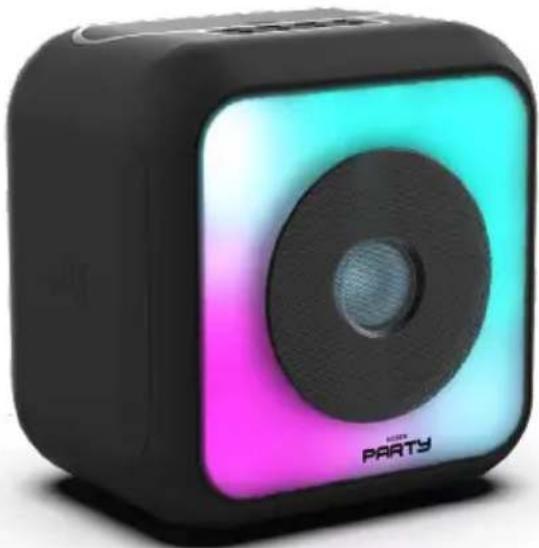
USER GUIDE
PLEASE READ THIS USER MANUAL CAREFULLY BEFORE OPERATING THE UNIT AND RETAIN FOR FUTURE REFERENCE.
Getting Started
• Take the device out of the box.
- Remove all the packaging from the product.
- Place the packaging inside the box or dispose of it safely in compliance with the waste sorting instructions shown on the outside.
Safety warning and notice
Please read and understand all the instructions before using this device. The warranty will not apply if damage is caused by failure to follow the instructions.

- Never remove the device casing.
- Never place this device on top of other electrical equipment.
-
Protect the power cable from being stepped on or pinched, particularly at the plugs, sockets, and the point where it exits the device. Make sure that the power rating corresponds to the voltage shown on the rating plate at the rear of the device. Always pull the plug from the socket when disconnecting from the mains. Never pull on the cable. Ensure you have completed all the other connections before connecting the mains plug.
-
Only use attachments/accessories that are recommended by the manufacturer.
-
Entrust all device repairs to qualified repairers. Repair is needed when the issues been damaged in any fashion, and in particular:
-
if the power cable is damaged;
- in the event of a liquid spill or objects being inserted into the device;
- if the device is exposed to rain or dampness;
- if the device does not operate normally;
-
or if the device has been dropped or impacted.
-
The series panel is located on the bottom of the device.
-
Never block the air vents.
-
Make sure you have enough space for ventilation. Place the product on a stable surface.
-
This device must be used in a moderate climate, away from direct sunlight, naked flames or sources of heat, heaters, cookers or any other devices (including amplifiers) that generate heat. Do not install near a heat source.
-
The batteries (battery pack or inserted batteries) must not be exposed to excessive heat, such as sunshine, fire, etc.
-
Always unplug the device before cleaning it. Never lubricate any part of this device. Clean
it using a soft cloth. Do not use abrasive products or harsh cleaners.
- Ensure that you always have easy access to the power cable, plug or adapter to disconnect this device from the mains if necessary.
- Do not use this device near water. It must not be dripped on or splashed. Do not use this device in a damp or wet environment.
- Disconnect this device in the event of a storm, or if you intend not to use it for a long period of time.
- This device can be used by children aged 8 and over, and by persons with a physical or sensory disability, learning difficulties or a lack of experience and knowledge, provided they are supervised or have received instructions on the safe use of the device, and they understand the risks involved. Children must not play with the device or the power cable (risk of strangulation). Children must not clean or maintain the device without supervision.
- This device must only be supplied with very low safety voltage as indicated on the device.
- The battery should be removed from the device before disposal. The device must be disconnected from the power supply when removing the battery.
- The product must be at a minimal distance of 20 cm from the human body when working.
- This device is for household use only; do not use outdoors.
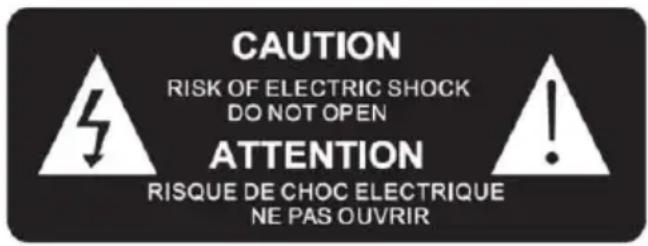

The lightning bolt symbol within an equilateral triangle alerts users to the presence of dangerous uninsulated voltages, inside the device, that may present a risk of electric shock.

The exclamation mark inside a triangle indicates the presence of important operating and maintenance (repair) instructions in the literature accompanying the device.
| Direct current |  |
| Alternating current |  |
| For indoor use only |  |
Package contents
Check and identify the contents of your box:
- 1 speaker
• 1 cm USB-C cable (100cm) - 1 x 3.5 mm (50 cm) audio cable
- 1 user manual
• 2 wireless microphones
Product overview
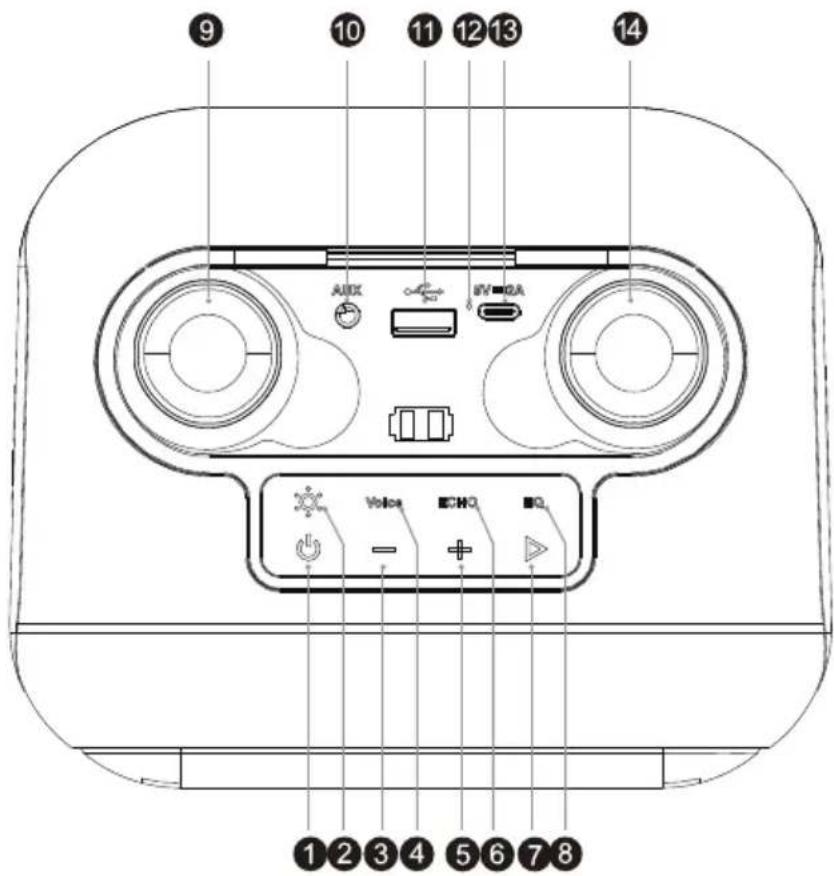
- Power button ON/OFF/MODE
Press and hold to turn the speaker on or off.
Press quickly to switch between Bluetooth/USB/AUX modes.
- LED Lighting Button
Long press to turn on/off
Press quickly to switch from one lighting mode to another
- Previous track/decrease volume button
In Bluetooth/USB mode. Press and hold the button to decrease the volume. Short press to return to the previous track
- Voice Button
This button allows you to mute the original voice of the track that is being played back from the Bluetooth, USB and AUX source.
- Next track/increase volume button
In Bluetooth/USB mode. Press and hold the button to increase the volume. Short press to move to the next track
- ECHO button
Short press to turn echo on/off. (Depending on the microphone connected.)
- Play/Pause button
In Bluetooth/USB mode, press briefly to play or pause the track.
- EQ button
Press this button to select 1 of 4 different sound effects. Pop / Rock / Jazz / Bass Boost (This only works in Bluetooth/USB mode.)
-
Wireless Microphone 1
-
Aux-in location
-
USB: play music from USB flash disk
-
LED indicator: The red indicator comes on during charging and goes off when charging is complete.
-
Charging port Type-C 5V 2A
-
Wireless Microphone 2
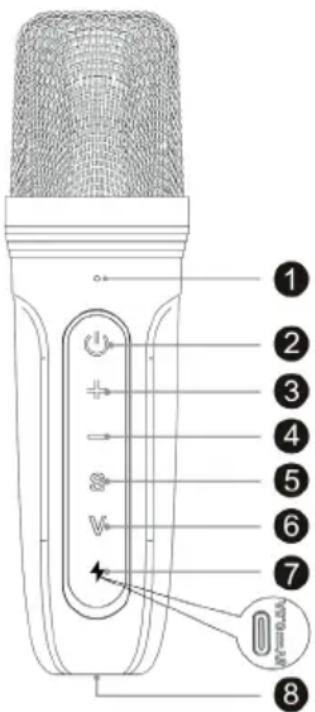
Microphone
- Indicator light
a. The blue light indicates Bluetooth mode
b. The red light indicates that the device is charging.
It comes on red during charging, then it changes to green once charging is complete.
-
On/off button (long press to turn on or turn off the microphone).
-
- Increase volume
-
- Reduce the volume
-
S button: Animated sounds (Applause/Kiss/Laughter)
-
V Button: Voice effects
Press this button to scroll through the different tones available (treble, bass, robot, etc.).
-
USB-C charging port (under a silicone cover for backup power charging).
-
Auto-charging point: automatically charges the microphone when the speaker is connected to its USB-C port.
Charging
Plug the charging cable into the speaker and connect it to another USB power source such as PC/MAC, USB power adapter, etc.
The microphones will only charge if the speaker itself is charging from the mains.
Bluetooth connection
Turn on the Bluetooth speaker and wait for it to pair.
Search for and select "PARTYBTKM" on your mobile phone. Once your phone and the speaker are paired, an audible signal occurs to indicate that the speaker is securely connected to your mobile phone.
If the Bluetooth connection is blocked for any reason, use a toothpick or any sharp non-metallic object to press the Reset button inside the 3.5mm Aux-in port.
AUX-IN connection
Connect one end of the audio cable to the speaker and the other end to a mobile phone or other audio device.
Light
RGB light on the front panel. Press and hold to turn on/off. Briefly press to switch between modes.
8 different light effects.
- From top to bottom: green - yellow - pink
- The colours are synchronized with the music (Equaliser)
- Fast random colours from top to bottom/bottom to top
- Fast random colour circles from top to bottom/bottom to top
- RGB from top to bottom
- Smooth transition between each colour
- Breathing effect
- Flame effect
- Tetris effect
Technical specifications
Output power: 10W RMS
Input: DC 5V 2A
Loudspeaker: 4"
Speaker battery capacity: 3.7 V, 2400 mAh
Microphone battery capacity: 3.7 V, 500 mAh
Product dimensions: 176 x 145 x 175.4 mm
Microphone dimensions: 37.5 x 37.5 x 134.4 mm (approx)
Maximum capacity of 32 GB for playback from USB drive.
Bluetooth pairing name: "PARTYBTKM"
CAUTION
Risk of fire or explosion if the battery is replaced by an incorrect type.
Disposal of a battery into fire or a hot oven, or mechanically crushing or cutting of a battery, that can result in an explosion.
Leaving a battery in an extremely high temperature surrounding environment that can result in an explosion or the leakage of flammable liquid or gas.
A battery subjected to extremely low air pressure that may result in an explosion or the leakage of flammable liquid or gas.
Maximum operating ambient temperature of the product is 45° C.
Please refer the information on exterior bottom enclosure for electrical and safety information before installing or operating the apparatus.
Technical specifications
| Type | Technical specifications | Type | Technical specifications |
| Speaker 4” (15 W) | Charging time Approximately 4 hours | ||
| Peak power 30W | Playback time | 100% volume for about 3 hours, 50% volume for about 5 hours | |
| RMS power 10W | Bluetooth version | 5.3 | |
| Standby mode/Power Consumption mode | 0.8W (lights off)/3.0W (lights on) | EIRP (Equivalent, Isotropically Radiated Power) | -1.29dBm |
| Power supply DC | 5V 2A | Bluetooth frequency | 2.402 - 2.480 GHz |
| Speaker resistance | 3.5 Ω | Speaker frequency | 80Hz~16KHz |
| S/N ratio ≥80dB S | Speaker Speaker 4” 3.5Ω | ||
| Battery type | Battery pack 3.7V 2400 mAh Li-ion | Transmission range | 10 m for speaker/6m for the microphone |
| Output (V, A) 3.7V | 2.4Ah 8.88 Wh Dimensions | 176 x 145 x 175.4 mm | |
NB: The maximum connection distance is approximately 10 metres. Place your Bluetooth speaker as close as possible to the device to avoid any interference with the connection.
The device may turn off in an environment with electrostatic discharge. The user must then recharge the battery and reset the device.
Environmental protection

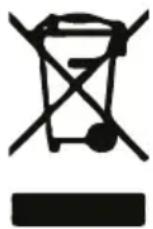
Your product has been designed and manufactured using high-quality materials and components that can be recycled and reused.
Attention should be drawn to the environmental aspects of battery disposal.
When the crossed-out wheelie bin symbol appears on a product, it means that the product is covered by European Directive 2002/96/EC. Please find out about the local sorting and collection system for electrical and electronic products. Please act according to local rules and do not dispose of your old products in your household waste. By ensuring this product is disposed of correctly, you are helping to prevent potentially negative consequences for the environment and human health.
Additional information
- If an incoming call is received while the PARTYBTKM system is connected to your mobile phone during music playback, the music will immediately pause when you answer the call, and start again once the call is finished. Depending on the mobile phone, playback may sometimes stay paused after the end of the call.
- The word Bluetooth ® , the symbol and logo are registered trademarks of Bluetooth SIG, Inc. and Bigben Interactive uses them under licence. All other brands and trade names are the property of their respective owners.
- This product is manufactured and sold under the responsibility of Bigben Interactive.
- All other products, services, corporate names, trademarks, trade names, product names and logos referenced herein are the property of their respective owners.
Declaration of conformity
- Bigben Interactive hereby declares that the PARTYBTKM radio equipment conforms with EU directive 2014/53/EU. The full text of the EU declaration of conformity is available at the following internet address: https://www.bigben-interactive.co.uk/support/
Warranty
This product is guaranteed by Bigben for a period of 2 years from the date of purchase, except in countries of the European Economic Area, which offer a longer warranty period. We recommend that you keep your receipt for any claims. The warranty covers breakdowns due to defective material, a missing element or manufacturing defect. In this case, contact our technical support. For any problem with a defective product, contact your point of purchase with your receipt. The warranty does not cover problems of improper use.
Support
www.bigben-interactive.co.uk/support
support@bigben.fr
Made in China
Manufactured by BIGBEN INTERACTIVE SA
396, Rue de la Voyette
CRT2 - FRETIN
CS 90414
59814 LESQUIN Cedex - France
www.bigben.eu
Fabricant : Bigben Interactive FRANCE
396, Rue de la Voyette, C.R.T. 2, Fretin,
CS90414 - 59814 Lesquin Cedex, France
BELGIQUE, customerservice@bigben-interactive.be
NEDERLAND, customerservice@bigben-interactive.nl
ESPAÑA, soporte@metronic.com
Tel.: 93 713 26 25
Carga
BELGIQUE, customerservice@bigben-interactive.be
NEDERLAND, customerservice@bigben-interactive.nl
ESPAÑA, soporte@metronic.com
Tel.: 93 713 26 25
ISTRUZIONI PER L'USO
LEGGERE IL PRESENTE MANUALE CON ATTENZIONE PRIMA DI METTERE IN FUNZIONE IL DISPOSITIVO E CONSERVARLO PER UNA CONSULTAZIONE FUTURA.
Avvio
Ricarica
BELGIQUE, customerservice@bigben-interactive.be
NEDERLAND, customerservice@bigben-interactive.nl
ESPAÑA, soporte@metronic.com
Tel.: 93 713 26 25
Carregamento
BELGIQUE, customerservice@bigben-interactive.be
NEDERLAND, customerservice@bigben-interactive.nl
ESPAÑA, soporte@metronic.com
Tel.: 93 713 26 25
BEDIENUNGSANLEITUNG
BELGIQUE, customerservice@bigben-interactive.be
NEDERLAND, customerservice@bigben-interactive.nl
ESPAÑA, soporte@metronic.com
Tel.: 93 713 26 25
GEBRUIKSAANWIJZING
ALVORENS DIT APPARAAT TE GEBRUIKEN, LEES DEZE INSTRUCTIES AANDACHTIG DOOR EN BEWAAR DEZE VOOR TOEKOMSTIGE RAADPLEGING.
Starten
Opladen
BELGIQUE, customerservice@bigben-interactive.be
NEDERLAND, customerservice@bigben-interactive.nl
ESPAÑA, soporte@metronic.com
Tel.: 93 713 26 25
INSTRUKCJA OBSŁUGI
Ładowanie
BELGIQUE, customerservice@bigben-interactive.be
NEDERLAND, customerservice@bigben-interactive.nl
ESPAÑA, soporte@metronic.com
Tel.: 93 713 26 25
UPUTE ZA UPORABU
PRIJE UPORABE OVOG APARATA PAŽLJIVO PROČITAJTE OVE UPUTE I SAČUVAJTE IH ZA BUDUĆE UPORABE.
Pokretanje
- Izvadite uređaj iz kutije.
- Uklonite sav materijal za pakiranje s proizvoda.
- Stavite materijale za pakiranje u kutiju ili ih odložite na siguran način prema uputama za recikliranje naznačenim na pakiranju uređaja.
Upozorenja i sigurnosne upute
Punjenje
Priključite kabel za punjenje u zvučnik i spojite ga na drugi USB izvor napajanja kao što su PC/MAC, USB adapter za napajanje, itd.
BELGIQUE, customerservice@bigben-interactive.be
NEDERLAND, customerservice@bigben-interactive.nl
ESPAÑA, soporte@metronic.com
Tel.: 93 713 26 25


- MODE D'EMPLOI
- DÉMARRAGE
- CHARGEMENT
- KARAOKE SET WITH 2 WIRELESS MICROPHONES
- USER GUIDE
- GETTING STARTED
- SAFETY WARNING AND NOTICE
- PACKAGE CONTENTS
- PRODUCT OVERVIEW
- MICROPHONE
- CHARGING
- BLUETOOTH CONNECTION
- AUX-IN CONNECTION
- LIGHT
- TECHNICAL SPECIFICATIONS
- CAUTION
- ENVIRONMENTAL PROTECTION
- ADDITIONAL INFORMATION
- DECLARATION OF CONFORMITY
- WARRANTY
- CARGA
- ISTRUZIONI PER L'USO
- AVVIO
- RICARICA
- CARREGAMENTO
- BEDIENUNGSANLEITUNG
- GEBRUIKSAANWIJZING
- STARTEN
- OPLADEN
- INSTRUKCJA OBSŁUGI
- ŁADOWANIE
- UPUTE ZA UPORABU
- POKRETANJE
- UPOZORENJA I SIGURNOSNE UPUTE
- PUNJENJE
Brand : BIGBEN
Model : PARTYBTKML
Category : Loudspeaker