SRL334NMB - Freezer SAMSUNG - Free user manual and instructions
Find the device manual for free SRL334NMB SAMSUNG in PDF.



| Product Type | Freezer |
| Brand | Samsung |
| Model | SRL334NMB |
| Dimensions (H x W x D) | 170 x 60 x 65 cm |
| Weight | 60 kg |
| Power Supply | 220-240 V, 50 Hz, 150 W |
| Climate Class | SN-T (from 10 °C to 43 °C) |
| Net Capacity | 300 L |
| Noise Level | 40 dB(A) |
| Fast Freeze Function | Yes |
| Open Door Alarm | Yes |
| Defrost Type | Manual |
| Shelf Material | Tempered glass |
| Interior Lighting | LED |
| Care and Cleaning | Unplug before cleaning; use a soft cloth and warm water; do not use abrasive cleaners |
| Safety | Child lock not available; unplug before any intervention; heavy doors, two-person handling |
| Repairable Spare Parts | Handles (on some models), gaskets, drawers, hinges |
| Door Reversibility | Yes, reversible (see manual) |
| Warranty | 2 years (parts and labor); unauthorized repairs void warranty |
Frequently Asked Questions - SRL334NMB SAMSUNG
User questions about SRL334NMB SAMSUNG
0 question about this device. Answer the ones you know or ask your own.
Ask a new question about this device
Download the instructions for your Freezer in PDF format for free! Find your manual SRL334NMB - SAMSUNG and take your electronic device back in hand. On this page are published all the documents necessary for the use of your device. SRL334NMB by SAMSUNG.
USER MANUAL SRL334NMB SAMSUNG
French - Français ......9
German - Deutsch ......17
Dutch - Nederlands......25
Italian - Italiano 33
Hungarian - Magyar ....57
Polish - Polski......65
Czech - Čeština....73
Slovakian - Slovenčina......81
Serbian - Srpski......97
Greek - ελληνικά......105
Croation - Hrvatski......121
Albanian-Shqip 129
Norwegian - Norsk......177
Finnish - Suomi ....185
Swedish - Svenska......193
Slovenian - Slovenščina ..... 201
- You can check where to buy replacement parts at http://samsung.com/support
- Visit the part purchase site and enter the model code of your product to check the parts available for purchase. The model code is labelled on the outer side of your product.
- You can check the model code and version on the barcode label at the bottom left of the product.
- For replacement parts, make sure the part name matches that of the illustration in this manual.
- User-serviceable parts are limited to handles (some models only), gaskets, drawers, and hinges.
NOTE
Following the repair by a non-authorised service provider, self-repair or non-professional repair of the product, Samsung is not liable for any damage to the product, any injury or any other product safety issue caused by any attempt to repair the product which does not carefully follow these repair and maintenance instructions. Any damage to the product caused by an attempt to repair the product by any person other than a Samsung certified service provider will not be covered by the warranty.
CAUTION
- The part name listed on the site may di'er from that in this manual. Please make sure you choose the right part name.
• Replacing hinges requires extreme caution because it involves detaching the door.
- Be sure to wear safety gloves while making repairs.
The actual image and provided parts of the refrigerator may differ, depending on the model and the country.
text_image
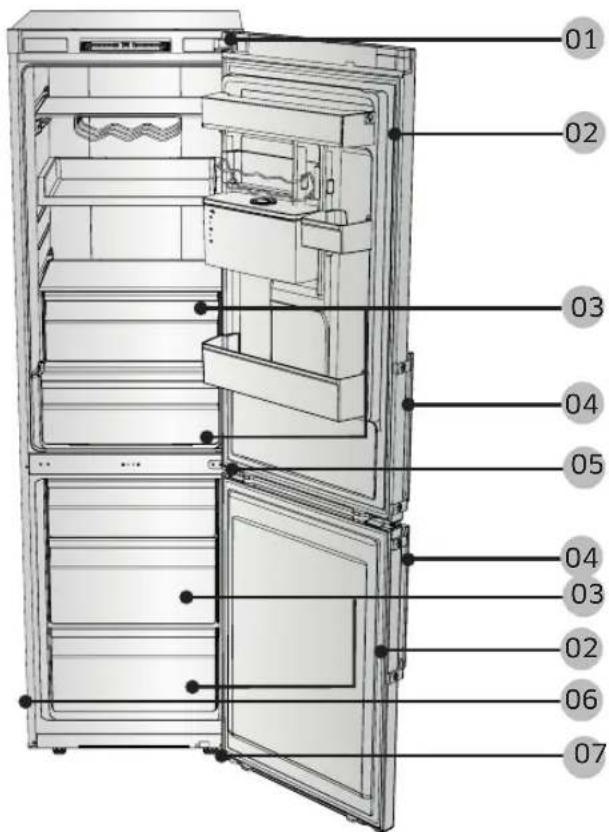
01 02 03 04 05 04 03 02 06 0701 Top hinge
03 Drawer
05 Middle hinge
07 Bottom hinge
02 Gasket
04 Handles (Applicable models only)
06 Barcode label
Handle replacement
Model name looks like this: RB29F*, RB29H*, RB30J*, RB31F*, RB31H*, RB33J*, RB34J*, RB3CJ* What replaces the asterisks may dier depending the model.
Asterisk(s) in the model code indicate a variant model and may replace (0-9) or (A-Z) in the model code.

CAUTION
- When replacing the door handle, take care not to scratch the front of the door.
- Firmly press the handles at the supports. Make sure there is no gap between the supports and the door.
- Tightly fasten the screws when attaching the handle.
- Check that the handle is rmly attached before using the product.
Tools required (not provided)
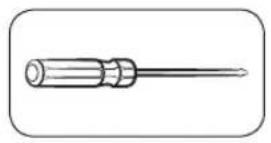
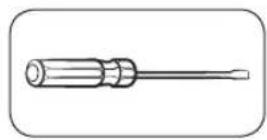
Philips screwdriver Flat-head screwdriver
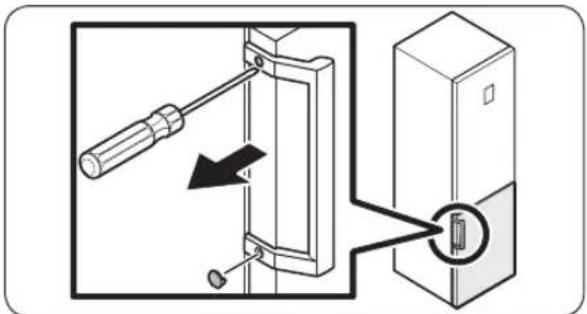
To detach the handles

NOTE
This procedure applies to both the fridge and freezer compartment.
text_image
Diagram showing a screwdriver inserted into a door panel with a close-up of the door's internal socket, illustrating electrical contact or mounting process.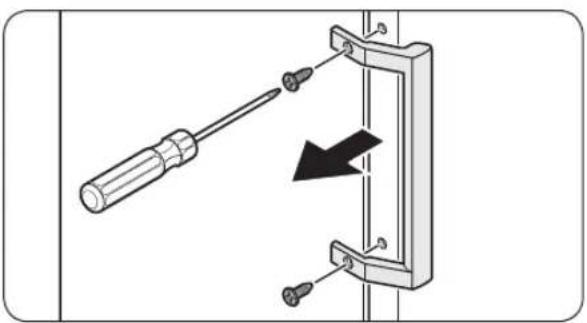
natural_image
Diagram of a screwdriver inserted into a mechanical clamp with a black arrow indicating compression (no text or symbols)- Use a at-head screwdriver to remove the screw covers.
- After detaching the handle, attach the screw covers back on the screw holes.
- Use a Phillips screwdriver to remove the screws and detach the handle.

NOTE
Use these screws to fasten the handle on the opposite side.
- Assemble the new handle in the reverse order of disassembly.
Gasket replacement

CAUTION
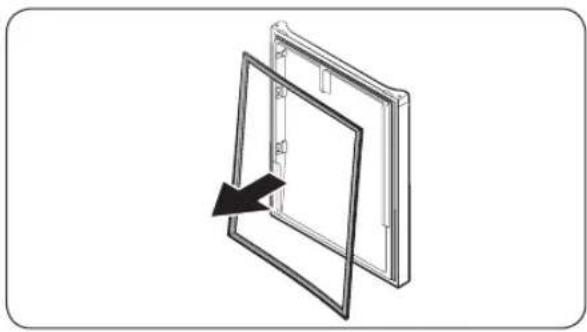
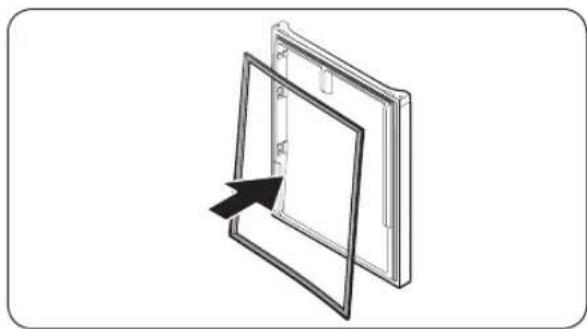
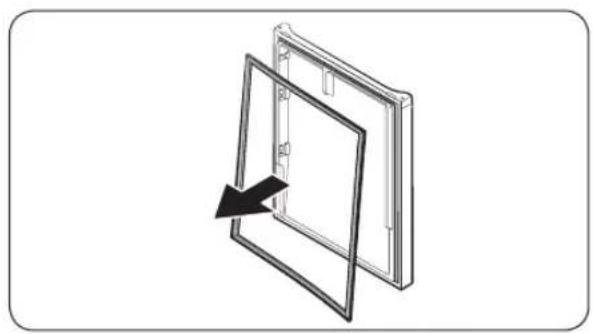
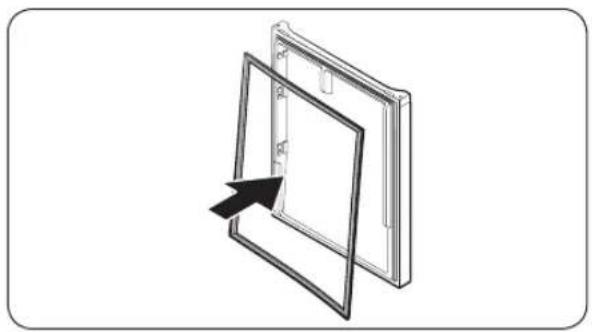
Make sure you ÿrmly attach the gasket. Otherwise, cold air from the refrigerator may leak.
To remove the gasket
natural_image
Diagram of a door frame with an arrow indicating direction (no text or symbols)Open the door and remove the gasket from the door.
To replace the gasket
natural_image
Diagram of a door frame with an arrow pointing to the interior panel (no text or symbols)Attach a new gasket to the refrigerator door. Make sure there is no gap between the new gasket and the door.
Drawer replacement

CAUTION
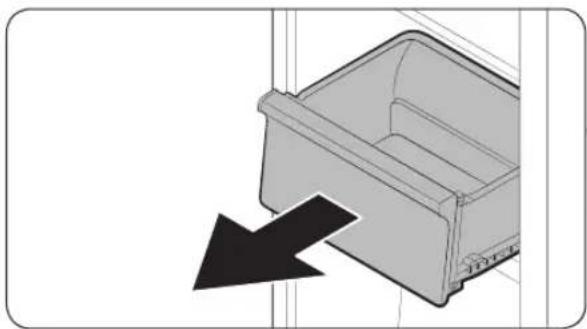
Check that the drawer is inserted properly into the rail during assembly.
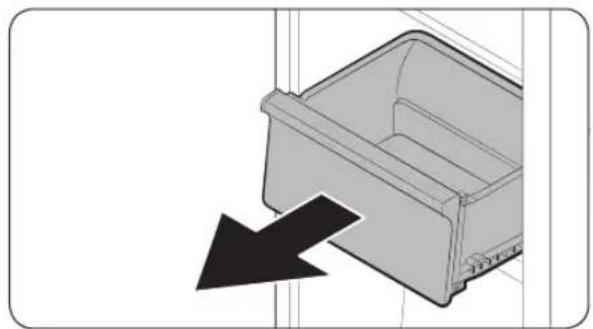
To remove the drawer
natural_image
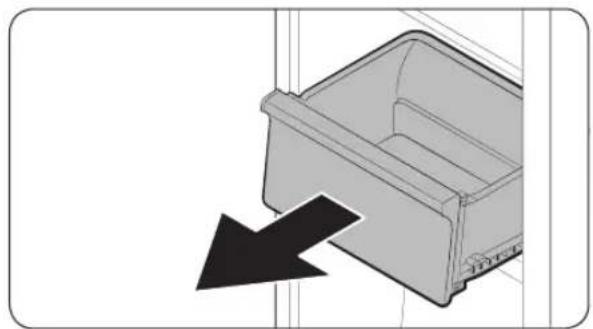
Diagram of a plastic drawer with an arrow pointing to it, no text or symbols presentGently lift up the front of the drawer and slide it out.
To reattach the drawers
Reattaching the drawers follows the reverse order of their respective removal steps.
To replace the hinges, you must remove the doors .
CAUTION
- When removing the doors, take extreme caution because the doors are heavy.
- Before replacing the hinges, put a soft pad such as cardboard on the oor to prevent scratches on the door when you place the doors down.
- As the hinges must be handled carefully and replaced by two or more persons, we recommend you to call for professional technical service.
• If you remove the hinge without holding the door, the door may fall and cause injury. - Ensure that the shaft is rmly tightened on the hinge.
- Check that the hinge is rmly attached to the cabinet.
- Make sure the wire connectors are connected properly.
- Be careful not to damage the wires when fastening the top cover.
WARNING
- Tilting/laying the refrigerator requires a minimum of 2 people.
- Disconnect the power cord before reversing the doors.
Tools required (not provided)
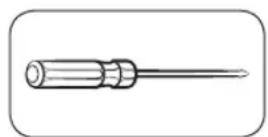
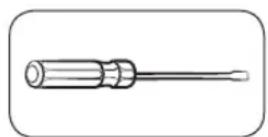
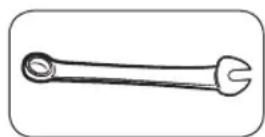
Philips screwdriver Flat-head screwdriver 11 mm spanner
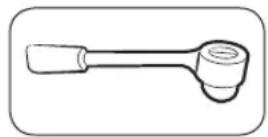
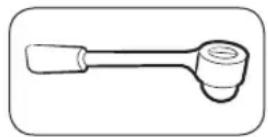
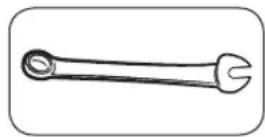
10 mm socket wrench 8 mm socket wrench 10 mm spanner
Reversing the door

NOTE
For the models with handles, reverse the handles rst. (For detailed information, see the "Reversing the door handle position (For models with bar handles)" section.)
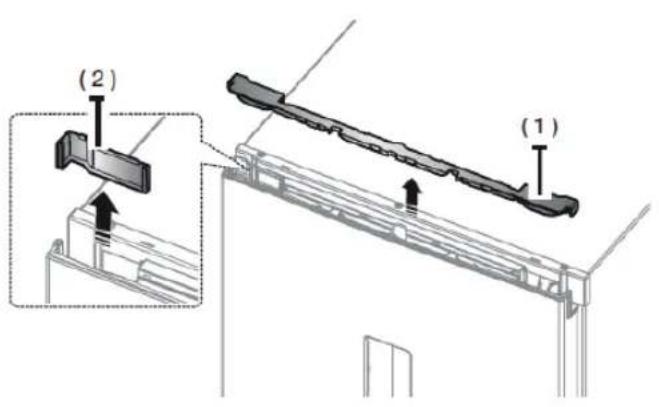
text_image
(2) (1)- Remove the Cover Wire Door (1). Disassemble the Cap space Door (2).
natural_image
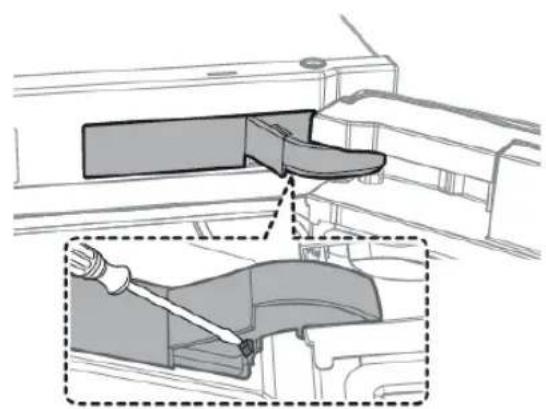
Technical diagram showing a mechanical component with a highlighted section and a close-up view of the handle (no text or symbols present)-
Remove the Cover Hinge to push a hook
-
Insert a at-head screwdriver and put it back
- Lever up the cover and push a hook (Take care not to damage the Cover Hinge Wire by pushing by pushing it too hard)
- Disassemble it by pushing
text_image
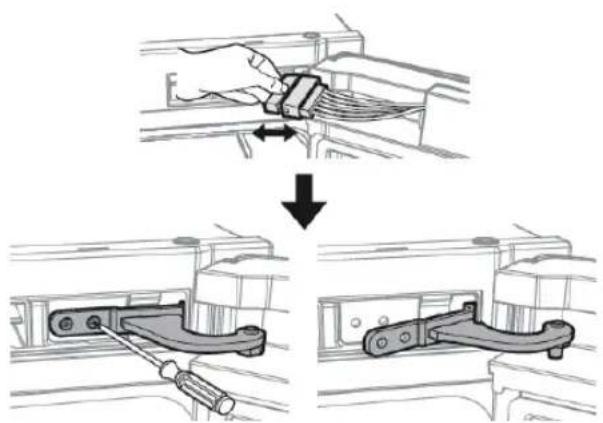
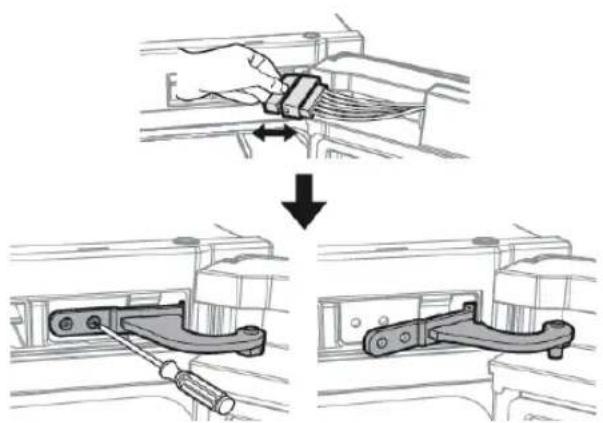
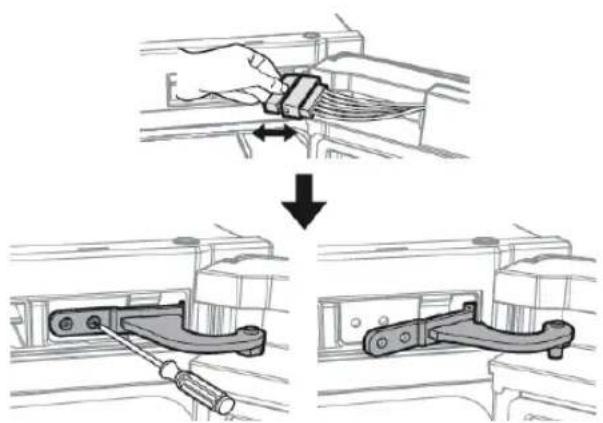
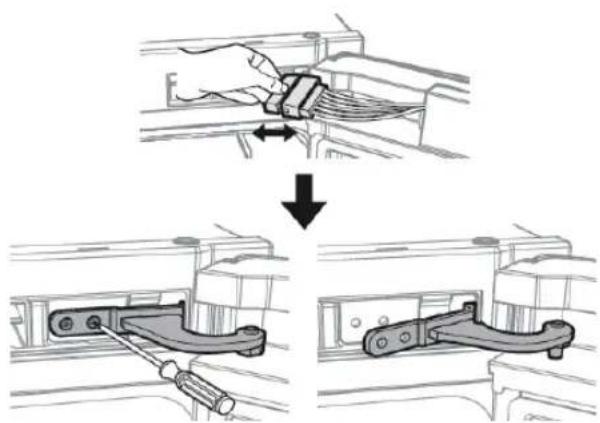
Diagram illustrating a mechanical assembly process with labeled steps and directional arrows indicating movement.- Disconnect the wiring connector for the fridge door.
- This step may not apply to some models.

CAUTION
Do not pull the connectors too hard.
- Remove the screws.
- (Be careful not to drop the door when you disassemble it.)
natural_image
Technical line drawing of an open refrigerator with internal compartments and ventilation ducts (no text or symbols)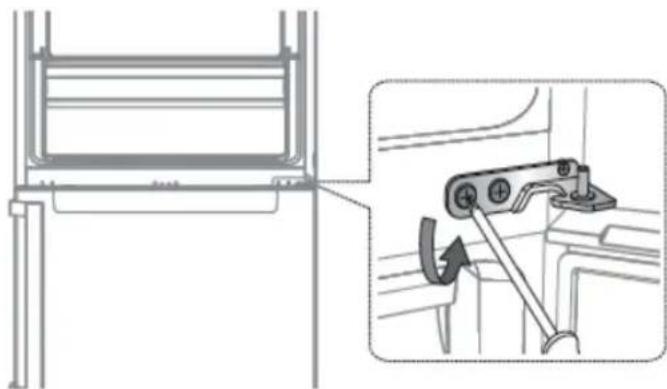
natural_image
Technical diagram showing a mechanical assembly with an inset view of a bracket and a hand tool (no text or symbols present)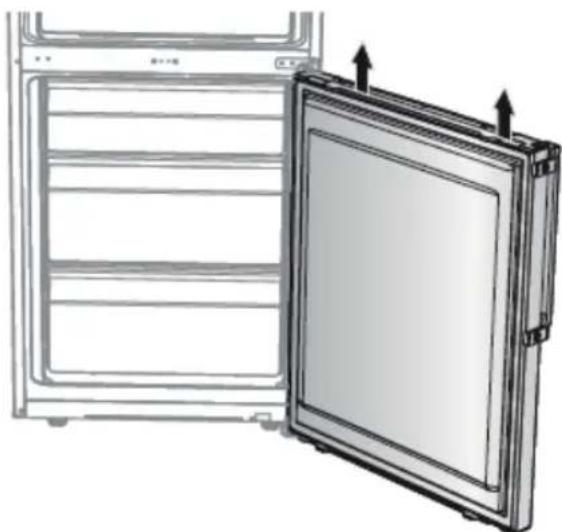
natural_image
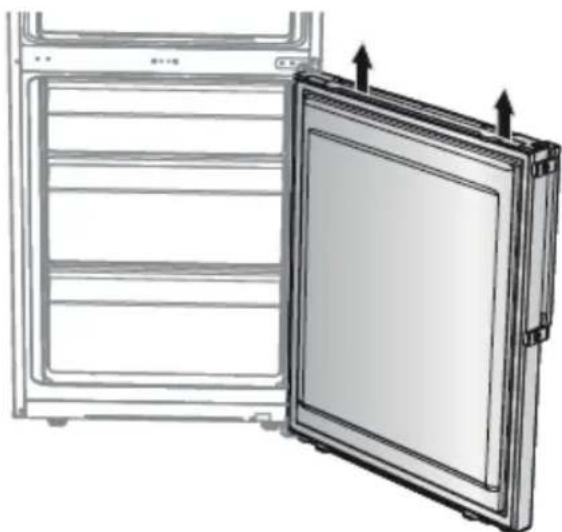
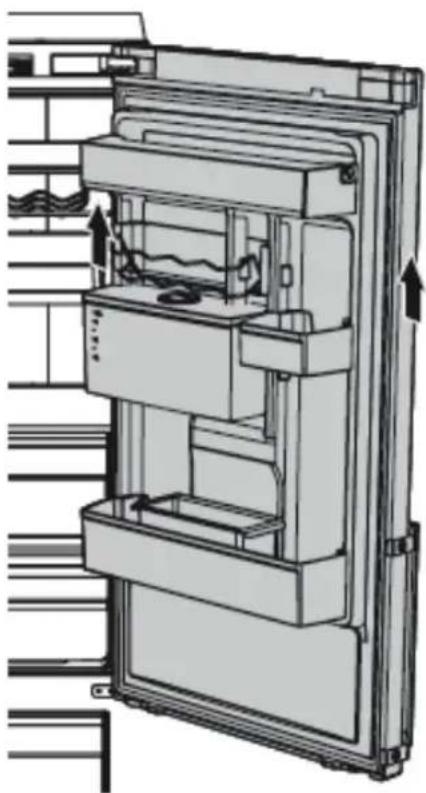
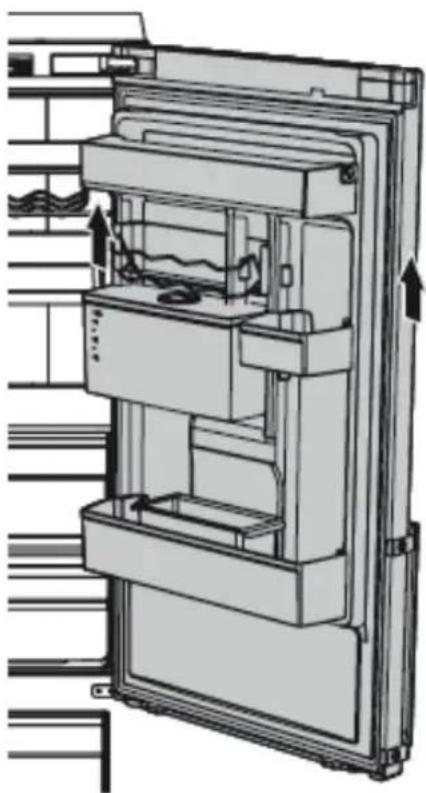
Diagram of a refrigerator with an open door and ventilation slots, showing internal compartments and mounting features (no text or symbols)- Remove the fridge door from the middle hinge by carefully lifting the door straight up.
CAUTION
The door is heavy, be careful not to injure yourself when removing the door.
- Disassemble the middle hinge by removing the screws using a Phillips Head (+) screwdriver.
CAUTION
The freezer door may fall forward so please support the door.
- Remove the freezer door from the bottom hinge by carefully lifting the door straight up.
CAUTION
The door is heavy, be careful not to injure yourself when removing the door.
- With the freezer door sitting on the bottom hinge (A), slowly pull the bottom hinge (A) to remove it from the holder on the bottom of the refrigerator. Once the bottom hinge (A) is removed from the holder, remove it from the freezer door, and then pull the freezer door down to remove it from the middle hinge (B).
CAUTION
To prevent the freezer door from falling, make sure to hold the freezer door tight until it is safely removed from the middle hinge (B).
-
Use a Phillips screwdriver and socket wrench (10 mm) to remove the screws fastening the middle hinge (A).
-
Reassemble in the opposite order of disassembly after replacing the top, middle, and/or bottom hinge.
CAUTION
- Make sure the wire connectors are connected properly.
- Be careful not to damage the wires when fastening the top cover
text_image
Diagram showing a screwdriver inserted into a door panel with a close button, illustrating the process of locking or disassembly.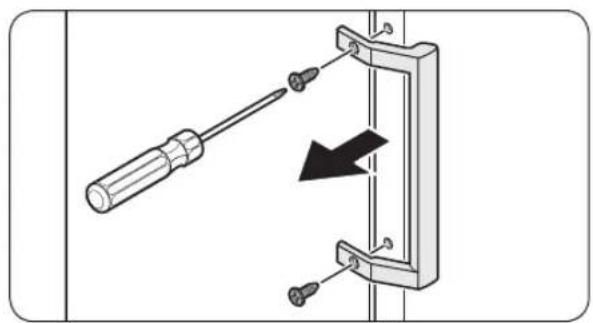
natural_image
Diagram showing a screwdriver inserted into a bracket with a black arrow indicating direction (no text or symbols present)Pour retirer le joint
natural_image
Diagram of a door frame with an arrow indicating direction, no text or symbols presentnatural_image
Diagram of a door frame with an arrow pointing to the front panel (no text or symbols)natural_image
Diagram of a plastic bin with a black arrow pointing to the left side (no text or symbols)natural_image
Technical illustration of a mechanical assembly with a close-up inset showing a hand operating a component (no text or symbols present)text_image
Diagram illustrating a mechanical assembly process with labeled steps and directional arrows indicating movement.natural_image
Technical line drawing of an open refrigerator with internal compartments and ventilation ducts (no text or symbols)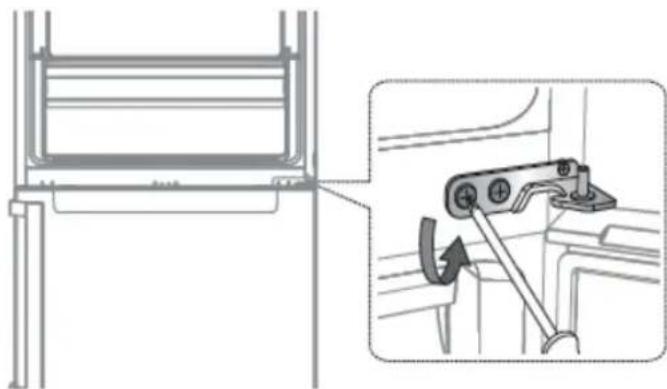
natural_image
Technical diagram showing a mechanical assembly with an inset view of a bracket and a close-up of a lever mechanism (no text or symbols present)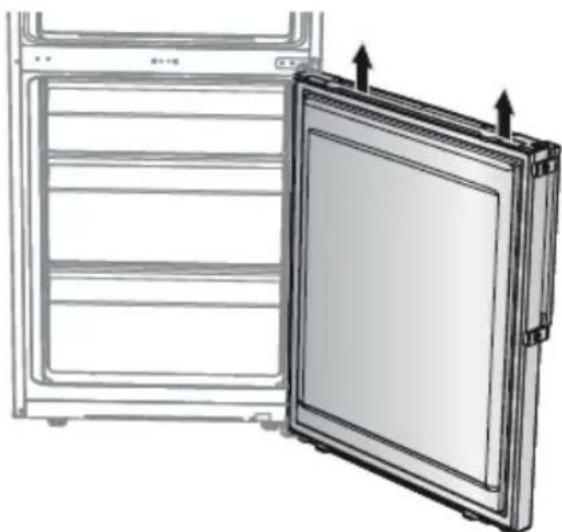
natural_image
Diagram of a refrigerator with an open door and ventilation slots, showing internal compartments and arrows indicating airflow or movement (no text or symbols)natural_image
Simple line drawing of a screwdriver (no text or symbols)text_image
Diagram showing a screwdriver inserted into a door panel with a close-up of the door's internal socket, illustrating electrical contact or mounting process.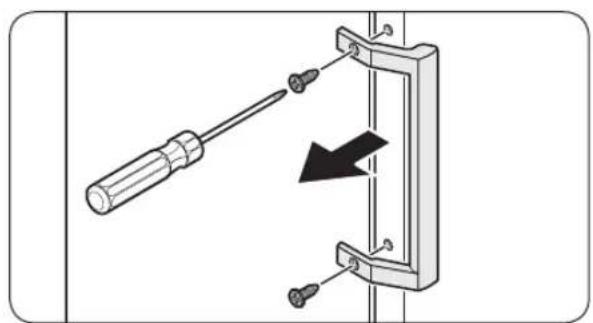
natural_image
Diagram showing a screwdriver inserted into a bracket with a black arrow indicating direction (no text or symbols present)natural_image
Diagram of a door frame with an arrow indicating direction (no text or symbols)natural_image
Diagram of a door frame with an arrow pointing to the opening (no text or symbols)natural_image
Diagram of a plastic drawer with an arrow pointing to it, no text or symbols presentnatural_image
Technical illustration of a mechanical assembly with a close-up inset showing a hand operating a component (no text or symbols present)text_image
Diagram illustrating a mechanical assembly process with labeled steps and directional arrows indicating movement.natural_image
Technical line drawing of an open refrigerator with internal compartments and ventilation ducts (no text or symbols)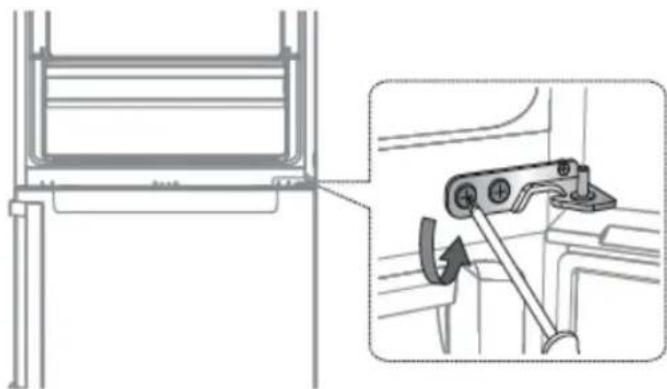
natural_image
Technical diagram showing a mechanical assembly with an inset view of a bracket and a close-up of a lever mechanism (no text or symbols present)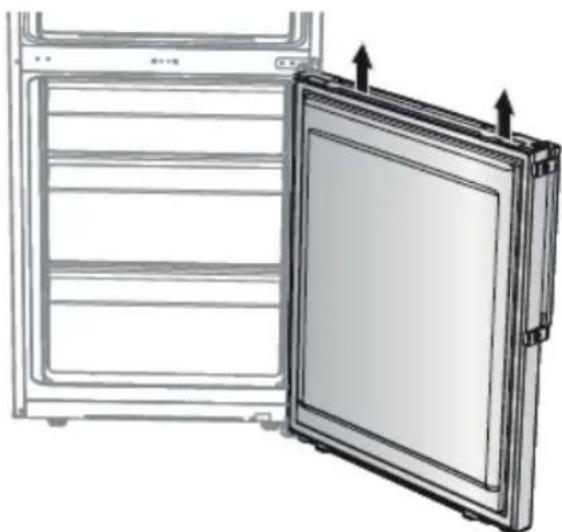
natural_image
Diagram of a refrigerator with an open door and side panel, showing structural details (no text or symbols)natural_image
Simple line drawing of a screwdriver with no text or symbolsnatural_image
Line drawing of a screwdriver with a cylindrical head and threaded shaft (no text or symbols)text_image
Diagram showing a screwdriver inserted into a door panel connected to a wall-mounted device, with an arrow indicating the direction of movement.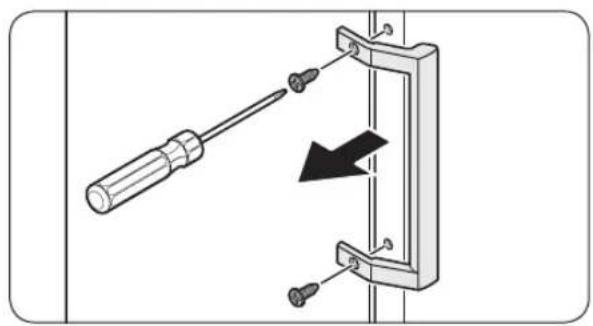
natural_image
Diagram of a screwdriver inserted into a mechanical clamp with a black arrow indicating direction (no text or symbols)natural_image
Diagram of a door frame with an arrow indicating direction (no text or symbols)natural_image
Diagram of a door frame with an arrow pointing to the front panel (no text or symbols)natural_image
Diagram of a plastic drawer with a black arrow pointing downward (no text or symbols)natural_image
Technical diagram showing a mechanical component with a highlighted section and a close-up view of the handle (no text or symbols present)text_image
Diagram illustrating a mechanical assembly process with labeled steps and directional arrows indicating movement.natural_image
Technical line drawing of an open refrigerator with internal compartments and ventilation ducts (no text or symbols)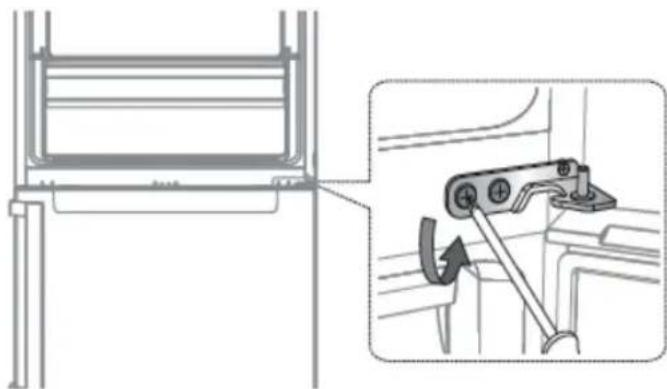
natural_image
Technical diagram showing a mechanical assembly with an inset view of a bracket and a close-up of a lever mechanism (no text or symbols present)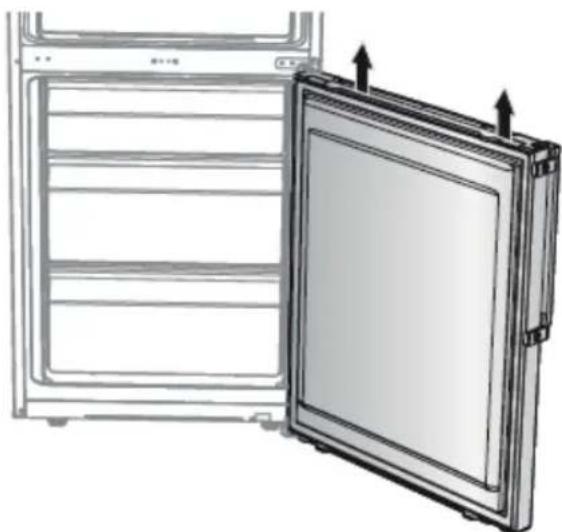
natural_image
Diagram of a refrigerator with an open door and side panel, showing structural details (no text or symbols)natural_image
Two identical line drawings of a screwdriver, shown in two different angles (no text or symbols)text_image
Diagram showing a screwdriver inserted into a doorbell with a close button, illustrating the process of locking or disassembly.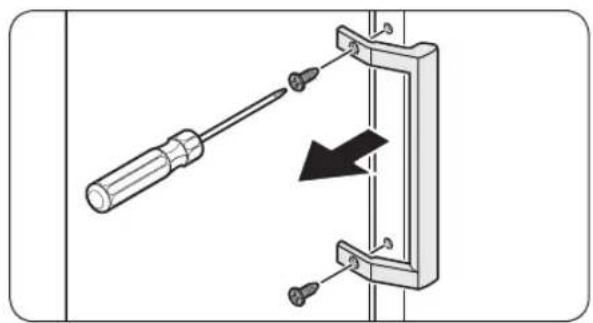
natural_image
Diagram of a screwdriver inserted into a bracket with a black arrow indicating direction (no text or symbols)natural_image
Diagram of a door frame with an arrow indicating rotation or movement (no text or symbols)natural_image
Diagram of a door frame with an arrow pointing to the front panel (no text or symbols)natural_image
Diagram of a plastic bin with a black arrow pointing to the bottom portion of the bin (no text or symbols present)natural_image
Technical illustration of a mechanical assembly with a close-up inset showing a hand operating a component (no text or symbols present)text_image
Diagram illustrating a mechanical assembly process with labeled steps and directional arrows indicating movement.natural_image
Technical line drawing of an open refrigerator with internal compartments and ventilation ducts (no text or symbols)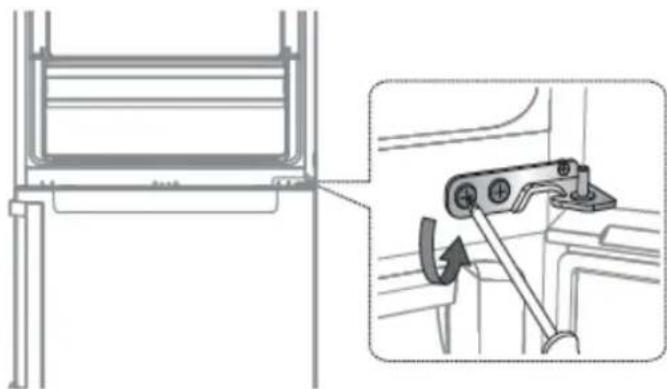
natural_image
Technical diagram showing a mechanical assembly with an inset view of a bracket and a close-up of a lever mechanism (no text or symbols present)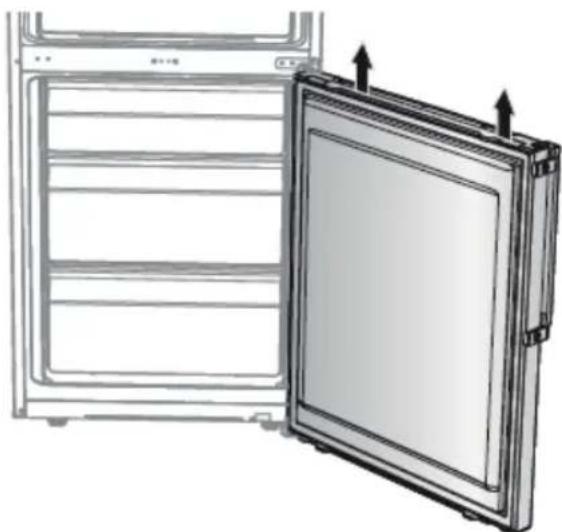
natural_image
Diagram of a refrigerator with an open door and side panel, showing structural details (no text or symbols)natural_image
Simple line drawing of a screwdriver (no text or symbols)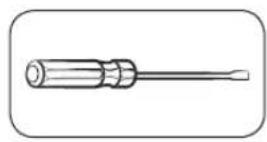
Chave Phillips Chave de fenda
de ponta plana
Para separar os manípulos

NOTA
text_image
Diagram showing a screwdriver inserted into a doorbell with a close-up of the doorbell's internal structure, illustrating mechanical assembly or mounting.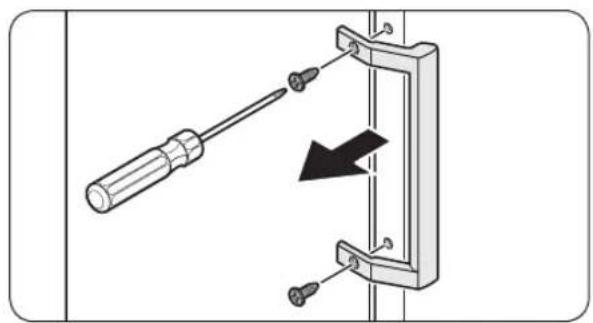
natural_image
Diagram of a screwdriver inserted into a mechanical bracket with a black arrow indicating direction (no text or symbols)natural_image
Diagram of a door frame with an arrow indicating direction (no text or symbols)natural_image
Diagram of a door frame with an arrow pointing to the front panel (no text or symbols)Para remover a gaveta
natural_image
Diagram of a plastic drawer with a black arrow pointing downward (no text or symbols)Para voltar a colocar as gavetas
natural_image
Technical diagram showing a mechanical component with a highlighted section (no text or symbols present)text_image
Diagram illustrating a mechanical assembly process with labeled steps and directional arrows indicating movement.natural_image
Technical line drawing of an open refrigerator with internal compartments and ventilation ducts (no text or symbols)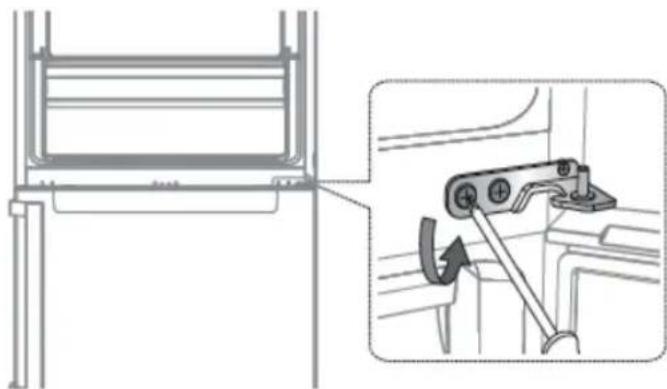
natural_image
Technical diagram showing a mechanical assembly with an inset view of a bracket and a close-up of a lever mechanism (no text or symbols present)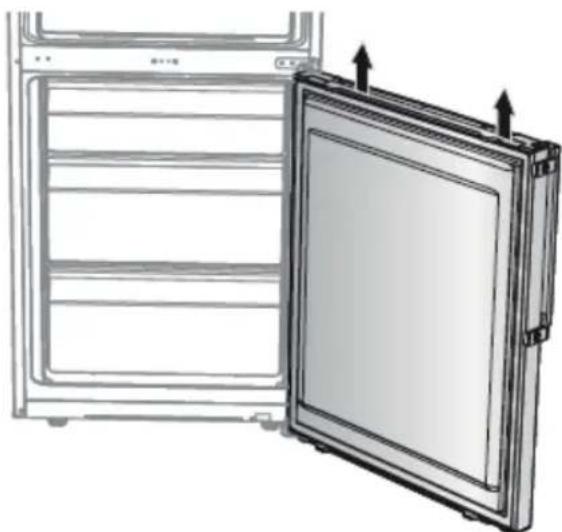
natural_image
Diagram of a refrigerator with an open door and ventilation slots, showing heat transfer arrows (no text or symbols)natural_image
Simple line drawing of a screwdriver (no text or symbols)text_image
Diagram showing a screwdriver inserted into a door panel, with a close-up of the door's internal socket connected to a wall-mounted device.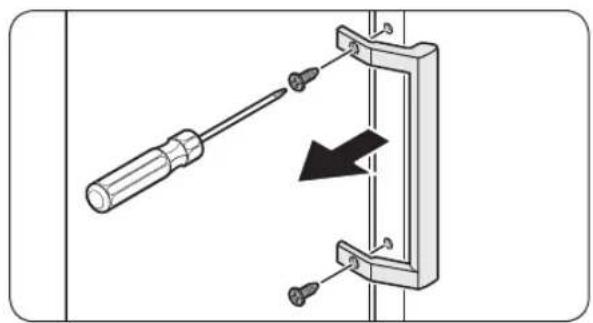
natural_image
Diagram of a screwdriver inserted into a mechanical bracket with a black arrow indicating direction (no text or symbols)natural_image
Diagram of a door frame with an arrow indicating direction (no text or symbols)natural_image
Diagram of a door frame with an arrow pointing to the front panel (no text or symbols)natural_image
Diagram of a plastic drawer with a black arrow pointing downward (no text or symbols)natural_image
Technical illustration of a mechanical assembly with a close-up inset showing a hand operating a component (no text or symbols present)text_image
Diagram illustrating a mechanical assembly process with labeled steps and directional arrows indicating movement.natural_image
Technical line drawing of an open refrigerator with internal compartments and ventilation ducts (no text or symbols)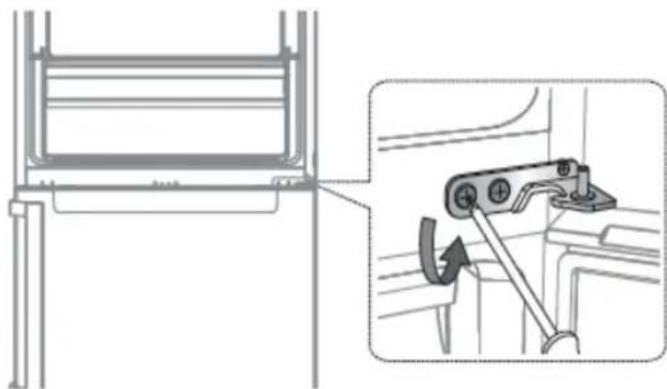
natural_image
Technical diagram showing a mechanical assembly with an inset view of a lever mechanism (no text or symbols present)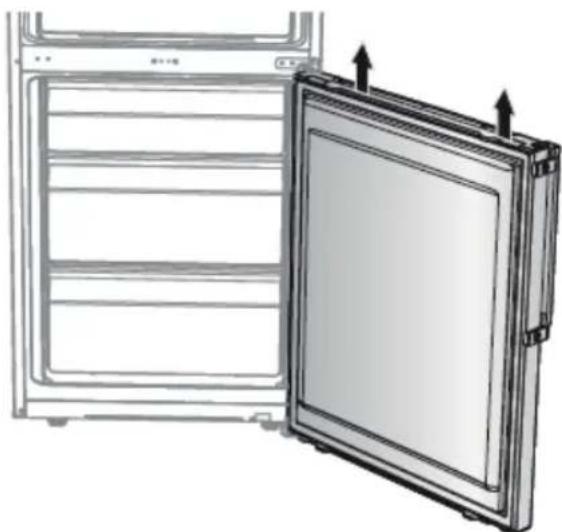
natural_image
Diagram of a refrigerator with an open door and ventilation slots, showing internal compartments and arrows indicating airflow or movement (no text or symbols)natural_image
Simple line drawing of a screwdriver (no text or symbols)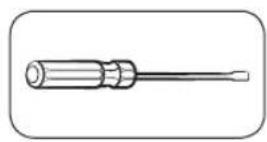
text_image
Diagram showing a screwdriver inserted into a door panel, with a close-up of the door's internal socket connected to a wall-mounted device.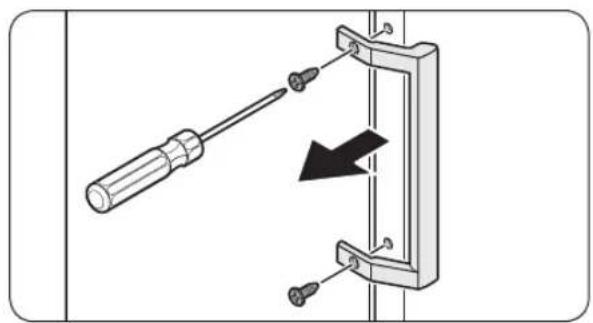
natural_image
Diagram of a screwdriver inserted into a mechanical bracket with a black arrow indicating direction (no text or symbols)natural_image
Diagram of a door frame with an arrow indicating direction (no text or symbols)natural_image
Diagram of a door frame with an arrow pointing to the interior panel (no text or symbols)natural_image
Diagram of a plastic drawer with an arrow pointing to it, no text or symbols presentnatural_image
Technical diagram showing a mechanical component with a highlighted section and a close-up view of the handle (no text or symbols present)text_image
Technical diagram showing a hand holding a cable with a switch, before and after disassembly or assembly.natural_image
Technical line drawing of an open refrigerator with internal compartments and ventilation ducts (no text or symbols)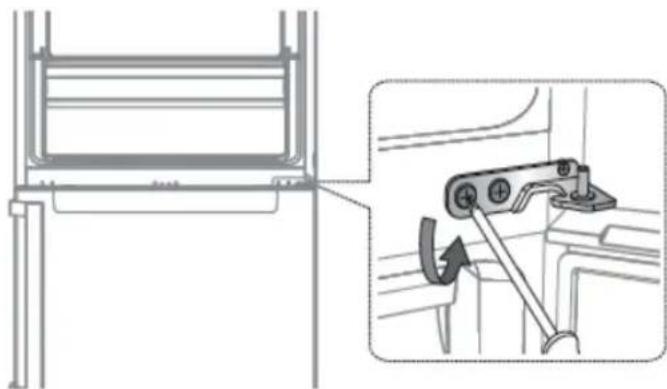
natural_image
Technical diagram showing a mechanical assembly with an inset view of a bracket and a hand tool (no text or symbols present)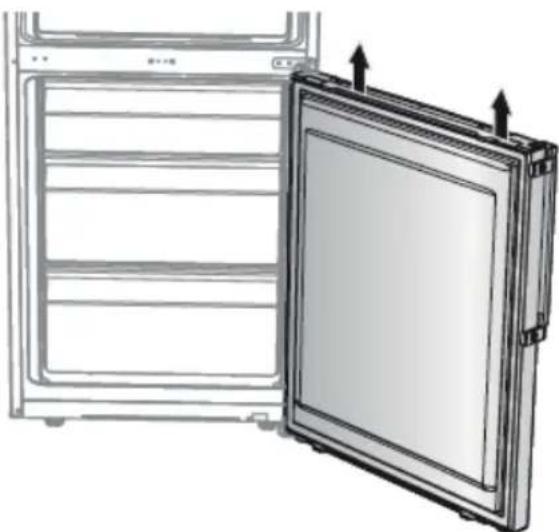
natural_image
Diagram of a refrigerator with an open door and side panel, showing structural details (no text or symbols)text_image
Diagram showing a screwdriver inserted into a doorbell with a close button, illustrating the process of locking or disassembly.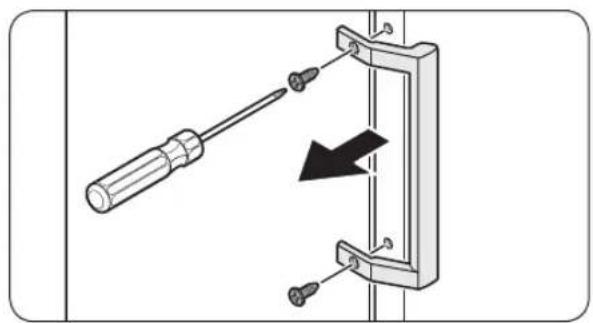
natural_image
Diagram showing a screwdriver inserted into a bracket with a black arrow indicating direction (no text or symbols present)natural_image
Diagram of a door frame with an arrow indicating rotation or movement (no text or symbols)natural_image
Diagram of a door frame with an arrow pointing to the front panel (no text or symbols)natural_image
Diagram of a plastic bin with a black arrow pointing to the bottom portion of the bin (no text or symbols present)natural_image
Technical diagram showing a mechanical component with a highlighted section (no text or symbols present)text_image
Technical diagram showing a hand holding a cable with a switch, before and after disassembly or assembly.natural_image
Technical line drawing of an open refrigerator with internal compartments and ventilation ducts (no text or symbols)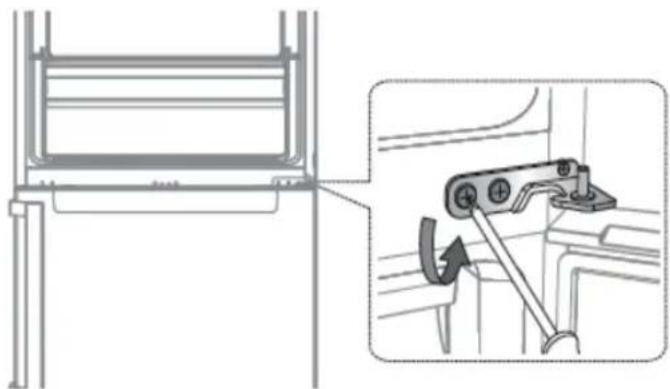
natural_image
Technical diagram showing a mechanical assembly with an inset view of a lever mechanism (no text or symbols present)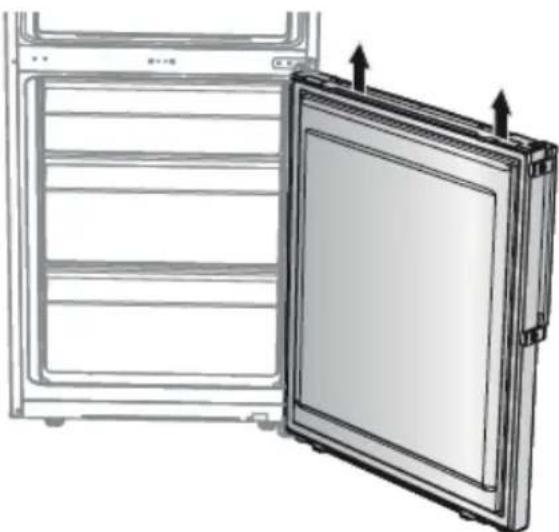
natural_image
Diagram of a refrigerator with an open door and ventilation slots, showing internal compartments and arrows indicating airflow or movement (no text or symbols)text_image
Diagram showing a screwdriver inserted into a doorbell with a close-up of the doorbell's internal structure.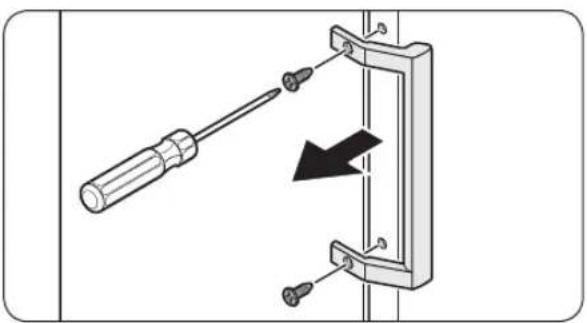
natural_image
Diagram of a screwdriver inserted into a mechanical clamp with a black arrow indicating force or direction (no text or symbols)natural_image
Diagram of a door frame with an arrow indicating direction (no text or symbols)natural_image
Diagram of a door frame with an arrow pointing to the front panel (no text or symbols)natural_image
Diagram of a plastic drawer with an arrow pointing to it, no text or symbols presentnatural_image
Technical diagram showing a mechanical component with a highlighted section and a close-up view of the handle (no text or symbols present)text_image
Diagram illustrating a mechanical assembly process with labeled steps and directional arrows indicating movement.natural_image
Technical line drawing of an open refrigerator with internal compartments and ventilation ducts (no text or symbols)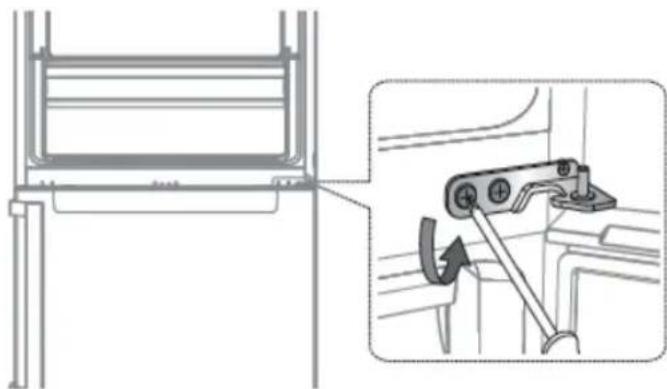
natural_image
Technical diagram showing a mechanical assembly with an inset view of a bracket and a close-up of a lever mechanism (no text or symbols present)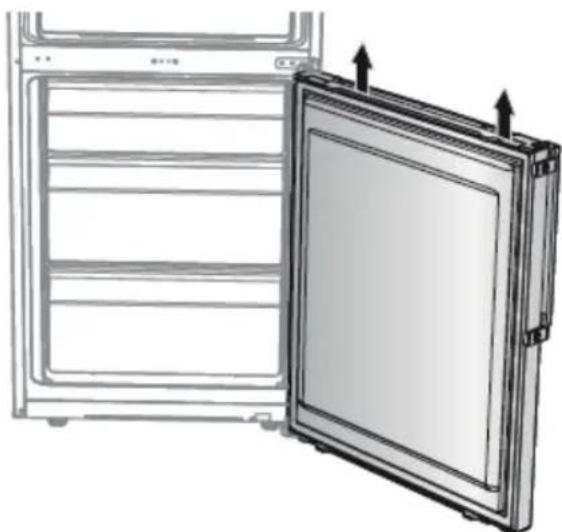
natural_image
Diagram of a refrigerator with an open door, showing front and side panels (no text or symbols)natural_image
Two identical illustrations of a screwdriver with a flat blade, shown in two different angles (no text or symbols)Skrutkovač Philips Skrutkovač
s plochou hlavou
Odpojenie rukovätí

POZNÁMKY
text_image
Diagram showing a screwdriver inserted into a door panel with a close button, illustrating the process of locking or disassembly.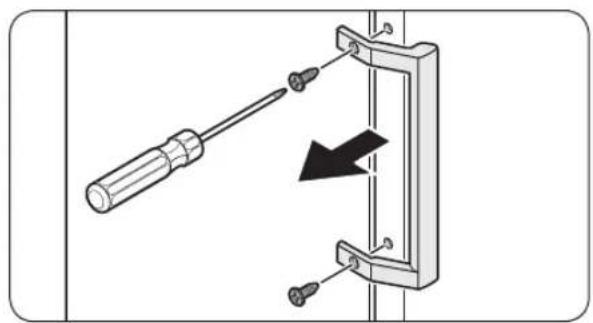
natural_image
Diagram of a screwdriver inserted into a mechanical bracket with a black arrow indicating direction (no text or symbols)natural_image
Diagram of a door frame with an arrow indicating direction, no text or symbols presentnatural_image
Diagram of a door frame with an arrow pointing to the front panel (no text or symbols)natural_image
Diagram of a plastic drawer with a black arrow pointing downward (no text or symbols)natural_image
Technical diagram showing a mechanical component with a highlighted section and a close-up view of the handle (no text or symbols present)- Odstráňte pánt krytu na potlačenie háku
text_image
Diagram illustrating a mechanical assembly process with labeled steps and directional arrows indicating movement.natural_image
Technical line drawing of an open refrigerator with internal compartments and ventilation ducts (no text or symbols)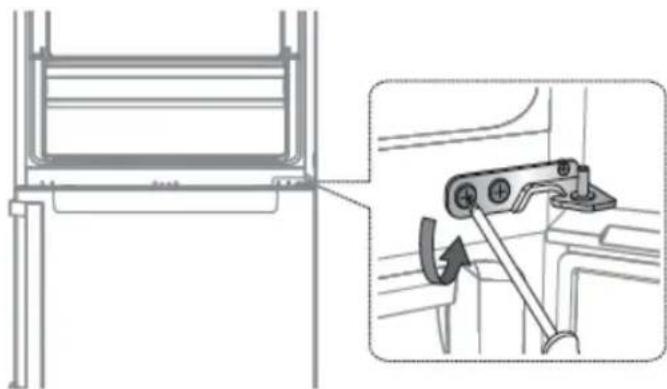
natural_image
Technical diagram showing a mechanical assembly with an inset view of a bracket and a hand tool (no text or symbols present)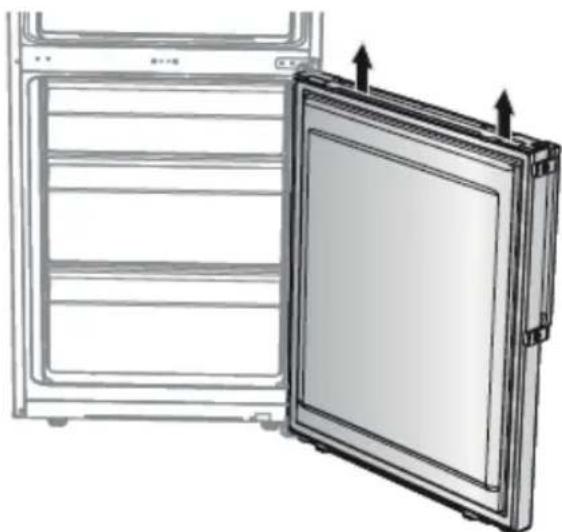
natural_image
Diagram of a refrigerator with an open door and ventilation slots, showing internal compartments and arrows indicating airflow (no text or symbols)text_image
Diagram showing a screwdriver inserted into a doorbell with a close button, illustrating the process of locking or disassembly.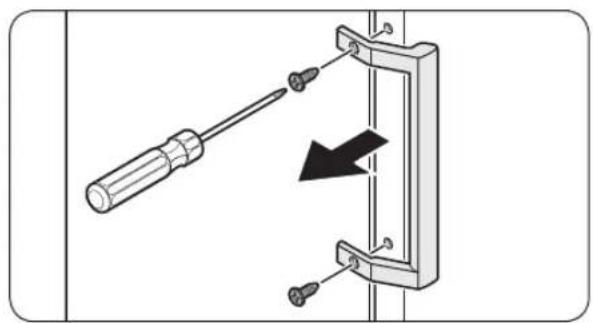
natural_image
Diagram of a screwdriver inserted into a bracket with a black arrow indicating direction (no text or symbols)natural_image
Diagram of a door frame with an arrow indicating direction (no text or symbols)natural_image
Diagram of a door frame with an arrow pointing to the front panel (no text or symbols)natural_image
Diagram of a plastic drawer with a black arrow pointing to it, no text or symbols presentnatural_image
Technical illustration of a mechanical assembly with a close-up inset showing a hand operating a component (no text or symbols present)text_image
Diagram illustrating a mechanical assembly process with labeled steps and directional arrows indicating movement.natural_image
Technical line drawing of an open refrigerator with internal compartments and ventilation ducts (no text or symbols)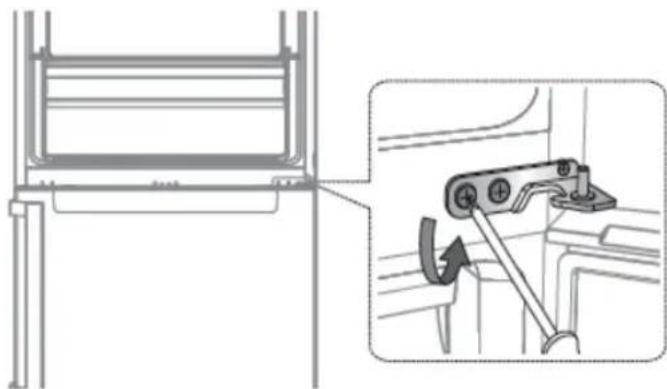
natural_image
Technical diagram showing a mechanical assembly with an inset view of a bracket and a close-up of a lever mechanism (no text or symbols present)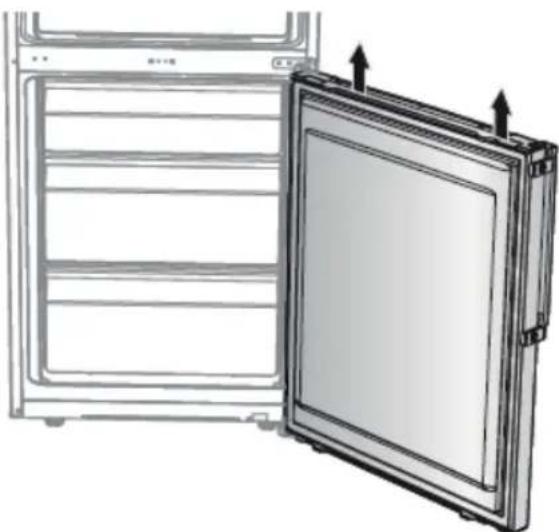
natural_image
Diagram of a refrigerator with an open door and ventilation slots, showing structural details (no text or symbols)text_image
Diagram showing a screwdriver inserted into a door panel with a close-up of the door's socket, illustrating electrical circuit connection.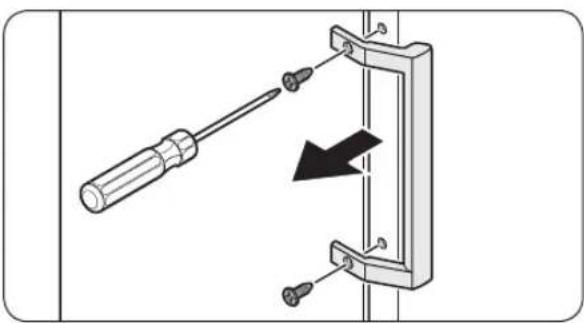
natural_image
Diagram showing a screwdriver inserted into a mechanical bracket with a black arrow indicating direction (no text or symbols present)- Koristite odvijač sa ravnom glavom da biste uklonili poklopce za zavrtnje.
- Nakon odvajanja ručke, vratite poklopce za zavrtnje na rupe za zavrtnje.
- Pomoću Phillips odvijača uklonite zavrtnje i odvojite ručku.

NAPOMENA
Koristite ove zavrtnje da pričvrstite ručku na suprotnoj strani.
natural_image
Diagram of a door frame with an arrow indicating direction, no text or symbols presentnatural_image
Diagram of a door frame with an arrow pointing to the front panel (no text or symbols)Pričvrstite novu zaptivku na vrata frižidera. Uverite se da nema praznina između nove zaptivke i vrata.
Zamena fioke

OPREZ
Proverite da li je fioka pravilno postavljena u šine tokom montaže.
Da biste uklonili fioku
natural_image
Diagram of a plastic drawer with a black arrow pointing downward (no text or symbols)Nežno podignite prednju stranu fioke i izvucite je.
Da ponovo pričvrstite fioke
Ponovno postavljanje fioka sledi obrnutom redosledu koraka za njihovo uklanjanje.
Da biste zamenili šarke, prvo morate skinuti vrata.
! OPREZ
- Prilikom uklanjanja vrata budite izuzetno oprezni jer su vrata teška.
- Pre nego što zamenite šarke, stavite na pod mekanu podlogu, kao što je karton, kako biste sprečili ogrebotine na vratima kada vrata skinete.
- Budući da sa šarkama treba pažljivo rukovati i da u njihovoj zameni treba da učestvuju dve ili više osoba, preporučujemo vam da pozovete stručnu tehničku službu.
- Ako uklonite šarku bez držanja vrata, vrata mogu pasti i prouzrokovati povrede.
- Uverite se da je osovina čvrsto zategnuta na šarki.
•Proverite da li je šarka čvrsto pričvršćena za kućište. - Uverite se da su žičani konektori pravilno povezani.
- Pazite da ne oštetite žice prilikom pričvršćivanja gornjeg poklopca.
⚠️ UPOZORENJE
- Naginjanje / postavljanje frižidera treba da rade najmanje 2 osobe.
- Isključite kabl za napajanje pre nego što započnete preokretanje vrata.
natural_image
Technical diagram showing a mechanical component with a highlighted section and a close-up view of the handle (no text or symbols present)-
Uklonite poklopac šarke da biste gurnuli kuku.
-
Umetnite odvijač sa ravnom glavom i potegnite ga nazad.
- Podignite poklopac i gurnite kuku (Pazite da ne oštetite žicu poklopca šarke pritiskajući je prejako).
- Rastavite guranjem.
text_image
Diagram illustrating a mechanical assembly process with labeled steps and directional arrows indicating movement.- Odkačite priključak ožičenja na vratima frižidera.
natural_image
Technical line drawing of an open refrigerator with internal compartments and ventilation ducts (no text or symbols)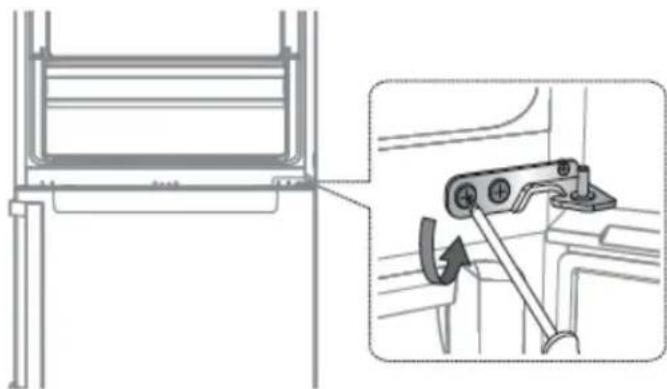
natural_image
Technical diagram showing a mechanical assembly with an inset view of a bracket and a hand tool (no text or symbols present)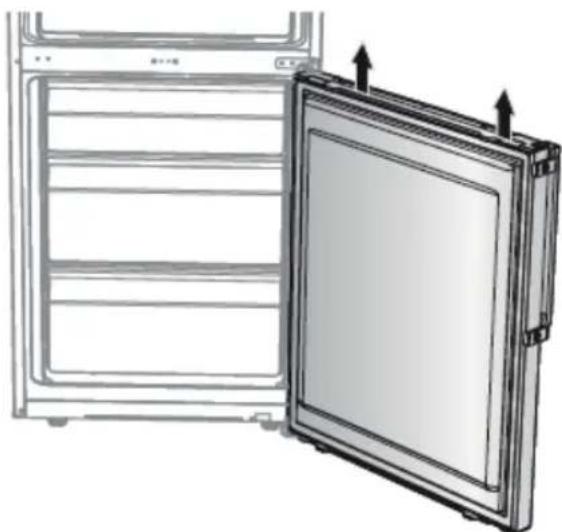
natural_image
Diagram of a refrigerator with an open door and ventilation slots, showing internal compartments and arrows indicating airflow or movement (no text or symbols)natural_image
Simple line drawing of a screwdriver (no text or symbols)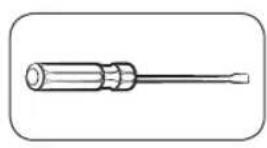
natural_image
Simple line drawing of a screwdriver (no text or symbols)text_image
Diagram showing a screwdriver inserted into a door panel connected to a wall-mounted device, with an arrow indicating the direction of movement.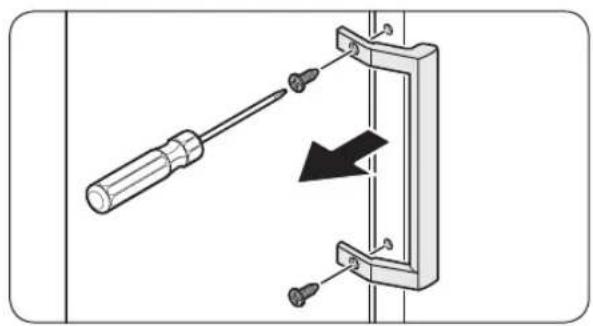
natural_image
Diagram of a screwdriver inserted into a mechanical clamp with a black arrow indicating direction (no text or symbols)natural_image
Diagram of a door frame with an arrow indicating direction (no text or symbols)natural_image
Diagram of a door frame with an arrow pointing to the front panel (no text or symbols)natural_image
3D diagram of a rectangular drawer with a black arrow pointing downward (no text or symbols)natural_image
Technical diagram showing a mechanical component with a highlighted section (no text or symbols present)text_image
Diagram illustrating a mechanical assembly process with labeled steps and directional arrows indicating movement.natural_image
Technical line drawing of an open refrigerator with internal compartments and ventilation ducts (no text or symbols)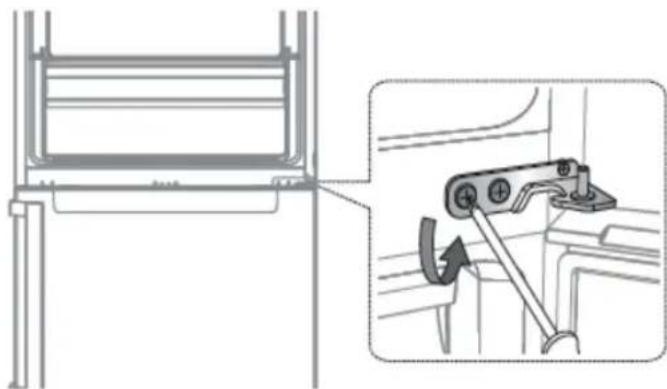
natural_image
Technical diagram showing a mechanical assembly with an inset view of a bracket and a close-up of a lever mechanism (no text or symbols present)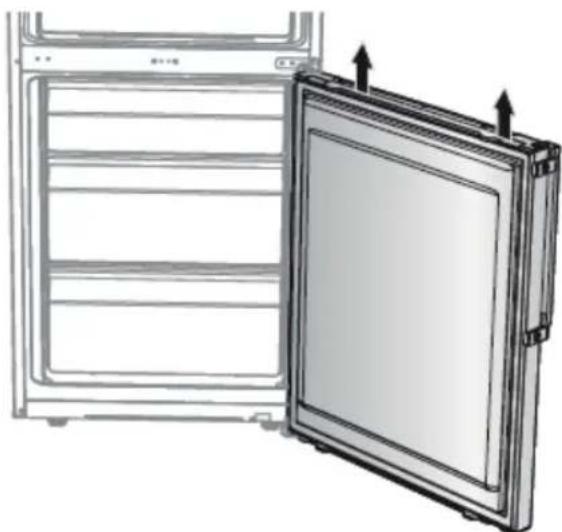
natural_image
Diagram of a refrigerator with an open door and side panel, showing structural details (no text or symbols)natural_image
Simple line drawing of a screwdriver (no text or symbols)text_image
Diagram showing a screwdriver inserted into a door panel with a close-up of the door's internal structure, indicating mechanical assembly or mounting.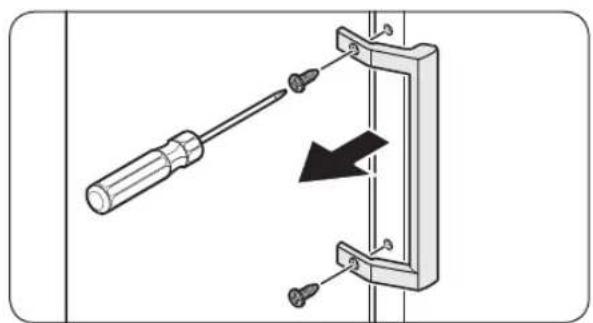
natural_image
Diagram showing a screwdriver inserted into a bracket with a black arrow indicating direction (no text or symbols present)natural_image
Diagram of a door frame with an arrow indicating rotation or movement (no text or symbols)natural_image
Diagram of a door frame with an arrow pointing to the front panel (no text or symbols)natural_image
Diagram of a plastic bin with a black arrow pointing to the bottom portion of the bin (no text or symbols present)natural_image
Technical illustration of a mechanical assembly with a close-up inset showing a hand operating a component (no text or symbols present)text_image
Technical diagram showing a hand holding a cable clip before and after disassembly, with three sequential steps shown.natural_image
Technical line drawing of an open refrigerator with internal compartments and ventilation ducts (no text or symbols)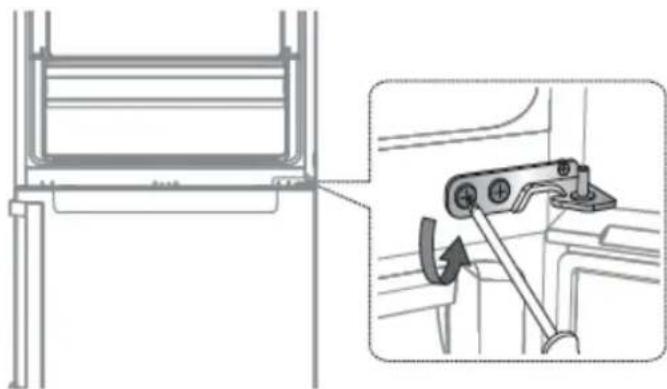
natural_image
Technical diagram showing a mechanical assembly with an inset view of a lever mechanism (no text or symbols present)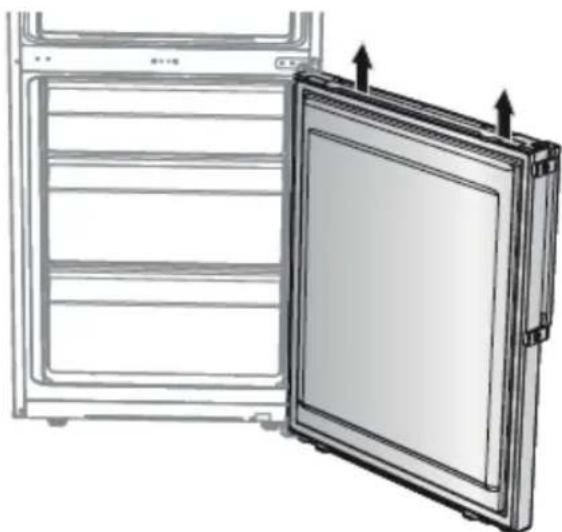
natural_image
Diagram of a refrigerator with an open door and ventilation slots, showing internal compartments and arrows indicating airflow or movement (no text or symbols)text_image
Diagram showing a screwdriver inserted into a door panel with a close-up of the door's socket, illustrating electrical circuit connection.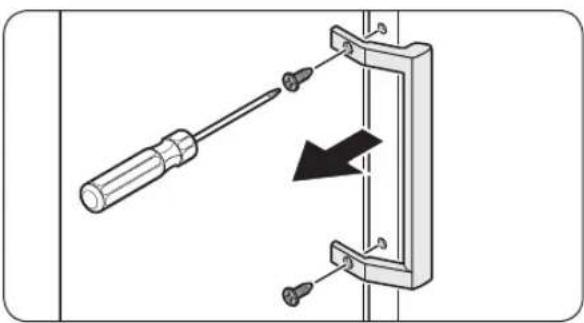
natural_image
Diagram showing a screwdriver inserted into a mechanical bracket with a black arrow indicating direction (no text or symbols present)- Pomoću odvijača s ravnom glavom uklonite poklopce vijaka.
-
Nakon odvajanja ručke, ponovno pričvrstite poklopce vijaka na rupe za vijke.
-
Upotrijebite Phillips odvijač da biste uklonili vijke i odvojili ručku.

NAPOMENA
Pomoću ovih vijaka pričvrstite ručku na suprotnoj strani.
- Sastavite novu ručku u obrnutom redoslijedu koraka za rastavljanje.
Zamjena brtve

OPREZ
natural_image
Diagram of a door frame with an arrow indicating direction (no text or symbols)Otvorite vrata i uklonite brtvu s vrata.
Da biste zamijenili brtvu
natural_image
Diagram of a door frame with an arrow pointing to the front panel (no text or symbols)Na vrata hladnjaka pričvrstite novu brtvu. Pazite da nema praznina između nove brtve i vrata.
Zamjena ladice

OPREZ
natural_image
Diagram of a plastic drawer with an arrow pointing to it, no text or symbols presentPažljivo podignite prednji dio ladice i izvucite je.
Da ponovno postavite ladice
natural_image
Technical diagram showing a mechanical component with a highlighted section and a close-up view of the handle (no text or symbols present)-
Uklonite pokrov šarke da biste gurnuli kuku.
-
Umetnite naglavni odvijač i vratite natrag.
- Podignite poklopac i gurnite kuku (Pazite da ne oštetite žicu zaštitnog zgloba pritiskajući je prejako).
- Rastavite ga guranjem
text_image
Diagram illustrating a mechanical assembly process with labeled steps and directional arrows indicating movement.natural_image
Technical line drawing of an open refrigerator with internal compartments and ventilation ducts (no text or symbols)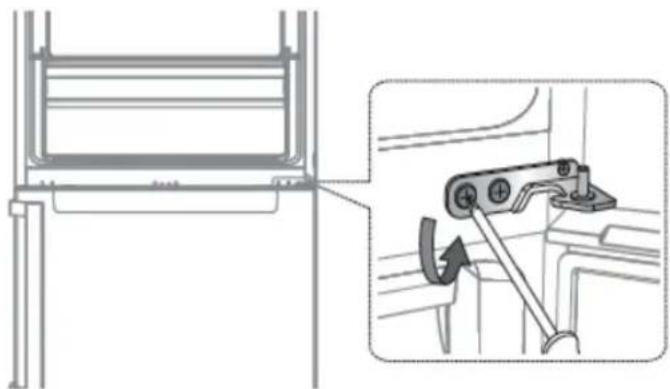
natural_image
Technical diagram showing a mechanical assembly with an inset view of a lever mechanism (no text or symbols present)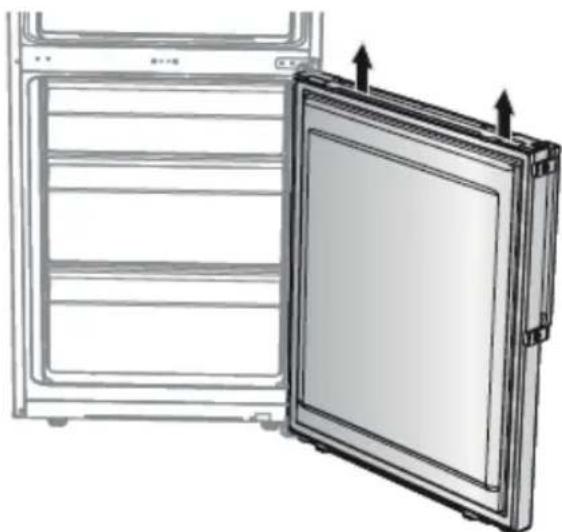
natural_image
Diagram of a refrigerator with an open door and ventilation slots, showing internal compartments and arrows indicating airflow (no text or symbols)natural_image
Simple line drawing of a screwdriver (no text or symbols)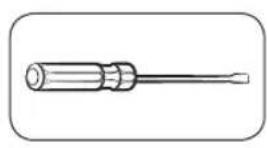
natural_image
Simple line drawing of a screwdriver (no text or symbols)text_image
Diagram showing a screwdriver inserted into a doorbell with a close-up of the doorbell's internal structure, illustrating electrical contact or mounting process.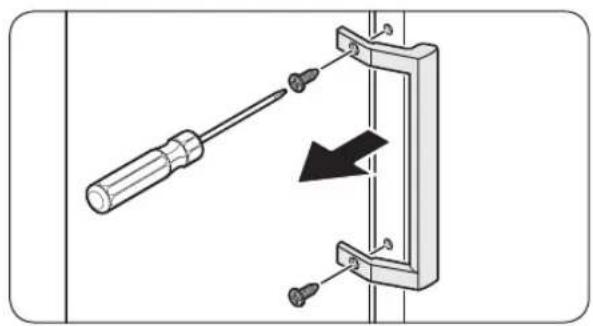
natural_image
Diagram of a screwdriver inserted into a mechanical clamp with a black arrow indicating direction (no text or symbols)natural_image
Diagram of a door frame with an arrow indicating direction (no text or symbols)natural_image
Diagram of a door frame with an arrow pointing to the front panel (no text or symbols)natural_image
Diagram of a plastic drawer with a black arrow pointing downward (no text or symbols)natural_image
Technical diagram showing a mechanical component with a highlighted section (no text or symbols present)text_image
Diagram illustrating a mechanical assembly process with labeled steps and directional arrows indicating movement.natural_image
Technical line drawing of an open refrigerator with internal compartments and ventilation ducts (no text or symbols)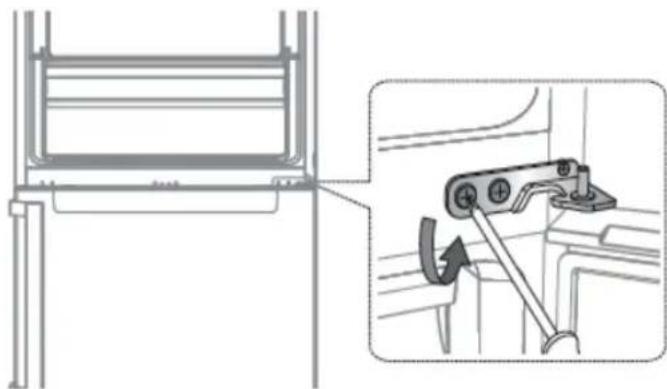
natural_image
Technical diagram showing a mechanical assembly with an inset view of a bracket and a hand tool (no text or symbols present)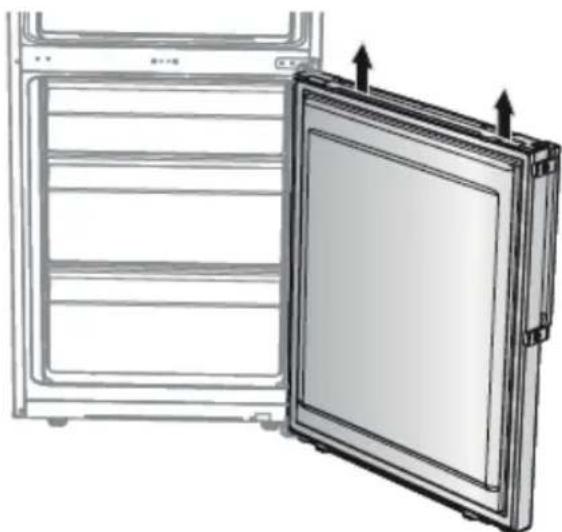
natural_image
Diagram of a refrigerator with an open door and ventilation slots, showing internal compartments and arrows indicating airflow (no text or symbols)text_image
Diagram showing a screwdriver inserted into a doorbell with a close-up of the doorbell's internal structure, illustrating mechanical assembly or mounting.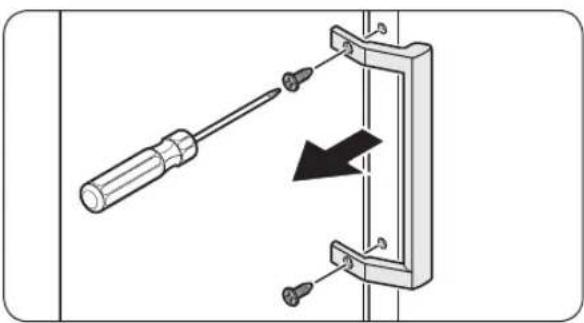
natural_image
Diagram of a screwdriver inserted into a mechanical bracket with a black arrow indicating direction (no text or symbols)natural_image
Diagram of a door frame with an arrow indicating direction (no text or symbols)natural_image
Diagram of a door frame with an arrow pointing to the interior panel (no text or symbols)natural_image
Diagram of a plastic drawer with an arrow pointing to it, no text or symbols presentnatural_image
Technical diagram showing a mechanical component with a highlighted section (no text or symbols present)text_image
Diagram illustrating a mechanical assembly process with labeled steps and directional arrows indicating movement.natural_image
Technical line drawing of an open refrigerator with internal compartments and ventilation ducts (no text or symbols)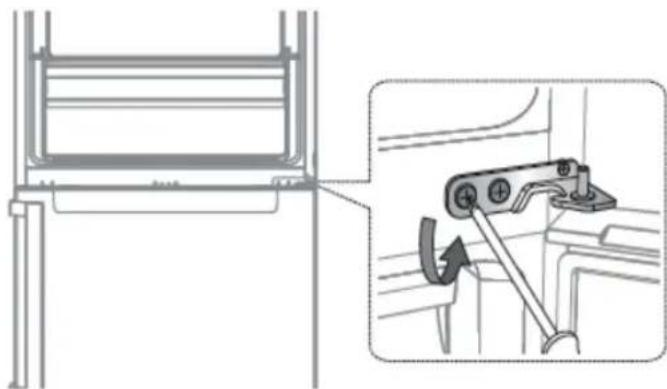
natural_image
Technical diagram showing a mechanical assembly with an inset view of a bracket and a close-up of a lever mechanism (no text or symbols present)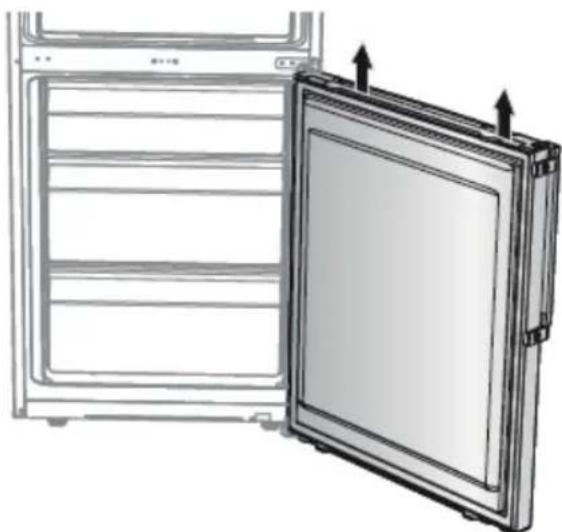
natural_image
Diagram of a refrigerator with an open door and side panel, showing structural details (no text or symbols)text_image
Diagram showing a screwdriver inserted into a door panel, with an arrow indicating the direction of movement and a close button labeled 'Close'.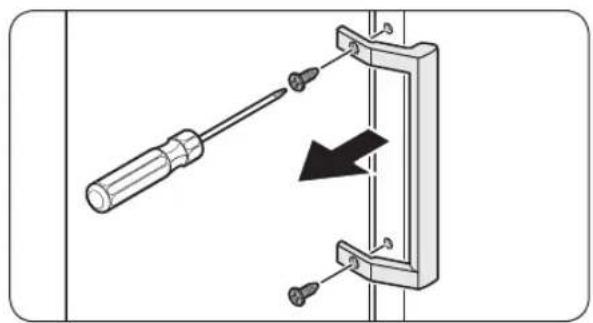
natural_image
Diagram showing a screwdriver inserted into a mechanical bracket with a black arrow indicating direction (no text or symbols present)natural_image
Diagram of a door frame with an arrow indicating direction (no text or symbols)natural_image
Diagram of a door frame with an arrow pointing to the front panel (no text or symbols)natural_image
Diagram of a plastic drawer with an arrow pointing to it, no text or symbols presentnatural_image
Technical diagram showing a mechanical component with a highlighted section and a close-up view of the handle (no text or symbols present)text_image
Diagram illustrating a mechanical assembly process with labeled steps and directional arrows indicating movement.natural_image
Technical line drawing of an open refrigerator with internal compartments and ventilation ducts (no text or symbols)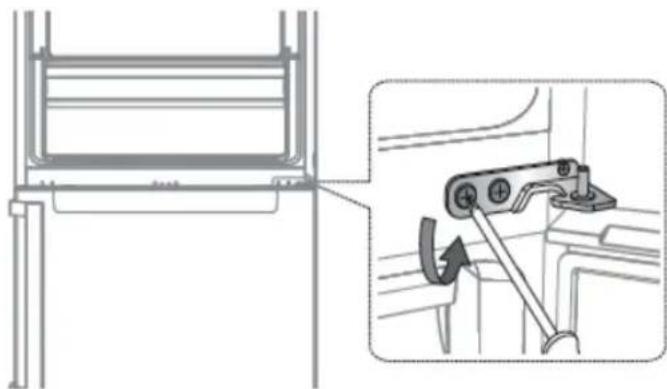
natural_image
Technical diagram showing a mechanical assembly with an inset view of a bracket and a hand tool (no text or symbols present)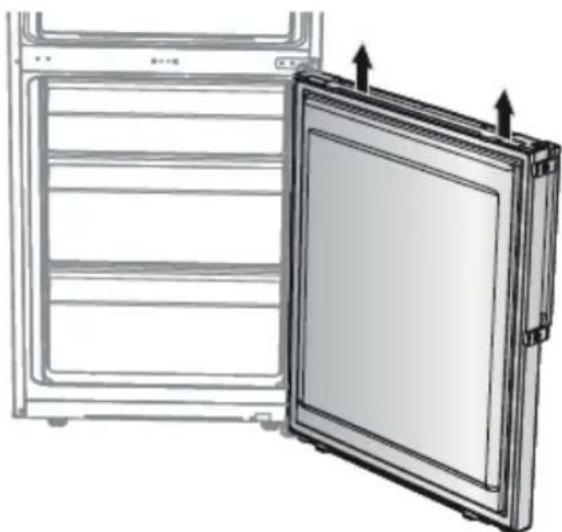
natural_image
Diagram of a refrigerator with an open door and ventilation slots, showing internal compartments and arrows indicating airflow (no text or symbols)text_image
Diagram showing a screwdriver inserted into a doorbell with a close button, illustrating the process of locking or disassembly.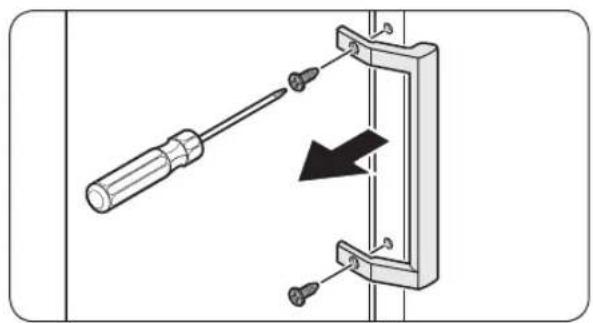
natural_image
Diagram of a screwdriver inserted into a bracket with a black arrow indicating direction (no text or symbols)natural_image
Diagram of a door frame with an arrow indicating direction (no text or symbols)natural_image
Diagram of a door frame with an arrow pointing to the front panel (no text or symbols)natural_image
Diagram of a plastic drawer with a black arrow pointing downward (no text or symbols)natural_image
Technical illustration of a mechanical assembly with a close-up inset showing a hand operating a component (no text or symbols present)text_image
Technical diagram showing a hand holding a cable with a switch, before and after disassembly or assembly.natural_image
Technical line drawing of an open refrigerator with internal compartments and ventilation ducts (no text or symbols)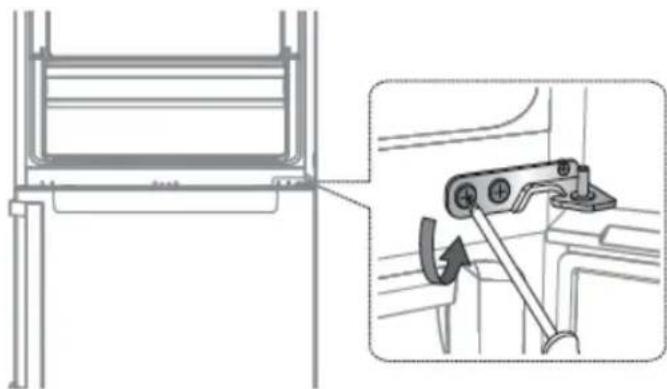
natural_image
Technical diagram showing a mechanical assembly with an inset view of a bracket and a hand tool (no text or symbols present)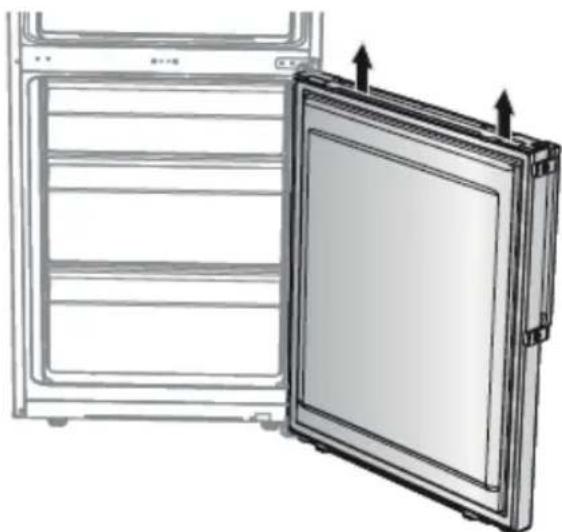
natural_image
Diagram of a refrigerator with an open door and ventilation slots, showing internal compartments and arrows indicating airflow (no text or symbols)text_image
Diagram showing a screwdriver inserted into a doorbell with a close button, illustrating the process of locking or disassembly.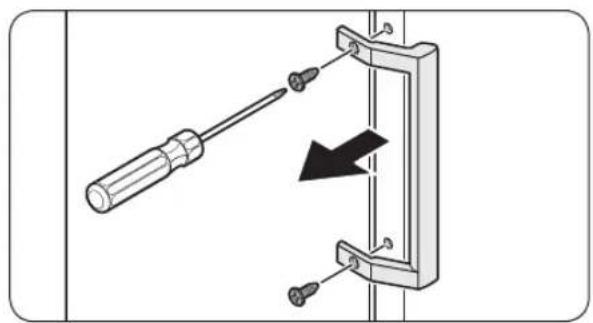
natural_image
Diagram showing a screwdriver inserted into a bracket with a black arrow indicating direction (no text or symbols present)natural_image
Diagram of a door frame with an arrow indicating direction, no text or symbols presentnatural_image
Diagram of a door frame with an arrow pointing to the front panel (no text or symbols)natural_image
Diagram of a plastic drawer with a black arrow pointing downward (no text or symbols)natural_image
Technical illustration of a mechanical assembly with a close-up inset showing a hand operating a component (no text or symbols present)text_image
Diagram illustrating a mechanical assembly process with labeled steps and directional arrows indicating movement.natural_image
Technical line drawing of an open refrigerator with internal compartments and ventilation ducts (no text or symbols)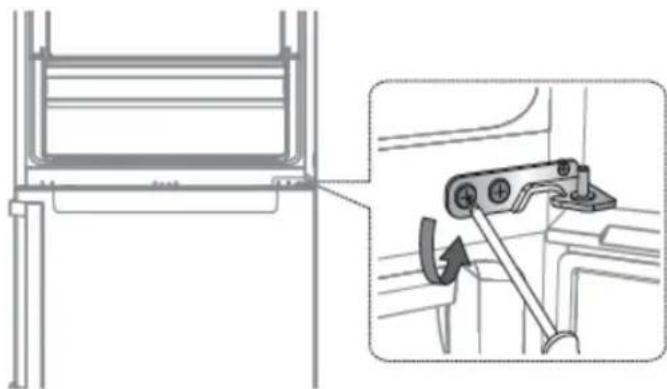
natural_image
Technical diagram showing a mechanical assembly with an inset view of a bracket and a hand tool (no text or symbols present)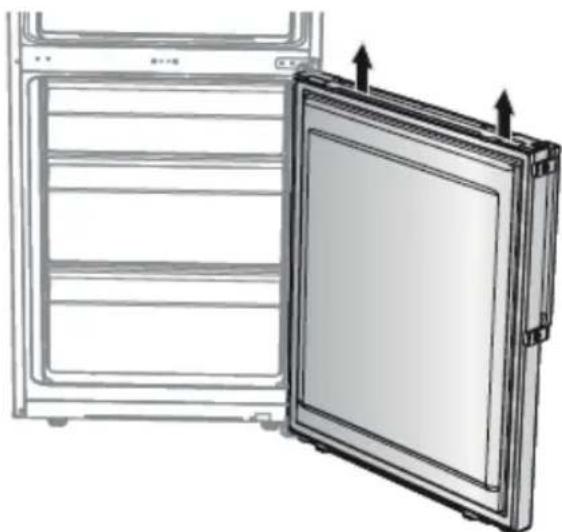
natural_image
Diagram of an open refrigerator with a door and side panel, showing structural details (no text or symbols)text_image
Diagram showing a screwdriver inserted into a doorbell with a close button, illustrating the process of locking or disassembly.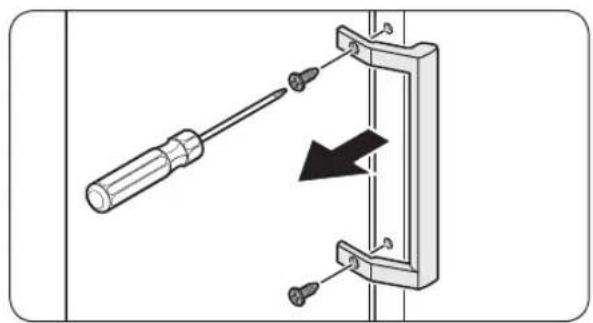
natural_image
Diagram showing a screwdriver inserted into a mechanical bracket with a black arrow indicating direction (no text or symbols present)natural_image
Diagram of a door frame with an arrow indicating direction, no text or symbols presentnatural_image
Diagram of a door frame with an arrow pointing to the front panel (no text or symbols)natural_image
Diagram of a plastic drawer with a black arrow pointing to it, no text or symbols presentnatural_image
Technical diagram showing a mechanical component with a highlighted section and a close-up view of the handle (no text or symbols present)text_image
Technical diagram showing a hand holding a cable with a switch, before and after disassembly or assembly.natural_image
Technical line drawing of an open refrigerator with internal compartments and ventilation ducts (no text or symbols)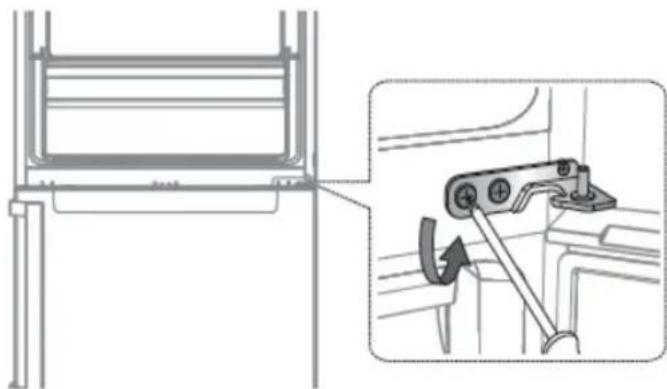
natural_image
Technical diagram showing a mechanical assembly with an inset view of a bracket and a hand tool (no text or symbols present)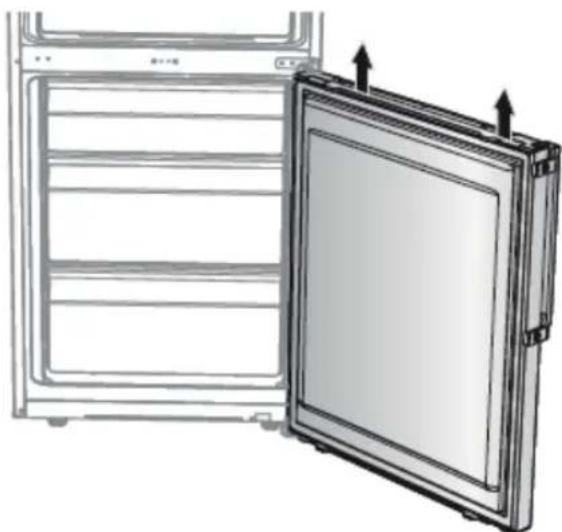
natural_image
Diagram of a refrigerator with an open door and ventilation slots, showing internal compartments and arrows indicating airflow (no text or symbols)text_image
Diagram showing a screwdriver inserted into a door panel with a close button, illustrating the process of locking or disassembly.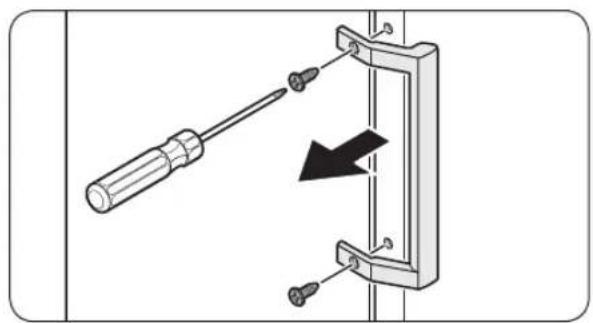
natural_image
Diagram showing a screwdriver inserted into a bracket with a black arrow indicating direction (no text or symbols present)natural_image
Diagram of a door frame with an arrow indicating direction, no text or symbols presentnatural_image
Diagram of a door frame with an arrow pointing to the interior panel (no text or symbols)natural_image
Diagram of a plastic drawer with a black arrow pointing to it, no text or symbols presentnatural_image
Technical illustration of a mechanical assembly with a close-up inset showing a hand operating a component (no text or symbols present)text_image
Technical diagram showing a hand holding a cable with an arrow indicating the process, before and after disassembly.- Koble ledningskontakten for kjøleskapsdøren.
- Dette trinnet gjelder ikke alle modeller.

VARSOMHET
natural_image
Technical line drawing of an open refrigerator with internal compartments and ventilation ducts (no text or symbols)
natural_image
Technical diagram showing a mechanical assembly with an inset view of a bracket and a hand tool (no text or symbols present)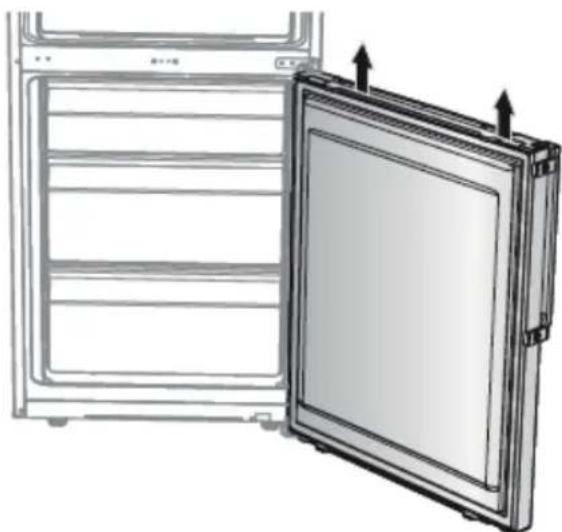
natural_image
Diagram of a refrigerator with an open door and ventilation slots, showing internal compartments and arrows indicating airflow or movement (no text or symbols)natural_image
Simple line drawing of a screwdriver with no text or symbols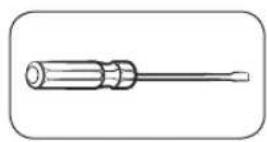
Philipsinruuvimeisseli Litteäpääinenruuvimeisseli
text_image
Diagram showing a screwdriver inserted into a doorbell with a close button, illustrating the process of locking or disassembly.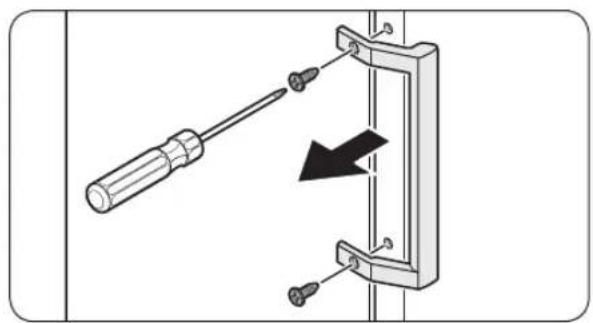
natural_image
Diagram showing a screwdriver inserted into a bracket with a black arrow indicating direction (no text or symbols present)natural_image
Diagram of a door frame with an arrow indicating direction (no text or symbols)natural_image
Diagram of a door frame with an arrow pointing to the front panel (no text or symbols)natural_image
Diagram of a plastic drawer with an arrow pointing to it, no text or symbols presentnatural_image
Technical diagram showing a mechanical component with a highlighted section (no text or symbols present)text_image
Technical diagram showing a hand holding a cable with an arrow indicating the process, before and after disassembly.natural_image
Technical line drawing of an open refrigerator with internal compartments and ventilation ducts (no text or symbols)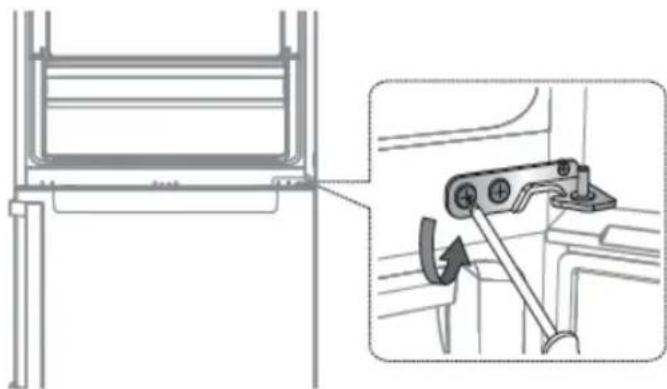
natural_image
Technical diagram showing a mechanical assembly with an inset view of a bracket and a hand tool (no text or symbols present)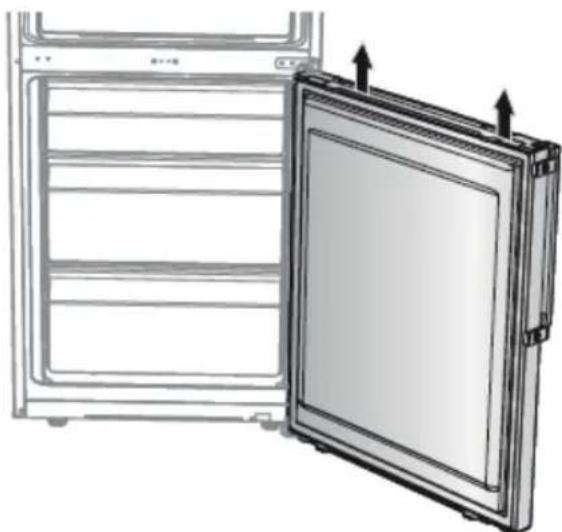
natural_image
Diagram of a refrigerator with an open door and ventilation slots, showing internal compartments and arrows indicating airflow (no text or symbols)text_image
Diagram showing a screwdriver inserted into a door panel, with an arrow indicating the direction of movement and a close-up of the door's internal structure.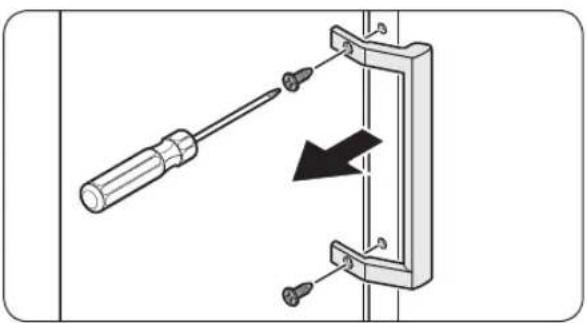
natural_image
Diagram of a screwdriver inserted into a mechanical clamp with a black arrow indicating compression (no text or symbols present)natural_image
Diagram of a door frame with an arrow indicating direction, no text or symbols presentnatural_image
Diagram of a door frame with an arrow pointing to the front panel (no text or symbols)natural_image
Diagram of a plastic drawer with an arrow pointing to it, no text or symbols presentnatural_image
Technical diagram showing a mechanical component with a highlighted section and a close-up view of the handle (no text or symbols present)text_image
Diagram illustrating a mechanical assembly process with labeled steps and directional arrows indicating movement.natural_image
Technical line drawing of an open refrigerator with internal compartments and ventilation ducts (no text or symbols)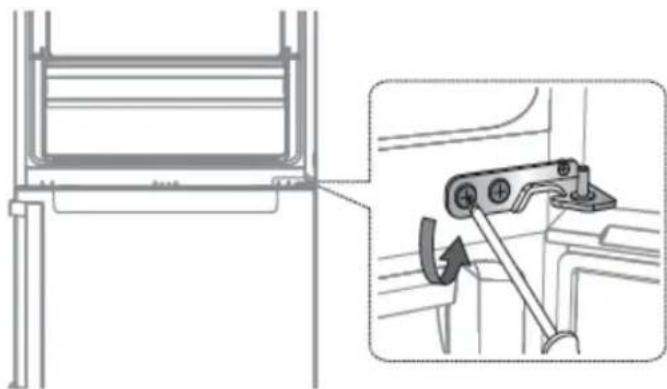
natural_image
Technical diagram showing a mechanical assembly with an inset view of a bracket and a close-up of a lever mechanism (no text or symbols present)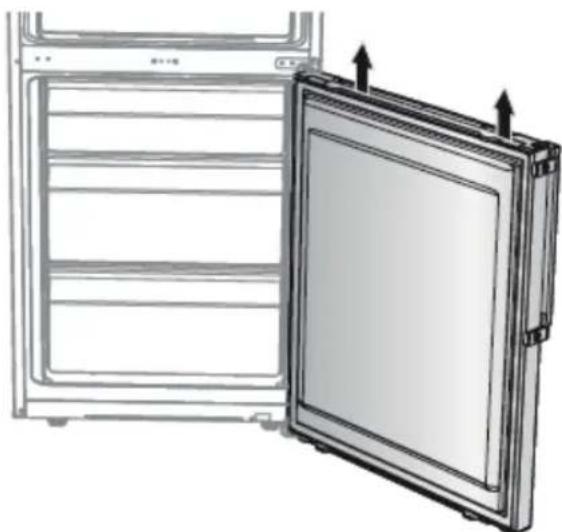
natural_image
Diagram of a refrigerator with an open door and side panel, showing structural details (no text or symbols)text_image
Diagram showing a screwdriver inserted into a door panel with a close-up of the door's internal socket, illustrating electrical circuit connection.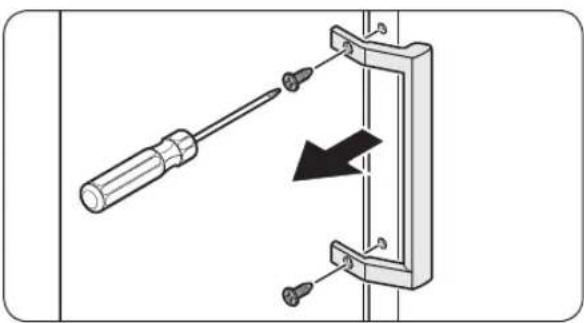
natural_image
Diagram of a screwdriver inserted into a mechanical bracket with a black arrow indicating direction (no text or symbols)natural_image
Diagram of a door frame with an arrow indicating direction, no text or symbols presentnatural_image
Diagram of a door frame with an arrow pointing to the front panel (no text or symbols)Na vrata hladilnika pritrdite novo tesnilo. Prepričajte se, da med novim tesnilom in vrati ni nobenih vrzeli.
Zamenjava predala

POZOR
natural_image
Diagram of a plastic drawer with a black arrow pointing to it, no text or symbols presentNežno dvignite sprednji del predala in ga izvlecite.
Ponovna pritrditev predalov
natural_image
Technical diagram showing a mechanical component with a highlighted section and a close-up view of the handle (no text or symbols present)-
Odstranite tečaj pokrova, da potisnete kavelj.
-
Vstavite naglavni izvijač in ga postavite nazaj.
- Povlecite pokrov navzgor in potisnite kavelj (Pazite, da ne poškodujete žice pokrova tečaja, tako da ga potisnete preveč močno).
- Razstavite ga tako, da pritisnete
text_image
Technical diagram showing a hand holding a cable with a switch, before and after disassembly or assembly.- Odklopite priključek za ožičenje za vrata hladilnika.
- Ta korak morda ne velja za nekatere modele.
! POZOR
Priključkov ne vlecite premočno.
- Odstranite vijake.
- (Pazite, da ne spustite vrat, ko jih razstavite.)
natural_image
Technical line drawing of an open refrigerator with internal compartments and ventilation ducts (no text or symbols)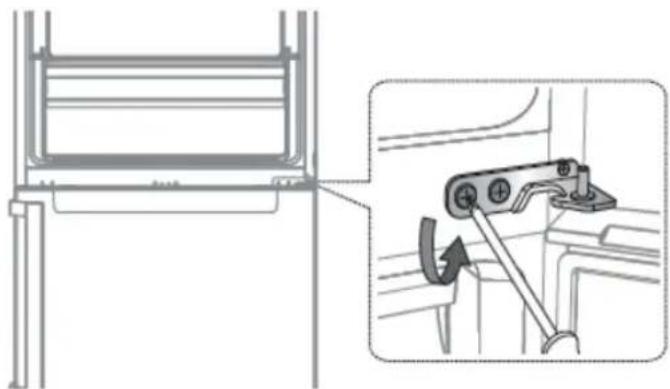
natural_image
Technical diagram showing a mechanical assembly with an inset view of a lever mechanism (no text or symbols present)