ManualGo.com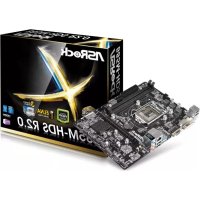
B85MHDS R2.0 - Motherboard ASROCK - Free user manual and instructions
Find the device manual for free B85MHDS R2.0 ASROCK in PDF.



Download the instructions for your Motherboard in PDF format for free! Find your manual B85MHDS R2.0 - ASROCK and take your electronic device back in hand. On this page are published all the documents necessary for the use of your device. B85MHDS R2.0 by ASROCK.
USER MANUAL B85MHDS R2.0 ASROCK
Version 1.0 Published November 2014 Copyright©2014 ASRock INC. All rights reserved. Copyright Notice: No part of this documentation may be reproduced, transcribed, transmitted, or translated in any language, in any form or by any means, except duplication of documentation by the purchaser for backup purpose, without written consent of ASRock Inc. Products and corporate names appearing in this documentation may or may not be registered trademarks or copyrights of their respective companies, and are used only for identication or explanation and to the owners’ benet, without intent to infringe. Disclaimer: Specications and information contained in this documentation are furnished for informational use only and subject to change without notice, and should not be constructed as a commitment by ASRock. ASRock assumes no responsibility for any errors or omissions that may appear in this documentation. With respect to the contents of this documentation, ASRock does not provide warranty of any kind, either expressed or implied, including but not limited to the implied warranties or conditions of merchantability or tness for a particular purpose. In no event shall ASRock, its directors, ocers, employees, or agents be liable for any indirect, special, incidental, or consequential damages (including damages for loss of prots, loss of business, loss of data, interruption of business and the like), even if ASRock has been advised of the possibility of such damages arising from any defect or error in the documentation or product. e terms HDMI
and HDMI High-Denition Multimedia Interface, and the HDMI logo are trademarks or registered trademarks of HDMI Licensing LLC in the United States and other countries. is device complies with Part 15 of the FCC Rules. Operation is subject to the following two conditions: (1) this device may not cause harmful interference, and (2) this device must accept any interference received, including interference that may cause undesired operation.
CALIFORNIA, USA ONLY
e Lithium battery adopted on this motherboard contains Perchlorate, a toxic substance controlled in Perchlorate Best Management Practices (BMP) regulations passed by the California Legislature. When you discard the Lithium battery in California, USA, please follow the related regulations in advance. “Perchlorate Material-special handling may apply, see www.dtsc.ca.gov/hazardouswaste/ perchlorate” ASRock Website: http://www.asrock.comAUSTRALIA ONLY Our goods come with guarantees that cannot be excluded under the Australian Consumer Law. You are entitled to a replacement or refund for a major failure and compensation for any other reasonably foreseeable loss or damage caused by our goods. You are also entitled to have the goods repaired or replaced if the goods fail to be of acceptable quality and the failure does not amount to a major failure. If you require assistance please call ASRock Tel : +886-2-28965588 ext.123 (Standard International call charges apply) e terms HDMI™ and HDMI High-Denition Multimedia Interface, and the HDMI logo are trademarks or registered trademarks of HDMI Licensing LLC in the United States and other countries.B85M-HDS R2.0
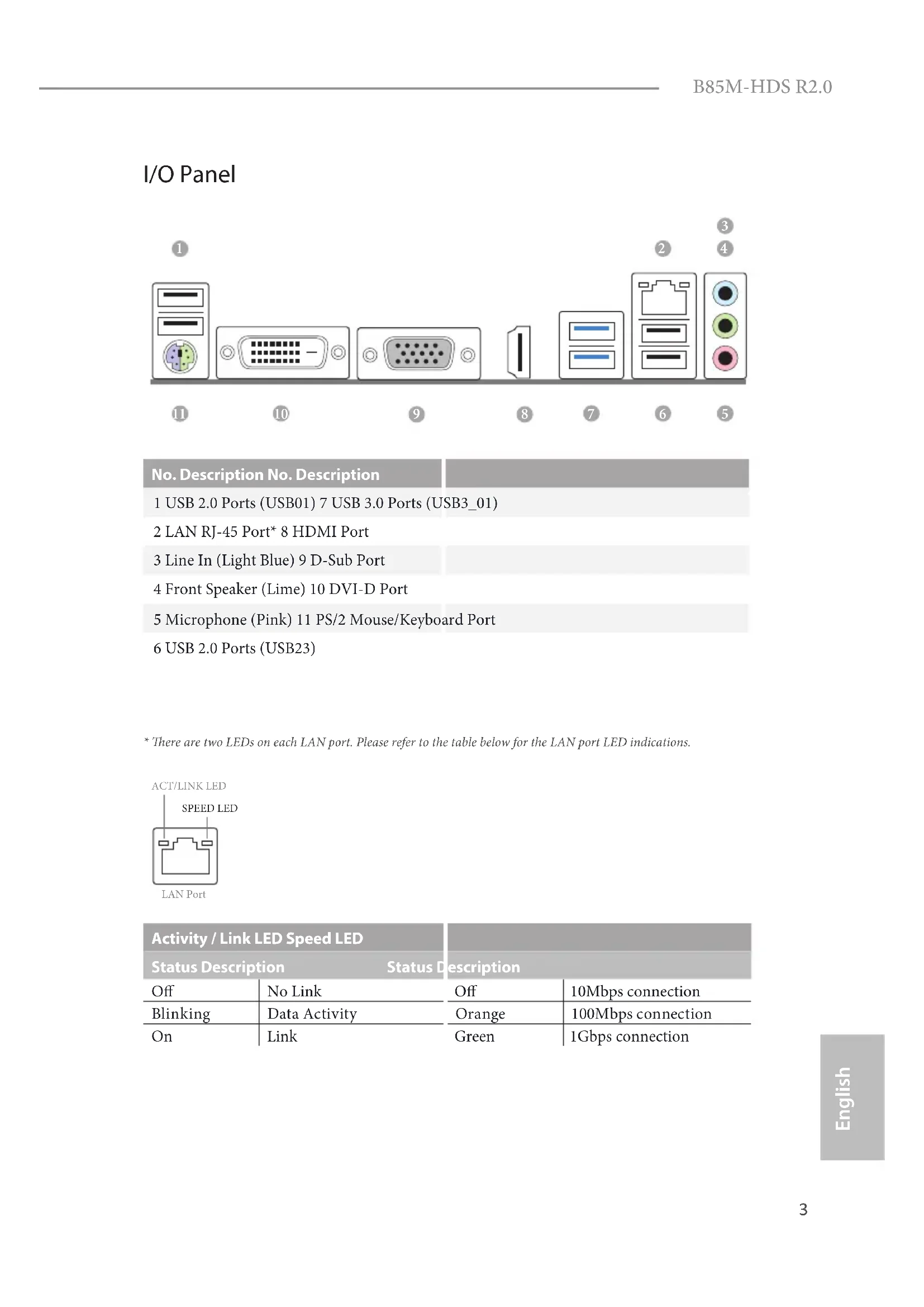
- ere are two LEDs on each LAN port. Please refer to the table below for the LAN port LED indications. Activity / Link LED Speed LED Status Description Status Description O No Link O 10Mbps connection Blinking Data Activity Orange 100Mbps connection On Link Green 1Gbps connection ACT/LINK LEDSPEED LEDLAN Port
English 1 Introduction ank you for purchasing ASRock B85M-HDS R2.0 motherboard, a reliable motherboard produced under ASRock’s consistently stringent quality control. It delivers excellent performance with robust design conforming to ASRock’s commitment to quality and endurance.
1 x I/O Panel Shield Because the motherboard specications and the BIOS soware might be updated, the content of this documentation will be subject to change without notice. In case any modications of this documentation occur, the updated version will be available on ASRock’s website without further notice. If you require technical support related to this motherboard, please visit our website for specic information about the model you are using. You may nd the latest VGA cards and CPU support list on ASRock’s website as well. ASRock website http://www.asrock.com.B85M-HDS R2.0
Solid Capacitor design
High Density Glass Fabric PCB CPU
Supports Intel® Turbo Boost 2.0 Technology Chipset
Dual Channel DDR3 Memory Technology
Supports DDR3 1600/1333/1066 non-ECC, un-buered memory
Max. capacity of system memory: 16GB (see CAUTION)
Intel® HD Graphics Built-in Visuals and the VGA outputs can be supported only with processors which are GPU integrated.
Supports Intel® HD Graphics Built-in Visuals : Intel® Quick Sync Video with AVC, MVC (S3D) and MPEG-2 Full HW Encode1, Intel® InTru
Supports Triple Monitor
Supports HDMI with max. resolution up to 1920x1200 @ 60Hz
Supports DVI-D with max. resolution up to 1920x1200 @ 60Hz
Supports D-Sub with max. resolution up to 1920x1200 @ 60Hz6 English
Supports Auto Lip Sync, Deep Color (12bpc), xvYCC and HBR (High Bit Rate Audio) with HDMI Port (Compliant HDMI monitor is required)
Supports HDCP with DVI-D and HDMI Ports
Supports Full HD 1080p Blu-ray (BD) playback with DVI-D and HDMI Ports Audio
Supports Surge Protection (ASRock Full Spike Protection)
Supports Wake-On-WAN
Supports Wake-On-LAN
Supports Lightning/ESD Protection (ASRock Full Spike Protection)
Supports LAN Cable Detection
Supports Energy Ecient Ethernet 802.3az
Supports PXE Rear Panel I/O
4 x USB 2.0 Ports (Supports ESD Protection (ASRock Full Spike Protection))
2 x USB 3.0 Ports (Supports ESD Protection (ASRock Full Spike Protection))
1 x RJ-45 LAN Port with LED (ACT/LINK LED and SPEED LED)
HD Audio Jacks: Line in / Front Speaker / Microphone Storage
4 x SATA3 6.0 Gb/s Connectors, support NCQ, AHCI and Hot Plug
1 x CPU Fan Connector (4-pin)
1 x Front Panel Audio Connector
2 x USB 2.0 Headers (Support 4 USB 2.0 ports) (Supports ESD Protection (ASRock Full Spike Protection))
1 x USB 3.0 Header (Supports 2 USB 3.0 ports) (Supports ESD Protection (ASRock Full Spike Protection)) BIOS Feature
32Mb AMI UEFI Legal BIOS with multilingual GUI support
ACPI 1.1 Compliant wake up events
DRAM, PCH 1.05V Voltage multi-adjustment Hardware Monitor
CPU/Chassis temperature sensing
CPU/Chassis Quiet Fan (Auto adjust chassis fan speed by CPU temperature)
CPU/Chassis Fan multi-speed control
ErP/EuP ready (ErP/EuP ready power supply is required)
- For detailed product information, please visit our website: http://www.asrock.com8 English Please realize that there is a certain risk involved with overclocking, including adjust- ing the setting in the BIOS, applying Untied Overclocking Technology, or using third- party overclocking tools. Overclocking may aect your system’s stability, or even cause damage to the components and devices of your system. It should be done at your own risk and expense. We are not responsible for possible damage caused by overclocking. Due to limitation, the actual memory size may be less than 4GB for the reservation for system usage under Windows® 32-bit operating systems. Windows® 64-bit operat- ing systems do not have such limitations. You can use ASRock XFast RAM to utilize the memory that Windows® cannot use.B85M-HDS R2.0
e illustration shows how jumpers are setup. When the jumper cap is placed on the pins, the jumper is “Short”. If no jumper cap is placed on the pins, the jumper is “Open”. e illustration shows a 3-pin jumper whose pin1 and pin2 are “Short” when a jumper cap is placed on these 2 pins. Clear CMOS Jumper (CLRCMOS1) (see p.1, No. 10) CLRCMOS1 allows you to clear the data in CMOS. To clear and reset the system parameters to default setup, please turn o the computer and unplug the power cord from the power supply. Aer waiting for 15 seconds, use a jumper cap to short pin2 and pin3 on CLRCMOS1 for 5 seconds. However, please do not clear the CMOS right aer you update the BIOS. If you need to clear the CMOS when you just nish updating the BIOS, you must boot up the system rst, and then shut it down before you do the clear-CMOS action. Please be noted that the password, date, time, and user default prole will be cleared only if the CMOS battery is removed. Clear CMOSDefault If you clear the CMOS, the case open may be detected. Please adjust the BIOS option “Clear Status” to clear the record of previous chassis intrusion status.10 English
1.4 Onboard Headers and Connectors
System Panel Header (9-pin PANEL1) (see p.1, No. 12) Connect the power switch, reset switch and system status indicator on the chassis to this header according to the pin assignments below. Note the positive and negative pins before connecting the cables. GND R ESET#P WRBTN#P LED-P LED+ GND
GND PWRBTN (Power Switch): Connect to the power switch on the chassis front panel. You may congure the way to turn o your system using the power switch. RESET (Reset Switch): Connect to the reset switch on the chassis front panel. Press the reset switch to restart the computer if the computer freezes and fails to perform a normal restart. PLED (System Power LED): Connect to the power status indicator on the chassis front panel. e LED is on when the system is operating. e LED keeps blinking when the system is in S1/S3 sleep state. e LED is o when the system is in S4 sleep state or powered o (S5). HDLED (Hard Drive Activity LED): Connect to the hard drive activity LED on the chassis front panel. e LED is on when the hard drive is reading or writing data. e front panel design may dier by chassis. A front panel module mainly consists of power switch, reset switch, power LED, hard drive activity LED, speaker and etc. When connecting your chassis front panel module to this header, make sure the wire assignments and the pin assignments are matched correctly. Onboard headers and connectors are NOT jumpers. Do NOT place jumper caps over these headers and connectors. Placing jumper caps over the headers and connectors will cause permanent damage to the motherboard.B85M-HDS R2.0
English Serial ATA2 Connectors (SATA2_4: see p.1, No. 6) (SATA2_5: see p.1, No. 5) ese two SATA2 connectors support SATA data cables for internal storage devices with up to
3.0 Gb/s data transfer rate.
Serial ATA3 Connectors (SATA3_0: see p.1, No. 7) (SATA3_1: see p.1, No. 8) (SATA3_2: see p.1, No. 13) (SATA3_3: see p.1, No. 14) ese four SATA3 connectors support SATA data cables for internal storage devices with up to
6.0 Gb/s data transfer rate.
USB 2.0 Headers (9-pin USB4_5) (see p.1, No. 17) (9-pin USB6_7) (see p.1, No. 15) Besides four USB 2.0 ports on the I/O panel, there are two headers on this motherboard. Each USB
2.0 header can support
two ports. USB 3.0 Header (19-pin USB3_2_3) (see p.1, No. 9) Besides two USB 3.0 ports on the I/O panel, there is one header on this motherboard. Each USB
3.0 header can support
two ports. Front Panel Audio Header (9-pin HD_AUDIO1) (see p.1, No. 20) is header is for connecting audio devices to the front audio panel. DUMMY GND GND
GND O UT2_R M IC2_R M IC2_L OUT_RET SATA3_1 SATA3_0 SATA3_3 SATA3_2 SATA2_5 SATA2_412 English Chassis Speaker Header (4-pin SPEAKER1) (see p.1, No. 16) Please connect the chassis speaker to this header. Chassis Fan Connector (4-pin CHA_FAN1) (see p.1, No. 11) Please connect fan cable to the fan connector and match the black wire to the ground pin. CPU Fan Connector (4-pin CPU_FAN1) (see p.1, No. 1) is motherboard pro- vides a 4-Pin CPU fan (Quiet Fan) connector. If you plan to connect a 3-Pin CPU fan, please connect it to Pin 1-3. ATX Power Connector (24-pin ATXPWR1) (see p.1, No. 4) is motherboard pro- vides a 24-pin ATX power connector. To use a 20-pin ATX power supply, please plug it along Pin 1 and Pin
1. High Denition Audio supports Jack Sensing, but the panel wire on the chassis must
support HDA to function correctly. Please follow the instructions in our manual and chassis manual to install your system.
2. If you use an AC’97 audio panel, please install it to the front panel audio header by
the steps below: A. Connect Mic_IN (MIC) to MIC2_L. B. Connect Audio_R (RIN) to OUT2_R and Audio_L (LIN) to OUT2_L. C. Connect Ground (GND) to Ground (GND). D. MIC_RET and OUT_RET are for the HD audio panel only. You don’t need to connect them for the AC’97 audio panel. E. To activate the front mic, go to the “FrontMic” Tab in the Realtek Control panel and adjust “Recording Volume”.
English ATX 12V Power Connector (4-pin ATX12V1) (see p.1, No. 2) Please connect an ATX 12V power supply to this connector. Chassis Intrusion Header (2-pin CI1) (see p.1, No. 19) is motherboard supports CASE OPEN detection feature that detects if the chassis cove has been removed. is feature requires a chassis with chassis intrusion detection design. TPM Header (17-pin TPMS1) (see p.1, No. 18) is connector supports Trusted Platform Module (TPM) system, which can securely store keys, digital certicates, passwords, and data. A TPM system also helps enhance network security, protects digital identities, and ensures platform integrity.
- Supporto WOW (Wake-On-WAN)
- Supporta Wake-On-LAN
- Supporta Energy Ecient Ethernet 802.3az
- High Density Glass Fabric PCB