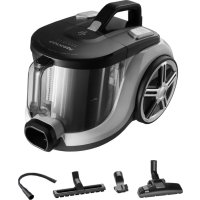
Serious VP5130 - Vacuum Cleaner Concept - Free user manual and instructions
Find the device manual for free Serious VP5130 Concept in PDF.



User questions about Serious VP5130 Concept
0 question about this device. Answer the ones you know or ask your own.
Ask a new question about this device
Download the instructions for your Vacuum Cleaner in PDF format for free! Find your manual Serious VP5130 - Concept and take your electronic device back in hand. On this page are published all the documents necessary for the use of your device. Serious VP5130 by Concept.
USER MANUAL Serious VP5130 Concept
Thank you for purchasing a Concept product. We wish you much joy with your new appliance every day you use it. Please read the instruction manual carefully before initial use. To refer to this manual any time you need to, we recommend you to keep it in a safe place. And please pass it to any future owner of the appliance.
| Technical specifications | |
| Voltage 220-240 V - 50-60 Hz | |
| Input 850 W | |
| Sound performance level ≤79 dB | |
IMPORTANT SAFETY PRECAUTIONS
- Do not use the appliance in any other way than as described in this manual.
- Remove all the covering and marketing materials from the appliance before the first use.
- Make sure the mains voltage corresponds to the values on the rating plate of the appliance.
- Do not leave the appliance unattended when it is switched on or connected to the mains.
- Disconnect the appliance from the electrical outlet if it is not being used.
- When disconnecting the appliance from the wall outlet, never pull the power cord, grasp the plug end and disconnect it by removing it from the receptacle.
- Do not allow children or unauthorized people to handle the appliance, use it out of their reach.
- Persons with reduced mobility, reduced sensory perception, mental disadvantage or persons not familiar with the operation must use the appliance only under the supervision of responsible person, who is familiar with the instructions.
- Pay extra attention if the appliance is used near children.
- Do not use the appliance as a toy.
- Do not use the appliance outdoors or on a wet surface, there is a risk of electric shock.
- Do not use any accessories other than those recommended by the manufacturer.
- Do not use the appliance with a damaged cord or plug and have it repaired immediately by an authorized service centre.
42
VP5130|VP5131|VP5132
VP5130|VP5131|VP5132
43
concept
concept
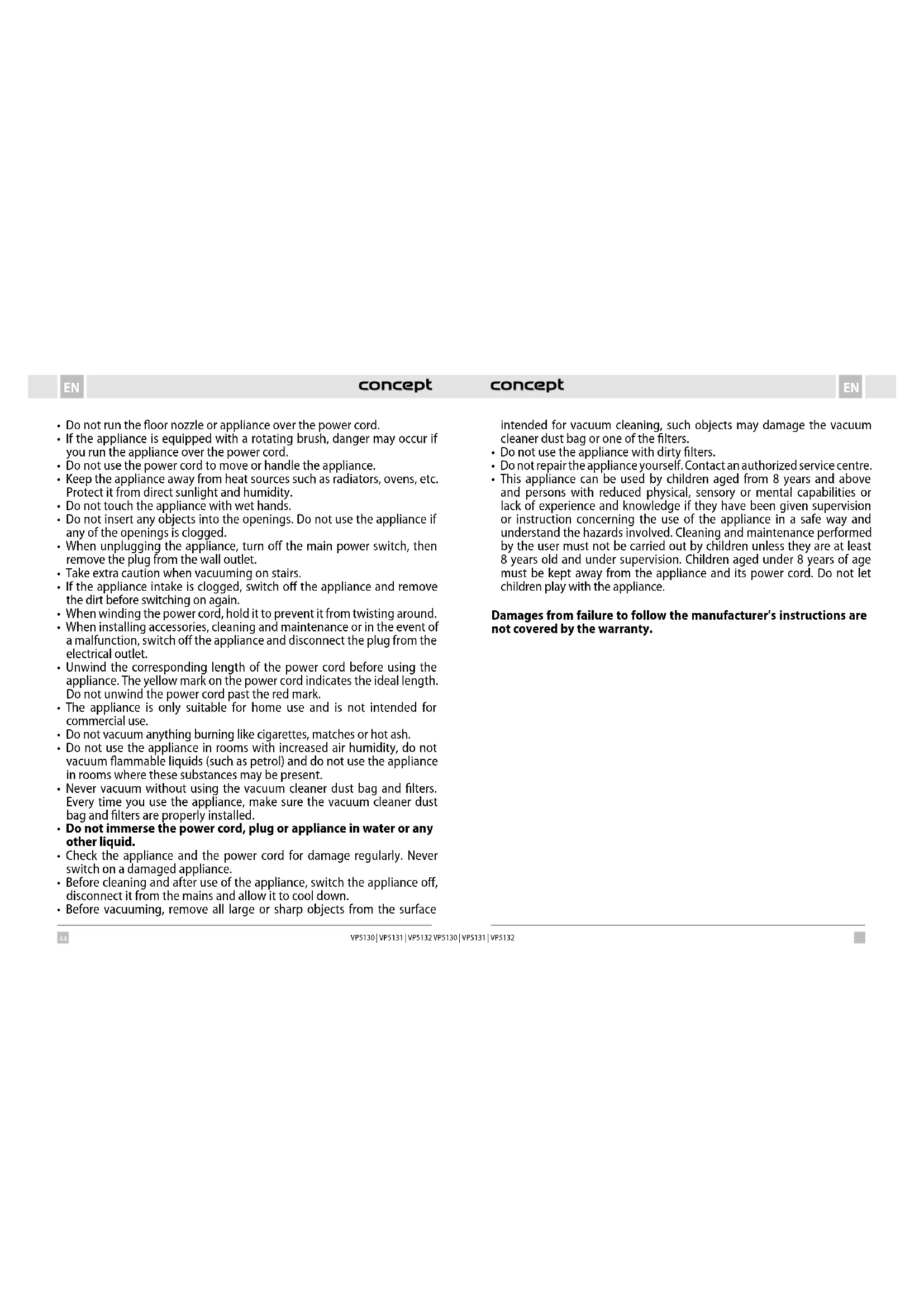
- Do not run the floor nozzle or appliance over the power cord.
- If the appliance is equipped with a rotating brush, danger may occur if you run the appliance over the power cord.
- Do not use the power cord to move or handle the appliance.
- Keep the appliance away from heat sources such as radiators, ovens, etc. Protect it from direct sunlight and humidity.
- Do not touch the appliance with wet hands.
- Do not insert any objects into the openings. Do not use the appliance if any of the openings is clogged.
- When unplugging the appliance, turn off the main power switch, then remove the plug from the wall outlet.
Take extra caution when vacuuming on stairs. - If the appliance intake is clogged, switch off the appliance and remove the dirt before switching on again.
- When winding the power cord, hold it to prevent it from twisting around.
- When installing accessories, cleaning and maintenance or in the event of a malfunction, switch off the appliance and disconnect the plug from the electrical outlet.
- Unwind the corresponding length of the power cord before using the appliance. The yellow mark on the power cord indicates the ideal length. Do not unwind the power cord past the red mark.
- The appliance is only suitable for home use and is not intended for commercial use.
- Do not vacuum anything burning like cigarettes, matches or hot ash.
- Do not use the appliance in rooms with increased air humidity, do not vacuum flammable liquids (such as petrol) and do not use the appliance in rooms where these substances may be present.
- Never vacuum without using the vacuum cleaner dust bag and filters. Every time you use the appliance, make sure the vacuum cleaner dust bag and filters are properly installed.
- Do not immerse the power cord, plug or appliance in water or any other liquid.
- Check the appliance and the power cord for damage regularly. Never switch on a damaged appliance.
- Before cleaning and after use of the appliance, switch the appliance off, disconnect it from the mains and allow it to cool down.
- Before vacuuming, remove all large or sharp objects from the surface
intended for vacuum cleaning, such objects may damage the vacuum cleaner dust bag or one of the filters.
- Do not use the appliance with dirty filters.
- Do not repair the appliance yourself. Contact an authorized service centre.
- This appliance can be used by children aged from 8 years and above and persons with reduced physical, sensory or mental capabilities or lack of experience and knowledge if they have been given supervision or instruction concerning the use of the appliance in a safe way and understand the hazards involved. Cleaning and maintenance performed by the user must not be carried out by children unless they are at least 8 years old and under supervision. Children aged under 8 years of age must be kept away from the appliance and its power cord. Do not let children play with the appliance.
Damages from failure to follow the manufacturer's instructions are not covered by the warranty.
concept
concept
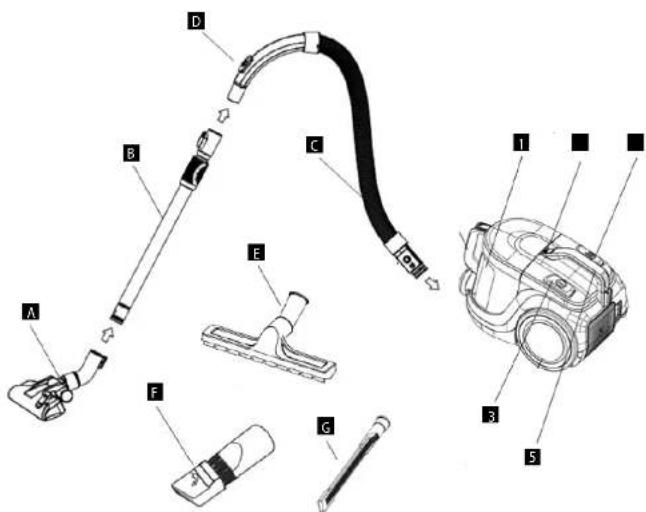
PRODUCT DESCRIPTION
1 Dust cup
2 Dust cup release button
3 Power button
4 Cord winding button
5 Carrying handle
A Floor nozzle
B Telescopic tube
C Flexible hose
Hose handle
E Parguet nozzle
E Slot nozzle with brush
G Long slot nozzle
OPERATING INSTRUCTIONS
ASSEMBLING THE VACUUM CLEANER
NOTICE
Always disconnect the plug out of the electrical outlet before assembling or removing accessories!
- Connecting flexible hose to vacuum cleaner
Insert the flexible hose into the air intake opening of the vacuum cleaner. Push until you hear a click - fitting into the correct position (Fig. 1). To remove the flexible hose, press the lock button and remove the hose. The suction force can be manually adjusted on the hose handle. Slider closed - more suction force. Slider open - less suction force. - Attaching the telescopic tube to the hose extension
Slide the telescopic tube onto the hose extension and turn slightly. - Extending the telescopic tube
Press the plastic latch and pull the smaller tube out. - Attaching the floor nozzle to the telescopic tube
Insert the telescopic tube into the floor nozzle and turn slightly. The flap on the nozzle is used to switch the floor nozzle to brushing (for smooth floors) or smooth vacuuming (for carpets).

ACCESSIONS
The following accessories are included in the package for each type of appliance:
VP5130:A,B,C,D,E,F,G(see product description)
VP5131:A,B,C,D,E,F(see product description)
VP5130:A,B,C,D,F (see product description)
USING THE VACUUM CLEANER
Before using the vacuum cleaner, make sure that the filters and dust container are correctly positioned and fixed. Unwind the appropriate cord length. The yellow mark on the power cord indicates the ideal length. Do not unwind the power cord past the red mark!
- Insert the plug into the wall outlet.
- Press the power switch to turn on the vacuum cleaner.
- After vacuuming, turn off the appliance and unplig it from the wall outlet.
- To wind the power cord, press the cord winding button. Hold the power cord with the other hand to prevent it from twisting around.
concept
concept
CHECKING THE FULLNESS OF DUST CONTAINER
If the suction power of the vacuum cleaner decreases even when the floor nozzle is raised above the floor, empty the dust container immediately.
rning: if the suction power is low even after the dust container is emptied, there may be several reasons:
-
Some of the air passages (hose, telescopic tube, suction opening, floor nozzle or other attachments) are blocked.
-
The air inlet filter in the dust container is dirty or old. It must be cleaned or replaced with a new one.
-
The air outlet filter is dirty or old. It must be cleaned or replaced with a new one.
Check each of these options and fix the problem before using the appliance again. If you are unable to identify the cause of the problem, take the appliance to your nearest service centre. Never use the appliance if the suction power is low, as this could irreparably damage the motor.
MAINTENANCE
It is recommended to empty the dust container and clean the vacuum cleaner filters after each use of the vacuum cleaner.
EMPTYING THE DUST CONTAINER
- Unplug the vacuum cleaner, pull the hose out of the suction opening.
- Press the latch on the vacuum cleaner body (Fig. 2) and remove the dust container upwards.
- Press the empty button, remove the lid of the dust container (Fig. 3) and empty the dust into the waste bin.
- Place the lid back on the dust container, press down the lid, you must hear the lid latch back.
- After closing the container, place it back into the vacuum cleaner. Make sure that the container is positioned properly. You must hear the click of the handle latch.
DUST CONTAINER FILTER REPLACEMENT AND CLEANING
- The filters should be cleaned or replaced with visible soiling or when the suction power of the vacuum cleaner drops. Check them after each use of the vacuum cleaner.
- To avoid damaging the vacuum cleaner, do not use it without properly fitted filters.
- Unplug the vacuum cleaner before replacing the filters.
- You can purchase suitable filter types from your dealer or order from the manufacturer.
- Remove the dust container from the vacuum cleaner (Fig. 2).
- Remove the cartridge with the SMS fabric filter and the foam filter (Fig. 3).
- Remove the foam filter.
- The filters can be cleaned by tapping. If heavily soiled, they can be washed in lukewarm water and left to dry properly.
CHECKING AND REPLACEMENT OF THE AIR OUTLET FILTER
- Press to open the air outlet grille at the back of the vacuum cleaner and remove it (Fig. 4).
- Remove the filter.
- The filter can be cleaned by tapping. If heavily soiled, it can be washed in lukewarm water and left to dry properly.
- Insert a cleaned or new air outlet filter and push gently, you must hear the latch click.
- Insert an air outlet grille and push gently, you must hear the latch click.
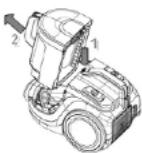
Fig.2
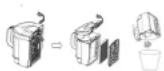
Fig. 3
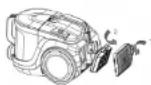
Fig. 4
CLEANING AND MAINTENANCE
Accessories and vacuum cleaner can be cleaned with a damp cloth.
Do not immerse the power cord, plug or appliance in water or any other liquid.
Do not use aggressive substances such as solvents or abrasives for cleaning!
TROUBLESHOOTING
| Problem Cause Remedy | ||
| The motor is not working | The plug inserted incorrectly or insufficiently in the wall outlet. | Check connection of the plug. |
| The wall outlet is not energized. | Check the presence of voltage, e.g. with another appliance. | |
| The motor stopped working | Poor or too low airflow, thermal motor protection has tripped. | Unplug the power cord. Check and clear the intake and exhaust air passage, filter cleanliness, and if necessary, replace the dust bag. Allow the vacuum cleaner to cool down. |
| Reduction of suction power | Full or clogged dust container. Empty | and clean the dust container. |
| The filters are clogged. Clean or replace the filters. | ||
| Clogged nozzle, tubes or hose. | Check and clear the intake and exhaust air passage. | |
| The vacuum cleaner is warming up | Warming up of the vacuum cleaner during operation is normal, it is not a malfunction. | |
EN
concept
concept
DE
SERVICE
Extensive maintenance or repair, which requires access to internal parts of the product, has to be performed by a qualified specialist or the service centre.
ENVIRONMENTAL CONCERNS
- Packaging materials and old appliances should be recycled.
- Packaging materials may be disposed of as sorted waste.
- Dispose the plastic bags made of polyethylene (PE) of as sorted waste.
Recycling of the appliance at the end of its lifespan:

This appliance is labelled in accordance with European Directive 2012/19/EU concerning used electrical and electronic appliances (Waste Electrical and Electronic Equipment - WEEE). The symbol on the product or on its packaging indicates that this product may not be treated as household waste. Instead, it should be taken to the appropriate collection point for the recycling of electrical and electronic equipment. By ensuring this product is disposed of correctly, you will help prevent potential negative consequences for the environment and human health, which could otherwise be caused by inappropriate waste handling of this product. The disposal of such material has to be done according to the recycling regulations. For more detailed information about recycling of this appliance see the authorized local office or service for household waste disposal or the shop, where you purchased the appliance.

The product meets all the necessary requirements of the EU directives applicable to the specific product.
Changes in text, design, and technical specifications are subject to change without prior notice and we reserve the right to change them.
DANKSAGUNG
www.www.my-concept.com
Importer:
CONCEPT POLSKA sp. 20, 0
ul Ostrowskiego 30,53-238 Wroclaw
tel:+48713390444,fax:713390414
www.www.my-concept.com
concept concept
LV GARANTIJAS TALONS
Pardevaja plenakums Ir lepazistnat pateretaju ar izstradajuma parametriem un daribiu, kai piliniba un salasami alzplditig garantijias talonu izstradajuma pardosanas diena.
Ja navareizi azipldita vain neparelizi noradita nepieciesama informacjia par izstradajumu, garantijas taliors in nederigens!
Razotajs (vai piegadatajs) garantijas laika perioda ir atbdigiqs par izstradajuma tehniskajam ipasibam un ta darbub, ko paredz attieciigas tehniskas nomus un nosacizumj.
Garantljus liaks Iglst 24 menesu, sakok no pardasonatas datuma, ja razotats (vai piegadatats) na voteiici citati.
Pateretajam garantijas iletaros in tiesibas uz bezmaksas, savlacigiu un pinligu izstradajuma bojajumu novetran skat. takiak) var, ta tas naevadekvalt attlecbi pret bojajuma raksturru, tiesibas uz izstradajuma bojato detalu mainu. Tiesibas uz izstradajuma mainu vai pirkasanus ligma nocasujum neivevorosanu var imzantot tikai tad, ja ir izpilditi visi likumige nosacjumi, um tikai gadijuma, ja izstradajums nav ticis pameneri nolietens vai bojats.
e-pastes: Infogwerners by
www:www. yerners.lv
The manufacturer (or Importer) is responsible for ensuring the product complies with the requirements of applicable legal regulations as well as those of the relevant technical standards. Moreover, they are responsible for ensuring the product has the properties the manufacturer described in documents related to the goods or those reasonably expected by the customer with regard to the nature of the goods or based on advertising produced by the manufacturer, and further they are responsible for ensuring the product is fit for the purpose proposed by the manufacturer or that a product of the same type is normally used for.
The quality warranty term is 24 months from product takeover by the customer.
The warranty does not apply to wear and tear caused by regular use. The customer shall not be entitled to any warranty claims it, prior to taking the product over, they knew the product contained a defect or if the defect is attributable to the customer.
The warranty specifically does not apply:
- if the product installation, operation and service conditions stipulated in the product operating manual have not been adhered to.
to malfunctions caused due to mechanical, heat or chemical damage, short circuit, over voltage or incorrect installation.
to malfunctions caused by an inexpert third-party intervention,
to malfunctions caused by natural disaster,
to malfunctions caused by insufficient or inappropriate maintenance in violation of the operating manual, including malfunctions caused by water and other sediments. - to changes in colour of the heating surface or to scratching of the surface caused as a result of using the products in an unusual manner,
to appearance and functional changes caused by exposure to sunlight, thermal radiation of water and other sediments. - if the service life of certain product parts expires, e.g. for accumulators, bulbs, etc.
The warranty does not apply to any products and services provided along with the product (gifts, promotional articles, etc.).
Filing a complaint
A complaint against a product defect must be filed as soon as identified, yet no later than before the end of the warranty term.
The customer must file a product complaint with the dealer from which they have purchased the product, or with any authorised service centre, a list of which is included in the product package, or available at www.my-concept.com.
While filing a product complaint, the product must be duly cleaned and securely packed so as to prevent any damage during its transport to an authorised service centre, where relevant, unless the product is delivered in person.
The customer must submit proof of having concluded a purchase contract for the product by producing the receipt.
While filing their complaint, the customer must indicate the noted defect and identify the preferred complaint application method.
Complaints processing
As long as the noted defect may be removed, the user has the right to have the defect duly removed free of charge on a timely basis.
Where such a procedure is not reasonable with regard to the nature of the defect, the user may require to be supplied a new defect-free product (replacement), or, where the defect applies to a part of the product only, replacement of the part concerned. However, if replacement of the product or any part thereof is not proportionate with regard to the nature of the defect, especially if the defect can be removed without undue delay, the customer has the right to have the defect removed free of charge.
If the noted defect is not removable, or if the customer becomes entitled to replacement of the product or a part thereof, yet the replacement is not possible, for example due to the product having been sold out, the customer has the right to return the product (withdrawal from the contract).
The customer shall have the right to a new product (replacement) or to replacement of a part of the product even if the defect can be removed, provided they cannot properly use the product due to repeated occurrence of the defect or due to a high number of such defects. In such a case, the customer also has the right to return the product (by withdrawing from the contract).
If the product is not returned the customer does not withdraw from the contract), or if the customer does not apply the right to a new defect-free product (replacement), to replacement of a part thereof or to repair of the product, they may request a reasonable discount. The customer also has a right to a reasonable discount if a new defect-free product cannot be supplied to them, or if a product part cannot be replaced or the product repaired unless the situation is remedied within a reasonable time limit, or if remedying the situation would create major discomfort on the part of the customer.
The seller, authorised service centre or a staff member authorised by them must decide about each complaint immediately or within three business days in complicated cases. This term does not include a reasonable period of time, depending on the type of product concerned.
required for the defect to be assessed by an expert. A complaint, including defect removal, must be dealt with without any undue delay, yet no later than within 30 calendar days of the complaint filing date, unless the seller and the customer agree on a later deadline.
On returning the product (withdrawing from the contract) the customer must return any accessories and documents supplied along with the product.
The customer does not have the right to keep the defective parts and components of the product replaced as part of a repair of the product.
This shall be without prejudice to any other rights the customer may have in relation to the purchase of the product.
Remark: Complaints against products damaged in transport are governed by the carrier's complaints procedure.
Manufacturer
Jindrich Valenta - Concept
Vysokomytska 1800,565 01 Chocn
Czech Republic
tel:+420465471400
fax+420465473304
Company ID No.13216660
email: servis@my-concept.cz
www: www.my-concept.com
Product data
| Model: | |
| Production number: | |
| Date of purchase; Seal and signature of vendor: | |
concept concept
DE GARANTIEBEDINGUNGEN
Garantie
FR CONDITIONS DE GARANTIE
Garantie
www.www.my-concept.co
Details du produit
www.www.my-concept.com
www.www.my-concept.com
Date despite produs
CONCEPT POLSKA sp. z o.o.
Ostrowskiego 30, 53-238 Wroclaw
Tel.: +48 713 390 444, Fax: 713 390 414
www.my-concept.pl