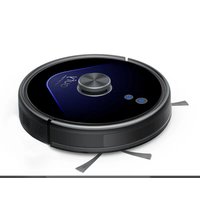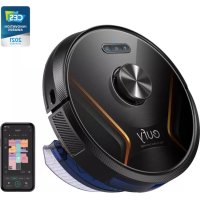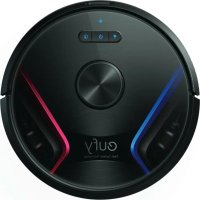
RoboVac X8 - Robot vacuum eufy - Free user manual and instructions
Find the device manual for free RoboVac X8 eufy in PDF.



User questions about RoboVac X8 eufy
0 question about this device. Answer the ones you know or ask your own.
Ask a new question about this device
Download the instructions for your Robot vacuum in PDF format for free! Find your manual RoboVac X8 - eufy and take your electronic device back in hand. On this page are published all the documents necessary for the use of your device. RoboVac X8 by eufy.
USER MANUAL RoboVac X8 eufy
For FAQs and more information, please visit: www.eufylife.com
Owner's Manual RoboVac X8
English 01
Deutsch 39
Espanol 77
Francais 115
Italiano 155
Nederlands 195
Pycckn 235
Turk 279
Table of Contents
02 Important Safety Instructions
10 About Your RoboVac
What's in the Box
RoboVac Anatomy
Buttons & Indicators
Map Navigation and Management
15 Get Started
Important Tips Before Use
Preparation
Charge Your RoboVac
Auto Recharge and Resume
18 Using Your RoboVac
Turn on/off
Start cleaning
Use Your RoboVac with the EufyHome App
Select a Cleaning Mode
Use Your RoboVac with Amazon Alexa /
the Google Assistant
Set Up Virtual Wall / Boundary Strip
25 Cleaning and Maintenance
Clean the Dust Collector and Filter
Clean the Rolling Brush
Clean the Side Brush
Clean the Swivel Wheel
32 Troubleshooting
Voice Alert
37 Customer Service
Thank you for purchasing RoseVac. Carefully read all the instructions below before using this device, and keep this manual for future reference.
EnglishEng
Important Safety Instructions
To reduce the risk of injury or damage, keep these instructions at hand when setting up, using, and maintaining this device.
WARNING SYMBOLS USED

This is the safety alert symbol. This symbol alerts you to potential hazards that could result in property damage and/or serious bodily harm or death.
This device can be used by children aged from 8 years and above and persons with reduced physical, sensory or mental capabilities or lack of experience and knowledge if they have been given supervision or instruction concerning use of this device in a safe way and understand the hazards involved.
Children should be supervised to ensure they do not play with this device.
- Cleaning and maintenance shall not be performed by children without adult supervision.
This device is only to be used with the power supply unit provided.
Before cleaning or maintaining this device, the plug must be removed from the outlet.
- The battery in this device should only be replaced by a skilled professional.
- When removing the battery, disconnect the device from the supply mains.
To recharge the battery, only use the detachable adapter (US/CA: GSCU1000S024V24T; UK: GSCB1000S024V24T; AU: GSCS1000S024V24T; EU: GSCV1000S024V24T) provided with this device.
The battery must be removed before this device is disposed of. To remove the battery, first unscrew
the screws on the bottom, then remove the back cover. Remove the battery by disconnecting the quick connector.
The used battery should be placed in a sealed plastic bag and disposed of safely according to local environmental regulations.
- The external flexible cable or cord of the power supply unit cannot be replaced; if the cord is damaged, the power supply unit should be disposed of.
This device is for indoor use only.
This device is not a toy. Do not sit or stand on this device. Small children and pets should be supervised when this device is operating.
- Store and operate this device in room temperature environments only.
- Do not use this device to pick up anything that is burning or smoking.
- Do not use this device to clean up spills of bleach, paint, chemicals, or anything wet.
Before using this device, pick up objects like clothing and loose paper. Lift up cords for blinds or curtains. Move power cords, sharp-pointed and fragile objects out of the way. If this device passes over a power cord and drags it, an object could be pulled off a table or shelf.
If the room to be cleaned has a balcony, a physical barrier should be used to prevent access to the balcony and to ensure safe operation.
- Do not place anything on top of this device.
- Be aware that this device moves around on its own.
Take care when walking in the area where this device is operating to avoid stepping on it.
- Do not operate this device in areas with exposed electrical outlets on the floor.
EnglishEng
- Do not expose the electronics of this device, its battery, or the integrated Charging Base. There are no user-serviceable parts inside.
- Do not use this device on an unfinished, unsealed, waxed or rough floor. It may result in damage to the floor and this device. Use only on hard floor surfaces or low-pile carpets, and not on carpets with tasseled edges or loose threads.
This device has been designed to be used on floors without scratching them. We still recommend that you test this device on a small area of the room to be cleaned to ensure no scratches are made before cleaning the whole room. - Only use attachments recommended or described in this manual.
- Do not handle the appliance or plug with wet hands.
- Ensure that the dust collector and/or filters are correctly in-place before usage.
- Do not use a battery pack or appliance that is damaged or modified. Damaged or modified batteries may exhibit unpredictable behavior resulting in fire, explosion, or risk of injury.
- Do not expose the battery pack or appliance to fire or excessive temperature. Exposure to fire or temperature above 130^ may cause an explosion.
- Do not modify or attempt to repair the appliance or the battery pack (as applicable), except as indicated in the instructions for use and care.
- Follow all charging instructions and do not charge the battery pack or appliance outside of the temperature range specified in the instructions. Charging improperly or at temperatures outside of the specified range may damage the battery and increase the risk of fire.
- The laser distance sensor of this device meets the standards for Class I Laser Products in IEC 60825-1:2014 and will not generate hazardous laser radiation.
Notice

This symbol on the device or its packaging indicates: Do not dispose of electrical appliances as unsorted municipal waste; use separate collection facilities. Contact your local authority for information regarding the collection systems available. If electrical appliances are disposed of in landfills or dumps, hazardous substances can leak into the groundwater and get into the food chain, damaging your health and well-being. When replacing old appliances with new ones, the retailer is legally obliged to take back your old appliance for disposal at least free of charge.
FCC Statement
This device complies with Part 15 of the FCC Rules. Operation is subject to the following two conditions: (1) This device may not cause harmful interference, and (2) this device must accept any interference received, including interference that may cause undesired operation.
Warning: Changes or modifications not expressly approved by the party responsible for compliance could void the user's authority to operate the equipment.
Note: This equipment has been tested and found to comply with the limits for a Class B digital device, pursuant to Part 15 of the FCC Rules. These limits are designed to provide reasonable protection against harmful interference in a residential installation.
This equipment generates, uses, and can radiate radio frequency energy and, if not installed and used in accordance with the instructions, may cause harmful interference to radio communications. However, there is no guarantee that interference will not occur in a particular installation. If
EnglishEng
this equipment does cause harmful interference to radio or television reception, which can be determined by turning the equipment off and on, the user is encouraged to try to correct the interference by one or more of the following measures: (1) Reorient or relocate the receiving antenna. (2) Increase the separation between the equipment and receiver. (3) Connect the equipment into an outlet on a circuit different from that to which the receiver is connected. (4) Consult the dealer or an experienced radio / TV technician for help.
ISED Compliance Statement
This device contains licence-exempt transmitter(s)/ receiver(s) that comply with Innovation, Science and Economic Development Canada's licence-exempt RSS(s). Operation is subject to the following two conditions:
- This device may not cause interference.
- This device must accept any interference, including interference that may cause undesired operation of the device.
RF Exposure Compliance Statement
This equipment complies with FCC/IC radiation exposure limits set forth for an uncontrolled environment. This equipment should be installed and operated with a minimum distance of 20cm between the radiator and your body.
Declaration of Conformity
This product complies with the radio interference requirements of the European Community. Hereby, Anker Innovations Limited declares that the radio equipment type T2262 is in compliance with Directive 2014/53/EU. The full text of the EU declaration of conformity is available at the following internet address: https://www.eufylife.com/. Maximum output power: 18 dBm (For EU) 0607
Frequency band: 2.4G band (2.4000GHz - 2.4835GHz)
GB Declaration of Conformity
Hereby, Anker Innovations Limited declares that the product type T2262 is in compliance with Radio Equipment Regulations 2017 and The Restriction of the Use of Certain Hazardous Substances in Electrical and Electronic Equipment Regulations 2012. The full text of the GB declaration of conformity is available at the following internet address:
https://www.euflylife.com/
Trademark Notice
Amazon, Echo, Alexa and all related logos are trademarks of Amazon.com, Inc. or its affiliates.
Apple and the Apple logo are trademarks of Apple Inc., registered in the U.S. and other countries, App Store is a service mark of Apple Inc., registered in the U.S. and other countries.
- Google Play and the Google Play logo are trademarks of Google Inc.
- Google Home is a trademark of Google Inc.
AUSTRALIA & NEW ZEALAND WARRANTY
This document details the terms and conditions of the warranty provided with this product. Please disregard any other representations contained on this product's packaging or provided with this product, which constitute or appear to constitute a warranty.
Subject to the exclusions and limitations set out below, we warrant to you that if you purchase a product directly from us, or, from any of our authorized resellers, that it will not contain defects which are a result of faulty manufacturer
EnglishEng
workmanship or materials. This warranty subsists for 15 months from the date of purchase. This warranty is provided in addition to your rights under the Australian & New Zealand Consumer Law.
Subject to any rights you have under the Australian & New Zealand Consumer Law, we will not be liable for defects which are a result of damage or loss caused by factors beyond our control, any product which has not been maintained according to any care or maintenance instructions provided with the product, any alterations to a product which are not performed by us, or damage or defects caused to the product due to unusual or non-recommended use. We will not be liable for any special, indirect, consequential or economic loss or damage or loss of profits whatsoever suffered by you or any other person resulting from any act or omission by us. Our total liability in respect of this Warranty against Defects is limited to the replacement of the goods.
This Warranty against Defects is provided in addition to other rights and remedies that you may have at law. Our goods come with guarantees that cannot be excluded under the Australian Consumer Law. You are entitled to a replacement or refund for a major failure and for compensation for any reasonably foreseeable loss or damage. You are also entitled to have the goods repaired or replaced if the goods fail to be of acceptable quality and the failure does not amount to a major failure.
In order to claim the warranty, you must return the product to the retailer from which it was purchased or if that retailer is part of a National network, a store within that chain, along with satisfactory proof of purchase. The retailer will then return the goods to Directed Electronics Australia authorized by Anker Innovations Limited. Directed Electronics Australia will repair, replace or refurbish the
product at its discretion. The retailer will contact you when the product is ready for collection. All costs involved in claiming this warranty, including the cost of the retailer sending the product to Directed Electronics Australia, will be borne by you.
This warranty is offered by Directed Electronics Australia.
Customer service support number (+61) 383314800 Mon-Fri 8:30am - 5:00pm (AEST) and customer service email address service@myeufy.com.au.
EnglishEng
About Your RoboVac
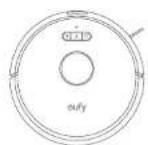
What's in the Box
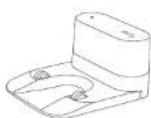
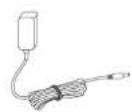
RoboVacChargingBasePowerAdapter
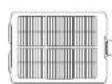
Additional Filter
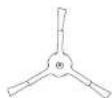
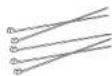
Additional Side Brush Cable Ties (x5)

Owner's Manual & Other Documents
10 11
RoboVac Anatomy
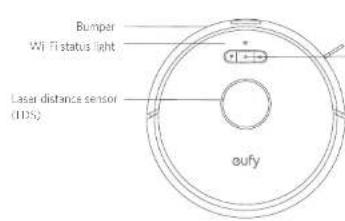
A. Top & Side
Recharge button
- Preso:orum RasaVic: the Chosing place, preso again in Insges
Auto cleaning Start / Pause button
Press and hold for 3 seconds to turn off (when not in Changing status)
- Press to start Auto cleaning
- Press to pause the current task when working
Spot cleaning button
Press to start Spot cleaning
F 5
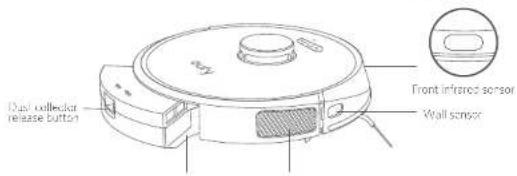
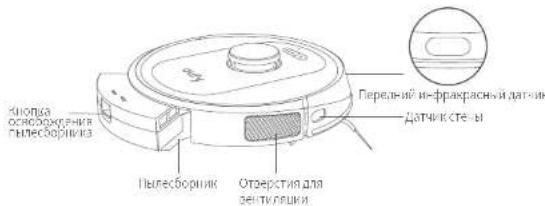
Dust collection
Ventilation holcs
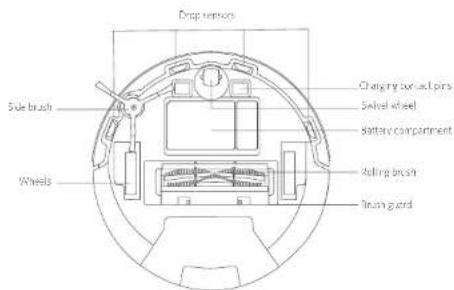
B. Bottom
EnglishEng
C. Dust Collector
D. Suction Inlet
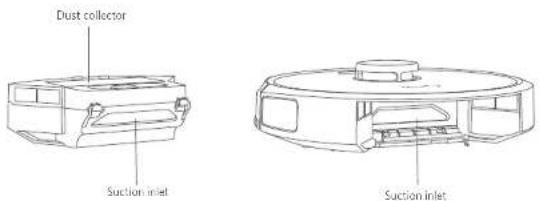
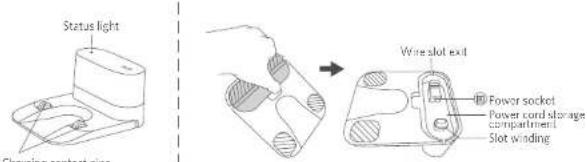
E. Charging Base
Buttons & Indicators
| Turn on / off (Press and hold for 3 seconds) | |
| Start / Pause Cleaning • Solid blue: standby, cleaning, pause cleaning, returning to charging base or fully charged • Solid orange: working in low battery status • Breathing orange (when docked to Charging Base): charging • Flashing red: error “Refer to the “Troubleshooting > Voice Alert” section in this manual for solutions. | |
| Start / Pause returning to Charging Base • Flashing blue slowly: returning to Charging Base • Solid blue: standby or paused | |
| Spot Cleaning • Flashing blue slowly: Spot Mode • Solid blue: standby or paused |
When you use the Find My Robot function via the Eulodyne app, all three LED indicators are solid blue and a voice prompt is heard.
To conserve power, the blue light on the buttons becomes dim when:
RoboVac is not docked to the Charging Base and has been inactive for 10 minutes.
RobaVar is fully charged for 1 minute.
| (Wi-Fi Status Light) | Status |
| Slowly flashing blue Waiting for connection | |
| Rapidly flashing blue Connecting with your wireless router | |
| Sold blue Connected to your wireless router | |
EnglishEng
Map Navigation and Management
Navigation
Once Auto cleaning starts, RoboVac moves from the Charging Base, automatically scans to generate maps, intelligently determines its cleaning route, and divides the space into zones. The cleaning paths are planned along the walls, following a Z-shaped cleaning method to complete the cleaning of each zone one by one.
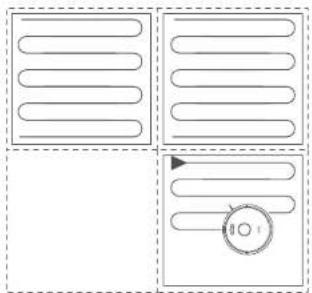
Real-time Mapping & Floor plan
Real-time mapping helps RoboVac to learn the correct cleaning path and the environment of your home easily. A floor plan will be built after clearing The map will be updated in real-time during each cleaning session to ensure normal navigation.
To create a complete floor plan
- Open your doors so that RoboVac can map each room
- Remove any objects that may be in the way or that might entangle RoboVac

Do not remove the Charging Base after a floor plan is created.
Repositioning & Remapping
If the position of RoboVac / Charging Base's adjusted or the surroundings are changed significantly, RoboVac will try to reposition and repump to match the surroundings.
If the repositioning is successful, Robovac will resume cleaning.
If the repositioning fails, RoboVac will remap to ensure normal navigation with a new cleaning:
1415

- When using for the first time, make sure ReboVac starts cleaning from the Charging Base.
- During cleaning, do not move RoboVac frequently. If moved, place RoboVac back to the original position.
Get Started
Important Tips Before Use
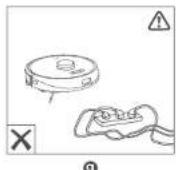
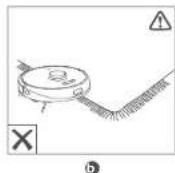
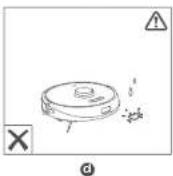

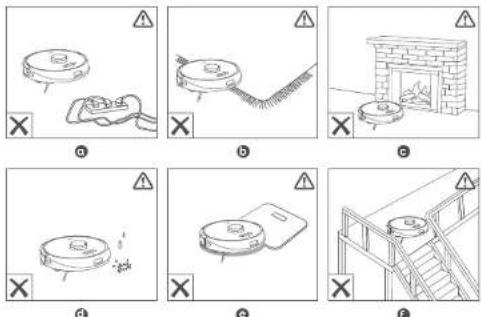
Remove power cords and small objects from the floor that may entangle RoboVac. Use the supplied cable ties to organize your wires and power cords.
Fold tasseled edges of area rugs undermaith to prevent tangling RoboVac. Avoid cleaning very dark-colored high-pile rugs or rugs thicker than 1.02 in/20 mm as they may cause RoboVac to malfunction.
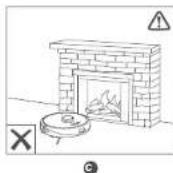
The "No-Go" zones that you set may be ineffective in some cases. It is strongly recommended to place boundary strips (acid separately) in front of fireplaces and certain areas (i.e. air vents) that may cause damage to RoboVac it entered.
Keen RoboVac away from wet areas during clearing.
RobVac may climb or top of objects less than 0.67 in/17 min in height. Remove these objects if possible.
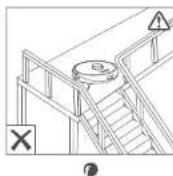
1 Anti-drop sensors will prevent RoboVac from tumbling downstairs and steep drops in most cases. Sensors are less effective if dirty or used on carpeted/reflective/very dark-colored floors. It is recommended to place physical barriers to block off areas where RoboVac may fall.
EnglishEng
Preparation
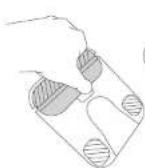
1 Remove the foam blocks beside the bumper before use.
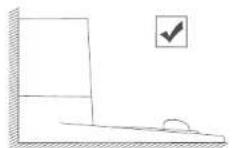
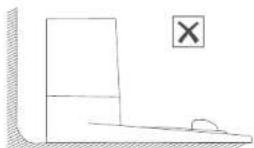
Place the Charging Base on a level surface and against a wall.
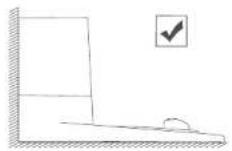
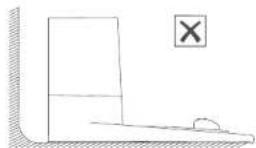
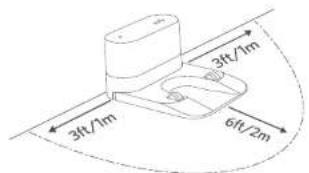
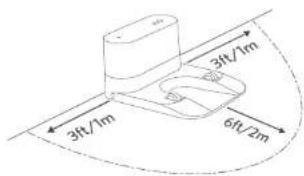
Remove objects within 3 ft/1 m of the left and right side and within 6 ft/2 m of the front of the Charging Base. If you cannot remove the objects, move RoboVac to a new place and check whether RoboVac can return to the Charging Base normally; if not, contact early customer service for help.
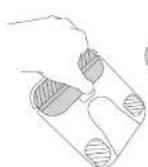
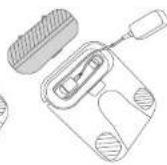
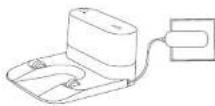
4 Connect the round connector of the adapter into the power socket on the Charging Base and the other end into a wall outlet. When the Charging Base connects to AC power, the LED indicator on the Charging Base is SOLDER WHITE.
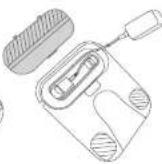
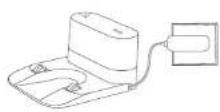
1
1617
Install the Charging Base in a location that RoboVac can easily access. It is recommended to place the Charging Base against a wall, and on a hard-level surface rather than on rugs or carpets.
Always keep the Charging Base plugged in, otherwise RoboVac will not automatically return up to it.
To ensure proper charging, do not frequently move the Charging Base. When its location is changed, RoboVac may remap due to repositioning (failure (see About Your RoboVac > Map Navigation and Management for details).
Charge Your RoboVac
Make sure RoboVac is fully charged before use.
- RoboVac will return to the Charging Base at the end of a cleaning cycle or when its battery is running low.
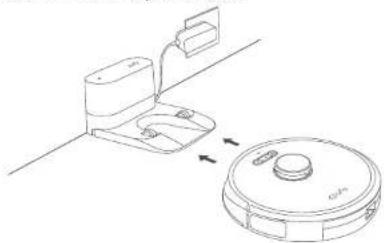
Method 1: Attach RoboVac to the Charging Base by aligning its charging pins with the charging pins on the base.
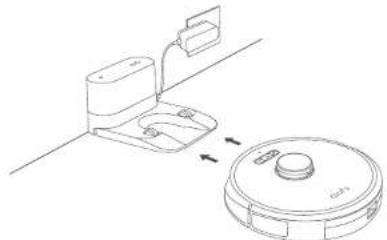
Method 2: Press in the main unit or tap the key in the Eufy Home app to send RoboVac to the Charging Base.
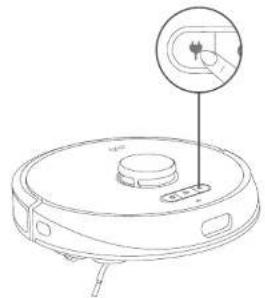
EnglishEng
- RoboVac is not used for a long time, to preserve the battery's lifespan, recharge at least once every 6 months.
When RoboVac is being charged, to enter Reduced Power Standby mode for power-saving, simultaneously press and hold the three buttons ( & ) RoboVac for 10 seconds until the lights turn off. Wi-Fi is disabled while this mode is active. Press Exit Reduced Power Standby mode.
Auto Recharge and Resume
RoboVac returns to the Charging Base automatically to recharge when:
RooVac has finished cleaning
- Cleaning is not complete and the battery level becomes low; Once recharged to 80% battery capacity, RoboVac will resume to finish the remaining cleaning.

Do not move the Charging Base during cleaning, otherwise RoboVac may fail to return for recharge. It failed, you have to manually attach it to the Charging Base. If the Charging Base is moved, start cleaning from the new location. RoboVac will automatically return when it has finished cleaning.
Using Your RoboVac
Turn on/off
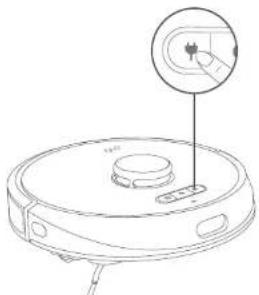
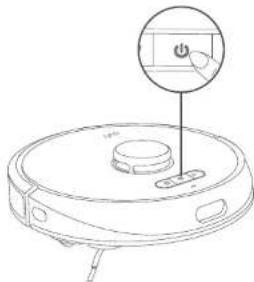
RoboVac turns on automatically when attached to the Charging Base and connected to power.
When RoboVac is not on the Changing Base, press and hold 3 seconds to turn on the main unit. Wait until the Power Status Light turns solid blue.
- When RoboVac is not on the Charging base, press and hold 3 seconds again to turn off the main unit.
Start cleaning

RoboVac cannot start cleaning if the battery level is low. In this case, recharge RoboVac first before cleaning.
1819
Press to start cleaning in Auto Mode.
RoboVac moves around to scan the environment and builds a map automatically.
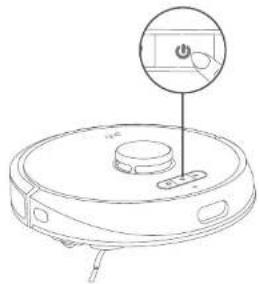
Press chain to pause cleaning.
Press resume cleaning.
When clearing is paused, docking RoooVac onto the Charging Base will stop the cleaning.
If clearing is paused for 10 minutes, RoboVac automatically stops clearing and switches to sleep mode.

stop current cleaning and return to the Charging Base.

Before cleaning, tidy cables and cords to avoid power interruption or any damage caused by pulling the cord during cleaning.
Use Your RoboVac with the EufyHome App
To fully enjoy all the available features, it is recommended to control your RoboVac via the Eufly home app.
Before you start, make sure that:
- Your smartphone or tablet is running iOS 9.0 (or above) or Android 5.0 (or above).
The 2.4GHz band wireless signal is enabled on your wireless router
The Wi-Fi status light on RohoVar is slowly flashing blue. - Your smartphone or tablet has enabled Bluetooth to ensure a better connection.
RoboVac has enough power curing setup.
EnglishEng

Download on the AppStore

GET IT ON Google Play
- Download the buyHome app from the App Store (OS devices) or Google Play (Android devices).
- Open the app and create a user account.
- Tap the "I" icon to add "RoboVac X8" to your EufyHome account.
- Follow the Instructions in the app to set up the Wi-Fi connection.
After connecting successfully, you can control RoboVac via the app.
With the app, you can select cleaning at your desired suction level, schedule cleaning, view the clearing map, set up "No-Go" zones, check the network connection status, and access additional features.
Wi-Fi Status Light
Slowly flashing blue Witing for connection
Rapidly flashing blue Connecting with your wireless router
Solid blue Connected with your wireless router

It RoboVac gets stuck in any space, tap Find My Robot in the app to find the machine. This function is available in the app only.
Reset the Wi-Fi connection
To reset the Wi-Fi connection, press and hold the two buttons (√ and √) simultaneously for 5 seconds until you hear a voice prompt. At the same time, RoboVac will restore the factory default settings.
You will hear a voice prompt when the Wi-Fi connection has been reset, and the Wi-Fi status light will slowly flash blue. Now you can follow the Wi-Fi instructions in the aufyHeme app to set up the Wi-Fi connection.
20 21
Schedule Cleaning
With the Fiftyorne app, you can schedule RoboVac to start cleaning at a particular time.

You can set the time and customize the cleaning schedules from Sunday to Saturday on the eufy-home app. This function is available in the app only.
Select a Cleaning Mode

- You can press (b) any time to pause the current cleaning cycle.
You can also select a cleaning mode via the EutyHome app.
Auto-cleaning
- Press start cleaning in Auto Mode
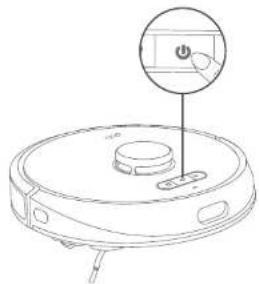
- Press (dain to pause cleaning

By default, RoboVac starts in Auto cleaning mode when it is turned on.
Spot cleaning
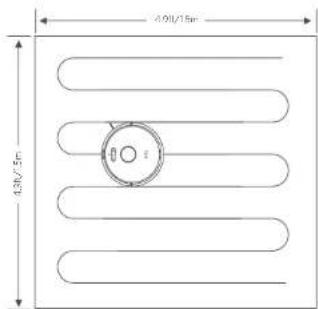
RoboVac intensely cleans a specific area with a size of 4.9 ft × 4.9 ft × 1.5 m × 5 m, useful if there is a concentrated area of dust or debris. When the cleaning of a certain
EnglishEng
zone is finished, it automatically returns to the Charging Base.
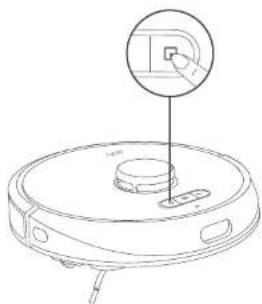
Press start Spot cleaning
Room cleaning (available via the EufyHome app only)
In this mode, your house's automatically divided into several rooms for cleaning in the EuflyHome app. You can also customize your room settings in the app. RoboVac will clean the selected rooms only and return to the Charging Base after cleaning.

- Start Room cleaning, only after RoboVac has created the map.
- It is recommended that RoboVac moves from the Charging Base to start Room cleaning.
2223
Zone cleaning (available via the EufyHome app only)
In this mode, you can set up a cleaning zone in the Fufyloma app. RoboVac will clean the selected zone only.
Select a Suction Power Level
In the EutyHome app, select a suction power levee according to your needs:
Quiet
Standard (Default)
Turbo
Max
Select BoostIQ™ feature
In the EuryHome app, select the BoostIQTM feature according to your needs. RoboVac will automatically increase the suction power if it detects that stronger power is needed to ensure the best clean. BoostIQTM is ideal for clearing thicker carotids and arthro-swoop masses, which will reduce the total cleaning time, but increase the noise level. If the vacuuming no se caused by BoostIQ™ disturbs you, you can disable this feature.
Use Your RoboVac with Amazon Alexa / the Google Assistant
Amazon Alexa and the Google Assistant are smart voice assistants that enable you to control RoboVac with your voice.
Before you start, make sure that:
RoboVac is attached to the Charging Base to ensure there is enough power.
RoboVac is connected with the EufyHome app.
- You have an Alexa-enabled device (i.e. Amazon Echo, Echo Dot and Amazon Tap, Echo Snow, Echo Spot) or a device enabled with the Google Assistant (i.e. Google Home, Google Home Mini). These devices are sold separately.
The Amazon Alexa app or Google Home app is already installed on your smart device, and you have created an account.
To control RoboVac with Amazon Alexa or the Google Assistant
- Open the EufyHome app and tap "Smart Integrations" in the top left
- Follow the on-screen instructions to complete the setup.
EnglishEng

Currently this feature only supports English, German, French, and Spanish. You can check regularly if more languages are supported at https://www.euylife.com/support/.
Set Up Virtual Wall / Boundary Strip
Virtual Wall (Available on the App Only)
In the EutyHomepop you can set up a No-Go Zone or "Virtual Walas a restricted area. This eliminates the need to use physical barriers, including Boundary Strips. This feature is only designed for dividing the cleaning zones, not for isolating hazardous areas.
- No-Go Zone: RoboVac will not enter the zone to vacuum.
Virtual Wall: RoboVac will not cross the virtual wall.

- To set a virtual wall. RoboVac must initially perform a cleaning run to create a floor plan.
Although a virtual wall is set, RoboVac may still enter the restricted zone due to repositioning failure or abnormal sensors. - Moving the device or changing the environment may lose the virtual wall and cause mapping to fail and rebuild.
Boundary Strips
Boundary strips (solid separately) can keep RoboVac away from hazardous areas. RoboVac will recognize the barriers and will not cross into the blocked-off area.
- Identify the area or item you do not want RoboVac to get close to.
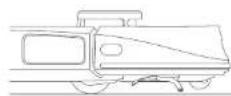
- Place the boundary strips FLAT on the floor or under a rug
- Do not place the boundary strips under a THICK rug as RoboVac may fail to recognize the boundary strip.
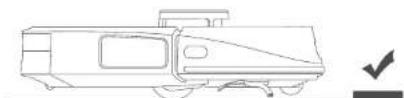


- Make sure the boundary srios are placed on the same surface plane. Robovac is used on.
If the boundary strips roll up, remove and then re-apply to the floor with adhesive tape. Otherwise the boundary strips may not work well.
Cleaning and Maintenance
Before cleaning and maintaining, turn off the device and unplug the adapter.
For optimal performance, follow the instructions below to clean and maintain RoboVac regularly. The cleaning/replacement frequency will depend on your RoboVac usage habits.
Recommended cleaning/replacement frequency
| RoboVac Part Cleaning Frequency Replacement Frequency | ||
| Dust Collector After each use - | ||
| Filter Once every week | Every 3 months | |
| Rolling Brush | Once every week | Every 6-12 months |
| Sce Brush | Once every month | Every 3-6 months (or when visibly worn) |
| Brush Guard | Once every month | Every 3-6 months (or when the silicone rubber strip on the brush guard becomes visibly worn) |
| Sensors | Once every month | - |
| Charging Pins | Once every month | - |
| Swivel Wheel | Once every month | - |
Clean the Dust Collector and Filter
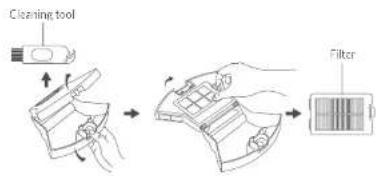
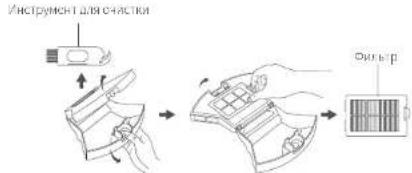
Press the dust collector release button to pull the dust collector out.
Open and empty the dust collector.
EnglishEng
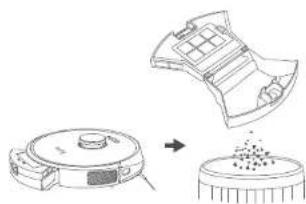
3 Remove the filter.
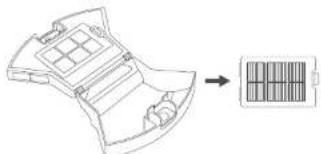
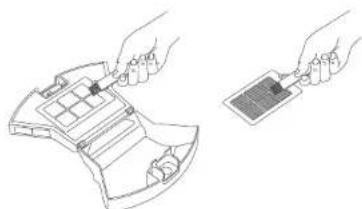
Clean the dust collector and filter with the cleaning brush.
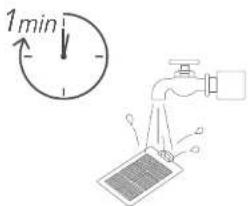
5 Rinse the dust collector and filter thoroughly with water.
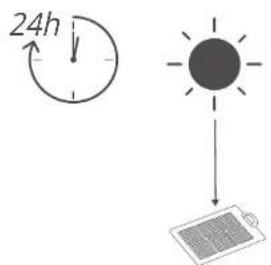
Air dry the dust collector and filter completely before next use. You may change to use the other filter if the original one is not completely dry.
7 Place the filter back into the dust collector.
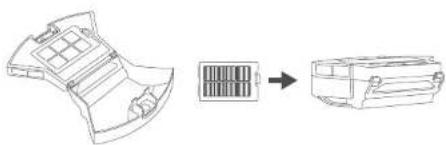
Push the dust collector back into the main unit.
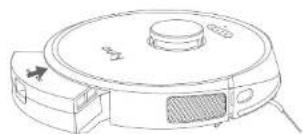
EnglishEng
Clean the Rolling Brush
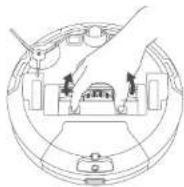
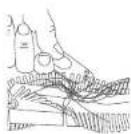
1 Pull on the release labs to unlock the brush guard as shown.
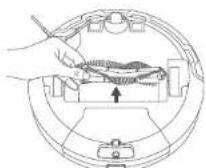
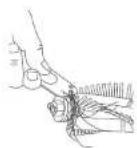
2 Lift the rolling brush to remove.
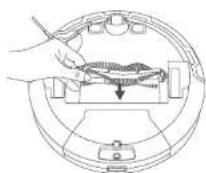
3 Clean the rolling brush with the cleaning tool.
4 Install the rolling brush by inserting the fixed protruding end first and then clicking into place.
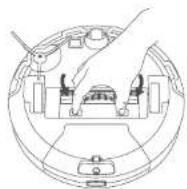
Press down to snap the brush guard into place.
1
2

3
4
5
Clean the Side Brush
Foreign substances, such as hair, can easily get tangled in the side brush, and dirt may adhere to it. Be sure to clean it regularly.
Use a Phillips screwdriver to unscrew the screw on the side brush.
2 Remove the side brush
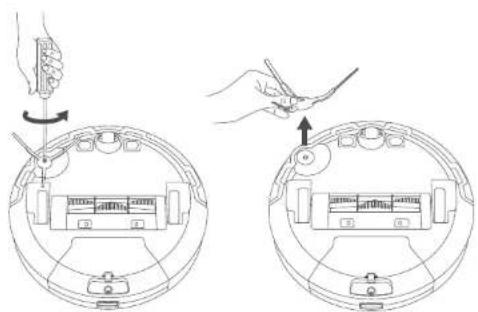
3 Carefully unwind and pull off any hair or string that is wrapped between the main unit and the side brush.
4 Clean the side brush with water.
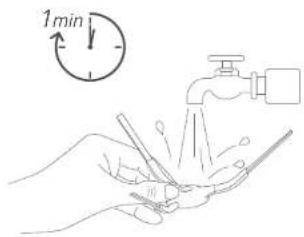

Only use the side brush when it is completely dry.
EnglishEng
Replace the Side Brush
The side brushes may become bent or damaged after being used for a period of time. Follow the instructions below to replace it.
Use a Phillips screwdriver to unscrew the screw on the side brush.
2 Pull off the old side brush and snap the new one into place.
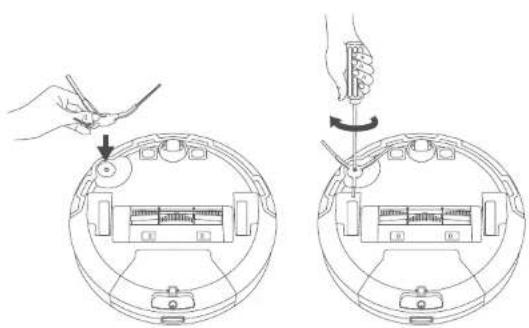
3 Screw down the screw to fasten the side brush.
Clean the Sensors and Charging Pins
To maintain the best performance, clean the drop sensors and charging pins regularly.
- Dust of the sensors and charging contact pins using a cloth or cleaning brush.
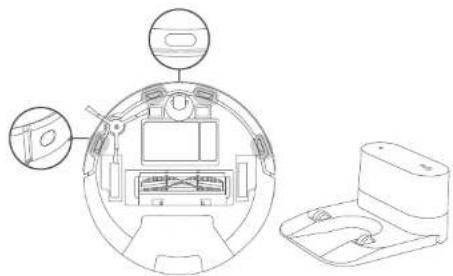
30 31
Clean the Swivel Wheel
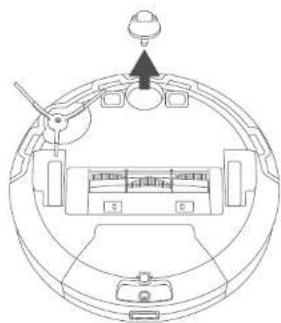
Hair or dust particles can easily get entangled in the swivel wheel. Be sure to clean the swivel wheel periodically and as needed.
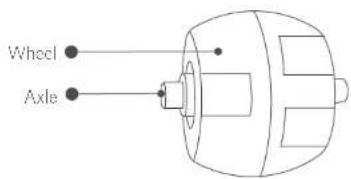
Pull out the swivel wheel.
Clean any hair or debris wrapped around the wheel or entangled inside the wheel cavity.
3 Reinstal the wheel and push in until it clicks into place.
Do not clean the swivel wheel with water.
EnglishEng
Troubleshooting
The solutions below are for general questions. If your problem persists, visit www.euylife.com, go to EulylHome app, or contact support@euylife.com for help.
| Problems Solutions | |
| RoboVac suddenly produces a loud noise. | ·Adjust the suction power level in the EuflyHome app ·Check if the rolling brush, filter, dust collector or suction inlet is stuck ·Make sure the filter and the brush guard have been properly installed. |
| The map is lost or rebuilt even after a floor plan is created. | ·If the position of RoboVac / Charging Base is adjusted or the surroundings are changed, RoboVac will try to relocalize and remap to match the surroundings ·Place RoboVac back to the Charging Base and start a new clearing sess on. |
| RoboVac cannot be activated. | ·Make sure RoboVac is connected to a power source ·Make sure the battery is fully charged ·Press and hold the button for 3 seconds to turn on RoboVac. |
| RoboVac suddenly stops working. | ·Check if RoboVac is trapped or stuck on an obstacle ·Check if the battery level is too low ·Check if RoboVac has alerted you with any voice prompts or LED indicators. Refer to the "Voice Alert" section in this manual ·If you still have trouble, turn off RoboVac, wait for 3 seconds, and then turn it back on. |
| You cannot schedule clearings. | ·Make sure RoboVac is turned on ·You can set the time of day and scheduled clearing time via the EuflyHome app ·Make sure the scheduled time has been set correctly ·Check if RoboVac's power is too low to start clearing ·RoboVac will not start a scheduled cleaning while already performing a clearing task. |
| Problems Solutions | |
| Suction power is weak. | Check if any obstructions are blocking the suction inlet. Empty the dust collector. Clean the filter with water. Select the max suction power level in the EutyHome app. Check if the filter is wet due to water or other liquid on the floor. Air-dry the filter completely before use. |
| RoboVac cannot be charged. | Check if the LED indicator on the Charging Base lights up (when RoboVac is not on the Charging Base), if not, reconnect the adapter with the Charging Base and try a new power outlet. If the problem still persists, contact the euty service center to repair or replace the Charging Base. Dust off the charging contact pins with a dry cloth. |
| RoboVac cannot return to the Charging Base | Remove objects within 3 ft/1 m to the left and right side and within 6 ft/2 m of the front of the Charging Base. Make sure RoboVac started cleaning from the Charging Base and has not been moved during cleaning. Clean the charging contact pins. |
| The rolling brush does not rotate. | Clean the rolling brush. Remove the hair wrapped around the rolling brush or entangled in the two ends of the brush. Check if the rolling brush and brush guard have been installed properly. |
| RoboVac's movements or travel path are abnormal. | Check if there is any relevant voice prompt. Follow the voice prompt to solve the problem. Clean the sensors carefully with a dry cloth. Restart RoboVac by turning RoboVac off and on. |
| RoboVac cannot connect to a Wi-Fi network. | Make sure your Wi-Fi router supports the 2.4GHz and 802.11b/g/n bands; the 3GHz band is not supported. |
EnglishEng
| Problems Solutions | |
| You cannot control RoboVac with Amazon Alexa. | ·Check if there are any Internet connection problems. ·Check whether you have installed the Amazon Alexa app onto your smart device and enabled "EufyHome - RoboVac" skill in the Amazon Alexa app. For details, refer to the "Smart Integrations" page in the EufyHome App. ·Make sure you have a EufyHome account and that it is connected to RoboVac. ·Make sure you are using correct Alexa voice commands. |
| You cannot control RoboVac with the Google Assistant. | ·Check if there are any Internet connection problems. ·Check if you have installed the Google Home app onto your smart device and initiated the "EufyHome" action in the Google Home app. For details, refer to the "Smart Integrations" page in the EufyHome App. ·Check if you are using the proper commands when talking to the Google Assistant. When making your request, first say the wake words "Ok Google". ·Repeat your question. Speak clearly to the Google Assistant. |
Voice Alert
When RoboVac encounters a problem, the red indicator on RoboVac will flash and you will hear the relevant voice prompts.
The voice prompts below are only for reference and may be changed slightly after voice pack updates. Please follow the voice prompts you have heard to find the cause and solution below.
| Voice Prompt Cause and Solution | |
| Error 1: Front bumper stuck | If the front bumper is stuck, gently push the bumper in repeatedly to dislodge anything trapped inside. If there is nothing there, try moving the device to a new area and restart. |
| Error 2: Wheel stuck. Check the wheel and move it to a new position | Wheel may be stuck or trapped. Clear any obstacles in the surrounding area and check the wheel for any trapped cust. Move the device to a new position and try again. |
| Error 3: Side brush stuck Side | brush may be stuck. Please clean it and try again. |
| Voice Prompt Cause and Solution | |
| Error 4: Rolling brush stuck. Remove and clean the rolling brush. | Remove the rolling brush, roller joint, roller brush cover, and suction inlet to clean it. Once cleaned, place the items back into the device and try again. |
| Error 5: Device trapped. Clear the surrounding area. | Device is trapped. Clear any obstacles in the surrounding area and try again. |
| Error 6: Device trapped. Reposition the device near the area where the problem occurred. | Device may be suspended in air. Move it to a new position close to the original position and try again. If the device is still unable to start, clean the edge sensor and try again. |
| Error 7: Wheel suspended. Please move the device to a new position. | Wheels may be suspended in air. Move the device to a flat surface and a new position close to the original position then try again. |
| Error 8: Low battery, shutting down device. Please charge your device. | Low Battery, system will shut down. Charge the device and try again. |
| Error 9: Magnetic Boundary Strip detected. Move device to a different area. | Device is too close to a strong magnetic field or strip. Move the device to a different area and try again. |
| Error 12: Right wall sensor needs cleaning. | Clean the right side wall sensor since it's covered in dust. |
| Error 13: Device tilted. Please put the device on a flat surface to start | Device may be tilted. Put the device on a flat surface and try again. |
| Error 14: Please insert dust collector and filter. | Put the dust collector and filter back in and confirm that they are in place. Then restart the device |
| Error 17: Virtual Boundary detected. Move device to a different area. | Device is too close to the virtual boundary. Move the device to a new position and try again. |
| Error 18: Laser cover may be stuck | Pressure sensor for laser cover is stuck. Move the device to a new position and try again. |
| Error 19: Laser sensor may be stuck | Laser ranging sensor is covered in dust. Clean it and try again. |
| Error 20: Laser sensor may be blocked. | Laser sensor is blocked by: • An empty environment • Metal mirrors • Or other multi-reflection devices Remove any obstacles and move the device to a different area. |
EnglishEng
| Voice Prompt Cause and Solution | |
| Error 21: Charging Base blocked by surrounding obstacles | Charging base is blocked by obstacles, clear any obstacles around the charging base and try again. |
| Error 51: Battery Error, Refer to Owner's Manual or App for help. | - Open the battery compartment and check whether the battery is connected and restart the device. - Battery Temperature may be too high or low; wait until the battery falls to normal temperatures before using 0°C - 40°C C/C 32°F to 104°F. - If the issue persists, contact customer support for help. |
| Error 52: Wheel Module Error, Refer to Owner's Manual or App for help. | - Check whether the wheels are stuck or dust is trapped inside before restarting the device. - If the issue persists, contact customer support for help. |
| Error 54: Suction Fan Error, Refer to Owner's Manual or App for help. | - Check whether the fan blades are stuck in an unknown object before restarting the device. - Clean the cust collector and filter before restarting the device. - If the issue persists, contact customer support for help. |
| Error 55: Rolling Brush Error, Refer to Owner's Manual or App for help. | - Remove and clean the roller brush, roller brush connection, roller brush cover and suction inlet before restarting the device. - If the issue persists, contact customer support for help. |
Specifications
| Input 24 V 1A | = |
| Battery Voltage 14.4V | = |
| Power Consumption 60 W | |
| Battery Type | 14.4V= Lion 5200 mAh (Typical) |
| Dust Collector Capacity | 0.6 L |
| Clearing Time Max. 150 mins | |
| Charging Time 240-300 mins | |
| Input 24 V 1A | = |
| Output 24 V 1A | = |
Customer Service
For FAQs and more information, please visit: https://support.safylife.com.
support@eufylife.com
support.mea@anker.com (For Middle East and Africa Only)
service@myeufy.com.au
www.eufylife.com
https://support.eu/fylife.com/s/phonecontactus
U5+18009887973
Mon-Fri 6:15-17:00 (PT)
Sat-Sun 6:30-16:30 (PT)
(UK) +44 (0) 1604 936200 Mon-Sun 6:00 - 17:00
Sat-Sun 6:00-14:00
(DE) +49 (0) 69 9579 7960 Mo-Fr 8:00-16:00
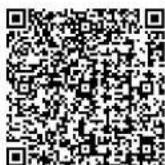
Scan the QR code for more support information.
@EulyOfficial
@EufyOficial
@EufyOfficial
@EutyOfficial
Anker Innovations Limited
Room 1318-19, Hollywood Plaza, 610 Nathan Road, Mongkok, Kowloon, Hong Kong
Inhaltsverzeichnis
Download on the App Store

GET IT ON Google Play
https://support.eufylife.com/s/phonecontactus
(US)+1(800)9887973
Mon-Fri 6:15-17:00 (PT)
Sat-Sun 6:30-16:30 (PT)
UK)4401604936200Mon-Sun6:00-17:00
Sat-Sun 6:00-14:00
(DE) +49 (0) 69 9579 7960 Mo-Fr 8:00-16:00
Download on the AppStore

GETITON GooglePlay
support.mea@anker.com (solo sara Oriente Medy Africa) service@myeuf.com.au
www.eufyife.com
Mon-Fri 6:15-17:00 (PT)
Sat-Sun 6:30-16:30 (PT)
UK) +44 01604936200 Mon-Sun 6:00-17:00
Sat-Sun 6:00-14:00
(DE) +49 (0) 69 9579 7960 Mo-Fr 8:00 - 16:00
Download on the AppStore

GET IT ON Google Play
service@myeufy.com.au
www.eufylife.com
https://support.euylife.com/s/phonecontactus
(US) +1 (800) 988 7973
Mon-Fri 6:15-17:00 (PT)
Sat-Sun 6:30-16:30 (PT)
UK) +44 (0) 1604 936200 Mon-Sun 6:00 - 17:00
Sat-Sun 6:00-14:00
(DE) +49 (0) 69 9579 7960 Mo-Fr 8:00 - 16:00
https://support.euflyife.com/s/phonecontactus
U5+18009887973
Mon-Fri 6:15-17:00 (PT)
Sat-Sun 6:30-16:30 (PT)
UK+4401604936200 Mon-Sun 6:00-
Sat-Sun 6:00-14:00
(DE) +49 (0) 69 9579 7960 Mo-Fr 8:00-16:00
This device complies with Part 15 of the FCC Rules. Operation is subject to the following two conditions: (1) This device may not cause harmful interference, and (2) this device must accept any interference received, including interference that may cause undesired operation.
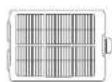
RoboVac Obioacstation Voeingsscapater
Extra filter
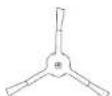
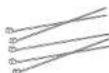
ExtrazjiborselKabelbidders (x5)

Handling en andere documenter
Nederlandns
Download on the AppStore

GET IT ON Google Play
https://support.eufyilfe.com/s/phonecontactus
(US) +1 (800) 988 7973
Mon-Fri 6:15-17:00 (PT)
Sat-Sun 6:30-16:30 (PT)
UK) +44 01604936200 Mon-Sun 6:00-17:00
Sat-Sun 6:00-14:00
(DE) +49 (0) 69 9579 7960 Mo-Fr 8:00-16:00
MaKcMmaJIbHaI MOUHOCTB BbIXOHOFO CnHnla
Bluetooth:18dEM(m(EC)
Дианэончстг:2,4ГU(2,4000-2,4835ГU)
3aBHeHoeToBapHbIX3HaKaX
- Amazon, Echo, Alexa u BCE cBz3aHbIe IorotnblyBIAHTcTOBapHbIM3HaKaAMu Amazon.com, Inc. nIn ee fuiinaiob.
Apple n IoroTun Apple raBnIOTc TOBaHbIMn 3HaKaAMn Apple Inc., 3apernctpnpoBaHHbIMn B CLIJA n dpynx cTpaHax. App Store RaBnEeTc 3HaKOM 06clnykBaHnA r Apple Inc., 3apernctpnpoBaHHbIMn B CLIJA n dpynx cTpaHax.
Google Play and Google Play are not on YouTube. - Google Home Web Page TOBapHbIM 3HaKOM Google Inc.
Pycckn
HΦopmaunO Baem RoboVac
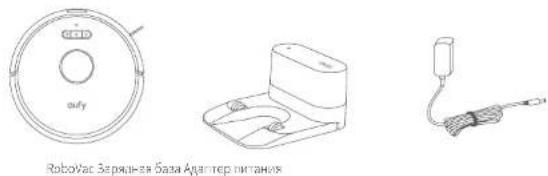
KOMIIeKT NOCTaBKn
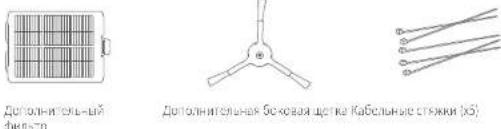

PYCOOLOLTOHIOIIL30-2OTATR 1YVYFUPYKHYTN-TH
244245
UcTpoIcTBo RoBoVac
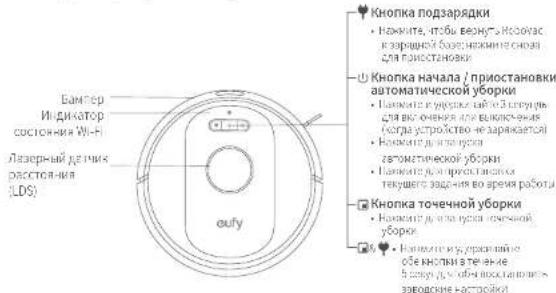
A. BnB cBepxu n c60ky
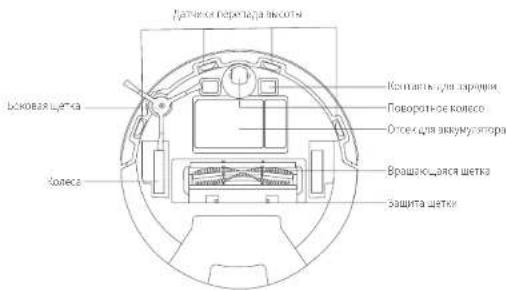
B.BudcHn3y
Pycckn
B.Пьлесборнк
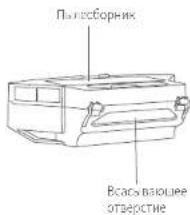
BcabibaouoeOTBepCTne
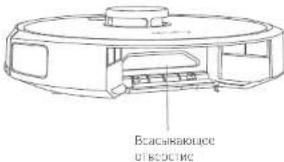
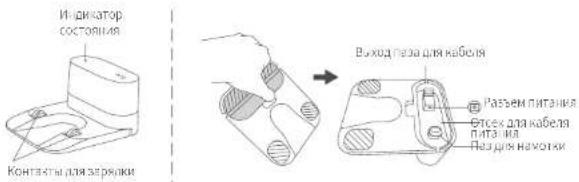
Д.Заряная 6а3a
KhONKn HnDnKaTOpbl
Noa Hana ABOtMAHNOKOBYOPK ROBOVAC NPOPEAETCOTZAPADHO BAs, ATOAMATHECCHKANPYPETIOPCPTIIOHRENEPHPYET KAPB, HNTENKEyTAHO ONPepenaeTMappyT OBPKNPAaNDNPTIOCPCTHO 30n. MappinyTHO BPKNPOXONBTOBnCTe, a zatoM oBpKa bOnnHnEETCA 30100000000000000000000000000000000000000000000000
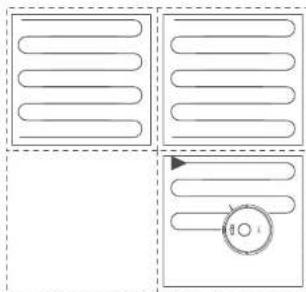
IocpoHne KapbI BpeaIbHOM BpeMeHN nIIaH IomeeHH
NocpTepHHeKapbTaPaaaHbOpEApemnnoBnOaRerRoboVac cERKcTbO CooaBa38PnOBMBeHbYtByyOoOcknOaHKOAMKoBcCCKpyKeHcEMBwTO Doma. PAnh NomoeuHb ByetCocdAnNoceOyOpkKn. Kapta ByetcObHOBraCa BpealbHMepeHaB Xdoe KaKaOnyOoOpKn DInr OoCeJeHnIpaBnHo HauRaHn.
JINCOZDJIHNIIOIIOIIOHOIMOHOUHIN248,249
- OTPKRpeI dna pOoBa-tnBceCoc RoPoVac Daepn,HTo6b OH MOr NoCTpOnTb (KAPY KAPN KMHATI)
2.YCTAPHHe NIO6eO6bKTH, KOTOPBE MOTyI prrpaxdaTb TYb Robovac HNN 3aYrTaBnTbB HEM.

- He y6paTne 3apnhyo 6aby roce toro, kac coaah nnah 3taKa.
U3MeHeHHe MeCTOnIONoXKeHNn IN3MeHeHHe KapTbI
EeNn noonoknHc RoBovacnnn 3apdnoi Bannmchoo nnnn 3aHTtioho NEMENIOKOKyEe, RoBovacnnoTaeC NEMENIE MecTONOKEIN H ooc20 HOYIO KAPY DncoTBCCTBnHOBOOMy OKpynKHO.
EcmHmMnHcHMeCmTOnoKCHHe npoiHo ycneHHo,RoboVac npOonkHT 8ooyi.
EcmieonnoeKneHn HnAaNc3mHbRt,RoboVacnMnHKT KAPrty dJrA oBcepehnaHnAnyaeKnHnBaHraIaN pPrn HNOyOBeKp.

PnI PnBOM NIOLOBOSHNIYbEeITcB, NTO RoBOvAC HNNHAAET bOyOJIc3aepdN0B6aB.
BBoepwYbOoNHepeMeuAeRObovAcHToEcoH yCPOcBbBuOpEmeuHO,HOmeCtREoBovAc6pTaIO B KHNABHOCNOKHO
HauaIpa6oTbI
BaxKbIe coBcTbI nepeHauanOM nCNoJIb3OBAHH
Pycckn
0yepte cnaa Hpyb nHnAHHn MaieBnKne npdmTe, HOTOpBE MOYr 3anytaBoR BRobovc. nCnBnyeKaBnBIOCTKKnB KOMNKeTd n yopraabnnnnpoBdoN hynpnrnnn
34 3aHHTe KpaKOBpO C KCTOCHIO HN, TTOBbI NpeDToBPATMb 32anyTBAHHe RoboVac He oocyctaneYte60ky OeHbTeMHKOpor BcICOKHM BOOCM, INH KOOBpO ToUHHO BoIEe 26MM, T, OHMOYt npRECTn KApHJIHnnpabotRoboVac.
YCTAHIOHIIHE BAMK 3AHPETIeBOHMOYITBHTHeHPOEKTNIHBI H E KEOTOBIX CNYAIX, HAcTOREINHO POXOMCJIDYTCPOA MCHUATb ORpAHHNIEHILBE NIIH (PNOIAOTCRDHYT) HANPTABKAMMIOB IN DPPYIXOACTNEi (HAPPMEP, BCHTNIOHXOBXOTBOPCN),NONADHMA KIOKOTPEOKMTNPOEBTROBoVAC.
136eaipeabotRobovacnBaanbxyactknaBpema y6opni.
RoboVacKET 3abipb cba HnpeimB bbcotom Meee 17 MM. V6pOte TAKIO pncmDf, cnnTO BOWNOHO.
1DATyHnNepanagbBA BmCOTnpeoTapaaaTnagne HOBvAC co TYCNHnENHnCTAeBn CEPNOBAMBCOTB B0BnBAAHCTBeCNYAEB EΦΦEKNHOCTB DAtyHOBM KcKETBbCHNEA,ecnONHsPABRTHEH NINHCIOBAYOHTCA HOpTaKaHOuX, OENHTEMHEX NINAXNNIINNIAK C PBOOMNIOPOPTHEM. PEKOMHYETCA pMaMeAHbF PHmueckne BAphepM, ITOB6IIOKMOBcA bOAnTA B3MOXHOr nAGHNBOyOCa
IpoTobka
1 N3BneKeHnOHOBbE 60Kx8aampeompeepncpOcBaHem
2 Pa3meTHTe 3apAHy6aay HrTopnHOtALHNOBepxHocTHy CTHeH.
3YCTPAHNTpePmctbHa paccToHHN1 M cncBa Hcnpaba,Ha paacToHHN2 mcrepeHTOa zapAHHN BaaB. CnnepeMeTHb HEOAMMOHOybp3b, nepeveMeTbe RoboVac H BOeBO MeTO HIOPOBcTe, MOKETnRoboVac BepyhC X aapAHHN6BaE. Cnntno HeBOAIMOHO, CBKKITcBco Cuy6BnIOepKKK KINHEOT EUYIINIOUYYEHNNOMOUII.
4 NpoknHtKpyrHmHITcKcP aanTcpa Kpa3bmy nHTaHnHa 3apnHO 63ae, aDpyoKoHe -K po3eKe.
Kcda3a0dHaa63aHnKHeHnKCTOHnHnpeMeHHoTOKa, CbOeIOHOHbHnDnKAtOp H aapnHOH 6a3cIOCTOHHO FOPVT EEBIM.
0
PacnoonKHTaBapHyoBbA 1nRKOoCTyHOMdRnRoboVac MeTc. PekomEJIpyrTaPamMeaIbBapHIOHO BApz yCtbnHa TBCOJNOBOeXHOCTN, a Hc HO KOBc.
34apnna 60aDnHb6BtBcCpTaNDKIOHCAKCTN 10xTPONTAHINHACRoBOvAcHOcMOCTABOMATYHECKN BOBPAATBCNIEH.
Hoboi Bocechienb HauhHexaoyo 3apky, He hepemwaiie 3apnyo 6y hao Tpyn npocmouroRobovoc MOKET MEBHb KAPYB Peybntbe HeMOOIOOCIN Opepee HOBORO MeTOIOLIOKHeN (cm paedn HFOOPMAU0BaWEM Robovac>HaHnraia no Kapre u npabaneHNEJn nnoyehn noopooHNHOOPMAUIN.
Pycckn
3apnre RoboVac

YoeiTeTec, HIO RoboVac NIOHocb bOzapKhen neped. IIOJIIOBZHHEM.
Robovac nepertcK zapnHb 63e no zaeepnHIO nIuIa yobpkn nn npn Hzckom yopnb e zapna akkyMnyatopa.
Cnoc61: NcOcdoeHNHeRoboVac K aaoiHNO Ba3e, COBmEtAB KOHTAKTeB HcyTcPOnTeC K OTHKTANM 3apAHO Bb3e.
Cnoco62:HaKMTIe HOCOBHOMYCTPOJCTBE WIMKOCHNTec3HAHUPnIOKeHH EUYHome,HTObOITIPABNBoRoboVac HA 3apdhyo8aay.

EcnroRobovHe He yIeHnONLHeTaBc HTeHNHE npOoKHTbHO BpEMHe,3apJxHte ERO MeMeHe OOnHo paaBa 8 MeCuee, TIObIpoNlbpoc CcykBbAkyMByTba
NtB6aAiknHAp3bEpeKmOHNaONaCHIO CHMKeIbHM 3hePronpOeCNHeHb BO EepaRapAdKn Robovac
OIOHOPeMeHOH NAKMOIYE ADEMOBIAITE TPHKONIKI O
& H. Robrovic, A Revenue of 20 Cnch, Nkne Impratienr, the nortoriacy. B stom pekevai Wi Fiotkiyohien. Haukme
DJIbXbOaV13pOKM8OKdAHHCOCHKcHHUM 3HEPONOTpehEHnHm
AbTomatnuecKa np3apka n npoDOnKeHne pa60TbI
RobovacBosBaapeicHnBaepyHybAhyIABOMATNEKCHIOQaepyIIC BcNcNlCnCnCn
RoboVac 3aepinun y6opxy;
YbOpka He 3aepuHa, Ho ypobHea aKpyMaTopa yke Hn3kn; nocne 3apnAikyMaTopa no 80% emocTh RoboVacnpodknt BrnoHnE hte Tuye ybOpka.

He npccmuTepaHdyio 83y BoBpMa yO0kN, HnHcR Robovac MoHET He BApYbK KHe NnDnOpaAeKn. Ecm cyptoHCTBy He ydaIOoc BepHYbTaCb Ha zapHydo 83y, nOmeCTte erHO He bpyHyIO. Ecm zapJaBa6Ba nepeXeIeHa, NaHHTe yO0kyc hOBOrMeToOnIoaeHH. Pocne 3abepeHHyOyO0rRobovac AOMATmNEckn Bepetca KHe.
IcnoJb3ObaHne RoboVac
BkIIOueHne/ BbIKIOUeHne
RobovacKHOHCAEATOMAIECKN,KOJDAOHIOJIIOUOHEKSAAPADHOB 6abe He noIIOIOHcK NITAHNO
Korjra ReboVac HacoNTAC He Ha 2apJHd0B6a3c,AnKoMHTe uynpckRbAte B TcEHNO3 CekHyI,TObOb BIKIOVTHOCBHOOYCTPOBCTO.
DIOINTECB, NOKA HIMKATOP cCCTOARH NITAHN BSYET NOCTORHO ROPET CHINM.
Pycckn
KorDa RoboVac HaxoHCTn He Ha 3apHoh6Ba3, HaxMNTe yDpckHBTe U BTECHME 3 CekyH CHORA, YTOBbI BYIKIOHTb OCHOBHe yCTPOCTRO.
3anycky60pk

RoboVac He MoKot HauHb y60pKy npn HnKOM ypoHe 3apJa AkkyMynTopa.8 Takom Cnyae ChHaHa zapdJeTbe RoboVac nepCn HauNOMy60pKn.

HaMMTe DnnaaayckaybOoKmBABToMaTneCKOMpekkme.
Robovac nepeucaeta rKCHNpyeOkykveHneIaIANTOMAUYECKOQoDyHnKAPt.

HaHMMTEHOBOA DnI npHOCTAOBKn yOOPKn.
Hakmte pnponkey6pkn.
Korya yoboka nocHTAOHcHbA,paWcUHne RoBOvAc Ha 3ap8nHOB
Ecnn y6pokna nnoctaohncnba Tcnoohn 10 MnyT, RohnVac automataeckn nppekaae: y6pokny n npexepovd t cibniu pekyn.

Hakimite 108 octaohou kienyue yocpiu noosapai 3apuiio 63ae.

PepaHanyo y60kN, y6epHTe KaKHe-Nko KaBENn npOBO3, KOPTOp HMOr PNIEBcT N KpeKpAueHNO NoaHn nTtAHmN NIOpeBKeJeHMM BpeyIbTaTe TOrO, HTOyCTPOCTBO nTtHET KApBEn Nn PpOOn 30 ppeM y60kpN.
IcnoJIb3OBAHnE RoboVac c npNJIOXeHNEm EufyHome
IIOIOIOIOIOIOIOIOIOIOIOIOIOIOIOIOIOIOIOIOIOIOIOIOIOIOIOIOIOIOIOIOIOIOIOIOIOIOIOIOIOIOIOIOIOIOIOIOIOIOIOIOIOIOIOIOIOIOIOIOIOIOIOIOIOIOIOIOIOIOIOIOIOIOIOIOIOIOIOIOIOIOIOIOIOIOIOIOIOIOIOIOIOIOOO
IpeaHaJOMnCnObn3oBaHnY6eDInTeCBcneDyioeM
Ha baem cmpfone nn nnae ectana hane oepauonn an CNTema 05.9 (nnn 600e HOBAR BEPN) nn Android 5.0 (nnn 600e HOBAR BEPN).
HaBaHem SeBpOBOHOM MappyuTAsatope AKnOHen SeBpOBOHON CHHnA HAnaOna3,24Tn
-Иннларop coctorHn Wi-Fi Ha RoboVac MeHHeHHo MuaTcNHHM.
Ha bawem cme Hn mHwet e knoenu Bluetooth n oecene HanyuW eO coeHHN.
RoboVac 3apRkSH BO BpEMHaCTPOKu.

Download on the
AppStore

GETTON
Google Play
- 3a pyrshne npnoknene EufyHome vs App Store (ycpnoctra iOS) nGoogle Play (ycpnoctra Android).
2.OTKpOte npnOxHne n cOsdaTe yIeTHyIO 3aNNb nonb308aTeTIA
3.Hokmte 3hakk 十 _ 一 Toc6u do6aBnTc RObovac X8K CROOYCHTOI Bannic EuyHoney.
4.CnDyIe HCTpyKINB BPOIOKEHN DnHACPOKN NOKNIENNO
Pocne ycnihoro noipnnoenb Bn Mokote ynpaaantb,poSOTm nncaccov RoboVac cpe3 prnlokne.
Pycckn
Pnnockncn no3Bolnt Bbpaht KcnaemmyyobcbMoHocn Bcaibnana, 1aamipaa bypoxpnpocmatpbratk npty yobpkn Hactpanba 3aIpeTHe 30h, npopepbcoctonnnce TognKneHHN CNOONsO3oBbDonOnHTeHbE FyHKn
HdkaTopcoCToHHaWi-Fi
Bb6op ypOBH MoUHCTN BcABBaHN
BbEpeyUOeBHeMouHcTbCABsBnHHBnBpIiOJExHHEnuelyHome B COOTCTCBN CBAHIMN NotPCbHOctHHm
Tnxn
CTaHJapTHn (noymonuHaHIO)
Typ60
MAKCHMADHIN
IcnoBbOBAHne yHKnN BoostlQTM
BBe60eTeyHnNO BOSUQTM BnIOJOKHEHN EUYFHeB C BOOTBTCTEH N CBAHMN IOpebOCHMnROBAC ByEaI ATOBMIA HNEC KYNBHBAT MOHIOCTB BCAMBHNA,CCN O6hApKytFO TIN DAAHNYIK
ADeKFeKNHOHcyOBpN HeoSOOMMA BoBHMA MOHIOCTB.BoosuQTM
NOCAHNO NOOcDnOd ANOHKTBCBOCKN KOBPOB CnHNO3P3HNNHX
OBaCNAE, PekHM yEmHuaI oObue apemx yobpns, no yEBmHHMaET
yoPoBcH UyMa ECnUM npn paoTb nncoc a peKmme BoostQIM
BecIOHIOIAC, 3Y FyHIOIO MXXIO HOIOHIOHII.
IcnoB3OBAHHe RoBoVac cRndekAInca
SHKcAIAHCA 310IINIEKXTyIHOHOYcPOCTBOIOLOCOOIOyipaaIHHN KOTOPoCIOBIOACBAMyypnabnnPbpoTOmIINECOCM NMOIOHOIOCA. PpEKeHcHauHb, y6eMaTeCb, qTO:
RobovacIOIOIOOeHcAepHHo6BaSe,HTO6bIobScTeHNbIOCTaTOHOE 1113HHe
RoboVac nojikouhen npnoken Eufylome.
YBaCctbycIPOBIO CnoDpeKnOyIeKcAInCbE (HnIepMeP,SyIeKc. CTaHaN).OTN yCTpOBCTBAPOADtOyTcENbO.
-PrnTOKHEHREXQYxueTCAHOENHOBAUCMAPrFOE,VbB
Pycckn
- YnpBaleHne RoboVac nomoucbio RaHdeK Anncbi
1.OTpkpnpnnpckHcEufHmncnHnauHn HINHTaPnAeBbOMBepxHmNy.
2. HanaTe IeKcN cIeJeTne NHTpyKJMaH 3aKpaHe Iae 3abepeHnna HacTPOJI.
MnHaeemcNTOyRACHeB3HHKHTnp6bNeBNOKNIOEHINHNIEK, AInceHoECINHAMoTIPe8cyTeHNAHOMou-ByteyepeHEM, MeI cTeneMeRCHeEOxOxOuMoE,TO6bNnMOHbAM
IcnoB3ObaHne RoboVac c Amazon Alexa / Google AccnCTeHTOM
AmazonAlexaGoogleAccnteHT-ronocobicnmoHmKc
NcycCIEBENHMMIYNEKIOI,HN30B1OJIIOJIINBAUYIPABJIIBp60IOM RoboVoc NOMOIIbIKOnOA.
Peped Hauanom mncnlo3OBAHn y6eDntcB CneDyUoem:
- Robovac nIOJouH K sApIuH O Bae, 0ToBb oEcbnVbI dcTatoHoe KOINIECBO AapHa.
Robovac nonknouen K npnoxeknlo Euylome
YBaHMeTcA yCToPcIbTO CnNDpKkoAlexa (HaNPmep,Amazon Echo, Echo Dot nNAMazon Top,Echo Show,Echo Spot),nHO cyToPcIbTO CnNDpKkoGoogle AccChTeHr (HaNPmep,Google Home,Google Hlome Min). DaHIMe YcToPcIbNA pnpOpEpaTcOgTbeHIO. - PpnoKxNHeA Amazon Alexa nHn Google Home yKc yctahObeHO HA Bauem CwptyTqPCTAE, yBaacMeTeaY TaeHaa TaBnC.
ДинTORO,ТОББИСПОЛБОВТВ Б罗ВоСс AmazonAlexainnGoogle ACCIENCTHOM
LOKPOITe PnOxNooC EUYHOMc N HAOKMTe 1HTENZekTyBnHn
2.CnnyIeMHCTpyKusmHa3kpaHeDn3aBepWeHHnPoueccaHAcTpOKn.

B Hactoie Bpma daHn aHyKnn DoctyHa TOnkdo nA Hnckno, HnneKtO, pAnHly3cKO IN CnHAcNHO 1bko. Hnnpmaa no dncpepepyxraikobodpndabnaHa ha cainr https://www.eylife.com/support/.
HactpoKa BnptyabHoI CTeHbI/ orpaHnHTbHOJ IENTbl
Bnptyanbna cteHa (doctynh Taonbko B npnloKeHH)
BbMoketHeHactPcHb3AepTtH0OHTyHnKbXpTyabHyCteBvB
rpHmOxHEnEUYHomByB TAKOMcHcyHET Heo6bMOCTNACIOB8aTb
fmauece6apbpby, aonnoor orpanHHTBaHE nhtb.3ta FyHKiIM
npdaHaMaHene ToIbKaDyIbOeHAnOy HycpKn, a He Dria IOTnIKuONaChhIX
obacntl.

Pepen yctraHOKA KAPrtyaHOBn CTeHb ROBoVac nnonke Hnana hho BnOeHHTb yOpKy dHa coaHaHa PnHa nnonmeuHc
HecmtpnHaYcTahOBkyBnpyaibHOcreb,RoboVac ace paoHOxOe3aEaKbTaB 3aIpenyIOy 301yN3aMMeHEHHI IOLOHEHH,HePApBAHbHOIO3aIOHOHPOBaHHN HOpABHHoPbOToDAtTHOKB.
PepemeHneyycpTbA HnMaMeHneYckpyKmOeK TnpBecTHN KytprBnRyAynhoi CTChN, a TaKcK C60io NoCTPOEHN KAPtN NNoTcPHMcy NoCTPOEHN KAPtY.
OrpaHnHTeNbHbIe IeHTbl
OrpaHHTeBHeJIbIeJIbI(npaHOATcOTgTbeHIO)NtOABHHT HIOINPOBAtb RoboVac OTOAnchb6nblacte,RoboVac Gydt PaCnOHaBaTaB6paBepH He 6dyet3aEaKbA b3aKnOpRbAHHbEobactn.
- OnepaIeIte OxHbT bUc bEck, K KOIpBm He doJIOKeH pINOJIgKbAETbCn RoboVac.
2.PacnookrepaHnneBHeJeHbIaUMHaHcynnncKOBpOM
He paaeeaeorpaanHnntBnBeIeTbIaTOCTbIMKOBPM,TAK KAOBoVACMOKET He paoon3aHTbIXBAKOMCryAAC.


Pycckn

YbEiTeB, YTO OR pAnHnIeBHe IeBHe PaCIOXeBHaTOn He TOpIN3OHTaBHOIOBepxHOCTH, HApOTopnIONcNoBcyEToR OBoVac.
Ecnn orpahnHHTbHe hNtB 3aMnHc, CHMNTE u 3akpennte XCHORACOMHOVIOKCNKOHnEe. B npoTHROM CNYae orpahnHHTbHe HNtB HeSyT pabotA.
OuNTka n 6cbnyxnbHne
IIIEPcIACIKIOIIOJIbIKBANHIMyCIPKcIBOITOKNHTeEOIOTCCDDINCTAIONTIPNTAHIA.
IINIOIINIIINHNNNHNHNNNNNNNNNNNNNNNNNNNNNNNNNNNNNNNNNNNNNNNNNNNNNNNNNNNNNNNNNNNNNNNNNNNNNNNNNNNNNNNNNNNNNNNNNNNNNNNNNNNNNNNNNNNNNNNNNNNNNNNNNNNNNNNNNNNNNNNNNNNNNNNNNNNNNNNNNNNNNNNNNNNN
Pekomehnyemar yactotaOCHKN/3AmHbI
support@eufylife.com
support.mea@anker.com
www.eufylife.com
https://support.eu/fylife.com/s/phonecontactus
(US) +1 (800) 988 7973
Mon-Fri 6:15-17:00 (PT)
Sat-Sun 6:30-16:30 (PT)
UK+4401604936200Mon-Sun 6:00-17:00
Sat-Sun 6:00-14:00
(DE) +49 (0) 69 9579 7960 Mo-Fr 8:00 - 16:00
KoMaHnAn Anker Innovations Limited
OΦm 1318,19,FouIINbYPiNAsa,610HaTaiPoyu,MorHoi,KoynyI,TcHKnIH (Room 1318-19,Hollywood Plaza,610 Nathan Road,Mongkok,Kowloon,Hong Kong)
icindekiler
Download on the App Store

GET IT ON Google Play
- App Store clone (iOS cihazlar) vega Google Playden (Android cihazlar) EufyHome uygalamasiririindirn
2.Uygulamayyagin ve tir kullanr hesatn plusturun.
3.Robovac X8" Euyf-homa hesabinizaklemeicin "simgesine dokunun.
Wifibaglant sm ayarlamak icin uygu amadaki talimatlan izeyin,
support.mea@anker.com (For Middle East and Africa Only) service@meyufy.com.au
www.eutylife.com
https://support.eu/fylife.com/s/phonecontactus
US +1 8009887973
Mon-Fri 6:15-17:00 (PT)
Sat-Sun 6:30-16:30 (PT)
UK+4401604936200 Mon-Sun 6:00-17:00
Sat-Sun 6:00-14:00
(DE) +49 (0) 69 9579 7960 Mo-Fr 8:00-16:00
TR+908504601414 Mon-Fri 09.00-18.00
(日本)0344557823E-金9:00-17:00
Daha faia diestek bigisicn QR kodun taran.

@EufyOfficial

@EuFyOfficial

@EufyOfficial

@EufyOfficial