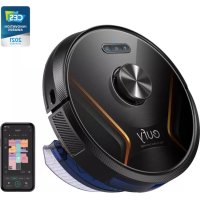
RoboVac X8 Hybrid - Robot vacuum eufy - Free user manual and instructions
Find the device manual for free RoboVac X8 Hybrid eufy in PDF.



| Product Type | Robot Vacuum and Mop |
| Brand | Eufy |
| Model | RoboVac X8 Hybrid |
| Dimensions (diameter × height) | 350 × 100 mm |
| Weight | 3.5 kg |
| Power Supply | Adapter 24 V ⎓ 1 A, Li-ion battery 14.4 V 5200 mAh |
| Maximum Run Time | 150 min |
| Charging Time | 240 - 300 min |
| Dustbin Capacity | 400 ml |
| Water Tank Capacity | 250 ml |
| Navigation | iPath Laser |
| Mapping | Real-time with floor plan |
| Cleaning Modes | Auto, Spot, Room, Zone |
| Suction Power | Quiet, Standard, Turbo, Max |
| BoostIQ™ Function | Yes (automatic suction boost) |
| Mopping System | Washable or disposable mop cloth, integrated water tank |
| Connectivity | Wi-Fi 2.4 GHz, EufyHome app, Alexa, Google Assistant |
| Virtual Boundaries | Virtual walls and no-go zones via app |
| Boundary Strips | Supported (sold separately) |
| Auto-Resume | Yes (recharge and resume cleaning) |
| Sensors | Drop, anti-collision, laser (LDS) |
| Maintenance | Washable filter, replaceable side and main brushes |
| Noise Level | ~55 dB (quiet mode) |
Frequently Asked Questions - RoboVac X8 Hybrid eufy
User questions about RoboVac X8 Hybrid eufy
0 question about this device. Answer the ones you know or ask your own.
Ask a new question about this device
Download the instructions for your Robot vacuum in PDF format for free! Find your manual RoboVac X8 Hybrid - eufy and take your electronic device back in hand. On this page are published all the documents necessary for the use of your device. RoboVac X8 Hybrid by eufy.
USER MANUAL RoboVac X8 Hybrid eufy
For FAQs and more information, please visit: www.eufylife.com
Owner's Manual
RoboVac X8 Hybrid
English 01
Deutsch 41
Español 83
Français 125
Italiano 167
Türk 209
Русский 249
Nederlands 295
Table of Contents
02 Important Safety Instructions
10 About Your RoboVac
What's in the Box
RoboVac Anatomy
Map Navigation and Management
16 Get Started
Important Tips Before Use
Preparation
Charge Your RoboVac
Auto Recharge and Resume
19 Using Your RoboVac
Turn On / Off
Start Cleaning
Use Your RoboVac with the EufyHome App
Select a Cleaning Mode
Use Your RoboVac with Amazon Alexa /
the Google Assistant
Set Up Virtual Wall / Boundary Strip
28 Cleaning and Maintenance
Clean the Dust Collector and Filter
Clean the Rolling Brush
Clean the Side Brush
Clean the Swivel Wheel
Clean the Mopping Cloth and Water Tank
34 Troubleshooting
Voice Alert
40 Customer Service
Thank you for purchasing RoboVac. Carefully read all the instructions below before using this device, and keep this manual for future reference.
EnglishEng
Important Safety Instructions
To reduce the risk of injury or damage, keep these instructions at hand when setting up, using, and maintaining this device.

WARNING SYMBOLS USED
This is the safety alert symbol. This symbol alerts you to potential hazards that could result in property damage and/or serious bodily harm or death.
- This device can be used by children aged from 8 years and above and persons with reduced physical, sensory or mental capabilities or lack of experience and knowledge if they have been given supervision or instruction concerning use of this device in a safe way and understand the hazards involved.
• Children should be supervised to ensure they do not play with this device. - Cleaning and maintenance shall not be performed by children without adult supervision.
- This device is only to be used with the power supply unit provided.
■ Before cleaning or maintaining this device, the plug must be removed from the outlet. - The battery in this device should only be replaced by a skilled professional.
- When removing the battery, disconnect the device from the supply mains.
- To recharge the battery, only use the detachable adapter (US/CA: GSCU1000S024V24T; UK: GSCB1000S024V24T; AU: GSCS1000S024V24T; EU: GSCV1000S024V24T) provided with this device.
- The battery must be removed before this device is disposed of. To remove the battery, first unscrew
02 03
the screws on the bottom, then remove the back cover. Remove the battery by disconnecting the quick connector.
- The used battery should be placed in a sealed plastic bag and disposed of safely according to local environmental regulations.
- The external flexible cable or cord of the power supply unit cannot be replaced; if the cord is damaged, the power supply unit should be disposed of.
■ This device is for indoor use only. - This device is not a toy. Do not sit or stand on this device. Small children and pets should be supervised when this device is operating.
- Store and operate this device in room temperature environments only.
- Do not use this device to pick up anything that is burning or smoking.
- Do not use this device to clean up spills of bleach, paint, chemicals, or anything wet.
■ Before using this device, pick up objects like clothing and loose paper. Lift up cords for blinds or curtains. Move power cords, sharp-pointed and fragile objects out of the way. If this device passes over a power cord and drags it, an object could be pulled off a table or shelf. - If the room to be cleaned has a balcony, a physical barrier should be used to prevent access to the balcony and to ensure safe operation.
- Do not place anything on top of this device.
- Be aware that this device moves around on its own. Take care when walking in the area where this device is operating to avoid stepping on it.
- Do not operate this device in areas with exposed electrical outlets on the floor.
EnglishEng
- Do not expose the electronics of this device, its battery, or the integrated Charging Base. There are no user-serviceable parts inside.
- Do not use this device on an unfinished, unsealed, waxed or rough floor. It may result in damage to the floor and this device. Use only on hard floor surfaces or low-pile carpets, and not on carpets with tasseled edges or loose threads.
- This device has been designed to be used on floors without scratching them. We still recommend that you test this device on a small area of the room to be cleaned to ensure no scratches are made before cleaning the whole room.
- Only use attachments recommended or described in this manual.
- Do not handle the appliance or plug with wet hands.
- Ensure that the dust collector and/or filters are correctly in-place before usage.
- Do not use a battery pack or appliance that is damaged or modified. Damaged or modified batteries may exhibit unpredictable behavior resulting in fire, explosion, or risk of injury.
- Do not expose the battery pack or appliance to fire or excessive temperature. Exposure to fire or temperature above 130^ may cause an explosion.
- Do not modify or attempt to repair the appliance or the battery pack (as applicable), except as indicated in the instructions for use and care.
- Follow all charging instructions and do not charge the battery pack or appliance outside of the temperature range specified in the instructions. Charging improperly or at temperatures outside of the specified range may damage the battery and increase the risk of fire.
- The laser distance sensor of this device meets the standards for Class I Laser Products in IEC 60825-1:2014 and will not generate hazardous laser radiation.
Notice

This symbol on the device or its packaging indicates: Do not dispose of electrical appliances as unsorted municipal waste; use separate collection facilities. Contact your local authority for information regarding the collection systems available. If electrical appliances are disposed of in landfills or dumps, hazardous substances can leak into the groundwater and get into the food chain, damaging your health and well-being. When replacing old appliances with new ones, the retailer is legally obliged to take back your old appliance for disposal at least free of charge.
FCC Statement
This device complies with Part 15 of the FCC Rules. Operation is subject to the following two conditions: (1) This device may not cause harmful interference, and (2) this device must accept any interference received, including interference that may cause undesired operation.
Warning: Changes or modifications not expressly approved by the party responsible for compliance could void the user's authority to operate the equipment.
Note: This equipment has been tested and found to comply with the limits for a Class B digital device, pursuant to Part 15 of the FCC Rules. These limits are designed to provide reasonable protection against harmful interference in a residential installation.
This equipment generates, uses, and can radiate radio frequency energy and, if not installed and used in accordance with the instructions, may cause harmful interference to radio communications. However, there is no guarantee that interference will not occur in a particular installation.
EnglishEng
If this equipment does cause harmful interference to radio or television reception, which can be determined by turning the equipment off and on, the user is encouraged to try to correct the interference by one or more of the following measures: (1) Reorient or relocate the receiving antenna. (2) Increase the separation between the equipment and receiver. (3) Connect the equipment into an outlet on a circuit different from that to which the receiver is connected. (4) Consult the dealer or an experienced radio / TV technician for help.
ISED Compliance Statement
This device contains licence-exempt transmitter(s)/receiver(s) that comply with Innovation, Science and Economic Development Canada's licence-exempt RSS(s). Operation is subject to the following two conditions:
- This device may not cause interference.
- This device must accept any interference, including interference that may cause undesired operation of the device.
RF Exposure Compliance Statement
This equipment complies with FCC/IC radiation exposure limits set forth for an uncontrolled environment. This equipment should be installed and operated with a minimum distance of 20cm between the radiator and your body.
Declaration of Conformity
This product complies with the radio interference requirements of the European Community. Hereby, Anker Innovations Limited declares that the radio equipment type T2261 is in compliance with Directive 2014/53/EU. The full text of the EU declaration of conformity is available at the following internet address: https://www.eufylife.com/.
Maximum output power: 18 dBm (For EU)
Frequency band: 2.4G band (2.4000GHz - 2.4835GHz)
GB Declaration of Conformity
Hereby, Anker Innovations Limited declares that the product type T2261 is in compliance with Radio Equipment Regulations 2017 and The Restriction of the Use of Certain Hazardous Substances in Electrical and Electronic Equipment Regulations 2012. The full text of the GB declaration of conformity is available at the following internet address: https://www.eufy.com.
Trademark Notice
- Amazon, Echo, Alexa and all related logos are trademarks of Amazon.com, Inc. or its affiliates.
- Apple and the Apple logo are trademarks of Apple Inc., registered in the U.S. and other countries. App Store is a service mark of Apple Inc., registered in the U.S. and other countries.
■ Google Play and the Google Play logo are trademarks of Google Inc. - Google Home is a trademark of Google Inc.
EnglishEng
AUSTRALIA & NEW ZEALAND WARRANTY
This document details the terms and conditions of the warranty provided with this product. Please disregard any other representations contained on this product's packaging or provided with this product, which constitute or appear to constitute a warranty.
Subject to the exclusions and limitations set out below, we warrant to you that if you purchase a product directly from us, or, from any of our authorized resellers, that it will not contain defects which are a result of faulty manufacturer workmanship or materials. This warranty subsists for 15 months from the date of purchase. This warranty is provided in addition to your rights under the Australian & New Zealand Consumer Law.
Subject to any rights you have under the Australian & New Zealand Consumer Law, we will not be liable for defects which are a result of damage or loss caused by factors beyond our control, any product which has not been maintained according to any care or maintenance instructions provided with the product, any alterations to a product which are not performed by us, or damage or defects caused to the product due to unusual or non-recommended use. We will not be liable for any special, indirect, consequential or economic loss or damage or loss of profits whatsoever suffered by you or any other person resulting from any act or omission by us. Our total liability in respect of this Warranty against Defects is limited to the replacement of the goods.
This Warranty against Defects is provided in addition to other rights and remedies that you may have at law. Our goods come with guarantees that cannot be excluded under the Australian Consumer Law. You are entitled to a replacement or refund for a major failure and for compensation for any reasonably foreseeable loss or
damage. You are also entitled to have the goods repaired or replaced if the goods fail to be of acceptable quality and the failure does not amount to a major failure.
In order to claim the warranty, you must return the product to the retailer from which it was purchased or if that retailer is part of a National network, a store within that chain, along with satisfactory proof of purchase. The retailer will then return the goods to Directed Electronics Australia authorized by Anker Innovations Limited. Directed Electronics Australia will repair, replace or refurbish the product at its discretion. The retailer will contact you when the product is ready for collection. All costs involved in claiming this warranty, including the cost of the retailer sending the product to Directed Electronics Australia, will be borne by you.
This warranty is offered by Directed Electronics Australia. Customer service support number (+61) 3 8331 4800 Mon-Fri 8:30am - 5:00pm (AEST) and customer service email address service@myeufy.com.au.
EnglishEng
About Your RoboVac
What's in the Box
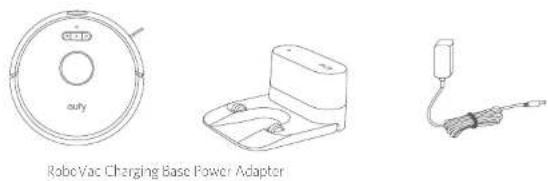
RoboVac Charging Base Power Adapter
Additional Filter
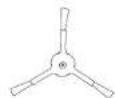
Additional Side Brush Cable Ties (x5)
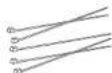
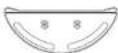
Water Tank Washable Mopping Cloth
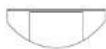

Disposable Mapping Cloths (x5)
Waterproof Pad

Owner's Manual & Other Documents
RoboVac Anatomy
A. Top & Side
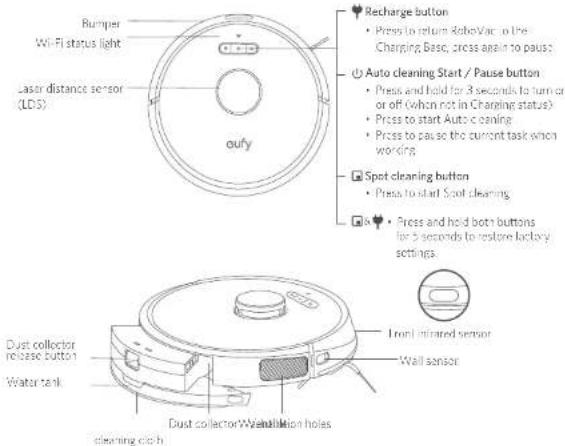
Recharge button
Press to return SuboVac on the
Charging Base, cross again to pause
Auto cleaning Start / Pause button
- Press and hold for 3 seconds to turn on
or off (when not in Charging status)
• Press to start Auto Cleaning
• Press to pause the current task which
Spot cleaning button
Press to start Spot clearing
- Press and hold both buttons for 5 seconds to restore lactacy settings.
B. Bottom
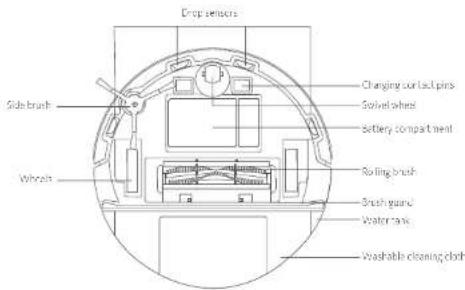
EnglishEng
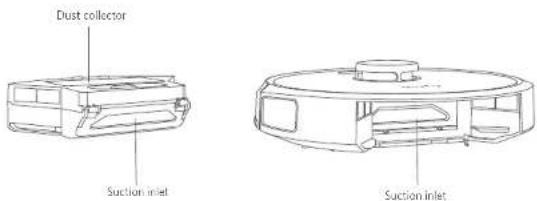
C. Dust Collector
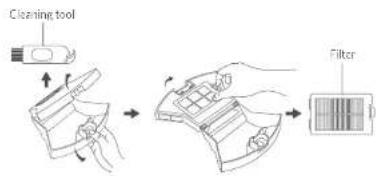
D. Suction Inlet
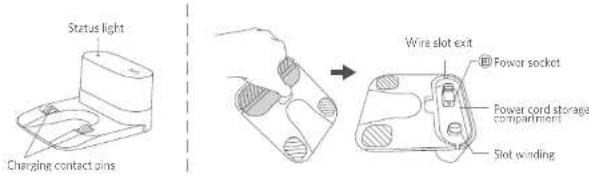
E. Charging Base
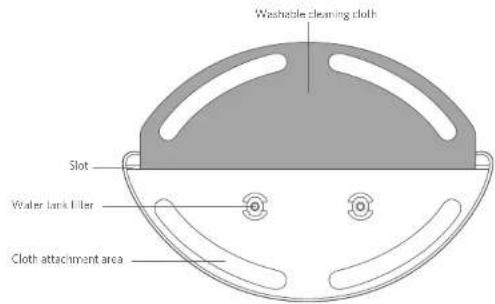
F. Water Tank
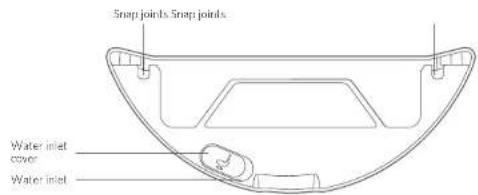
EnglishEng
Buttons & Indicators
| [C236] | Turn on / off (Press and hold for 3 seconds) |
| Start / Paused CleaningSolid blue: standby, cleaning, paused cleaning, returning to charging base or fully chargedSolid orange: working in low battery statusPulsing orange (when docked to Charging Base): chargingFlashing red: errorRefer to the "Troubleshooting > Voice Alert" section in this manual for solutions. | |
 | Returning to Charging BaseFlashing blue slowly: returning to Charging BaseSolid blue: standby or paused |
| [60H0] | Start / Paused Spot CleaningFlashing blue slowly: Spot ModeSolid blue: standby or paused |

| (Wi-Fi Status Light) | Status |
| Slowly flashing blue Waiting for connection | |
| Rapidly flashing blue Connecting with your wireless router | |
| Solid blue Connected to your wireless router | |
Map Navigation and Management
Navigation
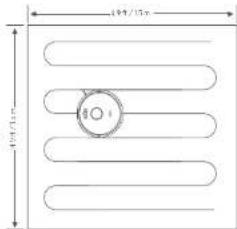
Once Auto clearing starts, RobaVac moves from the Changing Base, automatically scans to generate maps, intelligently determines its cleaning route, and divides the space into zones. The cleaning paths are planned along the walls, following a Z-shaped clearing method to complete the clearing of each zone one by one.
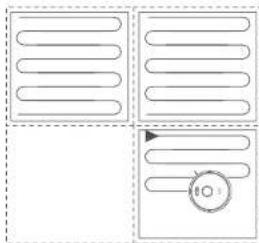
natural_image
Pure diagram of four rectangular panels with rounded rectangular sections and a circular arrow, no text or symbols present.Real-time Mapping & Floor plan
Real-time mapping helps RoboVac to learn the correct cleaning path and the environment of your home easily. A floor plan will be built after cleaning. The map will be updated in real-time during each cleaning session to ensure normal navigation.
To create a complete floor plan;
- Open your doors so that RoboVac can map each room.
- Remove any objects that may be in the way or that might entangle RoboVac.
Repositioning & Remapping
If the position of RoboVac / Charging Base is adjusted or the surroundings are changed significantly, RoboVac will try to reposition and remap to match the surroundings.
- If the repositioning is successful, RahoVac will resume cleaning.
- If the repositioning fails, RoboVac will remap to ensure normal navigation with a new clearing.
EnglishEng

- When using for the first time, make sure RobuVac starts cleaning from the Charging Base.
- During cleaning, do not move RoboVac frequently. If moved, place RoboVac back to the original position.
Get Started
Important Tips Before Use
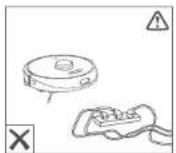
a
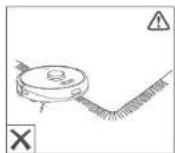
b
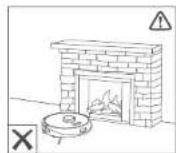
©
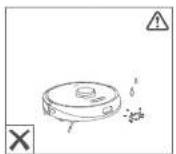
d
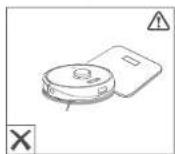
E
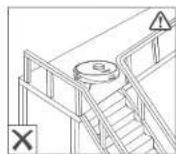
f
Remove power cords and small objects from the floor that may entangle RoboVac. Use the supplied cable ties to organize your wires and power cords.
b Fold tassled edges of area rugs underneath to prevent tanging RoboVac. Avoid cleaning very dark-colored high-pile rugs or rugs thicker than 1.02 n/26 mm as they may cause RoboVac to malfunction.
The "No-Go" zones that you set may be ineffective in some cases. It is strongly recommended to place boundary strips (sold separately) in front of fireplaces and certain areas (i.e. air vents) that may cause damage to RoboVac if entered.
d Keep RoboVac away from wet areas during cleaning.
e RoboVac may climb on top of objects less than 0.67 in /17 mm in height. Remove these objects if possible.
f Ant-drop sensors will prevent RoboVac from tumbling downstairs and steep drops in most cases. Sensors are less effective if dirty or used on carpeted/reflective/very dark-colored floors. It is recommended to place physical barriers to block off areas where RoboVac may fall.
Preparation
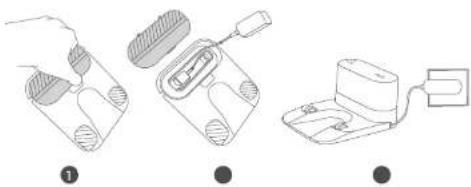
1 Remove the foam blocks beside the bumper before use.
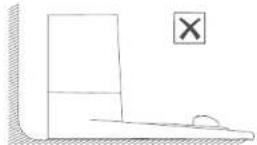
2 Place the Charging Base on a level surface and against a wall
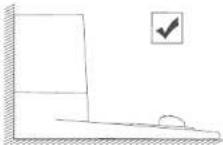
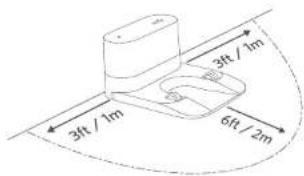
3 Remove objects within 3 ft / 1 m of the left and right side and within 6 ft / 2 m of the front of the Charging Base. If you cannot remove the objects, move RoboVac to a new place and check whether RoboVac can return to the Charging Base normally: if not, contact only customer service for help.
4 Connect the adapter to the Charging Base and a wall outlet.
When the Charging Base connects to AC power, the LED indicator on the Charging Base is SOLID WHITE.
natural_image
Three-step diagram showing a hand holding a device, a connector inserted into a housing, and a battery connected to a plug (no text or symbols)EnglishEng
• Install the Charging Base in a location that RoboVac can easily access. It is recommended to place the Charging Base against a wall, and on a hard-level surface rather than on rugs or carpets.
- Always keep the Charging Base plugged in, otherwise RoboVac will not automatically return to it.
- To ensure proper charging, do not frequently move the Charging Base. When its location is changed, RoboVac may remap due to repositioning failure (see About Your RoboVac > Map Navigation and Management for details).
Charge Your RoboVac
■ Make sure RoboVac is fully charged before use.
- RoboVac will return to the Charging Base at the end of a cleaning cycle or when its battery is running low.
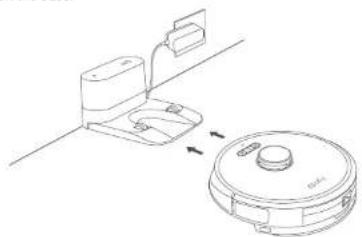
Method 1: Attach RoboVac to the Charging Base by aligning its charging pins with the charging pins on the base.
natural_image
Line drawing of a bathroom toilet and a circular appliance with a handle, showing no text or symbols.Method 2: Press on the main unit or tap the icon in the EufyHome app to send RoboVac to the Charging Base.
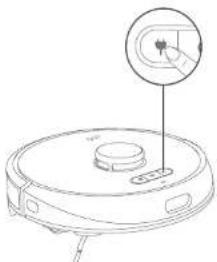
natural_image
Line drawing of a robotic vacuum cleaner with a hand cursor pointing to the button (no text or symbols)18 19
- If RoboVac is not used for a long time, to preserve the battery's lifespan, recharge at least once every 6 months.
- When RoboVac is being charged, to enter Reduced Power Standby mode for power-saving, simultaneously press and hold the three buttons ( 🔊 & 🔒 ). 📁 RoboVac for 10 seconds until the lights turn off. Wi-Fi is disabled while this mode is active. Press ⏻ to exit Reduced Power Standby mode.
Auto Recharge and Resume
RoboVac returns to the Charging Base automatically to recharge when
- RoboVac has finished cleaning;
- Cleaning is not complete and the battery level becomes low, once recharged to 80% battery capacity. RoboVac will resume and finish the remaining cleaning.
Do not move the Charging Base during cleaning, otherwise RoboVac may fail to return for recharge. If failed, you have to manually attach it to the Charging Base. If the Charging Base is moved, start cleaning from the new location. RoboVac will automatically return when it has finished cleaning.
Using Your RoboVac
Turn On / Off
- RoboVac turns on automatically when attached to the Charging Base and connected to power.
- When RoboVac is not on the Charging Base, press and hold ⏻ for 3 seconds to turn on the main unit. Wait until the Power Status Light turns solid blue.
- When RoboVac is not on the Charging Base, press and hold ⏻ for 3 seconds again to turn off the main unit.
Start Cleaning
RoboVac cannot start cleaning if the battery level is low. In this case, recharge RoboVac first before cleaning.
EnglishEng
1 Press ⏻ to start cleaning in Auto cleaning mode.
➢RoboVac moves around to scan the environment and builds a map automatically.
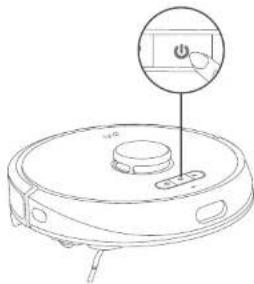
natural_image
Line drawing of a robotic vacuum cleaner with a button and handle (no text or symbols)② Press (again to pause cleaning.
▶ Press 🔍 resume cleaning.
When cleaning is paused, docking RoboVac onto the Charging Base will stop the clearing.
➢ Cleaning is paused for 10 minutes. RoboVac automatically stops cleaning and switches to sleep mode.
③ Press 🤒 to stop current cleaning and return to the Charging Base.

Before clearing, tidy cables and cords to avoid power interruption or any damage caused by pulling the cord during cleaning.
Use Your RoboVac with the EufyHome App
To fully enjoy all the available features, it's recommended to control your RoboVac via the EufyHome app.
Before you start, make sure that:
- Your smartphone or tablet is running iOS 9.0 (or above) or Android 5.0 (or above).
- The 2.4GHz band wireless signal is enabled on your wireless router,
- The Wi-Fi status light on RoboVac is slowly flashing out.
- Your smartphone or tablet has enabled Bluetooth to ensure a better connection.
- RoboVac has enough power during setup.


- Download the EuryHome app from the App Store (iOS devices) or Google Play (Android devices).
- Open the app and create a user account.
- Tap the " + " icon to add "RoboVac X8 Hybrid" to your EufyHome account.
- Follow the instructions in the app to set up the Wi-Fi connection.
After connecting successfully, you can control RoboVac via the app.
With the app, you can select cleaning at your desired suction level, schedule cleaning view the cleaning map, set up "No-Go" zones, check the network connection status, and access additional features.
Wi-Fi Status Light
| Slowly flashing blue Waiting for connection | |
| Rapidly flashing blue Connecting with your wireless router | |
| Solid blue Connected with your wireless router |

If RoboVac gets stuck in any space, tap Find My Robot in the app to find the machine. This function is available in the app only.
Reset the Wi-Fi connection
To reset the Wi-Fi connection, press and hold the two buttons (and) is multaneously for 5 seconds until you hear a voice prompt. At the same time, RoboVac will restore the factory default settings.
You will hear a voice prompt when the Wi-Fi connection has been reset, and the Wi-Fi status light will slowly flash blue. Now you can follow the Wi-Fi instructions in the eufyl lome app to set up the Wi-Fi connection.
EnglishEng
Schedule Cleaning
With the Fufylsome app, you can schedule RoboVac to start cleaning at a particular time.

You can set the time and customize the cleaning schedules from Sunday to Saturday on the EufyHome app. This function is available in the app only.
Select a Cleaning Mode

- You can press it at any time to pause the current cleaning cycle.
- You can also select a cleaning mode via the EufyHome app.
Auto Cleaning Mode
- Press ⬆ start cleaning in Auto cleaning mode.
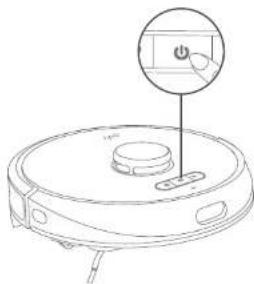
natural_image
Line drawing of a robotic vacuum cleaner with a control panel and power button (no text or symbols)- Press again to pause cleaning.

By default, ReboVac starts in Auto cleaning mode when it is turned on.
Spot Cleaning Mode
RoboVac intensively cleans a specific area with a size of 4.9 ft x 4.9 ft / 1.5 m x 1.5 m, useful if there is a concentrated area of dust or debris. When the cleaning of a certain zone is finished, it automatically returns to the Charging Base.
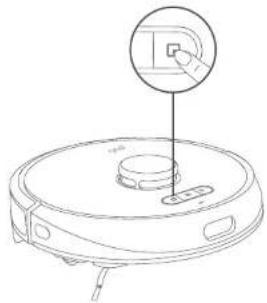
Press 📋 start Spot clearing.
natural_image
Line drawing of a robotic vacuum cleaner with a close-up inset showing the handle (no text or symbols)Room Cleaning Mode (available via the EufyHome app only)
In this mode, your house is automatically divided into several rooms for cleaning in the Euly-Home app. You can also customize your room settings in the app. RoboVac will clean the selected rooms only and return to the Charging Base after cleaning.

- Start Room cleaning only after RoboVac has created the map - It is recommended that RoboVac moves from the Charging Base to start Room cleaning.
EnglishEng
Zone Cleaning Mode (available via the EufyHome app only)
In this mode, you can set up a cleaning zone in the FulyHome app. RonoVac will clean the selected zone only.
Select a Suction Power Level
In the EufyHome app, select a suction power level according to your needs:
- Quiet
- Standard (Default)
- Turbo
• Max
Select BoostIQ™ feature
In the EarlyHome app, select the BoostIQ™ feature according to your needs. RoboVac will automatically increase the suction power if it detects that stronger power is needed to ensure the best clean. BoostIQ™ is ideal for cleaning thicker carpets and hard-to-sweep menses, which will reduce the total clearing time, but increase the noise level. If the vacuuming noise caused by BoostIQ™ disturbs you, you can disable this feature.
Use Mopping System

- The mopping mode is only intended for a clean floor without stubborn stains or liquids. To avoid staining floors, do not use the mopping function when dust is mixed with liquids such as coffee or ink
- Mopping System cleans best on smooth hard surfaces and may not perform so well on uneven tiles, heavily waxed floors or rough surfaces like slate or brick, which may snag the cleaning pad.
- The mopping mode is not recommended when no one is at home.
-
Do not use the mapping mode on a carpeted floor. It is recommended to set a "No-Mop" zone in the EufyHome app to avoid cleaning the carpeted area.
-
Before mopping, install the waterproof pad under the Charging Base to protect the floor
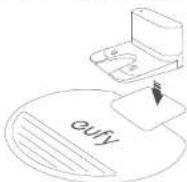
24 25
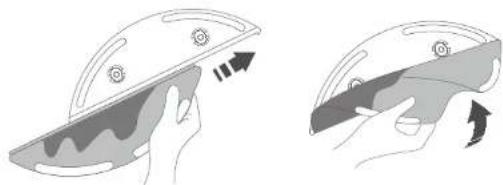
- Wet the mopping cloth and wring it until it does not drip. Insert the cloth along the bracket slot and stick it firmly.
- Use either the washable mopping cloth or the disposable cloth for mopping.
natural_image
Illustration of two hands holding a bowl with food items, showing a change in the interior (no text or symbols)- Open the water inlet cover to fill the water, then close the cover.
natural_image
Line drawing of a hand using a tool to lift a boat (no text or symbols)
- Do not use any cleaning solution on other than those specified by eufy, as it may damage RoboVac.
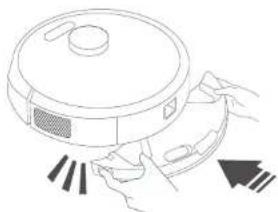
- Install the water tank into the bottom of RoboVac until a click is heard.
natural_image
Line drawing of a robotic vacuum cleaner with control panel and directional arrows (no text or symbols)
- The mapping mode is only intended for a clean floor without stubborn stains. To achieve a better mapping effect, it is recommended to clean the floor with RoboVac three times before installing the mapping module.
EnglishEng
- Select a cleaning mode to start clearing.
➢ RoboVac automatically swoeps and mops in the selected mode.
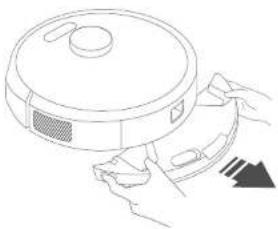
- When RoboVac finishes working and returns to the Charging Base, remove the water tank, empty any remaining water, and clean the mopping cloth to prevent mildew or unpleasant smells. The disposable mopping cloth is for single-use only. For how to clean and maintain the water tank, refer to the "Cleaning and Maintenance" sect on in this manual.
natural_image
Line drawing of a hand holding a circular device with a lid and handle, showing a black triangular arrow pointing downward (no text or symbols)Use Your RoboVac with Amazon Alexa / the Google Assistant
Amazon Alexa and the Google Assistant are smart voice assistants that enable you to control RoboVac with your voice.
Before you start, make sure that:
- RoboVac is attached to the Charging Base to ensure there is enough power.
- RoboVac is connected with the [FyI] home app.
- You have an Alexa-enabled device (i.e. Amazon Echo, Echo Dot and Amazon Tap, Echo Show, Echo Spot) or a device enabled with the Google Assistant (i.e. Google Home, Google Home Mini). These devices are sold separately.
- The Amazon Alexa app or Google Home app is already installed on your smart device, and you have created an account.
To control RoboVac with Amazon Alexa or the Google Assistant
- Open the EufyHome app and tap "Smart Integrations" in the top left.
- Follow the on-screen instructions to complete the setup.

Currently this feature only supports English, German, French, and Spanish. You can check regularly if more languages are supported at https://www.eufylife.com/support/.
Set Up Virtual Wall / Boundary Strip
Virtual Wall (Available on the App Only)
In the EufyHome app, you can set up a "No-Go Zone" or "Virtual Wall" as a restricted area. This eliminates the need to use physical barriers, including Boundary Strips. This feature is only designed for dividing the cleaning zones, not for isolating hazardous areas.
• No-Go Zone: RoboVac will not enter the zone to vacuum.
• Virtual Wall: RoboVac will not cross the virtual wall.
- To set a virtual wall, RoboVac must initially perform a cleaning run to create a floor plan.
- Although a virtual wall is set, RoboVac may still enter the restricted zone due to repositioning failure or abnormal sensors.
- Moving the device or changing the environment may lose the virtual wall and cause mapping to fail and rebuild.
Boundary Strips
Boundary strips (sold separately) can keep RoboVac away from hazardous areas. RoboVac will recognize the barriers and will not cross into the blocked-off area.
- Identify the area or item you do not want RoboVac to get close to.
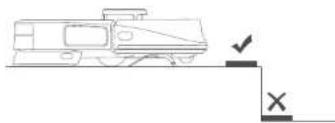
- Place the boundary strips FLAT on the floor or under a rug.
- Do not place the boundary strips under a THICK rug as RoboVac may fail to recognize the boundary strip.
natural_image
Simple line drawing of a vehicle with a checkmark and cross symbol (no text or labels)
- Make sure the boundary strips are placed on the same surface plane RoboVac is used on.
- If the boundary strips roll up, remove and then re-apply to the floor with adhesive tape. Otherwise the boundary strips may not work well.
EnglishEng
Cleaning and Maintenance
Before cleaning and maintaining, turn off the device and unplug the adapter
For optimal performance, follow the instructions below to clean and maintain RoboVac regularly. The cleaning / replacement frequency will depend on your RoboVac usage habits.
Recommended Cleaning / Replacement Frequency
| RoboVac Part Cleaning Frequency Replacement Frequency | ||
| Dust Collector After each use - | ||
| Filter Once every week Every 3 months | ||
| Rolling Brush Once every week Every 6-12 months | ||
| Side Brush Once every month Every 3-6 months (or when visibly worn) | ||
| Brush Guard | Once every month Every 3-6 months (or when the silicone rubber strip on the brush guard becomes visibly worn) | |
| Sensors | Once every month - | |
| Charging Pins | Once every month - | |
| Swivel Wheel | Once every month - | |
| Water Tank | After each use - | |
| Washable Mopping Cloth | After each use - | |
| Water Tank Filters | - | Every 6 months (or when they become yellow) |
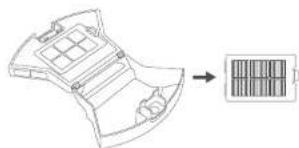
Clean the Dust Collector and Filter
1 Press the dust collector release button to pull the dust collector out.
2 Open and empty the dust collector.
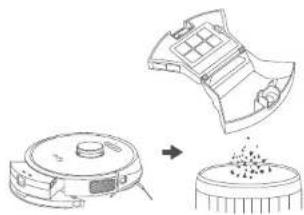
natural_image
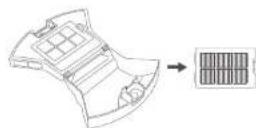
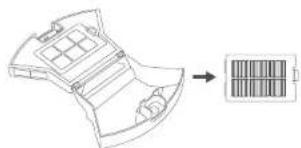
Diagram showing a robotic vacuum cleaner with a component being processed into a circular component (no text or symbols present)3 Remove the filter.
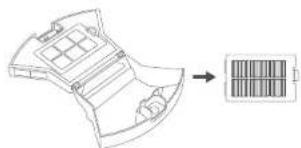
natural_image
Diagram of a battery pack with internal compartments and an output arrow (no text or symbols)4 Clean the dust collector and filter with the cleaning brush.
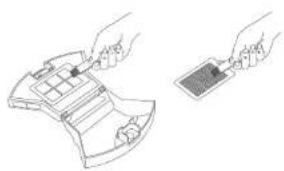
natural_image
Line drawing of two hands holding a device with a grid and a separate card (no text or symbols)5 Rinse the dust collector and filter thoroughly with water.
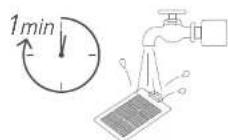
EnglishEng
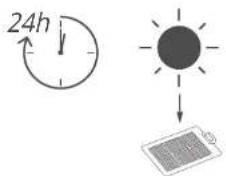
6 Air dry the dust collector and filler completely before next use. You may use another filter if the original one is not dry.
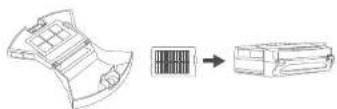
⑦ Place the filter back into the dust collector.
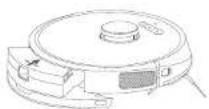
8 Push the dust collector back into the main unit.
Clean the Rolling Brush
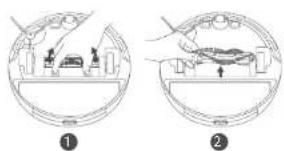
1 Pull on the release tabs to unlock the brush guard as shown.
2 Lift the rolling brush to remove.
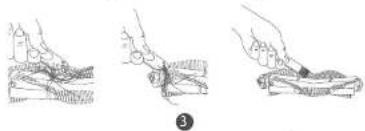
3 Clean the rolling brush with the cleaning tool.
4 Rainstall the rolling brush by inserting the fixed protruding end first and then clicking into place.
5 Press down to snap the brush guard into place.
natural_image
Three-step line drawing showing hand positioning and handling a small object, no text or symbols present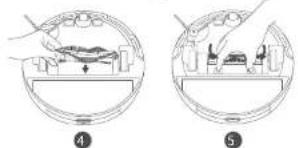
natural_image
Two-step diagram showing a device inside a circular housing, with no visible text or symbols.Clean the Side Brush
Foreign substances, such as hair, can easily get tangled in the side brush, and dirt may adhere to it. Be sure to clean it regularly.
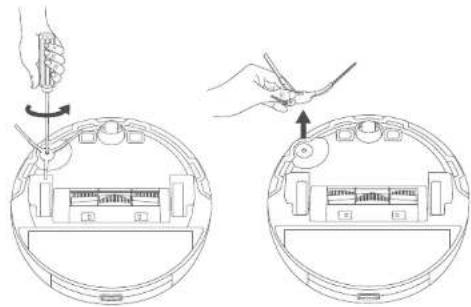
1 Use a Phillies screwdriver to unscrew the screw on the side brush.
2 Remove the side brush
EnglishEng
3 Carefully unwind and pull off any hair or string that is wrapped between the main unit and the side brush.
4 Clean the side brush with water
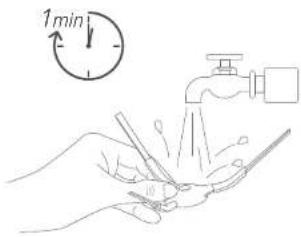

Only use the side brush when it is completely dry.
Replace the Side Brush
The side brushes may become bent or damaged after being used for a period of time. Follow the instructions below to replace it.
1 Use a Phillips screwdriver to unscrew the screw on the side brush.
② Pull off the old side brush and snap the new one into place.
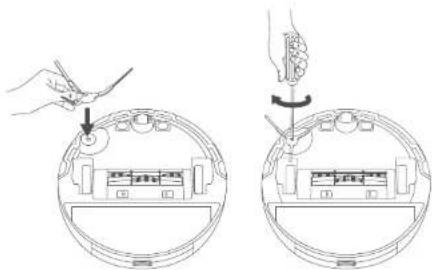
3 Screw down the screw to fasten the side brush.
32 33
Clean the Sensors and Charging Pins
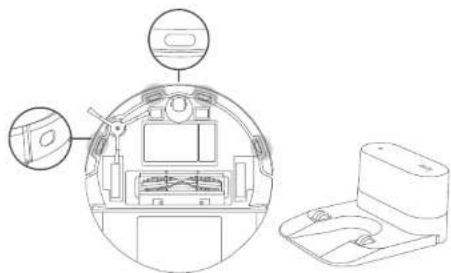
To maintain the best performance, clean the drop sensors and charging pins regularly.
- Dust off the sensors and charging contact pins using a cloth or cleaning brush.
natural_image
Technical line drawing of a device interior showing internal components and a separate assembled housing (no text or symbols)Clean the Swivel Wheel
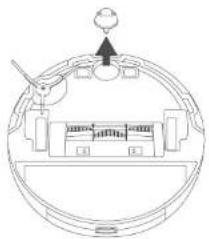
Hair or dust particles can easily get entangled in the swivel wheel. Be sure to clean the swivel wheel period caly and as needed.
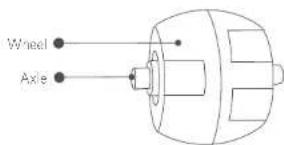
1 Pull out the swivel wheel
natural_image
Diagram of a circular mechanical or electrical component with internal components and a pointer (no text or symbols)EnglishEng
2 Clean any hair or debris wrapped around the wheel or entangled inside the wheel cavity.
3 Re install the wheel and push in until it clicks into place.

Do not clean the swivel wheel with water.
Clean the Mopping Cloth and Water Tank
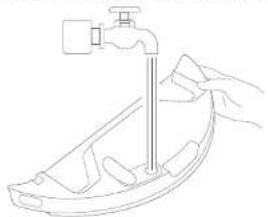
It is recommended to clean the washable mopping cloth and water tank after each use.
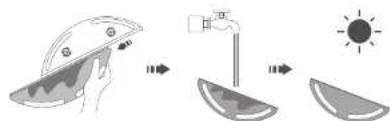
1 After each use, remove the mopping cloth from the water tank.
② Rinse the mopping cloth and water tank thoroughly with water.
3 Air-dry the mopping cloth and water tank completely to prevent mildew or unpleasant smells.
4 To discard your single-use mopping cloth, remove and drop it into a trash container.
Troubleshooting
The solutions below are for general questions. If your problem persists, visit www.eufylife.com, go to EufyHome app, or contact support@eufylife.com for help.
Problems Solutions
| RoboVac suddenly produces a loud noise. | Adjust the suction power level in the Fully-lome app.Check if the rolling brush, filter, dust collector, suction inlet, or wheel's are stuck.Make sure the filter and the brush guard have been properly installed. |
| Problems Solutions | |
| The map is lost or rebuilt even after a floor plan is created. | · If the position of RoboVac / Charging Base is adjusted or the surroundings are changed, RoboVac will try to reposition and remap to match the surroundings.· Place RoboVac back on the Charging Base and start a new clearing session. |
| RoboVac cannot be activated. | · Make sure RoboVac is connected to a power source.· Make sure the battery is fully charged.· Press and hold the ⏻ button for 3 seconds to turn on RoboVac. |
| RoboVac suddenly stops working. | · Check if RoboVac is trapped or stuck on an obstacle.· Check if the battery level is too low.· Check if RoboVac has alerted you with any voice prompts or LED indicators. Refer to the "Voice Alert" section in this manual.· If you still have trouble, turn off RoboVac, wait for 3 seconds, and then turn it back on. |
| You cannot schedule cleanings. | · Make sure RoboVac is turned on.· You can set the time of day and scheduled cleaning time via the EuryHome app.· Make sure the scheduled time has been set correctly.· Check if RoboVac's power is too low to start cleaning· RoboVac will not start a scheduled cleaning while already performing a cleaning task. |
| Suction power is weak. | · Check if any obstructions are blocking the suction inlet.· Empty the dust collector.· Clean the filter with water.· Select the max suction power level in the EuryHome app.· Check if the filter is wet due to water or other liquid on the floor. Air dry the filter completely before use. |
| RoboVac cannot be charged. | · Check if the LED indicator on the Charging Base lights up (when RoboVac is not on the Charging Base). If not, reconnect the adapter with the Charging Base and try a new power outlet. If the problem still persists, contact the eufy service center to repair or replace the Charging Base.· Dust off the charging contact pins with a dry cloth. |
EnglishEng
| Problems Solutions | |
| RoboVac cannot return to the Charging Base. | Remove objects within 3 ft / 1 m to the left and right side and within 6 ft / 2 m of the front of the Charging Base.Check if RoboVac is stuck by any objects.Make sure RoboVac started cleaning from the Charging Base and was not moved during cleaning.Clean the charging contact pins. |
| The rolling brush does not rotate. | Clean the rolling brush. Remove the hair wrapped around the rolling brush or entangled in the two ends of the brush.Check if the rolling brush and brush guard have been installed properly. |
| RoboVac's movements or travel path are abnormal. | Check if there is any relevant voice prompt. Follow the voice prompt to solve the problem.Clean the sensors carefully with a dry cloth.Restart RoboVac by turning RoboVac off and on. |
| Water does not come out during mopping. | Make sure there is enough water in the water tank.Check if the mopping module is correctly installed.Check if the water outlets are blocked. If yes, replace the water tank filters. |
| Too much water comes out during mopping. | Make sure the water tank has been installed properly.Make sure the water tank filters are correctly installed in place. |
| RoboVac cannot connect to a Wi-Fi network. | Make sure your Wi-Fi router supports the 2.4GHz and 802.11 b / g / n bands; the 5GHz band is not supported. |
| You cannot control RoboVac with Amazon Alexa. | Check if there are any Internet connection problems.Check whether you have installed the Amazon Alexa app onto your smart device and enabled "EufyHome - RoboVac" Skill in the Amazon Alexa app. For details, refer to the "Smart Integrations" page in the EufyHome App.Make sure you have a EufyHome account and that it is connected to RoboVac.Make sure you are using correct Alexa voice commands. |
| Problems Solutions | |
| You cannot control RoboVac with the Google Assistant. | Check if there are any Internet connection problems.Check if you have installed the Google Home app onto your smart device and initiated the "Eufy-Home" action in the Google Home app. For details, refer to the "Smart Integrations" page in the EufyHome App.Check if you are using the proper commands when talking to the Google Assistant. When making your request, first say the wake words "Ok Google".Repeat your question. Speak clearly to the Google Assistant. |
Voice Alert
When RoboVac encounters a problem, the red indicator on RoboVac will flash and you will hear the relevant voice prompts.
The voice prompts below are only for reference and may be charged slightly after voice pack updates. Please follow the voice prompts you have heard to find the cause and solution below.
| Voice Prompt Cause and Solution | |
| Error 1: Front bumper stuck | If the front bumper is stuck, gently push the bumper in repeatedly to dislodge anything trapped inside. If there is nothing there, try moving the device to a new area and restart. |
| Error 2: Wheel stuck. Check the wheel and move it to a new position | Wheel may be stuck or trapped. Clear any obstacles in the surrounding area and check the wheel for any trapped dust. Move the device to a new position and try again. |
| Error 3: Side brush stuck Side | brush may be stuck. Please clean it and try again. |
| Error 4: Rolling brush stuck. Remove and clean the rolling brush | Remove the rolling brush, roller joint, roller brush cover, and suction inlet to clean it. Once cleaned, place the items back into the device and try again. |
| Error 5: Device trapped. Clear the surrounding area | Device is trapped. Clear any obstacles in the surrounding area and try again. |
| Error 6: Device trapped. Reposition the device near the area where the problem occurred | Device may be suspended in air. Move it to a new position close to the original position and try again. If the device is still unable to start, clean the edge sensor and try again. |
EnglishEng
Voice Prompt Cause and Solution
| Error 7: Wheel suspended. Please move the device to a new position | Wheels may be suspended in air. Move the device to a flat surface and a new position close to the original position then try again. |
| Error 8: Low battery, shutting down device. Please charge your device | Low Battery; system will shut down. Charge the device and try again. |
| Error 9: Magnetic Boundary Strip detected. Move device to a different area | Device is too close to a strong magnetic field or strip. Move the device to a different area and try again. |
| Error 12: Right wall sensor needs cleaning | Clean the right side wall sensor since it's covered in dust. |
| Error 13: Device tilted. Please put the device on a flat surface to start | Device may be tilted. Put the device on a flat surface and try again. |
| Error 14: Please insert dust collector and filter. | Put the dust collector and filter back in and confirm that they are in place. Then restart the device. |
| Error 17: Virtual Boundary detected. Move device to a different area | Device is too close to the virtual boundary. Move the device to a new position and try again. |
| Error 18: Laser cover may be stuck | Pressure sensor for laser cover is stuck. Move the device to a new position and try again. |
| Error 19: Laser sensor may be stuck | Laser ranging sensor is covered in dust. Clean it and try again. |
| Error 20: Laser sensor may be blocked | Laser sensor is blocked byAn empty environmentMetal mirrorsOr other multi-reflection devicesRemove any obstacles and move the device to a different area. |
| Error 21: Charging Base blocked by surrounding obstacles | Charging base is blocked by obstacles, clear any obstacles around the charging base and try again. |
Voice Prompt Cause and Solution
| Error S1: Battery Error. Refer to Owner's Manual or App for help | - Open the battery compartment and check whether the battery is connected and restart the device.- Battery Temperature may be too high or low; wait until the battery falls to normal temperatures before using (0^ - 40^ / 32^ = 104^) - If the issue persists, contact customer support for he p. |
| Error S2: Wheel Module Error. Refer to Owner's Manual or App for help | - Check whether the wheels are stuck or dust is trapped inside before restarting the device.- If the issue persists, contact customer support for he p. |
| Error S4: Suction Fan Error. Refer to Owner's Manual or App for help | - Check whether the fan blades are stuck in an unknown object before restarting the device.- Clean the dust collector and filter before restarting the device.- If the issue persists, contact customer support for he p. |
| Error S5: Rolling Brush Error. Refer to Owner's Manual or App for help | - Remove and clean the roller brush, roller brush connection, roller brush cover and suction inlet before restarting the device.- If the issue persists, contact customer support for he p. |
Specifications
 | Input 24 V 1 A | == |
| Battery Voltage 14.4 V | === | |
| Power Consumption 60 W | ||
| Battery Type | 14.4 V ===Li-ion 5,200 mAh (Typical) | |
| Dust Collector Capacity | 400 mL | |
| Water Tank Capacity | 250 mL | |
| Cleaning Time Max 150 mins | ||
| Charging Time 240 - 300 mins |

English
Customer Service
For tutorial videos, FAQs, manuals, and more information, please visit: http://support.eu/ylife.com.
Contact Us
support@eufylife.com
www.eufylife.com
(US) +1 (800) 988 7973 Mon-Fri 6:15 - 17:00 (PT); Sat-Sun 6:30-16:30 (PT) (UK) +44 (0) 1604 936200 Mon-Sun 6:00 - 17:00; Sat-Sun 6:00-14:00 (DE) +49 (0) 69 9579 7960 Mo-Fr 8:00 - 16:00 (日本) 03 4455 7823 月-金 9:00 - 17:00
For more support phone numbers, please visit
http://support.cufylife.com/s/phonecontactus
Or scan the QR code below:

@EufyOfficial

@EufyOfficial

@EufyOfficial

@EufyOfficial
Anker Innovations Limited
Room 1318-19, Hollywood Plaza, 610 Nathan Road, Mongkok, Kowloon, Hong Kong
Inhaltsverzeichnis
natural_image
Pure diagram of four rectangular panels with horizontal and vertical lines, no text or symbols present.natural_image
Line drawing of a toilet and refrigerator with directional arrows indicating movement (no text or symbols)natural_image
Line drawing of a robotic vacuum cleaner with a circular dial indicator (no text or symbols)57
DeutschDe

natural_image
Line drawing of a robotic vacuum cleaner with a button and handle, no text or symbols presentnatural_image
Line drawing of a robotic vacuum cleaner with a button and handle (no text or symbols)natural_image
Line drawing of a robotic vacuum cleaner with a hand pointing to the button (no text or symbols)natural_image
Line drawing of a hand holding a water dispenser above a boat handle (no text or symbols)
natural_image
Line drawing of a robotic vacuum cleaner with hand and blade, no text or symbols present
natural_image
Line drawing of a robotic vacuum cleaner with hands holding a fan (no text or symbols)natural_image
Diagram showing a robotic vacuum cleaner's internal structure being processed into a circular component (no text or symbols present)natural_image
Diagram of a vehicle battery pack with internal compartments and a separate battery symbol (no text or labels)natural_image
Line drawing of hands holding a device with a separate panel (no text or symbols)natural_image
Diagram of a circular mechanical or electrical component with no visible text, numbers, or symbols.73
DeutschDe
support@eufylife.com
www.eufyllife.com
(US) +1 (800) 988 7973 Mon-Fri 6:15 - 17:00 (PT);
Sat-Sun 6:30-16:30 (PT)
(UK) +44 (0) 1604 936200 Mon-Sun 6:00 - 17:00;
Sat-Sun 6:00-14:00
(DE) +49 (0) 69 9579 7960 Mo-Fr 8:00 - 16:00
(日本)03 4455 7823 月-金 9:00 - 17:00
http://support.cutfylife.com/s/phonecontactus
natural_image
Four-panel diagram showing a U-shaped tube layout, a circular button labeled 'B', and a dashed border (no text or symbols)natural_image
Line drawing of a bathroom toilet and refrigerator with directional arrows indicating movement (no text or symbols)natural_image
Line drawing of a robotic vacuum cleaner with a circular button and pointer (no text or symbols)EspañolEsp

natural_image
Line drawing of a robotic vacuum cleaner with a button and handle (no text or symbols)
natural_image
Line drawing of a robotic vacuum cleaner with a circular button labeled 'ω' pointing to the lid (no text or symbols beyond the label)EspañolEsp
natural_image
Pure technical diagram of a U-shaped component with a circular hole, no text or symbols presentnatural_image
Line drawing of a robotic vacuum cleaner with a close-up inset showing the button (no text or symbols)104 105
natural_image
Illustration of two hands holding a bowl with a knife, showing a change in the interior (no text or symbols present)106 107
natural_image
Line drawing of a hand holding a water dispenser above a boat (no text or symbols)
natural_image
Line drawing of a robotic vacuum cleaner with control panel and directional arrows (no text or symbols)
natural_image
Line drawing of a robotic vacuum cleaner with a hand holding the device (no text or symbols)natural_image
Simple line drawing of a vehicle with a checkmark and cross symbol (no text or labels)
natural_image
Diagram showing a robotic vacuum cleaner and its internal components, with no visible text or symbols.3 Retire el filtro.
natural_image
Technical line drawing of a battery pack with internal compartments and a corresponding bar symbol (no text or labels)natural_image
Line drawing of two hands holding a device component, one with a handle and the other with a tray (no text or symbols)EspañolEsp
natural_image
Two-step diagram showing hand tool application on a circular device, no text or symbols presentnatural_image
Technical line drawing of a device interior showing internal components and a separate view (no text or symbols)natural_image
Technical line drawing of a circular mechanical component with internal components and a pointer (no text or symbols)EspañolEsp
support@eufylife.com
www.eufylife.com
(US) +1 (800) 988 7973 Mon-Fri 6:15 - 17:00 (PT); Sat-Sun 6:30-16:30 (PT)
(UK) +44 (0) 1604 936200 Mon-Sun 6:00 - 17:00;
Sat Sun 6:00-14:00
(DE) +49 (0) 69 9579 7960 Mo-Fr 8:00 - 16:00
(日本)03 4455 7823月-金 9:00 - 17:00
application Eufyl Home
natural_image
Pure diagram of four rectangular panels with horizontal lines and a central circular symbol, no text or labels present.natural_image
Three-step diagram showing a device with labeled parts: a bulb, a plug, and a battery (no text or symbols present)140 141
natural_image
Line drawing of a toilet and refrigerator with a door handle, no text or symbols presentnatural_image
Line drawing of a robotic vacuum cleaner with a dial indicator (no text or symbols)FrançaisFra

natural_image
Line drawing of a robotic vacuum cleaner with a control panel and power button (no text or symbols)
natural_image
Line drawing of a robotic vacuum cleaner with a circular button and handle (no text or symbols)FrançaisFra
natural_image
Line drawing of a robotic vacuum cleaner with a close-up inset showing the handle (no text or symbols)natural_image
Illustration of a hand holding a bowl with a tray, showing a tray with three labeled items and an arrow indicating direction (no text or symbols present)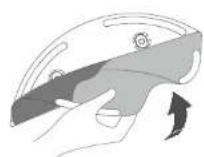
148 149
natural_image
Line drawing of a hand using a tool to lift a boat (no text or symbols)
natural_image
Line drawing of a robotic vacuum cleaner with control panel and sensor array (no text or symbols)
natural_image
Line drawing of a robotic vacuum cleaner with a hand adjusting its component (no text or symbols)natural_image
Line drawing of a vehicle or vehicle with a directional arrow indicating motion (no text or symbols)
natural_image
Diagram showing a device being processed into a circular component, with no visible text or symbols.3 Retirez le filtre.
natural_image
Line drawing of two hands holding a device component, one with a grid and the other with a rectangular tray (no text or symbols)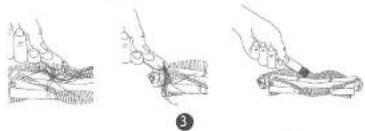
natural_image
Three-step line drawing showing hand positioning and handling a small object, no text or symbols present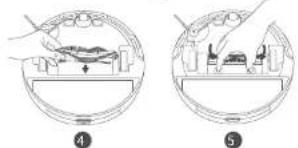
natural_image
Two-step diagram showing a device inside a circular container, with no visible text or symbols.FrançaisFra
natural_image
Technical line drawing of a device interior showing internal components and external casing (no text or symbols)natural_image
Diagram of a circular mechanical or electrical component with no visible text, numbers, or symbols.Français Fra
support@eufylife.com
www.eufylife.com

(US) +1 (800) 988 7973 Mon-Fri 6:15 - 17:00 (PT);
Sat-Sun 6:30-16:30 (PT)
(UK) +44 (0) 1604 936200 Mon-Sun 6:00 - 17:00;
Sat-Sun 6:00-14:00
(DE) +49 (0) 69 9579 7960 Mo-Fr 8:00 - 16:00
(日本)03 4455 7823 月-金 9:00 - 17:00
Anker Innovations Limited
Room 1318-19, Hollywood Plaza, 610 Nathan Road,
Mongkok, Kowloon, Hong Kong
natural_image
Pure diagram of four rectangular panels with horizontal lines and a central circular icon, no text or symbols present.natural_image
Line drawing of a toilet and refrigerator with a wall-mounted switch (no text or symbols)natural_image
Line drawing of a robotic vacuum cleaner with a dial indicator (no text or symbols)Italianoltal

natural_image
Line drawing of a robotic vacuum cleaner with a button and control knob (no text or symbols)
Download on the App Store

GET IT ON Google Play
natural_image
Line drawing of a robotic vacuum cleaner with a close-up inset showing the button (no text or symbols)Italianoltal
natural_image
Pure technical diagram of a coiled spring or coil with no text, numbers, or symbolsnatural_image
Line drawing of a robotic vacuum cleaner with a close-up inset showing the handle (no text or symbols)188 189
natural_image
Illustration of a hand holding a bowl with a lid and arrow indicating direction (no text or symbols)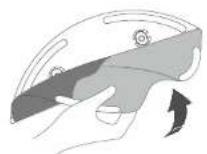
190 191
natural_image
Line drawing of a hand using a tool to lift a boat (no text or symbols)
natural_image
Line drawing of a robotic vacuum cleaner with hands and motion arrows indicating motion (no text or symbols)
natural_image
Line drawing of a robotic vacuum cleaner with a hand holding the blade (no text or symbols)natural_image
Diagram showing a robotic vacuum cleaner transforming into a circular component (no text or symbols present)natural_image
Diagram of a battery pack with internal compartments and an output arrow (no text or symbols)natural_image
Line drawing of two hands holding a device component, one with a handle and the other with a clip (no text or symbols)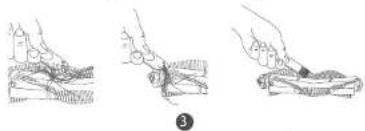
natural_image
Three-step line drawing showing hand positioning and handling a small object (no text or symbols)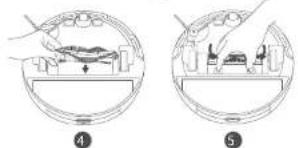
natural_image
Two-step diagram showing a device inside a circular housing, with no visible text or symbols.natural_image
Technical line drawing of a device interior showing internal components and a separate view of a rectangular housing (no text or symbols)natural_image
Diagram of a circular mechanical or electrical component with internal components and a pointer (no text or symbols)Italianoltali
support@eufylife.com
www.eufylife.com
(US) +1 (800) 988 7973 Mon-Fri 6:15 - 17:00 (PT); Sat-Sun 6:30-16:30 (PT)
(UK) +44 (0) 1604 936200 Mon-Sun 6:00 - 17:00;
Sat-Sun 6:00-14:00
(DE) +49 (0) 69 9579 7960 Mo-Fr 8:00 - 16:00
http://support.eufylife.com/s/phonecontactus
natural_image
Line drawings of three electronic devices with no visible text or symbols1
●
●
Türk Türk

natural_image
Technical line drawing of a bathroom toilet and refrigerator with directional arrows indicating movement (no text or symbols)natural_image
Line drawing of a robotic vacuum cleaner with a hand cursor pointing to the button (no text or symbols)224 225

natural_image
Line drawing of a robotic vacuum cleaner with a button and control knob (no text or symbols)
natural_image
Line drawing of a robotic vacuum cleaner with a circular button labeled 'Power' pointing to the lid (no text or symbols beyond basic diagram)228 229
natural_image
Pure technical diagram of a coiled spring with no text, numbers, or symbolsnatural_image
Line drawing of a robotic vacuum cleaner with a circular component inserted (no text or symbols)natural_image
Illustration of two hands holding a helmet, showing blade and blade details (no text or symbols)natural_image
Line drawing of a hand using a tool to lift a curved object (no text or symbols)
natural_image
Line drawing of a robotic vacuum cleaner with attached sensor and control panel (no text or symbols)Türk Türk

natural_image
Line drawing of a robotic vacuum cleaner with hands adjusting the component (no text or symbols)natural_image
Diagram showing a robotic vacuum cleaner with a close-up of its internal components (no text or symbols present)3 Filtreyi çıkarın.
natural_image
Diagram of a battery pack with internal compartments and an output indicator (no text or symbols)natural_image
Line drawing of hands holding a device with a small rectangular component (no text or symbols)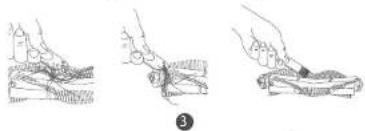
natural_image
Three-step line drawing showing hand positioning and handling a small object, no text or symbols present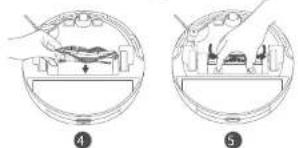
natural_image
Two-step diagram showing a device inside a circular housing, with no visible text or symbols.Yan Fırça Temizliği
Türk Türk
natural_image
Two-step diagram showing hand tool application on circular device, no text or symbols presentnatural_image
Technical line drawing of a circular mechanical device with internal components and a separate flat base (no text or symbols)natural_image
Diagram of a mechanical device with labeled components (no text or symbols present)Türk Türk
support@eufylife.com
(TR) +90 850 460 14 14 Pzt-Cuma 09:00-18:00
(US) +1 (800) 988 7973 Mon-Fri 6:15 - 17:00 (PT);
Sat-Sun 6:30-16:30 (PT)
(UK) +44 (0) 1604 936200 Mon-Sun 6:00 - 17:00;
Sat-Sun 6:00-14:00
(DE) +49 (0) 69 9579 7960 Mo-Fr 8:00 - 16:00
(日本)0344557823月-金9:00-17:00
http://support.eufylife.com/s/phonecontactus
natural_image
Three-step diagram showing a device with a plug, a connector, and a battery connected to a cable (no text or symbols)
natural_image
Technical line drawing of a mechanical device with a circular component and a separate housing (no text or symbols)natural_image
Line drawing of a robotic vacuum cleaner with a dial indicator (no text or symbols)Download on the App Store

GET IT ON Google Play
natural_image
Line drawing of a robotic vacuum cleaner with a button and handle (no text or symbols)natural_image
Line drawing of a robotic vacuum cleaner with a close-up inset showing the dial (no text or symbols)natural_image
Line drawing of a hand holding a small boat with a faucet above it (no text or symbols)
natural_image
Line drawing of a robotic vacuum cleaner with control panel and sensor array (no text or symbols)
natural_image
Line drawing of a robotic vacuum cleaner with hands operating it (no text or symbols)natural_image
Simple line drawing of a vehicle with a checkmark and cross mark, no text or symbols present
natural_image
Diagram showing a robotic vacuum cleaner's internal structure being processed into a circular component (no text or symbols present)natural_image
Top-down schematic of a mechanical device with labeled components (no text or symbols)284 285
http://support.eufylife.com.
Свяжитесь с нами
support@eufylife.com
www.eufylife.com

(US) +1 (800) 988 7973 Mon-Fri 6:15 - 17:00 (PT);
Sat-Sun 6:30-16:30 (PT)
(UK) +44 (0) 1604 936200 Mon-Sun 6:00 - 17:00;
Sat-Sun 6:00-14:00
(DE) +49 (0) 69 9579 7960 Mo-Fr 8:00 - 16:00
(日本)0344557823月-企9:00-17:00
http://support.eufylife.com/s/phonecontactus
Warning: Changes or modifications not expressly approved by the party responsible for compliance could void the user's authority to operate the equipment.
If this equipment does cause harmful interference to radio or television reception, which can be determined by turning the equipment off and on, the user is encouraged to try to correct the interference by one or more of the following measures:
(1) Reorient or relocate the receiving antenna.(2) Increase the separation between the equipment and receiver.(3) Connect the equipment into an outlet on a circuit different from that to which the receiver is connected.(4) Raadpleeg de leverancier of een ervaren radio-/tv-technicus voor hulp.
natural_image
Pure diagram of four rectangular panels with horizontal lines and a central circular icon, no text or symbols present.natural_image
Illustration of three electronic devices with labeled parts (no text or symbols present)310 311

natural_image
Line drawing of a toilet with a lid and outlet, showing no text or symbolsnatural_image
Line drawing of a robotic vacuum cleaner with a circular dial indicator (no text or symbols)NederlandsN

natural_image
Line drawing of a robotic vacuum cleaner with a button and sensor (no text or symbols)natural_image
Line drawing of a robotic vacuum cleaner with a button and handle, no text or symbols presentNederlandsN
natural_image
Line drawing of a robotic vacuum cleaner with a close-up inset showing the handle (no text or symbols)316 317
natural_image
Illustration of two hands holding a helmet with a curved blade and arrow indicating direction (no text or symbols)318 319
natural_image
Line drawing of a robotic vacuum cleaner with attached components and directional arrows (no text or symbols)
natural_image
Line drawing of a hand holding a vacuum cleaner with a handle and control panel (no text or symbols)NederlandsN
natural_image
Diagram showing a robotic vacuum cleaner being processed into a circular component with granular dust (no text or symbols)natural_image
Diagram of a battery pack with internal compartments and an external circuit symbol (no text or labels)natural_image
Line drawing of two hands holding a device component, one with a handle and the other with a grid-like element (no text or symbols)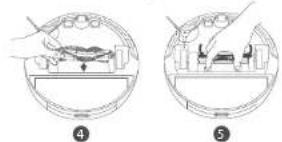
natural_image
Two circular diagrams showing a device interior with hand and tool, labeled 4 and 5 (no text or symbols present)natural_image
Two-step diagram showing hand tool application on a circular device, no text or symbols presentnatural_image
Technical line drawing of a circular device with internal components and a separate rectangular housing (no text or symbols)326 327
NederlandsN
support@eufylife.com
www.eufylife.com
(US) +1 (800) 988 7973 Mon-Fri 6:15 - 17:00 (PT);
Sat-Sun 6:30-16:30 (PT)
(UK) +44 (0) 1604 936200 Mon-Sun 6:00 - 17:00;
Sat-Sun 6:00-14:00
(DE) +49 (0) 69 9579 7960 Mo-Fr 8:00 - 16:00
(日本)03 4455 7823 月-金 9:00 - 17:00
