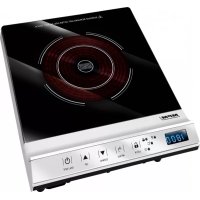
MKE12 - Cooker MPM - Free user manual and instructions
Find the device manual for free MKE12 MPM in PDF.



| Product type | Portable induction cooktop |
| Brand | MPM |
| Model | MKE12 |
| Cooking zone | 1 zone, diameter 190 mm, max power 1800 W |
| Power supply | 220-240 V ~ 50/60 Hz |
| Rated power | 1800 W |
| Power settings | 10 levels: 200, 350, 500, 650, 800, 1000, 1200, 1400, 1600, 1800 W |
| Temperature settings | 10 levels: 60, 80, 100, 120, 140, 160, 180, 200, 220, 240 °C |
| Timer | 0 to 180 minutes with automatic shutdown |
| Functions | Power, temperature, timer, key lock, automatic shutdown, overheating protection |
| Display | LED with power, temperature, timer and lock indicators |
| Surface material | Glass ceramic |
| Power cord length | 1.25 meters |
| Noise level | L_WA = 48 dB |
| Safety | Child lock, automatic shutdown after 2h, pan detection, overvoltage and undervoltage protection, overheating protection |
| Error codes | E0 (no pan), E1 (short circuit), E2 (sensor), E3 (high voltage), E4 (low voltage), E5 (overheat), E6 (fan) |
| Cleaning | Damp cloth with dish soap; glass ceramic surface with mild cleaner and soft cloth |
| Compatible cookware | Flat bottoms, diameter 11-20 cm, induction-compatible (magnetic); avoid glass, earthenware, aluminum |
| Weight | Approximately 2.5 kg (estimated) |
| Dimensions (approx.) | Approximately 28 x 35 x 5 cm (estimated) |
| Warranty | Legal warranty, see manufacturer's terms |
| Country of origin | Not specified (estimated China) |
Frequently Asked Questions - MKE12 MPM
User questions about MKE12 MPM
0 question about this device. Answer the ones you know or ask your own.
Ask a new question about this device
Download the instructions for your Cooker in PDF format for free! Find your manual MKE12 - MPM and take your electronic device back in hand. On this page are published all the documents necessary for the use of your device. MKE12 by MPM.
USER MANUAL MKE12 MPM
EN We wish you satisfaction from using the product and invite you to check a wide range of other MPM/appliances
AAGUZ LO MDLEHE US ON SINGOY, PSL
ОДПОСС ФОРЧИЯ
JEDNOPÓLOVÝ INDUKČNY VARIĆ
natural_image
Exterior view of a modern electric stove with a black top and red circular vent (no visible text or symbols)GZ NAVOD K OBSUZE 3
SK POLIŽ VATFÍSKÁ PR RÚČKA 101
BEZPEČNOSTNÍ INSTRUKCE
Read the user manual before the first use.
The device is designed for home use only.
Due to rapid reaction of the induction plate to heat, do not use the plate unsupervised after setting it to a high heating level.
The device is not designed to be used in open spaces.
When cooking, a high velocity of heating the hotplate should be noticed.
Only specially designed pots, with thick bottom, may be used with the induction cooker.
Do not put empty pots when the heating plate is on in order to prevent overheating.
Exercise caution when cooking milk in special pots as water may be imperceptibly boiled away, which may damage the pot or the device.
After finishing cooking, turn off the heating plate with a button.
Dils and fats, due to its high temperature, can catch fire very easily. Maintain the utmost care when preparing food with the above-mentioned ingredients. Do not extinguish burning oils with water. Cover the pot with a lid and turn off the heating plate.
- Avoid dropping heavy objects on the heating surface. Too heavy impact loading may cause permanent damage of a glass surface of the device.
In case of finding any damages on the device (e.g. cracks, scratches, chips), immediately turn it off because there is the risk of electrical shock.
If, for some reason, it is impossible to turn off the heating plate (e.g. the control module is broken), disconnect the plug or turn off the fuses and inform the service about the failure.
The power cord cannot have contact with the heating zones.
The cooker is not designed for storing any objects.
Before using put the cooker on a hard, flat and dry surface.
The heating plate is equipped in a safety system which disconnects the power of the heating zone when moving or removing the pot from the heating zone.
Do not put any flammable objects under the heating plate, as they may cause fire.
Note any carried metal objects (e.g. keys, decorations). They may be heated up and cause burns. This does not apply only to objects with magnetic characteristics (e.g. silver, gold).
Do not heat up closed cans or other containers as the increase of thermal energy inside the containers may lead to sudden burst.
- Keep the sensor buttons clean. Do not put any objects on them.
If the content of the pot is boiled over on the sensor buttons, disconnect the plate and clean it. The heating surface is hot.
Take particular caution if there are children near the device.
After long operation, the heating surface of the plate may still be hot. Do not touch the surface as there is a danger of burn.
Regular checking whether there are any objects near the air outlets, which may impede the airflow, is recommended.
The power cord should be regularly checked whether there are any damages. Do not use the device if the power cord is
damaged. In such a case necessarily contact your authorized service to repair the damage.
Do not use the device in places where the air temperature is high, e.g. near gas cookers.
- Clean the heating plate regularly.
The device is not designed to work with external time switches or a separate remote control system.
This appliance is not intended for use by children under 8 years of age and individuals with reduced physical, sensory or mental capabilities, or lack of experience and knowledge, unless they have been given supervision or instruction concerning use of the appliance in a safe way and if they understand the hazards involved. Cleaning and user maintenance shall not be carried out by children without supervision.
Pay attention to children to prevent playing with the device.
Store the appliance and its cord out of reach of children under 8 years of age.
Do not pull the plug by holding the power cord.
Do not connect the power plug with wet hands.
In order to ensure your children's safety, please keep all pack aging (plastic bags, boxes, polystyrene etc.) out of their reach.
WARNING! Do not allow small children to play with the foil as there is a danger of suffocation!
NOTE! Turn off the device if the surface is cracked to avoid electric shock.
NOTE! Do not put metal objects on the cooker, such as: knives, forks, spoons and lids, as they may become hot.
In order to ensure your children's safety, please keep all pack aging (plastic bags, boxes, polystyrene etc.) out of their reach.
This appliance shall not be used by children. Keep the appliance and its cord out of reach of children.
Always disconnect the appliance from the supply if it is left unattended and before assembling, disassembling or cleaning.
WARNING! Do not allow small children to play with the foil as there is a danger of suffocation!
Warning! Hot surface! The heating plates can be hot after use. Do not touch.
APPLIANCE OVERVIEW
- Heating zone (max. 1800 W, ∅ 190 mm)
- LED display
- Heating power control light
- Heating temperature control light
- Timer control light
-
Keyboard lock control light
-
Keyboard lock button
- "Menu" function selection button
- Range adjustment button (DOWN)
- Range adjustment button (UP)
- On/Off switch
- Anti-slip feet
GENERAL INFORMATION
- The induction hob generates a strong magnetic field that induces eddy currents in the bottom of the pan which produce heat. This means that only the pan is heated and not the hob, which saves a lot of electrical energy and significantly reduces the cooking time.
- Make sure to use a pan compatible with induction hobs. Do not use pans which have uneven bottoms, support feet or a diameter smaller than 11 cm. The maximum diameter is 20 cm. Do not use glass, clay or aluminium pots.
- Always keep the hob and the control panel clean. Use dry fingers and firm movements when operating the keyboard.
- The hob features and anti-overheating system. If the cooking temperature is too high or the pan is empty, the "E5" error will be reported. Once the appliance cools down, the cooking process will resume.
- The hob features an undervoltage and overvoltage protection system. If the voltage changes too much, the appliance will report an error (see the error table).
BEFORE FIRST USE
- Remove the appliance from the box. Remove all plastic sheets, bags and styrofoam inserts.
- During unpacking check appliance if there are not damaged.
- Clean the appliance (see CLEANING & MAINTENANCE).
- Make sure that your mains power supply corresponds to the voltage stated on the rating plate.
USAGE INSTRUCTIONS
- Place the appliance on a firm, level and dry surface.
- Plug the power cord to the mains. A short sound signal will be played, and the display (2) will show the "OFF" status. Keyboard operation will always produce a sound signal.
- Place a compatible pan on the heating zone (1). Any attempt to start the heating process without a pan on the heating plate or with an incompatible pan will result in the "EO" error code on the display (2).
- Turn on the appliance using the on switch (11) and press the "Menu" button (8) to go to heating parameter selection. If you take no action after turning on the hob, it will automatically turn off after 10 seconds.
HEATING POWER – use the function selection button (8) to select the heating power; the control light (3) will turn on, indicating that the heating process has started. Next, use the range adjustment buttons (9) and (10) to set the power. The heating zone supports the following power settings: 200, 350, 500, 650, 800, 1000, 1200, 1400, 1600, 1800 W. The higher the power, the faster the hob heats up, which reduces the cooking time. You can modify the power settings at any moment during cooking.
HEATING TEMPERATURE – if the temperature is your priority, use the function selection button (8) to select the temperature; the control light (4) will turn on, indicating that the heating process has started. Next, use the range adjustment buttons (9) and (10) to set the temperature. The following temperature settings are available: 60, 80, 100, 120, 140, 160, 180, 200, 220, 240 °C. You can modify the temperature at any moment during cooking.
CAUTION! If you do not declare the heating time, the appliance will automatically switch off after 120 minutes.
HEATING TIME – you can set it between 0 and 180 minutes. Use the function selection button (8) to select the timer; the control light (5) and (3) will turn on. Set the heating time using the (9) and (10) buttons, and wait for a moment; the value you selected will light up continuously, which means that the countdown has started. The hob will then alternate between displaying the time and the power. Modify the latter if necessary. The same applies to the heating time and temperature. After the heating time elapses, the hob will switch off, which will be signalled by a sound.
- The appliance is equipped with a key lock button. Press the button (7) to lock the keypad and hold it briefly to unlock the keypad. Locking the keypad is signaled by lighting of the control lamp (6).
- If you lift the pot/pan or move it away from the cooking zone, the heating process will stop automatically ("EO" message). The hob will resume the process using the previous settings if you put the pot/pan back on the heating zone within 60 seconds. Otherwise the hob will switch off automatically.
- You can stop the heating process at any moment using the "ON/OFF" button (11).
CAUTION! The heating plates can be hot after use. Do not touch.
- When the heating process is over, take the pot/pan away from the heating zone but do not unplug the hob from the mains while the fan cooling the inside of the appliance continue to work. You can safely unplug the hob only after the cooling fan stop.
- When the plates cool down, clean the appliance (see: "CLEANING AND MAINTENANCE").
ERROR TABLE: CAUSES AND SOLUTIONS
| ERROR CODE | CAUSE SOLUTION | |
| E0 | No pot/pan in the heating zone. Incorrect cookware. | Put a pot/pan in the heating zone. Make sure your cookware is compatible with induction hobs. |
| E1 Electrical failure/ short circuit. Contact an authorised service centre. | ||
| E2 | Damaged temperature sensor. | Contact an authorised service centre. |
| E3 Power supply voltage too high. Make sure the power supply parameters correspond to the ones presented on the product's nameplate. | ||
| E4 Power supply voltage too low. Make sure the power supply parameters correspond to the ones presented on the product's nameplate. | ||
| E5 Ceramic hob or cookware temperature too high. Empty cookware. | Wait until the temperature of the hob/cookware goes down. Fill the cookware. | |
| E6 Cooling fan(s) damaged. Turn off the appliance. Wait until it cools down, clean the airflow grills and turn on the hob again. Contact an authorised service centre. | ||
CLEANING AND MAINTENANCE
Clean the device after each use. Disconnect the device and wait until it gets cooler. Do not use petrol, thinners, brushes and paste to clean the device. Wipe the device with damp cloth with some dishwash. Using the vacuum cleaner remove the dirt from the air ducts and the fan grid. Clean the ceramic surface and the control panel with soft cloth and delicate means for cleaning ceramic surfaces. Take care and prevent running water on the device (water may cause the damage of the device). Never immerse the device and the power cord in water or other liquid.
TECHNICAL DATA
Technical parameters are indicated on the product nameplate.
Length of power cord: 1,25 m
Noise level: L_WA = 48 dB

NOTE! MPM agd S.A. reserves its right to modify the technical data.
Proper disposal of the product (waste electrical and electronic equipment)
Marking on the product indicates that after the service-life of the product expires, it should not be disposed with other type of municipal waste. Used equipment may have a negative impact on the environment and health of people due to potentially containing hazardous substances, mixtures and components.
Mixing electric waste with other types of waste or disassembling those in an unprofessional manner may cause a release of substances that are hazardous to the environment and health. Used equipment should
be handed-over to a point for collection of electric waste. In order to obtain detailed information regarding the electric waste collection points, the user should contact the municipal point of electric waste collection or used equipment processing department.
TABLEAU DES DEFAULTS - CAUSES ET SOLUTIONS
BESCHRIJVING VAN HET APPARAAT
- BEZPEČNOSTNÍ INSTRUKCE
- APPLIANCE OVERVIEW
- GENERAL INFORMATION
- BEFORE FIRST USE
- USAGE INSTRUCTIONS
- CAUTION! The heating plates can be hot after use. Do not touch.
- CLEANING AND MAINTENANCE
- TECHNICAL DATA
- Proper disposal of the product (waste electrical and electronic equipment)
- BESCHRIJVING VAN HET APPARAAT
Brand : MPM
Model : MKE12
Category : Cooker