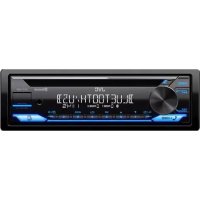
USER MANUAL KDT716BT JVC
Quick Guide
JVCKENWOOD Corporation
For detailed operations and information, refer to the INSTRUCTION MANUAL on the following website:
http://www.jvc.net/cs/car/
B5K-0660-30 [E]


Products and batteries with the symbol (crossed-out wheeled bin) cannot be disposed as household waste. Old electrical and electronic equipment and batteries should be recycled at a facility capable of handling these items and their waste byproducts.
Contact your local authority for details in locating a recycle facility nearest to you. Proper recycling and waste disposal will help conserve resources whilst preventing detrimental effects on our health and the environment.
Notice: The sign "Pb" below the symbol for batteries indicates that this battery contains lead.
In accordance with the Law of the Russian Federation "On Protection of Consumer Rights", the service life (suitability) of this product, after which it may pose a danger to life, health, property of the consumer or the environment, is seven (7) years from the date of manufacture.
Consumable materials for this product, supplied together with it, may be stored for two (2) years from the date of its manufacture.
The service life (suitability), except for the storage period of consumable materials mentioned in the previous two paragraphs, does not affect any other consumer rights, in particular, the warranty service of JVC, which the consumer may receive in accordance with the Law on Protection of Consumer Rights or other laws related to it.
Storage conditions:
Temperature: from -30°C to +85°C
Humidity: from 0% to 90%
For Israel

Declaration of Conformity with regard to the RE Directive 2014/53/EU Declaration of Conformity with regard to the RoHS Directive 2011/65/
Manufacturer:
JVCKENWOOD Corporation
3-12, Moriya-cho, Kanagawa-ku, Yokohama-shi, Kanagawa, 221-0022, JAPAN
EU Representative:
JVCKENWOOD Europe B.V.
Amsterdamseweg 37,1422 AC UITHOORN, THE NETHERLANDS
EU Representative:
JVCKENWOOD Europe B.V.
Amsterdamseweg 37,1422 AC UITHOORN, THE NETHERLANDS
Hereby, JVCKENWOOD declares that the radio equipment "KD-T812BT/KD-T716BT" is in compliance with Directive 2014/53/EU. The full text of the EU declaration of conformity is available at the following internet address: http://www.jvc.net/cs/car/eudoc/
The marking of products using lasers
The label is attached to the chassis/case and says that the component uses laser beams that have been classified as Class 1. It means that the unit is utilizing laser beams that are of a weaker class. There is no danger of hazardous radiation outside the unit.
The software embedded in the Product (hereinafter the "Licensed Software") provided by Licensor is copyrighted to or sublicensable by the Licensor, and this Agreement provides for the terms and conditions which Users shall follow in order to use the Licensed Software.
The User shall use the Licensed Software by agreeing with the terms of this Software License Agreement. This Agreement shall be deemed completed at the time the User (hereinafter the "User") initially used the Product in which the "Licensed Software" is embedded.
The Licensed Software may include the software which has been licensed to the Licensor directly or indirectly from any third party. In such case, some third parties require the Users to follow their conditions for use separately from this Software License Agreement. Such software shall not be subject to this Agreement, and the Users are urged to read the "Important Notice concerning the Software" to be provided separately below.
Article 1 General Provision
The Licensee shall grant to the User a non-exclusive and non-transferable (other than the exceptional case referred to in Article 3, Paragraph 1) licensed to use the Licensed Software within the country of the User. (the country where the User bought the Product (hereinafter the "Country")
Article 2 License
- The license granted under this Agreement shall be the right to use the Licensed Software in the Product.
- The User shall not duplicate, copy, modify, add, translate or otherwise alter, or lease the Licensed Software and any related documents, whether in whole or in part.
- The use of the Licensed Software shall be limited to personal purpose, and the Licensed Software shall not be distributed, licensed or sub-licensed whether it is for commercial purpose or not.
- The User shall use the Licensed Software according to the directions described in the operation manual or help file, and is prohibited to use or duplicate any data in a manner violating the Copyright Law or any other laws and regulations by applying whole or a part of the Licensed Software.
Article 3 Conditions for Grant of License
- When the User transfers the Product, it may also transfer the license to use the Licensed Software embedded in the Product (including any related materials, updates and upgrades) on condition that no original, copies or related materials continue in the possession of the User, and that the User shall cause the transferee to comply with this Software License Agreement.
- The User shall not carry out reverse engineering, disassembling, decompiling or any other code analysis works in connection with the Licensed Software.
Article 4 Right pertaining to the Licensed Software
Any and all copyrights and other rights pertaining to the Licensed Software and related documents shall belong to the Licensee or the original holder of the right who granted to the Licensee the license or sublicense for the Licensed Software (hereinafter the "Original Rightholder"), and the User shall not be entitled to any right other than the license granted hereunder, in respect of the Licensed Software and any related documents.
Article 5 Indemnification of Licensor
- Neither the Licensor nor the Original Rightholder shall be liable for any damage incurred by the User or any third party due to the exercise of the license granted to the User under this Agreement, unless otherwise restricted by law.
- The Licensee will offer no guarantee for the merchantability, convertibility and consistency with certain objective of the Licensed Software.
Article 6 Liability to Third Party
If any dispute has arisen with any third party due to an infringement upon a copyright, patent or any other intellectual property right that was caused by the User's use of the Licensed Software, the User shall settle such dispute at its own cost and hold the Licensee and the Original Rightholder harmless from any inconvenience it may cause.
Article 7 Confidentiality
The User shall keep the confidentiality of such portion of the Licensed Software, related documents thereof or any other information to be granted under this Agreement, as well as the conditions of this Agreement as has not yet entered the public domain, and shall not disclose or divulge the same to any third party without approval of the Licensor.
Article 8 Termination
In case the User falls under any of the events described in the following items, the Licensor may immediately terminate this Agreement or claim that the User compensates for the damage incurred by the Licensor due to such event:
(1) when the User violated any provision of this Agreement; or (2) when a petition has been filed against the User for an attachment, provisional attachment, provisional disposition or any other compulsory execution.
Article 9 Destruction of the Licensed Software
If this Agreement is terminated pursuant to the provision of Article 8, the User shall destroy the Licensed Software, any related documents and copies thereof within two (2) weeks from such date of termination.
Article 10 Protection of Copyright
- The copyright and all the other intellectual property rights relating to the Licensed Software shall belong to the Licensee and the Original Rightholder, and in no event shall they be under the ownership of the User.
- The User shall, whenever it uses the Licensed Software, comply with any laws relating to the copyright and other intellectual property rights.
Article 11 Export Restriction
- It is prohibited to export the Licensed Software and any related documents outside the country of the User (including transmission thereof outside the country of the User via Internet of other communication tools).
- The User shall understand that the Licensed Software shall be subject to the export restrictions adopted by the country of User and any other countries.
- The User shall agree that the software will be subject to any and all applicable international and domestic laws (including the export control regulation of the country of User and any other countries, and any restrictions concerning the end-users, the use by end-users and importing countries to be provided by the country of User and any other countries, and any other governmental authorities).
Article 12 Miscellaneous
- In the event any part of this Agreement is invalidated by operation of law, the residual provisions shall continue in force.
- Matters not stipulated in this Agreement or any ambiguity or question raised in the construction of this Agreement shall be provided or settled upon good-faith consultation between the Licensor and the User.
- The Licensee and the User hereby agree that this Agreement is governed by the laws of Japan, and any dispute arising from, and relating to the rights and obligations under, this Agreement shall be submitted to the exclusive jurisdiction of the Tokyo District Court for its first instance.
Important Notice concerning the Software
Copyright (c) 2009-2012 Petri Lehtinen petri@digip.org
Permission is hereby granted, free of charge, to any person obtaining a copy of this software and associated documentation files (the "Software"), to deal in the Software without restriction, including without limitation the rights to use, copy, modify, merge, publish, distribute, sublicense, and/or sell copies of the Software, and to permit persons to whom the Software is furnished to do so, subject to the following conditions:
The above copyright notice and this permission notice shall be included in all copies or substantial portions of the Software.
THE SOFTWARE IS PROVIDED "AS IS", WITHOUT WARRANTY OF ANY KIND, EXPRESS OR IMPLIED, INCLUDING BUT NOT LIMITED TO THE WARRANTY OF MERCHANTABILITY, FITNESS FOR A PARTICULAR PURPOSE AND NONINFRINGEMENT. IN NO EVENT SHALL THE AUTHORS OR COPYRIGHT HOLDERS BE LIABLE FOR ANY CLAIM, DAMAGES OR OTHER LIABILITY, WHETHER IN AN ACTION OF CONTRACT, TORT OR OTHERWISE, ASING FROM, OUT OF OR IN CONNECTION WITH THE SOFTWARE OR THE USE OR OTHER DEALINGS IN THE SOFTWARE.
-cJSON
Copyright (c) 2009 Dave Gamble
Permission is hereby granted, free of charge, to any person obtaining a copy of this software and associated documentation files (the "Software"), to deal in the Software without restriction, including without limitation the rights to use, copy, modify, merge, publish, distribute, sublicense, and/or sell copies of the Software, and to permit persons to whom the Software is furnished to do so, subject to the following conditions:
The above copyright notice and this permission notice shall be included in all copies or substantial portions of the Software.
THE SOFTWARE IS PROVIDED "AS IS", WITHOUT WARRANTY OF ANY KIND, EXPRESS OR IMPLIED, INCLUDING BUT NOT LIMITED TO THE WARRANTY OF MERCHANTABILITY, FITNESS FOR A PARTICULAR PURPOSE AND NONINFRINGEMENT. IN NO EVENT SHALL THE AUTHORS OR COPYRIGHT HOLDERS BE LIABLE FOR ANY CLAIM, DAMAGES OR OTHER LIABILITY, WHETHER IN AN ACTION OF CONTRACT, TORT OR OTHERWISE, ASING FROM, OUT OF OR IN CONNECTION WITH THE SOFTWARE OR THE USE OR OTHER DEALINGS IN THE SOFTWARE.
-CMP
The MIT License (MIT)
Copyright (c) 2014 Charles Gunyon
Permission is hereby granted, free of charge, to any person obtaining a copy of this software and associated documentation files (the "Software"), to deal in the Software without restriction, including without limitation the rights to use, copy, modify, merge, publish, distribute, sublicense, and/or sell copies of the Software, and to permit persons to whom the Software is furnished to do so, subject to the following conditions:
The above copyright notice and this permission notice shall be included in all copies or substantial portions of the Software.
THE SOFTWARE IS PROVIDED "AS IS", WITHOUT WARRANTY OF ANY KIND, EXPRESS OR IMPLIED, INCLUDING BUT NOT LIMITED TO THE WARRANTIES OF MERCHANTABILITY, FITNESS FOR A PARTICULAR PURPOSE AND NONINFRINGEMENT. IN NO EVENT SHALL THE AUTHORS OR COPYRIGHT HOLDERS BE LIABLE FOR ANY CLAIM, DAMAGES OR OTHER LIABILITY, WHETHER IN AN ACTION OF CONTRACT, TORT OR OTHERWISE, ARISING FROM, OUT OF OR IN CONNECTION WITH THE SOFTWARE OR THE USE OR OTHER DEALINGS IN THE SOFTWARE.
nanopb
Copyright (c) 2011 Petteri Aimonen
This software is provided 'as-is', without any express or implied warranty. In no event will the authors be held liable for any damages arising from the use of this software.
Permission is granted to anyone to use this software for any purpose, including commercial applications, and to alter it and redistribute it freely, subject to the following restrictions:
- The origin of this software must not be misrepresented; you must not claim that you wrote the original software. If you use this software in a product, an acknowledgment in the product documentation would be appreciated but is not required.
- Altered source versions must be plainly marked as such, and must not be misrepresented as being the original software.
- This notice may not be removed or altered from any source distribution.
sha2
AUTHOR: Aaron D. Gifford - http://www.aaronggifford.com/
Copyright (c) 2000-2001, Aaron D. Gifford
All rights reserved.
You may obtain a copy of the license at
https://opensource.org/licenses/BSD-3-Clause
THE SOFTWARE IS PROVIDED "AS IS", WITHOUT WARRANTY OF ANY KIND, EXPRESS OR IMPLIED, INCLUDING BUT NOT LIMITED TO THE WARRANTIES OF MERCHANTABILITY, FITNESS FOR A PARTICULAR PURPOSE AND NONINFRINGEMENT. IN NO EVENT SHALL THE AUTHORS OR COPYRIGHT HOLDERS BE LIABLE FOR ANY CLAIM, DAMAGES OR OTHER LIABILITY, WHETHER IN AN ACTION OF CONTRACT, TORT OR OTHERWISE, ARISING FROM, OUT OF OR IN CONNECTION WITH THE SOFTWARE OR THE USE OR OTHER DEALINGS IN THE SOFTWARE.
Posix
Copyright (c) 1990, 1993
The Regents of the University of California. All rights reserved.
Redistribution and use in source and binary forms, with or without modification, are permitted provided that the following conditions are met:
- Redistributions of source code must retain the above copyright notice, this list of conditions and the following disclaimer.
- Redistributions in binary form must reproduce the above copyright notice, this list of conditions and the following disclaimer in the documentation and/or other materials provided with the distribution.
- All advertising materials mentioning features or use of this software must display the following acknowledgement:
This product includes software developed by the University of California, Berkeley and its contributors.
- Neither the name of the University nor the names of its contributors may be used to endorse or promote products derived from this software without specific prior written permission.
Copyright (C) 1993 by Sun Microsystems, Inc. All rights reserved.
Developed at SunPro, a Sun Microsystems, Inc. business.
Permission to use, copy, modify, and distribute this software is freely granted, provided that this notice is preserved.
Copyright (C) 1991-2, RSA Data Security, Inc. Created 1991. All rights reserved.
License to copy and use this software is granted provided that it is identified as the "RSA Data Security, Inc. MD4 Message-Digest Algorithm" in all material mentioning or referencing this software or this function.
Copyright (c) 1995, 1996 Carnegie-Mellon University. All rights reserved.
Author: Chris G. Demetriou
Permission to use, copy, modify and distribute this software and its documentation is hereby granted, provided that both the copyright notice and this permission notice appear in all copies of the software, derivative works or modified versions, and any portions thereof, and that both notices appear in supporting documentation.
CARNEGIE MELLON ALLOWS FREE USE OF THIS SOFTWARE IN ITS "AS IS" CONDITION. CARNEGIE MELLON DISCLAIMS ANY LIABILITY OF ANY KIND FOR ANY DAMAGES WHATSOEVER RESULTING FROM THE USE OF THIS SOFTWARE.
Carnegie Mellon requests users of this software to return to
Software Distribution Coordinator or Software.Distribution@
CS.CMU.EDU
School of Computer Science
Carnegie Mellon University
Pittsburgh PA 15213-3890
any improvements or extensions that they make and grant Carnegie the rights to redistribute these changes.
License is also granted to make and use derivative works provided that such works are identified as "derived from the RSA Data Security, Inc. MD4 Message-Digest Algorithm" in all material mentioning or referencing the derived work.
RSA Data Security, Inc. makes no representations concerning either the merchantability of this software or the suitability of this software for any particular purpose. It is provided "as is" without express or implied warranty of any kind.
Copyright (c) 1993 Martin Birgmeier
All rights reserved.
You may redistribute unmodified or modified versions of this source code provided that the above copyright notice and this and the following conditions are retained.
This software is provided "as is", and comes with no warranties of any kind. I shall in no event be liable for anything that happens to anyone/anything when using this software.
These notices must be retained in any copies of any part of this documentation and/or software.
T-Kernel 2.0
This product uses the source code of T-Kernel 2.0 under T-License 2.0 granted by T-Engine Forum
(www.tron.org)
BSD-3-Clause
Copyright (c) 2000-2001, Aaron D. Gifford
All rights reserved.
You may obtain a copy of the license at
https://opensource.org/licenses/BSD-3-Clause
THE SOFTWARE IS PROVIDED "AS IS", WITHOUT WARRANTY OF ANY KIND, EXPRESS OR IMPLIED, INCLUDING BUT NOT LIMITED TO THE WARRANTY OF MERCHANTABILITY, FITNESS FOR A PARTICULAR PURPOSE AND NONINFRINGEMENT. IN NO EVENT SHALL THE AUTHORS OR COPYRIGHT HOLDERS BE LIABLE FOR ANY CLAIM, DAMAGES OR OTHER LIABILITY, WHETHER IN AN ACTION OF CONTRACT, TORT OR OTHERWISE, ARISING FROM, OUT OF OR IN CONNECTION WITH THE SOFTWARE OR THE USE OR OTHER DEALINGS IN THE SOFTWARE.
LFS Subsystem
Copyright The Regents of the University of California. All rights reserved.
You may obtain a copy of the license at
https://directory.fsf.org/wiki/License:BSD-4-Clause
THE SOFTWARE IS PROVIDED "AS IS", WITHOUT WARRANTY OF ANY KIND, EXPRESS OR IMPLIED, INCLUDING BUT NOT LIMITED TO THE WARRANTY OF MERCHANTABILITY, FITNESS FOR A PARTICULAR PURPOSE AND NONINFRINGEMENT. IN NO EVENT SHALL THE AUTHORS OR COPYRIGHT HOLDERS BE LIABLE FOR ANY CLAIM, DAMAGES OR OTHER LIABILITY, WHETHER IN AN ACTION OF CONTRACT, TORT OR OTHERWISE, ARISING FROM, OUT OF OR IN CONNECTION WITH THE SOFTWARE OR THE USE OR OTHER DEALINGS IN THE SOFTWARE.
Accordo2 Player
Apache License
Licensed under the Apache License.
Version 2.0, January 2004 (the "License");
You may obtain a copy of the license at
http://www.apache.org/licenses/LICENSE-2.0
THE SOFTWARE IS PROVIDED "AS IS", WITHOUT WARRANTY OF ANY KIND, EXPRESS OR IMPLIED, INCLUDING BUT NOT LIMITED TO THE WARRANTY OF MERCHANTABILITY, FITNESS FOR A PARTICULAR PURPOSE AND NONINFRINGEMENT. IN NO EVENT SHALL THE AUTHORS OR COPYRIGHT HOLDERS BE LIABLE FOR ANY CLAIM, DAMAGES OR OTHER LIABILITY, WHETHER IN AN ACTION OF CONTRACT, TORT OR OTHERWISE, ARISING FROM, OUT OF OR IN CONNECTION WITH THE SOFTWARE OR THE USE OR OTHER DEALINGS IN THE SOFTWARE.
Installation/Connection
This section is for the professional installer. For safety's sake, leave wiring and mounting to professionals. Consult the car audio dealer.
WARNING
The unit can only be used with a 12 V DC power supply, negative ground. - Disconnect the battery's negative terminal before wiring and mounting. - Do not connect Battery wire (yellow) and Ignition wire (red) to the car chassis or Ground wire (black) to prevent a short circuit. To prevent short circuit: Insulate unconnected wires with vinyl tape. - Be sure to ground this unit to the car's chassis again after installation. - Secure the wires with cable clamps and wrap vinyl tape around the wires that come into contact with metal parts to protect the wires.
CAUTION
Install this unit in the console of your vehicle. Do not touch the metal parts of this unit during and shortly after use of the unit. Metal parts such as the heat sink and enclosure become hot.
- Do not connect the wires of speakers to the car chassis or Ground wire (black), or connect them in parallel.
- Connect speakers with a maximum power of more than 50 W. If the maximum power of the speakers is lower than 50 W, change the [AMP GAIN] setting to avoid damaging the speakers.
- Mount the unit at an angle of less than 30°. If your vehicle wiring harness does not have the ignition terminal, connect ignition wire (red) to the terminal on the vehicle's fuse box which provides 12 V DC power supply and is turned on and off by the ignition key.
- Keep all cables away from heat dissipating metal parts.
- After the unit is installed, check whether the brake lamps, blinkers, wipers, etc. on the car are working properly. If the fuse blows, first make sure the wires are not touching the car's chassis, then replace the old fuse with one that has the same rating.
Install this unit in the console of your vehicle. Do not touch the metal parts of this unit during and shortly after use of the unit. Metal parts such as the heat sink and enclosure become hot. - Do not connect the wires of speakers to the car chassis or Ground wire (black), or connect them in parallel. - Connect speakers with a maximum power of more than 50 W. If the maximum power of the speakers is lower than 50 W, change the [AMP GAIN] setting to avoid damaging the speakers. - Mount the unit at an angle of less than 30 degrees. If your vehicle wiring harness does not have the ignition terminal, connect ignition wire (red) to the terminal on the vehicle's fuse box which provides 12 V DC power supply and is turned on and off by the ignition key. - Keep all cables away from heat dissipating metal parts. - After the unit is installed, check whether the brake lamps, blinkers, wipers, etc. on the car are working properly. If the fuse blows, first make sure the wires are not touching the car's chassis, then replace the old fuse with one that has the same rating.
1. Remove the key from the ignition switch, then disconnect the − terminal of the car battery.
2. Connect the wires properly. See "Wiring connection" on page 3.
3. Install the unit to your car. See the following "Installing the unit (in-dash mounting)".
4. Connect the terminal of the car battery.
5. Press SRC to turn on the power.
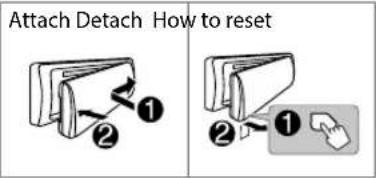
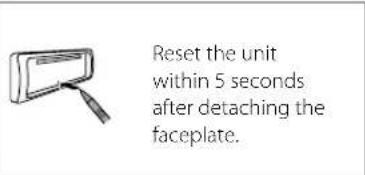
6. Detach the faceplate and reset the unit within 5 seconds. See "How to reset" on page 4.
1 Remove the key from the ignition switch, then disconnect the negative terminal of the car battery. 2 Connect the wires properly. See "Wiring connection" on page 3. 3 Install the unit to your car. See the following "Installing the unit (in-dash mounting)". 4 Connect the terminal of the car battery. 5 Press SRC to turn on the power. 6 Detach the faceplate and reset the unit within 5 seconds. See "How to reset" on page 4.
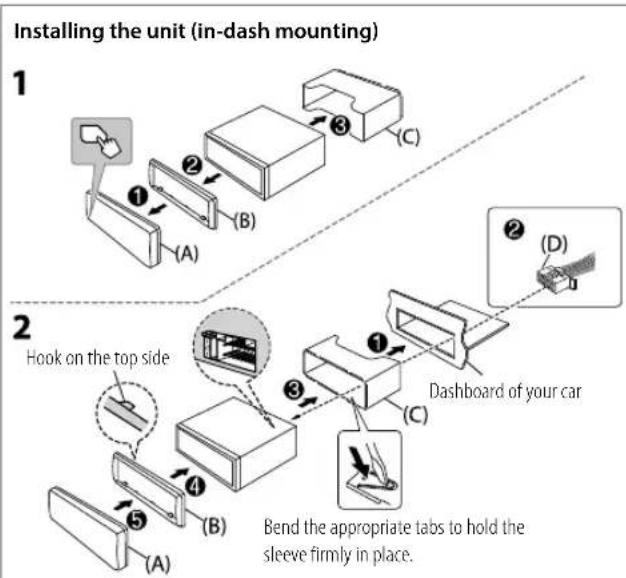
1. Remove the mounting sleeve and trim plate from the unit.
2. Align the holes in the unit (on both sides) with the vehicle mounting bracket and secure the unit with screws (commercially available).
1 Remove the mounting sleeve and trim plate from the unit. 2 Align the holes in the unit (on both sides) with the vehicle mounting bracket and secure the unit with screws (commercially available).
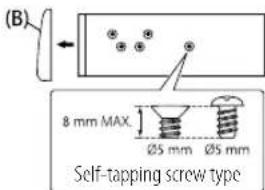
Use only the specified screws. Using wrong screws might damage the unit.
Part list (supplied)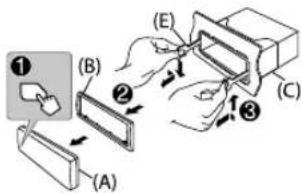

(A) Faceplate (×1)
(B) Trim plate (×1)
(C) Mounting sleeve (×1)
(D) Wiring harness (×1)
(E) Extraction key (×2)
(A) Faceplate (x1) (B) Trim plate (x1) (C) Mounting sleeve (x1) (D) Wiring harness (x1) (E) Extraction key (x2)
Pin Color and function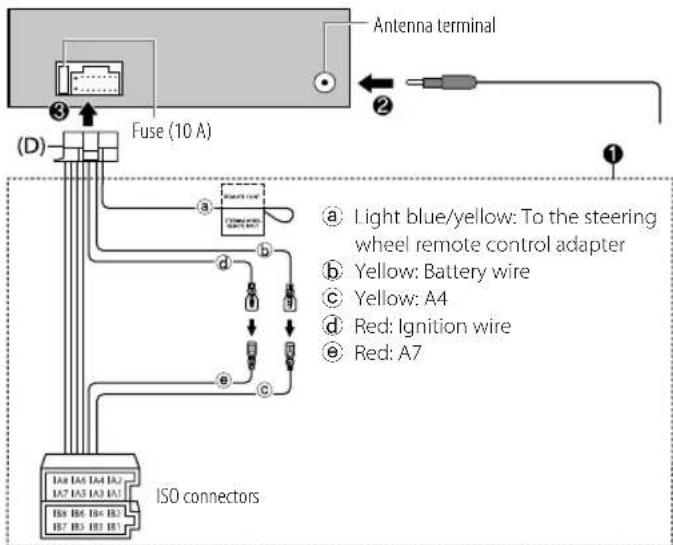
A4 Yellow Battery
A5 Blue/White: Power control (12 V =350mA)
A6 Orange/white: Car light control switch
A7 Red Ignition (ACC)
A8 Black: Earth (ground) connection
B1,B2 Purple, Purple/black: Rear speaker (right)
B3,B4 Gray, Gray/black: Front speaker (right)
B5,B6 White ⊕, White/black ⊖: Front speaker (left)
B7,B8 Green ⊕, Green/black: Rear speaker (left)
A4 Yellow Battery A5 Blue/White: Power control (12 V =350mA) A6 Orange/white: Car light control switch A7 Red Ignition (ACC) A8 Black: Earth (ground) connection B1,B2 Purple, Purple/black :Rear speaker(right) B3,B4 Gray,Gray/black:Front speaker(right) B5,B6 White ,White/black :Front speaker (left) B7,B8 Green ,Green/black Rear speaker (left)
IMPORTANT
IMPORTANT
To ensure proper use, please read through this Guide before using this product. It is especially important that you read and observe the Warnings and Cautions in this Guide. Please keep the Guide in a safe and accessible place for future reference.
WARNING
Do not operate any function that takes your attention away from safe driving.
CAUTION
Volume setting:
- Adjust the volume so that you can hear sounds outside the car to prevent accidents.
- Lower the volume before playing digital sources to avoid damaging the speakers by the sudden increase of the output level.
General:
- Avoid using the external device if it might hinder safe driving.
- Make sure all important data has been backed up. We shall bear no responsibility for any loss of recorded data.
- Never put or leave any metallic objects (such as coins or metal tools) inside the unit to prevent a short circuit.
- If a disc error occurs due to condensation on the laser lens, eject the disc and wait for the moisture to evaporate.
Basics
Faceplate
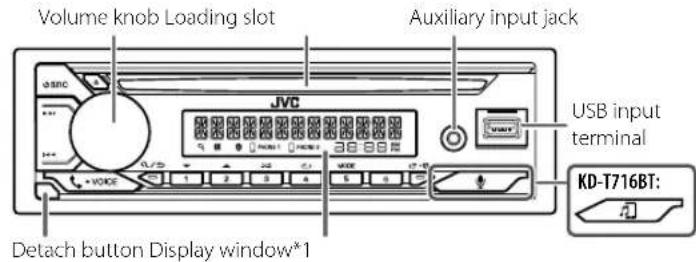
*1 Only for illustration purpose.
On the faceplate
Turn on the power
Press SRC.
- Press and hold to turn off the power.
Adjust the volume Turn the volume knob.
Select a source
Press SRC repeatedly.
Change the display information*2
Press repeatedly.
*2 One of the display information supports Music Synchronization Effect. The brightness level of the buttons changes and synchronizes with the music level.
Getting Started
1 Cancel the demonstration
When you turn on the power for the first time (or [FACTORY RESET] is set to [YES]), the display shows: "CANCEL DEMO" "PRESS" "VOLUME KNOB"
1 Press the volume knob. [YES] is selected for the initial setup. 2 Press the volume knob again. "DEMO OFF" appears.
2 Set the clock and date
1 Press and hold 2 Turn the volume knob to select CLOCK, then press the knob.
To adjust the clock
3 Turn the volume knob to select [CLOCK ADJUST], then press the knob. 4 Turn the volume knob to make the settings, then press the knob. Set the time in the order of "Hour" "Minute". 5 Turn the volume knob to select [CLOCK FORMAT], then press the knob. 6 Turn the volume knob to select [12H] or [24H], then press the knob.
To set the date
7 Turn the volume knob to select [DATE SET], then press the knob. 8 Turn the volume knob to make the settings, then press the knob. Set the date in the order of "Day" "Month" "Year".
9 Press to exit.
To return to the previous setting item, press
3 Set the basic settings
1 Press and hold 2 Turn the volume knob to select an item (see the following table), then press the knob. 3 Repeat step 2 until the desired item is selected or activated. 4 Press to exit.
To return to the previous setting item, press Q/
Default: [XX]
| [SYSTEM] |
| [KEY BEEP] | (Not applicable when 3-way crossover is selected.)
[ON]: Activates the keypress tone.; [OFF]: Deactivates. |
| [FACTORY RESET] | [YES]: Resets the settings to default (except the stored station);
[NO]: Cancels. |
| [CLOCK] |
| [CLOCK DISPLAY] | [ON]: The clock time is shown on the display even when the unit is turned off.; [OFF]: Cancels. |
| [ENGLISH] |
| [PUSCKEN] | Select the display language for menu and music information if applicable.
By default, [ENGLISH] is selected. |
| [ESPANOL] |
| [FRANCAIS] |
| [DEUTSCH]* |
Radio
Search for a station
1 Press SRC repeatedly to select FM or AM. 2 Press to search for a station automatically. (or)
Press and hold ▼▼ / ▲▲ until "M" flashes, then press repeatedly to search for a station manually.
Settings in memory
You can store up to 18 stations for FM and 6 stations for AM.
Store a station
While listening to a station...
Press and hold one of the number buttons (1 to 6).
(or)
1 Press and hold the volume knob until "PRESET MODE" flashes. 2 Turn the volume knob to select a preset number, then press the knob. "MEMORY" appears once the station is stored.
Select a stored station
Press one of the number buttons (1 to 6).
(or)
1 Press. 2 Turn the volume knob to select a preset number, then press the knob.
CD/USB/iPod
Selectable source:
KD-T812BT: CD/USB iPod USB or iPod BT KD-T716BT: CD/USB
Start playback
The source changes automatically and playback starts when you load a disc or attach a device (USB device/ iPod/iPhone) to the USB input terminal.
To On the faceplate
| Reverse/Fast-forward | Press and hold I▼/▶I. |
| Select a track/file | Press I▼/▶I. |
| Select a folder | Press 2▲/1▼. |
| Repeat play | Press 4◇repeatedly. |
| Random play | Press 3◇repeatedly. |
1 Press and hold menu settings. 2 Turn the volume knob to select an item, then press the knob. 3 Repeat step 2 until the desired item is selected/activated. 4 Press to exit.
To return to the previous setting item, press Q /
Refer to the INSTRUCTION MANUAL on the following website for the detailed explanation of each item: http://www.jvc.net/cs/car/ The availability of each item vary depending on the model.
[EQ SETTING]: Selects a preset equalizer or adjusts your own sound settings.
[AUDIO CONTROL]: Sets your preferred audio settings.
[SOUND EFFECT]: Sets your preferred sound effect.
[DISPLAY]: Sets your preferred control for the display window.
TUNER SETTING : Settings for radio source.
[BT MODE]: Settings for using a Bluetooth device.
[REMOTE APP] : Settings for using smartphone to control this unit.
[MIC GAIN]1: Sets the sensitivity of the microphone.
[NR LEVEL]*1: Adjusts the noise reduction level.
[ECHO CANCEL]*1: Adjusts the echo cancellation delay time.
SYSTEM]: Settings for this unit.
CLOCK : Adjusts the clock.
[ENGLISH]: Selects language for the menu and music information.
[PyCCKM]: Selects language for the menu and music information.
ESPANOL : Selects language for the menu and music information.
[FRANCAIS] : Selects language for the menu and music information.
[DEUTsCH]2 : Selects language for the menu and music information.
[DEMO MODE]: Activates or deactivates the display demonstration.
*1 Applicable only while talking on the phone.
*2 Only for KD-T812BT
Examples of some well-used settings
Subwoofer Level Setting
1 Press and hold to enter menu settings.

2 Turn the volume knob clockwise to select [AUDIO CONTROL], then press the knob.

AUDIO CONTROL


3 Turn the volume knob clockwise to select [SUBWOOFER SET], then press the knob.

SUBWOOFER SET


4 Turn the volume knob clockwise to select [ON], then press the knob.

OFF ON

5 Turn the volume knob clockwise to select [SUBW LEVEL], then press the knob.

SUBW LEVEL

6 Press the volume knob if [PRE-OUT] is shown on the display.

PRE-OUT
7 Turn the volume knob to adjust the subwoofer level, then press the knob.

SU8U


Continued on the next page...
8 Press to exit the setting menu.
Note:
You need to set [SPK/PRE OUT] to [REAR/SUB.W] or [SUB.W/SUB.W] before you can make the subwoofer level settings.
For playback operations of AUX, Spotify, AMAZON ALEXA sources, refer to the INSTRUCTION MANUAL on the following website:
http://www.jvc.net/cs/car/ The availability of each source vary depending on the model.
Note for specifications
Bluetooth Frequency Range:
2.402 GHz — 2.480 GHz
Bluetooth RF Output Power (E.I.R.P.):
4 dBm (MAX), Power Class 2
Speaker Impedance:
40—80
Operating Voltage:
12 V DC car battery
Bluetooth®
- Depending on the Bluetooth version, operating system, and firmware version of your mobile phone, Bluetooth features may not work with this unit.
- Be sure to turn on the Bluetooth function of the device to perform the following operations.
- Signal conditions vary depending on the surroundings.
Connect the microphone
Connect the supplied microphone to the microphone input jack on the rear panel.
Adjust the microphone angle
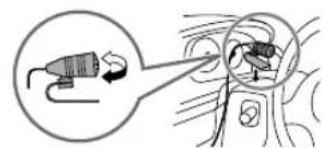
Secure using cord clamps (not supplied) if necessary.
Pair and connect a Bluetooth device for the first time
1 Press SRC to turn on the unit. 2 Search and select the name of your receiver ("KD-T812BT"/ "KD-T716BT") on the Bluetooth device. 3 Perform (A) or (B) depending on what appears on the display. For some Bluetooth devices, the pairing sequence may vary from the steps described below.
(A) "Device Name" "XXXXXX" "VOL-YES" "BACK-NO"
"XXXXXXXX" is a 6-digit passkey randomly generated during each pairing. Ensure that the passkeys appearing on the unit and the Bluetooth device are the same.
Press the volume knob to confirm the passkey.
Operate the Bluetooth device to confirm the passkey.
(B) [Device Name] -> "VOL-YES" "BACK-NO"
Press the volume knob to start pairing.
2 If "PAIRING" → "PIN 0000" scrolls on the display, enter the PIN code "0000" into the Bluetooth device. - If only "PAIRING" appears, operate the Bluetooth device to confirm pairing.
"PAIRING COMPLETED" appears when pairing is completed and will light up when the Bluetooth connection is established.
Answer a call
Press for the volume knob.
To adjust the phone volume [00] to [35], turn the volume knob. To end a call, press and hold for the volume knob.
Audio player via Bluetooth
1 Press SRC repeatedly to select BT AUDIO. For KD-T716BT: Pressing enters BT AUDIO directly. 2 Operate the audio player via Bluetooth to start playback.
To On the faceplate
| Play back/pause Press the volume knob. |
| Select group or folder | Press 2▲/1▼. |
| Reverse skip/Forward skip | Press ↓/▶L. |
| Reverse/Fast-forward | Press and hold ↓/▶L. |
| Repeat play | Press 4 repeatedly. |
| Random play | Press 3 ×× repeatedly. |
KD-T812BT;CD/USB/IPod USB of IPod BT KD-T/16BT:CD/USB
Source selectiontable:
KD-T812BT;CD/USB/iPod USB ou iPod BT KD-T716BT:CD/USB
Start playback
2 Setting the clock and date
1 Press and hold the volume knob. 2 Turn the volume knob to select the CLOCK element, then press it.
To set the clock
3 Turn the volume knob to select the [CLOCK ADJUST] element, then press it. 4 Turn the volume knob to select the parameter value, then press it. Set the time in the order of "Hour" - Minute. 5 Turn the volume knob to select the [CLOCK FORMAT] element, then press it. 6 Turn the volume knob to select [12H] or [24H], then press it.
To set the date
7 Turn the volume knob to select the [DATE SET] element, then press it. 8 Turn the volume knob to select the parameter value, then press it. Set the date in the order of "Day" → Month. 9 Press exit.
To return to the previous menu, press the Q/ button.
3 Setting the default settings
1 Press and hold the button. 2 To select an element, turn the volume knob (see the following table), then press it. 3 Repeat step 2 until the desired element is selected or activated.
4 Press 100
To return to the previous menu, press the Q/ button.
By default: [XX]
| [SYSTEM] |
| [KEY BEEP] | {HeПрименьимо, КОДа Вьбай 3-палочьй кресовер.}
[ON]: Вькоченье 38уka Нжати Кноки.; [OFF]: Вькоченье. |
| [FACTORY RESET] [YES]: Сбор BCex Насторг на ЗИченье no ymonчailleno (Крочев)
coхсаньх радюctанц); [NO]: Otmeha. |
| [CLOCK] |
| [CLOCK DISPLAY] | [ON]: Дамke в Вькоченьом состаян no Димплес отobражета
Tekушие Вremя.; [OFF]: Otmeha. |
| [ENGLISH] |
| [PYCCKIM] | Вьбения зах отobраоженя за мени no в primeme bix Stychax
Инфомаць no Myз bike.
Пу уmonчаню Вьбай ЗИченье [ENGLISH]. |
| [ESPANOL] |
| [FRANCAIS] |
| [DEUTSCH]* |
Only for DAK-1812B1
Radio receiver
Radio station search
1 Press the SRC button several times to select FM or AM. 2 Press the I /▶ button for automatic radio station search. (n)
Press and hold the /▶■ button until the symbol "M" starts flashing, then press it several times for manual radio station search.
Station settings
You can save up to 18 FM stations and 6 AM stations.
Saving stations
While listening to a station
Press and hold one of the numbered buttons (1 to 6) (FM).
1 Press and hold the volume control knob until "PRESET MODE" flashes. 2 Turn the volume control knob to select the preset number, then press the knob. After saving, the station is displayed with "MEMORY".
Selecting a saved station
Press one of the numbered buttons (1 to 6). (FM)
1 Press the button. 2 Turn the volume control knob to select the preset number, then press the knob.
CD/USB/iPod
Other selectable sources
KD-T812BT: CD/USB/iPod USB or iPod BT KD-T/16BT: CD/USB
Starting playback
When a disc is inserted or a device (USB device/iPod/iPhone) is connected to the USB terminal, the source changes automatically and playback starts.
Front panel
Adjusting the low-pass filter level
1 Turn the control knob to select the desired item in the menu.

2 Turn the volume control knob clockwise to select the element [AUDIO CONTROL], then press it.

AUDIO CONTROL


3 Turn the volume control knob clockwise to select the element [SUBWOOFER SET], then press it.

SUBWOOFER SET

4 Turn the volume control knob clockwise to select the element [ON], then press it.

OFF/ON

5 Turn the volume control knob clockwise to select the element [SUB.W LEVEL], then press it.

SUB W LEVEL

6 Press the volume control knob if [PRE-OUT] is displayed on the screen.

PRE-OUT
7 Turn the volume control knob to adjust the subwoofer level, then press it.

SUB W +07

Continuing on the next page...
8 Press to exit the settings menu.

PpIMeuaHne:
IpeepTeKAKBcMOKETeBbHIOHHTbHACPTPOHKyPOOBHH3KOACTOTHOIIMAMKa,BAmNOTpe6yeTcRyCTAHOBHTb[SPK/PREOUT]Ha[REAR/SUB.W]INSUB.W/SUB.W.
Дугая Информацья
3a INHOPMaueH No OepaHBM BOCPONBDEEHN HCTOHHKOB AUX,Spotify, AMAZON ALEXA opaauiebc K IHCTPYLNI IIO 3KCIYATALIN Ha cnedyouem Be6-caire: http://www.jvc.net/cs/car/ DocyHocbKaDDORIONCTOCHNKAOTINUaeTcB3aBNCMOCTNOTMoeNN
3aMeuHHe NO TexHnueckm XapaKTePncTnKaM
Dnana3oh yactoR Bluetooth:
2,402TTU—2,480TTU
BbXoHnMa MoHocr Pu Bluetooth (E.I.R.P.):
+4BbM (MAKC),KnaCC MoHocn2
Плобно соротиьненke katуши ГомКOROBOPHTEJI: 4OM-8OM
Pa6oue HnpanxkeHne:
AkkymyTAOPHAR CNTema HAnpXeHHem 12 B nocToHHoro ToKa
Bluetooth®
B 3abCIMOCTOn OT Bepcnn Bluetooth, onepaunHOHOn cIcTeMbN Bepcnn BCPTOEHNIO IporpamHOrO oBeceueHn, fyHKn Bluetooth MOrYr He paoTobat C daHHbM yCPOXOBm. - DnBbnoJIHeHnCIEyUOuXnOepeauN O63aTeIbHO BKNIOHTe FyHKuOBluetooth HaBaWemycTpoiCTBe. - Okpykaoua crpa Oka3bBaET BIMHne Ha COCTORHnCnHaia.
IopknioueHne MmKpOfoHa
Connect the supplied microphone to the microphone input jack on the rear panel.
Adjusting the microphone angle
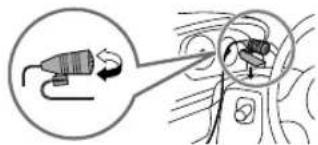
If necessary, secure it with a clamp (not included).
Pairing and connecting a Bluetooth device for the first time
1 Turn on the device and press SRC. 2 On the Bluetooth device, find and select the name of the receiver being used ("KD-T812BT"/"KD-T716BT"). 3 Depending on the data displayed on the screen, perform action (A) or (B).
Some Bluetooth devices may have a pairing procedure that differs from the one described below.
(A) "[Device]" "XXXXXX" VOL-YES BACK-NO
"XXXXXX" is an access key consisting of 6 digits, randomly generated each time pairing is performed.
1 Make sure that the access key displayed on this device and the Bluetooth device are the same. 2 Press the volume knob to confirm the access key. 3 Use the Bluetooth device to confirm the access key.
(B) "[Device]" VOL-YES BACK-NO
1 Press the volume knob to start pairing. 2 - If the message "PAIRING" PIN 0000" is displayed, enter the PIN code "0000" on the Bluetooth device. - If only the message "PAIRING" is displayed, confirm the pairing using the Bluetooth device.
The message "PAIRING COMPLETED" is displayed when pairing is complete, and when a Bluetooth connection is established, the symbol lights up.
Answering a call
Press VOICE or the volume knob. To adjust the volume of the other party, turn the volume knob within the range [00] to [35]. To end the call, press and hold VOICE or the volume knob.
Playing audio via Bluetooth
Press the [SRC] button several times to select BT AUDIO. - For KD-T716BT: press the [SRC] button to switch directly to BT AUDIO. 2 Control the Bluetooth audio player to start playback.
Microsoft and Windows Media are either registered trademarks or trademarks of Microsoft Corporation in the United States and/or other countries. - Use of the Made for Apple badge means that an accessory has been designed to connect specifically to the Apple product(s) identified in the badge and has been certified by the developer to meet Apple performance standards. Apple is not responsible for the operation of this device or its compliance with safety and regulatory standards. Please note that the use of this accessory with an Apple product may affect wireless performance. Apple, iPhone, iPod, iPod touch, and iTunes are trademarks of Apple Inc., registered in the U.S. and other countries. - IOS is a trademark or registered trademark of Cisco in the U.S. and other countries and is used under license. - SPOTIFY and the Spotify logo are among the registered trademarks of Spotify AB. Android is a trademark of Google LLC. The Bluetooth® word mark and logos are registered trademarks owned by Bluetooth SIG, Inc. and any use of such marks by JVCKENWOOD Corporation is under license. Other trademarks and trade names are those of their respective owners. - Amazon Alexa is not available in all languages and countries. - Amazon, Alexa and all related logos are trademarks of Amazon.com, Inc. or its affiliates.

alexa built-in
Made for

iPhone iPod

TECHNOLOGY

Bluetooth

Spotify