KW-AVX730EE - Car radio JVC - Free user manual and instructions
Find the device manual for free KW-AVX730EE JVC in PDF.


Pick your language and provide your email: we'll send you a specifically translated version.
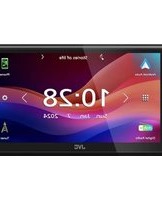
| Type of product | Car Radio / Multimedia Receiver |
| Installation size | Double-DIN (2-DIN) |
| Display | 7-inch touchscreen |
| Display resolution | 800 x 480 pixels |
| Maximum power output | 50 Watts x 4 channels |
| Built-in amplifier | MOSFET |
| Supported optical media | DVD, DVD-R/RW, CD, CD-R/RW |
| Supported audio formats | MP3, WMA, AAC |
| Supported video formats | DivX, MPEG-4 |
| Bluetooth | Yes, hands-free and audio streaming |
| USB input | Yes, mass storage class |
| SD card slot | Yes |
| Auxiliary input | 3.5 mm front |
| Rear view camera input | Yes, RCA with auto switching |
| Steering wheel remote input | Yes |
| Radio tuner | AM/FM |
| Power supply | 12V DC battery (negative ground) |
| Dimensions (W x H x D) | 178 x 100 x 165 mm |
| Weight | 2.4 kg |
| Security | Detachable faceplate, security code |
| Maintenance | Clean with a soft dry cloth |
| Reparability | User-replaceable fuse, service parts available |
Frequently Asked Questions - KW-AVX730EE JVC
How do I set the clock on my JVC KW-AVX730EE?
Press the Menu button, then select Settings and Clock. Use the touchscreen to adjust the hour and minute. Confirm by pressing Set.
How do I pair my smartphone via Bluetooth?
Enable Bluetooth on your phone and set it to visible. On the unit, press Bluetooth and select Search. When your phone appears, select it and confirm the passcode 0000 or accept the pairing request.
Can I watch movies on the touchscreen while driving?
For safety, the video playback is only available when the parking brake is engaged. The picture is disabled automatically when the vehicle is in motion. To watch, park safely and engage the parking brake.
What file formats can I play from a USB drive?
The USB input supports MP3, WMA, and AAC audio files, as well as DivX and MPEG-4 video files. Make sure the file system is FAT32 for best compatibility.
How do I adjust the bass and treble?
Press the Audio button to enter the sound settings. Use the on-screen menu to adjust Bass, Treble, Fader, and Balance. You can also choose from preset sound modes like Rock, Jazz, or Pop.
Is the faceplate detachable for anti-theft protection?
The KW-AVX730EE features a detachable faceplate for security. Press the Release button to remove it, and store it in the supplied carrying case. You can also set a security code in the menu.
How can I connect a rear view camera?
Connect the camera's RCA cable to the REAR CAMERA input on the back of the unit. The screen will automatically switch to the camera view when you engage reverse gear (if the reverse wire is wired correctly).
What should I do if the unit does not power on?
First check the fuse. Replace a blown fuse with one of the same rating. Also verify the ignition wire and battery wire connections. If everything seems fine, perform a reset by pressing the Reset button with a thin object.
How do I reset the unit to factory defaults?
Press and hold the Reset button (small hole near the face) for a few seconds, or go to Settings, then System, and select Factory Reset. Confirm with Yes.
Can I use the touchscreen with gloves?
The touchscreen is a resistive type that responds to pressure. You can use a stylus or your finger, but gloves may not register reliably. Use the included stylus for precise control.
User questions about KW-AVX730EE JVC
0 question about this device. Answer the ones you know or ask your own.
Ask a new question about this device
No questions yet. Be the first to ask one.
Download the instructions for your Car radio in PDF format for free! Find your manual KW-AVX730EE - JVC and take your electronic device back in hand. On this page are published all the documents necessary for the use of your device. KW-AVX730EE by JVC.
USER MANUAL KW-AVX730EE JVC


Manual assistant
Powered by Anthropic
Waiting for your message
Product information
Brand : JVC
Model : KW-AVX730EE
Category : Car radio