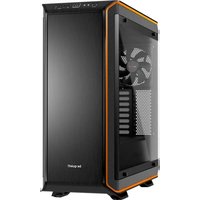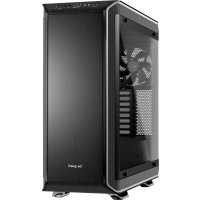
Dark Base 900 - Desktop Computer Be Quiet! - Free user manual and instructions
Find the device manual for free Dark Base 900 Be Quiet! in PDF.



| Product type | Tower computer case (system unit) |
| Brand | Be Quiet! |
| Model | Dark Base 900 |
| Dimensions (L x H x D) | 242.7 x 585.5 x 577.2 mm |
| Weight | Approximately 15 kg (estimated) |
| Materials | SECC steel 0.8-1 mm, aluminum 0.8 mm, ABS plastic, tempered glass 4 mm (Pro version) |
| Supported motherboard form factors | E-ATX, XL-ATX, ATX, MATX, Mini-ITX |
| Front panel connectivity | 2 x USB 3.0, 2 x USB 2.0, 2 x 3.5 mm jacks (audio/micro) |
| Integrated fan controller | 3 x 4-pin + 3 x 3-pin (manual controller 5V-12V); Pro version: 4 x 4-pin + 4 x 3-pin + PWM hub |
| Maximum CPU cooler height | 185 mm |
| Maximum graphics card length | 325 mm (with HDD cages) / 470 mm (without cages) |
| Maximum power supply length | 150 - 284 mm |
| PCI slots | 8 |
| Storage bays | 2 x 5.25\", 7 x 3.5\", 1 + 14 x 2.5\" |
| Included fans | Front: 2 x SilentWings® 3 140 mm / 1000 rpm; Rear: 1 x SilentWings® 3 140 mm / 1000 rpm |
| Additional fan mounts | Front: 1 x 140 mm (without 5.25\" cage); Top: 3 x 140 / 4 x 120 / 1 x 180; Bottom: 1 x 120 / 2 x 140 |
| Watercooling radiator support | 120, 140, 180, 240, 280, 360, 420 mm |
| Additional features | 2-level side panel frame; Pro version: 2 multicolor RGB LED strips + Qi wireless charger |
| Manufacturer warranty | 3 years |
| Maintenance and cleaning | Clean the dust filters and interior regularly with a soft cloth or compressed air. Avoid moisture. |
| Safety | Disconnect the device before any intervention. Use compatible components. Do not modify the chassis (voids warranty). |
| Spare parts and repairability | Spare parts (fans, filters, screws) can be ordered through Be Quiet! customer service. |
| General information | Manual available in multiple languages. Customer service: 0800 469 209, service@be-quiet.fr, bequiet.com |
Frequently Asked Questions - Dark Base 900 Be Quiet!
User questions about Dark Base 900 Be Quiet!
0 question about this device. Answer the ones you know or ask your own.
Ask a new question about this device
Download the instructions for your Desktop Computer in PDF format for free! Find your manual Dark Base 900 - Be Quiet! and take your electronic device back in hand. On this page are published all the documents necessary for the use of your device. Dark Base 900 by Be Quiet!.
USER MANUAL Dark Base 900 Be Quiet!
- INTRODUCTION 4
- SPECIFICATIONS 5
- CONTENTS 6
- EXPLODED VIEW & PARTS 7
- LAYOUTS 52
- FAN COMPATIBILITY 55
- RADIATOR SUPPORT 56
- REMOVE EXTERNAL PARTS 56
- INSTALLATION AND REMOVAL OF DRIVES AND FILTERS 60
10.HDD PANEL REMOVAL/ADJUSTMENT 63
11.MB-TRAY LAYOUT ADJUSTMENT 65 - PSU LAYOUT ADJUSTMENT 68
- DOOR PANEL ADJUSTMENT 70
- COMPONENT INSTALLATION 71
LIMITED WARRANTY 75
DEUTSCH
We are delighted you have chosen to buy our Dark Base PC case. Please read the information here and carefully follow all the instructions prior to installation. Should you have further questions, please contact our customer service. See contact information in the manufacturer's details section.
Warranty
3-year manufacturer's warranty for the consumer (original purchase from authorized be quiet! dealers only)
- Your original receipt of purchase will be required before warranty services are rendered. Please store it carefully.
- Manipulations and/or technical modifications of any kind, or damage due to the application of mechanical force, will void your warranty.
To read the warranty terms and conditions in full, see Service/Warranty Conditions on our website at bequiet.com.
Our General Terms and Conditions of Business also apply. For details please refer online under bequiet.com.
Manufacturer's details
Listan GmbH & Co. KG | Biedenkamp 3a | 21509 Glinde | Germany
For support in Germany, you can call our free service hotline
Monday through Friday 09:00 - 17:30 (UTC+1)
Tel. 0049 40 736 7686 - 44 Fax 0049 40-7367686-69
Email: service@bequiet.com
Internet page: www.bequiet.com
Copyright
You are not allowed to reproduce, disclose, publish or store the contents of this documentation, or excerpts of it, without the prior written consent of Listan.
- be quiet! is a registered trademark of Listan GmbH & Co. KG. Other products and company names mentioned in this documentation may be the brands or trademarks of their respective owners.
In accordance with company policy, all Listan products are subject to ongoing development. Listan reserves the right to make changes and improvements to any product described in this documentation without prior notice.
Under no circumstances shall Listan be held liable for loss of data or income, or for any specific, incidental, direct, or indirect damage, however it arises.
- The content of this documentation represents the status at time of writing. Listen does not assume, whether expressed or implicit, any liability for the correctness or completeness of the content of this documentation, including, but not limited to the implicit guarantee of market suitability for a particular purpose, unless applicable laws or jurisdiction specifically stipulate such a liability.
Listan reserves the right to make changes to this documentation or to withdraw the documentation at any time without prior announcement.
2. SPECIFICATIONS
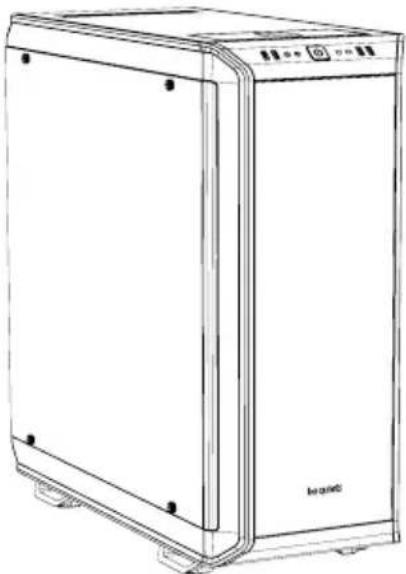
DARKBASEPRO900
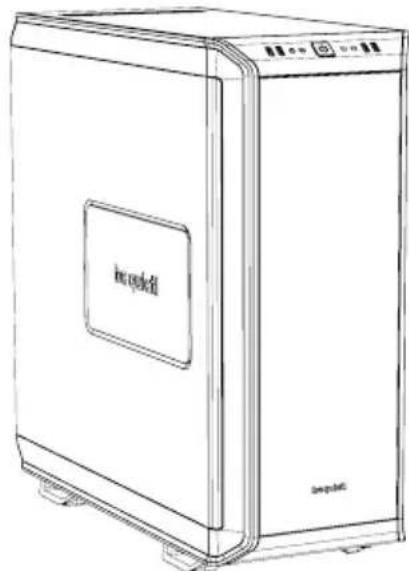
DARKBASE900
| Dimension (W x H x D in mm) 2 | 42.7 x 585.5 x 577.2 |
| Case Type Super Midi Tower | |
| Material 0.8mm - 1mm SECC, | 0.8mm Aluminum, ABS plastic, Dark Base Pro 900: 4mm tempered glass |
| M/B Support E-ATX, XL-ATX, | ATX, M-ATX, Mini-ITX |
| Front I/O 2 x USB 3.0, 2 x USB | 2.0, HD audio jacks |
| Fan Speed Controller Dark Base | 900: 3x 4-pin, 3x 3-pin, Controller: manual 5V-12V Dark Base Pro 900: 4x 4-pin, 4x 3-pin, Controller: manual 5V-12V / PWM hub |
| Cooler Height (mm) 185 | |
| Graphics Card Length (mm) 32 | 5 / 470 (w/o HDD trays) |
| PSU Length (mm) 150 - 284 | |
| PCI Slots | 8 |
| 5.25" Bay | 2 |
| 3.5" Bay | 7 |
| 2.5" Bay | 1 + 14 |
| Cooling Fan (mm)/(rpm) | Front: 2x SilentWings® 3 140 / 1000, Rear: SilentWings® 3 140 / 1000 |
| Optional Cooling Fan (mm) | Front: 1 x 140 (w/o ODD cage, fan bracket included), Top: 3x 140 / 4 x 120 / 1x 180, Base: 1x 120 / 2x 140 |
| Radiator Support (mm) | 120, 140, 180, 240 (2x 120), 280 (2x 140), 360 (3x 120), 420 (3x 140) |
| Additional Features Dark Base | 900: 2 step side panel bezel Dark Base Pro 900: 2x Multi-Color RGB LED strip, Qi charger |
3. CONTENTS
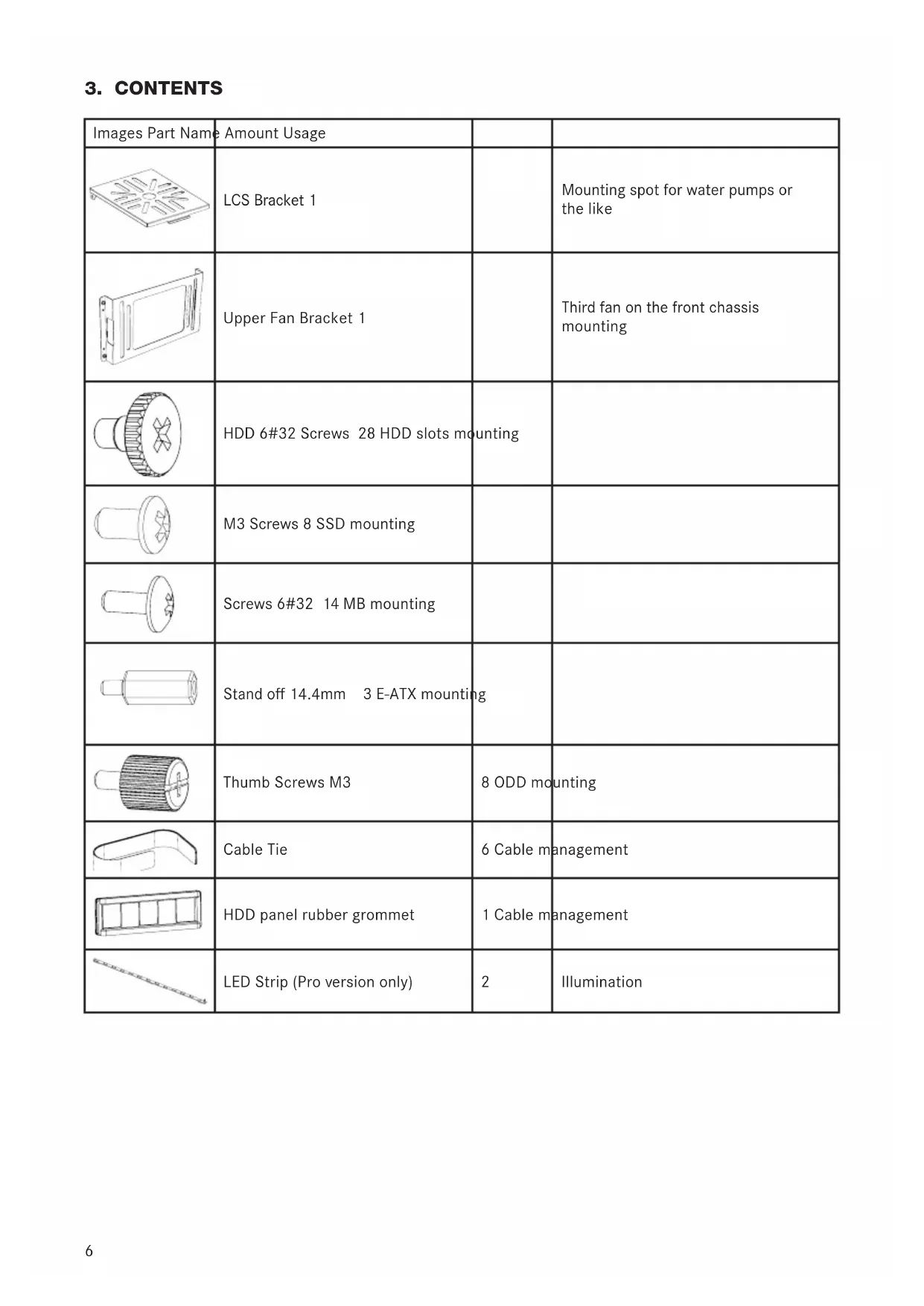
| Images Part Name | Amount Usage | ||
| LCS Bracket 1 | Mounting spot for water pumps or the like | ||
| Upper Fan Bracket 1 | Third fan on the front chassis mounting | ||
| HDD 6#32 Screws 28 HDD slots mounting | |||
| M3 Screws 8 SSD mounting | |||
| Screws 6#32 14 MB mounting | |||
| Stand off 14.4mm 3 E-ATX mounting | |||
| Thumb Screws M3 | 8 ODD mounting | ||
| Cable Tie | 6 Cable management | ||
| HDD panel rubber grommet | 1 Cable management | ||
| LED Strip (Pro version only) | 2 | Illumination |
4. EXPLODED VIEW & PARTS
DARKBASEPRO900
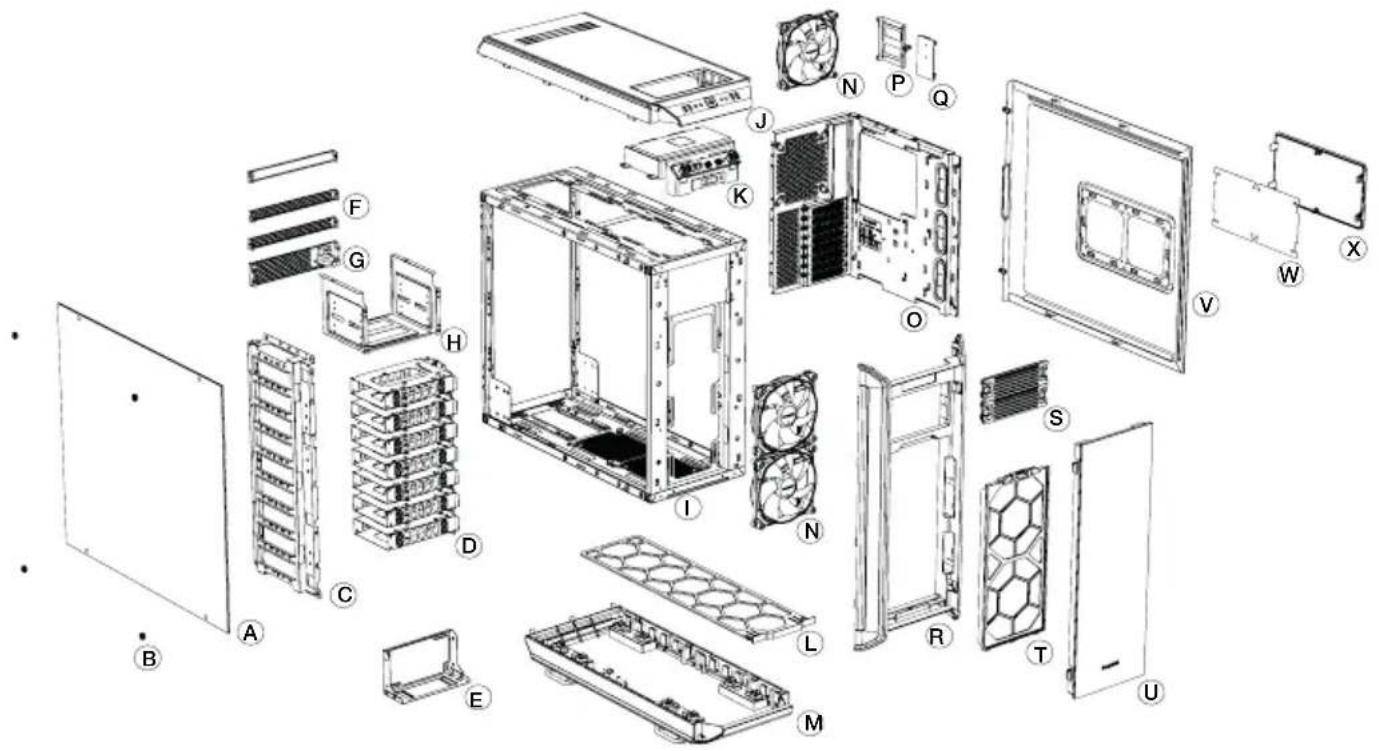
| A G | Glass Side Panel Bezel M External Base Cover | ||
| B M | Mounting Screws N SilentWings | ® 3 Fan | |
| C H | DD Panel O MB-Tray | ||
| D H | DD Slots P SSD-Tray | ||
| E PSU Bracket Q Fan Speed Controller Board | |||
| F Rear Panel Brackets R External Front Panel | |||
| G | Power Adapter Bracket | S | ODD Bezel |
| H OD | DD Cage T Front Air Filter | ||
| I Chassis Body | U Front Panel Door | ||
| J | External Top Cover | V | Side Panel |
| K Front I/O Holder | W Side Panel Filter | ||
| L | Base Air Filter | X | Side Panel Bezel |
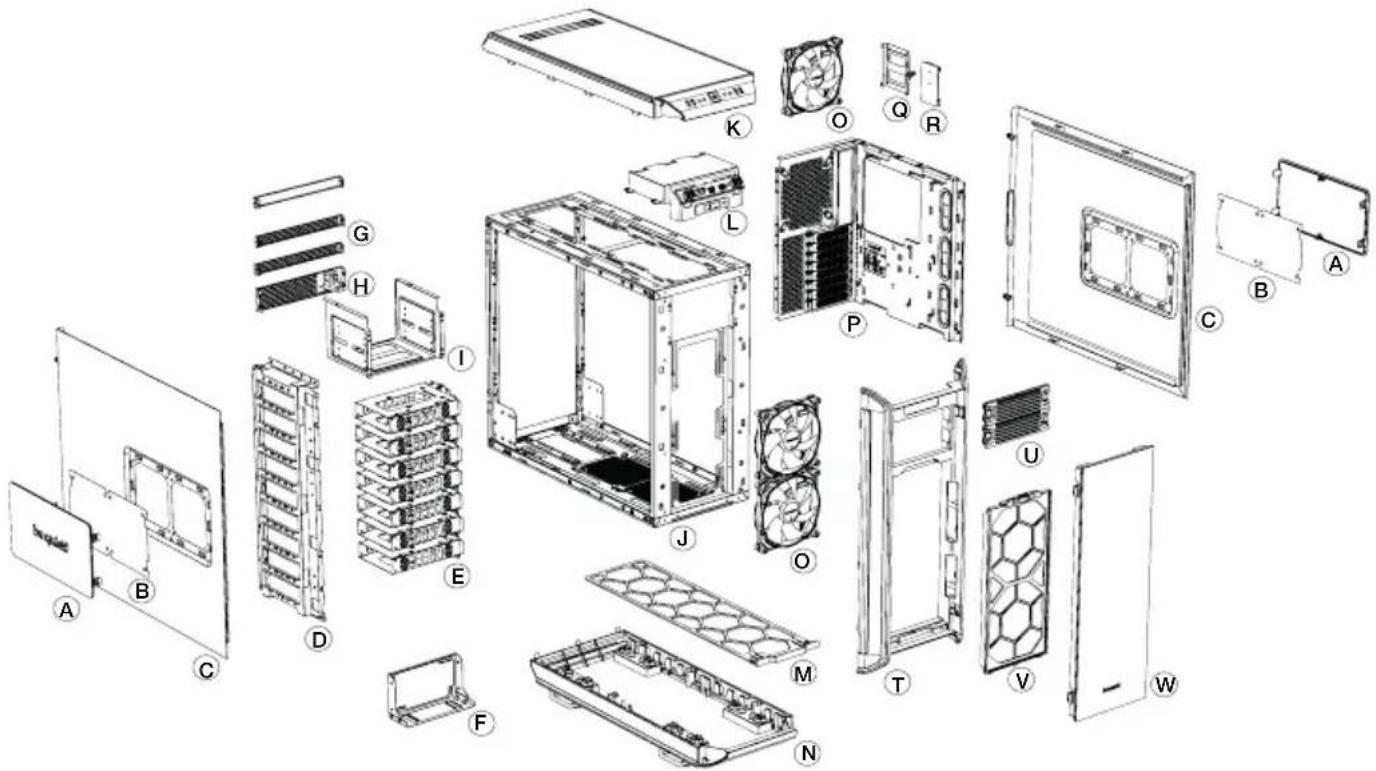
| A | Side Panel Bezel | M | Base Air Filter |
| B | Side Panel Filter N External Base Cover | ||
| C | Side Panel O SilentWings | ® 3 fan | |
| D | DD Panel P M/B Tray | ||
| E | HDD slots Q SSD Bracket | ||
| F | PSU Bracket R Fan Speed Controller Board | ||
| G | Rear Panel Brackets T External Front Panel | ||
| H | Power Adapter Bracket | U | ODD Bezel |
| I | ODD Cage | V | Front Air Filter |
| J | Chassis Body | W Front Panel Door | |
| K | External Top Cover | ||
| L | Front I/O Holder | ||
4.1 FRONT I/O AND MEDIA PORTS
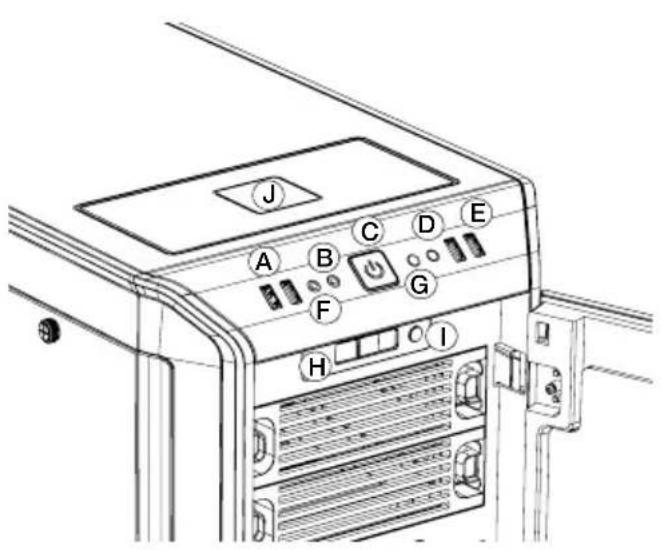
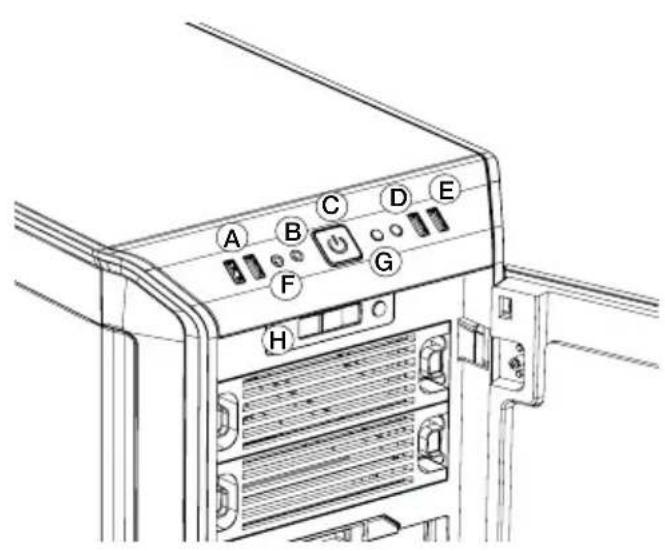
DARKBASEPRO900DARKBASE900
| A USB 3.0 E USB 2.0 I LED Switch | Pro only) | ||
| B Headphone F Microphone J QI C harger (Pro only) | |||
| C Power Button / Power LED G Reset | |||
| D HDD LED H Fan Speed Controller Switch | |||
4.2 I/O PORTS
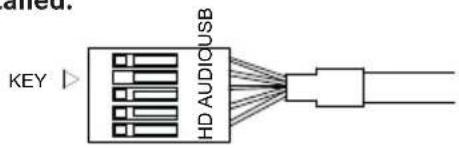
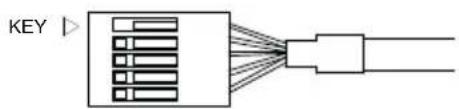
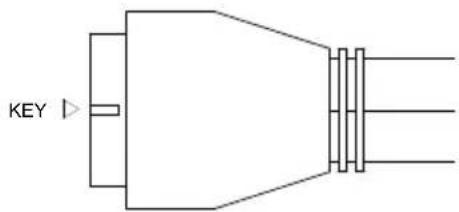
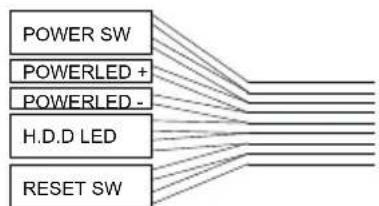
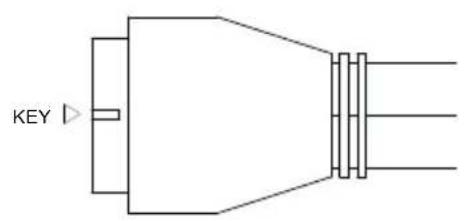
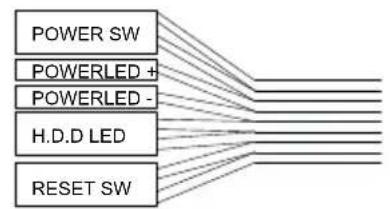
The function panel has several wire connections that need to be installed.
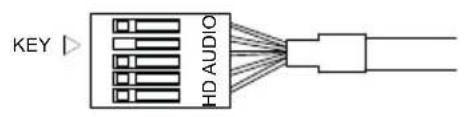
HD audio (headphone jack/microphone jack)
Find the "Front panel audio headers/pin connectors" on the motherboard. Plug in the wires according to the motherboard manual.
USB 2.0
Find the "USB 2.0 Headers/pin connectors" on the motherboard. Plug in the wires according to the motherboard manual.
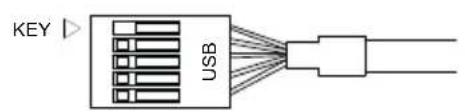
USB 3.0
Find the "USB 3.0 Headers/pin connectors" on the motherboard. Plug in the wires according to the motherboard manual.
Power switch, Power LED, HDD LED, Reset switch
These wires plug into the motherboard where all the front panel switch/pin connectors functions are located. The motherboard manual will have a description of where to plug these in, usually their location is labeled in the motherboard manual.
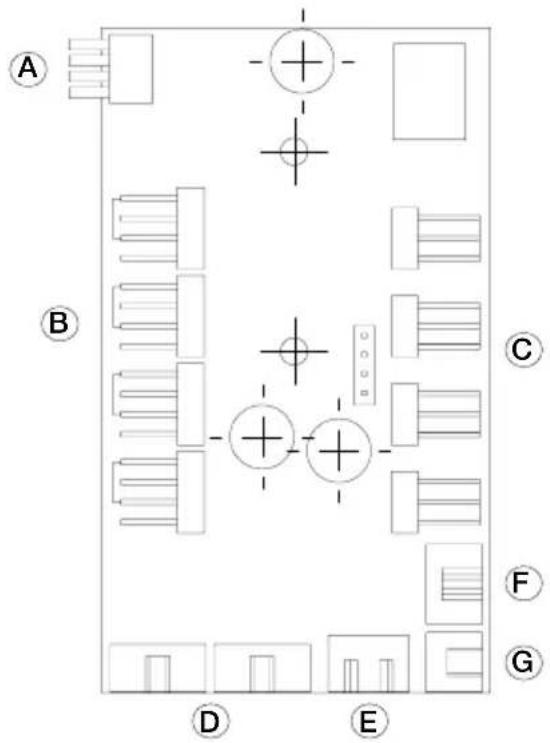
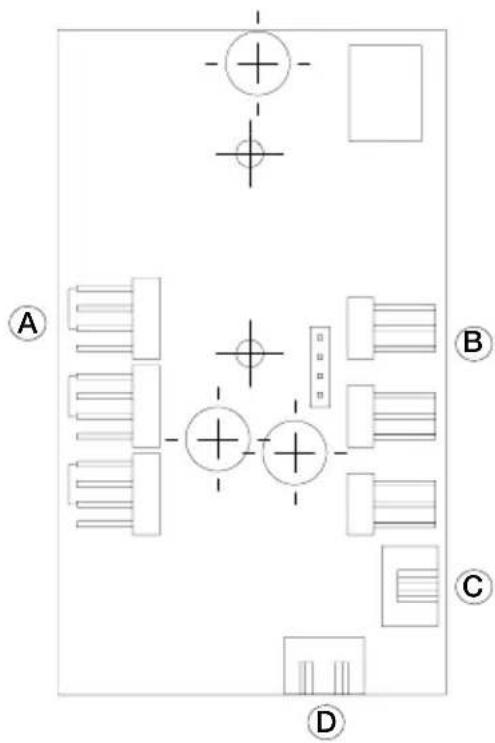
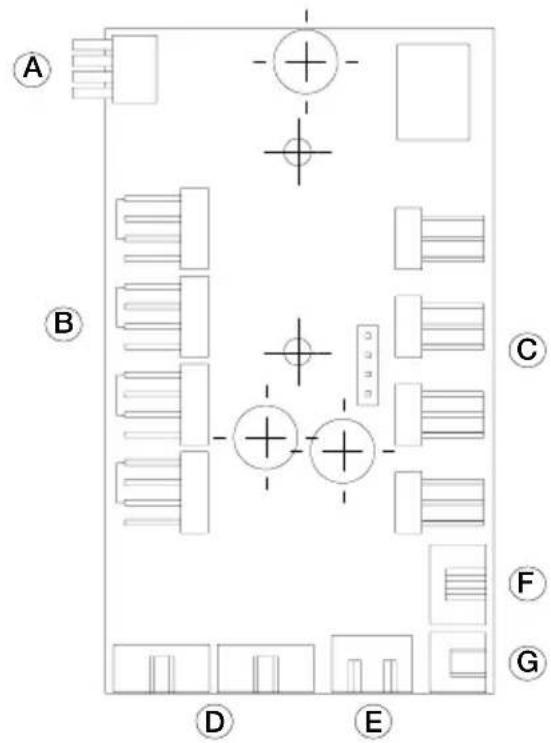
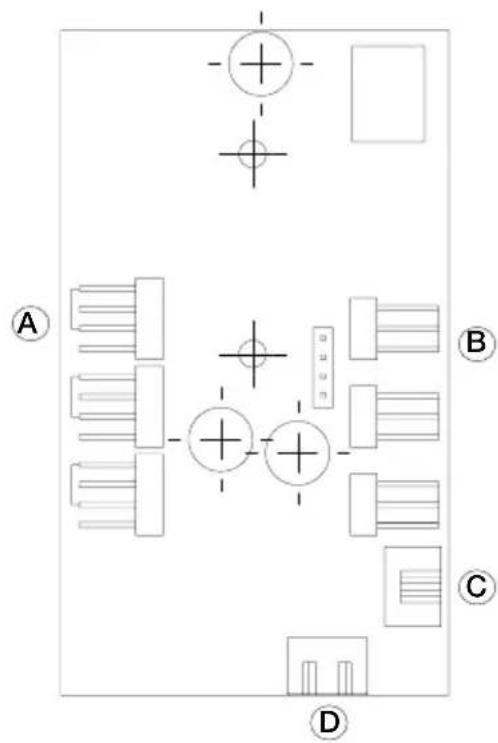
4.3 PCB PANEL / PORTS
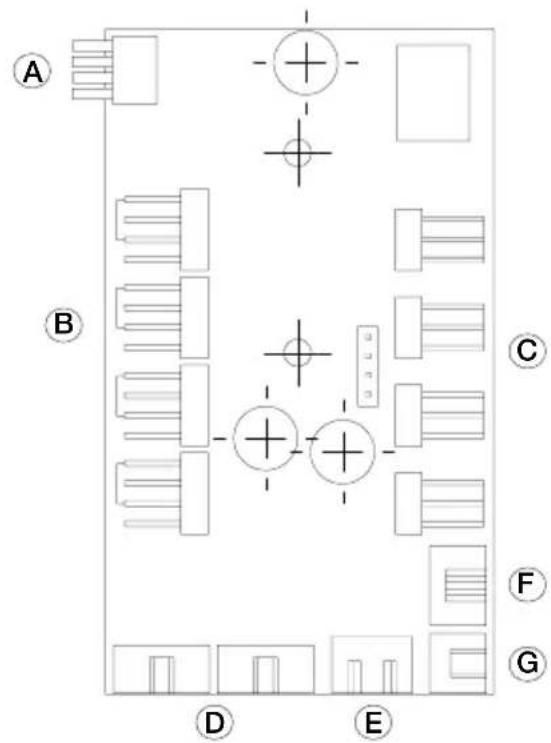
DARKBASEPRO900
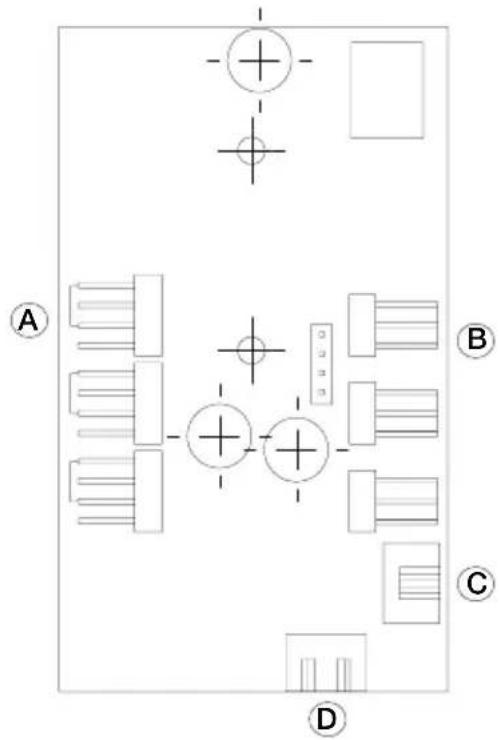
DARKBASE900
| A 4-Pin PWM Connector to M/B A 4-Pin PWM Connector Switch | |||
| B 4-Pin PWM Connector B 3-Pin Fan Connector | |||
| C 3-Pin Fan Connector C Fan Speed Controller | |||
| D LED Strip Connector | |||
| E Power Connector (SATA) | |||
| F Fan Speed Controller Switch Connector | |||
| G Cl Charger Power Connector |
4.4 FAN CONTROLLER
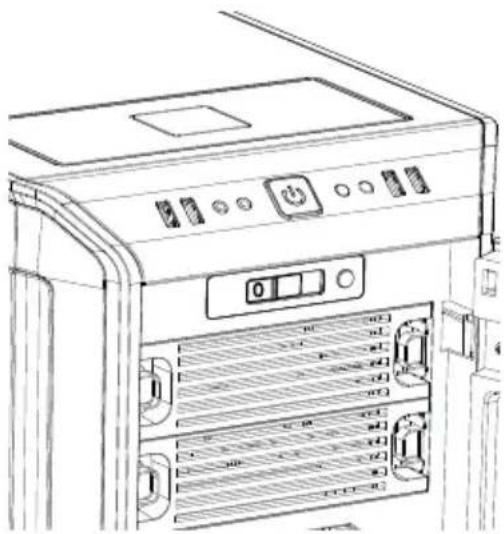
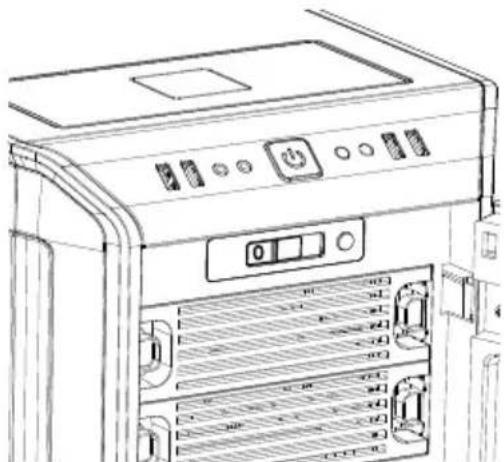
The fan controller has two modes of operation.
1. Automatic operation
For this the PWM signal of the MB is used and the speed of all fans connected (PWM and 3-pin) can be adjusted automatically through the MB.
In this mode the fan controller slider switch must be set to the first position "0" on the far left.
2. Manual control
When the fan controller slider switch is moved from its position "0" to the right, the PWM signal is dropped and the fan speed can be regulated manually.
If the slider switch is subsequently reset to its first position "0", the PWM signal regains automatic control of the fans.
Automatic PWM control of the fans requires cable "A" of the PCB panel (4.3) is connected to a PWM connector on your MB. Lacking such a connection the speed of the fans connected can only be regulated manually.
DARKBASE900
Dark Base 900 does not have automatic regulation.
The speed of all fans (PWM and 3-pin) connected to the PCB panel (4.3) are manually regulated using the slider switch.
4.5 LED INSTALLATION AND USE (ONLY PRO-VERSION)
The LED illumination supplied can be freely positioned and installed in the case according to system configuration using the attached adhesive strips.
To power them the lamps must be connected to socket "D" on the PCB panel (4.3).
Using switch "I" and switches the lamps on and off and permits the illumination color to be selected (red, green, blue, white, orange).
4.6 QI Charger use (only Pro-Version)
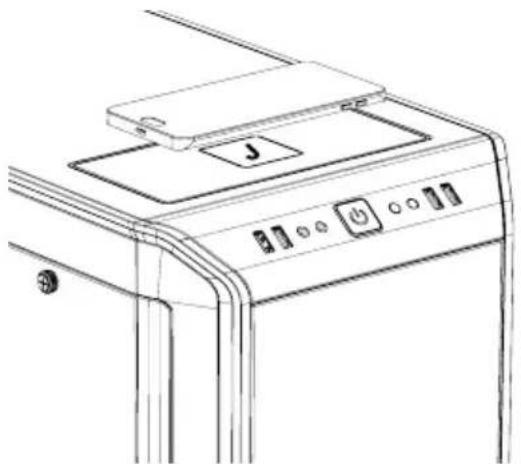
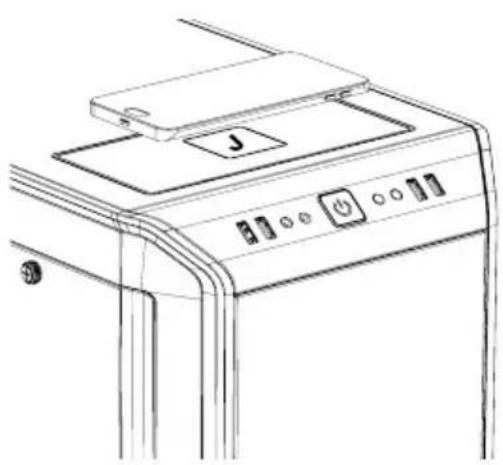
The preinstalled Qi charger supplied with Dark Base Pro 900 allows cable-free charging of all external devices that are compatible with the Qi standard. If the device (e.g. smartphone) is equipped with such a feature it can be charged without cable connection by placing it on the plate marked "J" on the Dark Base Pro 900.
An acoustic signal will indicate that charging has started upon laying the device on the charger.
In so doing please ensure you position the device carefully on the center of the charging plate "J". The charging coil of the Dark Base Pro 900 charging device is located in the middle of charging plate.
1. EINLEITUNG
4.3 UKLAD WEJSC/ PORTOW NA PLYCIE PCB
DARKBASEPRO900
DARKBASE900
4.2 INHTEPΦEINCbl BBODA/BbIBODA
Функюньная пань IMeET HeCKoЛьКО npOBODbIX COeINHeHn, KOtOpbie HeO6xOДIMO NOДКЛЮЧИТ.
HD audio (pa3bem HaywnkoB/pa3bem MnkpofoHa)
Haundte "Aydno pa3bEmbl/koHTaKTHbIe rpynnbl nepeHne nanei" Ha MaTePNHcKn Pnate. NodKIOUHTe npoBoda B COOTBETCTBnC pyKOBOCTBOM MaTePNHcKN Pnatabl.
USB 2.0
HaIaTe "USB 2.0 pa3bEmbl/koHTaKTHbIe rpynnbl" Ha MaTePHNcKoI pIaTe. POnKJIIOuHTe IpoBOda B COOTBETCTBnC pyKOBoDCTBOM MaTePHNcKo IPaTbI.
USB 3.0
HaIaTe "USB 3.0 pa3bEmbl/koHTaKTHbIe rpynnbl" Ha MaTePHNcKoI pIaTe. POnKJIIOHTe npOBOa B COOTBETCTBn C pyKOBoDCTBOM MaTePHNcKo INaTbI.
KnaBnwa BkIIOeHn, INDkaunn nITaHn, INDkaunn HDD, KhONKa nepe3arpy3kn
3TN npoBoda NOkJIOUaOTcK MaTePNHCKO INaTe B MeCTe pacNoIoxKeHnpa3bEmOB/KoHTaKTbIX rpynn 0pOHTaJIbHOINaHeIN.PyKOBOcTBo MaTePNHCKO INaTbIMeET ONICAHNE NOPdKa NOkJIooHEnnIK, KaN pRaUNo, INx PACNOLOXKeHne O6O3HaueHO BY PkyOBODCTBE MaTePNHCKO INaTbI.
4.3NJATA YNPABJIENRA / PA3bEMbl
DARKBASEPRO900
DARKBASE900
| A | 4-Pin PWM pa3bem подочenvу К материнckои палуte |
| B | 4-Pin PWM pa3bem |
| C | 3-Pin pa3bem Вентлитopa |
| D | Pa3bem LED посветки |
| E | Pa3bem пitaши(SATA) |
| F | Pa3bem поеклочаши Конт polлера Вentлиторов |
| G | Pa3bem пitaши QI бес四项юн Заряdkи |
| A | 4-Pin PWM pa3bem |
| B | 3-Pin pa3bem BeHTnJIaTopa |
| C | Pa3bem NepeKJIuOaTeЯ KoHTpOJIaIepa BeHTnJIaTOpOB |
| D | Pa3bem NiTaHnIA (SATA) |
4.4 KOHTPOJIIEP BEHTNIJATOPOB
KoHTpOJIeP BeHTnIaTOpOB IMeET DbpeXmMa pa60tbl.
1.ABtOMaTnueckn KOHTpOJIb
B 3OM pexkme nCnoJb3yeTcra PWM-cnHraI OT MaTePnHcko I naTbI u npaBHe HBeMn NODcoEHNHeHHbIMN K KOHTpOJIepy BeHTnIaTOpamn (PWM n 3-pin) npocxOuNT aBTomatueckn. Dna 3TOrO NO3yHOK KOHTpOJIepa DOJKeH HaxOuNTbcR B KpaHem JEBOM NOLOKeHn B No3nUIN "0".
- PuyHoi KOHTpoJIb
Ecnn noJ3yHok KOHTpOJIePa nepemeuec c n3HaJaBHOI no3uCn "0" BnpaBO, PWM-cnrHaN C MaTePnHcKoI IaTbI rHOpnPyeTcN CKOpOCTb BEHTNJrTOPOB MOXHO
perynpoBaBbpyHyIO. Pn daIbHeM eepMeueHn no3yHka B n3HaJIbHoe noLoXeHne "0" 6ydt BocCTaHOBJIeHa aTOMaTNeCKa perynpoBka ckopocn BeHTNJrTopoB no PWM-cnrHany c MaTePHckO nnTaBl.
Дя abTomatnuecko PWM-perylnipOBKn BeHTnlaTOpOB Heo6xOIMo npOBODHoe NOKIOUeHne pa3bema "A" Ha nIate ynpabLeHna (4.3) K PWM pa3bemy BaSeM MaTePNHCKo INaTbI. NHaue Bo3MOXHO TOnbKO pyHoe ynpaBHeHne cKOpocTbIO NOKIIuOeHHbIX BeHTnlaTOpOB.
DARKBASE900
Dark Base 900 He IMeET aBToMaTnuecko peryIuPoBKn. CkOpocTb BpaUeHna BCEx BeHTnIaTOPOB (PWM n 3-pin), noDknUoyehNbx K Pnate ynpabJeHna (4.3), peryIuPyetc npemeueHnem noJ3yHka KOHTpOJIpepa BpyHyU.
4.5 MOHTAX I NcNoJIb3OBAHHe LED IOdCBETK (TOJIbKO PRO)
CBeToIOIOHbIe NOIOCKn C KJIeIKoN OCHOBOI KOmIIeKTHOLED NOcCBETKN MOYr 6bITb paCNOJIOXeHbI B Kopnyce npOn3BOJIbHIM O6pa3OM B COOTBEcTBN C KOHpUrypaueNe CNCTEmbl.
IopKJIouHte noJockn noCBeTkn K pa3bemy "D" Ha nlaTe ynpabHeHna (4.3)
IpeeknloaTeIb "I" NO3BOJare TB KNIIOAHTb IIN OTKIOOATb NODCBETKy, a TaKKe Bbl6uPaTb CBeT CBeueHnR (kpachh, 3eJIeHb, cHH, 6JIbI, opAHKeBbI).
4.6 IcnoJb3OBAHNE QI 3APdHOFO YCTPOINCTBA (TOJIbKO BEPCnRA PRO)
UctaHOBHeHoeB Dark Base Pro 900 6ecnpoBOHOe 3apAnHOe yCTpoIcTBO N03BOJareT 3apXKaTb Qi-COBMeCTUMbIE BHeuHne yCTpoIcTBA. EcIn yCTpoIcTBO (HaPIMep, cMaprFOH) NOpeKnBaET 3Ty OOnuH, erO MoKHO 3apXKaTb 6e3 IcNoJIb3OBAHnI PNOBOdHOTo NOdkJIIOueHnI, IpocTo pa3MeCTNB erO Ha IIaCTnHe "J" BepXHe nAHeN Dark Base Pro 900.
3BykoBOn CnHAn 6o3HaHT Haayano npocecca 3apAKn, KaK TolbKO yCTpoiCtBO 6ydt NOMEeHNO Ha 3apAHyo PnactHy.
Y6eNTecb, YTO yCTPOIcTBo pa3MeUeHO NO ueHTpy 3aprHoi
Pnactnbl "J". INdyKUHOHHa KaTyUka 3aprHoro yCTpoiCTBa
Dark Base Pro 900 HaxOHTcra NOD CEHTpOM 3aprHoi
Pnactnbl.
5. EN LAYOUTS | DE LAYOUTS | FR CONFIGURATIONS | PL UKLAD |
ES DISTRIBUTIONES DE INSTALLACION | RU CXEMBI YCTAHOBKN*
EN MB TYPE:ATX (HDD slots facing interior, space for radiator in front of HDD cage)
DE MB TYP: ATX (HDD-Slots, der Innenseite zugewandt, Platz für Radiator vor dem HDD Käfig)
FR Carte mère ATX (Slot HDD vers l'intérieur placement pour radiateur devant les HDD)
PL TYP PLYTY GLOWNEJ:ATX (koszyk HDD cony do wewnatrz, przestrzen dla radiatoria z przyodu koszyka HDD)
ES TIPO DE PLACA BASE: ATX (slot del dispositivo HDD hacía el interior, espacio para el radiador frente a la caja para la unidad HDD)
RU Tn MaTePNHcKo nlaTb: ATX (CIOToH HDD O6paueHb K 3aDHe yactn Kopnyca, npocTpahCTBO dna paHaatopa BnepeDen Kop3HHb HDD)
EN MB TYPE: E-ATX (HDD slots facing front, space for large motherboard)
DE MB TYP: E-ATX (HDD Slot, der Vorderseite zugewandt, Platz für große Mainboard)
Garte mere E-ATX (Slot HDD vers l'avant avec espace supplémentaire pour une grande carte mère)
P P L P T Y G L O W N E J: E-ATX (koszyk HDD zworcony w strone przodu obudowy, przystrze duzych pIyt glownych)
ES TIPO DE PLACA BASE: E-ATX (slot del dispositivo HDD hacía el frrente, espacio para plaza base de gran
RU TnMaTePHNCKOJIaTbE-ATX (CJOTbl HDD o6paueHbK nepeDHeu qacTn Kopnyca, npoctpaHCTBO Dnla 60Jbwo MaTePHNCKOJIaTbI)
Layout A / Configuration A / Uklad A / Distribución A / Cxema A
Case opens to the left / Gehäuse öffnet sich nach links / Ouverture du boîtier à gauche / Obudowa otwiera sie na lewą strone / La caja abre hacía la izquierda / Kopnyc OKpbíBaTcRc C JéBoi CTOPHbI
A1A2
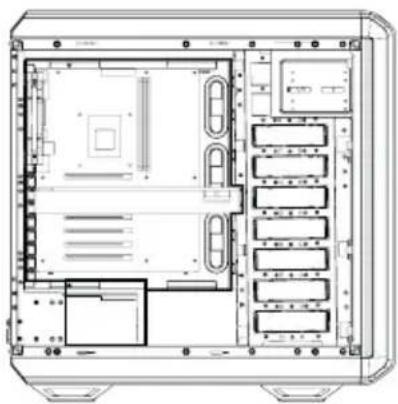
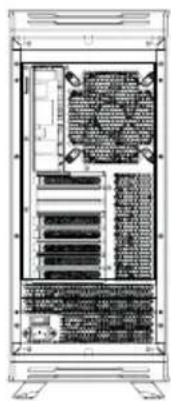
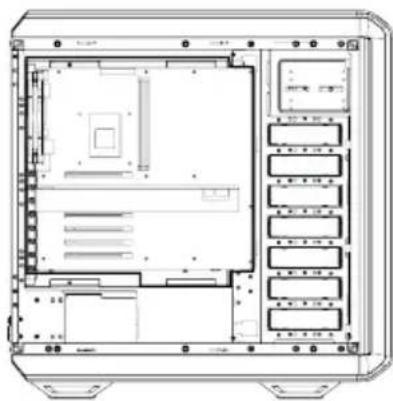
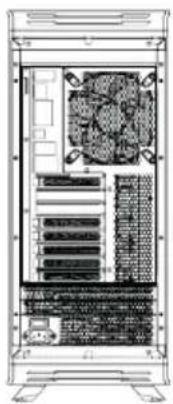
EN 8x PCI Slots / Space for radiator in front of PSU / Space above M/B: 40mm
DE 8x PCI-Anschluse / Platz fur Radiator vor dem Netzteil / Platz uber M/B: 40mm
FR 8x Emplacements PCI / Espace pour un radiateur devant l'alimentation / Espace au-dessus de la carte mère : 40 mm
PL 8x sloty PCI / Miejsce na radiator z przodu zasilacza / Przestrzen nad M/B: 40mm
ES 8x ranuras PCI / Espacio para el radiador enANTE del modulo PSU
RU 8x CJLOTOB PCI / PpoctpaHCTBO Dnla paDnataTopa BnpeDn Bn / PpoctpaHCTBO HaM/B:40MM
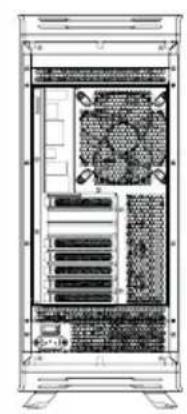
A3 A4
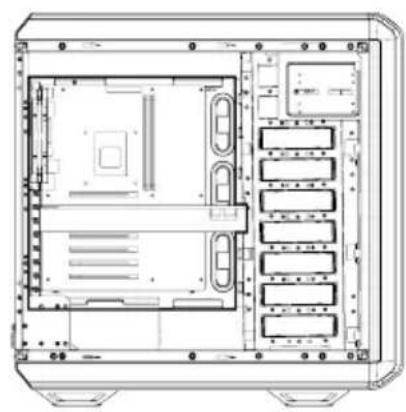
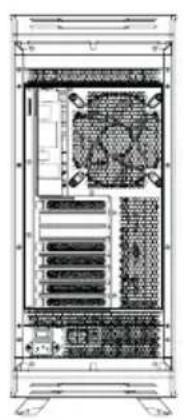
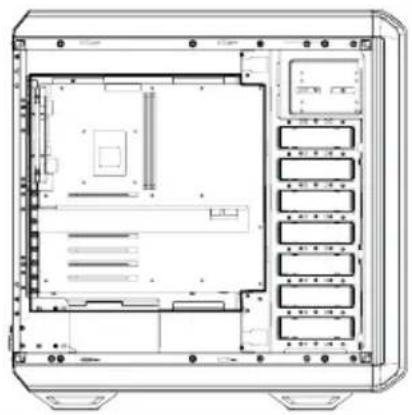
EN 7x PCI Slots / Space above M/B: 62mm
DE 7x PCI-Anschlüsse / Platz über M/B: 62mm
FR 7x Emplacements PCI / Espace au-dessus de la carte mère : 62 mm
PL 7x sloty PCI / Przestrzen nad M/B: 62mm
ES 7x ranuras PCI / Espacio por encima del modulo M/B: 62 mm
RU 7x CLOTOB PCI /PpocTpaHCTBO HaM/B:62MM
A5 A6
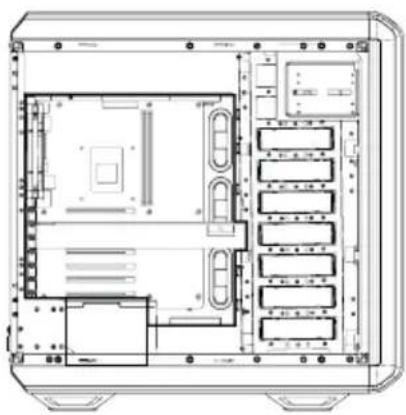
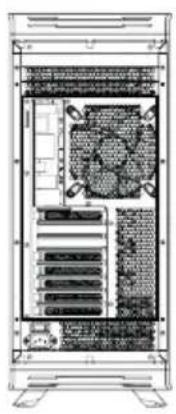
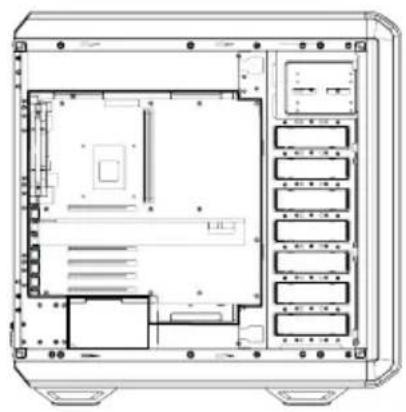
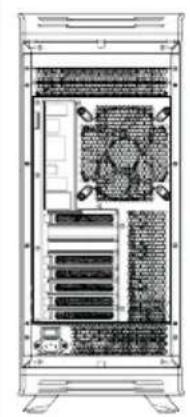
EN 6x PCI Slots / Space above M/B: 84mm
DE 6x PCI-Anschlüsse / Platz über M/B: 84mm
FR 6x Emplacements PCI / Espace au-dessus de la carte mère : 84 mm
PL 6x sloty PCI / Przestrzen nad M/B: 84mm
ES 6x ranuras PCI / Espacio por encima del modulo M/B: 84 mm
RU 6x CLOTOB PCI / PpocTpaHCTBO HaM/B:84MM
| Layout B / Configuration B / Ukfad B / Distribución B / Cxema B | Case opens to the right / Gehäuse öffnet sich nach rechts / Ouverture du boîtier à droite / Obudowa otwiera sie na prawă strone / La caja abre hacía la derecha / Koprnyc otkarbyečć c irpavòi stóropòhí |
| B1 B2 | |
| EN 8x PCI Slots / Space for radiator in front of PSU / Space above M/B: 55mm DE 8x PCI-Anschlüssse / Platz für Radiator vor dem Netzeil / Platz über M/B: 55mm FR 8x Emplacements PCI / Espace pour un radiateur devant l'alimentation / Espace au-dessus de la carte mère: 55 mm PL 8x sloty PCI / Miejsce na radiator z przodu zasilacza / Przestrzeń nad M/B: 55mm ES 8x ranuras PCI / Espacio para el radiador en fronte del modulo PSU / Espacio por encima del modulo M/B: 55 mm RU 8x cnotobos PCI / Постранстvo до радиаторa врееди БП / Постранстvo наd M/B: 55mm | |
| B3 B4 | |
| EN 7x PCI Slots / Space above M/B: 77mm DE 7x PCI-Anschlüssse / Platz über M/B: 77mm FR 7x Emplacements PCI / Espace au-dessus de la carte mère: 77 mm PL 7x sloty PCI / Przestrzeń nad M/B: 77mm ES 7x ranuras PCI / Espacio por encima del modulo M/B: 77 mm RU 7x cnotobos PCI / Постранстvo наd M/B: 77mm | |
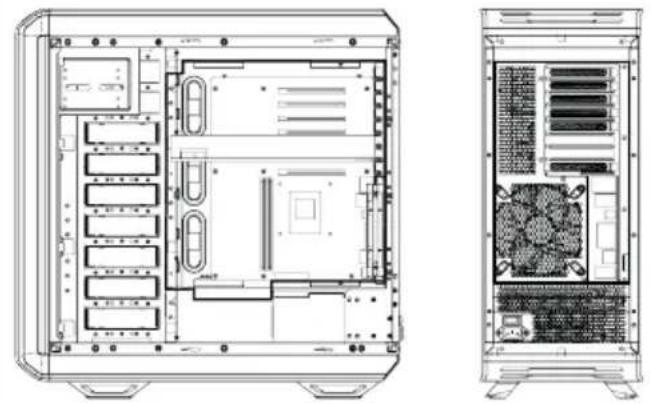
B5 B6
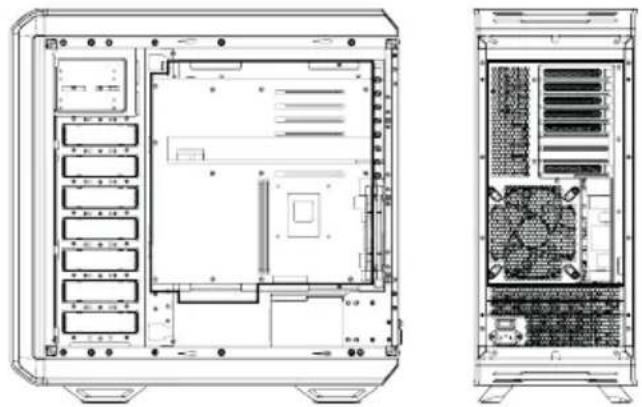
EN 6x PCI Slots / Space above M/B: 99mm
DE 6x PCI-Anschluse / Platz über M/B: 99mm
FR 6x Emplacements PCI / Espace au-dessus de la carte mère : 99 mm
PL 6x gniazdo PCI / Przestrzen nad M/B: 99mm
ES 6x ranuras PCI / Espacio por encima del modulo M/B: 99 mm
RU 6x CNoToB PCI /IpocTpaHCTBo HaM/B:99MM
*Examples of installation layouts. Many other setups also possible. / Beispiele für Konfigurationen. Viele weitere Varianten möglich. / Exemples d'installation. Il existe de nombreuses autres possibités de configuration. / Przykladowe ułady instalacji. Mnizwych jest wiele innych uładów / Ejemplos de instalaciones. Son possibles muchas或其他 dispositions. / Птум扼ы схем установки. Bo3moхно моженье STBO dpyruх варнаюв.
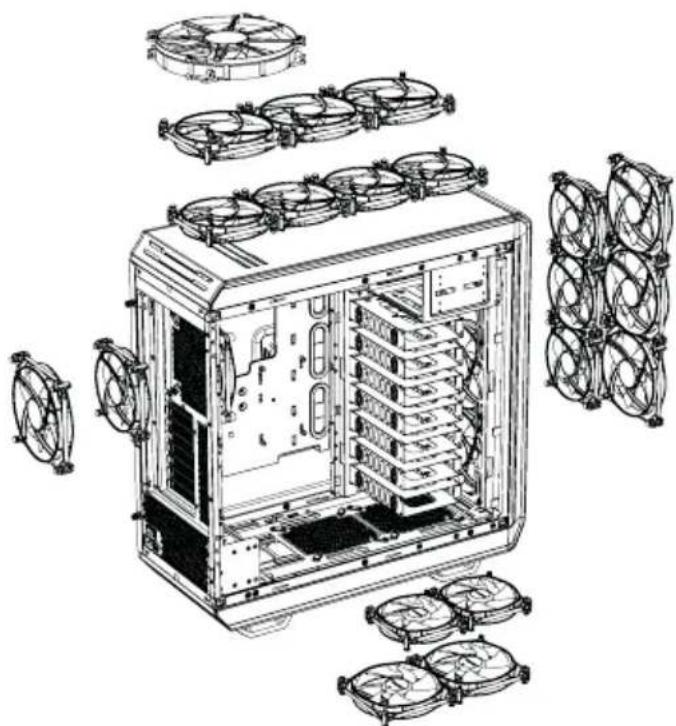
6. EN FAN COMPATIBILITY | DE LÜFTERKOMPATIBILITÄT | COMPATIBILITÉ VENTILATEURS | KOMPATYBILNOŚC Z WENTYLATORAMI | COMPATI-BILIDAD CON VENTILADORES | COBMECTIMBIE BEHTNJRATOPbl
| Position Far | Size |
| Top 4x 120mm | 3x 140mm, 180mm (mounting points C/C (center to center 154mm) |
| Bottom 2x 1 | 20mm, 2 x 140mm |
| Front | 3x 120mm, 3 x 140mm |
| Rear | 1x 120mm, 140mm |
| Side | 2x 120mm (Dark Base 900) |
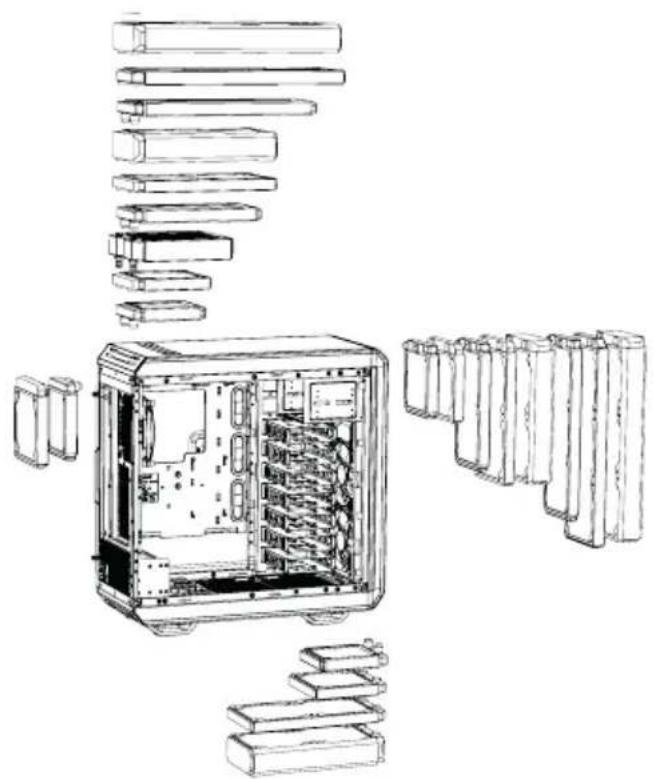
- EN RADIATOR SUPPORT | DE RADIATOREINBAU | FR SUPPORT RADIATEURS
KOMPATYBILNOŚC Z RADIATORAMI | ES SOPORTE PARA RADIADOR
RU NOДДЕРЖKA PAДИATOPOB
| Position Radiator Size (mm) |
| Top 120, 140, 180*, 240, 280, 360, 420 |
| Bottom 120, 140, 280 |
| Front 120, 140, 240, 280, 360, 420 |
| Rear 120, 140 |
*Mounting point of 180mm radiator is c/c 154mm
- EN REMOVE EXTERNAL PARTS | DE ENTFERNEN DES SEITENTEILS FR DEMONTAGE DES PIECES EXTERIEURES | PL DEMONTAZ CZESCI ZEWNETRZNYCH | ES DESMONTE DE COMPONENTES EXTERNOS RU DEMOHTAX BHEUHIX 3JIEMEHTOB
8.1 SIDE PANEL REMOVAL / ENTFERNEN DER SEITENABDECKUNG / DEMONTAGE PANNEAU LATERAL / DEMONTAZ PANELU BOCZNEG0 / DESMONTE DEL PANEL LATERAL / DEMOHTAX BOKOBOI PAHEJI
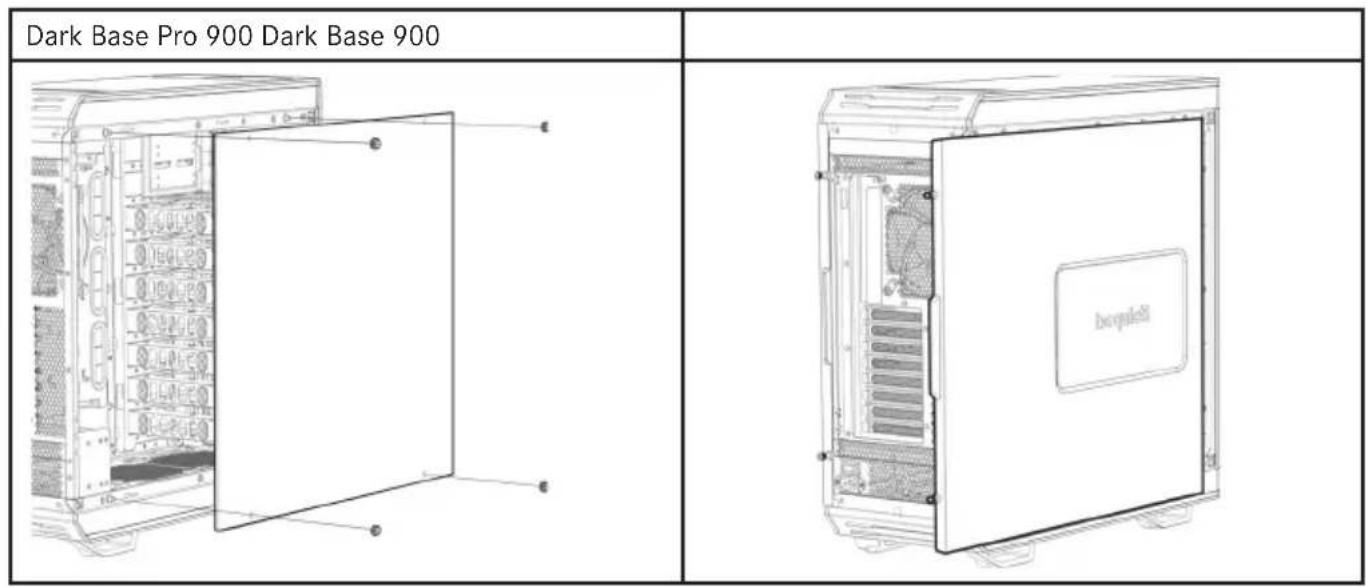
EN Remove the thumb screw nuts to remove glass panel
DE Losen Sie die Muttern der Rändelschrauben um das Glas zu entfernen
FR Desserrez les vis à main pour retarder le panneau en verre
PL Usun nakrtek szybkośrubesk, aby zdjec boczny panel szklany
Retire las tuercas de los tornillos mariposa parautar el panel de vidrio
RU OTKpyTnte raikn c HakaTaHHoI rOIOBKOJ dJI CHaTNI 6OKOBOI nHaHNI
EN Loosen the thumb screws to remove the steel side panel
DE Losen Sie die Rändelschrauben um das Seiteneil zu entfernen
FR Desserrez les vis à main et faire glisser le panneau en acier
PL Poluzuj szybkośrubki, aby zȩć stalowy boczny
Es Afloje los tornillos de mariposa para desmontar el panel lateral de acero
RU Ocna6bTe BnHTbl C HaKaTaHHoI RoIOBkoI DJI CHaTINr CTaJIbHOI 6OKOBOI NaHEJI
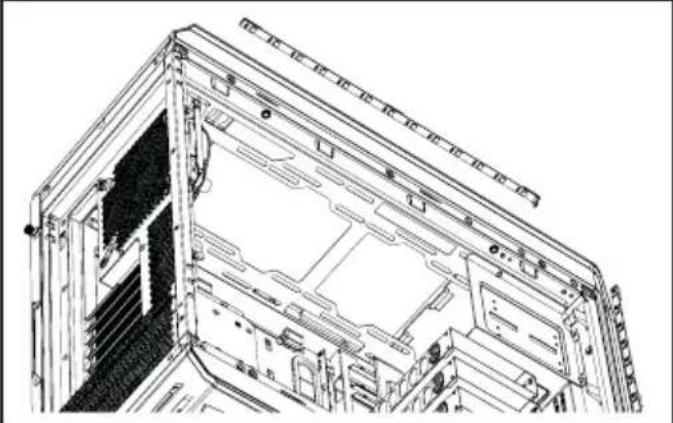
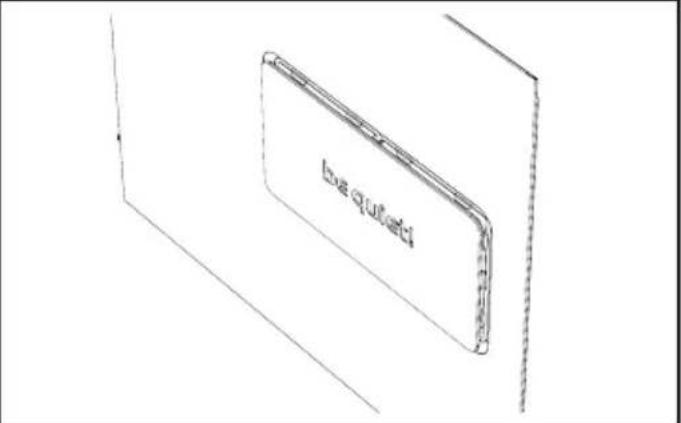
EN LED light can be installed in top, bottom and front areas
DE Die LED-Leisten können im oberen, im vorderen und im unteren Bereich installiert werden
FR Un éclairage à LED peut être installé au dessus, en bas et à l'avant
PL Oswietlenie LED moze byc umi górze, dole lub przyodzie obudowy
ES La iluminacion LED se pueda instalar en las partes superior, inferior y frontal
RU CBeToIOIOHnA NOcBcTeKa MoXeT 6blb yCTaHOBNEHa CBepxy, Bn3y nn no 6okam
EN Sidevent can be opened in amounts
DE Teilliche Luftungsöffnung kann in zwei Schritten geöffnet werden
FR L'event latorial peut etre retire en deux etapes
PL Boczny otwor wentylacyjny moze byc
ES La ventilación lateral se pueda abrir en dos pasos
RU BOKOBoe BEHTnIaHHOHoe OTBepCTne MOKeT 6bITb OKpbITo B DByX NIOJoxeHNx
8.2 TOP COVER REMOVAL / ENTFERNEN DER OBEREN ABDECKUNG / DEMONTAGE DU PANNEAU SUPERIEUR / ZDEJMOWANIE POKRYWY GORNEJ / DESMONTE DE LA TAPA SUPERIOR/ CHRITME BEPXHEI PAHEJI
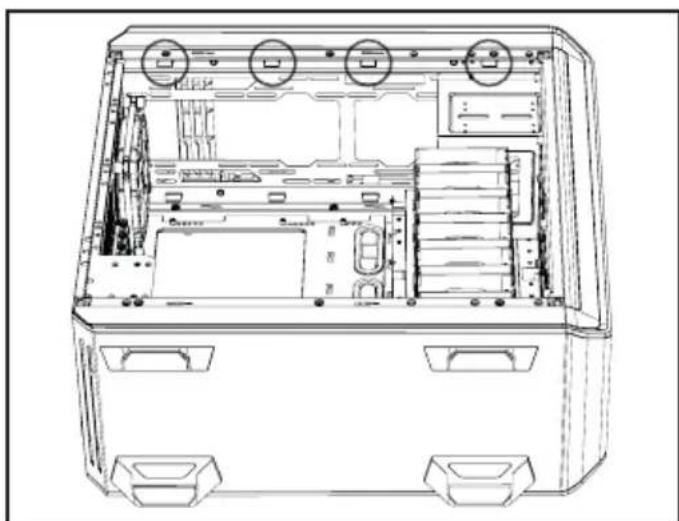
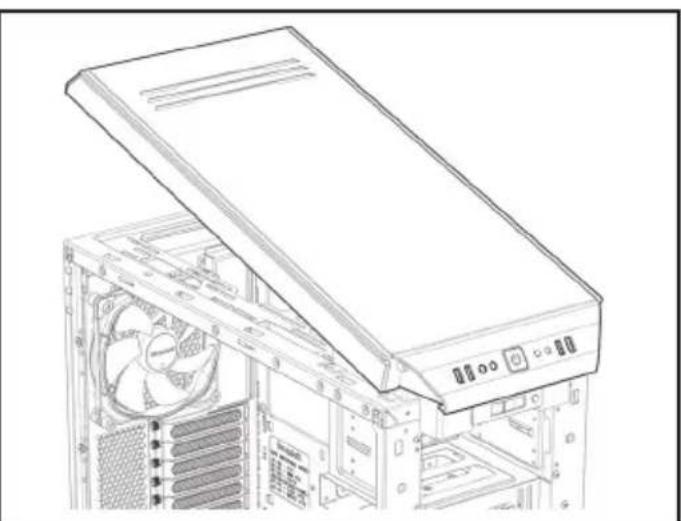
EN Frist remove the front panel (8.3).Locate the 8 hooks under the top cover and push them outwards to free the top cover
DE Entfernen Sie zunachst die Vorderseite (8.3). Finden Sie die 8 Häkchen unter dem Deckel und drücken Sie diese nach außen, um den Deckel zu losen
FR Retirer tout d'abord le cache frontal (8.3). Reprez les 8 crochets sous le panneau supérieur et poussez les pour le libreter
PL Najpierw wymontuj panel czofowy (8.3). Zlokalizuj 8 zaczepow pod Pokrywa górna i przyzesunj je na zewnatrz aby uwolnić pokrzywo górna
ES Primero retire el panel frontal (8.3). Localice los 8 ganchos debajo de la tapa superior y presiónlos hacía afuera para liberar la tapa
RU Chauana chHMMTe nepeHIOIO naHeIb (8.3). HanDnTe 8 3aueNOK nOd BepxHei KpbIkwOn n OTOKMITE IV
Per the terms and conditions of this limited warranty as given below, be quiet! warrants its new products to be free of defects resulting from faulty materials and faulty manufacturing for the length of the warranty period.
I. APPLICABILITY
This non-transferrable warranty is applicable to newly purchased, previously unopened be quiet! products and is enforceable by only the original consumer purchaser. Proof of purchase is required for warranty service, so should be retained. be quiet! does not provide warranty registration services.
II. WARRANTY PERIOD
For eligible products, parts and labor are warranted for the applicable warranty period from the date of purchase. The applicable warranty period varies by product model, and is identified in your user documentation, on the product package, or as listed below. Should any of these warranty periods differ, the longest specified warranty period will apply. Replaced products will be warranted for the remainder of the original warranty period or thirty days, whichever is longer.
III. EXCLUSIONS
The following are not covered by the warranty:
- Normal wear and tear.
- Any product which has been modified without permission from be quiet!, or on which the serial number or warranty sticker has been defaced, modified, or removed.
- Damage, deterioration or malfunction resulting from:
Accident, abuse, misuse or improper use, neglect, connection to an improper voltage source, unauthorized product modification, or failure to follow instructions included with the product.
Fire, water, lightning, or other acts of nature.
Repair or attempted repair by anyone not authorized by be quiet!.
Shipping or transport damage (claims must be made with the carrier).
Any other cause which does not relate to a defect in materials or manufacturing workmanship.
- Cartons, cases, batteries, cabinets, tapes, accessories or other consumables used with this product.
- be quiet!, Inc. does not warrant that this product will meet your requirements. It is your responsibility to determine the suitability of this product for your purpose.
- Removal or installation charges.
- Shipping charges.
- Any incidental charges.
IV. EXCLUSION OF DAMAGES
be quiet! 's sole obligation and liability under this warranty is limited to the repair or replacement of a defective product at its option. be quiet! shall not, in any event, be liable for any special, incidental, indirect, or consequential damages whatsoever, including but not limited to loss of profits, revenue, or data (whether direct or indirect), damages resulting from interruption of service and loss of business, or for liability in tort relating to this product or resulting from its use or possession, even if be quiet! has been advised previously of the possibility of such damages.
V. LIMITATIONS OF IMPLIED WARRANTYES
There are no other warranties, expressed or implied, including but not limited to those of merchantability or fitness for a particular purpose. The duration of implied warranties is limited to the warranty length specified in Paragraph II.
VI. LOCAL LAW AND YOUR WARRANTY
This warranty gives you specific legal rights. You may also have other rights granted under local law. These rights may vary.
VII. NO OTHER WARRANTY
No be quiet! employee, dealer, or other agent is authorized to make any modification, extension, or addition to this warranty.
VIII. TO OBTAIN TECHNICAL SUPPORT OR WARRANTY SERVICE
Please see your product owner's manual or visit the Online Support section at www.bequiet.com for details and contact information. You will need to provide proof of purchase for warranty service.