
ISDRG1200 - Alarm system BLAUPUNKT - Free user manual and instructions
Find the device manual for free ISDRG1200 BLAUPUNKT in PDF.
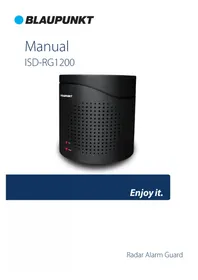



| Product type | Indoor radar alarm system |
| Brand | Blaupunkt |
| Model | ISDRG1200 |
| Dimensions (L x H x D) | 154 x 160 x 110 mm |
| Weight | 820 g |
| Main power supply | 12V DC, 1A power adapter (included) |
| Backup power supply | 8 AA 1.5V batteries (not included) |
| Power consumption | ≥ 6 W |
| Standby consumption | ≥ 7 mA |
| Dynamic consumption | ≥ 500 mA |
| Detection type | 5.8 GHz motion wave radar |
| Detection angle | 360° |
| Detection range (open space) | Rear: 0-15 m, Front: 0-3.5 m, Sides: 0-7 m |
| Detection through walls | Wood, plastic, stone ≤ 18 cm; glass possible |
| Ringtone types | 3 sirens, 1 dog bark, 1 doorbell |
| Maximum sound level | 95 dB |
| Volume adjustment | 8 levels |
| Alarm duration | Approx. 60 seconds (siren and bark), doorbell once |
| Remote controls included | 2, CR2032 battery (included), range 60 m max |
| Panic alarm | Yes, via ALARM button |
| Operating temperature | 0 to +40 °C |
| Operating humidity | 20 % – 85 % RH |
| Cleaning | Dry non-linting cloth; device turned off and unplugged |
| Safety | Indoor use only, away from heat sources, do not immerse |
| Box contents | 1 radar guard, 2 remote controls, 1 power adapter, 1 user manual, 1 CR2032 battery |
| Manual | 38 pages, available in several languages |
Frequently Asked Questions - ISDRG1200 BLAUPUNKT
User questions about ISDRG1200 BLAUPUNKT
0 question about this device. Answer the ones you know or ask your own.
Ask a new question about this device
Download the instructions for your Alarm system in PDF format for free! Find your manual ISDRG1200 - BLAUPUNKT and take your electronic device back in hand. On this page are published all the documents necessary for the use of your device. ISDRG1200 by BLAUPUNKT.
USER MANUAL ISDRG1200 BLAUPUNKT
Enjoy it.
Language Index
ISD-RG1200 | Manual
EN MANUAL 2
Radar Alarm Guard - ISD-RG1200 Manual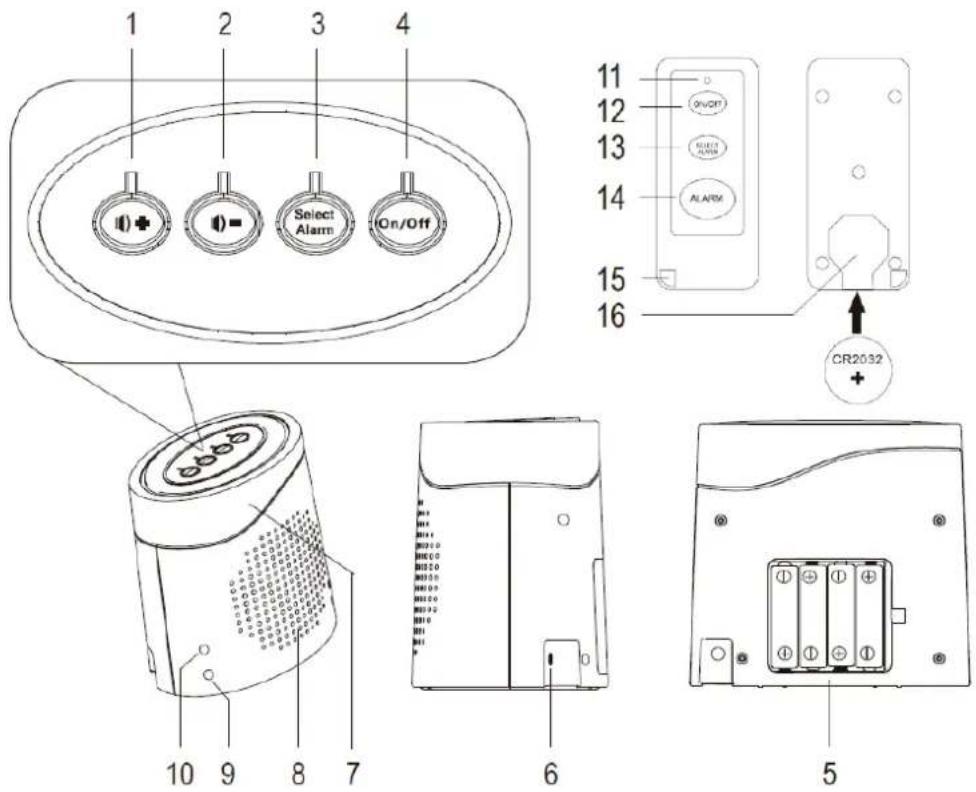
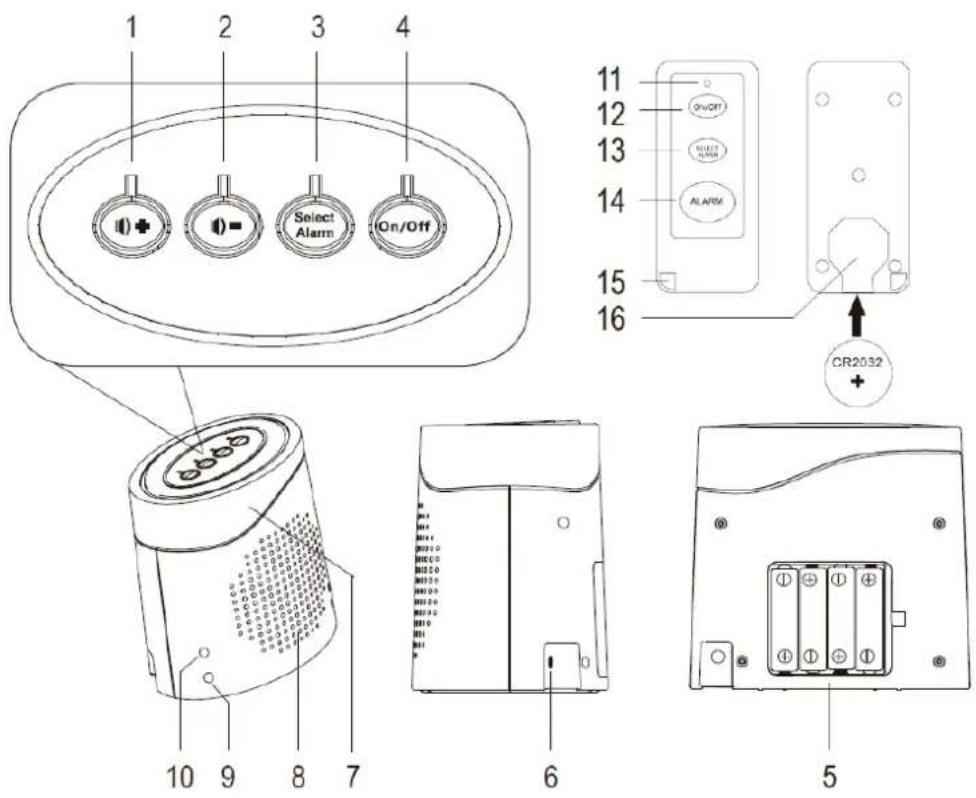
1 – Parts description
- Volume + button
- Volume - button
- Select Alarm button
- On/off button
- Battery compartment
- Connection socket 12 V/DC 1 A
- Radar sensor
- Speaker
- POWER LED Indicator
- ARM LED Indicator
- Signal LED
- ON/OFF button
- Select Alarm button
- Alarm button
- Eyelet with snap hook
- Battery compartment
2 – Package content
1 x Radar Guard ISD-RG1200
2 x Remote control
1 x Power adapter
1x Manual
1x Battery CR2032
3 – Installation
- Installation of remote control batteries: Open the battery compartment (16) of the remote control. Insert the included type CR2032 button cell with the positive terminal facing up into the battery compartment. Close the battery compartment.
Note:
- Please note that whenever the device gets plugged ON it will be armed automatically. Press the ON/OFF button to disarm the device. The ARM indicator LED will turn off.
- Connect the round plug of the mains adapter to the 12 V/DC 1 A connection socket (6).
- Once the unit has been connected to the mains supply, the POWER LED indicator and ARM LED indicator (10) light up. The device is turned ON and is in ARM mode.
Optional: Insert 8x 1.5 V AA batteries (not included) into the battery compartment (5). Observe correct polarity (+/-) as indicated in the battery compartment. Close the battery compartment. We do not recommend the use of rechargeable batteries, since those have a lower voltage.
Note:
- Radar Guard batteries are intended for use as backup batteries (backup power supply), in case the supply through the mains adapter gets disconnected or fails. Do not consider batteries as a main power supply. The main unit must be connected to the provided mains adapter during use.
- In case of power failure, the lifespan of the batteries can last for up to one week, as long as the device does not activate the alarm periodically. Periodically activating the alarm can cause the batteries to be exhausted after one day or even faster.
- Replace the batteries, once the POWER indicator lamp gets weaker or turns off.
- Remove the batteries when not using the device for a longer period of time.
4 – Operation
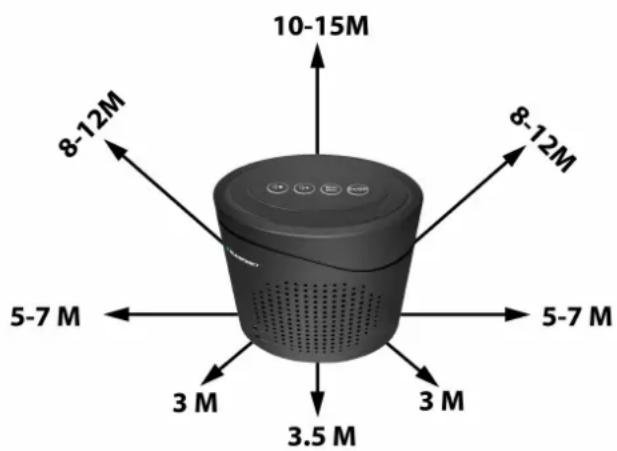
Radar detection: The integrated radar sensor (7) reacts to motions within its detection range with a detection angle of 360°, for example, if a human being or animal enters the detection range (0 - 10 m in open areas). If the device is in arm mode, the alarm will be activated immediately.
Important note:
Motions can be detected through wooden, plastic and stone walls etc. of max. 18 cm in thickness. Detection through glass is also possible.
The detection range varies depending on the thickness or material of the wall and might be reduced if there are any metal frames reducing the radar wave penetration.
Alarm siren: Press the Select Alarm button on the device or the remote control to change the alarm type. Choose between 5 different alarm sounds: 3 different siren alarm types, 1 realistic Dog bark sound, and 1 door bell. Adjust the volume using the VOL+ (1) and VOL- (2) buttons to select between the 8 different volume levels. A demonstration sound level will be triggered for 10 seconds after pressing any volume button.
Panic alarm: Press the ALARM button to activate an immediate alarm. For this function, the device must not be in activated mode.
Arm / disarm: Press the On/Off button to turn ON the alarm. The device will start a 10 seconds countdown and will be armed afterwards. Please leave the detection range before the countdown ends, as the alarm will get activated otherwise. To stop an alarm please press the On/Off button to turn off the alarm. The alarm will stop immediately, but the device is still in armed mode. Press the On/Off button again to disarm the device, the ARM LED indicator will turn off. The dogs barking and siren sound will last for approx. 60 seconds each time the alarm is activated. The doorbell will ring only once when it's activated.
5 – Cleaning and care
- Turn off and disconnect the product from the mains before each cleaning.
- Under no circumstances use aggressive cleanings agents, cleaning alcohol or other chemical solutions since these can penetrate the housing or impair functionality.
- Never submerge the product in water or other liquids.
- Clean the product with a dry, fibre-free cloth.
6 – Safety instructions
Read the operating instructions carefully and especially observe the safety information. If you do not follow the safety instructions and information on proper handling in this manual, we assume no liability for any resulting personal injury or damage to property. Such cases will invalidate the warranty/guarantee.
- Do not install the system where it will be exposed to direct sunlight or rain (for indoor use only).
- The unit should be away from heat sources such as radiators, heating ducts and stoves.
- If the device triggers a false alarm, it may be located too close to a heat source. Changing the location or direction of the unit can remedy this.
- Only use the supplied mains adapter as a power supply.
- The system sound is very loud; never put the unit close to your ear.
- For safety reasons, disconnect the power adapter from the mains socket during storms.
- If you have questions that remain unanswered by these operating instructions, contact our technical support service or other technical personnel.
6 – Technical specifications
ISD-RG1200
Input voltage / current.... 12 V/DC, 1 A via power adapter
Backup battery.... 8 x 1.5 V battery type AA
Power consumption.... ≤ 6 W
Standby current consumption.... ≤ 7 mA
Dynamic current consumption.... ≤ 500 mA
Noise level range....≤ 95 dB
Doorbell noise level range....70-95 dB
Dogs barking noise level range....65-95 dB
Alarm noise level range.... 75-95 dB
Transmission frequency/power.... 5.8 GHz, 1 mW
Radar detection angle.... 360°
Radar detection range (open area) .... 0 – 15 m (rear), 0 – 3,5 m (front), 0 – 7 m (side)
Operating conditions.... 0 to +40 °C, 20 % – 85 % RH
Storage conditions.... 0 to +40 °C, 20 % – 50 % RH
Dimensions (W x H x D) 154 x 160 x 110 m m
Weight..... Approx. 820 g
Power adapter
Input voltage / current.... 100 – 240 V/AC, 50/60 Hz, max. 0.3 A
Output voltage / current.... 12 V/DC, 1 A
Cable length.... 1.5 m
Remote control
Operating voltage.... 1 x 3 V button cell, type CR2032
Range (open area) max. 60 m
Transmission frequency/power.... 433 MHz, 0.1 mW
German
4 – Operation
4 - Operation
French
4 - Use
Italian
4 – Operation
4 - Use
4 - Operation
Scan here: To find your local Blaupunkt Service Support


Brand : BLAUPUNKT
Model : ISDRG1200
Category : Alarm system