
B01 - Alarm system BLAUPUNKT - Free user manual and instructions
Find the device manual for free B01 BLAUPUNKT in PDF.


| Product Type | Vehicle Security System |
| Brand | Blaupunkt |
| Model | B01 / B02 |
| Power Source | Car battery DC 12V (via 15A fuse) |
| Remote Control | 4-button key fob |
| Remote Range | Typical 20-30 meters (line of sight) |
| Key Functions | Arm, Disarm, Panic, Silent Arm/Disarm, Trunk Release, Valet Mode, Auto Relock, Foot Brake Lock, Exit Delay |
| Immobilizer | Passive immobilizer with LED indicator |
| Shock Sensor | 2-port three wire dual zone (optional) |
| Door / Boot / Bonnet Detection | Yes, with zone memory and warning |
| Auto Relock / Rearm | Remote selectable, 30 sec delay |
| Panic Mode | Press Button 4, siren 45 sec |
| Valet Mode | Disables alarm, retains central locking |
| Trunk Release | Remote (optional, requires signal output) |
| Exit Delay | 5 or 30 seconds, remote selectable |
| Central Locking Integration | Yes |
| Installation | Professional installation recommended |
| Manual Override | Via reset switch (ignition ON) |
| Safety Notes | Keep dry, no shocks, replace battery with equivalent type |
Frequently Asked Questions - B01 BLAUPUNKT
User questions about B01 BLAUPUNKT
0 question about this device. Answer the ones you know or ask your own.
Ask a new question about this device
Download the instructions for your Alarm system in PDF format for free! Find your manual B01 - BLAUPUNKT and take your electronic device back in hand. On this page are published all the documents necessary for the use of your device. B01 by BLAUPUNKT.
USER MANUAL B01 BLAUPUNKT
VEHICLE SECURITY SYSTEM B01/B02
B01
B02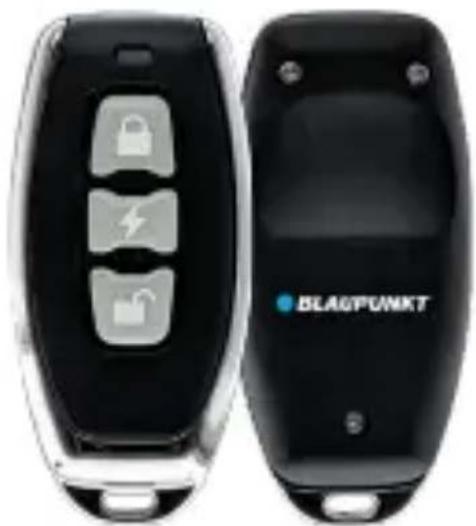
Enjoy it.
CAUTIONS
Safety Notes
This vehicle security system has been manufactured according to established safety guidelines. However, dangers may still occur if the safety notes in this manual are not observed. This manual is intended to familiarize the user with the vehicle security system's important functions. Read this carefully prior to using the vehicle security system. Keep this manual in an easily accessible location. In addition, do observe the instructions of the devices used in conjunction with this vehicle security system.
Attentions
- Keep the device in a dry and well-ventilated environment.
- Do not drop the device or subject it to physical shock.
- Improper use or replacement of the battery may cause an explosion hazard. Replace with the equivalent type only.
- The vehicle security system is a complicated technical device implying connection to the car circuits related to engine operation. It is strongly advised to have a professional car mechanic install the system.
This manual may be updated from time to time without any notice.
Disclaimer
In no event shall Blaupunkt be liable for any direct, indirect, punitive, incidental, special consequential damages to property or life and whatsoever arising out of or connected with the use or misuse of our products. USA & CANADA: This product is not intended for sale in the United States and Canada. If purchased in the U.S. or Canada, this product is purchased on an as-is basis. No warranty, whether expressed or implied, is provided in the U.S. or Canada.
STRUCTURE

B01 B02

| Function | Button | Ignition Status |
| Arm | Button 1 | OFF |
| Disarm | Button 2 | OFF |
| Panic | Button 3 | OFF |
| Trunk Release | Hold Button 2 /4 | OFF |
| Beep Sound (Silent) | Button 1 & 2 | OFF |
| Auto Relock (Default: Activated) | Hold Button 1 | ON (Deactivate) |
| Foot Brake Lock (Default: Activated) | Hold Button 2 | ON (Deactivate) |
| Valet Mode (Default: Activated) | Hold Button 1 & 2 | ON (Deactivate) |
| Exit Delay Time (5 & 30Sec) (Default: Activated) | Hold Button 3 | ON (Deactivate) |
SPECIFICATIONS
• Remote Arm, Disarm and Panic • Remote Silent Arm and Disarm • Remote Boot Release • Beep Sound (Remote Selectable) • Auto Relocking / Auto Rearming (Remote Selectable) • Foot Brake Lock (Remote Selectable) • Valet Mode (Remote Selectable) • Door Not Closed Warning (Remote Selectable)
- Exit Delay Time 5 or 30 sec. (Remote Selectable)
- Door Open Detection • 2 Ports Three Wire Dual Zone Shock Sensor • Passive Immobilizer • Code Learning Technology
FUNCTIONS
1. Arm (Lock)
- Press Button 1 to arm.
- The central lock will be locked, alarm will beep once, hazard light flashes and LED light will turn on.
- The immobilizer will function if the ignition is turned ON.
2. Disarm (Unlock)
- Press Button 2 to disarm.
- The central lock will be unlocked and alarm will beep twice.
- Hazard light flashes twice and LED light will turn off.
3. Beep Sound (Remote Selection)
- Press Button 1 and 2 simultaneously to disable the beep sound; the hazard light will flash twice.
- Repeat the same step to enable the beep sound.
- The alarm will beep and the hazard light will flash.
4. Panic
- Press Button 4 to trigger the alarm and hazard light for approximately 45 seconds instantly in case of emergency.
- Press buttons other than Button 4 to turn off the alarm; the alarm system will remain armed and locked.
5. Auto Relock/ Auto Rearm
(Remote Selection)
After 30 seconds of disarming the alarm system, if no doors are opened, the system will automatically relock/rearm the vehicle.
- If the central locking was accidentally unlocked, after 15 seconds the alarm will beep and the hazard light will flash, indicating that the system will be rearmed and the door will be relocked in another 15 seconds.
- To disable this function, turn on the ignition, press and hold Button 1 for 2 seconds; the alarm will beep twice and the hazard light will flash.
- Repeat the same step to enable this function again; the alarm will beep once and the hazard light will flash.
6. Passive Immobilizer
- This function will be activated either after the ignition is turned off for 60 seconds in disarm mode or 60 seconds after Button 2 is pressed.
- The passive immobilizer sends out a signal to stop the electronic start/ignition circuit in order to immobilize the vehicle. The blinking LED indicates the function is enabled.
- To cancel the passive immobilizer, press Button 2; the LED will stop blinking indicating the function is disabled. Note: The auto-relock function will override the passive immobilizer function.
7. Doors/ Boot/ Bonnet Zone Protection
- The alarm will be triggered if any zones are opened while the alarm status is in armed mode.
- The siren will last for 45 seconds and then have a 5-second break, every time the system checks the zone status.
- Upon completion of 3 zone status checks, the violated port is ignored and the system will be rearmed.
FUNCTIONS
8. Key on Trigger Zone
- The alarm will be triggered if the alarm is in arm mode and the ignition is ON.
- The siren will continue for 45 seconds before it takes 5 seconds to check the ignition status; the siren will continue if the alarm is still in arm mode while the ignition is ON.
9. Manual Override System
- To set off the alarm system without using the remote in case of a missing or malfunctioning remote, turn on the ignition and press the Reset switch once.
10. Ignition / Starter Disable (External Heavy Duty 30A Relay)
- When the alarm system is in arm mode and the ignition is ON, the system will halt the ignition (subject to relay connection) and the alarm will be triggered. This will immobilize the vehicle to prevent the car from being stolen.
11. 3 Independent Triggering Zones with Memory
• There are sensors on the doors/bonnet/boot and ignition key zones. - The alarm will beep 3 times after the alarm is disarmed, indicating that the doors/bonnet/boot zone is triggered; 4 times indicates the sensor, and 5 times indicates the ignition key zone triggered. - The memory will automatically be erased when the ignition is turned on in disarm mode.
12. LED Indicator shows the Status of the Security System
- A dashboard mounted red arm and memory LED will light up to indicate when the alarm system is armed, disarmed, or triggered.
13. Valet Mode (Remote Selection)
- To turn on the Valet Mode, with the ignition ON, press and hold Button 1 and 2 for 2 seconds. The alarm will beep once, the hazard lights will flash, and the arm LED will also flash.
- The alarm system will be disabled when in valet mode (not including the central lock system).
- To return to normal mode, repeat the same steps again while the ignition is ON.
14. Door Open Detection
- In disarm mode, when the alarm system detects opened doors and the ignition is ON, the hazard lights flash.
- The hazard lights will stop flashing when the doors are closed.
15. Opened Door Warning (Remote Selection)
- When door lock mode is activated, the alarm will beep and the hazard lights will flash when the doors are opened. • After 30 seconds, the alarm will be triggered.
- To disable this function, follow the Exit Delay Time Selection.
FUNCTIONS
16. Exit Delay Time (Remote Selection)
- Exit delay time (5/30 sec.) can be selected by the remote control.
- For exit delay time 5 sec., turn ON the ignition, then press and hold the Button 3, the alarm will beep twice and hazard light flashes.
- When select exit delay time 5 sec., opened door warning function will be disabled.
- Repeat the same procedure again for the exit delay time to 30sec., the alarm will beep once and hazard light flashes.
17. Trunk Release Activation by Remote (Optional)
- Press and hold Button 2 or 4 (open trunk signal output is required).
- The alarm system will automatically disarm each time the trunk is opened.
TROUBLESHOOTING
If any of the following problem occur, please resort to Troubleshooting for the possible solutions. Consult Blaupunkt authorized dealer if problem persist.
| Problems | Possible Causes | Solutions |
| Remote does not work | Remote is not programmed or not pair. | Program remote and check the wire connection. |
| Weak or stale battery. | Replace with a new and equivalent type of battery. | |
| System will not arm | Power supply problem. | Check +12V & ground (earth) at the system module. |
| Remote is not functioning. | Check the battery level of the remote. |
WIRING DIAGRAM
![graph TD A["Shock Sensor (Optional)"] --> B["LED Status Indicator"] B --> C["Reset Switch"] C --> D["Ultra Sonic Sensor (Optional)"] D --> E["Hazard Light"] E --> F["Central Locking"] F --> G["Yellow"] G --> H["12 White"] H --> I["3 Brown / White"] I --> J["5 Black"] J --> K["BATTERY DC 12V"] K -->…](/content/2026/05/1107744/images/892d0d08aa1fb590ef6e5c607acbe20dc85da313a790278a473b1cd06d2a5eb4.jpg)

Designed and engineered by Blaupunkt Competence Centre
VSS B01
1 521 19 005 23 01
VSS B02
1 521 19 006 23 01



- VEHICLE SECURITY SYSTEM B01/B
- CAUTIONS
- SAFETY NOTES
- ATTENTIONS
- DISCLAIMER
- STRUCTURE
- SPECIFICATIONS
- FUNCTIONS
- ARM (LOCK)
- DISARM (UNLOCK)
- BEEP SOUND (REMOTE SELECTION)
- PANIC
- AUTO RELOCK/ AUTO REARM
- (REMOTE SELECTION)
- PASSIVE IMMOBILIZER
- DOORS/ BOOT/ BONNET ZONE PROTECTION
- KEY ON TRIGGER ZONE
- MANUAL OVERRIDE SYSTEM
- IGNITION / STARTER DISABLE (EXTERNAL HEAVY DUTY 30A RELAY)
- INDEPENDENT TRIGGERING ZONES WITH MEMORY
- LED INDICATOR SHOWS THE STATUS OF THE SECURITY SYSTEM
- VALET MODE (REMOTE SELECTION)
- DOOR OPEN DETECTION
- OPENED DOOR WARNING (REMOTE SELECTION)
- EXIT DELAY TIME (REMOTE SELECTION)
- TRUNK RELEASE ACTIVATION BY REMOTE (OPTIONAL)
- TROUBLESHOOTING
- WIRING DIAGRAM
Brand : BLAUPUNKT
Model : B01
Category : Alarm system