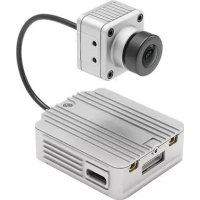
FPV Air Unit - Drone DJI - Free user manual and instructions
Find the device manual for free FPV Air Unit DJI in PDF.

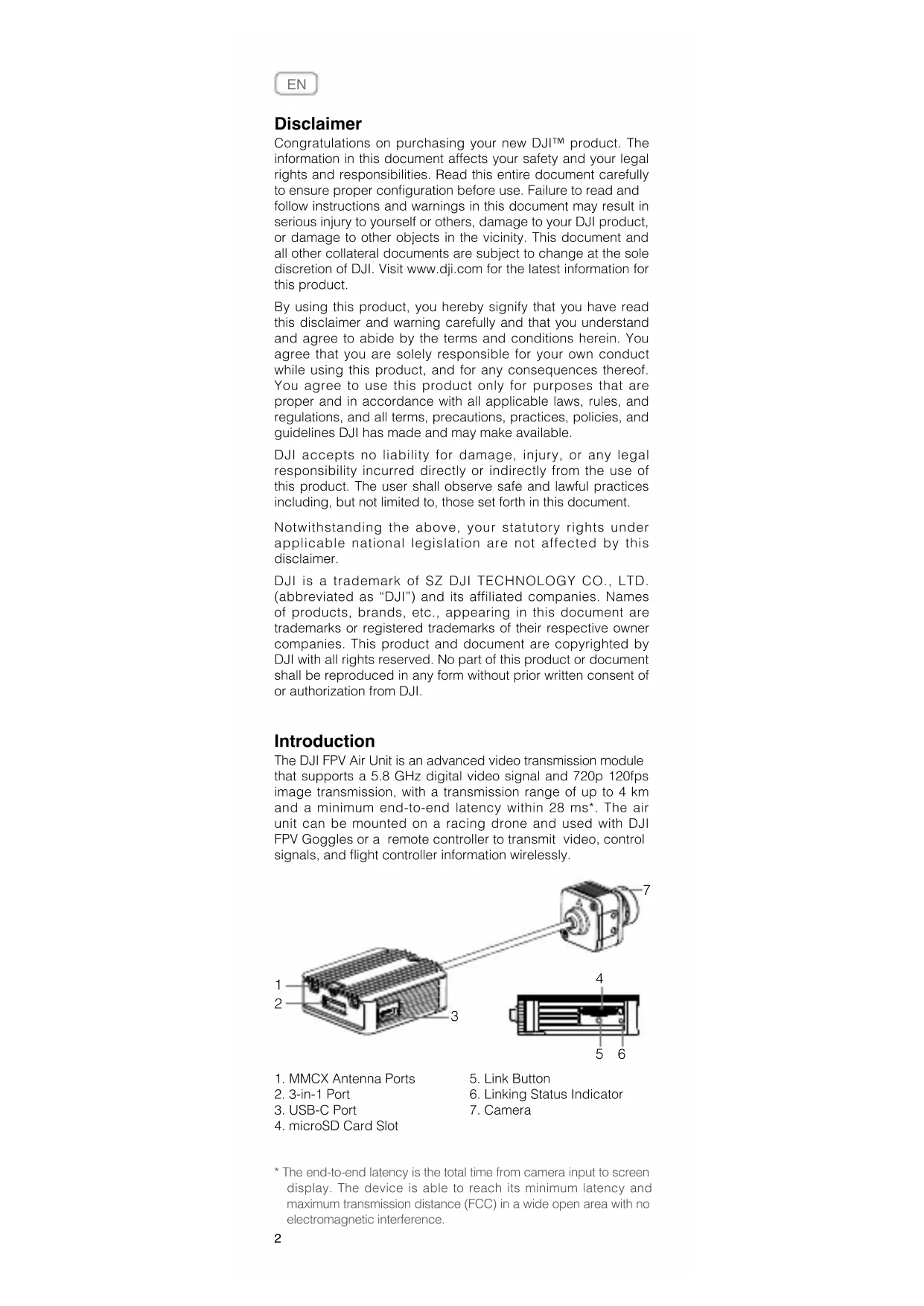


| Product Type | FPV Video Transmission Module |
| Brand | DJI |
| Model | FPV Air Unit |
| Category | Drone Accessory |
| Dimensions (Air Unit) | 44 x 37.8 x 14.4 mm |
| Dimensions (Camera) | 27.4 x 21.1 x 20.1 mm |
| Weight (Air Unit with Camera) | 45.8 g |
| Antenna Weight | 3.74 g (MMCX straight), 3.9 g (MMCX right angle), 6 g (SMA female) |
| Operating Frequency | 5.725 to 5.850 GHz |
| Transmitter Power (EIRP) | FCC/SRRC < 30 dBm, CE < 14 dBm |
| Minimum Latency | < 28 ms (720p 120 fps), < 40 ms (720p 60 fps) |
| Maximum Transmission Distance | 4 km (FCC/SRRC), 0.7 km (CE) |
| Supported Video Formats | MP4 (H.264, AAC-LC) |
| Connectivity | USB-C, MMCX, 3-in-1 port, microSD slot |
| Compatible Flight Control Systems | BetaFlight |
| Operating Temperature Range | 0 to 40 °C |
| Power Supply Voltage | 7.4 - 17.6 V |
| Camera Sensor | CMOS 1/3.2", effective pixels 4 million |
| Field of View | 150° (D), 122° (H), 93° (V) |
| ISO | 100 - 25,600 |
| Pairing Methods | A (goggles), B (remote controller), A+B |
| Activation | Via DJI Assistant 2 |
Frequently Asked Questions - FPV Air Unit DJI
User questions about FPV Air Unit DJI
0 question about this device. Answer the ones you know or ask your own.
Ask a new question about this device
Download the instructions for your Drone in PDF format for free! Find your manual FPV Air Unit - DJI and take your electronic device back in hand. On this page are published all the documents necessary for the use of your device. FPV Air Unit by DJI.
USER MANUAL FPV Air Unit DJI
natural_image
Technical line drawing of a mechanical component with a vertical shaft and base (no text or symbols)Contents
EN Quick Start Guide 2
CHS 快速入门指南 5
CHT 快速入門指南 8
JP クイックスタートガイド 11
KR 퀴 스타트 가이드 14
DE Kurzanleitung 17
Congratulations on purchasing your new DJITM product. The information in this document affects your safety and your legal rights and responsibilities. Read this entire document carefully to ensure proper configuration before use. Failure to read and follow instructions and warnings in this document may result in serious injury to yourself or others, damage to your DJI product, or damage to other objects in the vicinity. This document and all other collateral documents are subject to change at the sole discretion of DJI. Visit www.dji.com for the latest information for this product.
By using this product, you hereby signify that you have read this disclaimer and warning carefully and that you understand and agree to abide by the terms and conditions herein. You agree that you are solely responsible for your own conduct while using this product, and for any consequences thereof. You agree to use this product only for purposes that are proper and in accordance with all applicable laws, rules, and regulations, and all terms, precautions, practices, policies, and guidelines DJI has made and may make available.
DJI accepts no liability for damage, injury, or any legal responsibility incurred directly or indirectly from the use of this product. The user shall observe safe and lawful practices including, but not limited to, those set forth in this document.
Notwithstanding the above, your statutory rights under applicable national legislation are not affected by this disclaimer.
DJI is a trademark of SZ DJI TECHNOLOGY CO., LTD. (abbreviated as "DJI") and its affiliated companies. Names of products, brands, etc., appearing in this document are trademarks or registered trademarks of their respective owner companies. This product and document are copyrighted by DJI with all rights reserved. No part of this product or document shall be reproduced in any form without prior written consent of or authorization from DJI.
Introduction
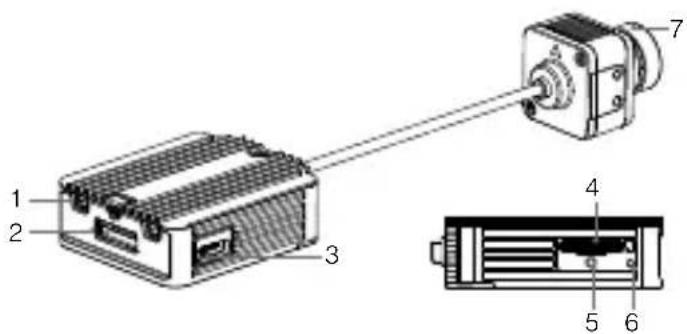
The DJI FPV Air Unit is an advanced video transmission module that supports a 5.8 GHz digital video signal and 720p 120fps image transmission, with a transmission range of up to 4 km and a minimum end-to-end latency within 28 ms*. The air unit can be mounted on a racing drone and used with DJI FPV Goggles or a remote controller to transmit video, control signals, and flight controller information wirelessly.
-
MMCX Antenna Ports
-
3-in-1 Port
-
USB-C Port
-
microSD Card Slot
-
Link Button
-
Linking Status Indicator
-
Camera
* The end-to-end latency is the total time from camera input to screen display. The device is able to reach its minimum latency and maximum transmission distance (FCC) in a wide open area with no electromagnetic interference.
Connection
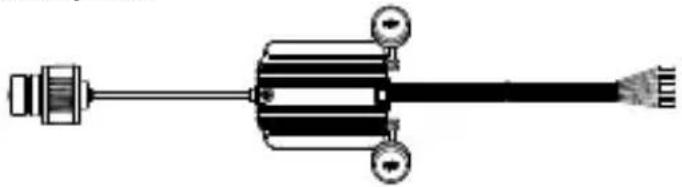
Refer to the illustration below to mount and connect the air unit to a racing drone.
natural_image
Pure mechanical component diagram without any text, numbers, or symbols3-in-1 Cable (Power, DJI HDL, UART)
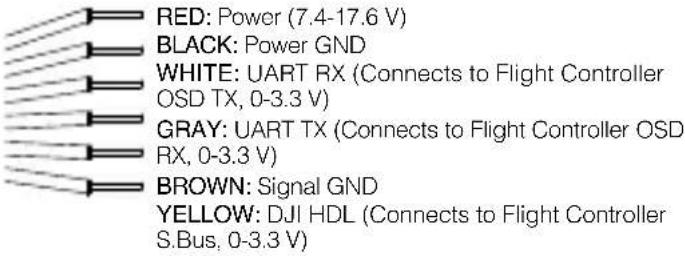

- An electric soldering iron and soldering tin are required for connection. Make sure that there are no short circuits or open circuits when soldering the cables.
- There are up to eight channels for the air unit depending on the region (FCC: eight, CE/SRRC: four, MIC: three). Each channel has a bandwidth of 20 MHz. The public channel is 8, which is the default channel when the equipment is powered on. The channel can be changed manually to avoid interference from other devices.

- The air unit may become hot during or after operation. DO NOT touch the air unit before it cools down.
- DO NOT use the air unit for an extended period when the temperature is high or there is poor ventilation. Otherwise, the air unit may overheat and enter low-power mode which will affect its performance. If the air unit enters low-power mode, restart it or wait for it to cool down and it will automatically return to normal.
- Keep the antennas of the air unit at least 40 mm apart. Keep the air unit away from metal objects or carbon fiber frames. Make sure to choose a position where the transmission will not be blocked during flight.
Activation
When powered on, connected the air unit to your computer and run DJI ASSISTANT™ 2 for activation.
Download DJI Assistant 2 at https://www.dji.com/fpv/downloads
Linking
The air unit support three linking methods: A, B, and A+B (Must link A before B).
A.
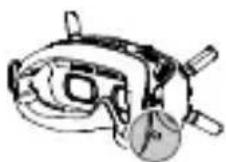
- Power on the air unit and the DJI FPV Goggles.
- Press the link button on the air unit and the goggles.*
- The linking status indicator of the air unit turns solid green. The goggles stop beeping when successfully linked and the video display is normal.
B.
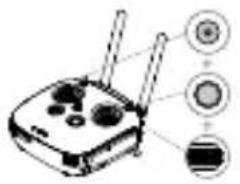
natural_image
Diagram of a wireless router with three labeled buttons (no text or symbols present)- Power on the air unit and the DJI FPV Remote Controller.
- Press the link button on the air unit, and then press the record button, C button, and right dial on the remote controller simultaneously.*
- Both the linking status indicators turn solid green when successfully linked.
* When ready to link, the devices will give the following indication:
Air unit: the linking status indicator turns solid red.
Goggles: the goggles beep continually.
Remote controller: the remote controller beeps continually and the status indicator blinks blue.
Specifications
Weight Air Unit (camera included): 45.8 g
Antenna: 3.74 g (MMCX straight);
3.9 g (MMCX elbow);
6 g (reverse polarity female SMA)
Dimensions Air Unit: 44×37.8×14.4 mm
Camera: 27.4×21.1×20.1 mm
Coaxial Cable: 100 mm
Operating Frequency 5.725-5.850 GHz
Transmitter Power (EIRP) FCC/SRRC: <30 dBm;
CE: <14 dBm
Min. Latency (end-to-end) Low Latency Mode (720p 120fps):
<28 ms;
High Quality Mode (720p 60fps):
<40 ms
Max. Transmission Distance FCC/SRRC: 4 km; CE: 0.7 km;
Video Format MP4 (Video format: H.264;
Audio format: AAC-LC)
I/O Interface USB-C, MMCX, 3-in-1 port,
microSD card slot
Supported Flight
BetaFlight
Control System
Operating
Temperature Range
0^ to 40^ (32° to 104° F)
Input Power 7.4-17.6 V
Camera Sensor: 1/3.2" CMOS; Effective
Pixels: 4 M
Lens: 2.1 mm, f/2.1
Shutter: Rolling shutter
ISO: 100-25600
FOV: 150° (D); 122° (H); 93° (V)
免责声明
natural_image
Pure electrical circuit lines without any symbolsnatural_image
Diagram of a wireless router with three labeled buttons (no text or symbols present)FOV: 150^ (D); 122^ (H); 93^ (V)
免責聲明
natural_image
Pure electrical circuit lines without any symbolsnatural_image
Diagram of a wireless router with three labeled buttons (no text or symbols present)natural_image
Pure mechanical component diagram without any text, numbers, or symbols- MMCX 안테나 포트
5.연동 버튼
2.3-in-1 포트
6.연동 상태 표시등
- USB-C 포트
7.카메라
4.microSD 카드 슬롯
natural_image
Pure mechanical component diagram without any text, numbers, or symbols3-in-1 케이블(전원, DJI HDL, UART)
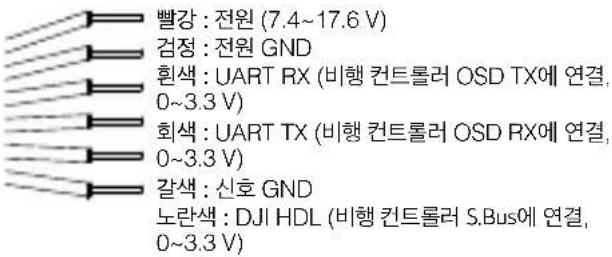
natural_image
Diagram of a wireless router with three labeled buttons (no text or symbols present)natural_image
Pure mechanical diagram of a shaft and housing assembly without any text, numbers, or symbols3-in-1-Kabel (Strom, DJI HDL, UART)
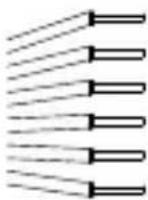
ROT: Stromversorgung (7,4-17,6 V)
SCHWARZ: Strom-GND
natural_image
Diagram of a router with three ports and three circular indicators (no text or symbols)Min. Latenz (End-to-End) Niedriglatenz-Modus (720p 120 fps): < 28 ms High-Quality-Modus (720p 60 fps): < 40 ms
natural_image
Pure mechanical component diagram without any text, numbers, or symbolsCable coaxial: 100 mm
(720p 120 fps): <28 ms
(720p 60 fps): <40 ms
FCC/SRRC: 4 km; CE: 0.7 km
natural_image
Pure mechanical component diagram without any text, numbers, or symbolsCâble 3 en 1 (alimentation, DJI HDL, UART)
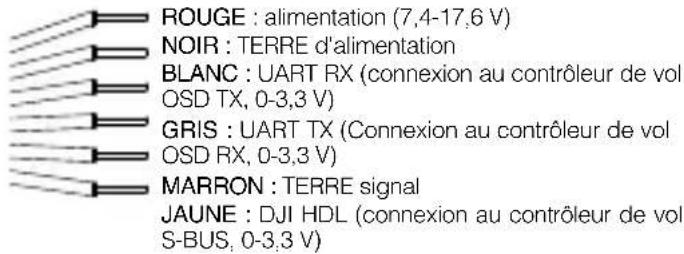
natural_image
Diagram of a router with three ports and three circular indicators (no text or symbols)natural_image
Pure mechanical component diagram without any text, numbers, or symbolsnatural_image
Diagram of a router with three ports and three circular indicators (no text or symbols)(end-to-end) (720p 120 fps): < 28 ms
(720p 60 fps): < 40 ms
- MMCX-antennepoorten
- 3-in-1 poort
- USB-C-poort
-
microSD-kaartsleuf
-
Koppeltoets
- Indicator koppelingsstatus
- Camera
natural_image
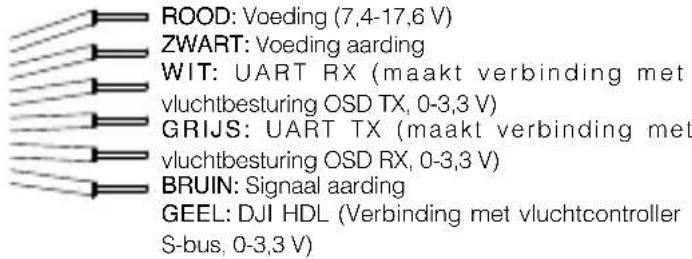
Pure mechanical component diagram without any text, numbers, or symbols3-in-1 kabel (voeding, DJI HDL, UART)
natural_image
Diagram of a router with three ports and three circular indicators pointing to its top-right (no text or symbols present)(720p 120 fps): < 28 ms
Hogekwaliteitsmodus
(720p 60 fps): < 40 ms
Max. Zendafstand FCC/SRRC: 4 km; CE: 0,7 km
Video-indeling MP4 (videoformaat: H.264;
audioformaat: AAC-LC)
I/O-interface USB-C, MMCX, 3-in-1-poort,
microSD-kaartslot
Ondersteund
BetaFlight
vluchtregelsysteem
natural_image
Pure mechanical component diagram without any text, numbers, or symbolsTransfira o DJI Assistant 2 em https://www.dji.com/fpv/downloads
Ligação
natural_image
Diagram of a router with three ports and three circular indicators pointing to its top view (no text or symbols present)natural_image
Pure mechanical component diagram without any text, numbers, or symbolsFaça o download do DJI Assistant 2 em https://www.dji.com/fpv/downloads
Vinculação
natural_image
Diagram of a router with three circular indicators pointing to its ports (no text or labels present)natural_image
Pure mechanical component diagram without any text, numbers, or symbolsnatural_image
Diagram of a router with three labeled ports (no text or symbols present)This device complies with Part 15 of the FCC Rules. Operation is subject to the following two conditions: (1) This device may not cause harmful interference, and (2) This device must accept any interference received, including interference that may cause undesired operation.
Any changes or modifications not expressly approved by the party responsible for compliance could void the user's authority to operate the equipment.
This equipment has been tested and found to comply with the limits for a Class B digital device, pursuant to part 15 of the FCC Rules.
These limits are designed to provide reasonable protection against harmful interference in a residential installation. This equipment generates, uses and can radiate radio frequency energy and, if not installed and used in accordance with the instructions, may cause harmful interference to radio communications. However, there is no guarantee that interference will not occur in a particular installation. If this equipment does cause harmful interference to radio or television reception, which can be determined by turning the equipment off and on, the user is encouraged to try to correct the interference by one or more of the following measures:
—Reorient or relocate the receiving antenna.
—Increase the separation between the equipment and receiver.
—Connect the equipment into an outlet on a circuit different from that to which the receiver is connected.
—Consult the dealer or an experienced radio/TV technician for help.
RF Exposure Information
This equipment complies with FCC radiation exposure limits set forth for an uncontrolled environment. In order to avoid the possibility of exceeding the FCC radio frequency exposure limits, human proximity to the antenna shall not be less than 20cm during normal operation. This transmitter must not be co-located or operating in conjunction with any other antenna or transmitter.
ISED Warning
This device contains licence-exempt transmitter(s)/receiver(s) that comply with Innovation, Science and Economic Development Canada's licence-exempt RSS(s). Operation is subject to the following two conditions: (1) This device may not cause interference.(2) This device must accept any interference, including interference that may cause undesired operation of the device.
This equipment complies with RSS-102 radiation exposure limits set forth for an uncontrolled environment. This equipment should be installed and operated with minimum distance 20cm between the radiator and your body. This transmitter must not be co-located or operating in conjunction with any other antenna or transmitter.
EU Compliance Statement: SZ DJI TECHNOLOGY CO., LTD. hereby declares that this device is in compliance with the essential requirements and other relevant provisions of the Directive 2014/53/EU.
A copy of the EU Declaration of Conformity is available online at www.dji.com/euro-compliance
EU contact address: DJI GmbH, Industriestrasse 12, 97618, Niederlauer, Germany
Environmentally friendly disposal
Old electrical appliances must not be disposed of together with the residual waste, but have to be disposed of separately. The disposal at the communal collecting point via private persons is for free. The owner of old appliances is responsible to bring the appliances to these collecting points or to similar collection points. With this little personal effort, you contribute to recycle valuable raw materials and the treatment of toxic substances.
https://www.dji.com/support
This content is subject to change.
Download the latest version from
https://www.dji.com/fpv
DJI is a trademark of DJI.
Copyright © 2019 DJI All Rights Reserved.
Brand : DJI
Model : FPV Air Unit
Category : Drone