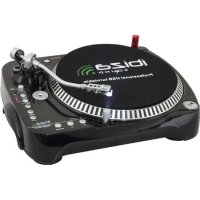
LP200 - Turntable IBIZA SOUND - Free user manual and instructions
Find the device manual for free LP200 IBIZA SOUND in PDF.



| Product type | Belt-drive turntable |
| Speeds | 33 1/3 and 45 RPM |
| Motor | DC |
| Power supply | 115/230 V, 60/50 Hz (manual switch) |
| Dimensions (W x D x H) | 418 x 355 x 110 mm |
| Weight | Approx. 5 kg |
| Audio outputs | RCA (L/R) with phono/line selector |
| USB interface | USB 1.1 compatible with PC and Mac |
| Built-in phono preamp | Yes |
| Tonearm lift and counterweight | Yes, adjustable |
| Dust cover | Yes |
| AUX input | Yes (for MP3 player) |
| Included accessories | Felt mat, belt, USB cable, RCA cable |
| Included software | Audacity (free download) |
| Safety instructions | Read instructions, avoid water, clean with damp cloth, unplug during storms, repair by qualified technician |
| Maintenance | Clean stylus and records, check counterweight, adjust speed via adjustment screws |
| Repairability | Have serviced by qualified technician; spare parts available from manufacturer |
| Recycling | Do not dispose of with household waste; recycle at appropriate facility |
Frequently Asked Questions - LP200 IBIZA SOUND
User questions about LP200 IBIZA SOUND
0 question about this device. Answer the ones you know or ask your own.
Ask a new question about this device
Download the instructions for your Turntable in PDF format for free! Find your manual LP200 - IBIZA SOUND and take your electronic device back in hand. On this page are published all the documents necessary for the use of your device. LP200 by IBIZA SOUND.
USER MANUAL LP200 IBIZA SOUND
Belt-Drive USB Turntable
MANUAL DE INSTRUÇões
Imported from China by:
LOTRONIC SA
Avenue Zénobe Gramme 11
1480 Saintes
Belgium
RoHS
Safety instruction
- Read these Instructions.
- Keep these Instructions.
Heed allWarnings. - Follow all Instructions.
- Do not use this apparatus near water.
- Clean only with a damp cloth.
- Do not block any of the ventilation openings. Install in accordance with the manufacture's instructions.
- Do not install near nay heat sources such as radiators, heat registers, stoves, or other apparatus (including amplifiers) that produce heat.
- Do not defeat the safety purpose of the polarized plug. The wide blade is provided for your safety. If the provided plug does no fit into your outlet, consult an electrician for replacement of the obsolete outlet.
- Protect the power cord from being walked on or pinched particularly at plug, convenience receptacles, and point where they exit from the apparatus.
- Only use attachments/accessories specified by the manufacturer.
- Use only with a cart, stand, tripod, bracket, or table specified by the manufacturer, or sold with the apparatus. When art is used, use caution when moving the cart/apparatus combination to avoid injury from tip-over
- Unplug this apparatus during lighting storms or when unused for long periods of time.
Refer all servicing to qualified service personnel. Serving is required when the apparatus has been damaged in any way, such as power-supply cord or plug is damaged, liquid has been spilled or objects have fallen into the apparatus, the apparatus has been exposed to rain or moisture, does not operate normally, or has been dropped.
This mains plug is used as the disconnect device, the disconnect device shall be readily operable.


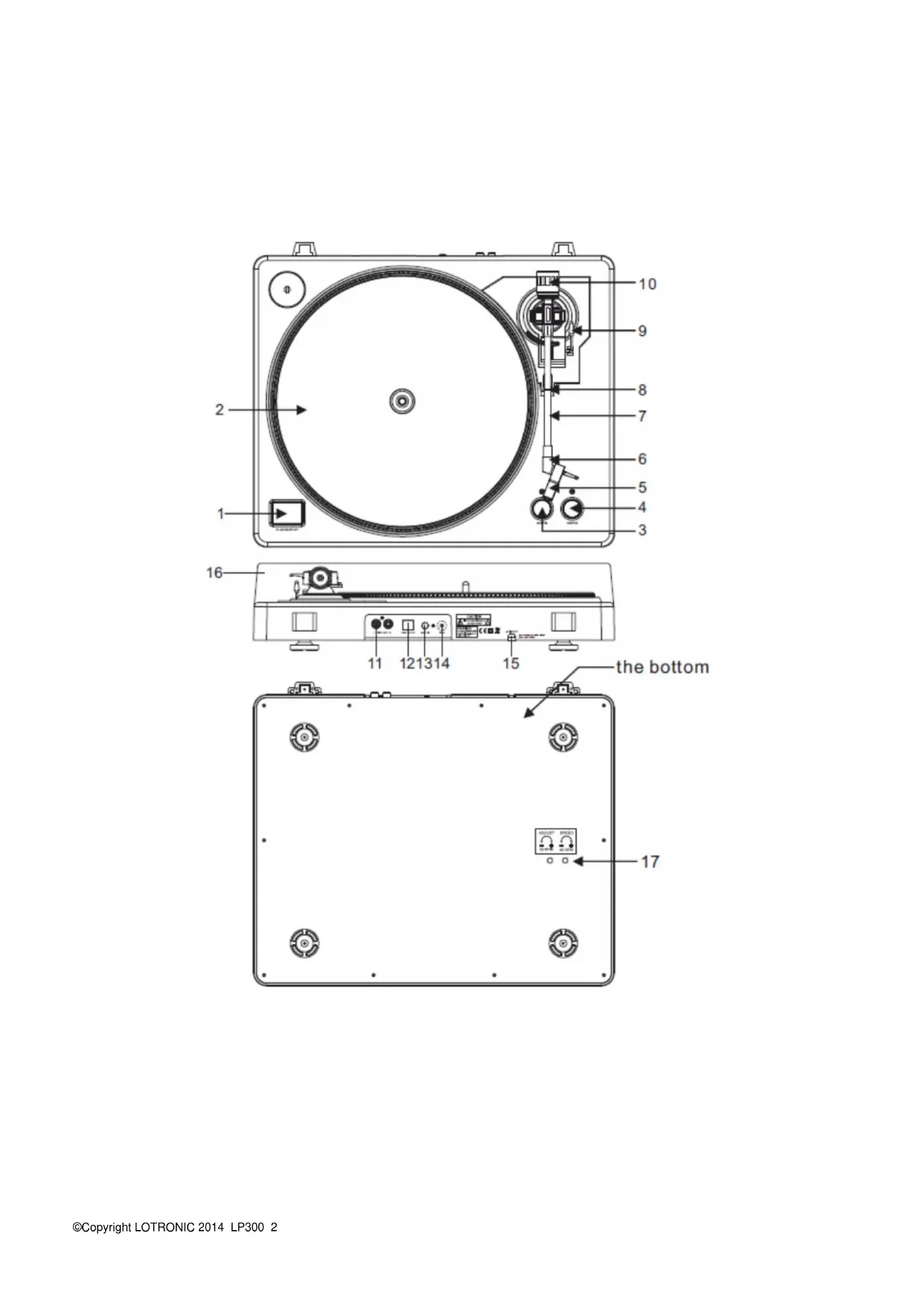
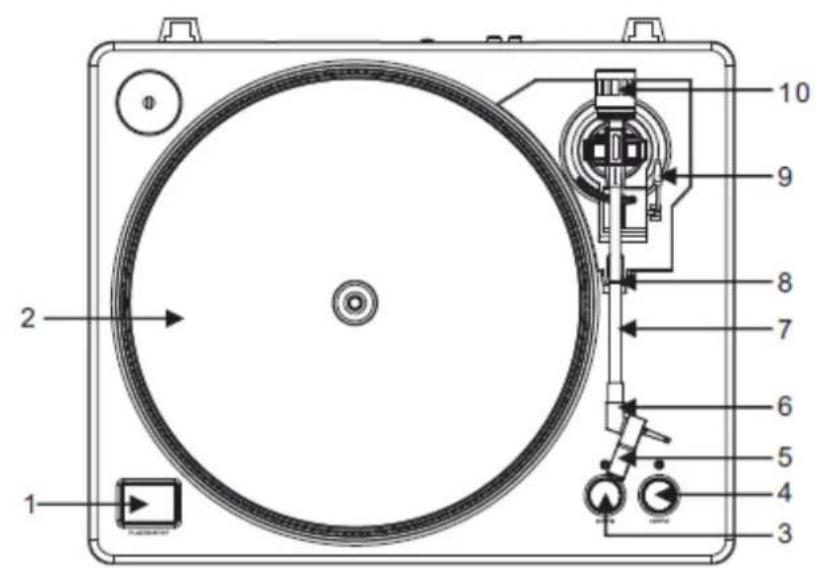
Description
1- Start/stop buttons Tonearm lift
Press this button to start or stop the platter.
2- Platter
The platter is equipped with a slip mat. This makes it easier to manipulate the record for scratch performances.
3- 33 rpm Speed select buttons
Press the "33" button to select the 33rpm speed.
4- 45 rpm Speed select buttons
Press the "45" button to select the 45rpm speed.
5- Headshell
Install cartridge here. When installing a cartridge, refer to the installation instructions supplied by the manufacture of that cartridge. During installation, attach the stylus protector to guard the stylus tip from damage. Attach wires as follows:
White (L + ) Left channel ^+
Blue (L-) Left channel -
Red (^+)
Right channel+
Green (R-) Right channel -
6- Headshell locking nut
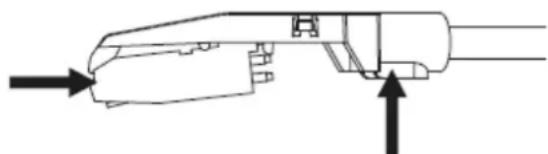
Attach the head shell by inserting it into the front end of the tone arm and then turn the locking nut clockwise.
7-Tone arm
This is a fully manual tone arm. To start playback, gently place the stylus on the record using head shell finger support OR use the tone arm lifter (see 9).
8-Tone arm stand with lock
This aluminum nut is used to secure the head shell and cartridge assembly to the tone arm tube.
9-Tonearm lift
Controls the up and down action of the tone arm.
10- Counterweight
Adjustment creates the proper downward pressure of the stylus to the record. We have installed the counterweight at our factory and it should be perfectly adjusted. If this is not the case, twist it lightly until the tone arm is perfectly balanced.
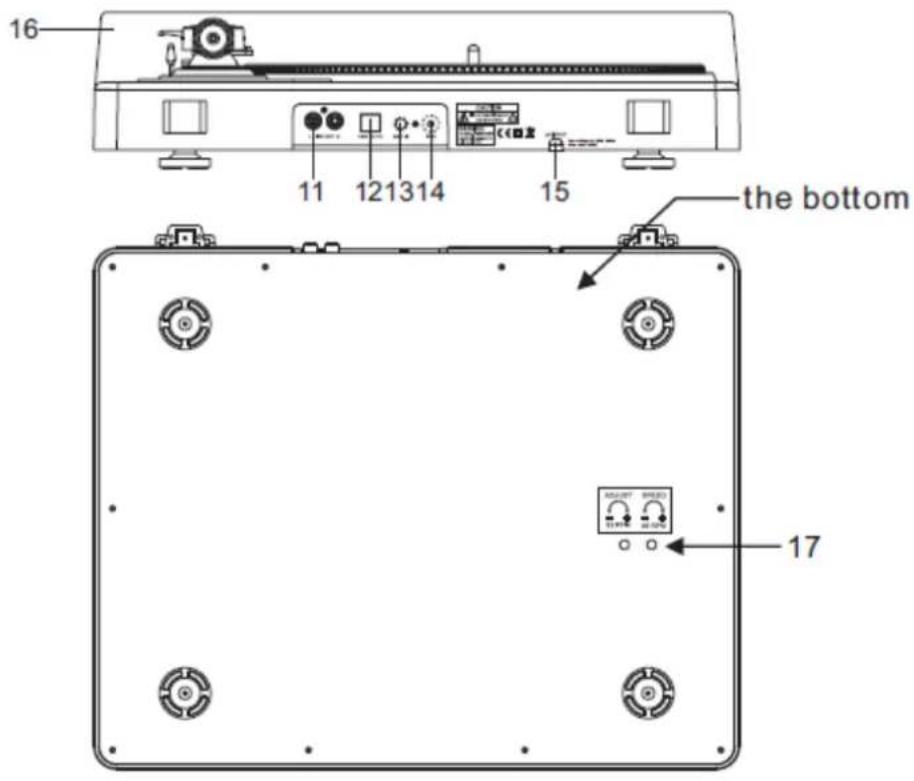
11- Output L & R
This is the standard analog output (RCA jacks) which can be connected either to phone or line input on any DJ mixer, depending on the setting of the phone/line selector.
12- USB SOCKET
Plug USB device. The USB lead length is limited to 3m
13- AUX TO PC
Audio input for connection of an iPod, MP2 player, etc. to a PC.
14- Ground
Ground lug for turntable connection. Always use this connection when using turntables (your turntable cable should have a grounding wire).
15- Power cable
This power cable should be plugged into a wall receptacle AFTER all audio connections have been made.
16-Dust cover
Close the dust cover when not in use to protect the unit against dust. Open and remove during use.
17- Adjustments
The unit has already been adjusted at works. However if you need to adjust the rotation speed, use these controls.
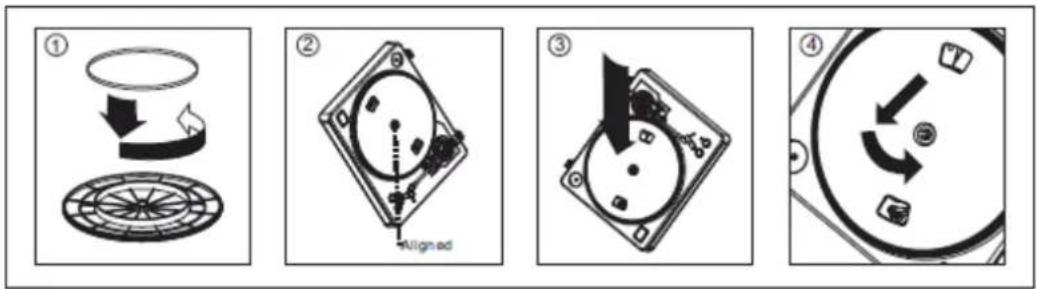
Warning: Incorrect platter setup can lead to poor turntable performance, platter instability or permanent motor damage.
- The rubber belt has been pre-installed onto the turntable platter. However, please turn the platter over and make sure that the belt is attached and is not twisted. If the belt has come off during shipping, please place it around the inner bottom ring of the turntable platter, as shown in NO. 1 above.
- Place the platter on the center spindle and press it down firmly. Rotate the platter until the brass motor spindle is visible through one of the holes. Check to make sure that it rotates uniformly and does not wobble excessively.
- Pass your fingers through the hole, grip the rubber drive belt and install it over the motor spindle. Be careful not to twist the rubber drive belt during this step. Check to make sure the platter rotates uniformly. If the drive belt is properly installed, there should be a slight amount of tension that brings the platter to a stop after spinning it freely.
Specifications
Motor: DC motor
Driving Method: Belt Drive
Starting & braking time:
Speed adjustment: 33
Computer interface;
Power supply:
Single Voltage:
Dimensions:
Power Consumption:
Weight:
Less than 1sec
1/3, 45 rpm
USB 1.1 compliant, Windows XP SP3, VISTA, Windows 7 and or MACOS X
AC 115/230V, 60/50Hz, User Selectable
AC 230V, 50Hz (Europe, U.K., New Zealand, South Africa, and Singapore)
418× 355× 110mm
6 Watts
2.9 Kgs
Audacity software overview
Audacity is free software, licensed under the GNU General Public License (GPL).
Note: Please ensure you have installed the software before starting.
Setting up your PC to work with Audacity
- Connect an input source to the unit
- Connect the USB lead to your computer
3.Install the Audacity recording software - Open the Audacity program
- Select Preference from the Edit tab in the Audacity menu
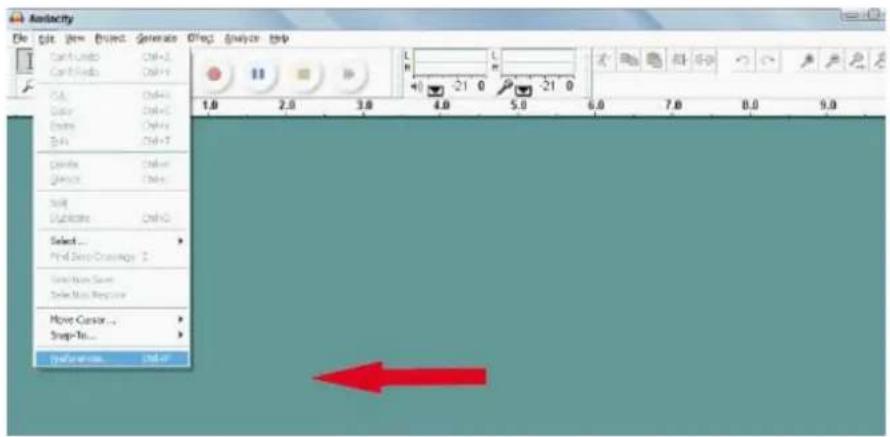
Audacity software overview
Recording Albums with Audacity
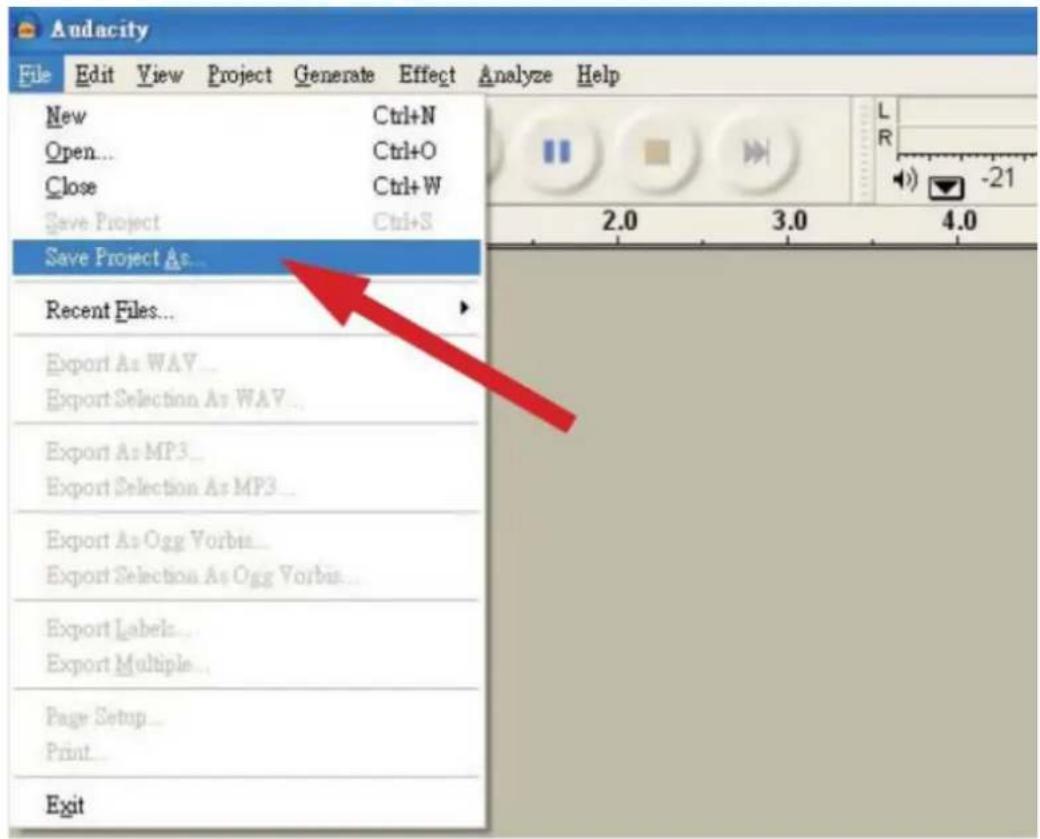
1. Saving a project
- Audacity write all the changed and recorded audio to directory called projefctname_data, which is located right where you saved the project file itself
- Thus, select Save project as from your Audacity File tab and choose a location and filename for your project
- Please note that when you startup Audacity fresh, only the "Save As..."menu option is available.
2. How to record
- Set your USB turntable up to play the song or album you want to record

Click on the red Play button to start the recording.
- Lower tone arm on USB Turntable onto album and track you want to record.

Click on the blue Pause button to pause the recording. Press it again to continue.

Click on the yellow Stop button.
That's it. You can now play around with your recording and explore the editing capabilities of Audacity. Remember that you can use the Undo function almost without limits while the project is open.
Note: CD'S cannot be burned directly from the Audacity application. Other CD burning applications should be used.
FAQ:
Software:
F: can not listen to record while recording
A: please activate "software playthrough" in audacity like shown in IM. check the record source (USB Audio Codec) like shown in IM check volume settings of your computer
F: can not store songs as MP3
A: please download LAME MP3-Codec from the internet
F: can not record
A: first the player has to be connected with the computer, then AUDACITY may be started.
F: can only record MONO
A: mostly this occurs with VISTA. please select in Windows config recording source as "stereo" not "mono" or "microphone"
Player:
F: sound is crackling
A: please make sure that this player is connected to a high-level-input of your amplifier. High-level inputs are:
CD, AUX, TAPE. The input PHONE is not suitable. The player has a built-in pre-amplifier.
clean the stylus and the vinyl check for correct counterweight setting check for correct anti-skating-level
F: direct recoding is not possible
A: USB-Stick/Card is write-protected check correct file system (FAT16)
F: direct recoded songs are recorded oversteered
A: check for correct recording level, see point 20 of IM
If at any time in the future you should need to dispose of this product please
Note that: Waste electrical products should not be disposed of with household waste.
Please recycle where facilities exist. Check with your Local Authority or retailer for
recycling advice. (Waste Electrical and Electronic Equipment Directive)
PLATINE-DISQUES A ENTRAINEMENT PAR COURROIE
CAUTION: To reduce the risk of electric shock, do not remove any cover. No user-serviceable parts inside. Refer servicing to qualified service personnel only.

The lightning flash with arrowhead symbol within the equilateral triangle is intended to alert the use to the presence of un-insulated "dangerous voltage" within the product's enclosure that may be of sufficient magnitude to constitute a risk of electric shock.

The exclamation point within the equilateral triangle is intended to alert the user to the presence of important operation and maintenance (servicing) instructions in the literature accompanying this appliance.
CAUTION
To prevent electric shock, do not use this polarized plug with an extension cord, receptacle or other outlet unless the blades can be fully inserted to prevent blade exposure.
Description
Consommation: 6 Watts
Poids: 2,9 Kg
Logiciel Audacity
CAUTION: To reduce the risk of electric shock, do not remove any cover. No user-serviceable parts inside. Refer servicing to qualified service personnel only.

The lightning flash with arrowhead symbol within the equilateral triangle is intended to alert the use to the presence of un-insulated "dangerous voltage" within the product's enclosure that may be of sufficient magnitude to constitute a risk of electric shock.

The exclamation point within the equilateral triangle is intended to alert the user to the presence of important operation and maintenance (servicing) instructions in the literature accompanying this appliance.
CAUTION
To prevent electric shock, do not use this polarized plug with an extension cord, receptacle or other outlet unless the blades can be fully inserted to prevent blade exposure.
Beschreibung
1- Start/Stopp Tasten Tonarmhebel
A: Activeer "software playthrough" in de Audacity software
Controller de audiobron (USB Audio Codec)
Controller de volumeinstelling van uw computer
F: Ik kan de tracks nicht in MP3 formaat opslaan.
A: Download LAME MP3-Codec van de internet
F: Geen opname
CAUTION: To reduce the risk of electric shock, do not remove any cover. No user-serviceable parts inside. Refer servicing to qualified service personnel only.

The lightning flash with arrowhead symbol within the equilateral triangle is intended to alert the use to the presence of un-insulated "dangerous voltage" within the product's enclosure that may be of sufficient magnitude to constitute a risk of electric shock.

The exclamation point within the equilateral triangle is intended to alert the user to the presence of important operation and maintenance (servicing) instructions in the literature accompanying this appliance.
CAUTION
To prevent electric shock, do not use this polarized plug with an extension cord, receptacle or other outlet unless the blades can be fully inserted to prevent blade exposure.
Descrição
1-Botoes Start/stop Tonearm lift
CAUTION: To reduce the risk of electric shock, do not remove any cover. No user-serviceable parts inside. Refer servicing to qualified service personnel only.

The lightning flash with arrowhead symbol within the equilateral triangle is intended to alert the use to the presence of un-insulated "dangerous voltage" within the product's enclosure that may be of sufficient magnitude to constitute a risk of electric shock.

The exclamation point within the equilateral triangle is intended to alert the user to the presence of important operation and maintenance (servicing) instructions in the literature accompanying this appliance.
CAUTION
To prevent electric shock, do not use this polarized plug with an extension cord, receptacle or other outlet unless the blades can be fully inserted to prevent blade exposure.
Descripción
CAUTION: To reduce the risk of electric shock, do not remove any cover. No user-serviceable parts inside. Refer servicing to qualified service personnel only.

The lightning flash with arrowhead symbol within the equilateral triangle is intended to alert the use to the presence of un-insulated "dangerous voltage" within the product's enclosure that may be of sufficient magnitude to constitute a risk of electric shock.

The exclamation point within the equilateral triangle is intended to alert the user to the presence of important operation and maintenance (servicing) instructions in the literature accompanying this appliance.
CAUTION
To prevent electric shock, do not use this polarized plug with an extension cord, receptacle or other outlet unless the blades can be fully inserted to prevent blade exposure.