ManualGo.com
IAN 270132 - Lighting Livarno Lux - Free user manual and instructions
Find the device manual for free IAN 270132 Livarno Lux in PDF.



Download the instructions for your Lighting in PDF format for free! Find your manual IAN 270132 - Livarno Lux and take your electronic device back in hand. On this page are published all the documents necessary for the use of your device. IAN 270132 by Livarno Lux.
USER MANUAL IAN 270132 Livarno Lux
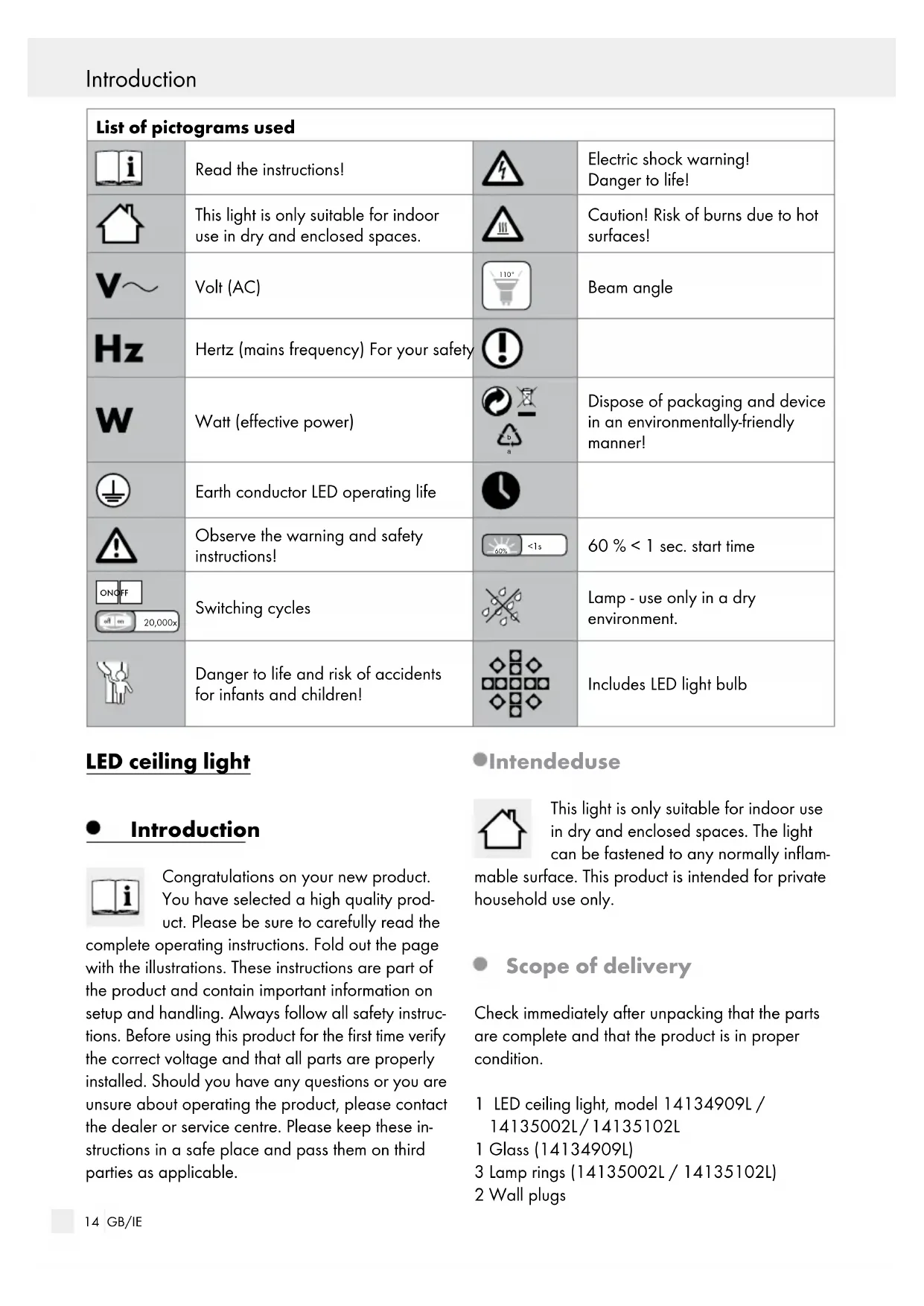
Dispose of packaging and device in an environmentally-friendly manner! Earth conductor LED operating life Observe the warning and safety instructions! <1s 60% 60 % < 1 sec. start time ON OFF 20,000x Switching cycles Lamp - use only in a dry environment. Danger to life and risk of accidents for infants and children! Includes LED light bulb LED ceiling light Introduction Congratulations on your new product. You have selected a high quality prod- uct. Please be sure to carefully read the complete operating instructions. Fold out the page with the illustrations. These instructions are part of the product and contain important information on setup and handling. Always follow all safety instruc- tions. Before using this product for the first time verify the correct voltage and that all parts are properly installed. Should you have any questions or you are unsure about operating the product, please contact the dealer or service centre. Please keep these in- structions in a safe place and pass them on third parties as applicable. Intended use This light is only suitable for indoor use in dry and enclosed spaces. The light can be fastened to any normally inflam- mable surface. This product is intended for private household use only. Scope of delivery Check immediately after unpacking that the parts are complete and that the product is in proper condition. 1 LED ceiling light, model 14134909L / 14135002L / 14135102L 1 Glass (14134909L) 3 Lamp rings (14135002L / 14135102L) 2 Wall plugs15 GB/IE Introduction Introduction / Safety 2 Screws (mounting bracket) 2 Protective tubes 1 Set of assembly instructions and instructions for use Parts description
Mains connection cord (external)
Screw (mounting bracket)
Locating screw (connection housing)
, 50 Hz Rated power max.: 3 x GU 10, LED, max. 5 W (3-level dimmable) Safety Safety advice The right to claim under the guarantee shall be rendered invalid in respect of damage caused by the non-observance of these operating instructions! No liability is accepted for consequent damage! No liability is accepted for damage to property or per- sons caused by improper handling or non-observance of the safety advice!
CHILDREN! Never leave children unsupervised with the packaging materials. The packaging material poses a suffocation hazard. Children frequently underestimate the dangers. Please always keep the product out of the reach of children. This device may be used by children aged 8 years and up, as well as by persons with re- duced physical, sensory or mental capacities, or lacking experience and/or knowledge, so long as they are supervised or instructed in the safe use of the device and understand the associated risks. Do not allow children to play with the device. Cleaning and user maintenance must not be performed by children without supervision. To avoid danger to life from electric shock Ensure that a qualified electrician or a person trained to carry out electrical installations per- forms the electrical installation. Before connecting the lamp to the mains, always check it and the mains lead / plug for any dam- age. Never use your lamp if you discover that it is damaged in any way. A damaged mains lead presents a serious danger to life from electric shock. The external flexi-cable cannot be replaced, if the cable is damaged then the lamp must be disposed of. Before installation, remove the fuse for this circuit or switch off at the circuit breaker (0 setting) in the fuse box. Before assembly, ensure that the mains voltage available corresponds to the operating voltage necessary of the light (see “Technical data“). Never let the lamp come into contact with water or other liquids. Never open or insert anything into electrical fittings or equipment. Doing this sort of thing can lead to a serious danger to life from electric shock. Do not install the lamp on a moist and conduc- tive surface!16 GB/IE Start-upSafety / Preparation / Prior to installation / Start-up Lamp - use only in a dry environment. Prevent fire and injury hazards RISK OF INJURY! Check each light bulb and lampshade for damage immediately after unpacking. Do not assemble the light if the light bulbs or lampshade are defective. In this case, contact the service centre for a replacement.
CAUTION! RISK OF BURNS
DUE TO HOT SURFACES! Ensure that the luminaire has been switched off and has cooled before touching it, to avoid burn injuries. Lamps develop a lot of heat in the area of the lamp head. Allow the lamp to cool off completely. ATTENTION! Do not look into the LED from a close distance during operation. Do not look at the LED with an optical instrument (e. g. magnifier). Only to be installed outside arms reach. Safe working Mount the light so that it is protected from moisture and dirt. Carefully prepare for assembly and allow your- self adequate time. Organise all parts and any necessary additional tools or materials before starting so they are easy to reach. Always be attentive! Always pay attention to what you are doing and use common sense. Never install the light if you are having difficulty concentrating or do not feel well. Preparation Required tools and material The tools and materials specified are not included. This information and these values are non-binding and are only provided as a reference. The nature of the material is determined by the individual local conditions. - Pencil / Making tool - Voltage tester - Screwdriver - Electric drill - Bit (ø approx. 0.6 cm) - Side cutting pliers - Ladder Prior to installation Important: The electrical connection must be established by a qualified electrician or a person trained to perform electrical installations. This per- son must be familiar with the properties of the light and the connection regulations. Familiarise yourself with all the instructions and diagrams in this manual, as well as with the light itself, before you install it. Before installation ensure that the circuit, to which the light will be connected, is not ener- gised. To do so, remove the fuse or switch off the circuit breaker in the fuse box (0 position). Use the voltage tester to verify the de-energised status. Start-up Mounting the light Prior to installation, remove the fuse or switch off the circuit breaker 0 setting in the fuse box. Remove the screws
visible at the side of the connection housing
at the back.17 GB/IE Start-upSafety / Preparation / Prior to installation / Start-up Use the slotted holes in the mounting bracket
intended for the screws
to mark the bores. Now drill the fixing holes (ø approx. 6 mm, depth approx. 40 mm). Ensure that you do not damage the supply line. Insert the rawlplugs
into the bores. Fasten the mounting bracket
with the provided screws
through the protective tubes
Now connect the connection cable of the light to the mains connection cable (external)
using the included terminal block
Also ensure to connect the correct coloured wires (live wire, black or brow = symbol L, neutral wire, blue = symbol N). Now connect the earth conductor (green- yellow) to the earth terminal marked inside the connection housing
to connect the light to the mounting bracket
Model 14134909L only: Carefully turn the light bulb
clockwise into the bulb socket
. Ensure that one silicone ring
remains on each spacer
on the silicone rings
and attach another silicone ring
Note: Be careful when attaching the glass
could break if you exert too much pressure. Model 14135002L / 14135102L only: Place the lamp ring
Carefully turn the light bulb
clockwise into the bulb socket
. Be sure they are positioned correctly. Replace the fuse or switch on the circuit breaker (I setting) inside the fuse box. Your light is now ready to use. Adjusting the spotlight (14135002L / 14135102L) Only change the direction of the spotlights
when the light is switched off. Allow the light to cool off completely. Adjust the individual spotlights
to the desired position by their base. The spots can be turned by approx. 320°. Dimming the light bulbs The light bulb
can be dimmed to 3 levels using the wall switch. Select the desired dimming level by repeatedly pressing the wall switch. The light will restart at the first dimming level if it has been switched off for an extended period. Replacing the bulb
HOT SURFACES! Allow the lamp to cool down completely. Only replace the light bulb
once it has fully cooled down. Model 14134909L: Remove the glass
from the light by carefully removing the box nuts
Turn the defective light bulb
carefully anti- clockwise out of the bulb socket
Use a clean, lint-free cloth to replace the bulb. Only use the light bulbs
specified in chapter “Technical data“. Screw the new bulb
clockwise into the bulb socket
. Ensure that it is positioned correctly.18 GB/IE Warranty and serviceStart-up / Cleaning and maintenance / Disposal / Warranty and service Model 14134909L: Assemble the glass
as described in the chapter “Mounting the light“. Model 14135002L / 14135102L: Place the lamp ring
Ensure that they are positioned correctly. Replace the fuse or switch on the circuit breaker (Position I) inside the fuse box. Cleaning and maintenance RISK OF ELECTRIC SHOCK! Disconnect the light from the mains circuit before cleaning. To do so, remove the fuse or switch off the circuit breaker in the fuse box 0 setting. RISK OF ELECTRIC SHOCK! For electrical safety, never clean the light with water or other liquids, or immerse it in water.
CAUTION! RISK OF BURNS DUE TO
HOT SURFACES! Allow the light to cool completely. Do not use solvents, benzene or similar sub- stances. They could damage the light. Only use a dry, lint-free cloth for cleaning. Replace the fuse or switch on the circuit breaker (Position I) inside the fuse box. Disposal The packaging is made entirely of recy- clable materials, which you may dispose of at local recycling facilities.