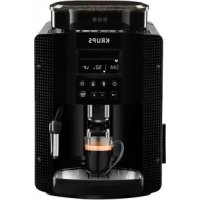
Pisa EA81P0 - Coffee machine KRUPS - Free user manual and instructions
Find the device manual for free Pisa EA81P0 KRUPS in PDF.



User questions about Pisa EA81P0 KRUPS
0 question about this device. Answer the ones you know or ask your own.
Ask a new question about this device
Download the instructions for your Coffee machine in PDF format for free! Find your manual Pisa EA81P0 - KRUPS and take your electronic device back in hand. On this page are published all the documents necessary for the use of your device. Pisa EA81P0 by KRUPS.
USER MANUAL Pisa EA81P0 KRUPS
Congratulations! You are now the proud owner of an Espresso Automatic EA815-EA816-EA817 Series. With your machine, you can make a wide range of drinks: espressos, coffees or ristrettos, completely automatically. You can also make milk-based drinks such as cappuccinos. It has been designed so that you can enjoy restaurant quality coffee at home, whatever the time of the day and every day of the week. You will appreciate its ease-of-use and the quality of your cup of coffee. You can set the amount, strength and temperature of your drinks.
Thanks to its Compact Thermoblock System with built-in percolation chamber, its 15 bar pump, and because it uses coffee beans which have been freshly ground just before making the coffee, your machine will give you hot ristrettos, espressos and coffees from the first cup with maximum aroma and a creamy golden-brown froth.
To give the drink maximum flavour, an espresso is traditionally served in a small, flared porcelain cup. For an optimum temperature espresso and a dense creamy froth, we recommend that you pre-heat your cup.
You will probably need to try several types of coffee before you find the one that suits you.
By experimenting with the blend and/or roast, you will eventually arrive at the ideal result.
Espresso coffee has a richer aroma than classic filter coffee. Despite its stronger taste which remains longer on the palate, an espresso contains less caffeine than filter coffee (around 60 to 80mg per cup compared to 80 to 100mg per cup) due to its shorter percolation period.
The quality of water used is another determining factor which affects the overall quality of the brewed coffee. You should ideally use water which is fresh from the tap (so that it hasn't had time to stagnate due to air contact), which is cold and which does not smell of chlorine.
The ergonomic, compact LCD display makes the machine easy to use. It will guide you through each step, from preparing your drink to servicing your machine.
We wish you many years of enjoyment with your Krups machine.
The Krups team

| Buttons and knobs | ||
| "On-off" button | → | Navigation button (cursor key) |
| Favourite coffee type button A or press B Save favourite button A press and hold B | - + | To adjust selected settings |
| Steam drink button | START STOP | Start or stop equipment t |
| Maintenance and settings button | To adjust how finely ground you would like the coffee beans. | |
| Symbols | Constant | Flashing | Meaning |
| ● | The coffee grounds collector is missing or improperly positioned | ||
| ● | Empty the coffee grounds collector + empty the drip tray | ||
| ● | Refill the water tank The water tank is not properly in place | ||
| ● | Place a container (0.6 L minimum) under the steam and coffee jets | ||
| ● | Maintenance cycle in progress | ||
| ● | Malfunction: unplug the machine for ten seconds then plug it back in | ||
| ● | Install filter cartridge | ||
| ● | Rinsing | cycle in progress | |
| ● | ● | Clean machine with KRUPS cleaning tablet | |
| ● | Cleaning cycle interrupted | ||
| ● | ● | Descale machine with KRUPS descaling sachet | |
| ● | Descaling cycle interrupted | ||
| ● | Adjust the water hardness | ||
| ● | Enable automatic rinsing of the coffee circuit when the machine starts. | ||
| ● | Program the length of time after which your machine switches off automatically (standby) | ||
| ● | ● | Adjust the coffee temperature/Pre-heating indicator | |
| ● | Favourite A or B - 2 drinks can be saved in memory | ||
| ● | Registering favourite A or B | ||
| ● | ● | Preparation progress indicator | |
| ● | Press the START-STOP button | ||
| ● | Coffee strength indicator | ||
| Volume or time indicator | |||
| ● | Number of cups (1 or 2) | ||
| Active use indicator | |||
| Maintenance or settings selection | |||
APPLIANCE DESCRIPTION
A. Water tank lid
B. Water tank
C. Used grounds collector
D. Coffee outlet and height-adjustable handle
E. Grid and removable drip tray
F. Coffee bean container lid ① Coffee bean container
G. Coffee grounds fineness adjustment knob
H. Metal grinder
I. Cleaning tablet funnel
J. Cup grid (may vary according to model)
K. Water level float
2 Graphic screen
L. On/off button
M. Coffee and favourites button
N. Steam button
0. Settings button
P. Navigation button
Q. + or - button
R. Start/stop button
S. Steam nozzle
BEVERAGE PREPARATION
| TYPES OF COFFEE | Number of possible cups | Possible settings Volume (ml) | Possible settings Strength |
| RISTRETTO | 1 20 to 30 | ml (per 10 ml) | 1 to 3 beans |
| 2 x 1 | 2 x 20 to 30 ml (per 10 ml) In two cycles | ||
| ESPRESSO | 1 30 to 70 | ml (per 10 ml) | 1 to 3 beans |
| 2 x 1 | 2 x 30 to 70 ml (per 10 ml) In two cycles | ||
| COFFEE | 1 80 to 180 | ml (per 10 ml) | 1 to 3 beans |
| 2 x 1 | 2 x 80 to 180 ml (per 10 ml) In two cycles |
BEVERAGE PREPARATION
Appliance preparation
To prevent used water spillage from making your work surface dirty and to avoid burning yourself, don't forget to attach the drip tray.
Remove and refill the water tank (1-2).
■ Refill the coffee bean container (3).
First use
Turn on the appliance by plugging it in then pressing the on/off button 4).
The machine pre-heats. At the end of the cycle, the symbols and start button start to flash.
Put a 0.6L container underneath the two coffee and steam nozzles.
Press the start/stop button (5). The machine starts and rinses the hydraulic circuits (coffee and steam) for around 2 minutes. At the end of the initialisation cycle, the coffee types menu appears. (6)
■ You are advised to rinse the circuit if you have not used your machine for several days (see the chapter on Maintaining Your Appliance).
Preparing the grinder
You can adjust the strength of your coffee by adjusting how finely the coffee beans are ground.
Generally, the finer the coffee is ground, the stronger and creamier the coffee will be, but this also depends on the type of coffee used.
Adjust the fineness of grinding by turning the coffee grounds fineness adjustment knob which is located in the coffee bean container. It is advised that you do this during grinding, one notch at a time.
After 3 rounds, you will notice a pronounced difference in taste. To the left, the grounds are finer. To the right, the grounds are courser. (7)
Claris F 088 - Aqua Filter System cartridge (Sold separately)
To optimise the taste of your drinks and the lifespan of your appliance, you are advised to only use a Claris - Aqua Filter System cartridge with your machine (see the chapter OTHER FUNCTIONS - Installing the filter).
Every time you place a Claris-Aqua Filter into the machine you must prime the filter before using the machine by activating the "install filter cartridge" program.
MAKING AN ESPRESSO AND A COFFEE
Note :
The amount of water for making an espresso is between 30 and 70ml
The amount of water for making a coffee is between 80 and 180ml
Starting preparation (with 1 or 2 cups)
Press the on-off button and wait for the appliance to finish heating up.
The coffee types menu is displayed. The function indicator is shown above the coffee types button 6).
■ Place one or two cups under the coffee jets. You can lower or raise the coffee jets according to the size of your cup (8). Select the coffee strength (shown coffee beans displayed on the screen in brackets) with the + button to increase or the - button to decrease.
Press the navigation button to set the volume: select the volume of water displayed on the screen between brackets using the + or - buttons (10).
Press the navigation button to set the number of cups: select 1 or 2 cups, displayed on the screen between brackets using the + or - buttons
Press the START button (11).
■ You can set the water volume at any time using the + or - buttons
To stop the flow into your cup, press the STOP button
■ You can also adjust the temperature of your coffee (see the chapter OTHER functions - Settings).
Two cup function
The appliance will automatically carry out 2 full cycles of coffee preparation.
MAKING DRINKS USING STEAM
Steam is used to froth the milk, for example when preparing a cappuccino or caffe latte, and also to heat up liquids. As a higher temperature is required when producing steam than when making an espresso, the appliance will launch an additional pre-heating phase.
Frothing milk
■ For best results, you are advised to use very fresh, very cold pasteurised or UHT milk, recently opened. Unpasteurised milk does not produce the best results.
- Check that the steam nozzle is correctly positioned.
Pour the milk into a milk jug which has a handle or into a cappuccino cup. Only fill it half way.
■ When the screen displays the drink selection menu, press the steam button (12). The function indicator is located above the steam button.
Insert the steam nozzle into the milk.
A screen indicates that the appliance is heating up. Once the appliance has finished heating up, you can begin to make steam by pressing START and following these steps (13):
Step 1: holding the milk jug in place, insert the steam nozzle approximately 2cm into the milk and wait for it to start frothing.
Step 2: raise the container slightly (approximately 1cm ). Do not completely submerge the metal tube.
Step 3: gradually lower the container as the froth accumulates. (14)
■ When you have frothed the milk enough, press the STOP button to stop the cycle. Warning: the cycle does not stop immediately.
To remove any milk traces from the steam nozzle, place a container under the nozzle and start the steam function again (approximately 10 seconds).
The steam nozzle is removable in order to allow for deep cleaning. Wash it with water and a little non-abrasive detergent using a brush. Rinse and dry (15-16). Before replacing, make sure that the air holes are not clogged with milk residue. Unclog the holes with the needle supplied with your appliance if necessary (17).
To stop the steam, press the STOP button
WARNING: THE CYCLE DOES NOT STOP IMMEDIATELY.
Steam can be produced for a maximum of 2 minutes per cycle.
Auto-cappuccino XS 6000 set (sold separately)
This auto-cappuccino accessory enables you to make cappuccinos or lattes (18). Connect the different parts to each other. Ensure that the pipe is not pierced by keeping the knob in the correct place.
After removing the lid, fill the jug with milk (19) and place a cup or glass under the auto-cappuccino nozzle (20). Select cappuccino or latte on the special nozzle (21).
Start steam, as indicated in the chapter Making drinks with steam.
Once you have made the milk froth, place your cup under the coffee jets and start a coffee cycle (22).
To prevent the milk from drying on the auto-cappuccino accessory, ensure that you clean it thoroughly. You are advised to wash it immediately by running a steam cycle with the accessory jug filled with water in order to clean the inside of the nozzle. For this you can use the KRUPS liquid detergent available separately.
MAINTAINING YOUR APPLIANCE
Emptying the coffee grounds collector and the drip tray
If the symbol starts flashing, empty and clean the drip tray (the drip tray may contain coffee grains) and the coffee grounds collector (23-25).
The drip tray is fitted with floats which indicate when it needs to be emptied (26). Once you have removed the coffee grounds collector, you should empty it completely in order to avoid any overflow.
The warning message will continue to be displayed if the coffee grounds collector is not pushed in or inserted correctly (24). You cannot make an espresso or a coffee while the warning message is shown.
Rinsing the circuits :
Press the maintenance and settings button 27). The function indicator is shown above the maintenance button
If necessary, using the navigation button, select the rinse symbol
Press STARTFinishing starts and finishes when the coffee menu appears.
Automatic rinsing of the circuits when the machine starts.
You can choose to program the machine to be rinsed automatically each time it is turned on. To do this, press the maintenance and settings button (27). Using the navigation button, select the automatic rinsing programming symbol . Press the button to choose ON which confirms this program. If you press the , button, automatic rinsing is disabled.
- You can return to the coffee types menu by pressing the button.
Warning: after this rinsing process, hot water will be released from the coffee jet. Ensure that the drip tray is in place even when the machine is not being used. The cycle lasts only a few seconds and stops automatically.
Cleaning program - total duration: approximately 13 minutes
You do not have to run the cleaning program as soon as the appliance requests it, but it must be done reasonably soon after. If cleaning is postponed, the alert message will remain illuminated until the process is carried out.
- When the symbol lights up, you can run the automatic cleaning program by pressing the maintenance and settings button. The symbol is selected. The function indicator is down above the maintenance button.
- the automatic cleaning program is divided into 2 stages: the cleaning cycle itself, followed by the rinse cycle. You can clean the machine at any time by pressing the maintenance and settings button when, using the navigation button select the cleaning symbol
To run this cleaning program, you will need a container which holds at least 0.6L and which can be placed beneath the coffee jets and the steam nozzle. The symbol flashes.
Lift the cup grid (28).
Insert the KRUPS cleaning tablet (29).
Fill the water container to its maximum level of 1.7L (2).
Empty the coffee grounds collector and the drip tray (23-25).
Put a 0.6 L container under the coffee and steam jets (30).
■ Press START. The symbol becomes constant. The first phase (approximately 10 minutes) begins. When this phase has finished, empty the container and the drip dray. The symbol flashes. Put the parts back in place.
Press START. The symbol becomes constant, the final phase (approximately 3 minutes) begins. When this phase has finished, empty the container and the drip tray. The cycle has finished, the coffee types menu appears.
Note: if you turn off or unplug your machine during cleaning or if there is a power failure, the cleaning program will start from the beginning of the program once the power is restored to the appliance. It is not possible to postpone this process. It is obligatory in order to rinse the water circuit. In this case, a new cleaning tablet may be necessary. It is best to run the full cleaning program in order to avoid any risk of poisoning. The cleaning cycle is irregular: do not put your hands under the coffee jets while the cycle is running.
Descaling program - duration: approximately 20 minutes
You do not have to run the descending program as soon as the appliance requests it, but it must be done reasonably soon after. If descending is postponed, the alert message will remain illuminated until the process is carried out.
The amount of limescale collected depends on the hardness of your water.
Warning : if your product is fitted with our Claris - Aqua Filter System cartridge, remove the cartridge before descending.
- When the symbol lights up, you can run the automatic descending program by pressing the maintenance and settings button (27). If necessary, using the navigation button, select the symbol. The symbol flashes and the function indicator is located above the maintenance button.
To run the descending program, you will need a container which holds at least 0.6 L and a sachet of KRUPS descaler.
■ Fill the water tank up to the CALC mark then pour in the contents of one sachet (31).
Put a 0.6L container under the coffee and steam nozzles.
Press START to begin the first phase (approximately 8 min). The symbol becomes constant. When this phase has finished, empty the container and the drip dray. The end symbols flash. Remove and clean the water tank using a sponge.
Once clean, refill your water tank and replace all parts. The symbol disappears. - Press START to begin the second phase (approximately 6 min). The symbol becomes constant. When this phase has finished, empty the container and the drip tray. The symbol flashes.
Press START to begin the final phase (approximately 6 min). The symbol becomes constant. When this phase has finished, empty the container and the drip tray. Dscaling is complete.
Note : if you turn off or unplug your machine during descending or if there is a power failure, the cleaning program will start from the beginning of the program once the appliance is restarted. It is not possible to postpone this process. It is obligatory in order to rinse the water circuit. Running the descending program is advisable. The descending cycle is irregular: do not put your hands under the steam jet.
Once the cycle has finished, the coffee types menu appears.
OTHER FUNCTIONS
■ You can access the appliance's OTHER FUNCTIONS menu by pressing the maintenance and settings button
For all settings, use the navigation button and + or - for the values.
To come out of the maintenance and settings menu, press the button.
MAINTENANCE
All of the following options allow you to run the selected programs:
| MAINTENANCE | Allows you to access rinsing. | |
| K | Allows you to access cleaning. | |
| Allows you to access descaling when the appliance requests it. | ||
| Allows you to prime the filter (Claris cartridge). | ||
| Return to coffee types menu. |
TURNING OFF YOUR APPLIANCE
You can turn off your appliance at any time. When stopped, the machine emits a double beep and OFF is displayed on the screen. The appliance has registered your request and will stop as soon as possible.
SETTINGS
All of the following options allow you to run the selected programs:
| SETTING | You can set your water hardness between 0 and 4 by pressing the + or - buttons See "Measuring water hardness" (below) | |
| You can program automatic rinsing each time the appliance is turned on by pressing the buttons and selecting ON. | ||
| You can choose the period after which your appliance will turn off automatically (between 15 and 120 minutes by pressing the buttons). | ||
| You can adjust the temperature of your coffee to three different levels by pressing the buttons. | ||
| Return to coffee types menu. |
Measuring water hardness
It is advisable to adjust the appliance according to the hardness of the water used. To check the water hardness, use the stick supplied with your machine or contact your local water authority.
| Degree of hardness | Class 0 Very soft | Class 1 Soft | Class 2 Average hardness | Class 3 Hard | Class 4 Very hard |
| ° dH < 3° > | 4° > 7° > 14° | > 21° | |||
| ° e < 3,75° | > 5° > 8,75° | > 17,5° > 26 | 25° | ||
| ° f | < 5,4° | > 7,2° | > 12,6° | > 25,2° | > 37,8° |
| Appliance settings | 0 | 1 | 2 | 3 | 4 |
Installing the filter (Claris - Aqua Filter System cartridge) (32)
Note: To correctly install your cartridge, ensure that you follow the installation procedure each time you replace it. (33) A mechanism which memorises the month in which the cartridge was changed and replaced (after a maximum of 2 months): set the date using the cartridge cursor. Fit the cartridge in the tank (34). In the maintenance and settings menu , the function indicator is located above the maintenance button . Using the navigation button , select the filter cartridge installation symbol The symbols and the start button start to flash. Place a 0.6L container under the steam nozzle.
Press start. The start-up cycle begins and finished when the coffee types menu appears
If one of the problems described in the table persists, contact KRUPS customer service.
| PROBLEM MALFUNCTION CORRECTIVE ACTION | |
| Your machine detects a fault: a symbol appears. | Switch off and disconnect the machine, remove the filter cartridge, wait for a minute and restart the machine. |
| The appliance does not turn on when the button is pressed. | Check your fuses and plug sockets. Check that the two power plugs are pushed in properly both on the appliance and at the socket. |
| The coffee grinder makes a strange noise. | There is a foreign body in the grinder. Disconnect the machine before investigating. See if you can extract the foreign body using your vacuum cleaner. |
| The steam nozzle makes a noise. | Check that the steam nozzle is correctly attached to its corresponding end piece. |
| The steam nozzle on your machine seems partially or completely clogged. | Ensure that the opening in the end piece is not obstructed by milk residue or limescale. Unclog the holes with the needle supplied with your appliance. |
| The steam nozzle makes little or no milk froth. | For milk-based drinks, you use very fresh, very cold pasteurised or UHT milk. It is also advisable to use a cold container. If the results do not improve, try changing the brand of milk. |
| No steam comes out of the nozzle. | Empty the tank and temporarily remove the filter cartridge. Fill the water tank with mineral water which is high in calcium (>100 mg/l) and run successive steam cycles. |
| The auto-cappuccino setting makes little or no froth. The auto-cappuccino setting does not take in milk. | Check that the accessory is correctly attached to the appliance, remove it then replace it. Check that the flexible tube is not obstructed or pierced and that it is correctly attached to the accessory so as to make it airtight. Rinse and clean the accessory (refer to the "Auto-cappuccino accessory" chapter). |
| There is water underneath the appliance. | Before removing the water tank, wait for 15 seconds after the coffee has finished flowing so that the machine finishes its cycle properly. Check that the drip tray is correctly positioned on the machine; it should always be in place, even when the appliance is not in use. Check that the drip tray is not full. The drip tray should not be removed during a cycle. |
| After emptying the coffee grounds collector, the warning message is still displayed on the screen. | Correctly replace the coffee grounds collector and follow the instructions on the screen. Wait at least 8 seconds before replacing them. |
| The coffee dispenses too slowly. | Turn the coffee fineness knob to the right to make the grounds courser (this could also depend on the type of coffee used).Run one or several rinsing cycles. Run a machine clean (see “Cleaning program”). Change the Claris Aqua Filter System cartridge (see “Installing the filter”). |
| Water or steam comes out abnormally from the steam nozzle. | At the beginning or end of making a drink, the steam nozzle may drip slightly. |
| The coffee fineness knob is difficult to turn. | Only change the grinder setting when it is running. |
| The espresso or coffee is not hot enough. | Increase the coffee temperature in the Maintenance and settings menuWarm the cup by rinsing it with hot water before making the drink. |
| The coffee is too lightly coloured or too weak. | Avoid using oily, caramelised or flavoured coffee. Check that the coffee bean container has coffee in it and that it is dispensing correctly.Decrease the drink volume, increase the drink strength. Turn the coffee fineness knob to the left to make the grounds finer.Make the drink in two cycles by using the 2 cups function. |
| The appliance is not producing coffee. | A problem has been detected during preparation of the drink.The appliance has restarted automatically and is ready for a new cycle. |
| Why can I not run descending/why does my machine not request a descending cycle? | The machine only requests a descending cycle once it has made a certain number of drinks using steam. |
| A power failure occurs during a cycle. | The appliance is automatically restarted when power is switched back on. |
| The appliance is working but no liquid is coming out. | Check that the water container is in the correct position and that the cord is not jammed between the appliance itself and the water container. |
| Coffee grains have found their way into the drip tray. | This happens if coffee grains fall outside the percolation tank; this keeps the machine clean. |

Danger: Only a qualified technician is authorised to carry out repairs on electrical wiring and carry out work on the electrical grid. If you do not follow these instructions, you risk death by electrocution! Do not use an appliance that is visibly damaged!
Beste klant,
BESCHRIJVING VAN HET APPARAAT
KoJIuYeCTBO 6pa3OBAHn HAKINN 3aBNCNT OT JECTKOCTN IcNoJIb3yEmoB BOIbl.
BHMaHne! Ecnn Ba7a Ma7nHa o7haeHa fNJIbTpyUo7m naTpoHOM Claris - Aqua Filter System, BbInbTe erO, npexde yem npicTuNaTb K onepauu no ydaJIeHIO hKnII.
Korda noBnEeTcNtKToPamMa BbMOKeTe 3aNyCTntb npOrpAmMy aBTOMaTneCKo ydaJeHnaHaKnnn, Haxab Ha KhoNky o6cnykubAHn n KOHcHpyaun (27).Pn Heo6xoIMOCTu, C NOMOuHbNAUHOHNOHKnONK, BbIbepuTe NtKToPamMy . Traet NtKToPamMa INKaTOp cyHKuN paCnTOXeH NaKHOKN O6cnykubAHn
■ДляnpоведеняпоррамMbI ydaJIeHЯнки, Bam notpe6yeTcKoHTeHep emKocTBIO He MeHee 0,6 n, a TaKke cpeDCTBO ydaJIeHЯнки KRUPS.
HanoJIHTpe3epByap dIy BObI DO OTMeTKn CALC, 3aTeM nOmeCTnTe Tyda cpeDCTBO (31).
YcTaHOBInTe cocyEmKocTbIO_0,6 nnoJ conna Jn KaOpe n npa.
HaKMTe Ha KhoNky START 3anycka nepBoro 3Tana (OKONo 8 MnH). NIKTORpMaMgOpNT NOCToRnHO. IIO OKOHuaHN 3ToI a3bI onyctoWnte EMKOCTb I NOdoH dIra c6opa Kaenb. Miraot NIKTORpMMbl . ChIMtE n NouchTe r6koJ pe3epByap dIra BObl.
3anolHnTe pe3epByap,ecn OH uCtbi, IN BepHnTe BCE 3JeMeHTbHa MeCTO. NIKtorpamma e ropnt.
HaXMMTe Ha KhoNky START 3aNycka BTOPOrO 3Tana (OKoNo 6 MInH). NIKTORpAMMa oPnT NOCTOARHHo. IIO OKOHuaHN 3ToJ pa3bl, onyctOuINTe EMKOCTb IN POnDoH dJa c6opa Kaenb. CmBON Hnraet.
HaXMMTe Ha START 3anycka 3aknouHTeIbHoro 3Tana (okono 6 MNH). NIKTORpAMMa 0rput noCToHHo. IIO OKOHuaHn 3ToI a3bI , ONOPOXHITE EMKocTb I NOdoH dIra c6opa KaeneB. IpOueDypa ydaJIeHn HAKINN OKOHYeHa.
PpimueHne: Ecn Bbl BbIKIouaTe MaunHy BO BpeM npocecca ouncTk, nIe cIy Bpyr npona aet 3JIeKtpnueCTBO, nporpaMa ydaJeHna HAKINn HauHeTc ChauJa npu Bo3O6HOBLeHn NODayn 3JIeKtpo3Hepnn. OTIOXHTb 3Ty OnpaUHn HeBO3MOxHo, TaK Ka TTo YBJAEcTc 6b3aTeNbHbIM dJa 3Anycka npoceDpybl npomlbAHn CnCTem. Dn npabNlboHoro OcyuEcTBJeHn npoceDpybl ydaJeHn HaKn. LkN ydaJeHn HaKnn npon3BOiNTcC nepepbAmn. 3anpeuaTc noCDTabnTb pykn nOd OTBepCTne dJa BbInycka napa.
IIO OKOHuaHn cNkla, OTo6paKaetcMeHIO peeTeTOb KoΦe.
ДPyгпЕ ФУнкциN
■ДocунВMeHIOpyrnxФyHKcNyCTpOYCTBaOCUeCTBnEETCNCOMOUsbKHOKNOBcnyxHBaHnIKOHfHypaun
■Дянachtpoek nCnoB3yIte HabnraunHnyKhoNky +nn- -ДЯ yCTaHOBKn 3HaueHn.
■ДЯ ВьIXОДа ИЗ MEHIO OБслуЖИВAHЯ N KOHOFNIGYPAcIN, HAXMITE Ha KhoNky
PABOTA IO yXOy
Bce 3tn onu nn no3BOJrT 3anyckaTb BbipaHbIe nporpaMMbl:
PiIroTOBka npncTpoIO
3 npctpo, He 3abyaBte BCTaHOBnOBatn ndoH nn 360p kpanelb.
BnIMt b 3aONBHITpe3epByap BOIO (1-2).
3anOBHITb JOTOK KaBOBUM 3epHamn (3).
Nepwe BnKOpncTaHHa
■Пдклочить писчтей до eнектомереши,notim HaTucHtB kHONky BBIMKH./BIMK (4).
■Pncptpi po3irpiBaetcbra. Iicna 3akHueHHa Kky noHne 6nMaTn nKtorpama KhoNka (yck).
BcTaHOBb cMHiCTb 06cMOM 0,6 nItpa nID OTBOpn dny BuxOy KaBt Ta napoBe conno.
HaTnchItb KhoNk Ky NcK/CTon (5).PncTprii noUHe npomBaHnR rIpaBnIuHnx cnCTem (Kabu Ta napu) npotrarom np6bn3no 2 xb. MeHIO Bv6Opy peeenty Kabn 3'YBnEtbcB iDpa3y nicna hiCiian3aui npncTpo. (6)
■PomBaHHcTeMn peKOMeHdyEcBvKoHyBaTu nicTpBaIoi nepebpY BvKOpncTaHHi npncToIO (DVB. po3dIn «O6cnyroByBaHH npncToPO»).
IiIroTOBka MmHnHa
Bn moxete peryniBoaTmuiHcTB KaN, HanaTObYIOU nCTyniHB nepemeneHHKaBOBHX 3epeH.
3araIOM, yIM dpi6hiue nepemeneHi KaBOi 3epHa, Tm MiHiwa Kaba, Ta Tm rcyiuy niHky BOHa MaE, aIe Ie TAKoK 3aJIeKHTb BID BVNDy KabN.
BidperyIIOTe cTyPiH nepemelenHHaKABOHX 3epeH, NOBepHyBn peryIaTOp cTyIeH aepemelenHHa, KIHN 3NaXoIbTbcA B KOHTeHepi dJa KaOBHX 3epeH. PekomeHdoBaHO BVKOHyBaTHcIO Oepauio NoCTynoBO B npoueci nepemelenHHa KaBN. Yke nicJr TpeTbOro npiroToYBaHHa BN qITko BiDyuTe pi3HnucIO B Cmaky. Ppi nobopoTI peryIaTopa BIIBO nepemelenHH 6yde dpi6HiuM. Ppi nobopoTI peryIaTopa Bnpabo nepemelenHH 6yde rpy6uM. (7)
ΦiNbTp Claris - Aqua Filter System F 088 (npoJaTbca okpeMo)
3aДЯ ONTUMi3aQUI CMAky KaBn Ta 3a6e3neueHnry DOBROiHoI Cnyx6n npuJaDy BnKOpNCTOBy Te BnKIOUHO fInbTpYBaJIbHn KApTpIqk Claris - Aqua Filter System, lo npOdaetbcra k akcecyap (INB. po3dIn IHSSI FUYHKLII - YcTaHOBka fInbTpA).
Etan 2: IereHbKO nIDHIMITb cMHiCTb (pN6n3Ho Ha 1 cm). He 3aHypioTe MeTaJeBy Tpy6ky NOBHiCTIO.
Etan 3:3HOBy onycttB emHicTb no Mipi Toro, k yTbOpioeTbcnHa. (14)
■KoJIi nIHKn 6ynde doCTaTHbO, HATnCHITb KnaBIuCy CTOp, uo6 3ynHHTu cIKN. YBara! PpnnHeHHra cIKny He BiD6yBaetbcr MmTEBO.
OcHnTnnapoBe conno BID MOKINBHX 3aIIuKIB MOnoka, NOBTOPiB cIKI yTBOpEHn napi (npOTARom np6ln3Ho 10 c), nDCTabNbnn nHbOro nocdyHy.
■IapOBe cOnIO 3Himaetbcra, 0o dae 3MOrO ONUCTnI NOrO BCEpeDiHI HAIJEXHM YINOM. BIKOHyTe OOnuHHe 3a DOnOMoro IO UITKn Ta BOiN 3 DoDABaHHM HeBeJIKOi KInbKOcTI Hea6pa3NBHO r MIOUOro 3acOby dna nocdy. Ipnmnte Ta npocuyitb (15-16). PpeD yctAHOBKOIO nepekoHaTecra, 0o OTBOpn nOdaHi NobiTpr He 3a6nti 3aIIshkamM MoIoka. 3a Notpe6n IpouncTt bix 3a DonOMoroIO roIkn (17).
Ioo6 npnnnHHTn noaay np, Hatahiy CTON
YBAGA! PUNINHEHHN CIKNY HE BIDSYBACTbCRA MTTTCBO.
MaKcImaJIbHa TpIbAJIicTb yTBopeHHra napn npOTarOM OndHOrO UHKJy O6MeKeHa Do 2 XBUNH. ABToKaIyUHaTop XS 6000 (npOdaCTbcr OkpeMo)
LcH akcecyap dny aBtOMaTHUHO npnroTyBaHHKanyuHNO nOerWyE npnroTyBaHHKanyuHNO a6o NaTTe (18). 3'edHaIte deTani akcecyapa. IpekeHaiTeC, 0o 7naHr He cKpyeHn, do6pe npnlaRaE N 3a6e3neye 3pyHne noLOXeHH KONKN.
3HIMITb KpnuKy 3 EMHocTi dna MoNoka, HauNtBe B Hei MoNoka (19) i ndctaBte aawky a6o cknAHy n.i connno abToKanyHaTopa (20). Bn6epitb noIooXeHHaKnyuHo a6o naTHe Ha cneuaJbHomy conJI. (21).
P03nOuHtB yTbOpEHn npn TaK, kE BkA3aHO B po3diI «PpnoRTOyBaHH 3 BnKOpNCtAHnM npn».
■KoJIIMONOuHa nIHka rOTOba, noCTaBte yaukny niD OTbip BxOdy Kabn ta noHItb npriroTyBaHHa Kabn (22).
PeteBbHO BHTnpaTe aBtOKanyuHaTOp BiD MoNoka, 0o6 BOHO Ha HbOMy He 3acxhaIo. PpomnTe conIIO BCEpeHNI BiDpa3y nicna npnroTyBaHHra. INa yBOrO 3anycTiB cIKn YTBopEnHra napi, BnKOpNCTOByouH KOHTeHep akcecyapa, 3anOBHeHm BoDoIO. INa OunueHn MOXHa BnKOpNCTOByBaTHPiKn MInOCh 3acio KOMnAHI KRUPS, DoCTynHn Jk Akcecyap.
OBCJYTOBYBAHHI IPNCTPOIO
CnopoxHeHHa KOHTeHepa dna KaBOBoI ryu ta nIDOnHy dna Kpanelb
■Kaio niktorpama 6nmae, cnopoxhiTi oounctiB niDOn (do niDOnHy dny kpanb moKe notpanTHeBeNka KjIbKicTb MeJeHOi Kabu) i KOHTeHep dny kabBOoi ryui (23-25).
■Пдон дя 3бору кpaneь осашени NonlaBkamn, як уac BiД уacy cnHani3yOTb npo Heo6xidHicTB noro ouицehн (26).Як tiЛьки ви Виингелю КНTeHep Дпя kabOBoi ryuli, ounciTiB noBHicTIO dЯ зanobirahншИнdkOMу 3a6pydHeHHTOТа nepenOBHeHHIO.
Ha dncnnei BiOobpa3ntbcra nobIDOMHnrykso KOHTeHep dna KaboBoI ruyi BCTaHOBneHn He npabNtbo (24).KoHa dncnnei BiOobpaxKeHo nobIDOMHeHH, npiroTyBaHH ecnpecO qn KaBn HEMoxKnBe.
PpommbHHcCTEm:
HaTnchItb KhoNky o6cnyroByBaHHa Ta HanaStyBaHb (27). IHNkaTOp fynKciI axoDntbcra Hnd KnaBiweio 6cnyroByBaHHa
3a noTpe6n 3a donomoroKnaBiiHabirauii Bn6epitb niktorpamy npommbHHHaTncHtB KhoNkCTAPT NoHTbcra npomBaHH,Ke 3aBepuNTbc npn noBmBu6opy KaBn.ABTomatUHe npomBaHH cntem do 3anyck npnctpo
■Bn moxete nporpaMyBaTn ABToMaTuHne npomBaHHn nicra Koxhoro BMkHaHH npncTpOu. HatncHt bKnaBiuy
obcnyrobyBaHHraHaHaawTyBaHb (27).3a donomoroKhoNkHaBiraui Bn6epitb nporpamy ABTOMaTHNOrO npomBaHH HaTncHtB KhoNky,io6 Bn6paTN YBIMK,uo niTBePdxye nporpamyBaHHaIKUo BN HATNCKaTe KhoNky,ABTOMaTHuHe npomBaHHcKacOByeTbcra.
■ Bn MOxKeTe NOBepHyTnC8 B MeHIO Bn6OpTy, HATNCHyBUn KNOHKy
Ybara!Piic npommbaHra rapa Boda Bntikae chepe3 OTBip BnXody Kabu. CniKyTe, 6o6 niDOn 3abKdN 3haxOdBcRa Ha Micci, HabiToi, KOnn npncpti He npaioe. LkKn Tpnae nnwe kInbKa cekynd i aBTOMATNUHO 3yHHETbcr.
He 06ob'3KOBO BnKohyBaTN OunuHn npncTroB BiDpa3y nicra OTpMaHn NOBIDOMnHn, ane Ioro notpi6HO BnKoHaTn Hn6blnxqum Yacom. KaO ouuHn He BnKoHaHO, NOBIDOMnHn 3aIIuTaUMetbc Ha dncJIeI npncTroIO, DOKN BV He BnKoHaTe zuo onepaio.
■KoJIbIIO6paXaETbcra NIKTORpama BIMOKeTe 3aNcyCTNTn Nporpamy ABTomaTHHOrO OChUeHHRA, HATNCyBWH KHOJkyOcJIyROByBaHHra Ta HanaTsyBaHb . NIKTORpamy BIBpaHO. IHdNKaTOP cyHKci 3hAxOHTbcra HaKJIaBiJeIO OcJIyROByBaHHa
■Iporpama aBtOMaTHHOrO OunuHn BkNouae 2 etan: BlaChe uKJOnuHHe Hn Ta 2 uKJIn npomBaHHa. Bm oKTe BnKoHaTn OunuHn 6yNb-KoJI, HaTNCHyBUn KONky 06cnyroByBaHHa Ta HanaStyBaHb , a Notim 3a DonOMorIO KONKn Habiraui Bn6patn NIKTORpamy OunuHn
■Дя Oчишпя Вам 3надобпся nocудна EmHicTIO zuHaamMeHSe 0,6 J, kky Tpe6a noctabNTn niD OTBip BuxOy kabN ta napObe conJIO. NIKTORpma OUHe 6nImatN.
■Пдимить решитку пдставки дя чашok (28).
BCTaBTe Ta6IeTky IJRA OUYIeHHK RUPS Ha Micie (29).
3anOBHITb pe3epByap BOIOHO Do MaKcImaJIbHoro pIBHr (1,7 n) (2).
CnopoXHiTb KOHTeHep IJRA KABOBoI rUsi i nIDOn IJRA Kpanenb (23-25).
■ NocTaBte nocyDHy eMHicTHO,6JniiD OTBOpN BxOxy Kabu Ta napoBe conIIO. (30).
HaTnCHiB KhoNkCy CTAPT .PiKToPama npnnHnTB 6nMaTu. NOpHnAeTbcn nepua a3a (TpnbAnictb np6n3Ho 10 XB). Picna 3akInueHHra iiei pa3n cnopoxHt b nocyduHy ta nnDOn dIy 36opy kpanenb. PiKToPama OuyHe 6nMaTu. 36epItb yci Detaji Ta BCTaHObit ix Ha Micue.
HATnCHiB KhONky CTAPT . NIKTORpama nepeCTaHe 6JIIMaTn, PO3NoUHTbcra OCTaHHIeTan (TpINBaNlrcb npu6n3Ho 3 XB.). Iic7a3aInHcHnA ciE i pa3n cnOpoxHITb nocyDnHy ta niDoH. LkKn 3aBepWeHn, BIDo6paXaETbcr MeHIO Bn60py peCenTa Kabn.
Ppimtka. RaBn Bn BmKHeTe npntpi nic yac ouHneHH a6o Bin BImKHeTcB hAcIIOK 360IO B pOboti eNeKtpomepeki, nporpaMa 3HOBy 3anyctntbcn icnB BBIMKHeHH npntpo. Lio onepaio BidKnactn HEMOXNBO, OcklbKn BOHa e 6OB'B3KOBO DnA 3anycky npomBaHH riDpaBniHoi ciCTem. Y cbomy Bnpanky MOKe 3HaObNTscra HOBA Ta6Netka MNoYoro 3acoby. 3aJna 3anobiraHH oTpyeHHo Heo6xIDHO npabNlbo HBNOH IOBNI pOMBaHH npntpo. Lnk npomBaHH 6e3nepebpHni, 3 orJny Ha ne npotrom ciCi onepaui 3abopohrTbcr TopkATncr OTbOpB BVXOdy Kabn.
Pporpama ouuueHH BID haknny - Tpnbaniictb: np6Jn3Ho 20 xBnH
He o6oB'3KOBO BnKohyBaTH OunuHnnpCTPOU BiHaKnny BiDpa3y nicJra OTpMaHHa NOiDMHe H, aIe Ioro notpi6HO BnKoHaTH HaibnKum Yacom. KaO ouHnEHNb Haknny He BnKoHaHO, NobIDOMHe 3aIIuWATmEtBC HA DcNneI npCTPOU, DOKN Bn HE BnKoHaTe cIO onepaio.
Kilbkictb i TOBUnHa HAKIny 3aJExKntb BiJ KOpCTKOcTi BOIN.
YBara! Kaio Baw npicpii ochaueHm fInbpyBaBnHm KaptpnJxem BoDn Claris - Aqua Filter System, nepeo OHnEHHAM npicptpoB iD hakiny Ioro Heo6xIDHO 3HrTn.
■KoJi BiO6paKaεTbcra NiKTorpama , Bn MoXeTe 3aNcTNTn IpOrpamy aBTOMaTHHOrO OChUeHHRA, HATNCHyBWH KHOJIy O6cIyROByBaHHra Ta HalaHTyBaHb (27). 3a Notpe6n 3a DonomorIO KNONKN Habiraqii , Bn6epitb NiKTorpamy . NiKTorpama 6bnmae, iHNkaTOP yHKuII 3hAxODITbcra HaD KHONKOIO ObcIyROByBaHHA
■Дя Oчишня BiД hakiny Bam 3haIO6bTbcr NocyDnHa EMHicTIO OToHaNMeHwe 0,6 I oDHa ynaKOBka 3acO6y DЯ OChuSHNry BiD hakiny KRUPS.
3anOBHITb pe3epByap BOIOIO do no3NaUkN CALC, notIM BucnTe Tydn ynaKOBky MInoOro 3ac06y (31).
IocTaBTe nocyDnHy eMHicTIO6Jn iND OTBOpN DnRA BNXOy KABi i napoBe conNo.
HaTnCHiB KhoNky CTAPT nna noatky nepwoi pa3n (tpnbAicTh np6n3HO 8 XB). NIKtorpama
nepectane 6nmatn. nicra 3akihcHna ciie i pa3n cnopoxhItb nocdyHy ta ndon Hnn 36opy kpanenb. Nktorpamn 7nytb 6nmatn. 3Himitb i oucnctitb pe3epByap dner BOIN 3a donomoro ng6kn.
Ynctn pe3epByap 3anOBHITb BOIOIO Ta noCTaBte NOro Ha Micce. IikTorpama Brache.
HaTnCHiB KhoNky CTAPT dny noaTy dpyroio pa3n (TpnbAicTh np6n3Ho 6 XB). NkTORpama nnpnnHt6bnmatn. Picra 3akInueHHy uei pa3n cnopoxHi8 nbocynHy ta niDoH dna 360py kpaneJb. NkTORpama 6byde 6nmatn.
HaTnchItb KhoNky CTAPT dny noatky kiueboi pa3n (tpnbaniictb np6n3Ho 6 XB). NIKtorpama nepeCTaHe 6nmatn. Picna 3akHcHnra ciEi pa3n cnopoxhItb nocyDnHy ta ndoH dny 36opy kpanel. OunneHHB iD hakiny 3abepseHo.
Ppimrka. KaIO BV BmKHeTe npncpii niac ouuueHHB iD haknny a6o BiH BmKHeTcBcBhacIioK 3600 B pOboti eNeKTpomepeX, nporpama 3HOBy 3aNyCTntbcra nicna niknoeHH npnctpoIo do enekTpomepeXi. LIO onepauio BiKnactn HeMOxNBO, ocknbK BOHa e 06OB'3KOBOIO dnn 3aNYCk npomBaHH ripabNioH cNCTem. CymIIHHO BIKOHai Te nporpamy OunueHH BId haknvy. LkN OUnueHH Bid haknvy 6e3nepebpHni, TOM npotarom HbOrO 3a6OpohReTbcra TpkatncnnapoBoro conna.
Lukn 3aBepseHo, BiObpaKaTc MeHIO BbOpy peeTa KaBn.
IHUΦVHKLI
DocTyn Do MeHIO IHUNX cyHKi3IiCHHOETbCyepe3 KONky 06cJyROByBaHHra Ta HanaHTyBaHb
IINBcix HalaHTyBaHb BnKOpNCTOByTe KhONky Habiraqii Ta + a6o - 3MHN 3HaueHb.
IIO6 BnITn 3 MeHIO o6cnyroByaHH Ta HanaWtYBaHb,HaTNCiTb KONKy
OBCJNYTOBYBAHH
Habehehi HnXue onui daIOy 3Mory 3anyckaTn Bn6paH nporpaMn.