
Falcon EA8442 - Coffee machine KRUPS - Free user manual and instructions
Find the device manual for free Falcon EA8442 KRUPS in PDF.
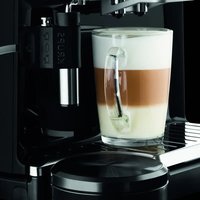


| Product type | Automatic coffee machine (espresso) |
| Brand | Krups |
| Model | Falcon EA8442 |
| Dimensions (H x W x D) | 376 x 274 x 404 mm |
| Weight | 9.5 kg |
| Power supply | 220-240 V~ / 50 Hz, 1450 W |
| Pump pressure | 15 bars |
| Water tank capacity | 1.7 L |
| Bean hopper capacity | 250 g |
| Main functions | Espresso, coffee, ristretto, cappuccino, caffè latte, hot water, milk froth |
| Display | Color touchscreen |
| Grinder | Metal burr grinder, fineness adjustment |
| Heating system | Compact Thermoblock System with integrated brewing chamber |
| Coffee outlets | Dual height-adjustable outlets |
| Included accessories | Steam wand or super cappuccino accessory, Claris Aqua Filter cartridge, 2 cleaning tablets, 1 descaler sachet, water hardness test strip |
| Maintenance programs | Automatic coffee circuit cleaning, automatic steam circuit descaling, auto rinse |
| Safety | Automatic shut-off, overheating protection, emergency stop |
| Noise level | Grinder and pump: normal noise level |
| Materials | Plastic, stainless steel, glass (display) |
| Warranty | 2 years / 6000 cycles (max 3000 cycles/year) |
| Manufacturer | SAS GSM, Rue Saint-Léonard, F-53104 Mayenne, France |
| Repairability | Spare parts available (filter cartridge, cleaning tablets, descaler, etc.) |
| Hotlines | Available by country (see manual) |
| Use | Household only, preparation of coffee and milk-based drinks |
Frequently Asked Questions - Falcon EA8442 KRUPS
User questions about Falcon EA8442 KRUPS
0 question about this device. Answer the ones you know or ask your own.
Ask a new question about this device
Download the instructions for your Coffee machine in PDF format for free! Find your manual Falcon EA8442 - KRUPS and take your electronic device back in hand. On this page are published all the documents necessary for the use of your device. Falcon EA8442 by KRUPS.
USER MANUAL Falcon EA8442 KRUPS
KRUPS
ESPRESSO AUTOMATIC
SERIE EA84xx
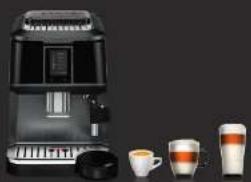
www.krups.com
Congratulations on purchasing your Espresso Automatic Series EA84XX. This machine allows you to prepare a wide variety of drinks, including espressos, coffees or ristrettos, totally automatically. You can also prepare milk drinks such as cappuccinos. It is designed to allow you to enjoy restaurant quality coffee at home, whatever the time of day or day of the week. You will appreciate both the quality of the coffee produced as well as the ease of use. You can choose the volume, strength and temperature of your drinks.
The Compact Thermoblock System with integrated percolation chamber, 15 bar pump and coffee granules that are freshly ground just before extraction, allows you to make ristrettos, espressos and coffees that are hot right from the first cup with maximum flavour and covered in a chamois coloured cream.
The hot water function also allows you to prepare teas and other drinks at an instant.
Espressos are traditionally served in small porcelain cups that widen at the top, releasing all of the coffee's aromas. To obtain an espresso with the perfect temperature and with a small cream, we recommend heating the cups beforehand.
It will probably take several attempts before you find the coffee beans you prefer. By changing the mixture and/or roasting process, you will soon achieve the ideal result.
Espressos are more aromatic than a classic filter coffee. Despite its more distinct taste, which is very evident in the mouth and more persistent, an espresso contains less caffeine than a filter coffee (approximately 60 to 80 mg per cup compared to 80 to 100 mg per cup); this is due to shorter percolation time.
The quality of the water used is also a determining factor in terms of the quality of the drink achieved. Ideally, use water straight from the tap (so that it has not had time to stagnate on contact with the air); the water should also be free from any chloride odours and it should be cold.
The ergonomic and comfortable colour touch screen will help you navigate through the programmes. It will guide you through the stages, from preparing your drink to maintenance operations.
We hope you enjoy using your Krups machine.
The Krups team

Here are some recommendations for making the most of your machine and producing quality coffees:
- The quality of the water has a huge impact on the quality of the aromas. Limescale and chlorine can alter the taste of your coffee. We recommend that you use the Claris Aqua Filter System cartridge, or slightly mineralised water to preserve all the aromas of your coffee.
- To prepare ristretto, espresso and coffee recipes, we recommend that you use pre-heated (by running under hot water) tulip shaped porcelain cups, which are the correct size for the size of drink you want. For your cappuccino, latte and hot milk recipes, we recommend that you use thick glass cups for a delicious result.
- Roasted coffee beans can lose their flavour if they are not protected. We recommend that you use the quantity of beans required for the next four to five days. The quality of coffee beans varies and whether you like them or not is a matter of personal taste; however, we recommend that you use arabica rather than robusta coffee beans. It will probably take several attempts to find the coffee beans that you prefer. Finally, we recommend that you do not use oily or caramelised beans, which can damage the machine.
- The quality and fineness of the ground beans will affect the aromas and quality of the cream. The finer the ground beans the creamier the cream. The grounding should be adjusted to the drink desired: fine for ristretto and espresso and coarser for coffee.
- You can use pasteurised or UHT milk, skimmed, semi-skimmed or whole milk, straight from the fridge (7°C). The use of special milks (microfiltered, unpasteurised, fermented, enriched, etc.) can produce less satisfactory results, in particular in terms of the quality of the froth and these are therefore not recommended.
Warranty conditions
This appliance is covered by a two year manufacturer's guarantee. Please refer to the guarantee document for details on the guarantee terms and conditions in your country.
This product has been designed for domestic use only. Any commercial use, inappropriate use or failure to comply with the instructions, the manufacturer accepts no responsibility and the guarantee will not apply.
To comply with the warranty conditions, it is essential to perform the descaling and cleaning cycle. The guarantee will not be valid if all the operations or cleaning and descaling instructions are not followed or if cleaning or descaling products that do not comply with KRUPS original specifications are used. The guarantee does not apply if the Claris Aqua Filter System cartridge has not been used according to the KRUPS instructions.
Normal wear and tear of the parts (grinding wheel, valves, seals) are exempt from the guarantee as is damage caused by external objects in the coffee grinder (for example: wood, stones, plastic, parts, etc.).
TABLE OF CONTENTS
IMPORTANT INFORMATION ON THE PRODUCT AND INSTRUCTIONS 28
Guide to symbols used in the instructions 28
Safety instructions 28
Use according to the instructions 30
Products supplied with your machine 30
Factory control 30
DESCRIPTION 31
OVERVIEW 32
Presentation of the different symbols 32
BEFORE FIRST USE 32 INSTALLATION 32
Initial settings 32
Installing the filter 33
Preparing the appliance.... 34
PREPARING DRINKS 34
Information on recipes 34
Preparing the grinder 34
Preparing coffee-based drinks.... 34
Preparing other drinks.... 35
Hot water.... 37
OTHER FUNCTIONS: Prog button 37
Settings 37
Maintenance.... 38
Info 38
GENERAL MAINTENANCE 38
Emptying the coffee grounds collector, coffee drawer and the drip tray.... 38
Circuit rinsing 39
Automatic clean programmes 39
PROBLEMS AND CORRECTIVE MEASURES 40
TECHNICAL DATA 42
TRANSPORT 43
DISPOSAL 43
RECIPIES 44
IMPORTANT INFORMATION ON THE PRODUCT AND INSTRUCTIONS
This manual contains all the important information for setting up, using and maintaining your automatic coffee/espresso machine.
The manual also includes important safety instructions.
Always read the instructions carefully before using your appliance for the first time and keep them for future use: any use which does not conform to these instructions will absolve Krups from any liability.
Guide to symbols used in the instructions
Symbols and associated words used in these instructions.

Danger: warning against risks of serious or fatal injuries. The flash symbol warns against electrical dangers.

Caution: warning against any malfunctions, damage to or destruction of the appliance.

Important: general or important comment on the functioning of the appliance.
Safety instructions

Important: these instructions are provided to protect you, third parties and the appliance. Strict compliance is therefore necessary.
Conditions of use
Do not immerse the appliance in water. Do not immerse the power cord or plug in water or any other liquid. Any contact between the appliance's conductive parts and humidity or water can cause fatal injuries due to the presence of electricity! This appliance can only be used in dry locations
If the room temperature should change from cold to hot, please wait a few hours before starting the appliance to ensure that it is not damaged due to condensation.
Avoid placing the appliance in direct sunlight, or exposing it to heat, cold, ice or humidity.
Take care not to place the appliance on a hot surface such as a warming plate or near a naked flame, to avoid any risk of fire or other damage.
Keep the appliance out of the reach of children.
This appliance is not intended for use by persons (including children) with reduced physical, sensory, or mental capabilities, or lack of experience and knowledge, unless they have been given supervision or instruction concerning use of the appliance by a person responsible for their safety.
Children should not be allowed to play with the appliance.
If one of the products supplied with the machine is swallowed, inform your doctor and/or poison control center immediately.
This appliance is not suitable for making drinks for babies under the age of 2 years.
Electrical power supply

Danger: Non-compliance with these instructions could cause fatal injuries due to electric shock!
Please check that the supply voltage indicated on the nameplate of the appliance corresponds to your electrical installation. The appliance should always be plugged into a socket outlet with an earth connection.
Check that the socket outlet can be easily accessed so that the plug can be disconnected easily in the event of a malfunction or during a thunderstorm, for example.
For the safety of your appliance, remove the plug in the event of a thunderstorm. Do not pull the power lead to remove the plug.
Remove the plug immediately if you notice any problem during operation or if there is a problem during percolation.
Disconnect the appliance if you are not going to use it for a long period and when cleaning.
Do not use the appliance if the power cord or the appliance itself is damaged. If the power cord or plug is damaged, the power cord must be replaced by an approved KRUPS center.
Do not leave the power cord overhanging a table or work surface. Do not leave your hand or power cord on hot parts of the appliance.
The power cord must never be close to or in contact with a source of heat or resting on sharp edges.
The use of multiple plugs or extension leads is not recommended. Any error in connection will invalidate the guarantee.
Appliance
With the exception of cleaning and descaling according to the appliance's instructions, any intervention on the appliance must be performed by an approved KRUPS centre.
For your own safety, only use approved KRUPS accessories and spare parts since these are suitable for your appliance.
Disconnect the appliance when you leave the room or house for a long period of time.
Never open the appliance. Caution, risk of death due to electrical current! Any unauthorised opening of the appliance will negate the guarantee. Do not use your appliance if it is not working properly or if it has been damaged. In this event, it is recommended that you get the appliance examined by an approved KRUPS centre (refer to the list in the KRUPS service booklet).
For safety and accreditation reasons, any transformation or modification of the appliance, performed individually, is forbidden, as only tested appliances are accredited and the manufacturer will refuse all liability in the event of damage.
For safety reasons, while producing steam for making a cappuccino, heating milk or heating water, take care not to put your hand under the steam nozzle or the super cappuccino accessory, or under the coffee nozzle while making coffee.
The steam spout can be very hot, take care not to handle it during or just after use.
To avoid dirty water overflowing onto your work-top or running the risk of burning yourself, remember to fit the drip tray and make sure you protect your work-top during the descaling cycles, particularly if it is made of marble, stone or wood.
Never put ground coffee into the coffee tank.
Do not put water in the coffee beans tank.
Use and maintenance
In the event of a malfunction or poor working condition, check the appliance and try to resolve the problem (see p.40: Problems and corrective measures) or get the appliance repaired at an approved KRUPS service centre if the malfunction persists.
Always refer to the instructions for descaling/cleaning the appliance. Disconnect from the mains before starting any maintenance operation.
Intended use
This Espresso Automatic Series EA84XX coffee/espresso machine should only be used to make espressos, coffee, hot water or to froth milk.
This appliance is intended for domestic use only. It is not intended to be used in the following applications and the guarantee will not apply for:
- staff kitchen areas in stores, offices and other working environments
- Farm houses,
- by clients in hotel, motels and other residential type environments.
- Bed and breakfast type environments.
The Espresso Automatic Series EA84XX coffee/espresso machine is not intended for commercial or professional use. Use for any purpose other than those described in the present manual does not comply with the instructions and can result in injuries and property damage as well as the deterioration or destruction of the appliance.
Products supplied with your machine
Check the products supplied with your machine. If a part is missing, contact the hotline directly (see p. 32: Initial settings).
Parts provided:
- Espresso Automatic Series EA84XX
- 1 steam nozzle (depending on model)
- 1 super cappuccino accessory (depending on model)
- 2 cleaning tablets
- 1 descaler sachet
- Claris – Aqua Filter System cartridge with screw accessory
- 1 stick to determine water hardness
- Instructions
- List of Krups After Sales Service Centres
- Guarantee documents
- 1 power cord
- 1 steam spout cleaning kit
Factory control
Your appliance was checked and tested before leaving the manufacturing factory. Despite the care taken when cleaning, it is possible that you may find coffee residue in the coffee grinder and/or drops of coffee on the drip tray. Thank you for your understanding. We also recommend that you rinse the appliance once or several times before using for the first time or when it has not been used for several days.
DESCRIPTION
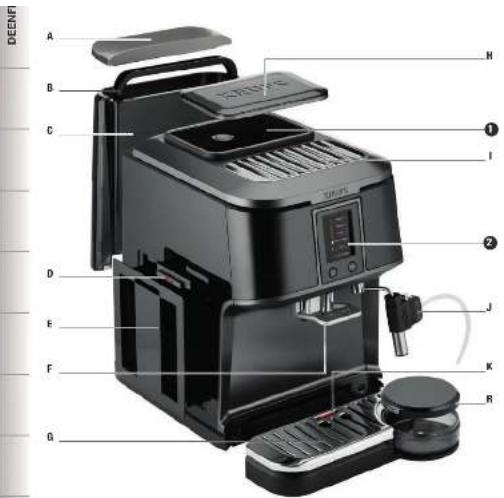
A Water tank lid B Water tank handle C Water tank D Coffee drawer E Coffee grounds collector F Handle for height adjustable coffee outlets G Removable grille and drip tray H Lid for the coffee bean tank I Cup rest grille J Steam nozzle or super cappuccino accessory (depending on model)
K Water level float
1 Coffee beans tank
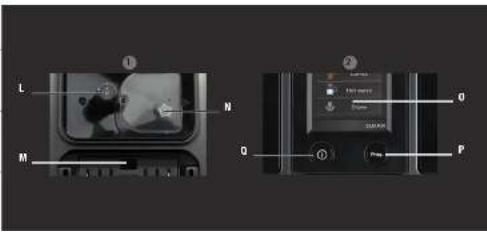
L Coffee grinding setting button M Spout for cleaning tablet N Metal grinding wheel
2 Touch screen
0 Touch screen P Programme button Q "Stop/start" button
R storage box and lid
Further information on:
The drip tray: allows you to collect water or coffee that may leak from the appliance during/after preparations. It must always be left in the same place. Coffee drawer: allows you to collect excess ground coffee.
Important: read these instructions carefully and keep for future use. Please follow the safety instructions.
Manufacturer
SAS GSM
Rue Saint-Léonard
F-53104 Mayenne
France
ACCESSORIES (sold separately)
This product may differ from the photos
F 088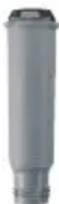
Claris - Aqua Filter System cartridge (1 cartridge supplied)
XS 4000
KRUPS
Cleaning fluid for Cappuccino system (not supplied)
XS 3000
Block of 10 cleaning tablets (2 tablets supplied)
F 054
Descaling powder (1 sachet supplied)
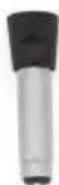
Steam nozzle
OVERVIEW
Presentation of the different symbols
Allows you to validate the stage.
Allows you to go back to the previous stage.
Allows you to go back to the main menu.

Warns of an alert message.
Allows you to interrupt the preparation or action in progress.
BEFORE FIRST USE INSTALLING THE APPLIANCE

Danger: The appliance should be plugged into a 230V - 240V AC socket outlet with an earth connection. Otherwise, you could be exposed to fatal injuries due to electric shock!
Follow the safety instructions (see "Safety instructions").
Initial settings
When using the machine for the first time, you are asked to perform certain settings. Follow the instructions that appear on the display. The aim of the following paragraphs is to give you some visual aids.
Turn on the appliance by pressing the On/Off (Q) button. Let the appliance guide you.
These are the first settings requested:
Language
Select a display language by pressing on the arrows until the required language appears.
Press OK to validate.
Country
Select your country of residence by pressing the arrows until the country appears.
Press OK to validate.
If your country is not in the list, press +.
The appliance will also ask you to set the following parameters:
Hotline number for your country of residence
If you do not know the hotline number for the country you entered in the list, you can search for it on the Internet site indicated on the screen.
Unit of measurement
You can select whether you would like to use oz or ml as your volume unit.
Date and time
To set the time, click on the required time format (24H or AM/PM).
Auto on / Auto off
It is possible to set the time at which you would like the machine to turn on automatically every day. Select the time at which you would like the machine to start automatically using the previously selected time format.
You can also choose the time after which your device will automatically switch off (time without use).
Water hardness
You must set your machine based on the water hardness, between 0 and 4.
Information on water hardness:
Before using the appliance for the first time, determine the hardness of your water so that you can adjust the appliance to this hardness. You should also do this when you are using your machine in a location where the water hardness is different or you notice a change in the water hardness. To determine the water hardness, use the strip supplied with the machine or contact your water company.
The table below contains information on the different classes:
| Degree of hardness | Class 0 Very soft | Class 1 Soft | Class 2 Moderately hard | Class 3 Hard | Class 4 Very hard |
| ° dH | < 3° > | 4° > 7° > 1 | 4° > 21° | ||
| ° e | < 3,75° > | 5° > 8,75° | > 17,5° > 26 | 6,25° | |
| ° f | < 5,4° > | 7,2° > 12,6° | > 25,2° | > 37,8° | |
| Appliance setting | 0 | 1 | 2 | 3 | 4 |
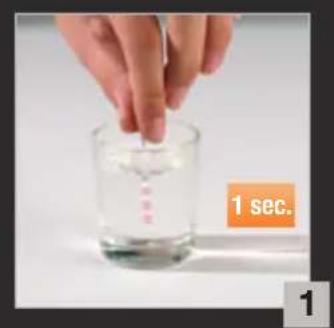
Fill a glass with water and immerse the strip. Fig. 1
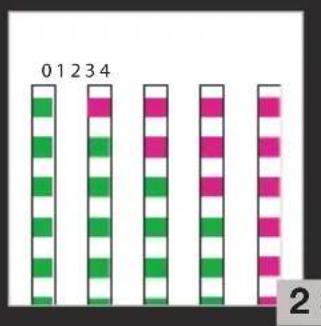
Read the water hardness after one minute. Fig. 2
Indicate the number of red zones when setting your appliance.
Installing the filter
When turning on for the first time, the appliance will ask you if you want to install the filter. If you want to, press "YES" and follow the instructions on the screen.
Installing the cartridge in the appliance: screw the filter cartridge into the bottom of the water tank using the accessory supplied with the cartridge. Fig. 3.
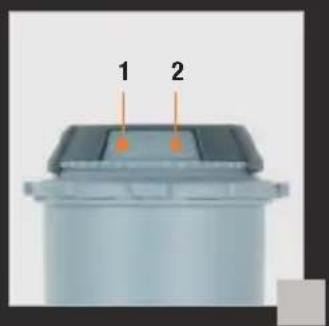
Set the month in which the cartridge was installed (position 1 in the image, figure to the left of the opening) by turning the grey ring on the upper end of the filter. The month in which the cartridge needs replacing is indicated in position 2 of the image. Fig. 4.
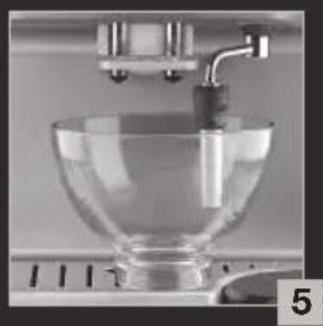
Put a 0.6 l container under the steam nozzle. Fig. 5.
The machine should function regardless of whether a filter is installed or not. The water circuits must be refilled. To do this, follow the instructions on the screen. The machine will begin by preheating of the circuits, filling the water circuits and will then carry out a test followed by automatic rinsing.
The screen then displays the main drinks menu.
Preparing the appliance
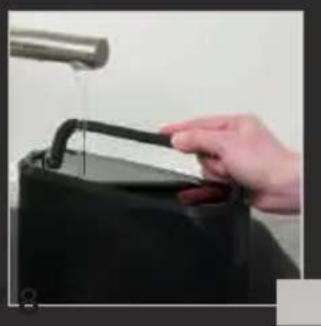
Remove and fill the water tank. Fig. 6.
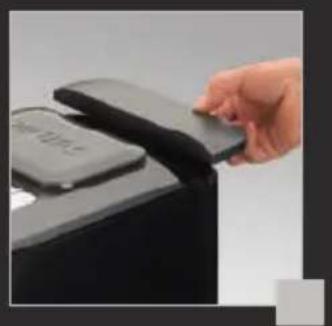
Close by placing the lid on the tank. Fig. 7.
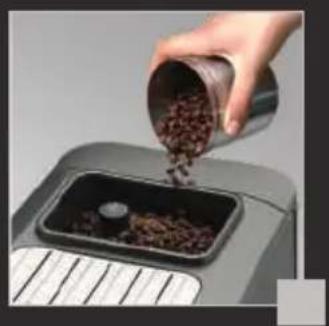
Open the lid on the coffee beans tank and pour in the beans (250 g maximum). Fig. 8.
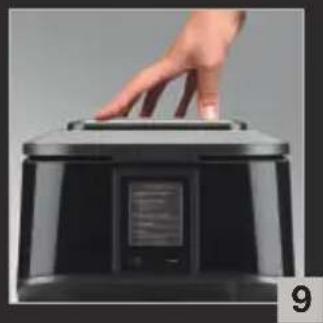
Close the lid on the coffee beans tank. Fig. 9.

Caution: the use of oily, caramelised or aromatic coffee beans is not recommended in this machine. Since some of these beans are very big, they can damage the machine.

Caution: make sure that any foreign objects such as small stones in the coffee beans do not enter the tank. Any damage caused by foreign objects entering the coffee tank is excluded from the guarantee.
PREPARING DRINKS
Information on recipes
Depending on the recipe selected, your Espresso Automatic EA84XX will automatically adjust the quantity of ground coffee.
Preparing the grinder
You can adjust the strength of your coffee by adjusting the size of the ground coffee beans. In general, the finer the coffee grounds, the stronger and creamier the coffee; however, this depends on the type of coffee used.
Adjust the size of the ground beans by turning the 'Coffee grinding setting' button (L) on the bean tank. You are advised to do this during the grinding process and gradually. After three preparations, you will notice a very distinctive difference in taste.
The grinding setting is useful when you change coffee type or if you would like a stronger or weaker coffee. It is not recommended that you perform this setting systematically.
Preparing drinks coffee
This chapter explains how the machine operates using the example of the Espresso function.
Press the "Espresso" button.
If the machine detects a lack of water when you request a recipe, it will ask you to fill the tank.
Place the cup(s) under the coffee spouts.
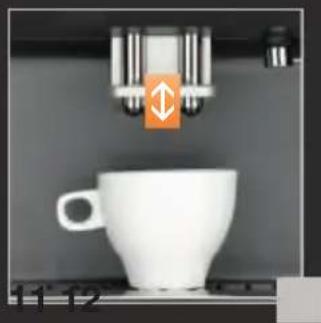
You can adjust the height of the coffee outlet depending on the size of your cup(s). Fig. 10.
Possible settings
The machine lets you prepare one or two cups.
Selecting the strength: the more beans selected, the coarser the preparation. You can change the strength using the - and + buttons located to the left and right of the symbols. Press the "OK" button on the touch screen to launch the preparation.
Preparing an espresso
The machine grinds the beans, compacts the coffee grounds and performs percolation.
It is possible to adjust the volume of coffee in preparation using the - and + buttons.
You can stop the preparation at any time by pressing "STOP". Caution, pressing stop causes a machine resetting phase that can last up to 30 seconds. This is normal.
When a cycle is interrupted, the machine does not stop immediately, the machine will finish its cycle but the preparation will be cancelled.
! Caution! : Automatic rinsing of the coffee nozzle
Depending on the type of recipes prepared, the machine may carry out an automatic rinsing operation when it is switched off.
The cycle lasts only a few seconds and will stop automatically.
Preparing other drinks:
Important: we recommend that you use pasteurised or UHT milk, recently opened. Unpasteurised milk does not produce the best results. Important: After using the steam functions, the spout can remain hot; we recommend that you wait a few moments before handling.
For drinks with frothy milk or hot water, the drip tray has been specially designed to allow you to fit a large cup under the steam nozzle or the super cappuccino accessory, once the magnetised box has been removed. The cup is ideally positioned to collect the frothy milk or the hot water produced by the nozzle or the super cappuccino accessory. Furthermore, you can use the box as storage for the super cappuccino accessory.
RECIPES MADE WITH MILK
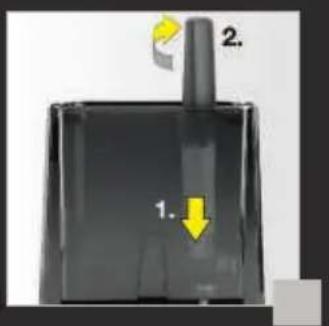
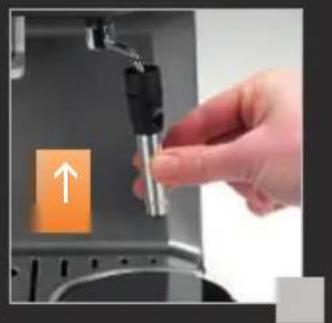
Recipes made with the steam nozzle (depending on model): check before each preparation to make sure that it is locked properly by turning it completely to the right. Fig. 11.
The steam froths the milk. As steam production requires high temperatures, the appliance has an additional preheating phase.
When the screen displays the drink selection menu, press the "steam" button.
The screen indicates that the appliance is preheating and a message appears asking you to place a container under the steam spout. You can start the steam production by pressing the "OK" button.
MILK FROTH
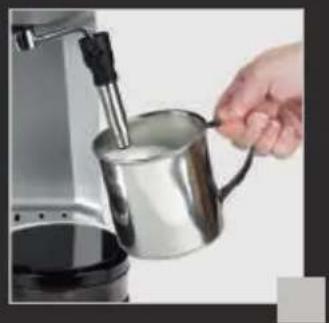
Pour milk into your milk container. Only fill half way. Immerse the steam spout into the milk. Fig. 12.
Press the steam button and follow the on-screen instructions.
To achieve a good result:
Stage 1: While holding the milk container, immerse the steam spout into the milk (about 2 cm) and wait for it to start frothing.
Stage 2: Raise the container slightly (about 1 cm). Never immerse the metal tube completely.
Stage 3: Lower the container gradually as the foam increases.
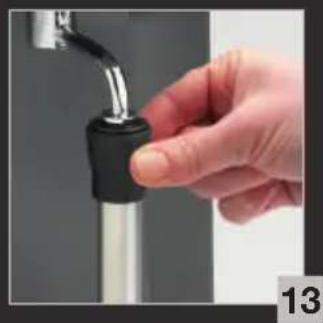
Press any button to stop the steam function. Caution, the cycle does not stop immediately. When the spout is hot, handle using the plastic part only. Fig. 13.
To remove any trace of milk from the steam spout, place a container under the spout and press "hot water" for a few seconds.
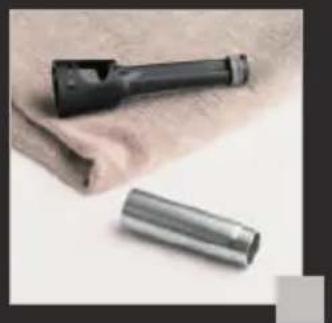
The steam spout can be disassembled for thorough cleaning. Fig. 14.
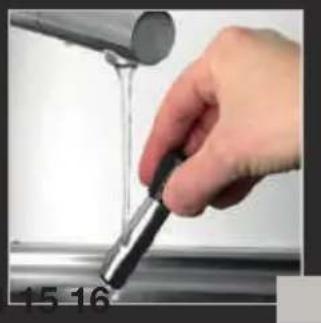
Wash with water and a bit of non-abrasive washing up liquid using a brush. Rinse and dry. Fig. 15.
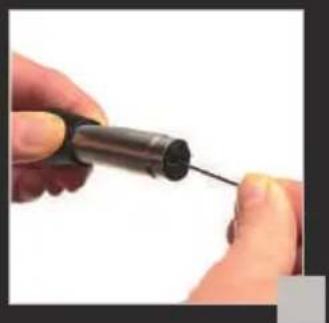
Before putting back into its place, make sure that the air holes are not blocked with milk residue. Unblock with the needle provided if necessary. Fig. 16.
SUPER CAPPUCCINO ACCESSORY (available depending on model)
Important: we recommend that you use pasteurised or UHT milk, recently opened. Unpasteurised milk does not produce the best results.
The super cappuccino accessory helps the preparation of a cappuccino or latte.
Preparing the appliance:
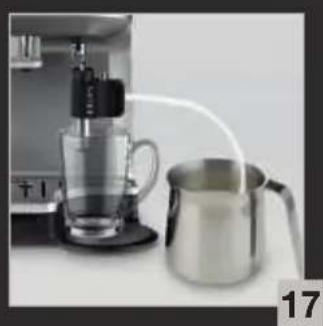
Connect the milk suction pipe to the super cappuccino accessory, on the unbevelled side. The inlet must not be twisted.
Fit the accessory on the steam outlet.
Enter the bevelled end of the suction pipe into a container filled with milk. Fig. 17.
Place a cup under the super cappuccino accessory.
Recipe stage 1:
Select the cappuccino (Lor caffè latte () position on the super cappuccino accessory.
Press "steam" to launch the pre-heating.
Possible settings
You can change the steam time using the - and + buttons located to the left and right of the symbols.
Press the "OK" button on the touch screen to launch the preparation.
Important: press any button to stop the steam function. Caution, the cycle does not stop immediately.
Recipe stage 2:
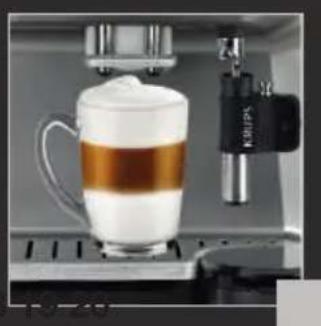
Place a cup under the coffee outlet and start a coffee/espresso cycle. Fig. 18. (See chapter: Preparing drinks using coffee beans).
Rinsing the accessory:
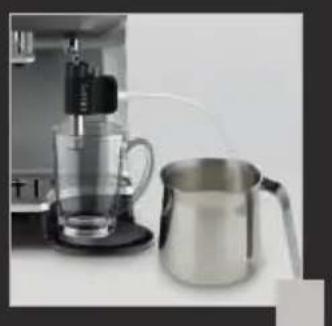
To ensure that the accessory functions correctly, rinse with water after each use. Your appliance will not ask you to do this. Carry out a steam cycle with a container filled with water in order to clean the accessory on the inside (Fig. 19).
To do this, you can also use the KRUPS liquid cleaner which is available as an accessory.
Maintenance and cleaning:
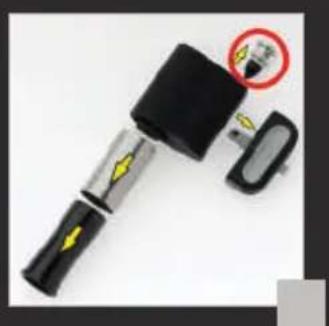
Remove the super cappuccino accessory and clean the parts using a small brush and, if appropriate, with a little washing-up liquid. Pay particular attention to cleaning the part circled in the photo (Fig. 20). The hole in the metal part should not be allowed to become blocked.
Hot water
Check that the super cappuccino accessory / steam nozzle is properly locked in place on its support.
When the screen displays the drink selection menu, press "HOT WATER". A message invites you to place a container under the steam spout and choose the volume.
You can start producing hot water by pressing "OK".

Press any button to stop the steam function. If the spout is obstructed, unblock using the needle supplied (Fig. 16).
OTHER FUNCTIONS: Prog button
You can access the menu for the appliance's other functions by pressing the Prog button.
Settings
The "Settings" menu allows you to make the necessary changes for your own optimum user comfort and preferences. Below are the main settings available.
| Date | The setting of the date is necessary in particular if using an anti-limescale cartridge. |
| Clock | You can select a 12 or 24 hour display. |
| Language | You can choose your preferred language from the suggestions. |
| Country | You can select your country of residence. |
| Unit of measurement | You can choose between ml and oz. |
| Screen brightness | You can adjust the screen contrast to your preference. |
| Coffee temperature | You can adjust the temperature of your recipes based on three levels. |
| Water hardness | You should adjust the water hardness between 0 and 4. See chapter “Measuring water hardness”. |
| Auto-on | You can set the automatic pre-heating to a certain time. |
| Auto-off | You can choose the length of time after which the appliance will switch off automatically. |
Maintenance
All these options allow you to start the selected programmes. You then have to follow the on-screen instructions.
| Rinsing | Allows you to access the rinse programme. |
| Cleaning | Allows you to access the clean programme. |
| Descaling | Allows you to access the descale programme.This function is not active until the number of recipes made has been reached. |
| Filter | Allows you to access the filter programme. |
To exit the maintenance menu, press

Info
The “Info” menu allows you to access a certain amount of information on your use and certain stages in the life of your machine. It also provides information on the machine's maintenance. Below is the main information available.
| Date of first use | Displays the date of first use. |
| Drinks prepared | Displays the total number of coffees, hot water and steam cycles performed by the machine. |
| Coffee cleaning circuit | Indicates that this should be performed after x amount of cycles. |
| Descaling | Indicates that this should be performed after x amount of cycles. |
| Filter | Indicates that this should be changed after x days or x litres. |
GENERAL MAINTENANCE
Emptying the coffee grounds collector, coffee drawer and the drip tray
After 12 coffees, the machine will ask you to empty the coffee grounds collector and to clean the coffee drawer. Failure to perform these operations correctly can damage your machine.
Wait at least for 8 seconds before refitting the coffee drawer and the coffee grounds collector, and follow the instructions on the screen.
The drip tray collects the used water and the coffee grounds collector collects the used coffee grounds.
The coffee drawer allows you to remove any coffee grounds below the percolation chamber.
If the message “Empty the two trays” is displayed, empty and clean the drip tray.
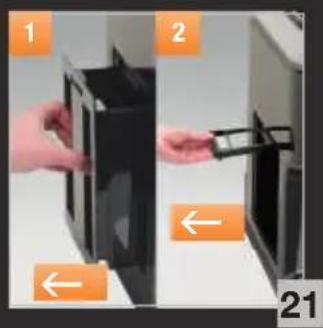
- Remove, empty and clean the coffee grounds collector. Fig. 21.
- Remove the coffee drawer.
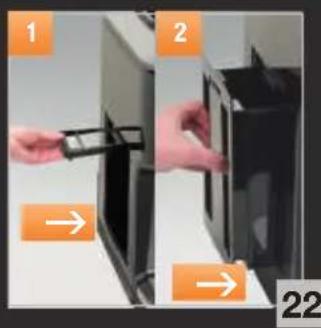
Wait for at least 8 seconds, then first of all put the coffee drawer back in place and then the coffee grounds collector tray. Fig. 22.
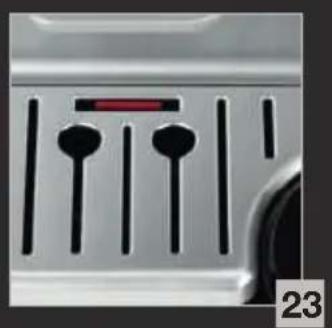
The drip tray is equipped with a float indicating when it requires emptying. Fig. 23.
Circuit rinsing
You can perform a rinse at any time by pressing Prog then maintenance. Depending on the types of recipes prepared, the machine can perform an automatic rinse when switching off.
Automatic clean programmes
Automatic clean programme for the coffee circuit
The machine will tell you when a clean programme is required. This clean must take place every 360 preparations approximately.
To perform the clean programme, you will need a container with a capacity of at least 0.6 l; this should be placed under the coffee outlets and a KRUPS cleaning tablet (XS3000).
Follow the instructions on-screen. It is also possible to launch cleaning via the maintenance menu.
Important: you do not have to perform the clean programme immediately when the appliance requests this; however, you should do this as soon as possible. If cleaning is delayed, an alert message will remain on the screen until the operation is performed.
The automatic clean programme includes two phases: a clean and a rinse cycle; the programme takes about 13 minutes.
Important: if you disconnect your machine during cleaning or in the event of a power cut, the cleaning programme will resume the stage in progress during the incident. It will not be possible to delay this operation. It is mandatory due to water circuit rinse reasons. In this case, a new cleaning tablet may be required. Make sure the entire clean programme is completed to remove any traces of descaling product that may be hazardous to your health.
Do not place your hands under the coffee outlets during the cycle.
Automatic descale programme for the steam circuit
Caution: if your appliance is fitted with our Claris - Aqua Filter System cartridge, please remove this before descaling.
The machine will tell you when the descale programme is required. The frequency at which this programme needs to be run depends on the quality of the water used and whether the Claris Aqua Filter System filter is used or not (the more limescale in the water, the more descaling is required).
Important: you do not have to perform the descale programme immediately when the appliance requests this; however, you should do this as soon as possible. If descaling is delayed, an alert message will remain on the screen until the operation is performed.
Follow the instructions on-screen. It is also possible to launch descaling via the maintenance menu.
To carry out this descaling programme, you will need a container that can hold at least 0.6L, which must be placed under the steam nozzle and a sachet of KRUPS descaling agent (40 g).
The automatic descale programme includes three phases: one descaling cycle and two rinse cycles. The programme lasts approximately 20 min.
Important: if there is a power cut or you disconnect your machine, the cycle will relaunch the stage in progress when the incident occurred; this operation cannot be delayed. Make sure the entire cycle is completed to remove any traces of descaling product that may be hazardous to your health.
PROBLEMS AND CORRECTIVE MEASURES
If any of the problems in the table persists, call KRUPS customer service. See contact list enclosed.
| MALFUNCTION CORRECTIVE MEASURES | |
| The machine indicates a fault, the software is frozen or your machine is malfunctioning. | Switch off and unplug the machine, remove the filter cartridge, wait for one minute and start the machine again. |
| The appliance does not come on after pressing the Start/Stop button. | Check the fuses and wall socket.Check that the 2 lead connectors are correctly plugged into the appliance and into the wall socket. |
| The grinder is making a strange noise. | Foreign bodies are present in the grinder.Disconnect the machine before any intervention.Check whether you can extract the foreign body using your vacuum cleaner. |
| The steam nozzle makes a noise.The steam nozzle of your machine seems partially or completely blocked or clogged.The steam nozzle does not make any or only makes a little frothy milk. | Check that the steam nozzle is correctly positioned on its corresponding end piece.Unblock the holes with the needle supplied with your appliance. If the problem persists, dismantle the nozzle and the steam end piece.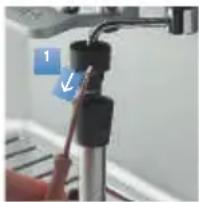 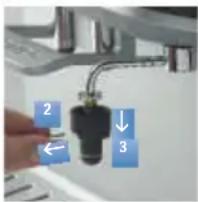 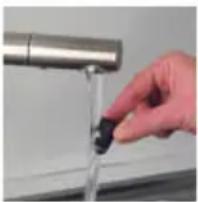 When the end piece has been taken off, use hot water to remove the rest of the deposits and make sure that the hole is not obstructed by any milk or calcium residue.For preparations made with milk:We recommend using fresh, pasteurised or UHT milk, recently opened, and we also recommend using a cold container. When the end piece has been taken off, use hot water to remove the rest of the deposits and make sure that the hole is not obstructed by any milk or calcium residue.For preparations made with milk:We recommend using fresh, pasteurised or UHT milk, recently opened, and we also recommend using a cold container. |
| No steam is coming out of the steam spout. | Empty the tank and temporarily remove the Claris cartridge.Fill the tank with calcium rich mineral water (>100 mg/l) and perform successive steam cycles (5 to 10) into a container until you obtain a constant flow of steam.Re-insert the Claris cartridge into the tank. |
| The super cappuccino accessory does not make any or makes little foam.The super cappuccino accessory does not suck up the milk. | Check that the accessory is correctly fitted to the appliance, remove it and then replace it.Check that the flexible hose is not obstructed or pierced shaped and that it is correctly connected to the accessory to avoid any air entering.Rinse and clean the accessory (refer to the "Super cappuccino accessory" chapter).If the problem persists replace the part surrounded in red on Fig.20 with the replacement part supplied with your machine. |
| The machine is asking you to empty the drip tray even though it is not full. | The machine is programmed to ask for drainage of the drip tray every 12 coffees, irrespective of any intermediate drainage that you may carry out. |
| There is water under the appliance. | Before lifting off the tank, wait for 15 seconds after the coffee has run through so that the machine finishes its cycle correctly.Check that the drip tray is correctly positioned on the machine, it must always be in place, even when your appliance is not being used.Check that the drip tray is not full.The drip tray must not be removed during a cycle. |
| When you turn off the appliance, warm water comes out of the coffee nozzles. | According to the type of recipe prepared, the machine can carry out an automatic rinsing operation when it is turned off. This cycle lasts only a few seconds and stops automatically. |
| After emptying the coffee grounds collector and cleaning the coffee drawer, the warning message is still displayed. | Correctly refit the coffee drawer and the coffee grounds collector, follow the instructions on the screen.Wait at least for 8 seconds before refitting them. |
| The coffee comes out too slowly. | Turn the grinding setting button to the right for coarser coffee grounds (this can depend on the type of coffee used).Perform one or several rinse cycles. Launch a clean programme (see" Coffee circuit automatic cleaning programme" p.39).Change the Claris Aqua Filter cartridge(see "Filter installation" p.33). |
| Water or steam are abnormally coming out of the steam spout. | At the start or end of the recipe some drops may fall from the steam nozzle. |
| After filling the water tank, the warning message remains on the screen. | Check that the tank is correctly positioned in the appliance.Check and unblock the float if necessary. The float at the bottom of the tank should move freely. |
| The grinding setting button is difficult to turn. | Only change the grinding setting when in operation. |
| The espresso or coffee is not hot enough. | Increase the temperature of the coffee in the Settings menu.Heat the cup by rinsing with hot water before starting the preparation. |
| The coffee is too clear or not coarse enough. | Do not use oily, caramelised or aromatised coffees.Check that the bean tank contains coffee and that it descends correctly.Reduce the volume of the preparation, increase the strength of the preparation.Turn the grinding setting button to the left for finer coffee grounds.Prepare your coffee in two cycles using the two cup function. |
| No coffee is coming out of the machine. | An incident has been detected during the preparation.The appliance is restarted automatically and is ready for a new cycle. |
| There is a power cut during the cycle. | The appliance restarts automatically when reconnected. |

Danger: Only a qualified technician is authorised to perform repairs on the power cord and the electrical network. If this instruction is not followed, you are at risk of death due to electric shock! Never use an appliance that is visibly damaged!
TECHNICAL DATA
| Appliance: | Automatic Espresso Series EA84xx | Coffee grounds tank: | 250 g |
| Electrical power supply: | 220-240V~ / 50 Hz | Pump pressure: | 15 bars |
| Energy consumption: | During operation: 1450 W | First use and storage: | indoors, in a dry place (free from frost). |
| Dimensions (H x I x P) : | 376 x 274 x 404 mm | ||
| Water tank: | 1,7 l | Weight EA84xx: | 9.5 kg |
Under reserve of technical modifications.
TRANSPORT
Keep the original packaging for transporting the appliance.
Before transporting or transferring the appliance, empty the coffee grounds collector, the coffee beans tank, the water tank and the drip trays to avoid water spillage.

Caution: if the appliance should fall out of the packaging during transport, it is advisable to take it to an After Sales Service Centre to have it checked and thus avoid any risk of fire or electrical hazard.
DISPOSAL
The symbol on the appliance or packaging indicates that this product can never be treated as household waste. It must therefore be sent to a waste collection centre for the recycling of electrical and electronic equipment. By taking your appliance to a proper collection centre and disposing of your appliances correctly at the end of their life, you are helping preserve our natural resources and are preventing harmful consequences for the environment and public health. For more information on the waste collection points contact an approved service centre or your dealer.
This machine contains one or more batteries that, for safety reasons, can only be accessed by a repair person. To change the batteries, please contact your nearest authorised Krups Service Centre.

Important: your appliance contains valuable materials which can be recovered or recycled.
Let's all help protect the environment!
Your appliance contains many recyclable materials that can be recovered or recycled. Leave it at a local civic waste collection point.
HELPLINE
If you have any product problems or queries, please contact our Customer Relations Team first for expert help and advice:
0845 330 6460 - UK
(01) 677 4003 - ROI
or consult our website - www.krups.co.uk

Here are some recipes you can make using your KRUPS Automatic :
• Cappuccino
For a cappuccino, the ideal proportions are as follows: 1/3 hot milk, 1/3 coffee, 1/3 milk froth.
• Caffe Latte
To make coffee with milk, also often called Latte Macchiato, the proportions are as follows: 3/5 hot milk, 1/5 coffee, 1/5 milk froth
- For these milk-based preparations, it is best to use cold skimmed milk straight from the refrigerator (ideally between 6 and 8°C). • To finish off, you can sprinkle with cocoa.
• Café Crème
• Prepare a conventional espresso in a large cup.
- Add a little cream to get a café crème.
- Café corretto*
• Prepare a cup of espresso as usual.
- Then add 1/4 or 1/2 of a liqueur glass of Cognac to taste. You can also use anisette, brandy, Sambuca, Kirsch or Cointreau. There are many other ways to give some punch to your espresso. Just use your imagination.
• Coffee liqueur*
- Mix 3 cups of espresso, 250 g of brown sugar candy and 1/2 litre of Cognac or Kirsch in an empty 0.75 litre bottle.
- Leave the mixture to marinate for at least 2 weeks. You will obtain a delicious liqueur. A real treat for coffee lovers.
• Italian style iced coffee
4 scoops of vanilla ice-cream, 2 cups of espresso with sugar to taste, 1/8 l milk, fresh cream, grated chocolate.
- Mix the cold espresso with the milk.
- Serve the scoops of ice-cream into the glasses, pour the coffee onto them and decorate with fresh cream and grated chocolate.
- Add a small glass of rum to a cup of sweetened espresso.
• Decorate with a good layer of fresh cream and serve.
- Flambéed espresso*
2 cups of espresso, 2 small glasses of Cognac, 2 teaspoons of brown sugar, fresh cream.
- Pour the Cognac into heat-resistant glasses, heat and light.
- Add the sugar, mix, pour in the coffee and decorate with fresh cream.
- Espresso parfait*
2 cups of espresso, 6 egg yolks, 200g sugar, 1/8 litre of sweetened fresh cream, 1 small glass of orange liqueur.
- Beat the egg yolks with the sugar until it forms a thick, frothy mass.
- Add the cold espresso and the orange liqueur.
- Then mix in the whipped fresh cream.
- Pour the mix into saucer champagne glasses or ordinary.
- Put the champagne glasses in the freezer.
(*: Remember, over-indulgence in alcohol is bad for the health.)
Dear Customer,
DESCRIPTION OF THE APPLIANCE 71
OVERVIEW 72
INSTALLING THE DEVICE 72
OTHER FUNCTIONS: Prog button 77
Settings 77
Maintenance 78
Info 78
GENERAL MAINTENANCE 78
DESCRIPTION OF THE DEVICE
OTHER FUNCTIONS: Prog button
PROBLEMS AND CORRECTIVE ACTIONS 120
TECHNICAL DATA 123
TRANSPORT 123
DISPOSAL 123
RECIPES 124
PROBLEMS AND CORRECTIVE ACTIONS
If one of the problems listed in the table persists, contact our KRUPS Consumer Contact Center.
INSTALLATION OF THE APPLIANCE 172
Initial settings 172
Installing the filter 173
A few recipes for your KRUPS Automatic:
• Cappuccino
GENERAL MAINTENANCE 198
GENERAL MAINTENANCE
TABLE OF CONTENTS
IMPORTANT PRODUCT INFORMATION AND USER MANUAL 208
OTHER FUNCTIONS: Prog selector


- THE KRUPS TEAM
- HERE ARE SOME RECOMMENDATIONS FOR MAKING THE MOST OF YOUR MACHINE AND PRODUCING QUALITY COFFEES
- WARRANTY CONDITIONS
- TABLE OF CONTENTS
- IMPORTANT INFORMATION ON THE PRODUCT AND INSTRUCTIONS
- DESCRIPTION
- OVERVIEW
- BEFORE FIRST USE 32 INSTALLATION
- PREPARING DRINKS
- OTHER FUNCTIONS: PROG BUTTON
- GENERAL MAINTENANCE
- PROBLEMS AND CORRECTIVE MEASURES
- TECHNICAL DATA
- TRANSPORT
- DISPOSAL
- RECIPIES
- GUIDE TO SYMBOLS USED IN THE INSTRUCTIONS
- SAFETY INSTRUCTIONS
- CONDITIONS OF USE
- ELECTRICAL POWER SUPPLY
- APPLIANCE
- USE AND MAINTENANCE
- INTENDED USE
- PRODUCTS SUPPLIED WITH YOUR MACHINE
- PARTS PROVIDED
- FACTORY CONTROL
- MANUFACTURER
- ACCESSORIES (SOLD SEPARATELY)
- PRESENTATION OF THE DIFFERENT SYMBOLS
- BEFORE FIRST USE INSTALLING THE APPLIANCE
- INITIAL SETTINGS
- LANGUAGE
- COUNTRY
- HOTLINE NUMBER FOR YOUR COUNTRY OF RESIDENCE
- UNIT OF MEASUREMENT
- DATE AND TIME
- AUTO ON / AUTO OFF
- WATER HARDNESS
- INSTALLING THE FILTER
- PREPARING THE APPLIANCE
- INFORMATION ON RECIPES
- PREPARING THE GRINDER
- PREPARING DRINKS COFFEE
- POSSIBLE SETTINGS
- PREPARING AN ESPRESSO
- CAUTION! : AUTOMATIC RINSING OF THE COFFEE NOZZLE
- PREPARING OTHER DRINKS
- RECIPES MADE WITH MILK
- MILK FROTH
- SUPER CAPPUCCINO ACCESSORY (AVAILABLE DEPENDING ON MODEL)
- RECIPE STAGE
- RINSING THE ACCESSORY
- MAINTENANCE AND CLEANING
- HOT WATER
- SETTINGS
- MAINTENANCE
- INFO
- EMPTYING THE COFFEE GROUNDS COLLECTOR, COFFEE DRAWER AND THE DRIP TRAY
- CIRCUIT RINSING
- AUTOMATIC CLEAN PROGRAMMES
- AUTOMATIC CLEAN PROGRAMME FOR THE COFFEE CIRCUIT
- AUTOMATIC DESCALE PROGRAMME FOR THE STEAM CIRCUIT
- LET'S ALL HELP PROTECT THE ENVIRONMENT
- HELPLINE
- HERE ARE SOME RECIPES YOU CAN MAKE USING YOUR KRUPS AUTOMATIC
- CAPPUCCINO
- CAFFE LATTE
- CAFÉ CRÈME
- CAFÉ CORRETTO
- COFFEE LIQUEUR
- ITALIAN STYLE ICED COFFEE
- FLAMBÉED ESPRESSO
- ESPRESSO PARFAIT
- DEAR CUSTOMER
- DESCRIPTION OF THE APPLIANCE
- INSTALLING THE DEVICE
- DESCRIPTION OF THE DEVICE
- PROBLEMS AND CORRECTIVE ACTIONS
- RECIPES
- INSTALLATION OF THE APPLIANCE
- A FEW RECIPES FOR YOUR KRUPS AUTOMATIC
- IMPORTANT PRODUCT INFORMATION AND USER MANUAL
- OTHER FUNCTIONS: PROG SELECTOR
Brand : KRUPS
Model : Falcon EA8442
Category : Coffee machine