USER MANUAL Mi Vacuum Cleaner Light Xiaomi
Mi Vacuum Cleaner Light User Manual
This product is for household use only. Read this manual carefully before use, and retain it for future reference.
- This appliance can be used by children aged from 8 years and above and persons with reduced physical, sensory or mental capabilities or lack of experience and knowledge if they have been given supervision or instruction concerning use of the appliance in a safe way and understand the hazards involved. Children shall not play with the appliance. Cleaning and user maintenance shall not be made by children without supervision.
- The appliance is only to be used with the power supply unit provided with the appliance.
- This appliance contains batteries that are non-replaceable.
- If the power adapter is damaged, it must be replaced by a special cord or assembly available from the manufacturer or its service agent.
- The vacuum cleaner is not a toy. Children may not play with or operate this product. Please exercise caution when using the vacuum cleaner near children.
- Do not allow children to clean or maintain the vacuum cleaner unless supervised by a parent or guardian.
- Only use the vacuum cleaner on dry indoor surfaces. Do not install, charge, or use this product outdoors, such as in bathrooms, or near a pool.
- Do not touch the plug or any part of the vacuum cleaner with wet hands.
- To reduce the risk of fire, explosion, or personal injury, check to make sure the lithium-ion battery and charger are undamaged before use. Do not use the vacuum cleaner if either the battery or charger is damaged.
- The electric floor brush, extension rod, and the vacuum cleaner are electrically conductive and should not be immersed in water or other liquid. Make sure all parts are thoroughly dry after you carry out cleaning on them.
- To prevent injury caused by moving parts, turn off the vacuum cleaner before cleaning the Electric floor brush. The Electric floor brush, dust compartment, and filter must all be properly installed before using the vacuum cleaner.
- Do not use the vacuum cleaner to pick up flammable or combustible liquids, such as gasoline, bleach, ammonia, or drain cleaners; nor other liquids like water.
- Do not use the vacuum cleaner to pick up drywall particles, ashes like fireplace ash, or smoking or burning materials such as coal, cigarette butts or matches.
- Do not use the vacuum cleaner to pick up sharp or hard objects, such as glass, nails, screws, or coins, which may damage the product.
- Keep hair, loose clothing, fingers, and other parts of the body away from the vacuum cleaner's openings and moving parts. Do not point the suction opening, extension rod, or other accessories at your eyes or ears or put them in your mouth.
- Do not put any object into the vacuum cleaner's openings, nor use the vacuum cleaner with any opening blocked. Keep free of dust, lint, hair, or other items which may reduce airflow.
- Do not rest the vacuum cleaner against a chair, table, or other unstable surfaces, as this may cause damage to the product or personal injury. If the vacuum cleaner malfunctions because of being knocked over or damaged, please contact the authorized service department. Never attempt to disassemble the vacuum cleaner on your own.
- Only use the original charger to charge the product in environments with an ambient temperature of 0°C to 35°C. Otherwise, the battery may be damaged.
- The dust compartment, filter cotton, cyclone separator, and filter must all be properly installed prior to using the vacuum cleaner.
- Make sure the vacuum cleaner is unplugged when not used for extended periods as well as prior to performing any maintenance or repairs.
- Please be extra careful when using the vacuum cleaner to clean stairs. WARNING: Do not apply any type of fragrance to the vacuum cleaner's filter. These types of products are known to contain flammable chemicals which may cause the vacuum cleaner to catch fire. DO NOT expose the appliance to fire as it may cause explosion. DO NOT expose or submerge the appliance in any water, salt water, or other liquids.
- Please strictly follow the instructions in this user manual when using the vacuum cleaner. Users are responsible for any loss or damage that may arise from improper use of the vacuum cleaner. For detailed e-manual, please go to www.mi.com/global/service/userguide
CE
We, Guangdong Deerma Technology Co., Ltd., hereby declare that this equipment is in compliance with the applicable Directives and European Norms, and amendments. The full text of the EU declaration of conformity is available at the following internet address:
http://www.mi.com/global/service/support/declaration.html
Equipped with a high-speed brushless motor, the Mi Vacuum Cleaner Light boasts the features including the powerful suction and a high-efficiency filtration system.
- High-speed brushless motor: Run rapidly with a stable output of strong suction for quick vacuuming.
- Powerful suction: Fast suction of small and large particles with high efficiency to deep clean the whole house.
- High-efficiency filtration: The cyclonic separation system, composed of fine steel mesh, filter cotton, and a filter, separates large particle dust from fine dust, then traps the dust to prevent it from escaping and causing secondary pollution.
- Lightweight and multi-purpose: The compact and lightweight vacuum cleaner works with accessories such as a light metal extension rod, electric floor brush, flat nozzle, and long nozzle to clean the whole house easily and efficiently.
Package Contents
| QuantityName |
| Vacuum cleaner | 1 |
| Extension rod | 1 |
| Electric floor brush | 1 |
| Flat nozzle | 1 |
| Long nozzle | 1 |
| User manual | 1 |
| Wall Mount | 1 |
| Power adapter | 1 |
| Wall plug | 2 |
| Screw | 2 |
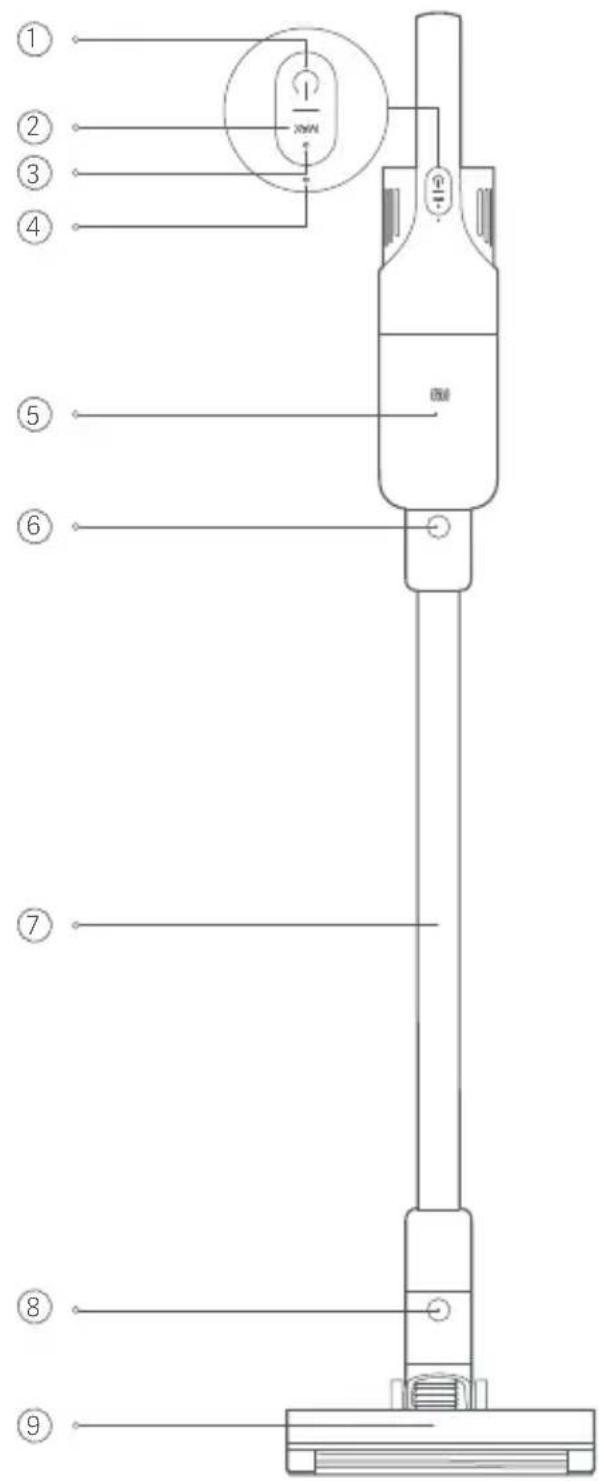
1 On/Off Button ② Suction Level Button 3 MAX Indicator 4 Battery Level Indicator 5 Dust Compartment 6 Extension Rod Release Button 7 Extension Rod 8 Electric Floor Brush Release Button 9 Floor Brush Window 10 Wheels ⑪ Roller Brush 12 Cleaning Soft Brush ⑬ Roller Brush Button 14 Dust Compartment Window 15 Vacuum Cleaner Charging Port 16 Anti-slip Strip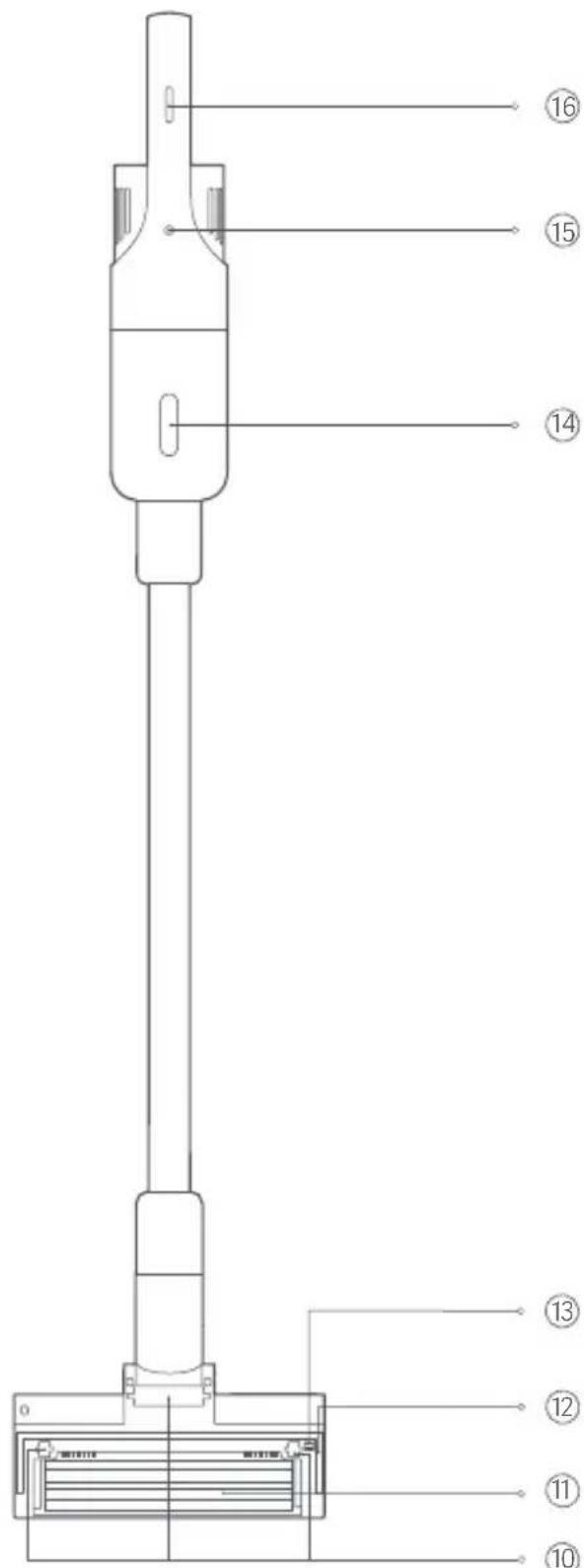
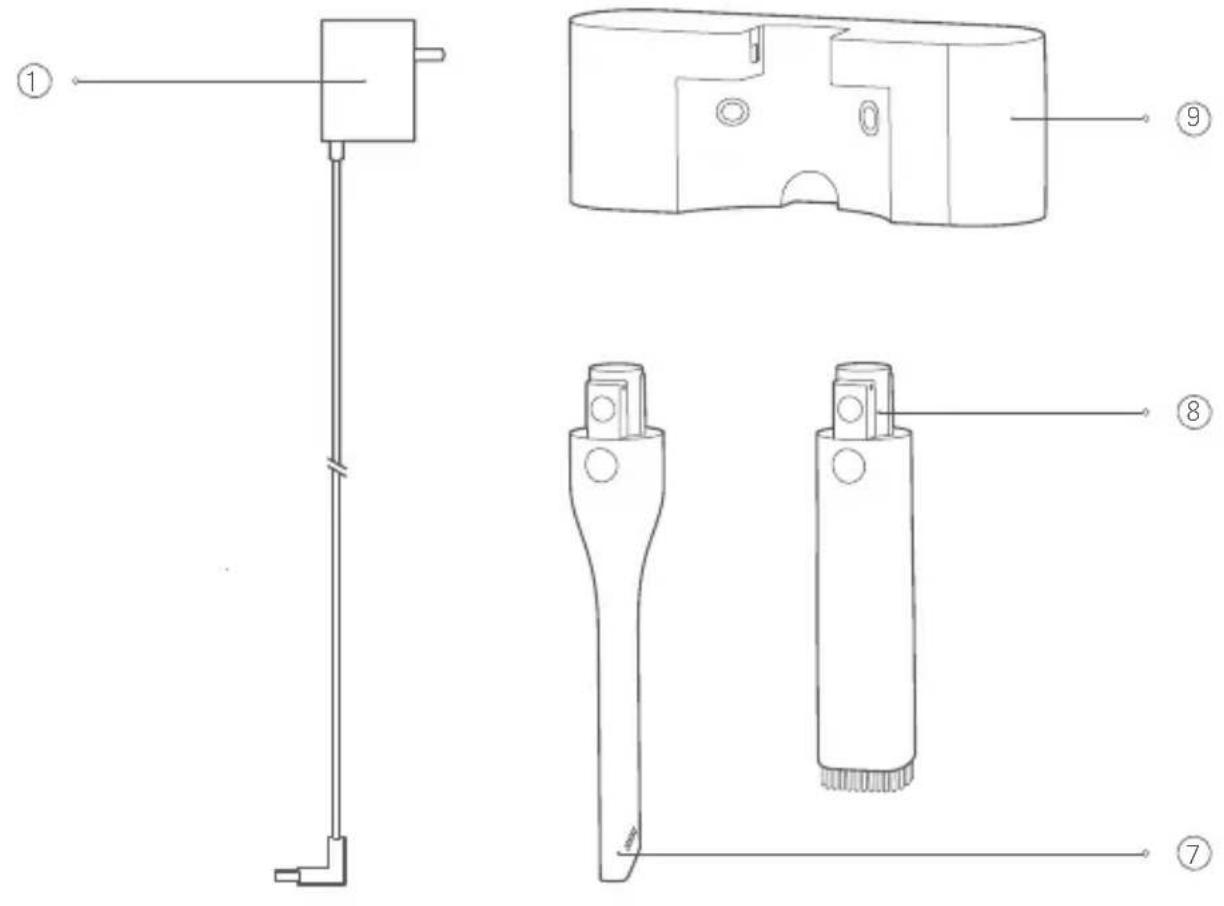
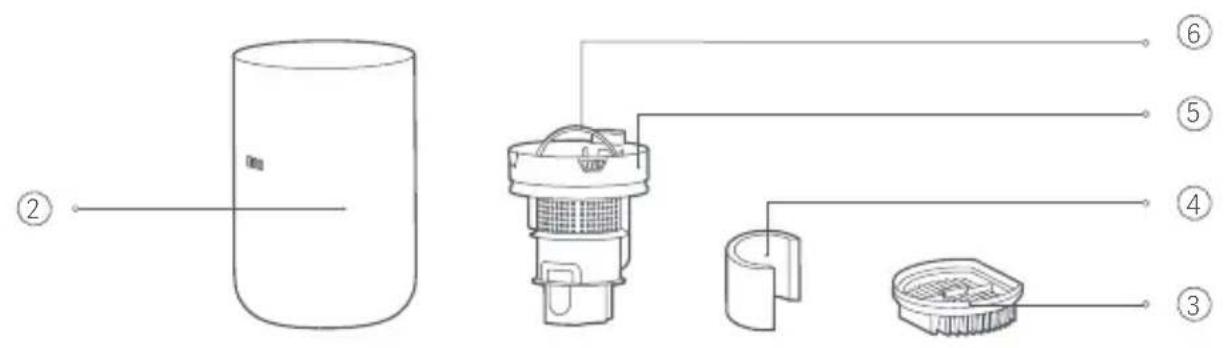
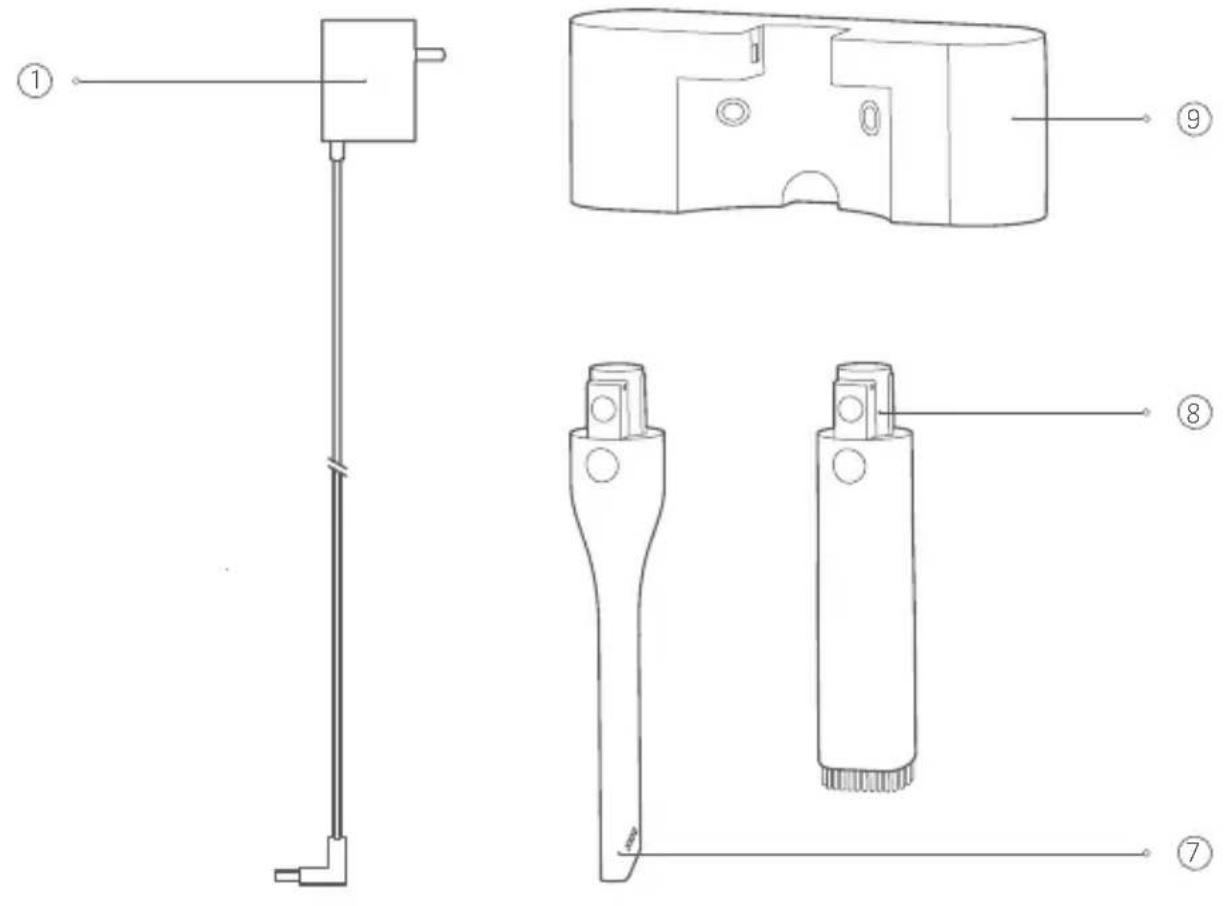
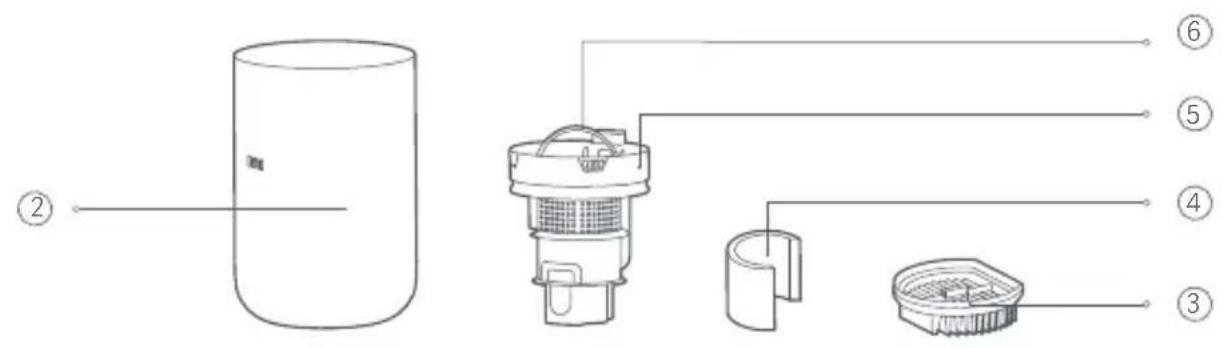
① Power Adapter 4 Filter Cotton ⑦ Long Nozzle
Dust Compartment ⑤ Cyclone Separator 8 Flat Nozzle
③ Filter ⑥ Cyclone Separator Handle 9 Wall Mount
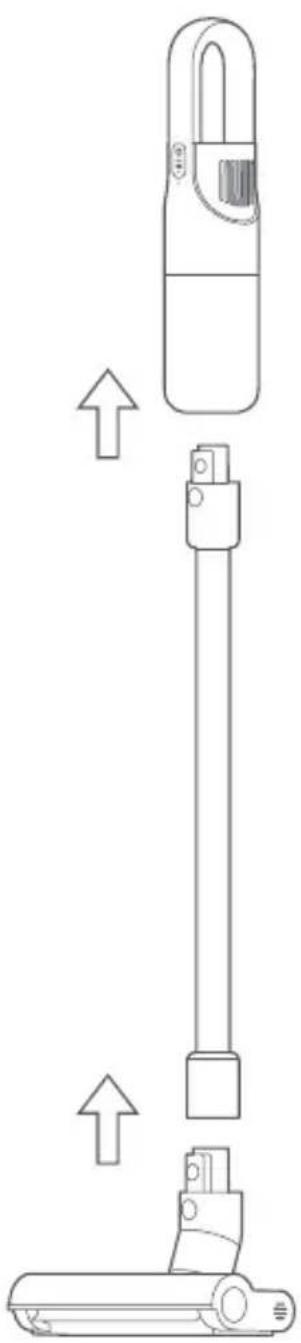
Assembling the Vacuum Cleaner
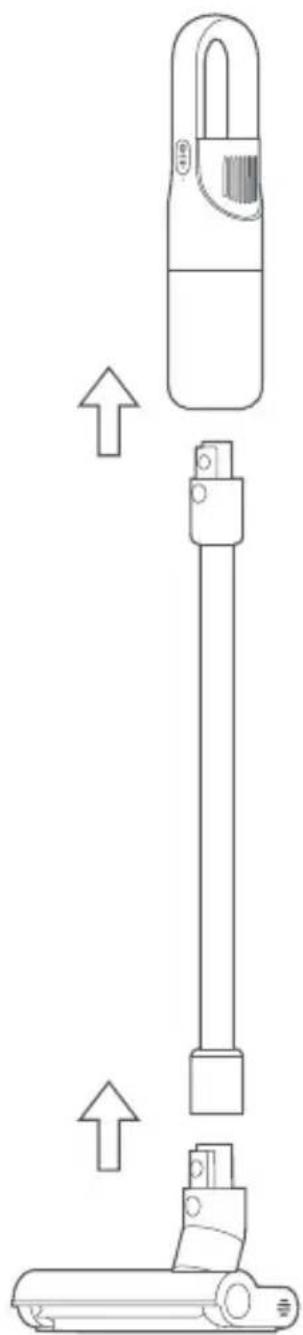
- Connect the extension rod to the vacuum cleaner, as illustrated, until you hear a click.
- Connect the electric floor brush to the extension rod, as illustrated, until you hear a click.
Installing the Accessories
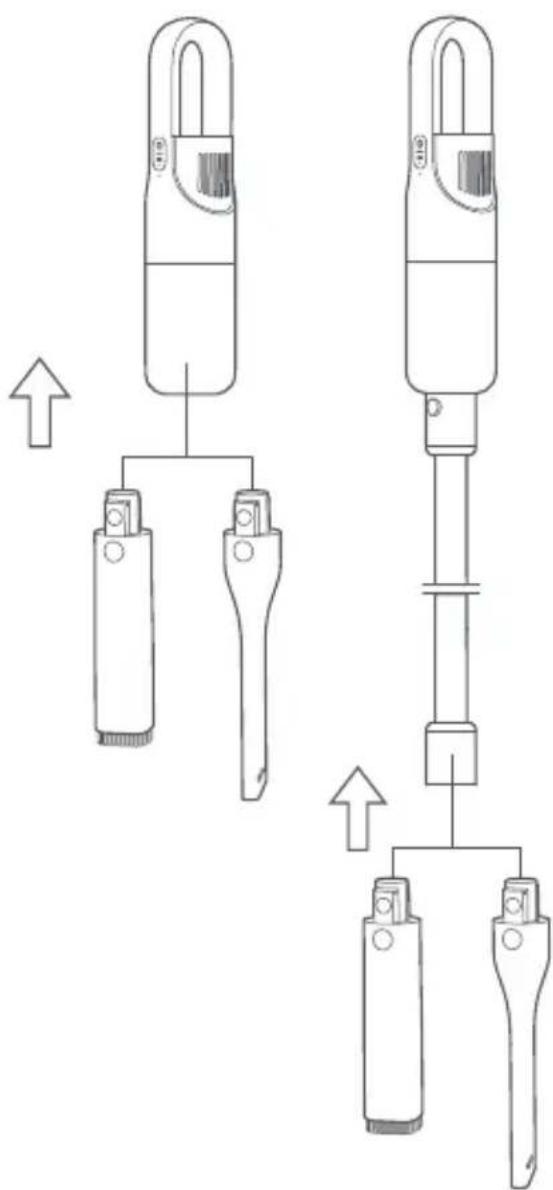
- The long nozzle and flat nozzle can be connected directly to the vacuum cleaner or the extension rod.
- Insert the long nozzle or flat nozzle into the vacuum cleaner or extension rod vertically, as illustrated, until you hear a click.
Note: The long nozzle is suitable for cleaning dust from narrow gaps such as doors, windows, stairs and corners. The flat nozzle is perfect for cleaning dust from sofa seats, cabinets, and desk or console surfaces.
Fixing the Wall Mount
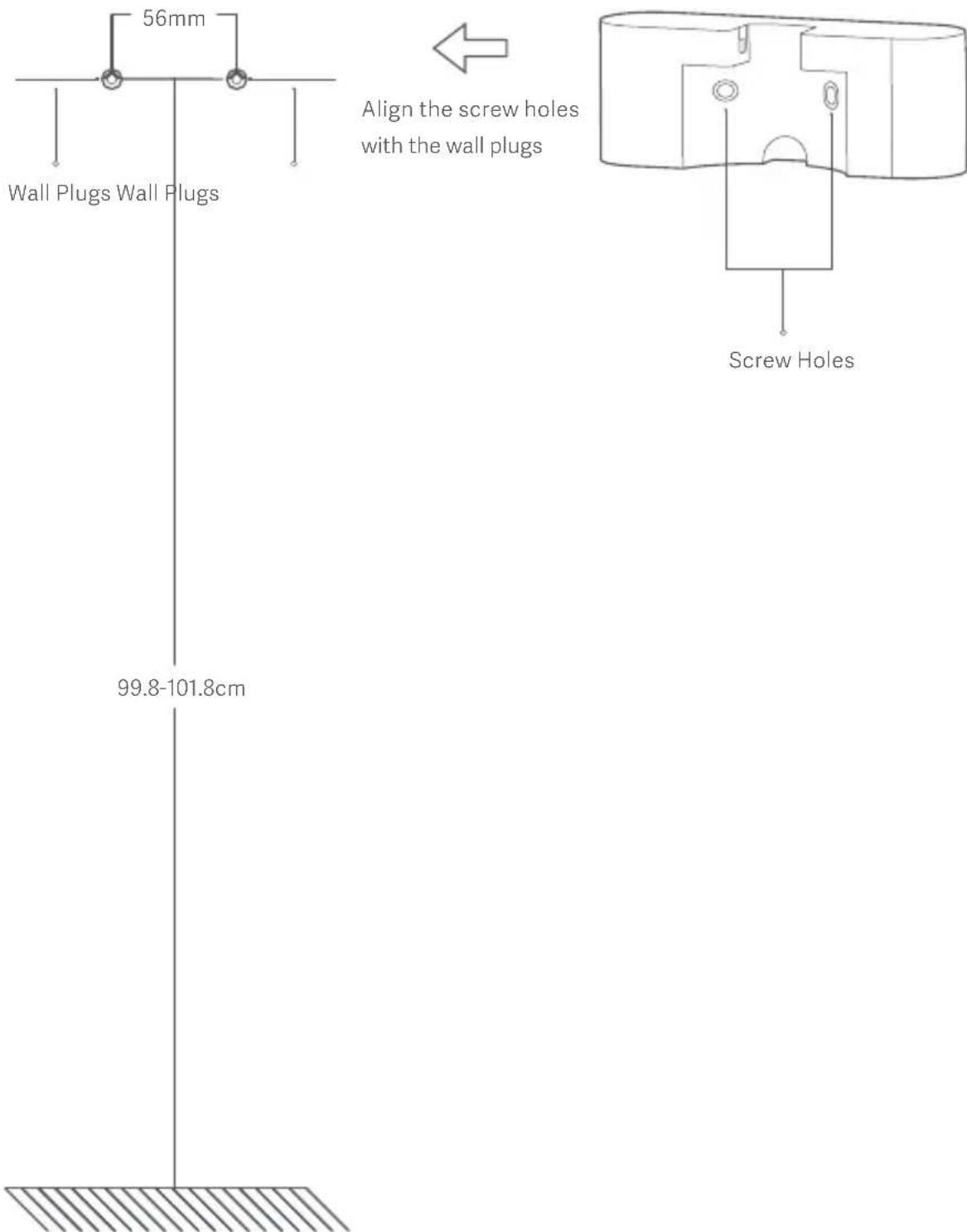
- Drill two holes with each diameter of 6 mm on the wall at the height of
99.8-101.8 cm above the ground, and ensure there is a distance of 56 mm between two holes, then insert two wall plugs into the holes.
- Align the screw holes in the wall mount with the wall plugs, then use two screws (4 x 20 mm) to firmly secure the wall mount to the wall.
Note: It is recommended to fix the wall mount near an electrical outlet so that it can easily connect to the power.
- Turning on/off: Press and hold the on/off button for 1 second, then the vacuum cleaner starts working and it runs on the standard mode by default. Press the on/off button again to stop the vacuum cleaner.
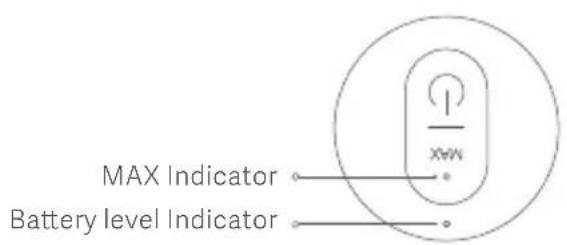
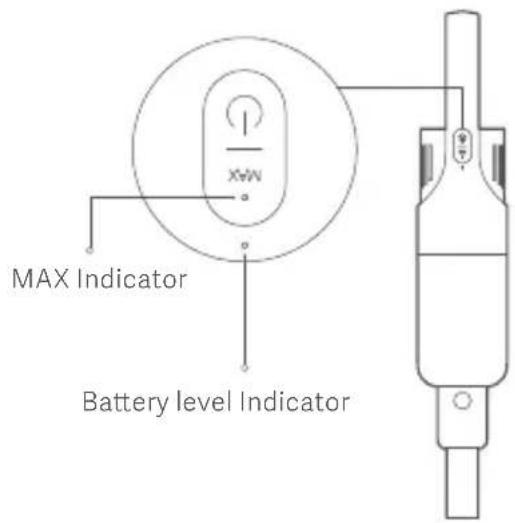
- Switch mode: When the vacuum cleaner is running, press the suction level button to switch to the turbo mode (MAX level); meanwhile, the MAX indicator will be white. Press the suction level button again to switch to the standard mode.
- Battery level indicator: When the battery level is sufficient, the battery level indicator is white. When the vacuum cleaner runs at a low battery level, the indicator is red; if so, the vacuum cleaner cannot be switched to the turbo mode. When the battery runs out, the vacuum cleaner automatically turns off.
Charging method
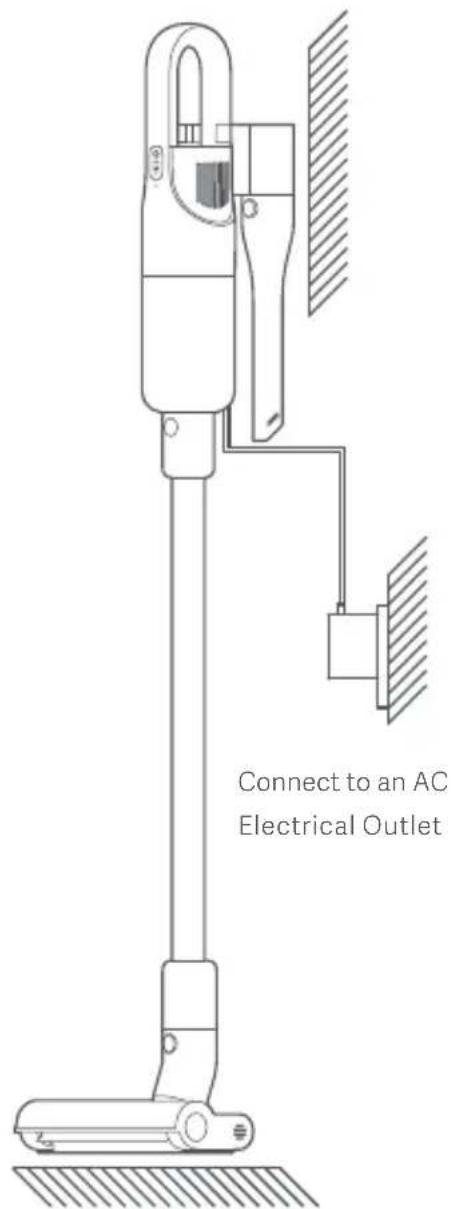
- Before charging, make sure that the power adapter is well connected to the electrical outlet and the vacuum cleaner.
- When charging, the battery level indicator is breathing. Once the battery is fully charged, the battery level indicator goes off.
- If you charge the vacuum cleaner while its battery is full, the battery level indicator will breathe for 20 seconds then go off.
Turning On/Off & Vacuuming
- Press and hold the on/off button for 1 second, then the vacuum cleaner starts working and it runs on the standard mode by default. You can switch the mode as needed.
- Hold the handle of the vacuum cleaner and push it back and forth to vacuum and clean the floor with the floor brush. You can also use the long nozzle or flat nozzle according to your needs.
- Press the on/off button again to stop the vacuum cleaner.
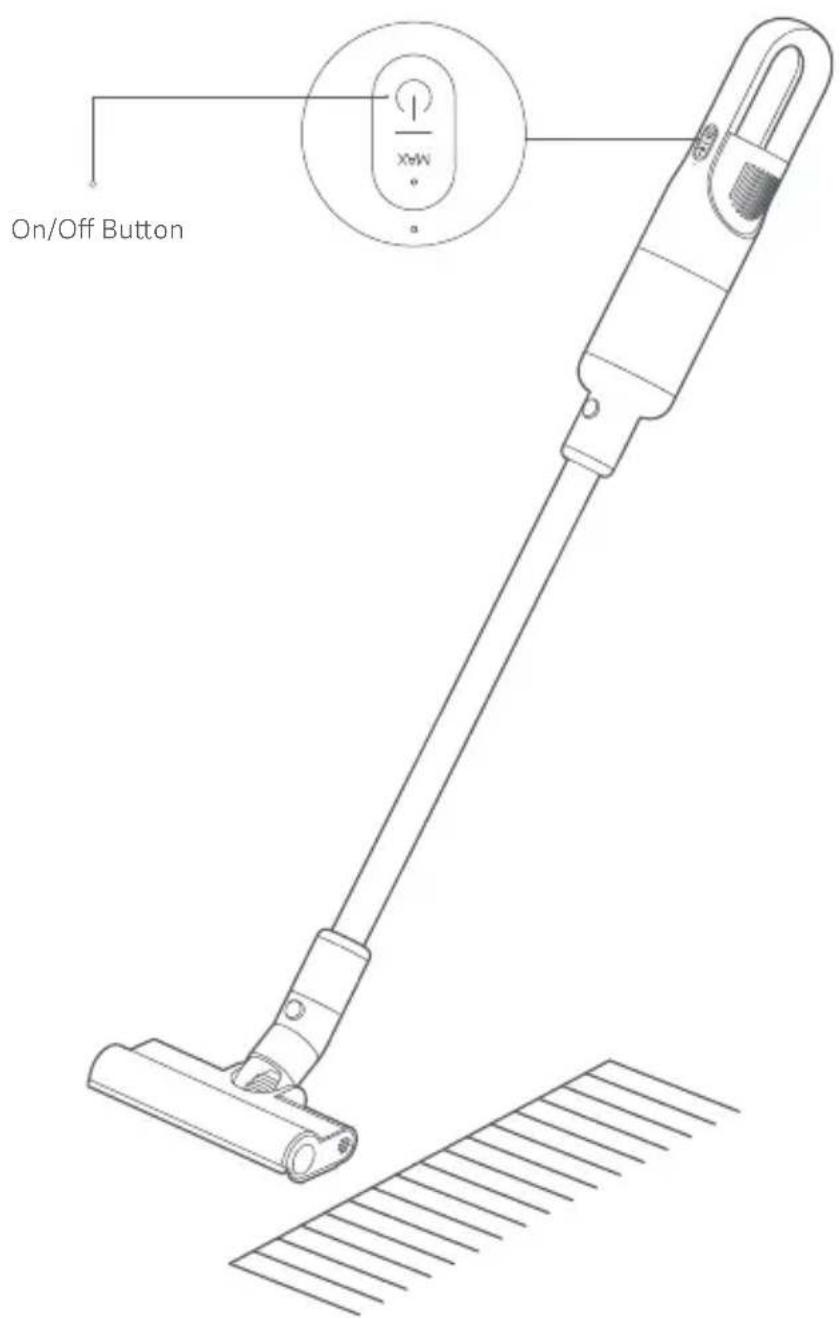
When the Vacuum Cleaner is Working
- When the battery level is low, the battery level indicator will blink red. Please recharge the vacuum cleaner soon. If the vacuum cleaner is running in standard mode, it cannot be switched to turbo mode.
- If it is not recharged in time, the battery voltage will become too low, and the vacuum cleaner will automatically turn off to protect the battery.
- If the vacuum cleaner turns off due to battery depletion, please recharge it promptly. Otherwise, the battery may be damaged due to over-discharging if it is not used for an extended period.
Notes
- There is a small amount of battery in the vacuum cleaner when you receive it. It is recommended to connect the power adapter to fully charge the vacuum cleaner before its first use.
- When charging, the vacuum cleaner cannot be used.
Storing Accessories
The accessories can be stored on the wall mount when not in use. Vertically insert the long nozzle or flat nozzle into the wall mount until you hear a click, with the release button oriented as shown in the figure. To remove the accessories from the wall mount, press the release button and simultaneously pull them down vertically.
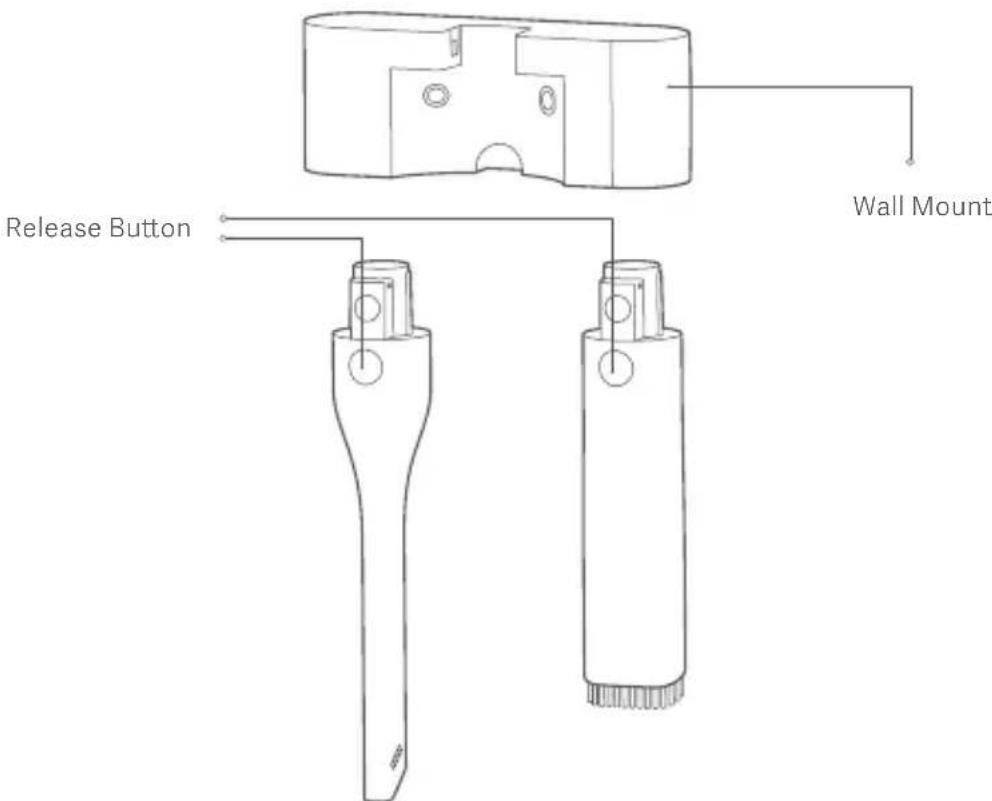
Note: Before cleaning or performing maintenance on the vacuum cleaner, turn it off and unplug it.
- Clean the dust compartment regularly to avoid dust buildup that could cause blockage and affect suction.
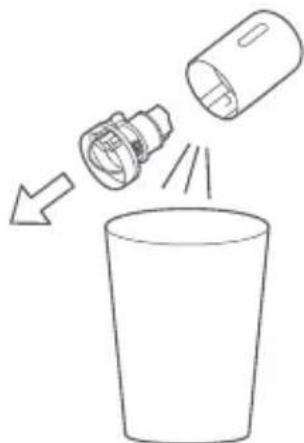
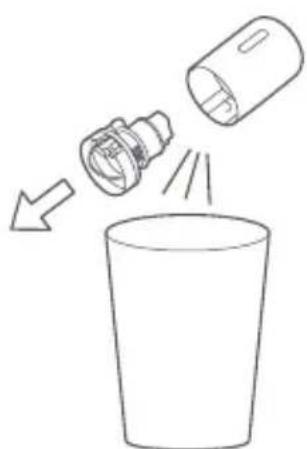
- To prevent dust from falling on the floor, hold the dust compartment over a trash can when removing it.
Removing & Installing the Dust Compartment
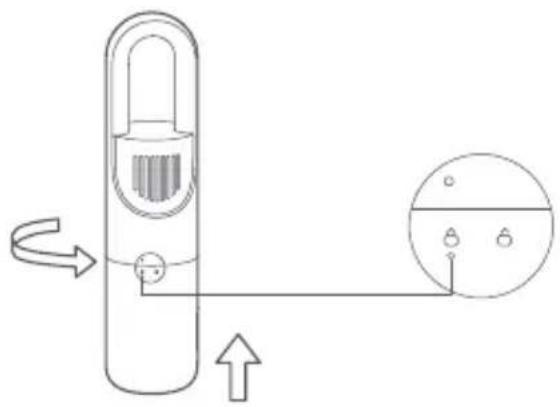
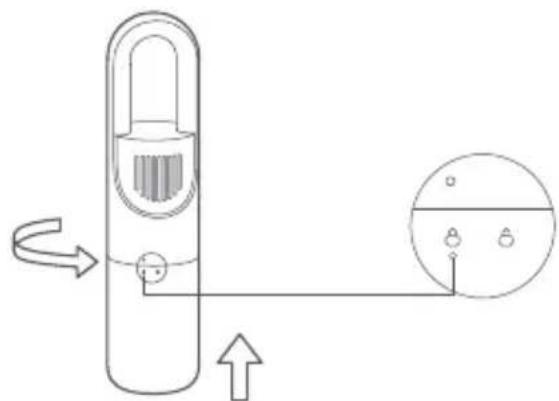
- After vacuuming or when the dust compartment is full, pull out the extension rod and rotate the dust compartment in the direction shown in the figure. When the unlock symbol is lined up with the unlock symbol, the dust compartment can be removed from the vacuum cleaner.
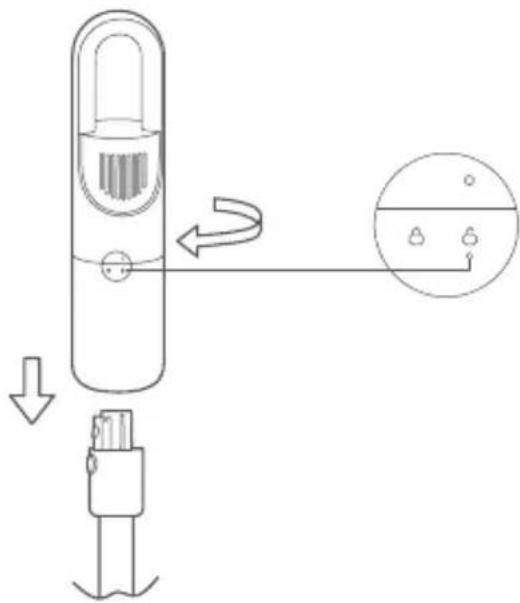
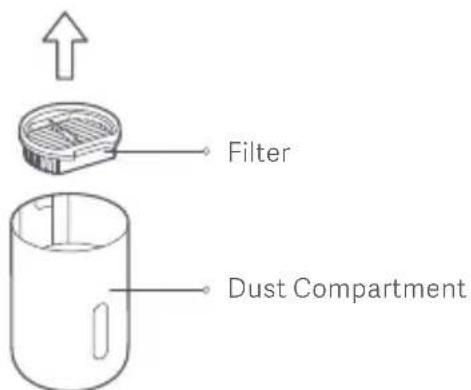
- Take the filter out of the dust compartment as shown in the figure, then remove the dust from its surface.
- Flip the cyclone separator handle over the trash can to remove the cyclone separator from the dust compartment, as shown in the figure. Empty the content in the dust compartment and clear any dust from the surface of the cyclone separator.
- Place the cyclone separator and filter back into the dust compartment when the cleaning is completed. Align the unlock symbol with the lock symbol, then rotate the dust compartment in the direction shown in the figure until the lock symbol is lined up with the lock symbol. Once you hear a click, the dust compartment is securely installed onto the vacuum cleaner.
Installing the Cyclone Separator
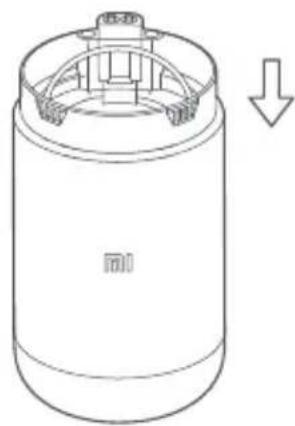
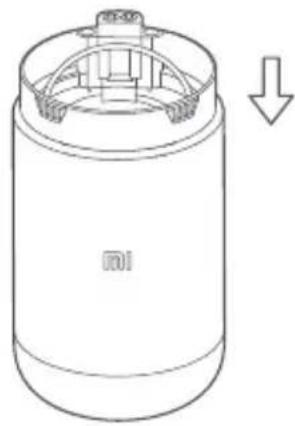
Press the cyclone separator straight downwards until it reaches the end of the dust compartment.
Cleaning the Dust Compartment & Filter Assembly
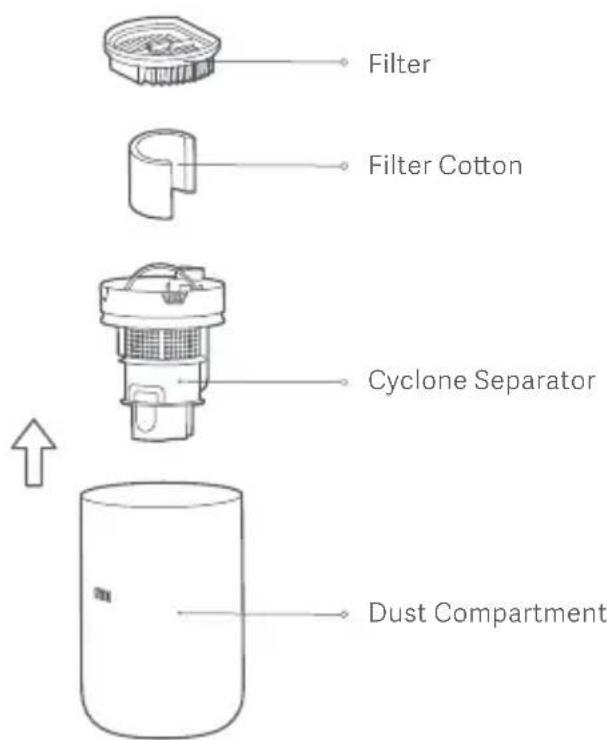
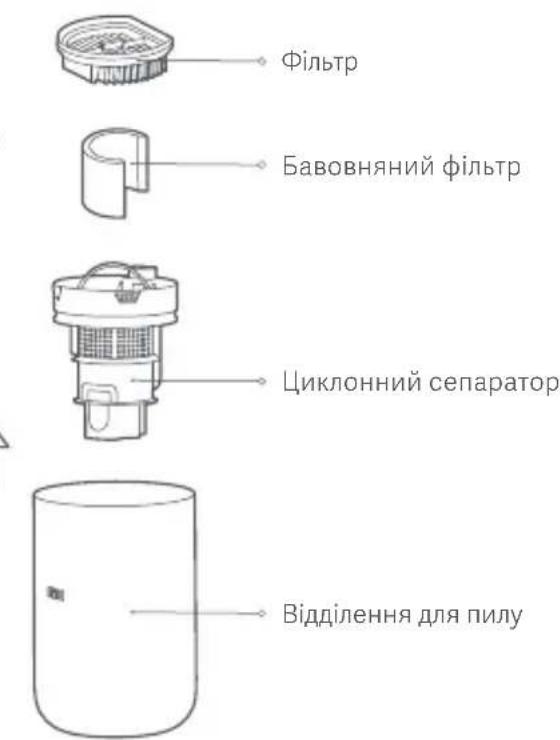
Take the filter, filter cotton, and cyclone separator successively out of the dust compartment. Remove any dust on their surface, then rinse them with clean water. Make sure they are thoroughly dry in a well-ventilated place away from direct sunlight before use. If necessary, you can replace the filter with the specified model of the filter.
Cleaning the Roller Brush
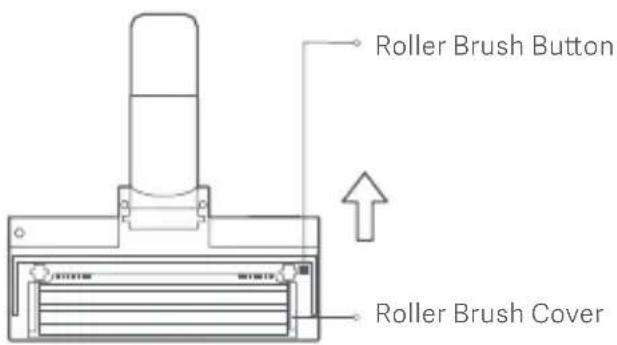
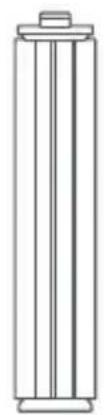
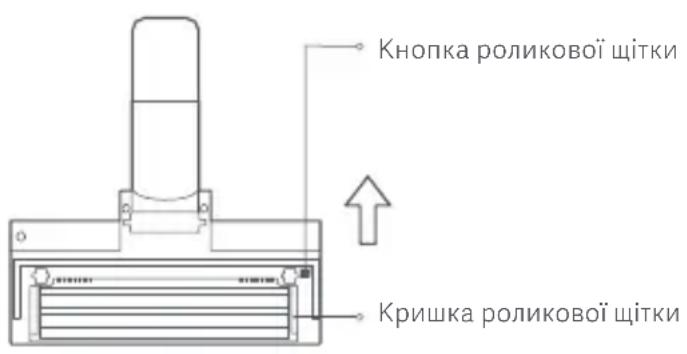
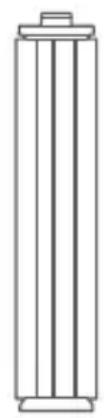
- Press the roller brush button as shown in the figure to pop open the roller brush cover, then pull out the roller brush to clean it. After it has been cleaned, put the roller brush back and close the cover until you hear a click.
- Cut off the hair and fibers attached to the roller brush and remove them.
- When cleaning the vacuum cleaner, use a dry cloth. Do not use chemical solvents such as gasoline, alcohol, or lacquer thinner, as these will cause the shell to crack or fade.
- Make sure you turn off the vacuum cleaner before cleaning or performing maintenance.
- When the dust compartment is full, please empty it immediately. Otherwise, it may be blocked by the dirt, affecting the suction performance and causing the motor to overheat.
- It is recommended to replace the filter every 2–3 months. You may need to change it more often if it is used frequently.
Troubleshooting
| Issue | | SolutionPossible Cause |
| The vacuum cleaner does not work. | 1. The battery level is low.
2. The vacuum cleaner is running for a long time so that it is overheated.
3. The vacuum cleaner is not powered on.
4. When the air duct has been clogged for eight seconds, the motor will stop running to protect overheating.
5. The motor or battery is damaged. | 1. Charge the vacuum cleaner.
2. Cool the vacuum cleaner down, then use it again.
3. Power on the vacuum cleaner.
4. Clear the foreign objects in the air duct, electric floor brush, extension rod, or dust compartment.
5. Please contact the after-sales service department for help. |
| The suction level decreases. | 1. The dust compartment is full.
2. The electric floor brush is blocked by foreign objects.
3. The filter is blocked or not thoroughly dry after cleaning. | 1. Empty the content in the dust compartment.
2. Remove the foreign objects in the electric floor brush.
3. Clean the filter or thoroughly dry it. |
| The noise is extremely loud. | 1. The dust compartment is full.
2. The air duct is clogged up. | 1. Empty the content in the dust compartment.
2. Clear the foreign objects in the air duct, electric floor brush, extension rod, or dust compartment. |
| The electric floor brush stops running. | 1. The electric floor brush is clogged so that it stops running for protection.
2. The electric floor brush does not work after connecting to power. | 1. Remove the objects tangled around the electric floor brush.
2. Please contact the after-sales service department for help. |
| The vacuum cleaner cannot be charged. | 1. It is not well connected between the power adapter and the electrical outlet.
2. It is not well connected between the power adapter and the vacuum cleaner charging port.
3. The power adapter is damaged. | 1. Firmly plug the power adapter into the electrical outlet.
2. Securely connect the power adapter with the charging port.
3. Please contact the after-sales service department for help. |
| The battery level Indicator is blinking red and white alternately. | The power adapter is not compatible with the vacuum cleaner. | Only use the included power adapter to charge the vacuum cleaner. |
Note: Any issue occurred during use, please refer to the troubleshooting above for the solution. If the problem still persists, please stop using the vacuum cleaner immediately and contact the after-sales service for help.
Specifications
| Mi Vacuum Cleaner Light |
| MJWXCQ03DYM | Model | 240 × 148 × 1132 mmltem Dim Nomin |
| Approx. 2.3 kgNet Weight | 2500 mAhBattery Charging T |
| 0.5 AlInput Current | Approx. 5 hoursCharging |
| 220 WOperating Power Put Voltage 26.0 V | = = |
| ≤ 79 dBNoise Emission | |
| Battery Service Life (excl. electric floor brush) | 45 minutes on standard mode |
| 13 minutes on turbo mode |
| Electric Floor Brush |
| Model | MJWXCQ03DY-DS |
| Operating Power | 15 W | Operating Voltage | 21.6 V--- |
| Power Adapter |
| Model | BLJ15W260050P-VA | | 84.6%Average Ac |
| Input | 100-240 V~ 50/60 Hz 0.5 A | Efficiency at Low Load (10%) | 71.43% |
| Output | 26.0 V ~ 0.5 A 13.0 W | No-load Power Consumption | 0.10 W |
| Zhongshan Baolijin Electronic Co., Ltd.Manufactured By |
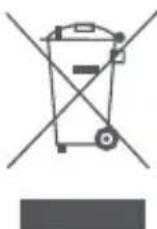
All products bearing this symbol are waste electrical and electronic equipment (WEEE as in directive 2012/19/EU) which should not be mixed with unsorted household waste. Instead, you should protect human health and the environment by handing over your waste equipment to a designated collection point for the recycling of waste
electrical and electronic equipment, appointed by the government or local authorities. Correct disposal and recycling will help prevent potential negative consequences to the environment and human health. Please contact the installer or local authorities for more information about the location as well as terms and conditions of such collection points.
- The vacuum cleaner is in standby mode and cannot be used during charging.
- The lithium-ion battery pack contains substances that are hazardous to the environment. Before disposing of the vacuum cleaner, please first remove the battery pack, then discard or recycle it in accordance with local laws and regulations of the country or region it is used in.
Note: The vacuum cleaner must be turned off before removing the battery.
The battery should be disposed of in a safe manner.
How to Remove the Battery
- Use a straight screwdriver to remove the on/off button and the button bracket, then use a tool to pry open the vacuum cleaner cover. Next, use a screwdriver to unscrew the four screws. Then you can pull the handle and motor cover to separate the battery pack.
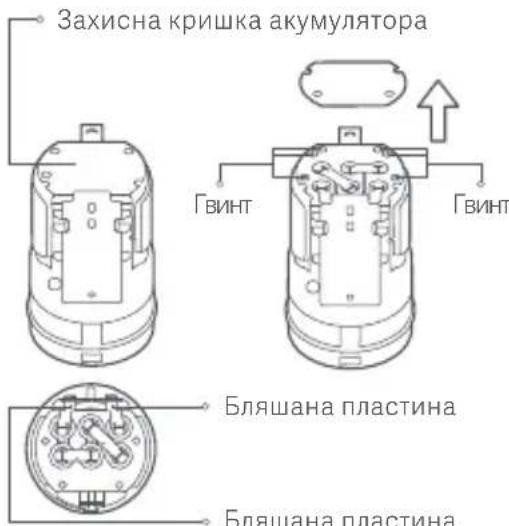
- Remove the battery protective cover, then release the four screws on the cover with a screwdriver. Use a scissor to cut off the tin plate connecting the battery and PCB board.
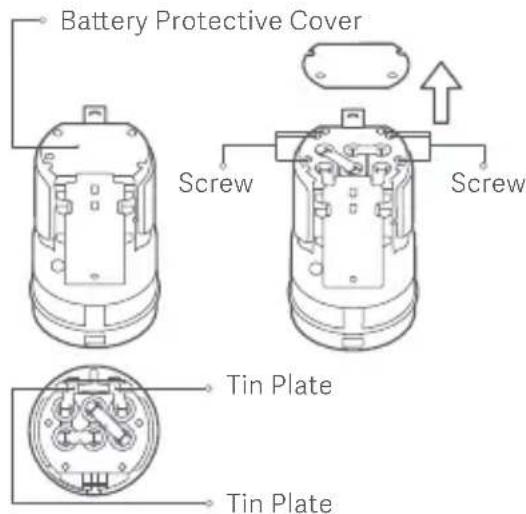
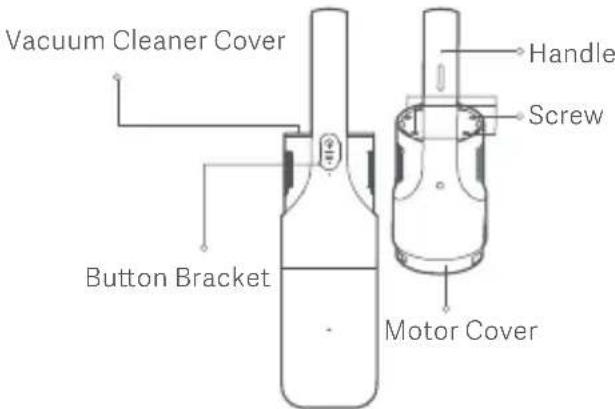
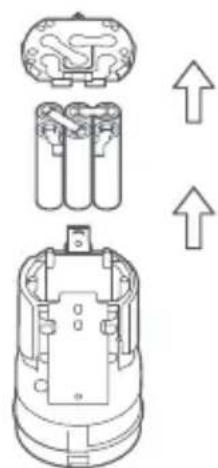
- After removing the up-bracket, the battery pack can be taken out of from the down-bracket. Then you can dispose of the battery in accordance with local laws and regulations.

http://www.mi.com/global/service/support/declaration.html
http://www.mi.com/global/service/support/declaration.html
http://www.mi.com/global/service/support/declaration.html
Equipped with a high-speed brushless motor, the Mi cordless vacuum cleaner can boast such functions as powerful suction and an efficient filtration system.
- High-speed brushless motor: fast operation with stable performance for strong suction, making cleaning quick.
- Powerful suction: fast and efficient suction of fine and coarse particles for deep cleaning of the entire home.
- Efficient filtration: a cyclone separation system consisting of a fine steel mesh, a sponge filter, and a filter that separates coarse dust from fine dust, then captures the dust to prevent it from escaping, thus preventing secondary pollution.
- Lightweight and versatile: the compact and lightweight vacuum cleaner works with accessories such as an extension wand made of lightweight metal, an electric brush for carpets, a flat nozzle, and a long nozzle, making it easy and effective to clean the entire home.
Package contents
http://www.mi.com/global/service/support/declaration.html
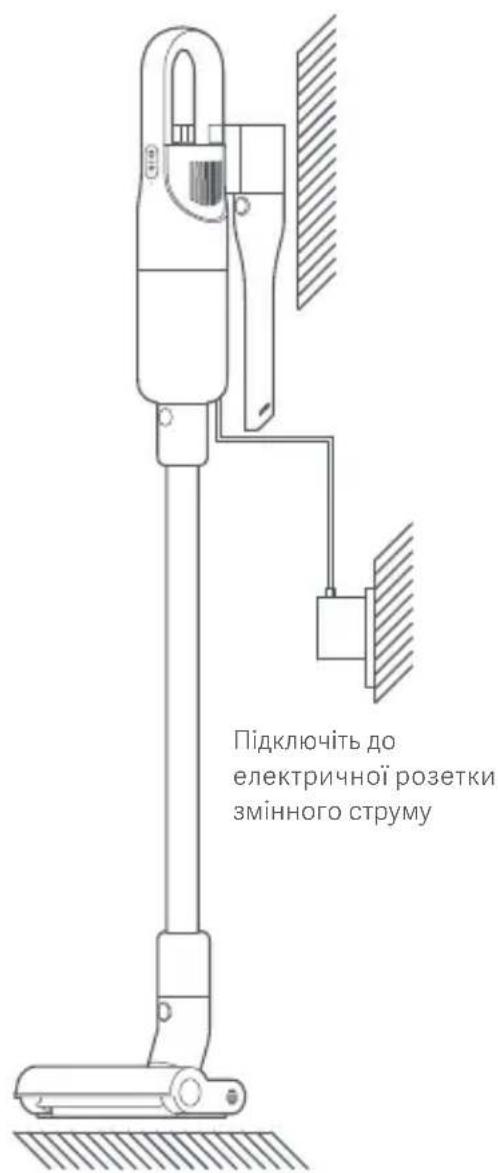
Plug into AC electrical outlet
MAX indicator Battery level indicator
Battery level indicator
6 Button for turning on the device
7 Turning on the device
8 Button for turning on the electric motor
9 Motor output
10 Contact
12 Motor power cable
3 Roller button
15 Charging port
16 Trigger
11 Roller
14 Window for motor output
1 Power supply
2 Power cord
0 Handle of the separator
5) Long nozzle
9) Crevice nozzle
7) Brush nozzle / Upholstery nozzle
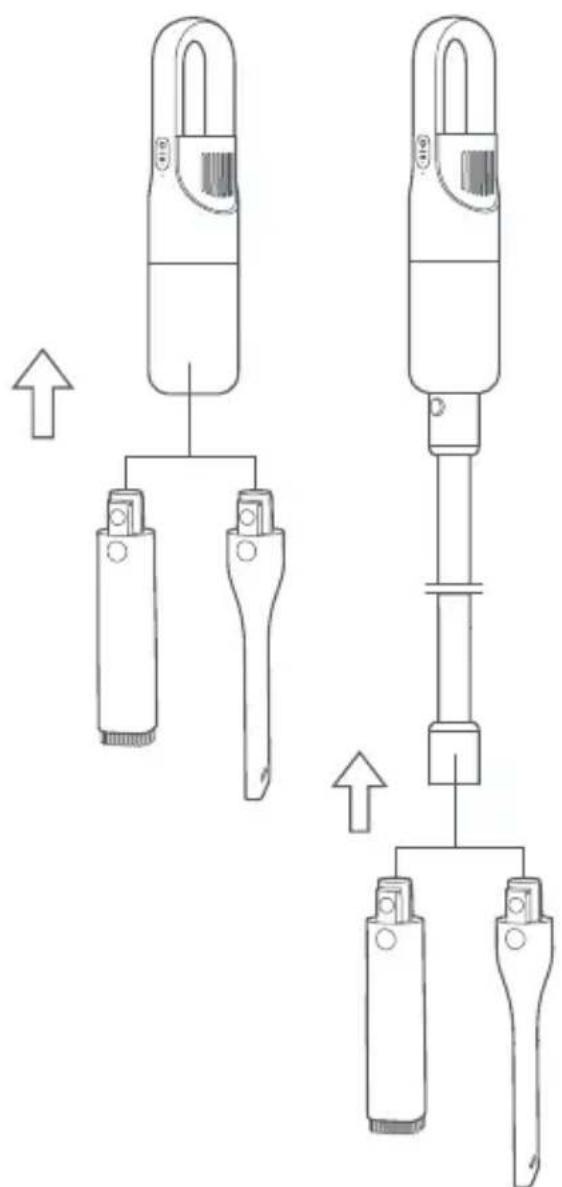
Assembling the vacuum cleaner
1. Connect the hose to the vacuum cleaner as shown in the illustration until you hear a click. 2. Connect the electric brush to the hose as shown in the illustration until you hear a click.
Installing the accessories
1. The long nozzle and flat nozzle can be connected directly to the vacuum cleaner or to the hose. 2. Insert the long nozzle or flat nozzle into the vacuum cleaner or hose vertically, as shown in the illustration, until you hear a click. Note: The long nozzle is suitable for cleaning dust from narrow gaps, such as corners, windows, and stairs. The flat nozzle is ideal for cleaning dust from sofas, wardrobes, as well as table or console surfaces.
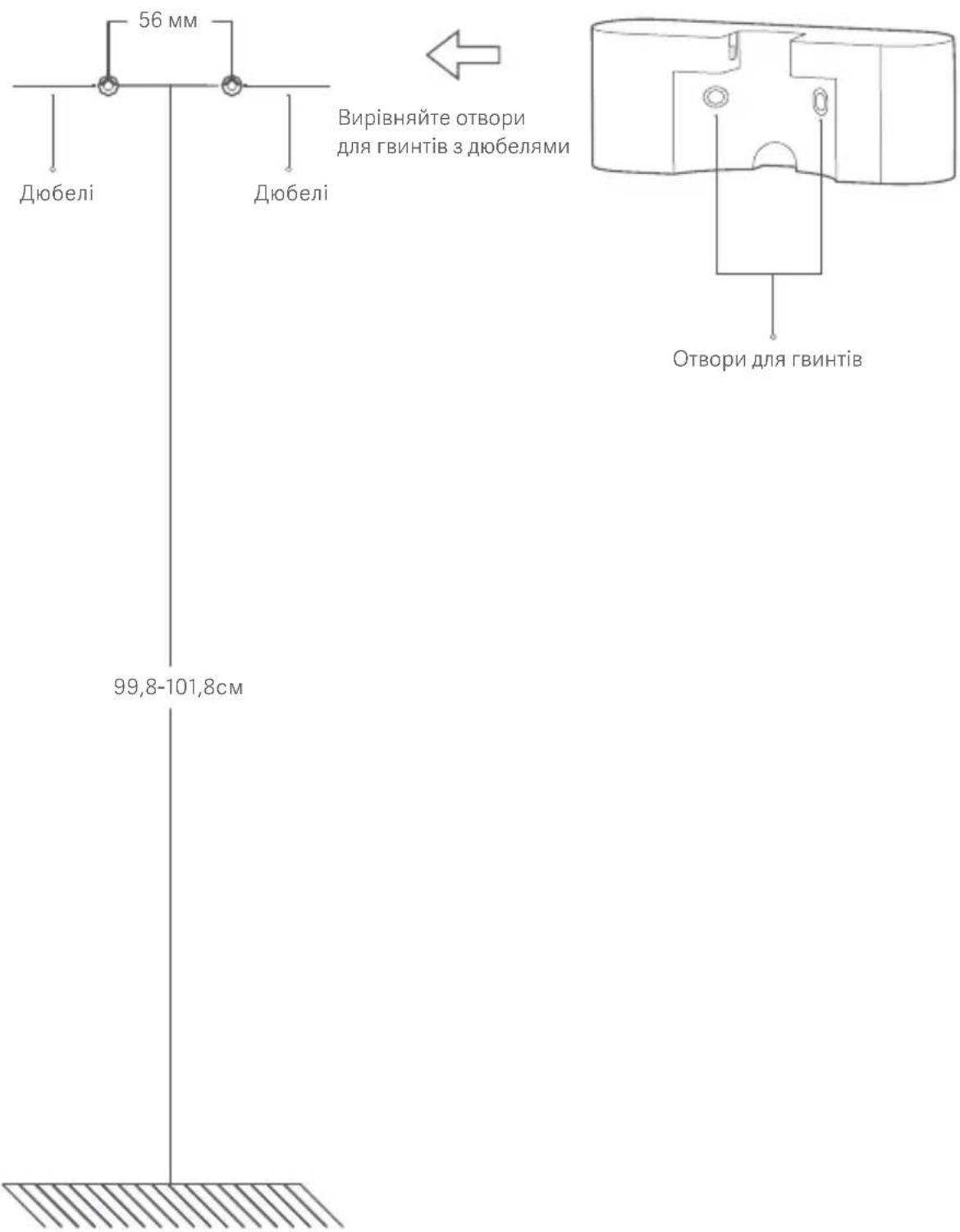
Securing the wall bracket
- Drill two holes with a diameter of 6 mm each in the wall at a height of 99.8-101.8 cm from the floor. The distance between the two holes must be 56 mm. Then insert two dowels into the holes.
- Align the holes for the screws in the wall bracket with the dowels, then firmly attach the wall bracket to the wall using two screws (4 × 20 mm). Note: It is recommended to install the bracket near an electrical outlet to avoid having to disconnect the power source.
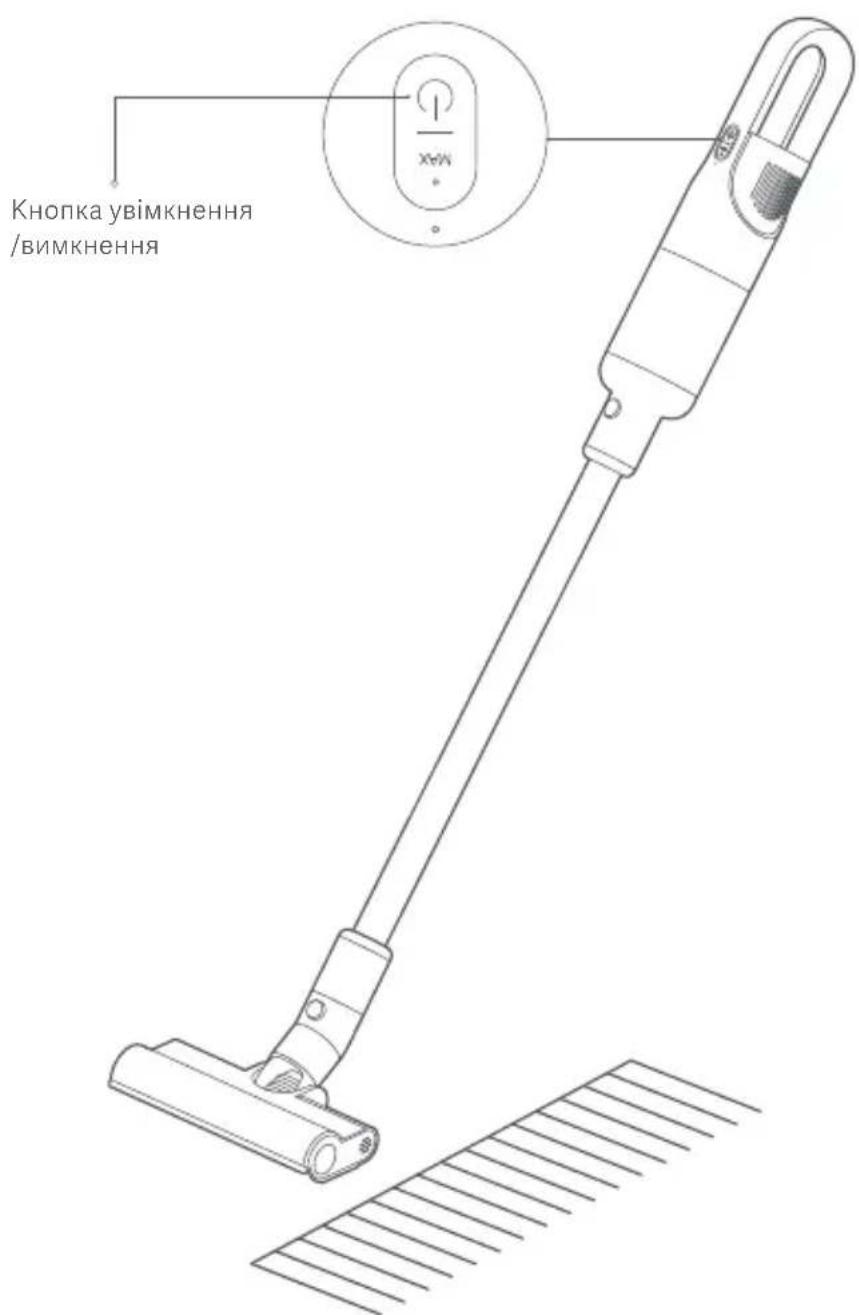
- Switching on/off: Press the on/off button for 1 second, after which the vacuum cleaner will start working, and after releasing it, it will operate in standard mode. Press the on/off button again to turn off the vacuum cleaner.
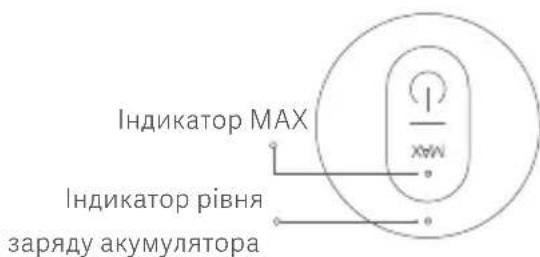
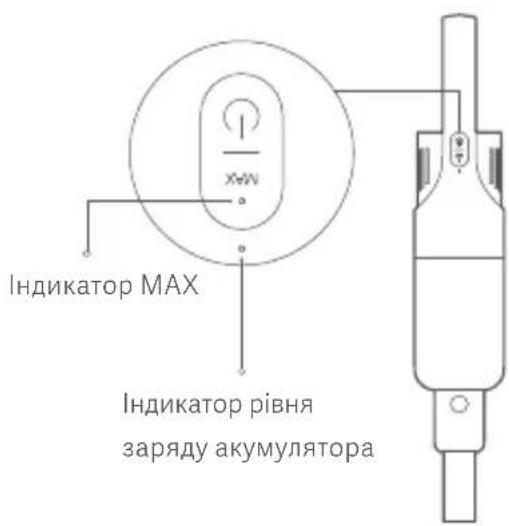
- Turbo mode: While the vacuum cleaner is running, press the power boost button to switch to turbo mode (MAX level); at this time, the MAX indicator lights up. Press the power boost button again to switch back to standard mode. Battery level indicator: When the battery charge is sufficient, the battery level indicator is white. When the vacuum cleaner operates at low battery level, the indicator is red; in this case, the vacuum cleaner cannot be switched to turbo mode. When the battery is discharged, the vacuum cleaner automatically turns off.
Charging
1. Before charging, make sure that the adapter is properly connected to the electrical outlet and the vacuum cleaner. 2. During charging, the battery level indicator lights up. When the battery is fully charged, the battery level indicator turns off. 3. If you charge the vacuum cleaner when the battery is fully charged, the battery level indicator will light up for 20 seconds and then turn off.
YbIMKHeHHBIMKHeHHH npn6npaHHnnococom
- Press and hold the humidify/dry button for 1 second. After that, the vacuum will start working, and by default it will work in standard mode. You can switch modes as needed. Hold the vacuum and move it back and forth to perform preliminary cleaning of the carpet. You can also use the long nozzle or flat nozzle, depending on your needs.
- Press the humidify/dry button again to turn off the vacuum.
When the vacuum is working
- At a low battery level, the battery charge indicator blinks red. This means that the vacuum needs to be charged soon. If the vacuum is working in standard mode, it cannot be switched to turbo mode.
- If the battery is not charged, the battery level drops significantly. At this time, the vacuum automatically turns off to protect the battery.
- If the vacuum turns off because the battery is depleted, charge it promptly. Otherwise, the battery may be damaged due to over-discharge if the appliance is not used for a long time.
Tips
- When purchasing the vacuum, the battery is charged with a small amount of energy. It is recommended to charge the battery fully before first use. - Do not use the vacuum while charging.
Storing accessories
When accessories are not in use, they can be stored on the storage bracket. Vertically insert the long nozzle or flat nozzle into the storage bracket until you hear a click, while pressing the release button as shown in the figure. To remove the accessories from the storage bracket, press the release button and simultaneously pull them vertically downward.
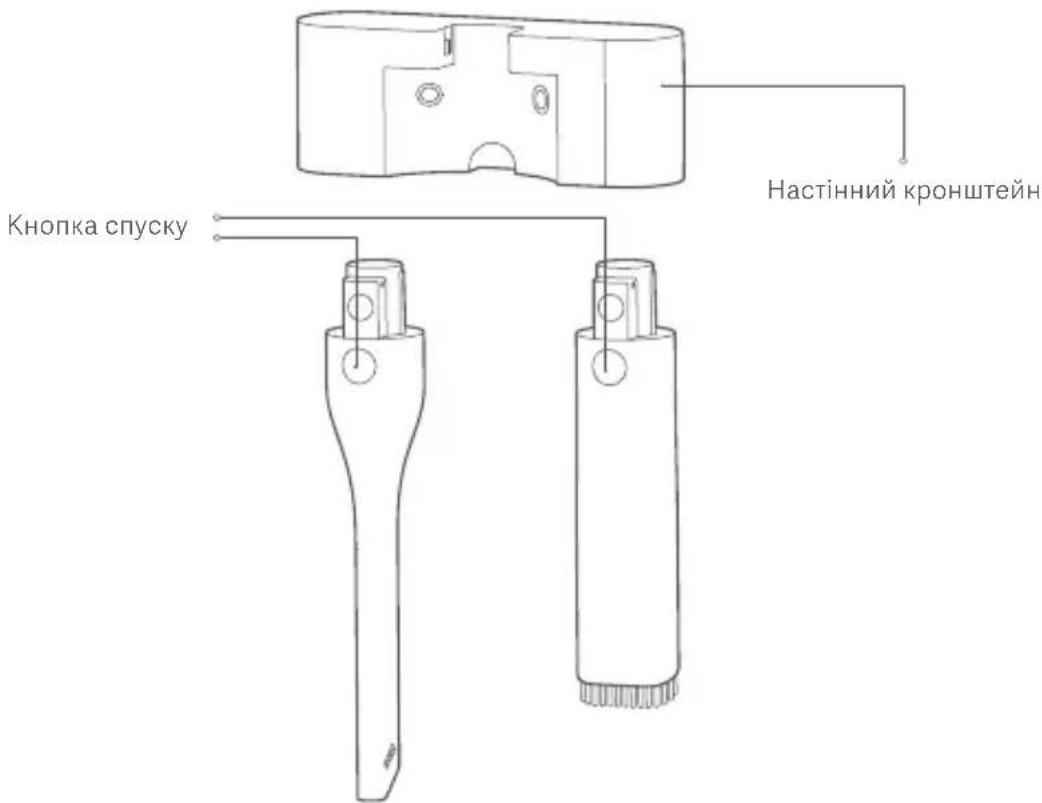
Note. Before cleaning or performing maintenance on the vacuum, turn it off and unplug it from the outlet.
Regularly perform wet cleaning to remove accumulated dust, which can lead to clogging and affect suction. - To prevent dust from entering, when removing the dust container from the appliance, hold it over a trash bin.
Removing and installing the dust container
1. After cleaning with the vacuum or when the dust container is full, remove the filter and return the dust container to the appliance as shown in the figure. When the release symbol is pressed, the dust container can be removed from the vacuum.
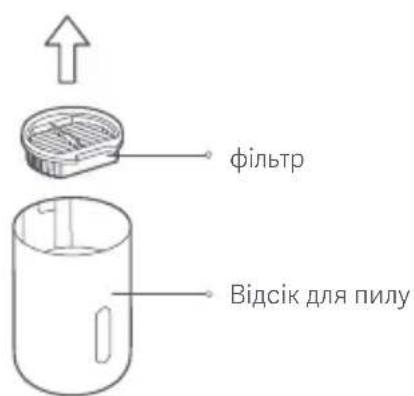

2. Remove the filter and the cyclone separator from the surface, as shown in the figure. Then install them back onto the surface.
- Turn the cyclone separator counterclockwise to remove it from the milk container, as shown in the figure. Empty the contents of the container and then reinstall the cyclone separator onto the surface.
4. Install the cyclone separator and filter onto the milk container after cleaning is complete. Align the unlock symbol with the lock symbol, then turn the milk container back to the position shown in the figure until the unlock symbol is no longer visible. When you hear a click, it means the milk container is properly installed in place.
Installing the cyclone separator
Press the cyclone separator straight down until it reaches the bottom of the container.
Cleaning the milk container and filter assembly
Remove the filter, foam filter, and cyclone separator in sequence from the milk container. Rinse them under clean water, then let them air dry completely in a well-ventilated area away from direct sunlight. If necessary, you can replace the filter with the specified model.
Cleaning the milk frother
- Press the milk frother button as shown in the figure to open the lid of the milk frother, then pull out the milk frother for cleaning. After cleaning, reinsert the milk frother and close the lid until you hear a click.
2. Remove any hairs and fibers attached to the milk frother and dispose of them.
- When cleaning the appliance, use a dry cloth. Do not use chemical solvents such as benzene, alcohol, or paint thinner, as they may cause cracking of the housing or loss of color. Always unplug the appliance before cleaning or maintenance.
- When the milk container is full, empty it immediately. Otherwise, it may become clogged, affecting performance and leading to overheating.
- It is recommended to replace the filter every 2-3 months. With heavy use, you may need to replace it more frequently.
To replace the battery
- Using a screwdriver, remove the screw on the battery cover, then open the battery cover. Next, use the screwdriver to remove the four screws. Then you can pull the handle to separate the cover and replace the battery.
- Bend the battery latch, then lift the battery out of the device using the handle. Using the handle, cut the plastic strap that connects the battery and the handle.

3. After removing the upper bracket, you can remove the battery pack from the lower bracket. After this, you can dispose of the battery in accordance with local laws and regulations.
This product is intended for household use only. Read this manual carefully before using the product and keep it for future reference.
http://www.mi.com/global/service/support/declaration.html
http://www.mi.com/global/service/support/declaration.html
Manufactured for: Xiaomi Communications Co., Ltd.
Manufactured by: Guangdong Deerma Technology Co., Ltd.
(a Mi Ecosystem company)
Address: No.4-1 Longhui Road, Malong Village Committee, Beijiao Town, Shunde District, Foshan City, Guangdong Province, China
For further information, please go to www.mi.com
Address: No.4-1 Longhui Road, Malong Village Committee, Beijiao Town, Shunde District,
Foshan City, Guangdong Province, China
Address: No.4-1 Longhui Road, Malong Village Committee, Beijiao Town, Shunde District,
Foshan City, Guangdong Province, China
Address: No.4-1 Longhui Road, Malong Village Committee, Beijiao Town, Shunde District,
Foshan City, Guangdong Province, China
Address: No.4-1 Longhui Road, Malong Village Committee, Beijiao Town, Shunde District,
Foshan City, Guangdong Province, China
Address: No.4-1 Longhui Road, Malong Village Committee, Beijiao Town, Shunde District,
Foshan City, Guangdong Province, China
Address: No.4-1 Longhui Road, Malong Village Committee, Beijiao Town, Shunde District,
Foshan City, Guangdong Province, China
More information: www.mi.com
Address: No.4-1 Longhui Road, Malong Village Committee, Beijiao Town, Shunde District, Foshan City, Guangdong Province, China
Address: No.4-1 Longhui Road, Malong Village Committee, Beijiao Town, Shunde District, Foshan City, Guangdong Province, China
Manufactured for: Xiaomi Communications Co., Ltd.
Manufacturer: Guangdong Deerma Technology Co., Ltd. (A Mi Ecosystem Company)
Address: No.4-1 Longhui Road, Malong Village Committee, Beijiao Town, Shunde District, Foshan City, Guangdong Province, China
Address: No.4-1 Longhui Road, Malong Village Committee, Beijiao Town, Shunde District, Foshan City, Guangdong Province, China
Address: No.4-1 Longhui Road, Malong Village Committee, Beijiao Town, Shunde District, Foshan City, Guangdong Province, China