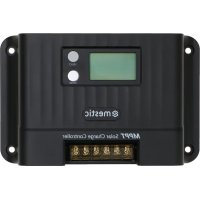
MSC4010 - Controller Mestic - Free user manual and instructions
Find the device manual for free MSC4010 Mestic in PDF.

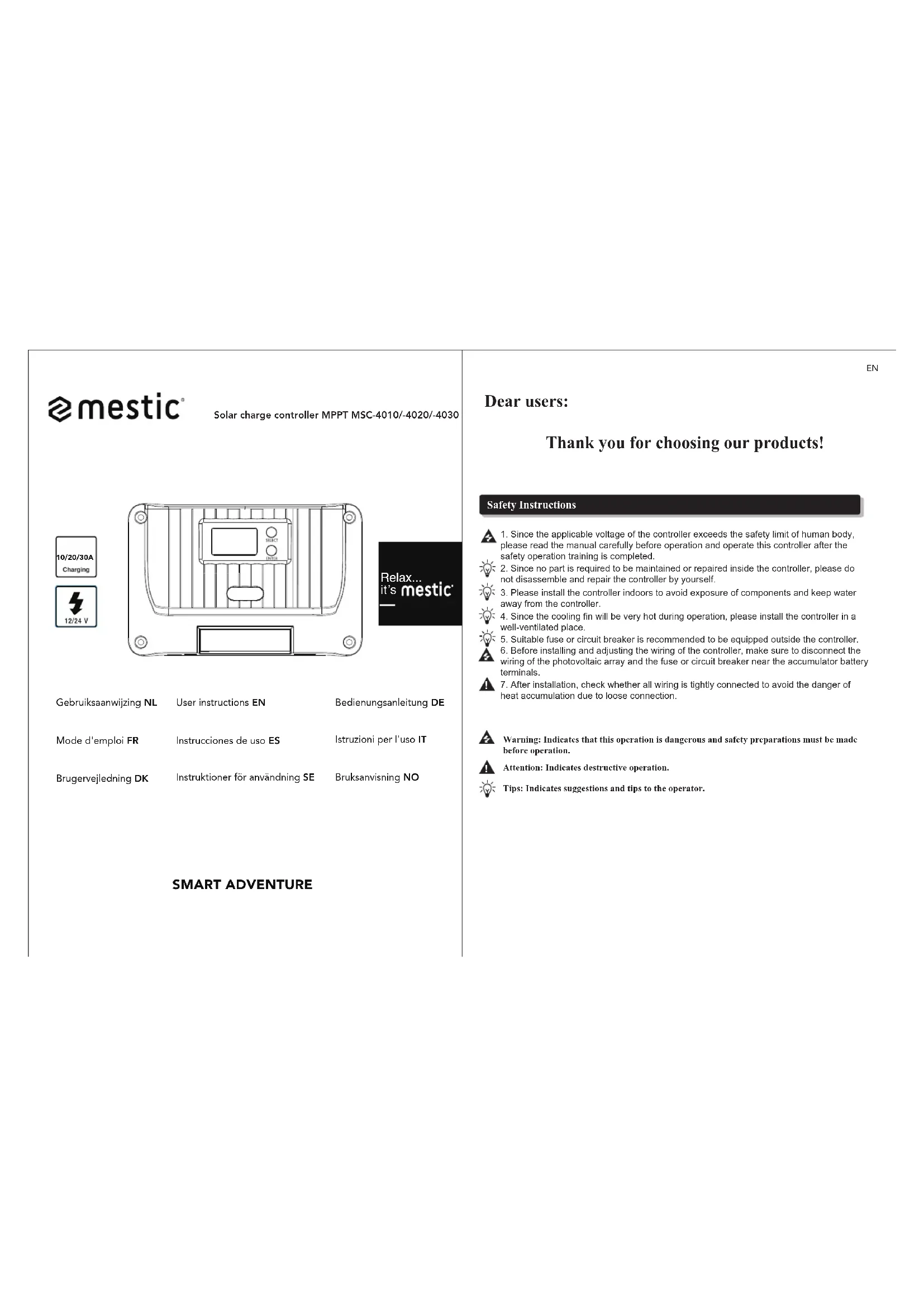


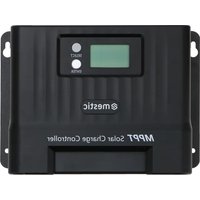
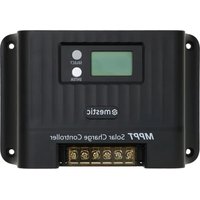
| Product type | MPPT solar charge controller (Maximum Power Point Tracking) |
| Model | MSC4010 (10A version) |
| Brand | Mestic |
| Dimensions (L x H x D) | 155 x 99 x 41.7 mm |
| Weight | 350 g |
| Power supply | Solar panel (max voltage 60V, PV input) and battery (system voltage 12V/24V) |
| Rated charge current | 10 A |
| Maximum solar panel power | 130 W / 12 V; 260 W / 24 V |
| Charging technology | MPPT with efficiency > 99%, conversion 85-98% |
| Supported battery types | Sealed lead-acid (SLD), gel (GEL), flooded (FLD), lithium (LI), custom (USE/USE LI) |
| Number of charging modes | 17 modes (light control, light+time, manual, debug, etc.) |
| Display | LCD screen with icons for voltage, current, charge status, alarms |
| Communication | RS485 (Modbus RTU, adjustable speed), TTL (9600 bps), optional Bluetooth, optional CAN |
| Protection functions | PV overvoltage, excessive input power, overheating, overcurrent, short circuit, battery reverse, etc. |
| Maintenance | Clean the heatsink, check connections and corrosion periodically |
| Safety | Indoor installation, ventilated, away from water; use an external fuse/circuit breaker |
| Spare parts and repairability | No user-serviceable parts; do not disassemble |
| Protection class | IP32 |
| Operating ambient temperature | -35°C to 66°C |
Frequently Asked Questions - MSC4010 Mestic
User questions about MSC4010 Mestic
0 question about this device. Answer the ones you know or ask your own.
Ask a new question about this device
Download the instructions for your Controller in PDF format for free! Find your manual MSC4010 - Mestic and take your electronic device back in hand. On this page are published all the documents necessary for the use of your device. MSC4010 by Mestic.
USER MANUAL MSC4010 Mestic

User instructions EN
8.5 Systeem spanning
8.13 Over-ontlading vertraging
Model: MSC-4010
Productafmeting: 155*99*41.7mm
Montage gatafstand: 137°77mm Vaste gatenpositie: φ4.5mm
18.2 MSC-4020
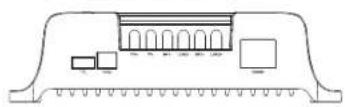
Model: MSC-4020
Producta/meting: 181*118*61.7mm
Montage gatafstand: 161*96mm Vaste gal positie: φ4.5mm
20 21
NL
18.3 MSC-4030
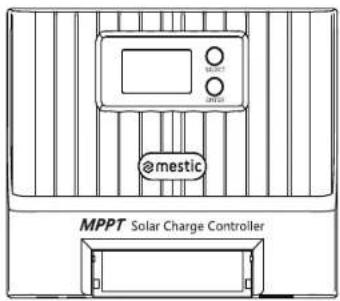
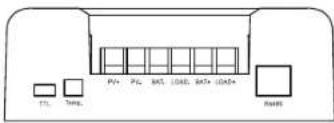
Model: MSC-4030
Productafmeting: 187*133*72mm
Montage gatafstand: 174*100mm
Vaste gatenpositie: φ5mm
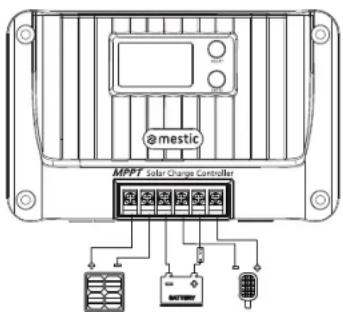
18. System wiring diagram
18.1 System wiring diagram
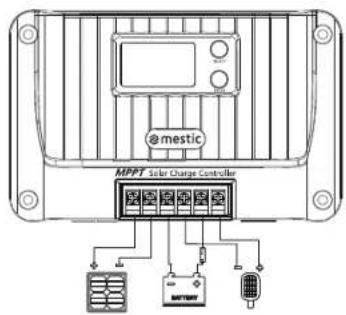
mestic
NL
Solar charge controller MPPT MSC-4010/-4020/-4030
Relax... it's mestic
User instructions EN
Thank you for choosing our products!
Safety Instructions
- Since the applicable voltage of the controller exceeds the safety limit of human body, please read the manual carefully before operation and operate this controller after the safety operation training is completed.
- Since no part is required to be maintained or repaired inside the controller, please do not disassemble and repair the controller by yourself.
- Please install the controller indoors to avoid exposure of components and keep water away from the controller.
- Since the cooling fin will be very hot during operation, please install the controller in a well-ventilated place.
- Suitable fuse or circuit breaker is recommended to be equipped outside the controller.
- Before installing and adjusting the wiring of the controller, make sure to disconnect the wiring of the photovoltaic array and the fuse or circuit breaker near the accumulator battery terminals.
- After installation, check whether all wiring is tightly connected to avoid the danger of heat accumulation due to loose connection.
Warning: Indicates that this operation is dangerous and safety preparations must be made before operation.
Attention: Indicates destructive operation.
Tips: Indicates suggestions and tips to the operator.
EN
1. Product introduction
1.1 Product overview
The Shiner series controller adopts the industry-leading MPPT to achieve the maximum energy tracking for the solar panel, that is, it can quickly and accurately track the maximum power point of the solar battery on any condition, and obtain the maximum energy of the solar panel in real time, significantly improving the energy utilization rate of the solar system. It is widely used as the core control component in the off-grid PV systems to manage the work of solar panels, batteries, and loads. Besides, it has complete software and hardware fault detection and protection functions to avoid damage to product components caused by installation errors and system faults to the greatest extent.
1.2 Product feature
◆ Adopt MPPT with tracking efficiency up to 99.9%.
◆ Support full-power charging and discharging at one time.
◆ Support multiple battery types such as sealed battery, gel battery, flooded battery, lithium battery and user-defined battery.
◆ Support lithium battery and lead-acid activated battery.
◆ Support the charging current setting.
◆ Support full-charging setting.
◆ Support temperature compensation.
◆ Support 17 load operating modes.
◆ Support capacitive loads and inductive loads.
◆ Save historical data for 200 consecutive days.
◆ Support RS485 communication of standard Modbus protocol with adjustable baud rate.
◆ Support TTL communication of standard Modbus protocol with fixed baud rate.
◆ Support Bluetooth communication (optional).
◆ Support CAN communication (optional).
◆ Possess complete charging and discharging protection mechanisms for overvoltage, overcurrent, overload, over-temperature, short circuit, etc.
- Adopt high-quality aluminum radiator and high-temperature derating treatment to ensure reliable and efficient operation in various operating conditions.
EN
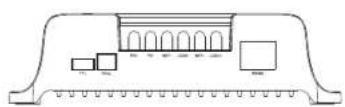
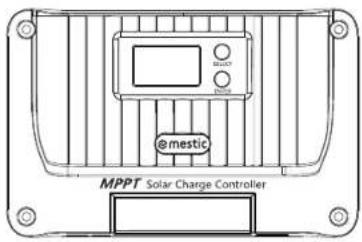
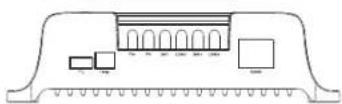
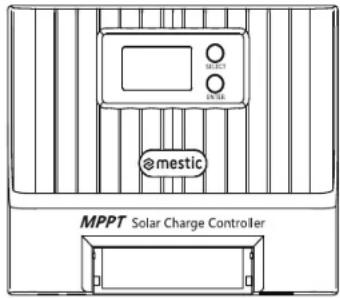
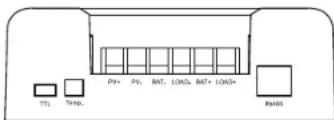
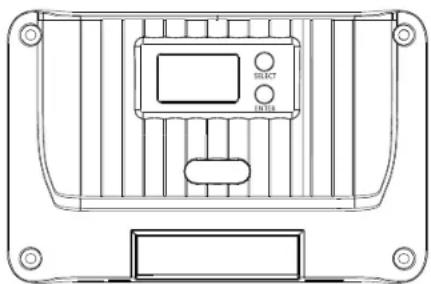
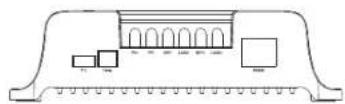
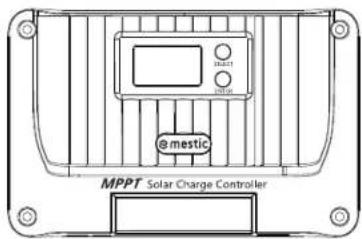
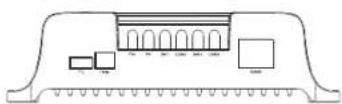
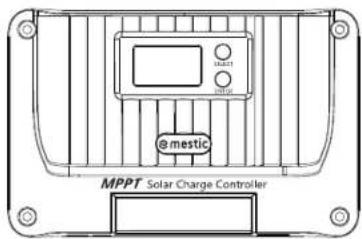
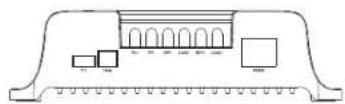
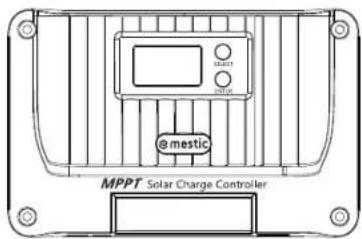
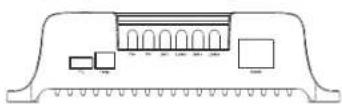
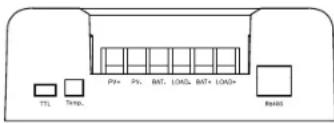
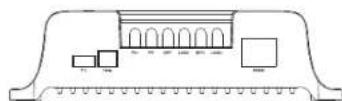
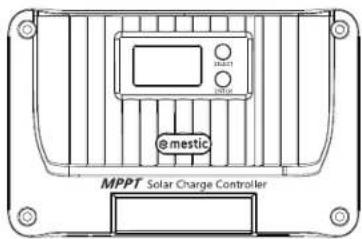
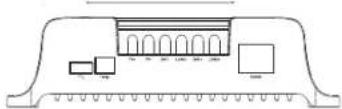
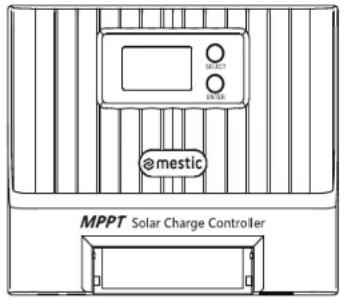
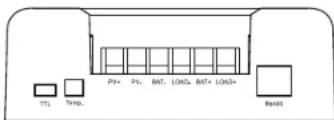
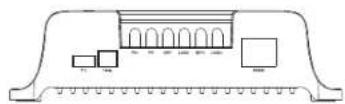
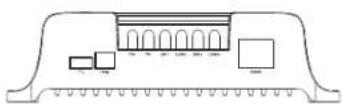
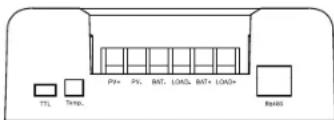
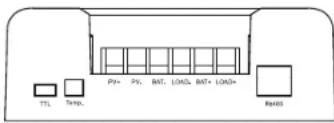
1.3 Appearance and interface description
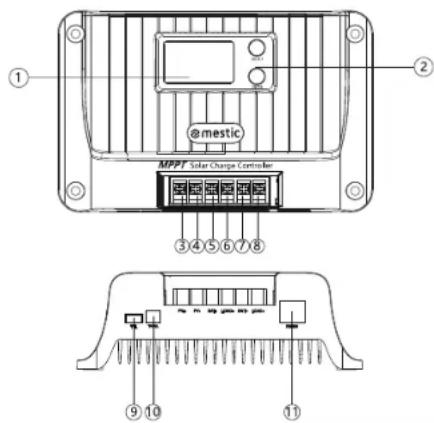
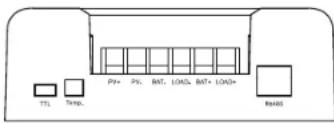
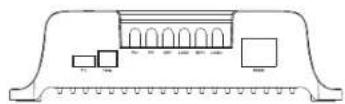
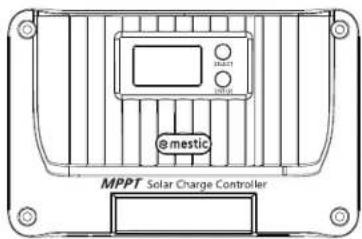
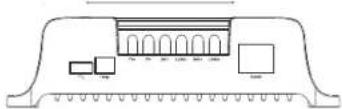
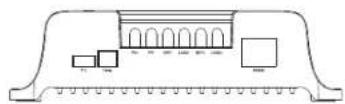
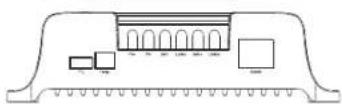
| S/N | Name | S/N | Name |
| 1 | LCD | 7 | Battery positive interface |
| 2 | Button | 8 | Load positive interface |
| 3 | Solar panel positive interface | 9 | TTL communication interface |
| 4 | Solar panel negative interface | 10 | Temperature sensor interface |
| 5 | Battery negative interface | 11 | RS485/CAN communication interface |
| 6 | Load negative interface |
2. Introduction of Maximum Power Point Tracking
The Maximum PowerPoint Tracking (MPPT) system is an advanced charging technology with more energy output from the solar batteries by adjusting the operating state of the electrical modules. Due to nonlinearity of the solar battery array, there is a maximum power point on its curve. The PWM charging technology used in the traditional controller cannot charge the battery continuously at the point, so it cannot obtain the maximum energy of the solar panel. Instead, the solar controller with MPPT can always track the maximum power point of the array, so as to charge the battery with maximum energy. For example, for the 12V solar system, since the peak-to-peak voltage (Vpp) of the solar battery is about 17V, but the battery voltage is about 12V, therefore, when the common charge controller is charging the battery, the voltage of the solar battery is about 12V, that is, the solar battery does not fully exert its maximum power.
EN
The MPPT controller can overcome the problem and adjust the input voltage and current of the solar panel in real time to reach the maximum input power. Moreover, compared with the traditional PWM controller, it can exert the maximum power of the solar battery to provide a larger charging current. Generally speaking, it can improve the energy utilization rate by 15%\~20% than the PWM controller.
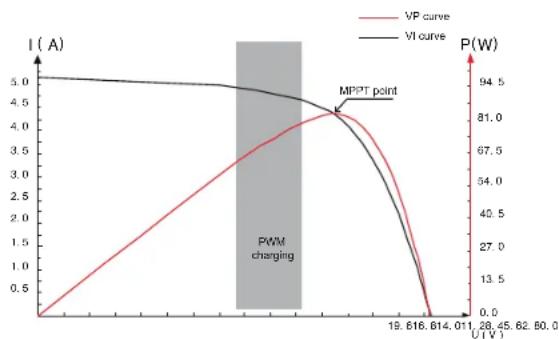
Fig. 2-1 Battery panel output characteristic curve
The maximum power point often changes due to the different ambient temperature and lighting conditions. And the MPPT controller is able to adjust the parameters in real-time under different conditions, thus making the system status always near the maximum operating point. The whole process is completely automatic without any adjustment.
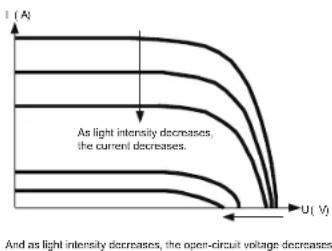
Fig. 2-2 Relationship between output characteristic of battery panel and light intensity
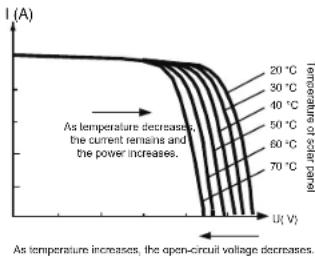
Fig. 2-3 Relationship between output characteristic of battery panel and temperature
03
EN
- Technical parameters
| Product model | MSC-4010 | MSC-4020 | MSC-4030 |
| Static power consumption | ≤10mA | ||
| Battery Type | SLD/SEL/FLD/LI/USE/USELI, SLD as default | ||
| System voltage | 12V/24V | ||
| Battery operating voltage range | 8V-32V | ||
| Rated charging current | 10A | 20A | 30A |
| Maximum solar panel power | 130W/12V260W/24V | 260W/12V520W/24V | 400W/12V800W/24V |
| Maximum PV open-circuit voltage | 60V (55V protection, 50V recovery) | 100V (95V protection, 90V recovery) | |
| MPPT operating voltage range | (Battery voltage +2V)-45V | (Battery voltage +2V)-72V | |
| MPPT tracking efficiency | >99% | ||
| Charging conversion efficiency | 85%-98% (10%-100% of rated power) | ||
| Rated load current | 10A | 20A | |
| Load operating mode | Light control, light control + time control, manual mode (default), debugging mode, normally open | ||
| Charging current setting | √ | ||
| Full-charging setting | √ | ||
| Constant voltage output setting | √ | ||
| Charging temperature compensation of load-acid battery | √ | ||
| Temperature unit setting | √ | ||
| Overload/Short-circuit protection | √ | ||
| TTL communication | Baud rate: 9,600 bps | ||
| RS485 communication | RJ45 interface, with power output 5V/200 mA,The baud rate is 9,600 bps by default, adjustable. | ||
| Bluetooth communication | Optional | ||
| CAN communication | RJ45 interface, optional (RV-C protocol) | ||
| Historical data Save the last 200 days of historical data | |||
| Protection function | PV overvoltage protection, PV reverse connection protection, PV short-circuit protection, night reverse charging protection, input power limit protection, over-temperature protection, load short-circuit protection, overload protection, battery over-voltage/over-discharge protection, battery reverse connection protection, battery end short circuit protection. | ||
| Grounding type | Grounding of common negative electrode | ||
| Operating ambient temperature range | -35°C~65°C | ||
| Protection grade | IP32 | ||
| Cooling mode | Natural heat dissipation | ||
| Dimension | 155°98'41.7mm | 181°118'51.7mm | 187°133'72mm |
| Weight | 350g | 650g | 1200g |
04
EN
4. Charging
4.1 Charging of lead-acid battery
Select such battery types as SLD/FLD/GEL/USE, and select the appropriate system voltage.
As shown in Fig. 4-1, the charging stages of lead-aoid battery are: MPPT charging, constant voltage charging (equalizing/boost/floating charging), and current-limiting charging. The constant voltage charging is divided into three stages: equalizing charging, boost charging and floating charging [MPPT charging] When the battery voltage has not reached the target constant voltage value, the controller will perform MPPT charging. When the battery voltage reaches the constant voltage value, it will automatically exit MPPT charging and switch to constant voltage charging (equalizing/boosting/floating charging).
[Equalizing charging] Regular equalizing charging is good for some batteries. Equalizing charging is mainly to make the charging voltage of battery higher than the standard supplementary voltage, besides, it can vaporize the battery electrolyte to balance the battery voltage and complete relevant chemical reaction. Equalizing charging and boosting charging are not repeated during one full charging to avoid excessive gas evolution or overheating of the battery.
Notes: 1) Since the equalizing charging of floored lead-acid battery produces explosive gas, the battery compartment must be well ventilated.
2) Although the equalizing charging elevates the battery voltage, it may damage the level of sensitive DC loads, therefore, it is necessary to verify that the allowable input voltage of all loads in the system is greater than the set battery voltage value in equalizing charging.
3) Excessive charging and excessive gas evolution may damage the battery plate and cause the active substances on the battery plate to fall off. Besides, excessive high equalizing charging voltage or excessive long equalizing charging duration may damage the battery. Please set relevant parameters according to the specifications of the battery used in the system.
[Boost charging] The duration of boost charging is 2 h (default). When the duration reaches the set value, the system will switch to floating charging.
[Floating charging] Floating charging is the last constant voltage charging stage in the charging cycle of lead-acid battery. The controller keeps the charging voltage constant at the floating charging voltage. At this stage, the battery is charged with a very weak current to ensure that the battery is in full-charging. When the battery voltage is as low as the reconnect voltage of boost charging, the system will exit the floating charging stage and re-enter the next charging cycle.
4.2 Charging of lithium battery
Select such battery types as LI/USE LI, and select the system voltage from 12V/24V.
As shown in Fig. 4-2, the charging stages of lithium battery are: MPPT charging/boost charging/
current-limiting charging.
[MPPT charging] When the battery voltage does not reach the target constant voltage value, the controller conducts MPPT charging to charge the battery with maximum solar power, when reaches, it automatically switches to boost charging.
[Boost charging] In the boost charging stage of lithium battery, when the battery voltage is lower than the boost charging voltage, the system conducts MPPT charging or current-limiting charging, when reaches, it switches to boost charging.
05
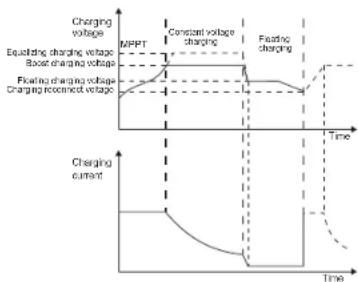
Fig. 4-1 Charging curve of lead acid battery
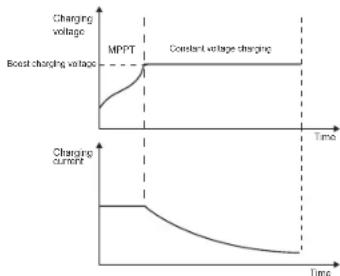
Fig. 4-2 Charging curve of lithium battery
5. Battery Temperature Sampling and Control
1) Connect the temperature sensor to the corresponding temperature interface to achieve the high and low temperature protection for the battery and the temperature compensation for the charging voltage of lead-acid battery (no temperature compensation for the lithium battery); if the temperature sensor is not connected, the default temperature is 25° C;
2). For the battery-related temperature protection/recovery value, please refer to the description in "12. System alarm". The wiring method is shown in the figure:
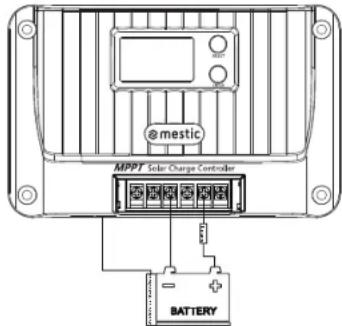
06
EN
6. Load output
1) [Recovery strategy of load short-circuit protection]:
① Automatic recovery: the self recovery time of the first protection is 10s, the second is 15s, the third is 20s, the fourth is 25s, the fifth is 30s, with more than five times restore the load output the next day;
② Manual recovery: press and hold the "SELECT" button for 2s on the system alarm interface, and the load will be recovered and output;
2) [Overload protection strategy]: 10s protection for the load greater than 1.25 times the rated load; 5s protection for the load greater than 1.5 times the rated load; 1s protection for the load greater than 2 times the rated load;
3) Please refer to "8.11-8.13" for load related settings.
- Menu
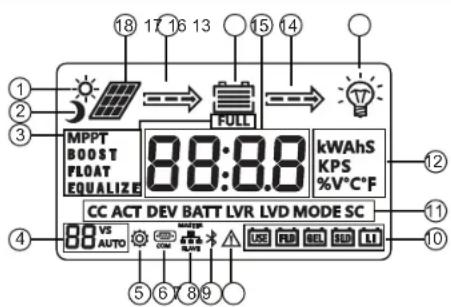
| No. | Description | No. | Description |
| 1 | Daytime icon | 10 | Battery type |
| 2 | Night icon | 11 | Function character |
| 3 | Charging stage | 12 | Unit symbol |
| 4 | System voltage | 13 | Load icon |
| 5 | Parameter setting | 14 | Discharging state |
| 6 | Communication icon | 15 | Battery |
| 7 | Parallel communication Voltage/current | ||
| 8 | Bluetooth icon | 17 | Charging state |
| 9 | System alarms | 18 | Solar panel |
07
7.1 View menu
![graph TD A["Main menu (voltage)"] --> B["14.40 V"] C["Main menu (current)"] --> D["20.00 V"] E["Battery voltage"] --> F["12.00 V"] G["Charging current"] --> H["20.00 V"] I["System alarms"] --> J["EO"] K["Load mode"] --> L["15 MODE"] M["Battery temperature"] --> N["25.0 °C"] O["Device temperature"] -…](/content/2026/03/524049/images/c7e0eed1507cdaeef0cafe5669973946e2884d79adc253e5fc427fda679e04ff.jpg)
1) Alternative display between (voltage) and (current) on the main menu every 10s.
2) Short press the [SELECT] key to browse the menu. If there is no key operation for 5s, it will automatically return to the main menu.
3) Long press [ENTER] for 3s on any interface to enter the parameter setting page.
08
EN
EN
8. Parameter setting
8.1 Battery parameter list
| Battery parameters | ||||||
| Battery TypeSetting/Voltage | Sealed Lead-Acid SLD | Gel lead-acid battery GEL FLD | Flooded lead-acid battery | Lithium battery LI | Custom lead acid battery USE | Custom lithium battery USE LI |
| Overvoltage disconnect voltage 1 | 16.0V | 16.0V | 16.0V | 16.0V | Boost voltage +2V | Boost voltage +2V |
| Equalizing voltage 1 | 14.6V | -- | 14.8V | -- | 9~17V | -- |
| Boost voltage 1 | 14.4V | 14.2V | 14.6V | 14.4V | 9~17V | 9~17V |
| Float charge voltage 1 | 13.8V | 13.8V | 13.8V | -- | 9~17V | -- |
| Boost charging reconnect voltage 1 | 13.2V | 13.2V | 13.2V | 13.2V | 9~17V | 9~17V |
| Over-discharge restoring voltage 1 | 12.6V | 12.6V | 12.6V | 12.6V | 9~17V | 9~17V |
| Under-voltage alarming voltage 1 | 12.0V | 12.0V | 12.0V | 12.0V | 9~17V | 9~17V |
| Over-discharge voltage 1 | 11.1V | 11.1V | 11.1V | 11.1V | 9~17V | 9~17V |
| Over-discharge cutoff voltage 1 | 10.6V | 10.6V | 10.6V | 10.6V | 9~17V | 9~17V |
| Over-discharge delay | 5s | 5s | 5s | 5s | 5s | 5s |
| Equalizing charging interval | 30 days | -- | 30 days | -- | 30 days | -- |
| Equalizing charging duration | 120 min | -- | 120 min | -- | 120 min | -- |
| Boost charging duration | 120 min | 120 min | 120 min | -- | 120 min | -- |
| Temperature compensation factor mV/°C/2V | -3 | -3 | -3 | -- | -3 | -- |
| Note:1The above values are the parameters at 25°C/12V; if it is the system of 24V/36V/48V, relevant voltage points shall be automatically multiplied by 2/3/4. | ||||||
8.2 Parameter setting list
| Function Setting range | Default | |
| Battery Type SLD/GEL/FLD/L/USE | USE LI SLD | |
| Equalizing charging voltage 2 | 9V~17V Available for USE only | |
| Boost charging voltage 3 | 9V~17V | Available for USE and USE LI only |
| Float charge voltage 3 | 9V~17V Available for USE only | |
| Boost charging reconnect voltage 6 | 9V~17V | Available for USE and USE LI only |
| Over-discharge restoring voltage 6 | 9V~17V | Available for USE and USE LI only |
| Over-discharge voltage 5 | 9V~17V | Available for USE and USE LI only |
| System voltage 12/24/AUTO AUTO | ||
| Charging current 0-rated current (0: no charging) Rated current | ||
| Full-charging setting 0-10 A, 0: turn the function off 0 0 | ||
| Full-charging setting | on: constant voltage output in no load on the battery terminaloF: no output in no load on the battery terminal | oF |
| Light control voltage 6 | 5-11V | 5V |
| Light control delay 60-3.600s 60s | ||
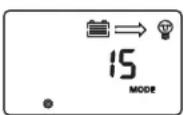
| Load mode 0-17 | 15 | |
| Load short-circuit protection | on: open load short-circuit protectionoF: close load short-circuit protection | on |
| Over-discharge delay | 1-60s | 5s |
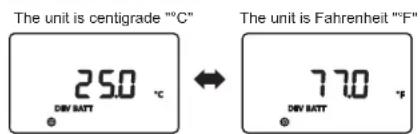
| Temperature unit | °C: Celsius/F: Fahrenheit | °C |
| RS485 communication baud rate | 1200~115200bps | 9600bps |
| Device address | 1-247 | 1 |
| System restart | F01 | Function key |
| Factory data reset | F02 | Function key |
| Clear historical data | F03 | Function key |
| Note:1: 24V/36V/48V battery system, automatically multiply by 2/3/4 according to the set value to get the actual control value. | ||
EN
EN
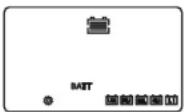
8.3 Type of battery
Please refer to "8.1 and 8.2" for setting.
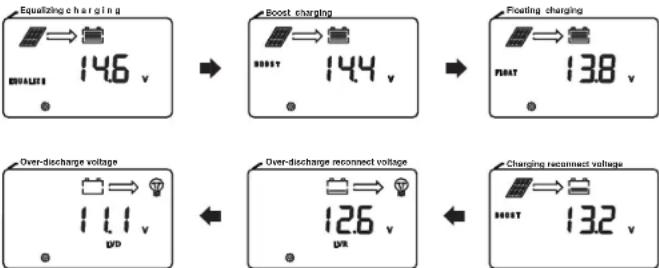
8.4 Equalizing charging\boost charging\floating charging\charging reconnect voltage\over-discharge reconnect voltage\over-discharge voltage
The option can only be set when the battery type is "USE" or "USE LI".
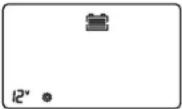
8.5 System voltage
When the system voltage changes, the system voltage icon on the main page will flash, prompting the user to reboot for effective operation.
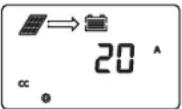
8.6 Charging current
1) [No charging]: Set 0
2) [Limit charging current] Set an arbitrary value from 1 to rated charging current in steps of 1A.
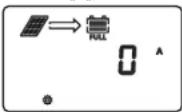
8.7 Full-charging setting
1) [Off]: Set 0
2) [On]: Select the appropriate current value between 1-10A
Full-charging condition: When the constant voltage charging duration of lithium battery reaches the set duration or the lead-acid battery is in float charging after the equalizing charging or the boost charging is finished, and the charging current is less than the set current value, the system will stop charging after 1 minute, and the "FULL" icon will light up on the screen.
Charging recovery condition: The battery voltage is less than the boost charging reconnect voltage, the system will recover charging, and the "FULL" icon will light off on the screen.
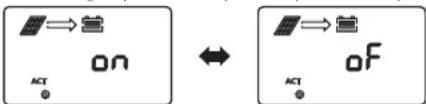
8.8 Constant voltage output of lead acid battery
Constant voltage output without battery
No output without battery
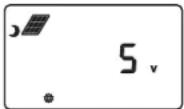
8.9 Light control voltage
1) [Light control on]: The solar panel voltage is less than 5V*N
2) [Light control of F]: The solar panel voltage is greater than 6V*N (N=1/2)
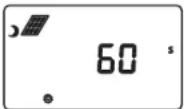
8.10 Light control delay
Minimum duration required to meet the light control on or off condition.
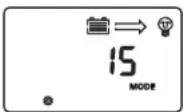
8.11 Load mode
EN
EN
| LCD screen number | Load mode Description | |
| 0 Pure light control | When the solar panel voltage is less than the Light control ON voltage with a duration is more than the light control delay, turn on the load:When the solar panel voltage is greater than the light control OFF voltage with a duration is greater than the light control delay, turn off the load. | |
| 1~14 | Light control + time control 1-14 h | After the duration during which the solar panel voltage is less than the light control ON voltage is greater than the light control delay, turn on the load. After the load has been operating for the set time, turn off the load.After the duration during which the solar panel voltage is greater than the light control OFF voltage is greater than the light control delay, turn off the load (light control prevails) |
| 15 | Manual mode(default) | Short press [ENTER] key to turn on/off the load (not affected by light control) |
| 16 | Debugging mode | When the solar panel voltage is less than the light control ON voltage, turn on the load immediatelyWhen the solar panel voltage is greater than the light control OFF voltage, turn off the load immediately |
| 17 | Normal on mode | The load is always on (in case of battery over-voltage, battery over-discharge, load short-circuit, overload, battery over-temperature, or battery low-temperature, the load will turn off the output) |
8.12 Load short-circuit protection switch
Some inductive loads or capacitive loads will produce high current at the moment of start-up, which will easily trigger load short-circuit protection, resulting in failure to turn on the load. This function can be disabled when the system cannot be started (Note: After this function is disabled, short circuit at load side of the controller is prohibited!)
![graph LR A["ON on sc"] --> B["OF on sc"]](/content/2026/03/524049/images/e8defdbc60249c3e9856ce85a269229da9c2a6b744b219e1a88d78b40caf6aaa.jpg)
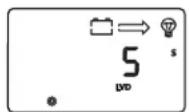
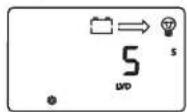
8.13 Over-discharge delay
After the battery voltage is lower than the over-discharge voltage, the controller turns off the delay time for the load. (Note: only the type of custom battery can be set)
8.14 Temperature unit
13 14
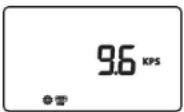
8.15 RS485 communication baud rate
The RS485 communication baud rate can be modified according to actual needs.
8.16 Equipment address
The device communication address can be modified according to actual needs.
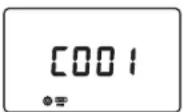
8.17 System restart
Single press [ENTER], 'F01' flashes; single press [ENTER] again, the controller will reboot.
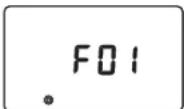
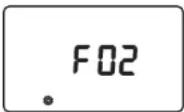
8.18 Factory reset
Reset the controller to factory default settings in accordance with "8.17".
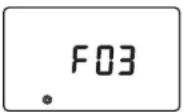
8.19 Historical data cleaning
Clear the historical data of the controller in accordance with "8.17".
EN
EN
9. TTL communication
1) Default baud rate: 9,600 bps; check bit: none; data bit: 8 bit; stop bit: 1 bit
2) Communication power supply output specification: (8.5V±1V)/: 100mA
| TTL-COM | S/N | Definition |
| 1 | VCC: communication power supply output | |
| 2 | RX: controller data receiving end | |
| 3 | TX: controller data transmitting end | |
| 4 | GND |
10. RS485
1) RS485 communication:
Default baud rate: 9,600 bps; parity bit: none; data bit: 8 bit; stop bit: 1 bit
Interface type: RJ45, communication power supply output specification: 5V/200mA
2) RJ45 interface communication line sequence definition:
| S/N | Definition |
| ① | CAN L |
| ② | CAN_H |
| ③ | NC |
| ④ | NC |
| ⑤ | Power ground/signal ground |
| ⑥ | D- |
| ⑦ | D+ |
| ⑧ | Positive terminal |
Note: NC represents an empty pin, which means that the pin is not connected.
11. CAN communication(Optional)
1) CAN communication: support RV-C protocol
12. Key
[Select]: short press to switch browsing menu and set data increment;
Press and hold the "System Alarm" interface for 2s to clear the "Load Short Circuit/
Overload Protection" fault code.
[Enter]: press and hold for 3s to enter/exit parameter setting;
Short press: short press on/off load in menu browsing interface (manual mode);
In the setting menu interface, short press for parameter modification and confirmation.
EN
13. System alarms
| System alarms | Meaning | Description |
| E0 | Normal system | No action |
| E1 Battery over-discharge | Turn off load output, after the battery voltage rises to the over-discharge reconnect voltage, relieve over-discharge to restore load output | |
| E2 Battery over-voltage | Stop charging, check and find out the cause of high battery voltage. The charging will be automatically restored after the battery voltage is lowered | |
| E3 | Battery under-voltage warning | Battery voltage below the under-voltage warning threshold, warning only |
| E4 | Load short-circuited Turn off load output | |
| E5 Load over-current | Turn off load output, and perform delay protection by a multiple of rated current | |
| E6 | Over-temperature protection of device | When the internal temperature is higher than the set temperature, start the constant temperature control; Charging is prohibited when the temperature is higher than 75°C, and charging is resumed when the temperature is lower than 75°C. |
| E7 | Battery over-temperature protection | Charging will be stopped when the battery temperature is above 65°C, and automatically resumed when it is below 60°C. |
| E10 Solar panel over-voltage | Charging is stopped, and then automatically resumed when the solar panel voltage is below the safety limit | |
| E15 Lead acid battery is not connected | In lead-acid battery mode, the battery is damaged or not connected. | |
| E16 | Battery high temperature discharging protection | Load output will be turned off when the battery temperature is above 75°C and resumed when it is below 70°C. |
| E17 | Battery low temperature discharging protection | Load output will be turned off when the battery temperature is below -35°C and resumed when it is above -30°C |
| E18 | Overcharge protection | Charging is stopped and then resumed 10s after the battery voltage is lowered |
| E19 | Battery low temperature charging protection | Charging will be stopped when the battery temperature is below -35°C and resumed when it is above -30°C |
| E30 | Charging and discharging disabled by system setting | Off by default (set relevant registers by protocol) |
| E31 | Charging overvoltage, overcurrent and reverse current protection etc. | After the abnormal conditions are removed, the equipment will recover automatically |
EN
- Common problems and solutions
| Phenomenon Troubleshooting | |
| LCD screen does not light up | Check whether the battery and solar panel are properly connected and whether the LCD connection cable has a poor connection |
| There is voltage in the solar panel, there is no voltage output from the battery side, and code E1/E15 is displayed | The battery is not detected at the lead-acid battery end, there is no voltage output from both ends of the battery. Connect the battery to return to normal or turn on the lead-acid battery activation switch |
| 12V/24V/36V/48V normal voltage battery is connected, the battery icon on the LCD screen flashes slowly, and code E1 is displayed | Check the battery system voltage, or set it to automatic identify and reboot the controller |
| The system voltage 12V/24V/36V/48V icon on the screen flashes | Set system voltage change, prompting the user to reboot the system for the change to take effect |
| The controller fails to charge | Check whether there is wrong wiring, whether the solar panel voltage exceeds the rated value, whether the battery is over-voltage, whether the LCD screen displays any error code of internal over-temperature, external over-temperature, external lithium battery low temperature, or lead-acid battery open-circuit, and whether it displays E7/E10, etc. |
| Charging power does not reach the rated value | Perform system current limiting and thermostatic control; Check to see if the system has reset charging current |
| Other problems or exceptions difficult to resolve | Try to reboot (F01) or reset controller (F02), and reset relevant parameters again as per system configurations. Be careful |
| Fail to start some loads | Try enabling the load short-circuit function after checking that the wiring is correct |
| The screen displays "full", and charging stops | Charging stops as the charging cut-off current conditions are met. When the voltage is below the boost charging reconnect voltage, the charging will be automatically resumed |
| There is a system alarm code See "12. System alarms" for details | |
15. Product Installation
15.1 Installation precautions
◆ Be careful when installing battery. Wear protective goggles when installing a flooded lead-acid battery. Once in contact with the battery acid, please rinse with water immediately.
◆ Keep away from metal objects to prevent short-circuit of battery.
◆ The battery may produce acid gas when charging. Make sure that the ambient environment is well-ventilated.
◆ The battery may produce combustible gas. Stay away from sparks.
When installing outdoors, avoid direct sunlight and rain seeping.
The falsely connected connection points and corroded wires may cause great heat, melt the wire insulation, burn the surrounding materials, and even cause fire. Therefore, it is necessary to ensure that all connectors are tightened, and the wires are preferably fixed with ties to avoid shaking of the wires during mobile applications loose connector.
EN
When connecting the system, the output voltage of the components may exceed the human body safety voltage, therefore, use insulated tools and keep your hands dry.
The battery terminals on the controller can be connected either to a single battery or a battery pack. The subsequent instructions are for a single battery, but they are also applicable to systems with a battery pack.
◆ Please follow the safety recommendations of the battery manufacturer.
◆ The system connection cables selected shall have a current density ≤4A/mm².
◆ Ground the ground terminal of the controller.
When installing the battery, it is forbidden to reverse the battery connection, which may cause irreversible damage.
15.2 Installation steps
Wiring and installation must meet the requirements of national and local electrical codes. Wiring specifications shall be selected according to the rated current, generally, 5 A/mm 2 .
Step 1: Select an installation location
Do not install the controller in a place with direct sunlight, high temperature, or where water can easily enter, and make sure the controller is well ventilated.
Step 2: Fix suspension screws
Mark the mounting position according to the mounting dimensions of the controller, drill two mounting holes of suitable size at the two marks and fix the screws on the two mounting holes.
Step 3: Fix the controller
Align the controller fixing holes with the two pre-fixed screws to hang the controller up, and then fix the two screws below.
Step 4: Open the front cover of the controller, wire, and then close the front cover.
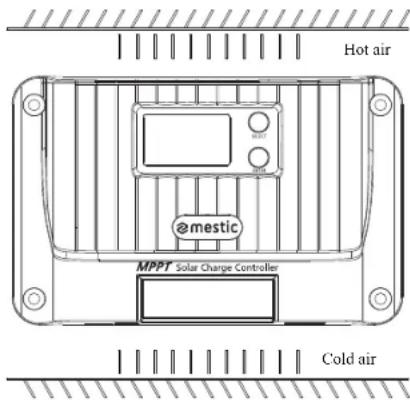
EN
16. Protection Functions
◆ Over-temperature protection of device
When the internal temperature of the controller exceeds the set value, the charging power will be automatically lowered or the charging will even be stopped, further slowing the rise in internal temperature of the controller.
◆ Battery over-temperature protection
Battery over-temperature protection requires an external battery temperature sampling sensor. Charging will be stopped when the battery temperature is detected to be too high, and will be automatically resumed when the battery temperature drops to 5°C below the set value for 2s.
◆ Input over-power protection
When the battery panel power is greater than the rated power, the controller will limit the charging power within the rated power range to prevent excessive current from damaging to the controller, and the controller will enter current-limited charging.
◆ PV input side too high voltage protection
When the voltage at the input side of the PV array is too high, the controller will automatically cut off PV input.
◆ PV input reverse-connection protection
The controller will not be damaged if the polarity of the PV array is reversed and will return to normal after the wiring error is corrected.
◆ Reverse charging protection at night
Prevent the battery from discharging through solar battery at night.
17. System Maintenance
In order to maintain the optimal operating performance of the controller for a long time, it is recommended that the following items are regularly checked.
Make sure that the airflow around the controller is not blocked, and remove any dirt or debris from the radiator.
◆ Take corrective actions timely after any fault or error is found.
◆ Check whether there is corrosion, insulation damage, high temperature or burning/discoloring at terminals, case distortion, etc., and repair or replace timely if any.
◆ Check whether there is any exposed or broken wire or wire with poor insulation, and repair or replace timely if any.
◆ Check whether there is dirt, nesting insects or corrosion, and clean timely if any.
Warning: There is a risk of electrical shock! Before carrying out checks or operations above, make sure that all power supplies for the controller are disconnected!
Any non-professional personnel is prohibited from carrying out such operations.
EN
18. Product Dimensions
18.1 MSC-4010
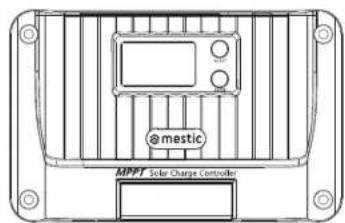
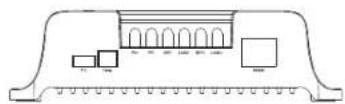
18.2 MSC-4020
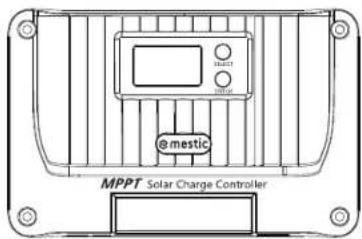
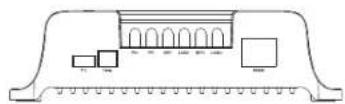
Model: MSC-4010
Product dimension: 155*99*41.7mm
Mounting hole spacing: 137*77mm
Fixed hole position: φ4.5mm
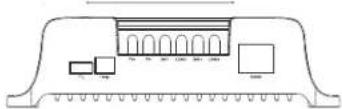
Model: MSC-4020
Product dimension: 181*118*61.7mm
Mounting hole spacing: 161*96mm
Fixed hole position: φ4.5mm
18.3 MSC-4030
Model: MSC-4030
Product dimension: 187*133*72mm
Mounting hole spacing: 174*100mm
Fixed hole position: φ5mm
19. Bedradingsschema systeem
19.1 Bedradingsschema systeem
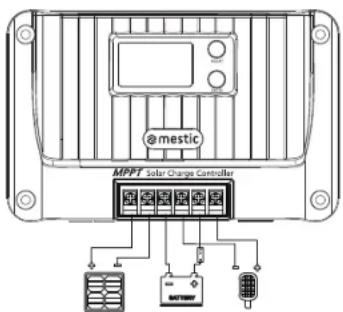
21 22
EN
emestic®
EN
Solar charge controller MPPT MSC-4010/-4020/-4030
Made in P.R.C - Imported by
Protection of the environment
This symbol attached to the product means that it is an appliance whose disposal is subject to the directive on waste from electrical and electronic equipment (WEEE). This appliance may not in any way be treated as household waste and must be subject to a specific type of removal for this type of waste. Recycling and recovery systems are available in your area (waste removal) and by distributors. By taking your appliance at its end of life to a recycling facility, you will contribute to environmental conservation and prevent any harm to your health.

mestic®
Solarladeregler MPPT MSC-4010/-4020/-4030


Relax... it's mestic
User instructions EN
8.5 System Spannung
18.2 MSC-4020
Model: MSC-4010
Produktabmessungen: 155*99*41.7mm
21 22
DE
mestic®
DE
Solarladeregler MPPT MSC-4010/-4020/-4030
Relax... it's mestic
User instructions EN
8.4 Equalizing charging\boost charging\floating charging\charging
reconnect voltage\over-discharge reconnect voltage\over-discharge voltage
8.5 Système Tension
18.2 MSC-4020
Modèle : MSC-4010
21 22
FR

mestic®
Relax... it's mestic
User instructions EN
8.4 Equalizing charging\boost charging\floating charging\charging reconnect voltage\over-discharge reconnect voltage\over-discharge voltage
8.5 Sistema tensión
18.2 MSC-4020
Model: MSC-4010
21 22
ES

mestic®
ES
Controlador de carga solar MPPT MSC-4010/-4020/-4030
Relax... it's mestic
User instructions EN
Some inductive loads or capacitive loads will produce high current at the moment of start-up, which will easily trigger load short-circuit protection, resulting in failure to turn on the load. This function can be disabled when the system cannot be started (Note: After this function is disabled, short circuit at load side of the controller is prohibited!)
![graph LR A["on"] --> B["lightbulb"] B --> C["of"] C --> D["star"]](/content/2026/03/524049/images/ec6f9aac5a83fa7f6024b1cad99a0bd19c6f63bbf26ab7bd87f26d1e65e5dfdc.jpg)
8.13 Over-discharge delay
After the battery voltage is lower than the over-discharge voltage, the controller turns off the delay time for the load. (Note: only the type of custom battery can be set)
8.14 Temperature unit
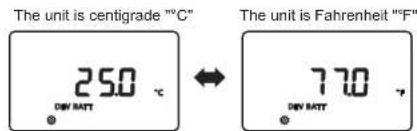
13 14
IT
Note: NC represents an empty pin, which means that the pin is not connected.
IT
18.2 MSC-4020
Model: MSC-4010
21 22
IT

mestic®
Relax... it's mestic
User instructions EN
Fig. 2-1 Karakteristisk curve for batteripanelets output
Fig. 4-2 Opladningskurve for litiumbatteri
DK
8.13 Overafladning forsinkelse
- Common problems and solutions
Model: MSC-4010
Produktdimension: 155*99*41,7mm
Afstand mellem monteringshuller:137*77mm
Fast hulposition: φ4.5mm
18.2 MSC-4020
Model: MSC-4020
Produktdimension: 181*118*61,7mm
Afstand mellem monteringshuller: 161*96mm
Fast hulposition: φ4.5mm
18.3 MSC-4030
Model: MSC-4030
Produktdimension: 187*133*72mm
Afstand mellem monteringshuller:174*100mm
Fast hulposition:φ5mm
19. Ledningsdiagram for systemet
19.1 Ledningsdiagram for systemet
21 22
DK

mestic®
DK
Solar laderegulator MPPT MSC-4010/-4020/-4030
Relax... it's mestic
User instructions EN
8.5 System spänning
8.9 Ljusstyrning spänning
Model: MSC-4010
Produktdimension: 155*99*41,7mm
Model: MSC-4020
Produktdimension: 181*118*61.7mm
Model: MSC-4030
Produktdimension: 187*133*72mm
Avstånd mellan monteringshål: 174*100mm
Fast hålposition: φ5mm
18. System wiring diagram
18.1 System wiring diagram
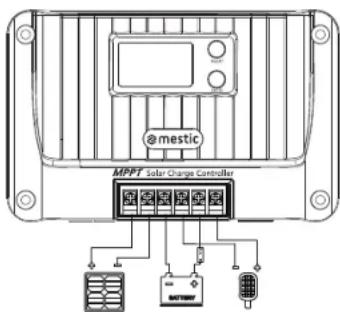
21 22
SE

mestic®
SE
Solar laddningsregulator MPPT MSC-4010/-4020/-4030
Relax... it's mestic
User instructions EN
Fig. 4-1 Ladckurve for blybatteri
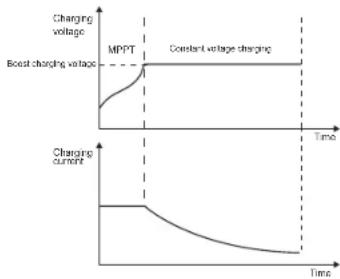
Fig. 4-2 Ladekurve for litiumbatteri
8.5 System spenning
8.11 Last inn -modus
NO
Model: MSC-4010
Produktdimensjon: 155 * 99 * 41,7 mm
Avstand mellom monteringshull: 137 *77 mm
Model: MSC-4020
Produktdimensjon: 181 * 118 * 61,7mm
Avstand mellom monteringshall: 161 * 96 mm
Model: MSC-4030
Produktdimension:187*133*72mm
Avstand mellom monteringshull:174*100mm
Fast hullposisjon:φ5mm
21 22
NO

mestic®
NO
Solar Iadekontroller MPPT MSC-4010/-4020/-4030
Euro Accessoires hereby declares that the MSC-4010/4020/4030 device complies with the basic requirements and other relevant regulations listed in the European Electromagnetic Compatibility Directive (2014/30/EU) and the Low Voltage Directive (2014/35/EU). A full declaration of conformity can be requested from the address on the back cover.
DE
- 8.5 SYSTEEM SPANNING
- 8.13 OVER-ONTLADING VERTRAGING
- SYSTEM WIRING DIAGRAM
- MESTIC
- THANK YOU FOR CHOOSING OUR PRODUCTS
- SAFETY INSTRUCTIONS
- PRODUCT INTRODUCTION
- 1.1 PRODUCT OVERVIEW
- 1.2 PRODUCT FEATURE
- INTRODUCTION OF MAXIMUM POWER POINT TRACKING
- CHARGING
- 4.1 CHARGING OF LEAD-ACID BATTERY
- 4.2 CHARGING OF LITHIUM BATTERY
- BATTERY TEMPERATURE SAMPLING AND CONTROL
- LOAD OUTPUT
- PARAMETER SETTING
- 8.3 TYPE OF BATTERY
- 8.5 SYSTEM VOLTAGE
- 8.6 CHARGING CURRENT
- 8.7 FULL-CHARGING SETTING
- 8.8 CONSTANT VOLTAGE OUTPUT OF LEAD ACID BATTERY
- 8.9 LIGHT CONTROL VOLTAGE
- 8.10 LIGHT CONTROL DELAY
- 8.11 LOAD MODE
- 8.12 LOAD SHORT-CIRCUIT PROTECTION SWITCH
- 8.13 OVER-DISCHARGE DELAY
- 8.14 TEMPERATURE UNIT
- 8.15 RS485 COMMUNICATION BAUD RATE
- 8.16 EQUIPMENT ADDRESS
- 8.17 SYSTEM RESTART
- 8.18 FACTORY RESET
- 8.19 HISTORICAL DATA CLEANING
- TTL COMMUNICATION
- RS485
- CAN COMMUNICATION(OPTIONAL)
- KEY
- SYSTEM ALARMS
- PRODUCT INSTALLATION
- 15.1 INSTALLATION PRECAUTIONS
- 15.2 INSTALLATION STEPS
- PROTECTION FUNCTIONS
- SYSTEM MAINTENANCE
- PRODUCT DIMENSIONS
- BEDRADINGSSCHEMA SYSTEEM
- EMESTIC®
- PROTECTION OF THE ENVIRONMENT
- 8.5 SYSTEM SPANNUNG
- MESTIC®
- 8.5 SYSTÈME TENSION
- 8.5 SISTEMA TENSIÓN
- 8.13 OVERAFLADNING FORSINKELSE
- LEDNINGSDIAGRAM FOR SYSTEMET
- 8.5 SYSTEM SPÄNNING
- 8.9 LJUSSTYRNING SPÄNNING
- 8.5 SYSTEM SPENNING
- 8.11 LAST INN -MODUS
- DE
Brand : Mestic
Model : MSC4010
Category : Controller