Sib Evo Pack 5.1 - Hi-fi system FOCAL - Free user manual and instructions
Find the device manual for free Sib Evo Pack 5.1 FOCAL in PDF.

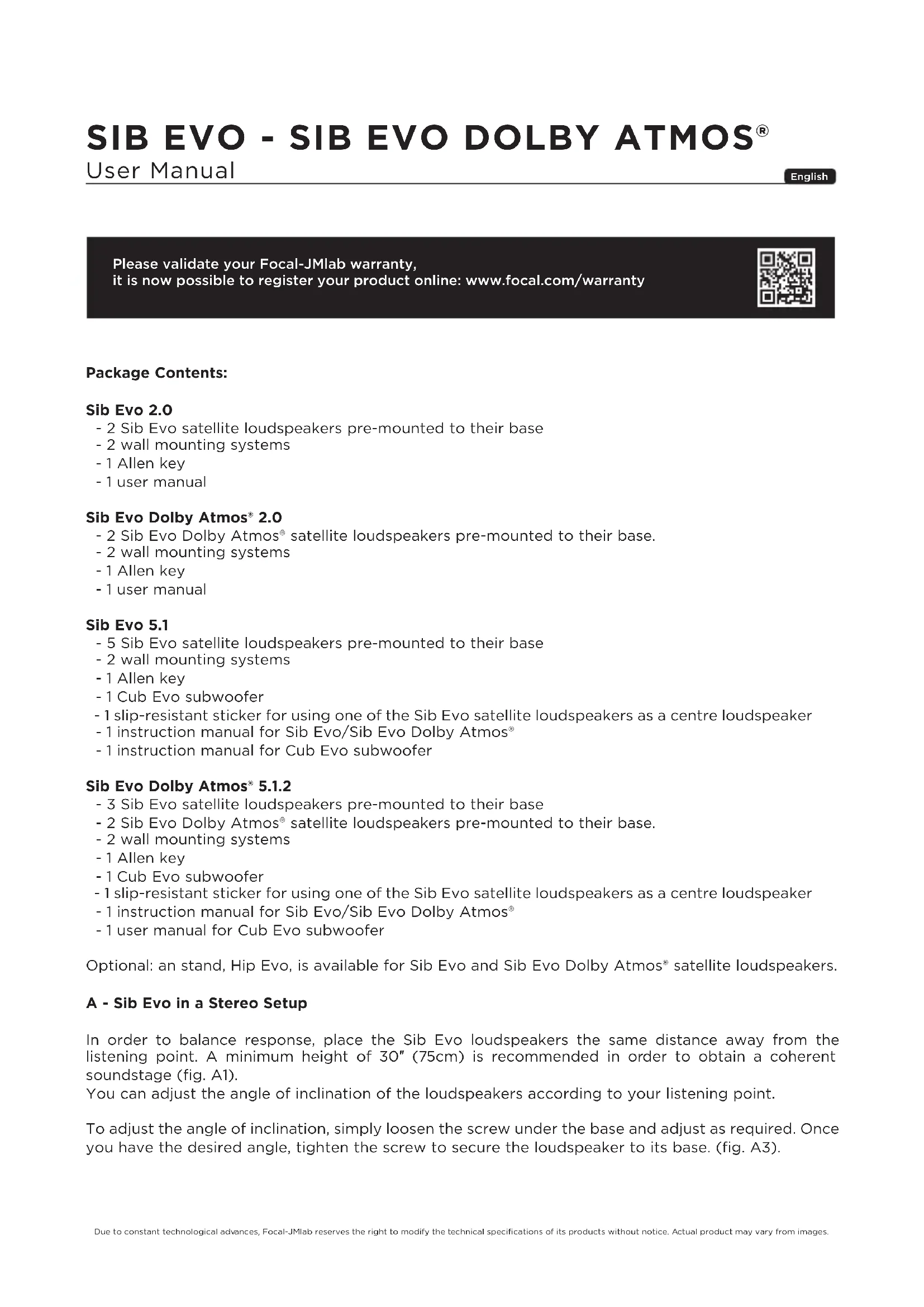


| Product type | 5.1 home cinema system |
| Brand | Focal |
| Model | Sib Evo Pack 5.1 |
| Composition | 5 Sib Evo satellite speakers, 1 Cub Evo subwoofer, 2 wall mounting systems, 1 key, 1 anti-slip sticker, instruction manuals |
| Satellite speaker type | 2-way bass-reflex |
| Drivers (satellite) | 13 cm Polyflex woofer, 19 mm fabric dome tweeter |
| Frequency response (satellite) | 70 Hz - 25 kHz (+/-3 dB) |
| -6 dB cut-off (satellite) | 66 Hz |
| Sensitivity (satellite) | 90 dB (2.83 V/1 m) |
| Nominal impedance (satellite) | 6 ohms |
| Crossover frequency (satellite) | 3.5 kHz |
| Recommended amplifier (satellite) | 25 - 200 W |
| Dimensions (H × W × D) satellite | 252 × 162 × 162 mm |
| Unit weight satellite | 1.8 kg |
| Subwoofer | Cub Evo subwoofer (see specific manual) |
| Use as center speaker | Possible in horizontal position with supplied anti-slip sticker |
| Wall mounting | Yes, with supplied brackets (screws included) |
| Adjustable tilt | Yes, via screw under the base |
| Break-in period | Approximately 20 hours at medium level, with bass-rich programs |
| Maintenance | Dust with dry microfiber cloth; clean stains only with damp microfiber cloth |
| Warranty | Mandatory online registration at www.focal.com/warranty |
Frequently Asked Questions - Sib Evo Pack 5.1 FOCAL
User questions about Sib Evo Pack 5.1 FOCAL
0 question about this device. Answer the ones you know or ask your own.
Ask a new question about this device
Download the instructions for your Hi-fi system in PDF format for free! Find your manual Sib Evo Pack 5.1 - FOCAL and take your electronic device back in hand. On this page are published all the documents necessary for the use of your device. Sib Evo Pack 5.1 by FOCAL.
USER MANUAL Sib Evo Pack 5.1 FOCAL
natural_image
Line drawing of a portable electronic device with a circular vent and base (no text or symbols)Sib Evo Dolby Atmos®
natural_image
Line drawing of a modern audio speaker with a circular head and base (no text or symbols)Sib Evo
Français : page 8
English : page 12
Deutsch : seite 16
Italiano : pagina 20
Español : página 24
Sib Evo
natural_image
Technical line drawings of a mechanical component, showing two views (b1 and b2) with no visible text or symbols.Sib Evo
natural_image
Line drawing of a device with exploded view showing internal components (no text or symbols)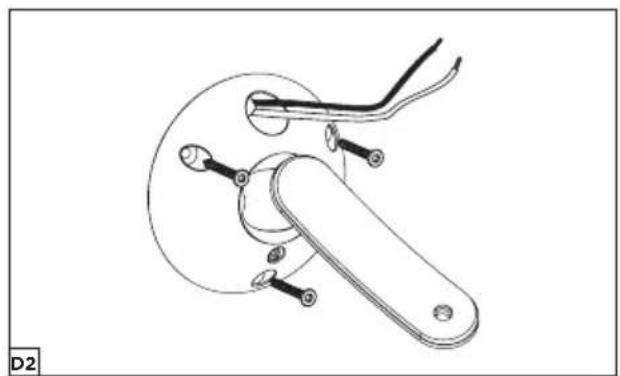
natural_image
Technical line drawing of a mechanical clamp or lever assembly (no text or symbols)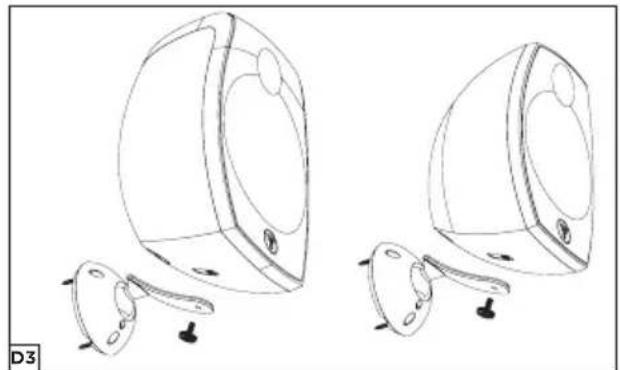
natural_image
Line drawing of two identical 3D-rendered objects with circular bases and small accessories, no text or symbols present.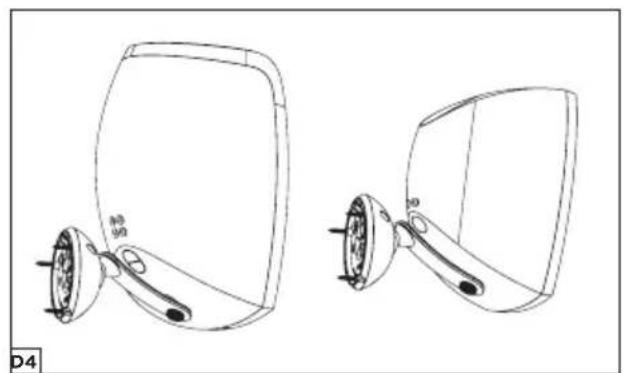
natural_image
Technical line drawing of two mirror-shaped objects with adjustment knobs and a handle (no text or symbols)Sib Evo Dolby Atmos ^® Sib Evo
natural_image
Line drawing of two identical electronic devices with circular ports and mounting feet (no text or symbols)Sib Evo Dolby Atmos®
Sib Evo
Sib Evo - Sib Evo Dolby AtmoS®
Sib Evo
Sib Evo Dolby Atmos®
natural_image
Diagram of a computer mouse with cable routing (no text or symbols)SIB EVO - SIB EVO DOLBY ATMOS®
| Type Two-way compact bass-reflex loudspeaker | |
| Speaker 5" (13cm) Polyflex woofer | 3/4" (19mm) soft dome tweeter |
| Frequency Response (+/-3dB) 70Hz to 25kHz | |
| Low frequency point -6dB 66Hz | |
| Sensibility (2.83V/1m) 90dB | |
| Nominal Impedance 6 Ohms | |
| Crossover Frequency 3.5kHz | |
| Recommended Amplifier Power 25 - 200W | |
| Dimensions (HxWxD) 9 | ^15/16"x6 ^3/8"x6 ^3/8" (252x162x162mm) |
| Weight (unit) 4lbs (1.8kg) |
Sib Evo Dolby Atmos®
| Front Channel Atmos® Channel | ||
| Type | Two-waybass-reflex loudspeaker | Fullrange sealedloudspeaker |
| Speakers 5" (13cm) Polyflex woofer | 3/4" (19mm) soft dometweeter | 4" (10cm) full-range speaker |
| Frequency Response (+/-3dB) | 65Hz to 25KHz | 90Hz to 20KHz |
| Low frequency point -6dB | 60Hz | 75Hz |
| Sensibility (2.83V/1m) | 90dB | 90dB |
| Nominal impedance | 6 Ohms | 6 Ohms |
| Crossover Frequency | 3.5kHz | |
| Recommended Amplifier Power | 25 - 200W | |
| Dimensions (HxWxD) | 11^5/8" × 7^11/16" × 7^1/2" (295x195x190mm) | |
| Weight (unit) 7lbs (3.25 kg) | ||
SIB EVO - SIB EVO DOLBY ATMOS®
Please validate your Focal-JMlab warranty, it is now possible to register your product online: www.focal.com/warranty

Package Contents:
Sib Evo 2.0
- 2 Sib Evo satellite loudspeakers pre-mounted to their base
- 2 wall mounting systems
- 1 Allen key
- 1 user manual
Sib Evo Dolby Atmos® 2.0
- 2 Sib Evo Dolby Atmos ^® satellite loudspeakers pre-mounted to their base.
- 2 wall mounting systems
- 1 Allen key
- 1 user manual
Sib Evo 5.1
- 5 Sib Evo satellite loudspeakers pre-mounted to their base
- 2 wall mounting systems
- 1 Allen key
- 1 Cub Evo subwoofer
- 1 slip-resistant sticker for using one of the Sib Evo satellite loudspeakers as a centre loudspeaker
- 1 instruction manual for Sib Evo/Sib Evo Dolby Atmos®
- 1 instruction manual for Cub Evo subwoofer
Sib Evo Dolby Atmos® 5.1.2
- 3 Sib Evo satellite loudspeakers pre-mounted to their base
- 2 Sib Evo Dolby Atmos ^® satellite loudspeakers pre-mounted to their base.
- 2 wall mounting systems
- 1 Allen key
- 1 Cub Evo subwoofer
- 1 slip-resistant sticker for using one of the Sib Evo satellite loudspeakers as a centre loudspeaker
- 1 instruction manual for Sib Evo/Sib Evo Dolby Atmos®
- 1 user manual for Cub Evo subwoofer
Optional: an stand, Hip Evo, is available for Sib Evo and Sib Evo Dolby Atmos ^® satellite loudspeakers.
A - Sib Evo in a Stereo Setup
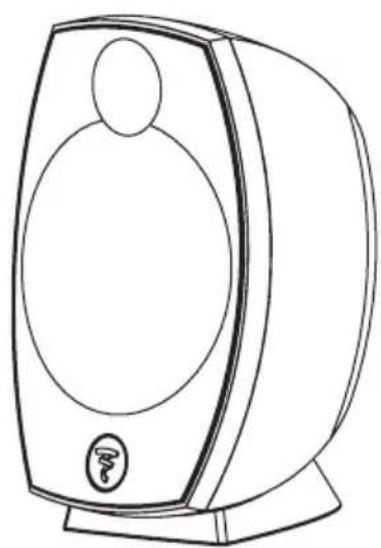
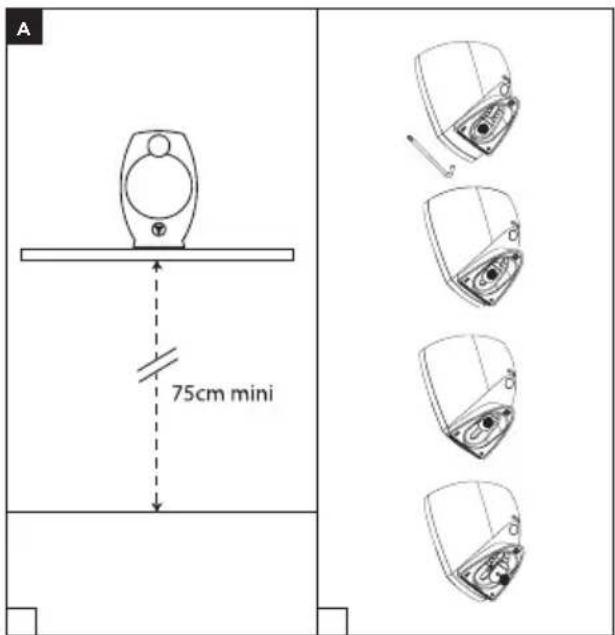
In order to balance response, place the Sib Evo loudspeakers the same distance away from the listening point. A minimum height of 30" (75cm) is recommended in order to obtain a coherent soundstage (fig. A1).
You can adjust the angle of inclination of the loudspeakers according to your listening point.
To adjust the angle of inclination, simply loosen the screw under the base and adjust as required. Once you have the desired angle, tighten the screw to secure the loudspeaker to its base. (fig. A3).
SIB EVO - SIB EVO DOLBY ATMOS®
User Manual
13
B - Sib Evo in a 5.1 Home Cinema Setup
1- Centre loudspeaker:
To use the Sib Evo satellite loudspeaker as a centre loudspeaker, unscrew the rubber base from the loudspeaker, stick the slip-resistant sticker in place (as shown in fig. B1) and position the loudspeaker horizontally central to the base (fig. B2). The centre loudspeaker must be positioned the same distance away from the front left and right loudspeakers. Turn the logo clockwise until it appears upright (figs. B2 and B3).
2- Adjusting the angle of inclination:
Sib Evo is supplied with the base pre-mounted.
However, you can adjust the angle of inclination of the loudspeaker according to your listening point. To adjust the angle of inclination, simply loosen the screw under the base and adjust as required as shown above. Once you have the desired angle, tighten the screw to secure the loudspeaker to its base (fig. A3).
C - Sib Evo in a 5.1.2 Dolby Atmos® Home Cinema Setup
The 5.1.2 pack features two Sib Evo Dolby Atmos ^® satellite loudspeakers certified by Dolby. These satellite loudspeakers are equipped with two speaker drivers, one of which is fired towards the ceiling to provide Dolby Atmos ^® effects. Dolby Atmos ^® technology offers true 3D sound by including a vertical dimension, that's to say the propagation of sound waves emitted from a new source: the ceiling. This new dimension provides even more precision and realism for a multichannel experience worthy of cinemas (figs. C1 et C2).
1- Centre loudspeaker:
To use the Sib Evo satellite loudspeaker as a centre loudspeaker, unscrew the rubber base from the loudspeaker, stick the slip-resistant sticker in place (as shown in fig. B1) and position the loudspeaker horizontally central to the base (fig. B2). The centre loudspeaker must be positioned the same distance away from the front left and right loudspeakers. Turn the logo clockwise until it appears upright (figs. B2 and B3).
2- Adjusting the angle of inclination:
All the loudspeakers in the Sib Evo packs are supplied with their bases pre-mounted.
The Sib Evo Dolby Atmos® loudspeaker is already mounted to its base according to Dolby Atmos® recommendations.
However, you can adjust the angle of inclination of the loudspeaker according to your listening point.
- For a listening point less than 6.5 feet away (2m): tilt the loudspeakers back.
- For a listening point more than 8 feet away (2.5m): tilt the loudspeakers forward.
To adjust the angle of inclination, simply loosen the screw under the base and adjust as required as shown above. Once you have the desired angle, tighten the screw to secure the loudspeaker to its base (fig. A3).
CAUTION: with a Dolby Atmos® installation, it is advised not to have any obstacles (shelves, lights, etc.) less than 3 feet (1m) above the Sib Evo Dolby Atmos® loudspeaker that could impede the reflection of Dolby Atmos® sound off the ceiling.
SIB EVO - SIB EVO DOLBY ATMOS®
User Manual
14
D - Wall-Mounting
1- Remove the base from the loudspeaker by unscrewing the screw underneath the base.
Caution: keep the screw to one side as it will be used again in step 3 (fig. D1).
2- Route the cable through the intended opening on the wall-mount and fix to the wall using the 3 screws supplied (fig. D2).
3- Position the loudspeakers on the wall-mount and secure in place using the screw put to the side in step 1 (figs. D2, D3).
4- Connect the cables (see E - Connections).
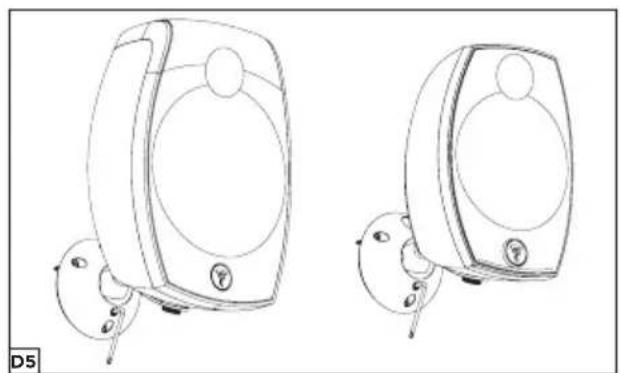
5- Incline the loudspeaker according to your installation and secure in place by tightening the screw underneath the ball joint using the Allen key supplied (fig. D5).
E - Connections
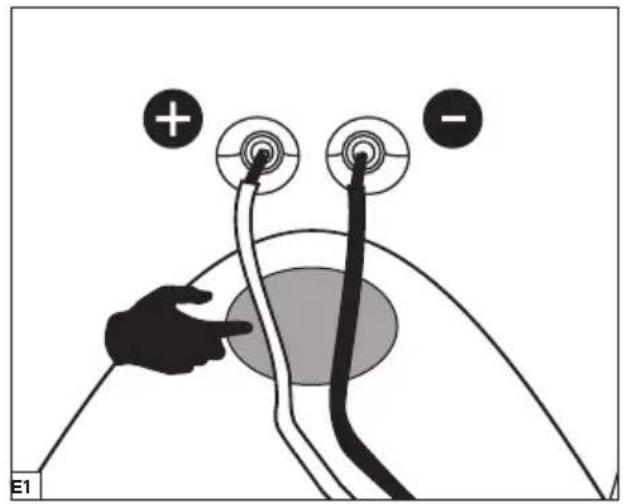
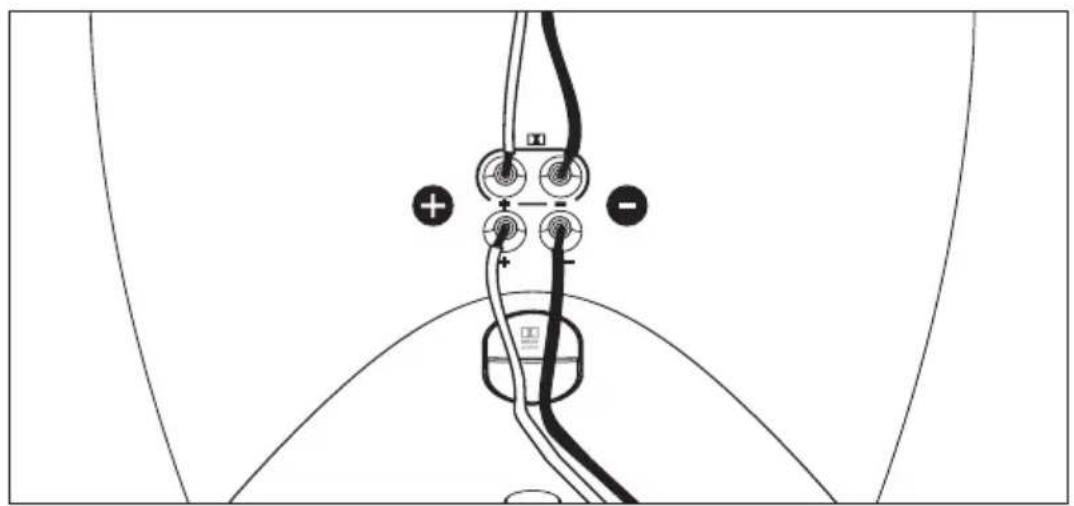
Connect your Sib loudspeakers to the amplifier using a hi-fi quality cable with a cross-section area of between 0.75mm^2 and 2mm^2 and with the polarity marked on one of the conductors.
Respect the polarity making sure to connect the "+" terminal on the amplifier to the "+" terminal on the corresponding loudspeaker.
Repeat the operation for the "-" terminals (fig. E1).
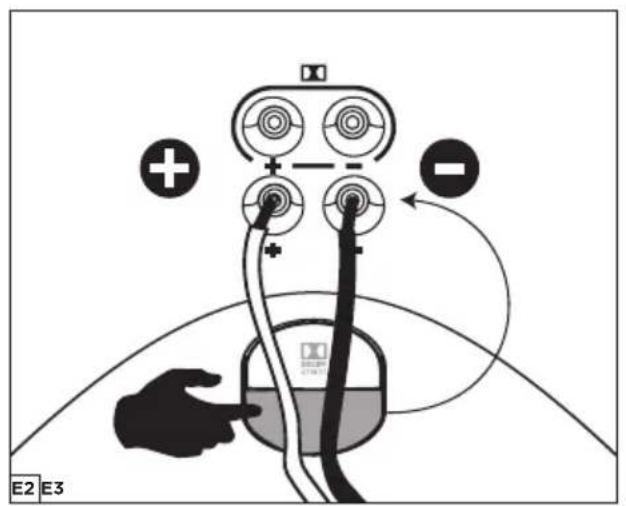
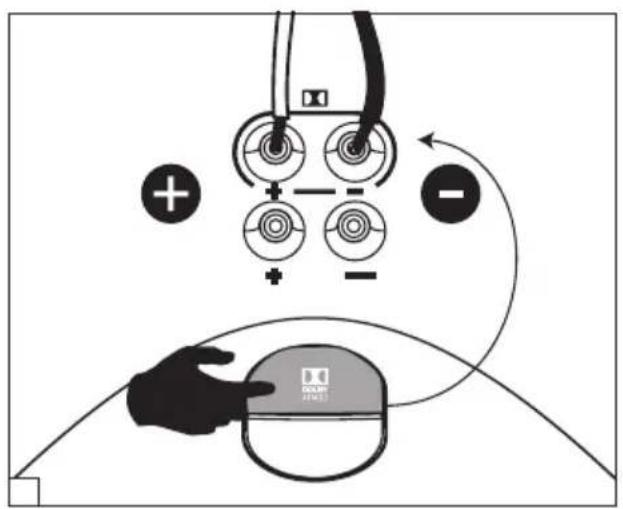
For the Sib Evo Dolby Atmos ^® satellite speakers, respect the conductors indicated on the back of the satellites, the forward firing speaker driver corresponds to the bottom connectors, and the Dolby Atmos ^® upward-firing speaker driver corresponds to the top connectors (figs. E2, E3).
SIB EVO - SIB EVO DOLBY ATMOS®
User Manual
15
F - Audio/video amplifier settings:
We highly recommend configuring your Sib loudspeakers in "SMALL" mode in your audio/video amplifier menu.
Recommendations:
- If your amplifier is equipped with an auto-calibration function, make sure that your amplifier has the latest firmware.
- If you configure the amplifier manually, we highly recommend:
- setting the cut-off frequency to 80Hz.
- doubling the distance of the Atmos® loudspeakers compared to the front speaker drivers.
- increasing the level until you obtain the desired result.
G - Subwoofer
For reproducing low frequencies, we recommend Cub Evo subwoofer.
H - Break-in period
The speaker drivers used in Sib Evo loudspeakers are complex mechanical components which require a break-in period in order to operate at their best and to become acclimatised to the temperature and humidity of your environment. The length of time this takes can vary depending on the conditions and may extend over several weeks.
To reduce this break-in period, we recommend operating your subwoofer for about 20 consecutive hours at medium volume, with music which is rich in bass. Once the loudspeaker's characteristics have totally stabilised, you will be able to enjoy the full potential of your loudspeakers.
I - Maintenance
Only clean Sib Evo loudspeakers with a dry microfibre cloth. If a loudspeaker is dirty, we recommend simply cleaning it with a damp microfibre cloth.
Never use solvents, detergents, alcohol-based or corrosive products, scrapers or scourers to clean the surface of the loudspeaker. Only wipe delicately and never press down hard.
SIB EVO - SIB EVO DOLBY ATMOS®
Gebrauchsanweisung
Deutsch