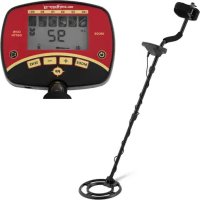
SBSMD20 - Detector STEINBERG - Free user manual and instructions
Find the device manual for free SBSMD20 STEINBERG in PDF.


| Product Type | Metal Detector |
| Brand | Steinberg |
| Model | SBS-MD-20 |
| Supply Voltage | 9 V (2 alkaline 9 V batteries) |
| Battery Type | Alkaline 9 V |
| Operating Frequency | 6010 Hz |
| Search Coil Diameter | 250 mm |
| Shaft Length (adjustable) | 1060 - 1220 mm |
| Weight | 1.05 kg |
| Headphone Jack | Yes (3.5 mm jack) |
| Detected Metal Types | 6 (iron, 5¢ coins, pull tab, zinc/copper, 10¢, 25¢) |
| Maximum Detection Range | 240 mm |
| Detection Modes | A-M (all metals), DISC (discrimination), MEMORY (memory), JEWELRY (jewelry) |
| Sensitivity Adjustment | Yes (adjustable levels) |
| Pinpoint Function (PP) | Yes (precise localization) |
| Backlight | Yes (long press on VOLUME/BACKLIGHT) |
| Auto Power Off | After 15 minutes of inactivity |
| Assembly | 3-part telescopic shaft with locks |
| Maintenance | Soft cloth, no caustic products, no immersion |
| Safety | Read manual, do not open, use correct batteries, remove batteries if not used for long time |
| Repairability | Manufacturer's after-sales service only |
| Intended Use | Searching for coins, jewelry, gold, silver and other metals |
Frequently Asked Questions - SBSMD20 STEINBERG
User questions about SBSMD20 STEINBERG
0 question about this device. Answer the ones you know or ask your own.
Ask a new question about this device
Download the instructions for your Detector in PDF format for free! Find your manual SBSMD20 - STEINBERG and take your electronic device back in hand. On this page are published all the documents necessary for the use of your device. SBSMD20 by STEINBERG.
USER MANUAL SBSMD20 STEINBERG
1. General Description
The instruction manual is intended to assist in safe and reliable use. The product is designed and manufactured strictly according to technical specifications using the latest technology and components and maintaining the highest quality standards.
PLEASE CAREFULLY READ AND UNDERSTAND THIS INSTRUCTION MANUAL BEFORE OPERATION,
To ensure long and reliable operation of the unit, make sure to operate and maintain it properly in accordance with the guidelines in this instruction manual. The technical data and specifications contained in this instruction manual are up to date. The manufacturer reserves the right to make changes in order to improve the quality. Taking the technical progress and the possibility of reducing noise into account, the unit is designed and built in such a way so that risks resulting from noise emissions are reduced to the lowest possible level.
Explanation of symbols
| CE | The product complies with applicable safety standards. |
| Please read the instructions before use. | |
| Recyclable product. | |
| CAUTION! or WARNING! or REMINDER! describing a situation. (general warning sign). |

CAUTION! The illustrations in this instruction manual are for reference only and may differ from the actual product in some details.
The original instruction manual is in the German language version. Other language versions are translations from German.
2. Safety of use
CAUTION! Read all safety warnings and all instructions. Failure to follow warnings and instructions could result in serious injury or even death.
The term "unit" or "product" in the warnings and in the description of the instructions refers to the METAL DETECTOR.
2.1. Safety in the workplace
a) If you have any doubts as to whether the unit is working properly or if it is damaged, contact the manufacturer's service department.
b) Only the manufacturer's service department can repair the unit. Do not carry out repairs yourself!
c) Keep all packaging materials (plastic bags, cardboard, polystyrene, etc.) out of the reach of children as they are a potential source of danger and must be disposed of in accordance with the regulations in force at the place of use.
2.2. Safe use of the unit
a) Repairs and maintenance should be carried out by qualified personnel using only original spare parts. This will ensure the safety of use.
b) To ensure the designed operational integrity of the unit, do not remove factory-installed covers or loosen screws.
c) Keep these instructions for use for future reference. If the unit is to be passed on to a third party, the operating instructions must also be handed over together with the unit.
d) The unit is not a toy. Children should be watched to ensure that they do not play with the unit.
e) Do not tamper with the unit to alter its performance or design.
f) Keep the unit away from sources of fire and heat.
g) Batteries that are not rechargeable should not be charged.
h) Do not mix different types of batteries, or old and used batteries.
i) Install batteries according to the polarity direction indicated on the unit and battery symbols.
j) Remove used batteries from the unit and dispose of them safely in accordance with the law.
k) Do not subject the unit to strong shocks.
I) For safety reasons, remove the batteries when the unit is not in use.
m) Please note that the devices are exposed to electromagnetic interference which may affect their use.
n) Do not mix old and new batteries or different battery types!
o) If the detector is not going to be used for a week or more, remove the batteries!
Chemical substances may leak from the batteries and destroy electronic components.
p) Use only new batteries of the required size!
3. Rules of use
The metal detector is a unit intended to support the process of searching for coins, jewelry, gold, silver etc. other metallic items with magnetic or non-magnetic properties.
The user is responsible for any damage resulting from misuse.
3.1.Description
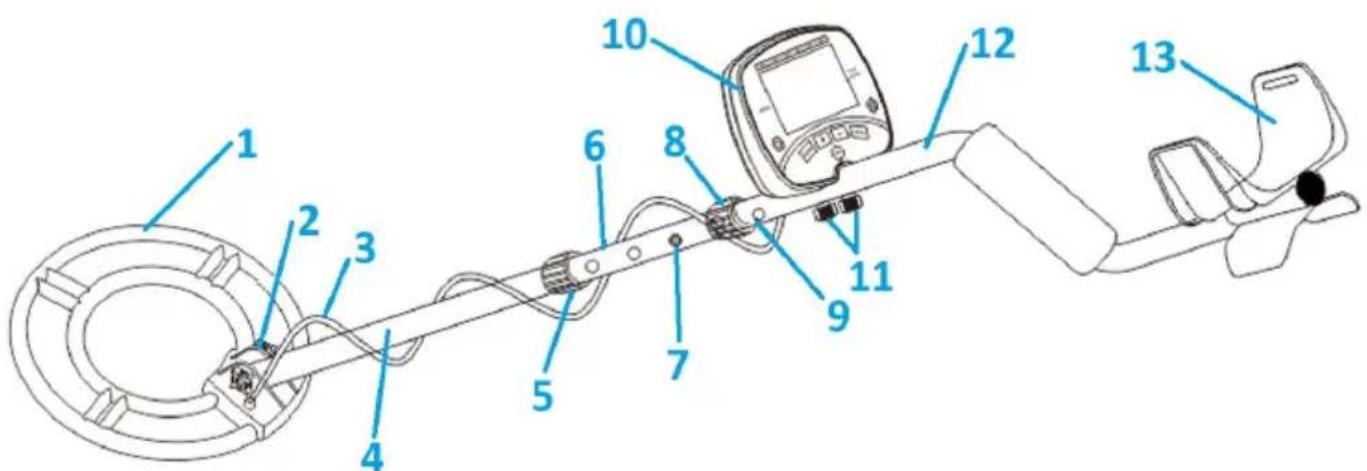
- Probe (search coil)
- Probe fixing screw/tilt adjustment screw
- Cable
- Lower stem
- Clamping nut
6.Middle stem - Lock
- Clamping nut
- Lock hole
- Control panel
- Control panel screw
- Upper stem
- Armrest
CONTROL PANEL
-
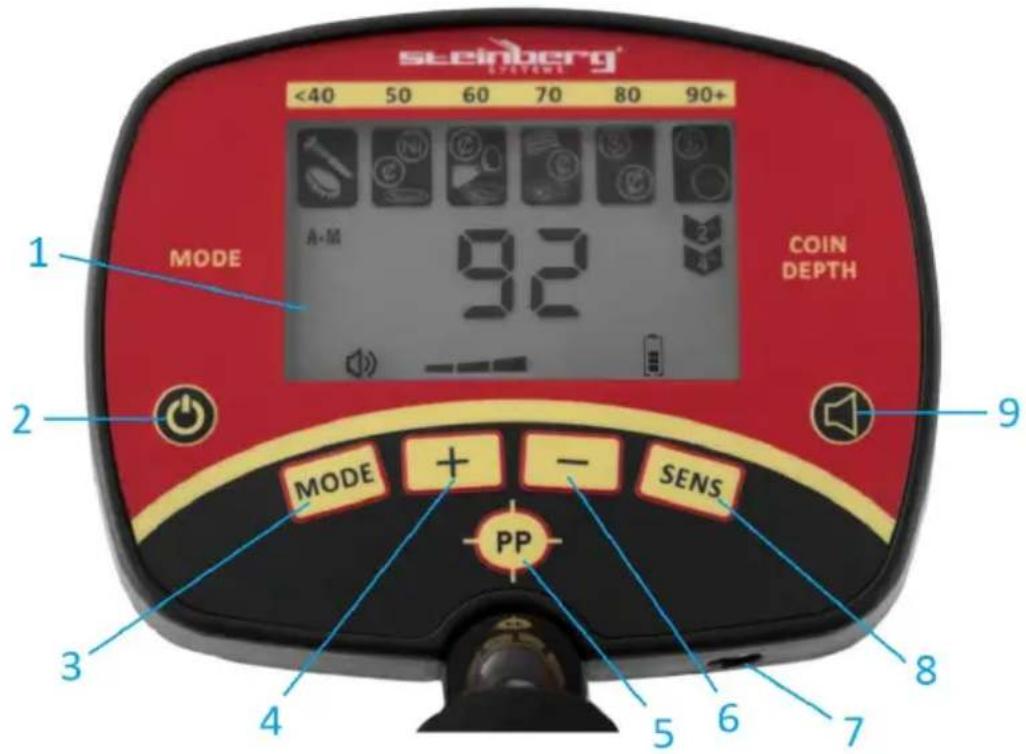
LCD display board
-
POWER button: switching the unit on/off
-
MODE button: Selection of one of the four modes (selection is shown on the display)
-
- button: Increase the volume of the VOLUME function, the sensitivity of the SENS function and the discrimination range of the DISC function.
-
PP button: Precise search mode, shows the precise location of the target.
-
- Button: Decrease the volume, sensitivity and discrimination range of VOLUME. SENS and DISC.
-
3.5mm headphone input.
-
SENS button: adjusts sensitivity level for object search. Press SENS button, then press + or - button to increase or decrease sensitivity. The sensitivity level will be displayed on the LCD.
-
VOLUME/BACKLIGHT button - adjust volume/enable backlight: short press to adjust volume level. To turn on the backlight, hold the button down for about 2 seconds. A long press again turns off the backlight.
Caution: Since the backlight consumes more power, it is better to turn it off in bright areas.
Display:
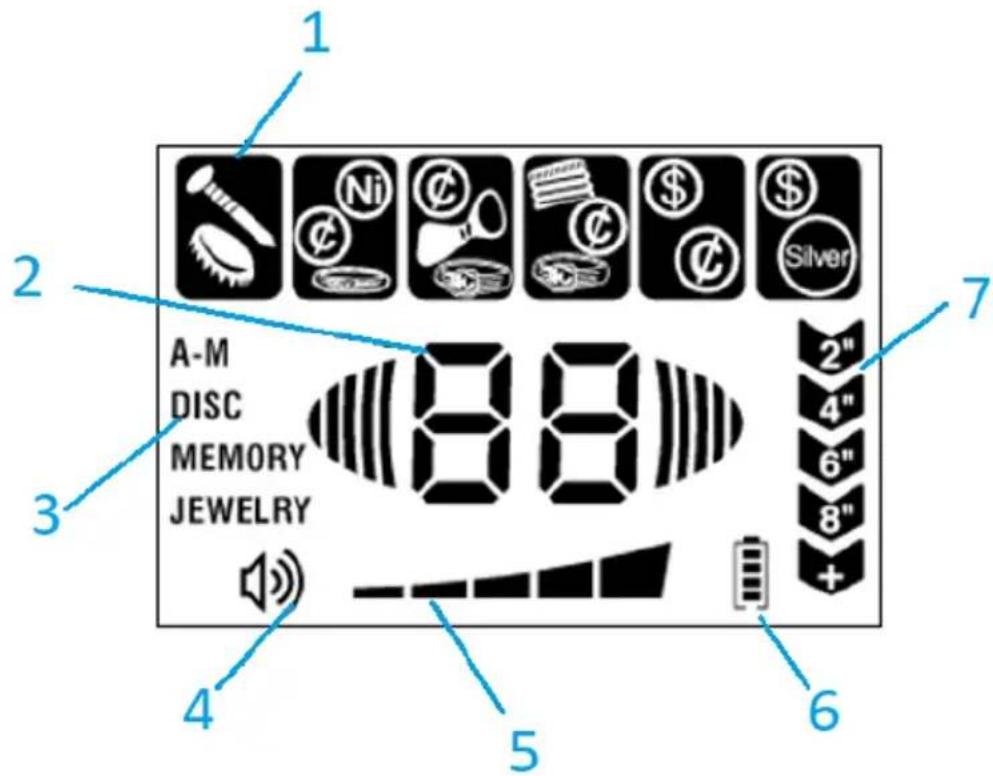
- Target ID
- Readout indication
- Operational mode indicators
- Volume indicator
- Sensitivity level indicator, SENS
- Battery level indicator
- Depth at which target was detected
MODES OF OPERATION:
The detector has four operating modes: A-M (ALL METAL), DISC (DISCRIMINATION), MEMORY, JEWELRY. Select the mode appropriate to the target you are searching for:
a) A-M (ALL METAL) MODE
This mode is designed to detect all types of metals.
b) DISC MODE (DISCRIMINATION)
In DISC mode the user can suppress detection of unwanted metals. The degree of discrimination should be set using the +, - buttons.
c) MEMORY MODE
MEMORY mode is designed for detection of metals with stored parameters.
d) JEWELRY MODE
In JEWELRY mode the detector automatically ignores most nails and small pieces of iron. The discrimination pattern is optimized to locate most jewelry items. In JEWELRY mode the detector will still find coins, relics and other nonjewelry items.
3.2. Preparation for operation ASSEMBLY OF THE UNIT
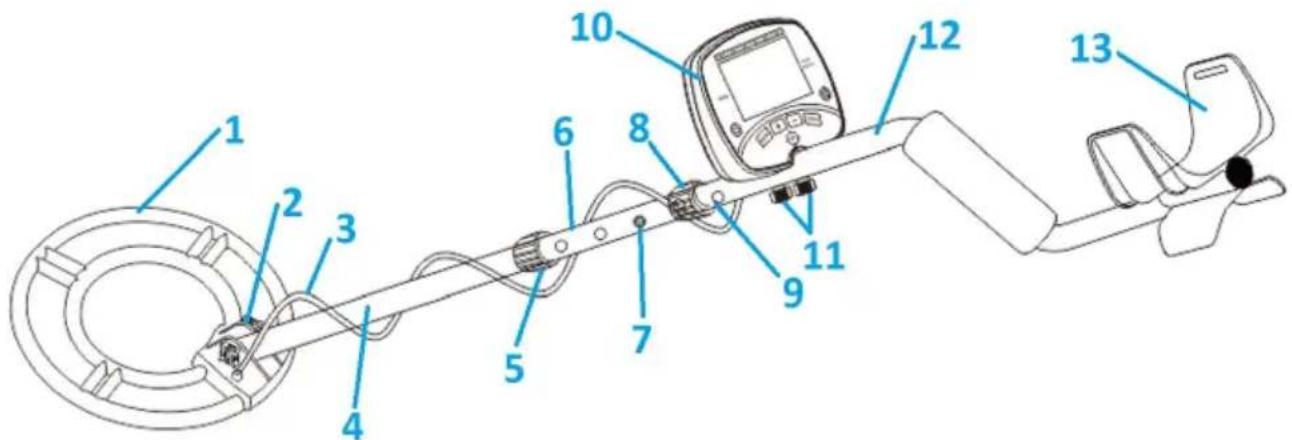
-
Open the package and remove all components.
-
Connect the detector's probe (1) to the lower stem (4) and then tighten the probe fixing screw (2).
-
Press the lock on the lower stem (7) and slide it into the middle stem (6). The lock must be visible in one of the holes (9).
-
Press the lock in the middle stem (7) and slide it into the upper stem (12). The lock must be visible in one of the holes (9).
-
Adjust the length of the stem so that you can comfortably stand upright holding the detector with the probe parallel to the ground. The other arm should be relaxed, placed freely along the body. Tighten the locking nut on the middle stem (5) counterclockwise.
-
Attach control panel (10) to upper stem (12) and tighten control panel mounting screws (11) securely.
-
Wrap the cable around the stem and insert the cable plug into the 5-pin socket (on the back of the control panel).
-
Check that the stem length is correct. Stand upright holding the detector with the probe parallel to the ground at a height of 1 - 5cm . The other arm should be relaxed, placed freely along the body. Tighten the locking nut on the upper stem (8) in a counter-clockwise direction.
CAUTION! Do not use excessive force or tools to tighten the clamping nuts and bolts!
CAUTION! The cable plug must be placed in the socket in the correct orientation. Do not force the plug or pull the cable - damage may result.
INSTALLING BATTERIES (batteries not included):
-
Turn off the unit before installing the batteries.
-
Slide the battery cover in the direction indicated by the arrow.
- Insert two 9V alkaline batteries into the battery compartment according to the polarity markings inside the unit.
- Close the battery compartment by sliding the cover back.
- Now the unit is ready for operation.
- Replace the batteries when the battery level icon is not filled with color.
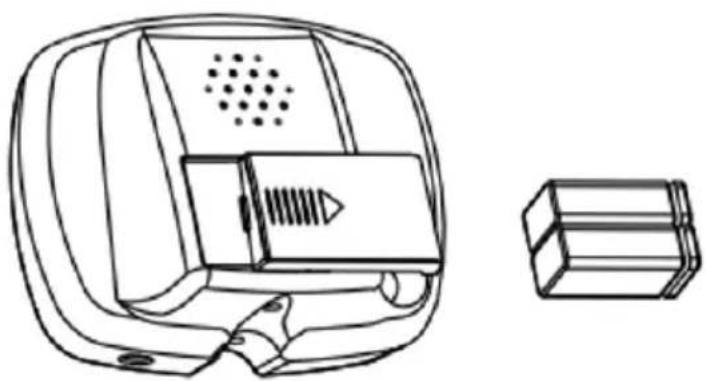

CAUTION! Do not mix different types of batteries, or old and used batteries.

CAUTION! If the detector is not going to be used for a week or more, remove batteries! Batteries can be damaged and lead to destruction of electronic components.

CAUTION! Use only new batteries of the required size and voltage!
CONNECTING HEADPHONES
- Choosing headphones with volume control is recommended.
- Insert the 3.5mm plug into the headphone socket located at the bottom right of the control panel. When the headphones are connected, the internal speaker is disconnected.
- Adjust the volume.
- Set the headphones to a low volume, then adjust the volume to the appropriate level.
3.3. Working with the unit
SWITCHING ON THE DETECTOR
-
Press the POWER button to turn on the unit.
-
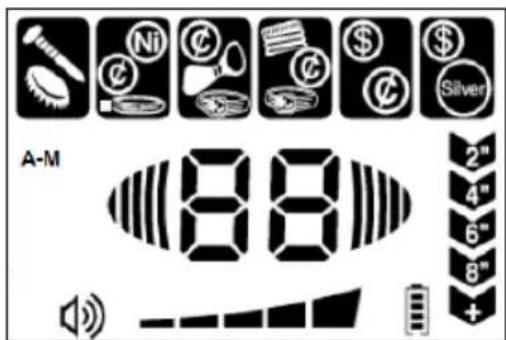
After approximately 2 seconds, the unit will go into standby mode. The LCD will display the four modes of operation, the SENS indicator, and the battery level.
-
A unit left in standby mode for approximately 15 minutes (i.e., no button is pressed, or no target is detected) will automatically turn off.
TESTING
-
Testing the unit before using it for the first time both indoors and outdoors is recommended.
-
Note how the detector reacts to individual metals.
-
Press the POWER button to turn on the unit.
-
Set the desired operating mode:
A. A-M (ALL METAL) mode:
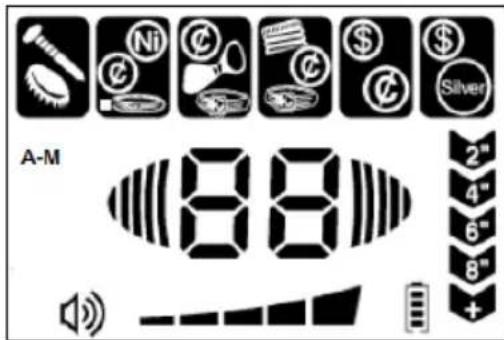
a) Press the MODE button to select A-M (ALL METAL) mode. A-M will appear on the LCD display.
b) This mode is designed to detect all types of metals.
B. DISC (DISCRIMINATION) mode:
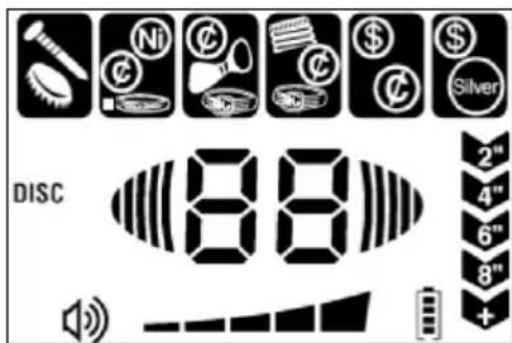
a) Press the MODE button to select DISC mode. DISC will appear on the LCD.
b) Press "+" to eliminate detection of unwanted targets. The icons of eliminated targets will disappear from the LCD screen in order from left to right.
c) The user can select several targets to eliminate using DISC mode. Silver, such as one-dollar coins or 25-cent coins (see METAL TABLE), cannot be eliminated because they are valuable.
d) To restore eliminated targets to the detector's search list, press " - " and the target icon will reappear on the LCD screen.
C. MEMORY Mode
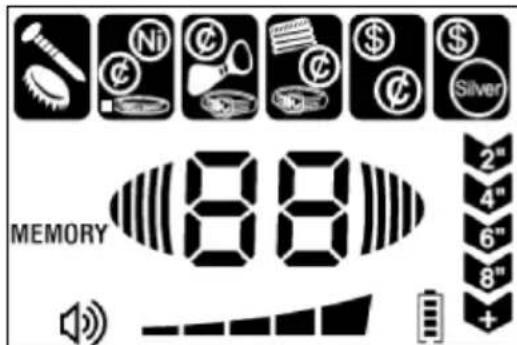
a) Press MODE to select MEMORY mode. MEMORY will appear on the LCD display.
b) This mode is designed for detecting one target memorized by the detector.
c) For example: if the user wants to find a 1 cent coin, place a 1 cent sample on the probe. The unit will detect the target and memorize it. Only the memorized target icon will appear on the LCD display and other target icons will be deleted. In this case, the detector will only detect a 1 cent coin and will not respond to others.
D. JEWELRY mode
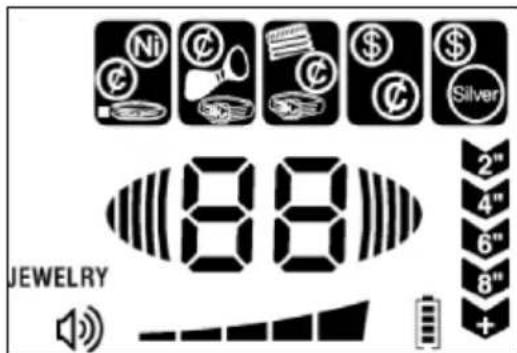
a) Press MODE to select JEWELRY mode. JEWELRY will appear on the LCD display.
b) This mode is designed to search for jewelry such as rings, bracelets, necklaces. Coins, relics and other non-jewelry items will also be searched for. In this mode, the detector automatically ignores most nails and small pieces of iron. The iron target ID will not appear on the LCD display. In this mode, the detector will not respond to iron. If you do not want to detect iron, you can use the JEWELRY mode for detection.
- Adjust the sensitivity. Press the SENS button, then press the "+" or "-" button to increase or decrease the sensitivity. The sensitivity level will be displayed on the LCD. To find objects deep in the ground, the sensitivity must be higher. If the sensitivity is set to the highest limit, it is possible that the detector will emit false signals.
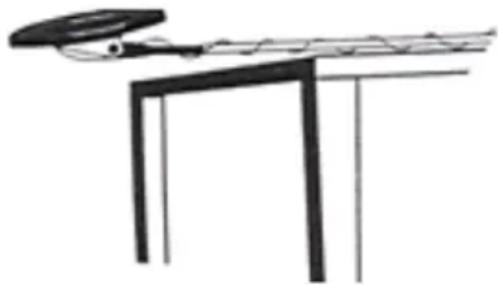
- Place the detector on a wooden or plastic table, and then the user should remove any watches, rings, or metal jewelry the user is wearing.
- Position the probe so that the flat part of the probe is facing the ceiling.
CAUTION! Do not test the detector on the floor inside a building. Most buildings have metals embedded in the floor that can interfere with or completely mask the signal.
- Slowly move a sample of the material you want the detector to find (e.g. gold ring, coin) a few centimeters above the probe surface. When the detector detects metal, it will beep and the target icon will flash. The LCD display will also show the reading value and the depth at which the target was detected. Note that the depth is only a reference point.
CAUTION! The detector will detect a coin more easily if it is held with its flat side parallel to the probe. Moving the coin sideways may cause false readings and unstable readings.
- Press the POWER button to turn on the unit.
- Set the desired operating mode (see "OPERATING THE UNIT INDOORS", section 2).
- Adjust the sensitivity (see "OPERATING THE UNIT IN ROOMS", step 3).
CAUTION! To detect a deeply buried target, you can set the sensitivity level (SENS) to high. However, do not set the sensitivity level to maximum, or the detector will pick up interference and false signals from the transmitting antenna and other electrical lines. The detector will have unstable and erratic readings.
- Find an outdoor location where there is no metal.
- Place a sample of the material to be found by the detector (such as a gold ring or coin) on the ground.
CAUTION! If a valuable metal such as gold will be used to test the detector, mark the location where the item will be placed to make it easier to find later. Do not place a valuable item in tall grass or bushes.
- Holding the probe parallel to the ground, about 1-5 cm above the surface, move it slowly over the area where the sample is placed. Make the movement from side to side.
MOVING THE DETECTOR'S PROBE
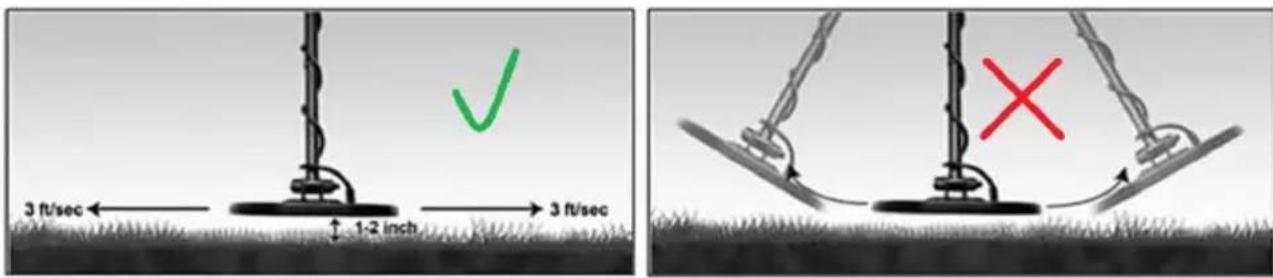
- When searching, it is best to move the detector from side to side, approximately 1 - 5cm above the surface being searched. The probe should be guided along an arc with a radius of 7 - 8cm , parallel to the ground.
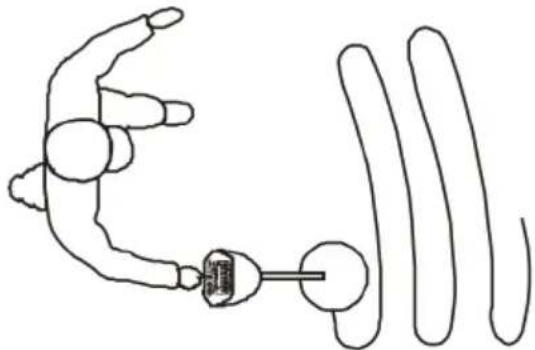
CAUTION! The probe movement should not resemble a pendulum. This may cause false readings of the detector.
-
The movement should be slow and at a constant speed.
-
When a target under the ground surface is found and identified, the detector will emit a single beep and the target found icon will flash. The LCD display will also show the reading value and the depth at which the target was detected.
-
If the detector does not detect any object, make sure that the operating mode is set correctly and that the probe is moved correctly.
-
The detector responds with a signal when it detects valuable metal objects. If the signal does not repeat after moving the probe over the target several times, it is probably scrap metal.
-
False signals can be caused by contaminated ground, electrical interference, or large irregular pieces of metal.
False signals are usually intermittent or not repeated.
FACTORS AFFECTING OBJECT DETECTION:
It is difficult to obtain an accurate detection result. Factors that affect the quality of readings are:
the angle of the target buried in the ground,
the depth at which the target is located,
the degree of oxidation of the target,
the size of the target,
- electro-magnetic and electrical interference surrounding the target.
- measurements in the area of strongly mineralized soil, fertile ground or wet sand - the detector will emit sound even if there is no metal in it. In this case you can reduce the sensitivity. You can also increase the distance between the probe and the ground,
metal digging tools placed near the unit.
TABLE OF METALS, TARGET IDENTIFIERS:
| Target | iron 5¢ | P-Tab | ZN, 1¢, S-CAPS | 10¢ 25¢ | ||
| iron objects | aluminum, nickel, small gold objects | aluminum, some small gold items, can pull tabs, | zinc, aluminum, medium-sized gold objects, bottle tops, | zinc, aluminum, large gold objects, copper coins | silver, aluminum | |
| Tone | Low | Low | Medium | Medium | High | High |
| Icon | ||||||
| Reading value | 10-40 | 41-50 | 55-70 | 72-75 | 80-83 | 86-88 |
CAUTION! There is a wide variety of metals. The target detected by the unit cannot be uniquely identified until it is unearthed. The table is for general reference only.
ILLUMINATION:
To turn on the backlight, hold down the VOLUME/BACKLIGHT button for approximately 2 seconds.
Another long press on the button turns off the backlight.
The backlight will automatically turn off after 10 minutes.
Caution: Since the backlight consumes more power, it is recommended to turn it off in bright areas.
PP (PINPOINT):
When you find a metal object, you can use the PP (PINPOINT) function to determine the precise position of the target.
- Press the PP button The PP icon will start blinking on the display. When the PP icon stops flashing, you can start moving the probe slowly over the selected location. If the detector finds the target, it will beep. The display will also show the digital readout value and the depth of the target location.
- Press the PP button. When the "PP" icon stops flashing on the display, move the probe, keeping the same distance. The detector will stop beeping. Move the probe closer to the previously selected location and the detector will again beep.
- Repeat the above steps until the detector emits a steady signal at the target location.
3.4. Cleaning and maintenance
a) Turn off the unit before each cleaning.
b) Use only non-corrosive cleaning agents for cleaning the surfaces.
c) After each cleaning, all the parts should be dried well before the unit is used again.
d) Store the unit in a dry and cool place protected from moisture and direct sunlight.
e) Do not spray the unit with a stream of water or immerse it in water.
f) Make sure that no water enters through the ventilation openings in the casing.
g) Clean the ventilation openings with a brush and compressed air.
h) Perform regular inspections of the unit checking technical fitness and any damages.
i) Use a soft cloth for cleaning.
j) Do not leave the batteries in the unit when it will not be used for a long time.
k) Do not clean the unit with acidic substances, medical products, diluent, fuel, oil or other chemicals as this may cause damage to the unit.
Install 29V batteries in the unit.
Remove used batteries from the unit in the same way you put them in.
Return the batteries to a unit responsible for their disposal.
DISPOSAL OF USED UNITS.
At the end of its useful life, this product should not be disposed of with normal household waste but should be taken to a collection point for the recycling of electrical and electronic equipment. This is indicated by the symbol on the product, operating instructions or packaging. The materials used in this unit are recyclable according to their marking. You will be making an important contribution to protecting our environment by reusing, recycling or otherwise disposing of used units.
Your local administration will provide you with information about the appropriate disposal point for used units.
TROUBLESHOOTING
| Problem | Possible cause | Action |
| The detector displays a reading or beeps without detecting a target. | The detector may receive interference and false signals from the transmitting antenna and other electrical lines. | Change the search location. Wait a while and try again. |
| The ambient humidity is too high. | ||
| The detector emits false signals. | Sensitivity is too high/environmental electromagnetic interference | Reduce the sensitivity. |
| Too fast or detector probe at wrong angle. | Move the detector probe slower and hold the detector correctly. | |
| Using 2 detectors in close proximity to each other | Keep the two detectors at least 6 meters apart. | |
| The detector does not detect anything. | Sensitivity set too low | Increase sensitivity. |
| Probe is not aligned parallel to the ground | Set the probe parallel to the ground. | |
| The display shows several targets at the same time or emits several sounds | The detector has found several different metal objects. | Reduce sensitivity to eliminate detection of deeper targets. |
| The detector cannot identify the target. Sometimes, oxidized metal also causes a | Move the probe at different angles. | |
| simultaneously. | different target and tone to be indicated. | |
| The detector does not work. | The 5-pin cable is incorrectly connected. | Connect the cable correctly. |
| The battery is discharged. | Replace the battery. |
Dane techniczne
MISE EN PLACE DES PILES (piles non fournies) :
A. MODE A-M (ALL METAL)
ACCENSIONE DEL METAL DETECTOR
a) A-M MOD (ALL METAL)
2.2. Sikker drug of apparatus
UDENDØRS ARBEJDE MED APPARATET
For the disposal of the device please consider and act according to the national and local rules and regulations.
CONTACT
expondo Polska sp. z o.o. sp. k.
- General Description
- PLEASE CAREFULLY READ AND UNDERSTAND THIS INSTRUCTION MANUAL BEFORE OPERATION,
- Explanation of symbols
- Safety of use
- Safety in the workplace
- Safe use of the unit
- Rules of use
- 3.1.Description
- CONTROL PANEL
- Display:
- MODES OF OPERATION:
- Preparation for operation ASSEMBLY OF THE UNIT
- INSTALLING BATTERIES (batteries not included):
- CONNECTING HEADPHONES
- Working with the unit
- SWITCHING ON THE DETECTOR
- TESTING
- MEMORY Mode
- JEWELRY mode
- MOVING THE DETECTOR'S PROBE
- FACTORS AFFECTING OBJECT DETECTION:
- ILLUMINATION:
- PP (PINPOINT):
- Cleaning and maintenance
- DISPOSAL OF USED UNITS.
- TROUBLESHOOTING
- Dane techniczne
- MISE EN PLACE DES PILES (piles non fournies) :
- ACCENSIONE DEL METAL DETECTOR
- Sikker drug of apparatus
- UDENDØRS ARBEJDE MED APPARATET
- CONTACT
Brand : STEINBERG
Model : SBSMD20
Category : Detector