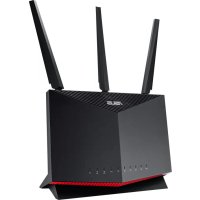
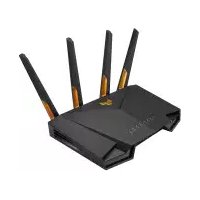
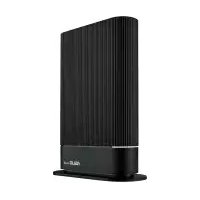
RTAX86S - Wireless Router ASUS - Free user manual and instructions
Find the device manual for free RTAX86S ASUS in PDF.



| Product Type | Wi-Fi 6 (802.11ax) Wireless Router |
| Model | RT-AX86S |
| Brand | ASUS |
| Frequency Bands | 2.4 GHz and 5 GHz |
| Wireless Standards | 802.11a/b/g/n/ac/ax |
| LAN Ports | 4 x RJ-45 Gigabit Ethernet |
| WAN Port | 1 x RJ-45 Gigabit Ethernet (Internet) |
| 2.5G Port | 1 x 2.5 Gigabit Ethernet (WAN/LAN) |
| USB Ports | 2 x USB 3.2 Gen1 |
| Buttons | WPS, Reset, Power, LED |
| LED Indicators | WPS, LAN 1-4, WAN, 2.5G, 2.4 GHz and 5 GHz bands, Power |
| Power Supply | DC Power Adapter: output +19V max 2.37A or +19.5V max 2.31A |
| Operating Temperature | 0°C to 40°C |
| Storage Temperature | 0°C to 70°C |
| Operating Humidity | 50-90% RH |
| Storage Humidity | 20-90% RH |
| Configuration | Via web interface (http://router.asus.com) or ASUS Router app |
| Wireless Security | WPA2-PSK, WPA3-PSK, WPA-Enterprise, WPS |
| Firmware Update | Via web interface or ASUS website (http://www.asus.com) |
| RF Safety Distance | Minimum 20 cm (EU) or 31 cm (Canada) between antenna and body |
| Indoor Use | Yes, 5 GHz band (5150-5350 MHz) restricted to indoor use |
Frequently Asked Questions - RTAX86S ASUS
User questions about RTAX86S ASUS
0 question about this device. Answer the ones you know or ask your own.
Ask a new question about this device
Download the instructions for your Wireless Router in PDF format for free! Find your manual RTAX86S - ASUS and take your electronic device back in hand. On this page are published all the documents necessary for the use of your device. RTAX86S by ASUS.
USER MANUAL RTAX86S ASUS
U16249/First Edition/March 2020



Table of contents
Package contents 3
A quick look at RT-AX86U. 3
Position your wireless router. 4
Preparing your modem 5
Setting up your RT-AX86U 6
A. Wired connection 6
B. Wireless connection.. 6
FAQ 8
Networks Global Hotline Information 173

This QSG contains these languages:
English
Быларскn
Cestina
Hrvatski
Dansk
Nederlands
Eesti
Suomi
Français
Deutsch
EAAnviKa
Magyar
Italiano
Latviski
Lietuviu
Norsk
Polski
Português
Româna
Pycckn
Srpski
Slovenský
Slovenscina
Espanol
Svenska
YkpaHcbkn
Türkce

Package contents
RT-AX86U Wireless Router AC adapter
Network cable (RJ-45) Quick Start Guide
A quick look at RT-AX86U
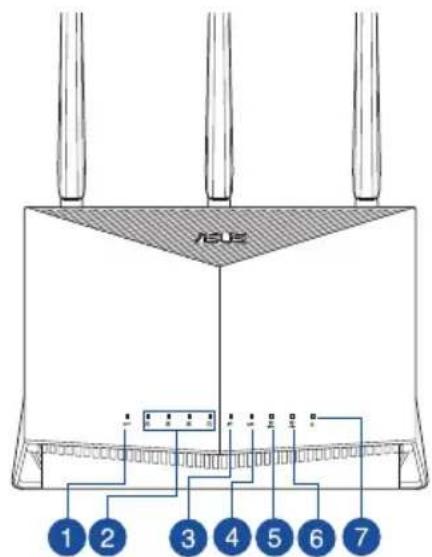
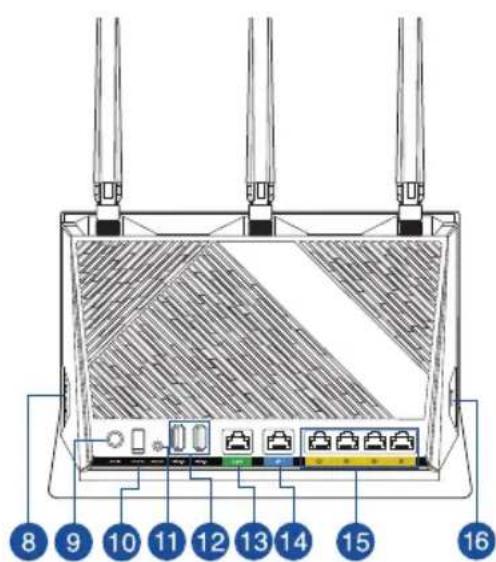
| 1 WPS LED Power (DC-IN) port | 9 |
| 2 LAN 1~4 LEDs Power button | 10 |
| 3 WAN (Internet) LED Reset button | 11 |
| 4 2.5G LED USB 3.2 Gen 1 ports | 12 |
| 5 2.4GHz LED 2.5G port | 13 |
| 6 5GHz LED WAN (Internet) port | 14 |
| 7 Power LAN 1 ~ 4 ports | 15 |
| 8 LED on/off button WPS button | 16 |
4s6u3

Position your wireless router
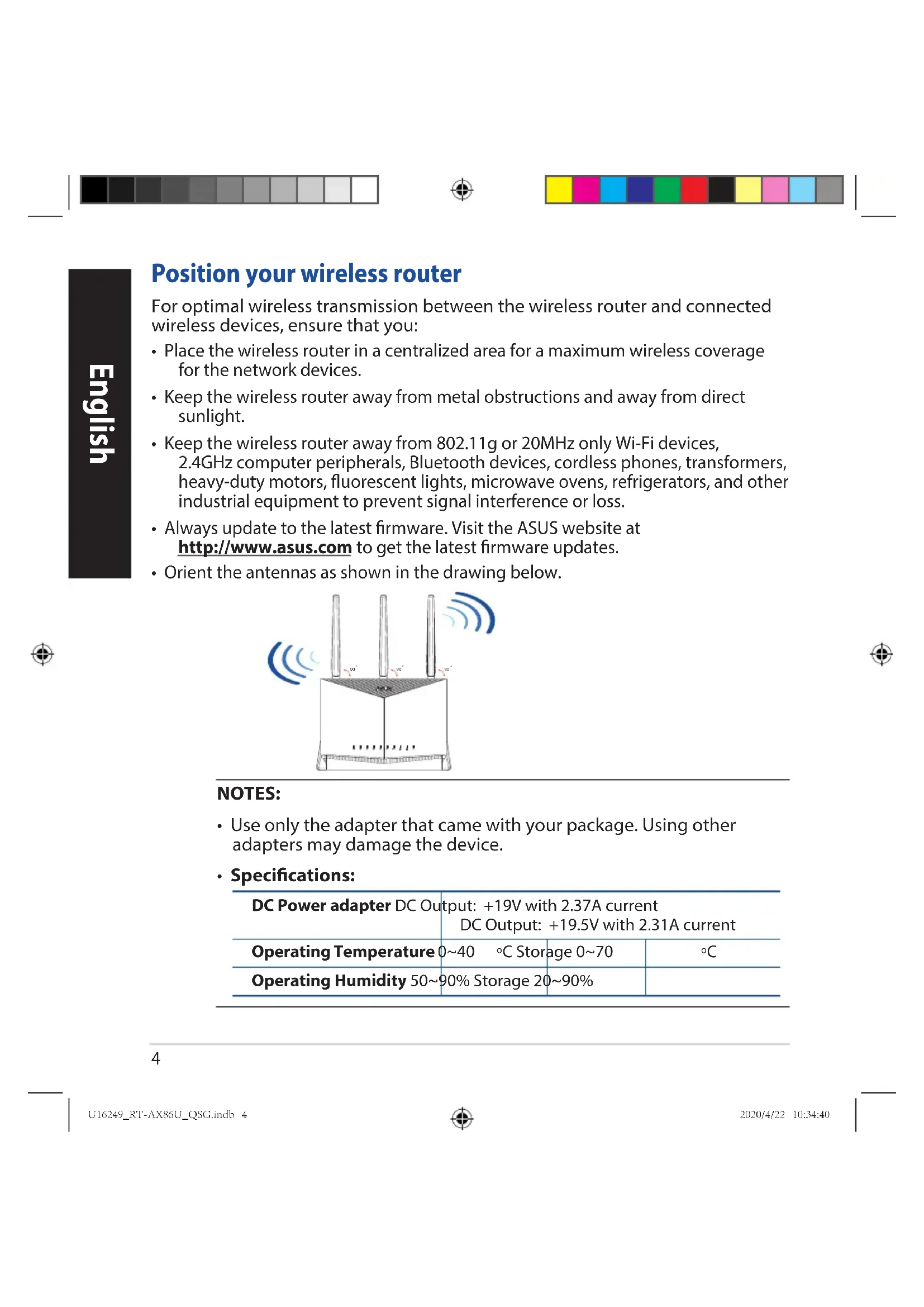
For optimal wireless transmission between the wireless router and connected wireless devices, ensure that you:
- Place the wireless router in a centralized area for a maximum wireless coverage for the network devices.
- Keep the wireless router away from metal obstructions and away from direct sunlight.
- Keep the wireless router away from 802.11g or 20MHz only Wi-Fi devices, 2.4GHz computer peripherals, Bluetooth devices, cordless phones, transformers, heavy-duty motors, fluorescent lights, microwave ovens, refrigerators, and other industrial equipment to prevent signal interference or loss.
- Always update to the latest firmware. Visit the ASUS website at http://www.asus.com to get the latest firmware updates.
- Orient the antennas as shown in the drawing below.
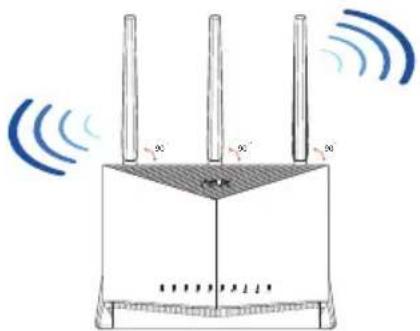
NOTES:
- Use only the adapter that came with your package. Using other adapters may damage the device.
- Specifications:
| DC Power adapter DC Output | Output: +19V with 2.37A current DC Output: +19.5V with 2.31A current | ||
| Operating Temperature | 0~40 °C Storage | 0~70 | °C |
| Operating Humidity 50~ | 90% Storage | 20~90% | |
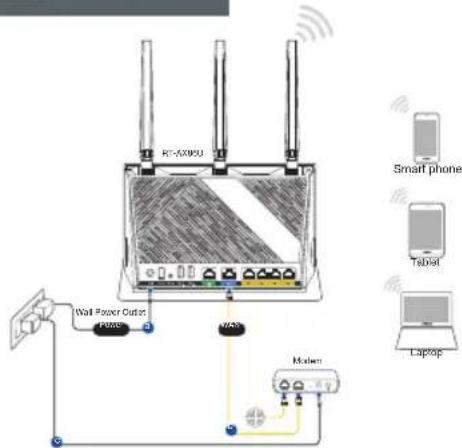
Preparing your modem
- Unplug the power cable/DSL modem. If it has a battery backup, remove the battery.
NOTE: If you are using DSL for Internet, you will need your username/password from your Internet Service Provider (ISP) to properly configure the router.
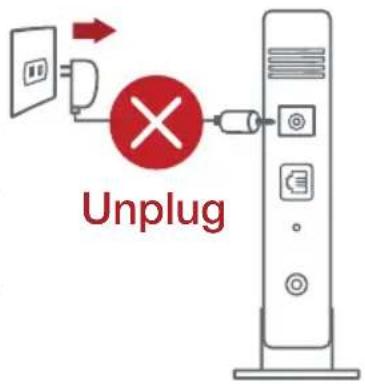
- Connect your modem to the router with the bundled network cable.
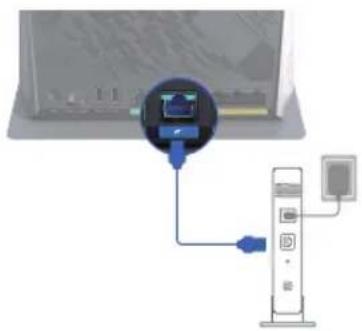
- Power on your cable/DSL modem.
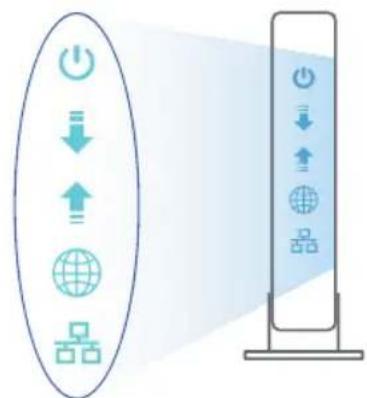
- Check your cable/DSL modem LED lights to ensure the connection is active.



Setting up your RT-AX86U
You can set up your router via wired or wireless connection.
A. Wired connection
- Plug your router into a power outlet and power it on. Connect the network cable from your computer to a LAN port on your router.
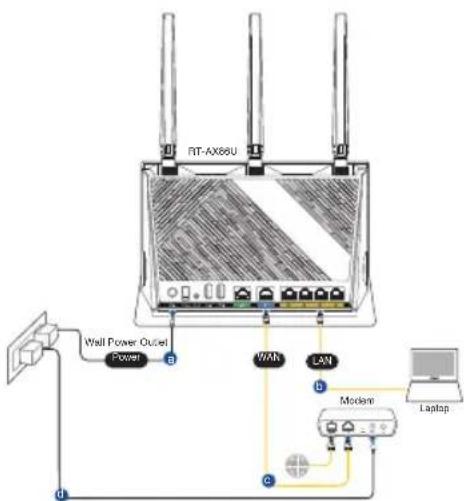
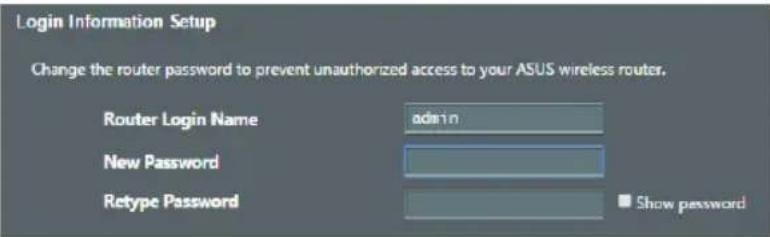
- The web GUI launches automatically when you open a web browser. If it does not auto-launch, enter http://router.asus.com.
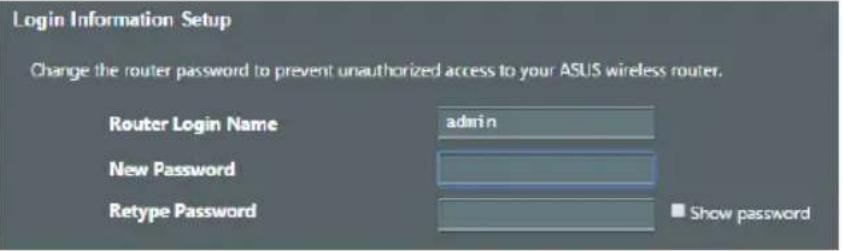
- Set up a password for your router to prevent unauthorized access.
B. Wireless connection
- Plug your router into a power outlet and power it on.
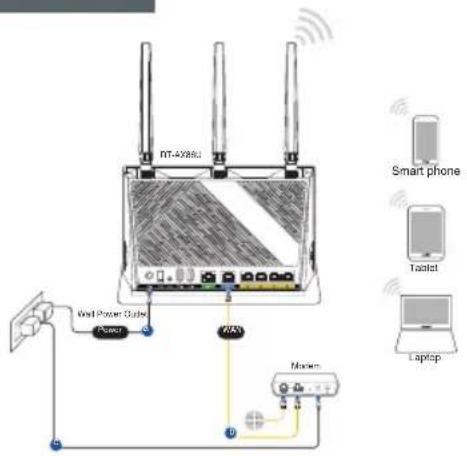
- Connect to the network with SSID shown on the product label on the back side of the router. For better network security, change to a unique SSID and assign a password.
Wi-Fi Name (SSID): ASUS XX
-
XX refers to the last two digits of 2.4GHz MAC address. You can find it on the label on the back of your router.
-
You can choose either the web GUI or ASUS Router app to set up your router. a. Web GUI Setup
-
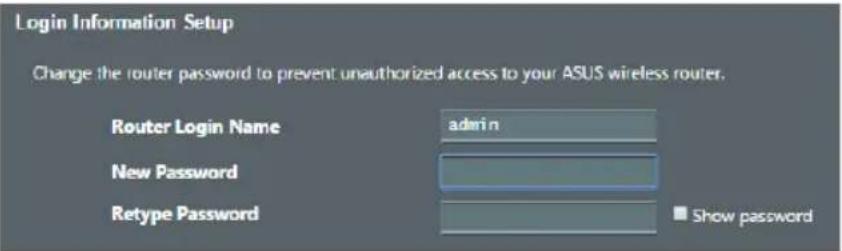
Once connected, the web GUI launches automatically when you open a web browser. If it does not auto-launch, enter http://router.asus.com.
-
Set up a password for your router to prevent unauthorized access.



b. App Setup
Download ASUS Router App to set up your router via your mobile devices.
- Turn on Wi-Fi on your mobile devices and connect to your router's network.
- Follow ASUS Router App setup instructions to complete the setup.
ASUS Router
ASUS Router
Remembering your wireless router settings
- Remember your wireless settings as you complete the router setup.
| Router Name: Password: | |
| 2.4 GHz network SSID: Password: | |
| 5GHz network SSID: Password: |
FAQ
-
Where can I find more information about the wireless router?
-
Online FAQ site: https://www.asus.com/support/faq
- Technical support site: https://www.asus.com/support
- Customer hotline: refer to the Support Hotline section in this Quick Start Guide
- You can get the user manual online at https://www.asus.com/support




Бьрз перлед
RT-AX86U AanTep 3a npomHnTOK
MpekoB ka6eJ (RJ-45) PbKOBOcO 3a 6bp3 cTapT
Download on the App Store

ASUS Router
Pamcenje postavki bežičnog usmjerivača
Download on the AppStore

ASUS Router
Change the router password to prevent unauthorized access to your ASUS wireless router.
Router Login Name
New Password
Retype Password
Show password
Download on this App Store

ASUS Router
Sādan husker du dine tradløse routerindstillinger
- Husk dine tradløse indstillinger, nár du konfigurerer routeren.
Change the router password to prevent unauthorized access to your ASUS wireless router.
Router Login Name
New Password
Retype Password

Show password
B. Traadita ühendus
Change the router password to prevent unauthorized access to your ASUS wireless router.
Router Login Name
New Password
Retype Password
b. Rakenduse seadistamine
Laadige alla ASUS-e ruuteri rakendus, et häalestada ruuter labi mobilse seadme.
Download on the App Store

ASUS Router
Traadita ruuteri sātete meeles pidamine
m = 311
m = 311
65




EykataoTaon RT-AX86U
Mnpoeite va putheta to RT-AX86U eow evupatnc n aoupatnc ouvdoanc.
Download on the App Store
Change the router password to prevent unauthorized access to your ASUS wireless router.
RouterLoginName
New Password
Retype Password
admin

Show password



ASUS Router



ASUS Router
79
TASUS Router n
Wi-Fi-n nx yson
RT-AX86U's nnnnnn
ASUS n"yNnNnNnNnNnNnNnNnNnNnNnNnNnNnNnNnNnNnNnNnNnNnNnNnNnNnNnNnNnNnNnNnNnNnNnNnNnNnNnNnNnNnNnNnNnNnNnNnNnNnN
y
.
| :700 MHz | |
| :2.4GHz nun wu: | |
| :5GHz nun wu: |
nixi nixu
?oynnnn nn y noyn nnnn nn nnnn .1
https://www.asus.com/support/fag:niinni nnnn nn
https://www.asus.com/support:
n nn nnnnnnnnnnnnnnnnnnnnnnnnnnnnnnnnnnnnnnnnnnnnnnnnnnnnnnnnnnnnnnnnnnnnnnnnnnnnnnnnnnnnnnnnnnnnn
wnnnn
https://www.asus.com/support:nnnnnnn nn nnnn

Xinwunninn
xin yin yuyu dian ninnn nn 5yiy
.
.
y'nynnnynnnn nn nnnnnnnnnnnnnnnnn
n nn nn nn nn nn nn nn nn nn nn nn nn nn nn nn nn nn nn nn nn nn nn nn nn nn nn nn nn nn nn nn nn nn nn nn nn nn nn nn nn nn nn nn nn nn nn nn nn nn nn nn nn nn nn nn nn nn nn nn nn nn nn nn nn nn nn nn nn nn nn nn nn nn nn nn nn nn nn nn nn nn nn nn nn nn nn nn nn nn nn nn nn nn nn nn nn nn nn nn nn
.
nTnn 7 n0/nuon I/ nn DnDn Dn
nwnnn
wnn nnnn nn nnnn nnnn nnnn
.
wnn nn nnn
y nnnn nn nnnn nn nnnn nn nnnn
nwnnn n7,
.7nn nn n 17 y nn n/ nn
wnnn nnnn nn nnnn nnnn nnnn nnnn nnnn nnnn
nntnxwn'psi pinn nnnn nn nnnn T97n
nnnnnn nnnn nn nnnn nnnnnn nnnn nnnn nnnn nnnn nnnn nnnn nnnn nnnn nnnn nnnn nnnn nnnn nnnn nnnn nnnn nnnn nnnn nnnn nnnn nnnn nnnn nnnn nnnn nnnn nnnn nnnn nnnn nnnn nnnn nnnn nnnn nnnn nnnn nann
.
y



Download on the App Store

ASUS Router
Downloaded on the AppStore
Download on the App Store

ASUS Router
Huske innstillinger for den tradløse ruteren
Husk de tradlose innstillingene du har utforer ruteroppsettet.
| Ruternavn: Passord: | |
| 2,4 GHz-nettverks-SSID: Passord: | |
| 5GHz-nettverks-SSID: Passord: |
Spørsmål og svar
- Hvor kan jeg finne mer informasjon om den tradlse ruteren?
- Online side med spørsmål og svar: https://www.asus.com/support/faq
- Side for tekniisk stotte: https://www.asus.com/support
Kundejhelp: Henvis til stottetelefonnummeret i tillegsguiden
Du finner bruksanvisingen på nettet på https://www.asus.com/support




Download on the AppStore
Change the router password to prevent unauthorized access to your ASUS wireless router.
Router Login Name
New Password
Retype Password
admin

Show password
Download on the App Store

ASUS Router
IyuyuueHn6ecnpoBOJHO CBa3m MExy poyTePOM 6ecnpoBOHBIMN yCTPOIcTBAM BbINONHHTe CneNyUOee:
IomeCTnTe 6ecnpoBODHO pOyTe B ceHTpe 6ecnpoBOHO cTn dJa MaKcImaJIbHOro NOKpbITnJ.
- PomeCTIte yCTPOINCTBO NOdaJIbIe OT MeTaJIInueCKnX npePapN IN PpAmbIX COJIHeHbIX Iyuei.
-ДяпгдотьразеняnomexnomecHTe yctpoiCTBO NOdaIbIe OT yctpoiCTB cTaNdapTa 802.11 nnn yctpoiCTB,pa6OtaUoInx Ha chaTote 2.4 nnn 5ITc, yctpoiCTB Bluetooth,6ecnpoBOHbIX TelefoHOB,TpaHcΦopMaTOPOB,Mouhbx DnBuTeIeN, fIOopecuENTbIX lamn, MmKpOBIoHOBbIX LyueN, XOJOnIbHnIKOB IN dpyrOTo npOMbiJIeHHORO O6OpyOBoAHNIA.
- IcnoIb3yIte nocJeHIO npOuBky.ДЯ NOUyeHn NOpO6HO INΦOpMaUN O HAIUnCBEXeN pOoNBKn nocETne caNT ASUS http://www.asus.com.
- PacnoJoxnTe aHTeHHbl, KaK noka3aHO Ha pucyHke Hxke.
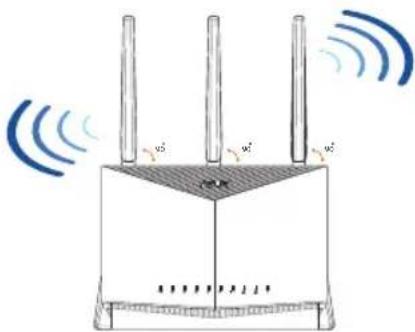
ПРИМЕЧАнг:
Cneunnkaa:
- IcnoJIb3yIe ToJIbKO 6IOK NITAHN, NOCTaBnREMbY C yCTPOINCTBOM. PpN IcNoJIb3OBAHnDpyrNX 6IOKOB NITAHN yCTPOINCTBO MOKeT 6bITb NOBpeXKeHO.
Download on the App Store

ASUS Router
CleyuTe HnctpyKzmaH Ha 3KpaHe IJy 3aBepWeHn pOcecca HacTpoiKn.
3anomnhaHne hactpoek 6ecnpoBODHoro pouTepa
3anomnhte napameTpbl 6ecnpoBODHO cETN nocne 3aBepueHnaCTpOKN poyTepa.

Downloaded on the App Store

ASUS Router
Download on the App Store

ASUS Router

Download on the App Store

ASUS Router
- YbimKHiTb MapwpyTu3aTop do po3eTKu XNBLeHHa I NOaIte XNBLeHHa.
- Плкючыд мерекеоби ha3Bn (SSID), bka3aHOi Ha apnky Bnp06y 33amyHa MapspuytnaTopi.Зарннади habиrihiwoi 6e3nekn Мерекi 3minitb SSID Na yHikalbni i npu3naHTe napOB.
Ha3Ba Wi-Fi (SSID): ASUS_XX
* XX BiINOBIAe ocTahHIM IbOM uΦpam MAC-aIpecn 2,4 Tt. ix Bka3aHO Ha npNky 33aNy Ha RT-AX86U.
- Дянаму ВаньимахутuraTopа можна ВибраMu rpaФiHn Be6-iHteppeic a6o nporpamy Mapwpyu3aTopa ASUS.
a. Hanaштуваньсяpeз графчни Be6-iHTepфсс
- Графічный Be6-iHTepфсьс aВТOMaTиЧО 3aNYСKaETbСЯ, КОЛ BИ ВIDКрпВае Te Be6-6pay3ep.Якso BIn He 3aNYСKaETbСЯ aВТOMaTиЧО, BVEdIb http://router.asus.com.
BctaHOBiTb napoIb Ha MapuTy3aTOp, 0o6 3anO6irTu HeaBTOpN3OBAHOMy DocTynu.



b. HanaawtyBaHnHa Chepe3 nporpamy
3aBaHaxTe nporpamy MapwpyTu3aTopa
ASUS, 06 HanaWtuBAtu MapwpyTu3aTop
uepe3 Mo6inbHi npucTpoi.
YbIMKHiTb Wi-Fi Ha MO6iNbHnX npucTpoaX iNiakIouitb ix do MepeXI RT-AX86U.
Bnkohyte iNCTpykui3 hanaTuBaHH nporpaMn Mappuytn3atopa ASUS, 0o6 3aBepuHTn hanaTuBaHH.
ASUS Router
GOTTON Google Play
Download on this AppStore

ASUS Router
- UK support e-mail: network_support_uk@asus.com
- For more information, visit the ASUS support site at: https://www.asus.com/support/
ASUS Recycling/Takeback Services
ASUS recycling and takeback programs come from our commitment to the highest standards for protecting our environment. We believe in providing solutions for you to be able to responsibly recycle our products, batteries, other components, as well as the packaging materials. Please go to http://csr.asus.com/english/Takeback.htm for the detailed recycling information in different regions.
REACH
Complying with the REACH (Registration, Evaluation, Authorisation, and Restriction of Chemicals) regulatory framework, we published the chemical substances in our products at ASUS REACH website at http://csr.asus.com/english/REACH.htm
Federal Communications Commission Statement
This device complies with Part 15 of the FCC Rules. Operation is subject to the following two conditions:
- This device may not cause harmful interference.
- This device must accept any interference received, including interference that may cause undesired operation.
This equipment has been tested and found to comply with the limits for a class B digital device, pursuant to part 15 of the FCC Rules. These limits are designed to provide reasonable protection against harmful interference in a residential installation.
This equipment generates, uses and can radiate radio frequency energy and, if not installed and used in accordance with the instructions, may cause harmful interference to radio communications. However, there is no guarantee that interference will not occur in a particular installation. If this equipment does cause harmful interference to radio or television reception, which can be determined by turning the equipment off and on, the user is encouraged to try to correct the interference by one or more of the following measures:
- Reorient or relocate the receiving antenna.
- Increase the separation between the equipment and receiver.
-
Connect the equipment into an outlet on a circuit different from that to which the receiver is connected.
-
Consult the dealer or an experienced radio/TV technician for help.

WARNING! Any changes or modifications not expressly approved by the party responsible for compliance could void the user's authority to operate the equipment.
Prohibition of Co-location
This device and its antenna(s) must not be co-located or operating in conjunction with any other antenna or transmitter.
IMPORTANT NOTE:
Radiation Exposure Statement: This equipment complies with FCC radiation exposure limits set forth for an uncontrolled environment. End users must follow the specific operating instructions for satisfying RF exposure compliance. To maintain compliance with FCC exposure compliance requirement, please follow operation instruction as documented in this manual. This device is restricted for indoor use.

WARNING! This equipment must be installed and operated in accordance with provided instructions and the antenna(s) used for this transmitter must be installed to provide a separation distance of at least 26cm from all persons and must not be co-located or operating in conjunction with any other antenna or transmitter.
Compliance Statement of Innovation, Science and Economic Development Canada (ISED)
This device complies with Innovation, Science and Economic Development Canada licence exempt RSS standard(s). Operation is subject to the following two conditions: (1) this device may not cause interference, and (2) this device must accept any interference, including interference that may cause undesired operation of the device.
Operation in the band 5150-5250 MHz is only for indoor use to reduce the potential for harmful interference to co-channel mobile satellite systems.
CANICES-3(B)/NMB-3(B)
Radio Frequency (RF) Exposure Information
The radiated output power of the ASUS Wireless Device is below the Innovation, Science and Economic Development Canada radio frequency exposure limits. The ASUS Wireless Device should be used in such a manner such that the potential for human contact during normal operation is minimized.
This equipment should be installed and operated with a minimum distance of 31cm between the radiator any part of your body.
This device has been certified for use in Canada. Status of the listing in the Innovation, Science and Economic Development Canada's REL (Radio Equipment List) can be found at the following web address:
http://www.ic.gc.ca/eic/site/ceb-bbst.nsf/eng/h_tt00020.html
Additional Canadian information on RF exposure also can be found at the following web:
https://www.ic.gc.ca/eic/site/smt-gst.nsf/eng/sf08792.html
This radio transmitter [3568A-RTAXI600] has been approved by Innovation, Science and Economic Development Canada to operate with the antenna types listed below, with the maximum permissible gain indicated. Antenna types not included in this list that have a gain greater than the maximum gain indicated for any type listed are strictly prohibited for use with this device.
The maximum antenna gain permitted for devices in the bands 5250-5350 MHz and 5470-5725 MHz shall be such that the equipment still complies with the e.i.r.p. limit.
The maximum antenna gain permitted for devices in the band 5725-5850 MHz shall be such that the equipment still complies with the e.i.r.p. limits specified for point-to-point and non-point-to-point operation as appropriate.
For indoor use only.
Precautions for the use of the device
a. Pay particular attention to the personal safety when use this device in airports, hospitals, gas stations and professional garages.
b. Medical device interference: Maintain a minimum distance of at least 15cm (6 inches) between implanted medical devices and ASUS products in order to reduce the risk of interference.
c. Kindly use ASUS products in good reception conditions in order to minimize the radiation's level.
d. Keep the device away from pregnant women and the lower abdomen of the teenager.
This product complies with the "India E-Waste (Management) Rules, 2016" and prohibits use of lead, mercury, hexavalent chromium, polybrominated biphenyls(PBBs) and polybrominated diphenyl ethers (PBDEs) in concentrations exceeding 0.1% by weight in homogenous materials and 0.01% by weight in homogenous materials for cadmium, except for the exemptions listed in Schedule II of the Rule.
YcIOBna 3KcnplyaTaun:
- TemnepaTypa 3Kcnpnyatauyn yctpoiCTBa: 0-40 ^ C . He nCnoIb3yIte yctpoiCTBO By CIOBnIX 3KCTpeMaJIbHO BbICOKIN HN3KNX TemnepaTyp.
- He pa3meaTe yCTPOIcTBO B6n3n nCToUHKnOB TeNla, HApPIMep, PAnOM C MKNPOBOJHOBOI neybIO, DuxOBbIM uKaΦOM NII paNaTOpOM.
- IcnoIb3OBAHne HeCOBMeCTUMORO INn HecepTuΦuNpOBaHHOro aanTepa NITaHnMoXeT npNBecTn K BO3rOpAHnU, B3pyBiY n npOuHM ONaChbIM NocJeDCTBnM.
- Pn noKIOeHnn K cTeN 3JIeKTPoNTaHn yCTpOcTBO cJeNyET pacNoIaratb 6n3KO K p03eTKe, K HeN dONXeH OcyuEcTBnTbC8 BeCnpenrTCTBeHHbI DoCTyn.
- YtUnn3aun yCTPOINCTBa OCyIeCTBJIeTcB COOTBECTBUN C MeCTHbIMN 3aKOHAMN IN NOLOXKeHNrM.N. YCTPOINCTBO N0 OKOHuaHN cPoka CnyJ6bl DOJHXbI 6bITb NepeDaHb I CepTNfUncpOBaHHb INyHK Tc6Opa DJIa BTOPNuHOJ nepepa6OTKn INI IN paBnHOBYtUnn3aun.
-Данhoe yctpoiCTBO He npeHa3HaueHo nla DeTeN. DeTn MOryT NOlb3ObaTbcA YcTPOICTBOM TOJbKO B INPCyTCTBnB 3PocJIbIX. - He bIbpaBaiTe yCTpoiCTBO n erO KOMPJIeKTyIOUne BMeCTe C 06bIuHbIMN 6bITOBbIMN OTXoJaMn.
IpepiK pexmib po6oTn IyKpaHn:
2,4Γι: 802.11b, 802.11g, 802.11n (HT20), 802.11n (HT40), 802.11ac (VHT20), 802.11ac (VHT40), 802.11ax(HE20), 802.11ax (HE40)
5Γι: 802.11a, 802.11n (HT20), 802.11n (HT40), 802.11ac (VHT20), 802.11ac (VHT40), 802.11ac (VHT80),
802.11ac (VHT160), 802.11ax (HE20), 802.11ax (HE40), 802.11ax (HE80), 802.11ax (HE160)
Yactota, pexim i MaKcImMaIbHa BnIpOMiHOBaHa NotyXHicTb dJa YkpaIHn:
2412-2472 MФι: 19,98 ΦΜ;
5180-5240 MГч: 19,98 ДБм,
5260-5320 MΓι: 19,98 ΜΜ;
5500-5670 Mf: 19,98 dBm,
Pnncpi npn3naeHOn dny BnKOpncTaHHa TInbKn y npmiiEHHi niac po60ntB YacToTHomy diaana3oHi 5150-5350 M.


182

CE statement
Simplified EU Declaration of Conformity
ASUSTek Computer Inc. hereby declares that this device is in compliance with the essential requirements and other relevant provisions of Directive 2014/53/EU. Full text of EU declaration of conformity is available at https://www.asus.com/Networking/RT-AX86U/HelpDesk/.
Declaration of Conformity for Ecodesign directive 2009/125/EC
Testing for eco-design requirements according to (EC) No 1275/2008 and (EU) No 801/2013 has been conducted. When the device is in Networked Standby Mode, its I/O and network interface are in sleep mode and may not work properly. To wake up the device, press the Wi-Fi on/off, LED on/off, reset, or WPS button. This equipment complies with EU radiation exposure limits set forth for an uncontrolled environment. This equipment should be installed and operated with minimum distance 20cm between the radiator & your body.
All operational modes:
2.4GHz: 802.11b, 802.11g, 802.11n (HT20), 802.11n (HT40), 802.11ac (VHT20), 802.11ac (VHT40), 802.11ax (HE20), 802.11ax (HE40)
5GHz: 802.11a, 802.11n (HT20), 802.11n (HT40), 802.11ac (VHT20), 802.11ac (VHT40), 802.11ac (VHT80),
802.11ac (VHT160), 802.11ax (HE20), 802.11ax (HE40), 802.11ax (HE80), 802.11ax (HE160)
The frequency, channel and the maximum transmitted power in EU are listed below:
2400-2483.5MHz(1-13):OFDM:19.97dBm(99.3mW);CCK:19.73dBm(93.9mW)
5150-5250MHz (36-48): 22.98dBm(198mW)
5250-5350MHz (52-64): 22.99dBm(199mW)
5470-5725MHz (100-140): 29.98dBm(995mW)
The device is restricted to indoor use only when operating in the 5150 to 5350 MHz frequency range.
The adapter shall be installed near the equipment and shall be easily accessible.
| AT BE BG CZ DK EE FR | ||||||
| DE IS IE IT EL | ES CY | |||||
| LV | LI | LT | LU | HU | MT | NL |
| NO | PL | PT | RO | SI | SK | TR |
| FI | SE CH UK | HR UA | ||||
Safety Notices
- Use this product in environments with ambient temperatures between 0^(32^) and 40^(104^) .
Refer to the rating label on the bottom of your product and ensure your power adapter complies with this rating.
DO NOT place on uneven or unstable work surfaces. Seek servicing if the casing has been damaged.
DO NOT place or drop objects on top and do not shove any foreign objects into the product. - DO NOT expose to or use near liquids, rain, or moisture. DO NOT use the modem during electrical storms.
- DO NOT cover the vents on the product to prevent the system from getting overheated.
- DO NOT use damaged power cords, accessories, or other peripherals.
- If the Adapter is broken, do not try to fix it by yourself. Contact a qualified service technician or your retailer.
- To prevent electrical shock hazard, disconnect the power cable from the electrical outlet before relocating the system.
DO NOT mount this equipment higher than 2 meters.
Bulgarian
CE statement
OnpocTeHa deknapaun 3a cbOTBeTcBne Ha EC
C HactoTo ASUSTeK Computer Inc. DeKnappa, Ye ToBa yctpoiCTBO e B cbOTBeTcTBne cbc sbueCTBeHnTe n3NCKBaHnHa n Dpyrnte npuioxmm NoCTaHOBHeHn Ha DnpeKtNbA 2014/53/EC. TbJHnT TeKT Ha DeKnapaunTa 3a CbotBeTcTBne Ha EC e DocTbNeH ha aDpec https://www.asus.com/Networking/ RT-AX86U/HelpDesk/.
Deknapaun 3a CbOTBeTCTBne 3a DnpeKTHBa 3a ekOuHa 2009/125/EO
IpoBedeHn ca TectObe 3a CbBmecTmOc c N3NCKBaHnra Ta 3a ekOJn3aH CbflacHo (EO) No. 1275/2008 n (EC) No. 801/2013. Korato yctpOcTBOTo e B Networked Standby Mode (PexnHa roTOBHOCT Ha mpeka), I/O nmpexOBnT nHTepfEcnc Ca B cnqU pexnM n MoKe da He pa6oT KacTo Tpr6Ba. 3a Da cb6yDnTe yctpOcTBOTO, HATNCHe Wi-Fi on/off (Wi-Fi BkN./n3Kn.), LED on/off (LED BkN./n3Kn.), reset (hynipaHe) nn 6byToHa WPS.
ToBa yCtpoiCTBO E B CbOTBeTCTBnE C rpaHnUte 3a paIIOueCTOHO 6OBuBaHe, yCTaHOBeHN OT EC 3a HeKoHTpOIpaHa CpeDa. ToBa o6OpyDbaHe Tp8Ba Da ce IHCTaIInpa N I3NON3Ba npn pa3ctOHNe HaimaIKO 20 cm 20 cm Mekdy nI3NbYBaUTO TAn O YOBeWKOTO TAnIO.
BcnuK npexmHa pa6oTa:
2.4GHz: 802.11b, 802.11g, 802.11n (HT20), 802.11n (HT40), 802.11ac (VHT20), 802.11ac (VHT40), 802.11ax (HE20), 802.11ax (HE40)
5GHz: 802.11a, 802.11n (HT20), 802.11n (HT40), 802.11ac (VHT20), 802.11ac (VHT40), 802.11ac (VHT80), 802.11ac (VHT160), 802.11ax (HE20), 802.11ax (HE40), 802.11ax (HE80), 802.11ax (HE160)
По-дoly ca nocoeyи cheToTa, kahJI makcmaHOTO npedabaHO 3axpaHbHe B EC. 2400-2483.5MHz(1-13): OFDM: 19.97dBm(99.3mW); CCK: 19.73dBm(93.9mW)
5150-5250MHz (36-48): 22.98dBm(198mW)
5250-5350MHz (52-64): 22.99dBm(199mW)
5470-5725MHz (100-140): 29.98dBm(995mW)
YcTPOINCTBOTO eOgpaHnueHO 3a n3nOJ3BaHe B NOMEeHnEeHnEeHnEeHnEoNepnpa B YecTOTeH dnaana3OH ot 5150 do 5350 MHz.
AanTepeT Tpa6Ba da ce HAMnpa B 6n3oCT do o6OpyDbaHeTo n da 6bJe necho DoctbneH.
Bélejkkn 3a 6e3onacHOCT
- 3nnon3BaIte To3 npOdyKT npI TempepaTpaHa OOKoHata cpea ot 0^ (32^) do 40^ (104^) .
BuxkTe etnkeTa Ha dOnHaTa cTpaHa Ha Baunr npOyKT n ce yBepTe, Ye Baunr aanTp e OTroBapra Ha 3NcKBaHnraTa.
HE noctabraIte BbpxH nepaBn nn HeCTa6uHn pa6oTHn NOBbpxHOCTN. O6bpHeTe ce KbM cepBn3, aKO KopnycbT ce noBpei. - HE noctabrayTe, He nyskaTe OTrope n He nbxaTe HnkaKbN yUxKn npedMeTn B npoJyKaTa.
HE n3naraTe Ha n He n3nOJI3BaIe B 6JIn3OCT Do TeUHOCTn, IbXd nnBna. HE n3nON3BaIe MoDema no BpeMe Ha rpbMOTeBvHn 6ypn.
HE nokpnbaiTe BeHTnlaOnHnTe OTbOpn Ha npOdyKa, 3a da npedeTbpaTne nperepaBaHe Ha cnCTeMaTa.
HE n3non3BaIe Tne NOBpeHn 3axpaHbAsu Ka6eHn, aKceCoapn nn npyri nepnepHny cTpoiCTBa.
Ako aanTepbTe nOBpeH, He ce onntBaIte da ro peMOHTnpaTe camN. CbbpKeTe ce c KBaIIuNpuHaTexnK nnC Baunr doCTabYnK.
3a da n36eHHepe pCK OT TOKOB yap, n3KIOUeTe 3axpaHbuaaia Ka6en OT eNEKtpueeckaTa Mpeka npedn da npemeCTIte CNTeMaTa.
ToBa 6OpUdbaHe da HE ce MoHTnpa Ha BncoUnHa Na2 MeTpa.
Croatian
CE statement
Pojednostavljena EU Izjava o sukladnosti
ASUSTek Computer Inc. ovime izjavluje da je uredaj sukladan s osnovnim zahtjevima i ostalim važnim odredbama direktive 2014/53/EU. Cijeli tekst EU izjave o sukladnosti dostupan je na https://www.asus.com/Networking/RT-AX86U/HelpDesk/.
Izjava o sukladnosti za direktivu o ekodizajnu 2009/125/EZ
Provedeno je testiranje zahtjeva na ekodizajn u skladu s (EC) No 1275/2008 i (EU) No 801/2013. Kada je urejadu umrezenom naclinu mirovanja, njegovi ulazi/izlazi i mreznou sucejle su takoder u nacinu mirovanja i mozda nece ispravno raditi. ZaPokretanje uredaja pritisnite tipku za uključivanje/isključivanje Wi-Fi uredaja, uključivanje/isključivanje LED-a, ponovno postavljanje ili gumb za WPS.
Ova oprema sukladna je EU ograničejima o izloženosti zračenju u nekontroliranom okruženju. Ovaj urejad se mora postaviti i koristiti na minimnoj udaljenosti od 20 cm izmedu radijatora i vaşeg tijela.
Svi načini rada:
2.4GHz: 802.11b, 802.11g, 802.11n (HT20), 802.11n (HT40), 802.11ac (VHT20), 802.11ac (VHT40), 802.11ax (HE20), 802.11ax (HE40)
5GHz: 802.11a, 802.11n (HT20), 802.11n (HT40), 802.11ac (VHT20), 802.11ac (VHT40), 802.11ac (VHT80), 802.11ac (VHT160), 802.11ax (HE20), 802.11ax (HE40), 802.11ax (HE80), 802.11ax (HE160)
U nastavku su navedeni frekvencija, kanai maksimalna emitirana snaga u EU: 2400-2483.5MHz(1-13): OFDM: 19.97dBm(99.3mW); CCK: 19.73dBm(93.9mW)
5150-5250MHz (36-48): 22.98dBm(198mW)
5250-5350MHz (52-64): 22.99dBm(199mW)
5470-5725MHz (100-140): 29.98dBm(995mW)
Urečaj je ogranicen na uporabu u zavorenim prostorima samo pri radu u frekvencijskom rasponu od 5150 do 5350 MHz.
Adapter se mora instalirati blizu uredaja i mora biti lako dostupan.
Sigurnosne napomene
- Ovaj proizvod koristite u okrużenjima s temperaturom okrużenia izmediu 0^ (32°F) i 40°C (104°F).
- Pogledajte nazivnu oznaku na donjem dijelu proizvoda kako biste provjerili je li adapter sukladan.
- NE postavljaje uredaj na neravne i nestabilne radne povrsine. U slučaju ostećenja kucišta, zatražite pomoc servisera.
- NEMOJTE postavljati ili spustati predmete na gornji dio uredaja i nemojte umetati strane predmete u proizvod.
- NE izlažite i ne upotrebljavaje uredaj u blizini tekuciina, kise ili vlage. NEMOJTE koristiti modem tijekom elektricne oluje.
- NEMOJTE prekrivati otvore na proizvodu kako ne biste uzrokovali pregrijavanje sustava.
- Nemojte koristiti oštecene kabele za napajanje, dodatnu opremu i ostale vanjske ureăje.
- Ako je adapter oštećen, nemojte ga popravljati sami. Oblatite se kvalificiranom servisnom tehnicaru ili dobavljacu.
- Kako biste sprijecili opasnost od elektricnog udara, iskopcjte kabel iz elektricne uticnice prije premjestanja sustava.
- NEMOJTE montirati ovu opremu na visini vecoj od 2 metra.
Czech
CE statement
- Table of contents
- This QSG contains these languages:
- Package contents
- A quick look at RT-AX86U
- 4s6u3
- Position your wireless router
- NOTES:
- Preparing your modem
- Setting up your RT-AX86U
- b. App Setup
- Remembering your wireless router settings
- FAQ
- Бьрз перлед
- Pamcenje postavki bežičnog usmjerivača
- Sādan husker du dine tradløse routerindstillinger
- b. Rakenduse seadistamine
- Laadige alla ASUS-e ruuteri rakendus, et häalestada ruuter labi mobilse seadme.
- Traadita ruuteri sātete meeles pidamine
- EykataoTaon RT-AX86U
- nixi nixu
- Xinwunninn
- Huske innstillinger for den tradløse ruteren
- Spørsmål og svar
- ПРИМЕЧАнг:
- Cneunnkaa:
- 3anomnhaHne hactpoek 6ecnpoBODHoro pouTepa
- b. HanaawtyBaHnHa Chepe3 nporpamy
- ASUS Recycling/Takeback Services
- REACH
- Federal Communications Commission Statement
- Prohibition of Co-location
- IMPORTANT NOTE:
- Compliance Statement of Innovation, Science and Economic Development Canada (ISED)
- Radio Frequency (RF) Exposure Information
- Precautions for the use of the device
- YcIOBna 3KcnplyaTaun:
- CE statement
- Simplified EU Declaration of Conformity
- Declaration of Conformity for Ecodesign directive 2009/125/EC
- Safety Notices
- Bulgarian
- OnpocTeHa deknapaun 3a cbOTBeTcBne Ha EC
- Deknapaun 3a CbOTBeTCTBne 3a DnpeKTHBa 3a ekOuHa 2009/125/EO
- Bélejkkn 3a 6e3onacHOCT
- Croatian
- Pojednostavljena EU Izjava o sukladnosti
- Izjava o sukladnosti za direktivu o ekodizajnu 2009/125/EZ
- Sigurnosne napomene
- Czech
Brand : ASUS
Model : RTAX86S
Category : Wireless Router