GWN7605 - Access Point GRANDSTREAM - Free user manual and instructions
Find the device manual for free GWN7605 GRANDSTREAM in PDF.



User questions about GWN7605 GRANDSTREAM
0 question about this device. Answer the ones you know or ask your own.
Ask a new question about this device
Download the instructions for your Access Point in PDF format for free! Find your manual GWN7605 - GRANDSTREAM and take your electronic device back in hand. On this page are published all the documents necessary for the use of your device. GWN7605 by GRANDSTREAM.
USER MANUAL GWN7605 GRANDSTREAM
Grandstream Networks, Inc.
126 Brookline Ave, 3rd Floor
Boston, MA 02215. USA
Tel: +1 (617) 566-9250
In all EU member states, operation of 5150 5350 MHz is restricted to indoor use only.
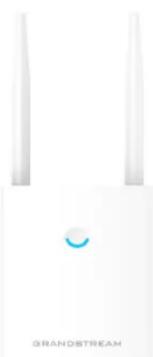
GWN7605LR
Outdoor 802.11ac Wave-2 2 × 2:2 Wi-Fi Access Point
Quick Installation Guide
Content
English. 1
简体中文. 7
Espanol. 13
Francais. 19
Deutsch. 25
Italiano. 31
Polski. 37
Portugues. 43
Pycck. 49
EN
OVERVIEW
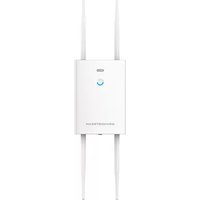
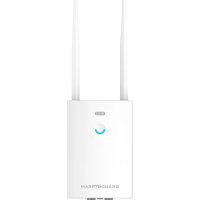
This long range Wi-Fi access point is designed to provide extended coverage support and is ideal for outdoor Wi-Fi solutions thanks to its waterproof casing and heat resistant technology. The GWN7605LR comes equipped with dual-band 2x2:2 MU-MIMO technology and a sophisticated antenna design for maximum network throughput and extended Wi-Fi coverage range of up to 250 meters. To ensure easy installation and management, the GWN7605LR uses a controller-less distributed network management design in which the controller is embedded within the product's web user interface. The GWN7605LR is also supported by GWN Cloud and GWN Manager, Grandstream's cloud and on-premise Wi-Fi management platforms.. It is the ideal Wi-Fi AP for voice-over-Wi-Fi deployments and offers a seamless connection with Grandstream's Wi-Fi-capable IP phones. With support for advanced QoS, low-latency real-time applications, mesh networks, captive portals, 100+ concurrent clients per AP and dual Gigabit network ports with PoE/PoE+, GWN-7605LR is ideal for deployment of medium/low wireless network environments with medium to advanced user density.
PRECAUTIONS
- Do not attempt to open, disassemble, or modify the device.
- Do not expose this device to temperatures outside range of -30^ to 70^ for operating and -30^ to 80^ for storage.
- Do not expose the GWN7605LR to environments outside of the following humidity range: 5-95% RH (non-condensing).
- Do not power cycle your GWN7605LR access point during system boot up or firmware upgrade. You may corrupt firmware images and cause the unit to malfunction.
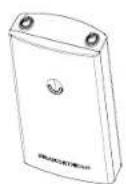
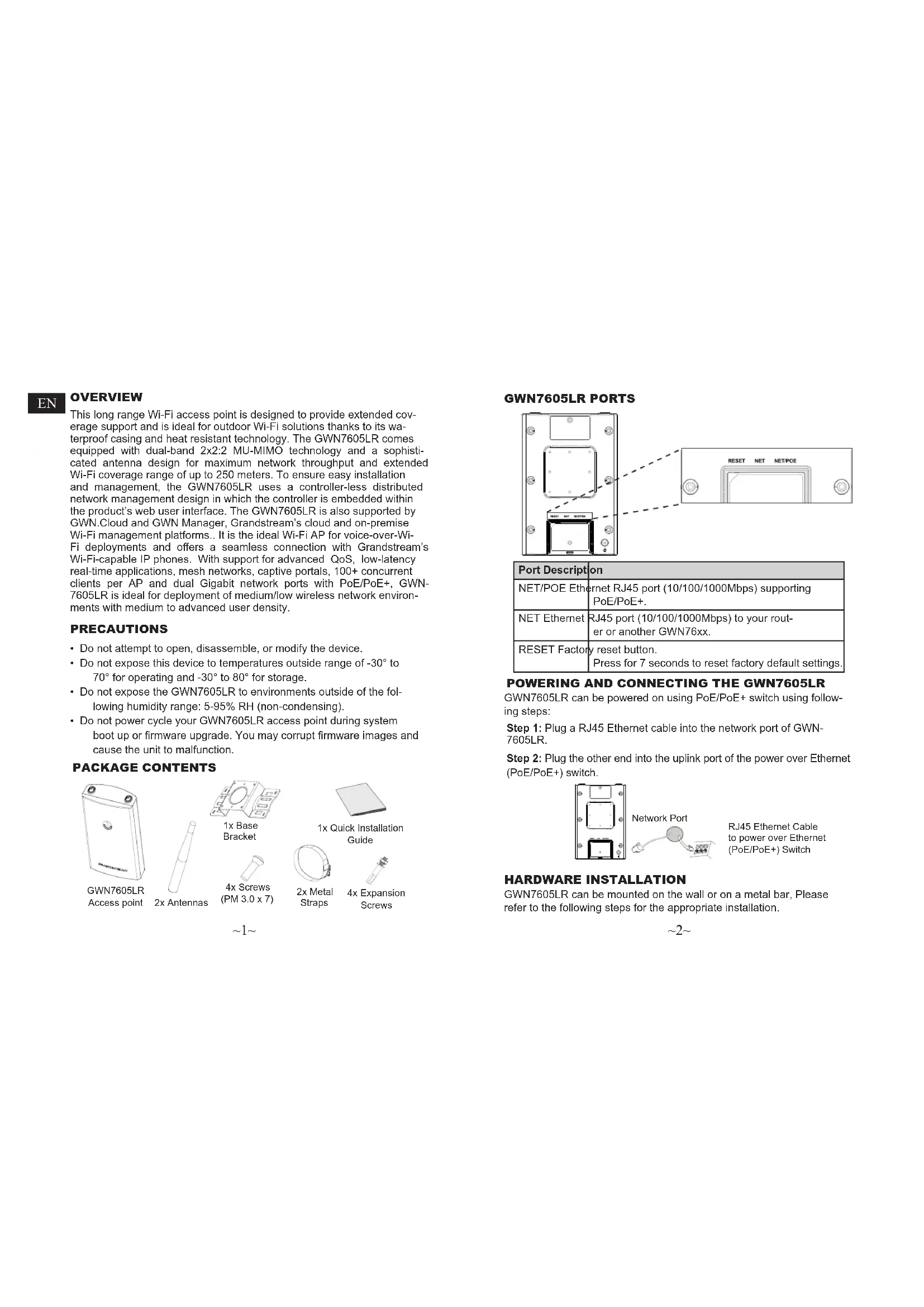
PACKAGE CONTENTS
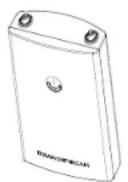
GWN7605LR
Access point
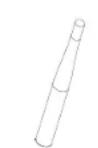
2x Antennas
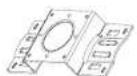
1x Base Bracket

1x Quick Installation Guide

2x Metal Straps

Expansion Screws

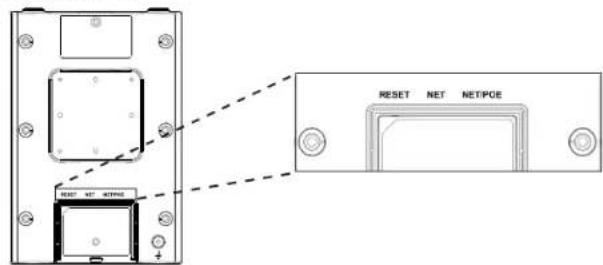
GWN7605LR PORTS
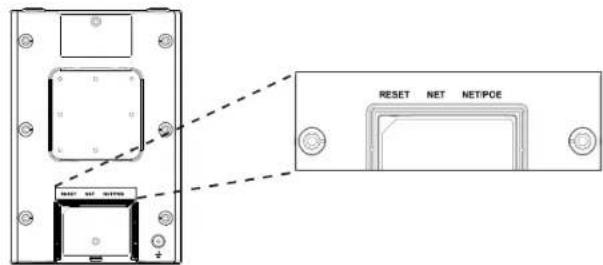
| Port Description | |
| NET/POE Ethernet | Ethernet RJ45 port (10/100/1000Mbps) supporting PoE/PoE+. |
| NET Ethernet | RJ45 port (10/100/1000Mbps) to your rout-er or another GWN76xx. |
| RESET Factory | reset button.Press for 7 seconds to reset factory default settings. |
POWERING AND CONNECTING THE GWN7605LR
GWN7605LR can be powered on using PoE/PoE+ switch using following steps:
Step 1: Plug a RJ45 Ethernet cable into the network port of GWN-7605LR.
Step 2: Plug the other end into the uplink port of the power over Ethernet (PoE/PoE+) switch.
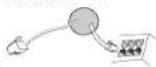
Network Port
RJ45 Ethernet Cable to power over Ethernet (PoE/PoE+) Switch
HARDWARE INSTALLATION
GWN7605LR can be mounted on the wall or on a metal bar, Please refer to the following steps for the appropriate installation.
Wall Mount
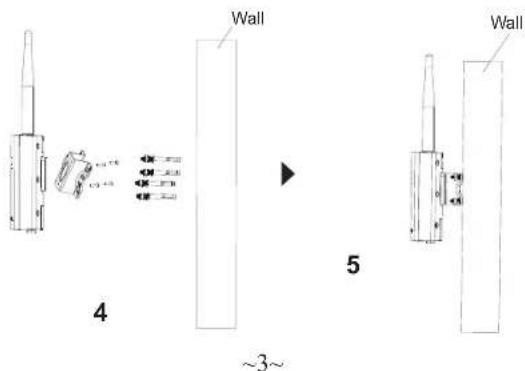
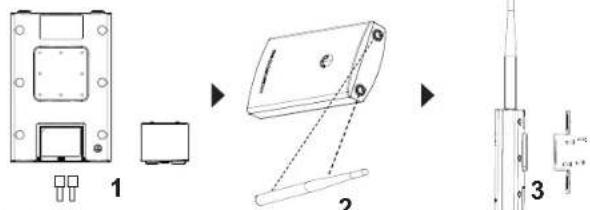
- Connect the Ethernet cable (RJ45) to the correct ports of your GWN-7605LR and insert the cover bracket.
- Connect each antenna to an antenna connector by rotating it clockwise.
- Attach the Base Bracket with screws (PM 3.0 x 7) on the back of GWN7605LR access point.
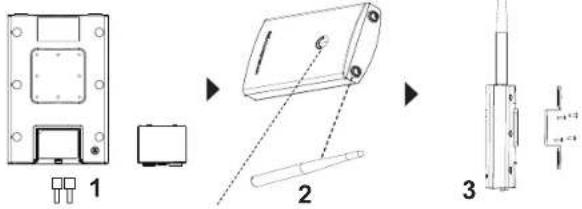
- Drill four holes on the wall referring to the positions of the ones on the Base Bracket. Then, fix an expansion screw in each hole.
- Attach the GWN7605LR access point by securing the Base Bracket with the expansion screws on the wall.
Pole Mount
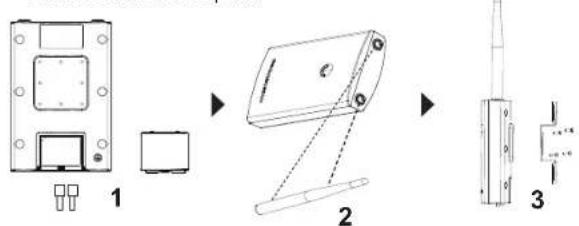
- Connect the Ethernet cable (RJ45) to the correct ports of your GWN-7605LR and insert the cover bracket.
- Connect each antenna to an antenna connector by rotating it clockwise.
- Attach the Base Bracket with screws (PM 3.0 x 7) on the back of GWN7605LR access point.
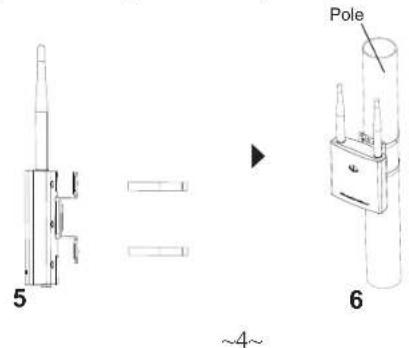
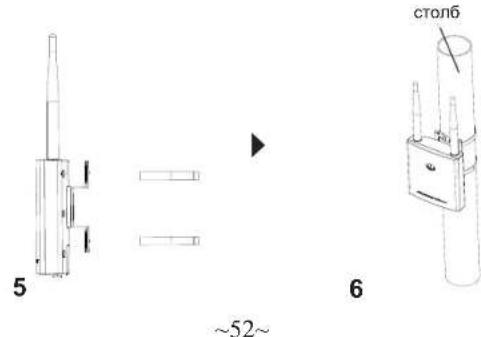
- Open the metal straps by turning the locking mechanism counter-clockwise. You can loosen it by hand or use a flathead screwdriver.
- Straighten out the end of the metal straps and slide it through the back of the base bracket.
- Wrap the metal strap around the pole and use a flathead screwdriver to tighten the locking mechanism by turning it clockwise.
CONNECT TO GWN7605LR DEFAULT Wi-Fi NETWORK
GWN7605LR can be used as standalone access point out of box, or after factory reset with Wi-Fi enabled by default.
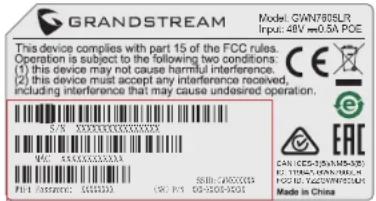
After powering the GWN7605LR and connecting it to the network, GWN7605LR will broadcast a default SSID based on its MAC address GWN[MAC's last 6 digits] and a random password.
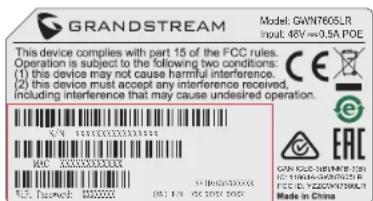
Note: GWN7605LR's default SSID and password information are printed on the sticker at the back of the unit.
ACCESSING THE CONFIGURATION INTERFACE
A computer connected to the GWN7605LR's SSID, or to the same network as the GWN7605LR can discover and access its configuration interface using one of the below methods:
Method 1: Discover GWN7605LR using its MAC Address
- Locate the MAC address on the MAC tag of the unit, which is on the underside of the device, or on the package.
- From a computer connected to same network as the GWN7605LR, type in following address using GWN7605LR's MAC address on your browser https://gwn_
.local
Example: If a GWN7605LR has the MAC address 00:0B:82:8C:4D:F8, this unit can be accessed by typing https://gwn_000b828c4df8.local on the browser.
Method 2: Discover GWN7605LR using GWN Discovery Tool
- Download and install GWN Discovery Tool from the following link: http://www.grandstream.com/tools/GWNDiscoveryTool.zip
- Open the GWN DiscoveryTool, and click on Scan.
-
The tool will discover all GWN76xx Access Points connected on the network showing their MAC and IP addresses.
-
Click on Manage Device to be redirected directly to the GWN-7605LR's configuration interface, or type in manually the displayed IP address on your browser.
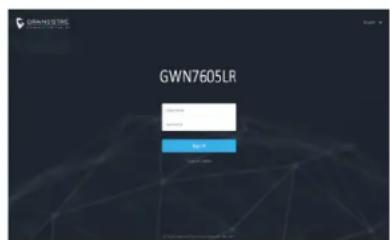
- Enter username and password to login. (The default administrator username is "admin" and the default random password can be found at the back sticker on the GWN7605LR).
Notes:
- Make sure that the GWN7605LR is not already paired with another GWN76xx Access Point as slave, GWN7000 Router Series or GWN. Cloud, otherwise the configuration interface cannot be accessed
- If the GWN7605LR is already paired, make sure to unpair it first, or do a factory reset.
- It is customer's responsibility to ensure compliance with local regulations for frequency bands, transmit power and others.
To manage GWN7605LR over cloud, please refer to https://www.gwn.cloud.
- To manager GWN7605LR over on-premise controller, please refer to http://www.grandstream.com/products/networking-solutions/wi-fi-management/product/gwn-manager
The GNU GPL license terms are incorporated into the device firmware and can be accessed via the Web user interface of the device at my_device_ip/gpl_li-cense. It can also be accessed here:
http://www.grandsstream.com/legal/open-source-software
To obtain a CD with GPL source code information please submit a written re
quest to info@grandstream.com
Refer to online documents and FAQ for more detailed information:
http://www.grandstream.com/our-products
ZH
概述

4x 机牙螺丝
(PM 3.0 x 7)

2 × 捆带

4x膨胀螺丝
GWN7605LR端口
CONECTAR AL GWN7605LR CON LA RED Wi-Fi PRE-DETERMINADA
CONNEXION AU RESEAU WI-FI PAR DEFAULT DU GWN
7605LR
ACCENSIONE COLLEGAMENTO DEL GWN7605LR
http://www.grandstream.com/legal/open-source-software
http://www.grandsstream.com/our-products
PL
INFORMACJE OGOLNE
POŁACZYC Z DOMYSLNA SIECIA Wi-Fi GWN7605LR
http://www.grandstream.com/our-products
42
PT
RESUMO:
CONTEUDO DO PACOTE
Access Point GWN7605LR
2x Antenas
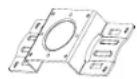
1x Suporte Base
CONECTAR A REDE WI-FI PADRAO DO GWN7605
http://www.grandsstream.com/our-products
RU
OB3OP NPOdykTA
3Ta Wi-Fi TOnKa Doctyna C 60nbWOn 3OHO NOKpbTnA Co3dHa
IaTTO, Toob6b ObecneHb60blSyu 3OHy NOKpbTnU n CTahet
NdeAnBbM Bb6Opm DnA ynnHbX BWi FpeuHnM, 6Naoradap
BOHOHePOHNuaEMOMy Koxyxy n TePmoYcToHNBocTH. Moenb GWN7605LR O6OpDnBaH aDyXnAna3oHH TeHXonOrne1 2x2:2 MU-MIMO
n AHTeHNO C noCNOH KOHCTpyKUne I dN MaKcmalBn nponyCKHO
CNOC6HOCTn Cetn n PaCunpeHHo 3OBy l NOKpbTnA WFi DO 250 MeTPOB.
Ia n PocOCT yctANOBKn U npaBnEHH B GWN7605LR nCnONbEyTC
ynpaBnHE n PacnPedeHnO CETn 6e3 OTeBNHoro KOnHpONepa,
KoHTpONep BCTpoe H nTN. GWN7605LR TaKke NoJDPckHBAeTC
GWN.Clou n GWN Manager, o6naHbIMn n JokaNbHbIMn nATfOpAMn
ynpaBnHE Wi-Fi Grandstream. n Dn nepeDaH rnoCa no Ni-Fi,
KOTopar obScneueBaert 6ecnepe6oHyu CB8b c IP-TeneFOHAMn
Grandstream C noDepeKko Wi-Fi. 5Naoradap nNopePkke uNyUweHHoro
QoS, npInIOKeH peanlBO BpeMeH n MaoN 3aedPckK, aeHcTBx
cetEn, aadTINHBx npTanob, Boone 100 oNDOBpeMHbX KNHeTOB
Ha ToKY DoCTyna n DByx rnaBtNbxCteEBx npotOB c PoE / PoE +, Moenb GWN7605LR nDeaBHo nOdoNdt n pa3BeptlbAHn
cepHe/Hn3KOypOBBeHbX bcTeEBx npotOB cPeD co cpeHne n NOBbSeHHo NnTOHcTbO NnO3BoAtenEne.
MEPbI INPEDOCTOPOXHOCTN
He nbTaIteCb OTKpbITb,pa3o6paTb nnNnN3MeHHTb yCTpOcTBO.
He NoDBepraTe BO3eIeTBMIO TEmnepaTyPbI BHe Dmna30Ha OT-30°C Do 70°C npn EKcnnyataun n O T-30°C Do 80°C npn xpaHeHn.
He IcnoIb3yIte IaHHOe yCTPOIEBO B CpeE, rIe 3HaueHMe BnaxHOCTN BIXOHT 3a ImaNa3OH: OTHOCNT. BnaXHOCTb 5%-95% (6e3 KOHECAUIN)
He BkHouTaB-BbKIOUaTb YcTpoICTBO GWN7605LR B npOceCe HauNbHO rTO 3ANyCKA CNTeMb I INB NpOceCE 6OBnEHHN PPOWBNK. Bbl MoKeTe TEM cAMbIM NOBpeINb 3ABoDCkyo NPOwBNKY yCtpoICTBa HBlBeCTn Ero I3 CTpoR.
CODEPKMOE YNAKOBKN
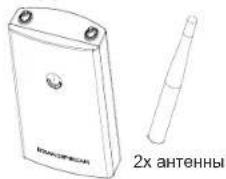
Točka doctyna GWN7605LR
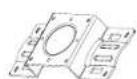
1xKpoHuTeH OCHOBAHNA
4x BnHTa Metaannnecknx (PM 3.0 x7) xomyta
1xPykoBOvCTBO no 6bIcTpoI
\~49\~
NOPTbl GWN7605
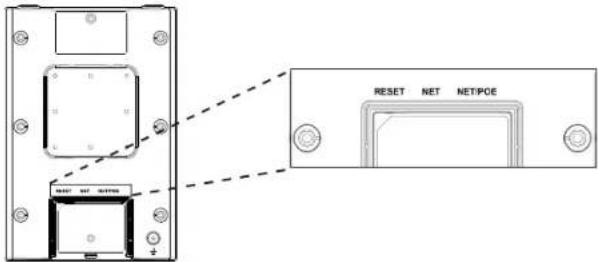
BKIOUeyHHe HACTPOKA YCTPOIcTBa GWN7605LR
YcTpoCTBO GWN7605LR MoKet 6bItb NIOKnIooHcNIOB3yPoE/ PoE+ nepeKIOuATEb B HeCKOJIbKO WaorOB:
Uar 1:BCTaBtB Ethernet ka6enb RJ45 B cTeB0n nopT yCTpOuCTBa GWN7605LR.
War 2: NpdknouHTe npryo kOHeu B nopT PoE/PoE+ nepeKIOUaTeIa.
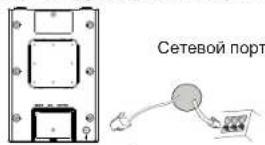
RJ45 Ethernet kabebn noKnueh K PoE/PoE+
YCTAHOBKA YCTPOICTBA
GWN7605LR MoXHO MOHTnPoBaTb Ha cTeHy Hnn MetaJIInueckyU nnaKHy. IoxAnIyIcTa, CM. cIeDyIOuIe WAr nIpnabINbHOr yCTaHOBKn.
YctahOBka Ha cTeHy MoTax HA cToJ6
- Pooknounte Ethernet k6ebb (RJ45) K BepHomy npTy Ha GWN-7605LR uycTaHOBTe KPOHHTeKpbluKn.
- POncoeINHnTe KaKdIyO aHTeHHy K KOHHeKTOpaM, NOBopaumBaR IN No YacBOI cTpeKe.
3.YCTAHOBHTe KPOHHTeH OCHOBAHn, INCIOHB3y BNHTbI (PM 3.0 x7) HA 3aHHOu cAcb ToKn Doctyna GWN7605LR.
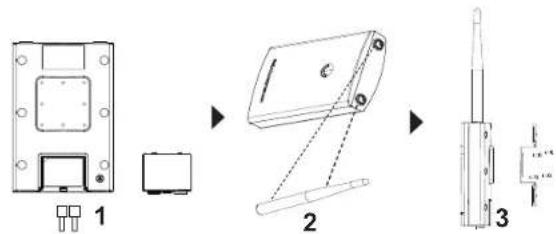
- PocBepnTe YeTbIpe OTBepCTMa B CTeHe B COOTBeTCTBM C no3HcHmN OTBepCTM B KpoHHTeHHe. 3aTeM 3akpenTe aHkepbI B KaKdOM OTBepCTM.
5.YctahOBHTeTOKyIOCTynaGWN7605LR,3aKpeINb KpOHTeHc nOMOsbHO aHKePOBa CTHe.
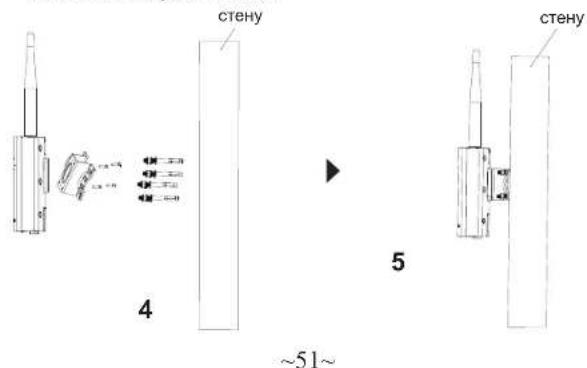
PnmeaHne: nra HauyUero noKpbTna peKOMeHdyETc yCTaHOBka Ha notoNOK.
- Pookhounte Ethernet kAben (RJ45) K BepHomy npTy Ha GWN7605LR n yctahOBITE KPOHHTeN KpbuKn.
- POnCOeINHInTe KaXdyo aHTEHy K KOHHeKTopaM, NOBOpaUBaI IN No YacOBn CTpeKe.
3.YCTAHOBNTe KPOHHTeIH OCHOBAHnI,HCNONb3yBnHTbl (PM 3.0 x7) Ha 3aHHIOUacTb TOKnDocTyna GWN7605LR.
- OTKpOte MetaJIHmIEckne XOMYbI, NOBepHyB 3aOpHbIMexAHn3 m npOTIB YacOB O CTpeKN. Bbl MoKeTe ocNaBbI bX BPyHyIO INI pN NOMOIO NIOCKON OTBETKN.
- Blynpmtte KOHtSeIaMJIeNcckHX XOMYTOB IN pOpynCTne IH uepe3 3aHIOU YAcTb KPOHTeHNeA OCHOBAHIN.
- 06eHnTe XOMyTb BOKpyr CTOn6a N pIn NOMOuN PNOCKo OTBepTK3aTnHtE 3aOpHbM MExAHmM No YAcOBoCTpeKe.
IOKJIIOHTb K Wi-Fi CETN GWN7605LR NO YMOJAHNO
GWN7605LR MoKHO IcNoIb3ObAt b Ka OTeBHyo rTObyu ToKy doCTyna, INI NOcE c6poca K 3aBODCKM HAcTPOKa M C BKNIOHHeBIM no yomuaHAnHi Wi-Fi.
Nocle 3aHbAHHGWN7605LR nOdKnIOeHHe eK cTeH, GWN7605LR nepeact SSID no yMOUAnHIO, H a OCHBE MAC-aPepCA GWN[6NoceDnHx UHPM AC] nPOn3BONbl Napop.
PpmeaHne: GWN7605LR SSID n npoIb no ymoIyauHIO yka3aHbHa npIbke MAC ha ycToiCTBe.
BXOДИHTEPФЕHC HACTPOIKN
Metod 1: O6HapyKeHne GWN7605LR no eMac-adpecy.
- HanDnTe MAC aDPEC yka3aHHb Hn HauKe Ha o6paTHoN CTOpOHe yCTpoiCTBa, N60 Ha KOp6ke.
2.ИСоЛьзУАКOMЛБОТЕР,ПОДКИЧЕНБК.TОМ.KСЕТИ,ЧТЯ GWN7605LR,Вбpayаразе ВБдпerte MAC-a-dpec GWN7605LR Cснедушем ВИDE:https://gwn_local
Пимерет:Есниу GWN7605LR MAC-aDPEC 00:0B:82:8B:4E:28,То доступу К усторпов мохно поочь Вевая https://gwn_000b-828b4e28.local Bбразуerte.
MeToD 2:O6hApxKeHne GWN7605LR npn nomou nporpaMMbl GWNDiscoveryTool
http://www.grandstream.com/our-products
54