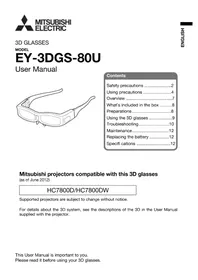
EY3DGS80U - 3D Glasses MITSUBISHI - Free user manual and instructions
Find the device manual for free EY3DGS80U MITSUBISHI in PDF.

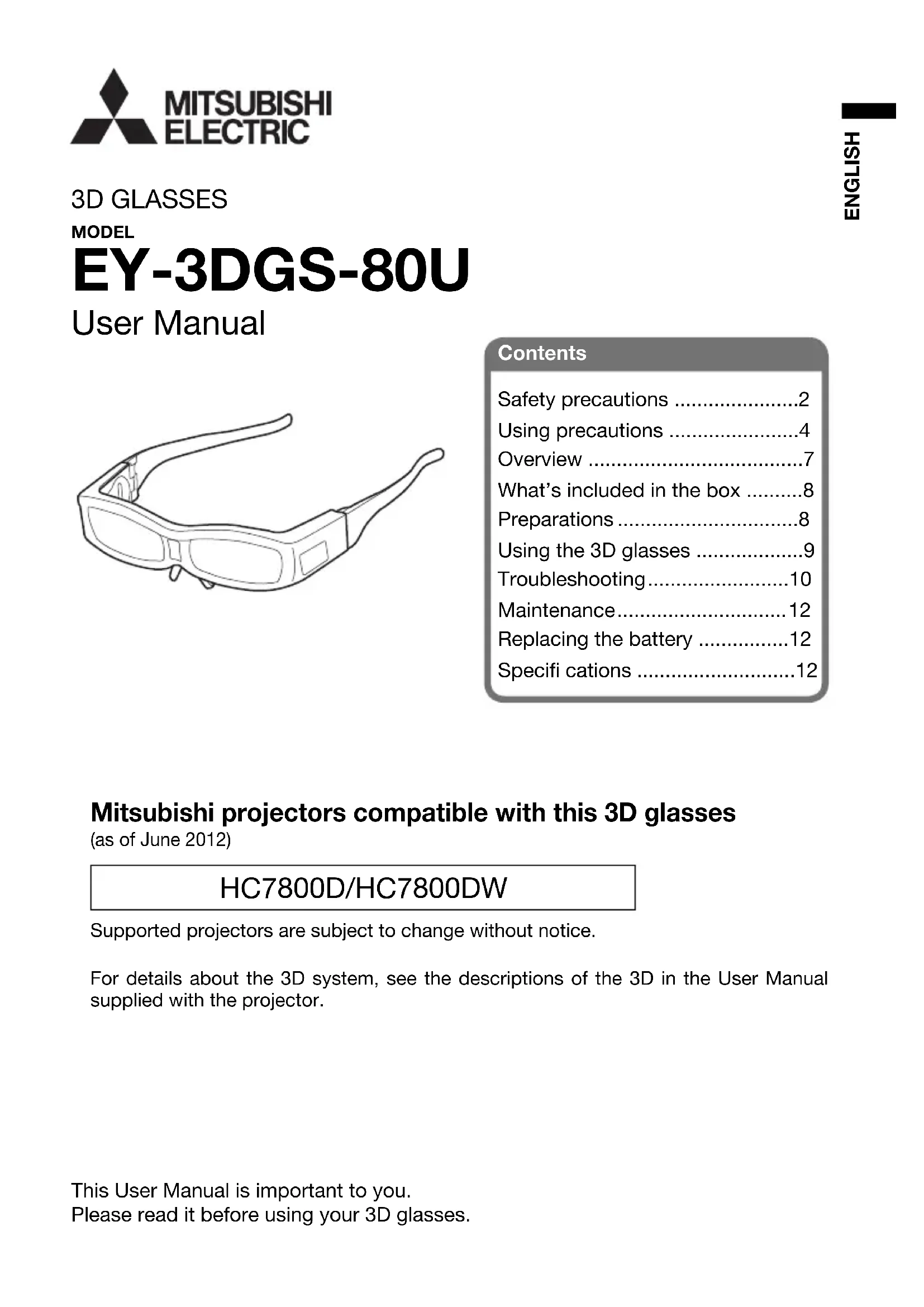


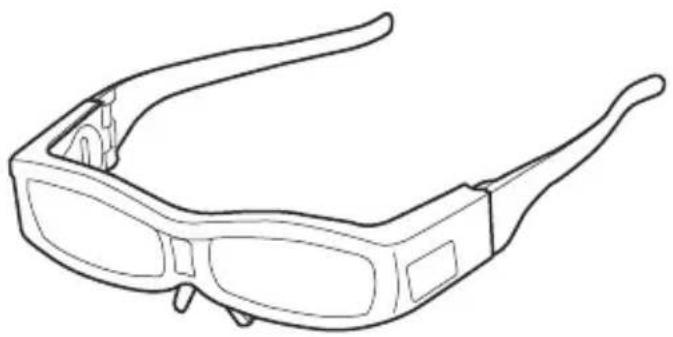
| Product type | Active 3D LCD shutter glasses |
| Brand / Model | Mitsubishi EY3DGS80U |
| Dimensions (W x H x D) | 170.5 x 41 x 187 mm |
| Weight (without battery) | 54 g |
| Power supply | Lithium battery CR2032 (3 V) |
| Battery life | Approximately 70 hours of continuous use |
| Lens system | Liquid crystal shutter |
| Body materials | ABS resin |
| Temple materials | PC resin |
| Lens materials | Liquid crystal glass |
| Operating temperature | +5°C to +35°C |
| Projector compatibility | HC7800D / HC7800DW (June 2012) |
| Main functions | Active 3D viewing, infrared reception, auto power off after 5 min without signal |
| Safety | Do not use by children under 5-6 years old; avoid if sensitive to light |
| Care and cleaning | Wipe with a soft, dry cloth; do not use benzene, thinner, alcohol or chemicals |
| Spare parts and repairability | Replaceable battery (CR2032); removable nose pad and elastic band |
| General information | CE certified, FCC Class B, Industry Canada; recycling per European directive |
Frequently Asked Questions - EY3DGS80U MITSUBISHI
User questions about EY3DGS80U MITSUBISHI
0 question about this device. Answer the ones you know or ask your own.
Ask a new question about this device
Download the instructions for your 3D Glasses in PDF format for free! Find your manual EY3DGS80U - MITSUBISHI and take your electronic device back in hand. On this page are published all the documents necessary for the use of your device. EY3DGS80U by MITSUBISHI.
USER MANUAL EY3DGS80U MITSUBISHI
What's included in the box .8
Preparations 8
Using the 3D glasses .9
Troubleshooting. 10
Maintenance. 12
Replacing the battery 12
Specifi cations 12
Mitsubishi projectors compatible with this 3D glasses
(as of June 2012)
HC7800D/HC7800DW
Supported projectors are subject to change without notice.
For details about the 3D system, see the descriptions of the 3D in the User Manual supplied with the projector.
Warning:
Do not store the small parts such as battery, rubber ring, battery cover and nose pad in places where small children can reach.
There is a danger small children could swallow such parts by mistake. If a child accidentally swallows such parts, seek immediate medical attention.
Caution:
Do not disassemble or modify the 3D glasses.
Doing so may result in fire, or in a malfunction that may cause the user to feel unwell.
Batteries must not be exposed to excessive heat such as sunshine, fire or the like.
Danger of explosion occurs if battery is incorrectly replaced. Replace only with the same or equivalent type.
Dispose of used batteries according to your local regulations.
Dispose of the used battery with cellophane tape wrapping both ends of it.
Keep battery in original package until ready to use.
Do not use the 3D glasses if you have a history of over-sensitivity to light, heart problems, or have any other existing medical condition.
Using the 3D glasses may cause the symptoms to worsen.
As a guide, 3D glasses should not be used by children younger than 5 - 6 years old.
As it is difficult to judge younger children's reactions to fatigue or discomfort, their physical condition may deteriorate suddenly.
When this product is being used by a child, the parent or guardian should check to ensure that the child's eyes are not becoming tired.
Stop using the 3D glasses immediately if you feel tired, discomfort, or any other abnormality.
Continuing to use the 3D glasses in such cases may cause you to feel unwell. Please take the necessary rest before continuing use.
Stop using the 3D glasses if you can clearly see double images when viewing 3D content.
Prolonged use may cause eyesight fatigue.
When watching 3D movies, take an appropriate break after watching a movie.
When watching 3D content on interactive devices such as 3D games or computers, take an appropriate break every 30 - 60 minutes.
Prolonged use may cause eyesight fatigue.
When using the 3D glasses, be careful not to strike the screen or other people by mistake.
As the images are in 3D, you may mistake the distance from the screen, causing to strike the screen which may result in injury.
When using the 3D glasses, do not place breakable objects near the glasses.
You may move by mistaking the 3D objects you are viewing as the real objects, causing damages to surrounding objects that may lead to injury.
Do not use if the 3D glasses are cracked or broken.
Doing so may result in injury or eyesight fatigue.
If a malfunction or fault occurs in the 3D glasses, stop use immediately.
Continuing to use the 3D glasses may result in injury, eyesight fatigue, or may cause you to feel unwell.
Do not move around while wearing the 3D glasses.
The surrounding area appears dark, which may result in falling or other accidents that may cause injury.
Use the 3D glasses when viewing the 3D images.
Use the 3D glasses only for the specified purpose.
Do not drop, apply force on, or step on the 3D glasses.
Doing so may damage the glass section, which may result in injury.
When using the 3D glasses, make sure your eyes are on an approximate horizontal level.
If you suffer from myopia (short sightedness), hyperopia (far-sightedness), astigmatism, or have eyesight differences between the left and right eyes, please use corrective glasses or other such methods to correct your eyesight before putting on the 3D glasses.
When you view the 3D images, keep a distance from the screen of about three times the effective height of the screen.
Stop using the 3D glasses immediately if your skin feels unusual.
In rare cases, the paint or materials used in the 3D glasses may cause an allergic reaction.
Stop using the 3D glasses immediately if you experience any redness, pain, or itching on the nose or temples.
Prolonged use may cause such symptoms due to excess pressure, which may result in the user feeling unwell.
Be careful not to trap a finger in the hinge section of the 3D glasses.
Doing so may result in injury.
Pay special attention when children are using this product.
Be careful of the tips of the frame when putting on the 3D glasses.
Accidentally inserting the tip of the frame into the eye may cause injury.
Lens (liquid-crystal shutter)
- Do not apply force on a lens. Also, do not drop or bend the product. It may cause break.
- Do not make a scratch on the surface of the lens with a sharp instrument. The lens may be broken and it may lead to degrade the 3D image quality.
Infra-red reception section
- Do not contaminate or apply a sticker or other such item on the infra-red reception section on the 3D glasses. The 3D glasses could not receive the signal from the 3D emitter and may not operate correctly.
- Other infra-red communication equipment may affect the 3D images.
- Operation of a remote control may cause a misoperation of the 3D glasses. It is not a malfunction. When you stop operating the remote control, the 3D glasses work properly.
- A remote control may operate improperly while you watch the 3D images, however, it is not a malfunction.
When using the 3D glasses
- Do not use a device that emits strong electromagnetic wave such as mobile telephone near the 3D glasses. It may cause misoperation of the 3D glasses.
- Use the 3D glasses under the condition between +41^ (+5^) to +95^ (+35^) .
- While watching the 3D images in a room with fluorescent lights, you may feel the whole lights in the room are flickering. In this case, place the 3D glasses and 3D emitter as far from the fluorescent lights as possible or turn off the fluorescent lights.
- Wear the 3D glasses appropriately. When you wear it upside down or back to front, you can not get the correct 3D images.
- Using the 3D glasses, it may be hard to see other displays such as that of a personal computer, digital clock and calculator. Remove the glasses when you watch images other than 3D images.
- The 3D glasses can not be used as sunglasses.
- This 3D glasses can not be used with incompatible products.
- This 3D glasses can not be used for movies in the movie theater.
- You can not get 3D images when you lie down, even when wearing the 3D glasses.
- Do not pull the temple of the glasses. It may cause break.
When using the device in Europe: COMPLIANCE NOTICE
This device complies with the requirements of the EC Directive 2004/108/EC "EMC Directive".
The electro-magnetic susceptibility has been chosen at a level that gains proper operation in residential areas, on business and light industrial premises and on small-scale enterprises, inside as well as outside of the buildings.
COMPLIANCE NOTICE OF FCC
This equipment has been tested and found to comply with the limits for a Class B digital device, pursuant to Part 15 of the FCC Rules. These limits are designed to provide reasonable protection against harmful interference in a residential installation. This equipment generates, uses and can radiate radio frequency energy and, if not installed and used in accordance with the instructions, may cause harmful interference to radio communications. However, there is no guarantee that interference will not occur in a particular installation. If this equipment does cause harmful interference to radio or television reception, which can be determined by turning the equipment off and on, the user is encouraged to try to correct the interference by one or more of the following measures:
- Reorient or relocate the receiving antenna.
- Increase the separation between the equipment and receiver.
- Connect the equipment into an outlet on a circuit different from that to which the receiver is connected.
- Consult the dealer or an experienced Radio/TV technician for help.
Any changes or modifi cations not expressly approved by Mitsubishi could void the user's authority to operate this equipment.
COMPLIANCE NOTICE OF INDUSTRY CANADA
This Class B digital apparatus complies with Canadian ICES-003.
Declaration of Conformity
Model number: EY-3DGS-80U
Trade name: MITSUBISHI ELECTRIC
Responsible party: Mitsubishi Electric Visual Solutions America, Inc.
9351 Jeronimo Road, Irvine, CA 92618 U.S.A
Telephone number: +1-(949) 465-6000
This device complies with Part 15 of the FCC Rules. Operation is subject to the following two conditions:
(1) this device may not cause harmful interference, and
(2) this device must accept any interference received, including interference that may cause undesired operation.
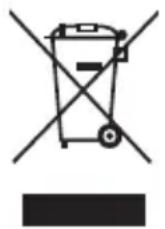
Note: This symbol mark is for EU countries only.
This symbol mark is according to the directive 2002/96/EC Article 10 Information for users and Annex IV, and/or to the directive 2006/66/EC Article 20 Information for end-users and Annex II.
Your MITSUBISHI ELECTRIC product is designed and manufactured with high quality materials and components which can be recycled and/or reused.
This symbol means that electrical and electronic equipment, batteries and accumulators, at their end-of-life, should be disposed of separately from your household waste.
If a chemical symbol is printed beneath the symbol shown above, this chemical symbol means that the battery or accumulator contains a heavy metal at a certain concentration. This will be indicated as follows:
Hg: mercury (0,0005%), Cd: cadmium (0,002%), Pb: lead (0,004%)
In the European Union there are separate collection systems for used electrical and electronic products, batteries and accumulators.
Please, dispose of this equipment, batteries and accumulators correctly at your local community waste collection/recycling centre.
Please, help us to conserve the environment we live in!
Information on Disposal in other Countries outside the European Union
This symbol mark is only valid in the European Union.
If you wish to discard this product, please contact your local authorities or dealer and ask for the correct method of disposal.
Environment care information for users in China

This symbol mark is only valid in China.
With the 3D glasses and 3D emitter, you can enjoy 3D images when you watch the 3D supporting programs on the projectors supporting 3D images.
You can wear the 3D glasses over vision corrective glasses.
Make sure to read the "Safety precautions" on pages 2 to 3 before using the 3D glasses.
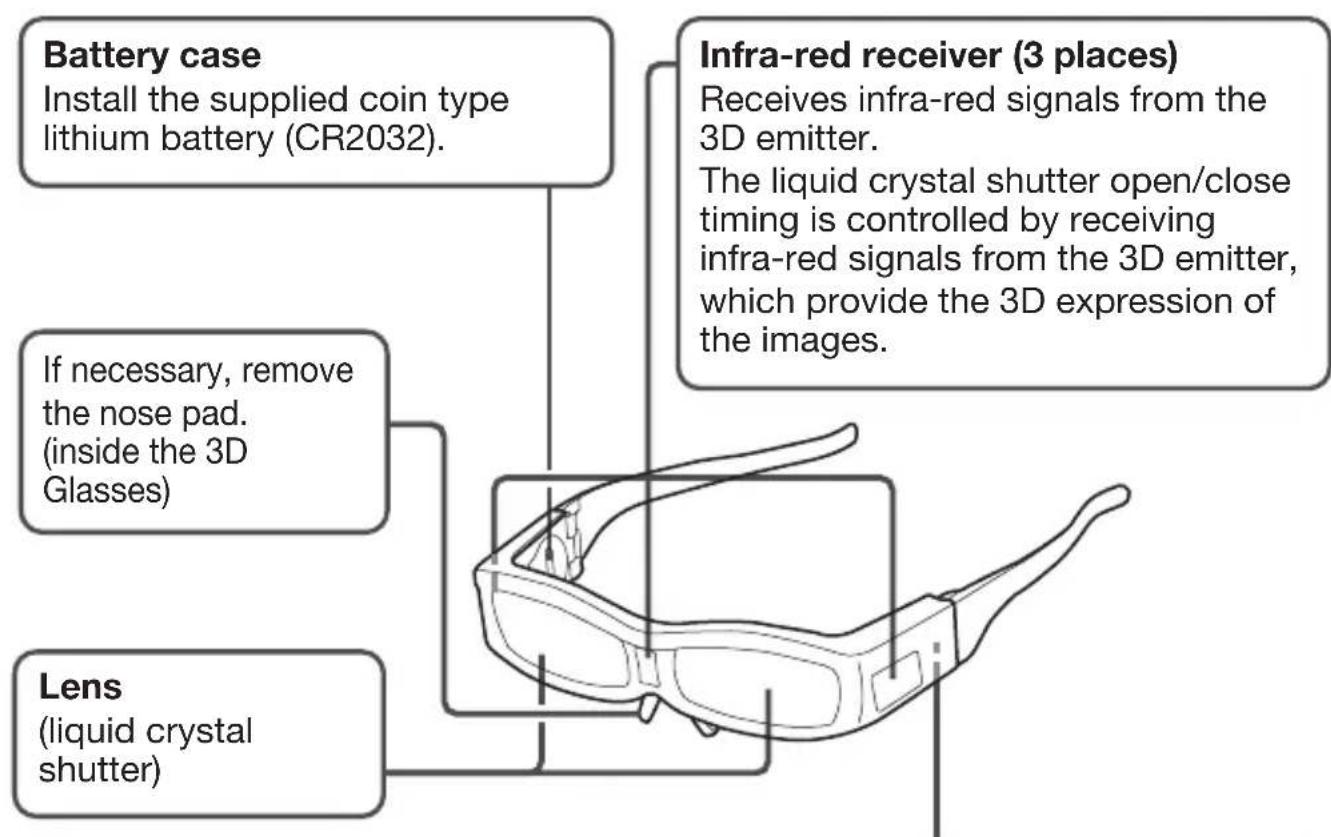
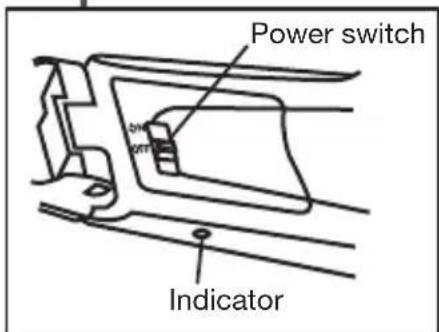
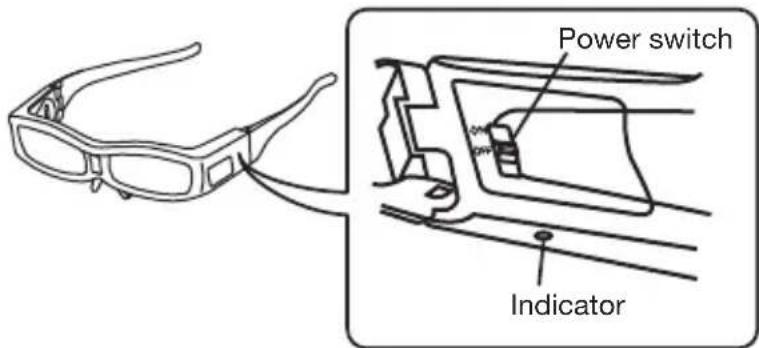
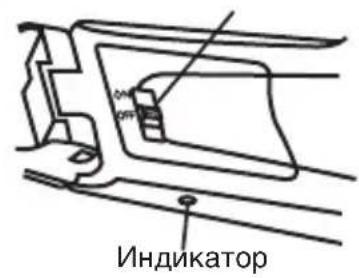
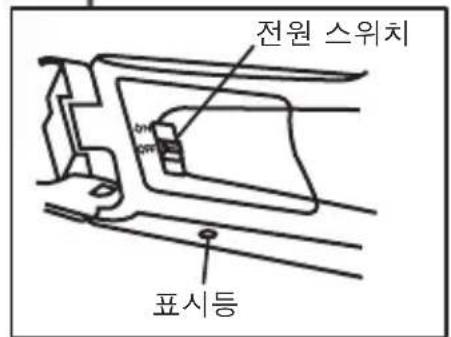
Power switch (ON/OFF) and indicator
When turning on the power:
Turn ON the power switch.
The indicator lights up.
When turning off the power:
Turn OFF the power switch.
The indicator goes off.
- When the infra-red signal from the 3D emitter is interrupted, the power turns off automatically after about 5 minutes, and the indicator goes off.
To turn on the power again, set the power switch to OFF and then ON.
- If the battery is running low, the indicator goes off immediately when you turn on the power.
What's included in the box
- Pouch (1)
- Nose pad (1)
Rubber ring (2) - Coin type lithium battery (CR2032) (1)
- User manual
The nose pad is attached on the 3D glasses.
Preparations
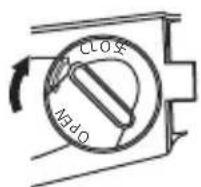
Before using, install the supplied battery. (Use one coin type lithium battery (CR2032) and one coin.) In addition, remove the nose pad or attach the supplied rubber ring as necessary.
- Turn and remove the cover according to the arrow using a coin.
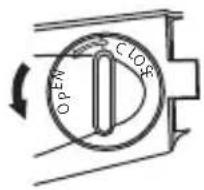
- Install the battery.
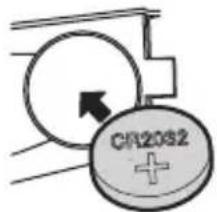
Install the battery with the + side upward.
- Attach and turn the cover according to the arrow.
- If necessary, remove the nose pad.
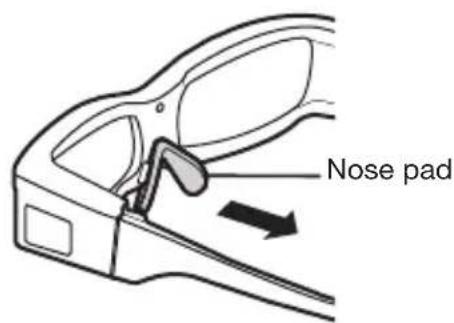
When you wear the 3D glasses over the vision correction glasses, choose whether or not to attach the nose pad according to your comfort.
- Attach the rubber ring as necessary (on left and right sides).
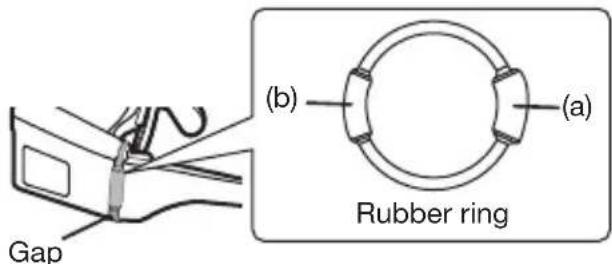
If the 3D glasses are too large and slip down from your nose, put the thicker part (a) (for children) or the thick part (b) (for ladies or users who have small face) of the rubber ring in the gap of the temple of the glasses as shown in the figure.
Important:
Install the battery correctly.
The duration of the battery is about 70 hours in continuous use. (The duration varies depending on the use.)
A supported projector and 3D emitter are required to watch the 3D images with the 3D glasses.
See the User Manual of the projector for the detailed operations.
-
Project a 3D image on the screen.
-
Turn ON the power switch on the 3D glasses.
-
Turn on the power of the 3D glasses and the indicator on the 3D glasses lights up. (See page 7.)
3. Wear the 3D glasses.
Visual distance of the 3D images
- When you view the 3D images, it is recommended to keep a distance from the screen about three times of the effective height of the screen.
Viewing images from closer distance than the recommended distance may lead to deconditioning or eyestrain. - The 3D glasses may not work properly when it is used too far from the screen.
- Do not place any block in the communication area between the 3D emitter and the 3D glasses.
When fi nishing watching
- Turn off the power of the 3D glasses.
- Keep in a place where children can't get it. Be careful of the damage or accident.
- Avoid keeping this 3D glasses in a place of high temperature or high humidity.
Important:
- It may need to switch the 3D mode (such as 3D setting system) on the recorder/ player when projecting 3D images with the 3D image supporting recorder/player. (For detail, see the User Manual of the recorder/player.)
- There is a difference in vision for each person. If you suffer from myopia (short sightedness), hyperopia (far-sightedness), astigmatism, or have eyesight differences between the left and right eyes, please use corrective glasses or other such methods to correct your eyesight before putting on the 3D glasses.
- At the start of watching 3D images, the image may be seen out of synchronization. However, it is not a malfunction.
- The 3D glasses stop working temporarily when the 3D glasses can not receive the infra-red signal from the 3D emitter by the reason such as turning your head away while watching 3D images. In this case, even when you turn around, you may see double images until 3D images restart, however it is not a malfunction.
- When the infra-red signal from the 3D emitter is interrupted, the power turns off automatically after about 5 minutes, and the indicator goes off. To turn on the power again, set the power switch to OFF and then ON.
Before asking for repair of the 3D glasses, check the following.
| Problem Solution | |
| Images are not 3D. | Is the 3D emitter connected to the projector? Is there any block in the communication area between the 3D emitter and the 3D glasses? Or, is there a sticker or other such item on the infra-red reception section on the 3D glasses? The 3D glasses operate by receiving signals from the 3D emitter. Check that there is not any block in the communication area between the 3D emitter and the 3D glasses. Is the distance between the 3D emitter and 3D glasses too far, or too close? Adjust the location of the 3D emitter. For detail, see the User Manual of the projector. Are the direction of the 3D emitter and that of the infra-red reception section on the 3D glasses misaligned? Adjust the direction and location of the 3D emitter. For detail, see the User Manual of the projector. Is the 3D glasses turned off? Turn ON the power switch on the 3D glasses. (When the power switch is ON, set it to OFF and then ON.) It may need to switch the 3D mode (such as 3D setting system) of the recorder/player when projecting 3D images with the 3D image supporting recorder/player. (For detail, see the User Manual of the recorder/player.) Is the 3D mode of the projector set properly for the image? Set the 3D mode of the projector (frame packing, side-by-side, top and bottom) properly for the image. The 3D glasses may become out of sync due to fluorescent light. Turn off the fluorescent light. Is there any other 3D emitter or 3D image supporting television close to the 3D glasses? The 3D glasses work by receiving signals from the 3D emitter. Check that there is no interference of the signals from other infra-red emission section. The 3D glasses stop working temporarily when the 3D glasses can not receive the infra-red signal from the 3D emitter by the reason such as turning your head away while watching 3D images. In this case, even when you turn around, you may see double images until 3D images restart, however it is not a malfunction. |
| The power of the 3D glasses turns off automatically. | Is there any block in the communication area between the 3D emitter and the 3D glasses? Or, is there a sticker or other such item on the infra-red reception section on the 3D glasses? When the signal from the 3D emitter is interrupted, the power of the 3D glasses automatically turns off 5 minutes after the interruption. Check that there is not any block in the communication area between the 3D emitter and the 3D glasses. |
| There is something wrong with the 3D images. | Depending on the 3D image status, you may feel something wrong with the 3D images. Switch the "3D SYNC." setting of the projector to check whether or not the uncomfortable feeling is disappeared. When the signal from the 3D emitter is interrupted, the power of the 3D glasses automatically turns off 5 minutes after the interruption. Check that there is not any block in the communication area between the 3D emitter and the 3D glasses. The 3D glasses may become out of sync due to fluorescent light. Turn off the fluorescent light. Is there any other 3D emitter or 3D image supporting television close to the 3D glasses? The 3D glasses work by receiving signals from the 3D emitter. Check that there is no interference of the signals from other infra-red emission section. |
| The indicator goes off immediately when the power of the 3D glasses is turned on. | The battery of the 3D glasses dies. Replace the battery with a new one. |
| The indicator does not light up even if the power switch on the 3D glasses is ON. | Does the battery of the 3D glasses die? Replace the battery with a new one. |
- When the 3D glasses become dirty, wipe them with a soft and dry cloth. If you wipe them with a dirt cloth, the lens (liquid crystal shutter) or the infrared reception section may be damaged.
- Do not use benzine or thinner to clean the 3D glasses. It may cause deformation of the surface.
- Do not soak the 3D glasses in water.
- Do not wipe the lens with alcohol or other chemicals. The lens may be discolored.
- Avoid keeping the 3D glasses in a place of high temperature or high humidity.
Replacing the battery
When the indicator goes off immediately after the 3D glasses are turned on, or the indicator doesn't light up even after the power switch of the 3D glasses is set to ON, replace the battery with a new one.
See page 8 for the replacement procedure, and remove the old battery before installing a new battery.
Specifications
The specific cations and outside appearance are subject to change without prior notice.
| Model EY-3DGS-80U | |
| Lens system Liquid crystal shutter | |
| Power supply DC 3 V, coin type lithium battery (CR2032) 1 | |
| Dimensions (W x H x D) 170.5 x 41 x 187 mm | |
| Weight 54 g (excluding the battery) | |
| Materials Body: ABS resin | Temple: PC resin Lens: Liquid crystal glass |
| Operating temperatures +41°F (+5°C) to +95°F (+35°C) | |
LUNETTES 3D
MODELE
EY-3DGS-80U
Manuel utiliseur
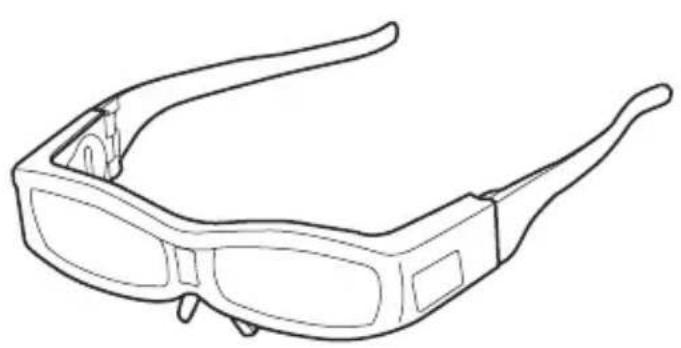
Table des matieres
CONFORMITA INDUSTRY CANADA
Note: This symbol mark is for China only.
Bo3MOxHbIe HEnCnpaBHOCTN 10
O6cnyxnbHne 12
3aMeHa 6atapen 12
XapakTepeNCTnKn 12
Пю ekTopы Mitsubishi, COBmecTnMbIe C DaHHbIMN
3D-ookamn (no coctoHnHO ha nIOhb 2012 roda)
HC7800D/HC7800DW
Cnncok noIepKINBaEMbIX npoeKTopOB MOKeT 6bITb N3MeHeH 6e3 npeBapntelbHorO ONOBueHnA.
Ppocb6a He pa36npaTb N He MoDnΦnucipOBaTb 3D ouKn.
3TO MOKET npNBecTN K NOXapu IIN HeNCnpaBHOJ pa6Ote, KOtopaMOKeT Bbl3BaTb He3DopOBbIe OUsUeHnY nOlb30BaTeJIa.
He3aMeIINTeJIbHO npeKpaTnte NcNoJIb3OBAHne 3D OUYKOB, ecN Bbl NOUYBCTBOBaJIY yCTaIOCTb, dNCKOMΦOpT IJIy dpyrNe HeecTeCTBeHHbIe OUyUeHnI.
IpoJIoJIKeHHe IcNoJIb3OBAHHe 3D OUKOB B TaKnx Clyuayx, MoXeT npNBecTu Bac K He3IopOBbIM OUsyueHnA M.
Noxaynta,OTdoXHyTb Heo6xoDnMoE BpeMa npei npoDoJxKeHneM
NcNoJIb3OBAHnA.
Ipekpatnte nCnoJb3ObaHne 3D ouKOB, ecn Bbl moXeTe yeTko yBnDeTb yDBoEHbIe n3o6paXeHn npi npocMoTpe 3D KOHTeHTa.
IpoDOnKInTeNbHoe IcNoIb3OBaHne MoXeT Bbl3BaTb NepeyTomJeHne rna3.
Ipn npocmoTe 3D pnlbMOB, npoc6a ocuueCTBnTb COOTBeTcTByOuN nepepbIB nocne npocmoTa pnlbMa.
При порсмOTpe 3D KOHTeHTa Ha INHTepaKTINBbIX yCTpoiCTbax, TaKnx KaK 3D nrgpbI nII KOMnbIOTepbI, npoc6ba ocUyecTbIaTb COOTBeTcTByIoUm IpepepbIB kAxDbIe 30 - 60 MnHyT.
IpoJONKHTeJIbHOe IcNoJIb3OBAHHe MOKeT Bbl3BaTb NepeyTomJeHne 3peHnA.
Ipn nCnoJb3OBAHn 3D ouKOB 6yDbTe ocTOpOXHbI, YTO6bl no Own6Ke He ydapntb 3KpaH nIIN dpyrnx IIOdei.
Tak kaK n3o6paXeHnBΦopMaTe 3D, Bbl MoXeTe OUn6ntbC r c pacNo3HaBaHHem pacCTOaHnDo 3KpaHa, YTO MoXeT npINBeCTN K yIapy no 3KpaHy N Bbl3BaTb TpaBMy.
He nepeBnraIteCb c HaJeTbIMN 3D Ouchamn.
Okpykaiooee npoctpaHCTBO BbIgIANTemhblm, YTO MOKeT npNBecTN K NaDeHnAM IIN dpYrIM HeCuaTHbIM CnyaAM, KOToPbIE MOryT Bbl3BaT TpaBMbl.
Icnojb3yIte 3D ouKn npn npocmoTpe 3D n3o6paxeHn.
IcnoJb3yIte 3D OUYK N TOJIbKO B COOTBETCTBNE C yKa3aHHOJ cJIbIO.
He 6pocaiTe, He npimEnyIe cnIy n He hAcTynaTe Ha 3D ouKn. 3TO MOKET NOBpeiNTb DeTaJIH OUYKOB, YTO MOKET Bbl3BaTb TpaBMbl.
BbIKJIouaTeIb IITaHnA (ON/OFF) n HdNKaTOp
Korda nItaHne BkIouyeHo:
HaXMMTe KHONky BKJI BKNIOUeHnI NITaHnI. INdNKaTOP CBeNTcR.
При ВыКлючени 3ЛeКТрОпТанг:
HaXMMTe KhoNky BblKJI BblKJIIOueHnI nITaHnI. HnDnKaTOp norachET.
BbIKJIOUaTeJIb NITaHNA
3D Aneng to Jtwn hns msshi fo roct (2012n 6w
HC7800D/HC7800DW
JiJ1
3D SisTeep 3D
彭高:
[BaT]n is n i f t
賄騰RlL 1
3D Aneng to sainshl dne h kriin n daen sarni t ltoh
3D 014JiJfJFJFJFJFJFJFJFJFJFJFJFJFJFJFJFJFJFJFJFJFJFJFJFJFJFJFJFJFJFJFJFJFJFJFJFJFJFJFJFJFJFJFJFJFJFJFJFJFJFJFJ
3D 安裝到使用者的口袋里,他們可以使用它。
3D 014JiJIiJIiJIJIJIJIJIJIJIJIJIJIJIJIJIJIJIJIJIJIJIJIJIJIJIJIJIJIJIJIJIJIJIJIJIJIJIJIJIJIJIJIJIJIJIJIJIJIJIJIJIJIJIJIJIJIJIJIJIJIJIJIJIJIJIJIJIJIJIJIJIJIJIJIJIJIJIJIJIJIJIJIJIJIJIJIJIJIJIJIJIJIJIJIJIJIJIJIJIJIJIJIJ
3D安進也國日成一
Class B DiJitel JostiCn Canadian ICES-003 0
EU 《约》的国有
iMuknEUuHJ.
F 1
中國出版社的韓經君的社會

i.
3D 0|MIJI将JUIHIN是PLORETEAER3DRIJHINHIOILOGILB
Jinwei Swoi chui to Kua xsi si (ON).
豆市通也接通
新元用
JrwnsWtHnO(OFF).
豆市通也开
*BbTtRlGaJckHJrJnJrJrJrJrJrJrJrJrJrJrJrJrJrJrJrJrJrJrJrJrJrJrJrJrJrJrJrJrJrJrJrJrJrJrJrJrJrJrJr
OPMERKING AANGAANDE OVEREENSTEMMING MET FCC
OPMERKING AANGAANDE OVEREENSTEMMING MET INDUSTRY CANADA
Mitsubishi Projector Warranty, Sales Support and Service Information
North America
MEVSA (Mitsubishi Electric Visual Solutions America, Inc.)
Presentation Products Division
9351 Jeronimo Road Irvine CA 92618, USA
For Warranty Registration, visit:
http://www.mitsubishi-presentations.com under Customer Care
Sales & Inquiries
Phone :Toll Free (888)307-0349 E-mail : :ppdinfo@mdea.com
Technical Inquiries
Phone :Toll Free (888)307-0309 E-mail: TSU
MESCA (Mitsubishi Electric Sales Canada Inc.)
http://www.mitsubishielectric.ca
Information Technologies Group, 4299 14th Avenue,
Markham, Ontario L3R 0J2, Canada
Color & Technical Inquiries
Sales & Technical Inquiries:
Phone :+1-(800) 450-6487 Fax :+1-(905) 475-7958
Customer Care
E-mail :support@mitsubishielectric.ca
Europe
MEU-FRA (Mitsubishi Electric Europe B.V French Branch)
Phone:+33(0)155-68-55-53
Fax:+33(0)155-68-57-31
Technical Inquiries
Phone: +33 (0)1 55-68-56-42
Fax: +33 (0)1 55-68-57-31
MEU-GER (Mitsubishi Electric Europe B.V. German Branch)
http://www.mitsubishi-evs.de/
Gothaer Strasse 8, 40880 Ratingen, Germany Sales Inquiries
Phone :0049 - 2102 - 486 9250
Fax:0049-2102-4867320
Technical Inquiries
Phone:0049-2102-486 1330
Fax:0049-2102-4861340
MEU-IR (Mitsubishi Electric Europe B.V. Irish Branch)
http://www.mitsubishi.ie/
Westgate Buslness Park, Ballymount, Dublin 24, Ireland
Sales Inquiries
Phone :+353-1-4198807
Fax +353-1-4198890
Technical Inquiries
Phone :+353-1-4198808
Fax:+353-1-4198895
MEU-IT (Mitsubishi Electric Europe B.V. Italian Branch)
20041 Agrate Brianza, Italy
Sales & Technical Inquiries
Phone :+39-0)39-60531
Fax +39-0)39-6053214
E-mail :info.projector@it.mee.com
MEU-NL (Mitsubishi Electric Europe B.V. Benelux Branch) http://www.mitsubishielectric.eu/
Phone :+31-297-282461
Fax +31-297-283936
E-mail :info@mitsubishi.nl
Technical Inquiries
Phone :+31-297-282461
Fax +31-297-283936
E-mailinfo@mitsubishi.nl
Russia (Mitsubishi Electric Europe B.V Moscow)
Representative Office)
http://www.mitsubishi-projector.ru/
Moscow Representative Office, 52/5 Kosmodamianskaya
Nab., 115054, Moscow, Russia
Sales & Technical Inquiries
Phone :(7095) 721-2068
Fax:(7095)721-2071
MEU-SP (Mitsubishi Electric Europe B.V. Spanish Branch)
http://www.mitsubishihielectric.es/
Ctra. de Rubl, 76-80, 08173 Sant Cugat del Valles,
Barcelona, Spain
Sales Inquiries
Phone :+34-93.565.31.54
Fax +34-93.589.43.88
E-mail ;mitsubishi.professional@sp.mee.com
Technical Inquiries
Phone :+34-93.586.27.51
Fax:+34-93.588.53.87
E-mail :mitsubishi.professional@sp.mee.com
MEU-SWE (Mitsubishi Electric Europe B.V Scandinavian)
Branch)
Hammarbacken 14, Box 750, S-19127, Sollentuna, Sweden
Sales Inquiries
Phone :+46-(0)8-6251070
Fax:+46-(0)8-6251036
Technical Inquiries
Phone :+46-(0)8-6251052
Fax:+46-(0)8-6251036
MEU-UK (Mitsubishi Electric Europe)
http://vis.mitsubishihielectric.co.uk/products/projectors/
Visual Information Systems Division, Travellers Lane,
Hatfield, Hertfordshire, AL10 8XB U.K.
Sales Inquiries
Phone: +44 (1707) 278684
Fax: +44 (1707) 278541
E-mail :projector.info@meuk.mee.com
Technical Inquiries
Phone: +44 (870) 606 5008
Fax:+44(1506)431927
E-mail :projector.info@meuk.mee.com
Asia
CHINA (Mitsubishi Electric Air-Conditioning & Visual
Information Systems (Shanghai) Ltd.)
15/F Henderson Metropolitan, No. 300 East Nanjing Road,
Shanghai 200001, China
Sales & Technical Inquiries
Phone :+86(21)2312-3030 (Ext.3228)
Fax :+86(21)2312-3008
Email :yis/support@mlc.mehkg.com
Sale and Service hotline
Phone :+86-400-820-2130
HONG KONG (Mitsubishi Electric Ryden Air-Conditioning
& Visual Information Systems (HongKong) Ltd.)
9/F, Skyline Tower, 39 Wang Kwong Road, Kowloon Bay,
Kowloon, Hong Kong
Sales Inquiries
Phone :+852-2510-1505
Fax:+852-2510-0463
Technical Inquiries
Phone :+852-2422-0161
Fax:+852-2487-0181
SINGAPORE (Mitsubishi Electric Asia Pte. Ltd.)
http://www.mitsubishihielectric.com.sg
307, Alexandra Road, #05-01/02 Mitsubishi Electric
Building, Singapore 159943
Sales Inquiries
Phone :+65-6473-2308
Fax :+65-6475-9503
Inquiries:
Phone :+65-6470-2666
Fax :+65-6475-9503
INDIA (Mitsubishi Electric Asia Pte. Ltd.)
307, Alexandra Road, #05-01/02 Mitsubishi Electric
Building, Singapore 159943
Sales Inquiries
Phone :+65-6473-2308
Fax:+65-6475-9503
E-mail :Peripherals@asia.meap.com
Technical Inquiries
Phone :+65-6470-2666
Fax :+65-6475-9503
INDONESIA (Mitsubishi Electric Asia Pte. Ltd.)
307, Alexandra Road, #05-01/02 Mitsubishi Electric
Building, Singapore 159943
Sales Inquiries
Phone :+65-6473-2308
Fax :+65-6475-9503
E-mail :Peripherals@asia.meap.com
Technical Inquiries
:+65-6470-2666
Fax :+65-6475-9503
PHILIPPINES (Mitsubishi Electric Asia Pte. Ltd.)
http://www.mitsubishielecric.com.sg
307, Alexandra Road, #05-01/02 Mitsubishi Electric
Building, Singapore 159943
Sales Inquiries
Phone :+65-6473-2308
Fax :+65-6475-9503
E-mail :Peripherals@asia.meap.com
Technical Inquiries
Phone :+65-6470-2666
Fax :+65-6475-9503
VIETNAM (Mitsubishi Electric Asia Pte)
307, Alexandra Road, #05-01/02 Mitsubishi Electric
Building, Singapore 159943
Sales Inquiries
Phone :+65-6473-2308
Fax:+65-6475-9503
E-mail Peripherals@asia.meap.com
Technical Inquiries
Phone :+65-6470-2666
Fax :+65-6475-9503
STC (Setsuyo Astec Corporation Seoul Branch)
16F KT Bldg., 28-2 Yeouido-dong, Yeoungdeungpo-gu,
Seoul 150-931, Korea
Sales & Technical Inquiries
Phone :+82-1588-5576
Fax :+82-2-704-8666
MALAYSIA (Melco Sales Malaysia Sdn Bhd)
Lot 11, Jalan 219, 46100 Petaling Jaya, Selangor Darul
Ehsan, Malaysia
Sales & Technical Inquiries
Phone :+60-(0)3-79573428
Fax :+60-(0)3-79563950/+60-(0)3-79582576
Technical & Service Inquiries
Phone :+60-(0)3-79553997
Fax 60-03-79584836
ME-TWN (Mitsubishi Electric Taiwan Co., Ltd.)
http://www.MitsubishiElectric.com.tw
11TH FL., 90 SEC.6, CHUNG SHAN N. RD., TAPEI, 111
R.O.C.
Sales & Technical Inquiries
Phone +886-2-2832-8255
Fax:+866-2-2833-9813
MKY (Mitsubishi Electric Kang Yong Watana Co., Ltd.)
Road, Huamark Bangkapi, Bangkok 10240, Thailand
Sales & Technical Inquiries
Phone :+66-2-731-6841
Fax :+66-2-379-4763
Oceania
ME-AUST (Mitsubishi Electric Australia)
http://www.mitsubishielectric.com.au/163.htm
348 Victoria Road, Rydalmere, N.S.W. 2116, Australia
Sales & Technical Inquiries
Phone :+(612)9684-7777
Fax 62984-7208
E-mail :diamonddigital@meaust.meap.com
Technical Inquiries
Phone:+6(2)9684-7694E-mail:info@zzb.com.cn
Fax:+(612)9684-7684
E-mail :service@meaust.meap.com
BDT (Black Diamond Technologies Ltd.)
(Warranty Registration) http://www.bdt.co.nz/projectors/warranty.asp
1 Parliament St, Lower Hutt, Wellington, New Zealand
Sales Inquiries
Phone :+64-(0)4-560-9100
Fax 64-04-560-9133
E-mail :projectorsales@bdt.co.nz
Technical Inquiries
Phone +64 - (0)4 - 560 - 9100
Fax 64-04-560-9133
E-mail :service@bdt.co.nz
MITSUBISHI
三菱3D×ガネ
形名
EY-3DGS-80U
取掇說明書
保証書付
毛<
安全のたてに必務お守りくだい…2
7
各部はたき 8
付属品 9
準備をする 9
使いかた 10
故障かな?思った… 11
保证とアフターーダー・12
14
電池交換にて 14
仕樣 14
Effective only in Japan.

- Mitsubishi projectors compatible with this 3D glasses
- Warning:
- Caution:
- Lens (liquid-crystal shutter)
- Infra-red reception section
- When using the 3D glasses
- When using the device in Europe: COMPLIANCE NOTICE
- COMPLIANCE NOTICE OF FCC
- COMPLIANCE NOTICE OF INDUSTRY CANADA
- Declaration of Conformity
- Information on Disposal in other Countries outside the European Union
- Environment care information for users in China
- Make sure to read the "Safety precautions" on pages 2 to 3 before using the 3D glasses.
- Power switch (ON/OFF) and indicator
- When turning on the power:
- When turning off the power:
- What's included in the box
- Preparations
- Important:
- Wear the 3D glasses.
- Visual distance of the 3D images
- When fi nishing watching
- Replacing the battery
- Specifications
- EY-3DGS-80U
- Table des matieres
- CONFORMITA INDUSTRY CANADA
- Пю ekTopы Mitsubishi, COBmecTnMbIe C DaHHbIMN
- BbIKJIouaTeIb IITaHnA (ON/OFF) n HdNKaTOp
- Korda nItaHne BkIouyeHo:
- При ВыКлючени 3ЛeКТрОпТанг:
- EU 《约》的国有
- 中國出版社的韓經君的社會
- OPMERKING AANGAANDE OVEREENSTEMMING MET FCC
- OPMERKING AANGAANDE OVEREENSTEMMING MET INDUSTRY CANADA
- Mitsubishi Projector Warranty, Sales Support and Service Information
- North America
- Europe
- Asia
- Oceania
- MITSUBISHI
- 三菱3D×ガネ
- 毛<
Brand : MITSUBISHI
Model : EY3DGS80U
Category : 3D Glasses