BD18AL - Lighting BLACK & DECKER - Free user manual and instructions
Find the device manual for free BD18AL BLACK & DECKER in PDF.


| Brand | Black & Decker |
| Model | BD18AL |
| Product Type | Rechargeable flashlight |
| Input Voltage | 18 V DC |
| Weight (unit alone) | 0.69 kg |
| Battery Type | NiCd / NiMH |
| Battery Weight | 0.83 kg |
| Bulb Type | Fluorescent (13 W) |
| Charger | Input 230 V AC, double insulation |
| Main Functions | Adjustable lighting, rotating handle (6 positions), suspension strap, replaceable fluorescent tube |
| Intended Use | Household and leisure, indoor and outdoor |
| Maintenance | Clean with a damp cloth, do not use solvents |
| Safety | Do not look directly at the light, do not immerse, let cool before storing |
| Spare Parts and Repairability | Replacement fluorescent tube DC5273 or Sylvania PN CF13DS/E/841, specific Black & Decker battery and charger |
| Warranty | 24 months, covers material and manufacturing defects |
| General Information | CE certification, end-of-life recycling through approved repairer |
Frequently Asked Questions - BD18AL BLACK & DECKER
User questions about BD18AL BLACK & DECKER
0 question about this device. Answer the ones you know or ask your own.
Ask a new question about this device
Download the instructions for your Lighting in PDF format for free! Find your manual BD18AL - BLACK & DECKER and take your electronic device back in hand. On this page are published all the documents necessary for the use of your device. BD18AL by BLACK & DECKER.
USER MANUAL BD18AL BLACK & DECKER
Your Black & Decker area work light has been designed for providing illumination for home and leisure use. This product is intended for consumer use only.
Safety instructions
Warning! When using battery-powered appliances, basic safety precautions, including the following, should always be followed to reduce the risk of fire, leaking batteries, personal injury and material damage.
Read all of this manual carefully before using the appliance.
- The intended use is described in this manual. The use of any accessory or attachment or the performance of any operation with this appliance other than those recommended in this instruction manual may present a risk of personal injury.
Retain this manual for future reference.
Using your appliance
Always take care when using the appliance.
This appliance is not intended for use by young or infirm persons without supervision.
The appliance is not to be used as a toy.
Use in a dry location only. Do not allow the unit to become wet.
Do not immerse the appliance in water.
Do not open body casing. There are no user-serviceable parts inside.
- Do not operate the appliance in explosive atmospheres, such as in the presence of flammable liquids, gases or dust.
To reduce the risk of damage to plugs and cords never pull the cable to remove the plug from a socket outlet.
After use
- When not in use, the appliance should be stored in a dry, well ventilated place out of the reach of children.
Children should not have access to stored appliances. - When the appliance is stored or transported in a vehicle it should be placed in the boot or restrained to prevent movement following sudden changes in speed or direction.
- The appliance should be protected from direct sunlight, heat and moisture.
Inspection and repairs
Before use, check the appliance for damaged or defective parts. Check for breakage of parts, damage to switches and any other conditions that may affect its operation.
Do not use the appliance if any part is damaged or defective.
- Have any damaged or defective parts repaired or replaced by an authorised repair agent.
- Never attempt to remove or replace any parts other than those specified in this manual.
Specific safety instructions for area work lights
The following safety symbol is marked on your area work light:

Warning! To reduce the risk of injury, the user must read the instruction manual.

Warning! Do not touch the lens as it becomes very hot during operation and remains hot for several minutes after the work light is switched off.
Allow the area work light to fully cool down before storage or charging.
- Keep combustible materials away from area work light lens. Extreme heat can cause fires.
- Never place the light face-down on any surface when it is switched on or cooling.
Do not leave the area work light unattended. Keep children and animals away from the work area.
Inspect the lens for damage following impact or if the area work light is dropped. Do not operate without the lens in place or with a damaged lens.
- The lens is manufactured from plastic. The lens may crack or break if subject to an impact. If the lens is damaged it must be replaced by manufacturers original parts. Wear gloves as sharp edges may cause injury.
Never look directly into the light or shine the light into another person's eyes.
Do not immerse area work light in water.
Only replace the fluorescent bulb with the type indicated in the technical data.
Use only with the Black & Decker batteries that are provided with the unit.
Additional safety instructions for batteries and chargers
Batteries
- Never attempt to open for any reason.
Do not charge damaged batteries.
Do not expose the battery to water.
Do not expose the battery to heat.
Do not store in locations where the temperature may exceed 40^ - Charge only at ambient temperatures between 10^ and 40^ .
Charge only using the chargers provided with the appliance.
- When disposing of batteries, follow the instructions given in the section "Protecting the environment".
Chargers
Use your Black and Decker charger only to charge the battery in the appliance with which it was supplied. Other batteries could burst, causing personal injury and damage.
Never attempt to charge non-rechargeable batteries.
Have defective cords replaced immediately.
Do not expose the charger to water.
Do not open the charger.
Do not probe the charger.
The following symbols are found on your charger:

Your charger is double insulated; therefore no earth wire is required.

Read all of this instruction manual carefully.

This appliance is intended for indoor use only.
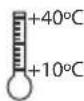
Working temperature.

This product must not be disposed of with normal household waste.
Electrical safety

The charger is double insulated; therefore no earth wire is required. Always check that the power supply corresponds to the voltage on the rating plate.
If the supply cord is damaged, it must be replaced by the manufacturer or an authorised Black & Decker Service Centre in order to avoid a hazard.
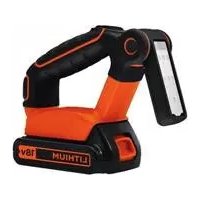
Features
This appliance includes some or all of the following features:
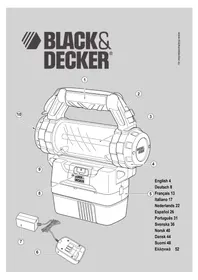
- Moveable handle
- Bungee cord
- Replaceable fluorescent tube
- Removable cap
- Battery
- Charger receptacle
- Mains charging adaptor
- On/off switch
- Fluorescent tube access screws
- Handle release button
Fitting and removing the battery (fig. G)
To fit the battery (5), line it up with the receptacle on the appliance. Slide the battery (5) into the receptacle and push until the battery (5) snaps into place.
To remove the battery (5), push the release button (12) while at the same time pulling the battery (5) out of the receptacle.
Fitting the battery cap (fig. F)
Fit the cap (11) to the battery (5) for transportation and storage.
Use
Charging the area work light
This area work light is shipped in a partially charged state. Charge the battery (5) before first use using the mains charging adaptor (6) for 10 hours.
Operating the area work light (fig. A)
Warning! Vision may be impaired when looking directly into the area work light.
To turn the light on, slide the on/off switch (8) to the right. To turn it off, slide the on/off switch to the left.
Replacing the fluorescent tube (fig. B)
Warning! Shock hazard. Disconnect the battery pack from the appliance before replacing the fluorescent tube. Such preventative safety measures reduce the risk of personal injury.
Warning! If replacing a broken tube, wear protective gloves, before attempting to remove the tube. Do not remove any pieces of broken glass or tube from the socket area with bare hands, or personal injury may occur.
Warning! Burn hazard. The lens or the fluorescent tube will be hot immediately after use.
Note: Use only DC5273 replacement bulbs or Sylvania PN CF13DS/E/841 replacement bulbs.
Remove the cap (4) by rotating it counter clockwise (fig. B).
Carefully pull the fluorescent tube access cover out of the opening.
Carefully remove the tube (3) from the socket by gently pulling it out from the base. Check to make sure that the socket and the area around the socket is free of dirt, dust and other contaminants.
Insert the new tube (3) in the same orientation as the old tube making sure that it is fully seated.
Replace the fluorescent tube access cover.
Replace the cap (4).
ENGLISH
To replace a broken tube (fig. B)
Always replace a broken bulb in a well ventilated area.
Rotate the cap (4) counter clockwise (fig. B).
Carefully pull the fluorescent tube access cover out of the opening.
Remove the two screws (9) from the clear plastic housing. Rotate the cover upward to allow access to the broken tube. Wearing protective gloves, remove the broken glass or tube.
Move the clear plastic housing back to the closed position and replace the screws (9).
Insert the new tube (3) in the same orientation as the old tube making sure it is fully seated. Replace the fluorescent tube access cover.
Replace the cap (4).
Bungee cord (fig. C)
Warning! When the area work light is hung by the bungee cord (2), do not shake the work light or the object that it is hanging from.
Do not hang the area work light from any electrical wires or anything that is not secure. Personal injury or property damage may occur.
Only use the bungee cord for hanging the area work light. The bungee cord is not intended to support additional weight.
Do not attach or hang anything additional to the work light or risk of breakage may occur.
The built-in bungee cord (2) nests in the handle (1). The bungee cord can be extended away from the handle and used to hang the work light (fig. C). The bungee cord (2) can also be removed from one end if required.
Rotating the light housing (fig. D & E)
The handle (1) can be moved by pressing down on the handle release button (10) (fig. E) and rotating the handle into one of six locked positions. The different handle positions can be used to carry the area work light or to lean the work light back on the handle for stationary use.
Maintenance
Your Black & Decker tool has been designed to operate over a long period of time with a minimum of maintenance.
Continuous satisfactory operation depends upon proper tool care and regular cleaning.
Warning! Before performing any maintenance or cleaning on the appliance, unplug the appliance.
From time to time wipe the appliance with a damp cloth. Do not use any abrasive or solvent-based cleaner. Do not immerse the appliance in water.
Protecting the environment

Separate collection. This product must not be disposed of with normal household waste.
Should you find one day that your appliance needs replacement, or if it is of no further use to you, think of the protection of the environment. Black & Decker repair agents will accept old Black & Decker tools and ensure that they are disposed of in an environmentally safe way.

Separate collection of used products and packaging allows materials to be recycled and used again. Re-use of recycled materials helps prevent environmental pollution and reduces the demand for raw materials
Local regulations may provide for separate collection of electrical products from the household, at municipal waste sites or by the retailer when you purchase a new product.
Black & Decker provides a facility for the collection and recycling of Black & Decker products once they have reached the end of their working life. To take advantage of this service please return your product to any authorised repair agent who will collect them on our behalf.
You can check the location of your nearest authorised repair agent by contacting your local Black & Decker office at the address indicated in this manual. Alternatively, a list of authorised Black & Decker repair agents and full details of our after-sales service and contacts are available on the Internet at: www.2helpU.com.

Black & Decker batteries can be recharged many times. At the end of their useful life, discard batteries with due care for our environment:
Do not short-circuit the battery terminals.
- Do not dispose of the battery in fire, as this may result in an explosion.
Run the battery down completely, then remove it from the appliance.
NiCd, NiMh, Lithium Ion and Lead Acid (Pb) batteries are recyclable. They must not be disposed of with household waste. Place the battery in suitable packaging to ensure that the terminals cannot be short-circuited. Take the battery to any authorised repair agent or a local recycling station.
Technical data
| BD18AL |
| Input voltage Vdc 18 |
| Unit weight kg 0.69 |
| Battery Type NiCD/NiMh |
| Battery weight kg 0.83 |
| Bulb Type Fluorescent |
| Vdc 18 |
| W 13 |
| Charger |
| Input Vac 230 |
| Approx. charging time h 3.0 |
| Weight kg 0.40 |
EC declaration of conformity
BD18AL
Black & Decker declares that these products conform to:
Standards & Legislation.
EN60598, 73/23/EEC
The undersigned is responsible for compilation of the technical file and makes this declaration on behalf of Black & Decker
Kevin Hewitt
Director of Consumer Engineering
Spennymoor, County Durham, DL16 6JG
United Kingdom
04-09-2008
Guarantee
Black & Decker is confident of the quality of its products and offers an outstanding guarantee. This guarantee statement is in addition to and in no way prejudices your statutory rights. The guarantee is valid within the territories of the Member States of the European Union and the European Free Trade Area.
If a Black & Decker product becomes defective due to faulty materials, workmanship or lack of conformity, within 24 months from the date of purchase, Black & Decker guarantees to replace defective parts, repair products subjected to fair wear and tear or replace such products to make sure of the minimum inconvenience to the customer unless:
The product has been used for trade, professional or hire purposes.
The product has been subjected to misuse or neglect
The product has sustained damage through foreign objects, substances or accidents.
Repairs have been attempted by persons other than authorised repair agents or Black & Decker service staff.
To claim on the guarantee, you will need to submit proof of purchase to the seller or an authorised repair agent. You can check the location of your nearest authorised repair agent by contacting your local Black & Decker office at the address indicated in this manual. Alternatively, a list of authorised Black & Decker repair agents and full details of our after-sales service and contacts are available on the Internet at:
www.2helpU.com
Please visit our website www.blackanddecker.co.uk to register your new Black & Decker product and to be kept up to date on new products and special offers. Further information on the Black & Decker brand and our range of products is available at www.blackanddecker.co.uk.
DEUTSCH
Director of Consumer Engineering
Spennymoor, County Durham, DL16 6JG
Charge approximative h 3,0
Poids kg 0,40
Normes & legislation.
EN60598, 73/23/CEE
Spennymoor, County Durham, DL16 6JG
Royaume-Uni
04-09-2008
Garantie
Spennymoor, County Durham DL16 6JG
Regno Unito
04-09-2008
Garanzia
Director of Consumer Engineering
Spennymoor, County Durham DL16 6JG
Verenigd Koninkrijk
04-09-2008
Garantie
Spennymoor, County Durham, DL16 6JG
Reino Unido
04-09-2008
Garantia
Spennymoor, County Durham, DL16 6JG
Reino Unido
04-09-2008
Garantia
Director of Consumer Engineering
Spennymoor, County Durham, DL16 6JG
Storbritannien
04-09-2008
Garanti
Spennymoor, County Durham, DL16 6JG
Storbritannia
4.9.2008
Garanti
Black & Decker er trygg på kvaliteten til sineprodukter og tilbyr en enestäende garanti. Denne garantierklæringenkommen i tillegg til dine lovbestemte rettigheter, og er/DDke i konflikt med disse. Garantien er gyldig i EU- og EFTA-medlemsstatene.
Director of Consumer Engineering
Spennymoor, County Durham, DL16 6JG
Storbritannien
04-09-2008
Garanti
Director of Consumer Engineering
Spennymoor, County Durham, DL16 6JG
Iso-Britannia
4.9.2008
Takui
Spennymoor, County Durham, DL16 6JG
HvωμévoBaσiλειo
04-09-2008
Eyyunon
- Safety instructions
- Using your appliance
- After use
- Inspection and repairs
- Specific safety instructions for area work lights
- Additional safety instructions for batteries and chargers
- Batteries
- Chargers
- Electrical safety
- Features
- Fitting and removing the battery (fig. G)
- Fitting the battery cap (fig. F)
- Use
- Charging the area work light
- Operating the area work light (fig. A)
- Replacing the fluorescent tube (fig. B)
- ENGLISH
- To replace a broken tube (fig. B)
- Bungee cord (fig. C)
- Rotating the light housing (fig. D & E)
- Maintenance
- Protecting the environment
- EC declaration of conformity
- Guarantee
- www.2helpU.com
- DEUTSCH
- Garantie
- Garanzia
- Garantia
- Garanti
- Takui
- Eyyunon
Brand : BLACK & DECKER
Model : BD18AL
Category : Lighting