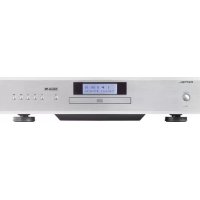
CD11 - Cd player/recorder ROTEL - Free user manual and instructions
Find the device manual for free CD11 ROTEL in PDF.



| Brand | Rotel |
| Model | CD11 |
| Product Type | CD Player/Recorder |
| Dimensions (front panel height) | 80 mm (3 1/8") |
| Net Weight | 5.8 kg (12.7 lb) |
| Mains Power Supply | 120 V / 60 Hz (USA) or 230 V / 50 Hz (Europe) |
| Standby Power Consumption | Complies with standby power consumption standards |
| Digital-to-Analog Converter | Texas Instruments 24-bit / 192 kHz |
| Frequency Response | 20 Hz - 20 kHz (±0.5 dB) |
| Harmonic Distortion + Noise | 0.009% at 1 kHz |
| Signal-to-Noise Ratio (A-weighted) | > 125 dB |
| Dynamic Range | > 99 dB |
| Channel Separation | > 115 dB at 10 kHz |
| Audio Outputs | Analog RCA, coaxial digital (0.5 V peak-to-peak, 75 Ω) |
| Playback Functions | Play, pause, stop, next/previous track, direct access, repeat, random play, programming (up to 20 tracks) |
| Display | Backlit, disc information, elapsed/remaining time |
| Remote Control | Infrared RR-D99 with advanced functions (menu, dimmer) |
| Connectivity | Trigger input 12 V (3 - 30 V AC/DC), Rotel Link (3.5 mm mini-jack), RS-232 (DB-9) |
| Care and Cleaning | Clean with a dry cloth or vacuum. Do not use liquid products. |
| Laser Class | Class 1 (safe during normal operation) |
| Safety | Double electrical insulation, surge protection, do not open the case |
| Repairability | Spare parts available from Rotel authorized after-sales service |
| General Information | Designed for high-quality music reproduction, compliant with RoHS and WEEE standards |
Frequently Asked Questions - CD11 ROTEL
User questions about CD11 ROTEL
0 question about this device. Answer the ones you know or ask your own.
Ask a new question about this device
Download the instructions for your Cd player/recorder in PDF format for free! Find your manual CD11 - ROTEL and take your electronic device back in hand. On this page are published all the documents necessary for the use of your device. CD11 by ROTEL.
USER MANUAL CD11 ROTEL
Stereo Compact Disc Player
HCTpyKcna nonb30BaTeJIa
CAUTION
RISK OF ELECTRIC SHOCK DO NOT OPEN

WARNING: SHOCK HAZARD-DO NOT OPEN
AVIS: RISOUE DE CHOC ÉLECTRIQUE-NE PAS OUVRIR
This symbol is to alert the user to the presence of uninsulated dangerous voltages inside the product's enclosure that may constitute a risk of electric shock.

This symbol is to alert the user to important operating and maintenance (service) instructions in this manual and literature accompanying the product.
APPLICABLE FOR USA, CANADA OR WHERE APPROVED FOR THE USAGE
CAUTION: TO PREVENT ELECTRIC SHOCK, MATCH WIDE BLADE OF PLUG TO WIDE SLOT. INSERT FULLY.
ATTENTION: POUR EVITER LES CHOCSE ELECTRIQUES, INTRODUIRE LA LAME LA PLUS LARGE DE LA FICHE DANS LA BORNE CORRESPONDANTE DE LA PRISE ET POUSSER JUSQU AU FOND.
This Class B digital apparatus complies with Canadian ICES-003.
Rotel products are designed to comply with international directives on the Restriction of Hazardous Substances (RoHS) in electrical and electronic equipment and the disposal of Waste Electrical and Electronic Equipment (WEEE). The crossed wheeie bin symbol indicates compliance and that the products must be appropriately recycled or processed in accordance with these directives.

This symbol means that this unit is double insulated. An earth connection is not required.

IMPORTANT FOR LASER PRODUCT
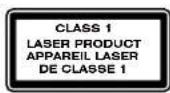
- CLASS 1 LASER PRODUCT
- DANGER: Visible laser radiation when open and interlock failed or bypassed. Avoid direct exposure to beam.
- CAUTION: Do not open the top cover. There are no user serviceable parts inside the player; leave all servicing to qualified service personnel.
WARNING!
To reduce the risk of electrical shock, fires, etc.:
- Do not remove screws, covers or cabinet.
- Do not expose the unit to rain or moisture.
- Do not touch the power cord or plug with wet hands.
Important Safety Instructions
WARNING: There are no user serviceable parts inside. Refer all servicing to qualified service personnel.
WARNING: To reduce the risk of fire or electric shock, do not expose the unit to moisture or water. Do not expose the unit to dripping or splashing. Do not place objects filled with liquids, such as vases, on the unit. Do not allow foreign objects to get into the enclosure. If the unit is exposed to moisture, or a foreign object gets into the enclosure, immediately disconnect the power cord from the wall. Take the unit to a qualified service person for inspection and necessary repairs.
Read these instructions.
Keep these instructions.
Heed all warnings.
Follow all instructions.
Do not use this apparatus near water.
Clean only with dry cloth.
Do not block any ventilation openings. Install in accordance with the manufacturer's instructions.
Do not install near any heat sources such as radiators, heat registers, stoves, or other apparatus (including amplifiers) that produce heat.
Do not defeat the safety purpose of the polarized or grounding-type plug. A polarized plug has two blades with one wider than the other. A grounding type plug has two blades and a third grounding prong. The wide blade or the third prong are provided for your safety. If the provided plug does not fit into your outlet, consult an electrician for replacement of the obsolete outlet.
Protect the power cord from being walked on or pinched particularly at plugs, convenience receptacles, and the point where they exit from the apparatus.
Only use attachments/accessories specified by the manufacturer.
Use only with the cart, stand, tripod, bracket, or table specified by the manufacturer, or sold with the apparatus. When a cart is used, use with caution when moving the cart/apparatus combination to avoid injury from tip-over.

Unplug this apparatus during lightning storms or when unused for long periods of time.
Refer all servicing to qualified service personnel. Servicing is required when the apparatus has been damaged in any way, such as power supply cord or plug is damaged, liquid has been spilled or objects have fallen into the apparatus, the apparatus has been exposed to rain or moisture, does not operate normally, or has been dropped.
The apparatus should be used in non tropical climate.
The ventilation should not be impeded by covering the ventilation openings with items, such as newspapers, table-cloths, curtains, etc.
No open flame sources, such as lighted candles, should be placed on the apparatus.
Touching uninsulated terminals or wiring may result in an unpleasant sensation.
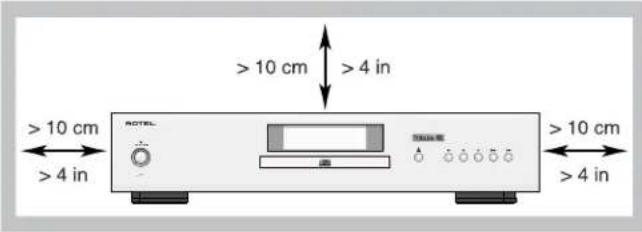
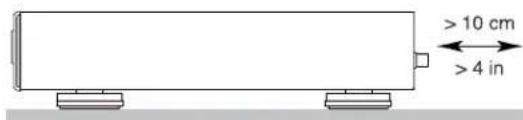
You must allow a minimum 10 cm or 4 inches of unobstructed clearance around the unit.
WARNING: The rear panel power cord connector is the mains power disconnect device. The device must be located in an open area that allows access to the cord connector.
The unit must be connected to a power supply only of the type and voltage specified on the rear panel. (USA: 120 V/60Hz, EC: 230V/50Hz)
Connect the component to the power outlet only with the supplied power supply cable or an exact equivalent. Do not modify the supplied cable. Do not use extension cords.
The mains plug is the disconnect of the unit. In order to completely disconnect the unit from the supply mains, remove the main plug from the unit and the AC power outlet. This is the only way to completely remove mains power from the unit.
The batteries in the remote control should not be exposed to excessive temperature such as sunshine, fire or other heat sources. Batteries should be recycled or disposed as per state and local guidelines.
Notice
The RS232 connection should be handled by authorized persons only.
FCC Information
This equipment has been tested and found to comply with the limits for a Class B digital device, pursuant to Part 15 of the FCC Rules. These limits are designed to provide reasonable protection against harmful interference in a residential installation. This equipment generates, uses and can radiate radio frequency energy and, if not installed and used in accordance with the instruction, may cause harmful interference to radio communications.
However, there is no guarantee that interference will not occur in a particular installation. If this equipment does cause harmful interference to radio or television reception, which can be determined by turning the equipment off and on, the user is encouraged to try to correct the interference by one or more of the following measures:
Reorient or relocate the receiving antenna.(TV, radio, etc.)
- Increase the separation between the equipment and receiver.
- Connect the equipment to an outlet on circuit different from that to which the receiver is connected.
- Consult the dealer or an experienced radio/TV technician for additional help.
Caution
This device complies with part 15 of the FCC Rules. Operation is subject to the following conditions: (1) This device may not cause harmful interference, and (2) this device must accept any interference received, including interference that may cause undesired operation.
NOTE: This equipment has been tested and found to comply with the limits for a Class B digital device, pursuant to Part 15 of the FCC Rules. These limits are designed to provide reasonable protection against interference in a residential installation. This equipment generates and can radiate radio frequency energy and, if not installed and used in accordance with the instructions, may cause interference to radio or TV communications. There is no guarantee that interference will not occur in a particular installation. If this equipment does cause interference to radio or television reception, which can be determined by turning the equipment off and on, try to correct the interference by one or more of the following measures:
Reorient or relocate the receiving antenna.
- Increase the separation between the unit and the television tuner.
- Connect the unit to an AC power outlet on a different electrical circuit.
- Consult your authorized Rotel retailer for assistance.
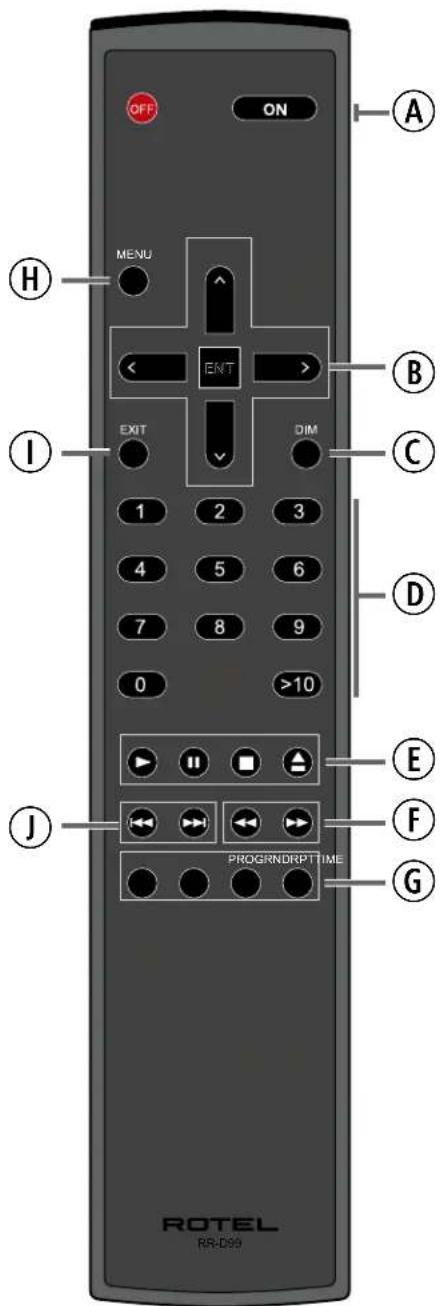
Figure 2: RR-D99 Remote Control
Figure 3: Connections Connexions
Anschlussdiagramm
Conexiones
Collegamenti
De verbindingen
Ansluttingar
PoiodcoeHnHeHn
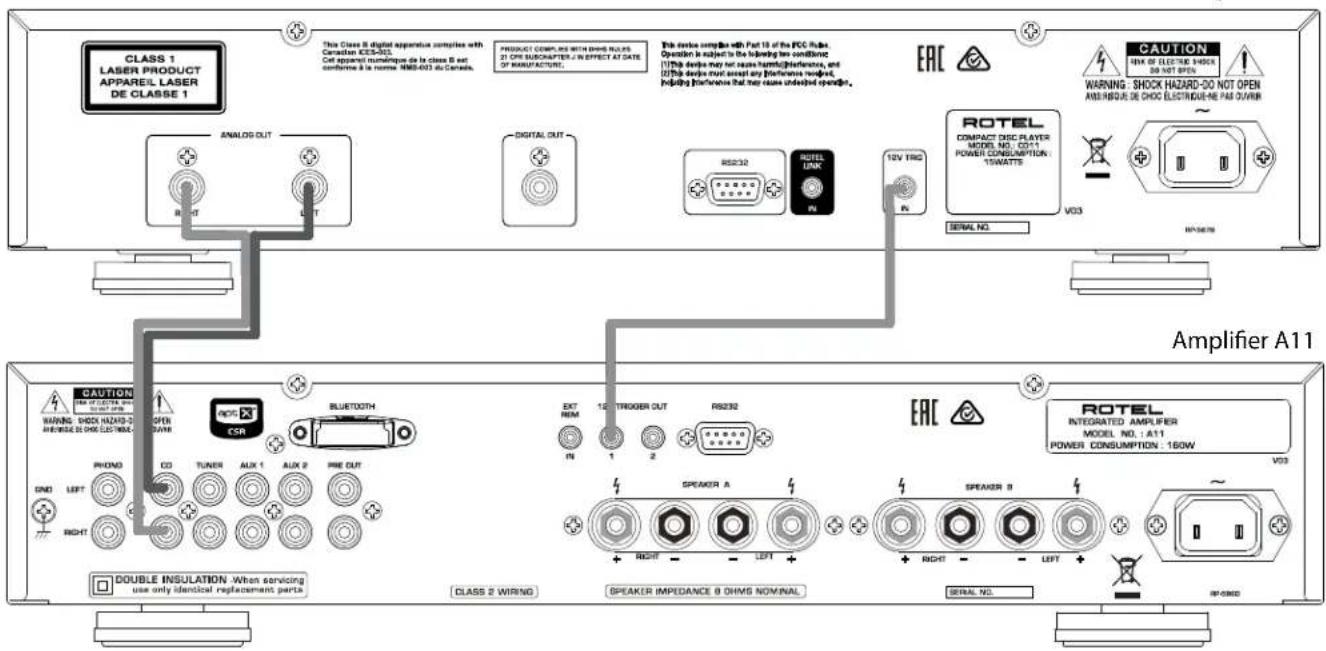
CD Player CD11
Important Notes
When making connections be sure to:
Turn off all the components in the system before hooking up any components, including loudspeakers.
Turn off all components in the system before changing any of the connections to the system.
Remarques importantes
Ipeep nooCoeHNHeHnEM:
V BbIKHOHTe BCE KOMNOHEtB, BKIOHQA KOLOHKn.
V BbIKIOHTe BCE KOMHOENTb BAWEI CNCTeME, npEKe DcH YTO-TO B He MEHrTb.
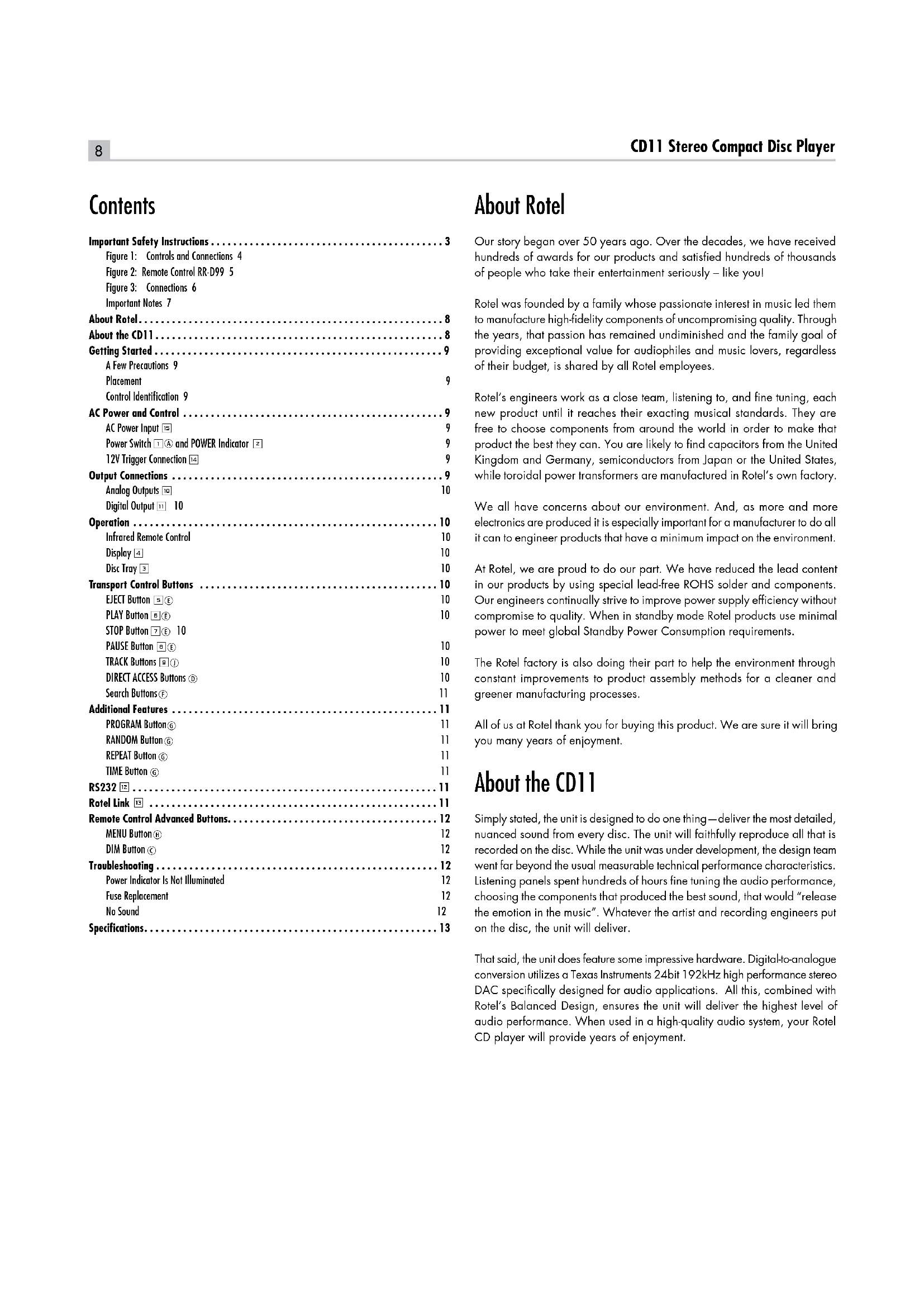
Contents
Important Safety Instructions 3
Figure 1: Controls and Connections 4
Figure 2: Remote Control RR-D99 5
Figure 3: Connections 6
Important Notes 7
About Rotel. 8
About the CD11 8
Getting Started 9
A Few Precautions 9
Placement
Control Identification 9
AC Power and Control 9
AC Power Input
Power Switch A and POWER Indicator B
12V Trigger Connection [14]
Output Connections 9
Analog Outputs
Digital Output [1] 10
Operation 10
Infrared Remote Control
Display
Disc Tray
Transport Control Buttons 10
EJECT Button ③⑥
PLAYButton
STOP Button 10
PAUSE Button
TRACK Buttons [9]
DIRECT ACCESS Buttons ⑥
Search Buttons
Additional Features 11
PROGRAM Button⑥
RANDOMButton ⑥
REPEAT Button
TIME Button ⑥
RS232 11
Rotel Link 11
Remote Control Advanced Buttons. 12
MENUBuTio
DIM Button
Troubleshooting 12
Power Indicator Is Not Illuminated
Fuse Replacement
No Sound
Specifications. 13
About Rotel
Our story began over 50 years ago. Over the decades, we have received hundreds of awards for our products and satisfied hundreds of thousands of people who take their entertainment seriously – like you!
Rotel was founded by a family whose passionate interest in music led them to manufacture high-fidelity components of uncompromising quality. Through the years, that passion has remained undiminished and the family goal of providing exceptional value for audiophiles and music lovers, regardless of their budget, is shared by all Rotel employees.
Rotel's engineers work as a close team, listening to, and fine tuning, each new product until it reaches their exacting musical standards. They are free to choose components from around the world in order to make that product the best they can. You are likely to find capacitors from the United Kingdom and Germany, semiconductors from Japan or the United States, while toroidal power transformers are manufactured in Rotel's own factory.
We all have concerns about our environment. And, as more and more electronics are produced it is especially important for a manufacturer to do all it can to engineer products that have a minimum impact on the environment.
At Rotel, we are proud to do our part. We have reduced the lead content in our products by using special lead-free ROHS solder and components.
Our engineers continually strive to improve power supply efficiency without compromise to quality. When in standby mode Rotel products use minimal power to meet global Standby Power Consumption requirements.
The Rotel factory is also doing their part to help the environment through constant improvements to product assembly methods for a cleaner and greener manufacturing processes.
All of us at Rotel thank you for buying this product. We are sure it will bring you many years of enjoyment.
About the CD11
Simply stated, the unit is designed to do one thing—deliver the most detailed, nuanced sound from every disc. The unit will faithfully reproduce all that is recorded on the disc. While the unit was under development, the design team went far beyond the usual measurable technical performance characteristics. Listening panels spent hundreds of hours fine tuning the audio performance, choosing the components that produced the best sound, that would "release the emotion in the music". Whatever the artist and recording engineers put on the disc, the unit will deliver.
That said, the unit does feature some impressive hardware. Digital-to-analogue conversion utilizes a Texas Instruments 24bit 192kHz high performance stereo DAC specifically designed for audio applications. All this, combined with Rotel's Balanced Design, ensures the unit will deliver the highest level of audio performance. When used in a high-quality audio system, your Rotel CD player will provide years of enjoyment.
Getting Started
A Few Precautions
WARNING: To avoid potential damage to your system, turn off ALL the components in the system when connecting or disconnecting the loudspeakers or any associated components. Do not turn the system components back on until you are sure all the connections are correct and secure.
Please read this manual carefully. In addition to installation and operating instructions, it provides valuable information on various unit system configurations as well as general information that will help you get optimum performance from your system. Please contact your authorized Rotel dealer for answers to any questions you might have. In addition, all of us at Rotel welcome your questions and comments.
Save the shipping carton and all enclosed packing material for future use. Shipping or moving the unit in anything other than the original packing material may result in severe damage to your unit.
If included in the box please fill out and send in the owner's registration card. Also be sure to keep the original sales receipt. It is your best record of the date of purchase, which you will need in the event warranty service is required.
Placement
Use common sense when placing the unit in a cabinet or when stacking other equipment. Make sure that the shelf or cabinet can support its weight. Do not stack heavy components on top of the unit. Avoid placing the unit where it may be subject to excessive heat such as on top of a large power amplifier or near a heat register. For best performance, avoid placing the unit where it may be subject to vibration, such as near a speaker.
Control Identification
This manual shows illustrations of the front and rear panels and the RR-D99 remote control. Each item in the illustrations is identified with a call out. Through out this manual the items referred to in the text are identified by the corresponding call out. The items on the front and rear panels are identified with a number call out, such as 1. The items on the remote control are labeled with a letter call out, such as A.
AC Power and Control
AC Power Input 15
Your unit is configured at the factory for the proper AC voltage in the country where you purchased it (either 120 volts or 230 volts). The AC line configuration is noted on a decal on the back panel.
NOTE: Should you move your CD player to another country, it may be possible to reconfigure it for use on a different line voltage. Do not attempt to perform this conversion yourself. Opening the enclosure of the unit exposes you to dangerous voltages. Consult a qualified service person or the Rotel factory service department for information.
NOTE: Some products are intended for sale in more than one country and as such are supplied with more than one AC cord. Please use only the cord appropriate for your country/region.
CD11 should be plugged directly into a polarized wall outlet using the supplied cable or other high current compatible cable as recommended by your authorized Rotel dealer. Do not use an extension cord.
Be sure the power switch on the front panel of the unit is turned off (in the "out" position). Then, connect the supplied power cord to the AC power receptacle on the rear of the unit and the AC power outlet.
If you are going to be away from home for an extended period of time such as a month-long vacation, it is a sensible precaution to unplug your CD player (as well as other audio and video components) while you are away.
Power Switch 14 and POWER Indicator
Press the front panel Power Switch button 1 to turn the unit on. The Power Indicator light 2 is illuminated when the unit is on. Press Power Switch button again to turn the unit off.
When the Power switch is in the ON position, the remote control ON and OFF A buttons may be used to activate the CD player or put it in Standby mode. In Standby mode the LED indicator above the power switch is red, but the display is turned off.
NOTE: If you are using a switched outlet to turn on and off your CD player, you should leave the power switch in the "ON" position. When AC power is applied to the unit, it will power up in fully active mode.
12V Trigger Connection [14]
The unit can be activated by a 12 volt trigger signal. The trigger input accepts any control signal (AC or DC) ranging from 3 volts to 30 volts. When a cable is connected to the 12V input and a trigger signal is present, the CD Player is activated. When the trigger signal is turned off, the unit goes into standby mode. The front panel power indicator will be red, but the display goes dark and the unit will not operate.
NOTE: When using the 12V Trigger feature, leave the POWER button in the ON position.
NOTE: If you are using other units in the series with Rotel link, please use the Rotel Link connection to turn the units on or off. Do not connect both the Rotel Link and 12V trigger cables. The 12V trigger's power on or off features will override the Rotel Link features.
Output Connections
The CD11 unit gives you a choice of two different kinds of output connections — an analog output signal from the built-in D/A converter for use with conventional analog audio components and a coax digital output which provides an unprocessed digital data signal for use with outboard D/A converters or digital processors.
NOTE: To prevent loud noises that could damage your speakers, turn off all the system components when you make any signal connections.
Analog Outputs
See Figure 3
A pair of standard RCA jacks supplies an analog output signal from the CD11 unit to the source inputs of an audio preamplifier, integrated amplifier, or receiver.
Select high quality audio interconnect cables. Connect the left and right channel outputs of the unit to the corresponding inputs on the preamplifier or other component.
Digital Output
See Figure 3
If you are using an outboard D/A converter or other digital processor, you will need an unprocessed digital data stream from the CD11. Using a standard 75 ohm coax digital cable, connect the CD11's coax digital output to the digital input connector on the outboard D/A converter.
Operation
The unit can be operated using its front panel buttons or from corresponding buttons on the supplied infrared remote control. Specific instructions for each of these controls are detailed below. Most of the buttons are duplicated on the front panel and on the IR remote control. However, there are a few exceptions where the buttons are only available on one or the other. These exceptions are noted in the instructions.
Infrared Remote Control
Before using the IR remote control, it is necessary to install two "UM-4/ AAA" batteries (supplied). Remove the plastic cover on the back of the IR remote, install the batteries (observing the + and - polarity indications), and reinstall the cover.
Display 4
A back-lit display on the front panel of the unit provides useful information about the status of the unit, activation of special features, and track/time information for the disc being played. Each of these indicators is described in the detailed operating instructions that follow.
2
0:00:06
Tracks: 12 0:44:34
Disc Tray
A motor-driven disc loading tray located in the center of the unit, accepts a compact disc. Press the eject button then place the disc into the tray, label-side up. Make sure the disc is properly centered before loading. The disc can be ejected by pressing the eject button again.
Transport Control Buttons
These buttons provide basic control functions for the disc transport mechanism. Except where noted, all functions are available on the unit front panel and the IR remote control.
EJECT Button 5E
To open the tray loading mechanism press the EJECT button The tray will open allowing the CD to be loaded label side up. To close the tray press the EJECT button again.
If no disc is loaded when the tray is closed the display will read "No Disc". When a disc is loaded, the display will indicate the number of tracks on the disc and the total time of the disc in hours, minutes and seconds.
PLAYButton6
After the disc is loaded, press the PLAY button to start playing the disc. The number of the track being played and the elapsed time will be shown in the display, along with the PLAY indicator. Normally, the disc will start playing with the first track. However, you can select a different track using the TRACK buttons or the DIRECT ACCESS buttons (see below) before pressing the PLAY button to start playing a different selection.
STOP Button ⑥
Press the STOP button once to stop disc play. Press the PLAY button to resume disc play where it was stopped. If the STOP button is pressed twice, disc play stops, the display shows STOP indicator. When the PLAY button is pressed after pressing the STOP button twice, the disc begins playing from the first track or the first programmed track in PROGRAM mode (see below).
PAUSEButton
This button is used to temporarily suspend play. The disc continues to spin and play will be resumed from the current position. The PAUSE indicator will light in the display. To resume playing the disc, press the PAUSE button again or press the PLAY button.
TRACK Buttons ⑨①
These buttons are used to select tracks on the disc. When a disc is playing, pressing the TRACK button advances to the beginning of the next track. Pressing the TRACK button returns to the beginning of the current track. Pressing the TRACK button twice quickly in succession returns to the beginning of the previous track. The new track number appears in the display.
These buttons are also used to select a track before pressing the PLAY button or when memorizing tracks for the PROGRAM play mode (see below). These selections are made by continuously pressing the TRACK buttons until the desired track is reached.
In PROGRAM mode, the TRACK buttons advance or reverse to the next track in the memorized selection list.
DIRECT ACCESS Buttons ⑥
Remote Only
These ten numeric buttons (labelled 0 through 9) are used to directly access a track from the IR remote control instead of stepping through the tracks using the TRACK buttons.
The first nine tracks on a disc can be selected by pressing the corresponding button. For example, to play the third track, press the 3 button on the remote control.
When accessing track numbers greater than 9, enter the 2 digit track number on the remote control.
Note: The >10 button is not used for this model.
The number of the selected track will appear in the main numeric area at the center of the display.
SEARCH Button
Remote Only
These fast forward and fast reverse buttons all fast searching through the currently playing disc. One press of these buttons will fast forward or fast reverse at 2X normal speed. Pressing these buttons repeatedly will fast forward or fast reverse at 4X and 8X normal speed. Pressing the PLAY button returns the player to normal speed. While the fast search function is active, you will hear high-speed audio.
Additional Features
These convenience features add extra functionality to the CD11, including the ability to memorize a group of tracks to be played, to repeat a disc, program, or track over and over, to play the tracks on a disc in random order, and to select from several available time displays.
PROGRAM Button ⑥
Remote Only
This button, labeled PROG, allows you to memorize as many as 20 tracks on the current disc for playback in a specific order. For example, you could instruct the CD11 to play track 5, followed by track 3, followed by track 8.
To begin a program:
- Insert a disc into the tray loader. The CD11 will read the contents of the disc.
- Press the PROG button on the remote control. The PROGRAM indicator will light up in the display, along with "PROG-01" indicating that the unit is waiting for the first track to be memorized.
- Enter the first track number using the DIRECT ACCESS buttons. Your selection will be memorized automatically. Press PROG button again then the display indicator will change to "PROG-02". Continue entering the rest of your selections using the DIRECT ACCESS buttons.
Once you have memorized a play list, the CD11 remains in PROGRAM mode until you eject the disc or press and hold the PROG button for 3 seconds. If you press the PLAY button , the memorized program will play instead of the entire disc, starting with the first selection in the memorized list.
When a PROGRAM has been memorized, most functions that would normally affect the entire disc operate on just the memorized program. For example, the TRACK buttons advance to the next track in the memorized program, not the next track on the disc. Likewise, the REPEAT button (see below) continuously plays the memorized program, not the entire disc.
NOTE: The Random button does not function when playing a program. To activate the Random button the unit must exit Program playback.
NOTE: Direct track access is not available when in the PROGRAM mode.
RANDOM Button ⑥
Remote Only
This instructs the CD player to play tracks from the entire disc in random order. Once all of the selections have been played once, the disc will stop playing, unless the REPEAT Button (see below) has been engaged, in which case the random play will continue until the STOP button is pressed.
REPEAT Button ⑥
Remote Only
This button allows you to repeat the current track or the entire disc continuously until the feature is cancelled by disengaging the REPEAT button or pressing the STOP button. The REPEAT button steps sequentially through the available options. Press the button once and the CD11 will repeat just the current track. Press the button a second time and the CD11 will repeat the entire disc. Press the button a third time to cancel the REPEAT function.
As noted above, REPEAT can be used in conjunction with the RANDOM play feature.
NOTE: The REPEAT function is automatically cancelled when the disc is ejected.
TIME Button ⑥
Remote Only
Normally, the CD11 displays the elapsed time of the currently playing track. The TIME button allows you to step through two alternative time displays. Pressing the button once displays the time remaining in the current track, which counts down as the track continues playing. Pressing the button a second time displays the time remaining on the entire disc (or memorized program). Pressing the button a third time reverts to the standard elapsed time display.
NOTE: If a disc has CD Text information on it, pressing the play button during playback will alternate between standard disc information and any CD Text data being shown on the display.
RS232 12
The unit can be controlled via RS232 for integration with automation systems. The RS232 input accepts a standard straight DB-9 Male-to-Female cable.
For additional information on the connections, software, and operating codes for RS232 control of the CD11, contact your authorized Rotel dealer.
Rotel Link 13
This 3.5mm stereo mini-jack (labeled ROTEL LINK IN) can optionally attach to Rotel network enabled products with ROTEL LINK OUT connections. This allows the attached Rotel products to communicate with each other and be controlled via the Rotel App (available for download on the iTunes® store).
Remote Control Advanced Buttons
MENUButton
Remote Only
By pressing the MENU button, you can enter the following setup menu:
- DISPLAY DIMMER: Changes the display brightness.
- POWER LED DIMMER: Changes the Power LED brightness.
NOTE: These settings are stored permanently even after the CD11 is powered off.
- VERSION: Shows the current software version.
- AUTO POWER OFF: The unit can be configured to automatically power off if unused for a specified period. If the CD is stopped for the specified "Auto Power Off" time the unit will automatically go to STANDBY mode. The Auto Power Off timer will be restarted if the CD starts to play. The default for Auto Power Off is set to 20 mins.
Valid settings include: DISABLE, 20 mins, 30 mins, 60 mins, 90 mins.
- EXIT: Exits this SETUP menu.
From the remote control, press the up/down arrow buttons to change the contents of the menu, and press ENT to enter the settings or confirm.
NOTE: You can also access the SETUP menu without the remote control. Press the STOP button on the front panel for 5 seconds. Press the TRACK buttons to change the contents of the menu and press STOP button to enter the settings or confirm.
DIM Button
Remote Only
Press the DIM button sequentially to change the DISPLAY brightness.
NOTE: Adjustments made using the button are temporary only and not saved after powering off the CD11.
Troubleshooting
Most difficulties in audio systems are the result of incorrect connections, or improper control settings. If you encounter problems, isolate the area of the difficulty, check the control settings, determine the cause of the fault and make the necessary changes. If you are unable to get sound from the unit, refer to the suggestions for the following conditions:
Power Indicator Is Not Illuminated
The Power Indicator and the basic items in the display window should be illuminated whenever the unit is plugged into the wall power outlet and the Power button is pushed in. If it does not light, test the power outlet with another electrical device, such as a lamp. Be sure the power outlet being used is not controlled by a switch that has been turned off.
Fuse Replacement
If another electrical device works when plugged into the power outlet, but the Power Indicator and the display still will not light when the unit is plugged into the wall outlet, it indicates that the internal power fuse may have blown. If you believe this has happened, contact your authorized Rotel dealer to get the fuse replaced.
No Sound
Check the cables between the unit and the amplifier inputs to be sure they are connected properly. Be sure the correct amplifier input is selected. Be sure the tape monitor system of the amplifier has not been activated. Check the wiring between the amplifier and the speakers.
Specifications
Total Harmonic Distortion + Noise 0.009% @ 1 kHz
Intermodulation Distortion 0.009% @ 1 kHz
Frequency Response (± 0.5 db) 20 - 20,000 Hz
Channel Balance ± 0.5 db
Phase Linearity ± 0.5 degree
Channel Separation > 115 dB @ 10 kHz
Signal to Noise Ratio (A weighting) > 125 dB
Dynamic Range > 99 dB
Digital to Analog Converters Texas Instruments
Analog Output impedance 470 Ohms
Digital Output 0.5 Volt, Peak to Peak
Load Impedance 75 Ohms
Power Requirements (AC)
USA 120V,60Hz
EC
230V, 50 Hz
Power Consumption 15 Watts
Standby Power Consumption
BTU
< 0.5 Watts
40 BTU/h
Dimensions (W,H,D)
430× 98× 314mm
17"×37/8"×123/8"
Front Panel Height
80mm/31/a"
Weight (net)
5.8 kgs, 12.7 lbs.
All specifications are accurate at the time of printing. Rotel reserves the right to make improvements without notice.
Rotel and the Rotel HiFi logo are registered trademarks of The Rotel Co., Ltd. Tokyo, Japan.
CAUTION
RISK OF ELECTRIC SHOCK DO NOT OPEN

WARNING: SHOCK HAZARD-DO NOT OPEN
AVIS: RISOUE DE CHOC ÉLECTRIQUE-NE PAS OUVRIR
This Class B digital apparatus complies with Canadian ICES-003.
Figure 2: Telecommande RR-D995
Figure 3: Connexions 6
Remarques importantes 7
Bouton SEARCH (RECHERCHE) 19
Bouton SEARCH (RECHERCHE)
Consummation 15 watts
Consummationen veille < 0.5 walt
BTU 40 BTU/h
Dimensions (L, H, P) 430 × 98 × 314 mm
17^ × 3 7/8"X123/8
This Class B digital apparatus complies with Canadian ICES-003.
| 2 | 0:00:06 |
| Tracks: 12 | 0:44:34 |
Disc-Ladefach
This Class B digital apparatus complies with Canadian ICES-003.
Whenever you want to use the botnets UP/DOWN, please contact us at: http://www.uzo.org/ and ask us how to use them.
Distorsion Armocia Total + Ruid 0.009% a1 kHz
This Class B digital apparatus complies with Canadian ICES-003.
ALGEMENE WAARSCHUWING!
The Rotel Co. Ltd. Tokyo, Japan.
CAUTION
RISK OF ELECTRIC SHOCK DO NOT OPEN

WARNING: SHOCK HAZARD-DO NOT OPEN
AVIS: RISQUE DE CHOC ÉLECTRIQUE-NE PAS OUVRIR
This Class B digital apparatus complies with Canadian ICES-003.
This Class B digital apparatus complies with Canadian ICES-003.
Behdll dnda brksanvising.
Baxkhble nHctpyKuIN no 6e3oNaChOCTN
PepynpeKHeHn: BHTPNOTCYTCTBYKOT DeTALN, 06cnykBaembIe NOnb3ObaTeMe. 06paauaiTecb 3a 06cnykBaHnEM ToBko K KBaHnHmnpoBaHOMy pEmOHTHMy npcoHany.
PepynpeHne: Ia CHnHexHn OnacOCTN Bo3rOpAHn Hn yDapa 3eKtpuecHM TKOM, He noDBpeRae TaHHe O3dEHN B03eCTBNO BObI Hn BnA. He noDBpeRae n3dEHN B03eCTBNO KaneH b6p3r. He pAm3MeauHte HmKAnK PnpEMToB, 3aONHEnHHx KJNDKoCTHM, TAKNX Ka B3b, Ha yCtpoCTBe. He no3BOnJIte NoctOpOHMM PnpEMTAM nonaDaTH BHytp Kopnyca. Ecn np6op NoDBpeRAeTCA Bo3eCTBNO BnA, Hn noCTOpOHnn PnpEMT nonan BHYtp Kopnyca, HemEDENHO OTOeOdHInTe cTeBOH mHyp OT CTENHO PO3eTK. OHcTeP np66p K KBaHnHnupOBaHMoY CnuaHInCTy dN OCMToPA Hno6XoDMoro peMOHTA.
IpoountaiBce HNCTpyKuH.
CoxpaHnTe 3To pykoBOCTBO.
06paaiTe BnImaHne Ha BCE npEynpeXeJdHna.
CnedyTe Bcem HNCHtpyqiam No kciuyataaun.
HeIcnoIb3yIte3To yCtpoIcTB0B6n3H B0dI.
OuMaaiTe Koprnyc TOnbko npn Nmooa Chyox TpAkn Hmblnecoom.
He ctabte annapat Ha Kpobatb, DmBaH, KoBep Hnnoo6HyMoKryu Nopebxocb, Kotopar MoKeet 3a0porDntb BcHTMNIOHNHMe OTeBPCTHa. Ecnn annapat BcTpaNbaETcB WkaΦ nnpdyroKopnyc, 3OT KopnycdoJnenBeHTMNIPoBAtcbnIg oEbcneueHnOxnaJaedHn annapata.
IepKnte annapat noanbue ot paanatopob oToonnHne, oOgrpeBaTeen, neey HIOkbix npyHX yCTPOBCTB, BbIeJIaONHX TENNO.
TOnpaH3OBAHbI WTekep HMeET DBA HOKeBbIX KOHTA, OINH I3 KOTopbIX UHepe ppyrTO. 3a3eMnHOuIM TWEKEP HMeET DBA HOKeBbIX KOHTA, IN TepTH 3a3eMnHOUIM Tbtpb. OHN oEcbneHuBaOT BAUY 6e3oNaCHcTb. HEtKa3bBAuTEc bOT MeP 6e3oNaCHOCTH, INpeOCTabReMaBX 3a3eMnHOUIM NIN NOPAHOBHbIM TWEKepOM. EcnH NOctabNaEMbI TEKEP He NOxOHN K Bauei po3eTke, 6opatNTecK K3eKTPKHy Iyra 3aMeHbY UcapeBWeip o3eTK.
He npoknabibaTte CetEBoH uhp Ta, rge OH MOKet 6bIb pa3aBneH, nepeKAT, cKpyeH, noDBepHTy B03dEChTBIO TENNA NIOBpeKdEHN KAMN HIO cnoCobM. ObaaJAE oco6oe BHMMAHNE HA CETEBO WHPB bINN WTEkepa H TA, rge OH BXODIT B 3aNDIO naHEnb yCTPOIBCTBA.
IcnoB3yTeToLbKo npHaNdEeKHO, yKa3aHbIe npO3BODuTEnEM.
IcnoB3yTe ToIbKo TeneKky, NoCTabky, CToIky, KpOnHtEIN Hm NnNkY DoCTaTOHO CInhBMy, YTO6bI BbIDepKaTb 3ToT h3ENH. ByJte OTOPOKHHbpi npepeMeHH mnp6opBaHaNoCTABKe MIn CTOKE Bo h36EkaHHe paAHEHm NnIOBpeKHeHH h3ENH.

CetebOuHyp CneyET OTOeDMHTb OT CTENHOI PO3EKN BO BpEMr IPO3bl Nn EcnN np6Op OCTaBHe HcHcONb3yeMbIM DnITeNbHOB BPmR.
HEmeIeHHo Npekpatte MCnoB3ObaHne KOMnoHeHa H nepeaIte Ha o6cneobAOHe H/nnn 06cnyKBaHnΦuPBOAHHO pMOHTHOOPARH3aueE eCNI: cTeBOH uHyp nNtKepe 6bIIOBpeKdEHN; BHytpb np6Op aYpOHmII pPeDMETb IIN pONIMn XmKOCTb; np6Op NO6bIaBn IOddoKEM; np6Op dEmOHCTpnpyet np3HAKn HeOpMaIbHO pa60b; np6Op ypOHmI INn NOpeDn IIO6bIMpyTMM CnOCOBom.
UyTPOHCTBO CNeDyET HCNoB3OBAbTB BHTPOINHuECKOM KINMaTe.
He cneyet npenrTcBOBAtb BEHTHnAa,3aKpbBaB eHTHnauHOHbIe OTBePCTN aTKMM npedMetam, Ka ra3ebl, CKaTePH, WToPbI N.
Ha yctpoiCTBe He DonKHO 6bIb MTOUHKnOB OTKpbItoro ORHa, TaKHX KAK 3aXKeHHbe CBEH.
PnKoCHOBHeH K He30JIHOBaHHbIM KHeMMaM Hm PpOBoJKe MoKet PnpBeCTN K HeepnTbIM OuIyUeHNrM.
BbdoJNkhbl06ceNeHTb MMHmym 10cm CBO6oHOro npoctpaHCTBa BOKpy yTcpoiCTBa.
IPEIOCTEPEXHEH: CTeB0 pa3bem Ha 3aDHeN naHei npEaHa3nueH pIy6bIcTPO rOcoeHNHn HycTObTBAOT 3neKtpuecko ceTt. YcTpoCTBO DOJNKHO oBeCteuHBaTB cO6oHbN DoCTyn K3aDHe nnaHn, yTO6bI cTeB0 Ka6eB moKHO b6blO b6IcTPO bUdepHyb.
JaHn np6opdoJKeH 6bIbNoCoeHIneK HcTOnHky NHTAHmToNbKO TaKOro TmHaHpaJKeHn, KOTOpBie yKa3aHbHa 3aHneH naHeJI. (CUSA:120 B/60 f, EC:230 B/50 f)
NoOcEOHNHnTe KOMIOHENTK NHTAIOUeI PO3EKe TOnbKO pN NMOOu CTeBOro WnHpya H3 KOMNNEKTa NOCTABKN, INN ETOHORO 3KBNBANeHTa. He NepeJeIbIBaIte NoCTABNReMbI nHyp. He NcNOB3yIte yDNIHNTe bNtAHn.
OchOBHn BUNKa CTeBOro 1hNypa CnyHn Dn OTKIOUeHN Annapata ot cTeH. IINa NOHOro OTKIOUeHN H3dENnO TnHTaIOuE CEtN, BNky CTeBOrO Ka6e NcIeYer TOcoEINHrTb OTcTeBOI PO3ETK INpeMeHHoro ToKa a TaKke H3dENn. 3To eINHCTBeHHbI CNOC6, YTObI NOHocTbU ydaJIbT CTeBoE NITAHneOT H3dENn.
Batapeu B nybte He cneyet noBeprtae ype3mepnoH harpeby coNHeuHbIM CBetom, HcOTHnKAMM OrnT.π. Batapeu DoJHKb6bItyTNlUHPOBaHbI NIOBTOHO B COOTETCBN CrocydapCTBeHHBMn MeCtHBMM HopMaTHBAMn.
3ameyehne
NoocenHeHne Hs232doJHKHO6bIbOcUeCTBnEHOToTbKOaBTOP3OBAHBMcIeHaHNTOM.
Hhopmaun FCC no 3nEkpomarHHTHO coBmectHMocTH
3To 06bpyoobhaHne npotechpoBaHO Ha npdeMeT eNektpomarHHTHO COBMeCTHMocTHn NOaTBePckJHeO, 7To OHO yOBnetBopRe Tpe6oabHHm dIe NcΦpObXy UcTPOCTB KnaCCa Class B B aactn Part 15 npaBn FCC.3To Tpe6oabHHc cphiOpMnIPoBAHb I dyTORo, 7To6bI o6ecNeHTb pa3ymHy0 3aunTy OT BpeDhIX H3nyehn B JkMbIX nomeeHNAX.3To YcTPOCTBO rerehpnyet, nCNoB3yET mOKeT H3NyA Tb 3HePTHO HA pAdIOuACTOTax H, 6ByUy UcTAHOBNEHbIM M nCnONb3yeMbIM He B COOTBECTBM CnCHtpyKueM, MoKTe C03DaBaTB NOMEXI Dn PAIOOB3H.
Ondako 3to He rapahtnyet, uTo B HekoToBx Cnyaayx He Bo3NHKHT NmExn IJn npHema paHIO nn Telenepeda. B ToKOM Cnyae bbl MoKeTe NoPpOobatb PpeInpHnAytb cneJyUee:
- PnepeopnHtnpoBaTb npHeMHny aHTenHH. (TB, pAnHO nT.n.)
yBENHHTb paCtOHHMe MEKdy yCTPOH CTBM HpeCMBePOM.
-Испльбоватдpyгуpo розукдяТВ,pадио nT.n.
-06paTb3a KOncybTaunneKdIepeynnKBAJIHΦIuPobAHOMy CneuaHnCTy no paHO n TB.
PpeoocpekceHne
3To yctpoiCTBO yDObIeTbOpEITpe6oBaHm qAChr Part 15 npabHn FCC n ABnIeTc cy6BeKtOM cIeNyUOuXyCIOBh: (1)3To yctpoiCTBO He MoKeT Be bbl3bAaTb BpeHbHe NomExn, n (2)3To yctpoiCTBO dONKHO BldepKmbaT IIobbe pINHIMaemble NomExn, BKNIOVA TaKHe NomExn, KOTOpBle MOrTy PnBcTeN K HeKeNaTeNbHbM OTKnIOHeHnM OT HopMaIbHOB paBoTb.
3AMEUHINI YCTAHOBUNKOB CHCTEM KABELbHO TO TB: 06paTne BHMaHHe YCTAHOBUNKa aHTEH Nn CHTeM CATV Ha naparpa 820-40 Ipabn no yCTAHOBKe 3NeKTPOoBOpDobAHnA (Article 820-40 of the NEC).B HEn OnnCAHn npabnna 3a3EmnHn, B uactHOCTm To, YTO «3EMN» YCTPOINCTBa DOJHKHa 6bITb NOcOeHNHe N K 3a3EmnHn 3dAnHn, pnpChem KaK MoXHo 6bnke K BBOy Kaben. CM. UpeTeKn no yCTAHOBKe.
Copepkanhe
Figure 1: OpraHbI ynpabHeHn npa3beMbI 4
Figure 2: IynbIy RR-D995
Figure 3: NpOcEHHENH6
Baxhhe3aMeyHn7
Baxkhhe Hnctpykun no 6e3oNaChoctn 62
OKomnaHnROTEL. 63
0 nleepe CD11 63
Iepbte 64
Mepb npedoctopoKHOCTn 64
yctahobka 64
0603haeHnOprahOBynpaBneHH 64
HHTAHHe npOHrpBbATEIa. 64
Pa3bem dnnr ceteboro uHypa 64
BbIKIOATEIb NHTAHNAH 4 HNMDKATOP NHTAHNA 64
12-B Tprrrrepbn BxoD 64
IopcoeHHHe BbIXoob 65
AnarorobbIe BixOdbI 65
UHpOBoB BbIXoA 65
OchOBhble onepaunu 65
IynbT HhPpKaPacHOrO hCTaHcHnHOro ynpabHeHnA (Dy) 65
Icnnnei 65
3arpy3ouHbI JOTOK DnA DnCKOB 65
KhoNk ynpabneHn npBODom npepa 65
KhoNka EJECT 65
Khoinka PLAY 65
Khoika STOP 65
Khonka PAUSE 65
KhoNNTRACK 65
KHONKDIRECT ACCESS 66
Khoonk SEARCH 66
IOnonHntenbHbIe yHKun. 66
KhoNka PROGRAM 66
KhoNka RANDM 66
Khonka REPEAT 66
Khonka TIME 66
RS232 66
Rotel Link 67
DononHHTeBHeIe KOnKn npNbTa D. 67
KhoNka MEnu 67
Khonka DIM 67
HnarHocTnKa HycTaPaeHHe HenoJaOk. 67
He CBeNTc HnDnKatop nHTaHn 67
3aMeHa npedoxpanHTeN 67
Her 3Byka 67
Texnueckne xapaKtepHCTHKN 68
OKompanHnROTEL
NCTOPRA HAWEI KOMNAHNI HauanaB noTn 50 nT Ha3a.3a npOeJWNE DecTINETMbl NOUYHNI COTHn Harpad 3a HauNI PNOyKtBI n CdeJANCACTINMBIMCOHTNbICHIKOJE, KOTOPbIE OTHOCATCA KCBOM pa3BneHnAM BNOJIHE cepbe3HO-TAK KE,KAKB!
KOMPAnHnRotel 6bIa OCHOBaHa CemeCTBOM, YbCTpactb K My3bIke npoDmla CTpeMHe Co3daBaTb hi-fi KOMNoHEtbl 6eCKOMnpomncCHoro KaueCTBa.3a MHOrne IOnDb tA StcpaTb HnHyTb He Ocnabla, n No cen Deh o6aJae N - BByIyCKaTb PPOyKTb INCKIOHTeNBHO UeHHOCTn dInaydNOfNIOB NHO6ntene My3bIKn, He3aBNCMO To INX fHnHaCOBBIX BO3MOxHOCTe, pa3dJIeTcR BCMeCOTpyDNHKamr Rotel.
HJKeHepBo Rotel pa6oTaOT kak ednHaKOMaHa, npocnyuINBa nTuaTeIbHo DOBDA KAKdbHOBH npOyKT DoTAKORO yPOBnCobepHeCTBa, KOr4a OH 6ydtYOBnTBOPaTbX CTpOIM My3bKaIbHbIM CTahdApTAM. IMnpedocTabNeHa CBO6Oa Bb6opa KomnneKtyIOUnx No BCEMy Mpy, UTo6b cDenA bAnnapat KaK MoxHO LyuWe. BepoTHo, Bbl CMoxTe HaHTN B HauNX annapatax ot6OpbHe KOnHehCaTopbN3 BeNko6pnTaHHn I EpMaHHn, noLynpoBDnHKn 3RNoHHn IN CIIa, Ondako TopoDaNbHbIe CInOBBe TpaHcFopMaTOpbMb N3rotabnBaem Ha co6CTBeHHom 3aBoe ROTEL.
BceMb3a60TmMc 06 OxpaHe OkpykaIoSe CpeB. IIO Mepe TOrO, KaK Bce 6oBbIe 3JIeKTOHHbIX UCTPOIcTB MIMPe BBInyCKaETc, IINI POnu3BOJnteIa OOC6HHO BaxHo Ipi KOHCTpynpOBaHIM INpOdyKTob CdeIaT Bce BO3MOxHoe, YTObI OHn HaocNII MNHImaJIbHbI yUep6 OkpykaIoSe CpeE.
MbB KOMnAHn RoteI, ropIMCra CBOIM BkAIDOM B 6Oe Dno. Bo-nerBbIX, Mbl cokpatnn coepzahme CBHua C Bc0e 3neKTPOHke, 3a cuet nCNObn3oAHn KOMnHOENTOB IN pInno,OTBeauaoTero Tpe6oAHnRM ROHS.Haun HxKehepbIOCTOARHHO CTPEMTCA yUywnb K.I.D. 6LOKOB NITAHN, 6e3 yuepe6a dna KaecTBa 3ByaHn. HaxoRb B peXmE OxuDAnHn standby npOdyktBt RoTe IcNoJb3yOt MNImMaIbHoe KOINueCTBO 3Heprn, YTO6bI yDObNETBOpNTB rlo6abHbIM Tpe6oAHnAM Ha Notpe6neHn E peXmE OxuDAnHn.
Фбрнka RotelТахke BHCNT CBОВ BKladВуnyчENE OXpaHbOxpyKAZIOUe CpeBlyIyTeMNoCToHHOrO COBepHECTBOBaHnI pON3BOJCTBeHHbIX nPoCECOB, DeNa Ix BCE 60ee uNCTbIMN IN «3eJIeHbIMN」.
BceMbI,coTpydHnKOMPnAHINROTEL,6NaOraOpIM Bac 3a NOKyNkY 3TOrO n3dien. MbI yBepehbl,TO OHO DOCTABNT BAM MHORo IET yDObONbCTBnR.
0 nneepe CD11
IIO cyuectBy, nleep CD11 6bIn cKoHcTpynpoBaH cOHO uOeoh oueBIO - oecneueHTb camoe dTeaBHOe INoHHe ToUHaiuX HIOaHCOB 3ByaHHe C KaJDO DnCKA. CD11 TuaTeBHO INoCTOBepHO BocPOn3BeJeT BCE, YTO aINCaHO HA TOM DCKe. Korda CD11 p3pa6aTaBlaCn, KOMaHa IINKeHepoB NOuHa ropa3do DaIbWe, Yem npocToe NImpeHne TexHnuecknx XapakTepnctNK. Fpynna 3KcpeptOB c TOHKIM CNYOM Npobena MHOrne COTHN YacOB, TOKHO HAcTpanBaERo 3ByaHHe, NODiupar KOMNoHEnTb, KOtOpBie OecneuBaHN HAnlyuWee 3ByaHne, INo3BOJIaNN «BbICBOOdntb My3bKaIaNbHbe EMOUIN». Bce, UTO NCIOINHTeB IN INHKeHepb 3Byko3aNci 3aLoxNII Ha Dnck, CD11 cyMeET DoHeCTM Do Bac.
3To CBnDteTbCTByET O TOM, YTO B CD11 DeIeCTBnTeJbHO NcIOJIb3ObaHa BneuATIIIOUaA 3NeMeHTHaa 6a3a.Дla UΦpo-aHAnorOBOro npeo6pa3OBAHHN IcNOJIb3yETcBa BCOKOKaueCTBeHHbI CTpeo LAnOTexAsInstruments pa3peuHemEM 24 6nt 192 KtCneuaJIbHO cKOHCTpynpOBaHHbI dAn aYdno npINOKeHH. Bce 3To, BcoTeAHm C KOHeuIeM c6aIaNCHpOBaHHOrO dIa3Ha
Rotel "Balanced Design" rapaHTnpIOT bblcOauJwe KaeCTBO BOCPON3BedeHn 3Byka. B coCTabe BbCOKKaueCTBeHHo ayDInocCTEmbl npOnrpbIbATElb CD11 o6ecneHT Bam MHOrne rOdby yDobOBJIbCTBNOT My3bIKN.
PepBbIe warn
Mepbippeoctopokxhoctn
PIMMEYAHNE:Bo u36ekaHue BO3MOxHO2o NOpeXdeHua KOMnoHeHmo cucmembl, BCE nodcoedunehu U omcoedunehu npou3bOdume npu bkiIOeHHom numaHlu. Ipexke dem BkIIOyamb numaHue, y6edumecb, 1mo coedunehu BbINOJIHeHb npabUbHo u HadeKHO.
BnmaIbHO npOHTaIte 3TO pyKOBOCTBO. NOMMIO OCHOBHbIX HNCTpyKcH No yctAHOBKe n EKcIIyatauIM, B HEM cOpEpaTcpeKoMeHdaUcN, KOTOpBle NOMORY Bam MaKcImaJIbHO nCNOb3OBAbTB BCE BO3MOXHOCTBaWe cnCTeMbI. IIO BcEM INTEpeCyIOUcM Bac BONpocAM o6paJauTeCb k YpONHOmOeHHOMy DInepy Rotel. Bce Mbl, coTpynIKn Rotel, Bcerda roToBbl OTBeNTb Ha Baun BonpoCb n pinnrTa BAsn 3ameaHnA.
Coxpahnte Kopo6ky Ira TpaHcnpOpTPOBKn I Bce OctaIbHbIe yNAKOBOUHbIe MATEpHaIaNbl, YTO6bl BdaIbHeIeMIMTeB 8O3MOXHOCTb BOCIOJIb3OBAtcbrA HMM. IpeMeueHne IINI TpaHCnOpTPOBka IpnIrpIbAtela B dpyroynAkoBKe MoKet Bb3BaTb Cepbe3HbIe NOBpexdHnY cTpoIcTB, He NOKpbIAeMbIe rapaHTmei.
EcInB Kopo6ke ecb perinctpaunHOHna KapToyka BnAedIbua, 3anoHNthe ee n BblHNTe Ham. CoxpanHTe Yek o npdoaKe. OH ABnEeTc LyuWM INCBMeHHbIM NOITBepXJdHnEM DaTb npno6peTeHHN, KOtOpoe NoHaOboTcBAM B Cnyae, ecn Korda-ni6o notpe6yeTc rapaHTmHoe 0cbNyKINBaHne.
YCTaHOBKa
Bbivapar MeTo dny yctahOBKn npOrrpbIbaTeN B WkaFy dny ayduo-Bndeo annapatpybl, nnn KOMNoHry erc C dpyrmm UcTpoiCTBaAMn CnCTembl, pykoBDCTByteCbo coo6paKeHnMn 3dpaboro CMbcna. Y6eDNTecb B TOM, YTO nonka shkaFa cnoc6Ha BblepKaTaB Bec annapata.He yctaHabNBaTe CBepxHa npOrrpIbAteNb TaKeIbeKoKMOHeHTbl. He CTabTe npOrrpIbAteNb B MecTax, rDe OH bdyet noDBeRaTbCa CNbHomy HaRepeBy, HApPIMep, Ha ycINITeMb MoUHOCTN Nn pRdOM COTOnNTeBbIMn Pnp6opamn. DnnoJouheny LyuXnx pa6OuNX XapaKTEpNCHK Ye cTaNabNBaTe npOrrpIbAteNb B MeCTax, rDe OH MOKeT NOBBePrHytbc BA3dEInCTBNU BO6paun, HApPIMep, OKONO akCTNuueckOuCnCTembl.
0603naeHnO rpaHOB ynpabNeHHa
B3OMpykoOCTBe npBedeHbI IINIOCTpaunn nepeHneN 3aHneN aHenn, a TaKke nybTa DY Tuna RR-D99. KaJdA deTaNb HpncyHKax N DaJIbHeuNX OINCAHNX cHa6KeHa BblHOCHbM 0o3HaueHem. DeTaNn nepeHneN 3aHneN naHEno6o3HaueHb YNCaMn, HApnPmep [a6yKbbI B KpyKoQkax OTHCATc K KHONKaM Ha NybTe, HApPmep A
Питуни поюрьвателя
Pa3bem dna ceTeBoro shhya [15]
CD11 NaCTpoen Ha 3aBOe B COOTBeCTBm C cTaHapTam 3neKTpuyeckoCetn B Bauei CTpaHe (120 nn 230 B nepemehoro ToKa n 60 nn 50 Tc).Kohfnpaunna 3neKTponntanu oOzHaheHa 3aHne n anepn annapata.
PIMMEYAHNE: EcnBbinepeedeemepyiocmpny, moKho npucno6umb npouzpbieamelk 己 pyzomy cemeomy Hanpexenu. Odaako, He nbimaumecb cdenamb 3mo camu. Obpamumecb KKeanufuupobahHom My Macmepy unu e cepuchyio cnxby Rotel.
IIPIMEYAHHE: HekomopbIe npodykmbI npedHa3NaYeHbI dna npodaku 6olee yemB odnoi cmpaH e no3momy nocmaeJIOmc c Heckonbkmu cemebbmu Ka6eMaMu. IcnoIb3yUme monbko mom Ka6eB, Komopbi nodxodum dna bauezo peuoha.
CD11 cneyet nocknoaTh HnocpeCTBeHNO K po3eTke C noJpI3OBAHHo
po3ekoi nmooub npinaraemoro Ka6eN nn dpyrTO COBmecTmoro Ka6eN
COBmecTmoro C60nbUIM TOKOM, Ka peKOMeHIOBAHO BAUM ABTOP3OBAHbIM
dInepom Rotel. He noIb3yntc b ynnHITenAMn.
Y6eHNTecb, YTO KONKa NITAHn Ha nepeHne NaHEn annapata HaxoHTcB B NOLOKeHH "BbIKIOUeHO" (BbICTyNaET HAD nobEPXHOCTbIO naHEn). 3aTeM NoDcoEHNITe WHyp nITAHn annapata K pa3bemy Ha 3aHNe NaHEn annapata N K CeTBoi po3TeK.
EcnBbHaoJrOye3kaeTe n3 doma,Ha npimep,Ha mecau,paymho 6ydet BbHyTb BNKn Wnhypa NHTAHy CD npourpmbateN npyrnx KOMnoHeTOB CNTEmbln p03etok.
BbIKIOuATEnb NHTAHNA ① A INHIMKATOP NHTAHNA Z
KhONKa BbIKHQUaTeI NtAHnHaXoOHTc HnpeDHe nAnEHn BaWero CDnEepa. 4To6bBbIKHQUHb npOnrPbBaTeN, HAKMNTe KHNkY BbIKHQUaTeI NtAHn. 3aOpNTc INHdkaTOp NtAHn Ha nepeHne NaHenn. 4To6bBbIKHQUHb npOnrPbBaTeN, CHOBa HAKMNTe KHNkY. OHa dnKHa BepHytbcB OTkaTOe NOJoxHeH.
Korda bkyknoateIb nHTaHn HaxoITcB nNoIOxEHn "ON" KhoNk nybTa ON I OFF moXHO nCNOb3ObaT bIra BkIOueHn CD-npeepa nn nepeboa erO b pexm oxndaHn Standb. B peXMe Standby cBeToIDnO INdkaTop nTuHn LED ctaHET KpaChbI, Ho dncnn otKIOuaeTcA.
PIMMEYAHNE: Ecnu Bby BKIOyae me u bkiIOyae npoUpbIbAmelbpe3 omKIOyaeMYIO poemky Ha dpyzom annapame, ocmaebme KhoNknu numHua BO eKIOyehHom noLoKeHH. Ppu nodaue numaHua Ha npouzpbIbAmelb OH bydEm BKIOyamcbc 8 noIHOeHH pa6Ouy peXum.
12-B TprnrrepnbB BXoD
CD11 MoKHO BkHIOaTb TpIrrpeRbIM CmHAlOM yPOBn 12B OTnpEduCInTeR RoTe. TpIRrpeHb BXoPnHMAeTIO60c mHrHan ynpabEnHn (nepeMeHHoro nIN NoCToHHOrO ToKa) HAnpJKeHNem O3 Do 30 BoNt. Ioka cHrHan npCytCTByet, CD npOnrpBbATEnb BKIOUeH. Korda cHrHan nponaAet, npOnrpBbATEnb nepExoDnB P pEKMM roTOBHOCTn. B 3om pEXKmE cBeToMDn INdkaTop nITAHn LED cTaHET KpaChb, Ho dncnnen noraueH n annapat hXoDNTCB Hepa6Oyem CoCTOHn.
PIMMEYAHNE: Ecnu Bblknoaeme u bkknoaeme npouzpaamenbmpuzepbHm cu2HaON, ocmaBme KhONky numaHua POWER eoBKIOeHHOM noIooKeHuU.
PIMMEYAHNE: Ecnu bblcnobnbye me dpyzue komnohenbmy 13 HOBou cepuu c Rotel Link, noxanyucma uncnobnyume uhmepfeuc Rotel Link dnx ekluoyehu u bkiyoheyu. He coedunhme ux odhoepemehno kaebamu Rotel Link u 12-B mpuzeepbHm. Jeno 8 mom, umo 12-B mpuzeepbHcu2han ha bkioueue u bkiyoheyue umeem npupumem had fyHKuee Rotel Link.
PoiocoeHHeHne BbIXoOOB
CD11 MoXHO NOcOeHnHTb KaHAnorOBMy ayDNo KOMnoHEtY ue3 aHAnorOBb BixoN, IIN6 Ko UΦpOBMy ayDIOKOMNOHeTy (coepKaaemy ⅡAII INI ΣΦpOBMy npouecccop) Ue3 KOAKCnAbHbI ΣΦpOBMy BixoN, Hecuyn Heo6pa60TaHHble UΦpOBBle daHHble.
PIMMEYAHNE:Bo u36exaHue zpomko zo wma, Henpuymzo dna Bac u Bawux konohok, bkiIouaume npouzpbiamenb npexde, yem npou3bodumb IIO6be coedunehu.
AHaIOrOBbIe BbIXOdbI
cm.puc.3
Yepe3 ananorobb BbIXoJ, npedctabnnoi co60i Dba rhe3a Tuna RCA, cnHan c CD11 noaetcHa aydno npeducnntelb, nHTernpobahnhy ycunntelb nn pecbep.
Pb3yTEcbBbICOKOKaueCTBeHHbIMn CoeHNHTeJIbHbIMn ayDIO Ka6eJMaN. CoeHNHTe BbIXoJLeBOrO KaHana CD11 cBXoDM JeBOrO KaHana npedycuNTeI IIN dpYrTOKOMNoHEtA. CoeHNHTe BbIXoJ npaBOrO KaHana CD11 cBXoDM npaBOrO KaHana npedycuNTeI INn dpYrTOKOMNoHEtA.
UHPOBOB BbIXoD
cm.puc.3
Дя подаи на В breeнни LAП ил сфробов пюсeccор тpe6уетсnotok Heobap6otahhhix qfpoBbIX daHHbIX, HepoWEdux BHTpeHnI LAPCD11. Tako notOK obecneuBaet cphiPoboi BbXOD CD11. PodcoeDInHte 3TOT bIXoD CTaHdApTHbIM 75-OMhIM ka6eM, ppeHa3haeHHbIM nla nepeDAHn CfPobix daHHbIX, K cphiPobomy BXOy BweHero LAI.
OchOBhble onepaun
PiEEPOMCD11MOxHNOyPnABTbKaC npepeHnnaHn,Takn cnpnilaraemoro nyIbTa.NHCTpyKmnoNcNoB3OBAHmIO COOTBeCTByUoxN KHOPOK pINBEdeHb Hnke.BoIbUnHCTBO n3 Hnx npOdy6nlpObaHb -Ha nepeHn naHEn, H na NyIbTe .ODnako IMeetc HecKoIbKO NCKIoueHm, KOToPbIe yKa3aHbIB INCTpyKun.
YTo6bblB6paTb DOpOxKc HOMepom 6onbwe 9, HaxnMaTe nOpraI DBe cnΦpOBbie KONKn.
PIMME4AHHE:3ma KhoNka>10 He ucnonb3yemc8 CD11.
Homep Bb6paHHoDopoxKNOtO6paKaetcHa HnCnIee.
KhoNkN SEARCH
monbkoHa nynbme
C NOMOJIbIO 3TNX KHOJOK OCUIeCTBIIeTc YCKOpEHHe BOCPON3BeDeHHe B HApBaJIeHNi BnpeIe IIN Ha3aI. PIn ODHOKpTHOM HaxaTIu, DnCK DnIXeTc C NOBbIeHHoB B2xC CKOpocTbIO. PIn IOBTOPHOM HaxaTIu KHOJKN IPOUN3OIETep EPEOXd K NepeMOTKe CO CKOpocTbIO 4X n8X OT HopMaJIbHO.HaxaTIe KHOJIKI PLAY BEpHT Bac K HopMaJIbHOMy BCOpON3BeHHeIO. B To BpEm KaK fYHKUaI b6bIcTPOrO TNONCA AKTINBA, 6yEtCblIeH 3Byk BbICOKOPoCtHOrO CHTMbAHHa.
DoponHnteIbHbIe yHKcnn
3nФyHKmO6ceNueHbAOTdoONHInTehBHeYDo6cBa npynpapBeHN CD11, B TOM YNCNE BO3MOXHOCTb 3aONMHbT pynnny TpeKOB dna BOCPON3BeHEN, NOBTOPTb Bec bNCK, nporpaMMy IIN TpeK MHorokpaTHo, BOCPON3BecTN DopoxkN B CnyauHOM nopAke, a TaKke Bb6paTb oINH n3 cnocobO tO6paKeHn BpeMeHH BOCPON3BeHEN.
Khonka PROGRAM ⑥
monbkoHa nyIbme
Moxho BBeCTn B namTb npOnrPbIbATEI npOrpAMMy BocnpOn3BedeHna, coepkauyo do 20-Tn DopOkeK. HanpImep, moxHo 3anpOrpAmMnPoBaTb CD11 Ha BocnpOn3BedeHne TpeKa 5, 3aTeM TpeKa 3, 3aTeM TpeKa 8.
Длгсоэднгпрогрмь:
1.BCTaBbTe DNCK B IOTOK.CD1I cHTaET coepKaHne DNCKa.
2. Haxmnte KhoNky PROG Ha nyIbTe. Ha dinCnnee 3arOpntc HnDnKaTOp PROGRAM nHaDnncb "PROG-01", 03HauHouaA, YTO npOnrPbBaTeJIb JxJET BBOda HOMepa nepBoi dopOxKn.
3. Пп поши КнорOK DIRECT ACCESS Вьдпite Homeр nepвд Дорожкnporpammbi.Homeр заломиаетс abTomatueckn.HajmITE Kнорky PROGE ue pa3 nHaJnncb n3MeHntc hy "PROG-02".Повторг ЭтOT war,ВьдпiteoctaIbHbie dopojKKn nporpaMbbi c NOMOць кнорOK DIRECT ACCESS.
Iocne BbOda nporpaMMb CD11 ocTaeTcB pexKMe nporpaMMb do Tex nop, noka He 6ydt BbDAn DNCK NnHnKaMnte N ydepKe TKNkY PROG B TeueHne 3 cekynd. Pn Haxatnn KhoNk PLAY 6ydt BocnpoN3BOOnTbcr He BeCb Dnck C hauJa, a BBeDeHHa nporpaMMa.
Korda nporpamma PROGRAM 3aheceha a naMrtb,60nbunHCTBO fHyHKnI 6ydt DeNCTBOBaT bnn nporpaMMbIK kak dny o6bHoro DNCKa. Hanpimep, Haxtne KhoiKn TRACK BbIOBET nepexoH He K cneDyoue dopoxke ncka,
a K cIeNyUoJeu ell oOpoKke nporpaMMbl. KhoNka REPEAT (cM. Hxke) Bb3OBet NOBTop He NsCKa, a nporpaMMbl.
IPMMEYAHNE: Bocnpou3eemu dopokku b cnyauHOM npraKe Heh3a, haxodc b pexume npospammuoepaHHOO BOcpou3eehua. ymobbl akmueupoabmb kHonky Random 6nokdoJxhen bImu u3 pekuma bocpou3eehna npospammbi.
ПРИМЕЧАНЕ: Пямου дocmyн к мpeкам He docmynen B pekume PROGRAM.
Khonka RANDOM ⑥
monbkoHa nylbme
3Toi KHNKo 3aynckaeTc npOnrpBbHne BceX dopOKe NnCKa B cnyauHOM nopAke. Korda Bce doPoxKn 6dyT Bocnpon3BeDeHb no OndHom pa3y, Bocnpon3BeHne octahOBITc,ecn He BkIoueH peKm nobTopa (REPEAT). B npOTNBom Cnyae Bocnpon3BeHne 6yTe npOJnxKaTbc B cnyauHOM nopAke Do haxatna KHNK STOP.
Khoonka REPEAT ⑥
monbkoHa nynbe
NobTropHoe Bocnpn3BedeHne DOpOxKn, DNCKa NIN INpOrpaMmbl npOdoJXaetcdoTexnop,noka He 6ydtet OTMeHEno KhoNko REPEAT nIN STOP. NepBoe haxaTne KhoNKn REPEAT BkIOUaET pexim nobTopa Tekyuee dopoxKn.BtOpe haxaTne BkIOUaET pexim nobToPf BCero dNcKa. TpeTbe HaxaTne OTMeHaret pexim nobTopa.
Kak OTmeHcHO BbIe,peXMM NOBToPA MoKeT 6bITb NcNOJIb3OBaH COBMeCTHO CpeXMMOM BOCPON3BeHnB B CnyauHOM nopAKe.
PIMMEYAHNE: Pexum noobmopaaabmamuuecku ommehremcn npu bidae ducka u3 cna.
Khonka TIME ⑥
monbKaHa nylbme
B npoecce Bocnpon3BeHnHa DnCnnee OTo6paKaetc HmOp Tekyuee dopokkn IBpme, npoweJee cHaana ee Bocnpon3BeHn. IepBoe HaxaTne KhoKnI TIME MeHreI npoweJee Bpme Ha octabWeecr DO KOHca DopokKn. Btope HaxaTne KhoKnI TIME BbIOHT Ha dncnEeBpme, octabWeecr DO KOHca BOCnpon3BeHn DnCKA (nnn nporpammbl, ecnB namrB BBeHe pporpamma). TpeBe HaxaTne Bo3Bpaaaet K obuHbIM NOKa3AHM DnCnne.
PIMMEYAHNE: Ecu duck umeem CD mekmobuy uhopmauho ha hem, hakab Ha khonky bocnpou3beehur BO bpema bocnpou3beehur 6ydem uepedoabmbc mekdy cmahdapmhou uhpomauu o ducke u nbobx mekmobb x daHHbX CD noka3bIaemca ha ducnlee.
Pa3beM RS232 12
YcunnteneM CD11 moxho KOMaHdoBaTb no WnHE RS232 cKomnbTepea, nInHTerpaun B cnCTembl DomaWHe ABToMaTnKn. BxoJ RS232 npHHMaet Ka6eJIu co TaHapTHbIM pa3bEmAMn DB-9, KOtOpBie 06bUHO NCNoB3yIOCT BaKa6eJIbHbIX ceTAX.
06baaTecb KaBawemy ABTopn3oBaHOMy DnIepy Rotel 3aDOnONHtEnbHO INHOFMaueH No pa3bemAM, Ka6eBHO pa3BODKe, PO, N KOaM KOMaHd IynpabHeHr CD11 OT KOMNbIOTepa.
Rotel Link 13
3TOT 3.5-MM CTEpeo pa3bem Tnma MNHn-1JKe (MapknpoBaHHbl ROTEL LINK IN) N03BOLnE rONIOHO CB3bBAtCBcC ppyrMMNPOyKTAM, COBMecTMbIMN C uHNO Rotor Link. 3To nO3BolnE rCOeHNHeHHbM NO uHne KOMnoHentAM Rotel NoDepKINBaTB CB3b Dpyr C pyrrom ynpabAAIbT bMM C NOMOuBo pnpioKHeR RoTeL App (doctynHoro dna cKaunBaHHaC caTaiTunes store).
DOnonHnTeIbHbIe KHOnKn nyIbTa IY
Khonka MENU
monbkoHa nyIbme
Haxab HA KHONky MENU, Bbl MOKeTe BOITN B MeHIO HAcTpoek:
DISPLAY DIMMER:Измehнетярковдисплг.
- POWER LED DIMMER: Изменяговский Дiversification Top TUTAHIA.
PIMMEYAHNE: ycmahOBku coxpanemc nocmnHno, daxe npu bkiHouehu CD11.
- VERSION: BbBodnHa nncnneHomep Tekyuee Bercnn nporpaMMHoro oecneuen.
- AUTO POWER OFF: CD11 MoKHo CkOHfNpynpoBaT TaK, TTo6bI OH ABTomatUueckn BbIKNoUaCnE, cInn He NcNoB3oBAnC B TeeHne 3aDaHHoro nepoJa BpeMeHn. Ecm KOMNaKT-DnCK OCTaHOBNeH nI B TeeHne 3aDaHHoro nepoJa BpeMeHn, B pexmme «Auto Power Off» TaMep nepeBeTe ero B pexm STANDBY. BpeMa OTCuHTbIaBEmoe TaIMepom Auto Power Off 6yDet c6poWeHo, cInn KOMNaKT-DnCK HauHnaeTnPaTb. IoymonuaHIO Auto Power Off HaxoDITCB NIOJooKeHn 20 MNHT.
Donyctmble yctahOBKn - DISABLE, 20 MNHT, 30 MNHT, 60 MNHT, 90 MNHT.
- EXIT: BbIXoN 13 MeHIO HAcTpoEK.
Ha npIbTe haxMITE KHOII UP/DOWN nIy cMeHbI coepJAHn MeHIO, 3aTeM haxMITE ENT IIN BBOda yCTAHOBOK INI nn NOITBePKeJHeN.
PIMMEYAHNE: B MeHIO HAcmpoek SETUP MoXHO BoMu makxe u 6e3 nyIbma. HaxMume u ydepxume Khonky STOP ha nepeDneu naHenu e meueHue 5 cekyhd. 3aem Haxumaume Khonku TRACK dna CMeHb codepKaHua MeHIO, u nomom HaxMume STOP dna BBoda ycmaHobok unu dna nodmbepxdeHua.
KhoNka DIM C
monbkoHa nylbme
HaximaiTe Ha KhoNky DIM HeckoIbko pa3 Iy NImeHnry npKocTn DcPnne - DISPLAY.
IPMMEYAHNE:3mu Hacmpouku, cdenaHHbIe c nomoubko Khonka C - 8aJIaIOMcEpeMeHHbIMU u He coXpaHraIomc noCte ebIKIOueHu numHa.
Диагнода и устраhoe HeNoJaDoK
BoIbIINCTBO HENoJADOK BaydNOCHTeMax npOnCXoUITn3-3a HEnpabInhBbIX coeHHeHnn HEnpabInhBbIX yCTaHOBOK opraHOB ynpaBHeHn. Ecn, HecMOTPHa TuaTeJIbHyIO npOBepKy coeHNHeHn NcTaHOBok, Bbl He MoKeTe do6bTcB3yKa OT CD11, npocMToPte npedctaBHeHn Hnke CnCOK.
He cBeTnTcHnDnKApToP nHTaHn
Korda KhoNka nHTAHnCD11 Haxata, n BILkA ero shHypa nHTAHn BCTaBHeBa B cTeByIO pO3eTKy,doJXhbl CBETNbCra INHdkAtoP NtAHn IOCHOBHbte 3JIeMeNTbI DcNIIeE.CsIN OH He CBeTATCR, npOBepbTe HAnuue HAnpRKeHnBA CTeBOI pO3eTke dpyrIM 3NeKTponpnpOpom, HanpImep, lamNoi. Y6eINTecb, 4TO PO3eTKa HE KOHTPONPurPyTcRA KaKm-NIO BbIKIOvATEneM, KOTOpBI B DAHHBI MOMENT BbIKIOUeyH.
3aMeHa npedoxpaHnteHa
Ecn nproonpnpopnoKnueHHKnToJKe po3eKe,pa6oTaet, a CD11-HETB03MOxHNOpeRoperBHTpeHHNnIaBKNnpeOxAHNtEnb nporpbBaTeNaBTOmCnyaeO6paTntcBABTopu3OBAHHyocPBCNUO cyj6y Rotel nraeroAmeHbl.
Het 3Byka
PpOBepTe Ka6eHn, NoCDKyCNNTeH; tot HxOaBb6paH Ha yCNIHTe; He BKNIOeHn Ha ycNITepeKIM KOtpoNa CnHa, 3aINCbBaEMoHa MaHHToFOh (Tape Monitor). PpOBepTe TaKke NoCoEHNHeHne YcNITeK KOJHOKaM.
TexHnueckne xapaKTepeNtIKn
06ue rapmoHweckne nCKaekhenrTHD+uym 0,009% Ha 1 KtU
VHTREPOOQYIOOHHbEOKKaeKeHn0,009%Ha1KtU
Dnanaohyactot(±0,5δ6)20-20000T
BanHcTepeoKaHaJIOB ±0,5d5
JHHeHoCTb a3OaTcTHOXapakTepeTmK 0,5rpaDyca
Pasenehme crepeoxahanos>115 db Ha 10 KTu
OTHOHEHcHAn/uym(HF"AA3eeu) > 120 d5
Uphpo-aHAnorobbIe npoe6pa0BareNn Texas Instruments
VmmepaHc aHaNoRbOro BboOg4 470OM
LHpOoB Bxa0 pa3MaX 0,5B
VIMnepaCOKoHeuHnHarpyx75OM
Tpe6oehnK3neKtponHn 230B,50
PiTpe6nreMaM MoHocTh 15Bt
Notpe6nne n Standby <0,5Bt
BTU 40 BTU/h Ta6apwTu (UXBx) 430x98x314 MM
Bbocra nepennnae 80 MM
Macca Netto 5.8K
Bce TexHnueckne XapakTepeuKNI COOTBeTCTBYOT JeIeCTBntEnbOCTNa DaTy n3dHaNn. Komnna Hria Rotel octaBnEET 3a c6oI npabo MoepHnnpoBaTb N3dInn 6c3 npedBapntenbHorO yBcDmneHn.
Rotel n norotin Rotel HiFi - 3to 3apeHCTpnpoBaHHbIe ToproBble MapKu Rotel Co., Ltd. Tokyo, Japan.
The Rotel Co. Ltd.
Tachikawa Bldg. 1F.,
2-11-4, Nakane, Meguro-ku,
Tokyo, 152-0031
Japan
Rotel of America
54 Concord Street
North Reading, MA 01864-2699
USA
Phone: +1 978-664-3820
Fax:+1978-664-4109
Rotel Europe
Dale Road
Worthing, West Sussex BN11 2BH
England
Phone: +44 (0)1903 221 763
Fax: +44 (0)1903 221 525
Rotel Deutschland

- CAUTION
- APPLICABLE FOR USA, CANADA OR WHERE APPROVED FOR THE USAGE
- This Class B digital apparatus complies with Canadian ICES-003.
- IMPORTANT FOR LASER PRODUCT
- WARNING!
- Important Safety Instructions
- You must allow a minimum 10 cm or 4 inches of unobstructed clearance around the unit.
- Notice
- FCC Information
- Important Notes
- When making connections be sure to:
- Remarques importantes
- Ipeep nooCoeHNHeHnEM:
- Contents
- About Rotel
- About the CD11
- Getting Started
- A Few Precautions
- Placement
- Control Identification
- AC Power and Control
- AC Power Input 15
- Power Switch 14 and POWER Indicator
- 12V Trigger Connection [14]
- Output Connections
- Analog Outputs
- Digital Output
- Operation
- Infrared Remote Control
- Display 4
- Disc Tray
- Transport Control Buttons
- EJECT Button 5E
- PLAYButton6
- STOP Button ⑥
- PAUSEButton
- TRACK Buttons ⑨①
- DIRECT ACCESS Buttons ⑥
- Remote Only
- SEARCH Button
- Additional Features
- PROGRAM Button ⑥
- RANDOM Button ⑥
- REPEAT Button ⑥
- TIME Button ⑥
- RS232 12
- Rotel Link 13
- Remote Control Advanced Buttons
- Troubleshooting
- Power Indicator Is Not Illuminated
- Fuse Replacement
- No Sound
- Specifications
- Bouton SEARCH (RECHERCHE)
- Disc-Ladefach
- ALGEMENE WAARSCHUWING!
- Baxkhble nHctpyKuIN no 6e3oNaChOCTN
- 3ameyehne
- Hhopmaun FCC no 3nEkpomarHHTHO coBmectHMocTH
- PpeoocpekceHne
- Copepkanhe
- OKompanHnROTEL
- nneepe CD11
- PepBbIe warn
- Mepbippeoctopokxhoctn
- YCTaHOBKa
- 0603naeHnO rpaHOB ynpabNeHHa
- Питуни поюрьвателя
- Pa3bem dna ceTeBoro shhya [15]
- BbIKIOuATEnb NHTAHNA ① A INHIMKATOP NHTAHNA Z
- 12-B TprnrrepnbB BXoD
- PoiocoeHHeHne BbIXoOOB
- AHaIOrOBbIe BbIXOdbI
- UHPOBOB BbIXoD
- OchOBhble onepaun
- KhoNkN SEARCH
- DoponHnteIbHbIe yHKcnn
- Khonka PROGRAM ⑥
- Khonka RANDOM ⑥
- Khoonka REPEAT ⑥
- Khonka TIME ⑥
- Pa3beM RS232 12
- DOnonHnTeIbHbIe KHOnKn nyIbTa IY
- Khonka MENU
- KhoNka DIM C
- Диагнода и устраhoe HeNoJaDoK
- He cBeTnTcHnDnKApToP nHTaHn
- 3aMeHa npedoxpaHnteHa
- Het 3Byka
- TexHnueckne xapaKTepeNtIKn
- The Rotel Co. Ltd.
- Rotel of America
- Rotel Europe
- Rotel Deutschland
Brand : ROTEL
Model : CD11
Category : Cd player/recorder