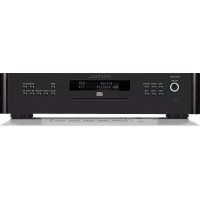
RCD1570 - Cd player/recorder ROTEL - Free user manual and instructions
Find the device manual for free RCD1570 ROTEL in PDF.



| Product Type | Stereo CD player/recorder |
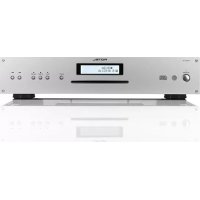
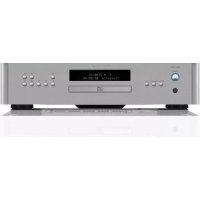
| Brand and Model | Rotel RCD-1570 |
| Front panel height | 88 mm (2U) |
| Power supply | 120V / 60Hz (USA) or 230V / 50Hz (Europe) |
| Power consumption | 15 watts |
| Digital-to-analog converter | Wolfson |
| Frequency response | 20 Hz - 20 kHz (±0.5 dB) |
| Total harmonic distortion + noise | 0.0045% @ 1 kHz |
| Signal-to-noise ratio | > 100 dB |
| Dynamic range | > 96 dB |
| Channel separation | > 98 dB @ 1 kHz |
| Analog outputs | Unbalanced RCA: 2.0 V / 100 Ω; Balanced XLR: 4.0 V / 200 Ω |
| Digital output | Coaxial: 0.5 V peak-to-peak, impedance 75 Ω |
| Supported formats | CD-DA, MP3, WMA |
| Playback functions | Programming (20 tracks), random, repeat, scan, time display, forward/reverse search |
| Connectivity | 12V Trigger input, Rotel Link (3.5 mm mini-jack), EXT REMOTE IN, RS232 (computer), infrared remote control |
| Loading type | Motorized, slot-in |
| Laser safety | Class 1 laser device |
| Double insulation | Yes (double square symbol) |
| Maintenance and cleaning | Clean with a dry cloth or vacuum; do not use liquids |
| Repairability | No user-serviceable parts; contact qualified technician |
Frequently Asked Questions - RCD1570 ROTEL
User questions about RCD1570 ROTEL
0 question about this device. Answer the ones you know or ask your own.
Ask a new question about this device
Download the instructions for your Cd player/recorder in PDF format for free! Find your manual RCD1570 - ROTEL and take your electronic device back in hand. On this page are published all the documents necessary for the use of your device. RCD1570 by ROTEL.
USER MANUAL RCD1570 ROTEL
Stereo Compact Disc Player
Important Safety Instructions
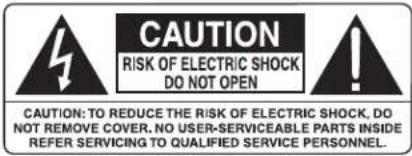
WARNING: There are no user serviceable parts inside. Refer all servicing to qualified service personnel.
WARNING: To reduce the risk of fire or electric shock, do not expose the unit to moisture or water. Do not expose the unit to dripping or splashing. Do not place objects filled with liquids, such as vases, on the unit. Do not allow foreign objects to get into the enclosure. If the unit is exposed to moisture, or a foreign object gets into the enclosure, immediately disconnect the power cord from the wall. Take the unit to a qualified service person for inspection and necessary repairs.
Read all the instructions before connecting or operating the component.
Keep this manual so you can refer to these safety instructions.
Heed all warnings and safety information in these instructions and on the product itself. Follow all operating instructions.
Clean the enclosure only with a dry cloth or a vacuum cleaner.
Do not use this unit near water.
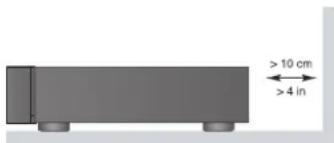
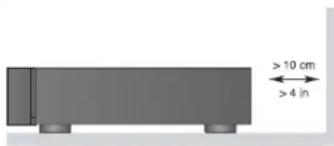
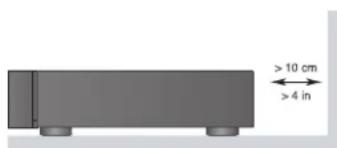
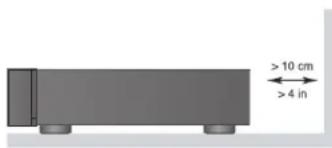
You must allow a minimum 10 cm or 4 inches of unobstructed clearance around the unit.
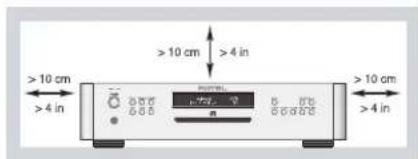
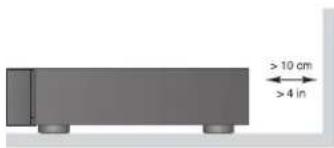
Do not place the unit on a bed, sofa, rug, or similar surface that could block the ventilation openings. If the unit is placed in a bookcase or cabinet, there must be ventilation of the cabinet to allow proper cooling.
Keep the component away from radiators, heat registers, stoves, or any other appliance that produces heat.
WARNING: The rear panel power cord connector is the mains power disconnect device. The device must be located in an open area that allows access to the cord connector.
The unit must be connected to a power supply only of the type and voltage specified on the rear panel. (USA: 120 V/60Hz, EC: 230V/50Hz)
Connect the component to the power outlet only with the supplied power supply cable or an exact equivalent. Do not modify the supplied cable. A polarized plug has two blades, with one wider than the other. A grounding plug has two blades plus a third grounding prong. These are provided for your safety. Do not defeat grounding and/or polarization safety provisions. If the supplied plug does not fit your outlet, please consult an electrician for replacement of the obsolete outlet. Do not use extension cords.
The main plug of the power cordset is a disconnect device of the apparatus. In order to completely disconnect the apparatus from the supply mains, the main plug of the power cordset should be unplugged from the mains (AC) outlet. The stand-by LED indicator will not be lit up to show the power cord is unplugged. The disconnect device shall remain readily operable.
Do not route the power cord where it will be crushed, pinched, bent, exposed to heat, or damaged in any way. Pay particular attention to the power cord at the plug and where the cord exits the back of the unit.
The power cord should be unplugged from the wall outlet during a lightning storm or if the unit is to be left unused for a long period of time.
Use only accessories specified by the manufacturer.
Use only with a cart, stand, rack, bracket or shelf system recommended by Rotel. Use caution when moving the unit in a stand or rack to avoid injury from a tip-over.

Immediately stop using the component and have it inspected and/or serviced by a qualified service agency if:
- The power supply cord or plug has been damaged.
- Objects have fallen or liquid has been spilled into the unit.
- The unit has been exposed to rain.
- The unit shows signs of improper operation.
- The unit has been dropped or damaged in any way.
The batteries in the remote control shall not be exposed to excessive heat such as sunshine, fire or the like.
APPLICABLE FOR USA, CANADA OR WHERE APPROVED FOR THE USAGE
CAUTION: TO PREVENT ELECTRIC SHOCK, MATCH WIDE BLADE OF PLUG TO WIDE SLOT. INSERT FULLY.
ATTENTION: POUR EVITER LES CHOCS ELECTRIQUES, INTRODUIRE LA LAME LA PLUS LARGE DE LA FICHE DANS LA BORNE CORRESPONDANTE DE LA PRISE ET POUSSER JUSQU AU FOND.
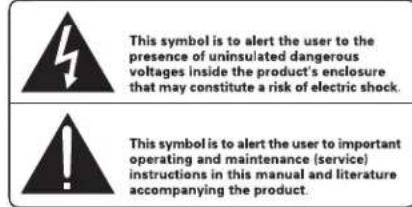
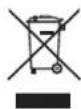
Rotel products are designed to comply with international directives on the Restriction of Hazardous Substances (RoHS) in electrical and electronic equipment and the disposal of Waste Electrical and Electronic Equipment (WEEE). The crossed wheelie bin symbol indicates compliance and that the products must be appropriately recycled or processed in accordance with these directives.

This symbol means that this unit is double insulated. An earth connection is not required.

IMPORTANT FOR LASER PRODUCTS
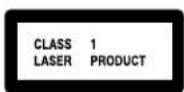
- CLASS I LASER PRODUCT
- DANGER: Visible laser radiation when open and interlock failed or bypassed. Avoid direct exposure to beam.
- CAUTION: Do not open the top cover. There are no user serviceable parts inside the player; leave all servicing to qualified service personnel.
WARNING!
To reduce the risk of electrical shock, fires, etc.:
- Do not remove screws, covers or cabinet.
- Do not expose the unit to rain or moisture.
- Do not touch the power cord or plug with wet hands.
| CAUTION | -LASER RADIATION WHEN OPEN.DO NOT STARE INTO BEAM. |
| ATTENTION | -RAYONNEMENT LASER EN CAS O'OUVERTURE.NE PAS REGARDIER DANS LE FAISCEAU. |
| VORSICHT | -LASERSTRAHLUNG, WENN ABDECKUNG GEÖFFENET,NICHT IN DEN STRAHL BLOCKEN. |
| ADVARSEL | -LASERSTRAILING VED ABNING.SE IKKE IND I STRÅLEN. |
| ADVARSEL | -LASERSTRAILING NÄR DEKSEL ÁPNES.STIRR IKKE INN I STRÅLEN. |
| WARNING | -LASERSTRAILING NÄR DENNA DEL ÄR ÖPPNAD.STREA EJ INI I STRÅLEN. |
| VARO! | AVATTAESSA OLET ALTTIINA LERSÄTELYLLE.ALÄ TIUOTA SÄTEESEN. |
| 注意 | 当打开这里会出现激光,请不要直观激光。 |
| 注意 | ここを聞くとレーザー光が出ます。レーザー光をのぞき込まないでください。 |
APPLICABLE FOR USA, CANADA OR WHERE APPROVED FOR THE USAGE
CAUTION: TO PREVENT ELECTRIC SHOCK, MATCH WIDE BLADE OF PLUG TO WIDE SLOT. INSERT FULLY.
ATTENTION: POUR EVITER LES CHOCS ELECTRIQUES, INTRODUIRE LA LAME LA PLUS LARGE DE LA FICHE DANS LA BORNE CORRESPONDANTE DE LA PRISE ET POUSSER JUSQU AU FOND.
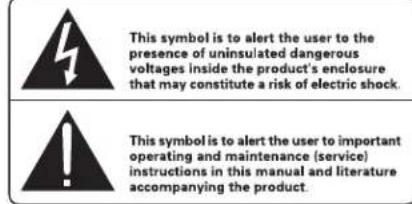
Rotel products are designed to comply with international directives on the Restriction of Hazardous Substances (RoHS) in electrical and electronic equipment and the disposal of Waste Electrical and Electronic Equipment (WEEE). The crossed wheelie bin symbol indicates compliance and that the products must be appropriately recycled or processed in accordance with these directives.
Figure 1: Controls and Connections Commandes et Branchements Bedienelemente und Anschlüsse Controles y Conexiones
Bedieningselementen en aansluitingen
Pannello frontale e posteriore
Kontroller och anslutningar
Органы управления и разъемы
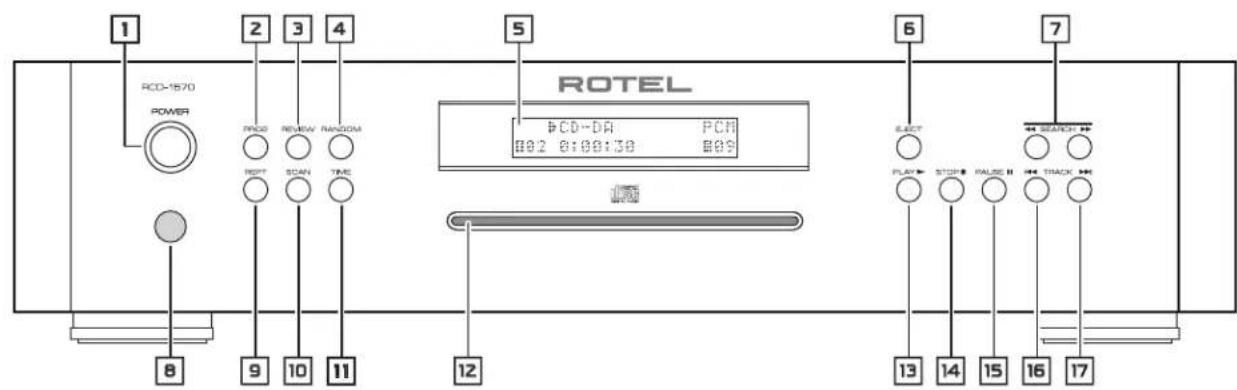
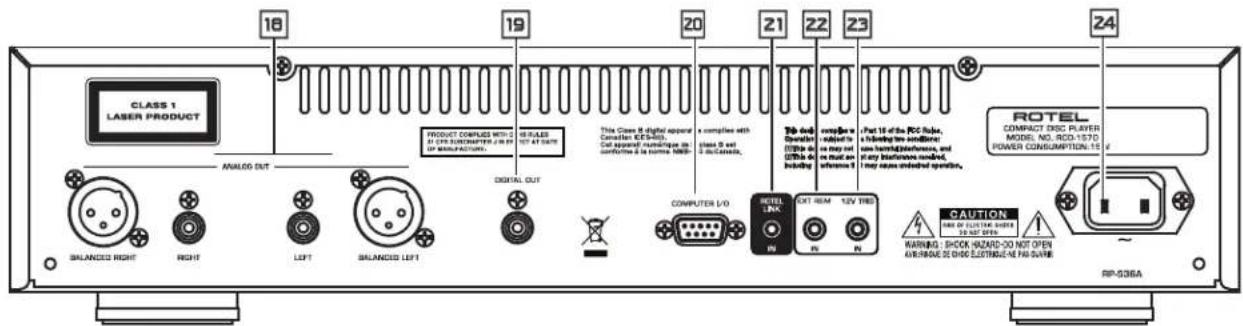
Figure 2: RR-D98 Remote Control RR-D98 Remote Control Télécommande RR-D98 Fernbedienung RR-D98 Mando a Distancia RR-D98 Afstandsbediening RR-D98 Telecomando RR-D98 Fjärrkontroll RR-D98 Пульт ДУ RR-D98
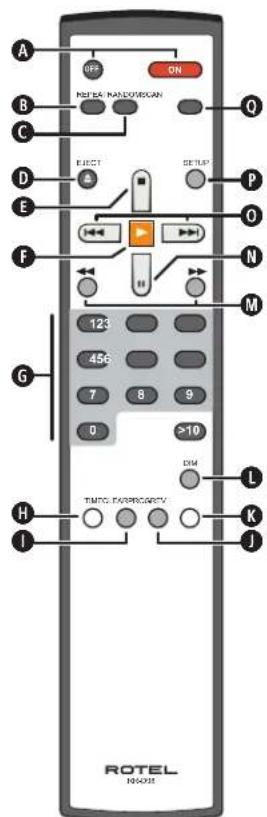
Figure 3: Analog Outputs and 12 Volt Trigger IN connection Sorties analogiques et branchements trigger 12 V IN Analoge Ausgänge und 12V TRIGGER IN-Anschluss Salidas Analogicas y Conexión de Entrada para Señal de Disparo de 12 Voltios
Analoge uitgangen en 12V-triggeringang
Uscite audio analogiche e connessioni segnali trigger 12V
Analoga utgångar och 12-volts styrsignaler
Схема подсоединения аналогового выхода и 12-B
тригрерного входа IN
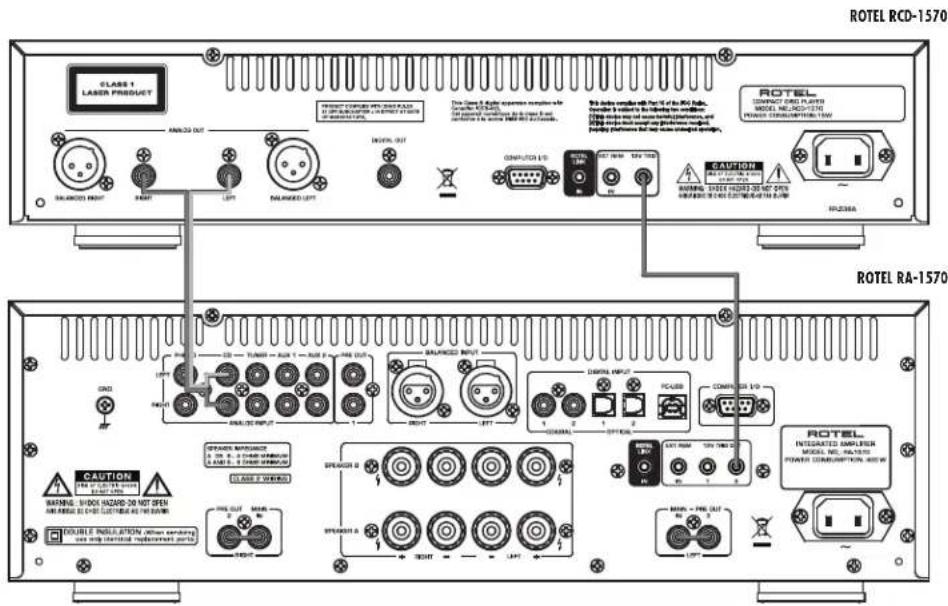
Figure 4: Balanced Outputs
Sorties symétriques
Symmetrische Ausgänge
Salidas Balanceadas
Gebalanceerde uitgangen
Uscite audio bilanciate
Balanserade utgångar
Балансные выходы
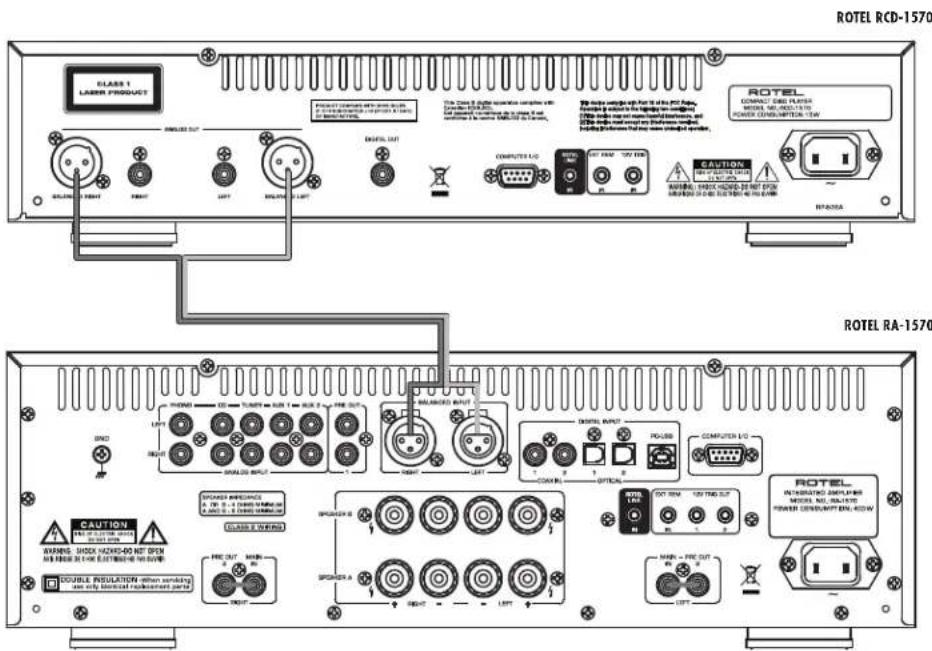
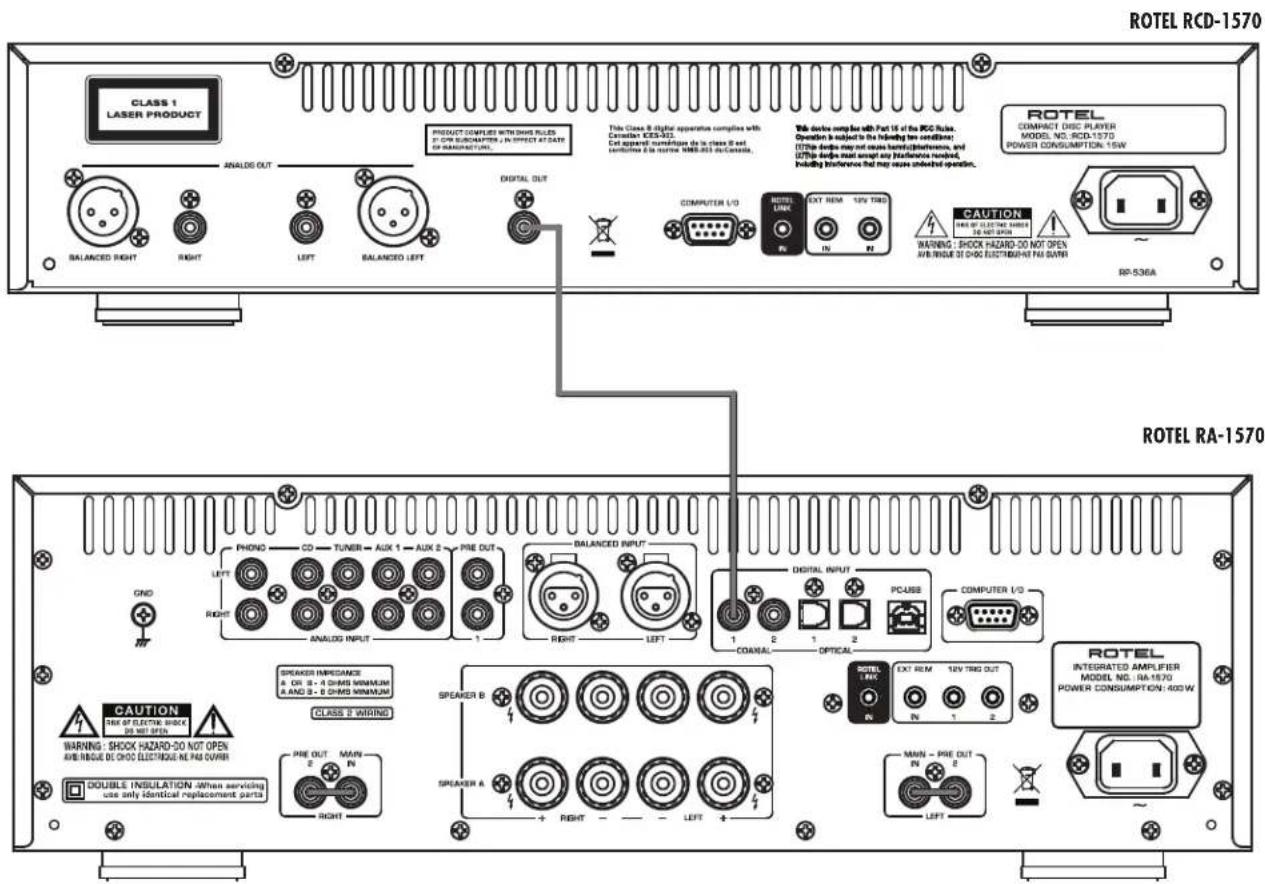
Figure 5: Digital Outputs
Sortie numérique
Digitalausgang
Salidas Digitales
Digitale uitgangen
Uscita digitale
Digitala utgångar
Цифровые выходы
Important Notes
When making connections be sure to:
√ Turn off all the components in the system before hooking up any components, including loudspeakers.
√ Turn off all components in the system before changing any of the connections to the system.
It is also recommended that you:
√ Turn the volume control of the amplifier all the way down before the amplifier is turned on or off.
Remarques importantes
Important Safety Instructions....2
Figure 1: Controls and Connections 3
Figure 2: RR-D98 Remote Control 3
Figure 3: Analog Outputs and 12 Volt Trriger IN connection 4
Figure 4: Balanced Outputs 4
Figure 5: Digital Outputs 5
Important Notes 6
About Rotel....7
About the RCD-1570 7
Getting Started 8
A Few Precautions 8
Placement 8
Control Identification 8
AC Power and Control 8
AC Power Input 24
Power Switch and Power Indicator i A
12 Volt Trigger Input
Output Connections 9
Analog Outputs 10
Digital Output
Operation 9
Infrared Remote Control
Display
Disc Slot 12
Transport Control Buttons....9
PLAY Button F
STOP Button 14 E
PAUSE Button
TRACK Buttons 10 17 0
DIRECT ACCESS Buttons G
SEARCH Buttons 7M
EJECT Button D
Additional Features 10
PROGRAM Button ☒ K
REVIEW Button 3
CLEAR Button
RANDOM Button 4①
REPEAT Button B
SCAN Button 10 C
TIME Button 11 H 11
Computer I/O Connector 20....11
Rotel-Link 21 11
EXT REMOTE IN Jack 22 ....11
Rotel Control Advanced Buttons 11
SETUP Button P
DIM Button
Troubleshooting 12
Power Indicator Is Not Illuminated
Fuse Replacement
No Sound
Specifications....12
About Rotel
Our story began over 50 years ago. Over the decades, we have received hundreds of awards for our products and satisfied hundreds of thousands of people who take their entertainment seriously - like you!
Rotel was founded by a family whose passionate interest in music led them to manufacture high-fidelity components of uncompromising quality. Through the years, that passion has remained undiminished and the family goal of providing exceptional value for audiophiles and music lovers, regardless of their budget, is shared by all Rotel employees.
Rotel's engineers work as a close team, listening to, and fine tuning, each new product until it reaches their exacting musical standards. They are free to choose components from around the world in order to make that product the best they can. You are likely to find capacitors from the United Kingdom and Germany, semiconductors from Japan or the United States, while toroidal power transformers are manufactured in Rotel's own factory.
We all have concerns about our environment. And, as more and more electronics are produced and later discarded, it is especially important for a manufacturer to do all it can to engineer products that have a minimum negative impact on landfill sites and water tables.
At Rotel, we are proud to do our part. We have reduced the lead content in our electronics by using special ROHS solder, while our new Class D (not digital) amplifiers are up to five times more efficient than our legacy designs and still deliver power and performance. These products run cool, give minimum wasted energy, are good for the environment and give better sound too.
Finally, we have printed this brochure on recycled paper stock.
While we understand that these are small first steps, they are still important ones. And we continue to pursue new methods and materials for a cleaner and greener manufacturing process. All of us at Rotel thank you for buying this product. We are sure it will bring you many years of enjoyment.
About the RCD-1570
Simply stated, the RCD-1570 is designed to do one thing—deliver the most detailed, nuanced sound from every disc. Whether it is a conventional CD, or an MP3 or WMA encoded disc, the RCD-1570 will faithfully reproduce all that is recorded on the disc.
While the RCD-1570 was under development. The design team went far beyond the usual measurable technical performance characteristics. Listening panels spent hundreds of hours fine tuning the audio performance, choosing the components that produced the best sound, that would "release the emotion in the music". Whatever the artist and recording engineers put on the disc, the RCD-1570 will deliver.
That said, the RCD-1570 does feature some impressive hardware. The digital-to-analogue converter is a state of the art DAC from the world renowned British manufacturer, Wolfson. This very high performance stereo DAC is specifically designed for audio applications such as CD, DVD, and home theatre systems.
All this, combined with Rotel's Balanced Design, ensures the RCD-1570 will deliver the highest level of audio performance. When used in a high-quality audio system, your Rotel product will provide years of enjoyment.
Getting Started
A Few Precautions
WARNING: To avoid potential damage to your system, turn off ALL the components in the system when connecting or disconnecting the loudspeakers or any associated components. Do not turn the system components back on until you are sure all the connections are correct and secure.
Please read this manual carefully. In addition to installation and operating instructions, it provides valuable information on various RCD-1570 system configurations as well as general information that will help you get optimum performance from your system. Please contact your authorized Rotel dealer for answers to any questions you might have. In addition, all of us at Rotel welcome your questions and comments.
Save the RCD-1570 shipping carton and all enclosed packing material for future use. Shipping or moving the RCD-1570 in anything other than the original packing material may result in severe damage that is not covered by the warranty.
If included in the box please fill out and send in the owner's registration card. Also be sure to keep the original sales receipt. It is your best record of the date of purchase, which you will need in the event warranty service is required.
Placement
Use common sense when placing the RCD-1570 in a cabinet or when stacking other equipment. Make sure that the shelf or cabinet can support its weight. Do not stack components on top of the RCD-1570. Avoid placing the unit where it may be subject to excessive heat such as on top of a large power amplifier or near a heat register. For best performance, avoid placing the unit where it may be subject to vibration, such as near a speaker.
Control Identification
This manual shows illustrations of the front and rear panels and the RR-D98 remote control. Each item in the illustrations is identified with a call out. Throughout this manual the items referred to in the text are identified by the corresponding call out. The items on the front and rear panels are identified with a number call out, such as 1. The items on the remote control are labeled with a letter call out, such as A.
AC Power and Control
AC Power Input 24
Your RCD-1570 is configured at the factory for the proper AC voltage in the country where you purchased it, either 120 volts or 230 volts. The AC line configuration is noted on a decal on the back panel.
NOTE: Should you move your CD player to another country, it may be possible to reconfigure it for use on a different line voltage. Do not attempt to perform this conversion yourself. Opening the enclosure of the RCD-1570 exposes you to dangerous voltages. Consult a qualified service person or the Rotel factory service department for information.
NOTE: Some products are intended for sale in more than one country and as such are supplied with more than one AC cord. Please use only the cord appropriate for your country/region.
The RCD-1570 should be plugged directly into a 2-pin polarized wall outlet or into the switched outlet on another component in your audio system. Do not use an extension cord.
Be sure the power switch on the front panel of the RCD-1570 is turned off (in the "out" position). Then, connect the supplied power cord to the AC power receptacle on the rear of the unit and the AC power outlet.
If you are going to be away from home for an extended period of time such as a month-long vacation, it is a sensible precaution to unplug your CD player (as well as other audio and video components) while you are away.
Power Switch and Power Indicator 1 A
The Power switch is located on the front panel of your CD player. To turn the CD player on, push the switch in. The ring around the switch and the Display will light up, indicating that the CD player is turned on. To turn the CD player off, push the button again and return it to the "out" position.
When the Power switch is in the On position, the remote control ON and OFF A buttons may be used to activate the CD player or put it in Standby mode. In Standby mode the ring around the power switch remains lit, but the display is turned off.
NOTE: If you are using a switched outlet to turn on and off your CD player, you should leave the power switch in the "ON" position. When AC power is applied to the unit, it will power up in fully active mode.
NOTE: Place the self adhesive ring over the light surrounding the power switch if the blue light is too bright.
12 Volt Trigger Input
The RCD-1570 can be activated by a 12 volt trigger signal. The trigger input accepts any control signal (AC or DC) ranging from 3 volts to 30 volts. When a cable is connected to the 12V input and a trigger signal is present, the RCD-1570 is activated. When the trigger signal is turned off, the unit goes into standby mode. The front panel power indicator remains lit, but the display goes dark and the unit will not operate.
NOTE: When using the 12V Trigger feature, leave the POWER button in the ON position.
Output Connections
The RCD-1570 gives you a choice of two different kinds of outputs – an analog output signal from the built-in D/A converter for use with conventional analog audio components and a coax digital output which provides an unprocessed digital signal for use with outboard D/A converters or digital processors.
NOTE: To prevent loud noises that could damage your speakers, turn off all the system components when you make any signal connections.
Analog Outputs 18
See Figure 3 and Figure 4
A pair of standard RCA jacks and XLR balanced connectors supplies an analog output signal from the RCD-1570 to the source inputs of an audio preamplifier, integrated amplifier, or receiver. You should choose only one method of analog connection from the RCD-1570. Do not connect both the RCA and XLR at the same time.
Select high quality audio interconnect cables. Connect the left and right channel outputs of the RCD-1570 to the corresponding inputs on the preamplifier or other component.
Digital Output 19
See Figure 5
If you are using an outboard D/A converter or other digital processor, you will need an unprocessed digital data stream from the RCD-1570. Using a standard 75 ohm coax digital cable, connect the RCD-1570's digital output to the digital input connector on the outboard D/A converter.
When playing CD-DA, MP3 and WMA discs the Digital Output provides a PCM data stream.
NOTE: When an HDCD disc is played "HDCD" appears in the display. However the analog output is not HDCD decoded.
Operation
The RCD-1570 can be operated using its front panel buttons or from corresponding buttons on the supplied infrared remote control. Specific instructions for each of these controls are detailed below. Most of the buttons are duplicated on the front panel and on the IR remote control. However, there are a few exceptions where the buttons are only available on one or the other. These exceptions are noted in the instructions.
Infrared Remote Control ☐
Before using the IR remote control, it is necessary to install two "UM-4/AAA" batteries (supplied). Remove the plastic cover on the back of the IR remote, install the batteries (observing the + and - polarity indications), and reinstall the cover.
To use the IR remote control, aim it at the IR sensor ☐ located in the lower left corner of the RCD-1570 front panel.
Display 5
A lighted Display on the front panel of the RCD-1570 provides useful information about the status of the unit, activation of special features, and track/time information for the disc being played. Each of these indicators is described in the detailed operating instructions that follow.
Disc Slot 12
A disc slot located in the center of the RCD-1570, accepts the disc and pulls it into the disc transport. Insert the disc label-side up. After the disc is loaded the display shows the number of tracks on the disc.
Transport Control Buttons
These buttons provide basic control functions for the disc transport mechanism. Except where noted, all functions are available on the RCD-1570 front panel and the IR remote control.
PLAY Button F
After the disc is loaded, press the PLAY button to start playing the disc. The number of the track being played and the elapsed time will be shown in the display, along with the PLAY indicator. Normally, the disc will start playing with the first track. However, you can select a different track using the TRACK buttons or the DIRECT ACCESS buttons (see below) before pressing the PLAY button to start playing a different selection.
STOP Button 14 E
Press the STOP button once to stop disc play. Press the PLAY button to resume disc play where it was stopped. If the STOP button is press twice, disc play stops, the display shows STOP and programmed selections are deleted (see below). When the PLAY button is press after pressing the STOP button twice, the disc begins playing from the first track.
PAUSE Button 📋
The PAUSE button is used to temporarily suspend play. The disc continues to spin and play will be resumed from the current position. The PAUSE indicator will light in the Display. To resume playing the disc, press the PAUSE button again or press the PLAY button.
TRACK Buttons 16 17 0
These buttons are used to select tracks on the disc. When a disc is playing, pressing the ▶TRACK button advances to the beginning of the next track. Pressing the ▶TRACK button returns to the beginning of the current track. Pressing ▶TRACK twice quickly in succession returns to the beginning of the previous track. The new track number appears in the Display.
These buttons are also used to select a track before pressing the PLAY button or when memorizing tracks for the PROGRAM play mode (see below). These selections are made by continuously pressing the TRACK buttons until the desired track is reached.
In PROGRAM mode, the TRACK buttons advance or reverse to the next track in the memorized selection list.
DIRECT ACCESS Buttons G
Remote Only
These eleven numeric buttons (labeled 1 through 0 and >10) are used to directly access a track from the IR remote control instead of stepping through the tracks using the TRACK buttons.
The first ten tracks on a disc can be selected by pressing the corresponding button. For example, to play the third track, press the 3 button on the remote control. To play track 10 press the 0 button.
To select track numbers greater than 10 use the >10 button. For example, to select track 14, press the >10 button followed by the 4 button. To select track 23, press the >10 button twice followed by the 3 button. The number of the selected track will appear in the main numeric area at the center of the Display.
The DIRECT ACCESS buttons may also be used to memorize tracks in PROGRAM mode (see PROGRAM Button section).
SEARCH Buttons 7 M
The ▶ and buttons fast forward or fast reverse through the disc that is playing. One press of the ▶ button will fast forward or fast reverse at 2X normal speed. Pressing the ▶ button repeatedly will fast forward or fast reverse at 4X, then 8X, 16X and 32X normal speed. One more press of the ▶ button, or pressing the Play ▶ button, returns the RCD-1570 to normal speed play. While the buttons are pressed, you will hear high-speed audio.
EJECT Button 6 D
When a disc is inserted into the front panel Disc Slot 12 it is pulled into the disc transport. To eject the disc press the EJECT button on the front panel 6 or the remote control D.
If you accidentally press either of these buttons, press the button again to re-load the disc.
Additional Features
These convenience features add extra functionality to the RCD-1570, including the ability to memorize a group of tracks to be played, to repeat a disc, a program, or a track over and over, to play the tracks on a disc in random order, to automatically play the first 10 seconds of each track, and to select from several available time displays.
PROGRAM Button ☐ K
This button, labeled PROG, allows you to memorize more than 20 tracks on the current disc for playback in a specific order. For example, you could instruct the RCD-1570 to play track 5, followed by track 3, followed by track 8.
NOTE: Programmed play lists cannot be set up with MP3 and WMA discs.
To begin a program:
-
Insert a disc in the front panel slot. The RCD-1570 will read the contents of the disc. You may press the PLAY button if you would like to listen to the tracks while you program them.
-
Press the PROGRAM ☐ button on the front panel or Ⓜ button on the remote control. The PROGRAM indicator will light up in the Display, along with "P:00" indicating that the unit is waiting for the first track to be memorized.
- To program tracks from the handheld remote control, enter the first track number using the DIRECT ACCESS 6 buttons. Your selection will be memorized automatically and the Display indicator will change to "P:01", indicating that one track has been memorized. Continue entering the rest of your selections using the DIRECT ACCESS buttons. Note that there is no need to press the PROGRAM button as each selection is memorized as it is entered.
- To program tracks from the front panel, start playing the CD and press the PROGRAM button. Select the desired first track in the program and press the PROGRAM button. To program additional tracks select them with the TRACK 16 17 buttons then press the PROGRAM button after each selection. To begin playing the program after selecting all desired tracks push the PLAY button and the first track in the program will begin playing.
Once you have memorized a play list, the RCD-1570 remains in PROGRAM mode until you eject the disc or press the STOP button twice in succession. If you press the PLAY button, the memorized program will play instead of the entire disc, starting with the first selection in the memorized list.
When a PROGRAM has been memorized, most functions that would normally affect the entire disc operate on just the memorized program. For example, the TRACK buttons advance to the next track in the memorized program, not the next track on the disc. Likewise, the REPEAT button (see below) continuously plays the memorized program, not the entire disc.
NOTE: The Random Play feature cannot be used when using the Programmed Play feature.
REVIEW Button 3 J
This button is used to review the memorized tracks in Program Play mode. Press the button and the first memorized track number and "Prog Review" will appear in the Display. Pressing the REVIEW button again while the track number is displayed will continue the review sequence, showing the next memorized track. Continue pressing the REVIEW button to see the complete memorized track list.
If the REVIEW button is not press again, after 5 seconds the review process is terminated and the unit resumes whatever mode it was in before you started the review process or resumes Program Play with the current track.
You may remove a selection from the Program Play list during the review procedure using the CLEAR button, as described below.
CLEAR Button ①
Remote Only
This button allows you to remove a track selection from the memorized program play list during the review procedure described above. Follow the review procedure until the desired track number appears. Then, instead of pressing the REVIEW button to continue, remove the track by pressing the CLEAR button while the track number is displayed. You may then continue the review procedure.
RANDOM Button 4①
This instructs the CD player to play tracks from the entire disc in random order. Once all of the selections have been played once, the disc will stop playing, unless the REPEAT Button (see below) has been engaged, in which case the random play will continue until the STOP button is pressed. When the RANDOM button is engaged, the icon appears in the Display.
REPEAT Button ☐ B
This button allows you to repeat the current track or the entire disc continuously until the feature is cancelled by disengaging the REPEAT button or pressing STOP. The REPEAT button steps sequentially through the available options. Press the button once and the RCD-1570 will repeat just the current track. The Icon appears in the Display. Press the button a second time and the RCD-1570 will repeat the entire disc. A second Icon appears in the Display. Press the button a third time to cancel the REPEAT function.
As noted above, REPEAT can be used in conjunction with the RANDOM play feature.
NOTE: The RANDOM, REPEAT and SCAN may not work when playing MP3 and WMA discs.
SCAN Button 10 C
This feature automatically plays the first ten seconds of each track on the disc (or the memorized program). To activate the feature, press the SCAN button. The icon appears in the Display. To stop scanning and resume normal operation at the current track, press the SCAN button again or press the PLAY button.
NOTE: The RANDOM, REPEAT and SCAN may not work when playing MP3 and WMA discs.
TIME Button 📄
Normally, the RCD-1570 displays the elapsed time of the currently playing track. The TIME button allows you to see alternative time displays. Pressing the button once displays the time remaining in the current track, which counts down as the track continues playing. Pressing the button a second time displays the time remaining on the entire disc (or memorized program). When the alternative time displays are selected an "icon" appears in the display. Pressing the button a third time reverts to the standard elapsed time display.
NOTE: When playing MP3 and WMA discs, only the regular elapsed time and the time remaining in the current track can be displayed.
Computer I/O Connector 20
The RCD-1570 can be controlled via RS232 for integration with automation systems. The COMPUTER I/O input accepts a standard straight DB-9 Male-to-Female cable.
For additional information on the connections, software, and operating codes for computer control of the RCD-1570, contact your authorized Rotel dealer.
Rotel Link 21
This 3.5 mm stereo mini-jack (labeled ROTEL LINK IN) can optionally attach to Rotel network enabled products with ROTEL LINK OUT connections. This allows the attached Rotel products to communicate with each other and be controlled via the Rotel Remote App (available for download on the iTunes ^® store).
EXT REMOTE IN Jack zz
This 3.5mm mini-jack receives command codes from industry-standard infrared receivers via hard-wired connections. This feature could prove useful when the unit is installed in a cabinet and the front-panel sensor is blocked. Consult your authorized Rotel dealer for information on these external repeaters and the proper wiring of a jack to fit the mini-jack receptacle.
Remote Control Advanced Buttons
SETUP Button P
Remote Only
By pressing the SETUP button, you can enter the following setup menu.
• DIMMER: Changes the display brightness.
NOTE: This setting is saved permanently including after powering off the RCD-1570.
- VERSION: Shows the current software version.
- EXIT: Exits this SETUP menu.
From the remote control, press the STOP/PAUSE/TRACK keys to change the contents of the menu, press PLAY to enter the setting or confirm.
NOTE: You can also access the SETUP menu without the remote control. Press the STOP key on the front panel for 5 seconds. Press the TRACK buttons to change the contents of the menu and press STOP to enter the settings or confirm.
DIM Button
Remote Only
Press the DIM Ⓛ key sequentially to change the DISPLAY brightness.
NOTE: Adjustments made using the ⏻ button is temporary only and not saved after powering off the RCD-1570.
Troubleshooting
Most difficulties in audio systems are the result of incorrect connections, or improper control settings. If you encounter problems, isolate the area of the difficulty, check the control settings, determine the cause of the fault and make the necessary changes. If you are unable to get sound from the RCD-1570, refer to the suggestions for the following conditions:
Power Indicator Is Not Illuminated
The Power Indicator and the basic items in the Display window should be illuminated whenever the RCD-1570 is plugged into the wall power outlet and the Power button is pushed in. If it does not light, test the power outlet with another electrical device, such as a lamp. Be sure the power outlet being used is not controlled by a switch that has been turned off.
Fuse Replacement
If another electrical device works when plugged into the power outlet, but the Power Indicator and the Display still will not light when the RCD-1570 is plugged into the wall outlet, it indicates that the internal power fuse may have blown. If you believe this has happened, contact your authorized Rotel dealer to get the fuse replaced.
No Sound
Check the cables between the RCD-1570 and the amplifier inputs to be sure they are connected properly. Be sure the amplifier input that the RCD-1570 is selected. Be sure the tape monitor system of the amplifier has not been activated. Check the wiring between the amplifier and the speakers.
Specifications
Total Harmonic Distortion + Noise 0.0045% @ 1kHz
Frequency Response (±0.5 dB) 20-20,000 Hz
Channel Balance ± 0.5 dB
Channel Separation > 98 dB @ 1kHz
Signal to Noise Ratio > 100dB
Dynamic Range > 96 dB
Digital to Analog Converters Wolfson
Speed Accuracy, Wow & Flutter Quartz Crystal Precision
Analog Output Level / Impedance (0dBfs)
Unbalanced (RCA) 2.0 Volts / 100 Ohms
Balanced (XLR) 4.0 Volts / 200 Ohms
Digital Output Level (coax) 0.5 Volt, Peak to Peak
Digital Output Impedance 75 Ohms
Power Requirements
USAS Version AC 120V, 60 Hz
Europa-Version AC 230V, 50 Hz
Power Consumption 15 Watts
Dimensions (W x H x D) 17 x 4 x 12 ^5 /8 inches
431 × 99 × 320 mm
Front Panel Height (for rack mount) 2U / 3 1/2 inches / 88.1 mm
Weight (net) 6.7 kg, 14.74 lb.
All specifications are accurate at the time of printing. Rotel reserves the right to make improvements without notice.
Rotel and the Rotel HiFi logo are registered trademarks of The Rotel Co, Ltd., Tokyo, Japan.
Bouton SEARCH (RECHERCHE) 7 M
Dimensions (W, H, D) 17" x 4" x 12 5/8"
431×99×320mm
Poids (net) 6.7 kg, 14.74 lbs.
Conector Computer I/O 20 34
Rotel-Link 34
Toma EXT REMOTE IN 34
Conector Computer I/O 20
ALGEMENE WAARSCHUWING!
KLASSE 1 LASERPRODUCT
| CAUTION | -LASER RADIATION WHEN OPEN.DO NOT STARE INTO BEAM. |
| ATTENTION | -RAYONNEMENT LASER EN CAS O'OUVERTURE.NE PAS REGARDIER DANS LE FAISCEAU. |
| VORSICHT | -LASERSTRAHLUNG, WENN ABDECKUNG GEÖFFENET,NICH T IN DEN STRAHL BLOCKEN. |
| ADVARSEL | -LASERSTRÄLING VED ABNING.SE IKKE IND I STRÄLEN. |
| ADVARSEL | -LASERSTRÄLING NÄR DEKSEL ÁPNES.STIRR IKKE INN I STRÄLEN. |
| WARNING | -LASERSTRÄLNING NÄR DENNA DEL ÄR ÖPPNAD.STTRA EJ INI STRÄLEN. |
| VARO! | AVATTAESSA OLET ALTTIINA LERSÄTEILYLLE.ALÄ TIUOTA SÄTEESEN. |
| 注意 | 当打开这里会出现激光,请不要直观激光。 |
| 注意 | ここを聞くとレーザー光が出す。レーザー光をのぞき込まないでください。 |
Inhoud
Computer I/O-connector 200 41
Rotel-Link 21 41
Specifications....42
Over Rotel
Computer I/O-connector 20
Dimensioni (L × A × P) 431 × 99 × 320 mm
Precision ("Wow and Flutter") Quartz Chrystal-precision
Analog utnivå/impedans (0 dBfs)
Obalanserad (RCA) 2,0 volt/100 ohm
Balanserad (XLR) 4,0 volt/200 ohm
2-11-4, Nakane, Meguro-ku,
Tokyo, 152-0031
Japan
Rotel of America
54 Concord Street
North Reading, MA 01864-2699
USA
Phone: +1 978-664-3820
Fax: +1 978-664-4109
Rotel Europe
Dale Road
Worthing, West Sussex BN11 2BH
England
Phone: + 44 (0)1903 221 761
Fax: +44 (0)1903 221 525
Rotel Deutschland

- Important Safety Instructions
- IMPORTANT FOR LASER PRODUCTS
- WARNING!
- Important Notes
- When making connections be sure to:
- It is also recommended that you:
- Remarques importantes
- About Rotel
- About the RCD-1570
- Getting Started
- A Few Precautions
- Placement
- Control Identification
- AC Power and Control
- AC Power Input 24
- Power Switch and Power Indicator 1 A
- Volt Trigger Input
- Output Connections
- Analog Outputs 18
- Digital Output 19
- Operation
- Infrared Remote Control ☐
- Display 5
- Disc Slot 12
- Transport Control Buttons
- PLAY Button F
- STOP Button 14 E
- PAUSE Button 📋
- TRACK Buttons 16 17 0
- DIRECT ACCESS Buttons G
- SEARCH Buttons 7 M
- EJECT Button 6 D
- Additional Features
- PROGRAM Button ☐ K
- REVIEW Button 3 J
- CLEAR Button ①
- RANDOM Button 4①
- REPEAT Button ☐ B
- SCAN Button 10 C
- TIME Button 📄
- Computer I/O Connector 20
- Rotel Link 21
- EXT REMOTE IN Jack zz
- Remote Control Advanced Buttons
- SETUP Button P
- DIM Button
- Troubleshooting
- Power Indicator Is Not Illuminated
- Fuse Replacement
- No Sound
- Specifications
- Bouton SEARCH (RECHERCHE) 7 M
- Conector Computer I/O 20
- ALGEMENE WAARSCHUWING!
- KLASSE 1 LASERPRODUCT
- Inhoud
- Over Rotel
- Computer I/O-connector 20
- Rotel of America
- Rotel Europe
- Rotel Deutschland
Brand : ROTEL
Model : RCD1570
Category : Cd player/recorder