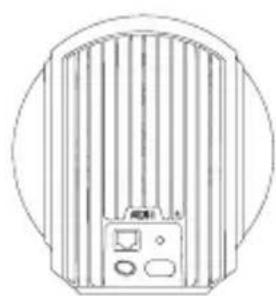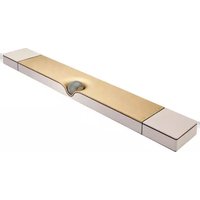
Phantom II - Speaker DEVIALET - Free user manual and instructions
Find the device manual for free Phantom II DEVIALET in PDF.



User questions about Phantom II DEVIALET
0 question about this device. Answer the ones you know or ask your own.
Ask a new question about this device
Download the instructions for your Speaker in PDF format for free! Find your manual Phantom II - DEVIALET and take your electronic device back in hand. On this page are published all the documents necessary for the use of your device. Phantom II by DEVIALET.
USER MANUAL Phantom II DEVIALET
Gecko is an invention from Devialet, Ingénierie Acoustique de France, the most awarded company in audio technologies.
Made in France
To avoid the risk of falling, fire and electrocution, please read the following instructions carefully.
Any unauthorized modification could compromise your safety and prevent the device from being used as intended.
If you experience any problems, please consult an expert.
For your safety, make sure that a disconnecting device (switch or circuit breaker) is installed and easily accessible.
In a thunderstorm, turn off the power supply.
Make sure that your electrical installation complies with all the electrical standards applicable in your country.
— Make sure that the wall on which the Gecko wall mount is to be installed is level, smooth and vertical.
— Make sure that the wall on which the Gecko wall mount is to be installed is not damaged and is able to support 22 lbs. at the fixing point.
— Only use the screws and dowels provided by DEVIALET for fitting the GECKO.
— For each mount type, use the screw and dowel combination stated below.
— When drilling into the wall, make sure that the drill bit has the correct diameter and is suitable for the mount.
— It is important that the screws are secured to the wall properly to ensure that the device is held in place.
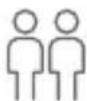
— Installation should always be carried out by two people.

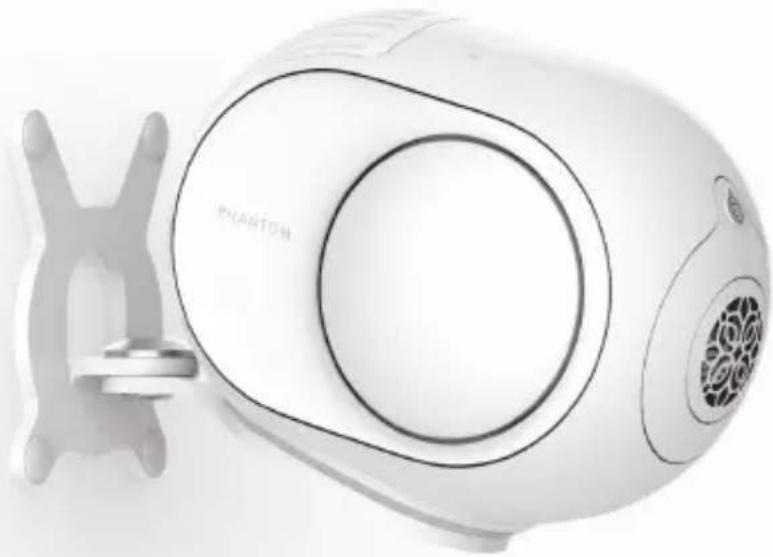
natural_image
White electric shower unit with a metallic handle and brand logo (no visible text or symbols on the device body)PACK CONTENTS
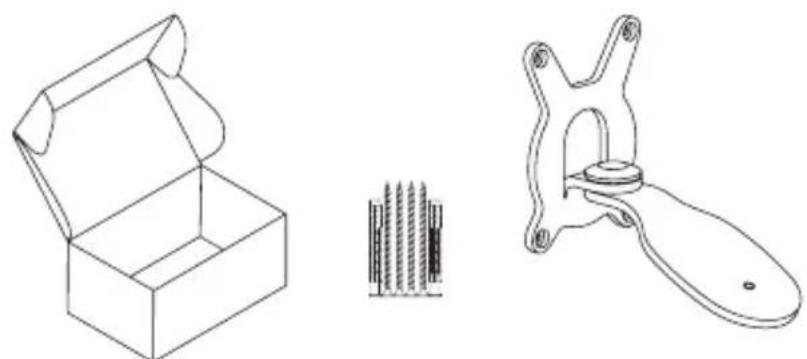
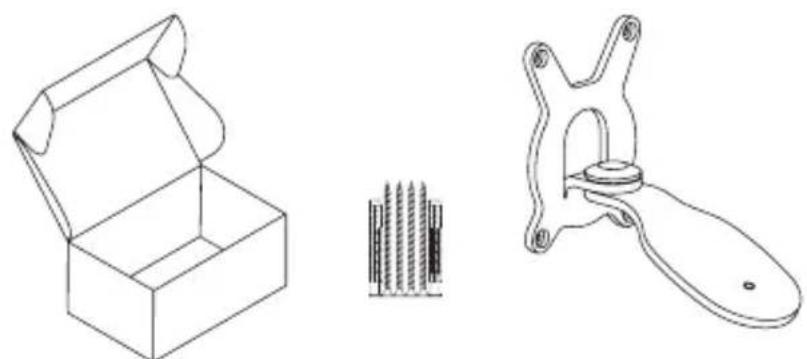
- Assembled Gecko
— 1x screw for fixing the Phantom on to the Gecko
— 4x dowels for solid materials
— 4x screws for solid materials
— 4x dowels for hollow materials
— 4x screws for hollow materials - 4x screw covers
INSTALLATION
STEP 1
Take all the components out of the box and remove the packaging.
STEP 2
To fix the Gecko to the wall, place the drilling markings on the wall with the aid of the product.
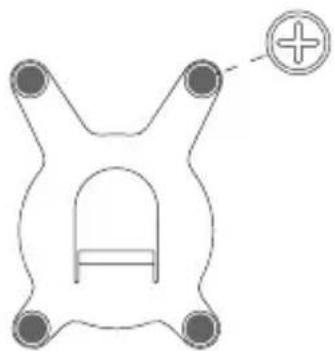
natural_image
Pure diagram of a symmetrical mechanical or electrical component with four circular ends and a central arch (no text or symbols)STEP 3
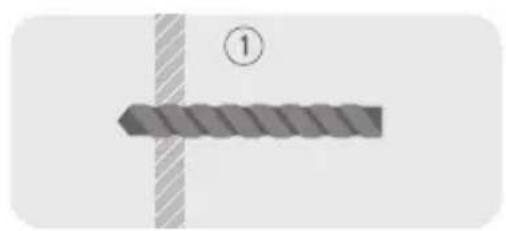
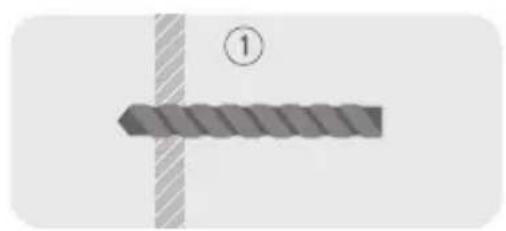
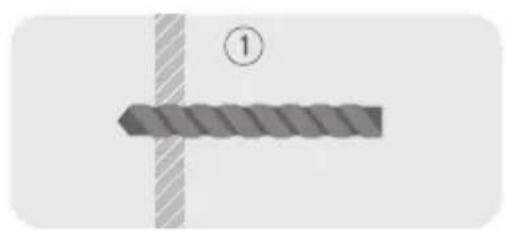
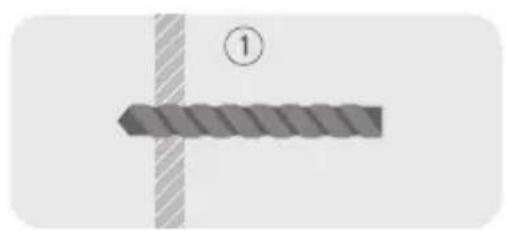
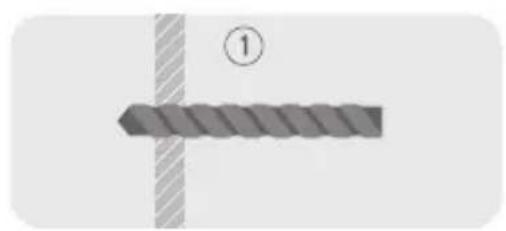
Drill into your wall, paying close attention to the instructions on the following pages.
1 — Walls made of solid material (natural stone, concrete, aerated concrete, solid brick, drywall) or concrete blocks:
4 dowels 5/16" x 2 1/4"

natural_image
Pure mechanical diagram showing a shaft and flange without any text, numbers, or symbols4 screws 3/16" x 2"

natural_image
Line drawing of a screw with threaded shaft and triangular head (no text or symbols)Drilling depth (minimum): 2 3/8"
Drilling diameter: 5/16"

Ensure that neither the screw nor the dowel spins freely in the hole.
2 — Walls made of solid wood:
4 screws 3/16" x 2"

natural_image
Pure line drawing of a screw with no text or symbolsDrilling depth (minimum): 2"
Drilling diameter: 3/32"
3 - 1/2" drywall :
4 dowels 3/8" x 2"

natural_image
Pure geometric diagram of a symmetrical shape with no text, numbers, or symbols4 screws 3/16" x 2"

natural_image
Simple line drawing of a rectangular object with a triangular tip on the left end (no text or symbols)Drilling diameter: 5/16"
natural_image
Diagram showing a textured rectangular object with a diagonal line and a circled number 1, no text or symbols present.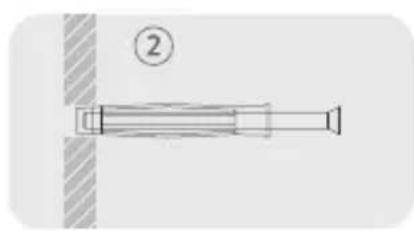
natural_image
Pure mechanical component diagram without any text, numbers, or symbols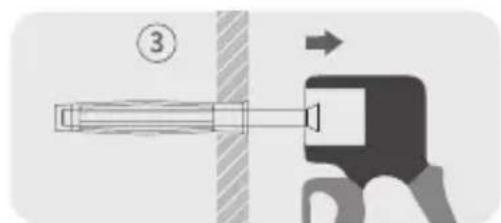
text_image
Diagram showing a mechanical device with labeled component 3 and directional arrow, likely illustrating a process or assembly.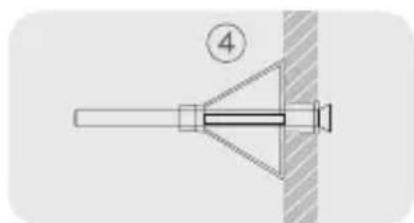
natural_image
Pure mechanical diagram showing a pin inserted into a bracket with a numbered label (4), no text or symbols present.⚠ Ensure that neither the screw nor the dowel spins freely in the hole. Do not fix to hollow brick. If you do not feel confident or have not understood the contents of this manual, do not fit the Gecko wall mount and seek the help of a professional.
Attention:
Do not fix the Gecko to a wall made of drywall less than 1/2 inch thick.
STEP 4
Screw the Gecko onto the wall as tightly as possible using the correct screws, then conceal the latter with the screw covers.
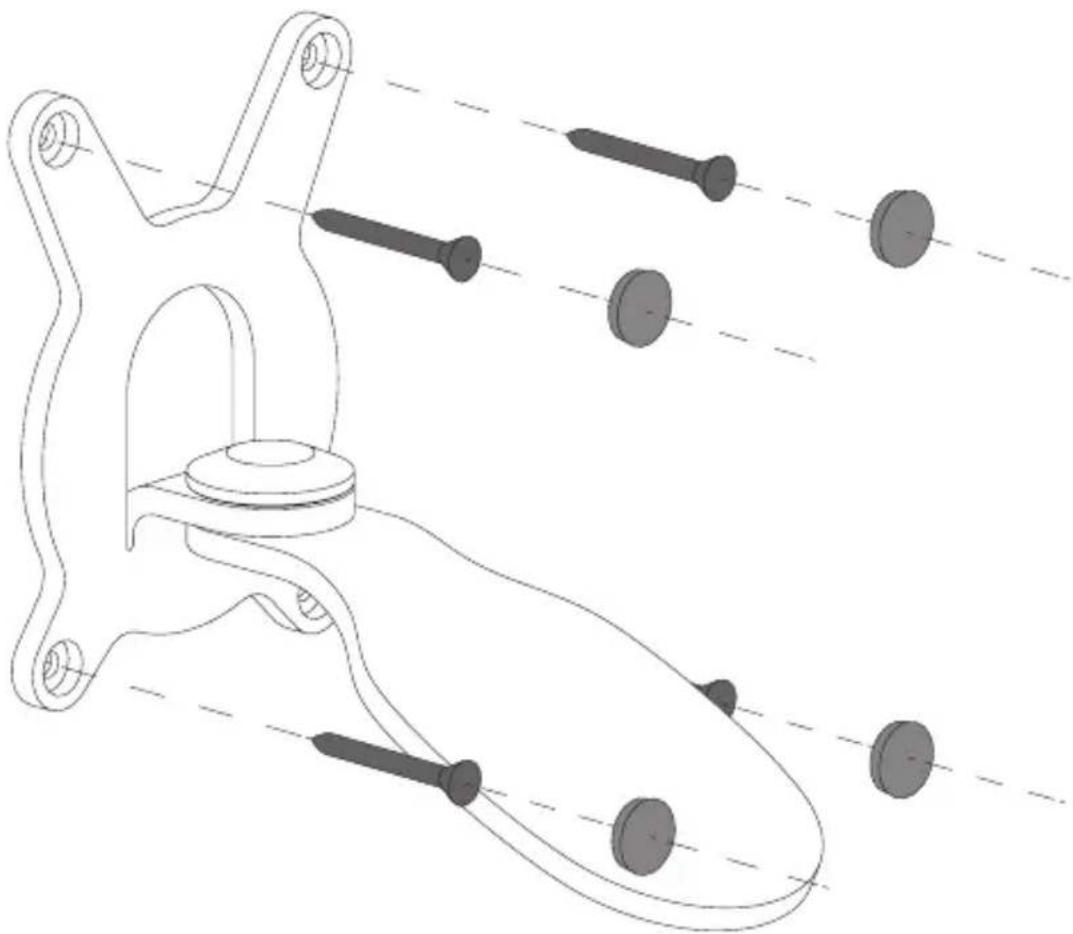
natural_image
Technical line drawing of a mechanical linkage assembly with multiple bolted components (no text or symbols)STEP 5
Installation should always be carried out by two people.

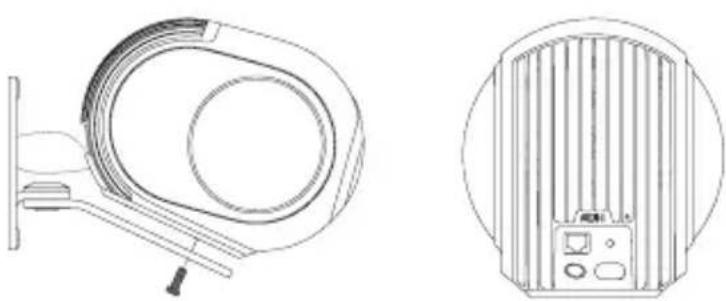
Place the Phantom on the Gecko, then tighten the screw provided as far as it will go in order to lock the Phantom on its mount. Attention: The prescribed tightening torque is 44 lb-in.
Attention: If people are going to be walking under the GECKO, we recommend fixing the Phantom in place using a steel wire as shown in the image.
natural_image
Technical line drawings of a medical imaging device (no text or symbols present)— Make sure that you keep hold of the Phantom during the procedure.
— To avoid damaging your Phantom, do not handle it by the speakers.
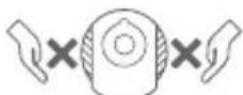
— Make sure that the Phantom is not plugged in during fitting.
STEP 6
Plug in your Phantom.
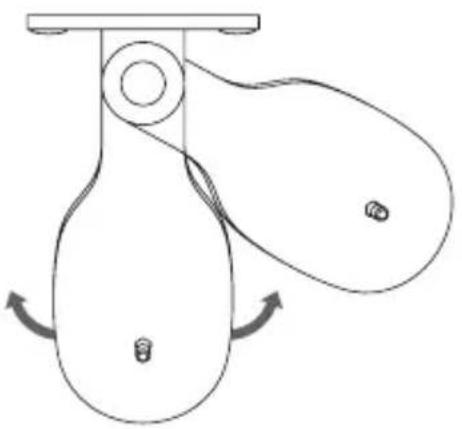
Note: You can adjust the angle of your Phantom as desired (up to +/- 110°).
natural_image
Simple line drawing of a pulley system with two wheels and a handle, showing rotational motion arrows (no text or symbols)Attention: After changing the position, ensure that the fixing screw is still tight.
Note 2: You can paint the Gecko to match the matte black of the Phantom; the color code is RAL 9005.
Oops! Do you need help?
Go to: help.devialet.com
2-YEAR WARRANTY
Find out more at www.devialet.com
DEVIALET
INGÉNIERIE ACOUSTIQUE DE FRANCE
natural_image
White PHANTOM electric shaver with a metallic handle attachment (no visible text or symbols on the device body)CONTENU DU PACK
natural_image
Pure diagram of a symmetrical mechanical or electrical component with four circular ends and a central arch (no text or symbols)ÉTAPE 3
natural_image
Pure mechanical diagram showing a shaft and flange without any text, numbers, or symbols4 Vis ∅5 x 50 mm

natural_image
Line drawing of a screw with threaded shaft and triangular head (no text or symbols)natural_image
Pure line drawing of a screw with no text or symbolsnatural_image
Pure geometric diagram of a symmetrical shape with no text, numbers, or symbols4 Vis M5 x 50 mm

natural_image
Simple horizontal line drawing with a triangular tip at the top (no text or symbols)natural_image
Diagram showing a textured rectangular object with a diagonal line and a circled number 1, no text or symbols present.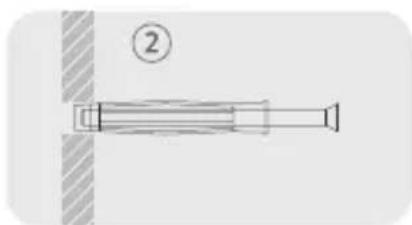
natural_image
Pure mechanical component diagram without any text, numbers, or symbols
natural_image
Diagram showing a mechanical device with a numbered component and directional arrow (no text or symbols)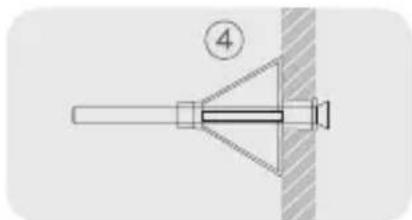
natural_image
Pure mechanical diagram showing a lever and pin without any text, numbers, or symbolsnatural_image
Technical line drawing of a mechanical linkage assembly with multiple bolted components (no text or symbols)ÉTAPE 5
natural_image
Technical line drawing of a mechanical component with no visible text or symbols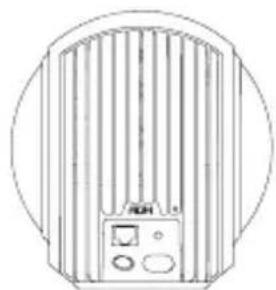
natural_image
Line drawing of a vertical fan or vent with control panel and buttons, enclosed in a circular frame (no text or symbols)natural_image
Simple line drawing of a pulley system with two wheels and a handle, showing rotational motion arrows (no text or symbols)natural_image
White PHANTOM electric shaver with a metallic handle attachment (no visible text or symbols on the device body)BEINHALTETES MATERIAL
natural_image
Pure diagram of a symmetrical mechanical or electrical component with four terminals and a central arch (no text or symbols)SCHRITT 3
natural_image
Pure mechanical diagram showing a shaft and flange without any text, numbers, or symbols4 Schrauben ∅5 x 50 mm

natural_image
Line drawing of a screw with threaded shaft and triangular head (no text or symbols)natural_image
Pure line drawing of a screw with no text or symbolsnatural_image
Pure geometric diagram of a symmetrical shape with no text, numbers, or symbolsnatural_image
Simple line drawing of a rectangular object with a triangular tip on the left end (no text or symbols)natural_image
Diagram showing a textured rectangular object with a diagonal hatched line and a circled number 1, no text or symbols present.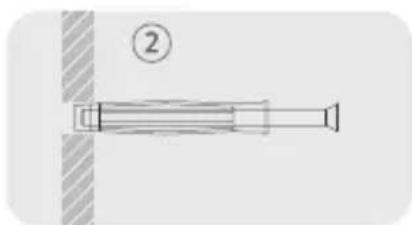
natural_image
Pure mechanical component diagram without any text, numbers, or symbols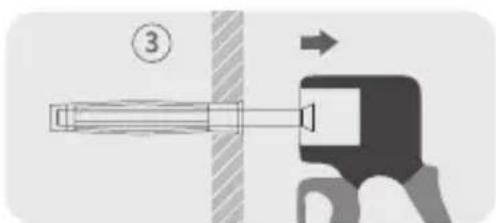
natural_image
Diagram showing a mechanical device with a numbered component and directional arrow (no text or symbols)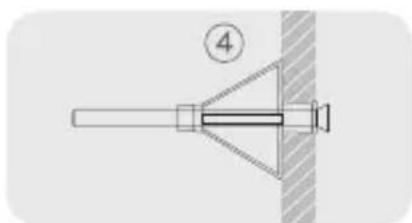
natural_image
Pure mechanical diagram showing a pin or lever assembly with a numbered label (4) and no text or symbols.natural_image
Technical line drawing of a mechanical component with multiple cylindrical pins and connecting rods (no text or symbols)SCHRITT 5
natural_image
Technical line drawing of a mechanical component with no visible text or symbols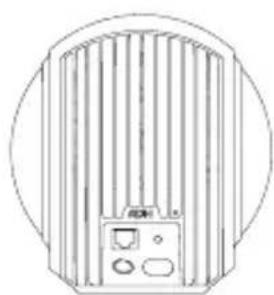
natural_image
Line drawing of a circular device with vertical fins and control panel (no text or symbols)natural_image
Simple line drawing of a pulley system with two wheels and a handle, showing rotational motion arrows (no text or symbols)natural_image
White PHANTOM electric shaver with a metallic handle attachment (no visible text or symbols on the device body)CONTENIDO DEL KIT
natural_image
Pure diagram of a symmetrical mechanical or electrical component with four terminals and a central arch (no text or symbols)ETAPA 3
natural_image
Pure mechanical diagram showing a shaft and flange without any text, numbers, or symbols4 tornillos ∅5 x 50 mm

natural_image
Line drawing of a screw with threaded shaft and pointed tip (no text or symbols)natural_image
Pure line drawing of a screw with no text or symbolsnatural_image
Pure geometric diagram of a symmetrical shape with no text, numbers, or symbols4 tornillos M5 × 50 mm

natural_image
Simple line drawing of a rectangular object with a triangular tip on the left end (no text or symbols)natural_image
Diagram showing a textured rectangular object with a diagonal line and a circled number 1, no text or symbols present.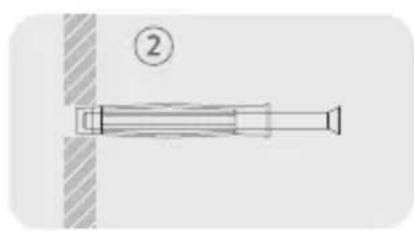
natural_image
Pure mechanical component diagram without any text, numbers, or symbols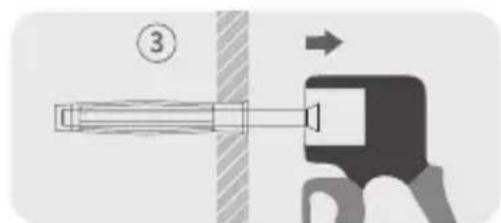
text_image
Diagram showing a mechanical device with labeled component 3 and directional arrow, likely illustrating a process or assembly.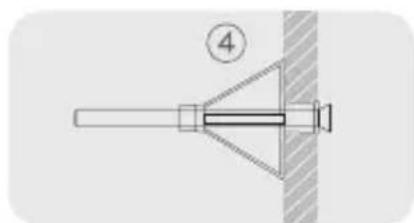
natural_image
Pure mechanical diagram showing a pin inserted into a bracket with a numbered label (4), no text or symbols present.
natural_image
Technical line drawing of a mechanical linkage assembly with multiple bolted components (no text or symbols)ETAPA 5
natural_image
Technical line drawings of a medical device and its internal panel (no text or symbols)natural_image
Simple line drawing of a pulley system with two wheels and a handle, showing rotational motion arrows (no text or symbols)natural_image
White PHANTOM electric shaver with a metallic handle attachment (no visible text or symbols on the device body)CONTEÚDO DA EMBALAGEM
natural_image
Pure diagram of a symmetrical mechanical or electrical component with four terminals and a central arch (no text or symbols)PASS03
natural_image
Pure mechanical component diagram without any text, numbers, or symbols4 Parafusos ∅5 x 50 mm

natural_image
Line drawing of a screw with threaded shaft and pointed tip (no text or symbols)4 Parafusos ∅5 x 50mm

natural_image
Line drawing of a screw with triangular head and threaded shaft (no text or symbols)natural_image
Pure geometric diagram of a symmetrical shape with no text, numbers, or symbols4 Parafusos M5 x 50mm

natural_image
Simple horizontal line drawing with a triangular tip at the top (no text or symbols)natural_image
Diagram showing a textured rectangular object with a diagonal line and a circled number 1, no text or symbols present.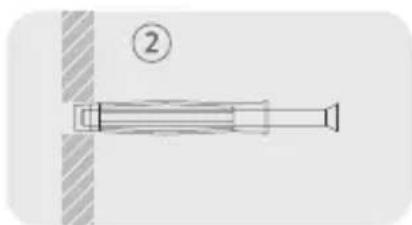
natural_image
Pure mechanical component diagram without any text, numbers, or symbols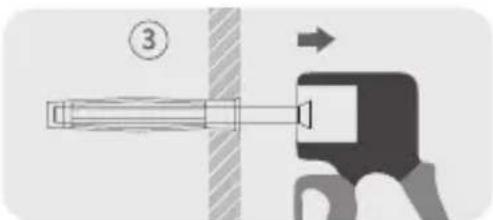
natural_image
Diagram showing a mechanical device with a numbered component and directional arrow (no text or symbols)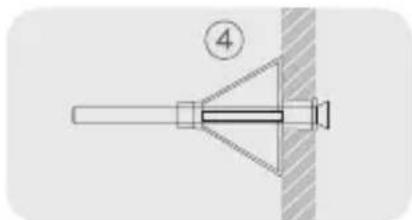
natural_image
Pure mechanical diagram showing a lever and pin without any text, numbers, or symbolsnatural_image
Technical line drawing of a mechanical linkage assembly with multiple bolted components (no text or symbols)PASS05
natural_image
Technical line drawing of a mechanical component with no visible text or symbols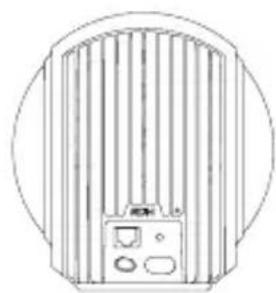
natural_image
Line drawing of a vertical fan or vent with internal components, enclosed in a circular frame (no text or symbols)natural_image
Simple line drawing of a pulley system with two wheels and a handle, showing rotational motion arrows (no text or symbols)natural_image
White Phantom air purifier device with a metallic handle attachment (no visible text or symbols on the device body)包装内容
natural_image
Pure diagram of a symmetrical mechanical or architectural component with no text, numbers, or symbols步骤3
钻墙请严格按照以下说明进行操作。
natural_image
Pure mechanical diagram showing a shaft and flange without any text, numbers, or symbolsnatural_image
Line drawing of a screw with threaded end (no text or symbols)钻孔深度(最小值):60 毫米
钻孔直径:8毫米

检查螺丝和销钉不会在空隙中转动。
2一实木墙:
4个直径5×50毫米的螺丝

natural_image
Pure line drawing of a screw with no text or symbols钻孔深度(最小值):50 毫米
钻孔直径:2毫米
natural_image
Pure geometric diagram of a symmetrical structure with no text, numbers, or symbols4 个M5×50毫米的螺丝

natural_image
Simple line drawing of a rectangular object with a triangular tip on the left end (no text or symbols)钻孔直径:8毫米
natural_image
Diagram showing a textured rectangular object with a diagonal line and a circled number 1, no text or symbols present.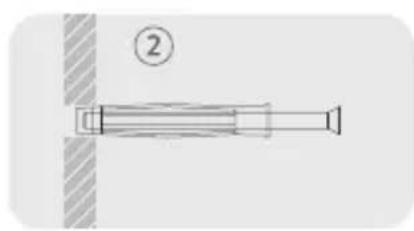
natural_image
Pure mechanical component diagram without any text, numbers, or symbols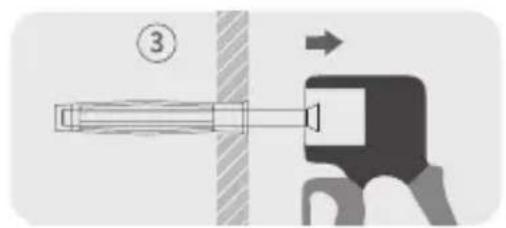
text_image
Diagram showing a mechanical device with labeled component 3 and directional arrow, likely illustrating a process or assembly.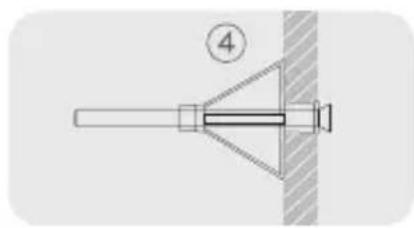
natural_image
Pure diagram of a mechanical component with no text, numbers, or symbolsnatural_image
Technical line drawing of a mechanical component with multiple cylindrical pins and connecting rods (no text or symbols)步骤5
务必两个人一起安装。

natural_image
Technical line drawings of a medical device with cross-sectional and top views (no text or symbols)natural_image
Simple line drawing of a pulley system with two wheels and a handle, showing rotational motion (no text or symbols)natural_image
White electric shower unit with a metallic handle and brand logo (no visible text or symbols on the device body)包裝內容物
— Gecko 組裝
— 1x用於Gecko上Phantom 固定螺絲釘
— 4x用於實心牆的膨脹螺絲
— 4x用於實心牆的螺絲釘
— 4x用於空心牆膨脹螺絲
— 4x用於空心牆的螺絲釘
— 4x 螺絲飾蓋
|安裝
步驟 1
打開包裝並取出所有零件。
步驟2
natural_image
Pure diagram of a symmetrical mechanical or architectural component with no text, numbers, or symbols步驟 3
請按照以下指示操作鑽牆。
natural_image
Pure mechanical diagram showing a shaft and flange without any text, numbers, or symbols4個螺絲釘∅5×50毫米

natural_image
Line drawing of a screw with threaded shaft and triangular head (no text or symbols)鑽孔深度(最小):60毫米
鑽孔直徑:8毫米

請檢查螺絲釘和膨漲螺絲並無空轉的情形。
2—實木板牆:
4個螺絲釘∅5×50毫米

natural_image
Pure line drawing of a screw with no text or symbols鑽孔深度(最小):50毫米
鑽孔直徑:2毫米
3—13毫米厚的石膏板牆:
4 個膨脹螺絲∅10 x 50毫米

natural_image
Pure geometric diagram of a symmetrical structure with no text, numbers, or symbols4個螺絲釘M5x 50毫米

natural_image
Simple line drawing of a long rectangular object with a triangular tip at the top (no text or symbols)鑽孔直徑:8毫米
natural_image
Diagram showing a textured rectangular object with a diagonal line and a circled number 1, no text or symbols present.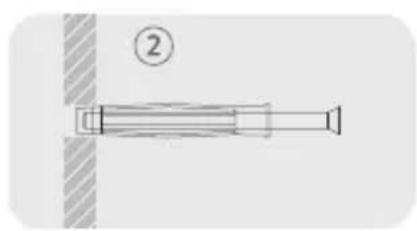
natural_image
Pure mechanical component diagram without any text, numbers, or symbols
text_image
Diagram showing a mechanical device with labeled component 3 and directional arrow, likely illustrating a process or assembly.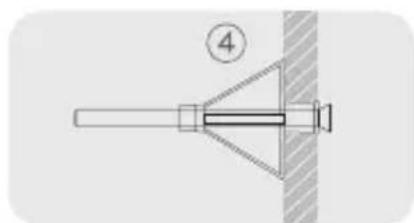
natural_image
Pure mechanical diagram showing a pin inserted into a bracket with a numbered label (4), no text or symbols present.natural_image
Technical line drawing of a mechanical assembly with multiple cylindrical components and connecting rods (no text or symbols)步驟5
請務必由兩個人安裝此產品。
natural_image
Technical line drawing of a mechanical component with no visible text or symbols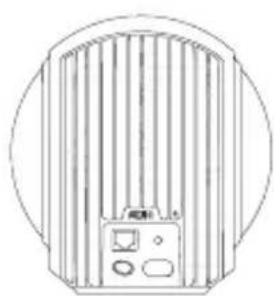
natural_image
Line drawing of a cylindrical fan or vent with internal blades and control panel (no text or symbols)natural_image
Simple line drawing of a pulley system with two wheels and a handle, showing rotational motion arrows (no text or symbols)natural_image
White PHANTOM electric shaver with a metallic handle attachment (no visible text or symbols on the device body)구성품 확인
-조립된Gecko
natural_image
Technical line drawings of a box, a bracket with screw holes, and a mechanical clamp (no text or symbols)2단계
natural_image
Pure diagram of a symmetrical mechanical or architectural component with no text, numbers, or symbols3단계
natural_image
Pure mechanical diagram showing a shaft and flange without any text, numbers, or symbols나사 4개 ∅5 x 50 mm

natural_image
Line drawing of a screw with threaded shaft and triangular head (no text or symbols)구멍 길이 (최소) : 60 mm
구멍 직경 :8mm
natural_image
Pure line drawing of a screw with no text or symbols구멍 길이 (최소) : 50 mm
구멍 직경 : 2 mm
3-13mm석고보드:
칼브릭 4개 ∅10 x 50mm

natural_image
Pure geometric diagram of a symmetrical shape with no text, numbers, or symbols나사 4개 M5 x 50 mm

natural_image
Simple line drawing of a rectangular object with a pointed tip on the left end (no text or symbols)구멍 직경:8mm
natural_image
Diagram showing a textured rectangular object with a diagonal line and a circled number 1, no text or symbols present.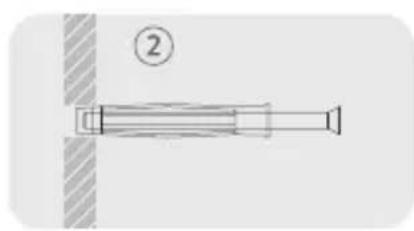
natural_image
Pure mechanical component diagram without any text, numbers, or symbols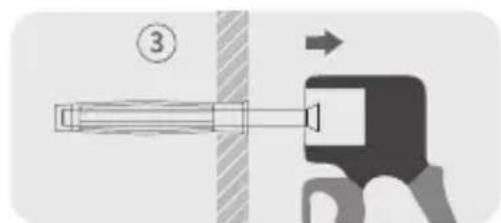
text_image
Diagram showing a mechanical device with labeled component 3 and directional arrow, likely illustrating a process or assembly.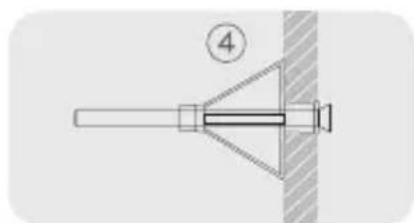
natural_image
Pure mechanical diagram showing a pin inserted into a bracket with a numbered label (4), no text or symbols present.natural_image
Technical line drawing of a mechanical linkage assembly with multiple bolted components (no text or symbols)5단계
성인 2인이 같이 설치하십시오.

Phantom 를Gecko위에놓은후,제공된전용나사를이용해최대로조이십시오.
주의: 적정토크값은5 N.m입니다.
natural_image
Technical line drawing of a mechanical component with no visible text or symbols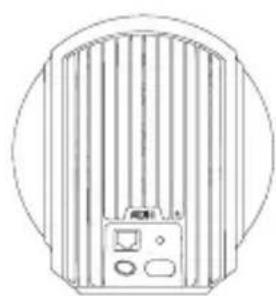
natural_image
Line drawing of a vertical fan or vent with control panel and buttons, enclosed in a circular frame (no text or symbols)natural_image
Simple line drawing of a pulley system with two wheels and a handle, showing rotational motion arrows (no text or symbols)natural_image
White PHANTOM electric shaver with a metallic handle attachment (no visible text or symbols on the device body)内容物
natural_image
Pure diagram of a symmetrical mechanical or architectural component with no text, numbers, or symbols手順 3
natural_image
Pure mechanical diagram showing a shaft and flange without any text, numbers, or symbols4本のねじ∅5 x 50 mm

natural_image
Line drawing of a screw with threaded shaft and triangular head (no text or symbols)穴の深さ (最低でも): 60 mm
穴径: 8mm
natural_image
Pure line drawing of a screw with no text or symbols穴の深さ (最低でも): 50 mm
穴径:2mm
3-13 mm石膏ボードの場合:
4本のボルト ∅10 x 50mm

natural_image
Pure geometric diagram of a symmetrical structure with no text, numbers, or symbols4本のねじM5 x 50 mm

natural_image
Simple line drawing of a rectangular object with a triangular tip on the left end (no text or symbols)穴径: 8mm
natural_image
Diagram showing a textured rectangular object with a diagonal line and a circled number 1, no text or symbols present.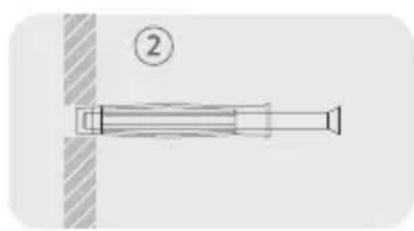
natural_image
Pure mechanical component diagram without any text, numbers, or symbols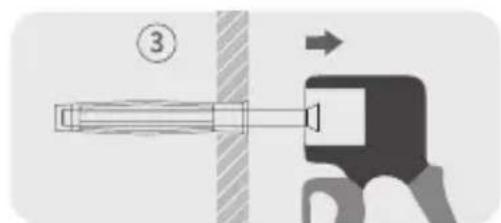
text_image
Diagram showing a mechanical device with labeled component 3 and directional arrow, likely illustrating a process or assembly.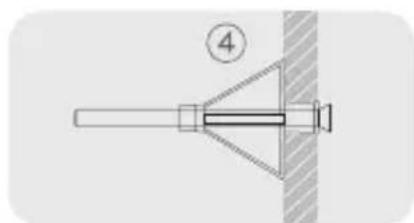
natural_image
Pure mechanical diagram showing a pin inserted into a bracket with a numbered label (4), no text or symbols present.natural_image
Technical line drawing of a mechanical component with multiple cylindrical pins and connecting rods (no text or symbols)手順 5
取付作業は必ず二人で行ってください。

natural_image
Technical line drawing of a mechanical component with no visible text or symbols