HK 37 To Go - Heated blanket BEURER - Free user manual and instructions
Find the device manual for free HK 37 To Go BEURER in PDF.



| Product type | Portable heating cushion |
| Brand | Beurer |
| Model | HK 37 To Go |
| Power supply | Rechargeable power bank charger (5 V, 1 A via USB) |
| Full charging time | Approximately 4.5 hours (if battery completely empty) |
| Temperature levels | 3 (green = min, yellow = medium, red = max) |
| Automatic shut-off | Yes, after approximately 110 minutes |
| Safety | Automatic safety shut-off system in case of overheating |
| Machine washable | Yes, delicate cycle at 30 °C, max 10 washes |
| Care instructions | Do not iron, do not tumble dry, do not dry clean, do not bleach |
| Storage | Flat, in a dry and cool place; recharge the battery at least once a year |
| Usage | For warming the human body, household use only (non-medical) |
| Target audience | Children from 3 years under supervision (minimum temperature); not recommended for children 0-3 years and people insensitive to heat |
| Included accessories | 1 heating cushion, 1 power bank charger, 1 charging cable, 1 instruction manual |
| Available spare parts | Power bank charger (ref. 163.296), charging cable (ref. 163.297) |
| Warranty | 3 years (worldwide, subject to conditions) |
| Pacemaker compatibility | Use possible after medical advice (electric fields < 5,000 V/m, magnetic fields < 80 A/m) |
Frequently Asked Questions - HK 37 To Go BEURER
User questions about HK 37 To Go BEURER
0 question about this device. Answer the ones you know or ask your own.
Ask a new question about this device
Download the instructions for your Heated blanket in PDF format for free! Find your manual HK 37 To Go - BEURER and take your electronic device back in hand. On this page are published all the documents necessary for the use of your device. HK 37 To Go by BEURER.
USER MANUAL HK 37 To Go BEURER
natural_image
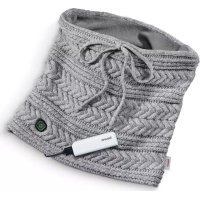
Close-up of a knitted sweater with visible braided texture and a beurer tag (no text or symbols on the garment itself)DE Beheizter Schlauchschal mit Powerbank
Gebrauchsanweisung .... 2
EN Heated loop scarf with powerbank Instructions for use 12
FR Snood chauffant avec chargeur power bank
Mode d'emploi....21
ES Bufanda tubular calentada con batería externa
Instrucciones de uso....30
IT Scaldacollo riscaldato con power bank
Istruzioni per l'uso ....40
TR Isiticılı boyunluk ve güç kaynağı
Kullanım kılavuzu.... 49
RU Шарф-хомут с подогревом,
с аккумулятором
Инструкция по применению......58
PL Podgrzewany szalik typu komin z powerbankiem
Instrukcja obsługi....68
DA Opvarmet tubehalstørklæde med powerbank
Betjeningsvejledning....78
SV Uppvärmd tubhalsduk med powerbank
Bruksanvisning....87
NO Oppvarmet tubeskjerf med powerbank Bruksanvisning....96
FI Virtapankilla varustettu lämmitettävä tuubihuivi
Käyttöohje....105
DEUTSCH
natural_image
White portable power bank connected to a smartphone displaying a battery icon (no text or symbols visible)natural_image
Black-and-white portrait of a smiling woman wearing a knitted scarf (no text or symbols visible)7. Anwendung
Einschalten
Thank you for choosing a product from our range. Our name stands for high-quality, thoroughly tested products for applications in the areas of heat, weight, blood pressure, body temperature, pulse, gentle therapy, massage, beauty, air and baby.
With kind regards
Your Beurer team
Contents
- Included in delivery....12
- Signs and symbols....12
- Intended use....13
- Important instructions Retain for future use....13
- Device description....15
-
Initial use .... 16
-
Usage 17
- Cleaning and maintenance....18
- Accessories and replacement parts......19
- What if there are problems? .....19
- Disposal....19
- Technical specifications .....19
- Warranty / Service 20
1. Included in delivery
Check that the exterior of the cardboard delivery packaging is intact and make sure that all contents are present. Before use, ensure that there is no visible damage to the device or accessories and that all packaging material has been removed. If you have any doubts, do not use the device and contact your retailer or the specified Customer Service address.
1x powerbank
1x heat pad
1x charging cable
1x these instructions for use
2. Signs and symbols
The following symbols are used on the device, in these instructions for use, on the packaging and on the type plate for the device:
 | WarningWarning instruction indicating a risk of injury or damage to health |  | Do not insert pins! |
 | ImportantSafety note indicating possible damage to the device/accessory |  | Do not use when folded or bunched up! |
 | Product informationNote on important information |  | Must not be used by very young children (0 – 3 years old). |
 | Read the instructions Extra-delicate cycle | 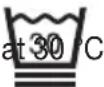 | |
 | Disposal in accordance with the Waste Electrical and Electronic Equipment EC Directive – WEEE |  | Do not bleach |
 | Dispose of packaging in an environmentally friendly manner |  | Do not tumble dry |
 | Certification symbol for products that are exported to the Russian Federation and members of the CIS |  | Do not iron |
 | CE labellingThis product satisfies the requirements of the applicable European and national directives. |  | Do not dry clean |
 | Manufacturer Class III equipment |  |
3. Intended use

IMPORTANT
This heat pad is only designed to warm up the human body.
This heat pad is suitable for personal use only, not for medical or commercial purposes.
4. Importantinstructions Retain for future use

WARNING
- Non-observance of the following notes may result in personal injury or material damage (electric shock, skin burns, fire). The following safety and hazard information is not only intended to protect your health and the health of others, it should also protect the product. For this reason, pay attention to these safety notes and include these instructions for use when handing over the product to others.
- This heat pad must not be used by persons who are not sensitive to heat or by vulnerable persons who may not be able to react to overheating (e.g. diabetics, people with skin alterations due to illness or scarred tissue in the application area, after taking pain relief medication or alcohol).
- This heat pad must not be used by very young children (0 – 3 years old) as they are unable to respond to overheating.
- The heat pad can be used by children older than 3 and younger than 8 years of age provided they are supervised. For this, the control must always be set to the minimum temperature.
- This heat pad may be used by children over the age of 8 and by people with reduced physical, sensory or mental skills or a lack of experience or knowledge, provided that they are supervised and have been instructed on how to use the heat pad safely, and are fully aware of the consequent risks of use.
- Children must not play with the heat pad or the powerbank.
- Cleaning and maintenance carried out by the user must not be performed by children unless supervised.
- This heat pad is not designed for use in hospitals.
- Do not insert needles.
- Do not use when folded or bunched up.
- Do not use if wet.
- This heat pad must only be used in conjunction with the battery pack/powerbank specified on the label.
- The electrical and magnetic fields emitted by this heat pad may interfere with the function of a pacemaker. However, they are still well below the limits: electrical field strength: max. 5000 V/m, magnetic field strength: max. 80 A/m, magnetic flux density: max. 0.1 milli-tesla. Please therefore consult your doctor and the manufacturer of your pacemaker before using this heat pad.
- Do not pull, twist or make sharp bends in the cables.
- Please check the heat pad and powerbank frequently for signs of wear and tear or damage. If any such signs are evident or if the heat pad or powerbank have been used incorrectly, they must be checked by the manufacturer before being switched on again.
- If the connection cable of this heat pad is damaged, it must be replaced by the manufacturer, its customer service department or a similarly qualified person to avoid any risk.
- When this heat pad is switched on:
- Do not place any objects on it (e.g. suitcase or washing basket) - Heat sources, such as hot water bottles, heat pads or similar must not be placed on the pad.
- Do not expose the powerbank to direct sunlight or high temperatures. Otherwise the powerbank could overheat and be damaged irreparably.
- Never expose the powerbank to extreme heat. This applies in particular to storage in a car. Extreme temperatures can occur inside the vehicle and in the glove compartment when the vehicle is parked for a long period of time. Therefore, remove the powerbank from the vehicle.
- The powerbank must never be charged and run down at the same time.
- Never charge the powerbank using the USB port on your computer, as this could become overloaded.
- Do not cover the powerbank with covers, cushions, or similar during charging in order to prevent overheating.
- When using a USB mains part, the socket used must always be easily accessible, so that the USB mains part can be disconnected from the socket quickly in a hazardous situation. Please also observe the instructions for use for the USB mains part.
- Risk of explosion! Incorrect handling of batteries can lead to fire, explosions, leakage of hazardous substances or other hazardous situations! Do not throw the powerbank into fire, as the integrated battery could explode.
- Do not disassemble, split or crush the batteries.
- Only use chargers specified in the instructions for use.
- Batteries must be charged correctly prior to use. The instructions from the manufacturer and the specifications in these instructions for use regarding correct charging must be observed at all times.
• Always observe the notes on operation (section 4), cleaning and maintenance (section 5) and storage (section 6).
- If you should have any questions about using our devices, please contact our Customer Services department.
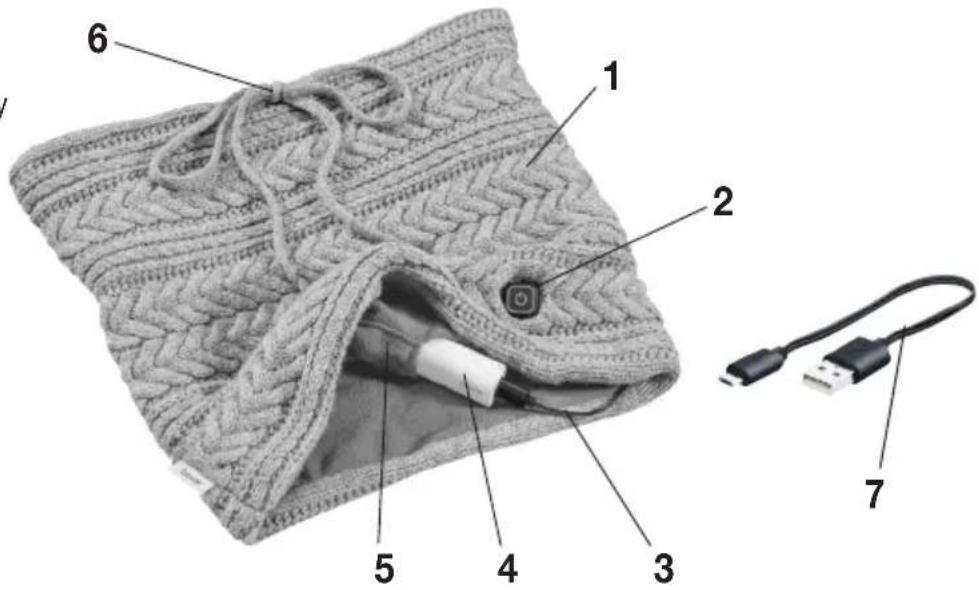
5. Device description
1 Heat pad
2 On/Off button with LED display
3 Connecting cable
4 Powerbank
5 Built-in pocket for powerbank
6 Drawstring
7 Charging cable
6. Initial use
Safety

IMPORTANT
The heat pad is fitted with a SAFETY SWITCH-OFF function. The SAFETY SWITCH-OFF stops the heat pad overheating by automatically switching it off in the event of a fault. Once the SAFETY SWITCH-OFF has taken place, the On/Off button (2) on the heat pad and the white LED display on the powerbank (4) remain illuminated. After cooling, the heat pad switches on again automatically.
Charging the powerbank

IMPORTANT
Before you begin charging the powerbank (4), please note the information in section 2 “Important instructions”.
The powerbank must be charged fully prior to initial use or if the device has not been used for a long period. If the powerbank is completely run down, the charging process will take approx. 4.5 hours until it is fully charged again. To charge the powerbank fully, proceed as follows:
- Insert the charging cable (7) provided into the connection socket of the powerbank.
- Connect the other end of the charging cable to a USB charger via the USB port (USB charger with 5V / 1A SELV in accordance with the requirements of IEC/EN 60335, not included). Whilst charging, the LED display on the powerbank flashes white.
- The flashing sequence of the white LED display on the powerbank indicates the charging status of the powerbank when charging and running down:
1 x flash: 0 - 25%
2 x flash: 26 - 50%
3 x flash: 51 - 75%
4 x flash: 76 - 99%
Permanently lit up: 100%
- As soon as the LED display on the powerbank lights up permanently white, the powerbank is fully charged (after approx. 4.5 hours from empty).
- The white LED display on the powerbank goes out shortly after the powerbank has been disconnected from the USB charger.
- The powerbank should be charged at least once a year to retain its capacity.
- Do not cover the powerbank with covers, cushions or similar during the charging process in order to prevent overheating.
- Only charge the powerbank in a dry environment and at normal room temperature.
Charging a smartphone via powerbank
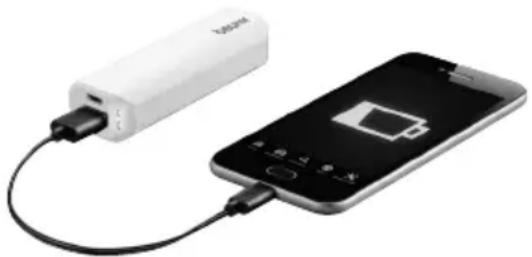
The powerbank can be used for more than just operating the heat pad – it can also be used to charge the battery of a smartphone. To charge your smartphone using the powerbank, proceed as follows:
- Connect the powerbank to your smartphone using the original USB charging cable from your smartphone manufacturer.
natural_image
White portable power bank connected to a smartphone displaying a battery icon (no text or symbols visible)Operating the heat pad
- Pull the heat pad over your head. Ensure that the drawstring (6) is positioned at the top, facing the front. Ensure that the heating element is located at your neck.
• To adjust the size, you can pull on the drawstring (6). - Place the charged powerbank (4) into the built-in pocket (5) on the heat pad.
- Insert the connector plug of the heat pad's connecting cable (3) into the connection socket on the powerbank. The LED display of the On/Off button (2) on the heat pad briefly lights up white three times. The heat pad is now ready for use.

IMPORTANT
Ensure that the heat pad will not bunch up or become folded during use.

natural_image
Black-and-white portrait of a smiling woman wearing a knitted scarf (no text or symbols visible)7. Usage
Switching on
- Press the On/Off button (2) to switch on the heat pad (1). The LED display of the On/Off button lights up green (minimum heat). The LED display of the powerbank (4) lights up or flashes white according to the charge status of the powerbank.
- If you press the On/Off button again, the temperature setting will increase (medium heat). The LED display of the On/Off button lights up yellow.
- If you press the On/Off button again, the heat pad switches to the maximum temperature setting (maximum heat). The LED display of the On/Off button lights up red.
- If you press the On/Off button again, the heat pad switches off. The LED display of the On/Off button goes out immediately and the LED display on the powerbank goes out after a few seconds.

WARNING
If the heat pad is being used over several hours, we recommend that you set the lowest temperature setting to avoid overheating the heated body part, which may lead to burns to the skin.

NOTE
When the powerbank (4) has been almost completely run down, the heat pad is switched off automatically to protect the powerbank. The powerbank must then be charged.
Setting the temperature
OFF: On/Off button (2) not lit
Setting 1: Minimum heat (LED display of the On/Off button lights up green)
Setting 2: Medium heat (LED display of the On/Off button lights up yellow)
Setting 3: Maximum heat (LED display of the On/Off button lights up red)
Switching off
Press the On/Off button (2) to switch off the heat pad (1). The switching sequence is 1 - 2 - 3 - OFF ... If the heat pad is switched off, the LED display of the On/Off button goes out immediately and the LED display on the powerbank (4) goes out after a few seconds.

NOTE
Please note that the powerbank (4) must be protected against extreme cold to maintain its full performance.
Automatic switch-off time
This heat pad (1) is equipped with an automatic switch-off function. This turns off the heat supply approx. 110 minutes after the initial use. The On/Off button (2) on the heat pad and the white LED display on the powerbank go out.
You can switch the heat pad on again immediately by pressing the On/Off button. If it is no longer possible to switch the heat pad on, then the powerbank has been run down.
8. Cleaning and maintenance

IMPORTANT
- Before cleaning, always first disconnect the powerbank (4) from the heat pad (1). Remove the powerbank from the heat pad's pocket. Otherwise there is a risk of damage.

IMPORTANT
- The powerbank (4) must never come into contact with water or other liquids as this may cause damage.
To clean the powerbank (4), use a dry, lint-free cloth. Do not use any chemical or abrasive cleaning agents.

IMPORTANT
- Please note that the heat pad (1) must not be chemically cleaned, wrung out, tumble dried, put through a mangle or ironed. Otherwise the heat pad may be damaged.
This heat pad is machine-washable. To do this, place the connecting cable (3) into the built-in pocket (5) and place the heat pad (1) in a wash bag. Set the washing machine to a particularly gentle wash cycle at 30 °C (wool cycle).
For ecological reasons, always wash the heat pad (1) together with other textiles.
Use a delicate laundry detergent and measure it out according to the manufacturer's instructions.

IMPORTANT
- Please note that washing the heat pad (1) too frequently has a negative effect on the product.
The heat pad should therefore be washed in a washing machine a maximum of 10 times during its life. Let the heat pad dry flat on a clothes horse.

IMPORTANT
- Do not use pegs or similar items to attach the heat pad (1) to the clothes horse, otherwise the heat pad may be damaged.
- Only reconnect the heat pad to the powerbank (4) once the heat pad and the connector plug of the connecting cable (3) are completely dry. Otherwise the powerbank and the heat pad could be damaged.
Storage
If you do not plan to use the heat pad for a long period of time, we recommend that you store it flat and spread out. Always remove the powerbank. Ensure there are no sharp folds in the heat pad at any time.

IMPORTANT
Please allow the heat pad (1) to cool down before storing, otherwise the heat pad may be damaged.
To avoid sharp folds in the heat pad, do not place any heavy objects on top of it while it is being stored.

IMPORTANT
Place the powerbank (4) in a dry, dust-free and cool place, away from direct sunlight. The powerbank should be charged once a year to retain its capacity.
9. Accessories and replacement parts
For replacement parts and additional items visit www.beurer.com or contact the corresponding service address in your country (according to the service address list).
Replacement parts and additional items are also available from retailers.
• Powerbank (item no. 163.296)
- Charging cable (item no. 163.297)
USB ^® is a registered trademark of USB Implementers Forum Inc.
10. What if there are problems?
| Problem Cause Solution | ||
| The LED display of the On/Off button (2) on the heat pad (1) and the white LED display on the powerbank (4) do not light up when:– the powerbank is connected to the heat pad and– the On/Off button has been pressed. | The powerbank has been fully run down. | Charge the powerbank. |
| There was a SAFETY SWITCH-OFF due to a fault in the heat pad. | Allow the heat pad to cool down to room temperature and switch it on again. | |
| The LED display of the On/Off button (2) on the heat pad (1) and the white LED display on the powerbank (4) do not light up when:–thefully charged powerbank is connected to the heat pad and– the On/Off button has been pressed. | The heat pad or the powerbank is faulty. | Send the heat pad and the powerbank for servicing. |
11. Disposal
For environmental reasons, do not dispose of the device in the household waste at the end of its service life. Dispose of the device at a suitable local collection or recycling point in your country. Dispose of the device in accordance with EC Directive – WEEE (Waste Electrical and Electronic Equipment). If you have any questions, please contact the local authorities responsible for waste disposal.
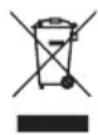
The empty, completely flat batteries must be disposed of through specially designated collection boxes, recycling points or electronics retailers. You are legally required to dispose of the batteries.
12. Technical specifications
Powerbank:
Operating temperature: 0 to +40 °C
Storage temperature: -10 °C to +45 °C
Recommended storage temperature: -10 °C to +25 °C
For technical data, see the type plate label on the heat pad and on the powerbank.
13. Warranty / Service
Beurer GmbH, Söflinger Straße 218, 89077 Ulm, Germany (hereinafter referred to as “Beurer”) provides a warranty for this product, subject to the requirements below and to the extent described as follows.
The warranty conditions below shall not affect the seller's statutory warranty obligations which ensue from the sales agreement with the buyer.
The warranty shall apply without prejudice to any mandatory statutory provisions on liability.
Beurer guarantees the perfect functionality and completeness of this product.
The worldwide warranty period is 3 years, commencing from the purchase of the new, unused product from the seller.
The warranty only applies to products purchased by the buyer as a consumer and used exclusively for personal purposes in the context of domestic use.
German law shall apply.
During the warranty period, should this product prove to be incomplete or defective in functionality in accordance with the following provisions, Beurer shall carry out a repair or a replacement delivery free of charge, in accordance with these warranty conditions.
If the buyer wishes to make a warranty claim, they should approach their local retailer in the first instance: see the attached “International Service” list of service addresses.
The buyer will then receive further information about the processing of the warranty claim, e.g. where they can send the product and what documentation is required.
A warranty claim shall only be considered if the buyer can provide Beurer, or an authorised Beurer partner, with
- a copy of the invoice/purchase receipt, and
- the original product.
The following are explicitly excluded from this warranty:
- deterioration due to normal use or consumption of the product;
- accessories supplied with this product which are worn out or used up through proper use (e.g. batteries, rechargeable batteries, cuffs, seals, electrodes, light sources, attachments and nebuliser accessories);
- products that are used, cleaned, stored or maintained improperly and/or contrary to the provisions of the instructions for use, as well as products that have been opened, repaired or modified by the buyer or by a service centre not authorised by Beurer;
- damage that arises during transport between manufacturer and customer, or between service centre and customer;
- products purchased as seconds or as used goods;
- consequential damage arising from a fault in this product (however, in this case, claims may exist arising from product liability or other compulsory statutory liability provisions).
Repairs or an exchange in full do not extend the warranty period under any circumstances.
FRANÇAIS
Chère cliente, cher client,
natural_image
White portable power bank connected to a smartphone displaying a battery icon (no text or symbols visible)natural_image
Black-and-white portrait of a smiling woman wearing a knitted scarf (no text or symbols visible)7. Utilisation
Mise sous tension
natural_image
White portable power bank connected to a smartphone displaying a battery icon (no text or symbols visible)natural_image
Black-and-white portrait of a smiling woman wearing a knitted scarf (no text or symbols visible)7. Aplicación
Encendido
natural_image
White portable power bank connected to a smartphone displaying a battery icon (no text or symbols visible)natural_image
Black-and-white portrait of a smiling woman wearing a knitted scarf (no text or symbols visible)
ATTENZIONE
• power bank (cod. art. 163.296)
natural_image
White portable power bank connected to a smartphone displaying a battery icon (no text or symbols visible)natural_image
Black-and-white portrait of a smiling woman wearing a knitted scarf (no text or symbols visible)7. Kullanım
Açma
natural_image
White portable power bank connected to a smartphone displaying a battery icon (no text or symbols visible)natural_image
Black-and-white portrait of a smiling woman wearing a knitted scarf (no text or symbols visible)
ВНИМАНИЕ
natural_image
White portable power bank connected to a smartphone displaying a battery icon (no text or symbols visible)natural_image
Black-and-white portrait of a smiling woman wearing a knitted scarf (no text or symbols visible)
UWAGA
1 x blink: 0 - 25 %
2 x blink: 26 - 50 %
3 x blink: 51 - 75 %
4 x blink: 76 - 99 %
Lyser fast: 100 %
natural_image
White portable power bank connected to a smartphone displaying a battery icon (no text or symbols visible)Brug af varmepuden
natural_image
Black-and-white portrait of a smiling woman wearing a knitted scarf (no text or symbols visible)7. Anvendelse
Tænding
natural_image
White portable power bank connected to a smartphone displaying a battery icon (no text or symbols visible)Använda värmekudden
natural_image
Black-and-white portrait of a smiling woman wearing a knitted scarf (no text or symbols visible)7. Användning
Inkoppling
natural_image
White portable power bank connected to a smartphone displaying a battery icon (no text or symbols visible)Bruk av varmeputen
natural_image
Black-and-white portrait of a smiling woman wearing a knitted scarf (no text or symbols visible)7. Bruk
Slå på
- Trykk på av/på-knappen (2) for å slå på varmeputen (1). LED-indikatoren på av/på-knappen må lyse grønt (minimum varme). LED-indikatoren på powerbanken (4) lyser eller blinker hvitt avhengig av powerbankens ladenivå.
- Når du trykker på av/på-knappen en gang til, økes temperaturtrinnet (middels varme). LED-indikatoren på av/på-knappen lyser gult.
- Når du trykker på av/på-knappen en gang til, slås varmeputen på med det høyeste temperaturtrinnet (maksimal varme). LED-indikatoren på av/på-knappen lyser rødt.
- Når du trykker på av/på-knappen en gang til, slås varmeputen av. LED-indikatoren på av/på-knappen slukner straks, og LED-indikatoren på powerbanken slukner etter et par sekunder.