
ELPSP02 - Speakers EPSON - Free user manual and instructions
Find the device manual for free ELPSP02 EPSON in PDF.
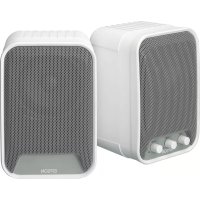

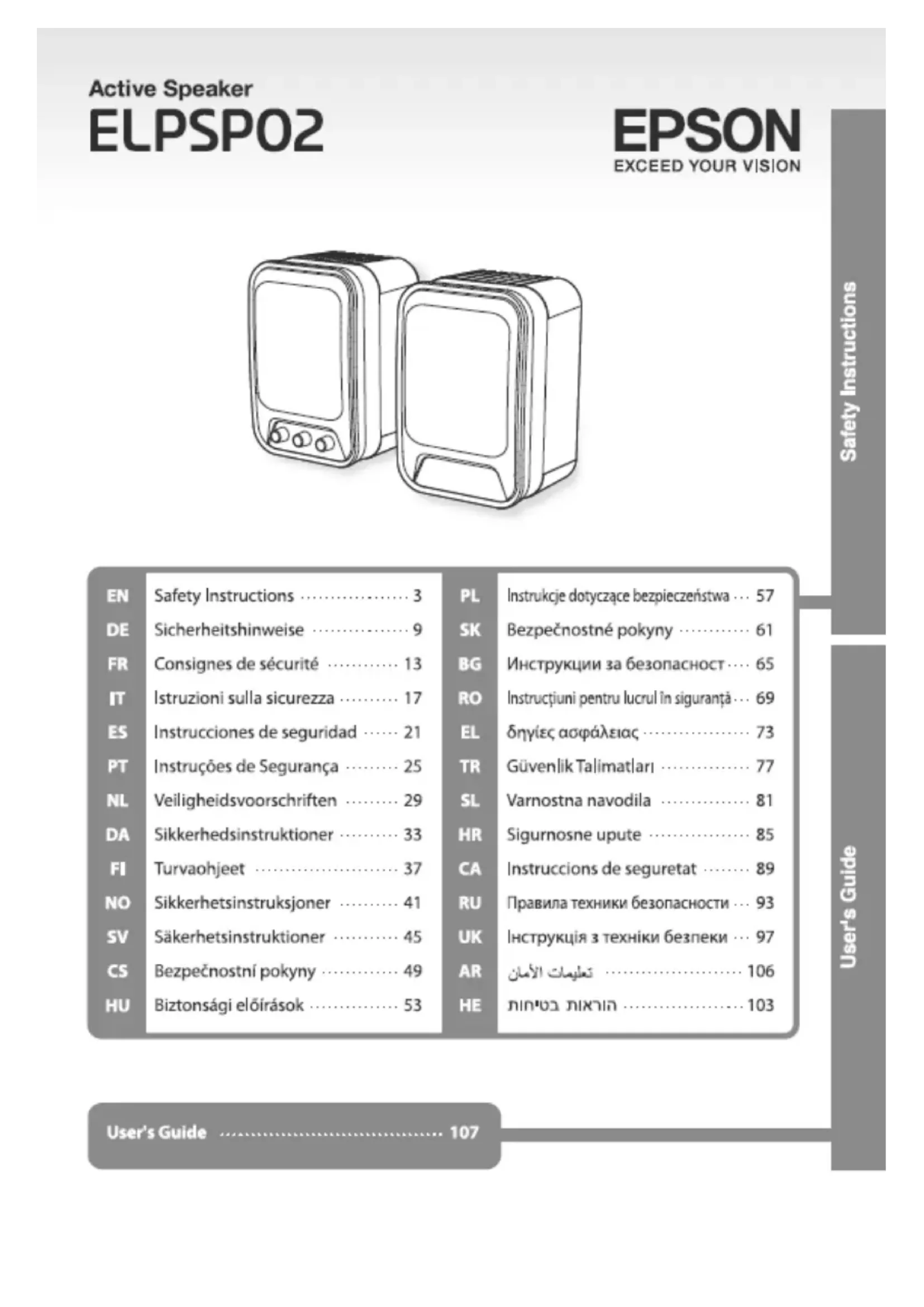


| Product type | Speaker |
| Brand | Epson |
| Model | ELPSP02 |
| Dimensions (approx.) | 300 x 200 x 150 mm |
| Weight (approx.) | 2 kg |
| Power supply | AC adapter (included) |
| Main functions | Audio output, stereo, wall-mountable |
| Care and cleaning | Unplug before cleaning, use a dry cloth |
| Safety | Do not open, avoid moisture, do not obstruct |
| Spare parts and repairability | AC adapter and cables available from Epson customer service |
| General information | Complies with ICES-003 (Canada) standard |
Frequently Asked Questions - ELPSP02 EPSON
User questions about ELPSP02 EPSON
0 question about this device. Answer the ones you know or ask your own.
Ask a new question about this device
Download the instructions for your Speakers in PDF format for free! Find your manual ELPSP02 - EPSON and take your electronic device back in hand. On this page are published all the documents necessary for the use of your device. ELPSP02 by EPSON.
USER MANUAL ELPSP02 EPSON
Thank you very much for purchasing this product. For your safety, read the attached documents carefully to use this product correctly.
After you have read all instructions, keep this information for later reference.
The following symbols are used to show dangerous operation or handling. Make sure you understand them before reading the guide.
| Warning | This symbol indicates information that, if ignored, could possibly result in serious personal injury or even death due to incorrect handling. |
| Caution | This symbol indicates information that, if ignored, could possibly result in personal injury or physical damage due to incorrect handling. |
Notes on Installation
| Warning |
| When installing this product, keep the enough strength of the wall. Do not install the product to a wall at an angle or an unstable wall. Otherwise, the product may fall, and which may cause injury or an accident. EPSON takes no responsibility for any fall accident due to strength poverty of the wall or fixture for the product. Be sure to follow the instructions of this manual when installing this product and the fixture. Otherwise, the product may fall, and which may cause injury or an accident. Installation to a wall requires a special technique. If not installed properly, the product may fall, and which may cause injury or an accident. Do not set up the product in places where there is a lot of humidity or dust, near cooking or heating appliances, may come in contact with oily or cigarette smoke, or steam. Do not set up the product in places where it might be subjected to vibration or shock. Otherwise, the screws may be loosened and the product may fall, which may cause injury or an accident. Make sure to turn off this product and the connected equipment during installation. Be sure to attach safety wires. For installation of the safety wires, keep the enough strength of the ceiling. |
| ·Tighten the screws thoroughly. Be sure to re-tighten them for confirmation. Otherwise, the product may fall and cause injury or an accident. ·Do not apply threadlocker, lubricant or oil to the attachment area of the product. Otherwise, the housing or fixing part may crack and the product may malfunction. Or the product may fall and cause injury or an accident. |
| Caution |
| ·Secure the product without any gap against the wall. Make sure the screws are not secured at an angle. Check if the screws are tightened firmly. |
Notes on Usage
| Warning |
| Do not stand on the product or hang a heavy object on it. Do not loosen the screws after installation. Check their condition periodically and confirm no screw is loosened. If any, re-tighten it securely. Do not open any covers on the product except as specifically explained in the User's Guide, and do not attempt to disassemble or modify the product. Doing so may cause fire, electric shock, or an accident, because some inner parts use a high voltage. Refer all repairs to qualified service personnel. Take care not to spill any beverage such as tea, coffee or juice onto the product, or spray aerosol insecticide. It may cause malfunction, fire, or electric shock. If any liquid has been spilled on the product, turn off the power and unplug the AC adapter immediately, and then contact your dealer. Continuous use may result in fire or electric shock. Under the following conditions, turn off the power immediately, unplug the product, disconnect all cables, and then contact your dealer or EPSON customer service call center:If smoke, strange odors or strange noises come from the product.If liquid or foreign objects get inside the product.If the product has been dropped or the housing has been damaged. Continuous use may result in fire or electric shock. Do not try to repair the product for yourself. The power cable supplied with the product is intended to comply with power supply requirements for the country of purchase. Be sure to use the power cable supplied with this product. |
| Do not use the AC adapter that is not supplied with the product and do not use the AC adapter with other than the specified voltage. Otherwise, damage, overheating, fire or electric shock may occur.Do not pull the AC adapter cord or put a heavy object on it. Do not modify the power cable, either.Doing so may cause fire or electric shock.Do not touch the product, AC adapter, plug, or cables with wet hands. Doing so may cause damage, fire, or electric shock.Do not use the AC adapter in a small space, or cover it with a cloth and such. Otherwise, the AC adapter may become hot and may be deteriorated.Take the following precautions when handling the plug. Failure to comply with these precautions could result in fire or electric shock.Do not overload wall outlets, extension cables, or power strips.Do not insert the dusty plug into an outlet.Insert the plug firmly into the outlet.Do not hold the plug with wet hands.Do not pull the power cable when disconnecting the plug. Be sure to hold the plug when disconnecting it.Do not use any damaged power cable. Otherwise, it may cause fire or electric shock.If the power cable is damaged (exposed conductor, breaking or the like), contact your dealer or Epson customer service call center.Do not keep listening ear-piercing sound at high volume for long time.Doing so may adversely affect your hearing ability. |
| Caution |
| Do not turn the volume too high at the beginning. Otherwise, ear-piercing loud sound may come out suddenly and may damage your hearing ability.Make sure to turn the volume down enough before inputting audio from the connected device, and turn it up gradually.Do not use the speakers at a high volume level continuously. Otherwise, their characteristics may be deteriorated or their life may be extremely shortened.Clean the product periodically. If the product has not been cleaned for a long time, dust may build up, which may cause fire or electric shock.Disconnect all cables from the product before cleaning.When cleaning the product, do not use a moistened cloth or solvents such as alcohol, thinner or benzine.The speakers are not magnetically shielded. |
Notes on Storage and Transportation

Warning
- Do not leave the product in places where it may become extremely hot such as in a vehicle with the windows closed, in direct sunlight, or near the exhaust duct of an air conditioner.

Caution
- Before moving the product, turn off the power and unplug from the outlet, and make sure all the cables are disconnected.
For Canadian Users
DECLARATION of CONFORMITY
According to 47CFR, Part 2 and 15
Class B Personal Computers and Peripherals; and/or
CPU Boards and Power Supplies used with Class B Personal Computers
We: Epson America, Inc.
Located at: 3840 Kilroy Airport Way
MS:3-13
Long Beach, CA 90806
Tel: 562-290-5254
Declare under sole responsibility that the product identified herein complies with 47CFR Part 2 and 15 of the FCC rules as a Class B digital device. Each product marketed is identical to the representative unit tested and found to be compliant with the standards. Records maintained continue to reflect that the equipment being produced can be expected to be within the variation accepted, due to quantity production and testing on a statistical basis as required by 47CFR 2.909. Operation is subject to the following two conditions: (1) this device may not cause harmful interference, and (2) this device must accept any interference received, including interference that may cause undesired operation.
Trade Name: EPSON
Type of Product: Active Speaker
Model: ELPSP02
FCC Compliance Statement For United States Users
This equipment has been tested and found to comply with the limits for a Class B digital device, pursuant to Part 15 of the FCC Rules. These limits are designed to provide reasonable protection against harmful interference in a residential installation. This equipment generates, uses, and can radiate radio frequency energy and, if not installed and used in accordance with the instructions, may cause harmful interference to radio communications. However, there is no guarantee that interference will not occur in a particular installation. If this equipment does cause interference to radio and television reception, which can be determined by turning the equipment off and on, the user is encouraged to try to correct the interference by one or more of the following measures.
- Reorient or relocate the receiving antenna.
- Increase the separation between the equipment and receiver.
- Connect the equipment into an outlet on a circuit different from that to which the receiver is connected.
- Consult the dealer or an experienced radio/TV technician for help.
WARNING
The connection of a non-shielded equipment interface cable to this equipment will invalidate the FCC Certification or Declaration of this device and may cause interference levels which exceed the limits established by the FCC for this equipment. It is the responsibility of the user to obtain and use a shielded equipment interface cable with this device. If this equipment has more than one interface connector, do not leave cables connected to unused interfaces. Changes or modifications not expressly approved by the manufacturer could void the user's authority to operate the equipment.
Safety Instructions
Before Use
- Be careful not to spill liquids (water, coffee, juice, etc.) and do not spray insecticides on the device.
This may cause malfunction, fire, or electric shock.
If liquid gets on the device, immediately turn off the power and unplug the power cord from the outlet. After that, contact a specialist.
Continuing to use the device may cause fire or electric shock.
In special cases, immediately turn off the power, unplug the device from the outlet, disconnect all cables, and contact a specialist or the EPSON customer service center for servicing.
If the device emits smoke, an unusual smell, or noise; if liquid or foreign objects get into the device; or if the device falls or its casing is damaged.
Continuing to use the device may cause fire or electric shock.
Do not attempt to repair the device yourself.
The power cord supplied with the device matches the electrical parameters in the country where the device was purchased. Use only the power cord supplied with the device. Use only the power supply unit supplied with the device, and connect the power supply unit only to a power source with the appropriate voltage.
Failure to comply with this requirement may cause damage to the device, overheating, fire, or electric shock.
Do not pull on the power cord of the power supply unit and do not place heavy objects on the cord. Do not modify the power cord.
This may cause fire or electric shock.
Do not touch the power supply unit, power cord, or plug with wet hands.
This may cause damage, fire, or electric shock.
Do not install the power supply unit in a confined space, and do not cover it with cloth or other materials.
Otherwise, the power supply unit may overheat, and its performance may degrade.
- When handling the plug, follow the precautions listed below.
Failure to follow these precautions may result in fire or electric shock.
Do not overload the outlet or use extension cords. Do not insert the plug into an outlet covered with dust. - Insert the plug firmly into the outlet. Do not touch the plug with wet hands. Do not pull the power cord to disconnect the plug from the outlet. Hold only the plug.
Do not pull the cord of the external power supply unit, and do not place heavy objects on it. Do not make any modifications to the power cord.
This may cause fire or electric shock.
Do not touch the connector, external power supply unit, or power plug with wet hands.
This may cause damage to the connector, fire, or electric shock.
Do not use the external power supply unit in places with poor ventilation, and do not cover it.
This may cause overheating of the power supply unit and damage to it.
When handling the plug, follow the precautions listed below.
Improper use of the device may result in electric shock.
Do not overload power outlets, extension cords, or power strips. Do not insert the plug into a damaged outlet. The plug must be fully inserted into the outlet. Do not touch the plug with wet hands. When unplugging the device from the power outlet, do not pull the cord, but grasp the plug.
Do not use a damaged power cord.
This may cause electric shock. If the power cord is damaged (for example, the cord is frayed or broken), contact the dealer or Epson technical support.
- Listening to loud sounds for a long time may damage your hearing.

Caution
Do not immediately set the volume to a very high level. The sound may be distorted, which could lead to hearing damage. When listening to sound from the device, first set the volume to a low level and then gradually increase it. Do not continuously use headphones at high volume. This may lead to deterioration of their characteristics or significant reduction of their service life. - Periodically clean the headphones. If the headphones are not cleaned, dirt may accumulate, which could lead to electric shock. - Disconnect the headphones from the device before cleaning. Do not use volatile liquids such as alcohol, thinner, or benzene to clean the headphones. These liquids may damage the magnetic screen.
.
.
EPSON
.
a a a 1
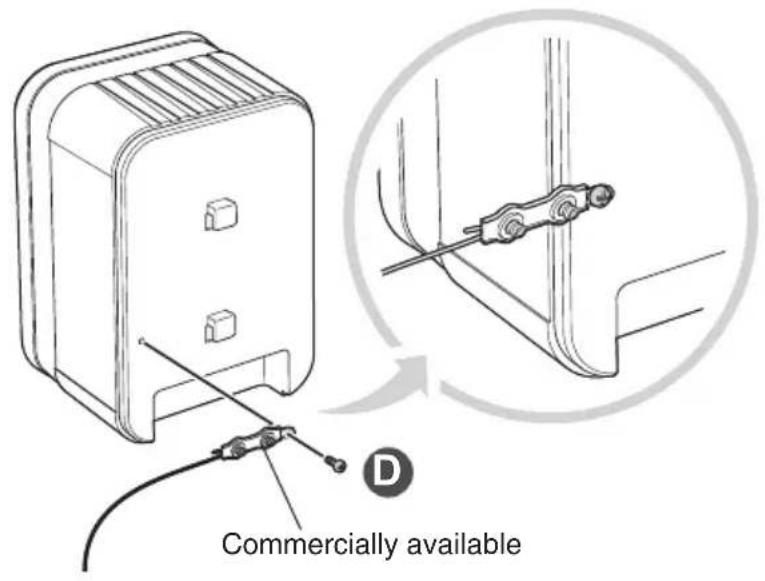
Installing the Safety Wire
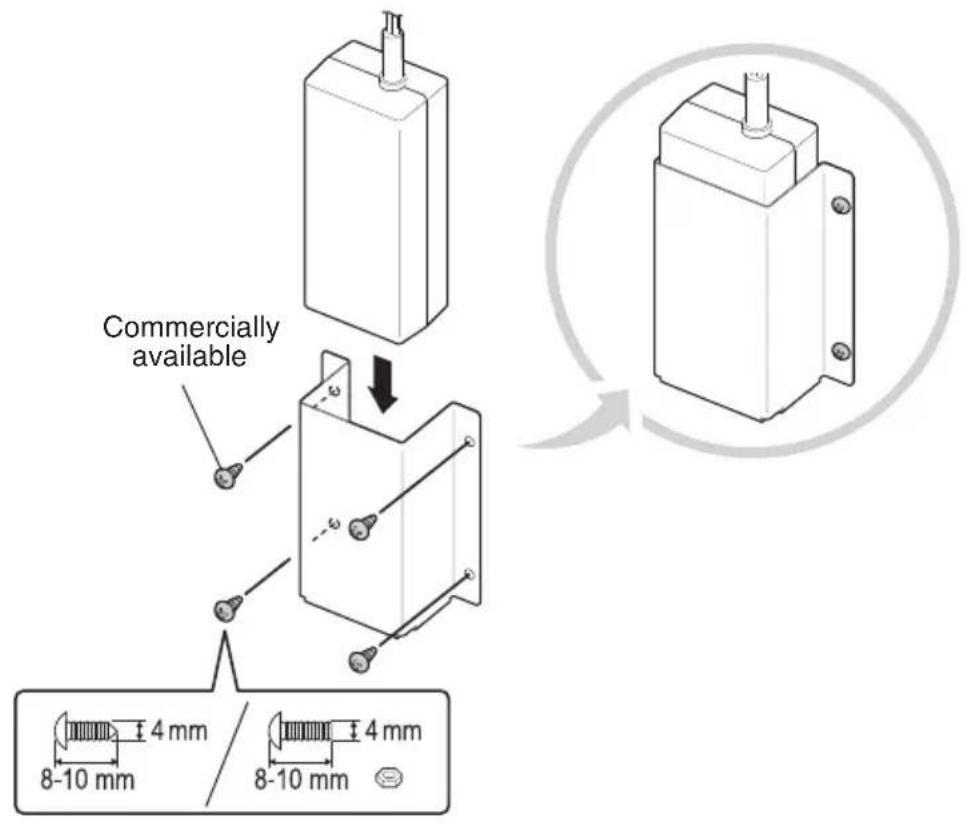
Installing the Adaptor Holder
Installation to the wall
1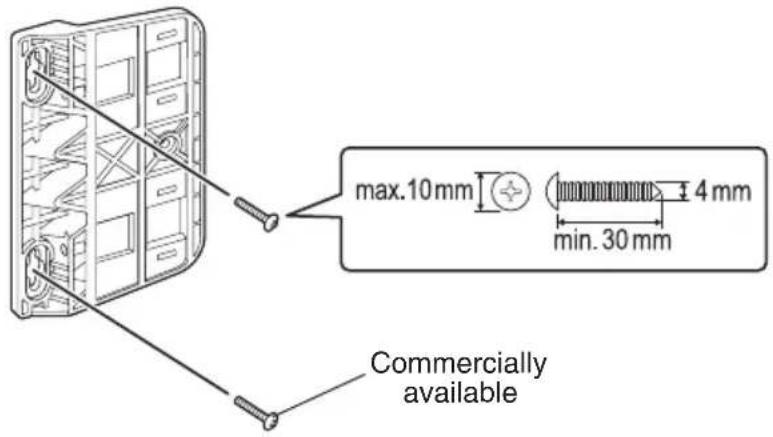
2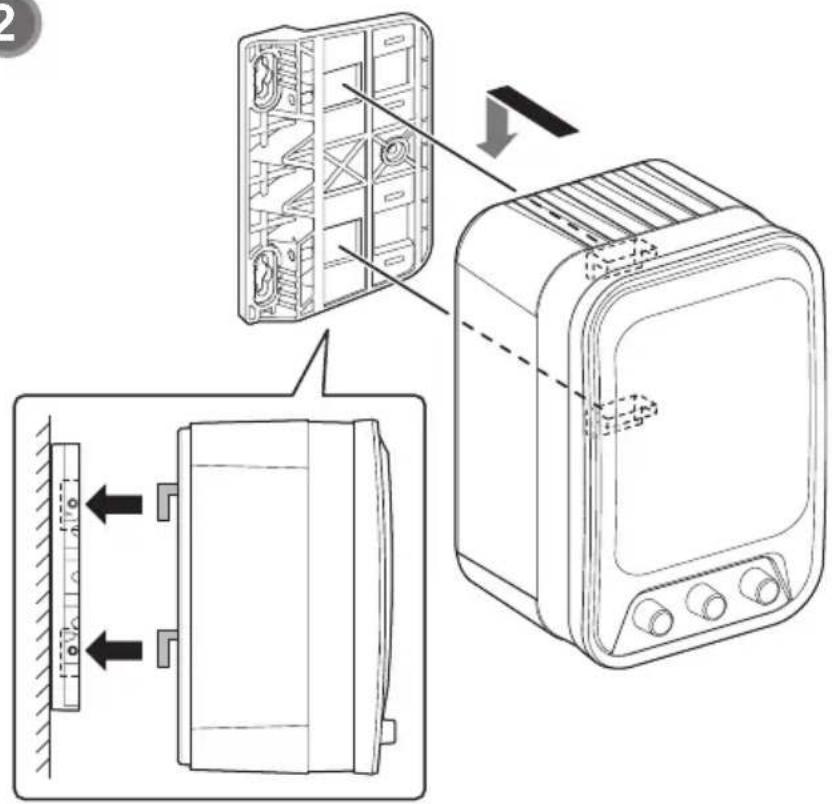
3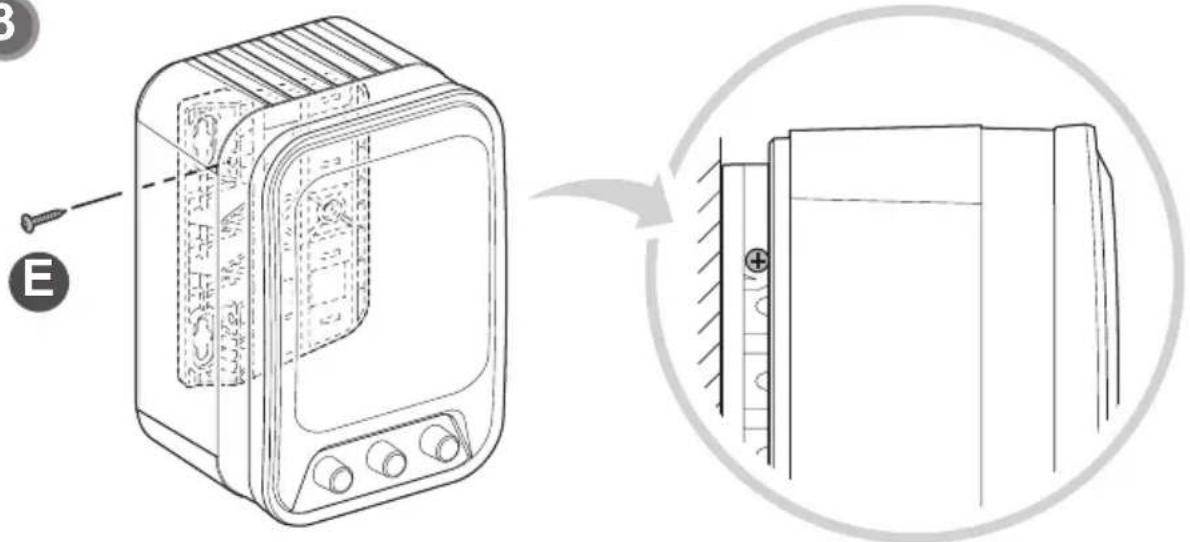
Specifications
| Dimensions | 156(W) × 230(H) × 141(D)mm (except for protrusion) | |
| Weight | Active | 2.1kg |
| Passive | 1.9kg | |
| Output power | 15 W + 15 W / 10% THD | |
| Frequency response | 80 Hz to 20 kHz | |
| Sound Pressure Level | 100 db at 1 W 1m | |
| Normal Impedance | 8 ohm | |
| Operating temperature | +5°C to +35°C (Non-condensing) | |
| Storage temperature | -10°C to +60°C (Non-condensing) | |
| Power supply | 100-240 V AC, 50/60 Hz | |
| Power consumption | Operating | 45 W |
| Standby | 0.50 W | |
| AC adapter | Product code | GPE602-180300D |
| Input power | 100-240 V AC, 50/60 Hz, 1.5 A | |
| Output power | 18 V DC, 3 A | |
External Dimensions
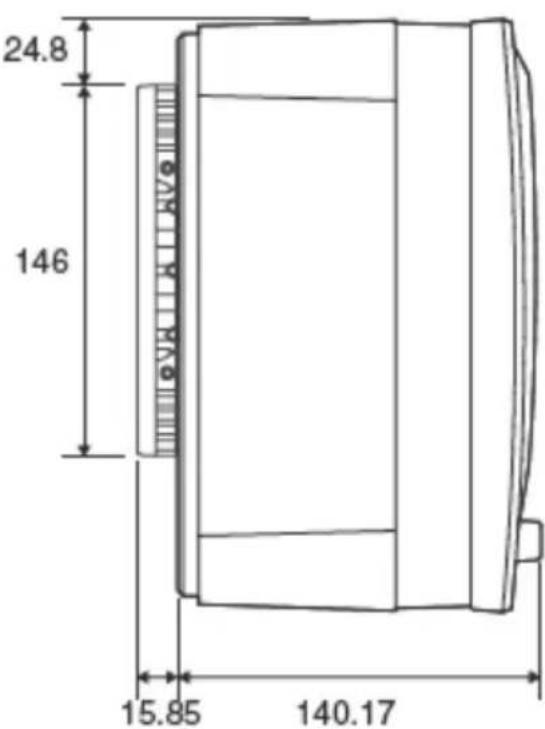
Units: mm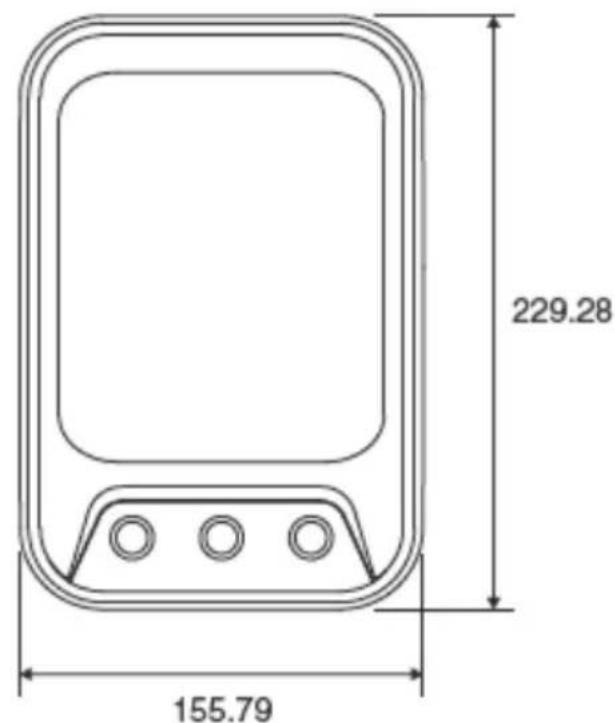
Brand : EPSON
Model : ELPSP02
Category : Speakers