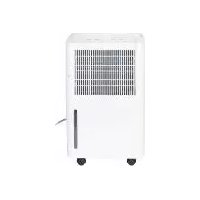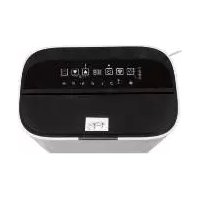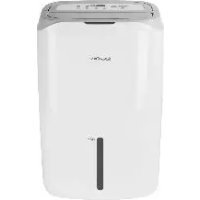
SLE 320 C4 - Dehumidifier SILVERCREST - Free user manual and instructions
Find the device manual for free SLE 320 C4 SILVERCREST in PDF.



| Product type | Dehumidifier |
| Brand | SilverCrest |
| Model | SLE 320 C4 |
| Dimensions (W x H x D) | Approx. 56 x 36.5 x 29 cm |
| Weight | Approx. 13.5 kg |
| Power supply | 220-240 V ~, 50 Hz |
| Power consumption | 265 W (max. 370 W) |
| Dehumidification capacity (30 °C / 80% RH) | 20 L/24h |
| Dehumidification capacity (27 °C / 60% RH) | 12 L/24h |
| Water tank | 6.5 L |
| Airflow | 160 m³/h |
| Programs | Automatic, Target humidity, Clothes drying, Air purification |
| Timer function | 1 to 24 hours |
| Child safety | Yes (key lock) |
| Auto defrost | Yes |
| Continuous drainage | Yes (via supplied hose) |
| Filter | Charcoal filter (clean every 2 weeks, replace every 6 months) |
| Operating temperature | 5 to 35 °C |
| Recommended maximum area | Approx. 20 m² (46 m³) |
| Refrigerant | R134a (0.105 kg) |
| Warranty | 3 years |
Frequently Asked Questions - SLE 320 C4 SILVERCREST
User questions about SLE 320 C4 SILVERCREST
0 question about this device. Answer the ones you know or ask your own.
Ask a new question about this device
Download the instructions for your Dehumidifier in PDF format for free! Find your manual SLE 320 C4 - SILVERCREST and take your electronic device back in hand. On this page are published all the documents necessary for the use of your device. SLE 320 C4 by SILVERCREST.
USER MANUAL SLE 320 C4 SILVERCREST
LUFTENTFEUCHTER / DEHUMIDIFIER DÉSHUMIDIFICATEUR D'AIR SLE 265 B3
DE AT CH
LUFTENTFEUCHTER
Bedienungsanleitung
FR BE
DÉSHUMIDIFICATEUR D'AIR
Mode d'emploi
CZ
ODVLHČOVAČ VZDUCHU
Návod k obsluze
PT
Operating instructions
NL BE
LUCHTONTVOCHTIGER
Gebruiksaanwijzing
ES
DESHUMIDIFICADOR
Before reading, unfold the page containing the illustrations and familiarise yourself with all functions of the device.
FR BE
GB/IE Operating instructions Page 27
natural_image
Line drawing of a mechanical component with curved surfaces and arrows indicating motion (no text or symbols)natural_image
Technical line drawing of a device with internal components and a close-up view showing internal structure (no text or symbols)Abb. 1
natural_image
Line drawing of a portable electric heater with labeled ports (no text or symbols beyond labels)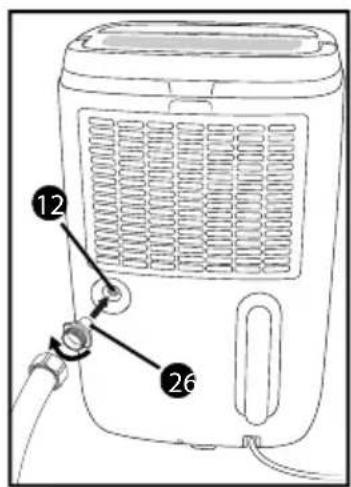
ACHTUNG
Abb. 5
Abb. 6
KOMPERNASS HANDELS GMBH
BURGSTRASSE 21
DE-44867 BOCHUM
DEUTSCHLAND
www.kompernass.com
Contents
Introduction 28
Copyright 28
Limitation of Liability 28
Intended use 28
Warning notices 29
Safety....30
Risk of electrocution 30
Risk of electrocution due to moisture 30
Risk of explosion 31
Risk of disease 31
Basic safety instructions 32
Operation 34
Package contents and transport inspection 34
Disposal of the packaging 34
Appliance description 35
Before initial use 36
Electrical connection 36
Guidelines for operation 36
Automatic defrosting 36
Handling and use 37
Switching the appliance on/off 37
Air outlet valve 37
Operating status displays 38
Selecting programmes 39
Timer function 40
Child lock 40
Water tank 41
Hose drainage 42
Cleaning 44
Cleaning and changing the filter 45
Protection against overheating 46
Storage 46
Troubleshooting 46
Causes of malfunction and fault rectification 46
Disposal 48
Disposal of the refrigerant 48
Attachment 49
Technical data 49
Notes on the Declaration of Conformity 49
Congratulations on the purchase of your new appliance.
You have selected a high-quality product. The operating instructions are part of this product. They contain important information about safety, usage and disposal. Before using the product, please familiarise yourself with all operating and safety instructions. Use the product only as described and for the range of applications specified. Retain these instructions for future reference. Please also pass on these operating instructions to any future owner.
Copyright
This documentation is protected by copyright.
Any copying or reproduction, including in the form of extracts, or any reproduction of images (even in a modified state), is permitted only with the written authorisation of the manufacturer.
Limitation of Liability
All technical information, data and instructions for the connection and operation contained in these operating instructions correspond to the latest available at the time of printing and, to the best of our knowledge, take into account our previous experience and know-how.
No claims may be derived from the specifications, figures and descriptions in these operating instructions.
The manufacturer assumes no liability for damages sustained in consequence of non-adherence to the operating instructions, inappropriate use, improper repairs, modifications undertaken without permission or the use of unauthorised spare parts.
Intended use
The appliance is exclusively intended to dehumidify living spaces, basements or storage areas with an ambient temperature of 5^ C to 35^ C. The appliance may only be used indoors. The appliance is intended solely for personal and not commercial use. Usage other than as described above is impermissible and may result in injury and/or damage to the appliance. The manufacturer accepts no liability for damage caused by improper application or usage. The risk shall be borne solely by the user.
Warning notices
The following types of warning are used in these operating instructions:

DANGER
A warning notice at this hazard level indicates an imminently hazardous situation.
Failure to avoid this hazardous situation could result in serious injuries or even death.
▶ Follow the instructions in this warning notice to avoid the risk of death or serious injury.

WARNING
A warning at this hazard level indicates a potentially hazardous situation.
Failure to avoid this hazardous situation could result in injury.
▶ Follow the instructions in this warning notice to prevent injury.
CAUTION
A warning notice at this hazard level indicates a risk of property damage.
Failure to avoid this situation could result in property damage.
▶ Follow the instructions in this warning notice to prevent property damage.
NOTE
▶ A note provides additional information that makes handling the appliance easier for you.
Safety
This section contains important safety instructions for using the appliance. Improper use may result in personal injury and property damage.
Risk of electrocution
DANGER
Risk of fatal injury from electrocution!
Contact with live cables or components can result in a fatal injury!
Please observe the following safety guidelines to prevent electrical hazards.
- Do not use the appliance if the power cable or the plug is damaged.
There is a risk of electrocution if live connections are touched and the electrical and mechanical structure is changed.
Risk of electrocution due to moisture
DANGER
- Do not place the appliance in water, in water pooling areas or puddles.
▶ Never operate the appliance near a bath tub, a shower, a filled wash basin or similar structures.
▶ Do not immerse appliance, the cabling or the mains plug in water or other fluids.
▶ Protect the appliance from water droplets or spray.
In the event that fluid enters the appliance (apart from in the water tank), disconnect the mains plug immediately. Arrange to have the appliance checked before using it again.
▶ Do not handle the appliance with damp hands.
▶ If the appliance falls into water, disconnect the mains plug immediately. Only then should you remove the appliance.
Risk of explosion
DANGER
▶ Do not use the appliance in a potentially explosive environment containing combustible liquids, gases or dusts. Electrical appliances generate sparks that can ignite the dust or fumes.
Risk of disease
DANGER
The stored water is not suitable for drinking or watering. There are potential health hazards.
WARNING: MATERIAL DAMAGE
▶ Do not use the appliance in swimming pools, wash rooms or similar facilities.
The appliance is not suitable for drying lagging. If insulation or lagging materials are damp after a pipe has burst, consult an expert under all circumstances.
▶ Never expose the appliance to temperatures of 0^ C or lower. Residual water in the pipes could freeze and damage the system.
▶ Do not use the appliance in a dusty or chlorinated environment.
Basic safety instructions
To ensure safe operation of the appliance, follow the safety guidelines set out below:
■ Check the appliance for visible external damage before use. Do not use an appliance that has been damaged or dropped.
■ To avoid possible risks, arrange for damaged cables or connections to be replaced by an authorised specialist or the Customer Service Department.
■ Do not operate the appliance outdoors.
■ During operation, always keep windows and doors closed so that the appliance can work effectively.
■ Do not operate the appliance in the proximity of highly inflammable gases or materials, near naked flames or in areas prone to oil and water splashing.
This appliance may be used by children aged 8 years and above and by persons with limited physical, sensory or mental capabilities or lack of experience and knowledge, provided that they are under supervision or have been told how to use the appliance safely and are aware of the potential risks. Do not allow children to use the appliance as a toy. Cleaning and user maintenance tasks may not be carried out by children unless under supervision.
■ All repairs must be carried out by authorised specialist companies or by the Customer Service department. Improper repairs can pose significant risks to the user. It will also invalidate any warranty claims.
■ Do not expose the appliance to rain. Protect the appliance against moisture and the ingress of fluids and objects into the casing. Never immerse the appliance in water and do not place objects containing fluids (e.g. vases) on the appliance. The appliance could be irreparably damaged!
■ Do not place heavy objects on the appliance.
■ Do not cover the appliance (e.g. with newspapers, cushions or blankets).
■ Do not insert any objects into the ventilation slits.
■ Avoid direct sunlight.
■ Do not place any naked flames, e.g. burning candles, on or directly next to the appliance.
■ In the event of malfunctions, and in bad weather, disconnect the plug from the mains power socket.
■ Ensure that the air inlet and air outlet apertures remain free of soiling during operation. Never cover the appliance!
■ Always place the appliance on a solid, flat surface so that it cannot tip over.
■ Do not install the appliance. Position the side panels of the appliance so there is a clearance of at least 20 cm from walls or other objects. Also ensure a clearance of at least 50 cm from the front, rear and top panels of the appliance in order to ensure good air circulation.
■ The appliance may only be operated in rooms with an ambient temperature of 5^ C to 35^ C.
■ Use the appliance only in rooms up a total of 20 m².
■ Clean the air filters before they become heavily soiled.
■ While draining via a hose, ensure that it does not become blocked and that the open end of the hose is positioned at a lower level than the outlet aperture. The end of the hose must be positioned above a drain.
■ Operate the appliance only together with the water tank or with the hose installed.
■ Connect the safety plug only to a properly installed, easily accessible plug socket with protected contacts, the voltage of which corresponds to the specifications on the rating plate. The plug socket must remain easily accessible even after connection.
■ Before cleaning, always disconnect the mains plug from the mains power socket.
■ Always transport the appliance in an upright position! Use the carrying handle for transport. The water tank must be emptied before transport.
Operation
Package contents and transport inspection
The appliance is supplied with the following components as standard:
- Dehumidifier
- Hose
• EU garden hose adapter
• These operating instructions
NOTE
▶ Check the package for completeness and signs of visible damage.
▶ If the delivery is incomplete or damage has occurred as a result of defective packaging or during transport, contact the Service hotline (see section Service).
◆ Remove all packaging materials and all transport restraints from the appliance.
◆ Remove the film from the control panel.
Disposal of the packaging
Dispose of the packaging in an environmentally friendly manner. Note the labelling on the packaging and separate the packaging material components for disposal if necessary. The packaging material is labelled with abbreviations (a) and numbers (b) with the following meanings:
1-7: plastics, 20-22: paper and cardboard, 80-98: composites
Appliance description
1 Control panel
2 Air outlet valve
③ LED panel
4 Water tank
5 Carrying handle
6 Air inlet
7 Plastic frame
8 Carbon filter
9 Cable retainer
10 Mains cable
11 Safety clip
12 Outlet
13 Drainage cap
14 Programme LEDs
15 Display
16 TANK FULL LED
17 TIMER LED
18 AUTO DEFROST LED
19 OPERATION LED
20 STAND-BY button
21 TIMER button
22 DOWN arrow button
23 UP arrow button
24 MODE button
25 Hose
26 EU garden hose adapter
Before initial use
◆ Place the appliance on a flat, dry and solid surface.
Allow the appliance to remain in the usage position for approx. 30 minutes so that the coolant can settle.
◆ Check whether the water tank ^4 has been correctly inserted.
◆ Insert the plug into a mains power socket.
Electrical connection
CAUTION
Before connecting the appliance, compare the specifications for the required input voltage on the rating plate with the intended voltage source for operation. This data must agree so that the appliance is not damaged.
The power cable must always be easily accessible, so that the appliance can be quickly removed from the mains in the event of an emergency.
▶ Check whether the power cable is undamaged and that it is not routed over hot surfaces and/or sharp edges, otherwise it will become damaged.
▶ Ensure that the power cable is not taut or kinked.
Guidelines for operation
If the air in your living spaces is constantly excessively humid, the cause should be identified and addressed. (Running the dehumidifier continuously for years is not reasonable.)
The optimal ambient temperature for dehumidifying the air is 5^ C to 35^ C. Using a dehumidifier at temperatures below 5^ C is redundant, as there is little humidity in the air.
During operation, room temperature can increase by between 1°C and 4°C, depending on the size of the room. This is normal.
Automatic defrosting
To ensure that the appliance does not ice up during sustained operation, it defrosts automatically. The defrosting function is activated automatically and cannot be switched on manually. The appliance cannot be switched off during defrosting. During defrosting, the AUTO DEFROST LED ^18 lights up. The lower the ambient temperature at which the appliance is operated, the earlier or more often the automatic defrosting is activated. Once the defrosting process is complete, the appliance resumes operation in the previous selected settings.
Handling and use
This section provides you with important information on handling and using the appliance.
Switching the appliance on/off
◆ Press the STAND-BY button ^1 20 to switch on the appliance. You will hear a beep and the OPERATION LED ^19 lights up.
◆ Press the STAND-BY button ^1 20 to switch off the appliance. You will hear a beep and the OPERATION LED ^19 goes out.
NOTE
- The appliance starts in the mode last selected. - After a power failure, if the appliance is disconnected from the mains, or after switching off owing to the overheating protection, the appliance restarts in the mode last selected.
If a timer has been programmed, the appliance switches off definitively upon lapse of the time specified (1–24 hours).
If the relative humidity value has been defined in the TARGET HUMIDITY programme, the appliance switches off once the value has been attained. If the value is exceeded, the appliance switches on again.
The appliance switches off if the water tank 4 is full or has been removed. If wrongly positioned, or if the water tank 4 has been removed, the TANK FULL LED 16 flashes and you will hear a beep if the appliance is switched on.
NOTE
The water tank must be fully inserted in the appliance; otherwise, the condensate cannot be collected properly.
Air outlet valve
natural_image
Diagram of a mechanical component with curved surfaces and directional arrows indicating motion (no text or symbols)There is an adjustable valve ② on the air outlet on the upper side of the appliance that you can open. You can set the valve ② at various angles to determine the air flow. This can be helpful if you are using the appliance
to dry washing, for example. In this way, you can direct the air flow towards the wet laundry.
Operating status displays
The various operating statuses are indicated by means of LEDs (14, 16, 17, 18, 19) and the display 15. In addition, there is an LED panel 3 on the front of the appliance that shows the relative humidity level (colour-coded).
LED indicators
| LED lit Meaning | |
| TANK FULL16 | The water tank is full or is not inserted. |
| TIMER17 | A switch-off time has been activated. |
| AIR CLEANDRY CLOTHESTARGET HUMIDITYAUTOMATIC14 | Show the selected programme. |
| OPERATION19 | The appliance is switched on. |
| AUTO DEFROST18 | Automatic defrosting is activated. |
Display indicator
| Display Meaning | |
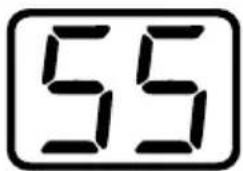 Hr % Hr % | During operation the current relative humidity is permanently displayed. |
LED panel
| Colour Meaning | |
| Red Relative humidity | HIGH (>70%) |
| Green Relative humidity | MID (≥50 to ≤70%) |
| Yellow Relative humidity | LOW (<50%) |
NOTE
▶ Note that the values for the relative humidity have a tolerance of approx. ± 3 %, and switching on the appliance or dehumidification may be slightly delayed.
Selecting programmes
The appliance has 4 distinct programmes.
◆ Press the MODE BUTTON 24 repeatedly to set the desired programme. The programme LED 14 of the set programme lights up.
TARGET HUMIDITY
This programme offers you the option of setting the desired air humidity level.
◆ Press the arrow button ⚠ 22 or ⏱ 23 to set the desired humidity in 5% steps between 30% and 80%. The set value flashes for approx. 5 seconds on the display 15 and then the current relative humidity is shown again.
Additionally, you also have the option to select the setting[CO] if you want to make a setting below 30% relative humidity. This setting allows you to achieve a very low humidity as the dehumidification runs permanently.
NOTE
The minimum humidity that can be achieved in the 60 mode is dependent on many factors, such as the room size or the ambient temperature, etc. Therefore it is not possible to define a generally applicable minimum value.
AUTOMATIC
The relative humidity that should be achieved is set permanently to 55%. The appliance dehumidifies until this value is achieved and then switches off. If relative humidity increases again, the appliance switches on again. Changes in the desired humidity are not possible in this programme.
Select this programme for sustained dehumidification at a comfortable relative humidity of 55%.
DRY CLOTHES
You can use this programme to dry damp laundry faster. Move the air outlet valve ② so that the air current is directed towards the articles of clothing to be dried. Changes in the desired humidity are not possible in this programme.
AIR CLEAN
No dehumidification takes place in this programme. The air in the room is drawn in via the filter in front of the air inlet aperture where it is purified.
Select this programme if you want to purify but not dehumidify the air in the room.
Timer function
The appliance is equipped with a timer function that can be used with any one of the 4 programmes. One of 24 switch-off times, ranging from 1 to 24 hours, can be selected. Once the set time has elapsed, the appliance switches off permanently.
◆ Press the TIMER button 21 during operation. The TIMER LED 17 lights up and flashes on the display 15.
◆ Press the arrow button 22 or 23 to set a switch-off time from 1 to 24 hours. The selected switch-off time flashes for approx. 5 seconds on the display 15 and afterwards the current relative humidity is displayed.
To end the timer prematurely, press the TIMER button twice. The TIMER LED 17 goes out and the current relative humidity value is shown on the display 15.
Child lock
The appliance is equipped with a child lock to prevent children from accidentally switching the appliance on or off or making settings. When the child lock is activated, all of the appliance keys are deactivated.
◆ Press both arrow buttons △ + ▽ 22 + 23 at the same time for approx. 3 seconds. You will hear a beep and L will appear on the display 15. The child safety lock is activated.
◆ Press both arrow buttons△ + ▼ 22 + 23 at the same time again for approx. 3 seconds to deactivate the child lock. You will hear a beep and the display L goes out.
Water tank
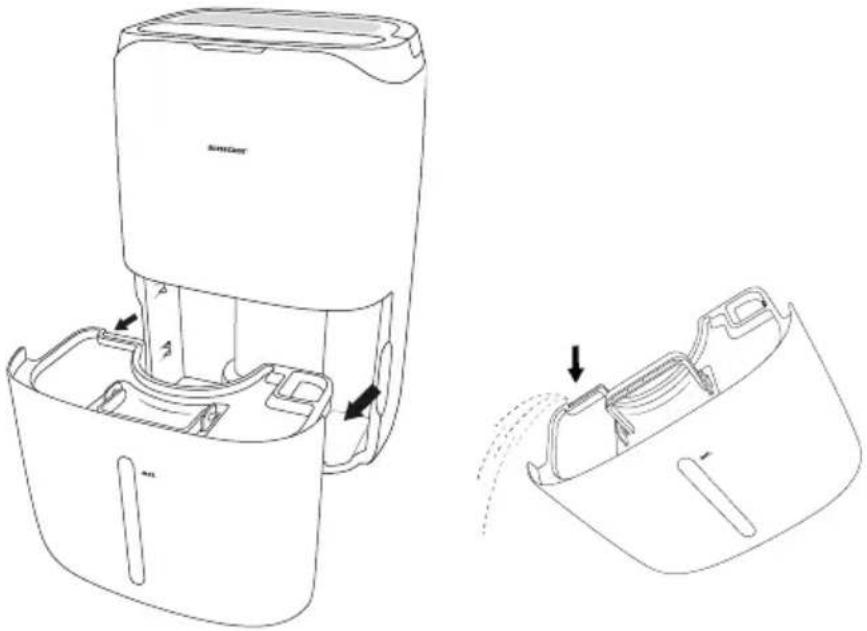
The water tank ④ has a capacity of approx. 6.5 litres. The water level is indicated on the front of the water tank ④. The appliance may only be operated once the water tank ④ is inserted. If the water tank ④ is full, the TANK FULL LED ⑯ will flash and the appliance will beep for about 20 seconds. The appliance switches off after a few seconds. The TANK FULL LED ⑯ flashes until the water tank ④ is emptied and replaced in the appliance.
◆ Pull the water tank 4 out of the appliance using the grips on the side. Use the grips to carry the water tank 4 (see figure 1).
natural_image
Line drawing of a device with internal components and a close-up view showing internal structure (no text or symbols)Fig. 1
Tip out the water and replace the water tank into the appliance. The appliance continues in the previously set programme for about 3 minutes.
Hose drainage
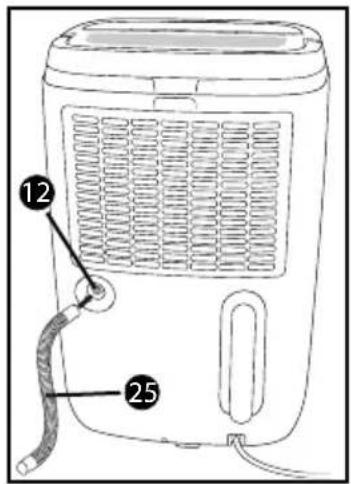
In very damp rooms, it is often more appropriate for the water not to collect in the water tank ④, but for it to be drained directly through a hose. You can use the supplied hose ②5 or the EU garden hose adapter ②6 to set up a permanent drainage.
CAUTION
- When draining via the hose, the appliance runs continuously. During hose drainage, ensure that the hose is not kinked and that it runs downwards over its entire length as the appliance does not have a pump for drainage.
▶ Check all connections in the system regularly for watertightness.
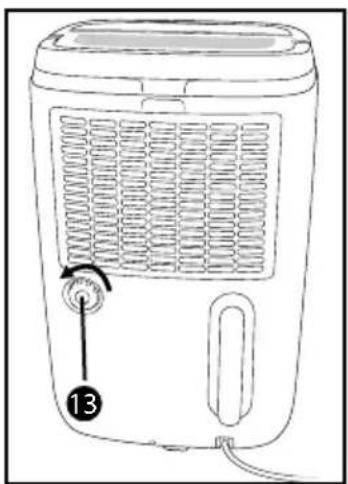
◆ Unscrew the cap13 on the rear of the appliance (see fig. 2).
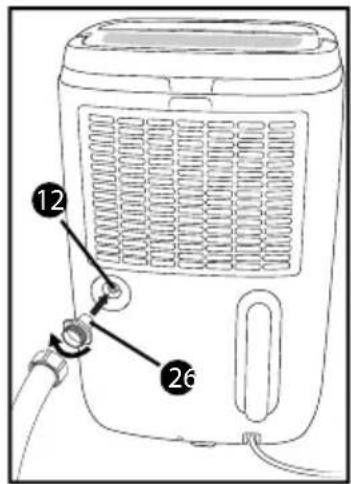
Either connect the supplied hose 25 to the outlet 12 or screw the EU garden hose adapter 26 to the outlet 12 (see figs. 3 + 4).
If you are using the EU garden hose adapter ^26 , screw a garden hose onto the EU garden hose adapter ^26 (see fig. 4).
natural_image
Line drawing of a portable electric heater with labeled control knob (no text or symbols beyond label)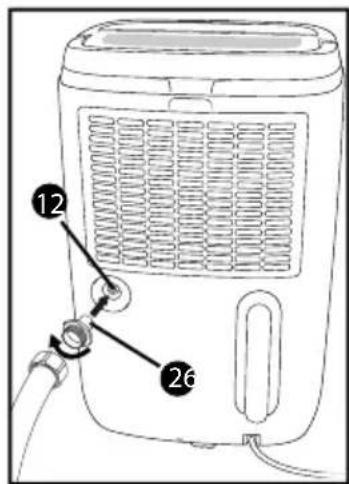
CAUTION
▶ Screw the EU garden hose adapte 26 hand-tight only. Do not use a wrench as this could damage the EU garden hose adapter 26.
NOTE
▶ Ensure that the seal of the EU garden hose adapte ^26 is always inserted (the seal is already fitted on delivery).
▶ Depending on the garden hose system you use, you may need an additional adapter. These are available from specialist stores.
- Set up the appliance so that the end of the hose is positioned over a drain. The open end of the hose must be positioned lower than the appliance's outlet (i.e. the hose must run downwards).
Switch on the appliance as usual and select a programme.
If you wish to drain into the water tank ^4 again, switch off the appliance, pull off the hose ^25 or unscrew the EU garden hose adapter ^26 together with the garden hose.
♦ Screw the cap13 back onto the outlet 12.
Cleaning
CAUTION
Possible damage to the appliance.
▶ Do not allow any liquids or moisture to get into the appliance.
▶ To avoid irreparable damage to the appliance, never immerse it in water.
▶ Always remove the mains plug from the mains power socket before cleaning the appliance.
▶ Do not use aggressive or abrasive cleaning agents, as these may corrode the surface of the casing.
▶ Do not clean the water tan 4 in a dishwasher. Otherwise, it will be damaged.
◆ If required, wipe the casing with a slightly damp cloth.
Remove the water tank ^4 and pour out the water. Dry it thoroughly, both inside and out, before replacing it.
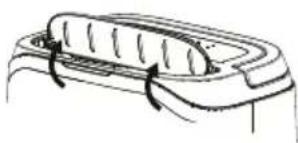
In order to clean the inside of the water tank 4, you must remove the lid. To do this, tip the grip backwards until the pins on the grip line up with the groove on the water tank 4. You can now remove the grip by pushing it on both sides out of the groove (see figure 5).
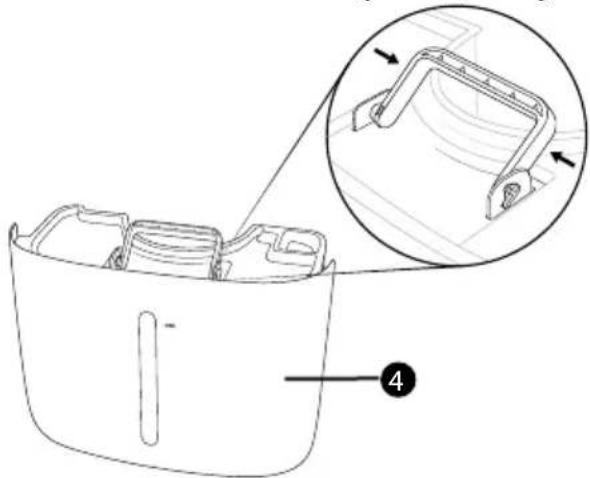
Fig. 5
Now remove the lid upwards from the water tank 4.
◆ Assembly is carried out in the reverse order.
We recommend that you clean the water tank regularly every two weeks to prevent the build-up of mould and bacteria. To do this, fill the water tank with lukewarm water, adding a standard detergent. Rinse repeatedly with lukewarm water. In addition, disinfection is recommended following cleaning. To do this, use a standard, alcohol-based disinfecting agent or high-proof alcohol. Both substances are completely harmless if rinsed repeatedly with lukewarm water afterwards.
Cleaning and changing the filter
The performance of the appliance also depends upon how clean the filter is. The carbon filter ⑧ should be cleaned every 2 weeks and changed every 6 months.
NOTE
▶ You can purchase new carbon filters in almost all shops selling household goods. The carbon filter mats just need to be cut to size.
◆ Switch the appliance off and pull out the mains plug.
To remove the air inlet grille 6, there are grips above the grille. Pull the air inlet grille 6 off backwards.
♦ Vacuum the air inlet grille⑥ or clean it with a soft brush.
To remove the plastic frame ^7 , carefully remove the retaining tabs around the frame from the mounts on the appliance.
Now, remove the carbon filter 8.
♦ Wash the carbon filter 8 in lukewarm water.
Allow the carbon filter 8 to dry completely before re-inserting it in the appliance.
◆ Assembly is carried out in the reverse order (see fig. 6).
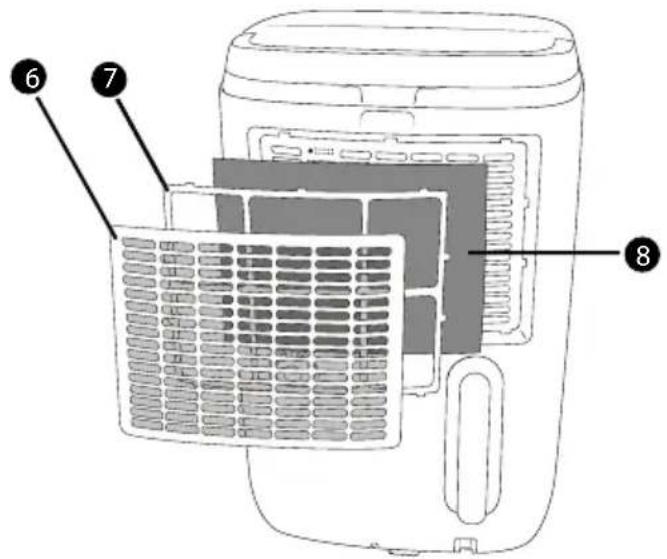
Fig. 6
Protection against overheating
The appliance has an overheating protection. It switches off automatically if there is a risk of overheating and switches back on once the appliance has fully cooled down. The appliance cannot be used during the cool-down phase.
Check whether external factors may have triggered the overheating protection (e.g. temperatures over 35^ C or a closed valve 2 on the air outlet).
Storage
◆ Remove the plug from the mains power socket.
- Wrap the mains cable 10 around the cable retainer 9 and secure the mains plug to the power cable using the safety clip 11 provided with the cable 10.
◆ Empty the water tank 4 if you are not using the appliance for a prolonged period.
◆ Always store the appliance in an upright position and in a dry and dust-free environment.
Troubleshooting
This section contains important information on fault identification and rectification.
Causes of malfunction and fault rectification
The following table will help you to identify and rectify minor malfunctions:
| Fault Possible cause Remedy | ||
| The plug is not plugged in. | Insert the plug into the mains power socket. | |
| The appliance will not switch on. | The mains power socket is not supplying power. | Check the house fuses. |
| Safety stop due to missing or incorrectly inserted water tank 4. | Insert the water tank 4 correctly. | |
| The water tank 4 is full. | Empty the water tank 4 and re-insert it. | |
| The appliance stops occasionally (the fan switches off). | The automatic defrosting function is activated. | This is a normal feature of the appliance. |
| The humidity of the room has reached the desired level. | This is a normal feature of the appliance. | |
| The appliance is producing no or too little condensate. | The air inlet or air outlet aperture is contaminated or obstructed. | Ensure that the air inlet and air outlet apertures are clean and free of obstructions. |
| The room's windows and doors are open. | Close the windows and doors. | |
| Is the appliance running in the AIR CLEAN programme? Dehumidification is not taking place. | Select a different programme, e.g. AUTOMATIC. | |
| The air ejected is warm. | Heat exchange process | This is a normal feature of the appliance. |
| The error code E1 is flashing on the display 15. | Temperature sensor error | Contact the Customer Service department. |
| The error code E2 is flashing on the display 15. | Humidity sensor error | Contact the Customer Service department. |
NOTE
▶ If the solutions presented above do not resolve the problem, please contact Customer Service (see section Service).
Disposal
Never dispose of the appliance in your normal domestic waste. This product is subject to the provisions of the European WEEE (Waste Electrical and Electronic Equipment) Directive 2012/19/EU.
Dispose of the appliance via an approved disposal company or your municipal waste facility. Please observe the currently applicable regulations. Please contact your waste disposal facility if you are in any doubt.

Your local community or municipal authorities can provide information on how to dispose of the product.
Disposal of the refrigerant
This appliance contains fluorinated greenhouse gases that are listed in the Kyoto Protocol.
The system is hermetically sealed.
Refrigerant: R134a
Fill quantity: 0.105 kg
CO₂ equivalent: 0.15 t
GWP value: 1430
The refrigerant R134a must be disposed of by professionals. Please contact your waste disposal facility if you are in any doubt.
Attachment
Technical data
| Input voltage 220-240 V ~ (alternating current), 50 Hz | |
| Input power 265 W | |
| Nominal current 1.3 A | |
| Max. output power 370 W | |
| Max. nominal current 1.6 A | |
| Air flow rate 160 m3/h | |
| Water tank 6.5 l | |
| Intake pressure 1.0 MPa | |
| Discharge pressure 2.5 MPa | |
| Dehumidification performance / 24 h* | 20 l (at 30°C/80% rh)12 l (at 27°C/60% rh) |
| Recommended room size | approx. 20 m2 or approx. 46 m3(at a ceiling height of 2.3 m) |
| Refrigerant R134a | |
| Operating temperature 5°C to +35°C | |
| Dimensions approx. 56 x 36.5 x 29 cm | |
| Weight approx. 13.5 kg | |
* The lower the ambient temperature and the colder the temperature outside becomes, the less moisture accumulates in the air and flows from outside into the room to be dehumidified. For this reason, dehumidification performance steadily decreases when temperatures drop and can come to a standstill. This does not mean that the appliance is defective.
Notes on the Declaration of Conformity

In terms of compliance with fundamental specifications and other relevant regulations, this appliance complies with the Low Voltage Directive 2014/35/EU, the Electromagnetic Compatibility Directive 2014/30/EU and the Ecodesign Directive 2009/125/EC.
The complete original Declaration of Conformity is available from the importer.
This appliance has a 3-year warranty valid from the date of purchase. If this product has any faults, you, the buyer, have certain statutory rights. Your statutory rights are not restricted in any way by the warranty described below.
Warranty conditions
The validity period of the warranty starts from the date of purchase. Please keep your original receipt in a safe place. This document will be required as proof of purchase.
If any material or production fault occurs within three years of the date of purchase of the product, we will either repair or replace the product for you at our discretion. This warranty service is dependent on you presenting the defective appliance and the proof of purchase (receipt) and a short written description of the fault and its time of occurrence.
If the defect is covered by the warranty, your product will either be repaired or replaced by us. The repair or replacement of a product does not signify the beginning of a new warranty period.
Warranty period and statutory claims for defects
The warranty period is not prolonged by repairs effected under the warranty. This also applies to replaced and repaired components. Any damage and defects present at the time of purchase must be reported immediately after unpacking. Repairs carried out after expiry of the warranty period shall be subject to a fee.
Scope of the warranty
This appliance has been manufactured in accordance with strict quality guidelines and inspected meticulously prior to delivery.
The warranty covers material faults or production faults. The warranty does not extend to product parts subject to normal wear and tear or fragile parts such as switches, batteries, baking moulds or parts made of glass.
The warranty does not apply if the product has been damaged, improperly used or improperly maintained. The directions in the operating instructions for the product regarding proper use of the product are to be strictly followed. Uses and actions that are discouraged in the operating instructions or which are warned against must be avoided.
This product is intended solely for private use and not for commercial purposes. The warranty shall be deemed void in cases of misuse or improper handling, use of force and modifications / repairs which have not been carried out by one of our authorised Service centres.
Warranty claim procedure
To ensure quick processing of your case, please observe the following instructions:
Please have the till receipt and the item number (e.g. IAN 12345) available as proof of purchase.
You will find the item number on the type plate, an engraving on the front page of the instructions (bottom left), or as a sticker on the rear or bottom of the appliance.
If functional or other defects occur, please contact the service department listed either by telephone or by e-mail.
You can return a defective product to us free of charge to the service address that will be provided to you. Ensure that you enclose the proof of purchase (till receipt) and information about what the defect is and when it occurred.
You can download these instructions along with many other manuals, product videos and software on www.lidl-service.com.
Service
GB Service Great Britain
Tel.: 0871 5000 720 (£ 0.10/Min.)
E-Mail: kompernass@lidl.co.uk
IE Service Ireland
Tel.: 1890 930 034
(0,08 EUR/Min., (peak))
(0,06 EUR/Min., (off peak))
E-Mail: kompernass@lidl.ie
IAN 298611
Importer
Please note that the following address is not the service address. Please use the service address provided in the operating instructions.
KOMPERNASS HANDELS GMBH
BURGSTRASSE 21
DE-44867 BOCHUM
GERMANY
www.kompernass.com
Table des matières
Introduction 54
Droits d'auteur 54
natural_image
Simple line drawing of a curved object with two arrows indicating direction (no text or symbols)natural_image
Technical line drawing of a device with internal components and a close-up view showing internal structure (no text or symbols)Fig. 1
natural_image
Line drawing of a portable electric heater with labeled ports (no text or symbols beyond labels)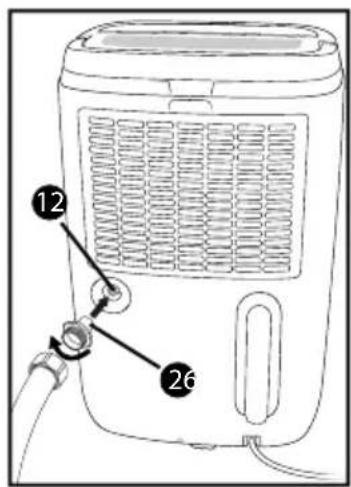
ATTENTION
Fig. 5
Fig. 6
KOMPERNASS HANDELS GMBH
BURGSTRASSE 21
DE-44867 BOCHUM
ALLEMAGNE
www.kompernass.com
Inhoud
Inleiding 80
Auteursrecht 80
⚠ WAARSCHUWING VOOR MATERIËLE SCHADE!
natural_image
Technical line drawing of a device with internal components and a close-up view showing internal structure (no text or symbols)Afb. 1
natural_image
Line drawing of a portable electric heater with labeled control knob (no text or symbols beyond label)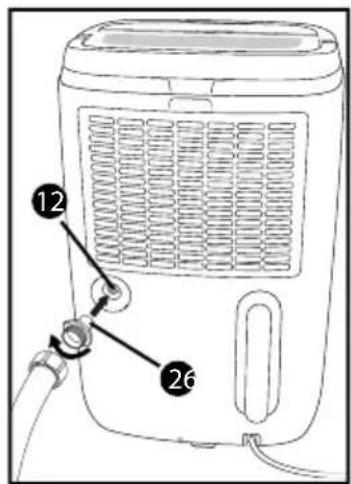
LET OP
Afb. 5
Afb. 6
KOMPERNASS HANDELS GMBH
BURGSTRASSE 21
DE-44867 BOCHUM
DUITSLAND
www.kompernass.com
Obsah
Úvod....106
Autorské právo 106
natural_image
Diagram of a car interior showing a handle and seat with arrows indicating direction (no text or symbols)natural_image
Line drawing of a device with internal components and a close-up view showing internal structure (no text or symbols)Obr. 1
natural_image
Line drawing of a portable air purifier with labeled ports and control knob (no text or symbols beyond labels)Obr. 2
Obr. 3
Obr.
POZOR
natural_image
Line drawing of a device casing with an inset showing a mechanical component (no text or symbols)Obr. 5
Obr. 6
KOMPERNASS HANDELS GMBH
BURGSTRASSE 21
DE-44867 BOCHUM
NĚMECKO
www.kompernass.com
Índice
Introducción....132
natural_image
Simple line drawing of a mechanical component with no text or symbolsnatural_image
Line drawing of a device interior showing internal components and a close-up view of the base (no text or symbols)Fig. 1
natural_image
Line drawing of a portable air purifier with labeled ports and control knob (no text or symbols beyond labels)Fig. 2
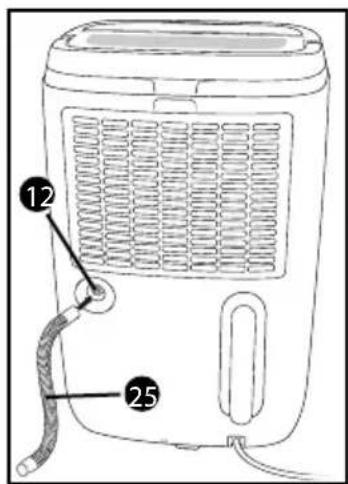
Fig. 3
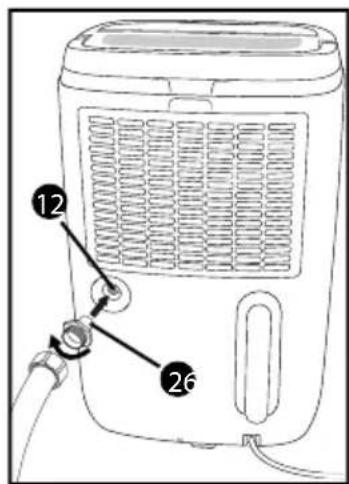
Fig. 4
ATENCIÓN
Fig. 5
Fig. 6
KOMPERNASS HANDELS GMBH
BURGSTRASSE 21
DE-44867 BOCHUM
ALEMANIA
www.kompernass.com
Índice
Introdução .... 158
natural_image
Line drawing of a mechanical component with a curved handle and fastener (no text or symbols)natural_image
Line drawing of a device with internal components and a close-up view showing internal structure (no text or symbols)Fig. 1
natural_image
Line drawing of a portable electric heater with labeled ports (no text or symbols beyond labels)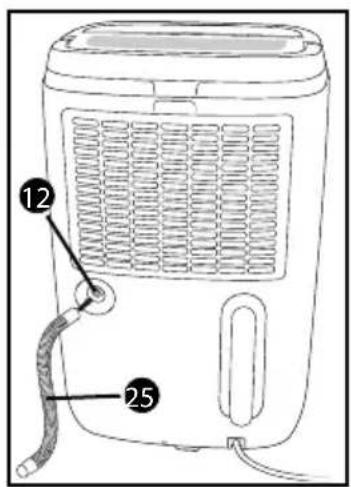
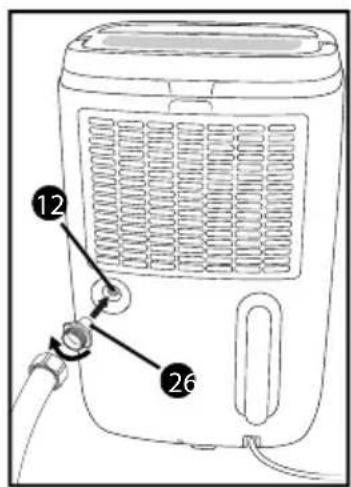
Fig. 5
Fig. 6
KOMPERNASS HANDELS GMBH
BURGSTRASSE 21
DE-44867 BOCHUM
ALEMANHA
www.kompernass.com
KOMPERNASS HANDELS GMBH
BURGSTRASSE 21
DE-44867 BOCHUM
GERMANY
www.kompernass.com
Stand der Informationen · Last Information Update · Version des informations
Stand van de informatie · Stav informací · Estado de las informaciones · Estado das informações: