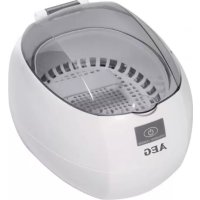
USR 5516 - Ultrasonic cleaner AEG - Free user manual and instructions
Find the device manual for free USR 5516 AEG in PDF.

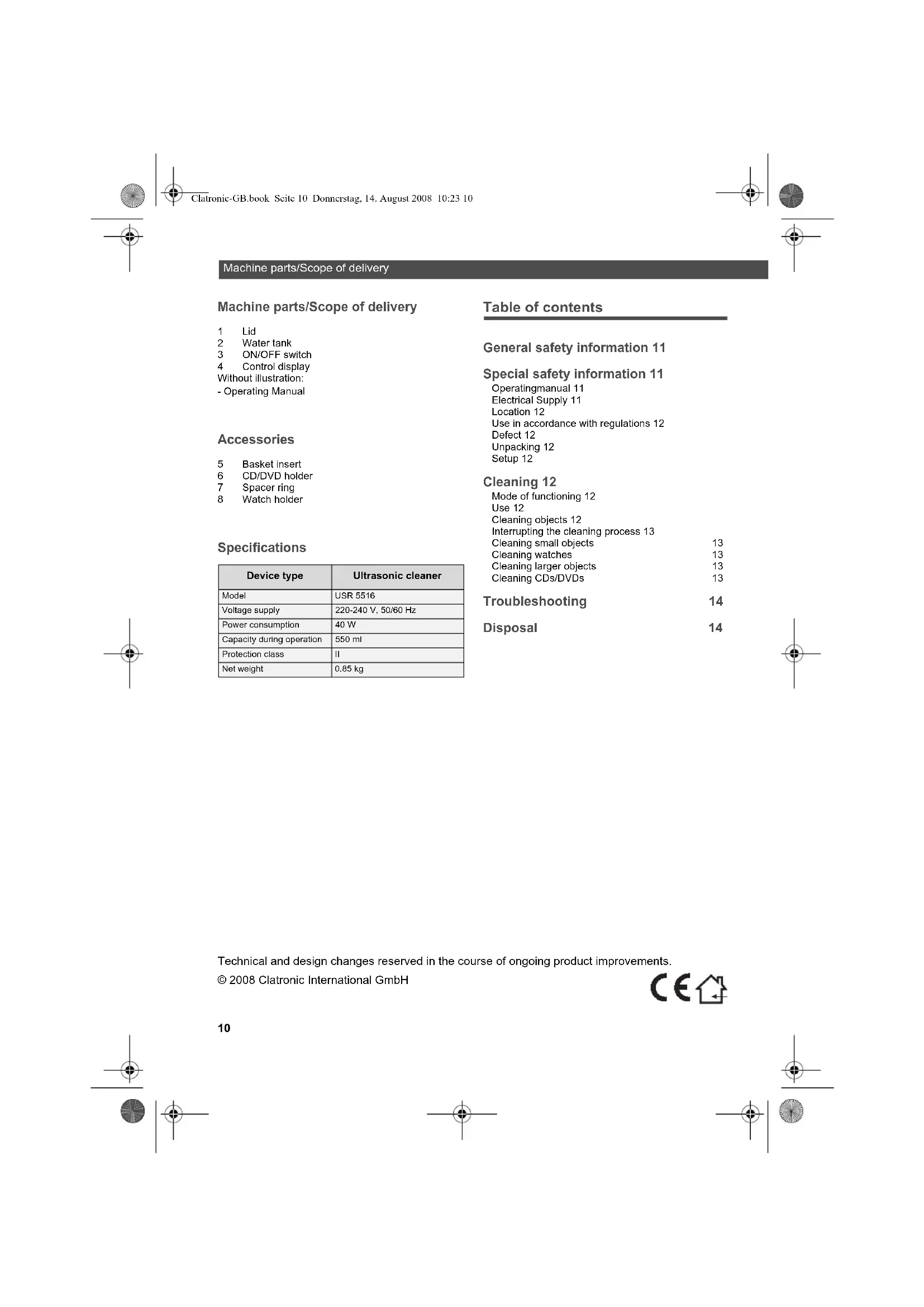


| Product type | Ultrasonic cleaner |
| Brand | AEG |
| Model | USR 5516 |
| Supply voltage | 220-240 V, 50/60 Hz |
| Power consumption | 40 W |
| Tank capacity | 550 ml |
| Protection class | II |
| Net weight | 0.85 kg |
| Included accessories | Insertion basket, CD/DVD holder, spacing ring, watch holder |
| Main function | Ultrasonic cleaning |
| Cleaning duration | 180 seconds (single cycle) |
| Automatic shut-off | Yes, after 180 seconds |
| Cleanable materials | Metal, glass, water-resistant plastic |
| Intended use | Cleaning of jewelry, glasses, waterproof watches, cutlery, CD/DVD, dental prostheses |
| Safety instructions | Do not use without water; do not clean non-waterproof objects; unplug before maintenance |
| Maintenance | Empty and rinse the tank after use; change water after 3 cycles |
| Power supply | Mains, power plug |
| Color | White (typical) |
| Warranty | 2 years (AEG standard) |
Frequently Asked Questions - USR 5516 AEG
User questions about USR 5516 AEG
0 question about this device. Answer the ones you know or ask your own.
Ask a new question about this device
Download the instructions for your Ultrasonic cleaner in PDF format for free! Find your manual USR 5516 - AEG and take your electronic device back in hand. On this page are published all the documents necessary for the use of your device. USR 5516 by AEG.
USER MANUAL USR 5516 AEG
Machine parts/Scope of delivery
Machine parts/Scope of delivery
1Lid
2 Water tank
3 ON/OFF switch
4 Control display
Without illustration:
- Operating Manual
Accessories
5 Basket insert
6 CD/DVD holder
7 Spacer ring
8 Watch holder
Specifications
| Device type | Ultrasonic cleaner |
| Model | USR 5516 |
| Voltage supply | 220-240 V, 50/60 Hz |
| Power consumption | 40 W |
| Capacity during operation | 550 ml |
| Protection class | II |
| Net weight | 0.85 kg |
Table of contents
General safety information 11
Special safety information 11
Operatingmanual11
Electrical Supply 11
Location 12
Use in accordance with regulations 12
Defect 12
Unpacking 12
Setup 12
Cleaning 12
Mode of functioning 12
Use 12
Cleaning objects 12
Interrupting the cleaning process 13
Cleaning small objects 13
Cleaning watches 13
Cleaning larger objects 13
Cleaning CDs/DVDs 13
Troubleshooting 14
Disposal 14
Technical and design changes reserved in the course of ongoing product improvements.
© 2008 Clatronic International GmbH



AEGI
General safety information
Thank you!
We congratulate you for choosing the ultrasonic cleaner USR 5516.
Symbols in this operating manual
Important notes for your safety have been highlighted in particular. Please be sure to observe these notes to avoid accidents and damages to the device:

WARNING:
Alerts you to health hazards and points to potential risks of injury.

CAUTION:
Indicates possible dangers for the device or other objects.

NOTE:
Emphasizes hints and information of interest to you.
General safety information
Before putting this device into operation, read the operating manual carefully and store it in a safe place along with your warranty card, receipt, and, if possible, the box including its inner packaging. Be sure to include the operating manual when passing on the unit to third parties.
Use the device as intended and for non-commercial purposes only. This device is not intended for commercial use.
Do not use the device outside. Keep it away from heat, direct sunlight, moisture (never immerse it in liquids) and sharp edges. Never use the device when your hands are wet. Pull the mains plug immediately when the device has become damp or wet.
Switch the device off and always pull the plug from the outlet (pull at the plug, not the cord) whenever not using the device, attaching accessories, cleaning the device or in case of a fault.
Never leave the device unattended while it is in operation. Always switch the device off before leaving the room. Pull the plug from the electrical outlet.
Regularly check the device and the cord for damages. Never use the device when it is damaged.
Never repair the device yourself, but take it to an authorized expert. To avoid danger, have a defective mains cable replaced with a cable of the same grade by the manufacturer, our customer service or a similarly qualified person only.
Use only original accessories.
Follow the "Special safety information" below.
Children and frail persons
Keep packaging pieces (plastic bags, box, styrofoam, etc.) out of the reach of children.

WARNING:
Do not allow small children to play with film. There is danger of suffocating!
To protect children or frail persons from the dangers of electrical devices, make sure this device is only used under supervision. This device is not a toy. Do not allow small children to play with it.
Special safety information
Operating manual
Please read this operating manual completely before using the device.
Keep the instructions for reference. Be sure to include the operating manual when passing on the unit to third parties.
Non-compliance with these instructions can lead to serious injuries or damages to the device.
We are not liable for damages resulting from noncompliance with this operating manual.
The device shall only be used for private purposes in the household. It is not suitable for commercial use.
Electrical Supply
The device is operated with electric power; consequently, there is a danger of electric shock. Pay particular attention to the following:
Never touch the plug with wet hands.
Always pull directly on the plug when you want to remove it from the outlet. Never pull on the cord; it might break.
Be careful not to kink, jam, drive over or expose the power cord to heat sources.
Pay attention that the power cord will not wrap itself around the device during operation.
Do not place the device on top of the power cord during operation.
Only use extension cords rated for the power consumption of the device.
Never submerge the device in water or other liquids. Pay attention that only the water tank comes in contact with water. Keep the other parts of the device away from rain and wetness.
Only operate the device when the electrical voltage shown on the type plate on the bottom of the device matches the voltage of your electrical outlet. A wrong voltage can destroy the device.
Pull the power cord from the outlet when you do not use the device.


Cleaning
Location
The safe operation of the devices requires a suitable location for it. Therefore observe the following:
Protect the device against effects of the weather. Never use it outdoors.
Protect the device against humidity.
Protect the device against frost. The residual water inside the device may freeze and damage the device.
Never place the appliance on or in direct vicinity of heat sources, such as e.g. hobs, ovens, etc.
Use in accordance with regulations
The ultrasonic cleaner is exclusively intended for cleaning waterproof objects made of metal, glass or plastic.
Any other use is considered not in accordance with regulations and is prohibited.
It is especially prohibited to clean water-sensitive objects with the device, for instance, mobile phones or watches that are not waterproof.
Defect
If the device is defective:
If the power cord of this device is damaged, it must be replaced by the manufacturer or its customer service or a similarly qualified person to avoid any hazards.
Never operate a defective device or a device with a defective cord. There is a significant risk of injury.
Unpacking
Unpack the device and all accessories and check if the contents are complete.

CAUTION:
Always transport/ship the device in its original packaging to protect it against damage. Keep the packing for this purpose.
Dispose of packing material no longer needed in compliance with the regulations applicable to your country.

NOTE:
Immediately contact your dealer if you notice transport damages.
Setup
Place the device on a level and plane surface.
Cleaning
Mode of functioning
The USR 5516 cleans objects with ultrasound, that is, with sound waves not audible to the human ear. The functional principle is simple: Small bubbles develop on the objects to be cleaned due to the ultrasonic waves. They immediately collapse again. The suction effect of the bubbles thus created gently loosens the dirt.
The USR 5516 enables you to clean surfaces and areas difficult to access in an easy and gentle manner.
Use
The device is excellently suited for cleaning waterproof objects made of metal, glass or plastic including:
Glasses
Coins
Waterproof watches
Jewellery
Cutlery
Dental prostheses/dental braces
CDs/DVDs/Blu-ray discs
Cleaning objects
To use the device, you must fill the water tank with water. The device does not have a cleaning effect if the tank contains too little or no water.

WARNING:
Explosion risk: Never pour flammable liquids into the water tank.

CAUTION:
Never use the device without water. It might become damaged. Fill the water tank with cold water only. Never use flammable liquids.

CAUTION:
Be particularly careful when cleaning valuable objects. First perform a trial with only one object. Remember that the mounting lugs of jewels in jewellery may become loose through the ultrasound.

CAUTION:
When cleaning glasses, pay attention that the lenses do not touch the tank bottom. They could become scratched.


AEGI
Cleaning
- Open the lid.
- Fill the water tank with cold water. Fill the water tank up to the "MAX" indicator. Remove the basket insert. The "MAX" mark is located on the side.
i NOTE:
Add a common cleaning solution to the water tank to increase the cleaning effect.
- Connect the device to an electrical outlet.
- Place the object to be cleaned into the water tank. You can also place the object into the basket or attach it to the watch holder. Hang items such as chains, bracelets or similar objects across the retaining bracket of the basket.
- Close the lid. Leave the lid open for larger items.
-
Press the ON/OFF key. The device now begins with the cleaning.
-
The operating indicator lights during the cleaning process.
-
The cleaning process is ended automatically after 180 seconds. The operating indicator goes off.
-
Open the lid and remove the cleaned object.
8.Pull the plug from the electrical outlet. - Empty the water tank.
Interrupting the cleaning process
The cleaning process normally lasts 180 seconds. Press the "On/Off" key to interrupt the cleaning process before this time has lapsed.
CAUTION:
Change the water no later than after the third cleaning process. Fill the tank with cold water to avoid overheating.
Cleaning small objects
Small objects can begin to move around in the tank during the cleaning process. This can possibly damage them, e.g. through scratches.
Therefore use the following approach with small objects:
- Put small objects in the basket insert included with the device.
- Place the basket insert into the device.
- Perform the cleaning process ⇒ Page 12, "Cleaning objects".
Cleaning watches
i NOTE:
The use of the basket insert reduces the cleaning output by approx. 30% .
You can also use the device to clean watches.
CAUTION:
The cleaning process can cause water to enter the watch and damage it. Only clean waterproof watches certified for a depth of at least 30 meters. Watches often loose their watertightness with age. You may therefore want to have your watch checked by a watchmaker for its watertightness.
- Attach the watch to the watch holder.
- Place the watch holder into the device (Fig. 2).
- Perform the cleaning process ⇔ Page 12, "Cleaning objects".
i NOTE:
The use of the watch holder reduces the cleaning output by approx. 30% .
Cleaning larger objects
You can also use the device to clean larger objects.
- Immerse the object to be cleaned only partially into the water tank.
- Perform the cleaning process ⇒ Page 12, "Cleaning objects".
Cleaning CDs/DVDs
- Remove the basket.
- Place the CD/DVD into the holder as shown in (Fig. 3).
- Place the CD/DVD holder into the centre of the water tank.
CAUTION:
Make sure the spacer ring is between the CDs if you want to clean two CDs/DVDs. The CDs/DVDs may become damaged when they lie on top of each other.


Troubleshooting
Troubleshooting
Please use the following table to check whether you can correct the fault yourself.
WARNING:
Be sure to pull the power plug before you start troubleshooting. Never use a defective device.
| Error Possible cause | Solution | |
| The device does not power up when pressing the ON/OFF switch. | no electrical power supply | Plug in the plug properly; you may want to check if the outlet is functional by using another device. |
| The cleaning effect is insufficient. | heavy dirt build-up | Add a common cleaning solution to the water tank ⇔Page 12, "Cleaning objects". Replace the water in the water tank. |
| simultaneous cleaning of several objects | Reduce the number of objects in the tank. | |
Disposal
At the end of the service life of the machine, in particular if it is malfunctioning, make the machine unusable by pulling the mains plug out of the socket and separating the power cable. Dispose of the device in accordance with the environmental regulations of your country. Electrical waste products may not be disposed of together with household waste. Contact your municipality or your dealer for advice regarding recycling.
Meaning of the symbol "recycle bin"
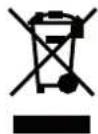
Protect the environment by not disposing of electrical devices in regular household waste. Take all electrical devices that you will no longer use and want to dispose of to the designated waste collecting points. By doing so, you are helping to avert potentially negative effects to the environment and the health of human
beings caused by improper disposal. You also contribute to the reuse and recycling of old electrical and electronic devices. For information on where to dispose of the devices, please contact your local community or municipal administration.
AEGI
DeTAn np6opa/KomnNeKT NoCTaBKn
1 Kpbilka
2 EMKoCTb DnRA BOaBbl
3 BbiknouaTeNb
4 HndkaTop pa60tbi Be3 pncyHka:
-Инстукma no ekcnnyatau m
Akeccyyapbi
5 Kop3nHa nnyknaKn
6 DepkataeB CD/DVD
7 Kolbueba paacnopa
8 EpkaTeIb yacOB
TexHHueckme daHHbIe
B cnyuae 06bApkyehnna NobpexdeHn npn nepebo3ke 6paauTebc HnocpecdTbeHHN K Baaew dpme-npdoaay.
YctaHOBka
YCTaHABINBAIte npBOp Ha rOpN3OHTaJIbHyIO pOBHyIO NOBepxHOCTb.


OuInCTka
OuInCTka
PnHcun DeiCTBn
USR 5516 ouhaaet npedMeIc nomoubO ynbtpaBky, to ectb 3ykoBbIMn BOHAMn, HeCbNbHbIMn dme HneoBececkO yxa. PnHUnn DeiCTBnnpoc:Ha noDnEkauxn OvchTke npedMetax 6bnorapd ynbtpaBky o6pa3yOTc H60bnjne ly3bpk. PnT 3OM OH cpa3yKe CHoBa "3axNoBbAIOTC". Bnolarap TaKOMO B0HNKAUeMy pa3pJxEHNO BHYTPn ny3bpKOB npocXoDIT 6epeKHO tDeJeHHe 3arp3HEHNI. PnpOp USR 5516 nO3BoJrEt Bam oCyueCTBnB kak npocTy, TAK i 6epeKHyTO ONUeK TYOBEXHcTe IN TpyHDooCTynbix yuaCTKOB.
PpIMeHHeH
Pnp6b BENKONHNO NOXOXNTINQCHN BOOCTOKNHX npedmetOB IN MetaTnA, CTKnA IN Nn PAACTMaccs,HanPMeP:
OuKIN
MOHETbl
BOHOHPOHuaembIyacbl
yKpaaeHn
HCTDyMEHTbl
3y6HbI npote3bl/3y6HbI cko6bl
CDs/DVDs/Blue Ray Discs
OuNTKa npedMeTOB
TtobbHcNpbl30BaTbpnp6Op,HeoXOIMO HanaonHHTB BDOIEMKOCTB.Pnp6OpHE DoCTnraet OHuauoEroAePfKaETc,ecNI B EMKOCTH BOBd CnHkOM ManoJNn ee BoooFE He.

PENEYNPEXKDEHNE:
Onachocb B3pbBa: He 3aIMBaTe ropoue XIKKOCTB EEMKoCTb DnA BObl.

BHIMAHHE:
HnKoHa He noIb3yITeB npIbOpom 6e3 BoIb. OH MoXet 6bITb NOpeXKeH. 3aINBaIte B E mKocTb NCKIOHTBHO xOIOHy BOy.He nCnOJIb3yIte TropHe KIKKOTM.

BHIMAHHE:
IporBnIeOCObyoOCTOpOxHocTbPnOcHCTKe eHbX npEmdTOB.CaHApA nonpOByte ToIbKo H aOnOM npEmdTe.PmIMTe BO BHNMaHne, YTO KpENHeNKaMHeB yKpaSeHnXpnN3BeCTbHX ycNoBnxMOyT 6bTy HapUWeHbYbTpA3ByKOM.

BHIMAHHE:
PnO OHCTKe OOKOB 6OBPATNE BHHMAHMe HA TO, 4TO6bI cTeKJIa He KacAnCb dHa EMKOCTN. OHN MOrYT noJaupanaTbc.
- OtkpoTe KpbIuKy.
- 3aeneB EEMKocbXoOnHyBOy.3aONHnEeMkocbIyNOBoiMaCKmMyD0OTMeTKn,MAX"H3bnKeIe KOp3nHy DnY yKnaKn. MapknopBa《MAX》 HaxoDITc6Oky。

YKA3AHME:
IycnHnHnOHHuaoEero3ΦeKTAo6abBe 0bHuHoe cpeCTBO IIN OOHCTKN B EMKOCTB K BOJe.
- BkHouHTe npH6opB po3Eky.
- Nooxnne noJnxauon ouNCTKe npDmet B EMKoCT bnaBdoBb.BoMOxTeNoIooXnTb npDmet TaKke B KOp3Hny Hn 3aKpeNTb erHa dePxtene hacOB. NocBeCte cenOKn, bpacnetb nn noo6Hoe Ha pyHcy Kop3HbI.
- 3aKpOJIe KbIbUk. B CyuAe C6bIoBIMn DeTAnMm KpbIbUka OCTaTeCt OTKpbIOT.
- HaxMMTe Ha KHONky BbIKJIOyATEIa. PnBOp HauHHaet OCHcTKy.
B-BoVemraipocecaOnCTKn rorHnHHNkKatop paboTb.
- PpOeCC OHTK ABOTAMUHECKN pEkpAaTaEC TPOWcETBn 180 ckyH. HndkAtop pa60tby rachet.
- OTKpoIe KpbIuKy u n3BNeKeITe OunueHHbI npedmet.
- 13BnkeKaIe WTeKeP n3 po3eKm.
- OnopoxhHte eMKoCTb nra BODbl
PpepbBaHne OunchTkn
ObHyIOPOeCC OHcKIN DNITCRA 180 cekyHd. HAKMITE KHNKY BbIKHOATEA, YTObI pKepkATNb OHCTKY Do IcTeHeHNA STORo BPemHn

BHIMAHNE:
CMEHITe BOy He No3Hee, YEM Nocne TpeTbeo npouceca ONUCKn. 3aJeBte B EMKocb XONOHy BOy,TO6bl N36EkaBte nepepeBa.
OuHCTKa He6oJIbIcx NpeMeTOB
BoBpemnpceccaOChTKeHBe60nlbWnePpeMeTbMoryr npnntB DmXeHMe. Pnp onpeDeneHHbIXycNoBnx Bpe3yIbTaTe 3TOO HN MOrYt 6bIbNOpeKDeHb, HanpMep, NoqapanaHbI.
NoToTMBy Cnyae C He60nlbWmpeDMeTamnoCTynaTe CneDyUcIM O6pa3oM:
- KlaJIaTe HSeBcIbIe NpeDMaTe bNocTabrEmyIO B KomJIneKte KopINH yra YkAnIA.
- YcTaHOBnTe KOp3mHy DnA yKnAnB npn6op.
- OcuietcbTBeO uChtky ⇒ cmpaHua 58, OucmcKa npedMemoe
AEGI
YcTpaHHeHHeHcNpabHocTei
OuNTka yacob

YKA3AHNE:
OuNTka DnCKOB CD/DVD
- 3BnEKeTKeKOp3Hy.
- Co6epnTe depkataB nCKOB CD/DVD, kAK noka3aHO Ha (pnc. 3).
- YctaHOBtE depKxatEnb CD/DVD no eHTpy EMKOTC.

BHIMAHHE:
Cneinte 3a TEM,HTObI KOJIbEBAI paACnOPKa HaxoINab MEXDy DNCKAM CD,ecnH Bbl XOTnTE OcNCTB DCAI CD,VDCD CD/DVDMORY NOBpeNTBCA,ecn6byT NExKaTb Dpyr HApyre.
YcTaPaHeHHe HEnCnPaBHOctTe
PpOeBpTe, noXanyIcTa, Ha OCHOBc Cnedyoue TaTbIa, CMoKETe Nbl BcAMCOTERlbo YcTpaHHTb HEHCNPABHOCTb.

IPEyIPEXDEHNE:
BbHtSe cTeBaW tKeEepBbH pa3bEm, nepei TEM KAK HauTb NocK HeNCpNaBHOCTe. HInkOra He NolbyntcB HeNCpRaBHm np6Opom.
- MACHINE PARTS/SCOPE OF DELIVERY
- ACCESSORIES
- SPECIFICATIONS
- TABLE OF CONTENTS
- GENERAL SAFETY INFORMATION 11
- SPECIAL SAFETY INFORMATION 11
- CLEANING 12
- TROUBLESHOOTING 14
- DISPOSAL 14
- AEGI
- GENERAL SAFETY INFORMATION
- THANK YOU
- SYMBOLS IN THIS OPERATING MANUAL
- WARNING
- CAUTION
- NOTE
- CHILDREN AND FRAIL PERSONS
- SPECIAL SAFETY INFORMATION
- OPERATING MANUAL
- ELECTRICAL SUPPLY
- CLEANING
- LOCATION
- USE IN ACCORDANCE WITH REGULATIONS
- DEFECT
- UNPACKING
- SETUP
- MODE OF FUNCTIONING
- USE
- CLEANING OBJECTS
- I NOTE
- INTERRUPTING THE CLEANING PROCESS
- CLEANING SMALL OBJECTS
- CLEANING WATCHES
- CLEANING LARGER OBJECTS
- CLEANING CDS/DVDS
- TROUBLESHOOTING
- DISPOSAL
- MEANING OF THE SYMBOL "RECYCLE BIN
- DETAN NP6OPA/KOMNNEKT NOCTABKN
- AKECCYYAPBI
- TEXHHUECKME DAHHBIE
- YCTAHOBKA
- OUINCTKA
- PNHCUN DEICTBN
- PPIMEHHEH
- OUKIN
- OUNTKA NPEDMETOB
- PENEYNPEXKDEHNE
- BHIMAHHE
- YKA3AHME
- PPEPBBAHNE OUNCHTKN
- BHIMAHNE
- OUHCTKA HE6OJIBICX NPEMETOB
- OUNTKA YACOB
- YKA3AHNE
- OUNTKA DNCKOB CD/DVD
- YCTAPAHEHHE HENCNPABHOCTTE
- IPEYIPEXDEHNE
Brand : AEG
Model : USR 5516
Category : Ultrasonic cleaner