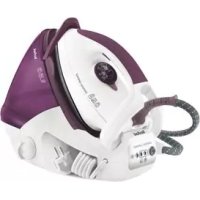
Express Compact GV7091 - Iron TEFAL - Free user manual and instructions
Find the device manual for free Express Compact GV7091 TEFAL in PDF.



User questions about Express Compact GV7091 TEFAL
0 question about this device. Answer the ones you know or ask your own.
Ask a new question about this device
Download the instructions for your Iron in PDF format for free! Find your manual Express Compact GV7091 - TEFAL and take your electronic device back in hand. On this page are published all the documents necessary for the use of your device. Express Compact GV7091 by TEFAL.
USER MANUAL Express Compact GV7091 TEFAL
natural_image
Exterior view of a Tefal air conditioner with visible brand logo and control buttons (no text-heavy elements)www.tefal.com

natural_image
Diagram of a car's seatbelt structure showing lapel, collar, and seat (no text or labels)10
text_image
1 2 3 4 5 6 9 13 7 EYES COMPACT 西丽庄 8 11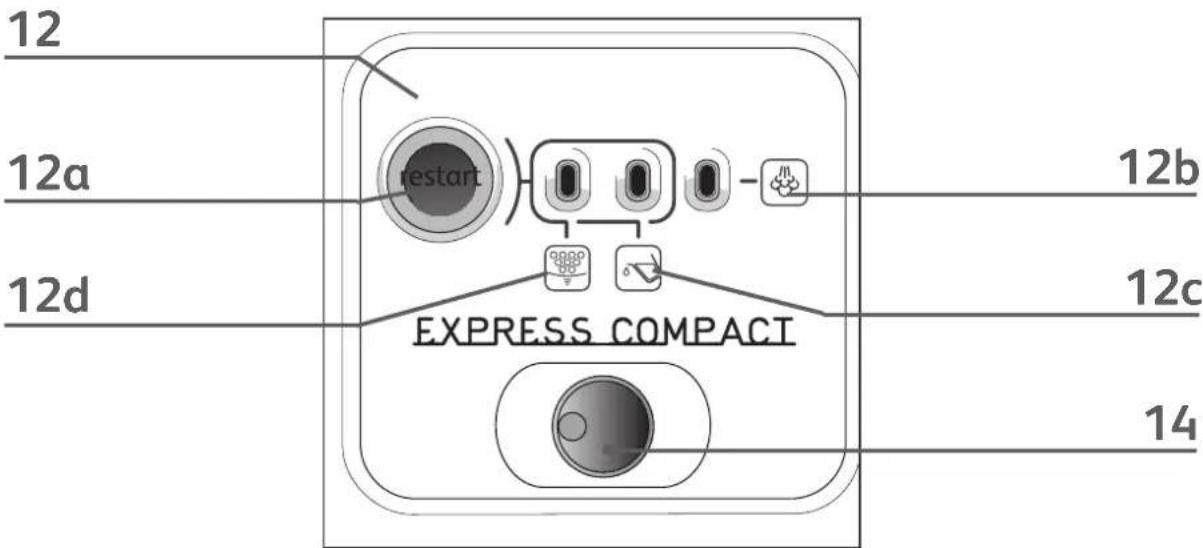
text_image
12 12a restart 12b 12d EXPRESS COMPACT 12c 14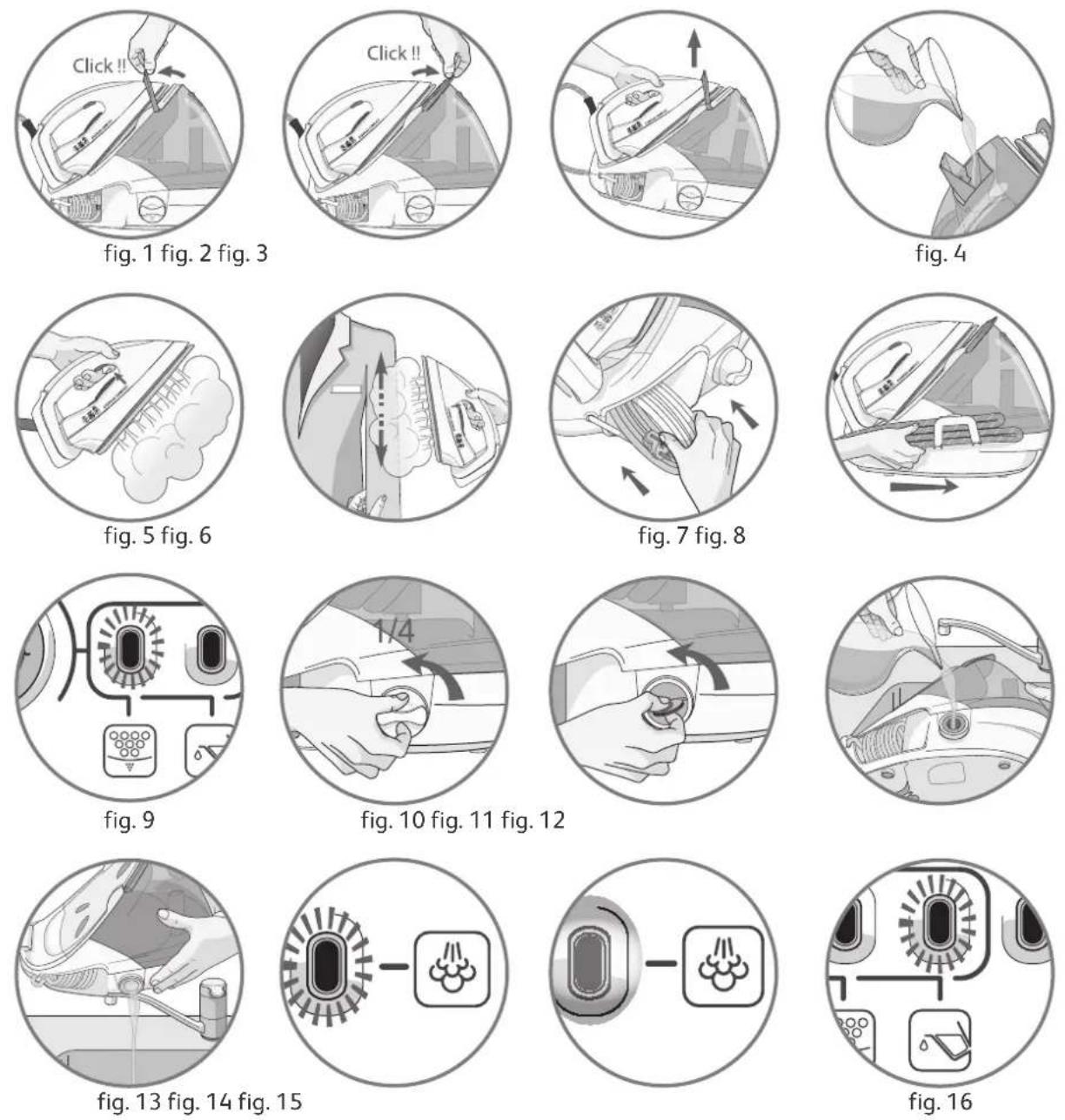
natural_image
Close-up of a hand pressing a button with the word 'OK' on it, no additional text or symbols visible.fig. 17
EN PLEASE REFER TO SAFETY BOOKLET BEFORE USING YOUR APPLIANCE
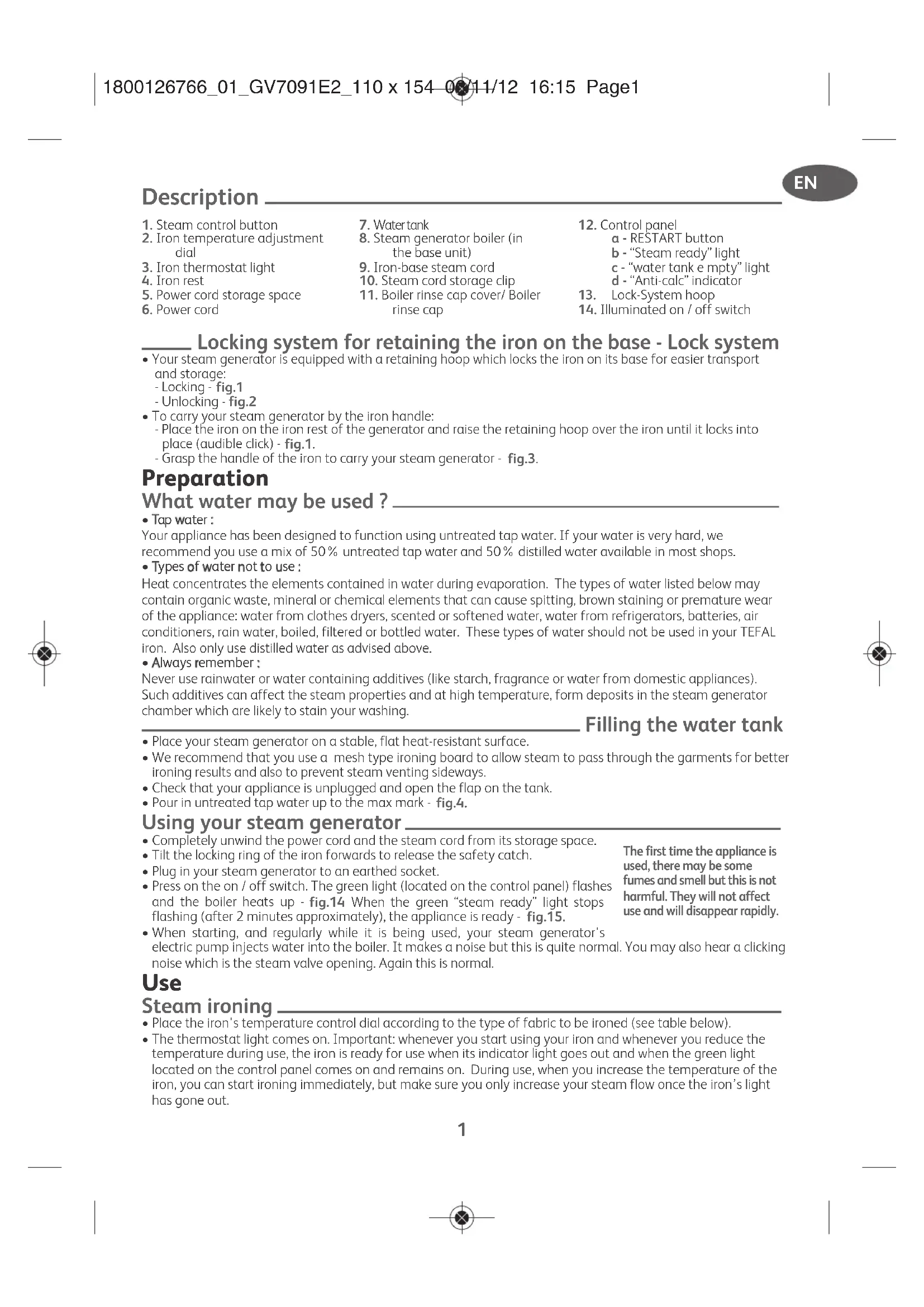
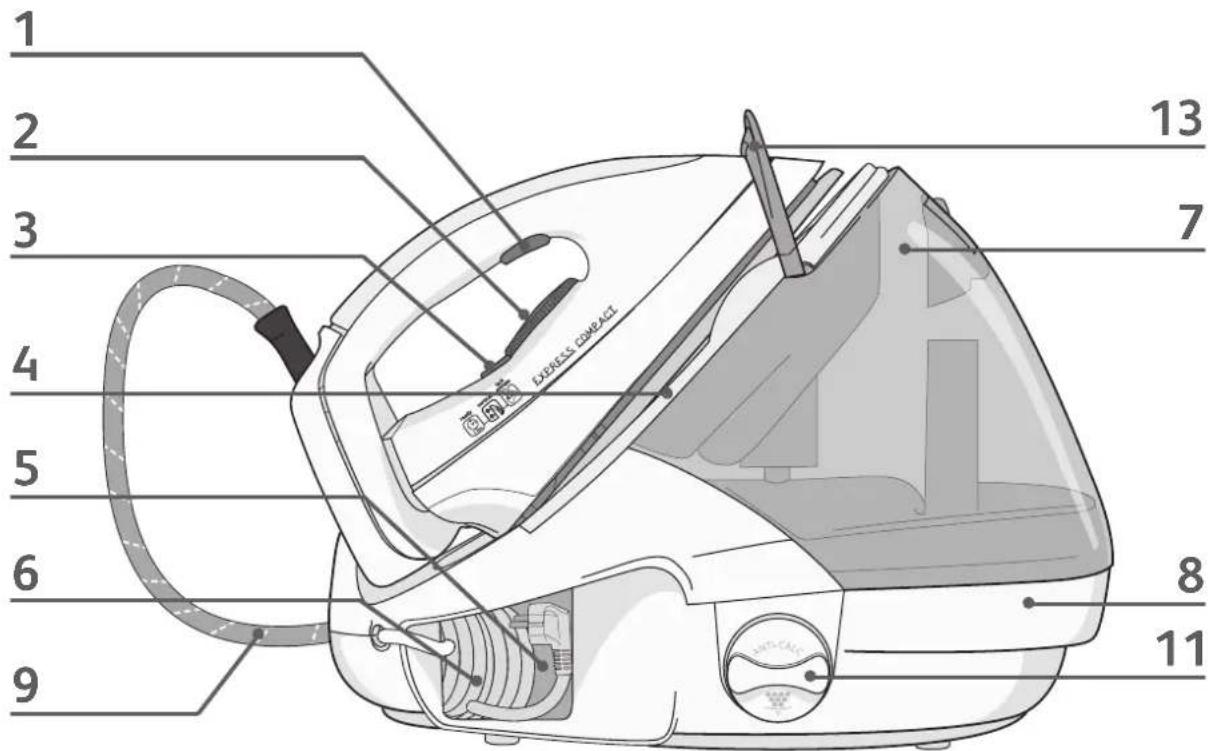
- Steam control button
- Iron temperature adjustment dial
- Iron thermostat light
- Iron rest
- Power cord storage space
-
Power cord
-
Water tank
- Steam generator boiler (in the base unit)
- Iron-base steam cord
- Steam cord storage clip
-
Boiler rinse cap cover/ Boiler rinse cap
-
Control panel
a - RESTART button
b - "Steam ready" light
c - "water tank empty" light
d - "Anti-calc" indicator
-
Lock-System hoop
-
Illuminated on / off switch
Locking system for retaining the iron on the base - Lock system
- Your steam generator is equipped with a retaining hoop which locks the iron on its base for easier transport and storage:
- Locking - fig.1
- Unlocking - fig.2
- To carry your steam generator by the iron handle:
- Place the iron on the iron rest of the generator and raise the retaining hoop over the iron until it locks into place (audible click) - fig.1.
- Grasp the handle of the iron to carry your steam generator - fig.3.
Preparation
What water may be used?
- Tap water :
Your appliance has been designed to function using untreated tap water. If your water is very hard, we recommend you use a mix of 50% untreated tap water and 50% distilled water available in most shops.
- Types of water not to use :
Heat concentrates the elements contained in water during evaporation. The types of water listed below may contain organic waste, mineral or chemical elements that can cause spitting, brown staining or premature wear of the appliance: water from clothes dryers, scented or softened water, water from refrigerators, batteries, air conditioners, rain water, boiled, filtered or bottled water. These types of water should not be used in your TEFAL iron. Also only use distilled water as advised above.
• Always remember ;
Never use rainwater or water containing additives (like starch, fragrance or water from domestic appliances). Such additives can affect the steam properties and at high temperature, form deposits in the steam generator chamber which are likely to stain your washing.
Filling the water tank
- Place your steam generator on a stable, flat heat-resistant surface.
- We recommend that you use a mesh type ironing board to allow steam to pass through the garments for better ironing results and also to prevent steam venting sideways.
- Check that your appliance is unplugged and open the flap on the tank.
- Pour in untreated tap water up to the max mark - fig.4.
Using your steam generator
- Completely unwind the power cord and the steam cord from its storage space.
- Tilt the locking ring of the iron forwards to release the safety catch.
- Plug in your steam generator to an earthed socket.
- Press on the on / off switch. The green light (located on the control panel) flashes and the boiler heats up - fig.14 When the green “steam ready” light stops flashing (after 2 minutes approximately), the appliance is ready - fig.15.
- When starting, and regularly while it is being used, your steam generator's electric pump injects water into the boiler. It makes a noise but this is quite normal. You may also hear a clicking noise which is the steam valve opening. Again this is normal.
The first time the appliance is used, there may be some fumes and smell but this is not harmful. They will not affect use and will disappear rapidly.
Use
Steam ironing
- Place the iron's temperature control dial according to the type of fabric to be ironed (see table below).
-
The thermostat light comes on. Important: whenever you start using your iron and whenever you reduce the temperature during use, the iron is ready for use when its indicator light goes out and when the green light located on the control panel comes on and remains on. During use, when you increase the temperature of the iron, you can start ironing immediately, but make sure you only increase your steam flow once the iron's light has gone out.
-
When the iron is in use, the iron thermostat light on the iron comes on and goes off according to the soleplate temperature requirement without this having any effect on the use of the appliance.
- To obtain steam, press on the steam control button under the iron handle and keep it pressed -fig.5. The steam will stop when you release the button.
• Always spray starch onto the reverse side of the fabric to be ironed.
Doropbelieionrometdup
port. When taking a break from ironing, always place the iron on the iron rest plate of the unit. It is equipped with non-slip pads and has been designed to withstand high temperatures.
Setting the temperature
| SETTING THE TEMPERATURE AND STEAM OUTPUT ACCORDING TO TYPE OF FABRIC TO BE IRONED: | ||
| TYPE OF FABRICS | Setting temperature control | |
| Synthetics Silk,(polyester, acetate, acrylic, polyamide) | ● | [SHKZ] |
| Wool, Viskoz | ●● | [COGZ] |
| Linen, cotton | ●●● | [HXBT] |
To prime the steam circuit, either before using the iron for the first time, or if you have not used the steam function for a few minutes, press the steam control button several times in a row, holding the iron away from your clothes. This will enable any cold water to be ejected from the steam circuit.
- Iron temperature setting:
- Start with the fabrics to be ironed at a low temperature ( ) and finish with those which need higher temperatures ( or Max).
- Mixed fibre fabric: set the ironing temperature to the setting for the most delicate fabric.
- Woollen garments: press repeatedly on the steam control button - fig.5 to obtain short bursts of steam, without placing the iron on the garment itself.
If you put your thermostat in the "min" position, the iron does not become hot.
Dry ironing
- Do not press the steam control button under the iron handle.
Vertical steam ironing
Recommendations: for fabrics other than linen or cotton, hold the iron a few centimetres from the garment to avoid burning the fabric.
- Set the iron temperature control dial to the MAX position.
- Hang the garment on a coat hanger and hold the fabric slightly taut with one hand.
- Holding the iron in a vertical position, tilted slightly forwards, press repeatedly on the steam control button - fig.5 (underneath the iron handle) moving the iron from top to bottom - fig.6.
As steam is very hot: never attempt to remove creases from a garment while it is being worn, always hang garments on a coat hanger.
Refilling the water tank
- When the red "water tank empty" light starts flashing, it means that you have no more steam.- fig.16. The water tank is empty.
- Unplug the steam generator and open the flap on the tank.
- Pour in untreated tap water up to the max mark - fig.4.
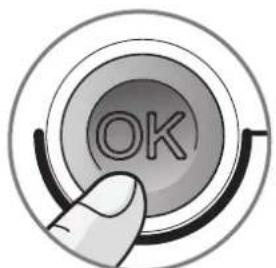
- Replug the generator. Press the "RESTART" button on the control panel - fig.17. to continue ironing. When the green light stops flashing, the steam is ready.
Maintenance and cleaning
Cleaning your generator
- Do not use detergent or descaling products for cleaning the soleplate base-unit.
- Never hold the iron or the base unit under the tap.
- Regularly clean the soleplate with a damp, non-metallic washing up pad.
- Clean the plastic parts of the appliance occasionally with a soft cloth.
Before cleaning, ensure your steam generator is unplugged and that the soleplate and the iron have cooled down.
EN
Before cleaning, ensure your steam generator is unplugged and that the soleplate and the iron have cooled down.
Rinsing the boiler (once a month)
- To extend the efficient operating life of your boiler and avoid scale particles on your linen, your generator is equipped with an orange “boiler rinse” warning light that flashes on the control panel after about 10 uses - fig. 9.
- If the orange “boiler rinse” warning light flashes, you can continue ironing normally but remember to rinse the boiler first the next time that you use it.
- Before proceeding, check that the generator is cool and unplugged for more than 2 hours.
- Place the steam generator on the edge of your sink, with the iron placed to one side, standing on its heel.
- Unscrew anti-clockwise a quarter of a turn the boiler rinse cap - fig. 10.
• Using a coin, gently unscrew the boiler rinse cap - fig. 11. - Holding the steam generator in a tilted position, and using a jug, fill the boiler with 14 litre of untreated tap water - fig. 12.
- Shake the base unit for a few moments and then empty it completely into your sink - fig. 13.
- To obtain the best results, we recommend that this operation is done twice.
- Screw back and tighten up the boiler rinse cap with a coin.
- Put the boiler rinse cap cover back in place.
- The next time you use the generator hold down the "RESTART" button for a few seconds to turn off the orange light - fig. 17.
Storing your generator.
- Press the illuminated on/off switch and unplug the generator.
- Warning: do not touch the soleplate while still hot.
- Fold the carrying arm down onto the iron until it clicks into position, ensuring that your iron is safely locked onto its housing.
- Store the electrical cord in its storage place - fig.7.
- Store the steam cord in the cord storage clip - fig.8.
- Leave the iron (and the iron rest) to cool down for 1 hour before storing it away.
A problem with your generator?
| PROBLEMS CAUSES SOLUTIONS | ||
| The generator does not come on and the thermostat light is not illuminated. | The appliance is not switched on. Check that | your appliance is correctly plugged in and press the illuminated on/off switch. |
| Water runs out of the holes in the soleplate. | Water has condensed in the pipes because you are using steam for the first time or you have not used it for some time. | Press on the steam control button away from your ironing board until the iron produces steam. |
| The soleplate is not hot enough. | Wait for the thermostat light to go out before activating the steam button. | |
| Water streaks appear on the linen. | Your ironing board is saturated with water because it is not suitable for use with a steam generator. | Check that your ironing board is suitable. |
| White streaks come through the holes in the soleplate. | Your boiler has a build-up of scale because it has not been rinsed out regularly. | Rinsing the boiler (see the “descaling your generator” section). |
| Brown streaks come through the holes in the soleplate and stain the linen. | You are using chemical descaling agents or additives in the water for ironing. | Never add this type of product in the water tank or in the boiler (see § “for what water may be used”). Contact an Approved Service Centre. |
| The soleplate is dirty or brown and may stain the linen. | You are ironing at too high a temperature. | See our recommendations regarding temperature control setting. |
| Your linen is not rinsed sufficiently or you have ironed a new garment before washing it. | Ensure linen is rinsed thoroughly to remove any soap deposits or chemicals on new garments which may be sucked up by the iron. | |
| You are using starch. | Always spray starch on the reverse side of the fabric to be ironed. | |
| There is no steam or there is little steam. | The water tank is empty (red light is flashing). | Fill the tank and press the "RESTART" button until the indicator goes out. |
| The soleplate temperature is set to the maximum. | The generator is working but steam is very hot and dry As a consequence, it is less visible. | |
| Steam escapes from the rinse plug. | The anti-scale valve plug has not been tightened correctly. | Tighten the anti-calc valve plug correctly. |
| The anti-scale valve plug is damaged. | Contact an Approved Service Centre to order a new rinse plug seal. | |
| The generator is faulty. | Stop using the generator and contact an Approved Service Centre. | |
| The red “water tank empty” is flashing. | The water tank is empty. Press the «RESTART» button on the control panel until the indicator goes out. | |
| Steam or water escapes under the appliance. | The generator is faulty. Stop using the generator and contact an Approved Service Centre. | |
| The “anti calc” indicator is flashing | You have not pressed the “RESTART” button. | Press the “RESTART” button until the indicator goes out |
If you have any problems or queries please call our Customer Relations team first for expert help and advice: 0845 602 1454 - UK / (01) 677 4003 - Ireland or consult our website - www.tefal.co.uk
Beschreibung
c. - Lampe: "tom tank"
d. - "Antikalk"-lampe
-
Lock-system
-
Av/på knapp med lys