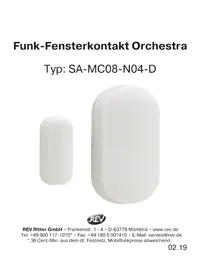
SAMC08N04D - Doorbells REV - Free user manual and instructions
Find the device manual for free SAMC08N04D REV in PDF.


User questions about SAMC08N04D REV
0 question about this device. Answer the ones you know or ask your own.
Ask a new question about this device
Download the instructions for your Doorbells in PDF format for free! Find your manual SAMC08N04D - REV and take your electronic device back in hand. On this page are published all the documents necessary for the use of your device. SAMC08N04D by REV.
USER MANUAL SAMC08N04D REV
natural_image
Two white capsule-shaped objects, one solid and one hollow, against a white background (no text or symbols)
natural_image
Symbol of a trash bin with crossed lines indicating no waste or restriction, and a solid black rectangle below (no text or labels)natural_image
Simple line drawing of a trash bin with diagonal lines crossing through it (no text or symbols)text_image
QR code image containing encoded data, no visible human-readable textGB
General information

Please thoroughly read the following operating instructions before placing the device into service and keep for future reference. The bell button is suitable for operation in protected outdoor areas and not in harsh environments. The wireless chime is intended for installation in dry indoor areas (IP20).
Notes
- The wireless chime is only designed for use with the appropriate batteries.
• To be able to use the Wireless window contact, you will need a receiver (bell) from the Orchestra range - In combination with a receiver (gong), the motion detector offers you the opportunity to set up a bell system without wiring.
- This set is not intended for integration into an existing bell system.
- The range between transmitter and receiver is maximum 100m in the open field. The radio signal is transmitted through walls, walls, furniture and other obstacles, but depends on the structural conditions - walls, especially reinforced concrete walls, heat-insulating glazing and ceilings lead to a reduction in range.
- Shielding caused by metal parts can severely impair reception, so that the signal cannot be transmitted. For this reason, never attach the transmitter to metal surfaces.
- If the product is not in use for a long period of time, remove the batteries.
- The product has no replaceable parts. Do not try to open or repair the product.
Technical Data
Range (free field): max. 100m
Frequency: 433,92MHz
Frequency band: 433,05 - 434,79MHz
Max. transmission power: <10mW
mounting distance: max. 1cm
Battery: 1x 3V CR1632 (included in delivery)
Degree of protection: IP20 (for dry indoor use only)
Degree of protection: Safety Extra Low Voltage
Safety Instructions for batteries:
- Incorrect polarity of the batteries can destroy the unit.
- Do not store batteries within reach of children, especially those that can be swallowed.
- Do not attempt to reactivate batteries by heating or similar measures.
- Primary batteries must not be charged as this can lead to electrolyte leakage, explosion or fire.
- Do not immerse batteries in water and store them in a dry and cool place, not in a damp place.
- Do not throw batteries into the fire, do not open them or solder or weld them yourself.
- Do not short-circuit batteries.
Function
The blue indicator lights up when the two parts of the window contact are more than 1cm apart. The sensor is triggered and sends a signal to the receiver (gong), which indicates receipt of the signal by a ringtone.
Set up
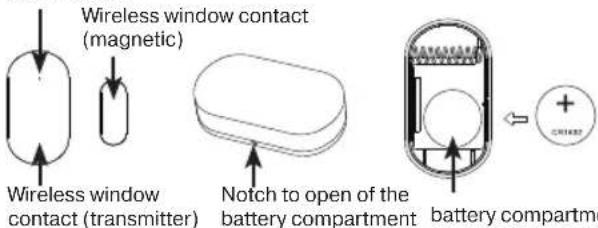
Open the battery compartment of the window contact. Remove the insulating strip in the battery compartment. Then close the battery compartment again.
Changing the batteries
Under normal conditions, the blue indicator blinks once, when the sensor is triggered. If the battery status is low, the blue indicator blinks an additional 2 times quickly after the normal blinking.
To change the batteries, remove the assembly fixture on the rear side. Unscrew the cover on the battery compartment. Replace the battery with a new battery of the same type (refer to "Technical Specifications"). The positive pole is pointing upwards. Then, close the battery compartment again.
Creating/deleting coding
Prior to coding, you require a receiver (chime) of the series Orchestra, refer to "Compatible Products".
Coding the chime and motion detector:
- Before coding, select your preferable bell tone (refer to "Volume setting/Melody selection").
- Remove the battery from the motion detector.
- Press the "Volume" button on the chime for 5 seconds. You will hear a ding-dong and the LED starts blinking, to signalise that the coding mode is active.
Note:
- The coding mode is automatically terminated after concluding the coding.
• The coding mode is only active for 5 seconds. - The coding mode is always only available for one receiver (chime) and transmitter (bell push, motion detector, window contact) simultaneously. Repeat the above-mentioned coding if you would like to code multiple receivers/transmitters.
- You can assign a different bell tone to each transmitter when coding and in doing so, create a call differentiation.
- Up to 20 receivers (chime) can be assigned to one transmitter (bell push, motion detector, window contact). Refer to "Compatible Products".
- Up to 20 transmitters (bell pushes, motion sensors, window contacts) can be assigned to one receiver (chime). Refer to "Compatible Products".
Deleting the coding:
Press the "Melody forward" button for 5 seconds, to reset the chime to the factory settings. When the chime plays back ding-dong and the LED blinks, resetting was successful.
Note: The coding between chime and window contact exists, until you delete the coding as described above. Even if you remove the batteries.
View
blue indicator
text_image
Wireless window contact (magnetic) Wireless window contact (transmitter) Notch to open of the battery compartment battery compartmentVolume setting/Melody selection
Press the "Volume"/"melody forward/backward" button until you hear the required volume/melody.
You can change the volume at any time and this is independent of the corresponding transmitter. The last selected volume is automatically saved. You can still replay different bell tones by pressing
"Melody forward/backward". This does not effect the saved bell tone when coding between transmitter and receiver.
Installation
Choose a suitable location for the chime and motion detector. Check the selected location for wiring before drilling any holes.
Tip: Test the desired function before ultimately installing the device at the place of installation you chose.
Stick both parts of the window contact onto a smooth and clean surface. To do so, remove the protective film on the rear side of the tape. Press down on the parts for at least 10 seconds, to create a good adhesive bond. Observe the maximum distance of 1cm between both parts.
Note:
- Avoid the effect of direct sunlight and water (e.g. caused by high humidity)
because this can affect the adhesive power of the window contact. - It does not matter whether the magnetic part of the window contact is installed on the right or left side of the transmitter component.
Troubleshooting
| Error description | Error correction |
| The chime does not sound | Check the batteries of the receiver (chime) and the transmitter (bell push, motion detector, window contact). Change the batteries if necessary.Check whether the distance between the receiver (chime) and transmitter (bell push, motion detector, window contact) is too far. If necessary, reduce the distance, to get back within the range.Check whether the receiver (chime) is coded with the transmitter (bell push, motion detector, window contact). If necessary, code the receiver and transmitter as described above.Check the volume setting of the receiver (chime). Increase the volume if necessary. |
| Range is low | Check the mounting surface and the surroundings.Metal surfaces can reduce the range. Avoid installation on or near metal.Structural conditions (e.g. concrete walls or ceilings) can have an effect on the range.Other wireless products in the vicinity can have an effect on the range. Change the location of the receiver (chime) and/or transmitter (bell push, motion detector, window contact) or the other wireless product.Check the batteries of the receiver (chime) and transmitter (bell push, motion detector, window contact). Change the batteries if necessary. |
Compatible Products
| article number type number designation | ||
| 0082600103 DB5 | 00 + DB50 Wireless chime | Orchestra square white + bell push Orchestra white |
| 0082610103 DB5 | 00AC + DB50 Wireless chime | Orchestra square for socket white + bell push Or-chestra white |
| 0082620103 DB4 | 00 + DB50 Wireless chime | Orchestra rectangle white + bell push Orchestra white |
| 0082630103 DB4 | 00AC + DB50 Wireless chime | Orchestra rectangle for socket white + bell push Orchestra white |
| 0083950103 DB5 | 00 Wireless bell push Orch-hestra white | |
| 0083960103 SA-IR07-NWX03-D Wireless motion detector Orchestra white | ||
| 0083970103 SA-MC08-N04-D Wireless window contact Orchestra white | ||
| 0082650103 B6 (AC) + B6 (DC) + DB50 | Wireless chime set Orchestra Gong Q + Gong Q socket white + bell push white | |
| 0082640103 B7 (DC) + SA-IR07-NWX03-D + DB50 | Wireless chime set Orchestra Gong Q + wireless motion detector white + bell push white | |
WEEE Disposal Notice
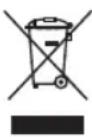
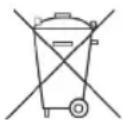
According to the European regulations, used electrical and electronic equipment may no longer be put out into unsorted rubbish. The symbol on the wheeled rubbish bin points out the necessity for separated collection. Help us to protect the environment and ensure that this unit is put out in the appropriate systems for separate collection once you do not use it any longer. DIRECTIVE OF THE EUOROPEAN PARLIAMENT AND COUNCIL of 4th July 2012 concerning used electrical and electronic equipment.
Battery disposal instructions
Batteries and rechargeable batteries must not be disposed of with household waste. Every consumer is legally obliged to dispose of all batteries and rechargeable batteries, whether or not they contain harmful substances, to a suitable commercial or municipal collection point municipality/district so that they can be disposed of in an environmentally friendly manner. Batteries and rechargeable batteries should only be returned in a discharged state!
CE Conformity Statement
REV Ritter GmbH hereby declares that it complies with radio equipment type SA-MC08-N04-D according to DIRECTIVE 2014/53/EU. The complete CE Declaration of Conformity can be found under: www.rev.de under the corresponding article or type number.

FR
Généralités
Pile: 1x 3V CR1632 (incluse)